


 Скачать презентацию Outpost Packet Message Manager Version 2 2 0
4ff713ed9f0f76e6a2c965016b74368c.ppt
- Количество слайдов: 51
 Outpost Packet Message Manager Version 2. 2. 0 Author: Title: Document Rev: Release Date: File: Jim Oberhofer KN 6 PE Outpost Tour and Training, v 2. 2. 0 1. 0 26 April 2007 Outpost. Tn. T 220. pdf
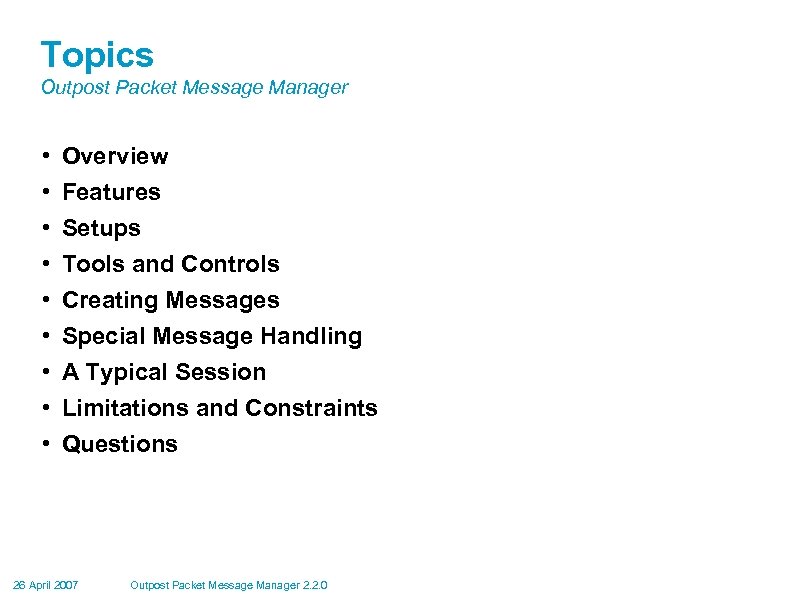 Topics Outpost Packet Message Manager • • • Overview Features Setups Tools and Controls Creating Messages Special Message Handling A Typical Session Limitations and Constraints Questions 26 April 2007 Outpost Packet Message Manager 2. 2. 0
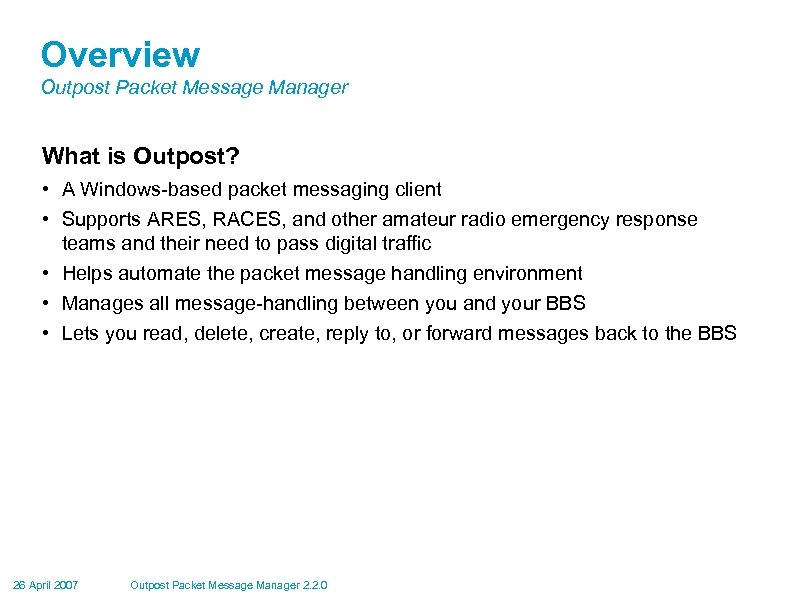 Overview Outpost Packet Message Manager What is Outpost? • A Windows-based packet messaging client • Supports ARES, RACES, and other amateur radio emergency response teams and their need to pass digital traffic • Helps automate the packet message handling environment • Manages all message-handling between you and your BBS • Lets you read, delete, create, reply to, or forward messages back to the BBS 26 April 2007 Outpost Packet Message Manager 2. 2. 0
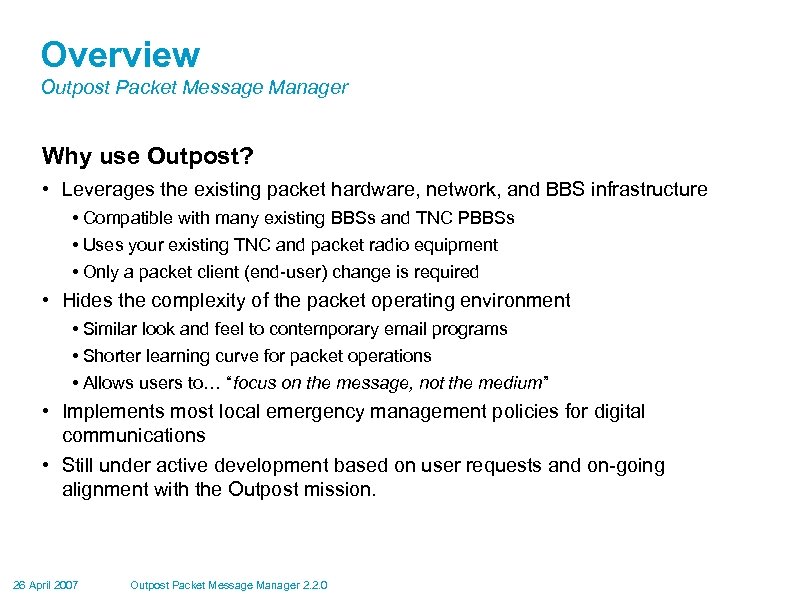 Overview Outpost Packet Message Manager Why use Outpost? • Leverages the existing packet hardware, network, and BBS infrastructure • Compatible with many existing BBSs and TNC PBBSs • Uses your existing TNC and packet radio equipment • Only a packet client (end-user) change is required • Hides the complexity of the packet operating environment • Similar look and feel to contemporary email programs • Shorter learning curve for packet operations • Allows users to… “focus on the message, not the medium” • Implements most local emergency management policies for digital communications • Still under active development based on user requests and on-going alignment with the Outpost mission. 26 April 2007 Outpost Packet Message Manager 2. 2. 0
 Overview Outpost Packet Message Manager General Outpost Features • Message Management • Multiple message folders • Supports the three primary message types: Private, NTS, and Bulletins • Text Formatting in a free-form message window • NTS Message Maker with automated ARL message support • On-line report builder using report templates • Supports Urgent message, Delivery and Read Receipts • Send/Receive Session Management • Supports Serial, AGWPE, and Telnet interfacing with over 20 of PBBS and BBSs • Automatically controls the sequence for initializing the selected interface, connecting to, and sending messages to and retrieving messages from the BBS 26 April 2007 Outpost Packet Message Manager 2. 2. 0
 Overview Outpost Packet Message Manager General Outpost Features • Configurations and Setups • BBS, TNC, and Interfaces – manages a list of BBSs & Interfaces • Message Retrieval – choose the message types ti be retrieved • Send/Receive automation – 3 ways for automatically initiating BBS sessions 26 April 2007 Outpost Packet Message Manager 2. 2. 0
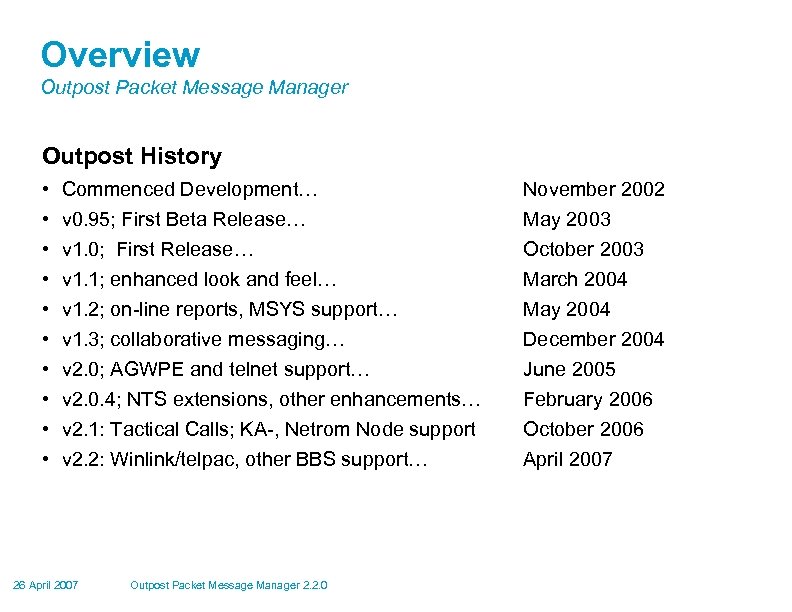 Overview Outpost Packet Message Manager Outpost History • • • Commenced Development… November 2002 v 0. 95; First Beta Release… v 1. 0; First Release… v 1. 1; enhanced look and feel… v 1. 2; on-line reports, MSYS support… v 1. 3; collaborative messaging… v 2. 0; AGWPE and telnet support… v 2. 0. 4; NTS extensions, other enhancements… v 2. 1: Tactical Calls; KA-, Netrom Node support v 2. 2: Winlink/telpac, other BBS support… May 2003 October 2003 March 2004 May 2004 December 2004 June 2005 February 2006 October 2006 April 2007 26 April 2007 Outpost Packet Message Manager 2. 2. 0
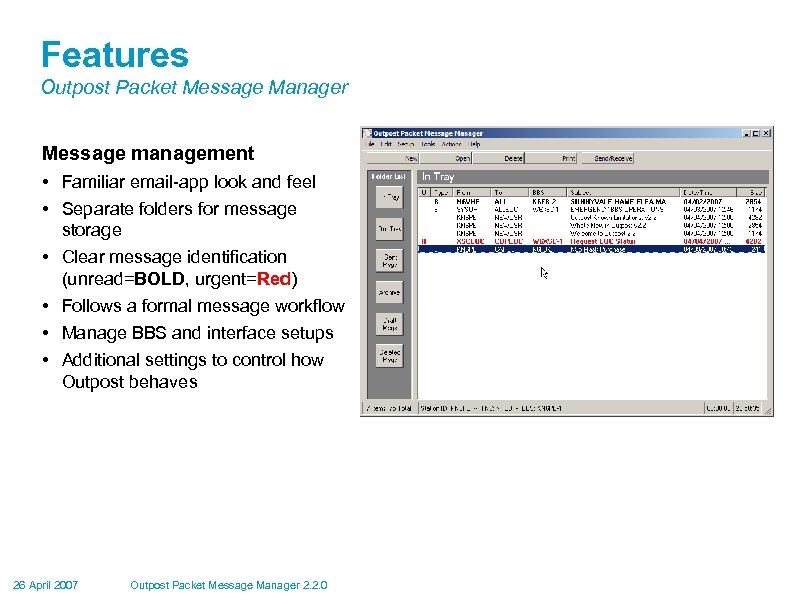 Features Outpost Packet Message Manager Message management • Familiar email-app look and feel • Separate folders for message storage • Clear message identification (unread=BOLD, urgent=Red) • Follows a formal message workflow • Manage BBS and interface setups • Additional settings to control how Outpost behaves 26 April 2007 Outpost Packet Message Manager 2. 2. 0
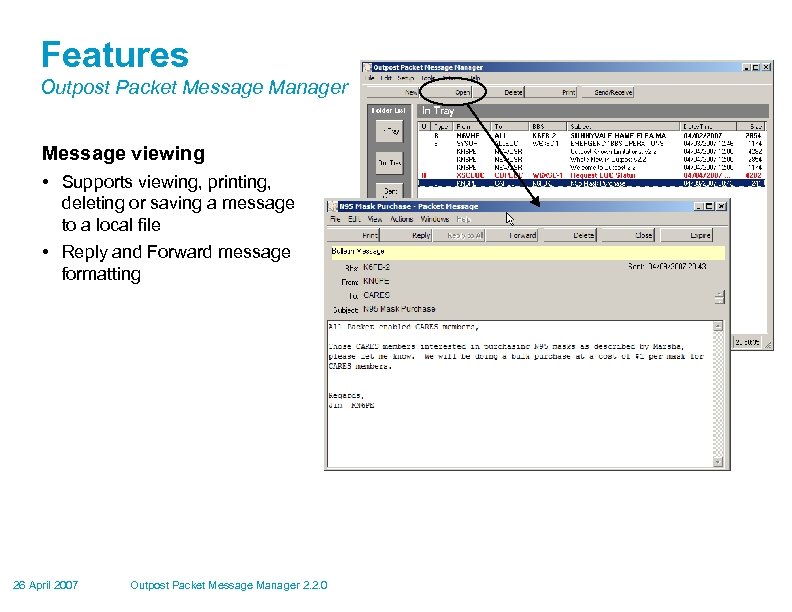 Features Outpost Packet Message Manager Message viewing • Supports viewing, printing, deleting or saving a message to a local file • Reply and Forward message formatting 26 April 2007 Outpost Packet Message Manager 2. 2. 0
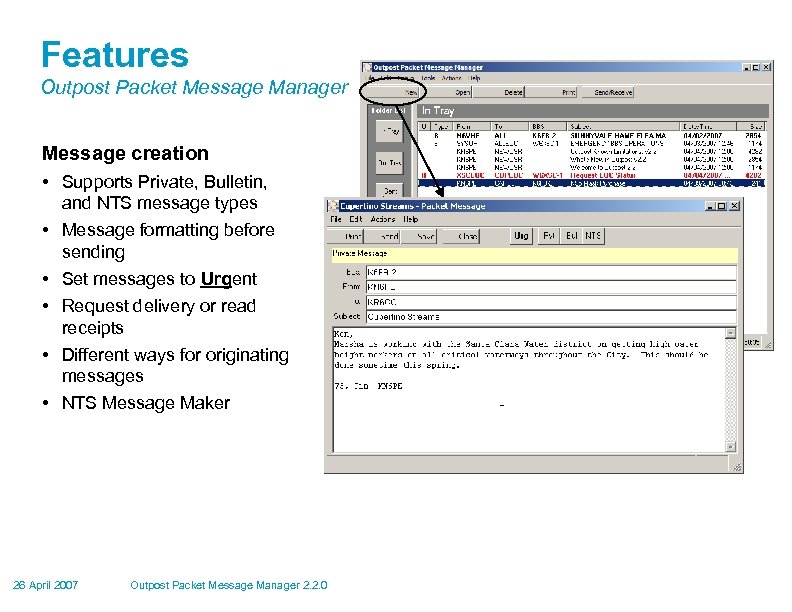 Features Outpost Packet Message Manager Message creation • Supports Private, Bulletin, and NTS message types • Message formatting before sending • Set messages to Urgent • Request delivery or read receipts • Different ways for originating messages • NTS Message Maker 26 April 2007 Outpost Packet Message Manager 2. 2. 0
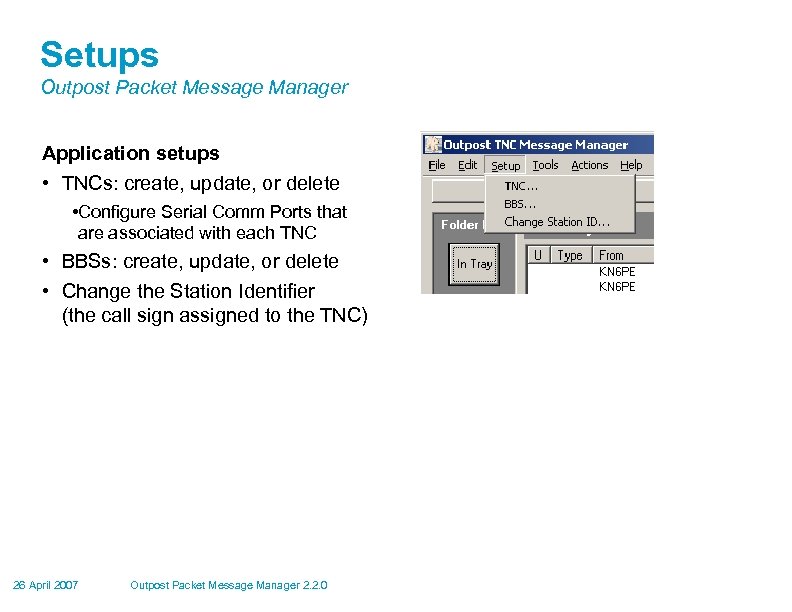 Setups Outpost Packet Message Manager Application setups • TNCs: create, update, or delete • Configure Serial Comm Ports that are associated with each TNC • BBSs: create, update, or delete • Change the Station Identifier (the call sign assigned to the TNC) 26 April 2007 Outpost Packet Message Manager 2. 2. 0
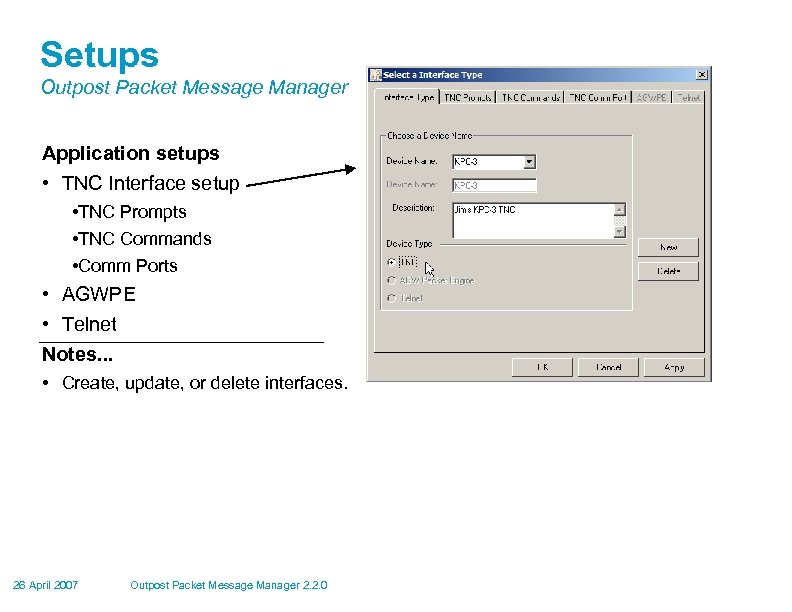 Setups Outpost Packet Message Manager Application setups • TNC Interface setup • TNC Prompts • TNC Commands • Comm Ports • AGWPE • Telnet Notes. . . • Create, update, or delete interfaces. 26 April 2007 Outpost Packet Message Manager 2. 2. 0
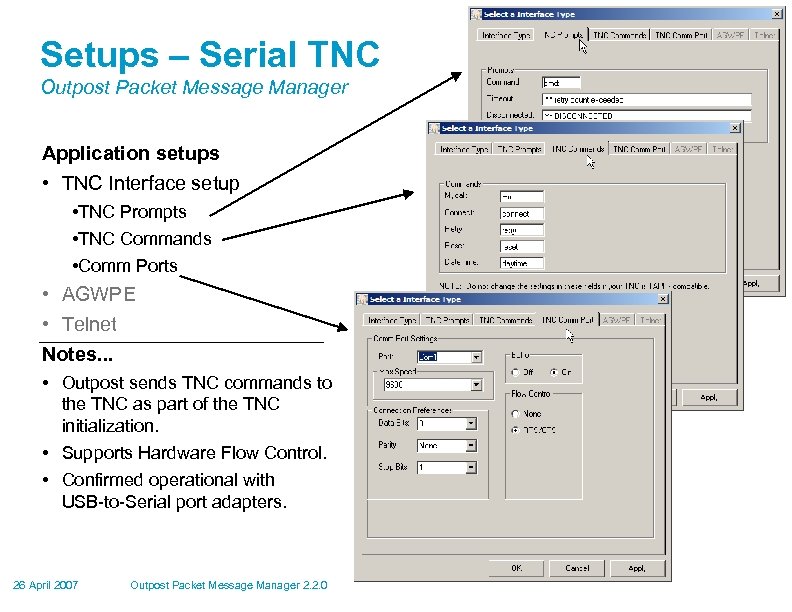 Setups – Serial TNC Outpost Packet Message Manager Application setups • TNC Interface setup • TNC Prompts • TNC Commands • Comm Ports • AGWPE • Telnet Notes. . . • Outpost sends TNC commands to the TNC as part of the TNC initialization. • Supports Hardware Flow Control. • Confirmed operational with USB-to-Serial port adapters. 26 April 2007 Outpost Packet Message Manager 2. 2. 0
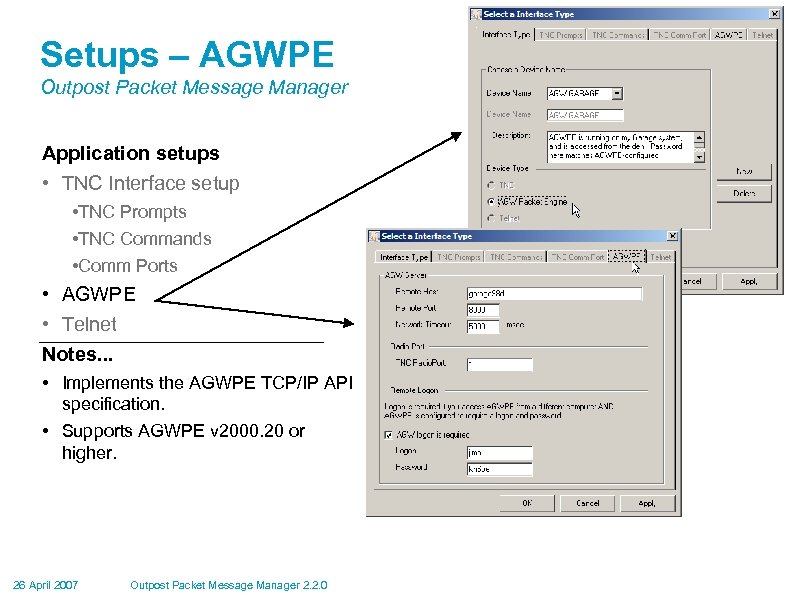 Setups – AGWPE Outpost Packet Message Manager Application setups • TNC Interface setup • TNC Prompts • TNC Commands • Comm Ports • AGWPE • Telnet Notes. . . • Implements the AGWPE TCP/IP API specification. • Supports AGWPE v 2000. 20 or higher. 26 April 2007 Outpost Packet Message Manager 2. 2. 0
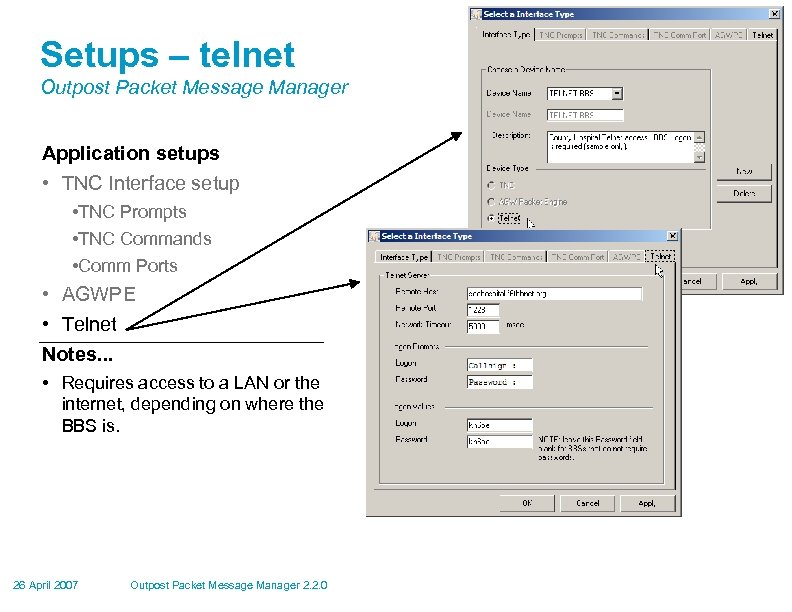 Setups – telnet Outpost Packet Message Manager Application setups • TNC Interface setup • TNC Prompts • TNC Commands • Comm Ports • AGWPE • Telnet Notes. . . • Requires access to a LAN or the internet, depending on where the BBS is. 26 April 2007 Outpost Packet Message Manager 2. 2. 0
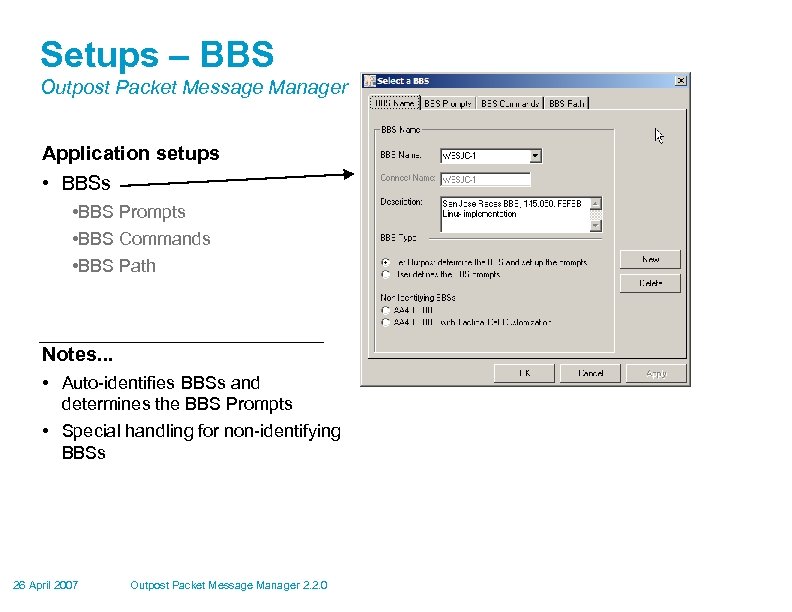 Setups – BBS Outpost Packet Message Manager Application setups • BBS Prompts • BBS Commands • BBS Path Notes. . . • Auto-identifies BBSs and determines the BBS Prompts • Special handling for non-identifying BBSs 26 April 2007 Outpost Packet Message Manager 2. 2. 0
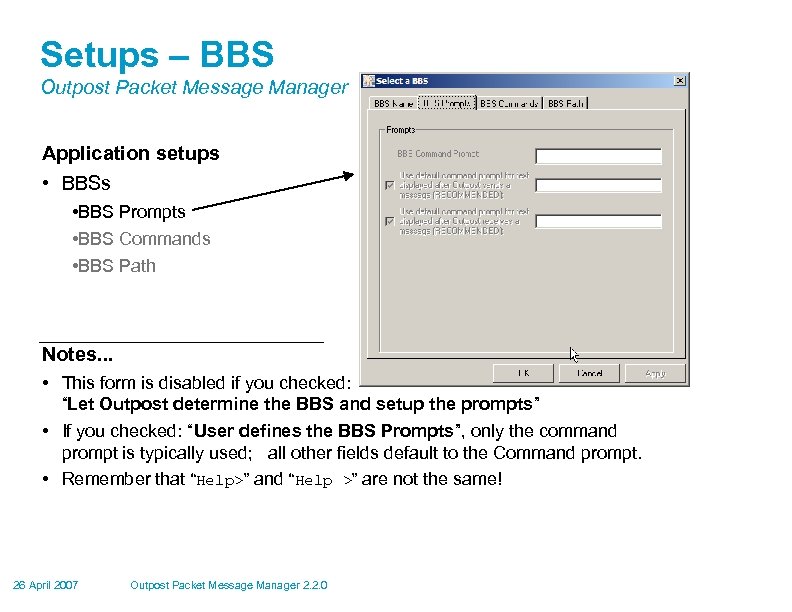 Setups – BBS Outpost Packet Message Manager Application setups • BBS Prompts • BBS Commands • BBS Path Notes. . . • This form is disabled if you checked: “Let Outpost determine the BBS and setup the prompts” • If you checked: “User defines the BBS Prompts”, only the command prompt is typically used; all other fields default to the Command prompt. • Remember that “Help>” and “Help >” are not the same! 26 April 2007 Outpost Packet Message Manager 2. 2. 0
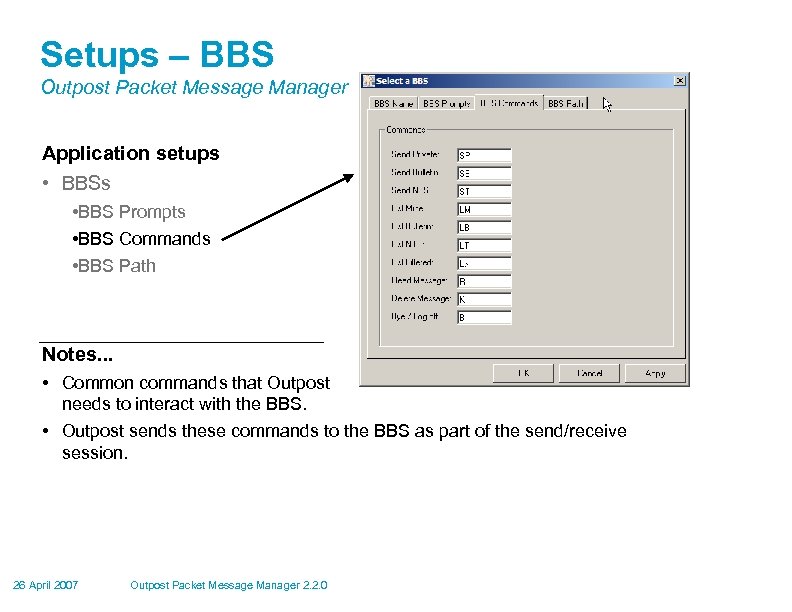 Setups – BBS Outpost Packet Message Manager Application setups • BBS Prompts • BBS Commands • BBS Path Notes. . . • Common commands that Outpost needs to interact with the BBS. • Outpost sends these commands to the BBS as part of the send/receive session. 26 April 2007 Outpost Packet Message Manager 2. 2. 0
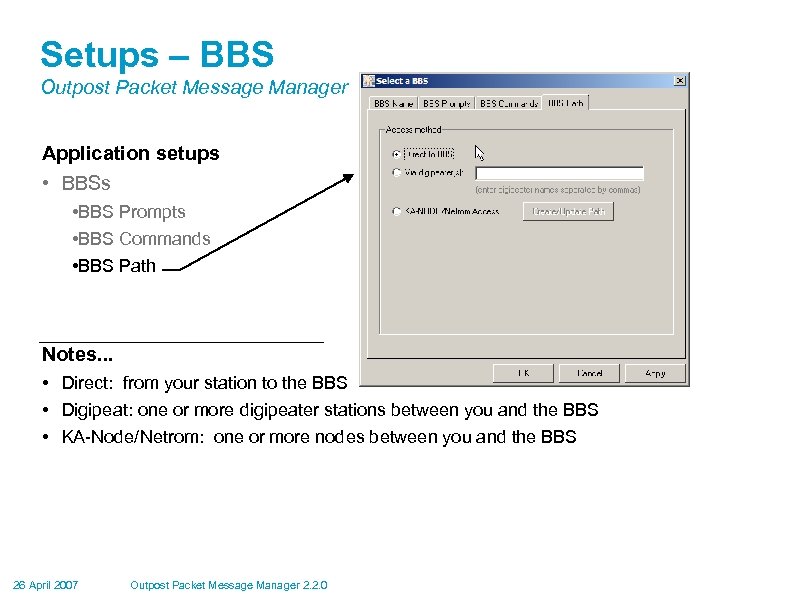 Setups – BBS Outpost Packet Message Manager Application setups • BBS Prompts • BBS Commands • BBS Path Notes. . . • Direct: from your station to the BBS • Digipeat: one or more digipeater stations between you and the BBS • KA-Node/Netrom: one or more nodes between you and the BBS 26 April 2007 Outpost Packet Message Manager 2. 2. 0
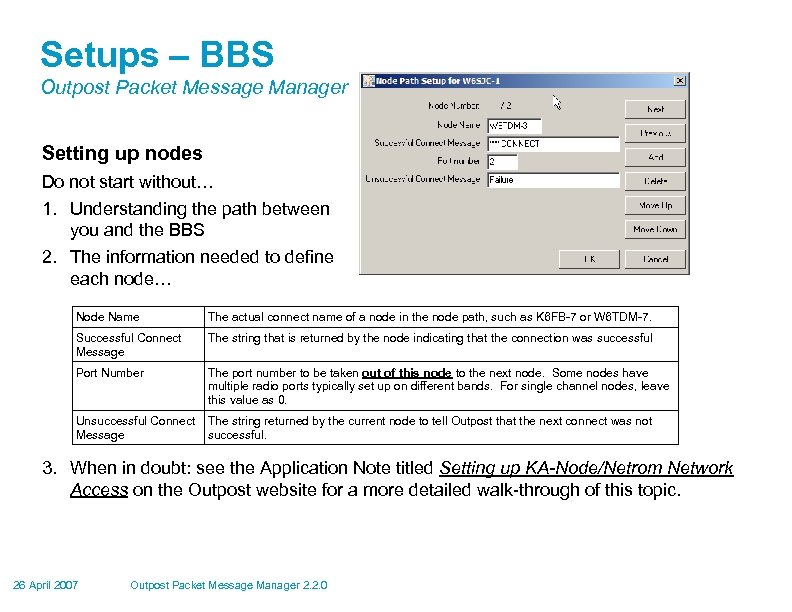 Setups – BBS Outpost Packet Message Manager Setting up nodes Do not start without… 1. Understanding the path between you and the BBS 2. The information needed to define each node… Node Name The actual connect name of a node in the node path, such as K 6 FB-7 or W 6 TDM-7. Successful Connect Message The string that is returned by the node indicating that the connection was successful Port Number The port number to be taken out of this node to the next node. Some nodes have multiple radio ports typically set up on different bands. For single channel nodes, leave this value as 0. Unsuccessful Connect The string returned by the current node to tell Outpost that the next connect was not Message successful. 3. When in doubt: see the Application Note titled Setting up KA-Node/Netrom Network Access on the Outpost website for a more detailed walk-through of this topic. 26 April 2007 Outpost Packet Message Manager 2. 2. 0
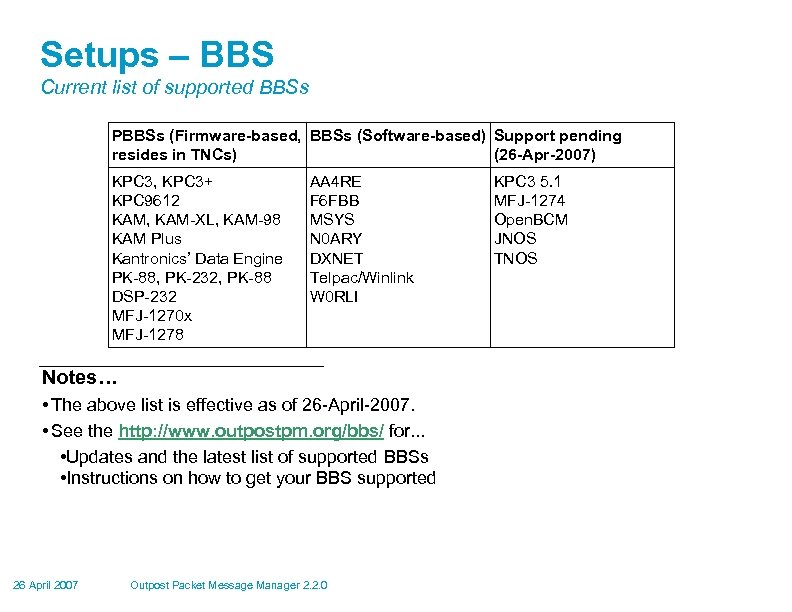 Setups – BBS Current list of supported BBSs PBBSs (Firmware-based, BBSs (Software-based) Support pending resides in TNCs) (26 -Apr-2007) KPC 3, KPC 3+ KPC 9612 KAM, KAM-XL, KAM-98 KAM Plus Kantronics’ Data Engine PK-88, PK-232, PK-88 DSP-232 MFJ-1270 x MFJ-1278 AA 4 RE F 6 FBB MSYS N 0 ARY DXNET Telpac/Winlink W 0 RLI Notes… • The above list is effective as of 26 -April-2007. • See the http: //www. outpostpm. org/bbs/ for. . . • Updates and the latest list of supported BBSs • Instructions on how to get your BBS supported 26 April 2007 Outpost Packet Message Manager 2. 2. 0 KPC 3 5. 1 MFJ-1274 Open. BCM JNOS TNOS
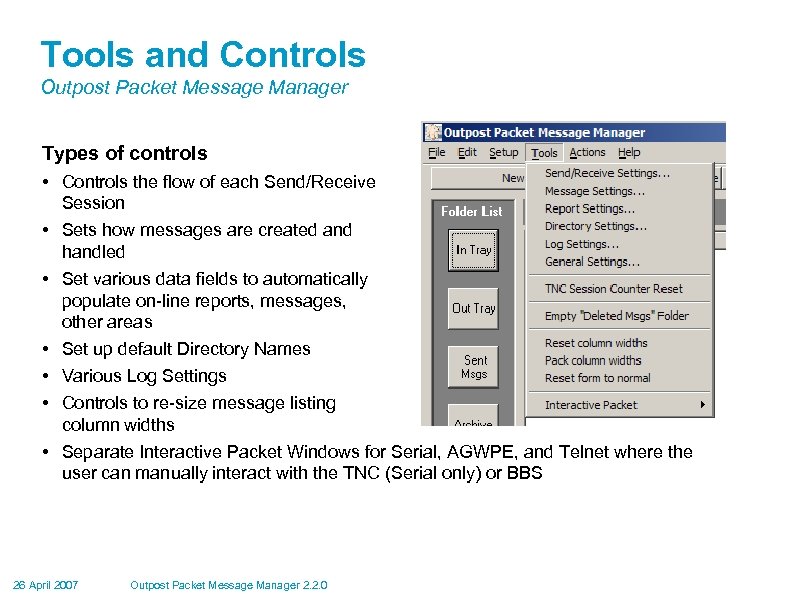 Tools and Controls Outpost Packet Message Manager Types of controls • Controls the flow of each Send/Receive Session • Sets how messages are created and handled • Set various data fields to automatically populate on-line reports, messages, other areas • Set up default Directory Names • Various Log Settings • Controls to re-size message listing column widths • Separate Interactive Packet Windows for Serial, AGWPE, and Telnet where the user can manually interact with the TNC (Serial only) or BBS 26 April 2007 Outpost Packet Message Manager 2. 2. 0
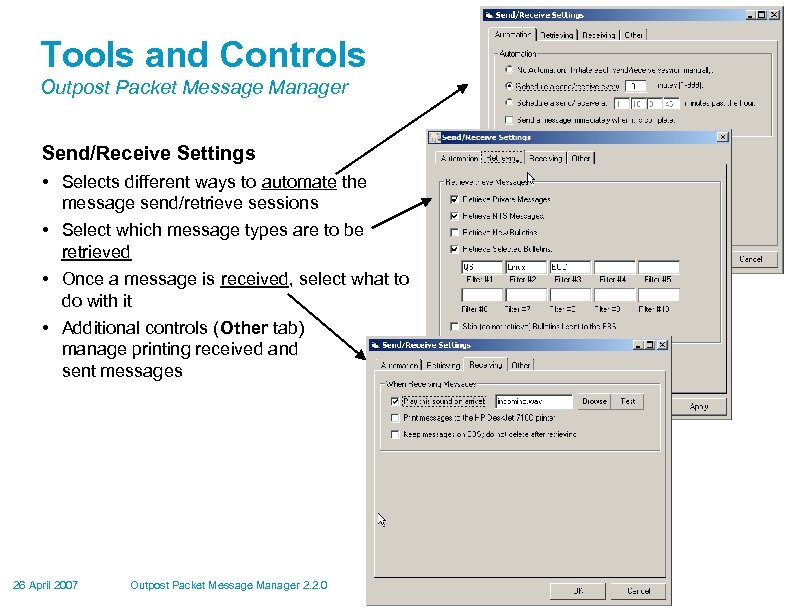 Tools and Controls Outpost Packet Message Manager Send/Receive Settings • Selects different ways to automate the message send/retrieve sessions • Select which message types are to be retrieved • Once a message is received, select what to do with it • Additional controls (Other tab) manage printing received and sent messages 26 April 2007 Outpost Packet Message Manager 2. 2. 0
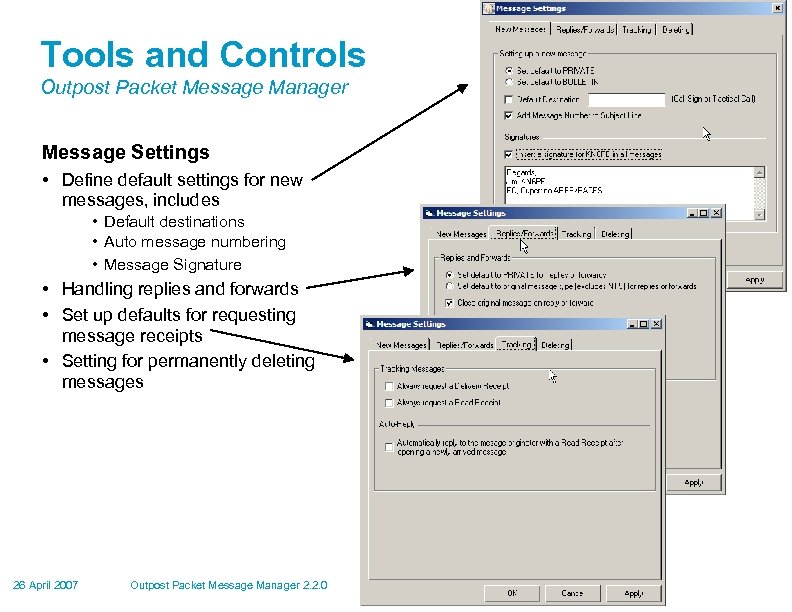 Tools and Controls Outpost Packet Message Manager Message Settings • Define default settings for new messages, includes • Default destinations • Auto message numbering • Message Signature • Handling replies and forwards • Set up defaults for requesting message receipts • Setting for permanently deleting messages 26 April 2007 Outpost Packet Message Manager 2. 2. 0
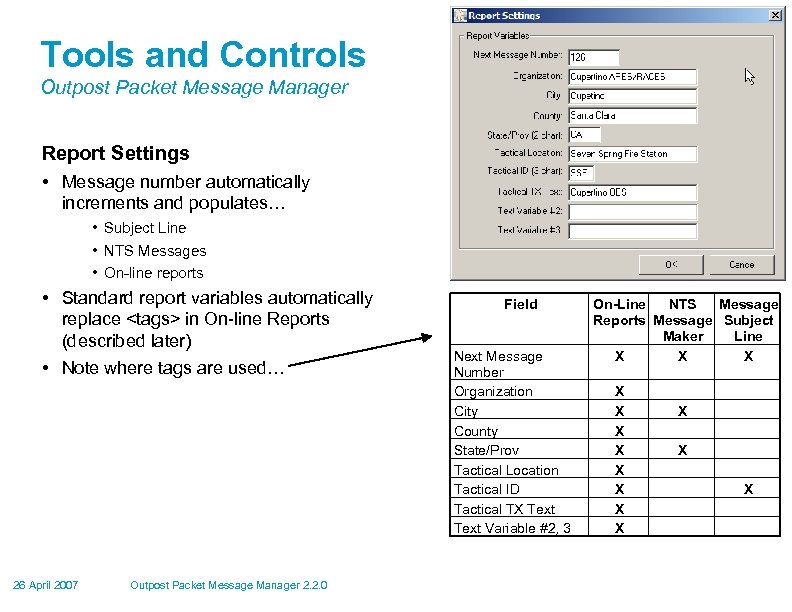 Tools and Controls Outpost Packet Message Manager Report Settings • Message number automatically increments and populates… • Subject Line • NTS Messages • On-line reports • Standard report variables automatically replace
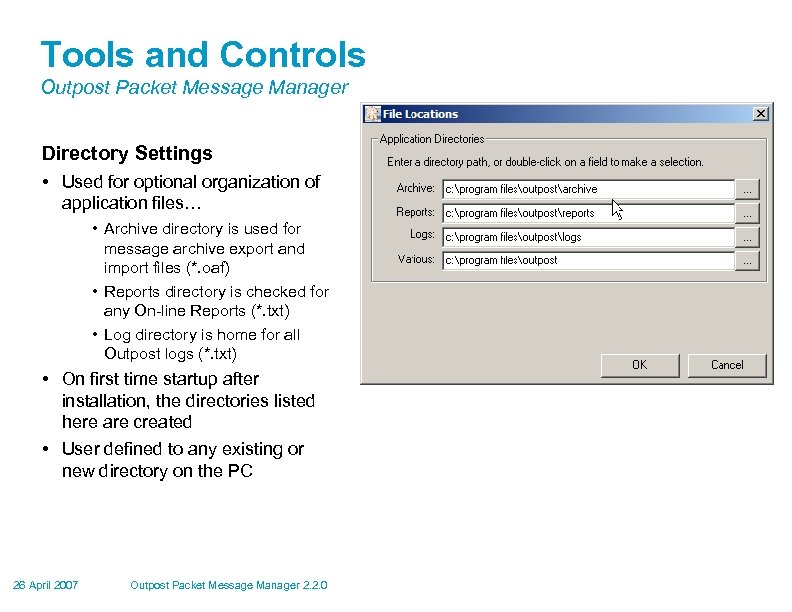 Tools and Controls Outpost Packet Message Manager Directory Settings • Used for optional organization of application files… • Archive directory is used for message archive export and import files (*. oaf) • Reports directory is checked for any On-line Reports (*. txt) • Log directory is home for all Outpost logs (*. txt) • On first time startup after installation, the directories listed here are created • User defined to any existing or new directory on the PC 26 April 2007 Outpost Packet Message Manager 2. 2. 0
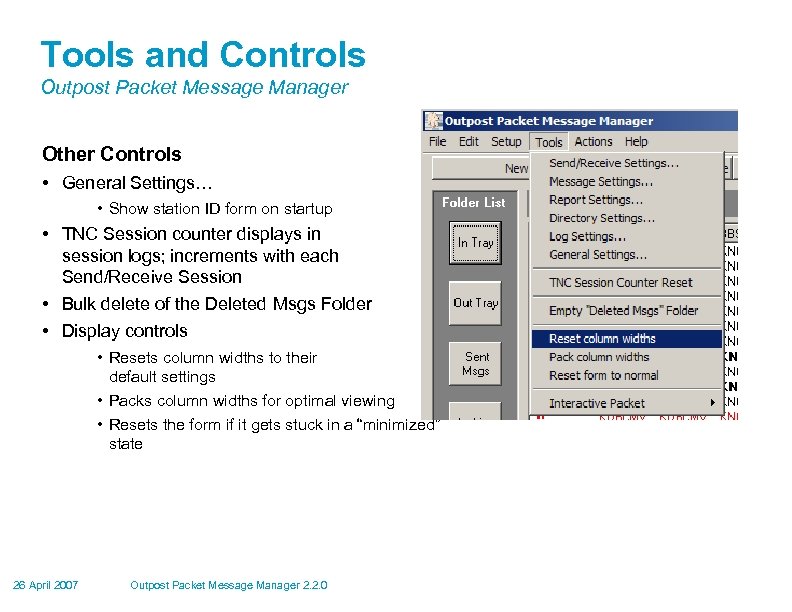 Tools and Controls Outpost Packet Message Manager Other Controls • General Settings… • Show station ID form on startup • TNC Session counter displays in session logs; increments with each Send/Receive Session • Bulk delete of the Deleted Msgs Folder • Display controls • Resets column widths to their default settings • Packs column widths for optimal viewing • Resets the form if it gets stuck in a “minimized” state 26 April 2007 Outpost Packet Message Manager 2. 2. 0
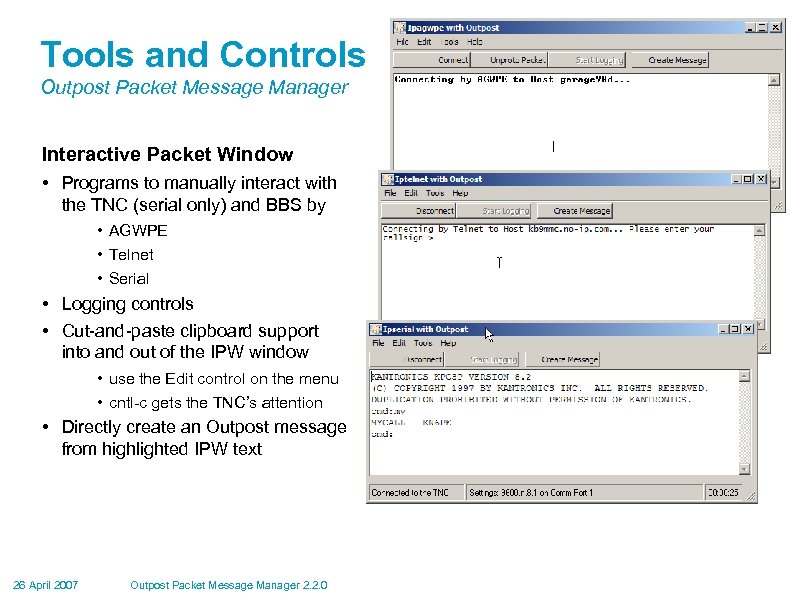 Tools and Controls Outpost Packet Message Manager Interactive Packet Window • Programs to manually interact with the TNC (serial only) and BBS by • AGWPE • Telnet • Serial • Logging controls • Cut-and-paste clipboard support into and out of the IPW window • use the Edit control on the menu • cntl-c gets the TNC’s attention • Directly create an Outpost message from highlighted IPW text 26 April 2007 Outpost Packet Message Manager 2. 2. 0
 Messages Outpost Packet Message Manager • Creating Messages • • • Direct Entry NTS Message Maker On-line Report Builder Cut-and-paste from other apps Import Text from a file • Special Message Handling • • Bulletins NTS Telpac/Winlink messages Tactical Calls 26 April 2007 Outpost Packet Message Manager 2. 2. 0
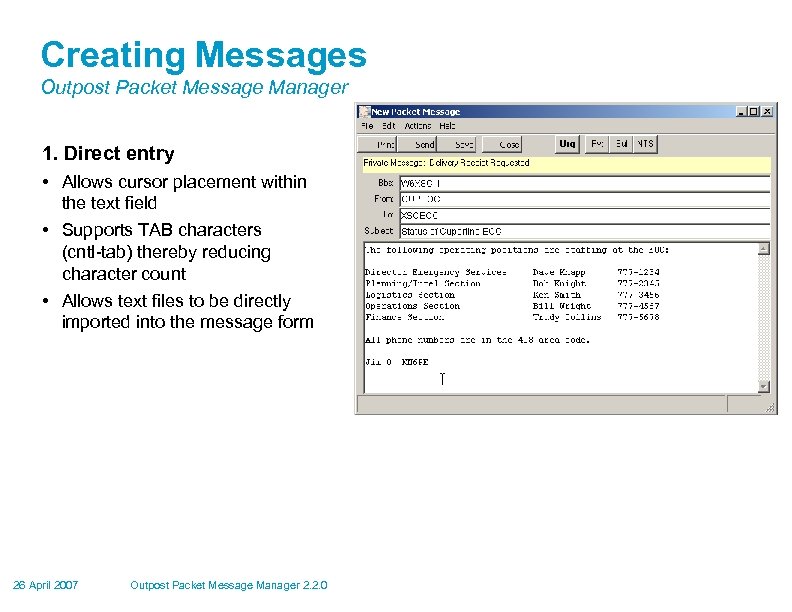 Creating Messages Outpost Packet Message Manager 1. Direct entry • Allows cursor placement within the text field • Supports TAB characters (cntl-tab) thereby reducing character count • Allows text files to be directly imported into the message form 26 April 2007 Outpost Packet Message Manager 2. 2. 0
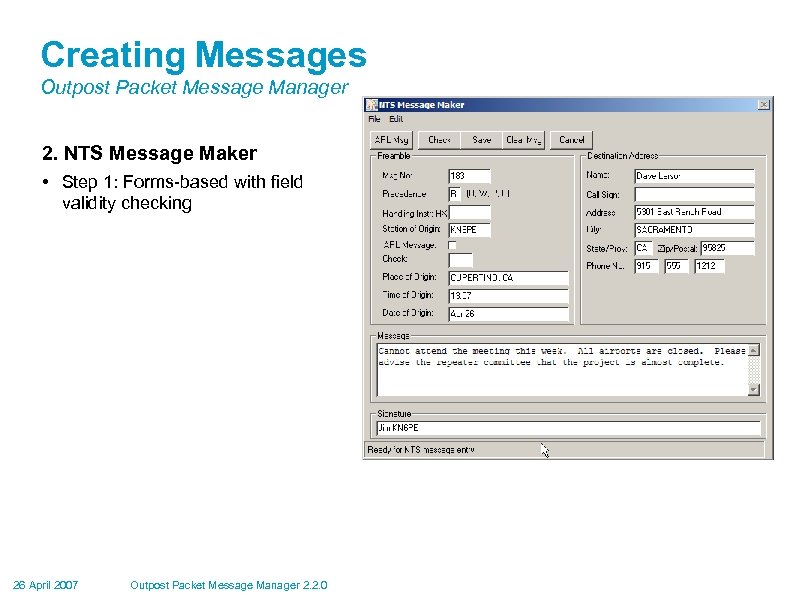 Creating Messages Outpost Packet Message Manager 2. NTS Message Maker • Step 1: Forms-based with field validity checking 26 April 2007 Outpost Packet Message Manager 2. 2. 0
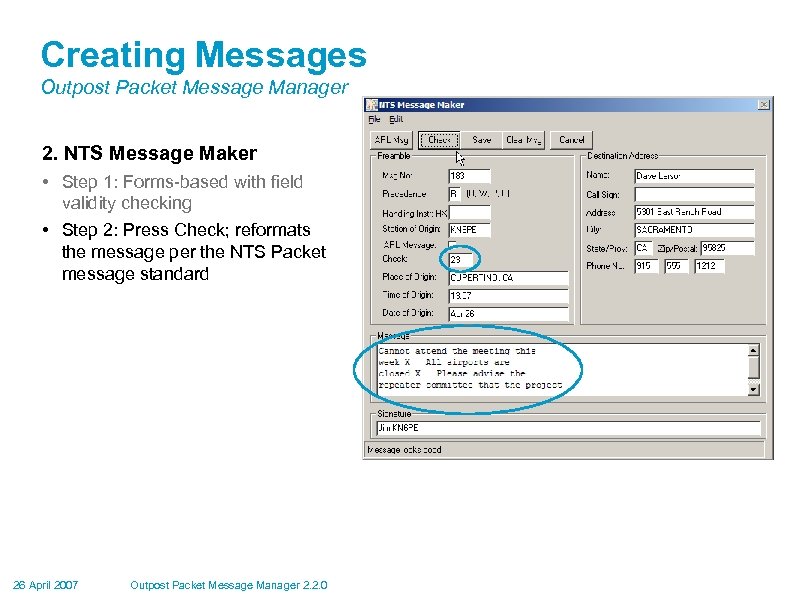 Creating Messages Outpost Packet Message Manager 2. NTS Message Maker • Step 1: Forms-based with field validity checking • Step 2: Press Check; reformats the message per the NTS Packet message standard 26 April 2007 Outpost Packet Message Manager 2. 2. 0
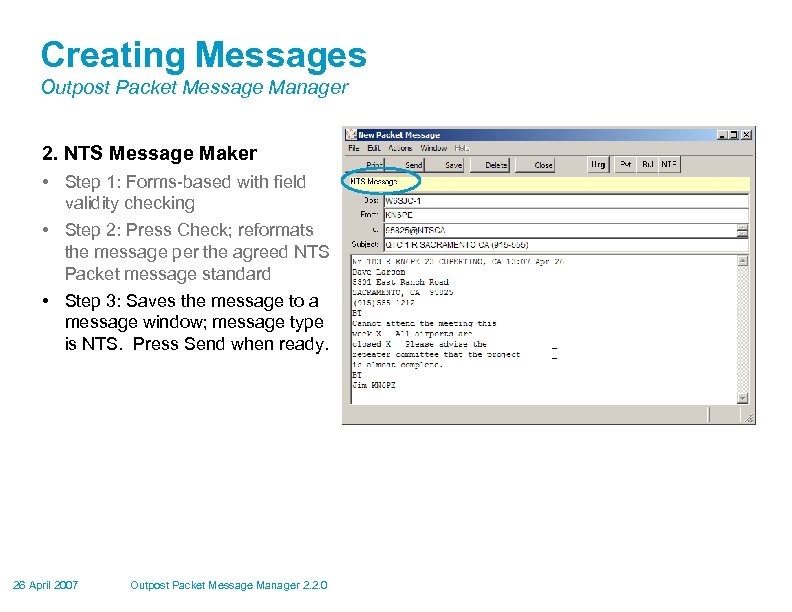 Creating Messages Outpost Packet Message Manager 2. NTS Message Maker • Step 1: Forms-based with field validity checking • Step 2: Press Check; reformats the message per the agreed NTS Packet message standard • Step 3: Saves the message to a message window; message type is NTS. Press Send when ready. 26 April 2007 Outpost Packet Message Manager 2. 2. 0
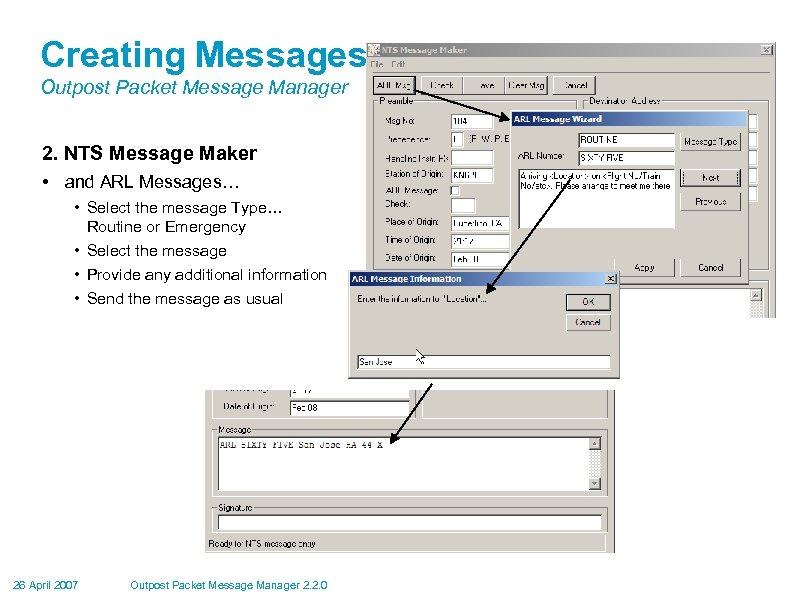 Creating Messages Outpost Packet Message Manager 2. NTS Message Maker • and ARL Messages… • Select the message Type… Routine or Emergency • Select the message • Provide any additional information • Send the message as usual 26 April 2007 Outpost Packet Message Manager 2. 2. 0
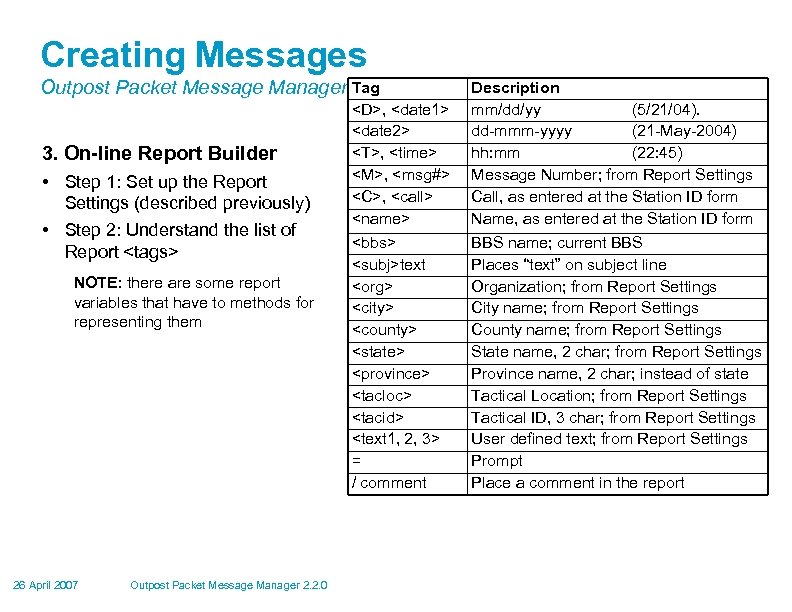 Creating Messages Outpost Packet Message Manager Tag 3. On-line Report Builder • Step 1: Set up the Report Settings (described previously) • Step 2: Understand the list of Report
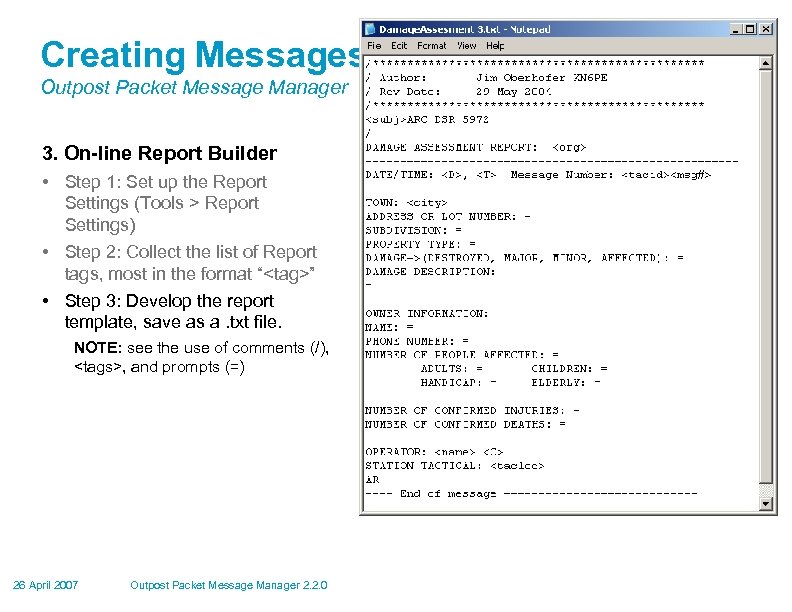 Creating Messages Outpost Packet Message Manager 3. On-line Report Builder • Step 1: Set up the Report Settings (Tools > Report Settings) • Step 2: Collect the list of Report tags, most in the format “
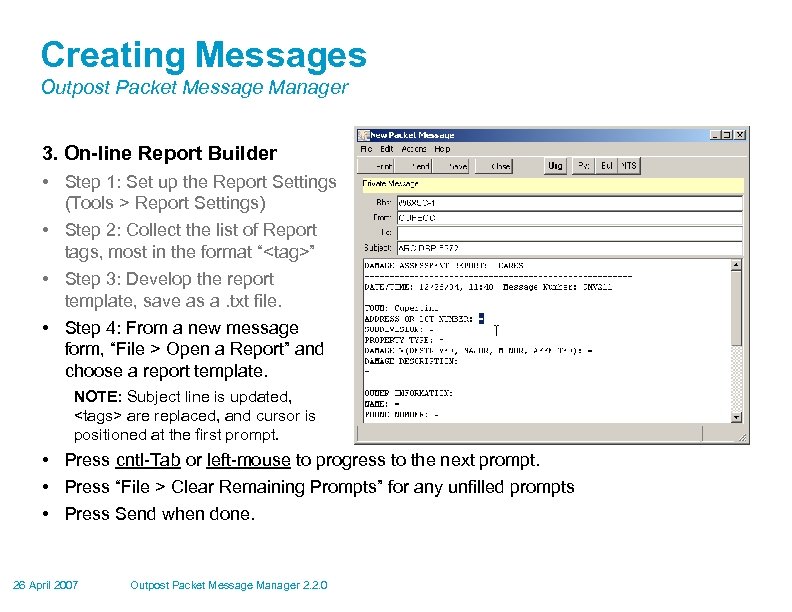 Creating Messages Outpost Packet Message Manager 3. On-line Report Builder • Step 1: Set up the Report Settings (Tools > Report Settings) • Step 2: Collect the list of Report tags, most in the format “
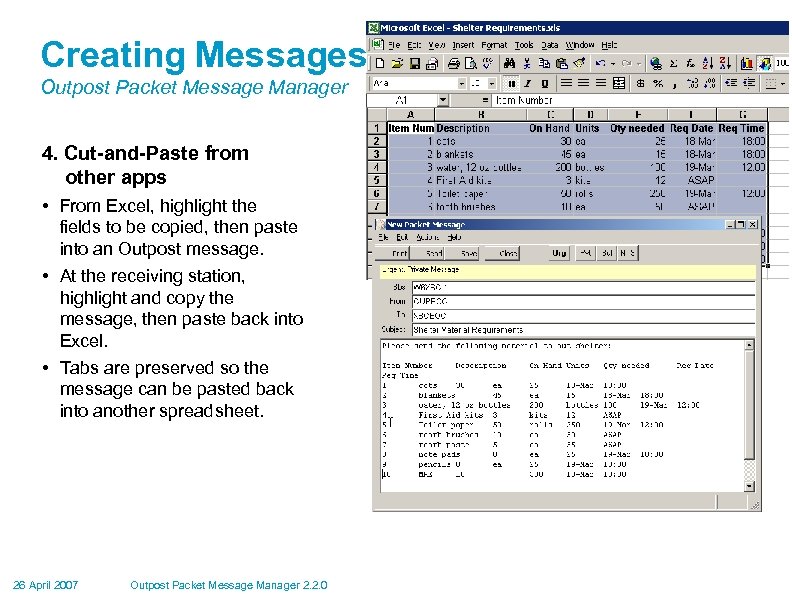 Creating Messages Outpost Packet Message Manager 4. Cut-and-Paste from other apps • From Excel, highlight the fields to be copied, then paste into an Outpost message. • At the receiving station, highlight and copy the message, then paste back into Excel. • Tabs are preserved so the message can be pasted back into another spreadsheet. 26 April 2007 Outpost Packet Message Manager 2. 2. 0
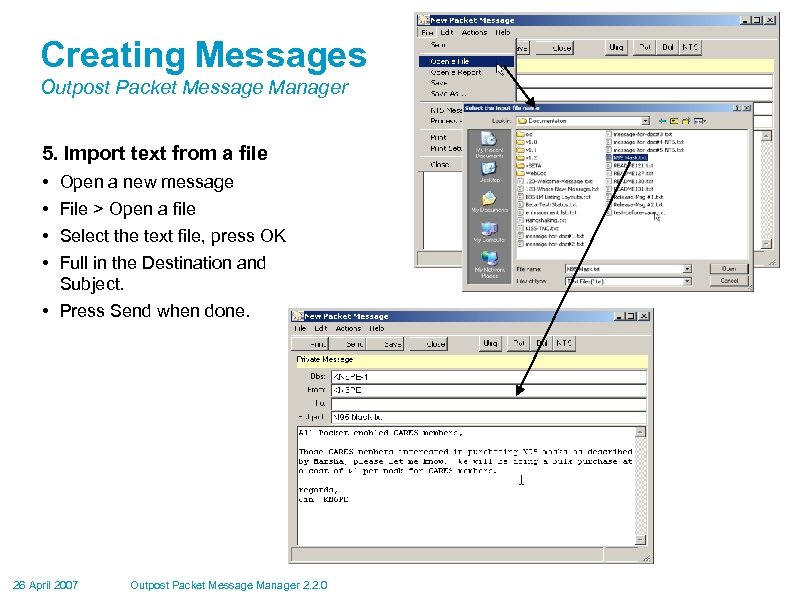 Creating Messages Outpost Packet Message Manager 5. Import text from a file • • Open a new message File > Open a file Select the text file, press OK Full in the Destination and Subject. • Press Send when done. 26 April 2007 Outpost Packet Message Manager 2. 2. 0
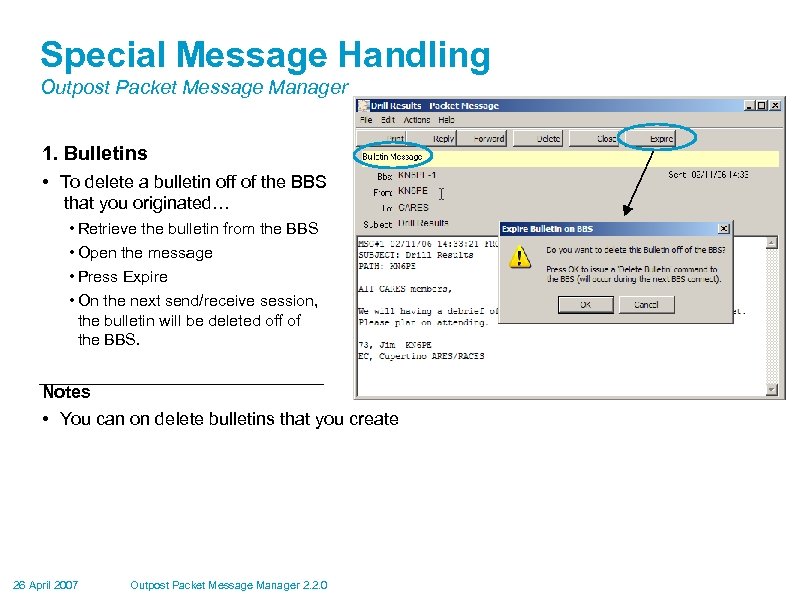 Special Message Handling Outpost Packet Message Manager 1. Bulletins • To delete a bulletin off of the BBS that you originated… • Retrieve the bulletin from the BBS • Open the message • Press Expire • On the next send/receive session, the bulletin will be deleted off of the BBS. Notes • You can on delete bulletins that you create 26 April 2007 Outpost Packet Message Manager 2. 2. 0
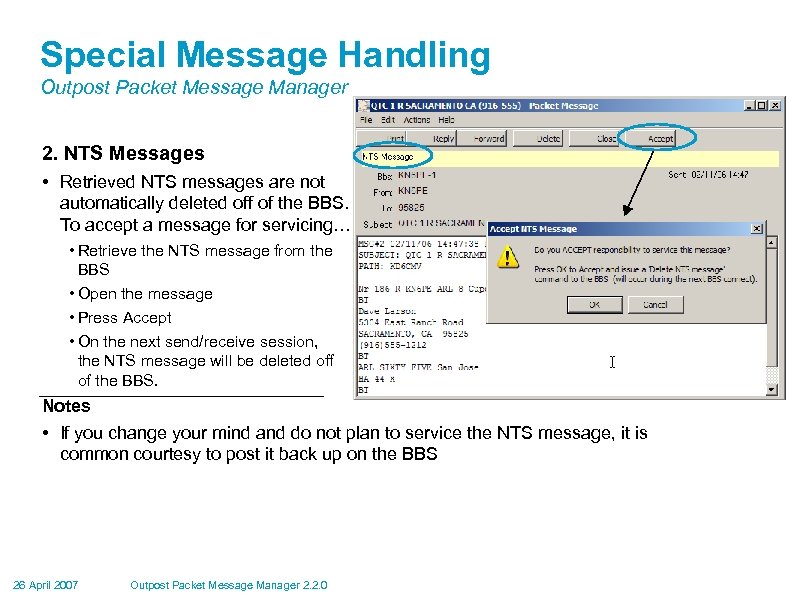 Special Message Handling Outpost Packet Message Manager 2. NTS Messages • Retrieved NTS messages are not automatically deleted off of the BBS. To accept a message for servicing… • Retrieve the NTS message from the BBS • Open the message • Press Accept • On the next send/receive session, the NTS message will be deleted off of the BBS. Notes • If you change your mind and do not plan to service the NTS message, it is common courtesy to post it back up on the BBS 26 April 2007 Outpost Packet Message Manager 2. 2. 0
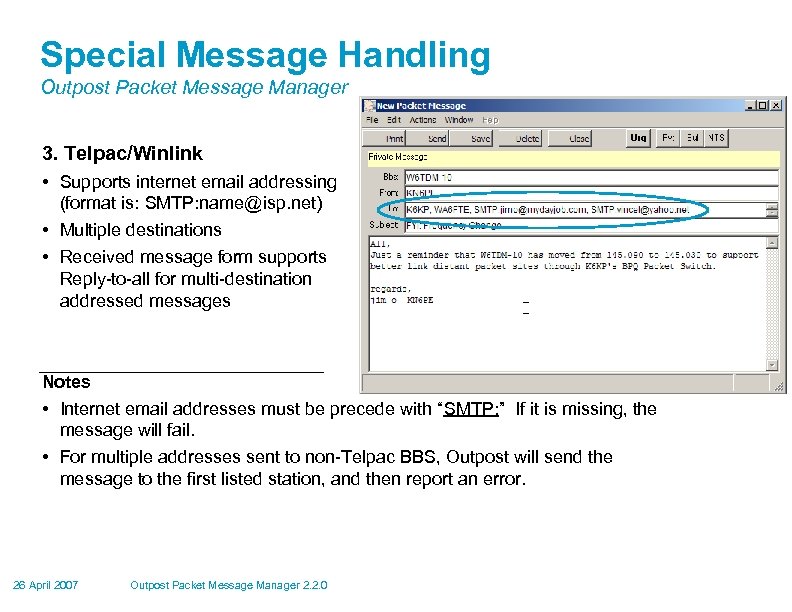 Special Message Handling Outpost Packet Message Manager 3. Telpac/Winlink • Supports internet email addressing (format is: SMTP: name@isp. net) • Multiple destinations • Received message form supports Reply-to-all for multi-destination addressed messages Notes • Internet email addresses must be precede with “SMTP: ” If it is missing, the message will fail. • For multiple addresses sent to non-Telpac BBS, Outpost will send the message to the first listed station, and then report an error. 26 April 2007 Outpost Packet Message Manager 2. 2. 0
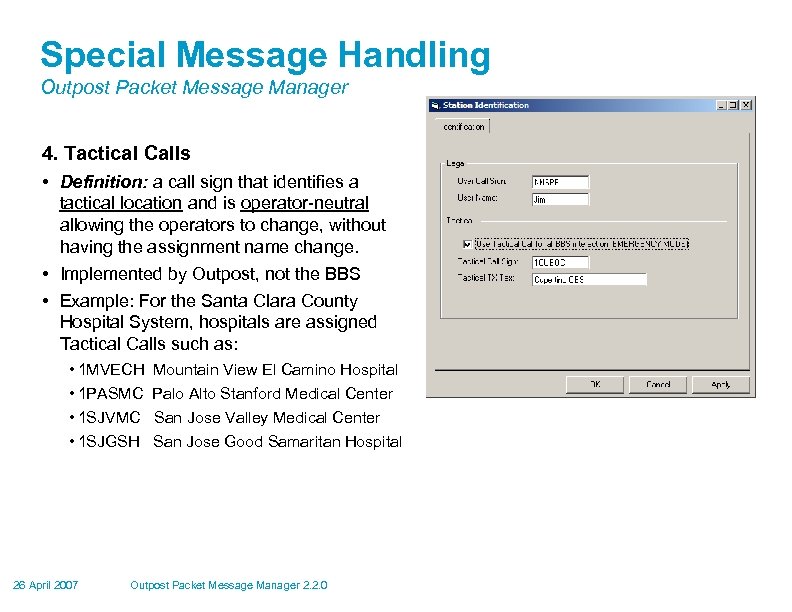 Special Message Handling Outpost Packet Message Manager 4. Tactical Calls • Definition: a call sign that identifies a tactical location and is operator-neutral allowing the operators to change, without having the assignment name change. • Implemented by Outpost, not the BBS • Example: For the Santa Clara County Hospital System, hospitals are assigned Tactical Calls such as: • 1 MVECH Mountain View El Camino Hospital • 1 PASMC Palo Alto Stanford Medical Center • 1 SJVMC San Jose Valley Medical Center • 1 SJGSH San Jose Good Samaritan Hospital 26 April 2007 Outpost Packet Message Manager 2. 2. 0
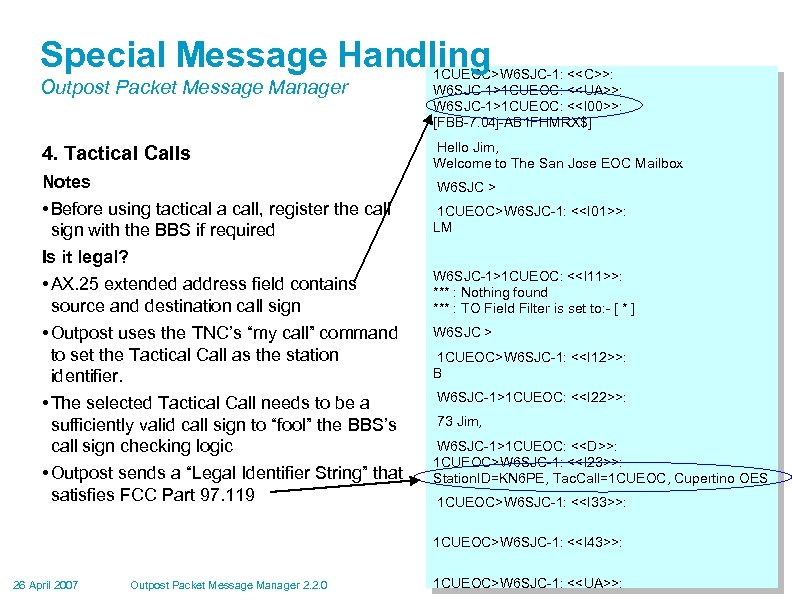 Special Message Handling Outpost Packet Message Manager 4. Tactical Calls Notes • Before using tactical a call, register the call sign with the BBS if required Is it legal? • AX. 25 extended address field contains source and destination call sign • Outpost uses the TNC’s “my call” command to set the Tactical Call as the station identifier. • The selected Tactical Call needs to be a sufficiently valid call sign to “fool” the BBS’s call sign checking logic • Outpost sends a “Legal Identifier String” that satisfies FCC Part 97. 119 1 CUEOC>W 6 SJC-1: <
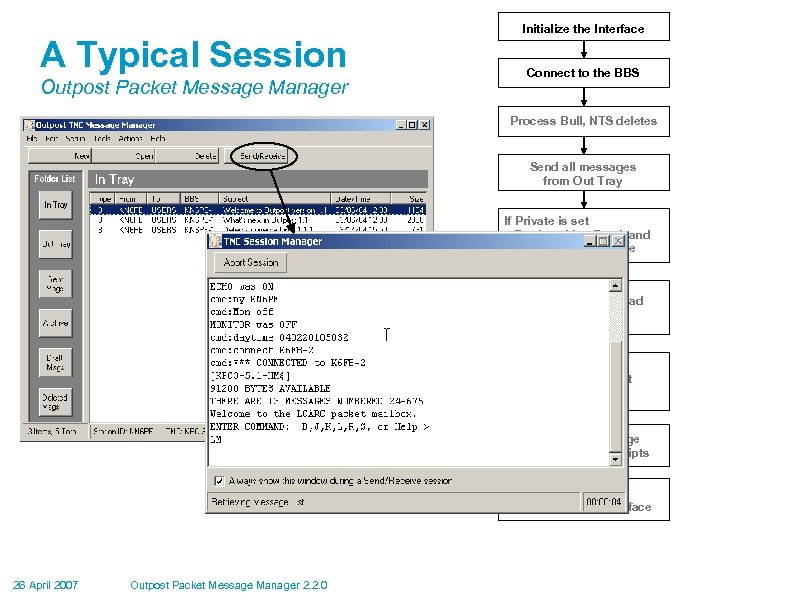 A Typical Session Outpost Packet Message Manager Initialize the Interface Connect to the BBS Process Bull, NTS deletes Send all messages from Out Tray If Private is set • Retrieve List, Read, and Delete each message If NTS is set, • Retrieve List and Read each message If Bulletins is set, • Retrieve List, if don’t have it, read each message Send any message delivery, read receipts Exit the BBS, Shut down the Interface 26 April 2007 Outpost Packet Message Manager 2. 2. 0
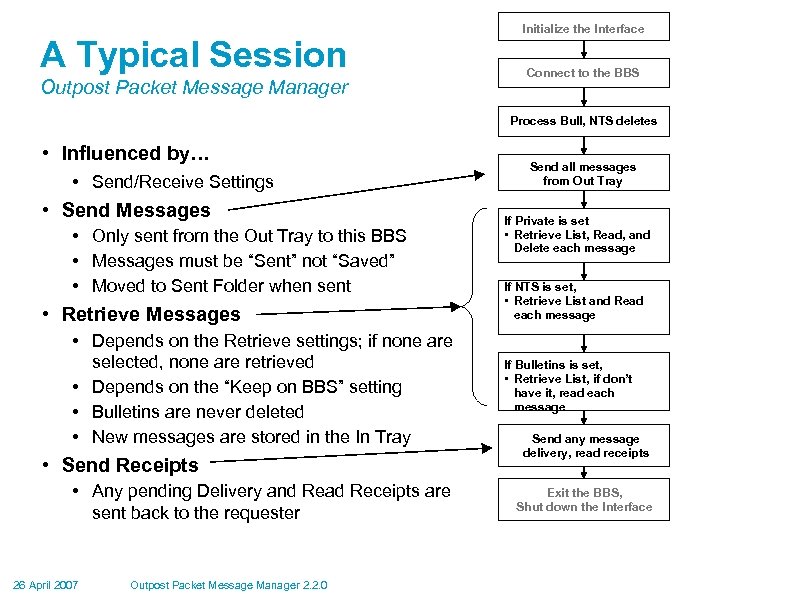 A Typical Session Outpost Packet Message Manager Initialize the Interface Connect to the BBS Process Bull, NTS deletes • Influenced by… • Send/Receive Settings • Send Messages • Only sent from the Out Tray to this BBS • Messages must be “Sent” not “Saved” • Moved to Sent Folder when sent • Retrieve Messages • Depends on the Retrieve settings; if none are selected, none are retrieved • Depends on the “Keep on BBS” setting • Bulletins are never deleted • New messages are stored in the In Tray • Send Receipts • Any pending Delivery and Read Receipts are sent back to the requester 26 April 2007 Outpost Packet Message Manager 2. 2. 0 Send all messages from Out Tray If Private is set • Retrieve List, Read, and Delete each message If NTS is set, • Retrieve List and Read each message If Bulletins is set, • Retrieve List, if don’t have it, read each message Send any message delivery, read receipts Exit the BBS, Shut down the Interface
 For more information Outpost Packet Message Manager Visit the Outpost website… http: //www. outpostpm. org And supporting links… • Users Guide… http: //www. outpostpm. org/#documentation • HOW-TOs… http: //www. outpostpm. org/howto. html • Support Info… http: //www. outpostpm. org/support. html • Users group… http: //groups. yahoo. com/group/outpostpacket/ Send inquiries to… Jim Oberhofer, kn 6 pe@arrl. net 26 April 2007 Outpost Packet Message Manager 2. 2. 0
 ! Other Information 26 April 2007 Outpost Packet Message Manager 2. 2. 0
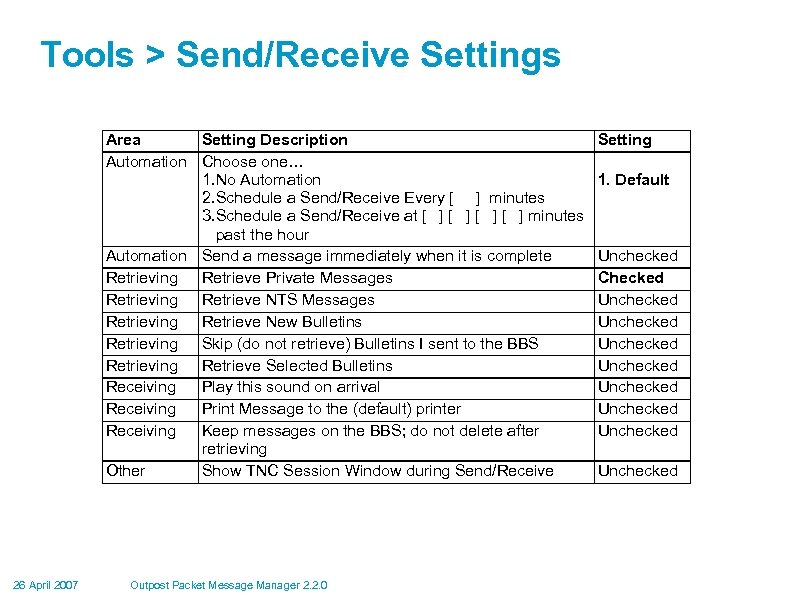 Tools > Send/Receive Settings Area Setting Description Automation Choose one… 1. No Automation 2. Schedule a Send/Receive Every [ ] minutes 3. Schedule a Send/Receive at [ ] minutes past the hour Automation Send a message immediately when it is complete Retrieving Retrieve Private Messages Retrieving Retrieve NTS Messages Retrieving Retrieve New Bulletins Retrieving Skip (do not retrieve) Bulletins I sent to the BBS Retrieving Retrieve Selected Bulletins Receiving Play this sound on arrival Receiving Print Message to the (default) printer Receiving Keep messages on the BBS; do not delete after retrieving Other Show TNC Session Window during Send/Receive 26 April 2007 Outpost Packet Message Manager 2. 2. 0 Setting 1. Default Unchecked Checked Unchecked Unchecked
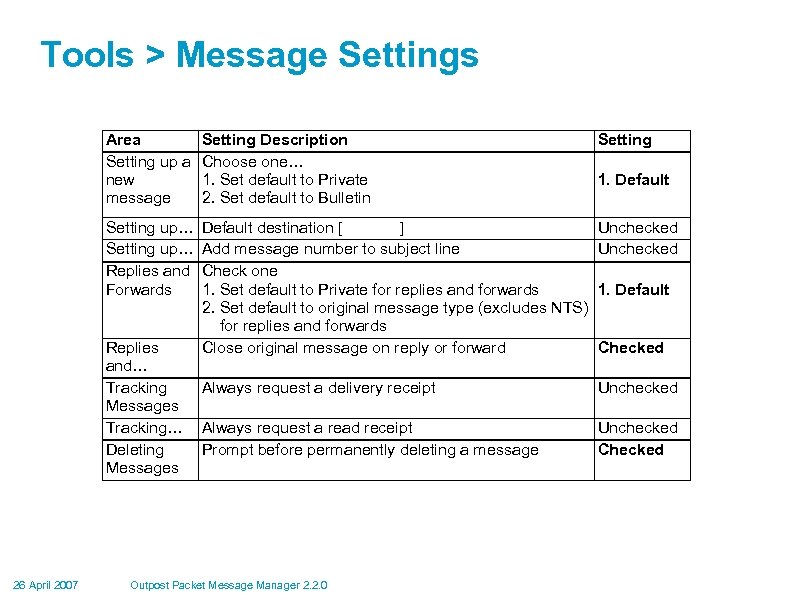 Tools > Message Settings Area Setting up a new message Setting Description Choose one… 1. Set default to Private 2. Set default to Bulletin Setting up… Replies and Forwards Default destination [ ] Unchecked Add message number to subject line Unchecked Check one 1. Set default to Private for replies and forwards 1. Default 2. Set default to original message type (excludes NTS) for replies and forwards Close original message on reply or forward Checked Replies and… Tracking Messages Tracking… Deleting Messages 26 April 2007 Setting 1. Default Always request a delivery receipt Unchecked Always request a read receipt Prompt before permanently deleting a message Unchecked Checked Outpost Packet Message Manager 2. 2. 0
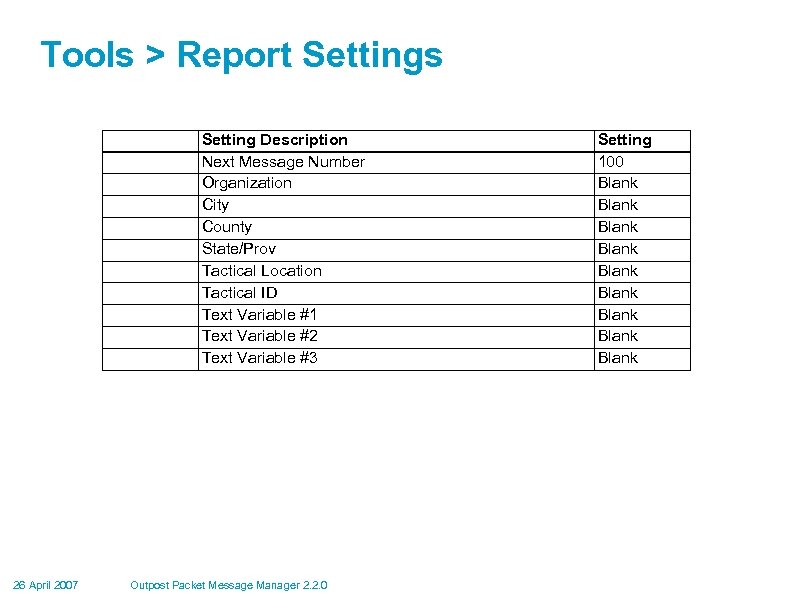 Tools > Report Settings Setting Description Next Message Number Organization City County State/Prov Tactical Location Tactical ID Text Variable #1 Text Variable #2 Text Variable #3 26 April 2007 Outpost Packet Message Manager 2. 2. 0 Setting 100 Blank Blank Blank