


 Скачать презентацию OSI Model and Standards ITNW 1325 Chapter II
c5178fdcd82e27db65609d155944d3aa.ppt
- Количество слайдов: 61
 OSI Model and Standards ITNW 1325, Chapter II
 Understanding the OSI Model
 Understanding the OSI Model Overview: Ø Open Systems Interconnection (OSI) – a layered reference model comprised of seven functional layers Ø Developed by the International Organization for Standardization (ISO) in 1984 – based on their analysis of TCP/IP, IBM SNA, and DECNET protocols Ø Governed by the ISO Standard 7498 – some vendors build their products according to it (Novell) Ø Ensures compatibility and solves communication issues among different implementations of network hardware and software
 Understanding the OSI Model Overview (continued): Ø Uses the divide-and-conquer approach to networking from low-level hardware to the high-level software Ø Constructs a series of independent but interconnected layers – breaks the big problem of communications into smaller problems that are isolated from each other Ø Individual layers encapsulate specific independent functions – changes to one layer don’t affect other ones Ø Implements the “peer communication” principle – only identical remote layers communicate to each other
 Understanding the OSI Model Overview (continued): Ø “Universal” resembles “imperfect” – some network functions operate at several layers, while some do not require services from every layer Ø Practical usage is questioned by many because of its complexity and lack of flexibility The OSI networking model remains a great tool for learning networks – protocols, devices security, and other models
 Understanding the OSI Model Reasons for Layering: Ø Divides communications into a finite number of logical blocks – simplifies comprehension and use Ø Provides design modularity – allows upgrades to a specific layer to remain separate from the other ones Ø Allows programmers to specialize in a particular layer of the networking model, with open set of specifications Ø Encourages interoperability by promoting balance between different networking models Ø Allows vendors to produce standardized interfaces
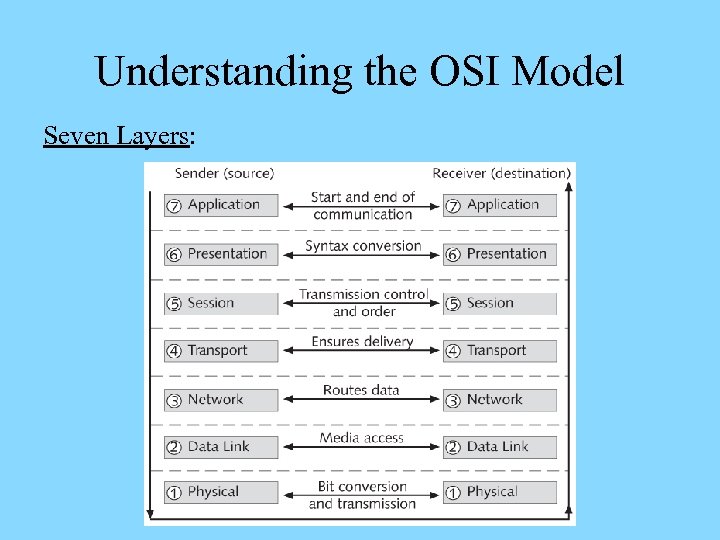 Understanding the OSI Model Seven Layers:
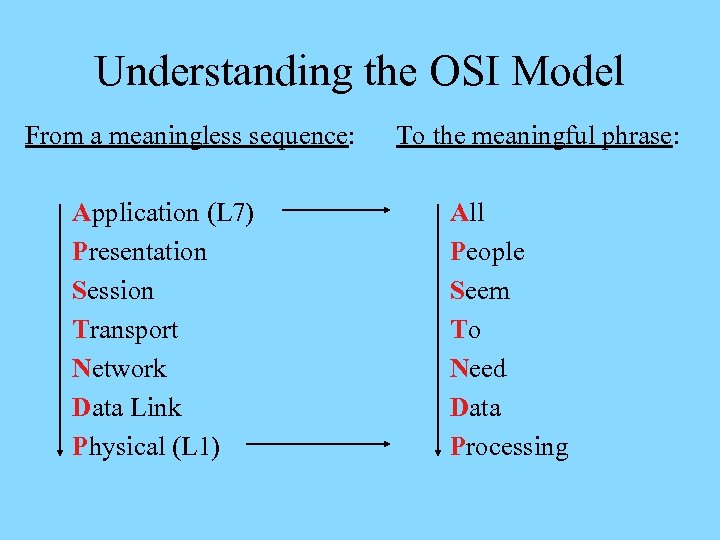 Understanding the OSI Model From a meaningless sequence: Application (L 7) Presentation Session Transport Network Data Link Physical (L 1) To the meaningful phrase: All People Seem To Need Data Processing
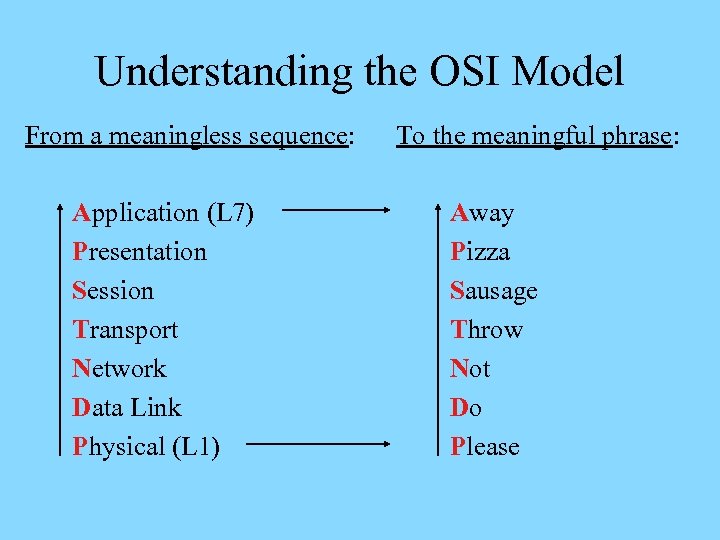 Understanding the OSI Model From a meaningless sequence: Application (L 7) Presentation Session Transport Network Data Link Physical (L 1) To the meaningful phrase: Away Pizza Sausage Throw Not Do Please
 Understanding the OSI Model Peer Communication, Overview: Ø Each layer is unaware of the activities of all other ones on the same host – doesn’t acknowledge their services Ø Each layer only communicates logically to an identical layer on the other side of the communication process – information is passed via headers and trailers added Ø Headers and trailers added at the sending layer will be read and removed at the peer layer on the other side Ø Protocol suites combine protocols defined at different layers together to enable network communications
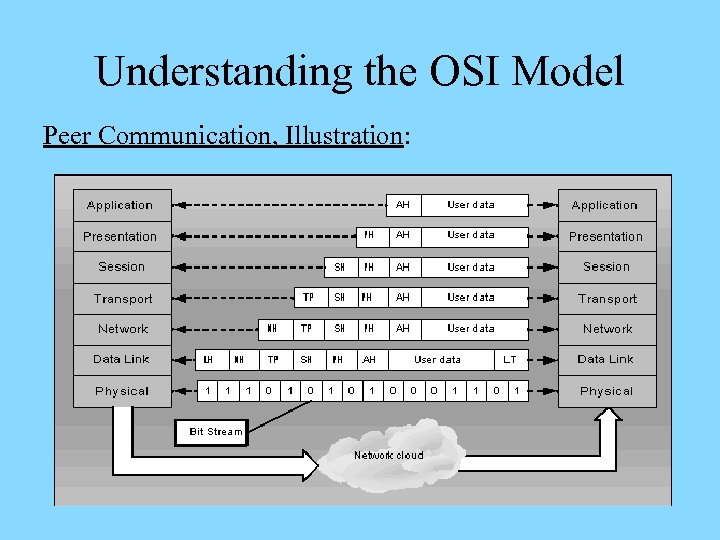 Understanding the OSI Model Peer Communication, Illustration:
 Understanding the OSI Model Peer Communication, Advantages: Ø Allows convenient distribution of networking functions Ø Permits independent error checking on different layers Ø Simplifies creation of protocols Peer Communication, Disadvantages: Ø Results in overhead that grows as data traverses the model from the Application to the Data Link layer Ø Leads to reduced efficiency of network utilization
 OSI Layer Functions
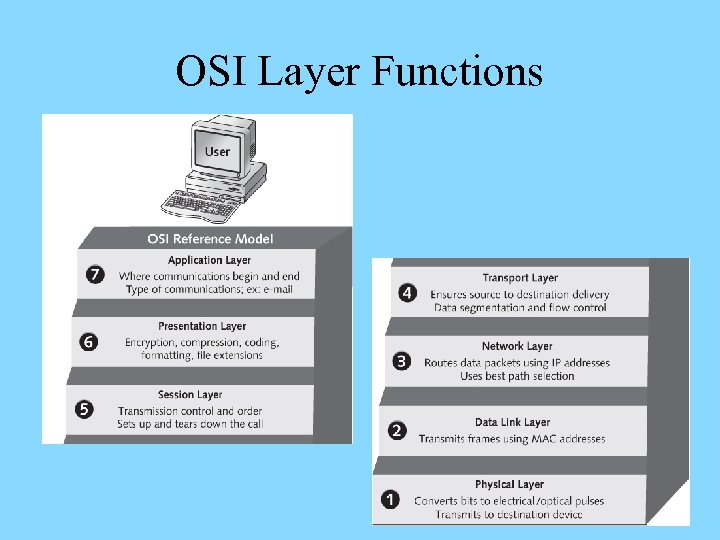
 OSI Layer Functions Application (L 7): Ø Defines network services that software applications (browsers, e-mail clients, etc) can request from the network and requests the services on their behalf Ø Accepts data from applications and interprets their formatting and procedures to the network Ø Interprets data coming from the network and passes it to proper applications Ø Facilitates multiple important protocols – HTTP, FTP, DNS, Telnet, SMTP, SNMP, etc.
 OSI Layer Functions Presentation (L 6): Ø Receives data from the Application layer and prepares it for transmission over the network Ø Reformats the incoming data from lower layers for specific machine/application combination Ø Performs encryption and compression of data for outbound communications – as well as decryption and decompression of data for inbound communications Ø The only layer that restructures data – other ones add headers and/or trailers without reconfiguring the data
 OSI Layer Functions Presentation (continued): Ø Distinguishes between file extensions and coding schemes – BMP, JPG, WAV, MP 3, ASCII, HTML, etc. Ø Example – Presentation layer protocols encode online music tracks into MP 3 format Ø Example – Presentation layer protocols interpret JPG images so that HTTP is able to understand them Ø Example – Presentation layer protocols encode text using ASCII and other schemes Ø Example – Presentation layer protocols encode/decode sensitive data within secure Internet connections
 OSI Layer Functions Session (L 5): Ø Allows senders and receivers to establish and manage data transmission session – independently of the actual data flow over the network Ø Detects if the transmission has been cut off, notifies the client software, and restart its at the appropriate point Ø Determines the order of communication, maximum duration of transmission, and provides clocking or timing for the session Ø Assists large data transfers – informs the receiver about the beginning/end of the stream that’s broken in pieces
 OSI Layer Functions Session (continued): Ø Allows information of different streams – that may be originating from different sources – to be properly combined or synchronized Ø Facilitates Net. BIOS, SQL, RPC, and other protocols
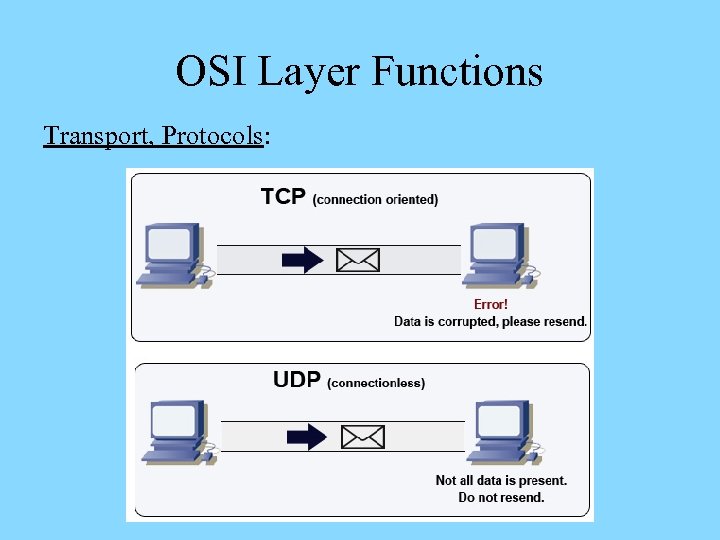
 OSI Layer Functions Transport (L 4): Ø Accepts data from the Session layer services and provides messaging service for them Ø Facilitates connection-oriented (guarantee of delivery) and connectionless (delivery not guaranteed) protocols Ø Connection-oriented protocols ensure data delivery – used for sensitive data transmissions over the Internet Ø Connectionless protocols don’t ensure data delivery – but impose much lower overhead onto the network Ø Submits data with its header added to the Network layer for further handling
 OSI Layer Functions Transport, Connection-Oriented Protocols: Ø Explicitly establish a session (“connection”) before allowing data to be sent Ø Ensure data delivery by requiring and acknowledgement (ACK) of the receipt of data packets – retransmit in case an ACK is not timely returned Ø Negotiate for the highest number of data segments to be sent before an acknowledgement is required Ø Provide data integrity via checksums – unique character strings attached to data that allow the receiving node to determine if a data unit was modified during delivery
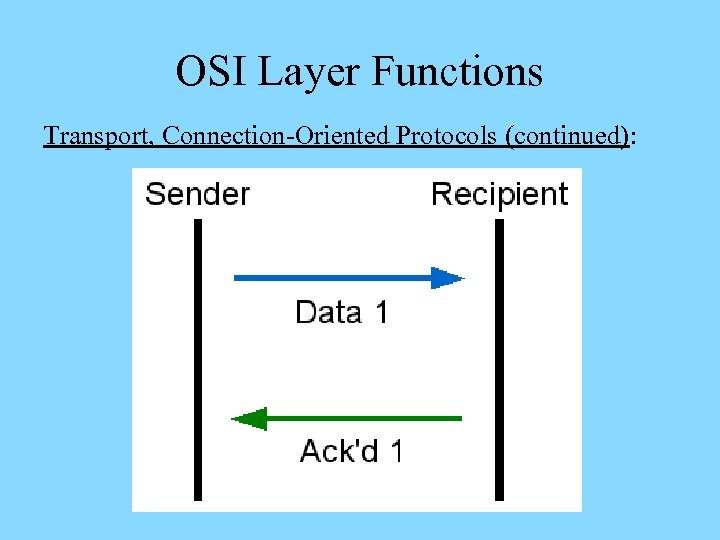 OSI Layer Functions Transport, Connection-Oriented Protocols (continued):
 OSI Layer Functions Transport, Connection-Oriented Protocols (continued): Ø Ensure reliable data delivery by breaking large data units into multiple smaller segments (segmentation) – with segment size related to the MTU size Ø The MTU size is the maximum data size that nodes on the way can place into their memory buffers Ø Identify segments that belong to the same message, determine the order of segments (sequencing), and reconstruct the segmented units (reassembly) Ø Gauge appropriate rate of transmission based on how fast the recipient can accept data (flow control)
 OSI Layer Functions Transport, Connectionless Protocols: Ø Do not establish a connection before sending data Ø Do not require acknowledgements for data sent – don’t ensure that the data was properly received Ø Define a special term for data carried – datagrams Ø Do not perform error check Ø Much less sophisticated and have less transmission and processing overhead than connection-oriented ones Ø Used in cases when data needs to be sent quickly Ø Example – streaming video and audio transmissions over the network
 OSI Layer Functions Transport, Protocols:
 OSI Layer Functions Network (L 3): Ø Accepts data from the Transport layer – wraps segments into packets that carry addressing information Ø May brake large packets into smaller ones – according to capacity of the network (fragmentation) Ø Defines protocol-dependent logical addressing schemes that uniquely identify nodes within interconnected networks and enable network segmentation Ø Establishes the best delivery path (routing) considering addressing, delivery priorities, network congestion, quality of service, and cost of the paths (routes)
 OSI Layer Functions Network (continued): Ø Implements congestion control by sensing delays associated with routes and managing how much traffic is sent across them – helpful within busy networks Ø Internet Protocol (IP) is the most common L 3 protocol
 OSI Layer Functions Data Link (L 2): Ø Encapsulates packets received from the Network layer into frames – complete packages to be transmitted Ø Defines the format of the header and/or trailer added to packets received – depend on the network type in use Ø Common network types are Ethernet and Token Ring – use different frames and can not be used together Ø Frame format and maximum size map onto the carrying capacity of the network medium Ø Performs verification of data integrity using checksum mechanism – to detect transmission errors
 OSI Layer Functions Data Link (continued): Ø Implies error correction upon the receiver’s request for retransmission in case a frame is dropped or altered Ø Manages point-to-point transmission across the medium within the same logical or physical cable segment Ø Splits into two sublayers with separate duties – Logical Link Control (LLC) and Media Access Control (MAC)
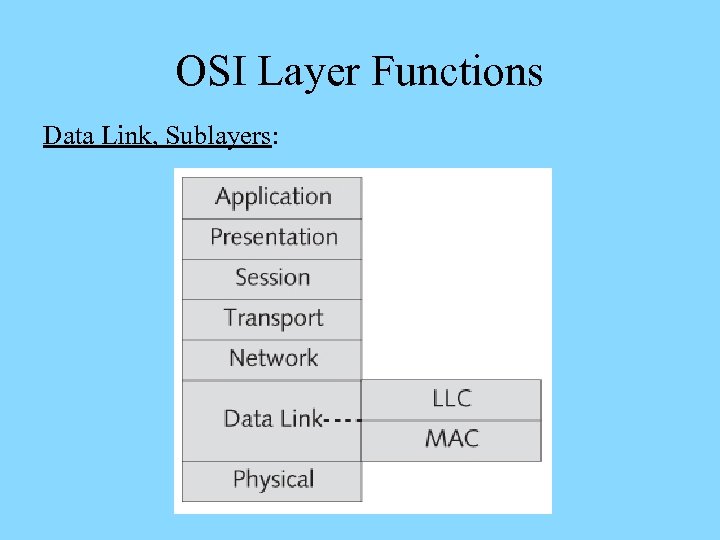 OSI Layer Functions Data Link, Sublayers:
 OSI Layer Functions Data Link, Sublayers, LLC: Ø Interfaces the Network layer – implies intelligence Ø Packages data frames differently for different networks Ø Manages flow control and issues requests for retransmission for data with errors Data Link, Sublayers, MAC: Ø Defines a unique physical identifier – MAC address – for network cards (every frame carries a destination and source MAC addresses) Ø Defines and manages the access to the physical medium
 OSI Layer Functions Data Link, MAC Addresses: Ø 48 -bit non-replaceable, “burned-in” addresses (BIA) represented using twelve hexadecimal characters Ø Consist of two parts – a block ID and a device ID Ø A block ID (“Organizational Unit Identifier, OUI”) – a six-character (24 -bit) sequence that uniquely identifies each vendor (managed by IEEE), with large vendors assigned several different block IDs Ø A device ID (“serial number”) – a six-character (24 -bit) sequence that uniquely identifies the device (managed by the manufacturer)
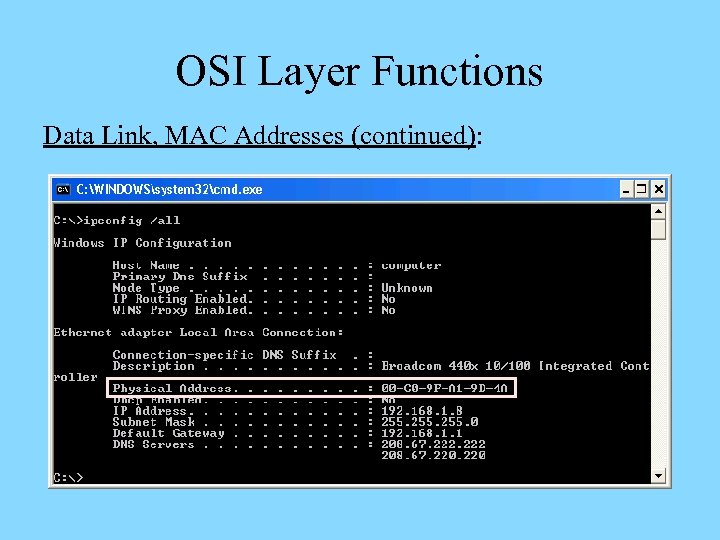 OSI Layer Functions Data Link, MAC Addresses (continued):
 OSI Layer Functions Data Link, Frame Integrity: Ø Before a frame is sent, the sender performs a cyclic redundancy check (CRC) on all of its fields – generates a unique 4 -byte frame check sequence (FCS) code Ø The FCS code is attached to the frame being sent – to be detached and regenerated by receiver Ø The generated code is compared to the one received – no error is assumed in case the two codes match and a retransmission request is issued in case of mismatch
 OSI Layer Functions Data Link, Frame Handling: Ø All NICs connected to the same physical segment of the network receive and process frames sent Ø Only NIC with matching destination MAC address passes the payload to the Network layer – other nodes would drop the frame Ø Broadcast frames are sent to and processed by all nodes on the physical segment – costs performance Ø Reducing the number of nodes on a physical network – segmentation – improves performance by reducing the number of frames sent and processed
 OSI Layer Functions Physical (L 1): Ø Accepts frames from the Data Link layer and turns frame bits into the medium pulses on the sending end Ø Transforms pulses to bits and passes them to the Data Link layer on the receiving end Ø Defines mechanical, electrical, and procedural characteristics of the network hardware and medium Ø Determines data transmission rates and timing intervals Ø Non-intelligent layer – does not read data handled, adds no header or trailer, and performs no error correction
 OSI Layer Functions
 OSI Model at Work
 OSI Model at Work Encapsulation, Overview: Ø Each lower layer accepts data from the layer above and performs encapsulation – adds a protocol data unit (PDU) composed of layer-specific header and/or trailer Ø A PDU enables logical communication between a layer at the source computer and the identical layer at the destination computer Ø Headers are layer-specific labels, trailers carry errordetection/correction information and end-of-PDU flags Ø The encapsulated data is passed to the layer below
 OSI Model at Work Encapsulation, Layer PDU: Ø Application, Presentation, and Session layer PDUs come in a variety of types and are referred to as Application, Presentation, and Session PDUs Ø Transport, Network, and Data Link layer PDUs are referred to as segments, packets, and frames Ø Physical layer PDUs consist of series of pulses that match bit patterns for Data Link layer frames
 OSI Model at Work Encapsulation, Process: Ø Begins at the upper three layers – the data is converted into a standard networking format Ø Transport layer forms segments by adding a header with port information – ensure proper delivery Ø The Network layer forms packets by adding a header with logical addressing information – ensures routing Ø The Data Link layer forms frames by adding a header with physical addressing information and a trailer Ø The Physical layer encodes frames and transmits them as pulses along the physical network
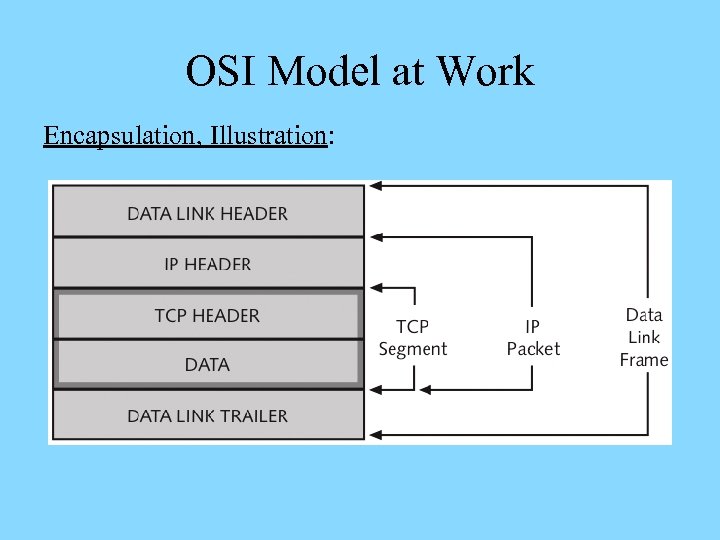 OSI Model at Work Encapsulation, Illustration:
 OSI Model at Work Decapsulation: Ø The receiver’s Physical layer accepts the data from the physical network – transforms pulses into bits, passes to the layer above where bits are read as a frame Ø Headers and trailers are removed as data travels up the OSI model’s layers at the destination computer Ø Ultimately, the original data is passed to the receiving application by the receiver’s Application layer – with no headers or trailers present
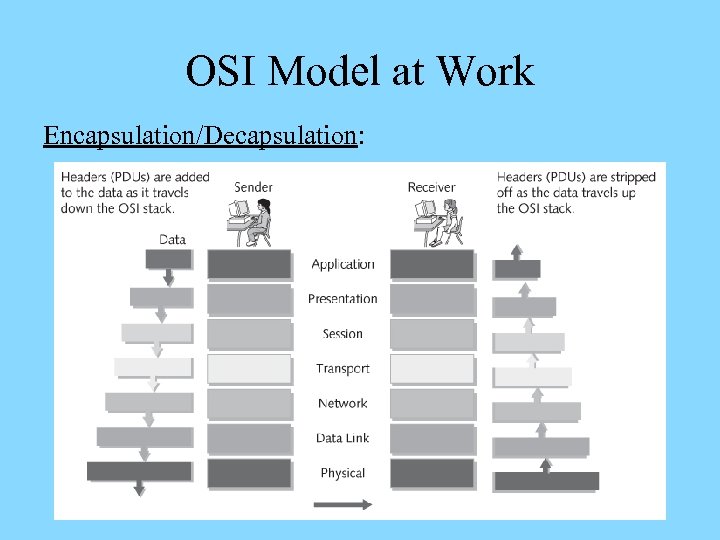 OSI Model at Work Encapsulation/Decapsulation:
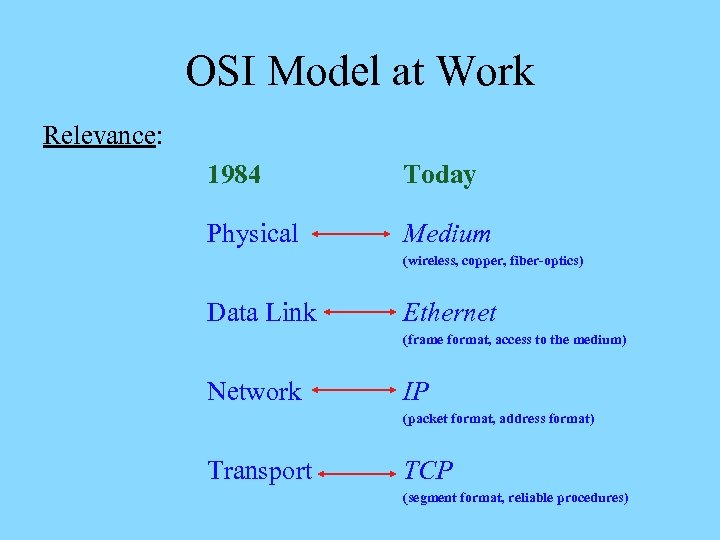 OSI Model at Work Relevance: 1984 Today Physical Medium (wireless, copper, fiber-optics) Data Link Ethernet (frame format, access to the medium) Network IP (packet format, address format) Transport TCP (segment format, reliable procedures)
 Networking Standards
 Networking Standards Advantages: Ø Creation of competition – everybody may create technological devices based on a standard, as opposed to proprietary, apart from standards, patented devices Ø Lower cost for consumers – via lower product startup costs, time due to lower manufacturing costs, and healthy competition Ø Protection of investment into technology – lower costs and clarity of equipment upgrades due to backward compatibility of newer products Ø Interoperability – all devices from various vendors
 Networking Standards Disadvantages: Ø International standards – open domestic markets to competition from countries with lower production costs Ø Political conflicts – can be caused by standards or result in rejection of standards proposed by a nation by others The advantages outweigh the disadvantages
 Networking Standards Types, De Facto: Ø Common practices followed by industry for a variety of reasons – ease of use, established habits, costs, etc. Ø Primary influencing factor – success in the marketplace Ø Examples – MS Windows, Intel x 86 architecture Types, De Jure: Ø Official, entrusted standards established by a body or an organization – with different subcommittees overseeing different technologies Ø Subject to lengthy development and acceptance process Ø Published and accessible to everyone online
 Networking Standards Types, De Jure (continued): Ø First step – working groups of industry experts propose the initial draft that gets published Ø Second step – requests for comments (RFCs) are sought from all interested developers, users, and specialists Ø Third step – the comments are reviewed and may be incorporated into a draft of the standard Ø Finally, the entire organization reviews the draft before it gets published as an official standard Ø A De Facto standard may become De Jure one upon approval by a committee or other authorized entity
 Networking Standards Types, Consortia: Ø Introduced by industry-sponsored organizations that want to promote a specific technology within a short period of time Ø Example – World Wide Web Consortium (W 3 C) that involves Microsoft, Sun, and IBM (developed Internet standards such as HTML, CSS, DOM) Ø Imply membership that may be open or not Standards can be enforced by the market De Jure standards are enforced by a regulatory authority
 Networking Standards Groups
 Networking Standards Groups Institute of Electrical and Electronics Engineers (IEEE): Ø World’s largest technical professional society – consists of 37 smaller societies and councils Ø Developed more than 800 standards in IT and communication, circuits and devices, control and automation, signal processing, optics, power and energy, etc. since early 1980 s Ø Project 802 develops computer network architecture and technology standards: Ethernet LAN (802. 3), Token Ring (802. 5), wireless LAN (802. 11), etc. Ø Website – www. ieee. org
 Networking Standards Groups International Organization for Standardization (ISO): Ø A collection of more than 17000 standards developed in more than 157 countries – titled after the Greek word iso than means “equal” Ø Covers multiple fields – communications, packaging, energy production, banking and financials, etc. Ø Promotes and facilitates global exchange of information and barrier-free trade Ø Website – www. iso. org
 Networking Standards Groups American National Standards Institute (ANSI): Ø Established standards for electronics industry, chemical and nuclear engineering, construction, health and safety Ø Involves industry and government representatives – represents the US in developing international standards Ø Requires rigorous testing of new technology for obtaining its approval Ø Compliance with its standards is voluntary but beneficial – constitutes reliability and compatibility and is beneficial Ø Website – www. ansi. org
 Networking Standards Groups Electronic Industries Alliance (EIA): Ø A trade organization that involves representatives of USA electronics manufacturing firms Ø Lobbies for legislation favorable to the growth of computer and electronics industries Ø Assists writing ANSI standards, sets standards for its members, and sponsors conferences and exhibitions Ø Its subgroup – Telecommunications Industry Association (TIA) – focuses on standards for IT Ø Websites – www. eia. org, www. tiaonline. org
 Networking Standards Groups International Telecommunication Union (ITU): Ø A United Nations agency that regulates international communications with members from 191 countries Ø Offers global standards in radio/TV frequencies, networking, satellite and global communications, etc. Ø Provides developing countries with technical expertise and telecommunications equipment Ø Actively involved into implementation of worldwide Internet services Ø Website – www. itu. int
 Networking Standards Groups Internet Corporation for Assigned Names and Numbers (ICANN): Ø A private nonprofit corporation upon recommendation of the US Department of Commerce Ø Responsible for Internet Protocol addressing (IP addressing) and domain name management Ø Assigns rights to use internet addresses and names Ø Website – www. icann. org
 Networking Standards Groups Internet Assigned Numbers Authority (IANA): Ø A nonprofit group that is used to keep records of available and reserved IP addresses and to determine how they are distributed Ø Cooperated with three Regional Internet Registries (RIRs) – American Registry for Internet Numbers (ARIN), Asia Pacific Network Information Centre (APNIC), and Reseaux IP Europeens (RIPE) Ø Performs system administration within ICANN Ø Website – www. iana. org
 Networking Standards Groups Internet Society (ISOC): Ø A professional membership society that establishes technical standards for the Internet – involves Internet professionals and companies Ø Addresses Internet’s growth, accessibility, security, addressing services, and open standards Ø Oversees several active subgroups that carry specific missions Ø Website – www. isoc. org
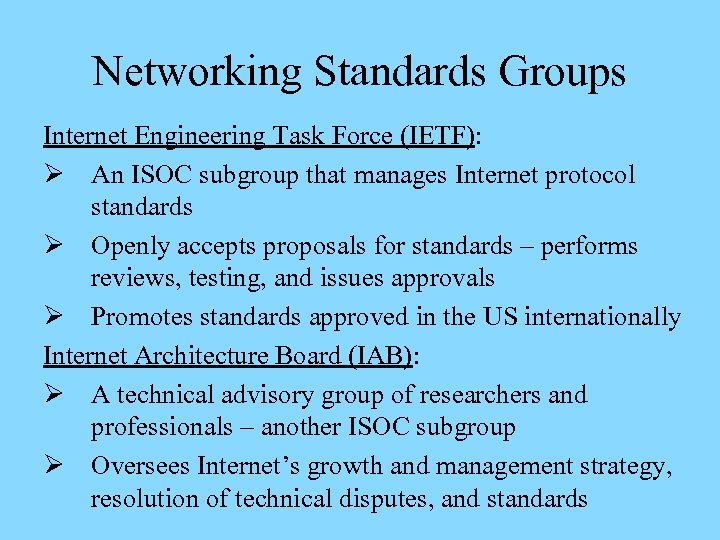 Networking Standards Groups Internet Engineering Task Force (IETF): Ø An ISOC subgroup that manages Internet protocol standards Ø Openly accepts proposals for standards – performs reviews, testing, and issues approvals Ø Promotes standards approved in the US internationally Internet Architecture Board (IAB): Ø A technical advisory group of researchers and professionals – another ISOC subgroup Ø Oversees Internet’s growth and management strategy, resolution of technical disputes, and standards
 Homework Ø Read the chapter and the summary section, then review the key terms learned Ø Answer the review questions and verify your answers with the chapter or lecture slides Ø Complete the hands-on project 2 -2 and case projects 2 -2 and 2 -3