


 Скачать презентацию Organizing Data and Information Chapter 3 1
287eafff9952bfc4e389909452d5d57a.ppt
- Количество слайдов: 76
 Organizing Data and Information Chapter 3 1
 Chapter Preview • In this chapter, we will study: – Basic data management terminology – Storing data in traditional files and problems with this approach – The database approach to storing data – How data are organized to create a database – Comparison of database models – Components of a DBMS – How companies utilize their stored data 2
 Organizing and Managing Data • A database helps an organization to – organize data and to generate information – access data more efficiently and use it more effectively • A database management system (DBMS) – consists of a group of programs that manipulate the database and other application programs 3
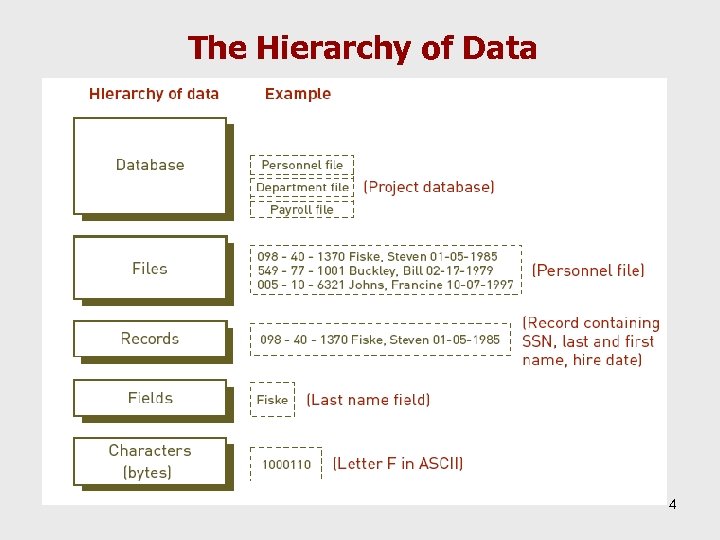 The Hierarchy of Data 4
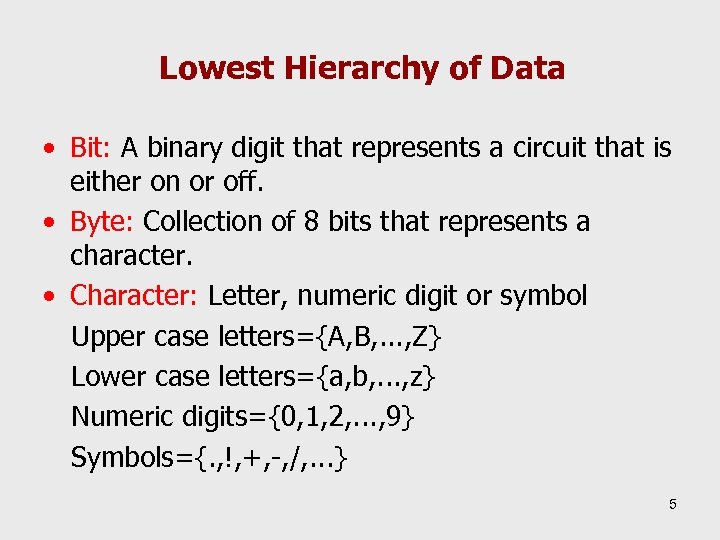 Lowest Hierarchy of Data • Bit: A binary digit that represents a circuit that is either on or off. • Byte: Collection of 8 bits that represents a character. • Character: Letter, numeric digit or symbol Upper case letters={A, B, . . . , Z} Lower case letters={a, b, . . . , z} Numeric digits={0, 1, 2, . . . , 9} Symbols={. , !, +, -, /, . . . } 5
 Data Entities, Attributes, and Keys • Entity – People, places, or things for which data are collected, stored, and maintained • Attribute – Characteristic of an entity • Data item – Value of an attribute 6
 Data Entities, Attributes, and Keys (continued) • Key – Field or set of fields in a record that is used to identify the record • Primary key – Field or set of fields that uniquely identifies the record 7
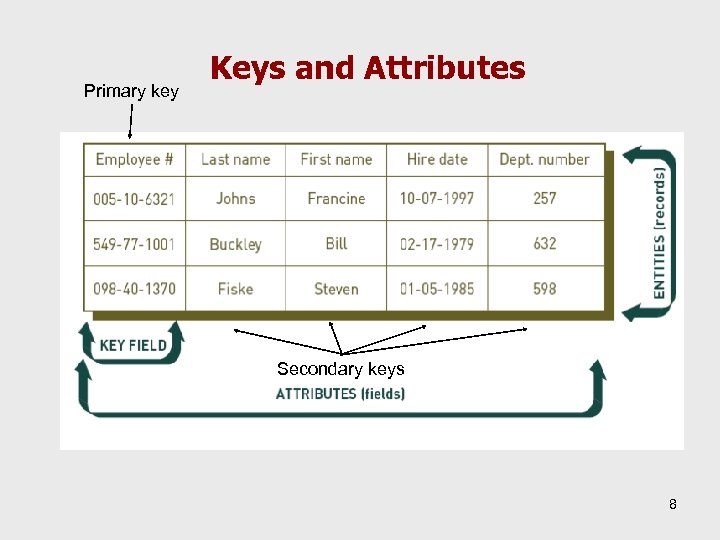 Primary key Keys and Attributes Secondary keys 8
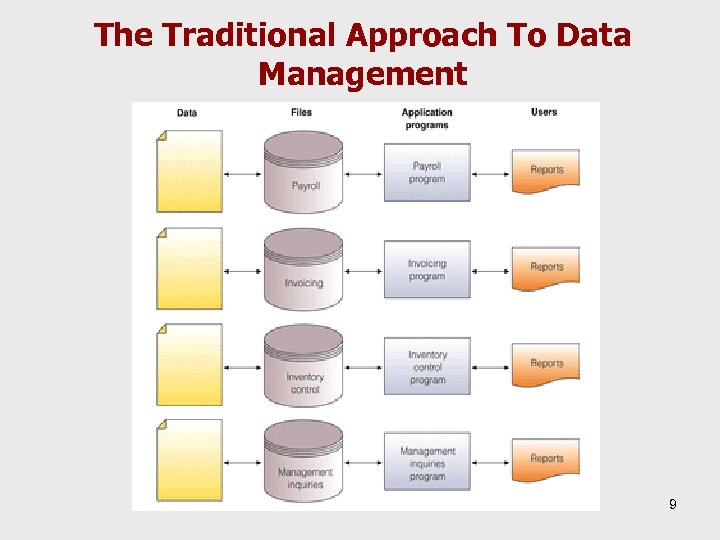 The Traditional Approach To Data Management 9
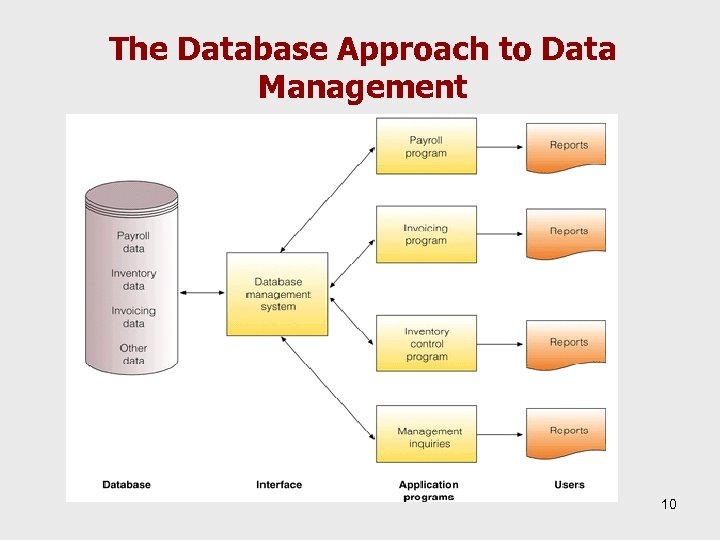 The Database Approach to Data Management 10
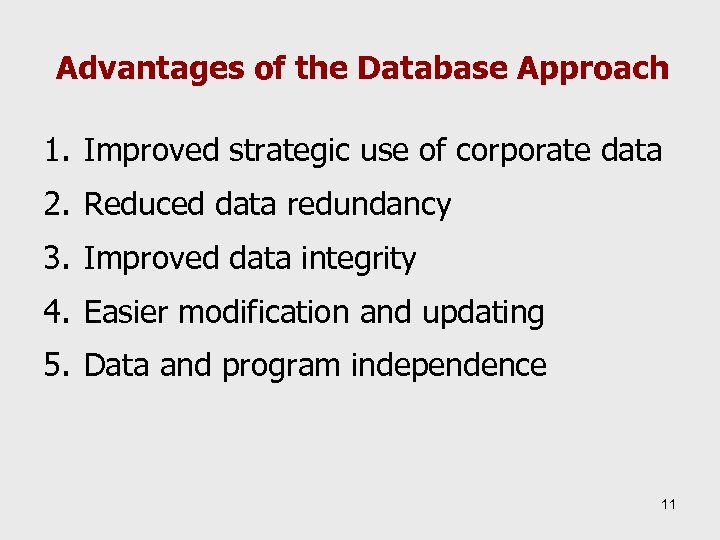 Advantages of the Database Approach 1. Improved strategic use of corporate data 2. Reduced data redundancy 3. Improved data integrity 4. Easier modification and updating 5. Data and program independence 11
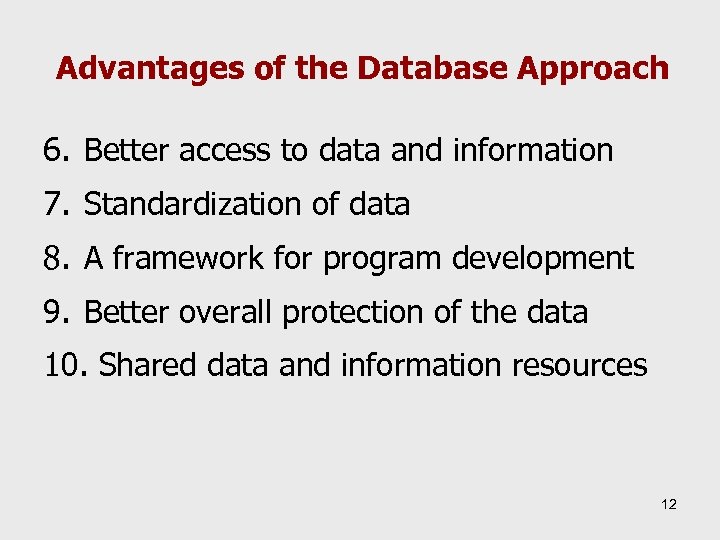 Advantages of the Database Approach 6. Better access to data and information 7. Standardization of data 8. A framework for program development 9. Better overall protection of the data 10. Shared data and information resources 12
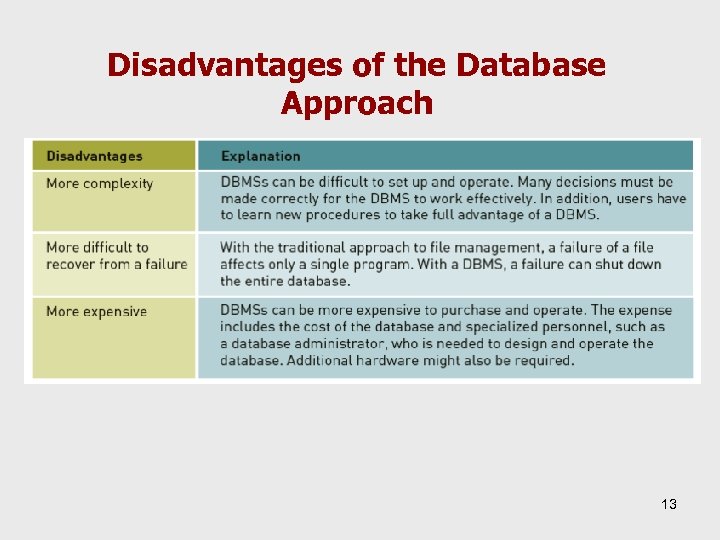 Disadvantages of the Database Approach 13
 Database Development When building a database, the following must be considered: • Content: What data should be collected and at what cost? • Access: What data should be provided to which users and when? • Logical structure: How should data be arranged? • Physical organization: Where should data be located? 14
 Data Modeling • The logical design of a database involves: – Grouping data items – Identifying relationships among different data items • The physical database design involves: – Implementing the logical design with possible modifications due to cost and performance considerations such as planned data redundancy 15
 Data Modeling • Data model: – An abstract model of the logical relationships among data represented by a diagram of entities and their relationships • Data modeling involves – understanding a specific business problem and analyzing the data and information needed to deliver a solution • Enterprise data modeling – First, investigate needs at the strategic level – Second, examine more specific needs for various functional areas and departments 16
 Data Modeling • Entity-relationship diagrams – Use basic graphical symbols to show the organization of data – Boxes indicate data items or entities – Connecting lines show relationships • Types of relationships: – One-to-one: a student has one schedule; a schedule belongs to one student – One-to-many: a professor has one or more courses, a course has one professor – Many-to-many: a student has one or more courses; a course has one or more students – Many-to-one: 17
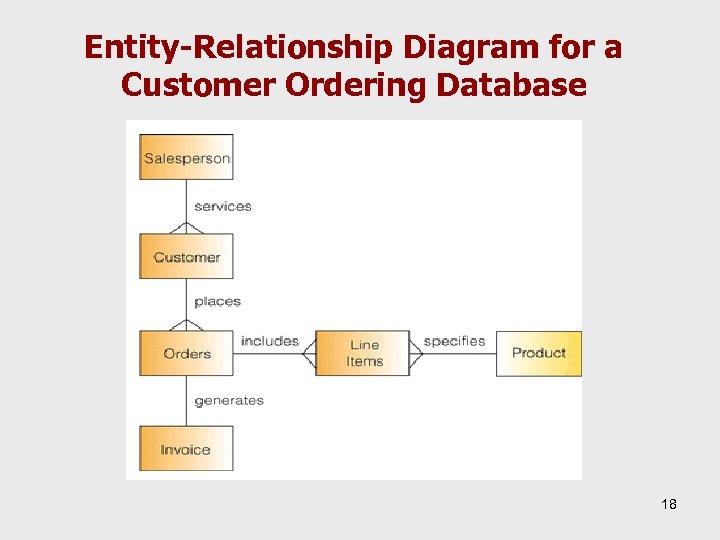 Entity-Relationship Diagram for a Customer Ordering Database 18
 Database Models • Hierarchical (tree) Organization Structure – Top-down; supports one-to-many relations Pros and Cons – gives best processing speeds, but poor query flexibility 19
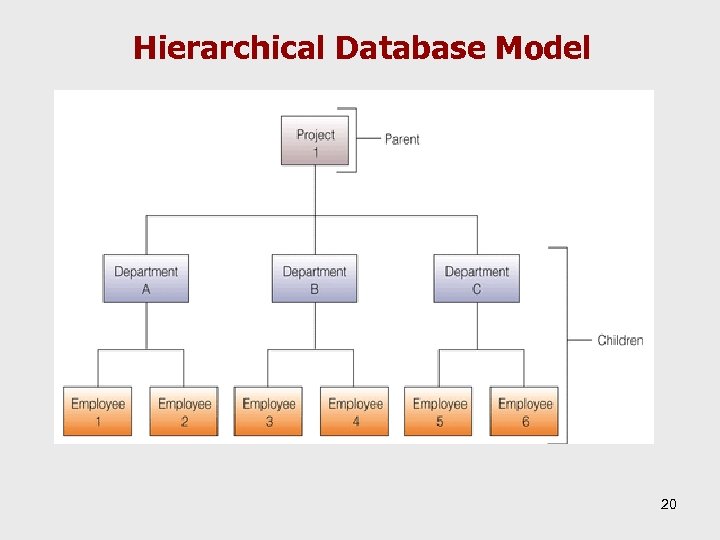 Hierarchical Database Model 20
 Database Models • Network Organization Structure – Supports many-to-many relations Pros and Cons – gives pretty good processing speeds and pretty good query flexibility, but is very complex – difficult to modify 21
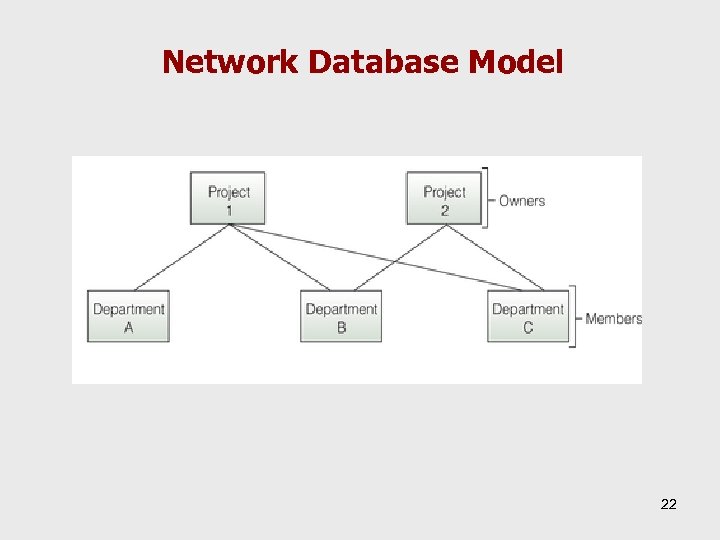 Network Database Model 22
 Database Models • Relational Models Organization Structure – Two-dimensional tables, called relations, are the logical equivalent of files – Tabular format: row=data entity; column=attributes – Domain: allowable values of each attribute Pros and Cons – common in PC environment because it is simple to understand – provides high flexibility and ease of use – provides slower search and access times; a problem in high-volume business settings 23
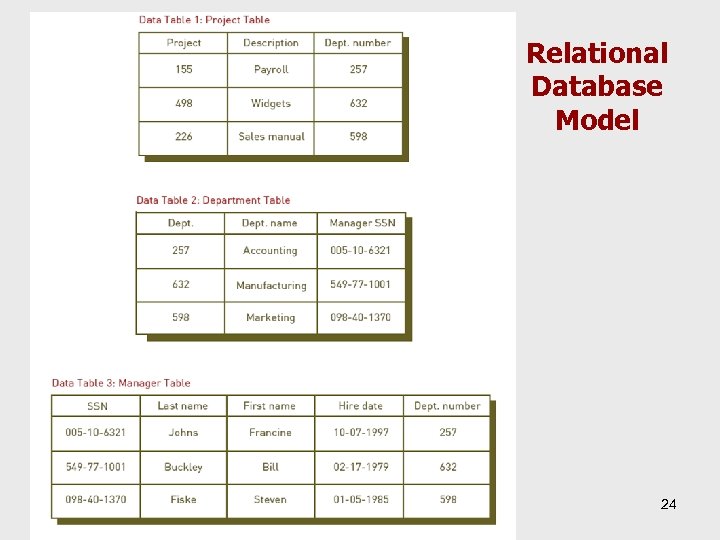 Relational Database Model 24
 Relational Models – Manipulating Data Making inquiries and analyzing data – Selecting § Choosing rows according to certain criteria – Projecting § Choosing columns, can be used to create new tables – Joining § Combining two or more tables 25
 Relational Models Linking – Tables that share at least one common attribute can be linked to provide useful information and reports – Linking provides the flexibility associated with relational models 26
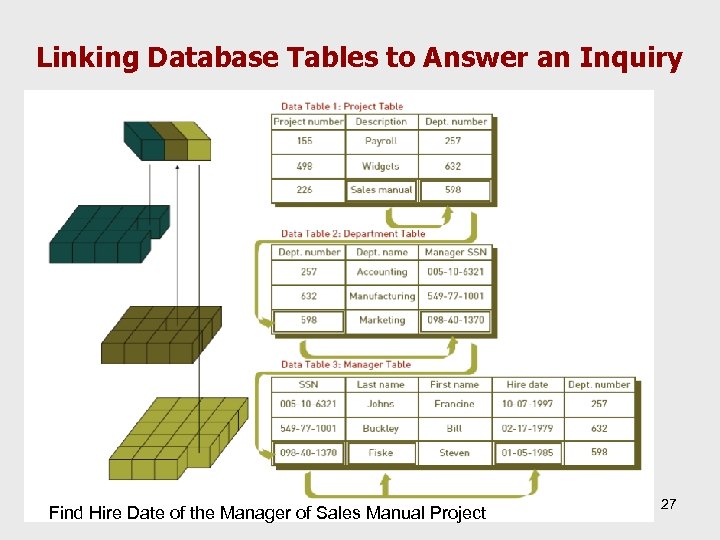 Linking Database Tables to Answer an Inquiry Find Hire Date of the Manager of Sales Manual Project 27
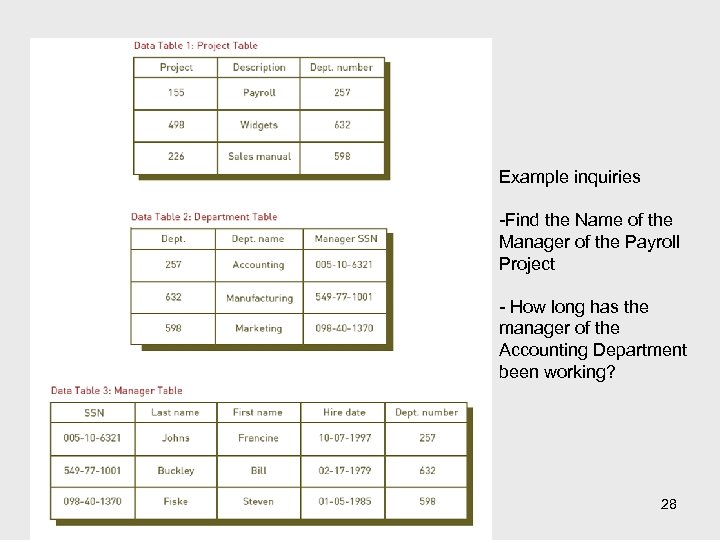 Example inquiries -Find the Name of the Manager of the Payroll Project - How long has the manager of the Accounting Department been working? 28
 Building a Relational Database • Physically implement the data model in the database management system software 1. 2. 3. 4. 5. Create tables Define fields and field properties Establish primary keys Define table relationships Add actual data (records) to tables 29
 Database Management Systems 30
 Database Management Systems • A DBMS is responsible for access to a database and acts as a user interface • The DBMS can reference a schema to find where to access the requested data in relation to another piece of data 31
 Overview of Database Types • Flat file – Simple database program whose records have no relationship to one another • Single user – Only one person can use the database at a time • Multiple user – Allows dozens or hundreds of people to access the same database system at the same time – Examples: Oracle, Sybase, and IBM 32
 Providing a User View • Schema - a description of the entire database – the logical and physical structure of the data • Subschema - a file that contains a description of a subset of the database and identifies which users can modify the data items in that subset – Subschemas are developed to create different user views – Examples? 33
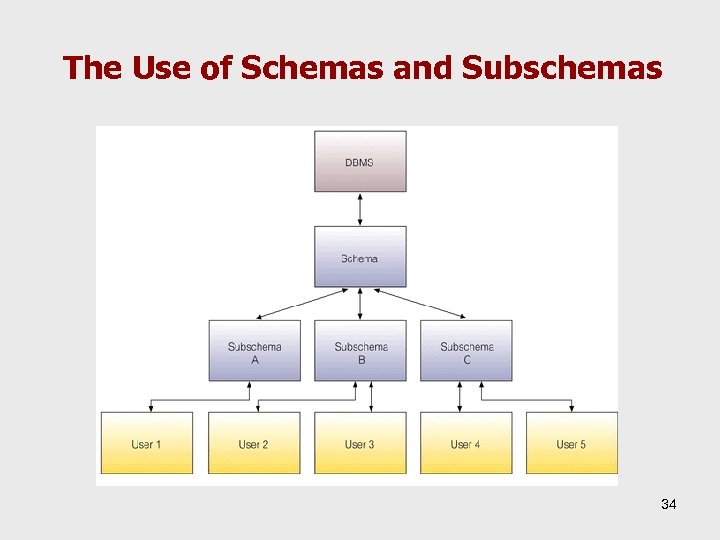 The Use of Schemas and Subschemas 34
 Creating and Modifying the Database • Data dictionary – detailed description of data in a database – Name of the data item, aliases, type of data, range, length in bytes, users who can access it, list of reports that use the data item 35
 Creating and Modifying the Database • Schemas and subschemas are implemented via a data definition language • Data definition language (DDL) - a collection of instructions and commands used to define and describe data and data relationships in a specific database 36
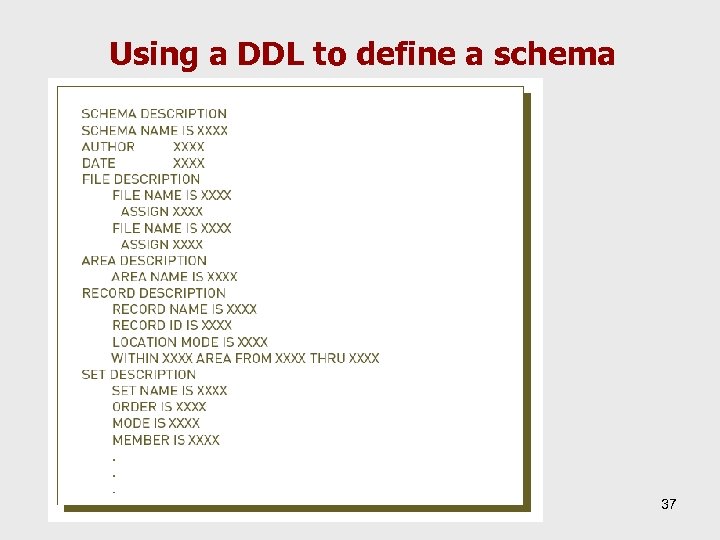 Using a DDL to define a schema 37
 Typical Uses of a Data Dictionary 1. Provide a standard definition of terms and data elements 2. Assist programmers in designing and writing programs 3. Simplify database modification 4. Reduce data redundancy 5. Increase data reliability 6. Speed program development 7. Ease modification of data and information 38
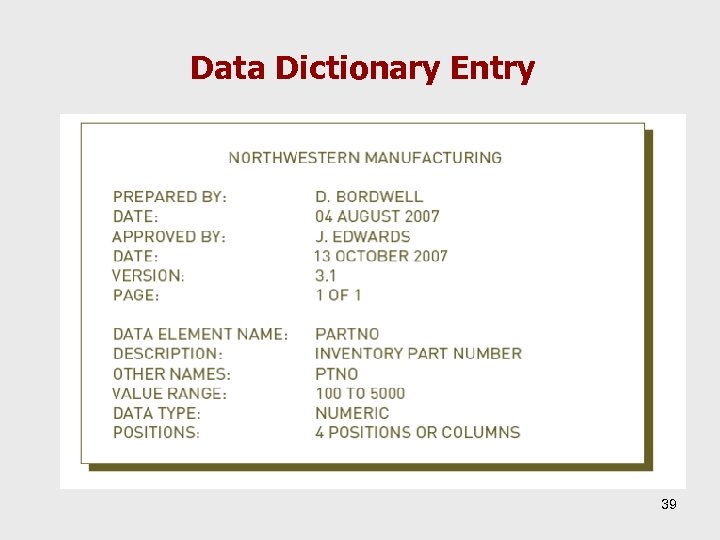 Data Dictionary Entry 39
 Storing and Retrieving Data • One function of a DBMS – To be an interface between an application program and the database • Concurrency control – Method of dealing with a situation in which two or more people need to access the same record in a database at the same time 40
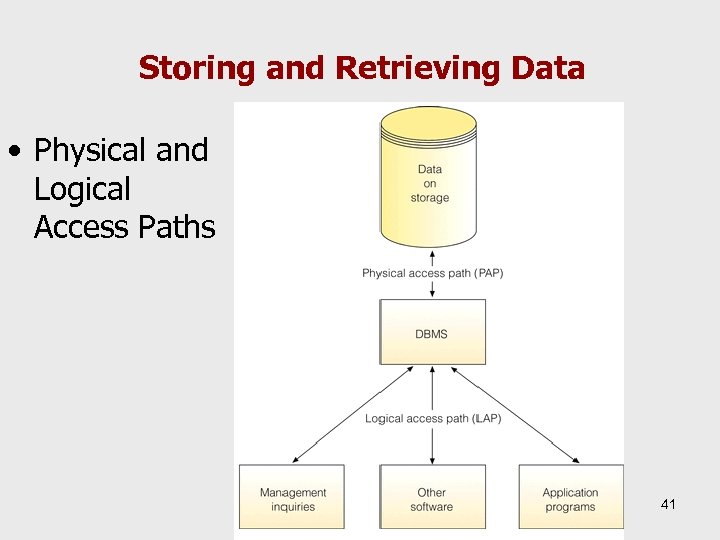 Storing and Retrieving Data • Physical and Logical Access Paths 41
 Manipulating Data and Generating Reports • Query-by-example (QBE) – Visual approach to developing database queries or requests • Data manipulation language (DML) – Commands that manipulate the data in a database • Structured Query Language (SQL) – Standardized data manipulation language – Lets programmers learn one powerful query language and use it on systems ranging from PCs to the largest mainframe computers 42
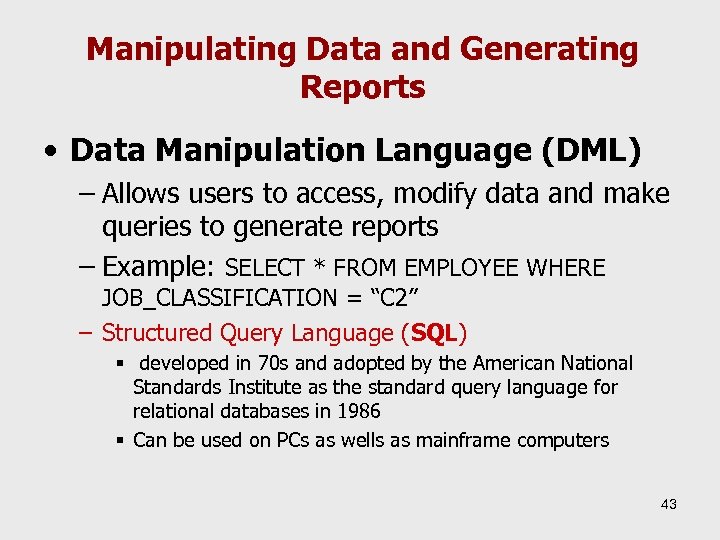 Manipulating Data and Generating Reports • Data Manipulation Language (DML) – Allows users to access, modify data and make queries to generate reports – Example: SELECT * FROM EMPLOYEE WHERE JOB_CLASSIFICATION = “C 2” – Structured Query Language (SQL) § developed in 70 s and adopted by the American National Standards Institute as the standard query language for relational databases in 1986 § Can be used on PCs as wells as mainframe computers 43
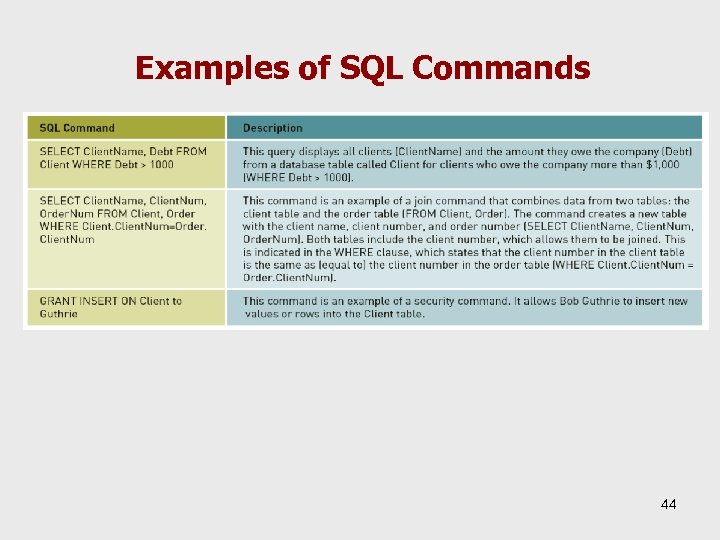 Examples of SQL Commands 44
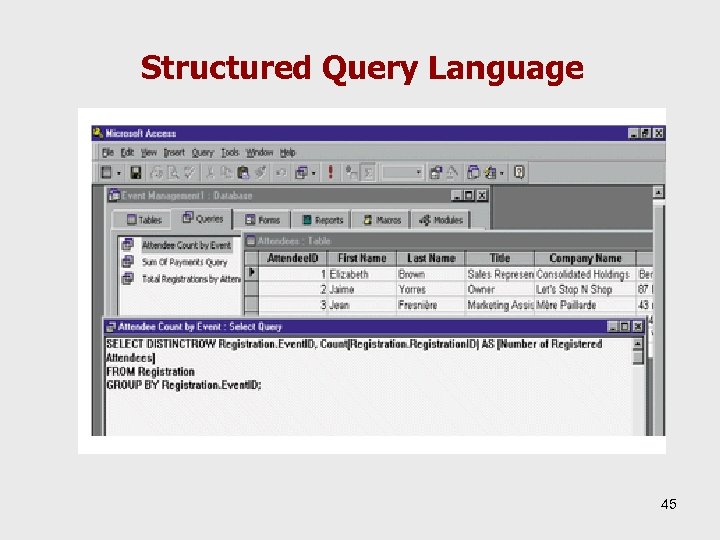 Structured Query Language 45
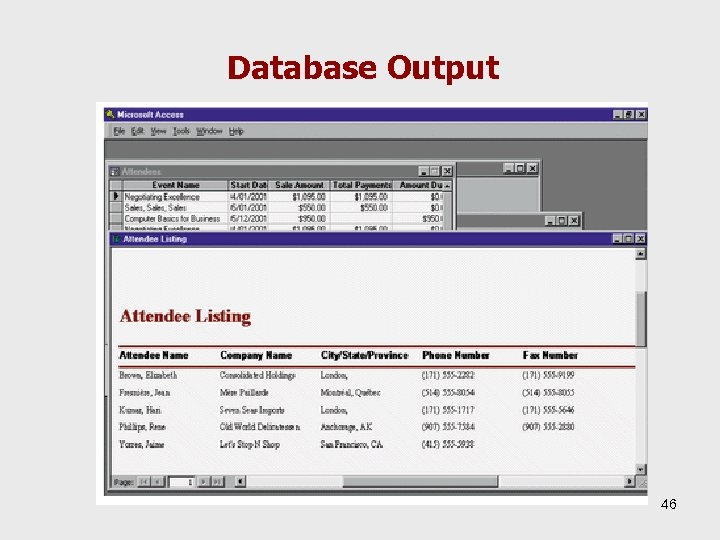 Database Output 46
 Database Output • Exception, scheduled, and demand reports for urgent attention • Documents and reports – Form letters with address labels – Payroll checks and reports – Invoices – Orders for materials and supplies – Financial performance reports 47
 Popular Database Management Systems • Relational DBMSs – – – – – Microsoft Access Corel’s Paradox database File. Maker Pro Lotus Approach Microsoft SQL IBM DB 2 and Informix Oracle Sybase Open source DBMSs: My SQL, Berkeley DB, Postgre. SQL, etc. 48
 Popular Database Management Systems • Popular DBMSs for end users – Microsoft Access and File. Maker Pro • Emerging software – Database as a Service (Daa. S) or Database 2. 0 – Database administration is provided by the service provider 49
 Special-Purpose Database Systems • Morphbank http: //www. morphbank. net/ Morph. Bank is an open web repository of biological images documenting specimen-based research in comparative anatomy, morphological phylogenetics, etc. 50
 Special-Purpose Database Systems – i. Tunes Store music and video catalog – The Internet Movie Database (IMDb) http: //www. imdb. com – an online database of information related to movies, actors, television shows, production crew personnel, video games, and most recently, fictional characters featured in visual entertainment media. – IMDb launched on October 17, 1990, and in 1998 was acquired by Amazon. com. 51
 Selecting a Database Management System • Important characteristics of databases – Database size – Database cost – Concurrent users – Performance – Integration – Vendor 52
 Selecting a Database Management System • • Database size – e. g. 100 million bytes, terabytes Number of concurrent users Performance – speed, memory requirement Integration – compatibility with OS Features – security, documentation, etc. Vendor – support Cost – cost of ownership 53
 Using Databases with Other Software • Database management systems are often used with other software packages or the Internet • Front-end application – Directly interacts with users • Back-end application – Interacts with applications 54
 Integration • Open Database Connectivity (ODBC) – Standards for data transfer and access among different databases – Import, export data and link to other applications – provides a standard software API method for using database management systems (DBMS) – The designers of ODBC aimed to make it independent of programming languages, database systems, and operating systems 55
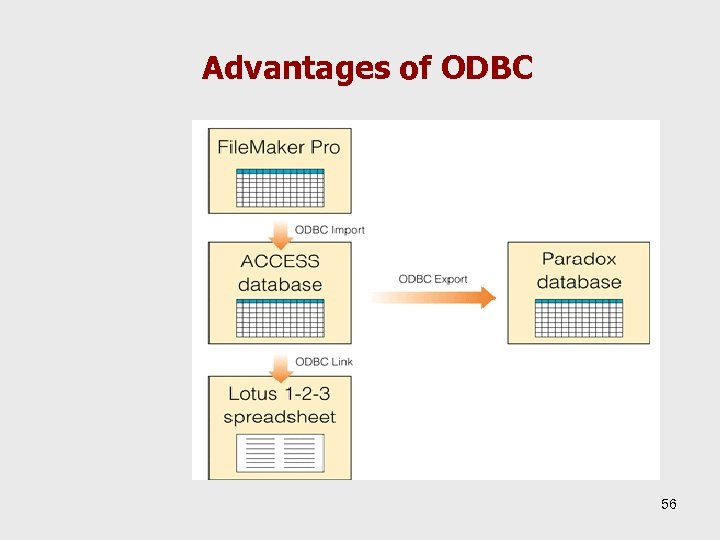 Advantages of ODBC 56
 Linking Databases to the Internet • Semantic Web – Developing a seamless integration of traditional databases with the Internet – Allows people to access and manipulate a number of traditional databases at the same time through the Internet 57
 Database Applications 58
 Data Warehouses, Data Marts, and Data Mining • Data Warehouse - a database that collects business information from many sources in the enterprise, covering all aspects of the company’s processes, products, and customers. • Data Mart – a subset of a data warehouse. • Data Mining - an information analysis tool that involves the automated discovery of patterns and relationships in a data warehouse. 59
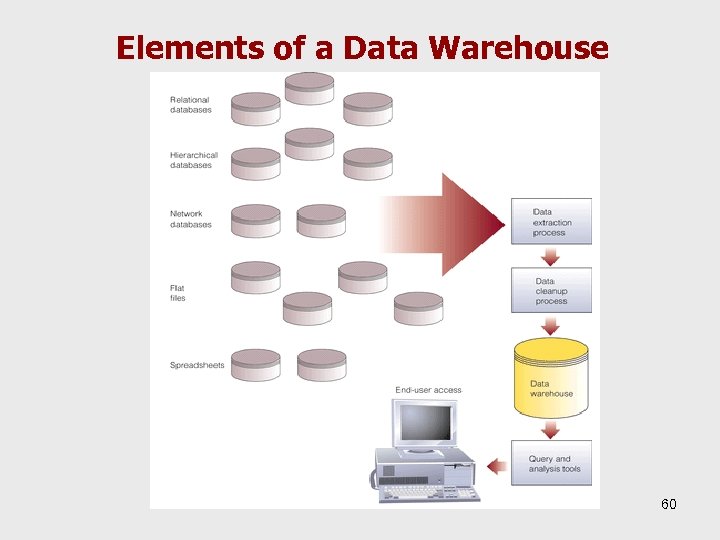 Elements of a Data Warehouse 60
 Data Mining • An information extraction activity whose goal is to discover hidden facts contained in databases • Data mining finds patterns and subtle relationships in data and infers rules that allow the prediction of future results • It is extensively used in marketing to improve customer retension, cross-selling opportunities, campaign management, market, channel and pricing analysis, customer segmentation analysis, etc. 61
 Types of information output 1. Classification – Infer to the defining characteristics – Ex. for classification: classify transactions as fraudulent or not, Classify a credit application as high or low risk (dependent variable is discrete) 2. Clustering – Identify groups sharing characteristics Ex: Customer segmentation as A, B, C (class labels are not known. ) 62
 Types of information output 3. Association – – Identify relationships at one time Ex: age between (20 -29) ^ income(3000 -5000 TL/month) à buys(X, “PC”) [support = 2%, confidence = 60%] 4. Sequencing – Identify relationships recurring over time. Observes similarities in sequential patterns 5. Forecasting – – Estimate future values based on patterns in data Ex. for prediction: How much does a 60 yrs old woman, from Kansascity is likely to spend in the casino? (dependent variable is continuous) 63
 Data mining • What can we learn (examples)? – – – Market segments and customer characteristics Customer buying patterns Fraudulent behavior Evaluation of retail promotions Credit risk analysis • What is not data mining? – query processing. – Expert systems or small ML/statistical programs 64
 Data Mining vs. Data Query • Data Query: – A list of all customers who use a credit card to buy a PC – A list of all students having a GPA of 3. 5 or higher and has studied 4 or less semesters • Data Mining problems: – What is the likelihood of a customer purchasing PC with credit card – Given the characteristics of MIS students predict her SPA in the comming term – What are the characteristics of MIS undergrad students 65
 Techniques • Case-based reasoning is the process of solving new problems based on the solutions of similar past problems. Ex: An auto mechanic who fixes an engine by recalling another car that exhibited similar symptoms is using case-based reasoning. Neural computing (machine learning) • Intelligent agents • Association analysis – Express statistical relationships • Others – Decision trees, genetic algorithms 66
 Business Intelligence • Gathering enough of the right information in a timely manner and usable form • Analyzing information to generate positive impact on business strategy, tactics or operations – Competitive intelligence -> about competitors – Counter-intelligence -> protect information – Knowledge management -> record and share knowledge 67
 Online Analytical Processing (OLAP) • Multidimensional databases and their analytical information display systems • OLAP servers and desktop tools allow high -speed analysis of data involving complex relationships – Ex: combinations of products, regions, channels of distribution, reporting units, time periods 68
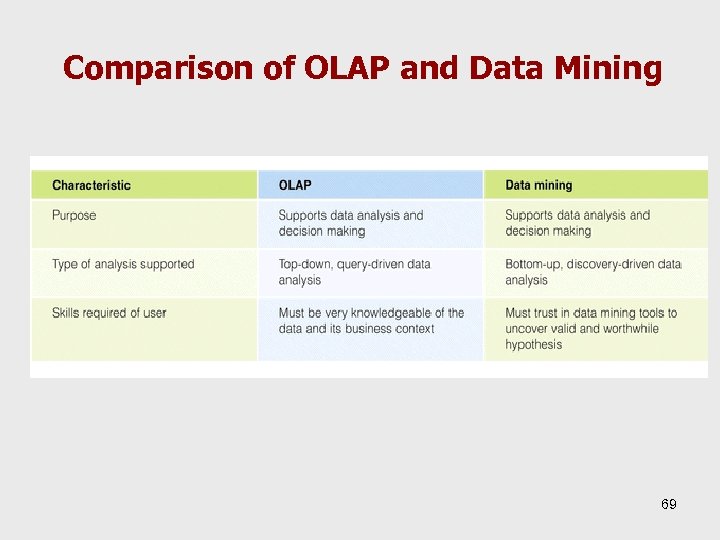 Comparison of OLAP and Data Mining 69
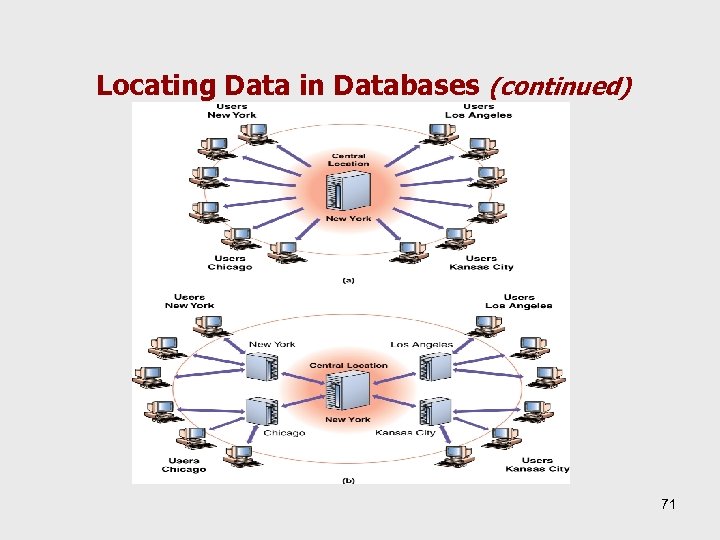
 Locating Data in Databases • Centralized vs. Distributed – Choice will affect user accessibility, query response time, data entry, security, and cost 70
 Locating Data in Databases (continued) 71
 Locating Data in Databases • Centralized database – All the related files are in one physical location – Provides database administrators with the ability to work on a database as a whole at one location – Data consistency is improved and security is easier – Files are only accessible via the centralized host computer – Recovery from disasters is easier – Vulnerable to a single point of failure – Speed problem due to transmission delays 72
 Locating Data in Databases (continued) • Distributed database – Complete copies of a database, or portions of a database, are in more than one location, close to the user – Type 1: Replicated database § Copies of database in many locations § Reduced single-point-of-failure problems § Increased user access responsiveness – Type 2: Partitioned databases § A portion of the database in each location § Each location responsible for its own data 73
 Object-Relational Database Management System • Provides a set of relational database capabilities plus the ability for third parties to add new data types and operations to the database. • Stores the following types of data as objects: – audio – images – Unstructured text – spatial data • Operations are indexing, optimization and retrieval. 74
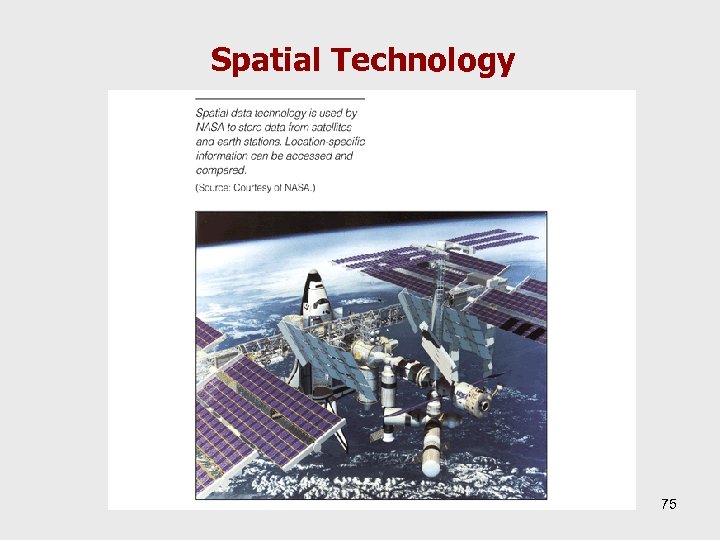 Spatial Technology 75
 Summary • Database – data organized in files • Entity - a generalized class of objects for which data is collected, stored, and maintained. • Attribute - a characteristic of an entity. • DBMS - a group of programs used as an interface between a database and application programs. • Data mining - the automated discovery of patterns and relationships in a data warehouse. 76