


 Скачать презентацию Oracle SGA Memory Management Tirthankar Lahiri Senior Manager
c1775470d72a62628e2f4ddc124d2044.ppt
- Количество слайдов: 81

 Oracle SGA Memory Management Tirthankar Lahiri Senior Manager Distributed Cache and Memory Management Oracle Corporation
 Outline Ÿ Architecture of the Oracle Buffer Cache Ÿ Automatic SGA Memory Management
 Architecture of the Oracle Buffer Cache Ÿ Overview Ÿ Basic buffer cache structure Ÿ Multiple buffer pools Ÿ Multiple block size support Ÿ Configuring the buffer cache Ÿ Diagnosing common performance issues Ÿ New 10 g functionality
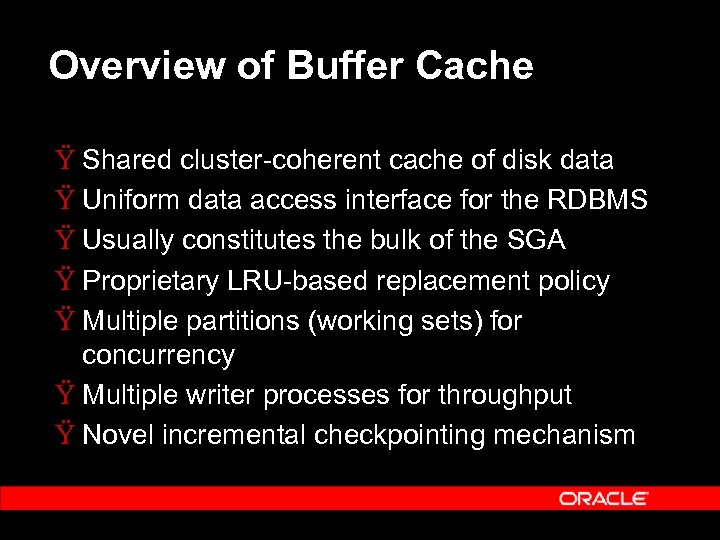 Overview of Buffer Cache Ÿ Shared cluster-coherent cache of disk data Ÿ Uniform data access interface for the RDBMS Ÿ Usually constitutes the bulk of the SGA Ÿ Proprietary LRU-based replacement policy Ÿ Multiple partitions (working sets) for concurrency Ÿ Multiple writer processes for throughput Ÿ Novel incremental checkpointing mechanism
 Basic Buffer Cache Structure Buffer Hash Table Ÿ Buffer Hash Table: Lookup table for locating buffers in the cache Ÿ Number of hash buckets = 2 x #buffers Ÿ Hash buckets are protected by hash latch (name in v$latch is “cache buffers chains”) Ÿ Multiple hash buckets protected by a single latch to save memory Ÿ Number of latches = #buffers / 128
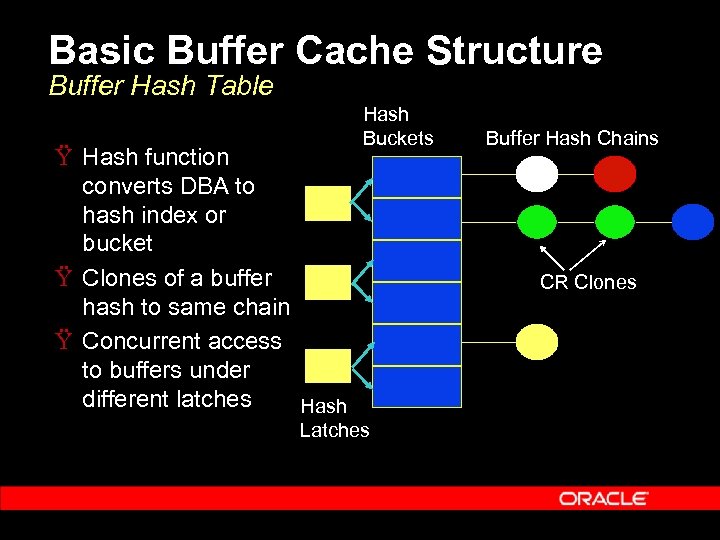 Basic Buffer Cache Structure Buffer Hash Table Ÿ Hash function converts DBA to hash index or bucket Ÿ Clones of a buffer hash to same chain Ÿ Concurrent access to buffers under different latches Hash Buckets Latches Buffer Hash Chains CR Clones
 Basic Buffer Cache Structure Working Sets Ÿ Ÿ Cache is partitioned into multiple “working sets” Sets act as independent cache partitions Each buffer is statically assigned to a working set A working set consists of: – – LRU replacement list Buffer Checkpoint Queue Ÿ Working set is protected by two latches – – “cache buffer lru chains” latch “checkpoint queue” latch Ÿ DB_BLOCK_LRU_LATCHES obsolete from 9 i, we internally pick an appropriate value based on the number of cpus, whether on NUMA machine, etc.
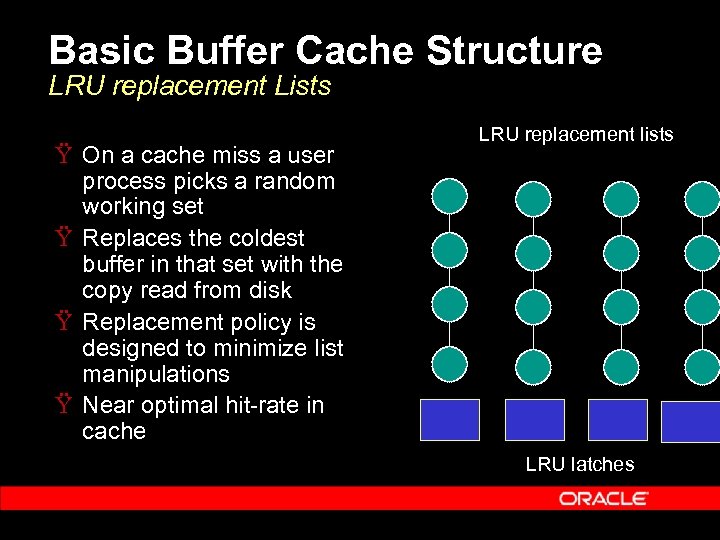 Basic Buffer Cache Structure LRU replacement Lists Ÿ On a cache miss a user process picks a random working set Ÿ Replaces the coldest buffer in that set with the copy read from disk Ÿ Replacement policy is designed to minimize list manipulations Ÿ Near optimal hit-rate in cache LRU replacement lists LRU latches
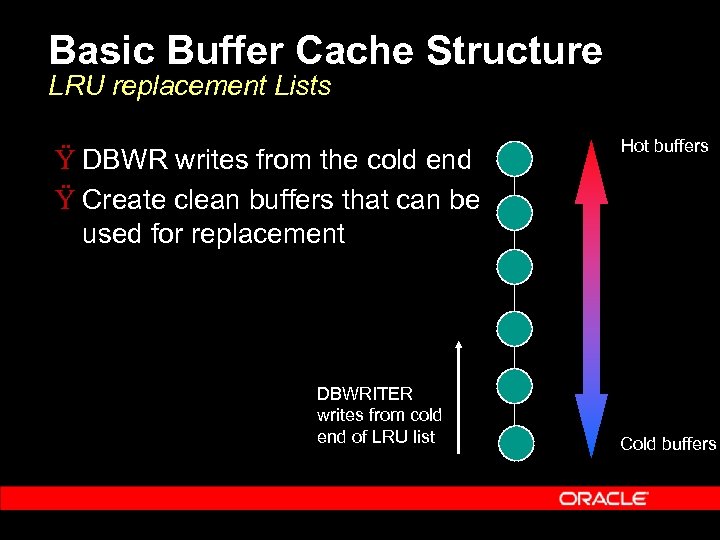 Basic Buffer Cache Structure LRU replacement Lists Ÿ DBWR writes from the cold end Ÿ Create clean buffers that can be used for replacement DBWRITER writes from cold end of LRU list Hot buffers Cold buffers
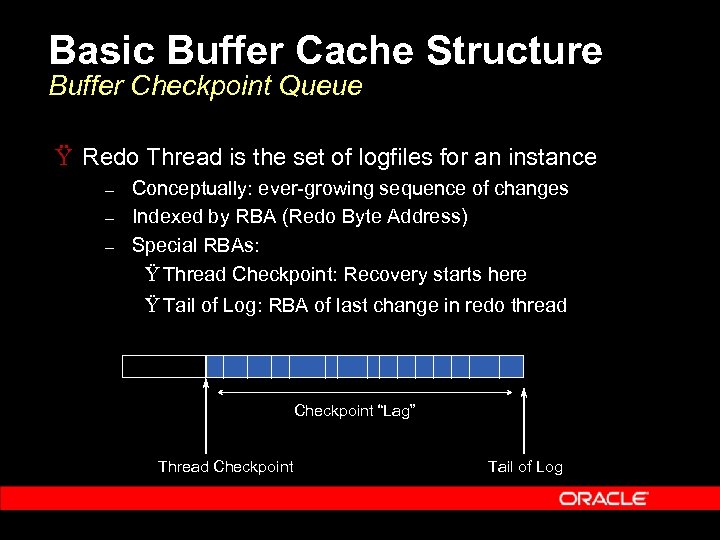 Basic Buffer Cache Structure Buffer Checkpoint Queue Ÿ Redo Thread is the set of logfiles for an instance – – – Conceptually: ever-growing sequence of changes Indexed by RBA (Redo Byte Address) Special RBAs: Ÿ Thread Checkpoint: Recovery starts here Ÿ Tail of Log: RBA of last change in redo thread Checkpoint “Lag” Thread Checkpoint Tail of Log
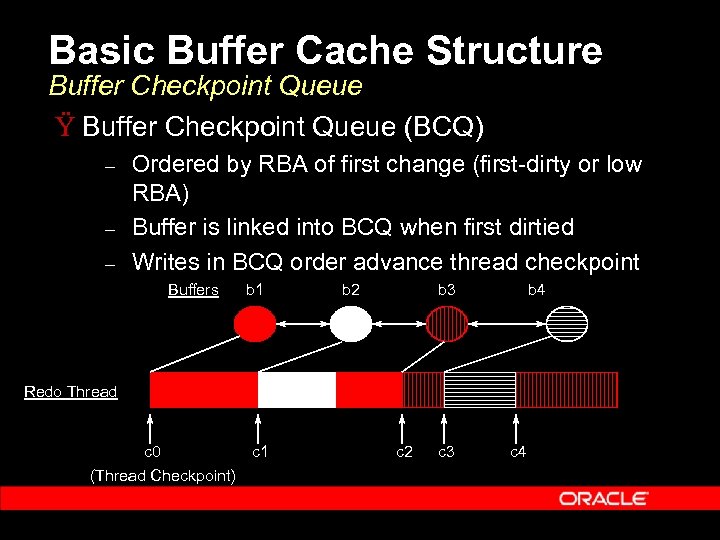 Basic Buffer Cache Structure Buffer Checkpoint Queue Ÿ Buffer Checkpoint Queue (BCQ) – – – Ordered by RBA of first change (first-dirty or low RBA) Buffer is linked into BCQ when first dirtied Writes in BCQ order advance thread checkpoint Buffers b 1 b 2 b 3 b 4 Redo Thread c 0 (Thread Checkpoint) c 1 c 2 c 3 c 4
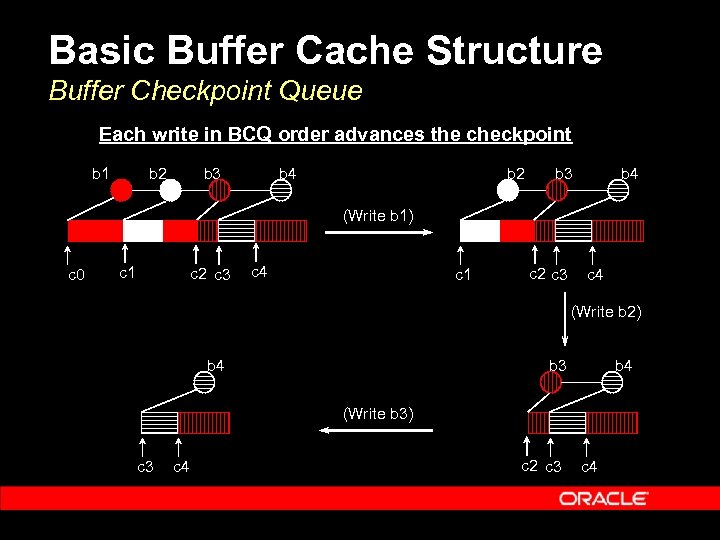 Basic Buffer Cache Structure Buffer Checkpoint Queue Each write in BCQ order advances the checkpoint b 1 b 2 b 3 b 4 (Write b 1) c 0 c 1 c 2 c 3 c 4 (Write b 2) b 4 b 3 b 4 (Write b 3) c 3 c 4 c 2 c 3 c 4
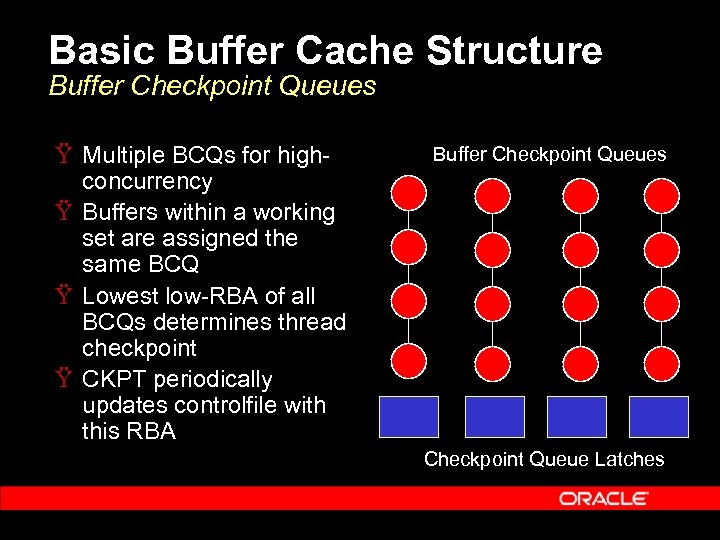 Basic Buffer Cache Structure Buffer Checkpoint Queues Ÿ Multiple BCQs for highconcurrency Ÿ Buffers within a working set are assigned the same BCQ Ÿ Lowest low-RBA of all BCQs determines thread checkpoint Ÿ CKPT periodically updates controlfile with this RBA Buffer Checkpoint Queues Checkpoint Queue Latches
 Multiple Buffer Pools Ÿ Working sets can be divided between “buffer pools” Ÿ Primary (DEFAULT) pool always exists – Parameter governing size is DB_CACHE_SIZE Ÿ Optional KEEP cache: for frequently accessed objects that should be kept in memory Ÿ Optional RECYCLE cache: for objects with very little locality that should be purged Ÿ Parameters: – – DB_RECYCLE_CACHE_SIZE DB_KEEP_CACHE_SIZE Ÿ Buffer Pools are useful for simple schemas Ÿ Not recommended for Oracle Apps: 60, 000 + objects.
 Multiple Blocksizes Ÿ Allows buffer caches for blocksizes other than standard blocksize (DB_BLOCK_SIZE) Ÿ Parameters: DB_
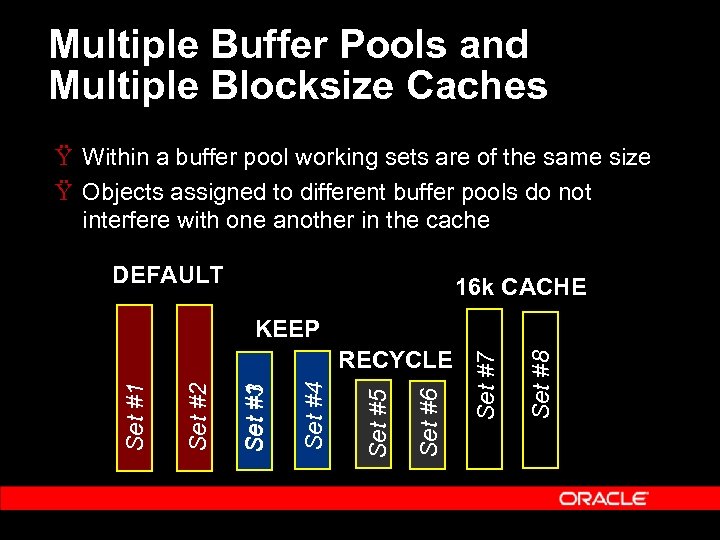 Multiple Buffer Pools and Multiple Blocksize Caches Ÿ Within a buffer pool working sets are of the same size Ÿ Objects assigned to different buffer pools do not interfere with one another in the cache DEFAULT 16 k CACHE Set #8 Set #6 Set #5 Set #4 Set #1 #3 Set #2 Set #1 RECYCLE Set #7 KEEP
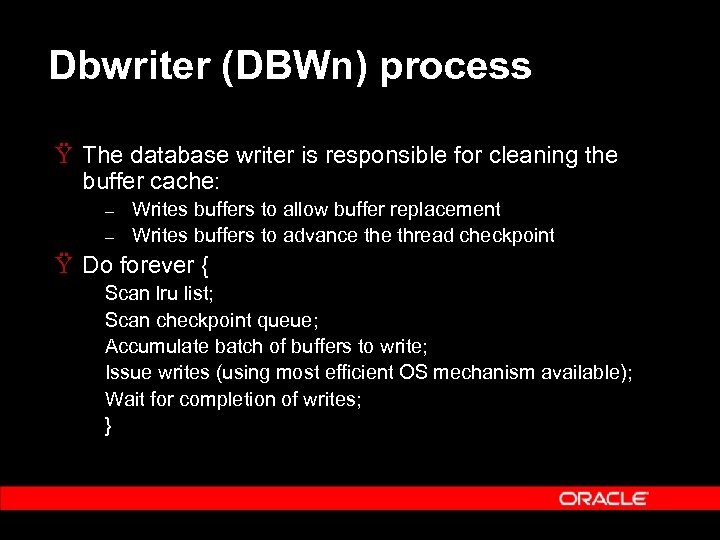 Dbwriter (DBWn) process Ÿ The database writer is responsible for cleaning the buffer cache: – – Writes buffers to allow buffer replacement Writes buffers to advance thread checkpoint Ÿ Do forever { Scan lru list; Scan checkpoint queue; Accumulate batch of buffers to write; Issue writes (using most efficient OS mechanism available); Wait for completion of writes; }
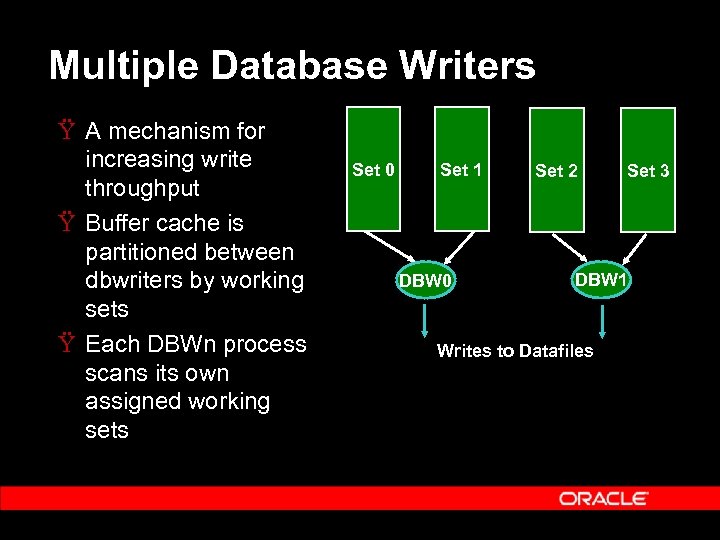 Multiple Database Writers Ÿ A mechanism for increasing write throughput Ÿ Buffer cache is partitioned between dbwriters by working sets Ÿ Each DBWn process scans its own assigned working sets Set 0 Set 1 DBW 0 Set 2 Set 3 DBW 1 Writes to Datafiles
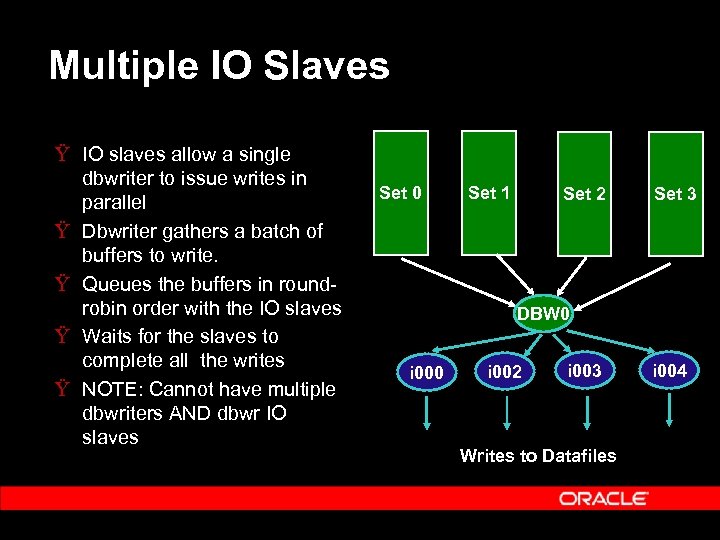 Multiple IO Slaves Ÿ IO slaves allow a single dbwriter to issue writes in parallel Ÿ Dbwriter gathers a batch of buffers to write. Ÿ Queues the buffers in roundrobin order with the IO slaves Ÿ Waits for the slaves to complete all the writes Ÿ NOTE: Cannot have multiple dbwriters AND dbwr IO slaves Set 0 Set 1 Set 2 Set 3 DBW 0 i 002 i 003 Writes to Datafiles i 004
 Configuring Buffer Cache Ÿ Configuring buffer cache size Ÿ Configuring multiple writer processes Ÿ Configuring checkpointing
 Configuring Buffer Cache Size Ÿ Parameter for buffer cache size: DB_CACHE_SIZE Ÿ This is preferred to the old DB_BLOCK_BUFFERS parameter Ÿ Includes all memory for the buffer cache including metadata (buffer headers) Ÿ This parameter is required for new buffer cache functionality – – – Dynamic grow/shrink Buffer cache size advice Multiple blocksizes Ÿ DB_BLOCK_BUFFERS should be set only with VLM (extended memory on 32 bit systems)
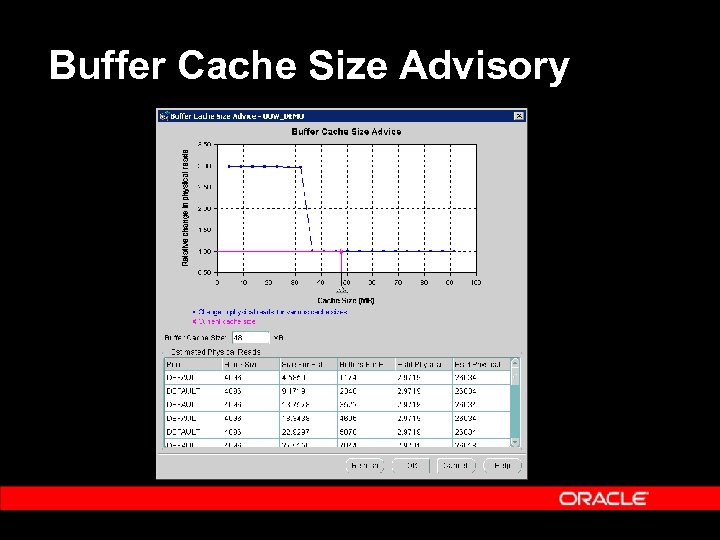
 Buffer Cache Size Advisory Ÿ Performs online simulation of the workload for different cache sizes Ÿ Very low overhead (<0. 1%) in terms of cpu and memory usage Ÿ Predicts change in I/Os as the buffer cache size is changed from 10% to 200% of the current size Ÿ Simulation Results (for all buffer pools) published in V$DB_CACHE_ADVICE Ÿ On by default in 9. 2 and 10 g. R 1; can be turned off using STATISTICS_LEVEL parameter
 Buffer Cache Size Advisory
 Configuring Multiple Writers Ÿ For most systems 1 database writer is enough – A dbwriter concurrently issues upto 4 k writes in parallel Ÿ Reasons to consider multiple IO slaves: – Async IO is not supported and a single dbwriter would have to issue successive synchronous writes. Ÿ Reasons to consider multiple dbwriters include high wait times for: – – Free buffer waits (cache not being cleaned fast enough) Logfile switch: checkpoint incomplete (checkpoint not advanced out of previous log, blocking redo generation) Ÿ Also consider multiple dbwriters if a single dbwriter consumes 100% of a cpu.
 When are Multiple Writers Really Needed? Ÿ An important myth to dispell: – “Write throughput is always critical for performance” Ÿ Many DBAs will configure large numbers of dbwriters or IO slaves even though this is unnecessary for performance Ÿ Writes are a background activity Ÿ A user process normally never waits for dbwriter Ÿ If there are negligible wait times on “free buffer wait” and “log file switch” more dbwriters or IO slaves will not help performance
 When are Multiple Writers Really Needed? Ÿ Another myth to dispell: – “Multiple dbwriters will help me get more bandwidth out of my IO subsystem” Ÿ Free buffer waits due to slow writes to saturated disks will not go away with multiple dbwriters or IO slaves Ÿ A good indication is the time spent on “db file sequential read” (foreground reads). Ÿ If this time is high the bottleneck is the disk, not the number of dbwriters.
 Configuring Checkpointing Ÿ Recovery time composed of two factors: – – Redo Log I/O: Large sequential reads Data Block I/O: Small random reads & writes Ÿ Incremental (fast-start) checkpointing: – – – Writes are trickled out from the BCQs in RBA order Avoids I/O bursts (as with normal checkpointing) Minimal impact on normal throughput
 Configuring Checkpointing Parameters Ÿ There are multiple checkpointing parameters – – FAST_START_IO_TARGET LOG_CHECKPOINT_INTERVAL/TIMEOUT Ÿ New preferred parameter in Oracle 9 i: – FAST_START_MTTR_TARGET – Specifies MTTR (mean time to recover) Ÿ Database Writer computes a target RBA “T” – – – Tredo: Time to apply redo from T to tail of log Tdata: Time to read and write buffers on BCQ with low RBA >T Tredo + Tdata <= FAST_START_MTTR_TARGET
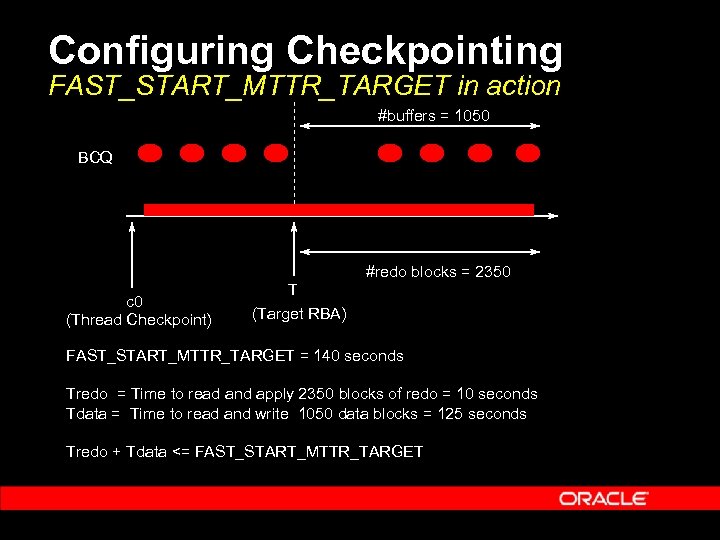 Configuring Checkpointing FAST_START_MTTR_TARGET in action #buffers = 1050 BCQ #redo blocks = 2350 c 0 (Thread Checkpoint) T (Target RBA) FAST_START_MTTR_TARGET = 140 seconds Tredo = Time to read and apply 2350 blocks of redo = 10 seconds Tdata = Time to read and write 1050 data blocks = 125 seconds Tredo + Tdata <= FAST_START_MTTR_TARGET
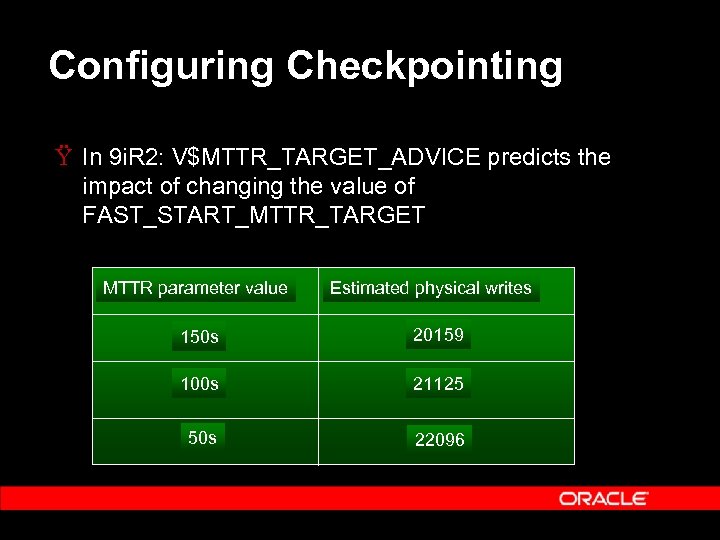 Configuring Checkpointing Ÿ In 9 i. R 2: V$MTTR_TARGET_ADVICE predicts the impact of changing the value of FAST_START_MTTR_TARGET MTTR parameter value Estimated physical writes 150 s 20159 100 s 21125 50 s 22096
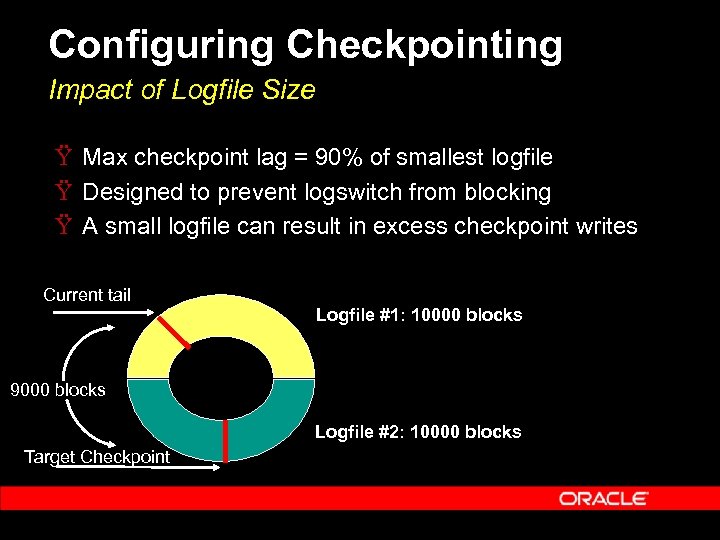 Configuring Checkpointing Impact of Logfile Size Ÿ Max checkpoint lag = 90% of smallest logfile Ÿ Designed to prevent logswitch from blocking Ÿ A small logfile can result in excess checkpoint writes Current tail Logfile #1: 10000 blocks 9000 blocks Logfile #2: 10000 blocks Target Checkpoint
 Configuring Checkpointing Impact of Logfile Size Ÿ New in 10 g: Logfile Size Advice Ÿ Computes the optimal logfile size for the instance – This size of logfile will produce no additional checkpoint writes beyond those caused by FAST_START_MTTR_TARGET parameter Ÿ This optimal size of logfile is published in V$INSTANCE_RECOVERY
 Configuring Checkpointing Determining Extra I/Os Caused by Checkpointing Ÿ Examine the following system statistics – – “physical writes”: total number of blocks written “physical writes non checkpoint”: theoretical number of blocks that would have been written in the absence of checkpointing Ÿ The difference between the two values tells you how many extra writes checkpointing caused
 Performance Issues Ÿ Two sporadic performance issues that can usually be traced back to the application or configuration: – – Contention on “cache buffers chains” latch High wait time for “buffer busy waits” Ÿ Other common issues: – – High wait time for “db file sequential read” High wait time for “free buffer waits”
 Performance Issues Hash Latch Contention Ÿ Usually one or more hot blocks under the same latch, worse with larger blocksizes (16 k, 32 k) Ÿ To find the blocks contributing to this contention: 1. 2. 3. Determine the hash latches with the highest number of sleeps from v$latch_children Determine the buffers they protect from x$bh: the fixed table on buffer headers (join the addr column in v$latch_children with the hladdr column in x$bh) Look for buffers with high touch counts (tch column).
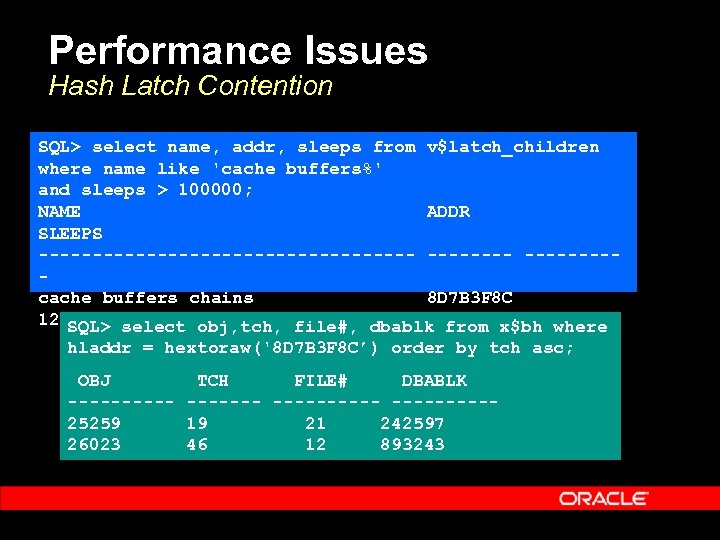 Performance Issues Hash Latch Contention SQL> select name, addr, sleeps from v$latch_children where name like 'cache buffers%' and sleeps > 100000; NAME ADDR SLEEPS ------------------cache buffers chains 8 D 7 B 3 F 8 C 128056 SQL> select obj, tch, file#, dbablk from x$bh where hladdr = hextoraw('8 D 7 B 3 F 8 C’) order by tch asc; OBJ TCH FILE# DBABLK ---------- 25259 19 21 242597 26023 46 12 893243
 Performance Issues Hash Latch Contention Ÿ If possible: restart instance with a different value of hash buckets and hash latches, for example: – – _DB_BLOCK_HASH_LATCHES = 2 x present number _DB_BLOCK_HASH_BUCKETS = 1. 5 x present number Ÿ The hot buffers will now move to a different set of buckets and latches Ÿ The hot buffers that you find in both cases (the intersection of the two sets) are the likely culprits Ÿ We are working on automating this determination of hot buffers in a future release
 Performance Issues High Wait Time for “Buffer Busy Waits” Ÿ Buffer busy waits are usually application level contention for buffers in the cache. Ÿ One exception: – – P 3 value in v$session_wait of “ 130” Implies that buffer being read by another session This is not a contention wait. Can be caused by concurrent table scans accessing the same blocks. In 10 g this is a separate event: “read by other session”
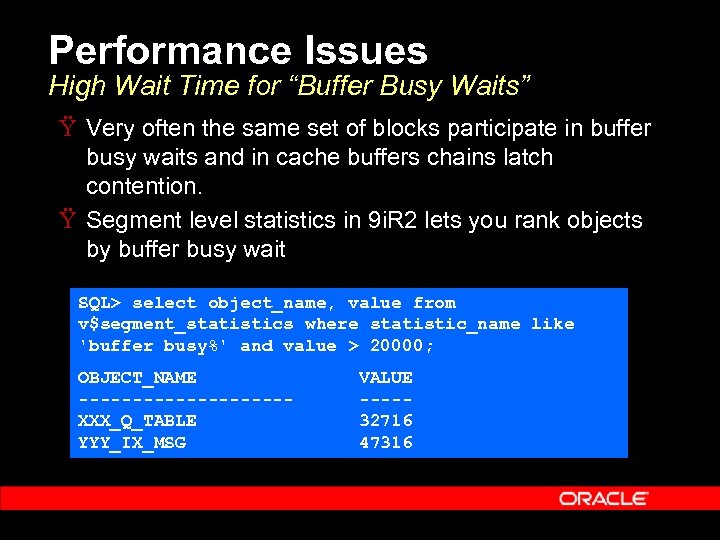 Performance Issues High Wait Time for “Buffer Busy Waits” Ÿ Very often the same set of blocks participate in buffer busy waits and in cache buffers chains latch contention. Ÿ Segment level statistics in 9 i. R 2 lets you rank objects by buffer busy wait SQL> select object_name, value from v$segment_statistics where statistic_name like 'buffer busy%' and value > 20000; OBJECT_NAME VALUE ---------- XXX_Q_TABLE 32716 YYY_IX_MSG 47316
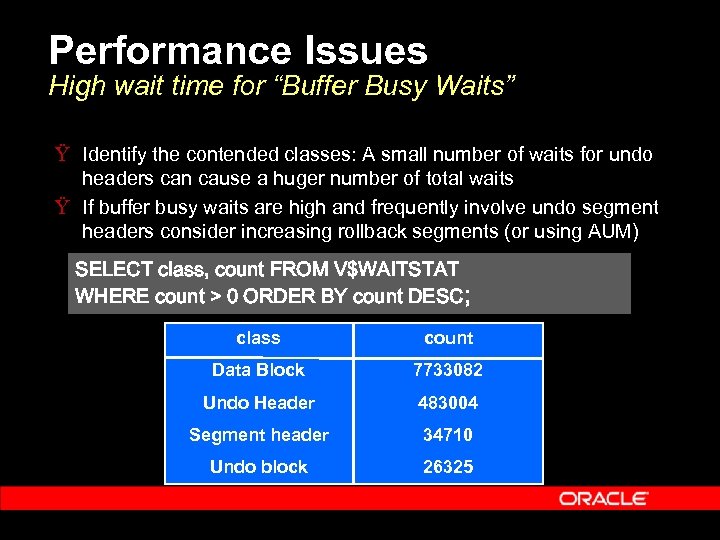 Performance Issues High wait time for “Buffer Busy Waits” Ÿ Identify the contended classes: A small number of waits for undo headers can cause a huger number of total waits Ÿ If buffer busy waits are high and frequently involve undo segment headers consider increasing rollback segments (or using AUM) SELECT class, count FROM V$WAITSTAT WHERE count > 0 ORDER BY count DESC; class count Data Block 7733082 Undo Header 483004 Segment header 34710 Undo block 26325
 Performance Issues High wait time for “db file sequential read” Ÿ If wait time for reads is high, consider: – – – Tuning SQL statements that issue the most disk reads (Sort V$SQL by DISK_READS and BUFFER_GETS) Growing the buffer cache based on cache advice if the cache appears undersized If average wait time is high (10+ msec) Ÿ Reducing write IOs (tune down checkpointing) Ÿ Adding more IO capacity
 Performance Issues High wait time for “free buffer waits” Ÿ If time spent waiting for reads is also high, this is probably an IO capacity problem Ÿ Over-aggressive checkpointing can also cause this: dbwriter spends most of its bandwidth writing out hot buffers and doesn’t clean the cold buffers Ÿ If neither of the above is true, consider increasing dbwriters
 Performance Issues Easier Performance Troubleshooting in 10 g Ÿ Automatic Database Diagnostic Monitor (ADDM) will automatically generate recommendations. Ÿ Session states are constantly sampled by MMON Ÿ Samples are logged in a system-wide history buffer: V$ACTIVE_SESSION_HISTORY Ÿ The history is periodically written to disk (Automatic Workload Repository or AWR) Ÿ ADDM analyzes the samples and quickly identifies the top SQL and top objects associated with the different waits making these drilldowns easier
 Performance Issues Easier Performance Troubleshooting in 10 g Ÿ A few other performance debugging aids: – – – V$EVENT_HISTOGRAM: histogram of wait-time distributions for different wait events V$FILE_HISTOGRAM: histogram of IO time distributions on different datafles V$SESSION_WAIT_HISTORY: history of recent waits by each session
 New 10 g Functionality Ÿ Prewarm buffer cache – – Preloads buffer cache after startup allowing faster rampup No user intervention needed, works transparently Ÿ Fast drop/truncate Avoids full cache scans for drops and truncates. – Time reduces from minutes to seconds on a large cache Ÿ ALTER SYSTEM FLUSH BUFFER_CACHE – For testing purposes only – Allows apps developers to purge previous cached contents – Successive test runs can start from a clean buffer cache –

 Automatic SGA Memory Management Outline Ÿ Ÿ Ÿ Ÿ Ÿ Overview of SGA Dynamic SGA Memory Advisors Drawbacks of Manual SGA Tuning Introducing Automatic SGA Memory Management Overview of Automatic SGA Management Benefits of Automatic SGA Management Using Automatic SGA Management Architecture Summary
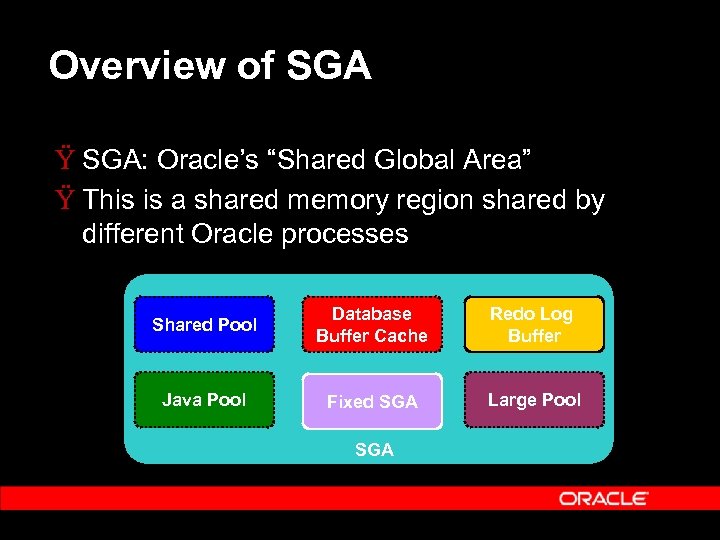 Overview of SGA Ÿ SGA: Oracle’s “Shared Global Area” Ÿ This is a shared memory region shared by different Oracle processes Shared Pool Database Buffer Cache Redo Log Buffer Java Pool Fixed SGA Large Pool SGA
 Overview of SGA Ÿ The SGA comprises multiple components: – – – Shared pool: Mostly for caching shared cursors Buffer cache: Cache of disk data Large pool: Large allocations (e. g. RMAN backup buffers, PQ message buffers, etc. ) Java pool: Java allocations and for caching java objects Log buffer: In memory buffer for redo generation Streams Pool: New in 10 g, for buffering inbound and outbound logical change records
 Overview of SGA Ÿ The unit of allocation of a component is a “granule” Ÿ Depending on platform and total SGA size granule size can be 4 M, 8 M, or 16 M Ÿ In 9 i the Dynamic SGA feature was introduced and allowed the user to dynamically resize components in units of granules
 Dynamic SGA Parameters Ÿ SGA_MAX_SIZE defines the maximum size of SGA – – Used for reserving virtual memory address space at instance startup Cannot be changed dynamically Ÿ Dynamic parameters for Buffer Cache – – DB_CACHE_SIZE, DB_KEEP/RECYCLE_CACHE_SIZE, DB_
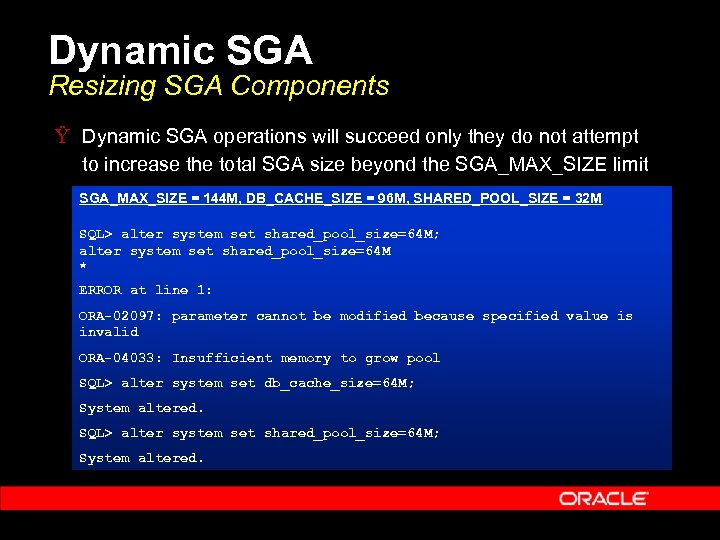 Dynamic SGA Resizing SGA Components Ÿ Dynamic SGA operations will succeed only they do not attempt to increase the total SGA size beyond the SGA_MAX_SIZE limit SGA_MAX_SIZE = 144 M, DB_CACHE_SIZE = 96 M, SHARED_POOL_SIZE = 32 M SQL> alter system set shared_pool_size=64 M; alter system set shared_pool_size=64 M * ERROR at line 1: ORA-02097: parameter cannot be modified because specified value is invalid ORA-04033: Insufficient memory to grow pool SQL> alter system set db_cache_size=64 M; System altered. SQL> alter system set shared_pool_size=64 M; System altered.
 Memory Advisories Ÿ Buffer Cache Advice (introduced in 9 i. R 1): – – V$DB_CACHE_ADVICE view Predicts physical reads for different cache sizes Ÿ Shared Pool Advice (in 9 i. R 2): – – V$SHARED_POOL_ADVICE view Predicts parse time savings from having different sizes of shared pool Ÿ Java Pool Advice (in 9 i. R 2): – – V$JAVA_POOL_ADVICE view Predicts java class load time savings from having different sizes of java pool
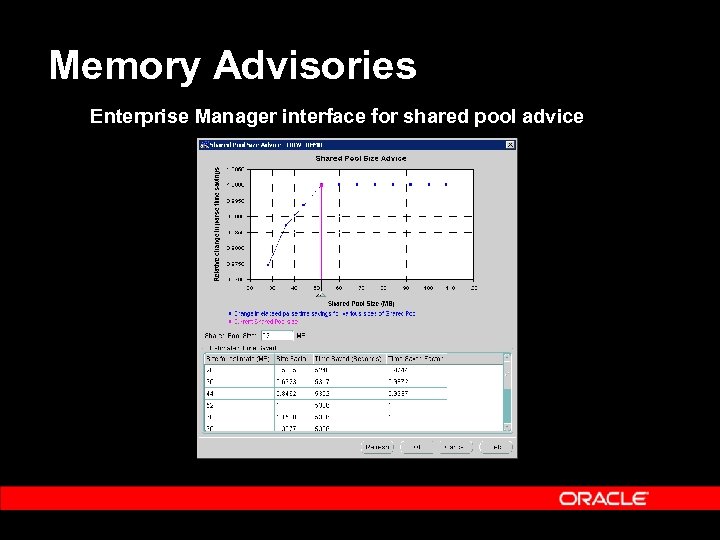 Memory Advisories Enterprise Manager interface for shared pool advice
 Memory Advisories Ÿ Advisories allow better sizing for SGA components: – – Eliminate repeated trial and error Highly accurate, based on actual workload Ÿ Dynamic SGA means that the advisory recommendations can be implemented online Ÿ However the actual task of adjusting component sizes was still left to the DBA
 Drawbacks of Manual SGA Management Ÿ Typically the SGA parameters are configured once and not reconfigured till there is a problem Ÿ Undersizing problems: Ÿ Poor performance (excess IO, parses) Ÿ Out-of-memory errors terminate application (ORA-4031) Ÿ Oversizing problems: Ÿ Wastes memory Ÿ Involves configuring for the worst-case: e. g. if a nightly batch job requires a large size of “large pool, the DBA will usually permanently configure LARGE_POOL_SIZE to that value
 Introducing Automatic SGA Memory Management Ÿ Auto SGA uses the dynamic SGA mechanism and the memory advisory mechanism: – – – Automatically sizes SGA components Uses advisories to trade off memory Memory is transferred to where most needed Ÿ This automated operation is transparent to the user
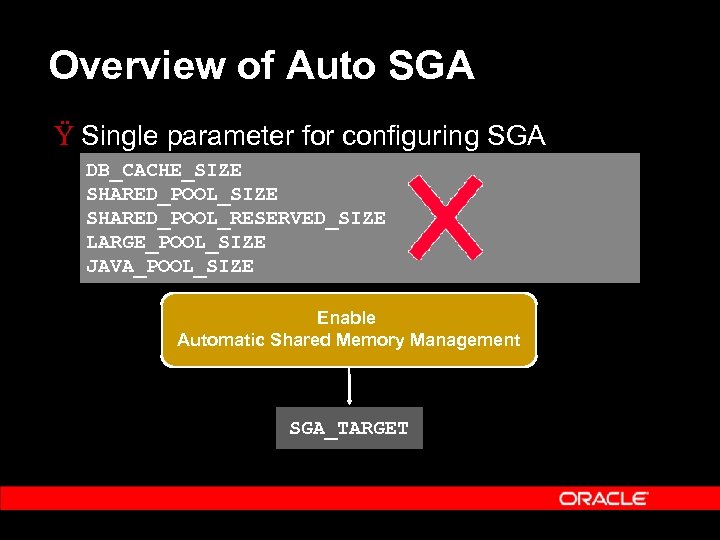 Overview of Auto SGA Ÿ Single parameter for configuring SGA DB_CACHE_SIZE SHARED_POOL_RESERVED_SIZE LARGE_POOL_SIZE JAVA_POOL_SIZE Enable Automatic Shared Memory Management SGA_TARGET
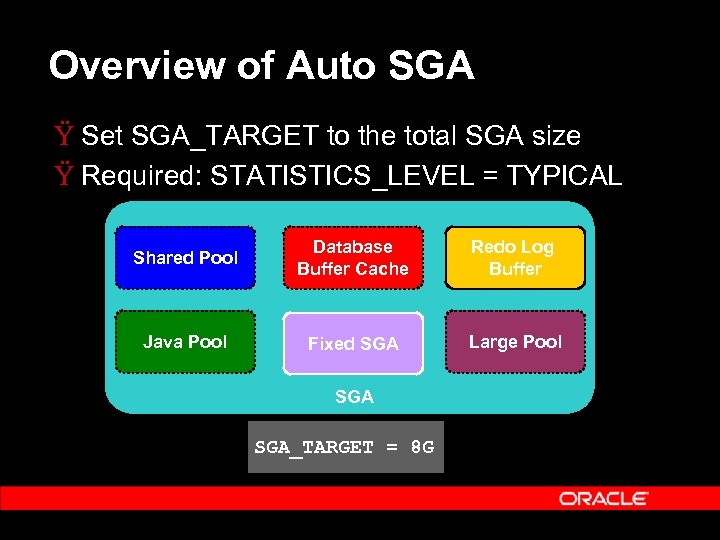 Overview of Auto SGA Ÿ Set SGA_TARGET to the total SGA size Ÿ Required: STATISTICS_LEVEL = TYPICAL Shared Pool Database Buffer Cache Redo Log Buffer Java Pool Fixed SGA Large Pool SGA_TARGET = 8 G
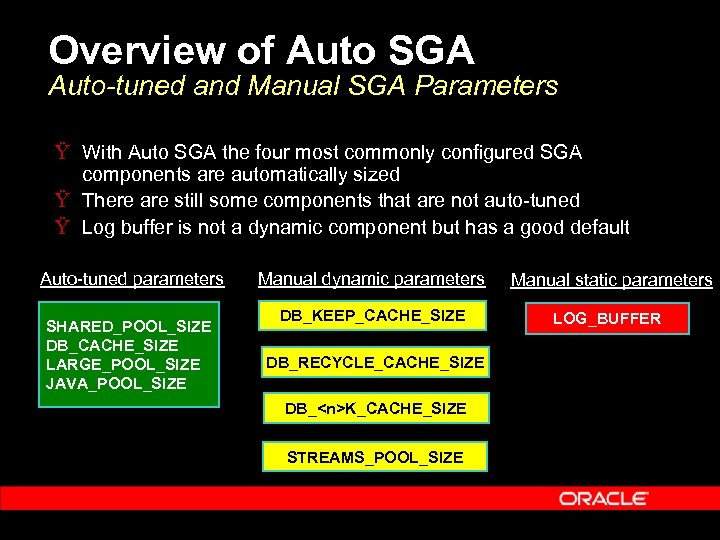 Overview of Auto SGA Auto-tuned and Manual SGA Parameters Ÿ With Auto SGA the four most commonly configured SGA components are automatically sized Ÿ There are still some components that are not auto-tuned Ÿ Log buffer is not a dynamic component but has a good default Auto-tuned parameters SHARED_POOL_SIZE DB_CACHE_SIZE LARGE_POOL_SIZE JAVA_POOL_SIZE Manual dynamic parameters Manual static parameters DB_KEEP_CACHE_SIZE LOG_BUFFER DB_RECYCLE_CACHE_SIZE DB_
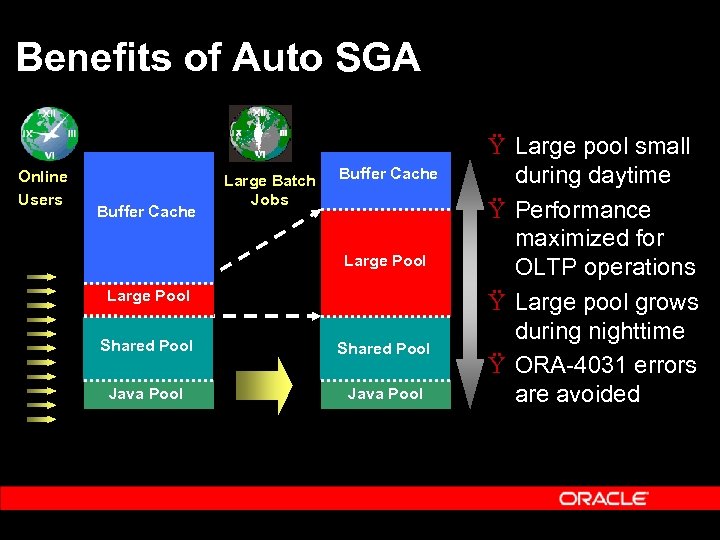 Benefits of Auto SGA Online Users Buffer Cache Large Batch Jobs Buffer Cache Large Pool Shared Pool Java Pool Ÿ Large pool small during daytime Ÿ Performance maximized for OLTP operations Ÿ Large pool grows during nighttime Ÿ ORA-4031 errors are avoided
 Using Auto SGA_TARGET Parameter Ÿ Includes everything in the SGA: – – – Fixed SGA and other internal allocations Automatically sized SGA components Manual SGA components Ÿ Allows precise sizing of the total shared memory allocation by Oracle
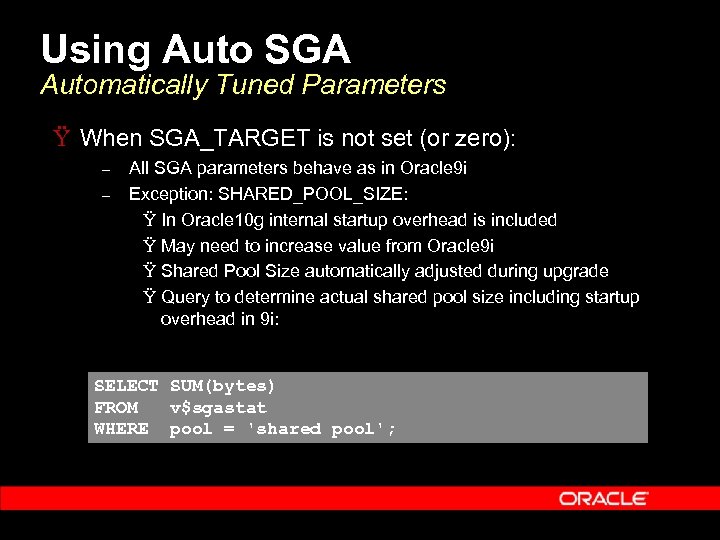 Using Auto SGA Automatically Tuned Parameters Ÿ When SGA_TARGET is not set (or zero): – – All SGA parameters behave as in Oracle 9 i Exception: SHARED_POOL_SIZE: Ÿ In Oracle 10 g internal startup overhead is included Ÿ May need to increase value from Oracle 9 i Ÿ Shared Pool Size automatically adjusted during upgrade Ÿ Query to determine actual shared pool size including startup overhead in 9 i: SELECT SUM(bytes) FROM v$sgastat WHERE pool = 'shared pool';
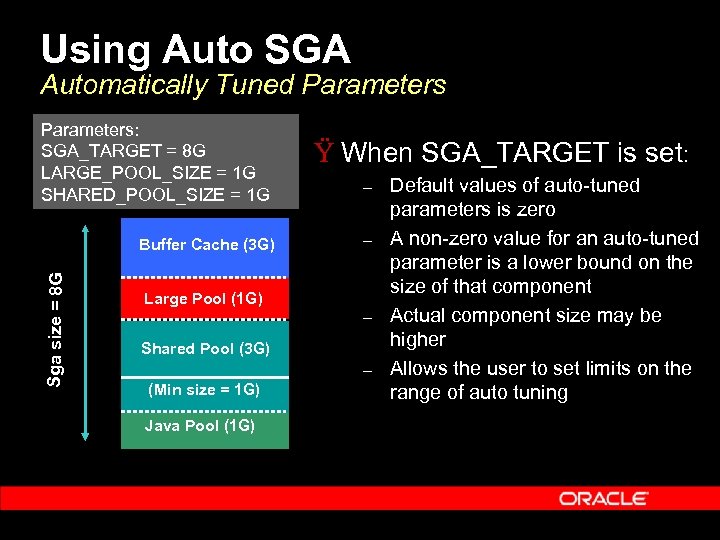 Using Auto SGA Automatically Tuned Parameters: SGA_TARGET = 8 G LARGE_POOL_SIZE = 1 G SHARED_POOL_SIZE = 1 G Sga size = 8 G Buffer Cache (3 G) Ÿ When SGA_TARGET is set: – – Large Pool (1 G) – Shared Pool (3 G) – (Min size = 1 G) Java Pool (1 G) Default values of auto-tuned parameters is zero A non-zero value for an auto-tuned parameter is a lower bound on the size of that component Actual component size may be higher Allows the user to set limits on the range of auto tuning
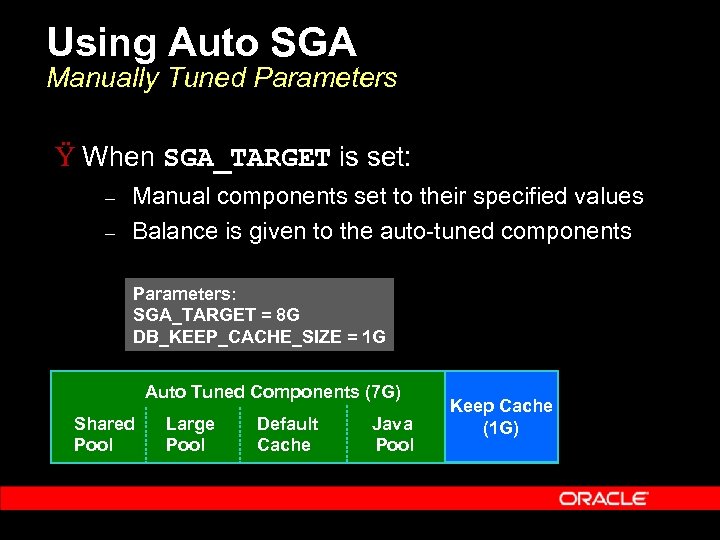 Using Auto SGA Manually Tuned Parameters Ÿ When SGA_TARGET is set: – – Manual components set to their specified values Balance is given to the auto-tuned components Parameters: SGA_TARGET = 8 G DB_KEEP_CACHE_SIZE = 1 G Auto Tuned Components (7 G) Shared Pool Large Pool Default Cache Java Pool Keep Cache (1 G)
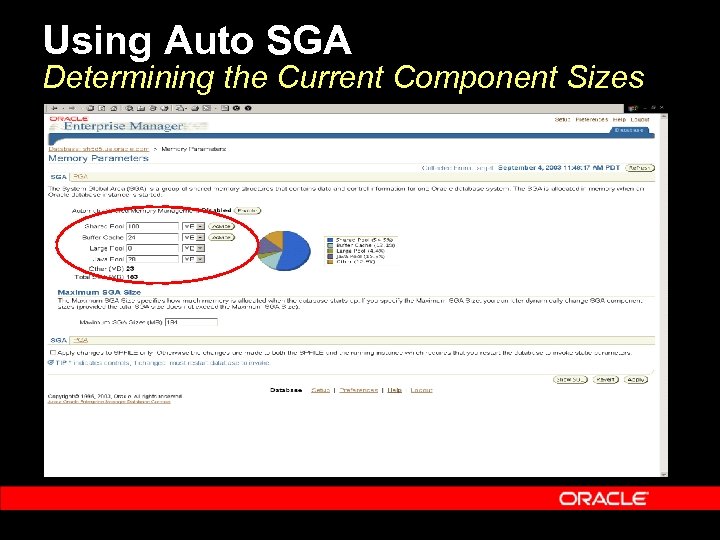 Using Auto SGA Determining the Current Component Sizes
 Using Auto SGA Monitoring the Operation of Auto SGA Ÿ If you wish to monitor Auto SGA and examine the resize decisions it made: – – V$SGA_DYNAMIC_COMPONENTS has the current status of all memory components V$SGA_RESIZE_OPS has a circular history buffer of the last 400 SGA resize requests
 Using Auto SGA Dynamic resize of SGA parameters Ÿ Dynamic resize supported for: – – – SGA_TARGET Auto tuned SGA components Manually configured SGA components Ÿ In addition Automatic SGA management can be dynamically enabled or disabled
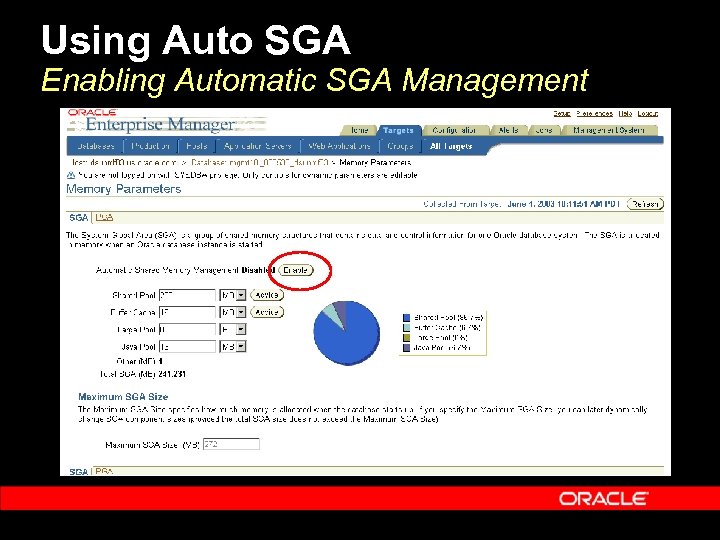 Using Auto SGA Enabling Automatic SGA Management
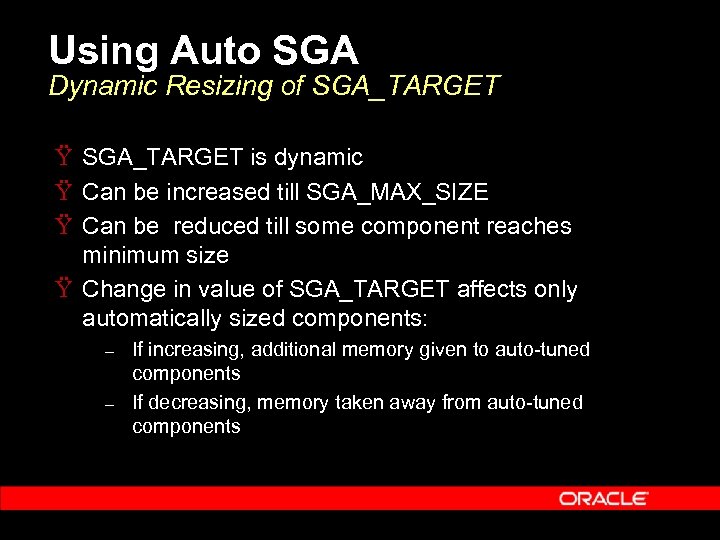 Using Auto SGA Dynamic Resizing of SGA_TARGET Ÿ SGA_TARGET is dynamic Ÿ Can be increased till SGA_MAX_SIZE Ÿ Can be reduced till some component reaches minimum size Ÿ Change in value of SGA_TARGET affects only automatically sized components: – – If increasing, additional memory given to auto-tuned components If decreasing, memory taken away from auto-tuned components
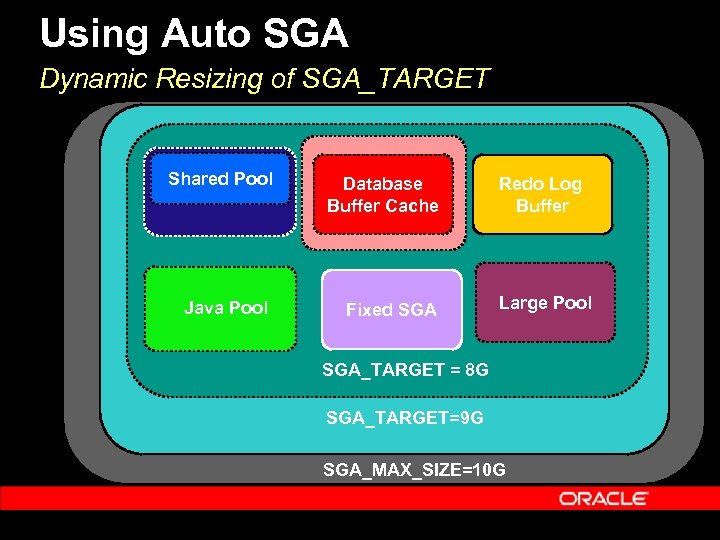 Using Auto SGA Dynamic Resizing of SGA_TARGET Shared Pool Database Buffer Cache Java Pool Fixed SGA Redo Log Buffer Large Pool SGA_TARGET = 8 G SGA_TARGET=9 G SGA_MAX_SIZE=10 G
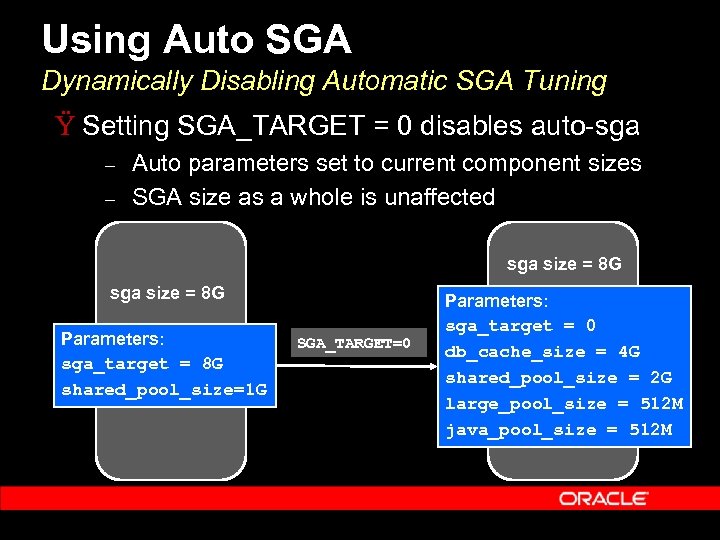 Using Auto SGA Dynamically Disabling Automatic SGA Tuning Ÿ Setting SGA_TARGET = 0 disables auto-sga – – Auto parameters set to current component sizes SGA size as a whole is unaffected sga size = 8 G Parameters: sga_target = 8 G shared_pool_size=1 G SGA_TARGET=0 Parameters: sga_target = 0 db_cache_size = 4 G shared_pool_size = 2 G large_pool_size = 512 M java_pool_size = 512 M
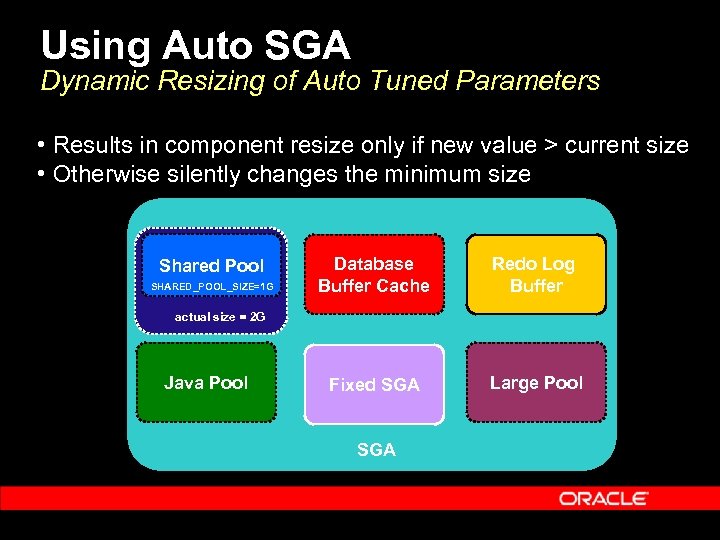 Using Auto SGA Dynamic Resizing of Auto Tuned Parameters • Results in component resize only if new value > current size • Otherwise silently changes the minimum size Database Shared Pool SGA_TARGET = 8 G SHARED_POOL_SIZE=1 G Buffer Cache Redo Log Buffer actual size = 2 G Java Pool Fixed SGA Large Pool
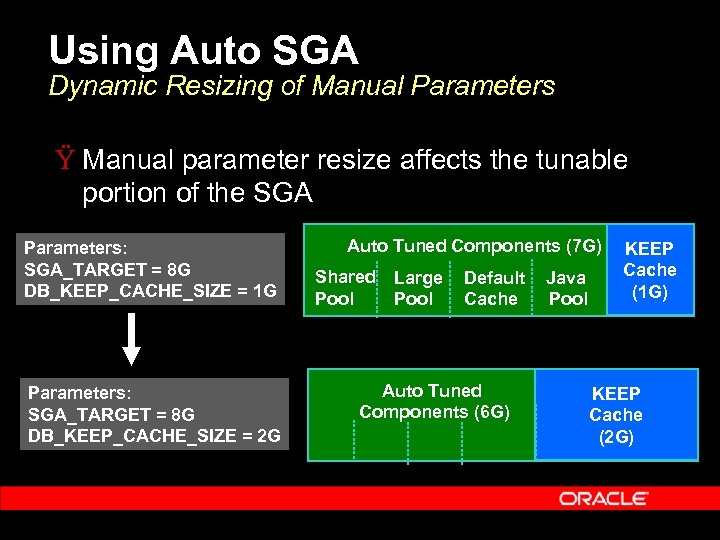 Using Auto SGA Dynamic Resizing of Manual Parameters Ÿ Manual parameter resize affects the tunable portion of the SGA Parameters: SGA_TARGET = 8 G DB_KEEP_CACHE_SIZE = 1 G Parameters: SGA_TARGET = 8 G DB_KEEP_CACHE_SIZE = 2 G Auto Tuned Components (7 G) Shared Pool Large Pool Default Cache Auto Tuned Components (6 G) Java Pool KEEP Cache (1 G) KEEP Cache (2 G)
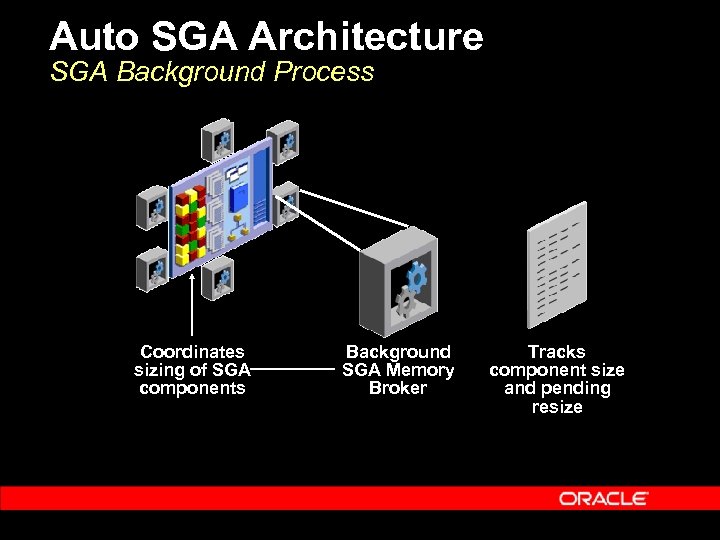 Auto SGA Architecture SGA Background Process Coordinates sizing of SGA components Background SGA Memory Broker Tracks component size and pending resize
 Auto SGA Architecture Memory Broker Overview Ÿ “Memory Broker” is a background action Ÿ Statistics and memory advisory are periodically captured in a circular buffer Ÿ Deltas between different buffer entries represent statistics for different time periods Ÿ Memory Broker policy analyzes deltas and examines both long-term and short-term trends Ÿ Generates resize decisions based on this analysis
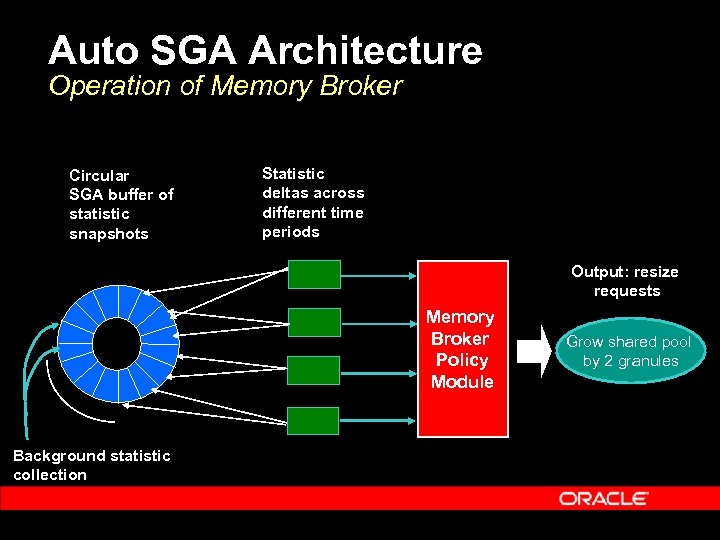 Auto SGA Architecture Operation of Memory Broker Circular SGA buffer of statistic snapshots Statistic deltas across different time periods Output: resize requests Memory Broker Policy Module Background statistic collection Grow shared pool by 2 granules
 Auto SGA Architecture Persistence of Auto-Tuned Values Ÿ If server parameter file (spfile) is used: – – – Component sizes saved across shutdowns Saved values used to bootstrap component sizes Avoids having to relearn optimal values Ÿ For this reason use of spfile is recommended with Automatic SGA Management
 Conclusions Ÿ Relieves the administrator from manually configuring the SGA Ÿ Internal algorithm adjusts based on workload Ÿ No need to configure for the worst-case Ÿ Simple usage model
 Q & A QUESTIONS ANSWERS