 Скачать презентацию Optimizing Blade Deployment with Virtual Infrastructure Eric Horschman
71214a9c3a93347dff58440353ae5c3c.ppt
- Количество слайдов: 28



Optimizing Blade Deployment with Virtual Infrastructure Eric Horschman Group Product Marketing Manager VMware, Inc. March 2005 Copyright © 2005 VMware, Inc. All rights reserved.
Agenda • Virtual Infrastructure Overview • Server Consolidation With Blades • Deploying Blades with Virtual Infrastructure • Customer Examples • Summary and Q&A Copyright © 2005 VMware, Inc. All rights reserved. 2
Virtual Infrastructure Overview • Copyright © 2005 VMware, Inc. All rights reserved.
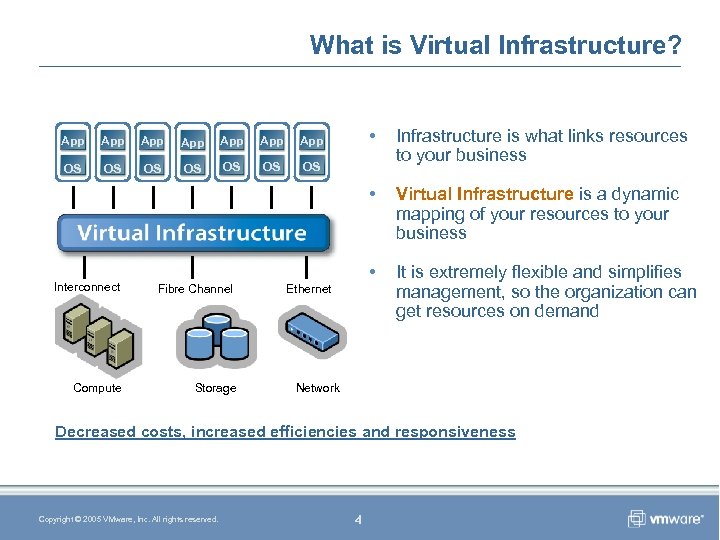
What is Virtual Infrastructure? App App App OS OS OS Infrastructure is what links resources to your business Virtual Infrastructure is a dynamic mapping of your resources to your business • App OS • • App It is extremely flexible and simplifies management, so the organization can get resources on demand OS Interconnect Fibre Channel Compute Storage Ethernet Network Decreased costs, increased efficiencies and responsiveness Copyright © 2005 VMware, Inc. All rights reserved. 4
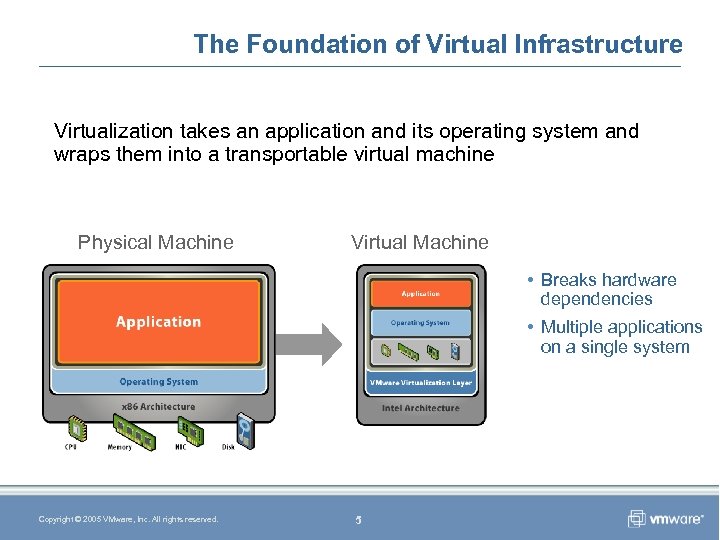
The Foundation of Virtual Infrastructure Virtualization takes an application and its operating system and wraps them into a transportable virtual machine Physical Machine Virtual Machine • Breaks hardware dependencies • Multiple applications on a single system Copyright © 2005 VMware, Inc. All rights reserved. 5
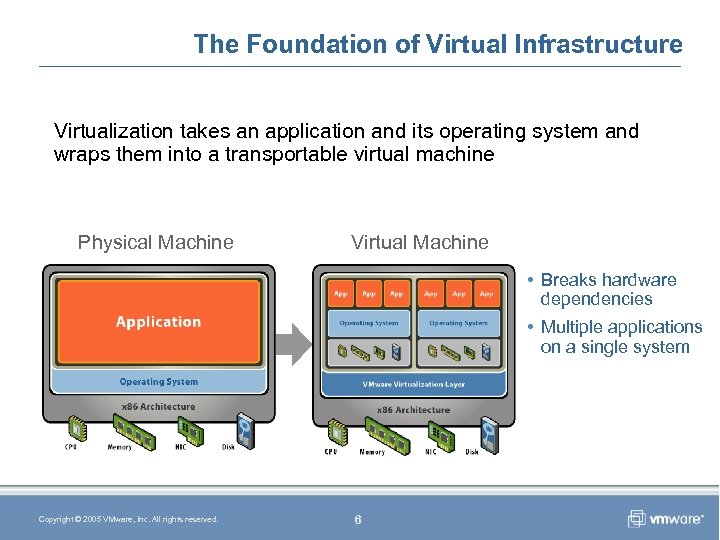
The Foundation of Virtual Infrastructure Virtualization takes an application and its operating system and wraps them into a transportable virtual machine Physical Machine Virtual Machine • Breaks hardware dependencies Application • Multiple applications on a single system Operating System Hardware Copyright © 2005 VMware, Inc. All rights reserved. 6
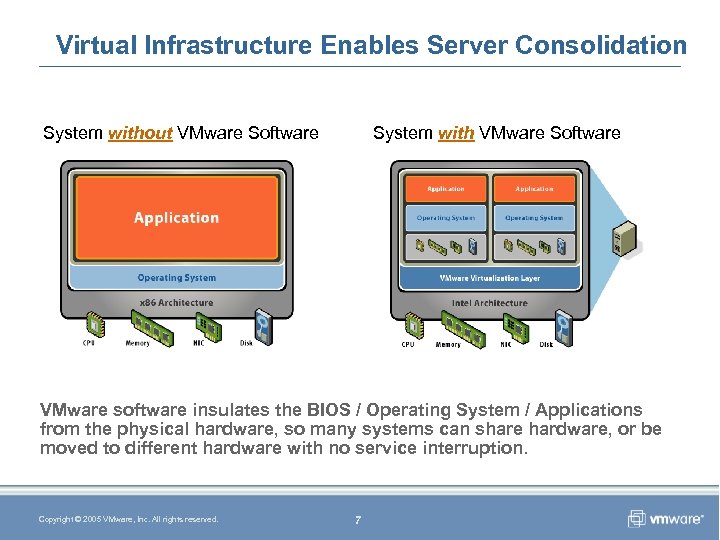
Virtual Infrastructure Enables Server Consolidation System with VMware Software System without VMware Software VMware software insulates the BIOS / Operating System / Applications from the physical hardware, so many systems can share hardware, or be moved to different hardware with no service interruption. Copyright © 2005 VMware, Inc. All rights reserved. 7
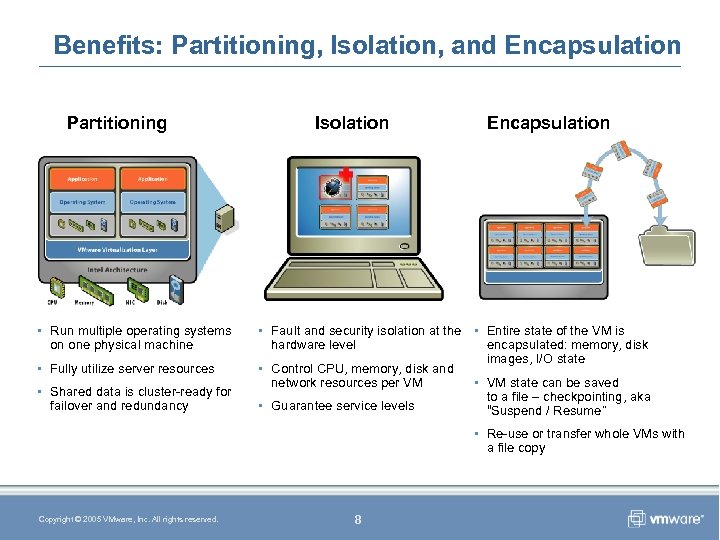
Benefits: Partitioning, Isolation, and Encapsulation Partitioning • Run multiple operating systems on one physical machine • Fully utilize server resources • Shared data is cluster-ready for failover and redundancy Isolation Encapsulation • Fault and security isolation at the • Entire state of the VM is hardware level encapsulated: memory, disk images, I/O state • Control CPU, memory, disk and network resources per VM • VM state can be saved to a file – checkpointing, aka • Guarantee service levels “Suspend / Resume” • Re-use or transfer whole VMs with a file copy Copyright © 2005 VMware, Inc. All rights reserved. 8
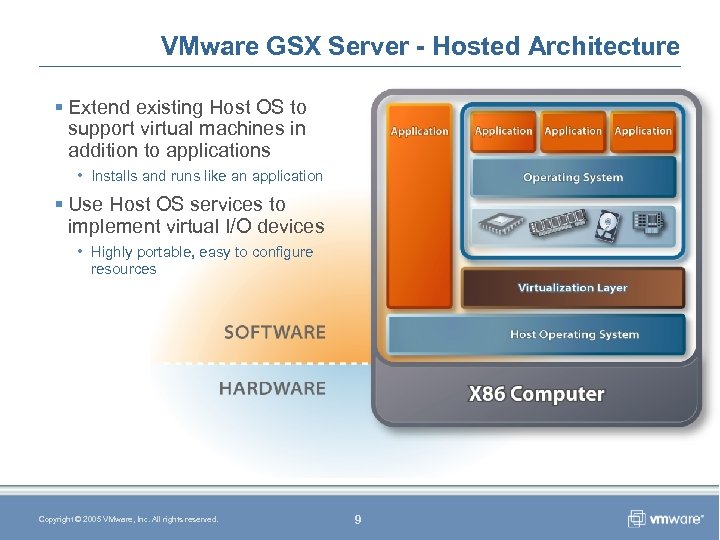
VMware GSX Server - Hosted Architecture § Extend existing Host OS to support virtual machines in addition to applications • Installs and runs like an application § Use Host OS services to implement virtual I/O devices • Highly portable, easy to configure resources Copyright © 2005 VMware, Inc. All rights reserved. 9
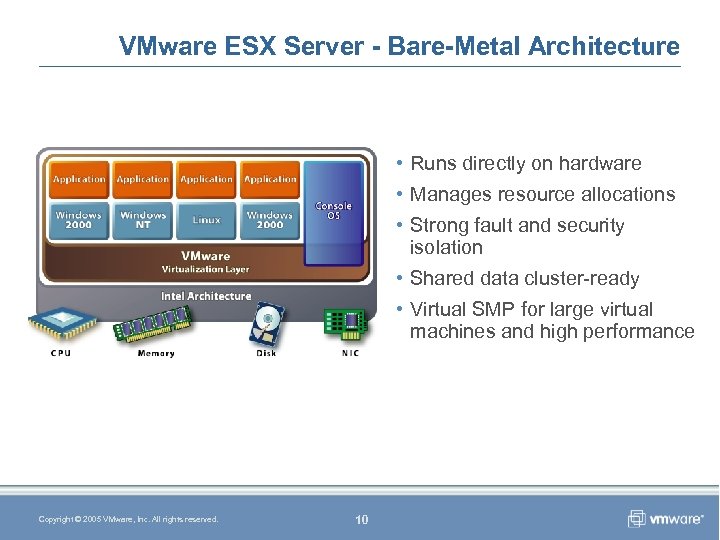
VMware ESX Server - Bare-Metal Architecture • Runs directly on hardware • Manages resource allocations • Strong fault and security isolation • Shared data cluster-ready • Virtual SMP for large virtual machines and high performance Copyright © 2005 VMware, Inc. All rights reserved. 10
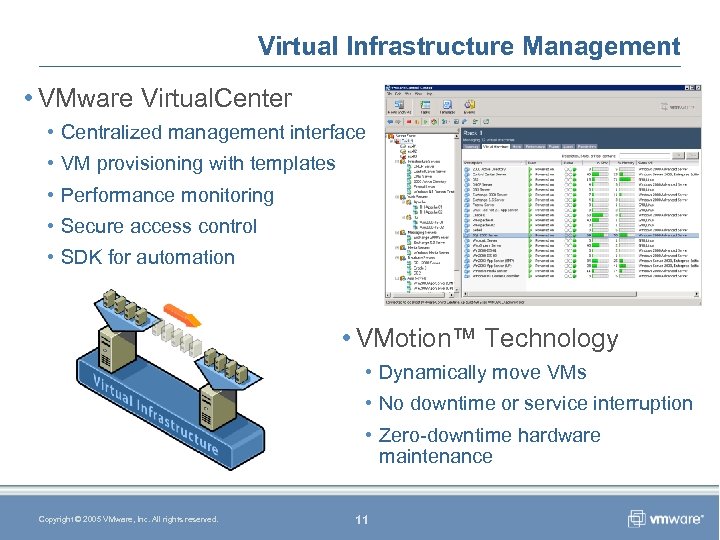
Virtual Infrastructure Management • VMware Virtual. Center • Centralized management interface • VM provisioning with templates • Performance monitoring • Secure access control • SDK for automation • VMotion™ Technology • Dynamically move VMs • No downtime or service interruption • Zero-downtime hardware maintenance Copyright © 2005 VMware, Inc. All rights reserved. 11
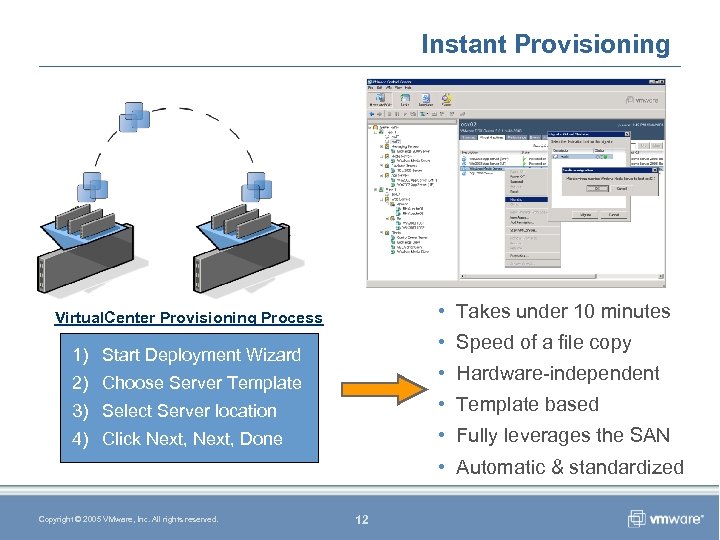
Instant Provisioning • Takes under 10 minutes Virtual. Center Provisioning Process • Speed of a file copy 1) Start Deployment Wizard • Hardware-independent 2) Choose Server Template 3) Select Server location • Template based 4) Click Next, Done • Fully leverages the SAN • Automatic & standardized Copyright © 2005 VMware, Inc. All rights reserved. 12
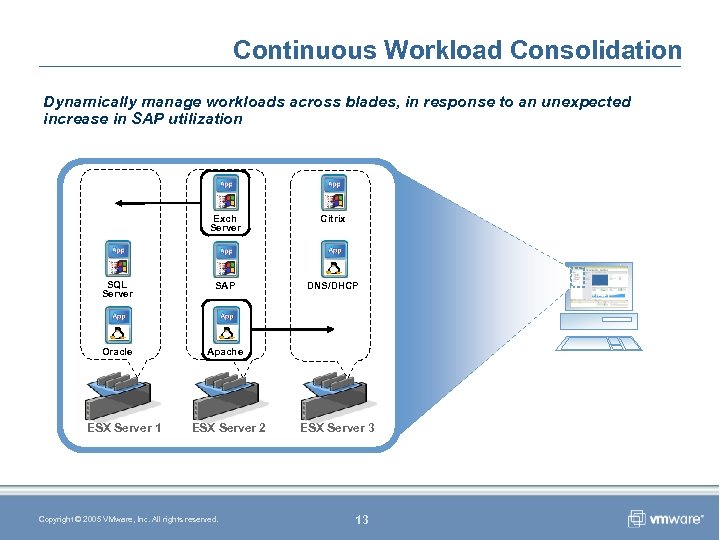
Continuous Workload Consolidation Dynamically manage workloads across blades, in response to an unexpected increase in SAP utilization Exch Server Citrix SQL Server SAP DNS/DHCP Oracle Apache ESX Server 1 ESX Server 2 Copyright © 2005 VMware, Inc. All rights reserved. ESX Server 3 13
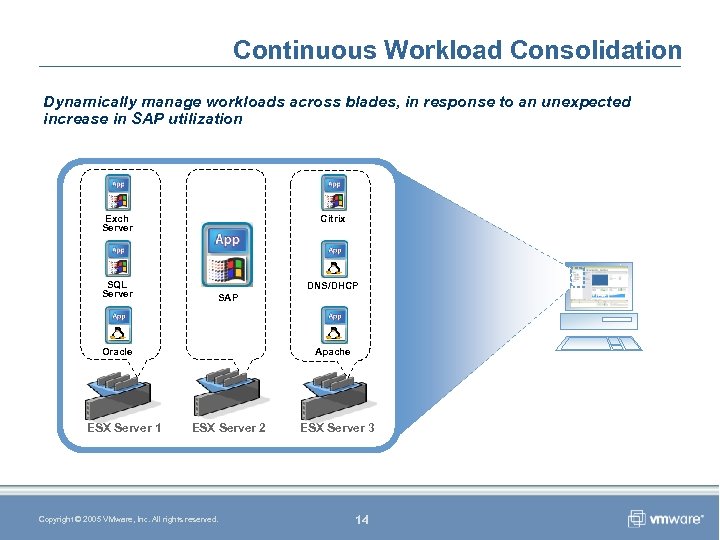
Continuous Workload Consolidation Dynamically manage workloads across blades, in response to an unexpected increase in SAP utilization Exch Server SQL Server Citrix DNS/DHCP SAP Oracle ESX Server 1 Apache ESX Server 2 Copyright © 2005 VMware, Inc. All rights reserved. ESX Server 3 14
Server Consolidation With Blades • Copyright © 2005 VMware, Inc. All rights reserved. Blades & VMware “The Perfect Match”
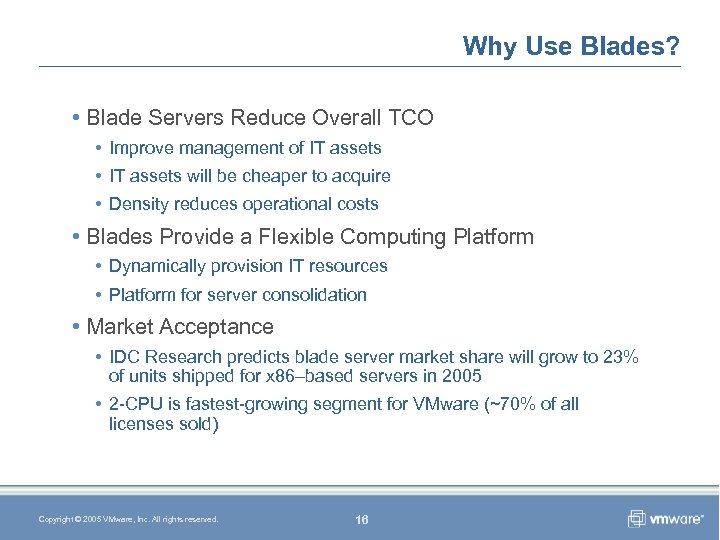
Why Use Blades? • Blade Servers Reduce Overall TCO • Improve management of IT assets • IT assets will be cheaper to acquire • Density reduces operational costs • Blades Provide a Flexible Computing Platform • Dynamically provision IT resources • Platform for server consolidation • Market Acceptance • IDC Research predicts blade server market share will grow to 23% of units shipped for x 86–based servers in 2005 • 2 -CPU is fastest-growing segment for VMware (~70% of all licenses sold) Copyright © 2005 VMware, Inc. All rights reserved. 16
Blades Have Limitations • Blade server cost efficiency declines sharply if its density potential is underutilized • Local storage availability on blades is limited • Blades offer few expansion slots • Additional blade peripherals may reduce density • Cost of deploying each additional blade chassis is a step function Copyright © 2005 VMware, Inc. All rights reserved. 17
Deploying Blades With Virtual Infrastructure • Copyright © 2005 VMware, Inc. All rights reserved.
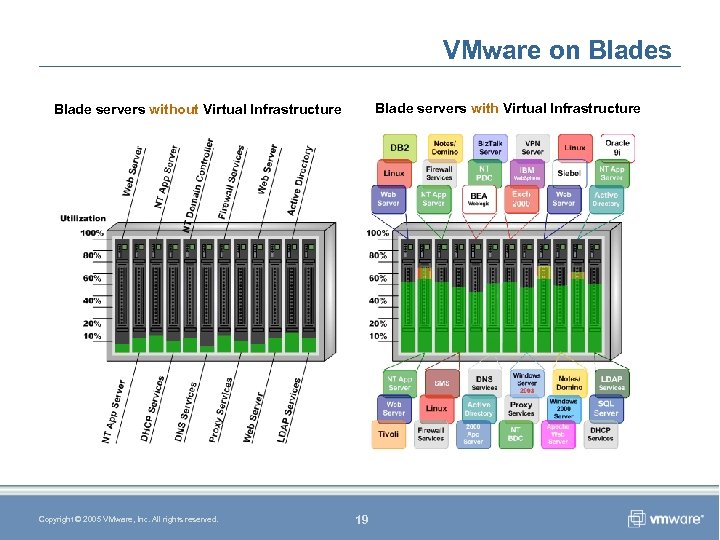
VMware on Blades Blade servers with Virtual Infrastructure Blade servers without Virtual Infrastructure Copyright © 2005 VMware, Inc. All rights reserved. 19
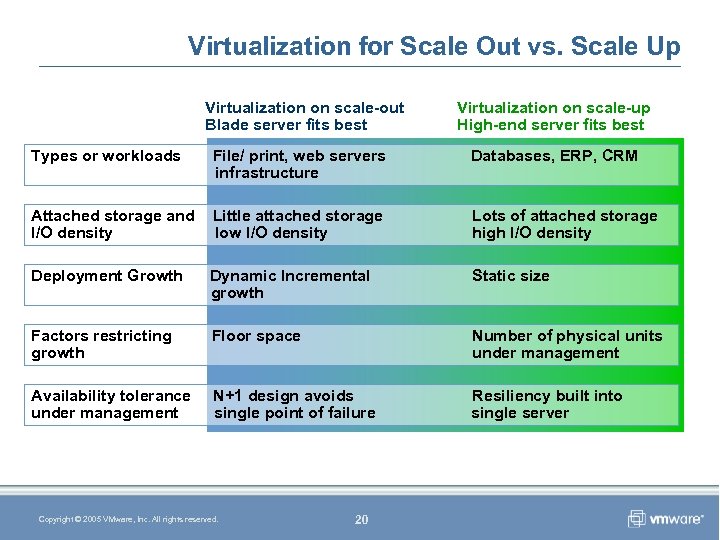
Virtualization for Scale Out vs. Scale Up Virtualization on scale-out Blade server fits best Virtualization on scale-up High-end server fits best Types or workloads File/ print, web servers infrastructure Databases, ERP, CRM Attached storage and I/O density Little attached storage low I/O density Lots of attached storage high I/O density Deployment Growth Dynamic Incremental growth Static size Factors restricting growth Floor space Number of physical units under management Availability tolerance under management N+1 design avoids single point of failure Resiliency built into single server Copyright © 2005 VMware, Inc. All rights reserved. 20
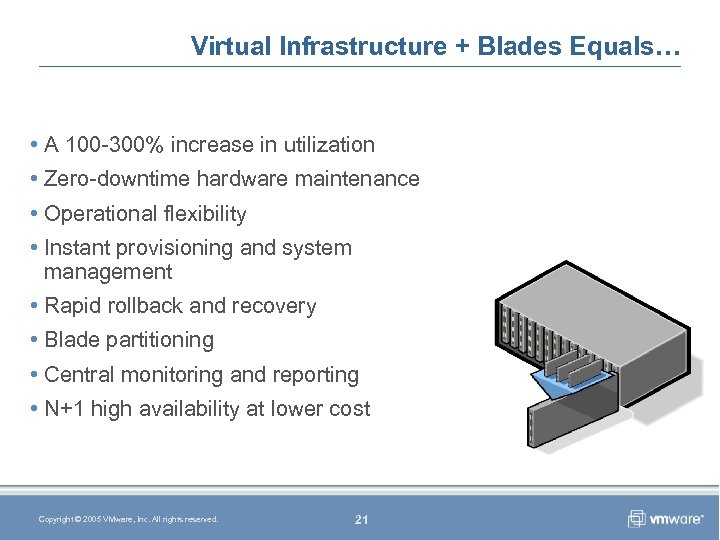
Virtual Infrastructure + Blades Equals… • A 100 -300% increase in utilization • Zero-downtime hardware maintenance • Operational flexibility • Instant provisioning and system management • Rapid rollback and recovery • Blade partitioning • Central monitoring and reporting • N+1 high availability at lower cost Copyright © 2005 VMware, Inc. All rights reserved. 21
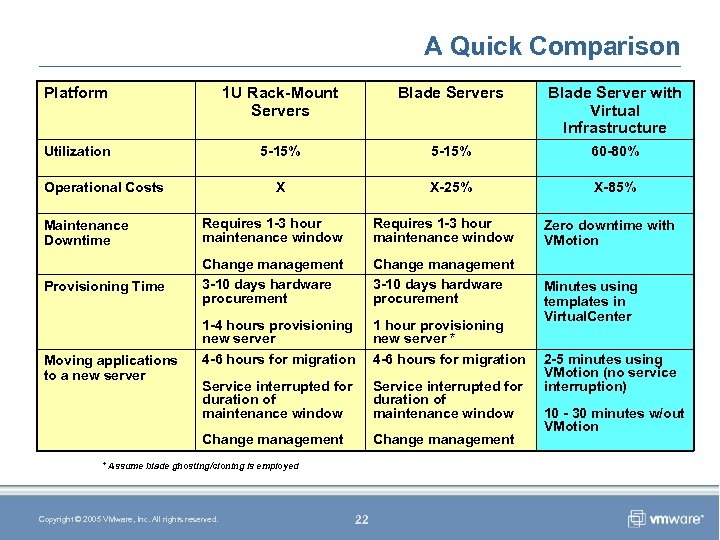
A Quick Comparison Platform 1 U Rack-Mount Servers Blade Server with Virtual Infrastructure Utilization 5 -15% 60 -80% X X-25% X-85% Operational Costs Maintenance Downtime Requires 1 -3 hour maintenance window Provisioning Time Change management 3 -10 days hardware procurement 1 -4 hours provisioning new server 4 -6 hours for migration 1 hour provisioning new server * 4 -6 hours for migration Service interrupted for duration of maintenance window Change management Moving applications to a new server ** Assume blade ghosting/cloning is employed Copyright © 2005 VMware, Inc. All rights reserved. 22 Zero downtime with VMotion Minutes using templates in Virtual. Center 2 -5 minutes using VMotion (no service interruption) 10 - 30 minutes w/out VMotion
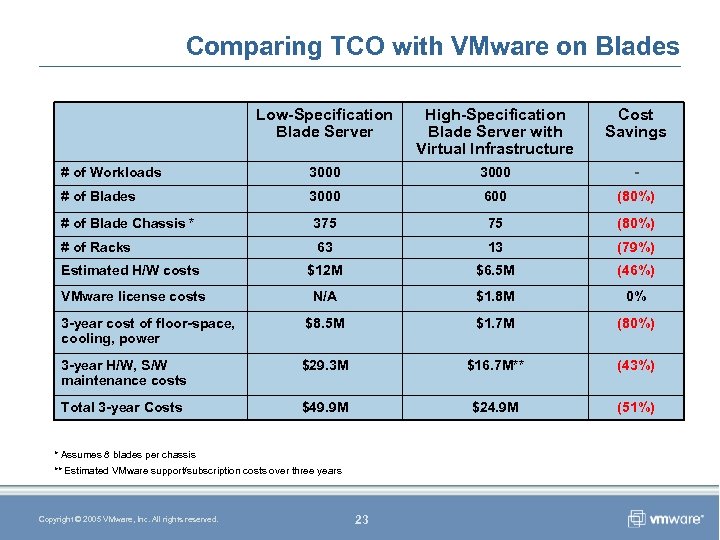
Comparing TCO with VMware on Blades Low-Specification Blade Server High-Specification Blade Server with Virtual Infrastructure Cost Savings # of Workloads 3000 - # of Blades 3000 600 (80%) # of Blade Chassis * 375 75 (80%) # of Racks 63 13 (79%) Estimated H/W costs $12 M $6. 5 M (46%) VMware license costs N/A $1. 8 M 0% 3 -year cost of floor-space, cooling, power $8. 5 M $1. 7 M (80%) 3 -year H/W, S/W maintenance costs $29. 3 M $16. 7 M** (43%) Total 3 -year Costs $49. 9 M $24. 9 M (51%) * Assumes 8 blades per chassis ** Estimated VMware support/subscription costs over three years Copyright © 2005 VMware, Inc. All rights reserved. 23
Customer Examples Copyright © 2005 VMware, Inc. All rights reserved.
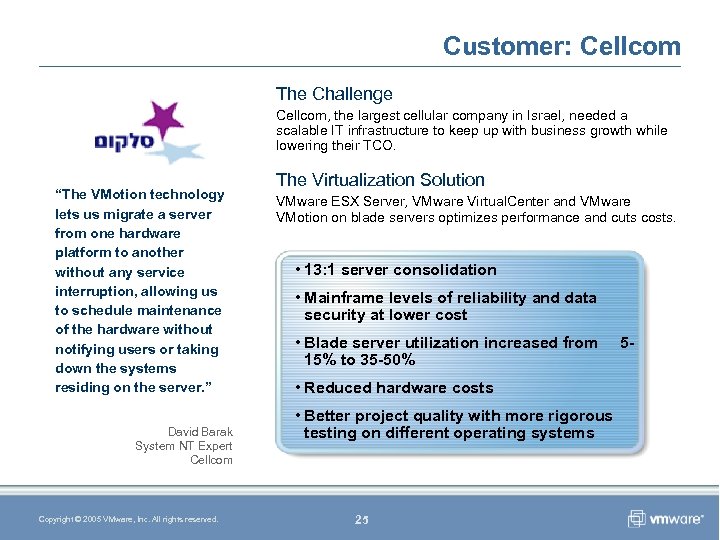
Customer: Cellcom The Challenge Cellcom, the largest cellular company in Israel, needed a scalable IT infrastructure to keep up with business growth while lowering their TCO. “The VMotion technology lets us migrate a server from one hardware platform to another without any service interruption, allowing us to schedule maintenance of the hardware without notifying users or taking down the systems residing on the server. ” David Barak System NT Expert Cellcom Copyright © 2005 VMware, Inc. All rights reserved. The Virtualization Solution VMware ESX Server, VMware Virtual. Center and VMware VMotion on blade servers optimizes performance and cuts costs. • 13: 1 server consolidation • Mainframe levels of reliability and data security at lower cost • Blade server utilization increased from 15% to 35 -50% • Reduced hardware costs • Better project quality with more rigorous testing on different operating systems 25 5 -
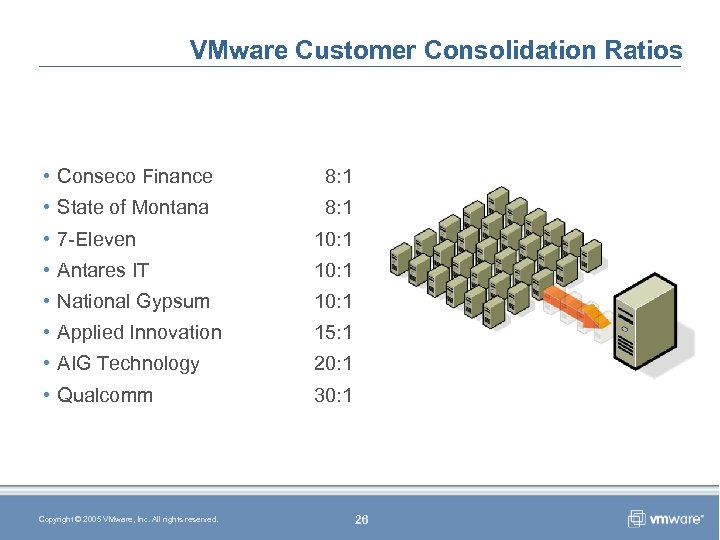
VMware Customer Consolidation Ratios • Conseco Finance 8: 1 • State of Montana 8: 1 • 7 -Eleven 10: 1 • Antares IT 10: 1 • National Gypsum 10: 1 • Applied Innovation 15: 1 • AIG Technology 20: 1 • Qualcomm 30: 1 Copyright © 2005 VMware, Inc. All rights reserved. 26
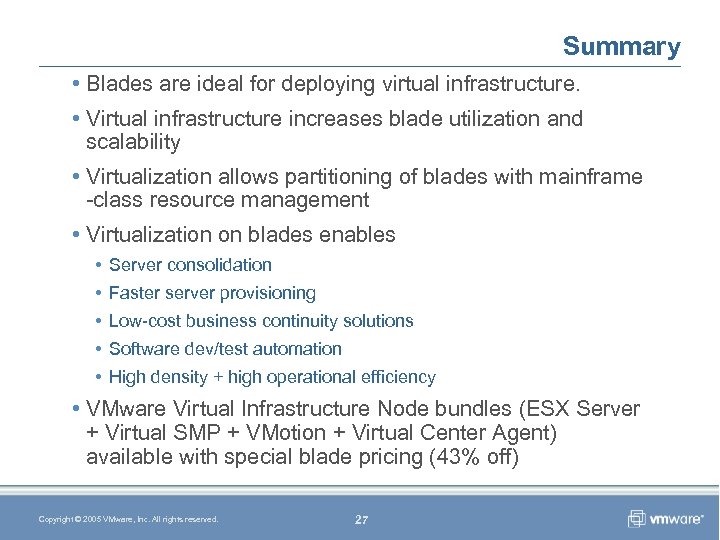
Summary • Blades are ideal for deploying virtual infrastructure. • Virtual infrastructure increases blade utilization and scalability • Virtualization allows partitioning of blades with mainframe -class resource management • Virtualization on blades enables • Server consolidation • Faster server provisioning • Low-cost business continuity solutions • Software dev/test automation • High density + high operational efficiency • VMware Virtual Infrastructure Node bundles (ESX Server + Virtual SMP + VMotion + Virtual Center Agent) available with special blade pricing (43% off) Copyright © 2005 VMware, Inc. All rights reserved. 27
Thank you! Questions? Copyright © 2005 VMware, Inc. All rights reserved.
Скачать презентацию Optimizing Blade Deployment with Virtual Infrastructure Eric Horschman
71214a9c3a93347dff58440353ae5c3c.ppt