


 Скачать презентацию Operating Juniper Networks Routers in the Enterprise Chapter
0b6eabc55e039501342e1a062a50268f.ppt
- Количество слайдов: 71
 Operating Juniper Networks Routers in the Enterprise Chapter 6: Routing Protocols and Policy 4 -1 Copyright © 2005 Juniper Networks, Inc. Proprietary and Confidential www. juniper. net
 Chapter Objectives § After successfully completing this chapter, you will be able to: • Describe routing tables and route preferences • Describe the role of JUNOS software routing policy • Describe J-Web support for routing protocols and policy • Configure and monitor static routes • Explain the role of IGPs • Configure and monitor RIP • Configure and monitor OSPF Copyright © 2007 Juniper Networks, Inc. Education Services 6 -2
 Agenda: Routing Protocols and Policy àRouting Table and Route Preferences § Routing Policy § J-Web Support for Routing Protocols and Policy § Configuring and Monitoring Static Routing § Interior Gateway Protocols § Configuring and Monitoring RIP § Configuring and Monitoring OSPF Copyright © 2007 Juniper Networks, Inc. Education Services 6 -3
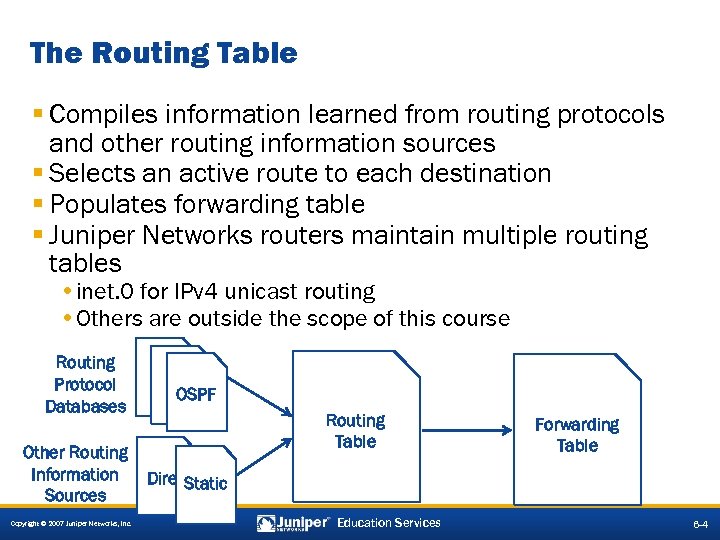 The Routing Table § Compiles information learned from routing protocols and other routing information sources § Selects an active route to each destination § Populates forwarding table § Juniper Networks routers maintain multiple routing tables • inet. 0 for IPv 4 unicast routing • Others are outside the scope of this course Routing Protocol Databases Other Routing Information Sources Copyright © 2007 Juniper Networks, Inc. OSPF Routing Table Forwarding Table Direct Static Education Services 6 -4
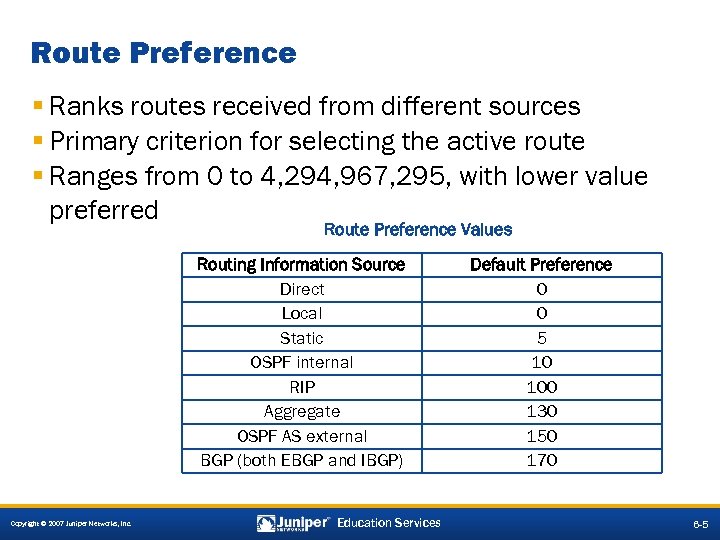 Route Preference § Ranks routes received from different sources § Primary criterion for selecting the active route § Ranges from 0 to 4, 294, 967, 295, with lower value preferred Route Preference Values Routing Information Source Direct Local Static OSPF internal RIP Aggregate OSPF AS external BGP (both EBGP and IBGP) Copyright © 2007 Juniper Networks, Inc. Education Services Default Preference 0 0 5 10 100 130 150 170 6 -5
 Agenda: Routing Protocols and Policy § Routing Table and Route Preferences àRouting Policy § J-Web Support for Routing Protocols and Policy § Configuring and Monitoring Static Routing § Interior Gateway Protocols § Configuring and Monitoring RIP § Configuring and Monitoring OSPF Copyright © 2007 Juniper Networks, Inc. Education Services 6 -7
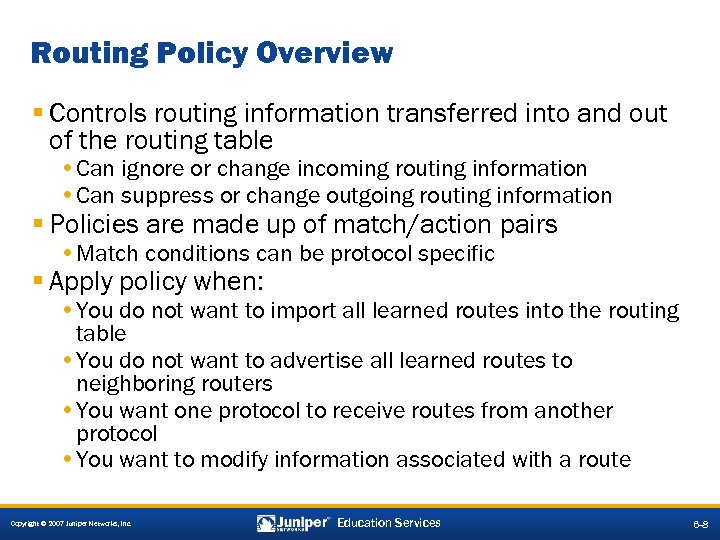 Routing Policy Overview § Controls routing information transferred into and out of the routing table • Can ignore or change incoming routing information • Can suppress or change outgoing routing information § Policies are made up of match/action pairs • Match conditions can be protocol specific § Apply policy when: • You do not want to import all learned routes into the routing table • You do not want to advertise all learned routes to neighboring routers • You want one protocol to receive routes from another protocol • You want to modify information associated with a route Copyright © 2007 Juniper Networks, Inc. Education Services 6 -8
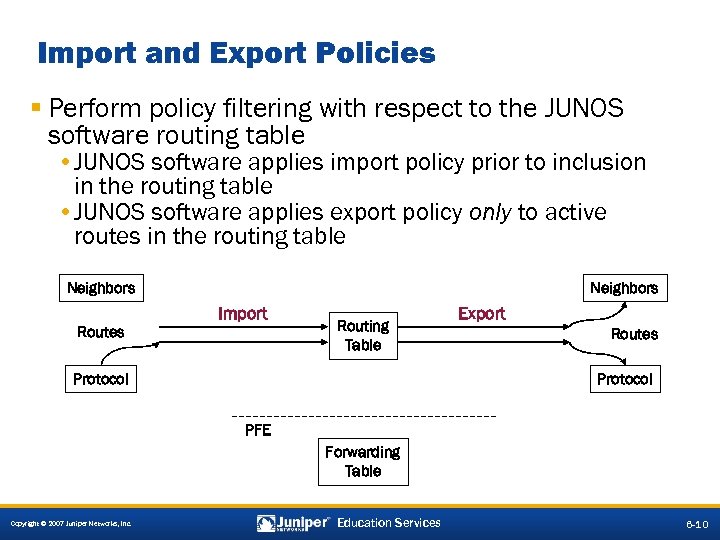 Import and Export Policies § Perform policy filtering with respect to the JUNOS software routing table • JUNOS software applies import policy prior to inclusion in the routing table • JUNOS software applies export policy only to active routes in the routing table Neighbors Import Routes Routing Table Protocol Export Routes Protocol PFE Forwarding Table Copyright © 2007 Juniper Networks, Inc. Education Services 6 -10
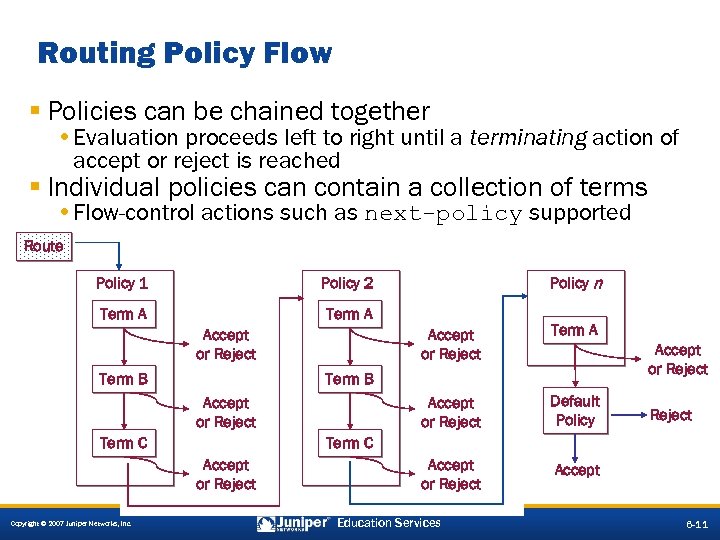 Routing Policy Flow § Policies can be chained together • Evaluation proceeds left to right until a terminating action of accept or reject is reached § Individual policies can contain a collection of terms • Flow-control actions such as next-policy supported Route Policy 1 Term A Policy n Policy 2 Term A Accept or Reject Term B Default Policy Accept or Reject Term B Accept or Reject Term C Accept or Reject Copyright © 2007 Juniper Networks, Inc. Term A Accept or Reject Education Services 6 -11
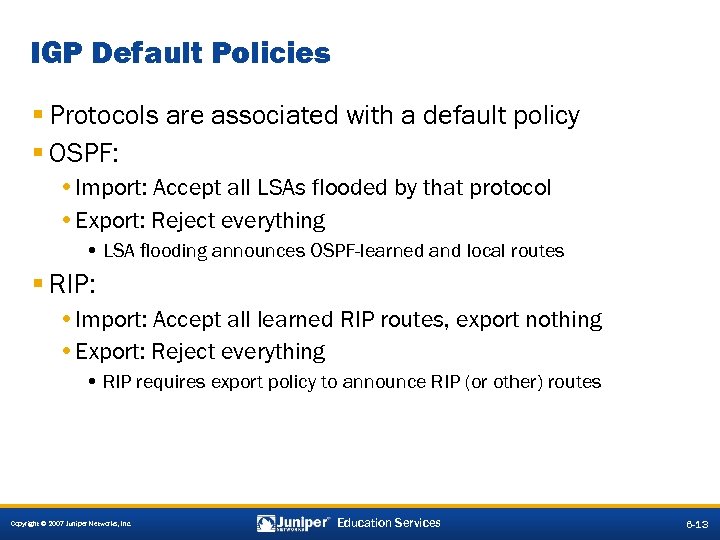 IGP Default Policies § Protocols are associated with a default policy § OSPF: • Import: Accept all LSAs flooded by that protocol • Export: Reject everything • LSA flooding announces OSPF-learned and local routes § RIP: • Import: Accept all learned RIP routes, export nothing • Export: Reject everything • RIP requires export policy to announce RIP (or other) routes Copyright © 2007 Juniper Networks, Inc. Education Services 6 -13
 Agenda: Routing Protocols and Policy § Routing Table and Route Preferences § Routing Policy àJ-Web Support for Routing Protocols and Policy § Configuring and Monitoring Static Routing § Interior Gateway Protocols § Configuring and Monitoring RIP § Configuring and Monitoring OSPF Copyright © 2007 Juniper Networks, Inc. Education Services 6 -15
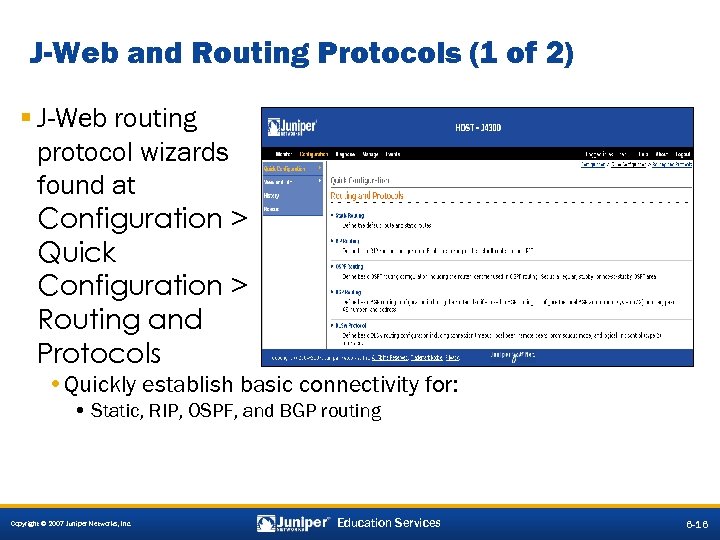 J-Web and Routing Protocols (1 of 2) § J-Web routing protocol wizards found at Configuration > Quick Configuration > Routing and Protocols • Quickly establish basic connectivity for: • Static, RIP, OSPF, and BGP routing Copyright © 2007 Juniper Networks, Inc. Education Services 6 -16
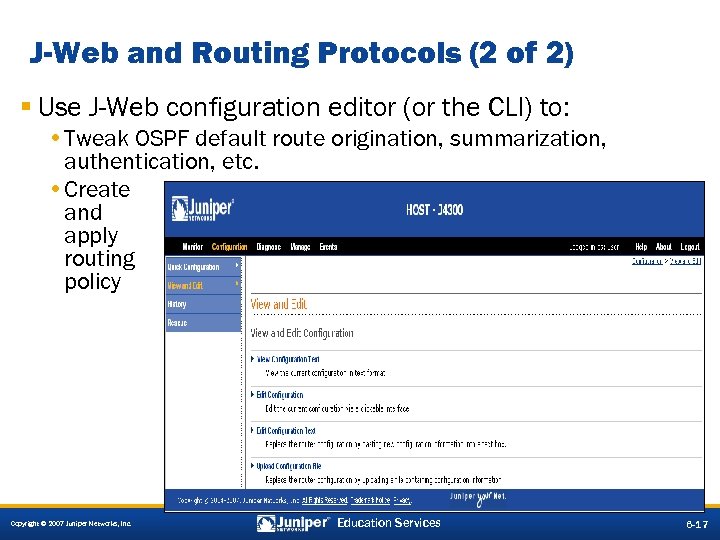 J-Web and Routing Protocols (2 of 2) § Use J-Web configuration editor (or the CLI) to: • Tweak OSPF default route origination, summarization, authentication, etc. • Create and apply routing policy Copyright © 2007 Juniper Networks, Inc. Education Services 6 -17
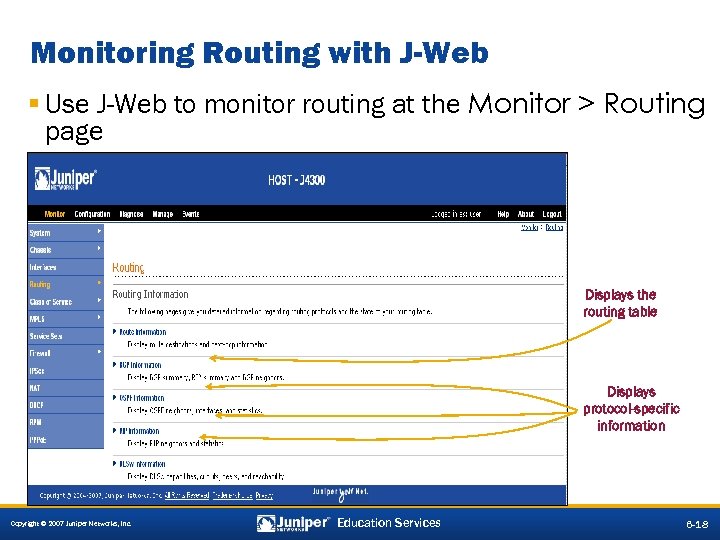 Monitoring Routing with J-Web § Use J-Web to monitor routing at the Monitor > Routing page Displays the routing table Displays protocol-specific information Copyright © 2007 Juniper Networks, Inc. Education Services 6 -18
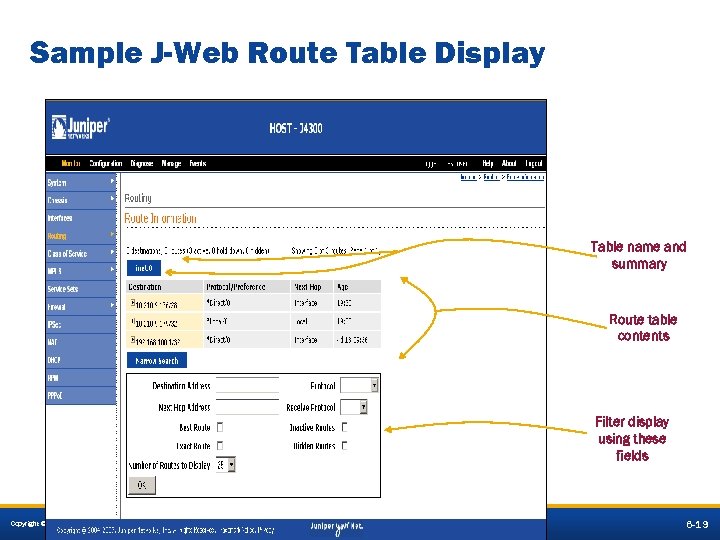 Sample J-Web Route Table Display Table name and summary Route table contents Filter display using these fields Copyright © 2007 Juniper Networks, Inc. Education Services 6 -19
 Agenda: Routing Protocols and Policy § Routing Table and Route Preferences § Routing Policy § J-Web Support for Routing Protocols and Policy àConfiguring and Monitoring Static Routing § Interior Gateway Protocols § Configuring and Monitoring RIP § Configuring and Monitoring OSPF Copyright © 2007 Juniper Networks, Inc. Education Services 6 -20
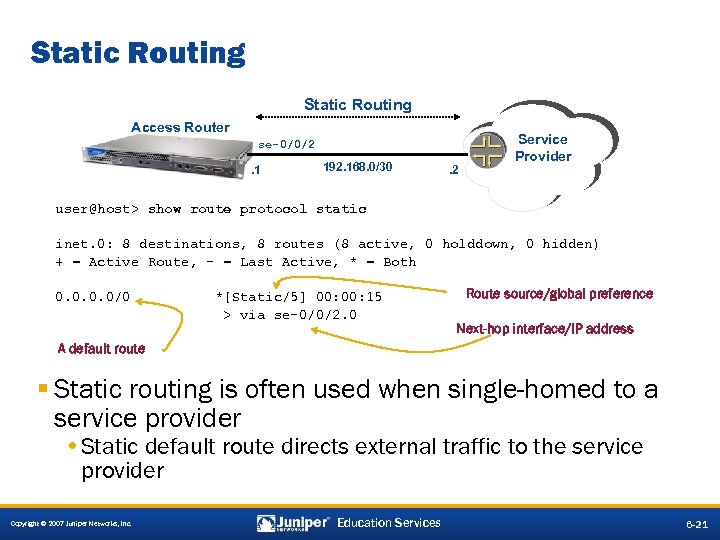 Static Routing Access Router se-0/0/2. 1 192. 168. 0/30 . 2 Service Provider user@host> show route protocol static inet. 0: 8 destinations, 8 routes (8 active, 0 holddown, 0 hidden) + = Active Route, - = Last Active, * = Both 0. 0/0 *[Static/5] 00: 15 > via se-0/0/2. 0 Route source/global preference Next-hop interface/IP address A default route § Static routing is often used when single-homed to a service provider • Static default route directs external traffic to the service provider Copyright © 2007 Juniper Networks, Inc. Education Services 6 -21
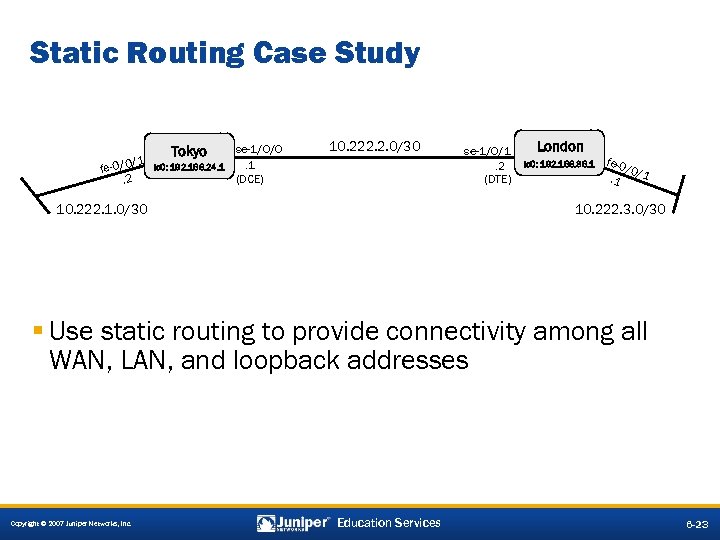 Static Routing Case Study /1 fe-0/0. 2 Tokyo HARLIE lo 0: 192. 168. 24. 1 se-1/0/0. 1 (DCE) 10. 222. 2. 0/30 10. 222. 1. 0/30 se-1/0/1. 2 (DTE) London Wintermute lo 0: 192. 168. 36. 1 fe-0 /0/ 1. 1 10. 222. 3. 0/30 § Use static routing to provide connectivity among all WAN, LAN, and loopback addresses Copyright © 2007 Juniper Networks, Inc. Education Services 6 -23
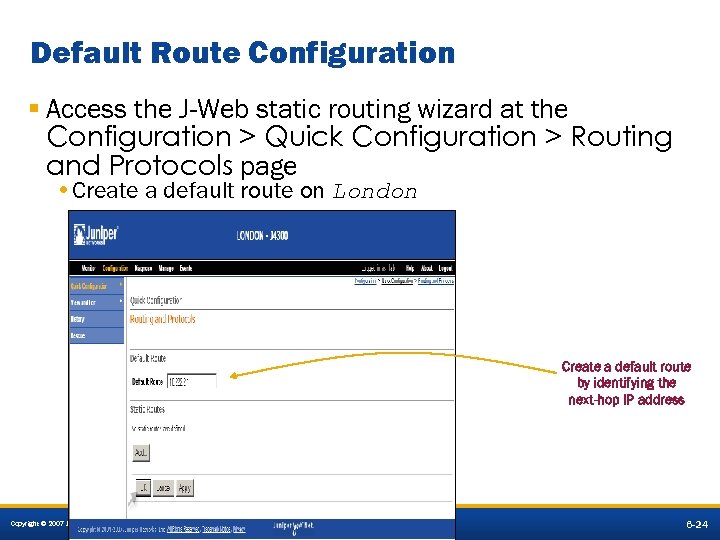 Default Route Configuration § Access the J-Web static routing wizard at the Configuration > Quick Configuration > Routing and Protocols page • Create a default route on London Create a default route by identifying the next-hop IP address Copyright © 2007 Juniper Networks, Inc. Education Services 6 -24
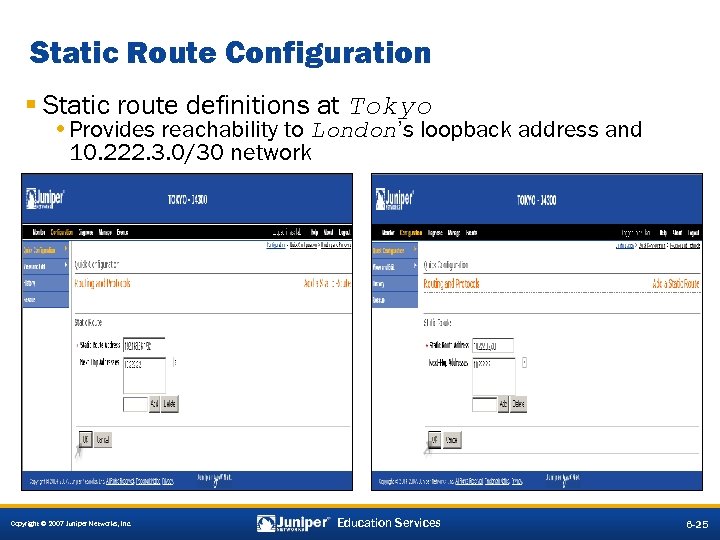 Static Route Configuration § Static route definitions at Tokyo • Provides reachability to London’s loopback address and 10. 222. 3. 0/30 network Copyright © 2007 Juniper Networks, Inc. Education Services 6 -25
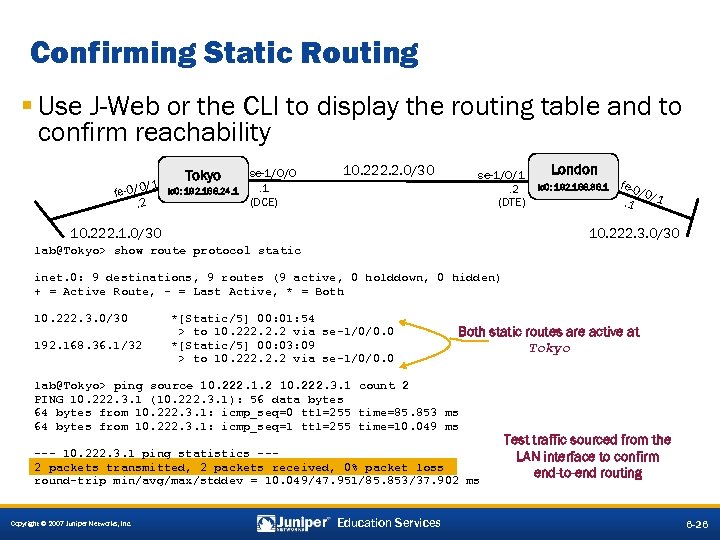 Confirming Static Routing § Use J-Web or the CLI to display the routing table and to confirm reachability 1 / fe-0/0. 2 Tokyo HARLIE lo 0: 192. 168. 24. 1 se-1/0/0. 1 (DCE) 10. 222. 2. 0/30 se-1/0/1. 2 (DTE) 10. 222. 1. 0/30 London Wintermute lo 0: 192. 168. 36. 1 fe-0 /0/ 1. 1 10. 222. 3. 0/30 lab@Tokyo> show route protocol static inet. 0: 9 destinations, 9 routes (9 active, 0 holddown, 0 hidden) + = Active Route, - = Last Active, * = Both 10. 222. 3. 0/30 192. 168. 36. 1/32 *[Static/5] 00: 01: 54 > to 10. 222. 2. 2 via se-1/0/0. 0 *[Static/5] 00: 03: 09 > to 10. 222. 2. 2 via se-1/0/0. 0 Both static routes are active at Tokyo lab@Tokyo> ping source 10. 222. 1. 2 10. 222. 3. 1 count 2 PING 10. 222. 3. 1 (10. 222. 3. 1): 56 data bytes 64 bytes from 10. 222. 3. 1: icmp_seq=0 ttl=255 time=85. 853 ms 64 bytes from 10. 222. 3. 1: icmp_seq=1 ttl=255 time=10. 049 ms --- 10. 222. 3. 1 ping statistics --2 packets transmitted, 2 packets received, 0% packet loss round-trip min/avg/max/stddev = 10. 049/47. 951/85. 853/37. 902 ms Copyright © 2007 Juniper Networks, Inc. Education Services Test traffic sourced from the LAN interface to confirm end-to-end routing 6 -26
 Lab 4—Parts 1– 3: Static Routing § Configure and monitor static routing. • Note: This lab and future labs require each team to use the Sydney router, which is logically segmented into several virtual routers. Each student router connects to a virtual router in the form of xx-VR, where xx is a two letter abbreviation for the directly connected student router. Please keep in mind that the command syntax is slightly different when working with a virtual router. Following are some examples: ping routing-instance LO-VR show route table LO-VR traceroute routing-instance LO-VR Copyright © 2007 Juniper Networks, Inc. Education Services 6 -27
 Agenda: Routing Protocols and Policy § Routing Table and Route Preferences § Routing Policy § J-Web Support for Routing Protocols and Policy § Configuring and Monitoring Static Routing àInterior Gateway Protocols § Configuring and Monitoring RIP § Configuring and Monitoring OSPF Copyright © 2007 Juniper Networks, Inc. Education Services 6 -28
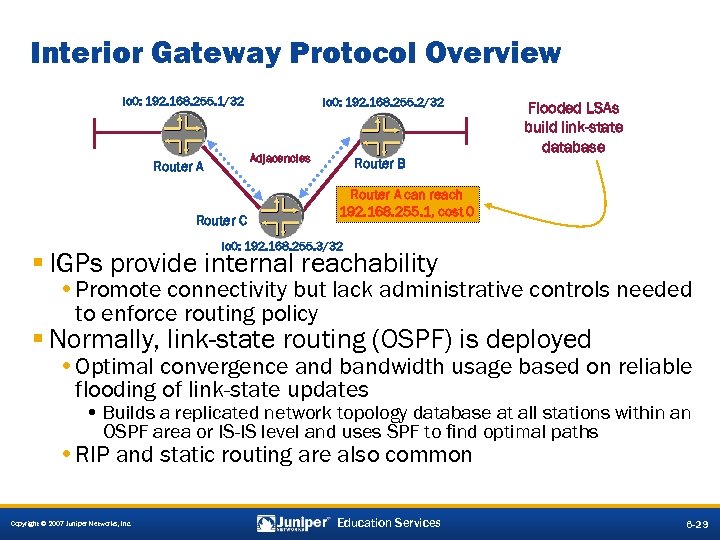 Interior Gateway Protocol Overview lo 0: 192. 168. 255. 1/32 lo 0: 192. 168. 255. 2/32 Adjacencies Router A Router C Router B Flooded LSAs build link-state database Router A can reach 192. 168. 255. 1, cost 0 lo 0: 192. 168. 255. 3/32 § IGPs provide internal reachability • Promote connectivity but lack administrative controls needed to enforce routing policy § Normally, link-state routing (OSPF) is deployed • Optimal convergence and bandwidth usage based on reliable flooding of link-state updates • Builds a replicated network topology database at all stations within an OSPF area or IS-IS level and uses SPF to find optimal paths • RIP and static routing are also common Copyright © 2007 Juniper Networks, Inc. Education Services 6 -29
 Agenda: Routing Protocols and Policy § Routing Table and Route Preferences § Routing Policy § J-Web Support for Routing Protocols and Policy § Configuring and Monitoring Static Routing § Interior Gateway Protocols àConfiguring and Monitoring RIP § Configuring and Monitoring OSPF Copyright © 2007 Juniper Networks, Inc. Education Services 6 -31
 What Is RIP? § RIP is an IGP that is used within an AS § Two versions: • RIPv 1 (RFC 1058) • RIPv 2 (RFC 2453) § Primary characteristics: • Distance-vector routing protocol; prone to loops and slow convergence • Split horizon and poison reverse for loop prevention • Hop count is used as the metric for path selection, based on Bellman-Ford distance-vector routing algorithm • Routing updates sent every 30 seconds Copyright © 2007 Juniper Networks, Inc. Education Services 6 -32
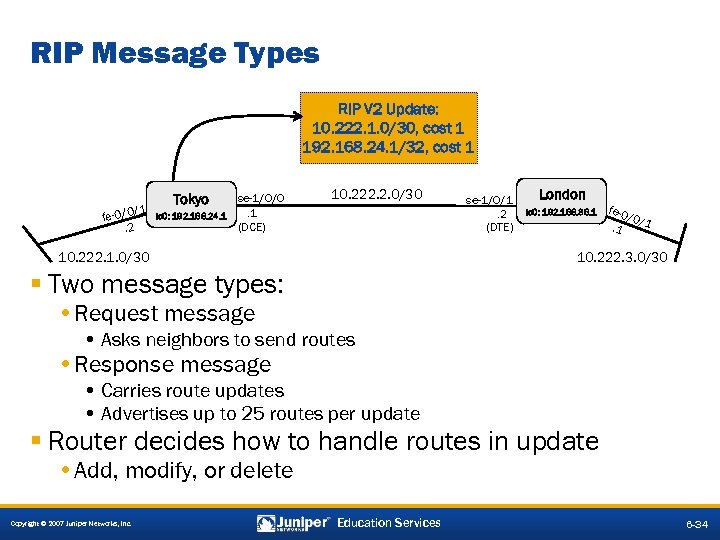 RIP Message Types RIP V 2 Update: 10. 222. 1. 0/30, cost 1 192. 168. 24. 1/32, cost 1 /1 fe-0/0. 2 Tokyo HARLIE lo 0: 192. 168. 24. 1 se-1/0/0. 1 (DCE) 10. 222. 2. 0/30 10. 222. 1. 0/30 se-1/0/1. 2 (DTE) London Wintermute lo 0: 192. 168. 36. 1 fe-0 /0/ 1. 1 10. 222. 3. 0/30 § Two message types: • Request message • Asks neighbors to send routes • Response message • Carries route updates • Advertises up to 25 routes per update § Router decides how to handle routes in update • Add, modify, or delete Copyright © 2007 Juniper Networks, Inc. Education Services 6 -34
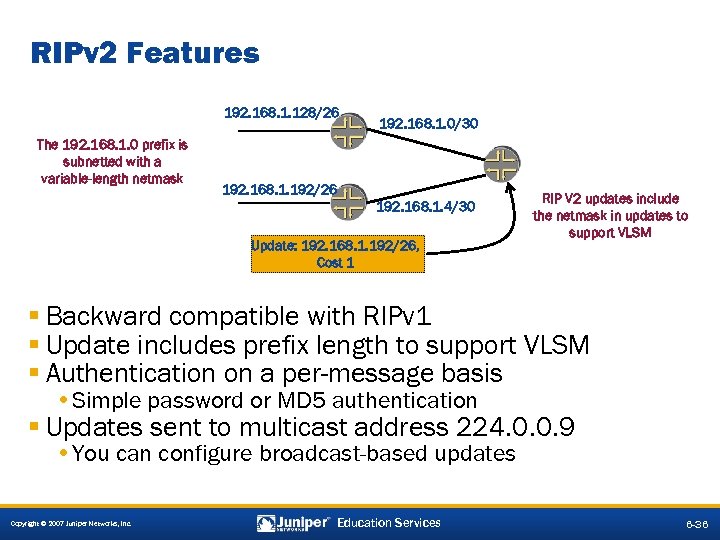 RIPv 2 Features 192. 168. 1. 128/26 The 192. 168. 1. 0 prefix is subnetted with a variable-length netmask 192. 168. 1. 0/30 192. 168. 1. 192/26 192. 168. 1. 4/30 Update: 192. 168. 1. 192/26, Cost 1 RIP V 2 updates include the netmask in updates to support VLSM § Backward compatible with RIPv 1 § Update includes prefix length to support VLSM § Authentication on a per-message basis • Simple password or MD 5 authentication § Updates sent to multicast address 224. 0. 0. 9 • You can configure broadcast-based updates Copyright © 2007 Juniper Networks, Inc. Education Services 6 -36
 RIP Limitations § Limitations: • Maximum network diameter = 15 hops • Regular updates include entire routing table approximately every 30 seconds • Poison reverse increases size of routing updates • Count to infinity slows route-loop prevention • Metrics reflect hop count only • Broadcasts between neighbors (RIPv 1 only) • Classful routing means no prefix length carried in route updates (RIPv 1 only) • No authentication mechanism exists (RIPv 1 only) • Has poor convergence Copyright © 2007 Juniper Networks, Inc. Education Services 6 -38
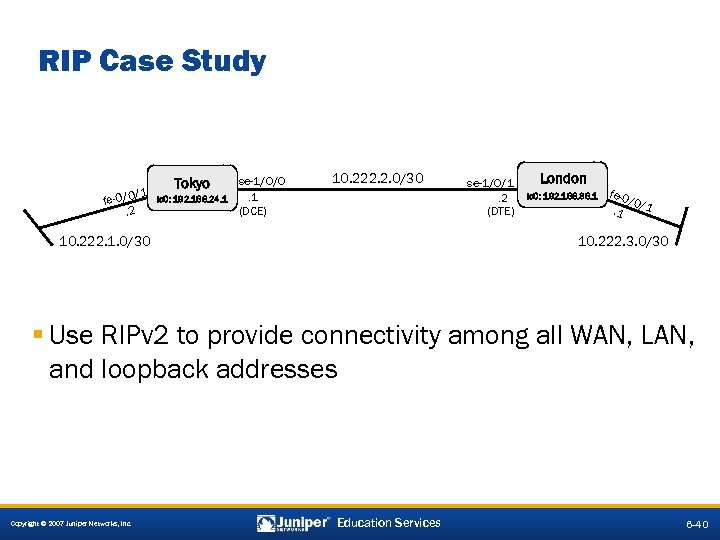 RIP Case Study /1 fe-0/0. 2 Tokyo HARLIE lo 0: 192. 168. 24. 1 se-1/0/0. 1 (DCE) 10. 222. 2. 0/30 10. 222. 1. 0/30 se-1/0/1. 2 (DTE) London Wintermute lo 0: 192. 168. 36. 1 fe-0 /0/ 1. 1 10. 222. 3. 0/30 § Use RIPv 2 to provide connectivity among all WAN, LAN, and loopback addresses Copyright © 2007 Juniper Networks, Inc. Education Services 6 -40
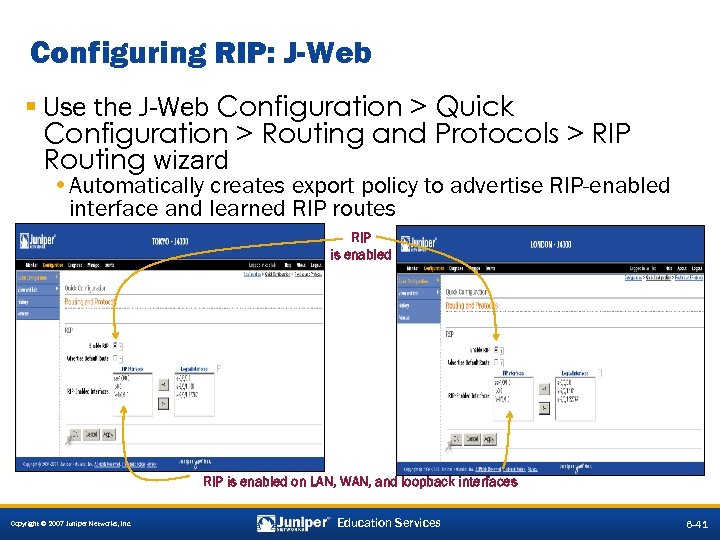 Configuring RIP: J-Web § Use the J-Web Configuration > Quick Configuration > Routing and Protocols > RIP Routing wizard • Automatically creates export policy to advertise RIP-enabled interface and learned RIP routes RIP is enabled on LAN, WAN, and loopback interfaces Copyright © 2007 Juniper Networks, Inc. Education Services 6 -41
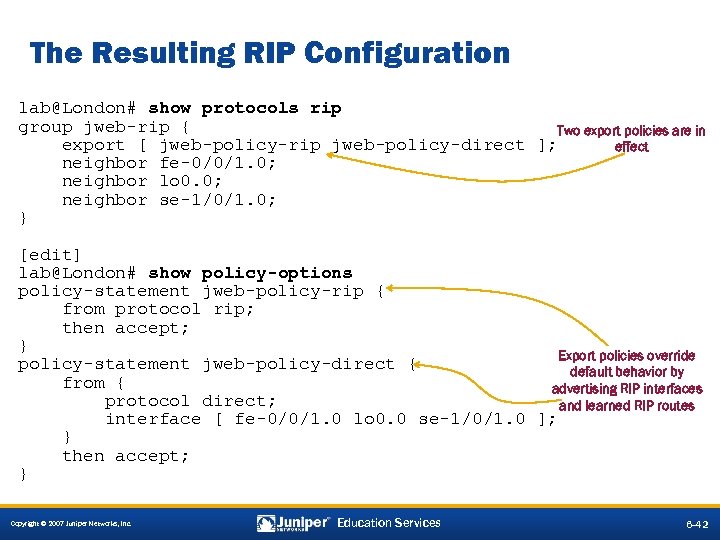 The Resulting RIP Configuration lab@London# show protocols rip group jweb-rip { Two export policies are in export [ jweb-policy-rip jweb-policy-direct ]; effect neighbor fe-0/0/1. 0; neighbor lo 0. 0; neighbor se-1/0/1. 0; } [edit] lab@London# show policy-options policy-statement jweb-policy-rip { from protocol rip; then accept; } Export policies override policy-statement jweb-policy-direct { default behavior by from { advertising RIP interfaces protocol direct; and learned RIP routes interface [ fe-0/0/1. 0 lo 0. 0 se-1/0/1. 0 ]; } then accept; } Copyright © 2007 Juniper Networks, Inc. Education Services 6 -42
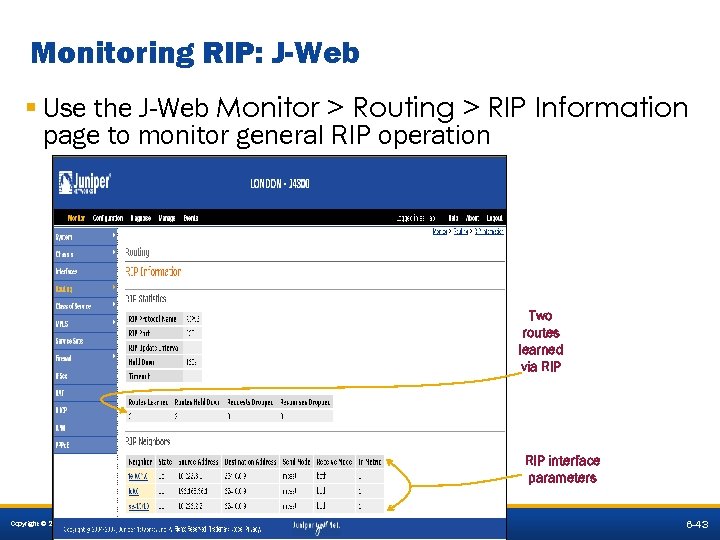 Monitoring RIP: J-Web § Use the J-Web Monitor > Routing > RIP Information page to monitor general RIP operation Two routes learned via RIP interface parameters Copyright © 2007 Juniper Networks, Inc. Education Services 6 -43
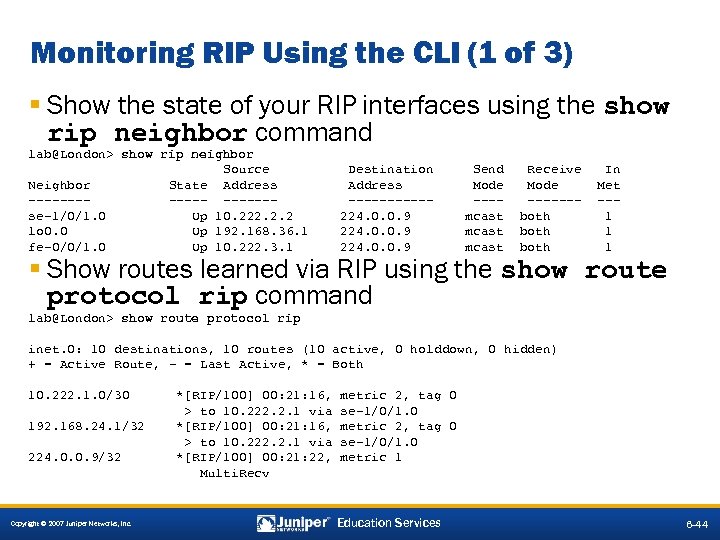 Monitoring RIP Using the CLI (1 of 3) § Show the state of your RIP interfaces using the show rip neighbor command lab@London> show rip neighbor Source Neighbor State Address ------se-1/0/1. 0 Up 10. 222. 2. 2 lo 0. 0 Up 192. 168. 36. 1 fe-0/0/1. 0 Up 10. 222. 3. 1 Destination Address -----224. 0. 0. 9 Send Mode ---mcast Receive Mode ------both In Met --1 1 1 § Show routes learned via RIP using the show route protocol rip command lab@London> show route protocol rip inet. 0: 10 destinations, 10 routes (10 active, 0 holddown, 0 hidden) + = Active Route, - = Last Active, * = Both 10. 222. 1. 0/30 192. 168. 24. 1/32 224. 0. 0. 9/32 Copyright © 2007 Juniper Networks, Inc. *[RIP/100] 00: 21: 16, > to 10. 222. 2. 1 via *[RIP/100] 00: 21: 22, Multi. Recv metric 2, tag 0 se-1/0/1. 0 metric 1 Education Services 6 -44
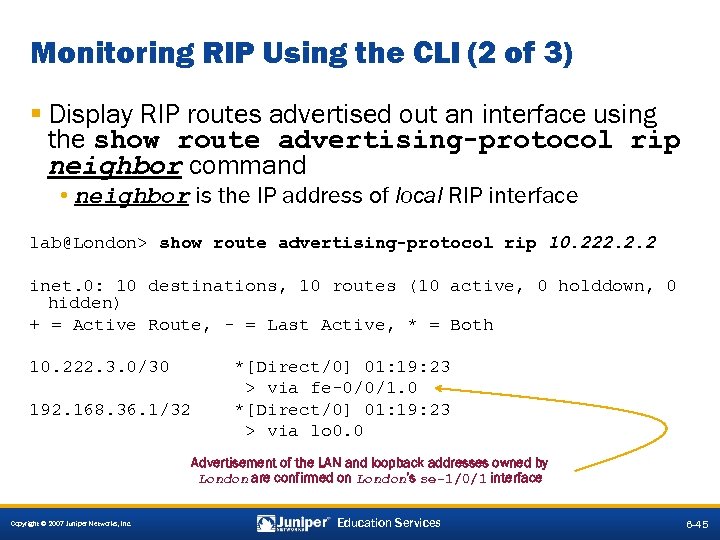 Monitoring RIP Using the CLI (2 of 3) § Display RIP routes advertised out an interface using the show route advertising-protocol rip neighbor command • neighbor is the IP address of local RIP interface lab@London> show route advertising-protocol rip 10. 222. 2. 2 inet. 0: 10 destinations, 10 routes (10 active, 0 holddown, 0 hidden) + = Active Route, - = Last Active, * = Both 10. 222. 3. 0/30 192. 168. 36. 1/32 *[Direct/0] 01: 19: 23 > via fe-0/0/1. 0 *[Direct/0] 01: 19: 23 > via lo 0. 0 Advertisement of the LAN and loopback addresses owned by London are confirmed on London’s se-1/0/1 interface Copyright © 2007 Juniper Networks, Inc. Education Services 6 -45
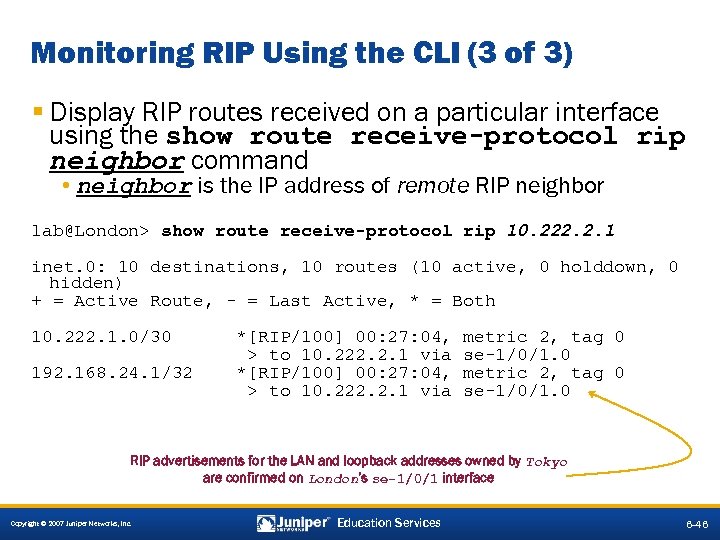 Monitoring RIP Using the CLI (3 of 3) § Display RIP routes received on a particular interface using the show route receive-protocol rip neighbor command • neighbor is the IP address of remote RIP neighbor lab@London> show route receive-protocol rip 10. 222. 2. 1 inet. 0: 10 destinations, 10 routes (10 active, 0 holddown, 0 hidden) + = Active Route, - = Last Active, * = Both 10. 222. 1. 0/30 192. 168. 24. 1/32 *[RIP/100] 00: 27: 04, > to 10. 222. 2. 1 via metric 2, tag 0 se-1/0/1. 0 RIP advertisements for the LAN and loopback addresses owned by Tokyo are confirmed on London’s se-1/0/1 interface Copyright © 2007 Juniper Networks, Inc. Education Services 6 -46
 Lab 4—Parts 4– 5: RIP § Configure and monitor RIP version 2. Copyright © 2007 Juniper Networks, Inc. Education Services 6 -47
 Agenda: Routing Protocols and Policy § Routing Table and Route Preferences § Routing Policy § J-Web Support for Routing Protocols and Policy § Configuring and Monitoring Static Routing § Interior Gateway Protocols § Configuring and Monitoring RIP àConfiguring and Monitoring OSPF Copyright © 2007 Juniper Networks, Inc. Education Services 6 -48
 OSPF Protocol Overview § OSPF is a link-state routing protocol § OSPF reliably floods LSAs to distribute link-state information once an adjacency is formed § Each router uses these LSAs to create a complete database for the network § OSPF uses the SPF algorithm within the database to calculate the best route to every node in the network § JUNOS software support for OSPF includes: • RFC 1587, The OSPF NSSA Option • RFC 2328, OSPF Version 2 • RFC 2740, OSPF for IPv 6 • draft-katz-yeung-ospf-traffic-01. txt, Traffic Engineering Extensions to OSPF • draft-ietf-katz-ward-bfd-00. txt, Bidirectional Forwarding Detection Copyright © 2007 Juniper Networks, Inc. Education Services 6 -49
 OSPF Router Terminology § Internal router has all OSPF links in the same area • Within Area 0, also called a backbone router § Backbone router • Any router with a link to Area 0 § ABRs • Routers that belong to more than one area are called area border routers • Connect OSPF areas to the backbone Area 0 § ASBRs • Routers that inject routing information from outside the OSPF domain are called AS boundary routers Copyright © 2007 Juniper Networks, Inc. Education Services 6 -51
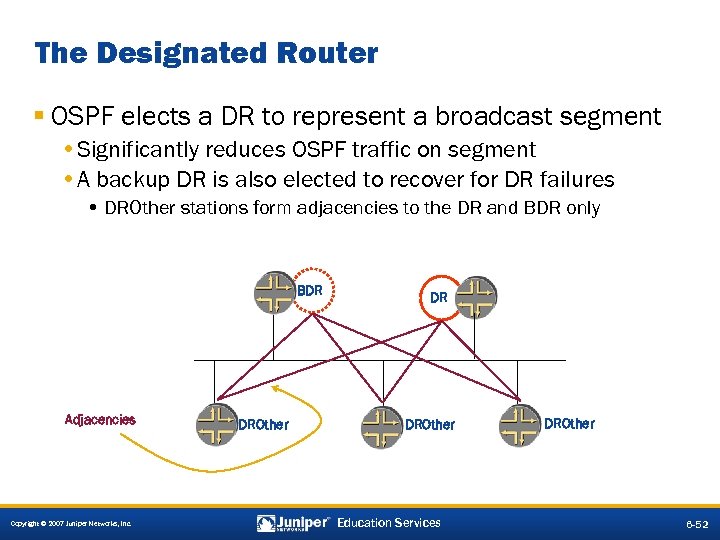 The Designated Router § OSPF elects a DR to represent a broadcast segment • Significantly reduces OSPF traffic on segment • A backup DR is also elected to recover for DR failures • DROther stations form adjacencies to the DR and BDR only BDR Adjacencies Copyright © 2007 Juniper Networks, Inc. DROther DR DROther Education Services DROther 6 -52
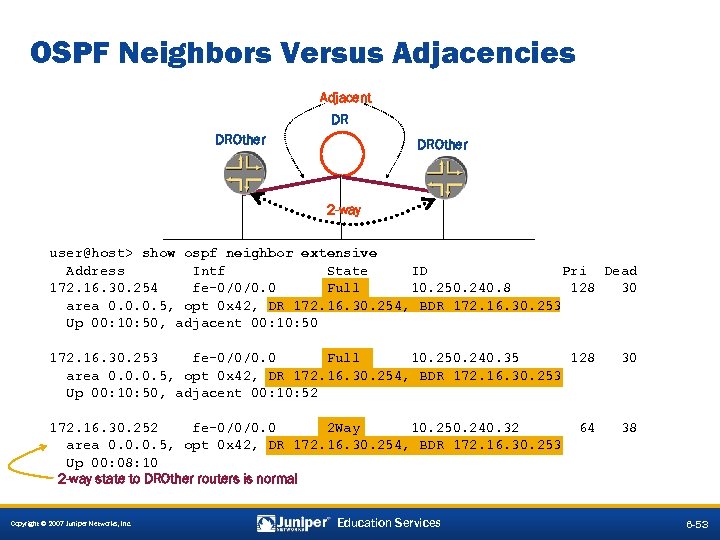 OSPF Neighbors Versus Adjacencies Adjacent DR DROther 2 -way user@host> show ospf neighbor extensive Address Intf State ID Pri Dead 172. 16. 30. 254 fe-0/0/0. 0 Full 10. 250. 240. 8 128 30 area 0. 0. 0. 5, opt 0 x 42, DR 172. 16. 30. 254, BDR 172. 16. 30. 253 Up 00: 10: 50, adjacent 00: 10: 50 172. 16. 30. 253 fe-0/0/0. 0 Full 10. 250. 240. 35 128 area 0. 0. 0. 5, opt 0 x 42, DR 172. 16. 30. 254, BDR 172. 16. 30. 253 Up 00: 10: 50, adjacent 00: 10: 52 30 172. 16. 30. 252 fe-0/0/0. 0 2 Way 10. 250. 240. 32 area 0. 0. 0. 5, opt 0 x 42, DR 172. 16. 30. 254, BDR 172. 16. 30. 253 Up 00: 08: 10 2 -way state to DROther routers is normal 38 Copyright © 2007 Juniper Networks, Inc. Education Services 64 6 -53
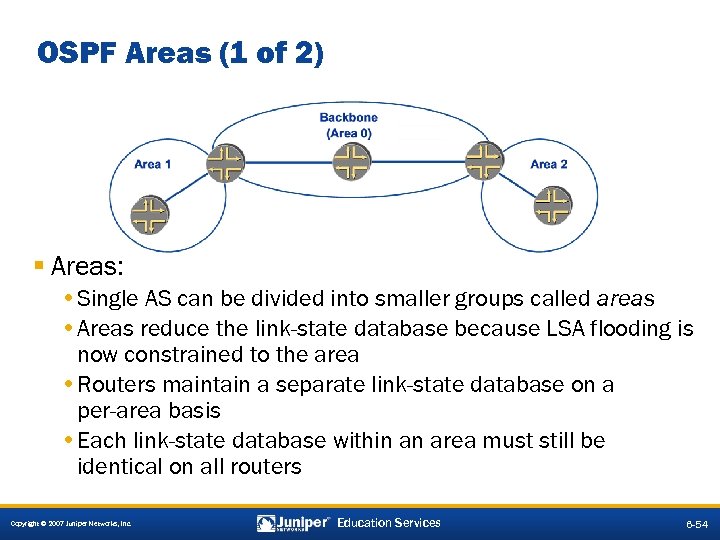 OSPF Areas (1 of 2) § Areas: • Single AS can be divided into smaller groups called areas • Areas reduce the link-state database because LSA flooding is now constrained to the area • Routers maintain a separate link-state database on a per-area basis • Each link-state database within an area must still be identical on all routers Copyright © 2007 Juniper Networks, Inc. Education Services 6 -54
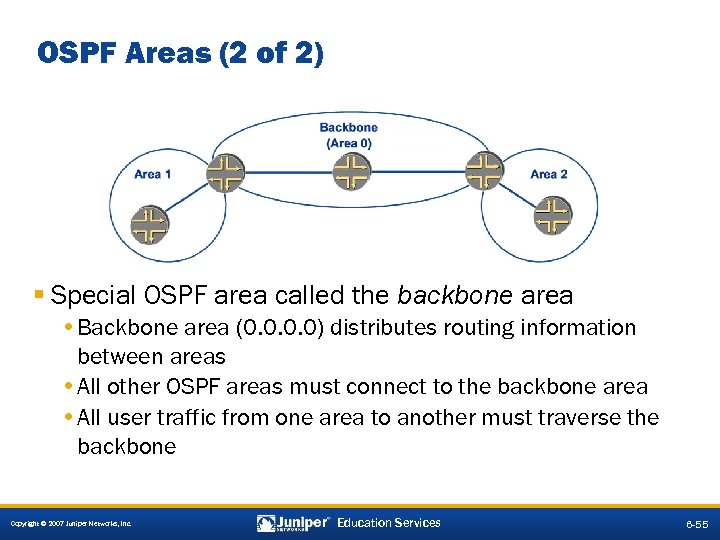 OSPF Areas (2 of 2) § Special OSPF area called the backbone area • Backbone area (0. 0) distributes routing information between areas • All other OSPF areas must connect to the backbone area • All user traffic from one area to another must traverse the backbone Copyright © 2007 Juniper Networks, Inc. Education Services 6 -55
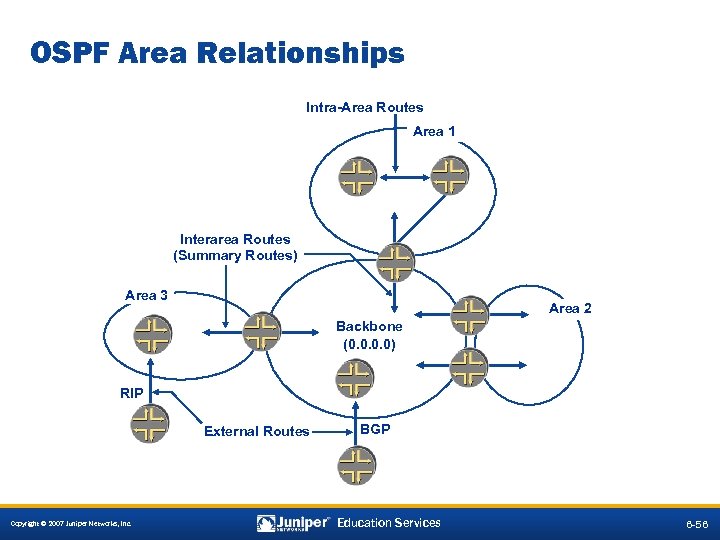 OSPF Area Relationships Intra-Area Routes Area 1 Interarea Routes (Summary Routes) Area 3 Area 2 Backbone (0. 0) RIP External Routes Copyright © 2007 Juniper Networks, Inc. BGP Education Services 6 -56
 OSPF Area Types § Stub areas • Do not carry external routes • Cannot contain ASBRs § Totally stubby areas • Stub areas that only receive the default route from the backbone § Not-so-stubby areas • Allow external routes to be advertised from the area but not received from another area Copyright © 2007 Juniper Networks, Inc. Education Services 6 -57
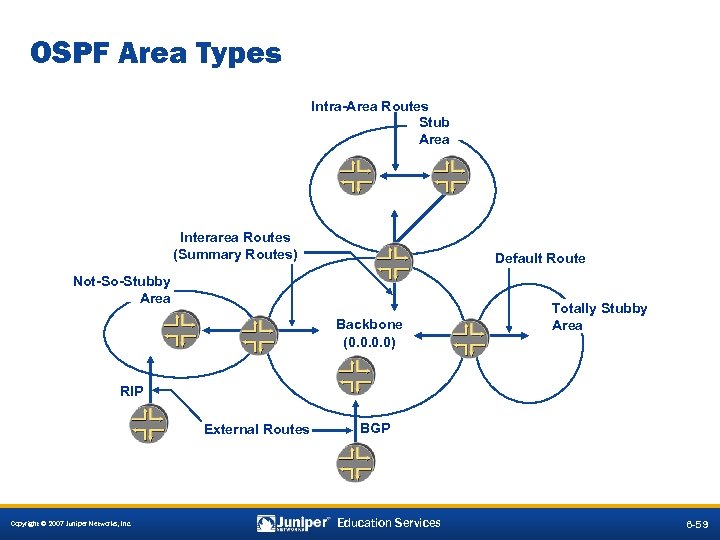 OSPF Area Types Intra-Area Routes Stub Area Interarea Routes (Summary Routes) Default Route Not-So-Stubby Area Backbone (0. 0) Totally Stubby Area RIP External Routes Copyright © 2007 Juniper Networks, Inc. BGP Education Services 6 -59
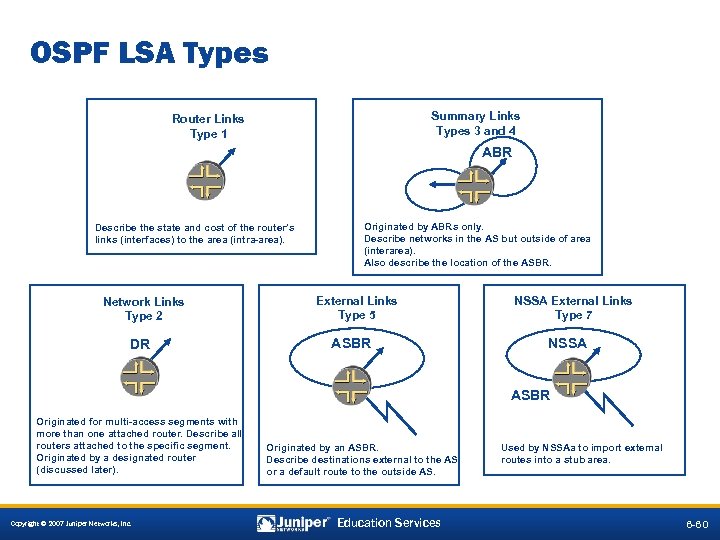 OSPF LSA Types Summary Links Types 3 and 4 Router Links Type 1 ABR Describe the state and cost of the router’s links (interfaces) to the area (intra-area). Network Links Type 2 DR Originated by ABRs only. Describe networks in the AS but outside of area (interarea). Also describe the location of the ASBR. External Links Type 5 ASBR NSSA External Links Type 7 NSSA ASBR Originated for multi-access segments with more than one attached router. Describe all routers attached to the specific segment. Originated by a designated router (discussed later). Copyright © 2007 Juniper Networks, Inc. Originated by an ASBR. Describe destinations external to the AS or a default route to the outside AS. Education Services Used by NSSAa to import external routes into a stub area. 6 -60
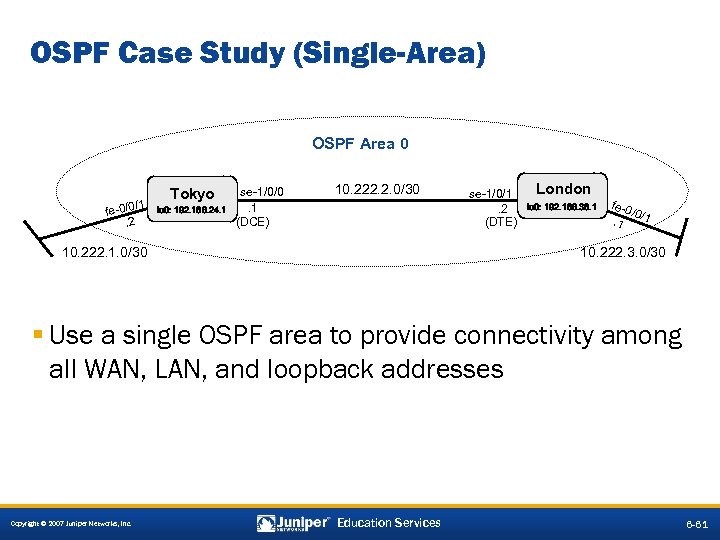 OSPF Case Study (Single-Area) OSPF Area 0 1 / fe-0/0. 2 Tokyo HARLIE lo 0: 192. 168. 24. 1 se-1/0/0. 1 (DCE) 10. 222. 2. 0/30 10. 222. 1. 0/30 se-1/0/1. 2 (DTE) London Wintermute lo 0: 192. 168. 36. 1 fe-0 /0/1. 1 10. 222. 3. 0/30 § Use a single OSPF area to provide connectivity among all WAN, LAN, and loopback addresses Copyright © 2007 Juniper Networks, Inc. Education Services 6 -61
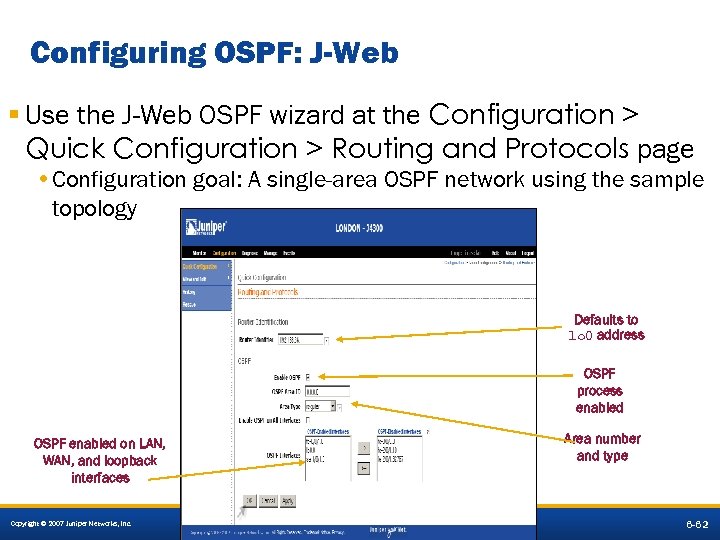 Configuring OSPF: J-Web § Use the J-Web OSPF wizard at the Configuration > Quick Configuration > Routing and Protocols page • Configuration goal: A single-area OSPF network using the sample topology Defaults to lo 0 address OSPF process enabled Area number and type OSPF enabled on LAN, WAN, and loopback interfaces Copyright © 2007 Juniper Networks, Inc. Education Services 6 -62
![The Resulting OSPF Configuration [edit] lab@London# show routing-options router-id 192. 168. 36. 1; [edit]](https://present5.com/presentation/0b6eabc55e039501342e1a062a50268f/image-51.jpg "The Resulting OSPF Configuration [edit] lab@London# show routing-options router-id 192. 168. 36. 1; [edit]") The Resulting OSPF Configuration [edit] lab@London# show routing-options router-id 192. 168. 36. 1; [edit] lab@London# show protocols ospf area 0. 0 { interface fe-0/0/1. 0; interface se-1/0/1. 0; interface lo 0. 0; } Required because of explicit RID; can be set to passive § Default OSPF import and export policies are in effect • Explicit declaration of lo 0 -based RID requires that OSPF run on loopback interface • Otherwise, the loopback route will not be advertised Copyright © 2007 Juniper Networks, Inc. Education Services 6 -63
The Resulting OSPF Configuration [edit] lab@London# show routing-options router-id 192. 168. 36. 1; [edit] lab@London# show protocols ospf area 0. 0 { interface fe-0/0/1. 0; interface se-1/0/1. 0; interface lo 0. 0; } Required because of explicit RID; can be set to passive § Default OSPF import and export policies are in effect • Explicit declaration of lo 0 -based RID requires that OSPF run on loopback interface • Otherwise, the loopback route will not be advertised Copyright © 2007 Juniper Networks, Inc. Education Services 6 -63
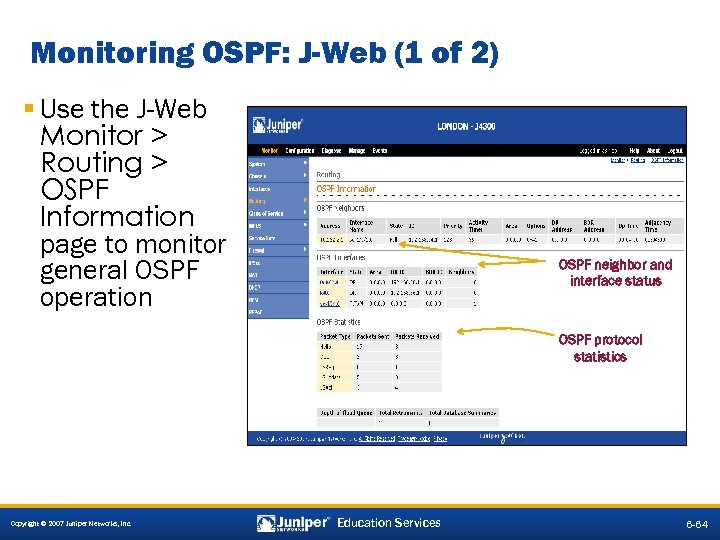 Monitoring OSPF: J-Web (1 of 2) § Use the J-Web Monitor > Routing > OSPF Information page to monitor general OSPF operation OSPF neighbor and interface status OSPF protocol statistics Copyright © 2007 Juniper Networks, Inc. Education Services 6 -64
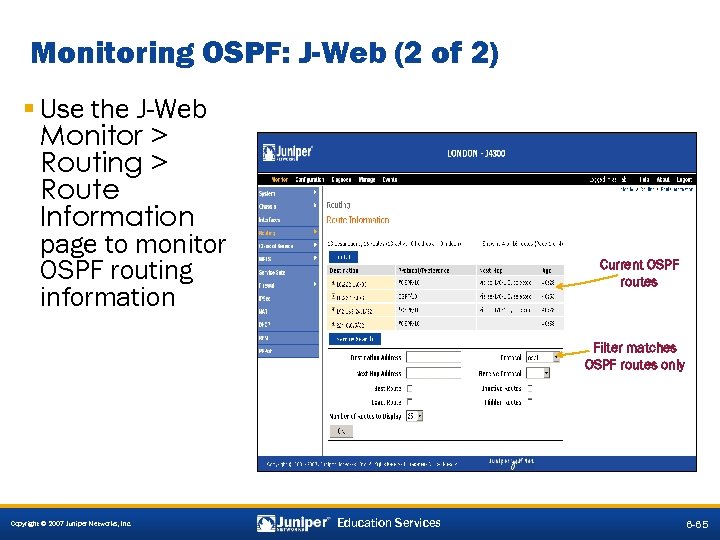 Monitoring OSPF: J-Web (2 of 2) § Use the J-Web Monitor > Routing > Route Information page to monitor OSPF routing information Current OSPF routes Filter matches OSPF routes only Copyright © 2007 Juniper Networks, Inc. Education Services 6 -65
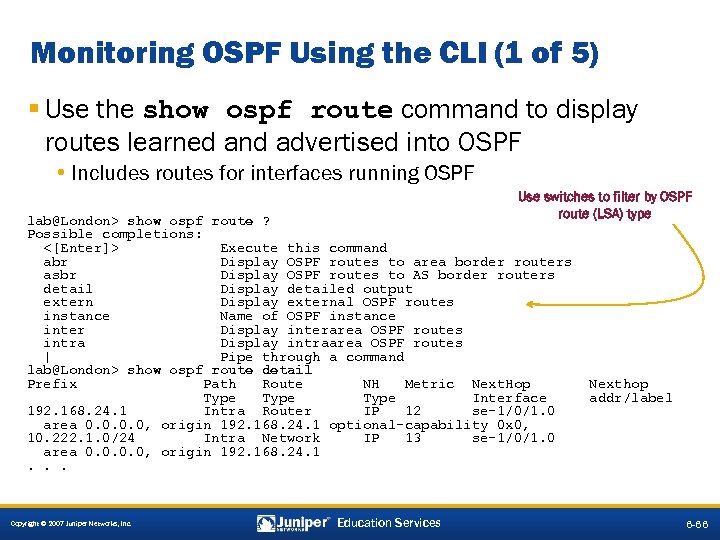 Monitoring OSPF Using the CLI (1 of 5) § Use the show ospf route command to display routes learned and advertised into OSPF • Includes routes for interfaces running OSPF Use switches to filter by OSPF route (LSA) type lab@London> show ospf route ? Possible completions: <[Enter]> Execute this command abr Display OSPF routes to area border routers asbr Display OSPF routes to AS border routers detail Display detailed output extern Display external OSPF routes instance Name of OSPF instance inter Display interarea OSPF routes intra Display intraarea OSPF routes | Pipe through a command lab@London> show ospf route detail Prefix Path Route NH Metric Next. Hop Type Interface 192. 168. 24. 1 Intra Router IP 12 se-1/0/1. 0 area 0. 0, origin 192. 168. 24. 1 optional-capability 0 x 0, 10. 222. 1. 0/24 Intra Network IP 13 se-1/0/1. 0 area 0. 0, origin 192. 168. 24. 1. . . Copyright © 2007 Juniper Networks, Inc. Education Services Nexthop addr/label 6 -66
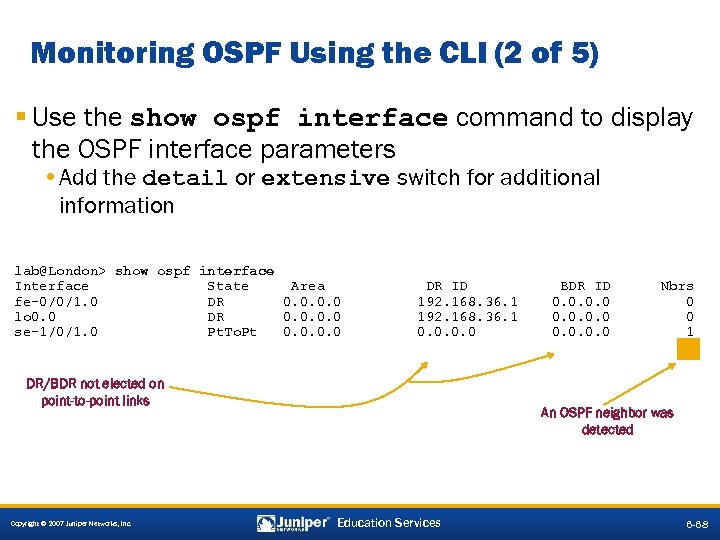 Monitoring OSPF Using the CLI (2 of 5) § Use the show ospf interface command to display the OSPF interface parameters • Add the detail or extensive switch for additional information lab@London> show ospf interface Interface State Area fe-0/0/1. 0 DR 0. 0 lo 0. 0 DR 0. 0 se-1/0/1. 0 Pt. To. Pt 0. 0 DR ID 192. 168. 36. 1 0. 0 DR/BDR not elected on point-to-point links Copyright © 2007 Juniper Networks, Inc. BDR ID 0. 0 Nbrs 0 0 1 An OSPF neighbor was detected Education Services 6 -68
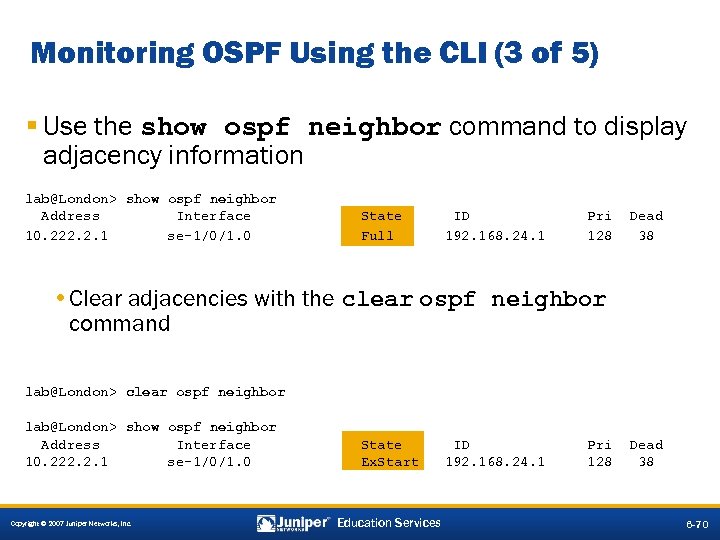 Monitoring OSPF Using the CLI (3 of 5) § Use the show ospf neighbor command to display adjacency information lab@London> show ospf neighbor Address Interface 10. 222. 2. 1 se-1/0/1. 0 State Full ID 192. 168. 24. 1 Pri 128 Dead 38 • Clear adjacencies with the clear ospf neighbor command lab@London> clear ospf neighbor lab@London> show ospf neighbor Address Interface 10. 222. 2. 1 se-1/0/1. 0 Copyright © 2007 Juniper Networks, Inc. State Ex. Start Education Services ID 192. 168. 24. 1 Pri 128 Dead 38 6 -70
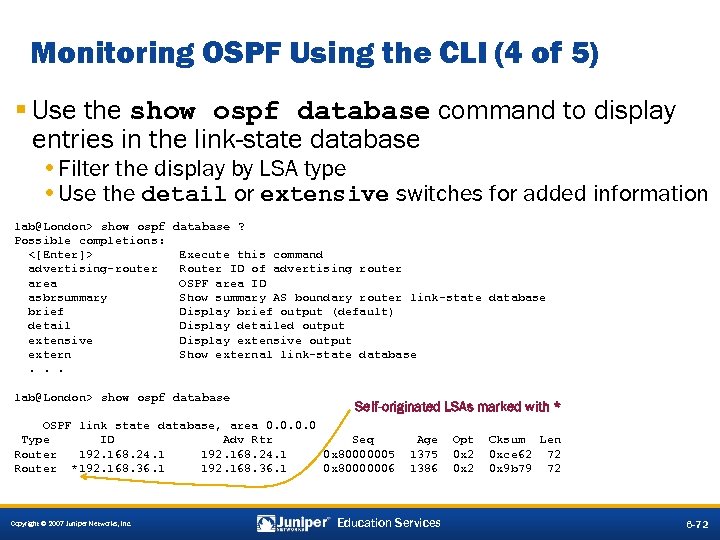 Monitoring OSPF Using the CLI (4 of 5) § Use the show ospf database command to display entries in the link-state database • Filter the display by LSA type • Use the detail or extensive switches for added information lab@London> show ospf database ? Possible completions: <[Enter]> Execute this command advertising-router Router ID of advertising router area OSPF area ID asbrsummary Show summary AS boundary router link-state database brief Display brief output (default) detail Display detailed output extensive Display extensive output extern Show external link-state database. . . lab@London> show ospf database Self-originated LSAs marked with * OSPF link state database, area 0. 0 Type ID Adv Rtr Seq Router 192. 168. 24. 1 0 x 80000005 Router *192. 168. 36. 1 0 x 80000006 Copyright © 2007 Juniper Networks, Inc. Age 1375 1386 Education Services Opt 0 x 2 Cksum Len 0 xce 62 72 0 x 9 b 79 72 6 -72
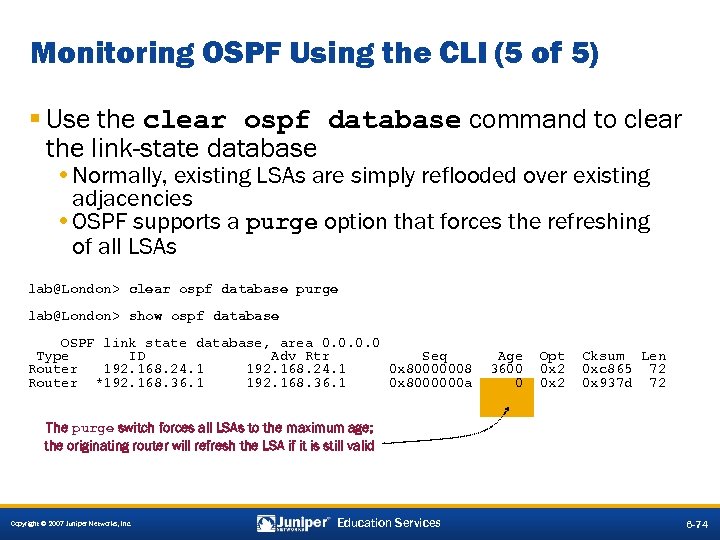 Monitoring OSPF Using the CLI (5 of 5) § Use the clear ospf database command to clear the link-state database • Normally, existing LSAs are simply reflooded over existing adjacencies • OSPF supports a purge option that forces the refreshing of all LSAs lab@London> clear ospf database purge lab@London> show ospf database OSPF link state database, area 0. 0 Type ID Adv Rtr Seq Router 192. 168. 24. 1 0 x 80000008 Router *192. 168. 36. 1 0 x 8000000 a Age 3600 0 Opt 0 x 2 Cksum Len 0 xc 865 72 0 x 937 d 72 The purge switch forces all LSAs to the maximum age; the originating router will refresh the LSA if it is still valid Copyright © 2007 Juniper Networks, Inc. Education Services 6 -74
 Lab 4–Part 6: OSPF Single Area § Configure and monitor single-area OSPF. Copyright © 2007 Juniper Networks, Inc. Education Services 6 -75
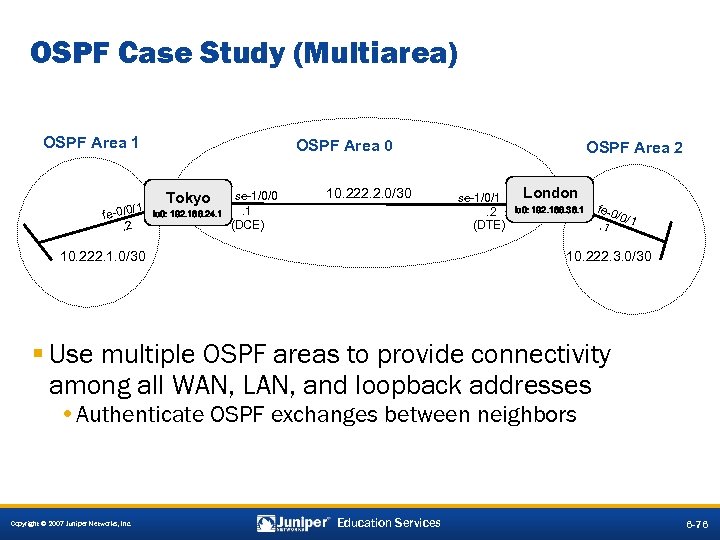 OSPF Case Study (Multiarea) OSPF Area 1 /1 fe-0/0. 2 OSPF Area 0 Tokyo HARLIE lo 0: 192. 168. 24. 1 se-1/0/0. 1 (DCE) 10. 222. 2. 0/30 10. 222. 1. 0/30 OSPF Area 2 se-1/0/1. 2 (DTE) London Wintermute lo 0: 192. 168. 36. 1 fe-0 /0/1. 1 10. 222. 3. 0/30 § Use multiple OSPF areas to provide connectivity among all WAN, LAN, and loopback addresses • Authenticate OSPF exchanges between neighbors Copyright © 2007 Juniper Networks, Inc. Education Services 6 -76
![Multiarea OSPF Configuration [edit] lab@London# show routing-options router-id 192. 168. 36. 1; Area and](https://present5.com/presentation/0b6eabc55e039501342e1a062a50268f/image-61.jpg "Multiarea OSPF Configuration [edit] lab@London# show routing-options router-id 192. 168. 36. 1; Area and") Multiarea OSPF Configuration [edit] lab@London# show routing-options router-id 192. 168. 36. 1; Area and interface configuration [edit] lab@London# show protocols ospf area 0. 0 { Required because of explicit RID; authentication-type md 5; can be set to passive interface lo 0. 0; interface se-1/0/1. 0 { authentication { md 5 1 key "$9$v. W 7 M 7 Vg 4 Zjk. PJG"; ## SECRET-DATA } } } area 0. 0. 0. 2 { authentication-type md 5; Authentication parameters interface fe-0/0/1. 0 { authentication { md 5 1 key "$9$5 T 6 AB 1 hr. K 8 Ec"; ## SECRET-DATA } } } Copyright © 2007 Juniper Networks, Inc. Education Services 6 -77
Multiarea OSPF Configuration [edit] lab@London# show routing-options router-id 192. 168. 36. 1; Area and interface configuration [edit] lab@London# show protocols ospf area 0. 0 { Required because of explicit RID; authentication-type md 5; can be set to passive interface lo 0. 0; interface se-1/0/1. 0 { authentication { md 5 1 key "$9$v. W 7 M 7 Vg 4 Zjk. PJG"; ## SECRET-DATA } } } area 0. 0. 0. 2 { authentication-type md 5; Authentication parameters interface fe-0/0/1. 0 { authentication { md 5 1 key "$9$5 T 6 AB 1 hr. K 8 Ec"; ## SECRET-DATA } } } Copyright © 2007 Juniper Networks, Inc. Education Services 6 -77
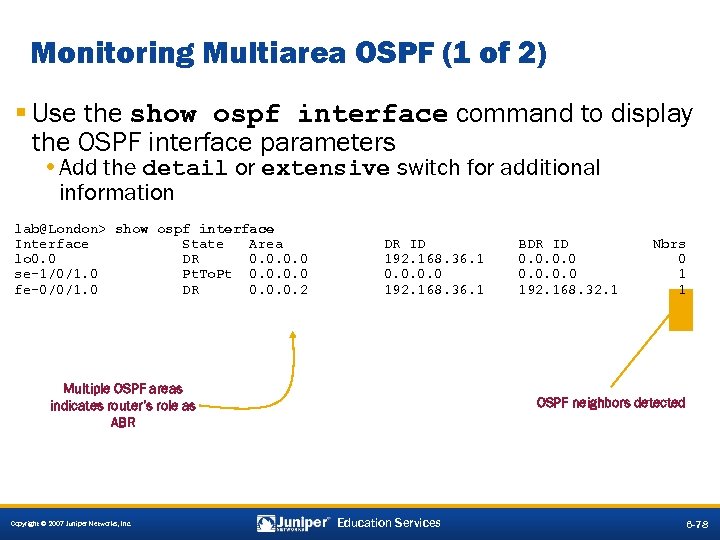 Monitoring Multiarea OSPF (1 of 2) § Use the show ospf interface command to display the OSPF interface parameters • Add the detail or extensive switch for additional information lab@London> show ospf interface Interface State Area lo 0. 0 DR 0. 0 se-1/0/1. 0 Pt. To. Pt 0. 0 fe-0/0/1. 0 DR 0. 0. 0. 2 DR ID 192. 168. 36. 1 0. 0 192. 168. 36. 1 Multiple OSPF areas indicates router’s role as ABR Copyright © 2007 Juniper Networks, Inc. BDR ID 0. 0 192. 168. 32. 1 Nbrs 0 1 1 OSPF neighbors detected Education Services 6 -78
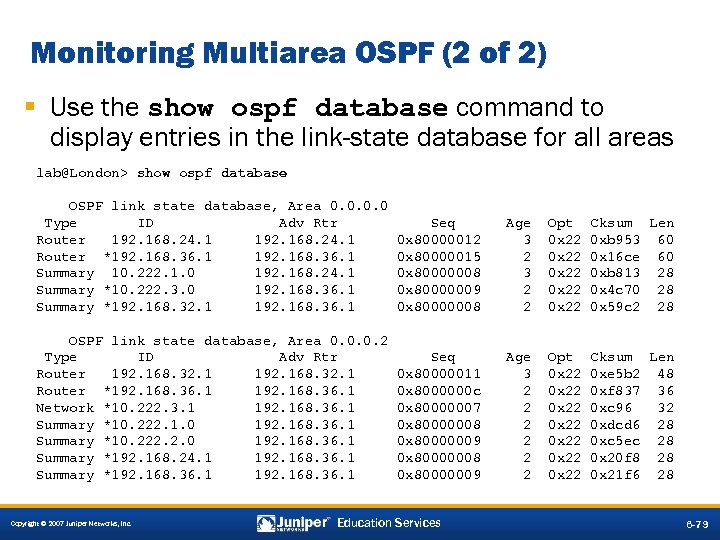 Monitoring Multiarea OSPF (2 of 2) § Use the show ospf database command to display entries in the link-state database for all areas lab@London> show ospf database OSPF link state database, Area 0. 0 Type ID Adv Rtr Router 192. 168. 24. 1 Router *192. 168. 36. 1 Summary 10. 222. 1. 0 192. 168. 24. 1 Summary *10. 222. 3. 0 192. 168. 36. 1 Summary *192. 168. 32. 1 192. 168. 36. 1 Seq 0 x 80000012 0 x 80000015 0 x 80000008 0 x 80000009 0 x 80000008 Age 3 2 2 Opt 0 x 22 0 x 22 Cksum Len 0 xb 953 60 0 x 16 ce 60 0 xb 813 28 0 x 4 c 70 28 0 x 59 c 2 28 OSPF link state database, Area 0. 0. 0. 2 Type ID Adv Rtr Router 192. 168. 32. 1 Router *192. 168. 36. 1 Network *10. 222. 3. 1 192. 168. 36. 1 Summary *10. 222. 1. 0 192. 168. 36. 1 Summary *10. 222. 2. 0 192. 168. 36. 1 Summary *192. 168. 24. 1 192. 168. 36. 1 Summary *192. 168. 36. 1 Seq 0 x 80000011 0 x 8000000 c 0 x 80000007 0 x 80000008 0 x 80000009 Age 3 2 2 2 Opt 0 x 22 0 x 22 Cksum Len 0 xe 5 b 2 48 0 xf 837 36 0 xc 96 32 0 xdcd 6 28 0 xc 5 ec 28 0 x 20 f 8 28 0 x 21 f 6 28 Copyright © 2007 Juniper Networks, Inc. Education Services 6 -79
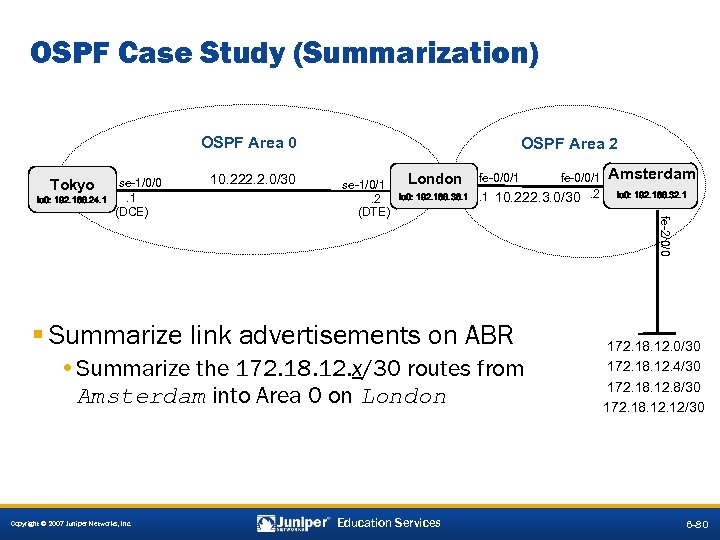 OSPF Case Study (Summarization) OSPF Area 0 Tokyo HARLIE lo 0: 192. 168. 24. 1 10. 222. 2. 0/30 se-1/0/1. 2 (DTE) London Wintermute lo 0: 192. 168. 36. 1 fe-0/0/1. 1 10. 222. 3. 0/30. 2 § Summarize link advertisements on ABR • Summarize the 172. 18. 12. x/30 routes from Amsterdam into Area 0 on London Copyright © 2007 Juniper Networks, Inc. Education Services Amsterdam lo 0: 192. 168. 32. 1 fe-2/0/0 se-1/0/0. 1 (DCE) OSPF Area 2 172. 18. 12. 0/30 172. 18. 12. 4/30 172. 18. 12. 8/30 172. 18. 12/30 6 -80
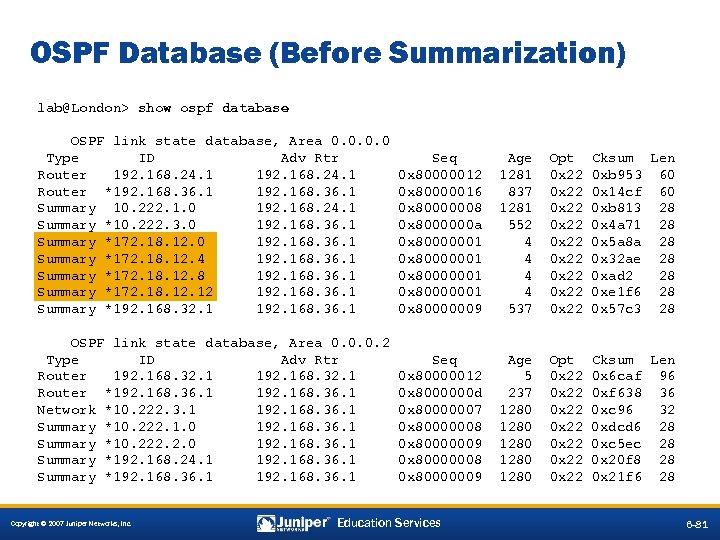 OSPF Database (Before Summarization) lab@London> show ospf database OSPF link state database, Area 0. 0 Type ID Adv Rtr Router 192. 168. 24. 1 Router *192. 168. 36. 1 Summary 10. 222. 1. 0 192. 168. 24. 1 Summary *10. 222. 3. 0 192. 168. 36. 1 Summary *172. 18. 12. 4 192. 168. 36. 1 Summary *172. 18. 12. 8 192. 168. 36. 1 Summary *172. 18. 12 192. 168. 36. 1 Summary *192. 168. 32. 1 192. 168. 36. 1 Seq 0 x 80000012 0 x 80000016 0 x 80000008 0 x 8000000 a 0 x 80000001 0 x 80000009 Age 1281 837 1281 552 4 4 537 Opt 0 x 22 0 x 22 0 x 22 Cksum Len 0 xb 953 60 0 x 14 cf 60 0 xb 813 28 0 x 4 a 71 28 0 x 5 a 8 a 28 0 x 32 ae 28 0 xad 2 28 0 xe 1 f 6 28 0 x 57 c 3 28 OSPF link state database, Area 0. 0. 0. 2 Type ID Adv Rtr Router 192. 168. 32. 1 Router *192. 168. 36. 1 Network *10. 222. 3. 1 192. 168. 36. 1 Summary *10. 222. 1. 0 192. 168. 36. 1 Summary *10. 222. 2. 0 192. 168. 36. 1 Summary *192. 168. 24. 1 192. 168. 36. 1 Summary *192. 168. 36. 1 Seq 0 x 80000012 0 x 8000000 d 0 x 80000007 0 x 80000008 0 x 80000009 Age 5 237 1280 1280 Opt 0 x 22 0 x 22 Cksum Len 0 x 6 caf 96 0 xf 638 36 0 xc 96 32 0 xdcd 6 28 0 xc 5 ec 28 0 x 20 f 8 28 0 x 21 f 6 28 Copyright © 2007 Juniper Networks, Inc. Education Services 6 -81
![Summary Configuration Added [edit] lab@London# show protocols ospf area 0. 0 { authentication-type md](https://present5.com/presentation/0b6eabc55e039501342e1a062a50268f/image-66.jpg "Summary Configuration Added [edit] lab@London# show protocols ospf area 0. 0 { authentication-type md") Summary Configuration Added [edit] lab@London# show protocols ospf area 0. 0 { authentication-type md 5; interface lo 0. 0; interface se-1/0/1. 0 { authentication { md 5 1 key "$9$v. W 7 M 7 Vg 4 Zjk. PJG"; ## SECRET-DATA } } } area 0. 0. 0. 2 { area-range 172. 18. 12. 0/28; authentication-type md 5; interface fe-0/0/1. 0 { authentication { md 5 1 key "$9$5 T 6 AB 1 hr. K 8 Ec"; ## SECRET-DATA } } } Copyright © 2007 Juniper Networks, Inc. Education Services area-range statement will summarize all 172. 18. 12. x/30 prefixes 6 -82
Summary Configuration Added [edit] lab@London# show protocols ospf area 0. 0 { authentication-type md 5; interface lo 0. 0; interface se-1/0/1. 0 { authentication { md 5 1 key "$9$v. W 7 M 7 Vg 4 Zjk. PJG"; ## SECRET-DATA } } } area 0. 0. 0. 2 { area-range 172. 18. 12. 0/28; authentication-type md 5; interface fe-0/0/1. 0 { authentication { md 5 1 key "$9$5 T 6 AB 1 hr. K 8 Ec"; ## SECRET-DATA } } } Copyright © 2007 Juniper Networks, Inc. Education Services area-range statement will summarize all 172. 18. 12. x/30 prefixes 6 -82
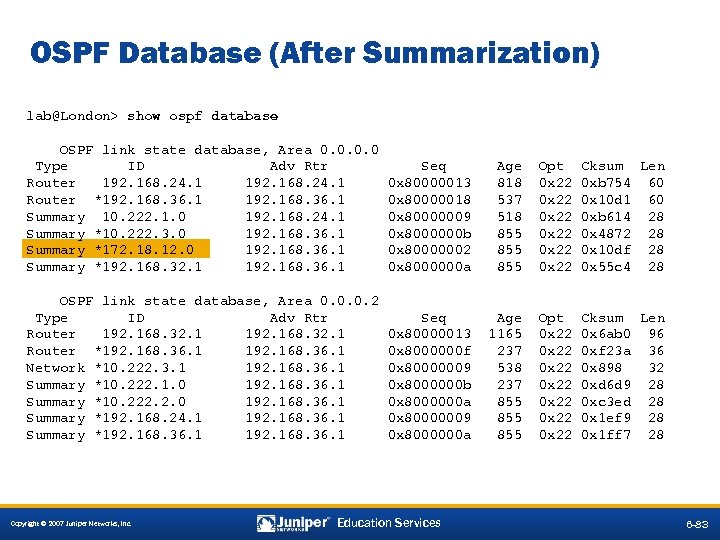 OSPF Database (After Summarization) lab@London> show ospf database OSPF link state database, Area 0. 0 Type ID Adv Rtr Router 192. 168. 24. 1 Router *192. 168. 36. 1 Summary 10. 222. 1. 0 192. 168. 24. 1 Summary *10. 222. 3. 0 192. 168. 36. 1 Summary *172. 18. 12. 0 192. 168. 36. 1 Summary *192. 168. 32. 1 192. 168. 36. 1 Seq 0 x 80000013 0 x 80000018 0 x 80000009 0 x 8000000 b 0 x 80000002 0 x 8000000 a Age 818 537 518 855 855 Opt 0 x 22 0 x 22 Cksum Len 0 xb 754 60 0 x 10 d 1 60 0 xb 614 28 0 x 4872 28 0 x 10 df 28 0 x 55 c 4 28 OSPF link state database, Area 0. 0. 0. 2 Type ID Adv Rtr Router 192. 168. 32. 1 Router *192. 168. 36. 1 Network *10. 222. 3. 1 192. 168. 36. 1 Summary *10. 222. 1. 0 192. 168. 36. 1 Summary *10. 222. 2. 0 192. 168. 36. 1 Summary *192. 168. 24. 1 192. 168. 36. 1 Summary *192. 168. 36. 1 Seq 0 x 80000013 0 x 8000000 f 0 x 80000009 0 x 8000000 b 0 x 8000000 a 0 x 80000009 0 x 8000000 a Age 1165 237 538 237 855 855 Opt 0 x 22 0 x 22 Cksum Len 0 x 6 ab 0 96 0 xf 23 a 36 0 x 898 32 0 xd 6 d 9 28 0 xc 3 ed 28 0 x 1 ef 9 28 0 x 1 ff 7 28 Copyright © 2007 Juniper Networks, Inc. Education Services 6 -83
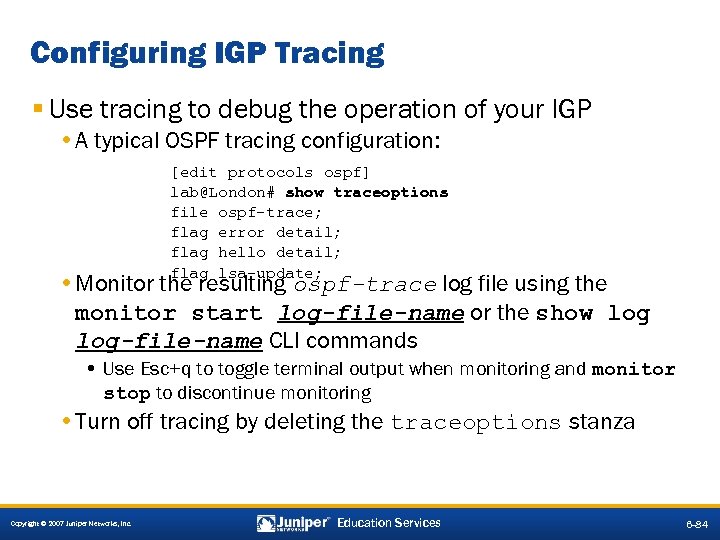 Configuring IGP Tracing § Use tracing to debug the operation of your IGP • A typical OSPF tracing configuration: [edit protocols ospf] lab@London# show traceoptions file ospf-trace; flag error detail; flag hello detail; flag lsa-update; • Monitor the resulting ospf-trace log file using the monitor start log-file-name or the show log-file-name CLI commands • Use Esc+q to toggle terminal output when monitoring and monitor stop to discontinue monitoring • Turn off tracing by deleting the traceoptions stanza Copyright © 2007 Juniper Networks, Inc. Education Services 6 -84
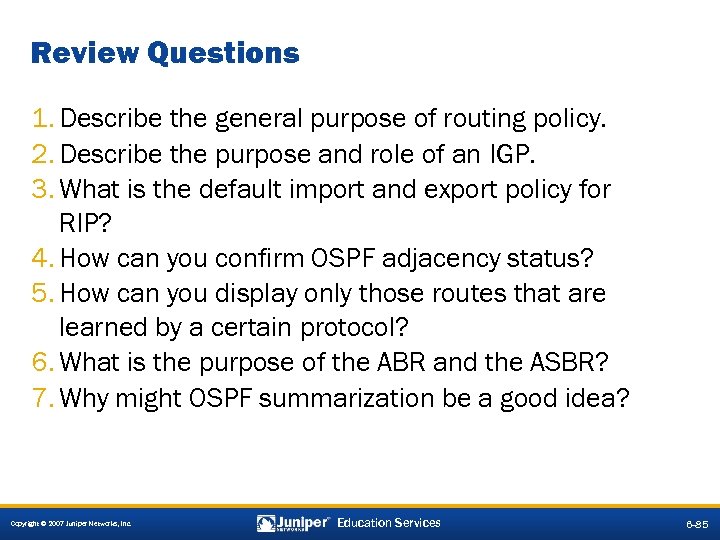 Review Questions 1. Describe the general purpose of routing policy. 2. Describe the purpose and role of an IGP. 3. What is the default import and export policy for RIP? 4. How can you confirm OSPF adjacency status? 5. How can you display only those routes that are learned by a certain protocol? 6. What is the purpose of the ABR and the ASBR? 7. Why might OSPF summarization be a good idea? Copyright © 2007 Juniper Networks, Inc. Education Services 6 -85
 Lab 4—Part 7: OSPF Multiarea § Configure and monitor multiarea OSPF. § Summarize link-state information into Area 0. Copyright © 2007 Juniper Networks, Inc. Education Services 6 -86
 Copyright © 2007 Juniper Networks, Inc. Education Services 6 -87