


 Скачать презентацию Online Safety — Workshop for schools Jane Mc
d67a63aaac295bb283dba441ddef11b8.ppt
- Количество слайдов: 22
 Online Safety - Workshop for schools Jane Mc. Fall Jane. mcfall@devon. gov. uk
 Objectives • • • Raise awareness with school staff and parents of the statutory Online Safety requirements for schools Identify the risks – social media, games consoles, mobile technologies, unsupervised access of the internet Raise awareness of online safety and its impact at home Identify strategies to consider for use of technology at home Identify free resources available to parents and carers 2
 Statutory Duties for schools The Common Inspection Framework education, skills and early years Key documentation for all staff in schools includes: • Keeping Children Safe in Education (September 2016 – 2017 version delayed due to General Election) Sets out roles and responsibilities https: //www. gov. uk/government/publications/keeping-children-safe-in-education--2 • Working together to safeguard children. Statutory applies in full to all schools. (Updated February 2017) https: //www. gov. uk/government/publications/workingtogether-to-safeguard-children--2 • Ofsted’s Inspecting Safeguarding in early years, education and skills settings (August 2016 – awaiting update following consultation) https: //www. gov. uk/government/uploads/system/uploads/attachment_data/file/5473 27/Inspecting_safeguarding_in_early_years_education_and_skills_settings. pdf • Prevent Duty guidance for England Wales(March 2015 – Updated March 2016) https: //www. gov. uk/government/publications/prevent-duty-guidance 3
 National Curriculum Computing Key Stage 1 and 2 Aims: ‘are responsible, competent, confident and creative users of information and communication technology’ Key Stage 1 - Pupils should be taught to: • recognise common uses of information technology beyond school • use technology safely and respectfully, keeping personal information private; identify where to go for help and support when they have concerns about content or contact on the internet or other online technologies. Key Stage 2 – Pupils should be taught to: • use technology safely, respectfully and responsibly; recognise acceptable/unacceptable behaviour; identify a range of ways to report concerns about content and contact. 4
 Consider what we can access via the internet • • • Films Books Shopping Travel Banking Research Social Media Games Sport +++++ 5
 How we can access the internet today • http: //www. mobility. protectchildren. ca/mobile-phone-technology/whatmobile-phones-can-do • http: //www. lovemyfire. com/kindle-fire. html • https: //www. lifewire. com/what-can-ipad-do-1994409 • https: //www. engadget. com/2013/11/08/xbox-one-neat-features/ • http: //www. techadvisor. co. uk/buying-advice/tablets/10 -reasons-you-shouldbuy-android-tablet-3489040/ +++++ 6
 Some Statistics (Ofcom Children and Parents: Media Use and Attitudes Report 2016) • One in five of all 5 -15 s only go online using a device other than a desktop or laptop (one in ten in 2015) • 32% 8 -11 s have their own smartphone (24% in 2015) • 42% 8 -11 s prefer to watch You. Tube to a TV • 51% 12 -15 s use Snapchat • 21% 12 -15 s claim to play online games with people they have never met • One in ten 11 -15 s are still communicating via social media at 10 pm https: //www. ofcom. org. uk/__data/assets/pdf_file/0034/93976/Children-Parents-Media-Use. Attitudes-Report-2016. pdf 7
 Some Statistics (10 -11 yr olds) Cornwall June 2017 • 100% access the internet unsupervised (use device in their own room) • 100% access You. Tube • 95% have access to a games console • 80% claim to access social media 8
 Risks to be considered • Age? • Information? • Chatting • Where? • Who? • Pictures/Images • Privacy Settings • Addiction https: //www. commonsensemedia. org 9
 More risks to be considered • Grooming • Social Networking • Sexting • Cyberbullying • Gaming https: //www. parentsprotect. co. uk/internet_safety. htm 10
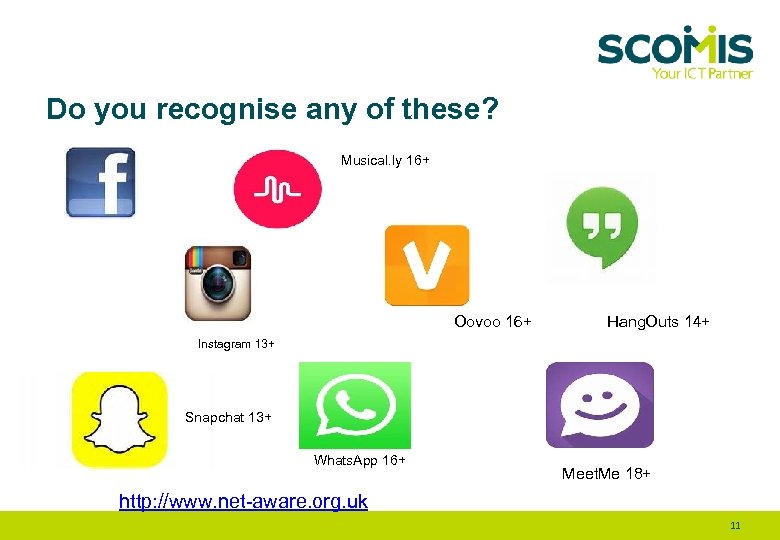 Do you recognise any of these? Musical. ly 16+ Face. Book 13+ Oovoo 16+ Hang. Outs 14+ Instagram 13+ Snapchat 13+ Whats. App 16+ Meet. Me 18+ http: //www. net-aware. org. uk 11
 Some facts about Gaming Consoles Did you know? • It is possible to access inappropriate websites through Playstation and Xbox consoles • Different games consoles are best suited to different ages (Nintendo 3 DS and Wii U have more games suitable for younger children) • Many games feature online multiplayer gameplay (competing against or with other players over the internet) • Games consoles do have parental controls • Games consoles require an internet connection to download updates. Some remain connected in stand-by mode and download content when not in use (Turn them off when not in use) • Games consoles connect to online app or games stores which can be used to download games (www. internetmatters. org) 12
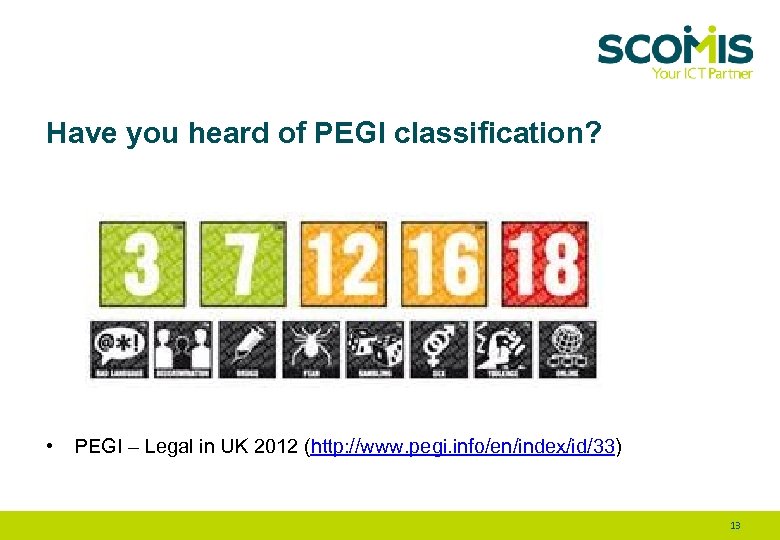 Have you heard of PEGI classification? • PEGI – Legal in UK 2012 (http: //www. pegi. info/en/index/id/33) 13
 Signs • • Behaviour – Aggressive/Bad tempered – Inappropriate language – Lack of interest in other activities – Mood swings Cyberbullying (same as being bullied) – appears sad, moody, or anxious – avoids school – withdraws from or shows a lack of interest in social activities – appears upset after using the computer or being online – appears upset after viewing a text message on a cell phone Addiction – Constant desire to be online – Withdrawal symptoms Screentime – – – Headaches Tiredness Nightmares 14
 Strategies to consider for use of technology at home • • Parental Control Tools You. Tube Kids Age-based settings for Netflix Safe Search for Google, Chrome or consider other browsers such as: Swiggle http: //www. swiggle. org. uk/ or Kidzsearch https: //www. kidzsearch. com/ • Parental controls for BT, Talk, Virgin, Sky ++ • Set screen time limits • Consider removing technology from the bedroom • Block ‘in-app’ purchases • Do not share your credit card details • Allow/Block websites • Monitor access • Have those conversations! Internetmatters https: //www. internetmatters. org/ NSPCC https: //www. nspcc. org. uk/preventing-abuse/keeping-children-safe/online-safety/talkingyour-child-staying-safe-online/ 15
 You. Tube Kids Apps for 0 -5 Years Gives parents peace of mind a child a safe online viewing experience • • You. Tube launched a child friendly version of their popular video sharing site. First introduced in the US, now available in the UK. Filters out inappropriate content and hides comments on videos It is not possible to login to the platform Ads are screened to ensure they are appropriate for children Videos are grouped into 4 categories; shows, music, learning, explore Age: 4+ Cost: Free Available on Android and IOS Remember it is still important to talk to your child about what they watch on this app 16
 The Think. Uknow Programme • CEOPS • What is it? • Why use it? https: //www. thinkuknow. co. uk/ New resources for 4 – 7 year olds! 17
 ESAFE • • • Educate yourself Start having conversations Ask your child to show you what they do online Find out how to set parental controls and agree boundaries Encourage your child to tell you if anything online unsettles them www. internetmatters. org www. nspcc. org. uk 18
 Resources • Thinkuknow https: //www. thinkuknow. co. uk/ • NSPCC and O 2 (0808 8005002) https: //www. nspcc. org. uk/fighting-for-childhood/about-us/partners/nspcc-o 2 -online-safetypartnership/ • UK Safer Internet Centre (UKSIC) http: //www. saferinternet. org. uk/ • Commonsense Media https: //www. commonsensemedia. org/ • Getsafeonline https: //www. getsafeonline. org/ • Parentzone https: //parentzone. org. uk/parent-info • Internetmatters https: //www. internetmatters. org/ • Australia Government's site https: //www. esafety. gov. au/education-resources/iparent 19
 Christmas is coming! Don’t forget to Set up before you wrap up! (www. internetmatters. org. uk 2015) Before wrapping mobile phones, games consoles, tablets, i. Pads, Smart TVs set up the safety settings beforehand: • mobile phones (store to help when you purchase or NSPCC &O 2) • broadband filters (check your Internet Service Provider – ISP or The UK Safer Internet Centre has made videos from the 4 main internet service providers about how to set up filters on your broadband service: BT Sky Talk Virgin Media • Download age appropriate apps (review https: //www. internetmatters. org/hub/guidance/child-friendly-apps-yourchildren-will-enjoy/ • Disable In-app purchases (search ‘how to disable in app purchases’) • Set up privacy settings on apps ( search - ‘Instagram privacy settings’) 20
 REMEMBER! No parental control is 100% fail safe! Help is at hand: School – Designated Safeguarding Lead NSPCC and O 2 (0808 8005002) Childline (0800 1111) CEOPs Cornwall LSCB – MARU Who to contact • Telephone 0300 1231 116 E-mail. Multi. Agency. Referral. Unit@cornwall. gcsx. gov. uk. Websitewww. cornwall. gov. uk/ • For urgent referrals after 17: 15 or at the weekend call the Out of Hours Service on 01208 251 300 21
 Finally! BBC Click Sunday 19 th November 2017 • • • • Parental control software launched in January 2017 called Safe. To. Net. As the product develops it will be able to block harmful messages and content on social networks in real-time and before it is seen helping to combat cyberbullying, sexting, grooming and other predatory risks Safe. To. Net will tell the difference between banter and aggression and will be able to block sexting (incoming and outgoing) and also go a long way to block users on social networks who are not who they say they are (the common source of grooming and radicalisation). In addition it gives the ability to block specific applications, offering the chance to time block homework time or ensure networks are not reachable after bedtime. Crucially this will run on any device (Android, Apple or Windows) and so restrictions can be tailored to your Dependents independently as well as giving assurance that restrictions run on 3 G and 4 G and not just the Wi. Fi network. This will be more advanced than any other on device solution on the market today. The ability to monitor, block and filter Apps - Facebook and Twitter Send alerts concerning your child Contact Monitoring Personal Information Protection Social Network Scanning (to find any accounts your child might have that you don’t know about) Website Blocking Access Requests Time Blocks The software cannot be removed from the Dependents device by the Dependent (discussions about monitoring, keeping safe. Free trial period - £ 6 per month per family(? ) – 5 accounts (NB. setting up) (https: //safetonet. com/) 22