 Скачать презентацию One Step At A Time Retaining Traditional PBXs
5486fd40544f9b0b5169908242ae699a.ppt
- Количество слайдов: 20



One Step At A Time Retaining Traditional PBXs While Benefiting from IP Telephony
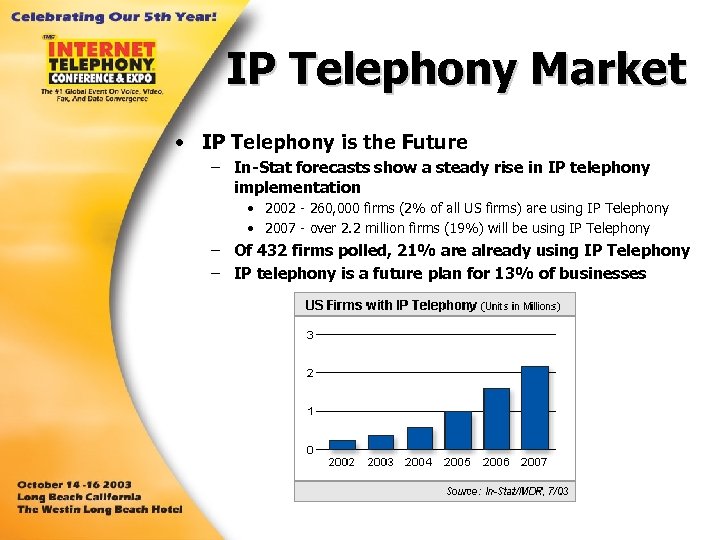
IP Telephony Market • IP Telephony is the Future – In-Stat forecasts show a steady rise in IP telephony implementation • 2002 - 260, 000 firms (2% of all US firms) are using IP Telephony • 2007 - over 2. 2 million firms (19%) will be using IP Telephony – Of 432 firms polled, 21% are already using IP Telephony – IP telephony is a future plan for 13% of businesses

Upgrade Drivers • Primary Drivers for IP Telephony Upgrades – Cost Savings • Toll avoidance • Multi-use data connections (convergence) • Staff reductions (combined telecom and IT resources) – Administration Simplification • Combine communications resources • Web-based administration • Centralized multi-system/networked-system administration – Additional Features • • • Remote teleworker Branch office networking Web integration Simplified CTI Future expectations
Upgrade Benefits • Communications upgrades offer 3 types of benefits. . . – New features • • • Web connectivity Networking Remote worker support Database connectivity Integrated CTI applications New phone styles or “Modernization” – Administrative Options • Web or centralized administration • Simplified MAC • Reliability/redundancy options – Cost Savings

Questions Is an upgrade necessary? The answer: Yes. If. . . … the system failing. … the system impacts productivity. . business growth requires new equipment.
Questions Is upgrading a benefit? The answer: Yes. If. . . … there is a feature that benefits the business process? … it can save money for the business? … it will modernize the business?
Common Objections My business will be down for days…even weeks! My current system is just fine. New technologies are not proven. It’s too complicated.
Real Objections • Factors that may prevent upgrading – Economy/Money • Is there enough benefit to justify expense? • Does the existing PBX/KSU provide acceptable service? – Questionable Technology • “I heard from that new technology is unreliable. ” • IP Telephony has come a long way but is it really complete? – Conventional Thinking • “I’ll wait until it is a proven technology. ” • “If it ain’t broke, don’t fix it!” • “Training my people will just cost me more money. ”
Upgrading Realities • TDM Solutions are Not Necessarily Replaced Because…. – TDM solution investment is too great to write-off • Cost outweighs benefit • Perceived value of new system is low – TDM solution has IP-enabled capabilities that meet current needs • Current equipment provides acceptable performance and features – Time to upgrade interferes with business – User training requirements too great – The system works!
Upgrading Realities • How are Upgrades Accommodated? – Only new installations get IP-PBX systems – Existing systems are IP-enabled to provide most beneficial feature (I. e. teleworker, networking) – Upgrade is delayed until equipment is fully capitalized

Why Limit Yourself to….
Co-existence: IP and TDM How can installing a new system behind existing system justify upgrading?
Co-existence: IP and TDM • Cost/Existing Equipment – Benefits • By not removing the existing equipment, the existing investment is retained but new features are added. – Drawbacks • The cost of upgrading is not removed however. New equipment will incur some costs.
Co-existence: IP and TDM • Time Value – Benefits • Allows for a graduated install plan that avoids time restricted and error prone weekend cutovers. • Installs can occur during business hours with little or no downtime. – Drawbacks • ?
Co-existence: IP and TDM • Training – Benefits • Common methodologies can be taught and used throughout the company increasing productivity. • New features and functionality can actually be used. – Drawbacks • Takes time from job responsibilities to attend training.

Inevitable Upgrades • Communications upgrades are necessary – Provide new communications options to customers • Examples: Voice mail, IVR, Fax, Email • Automated response mechanisms (fax back, email responses) • Outbound notifications (pagers, text messaging) – Smoother business processes • Automated document processing • Automated storage processes – Keep up with business partners • Remember Electronic Data Interchange (EDI)? • Wal-mart
Don’t Be Limited to….
Скачать презентацию One Step At A Time Retaining Traditional PBXs
5486fd40544f9b0b5169908242ae699a.ppt