


 Скачать презентацию Ohio s Solid Waste and C DD Program Annual Meeting
1330b20c1d6e244b8f047c9d52519679.ppt
- Количество слайдов: 19
 Ohio’s Solid Waste and C&DD Program Annual Meeting May 9, 2013 Ohio EPA Electronic Licensing and CLR Preview Registration Tools Jim Long
 What is CLR? • Web-based e. Business Center application for the solid & infectious waste program. • “C” = Compliance (inspection and violation tracking by DMWM and HD). • “L” = License application entry and processing. • “R” = Registration application entry and processing.
 Why CLR? • It’s 2013 • Better Control of Process – No “lost” applications • Ensure required information is reported • Track application from submit to issue
 Who can use the Licensing and Registration services of CLR? • Person with signatory authority as defined in 3745 -50 -500 who will complete and submit a license and/or registration application • DMWM Central Office & District Office staff • Health Department staff of approved HD • All who work in CLR will need to set up an e. Biz account and a PIN
 How is access granted? • Ohio EPA/PRMU staff have Administration rights assigned and can control who has access • Licensed facilities and Registrants: The signatory person requests to use the e. Biz licensing and/or registration services • HD: Person(s) who are to have Admin rights must request it from PRMU. The HD Admin can assign review steps to their staff or to DMWM • Ohio EPA District Office supervisor/manager, Central Office staff: A review step is assigned to you by PRMU and an e-mail is triggered when that occurs
 Setting up an e. Biz Account and getting a PIN • • • https: //ebiz. epa. ohio. gov/ “Create New Account” Provide required information and submit Under My Account, request a PIN Print the Subscriber Agreement and have it notarized Mail it to Ohio EPA and wait for the PIN to be assigned
 Getting Started in CLR • Once PIN is received, you can select facilities to submit applications for in CLR – Email sent to user when the request is approved. – Additional facility can be added at any time
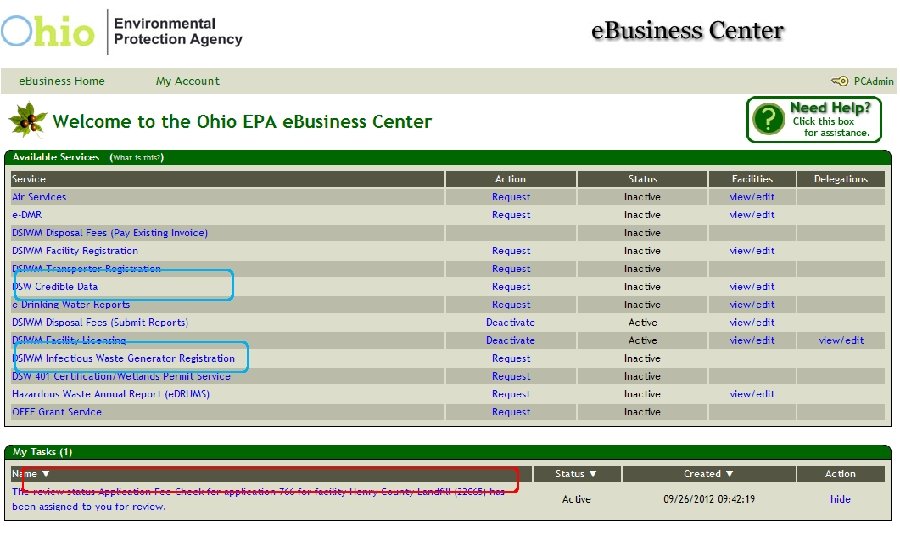
 Demonstration • Search for facility • Enter Application • Submit
 Overview of Process • User (Applicant, HD, & EPA) get User ID, PIN, and rights • User (Applicant, HD, or EPA) associates one or more facilities with their account • User (Applicant, HD, or EPA) enters and submits application • Review steps assigned by authority • Review steps completed • License authority issues license and invoice
 What are the Review Steps and who does them? • Application Fee (OEPA-PRMU): accurate fee was received • Complete (OEPA-PRMU) • Compliance (OEPA CO) • Financial Assurance (OEPA CO) • Inspected (HD or OEPA District Office) • These steps and the notes entered take the place of the HD Certification page for HD and the DO License/Registration Review form.
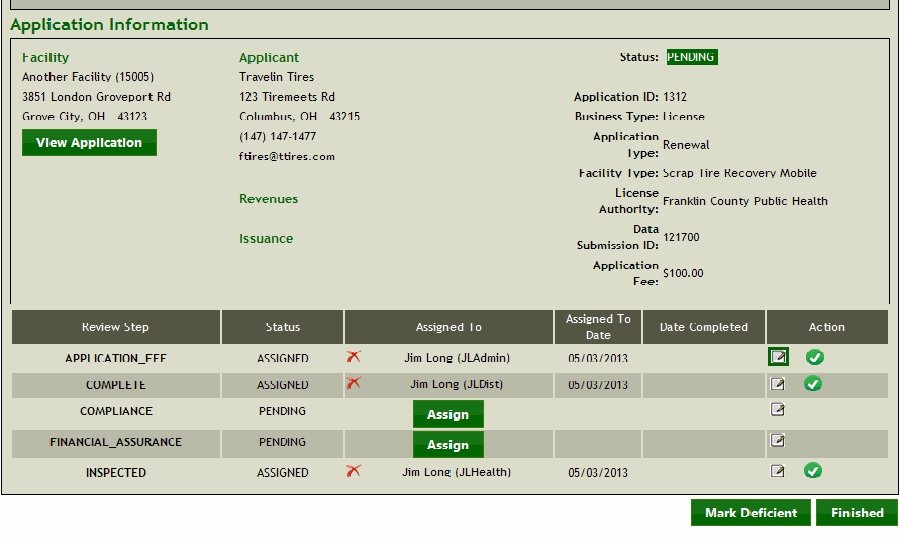
 Review Step definitions • Complete: The application is accurate and any required documentation is adequate. • Compliance: Has an enforcement action been escalated? For example, has it been referred to prosecution or have orders been issued but not signed?
 Review Step definitions • Financial Assurance: Is the documentation current and complete? • Inspected: Was the site recently inspected? Was the site in compliance?
 What can Reviewers do once assigned to a task? • View the application that was submitted • Add Notes to document important information or decisions for any of the review steps. • Mark the step as Complete when appropriate
 What are Reviewers not able to do? • Alter the submitted application • Assign your task to another user • Issue a license or registration (only PRMU or an approved HD administrator can) • View applications not assigned to you • View applications once the review steps are all complete or issuance takes place • Run reports – there are none in the software for version 1. 0
 Implementation Tasks for L&R • PRMU will use CLR to: – Process 2014 license applications – Enter Infectious Waste Renewals – Create Facility Lists • PRMU will provide orientation to HDs prior to 2014 cycle and assign Admin rights • Increase participation from all users
 Questions? • Who, What, When, …Why?
 What about the “C” part of CLR? • Compliance is not a part of this launch, but in the near future. • Holly Hillyer, Ohio EPA, SW Compliance & Inspection Support