 Скачать презентацию Notebook Peripherals Sales Education March 2007
33c1bcee1c2583134a631fe9dd5a4804.ppt
- Количество слайдов: 64




Notebook Peripherals – Sales Education March 2007 | © 2007 Lenovo
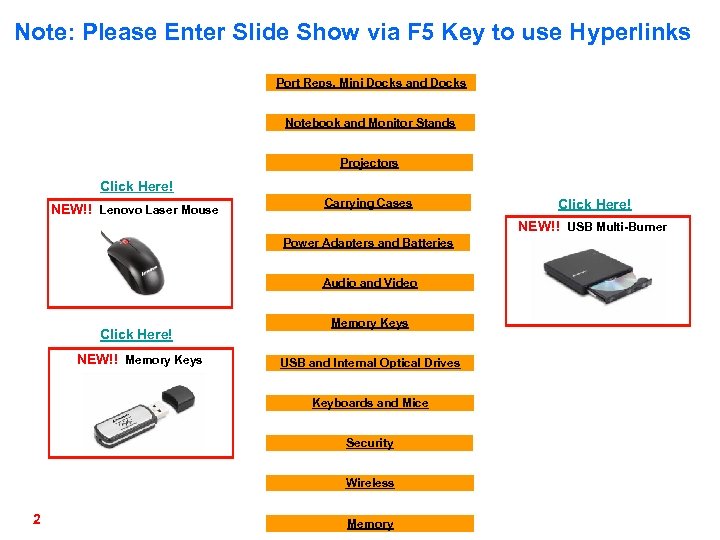
Note: Please Enter Slide Show via F 5 Key to use Hyperlinks Port Reps, Mini Docks and Docks Notebook and Monitor Stands Projectors Click Here! NEW!! Lenovo Laser Mouse Carrying Cases Click Here! NEW!! USB Multi-Burner Power Adapters and Batteries Audio and Video Click Here! NEW!! Memory Keys USB and Internal Optical Drives Keyboards and Mice Security Wireless 2 Memory
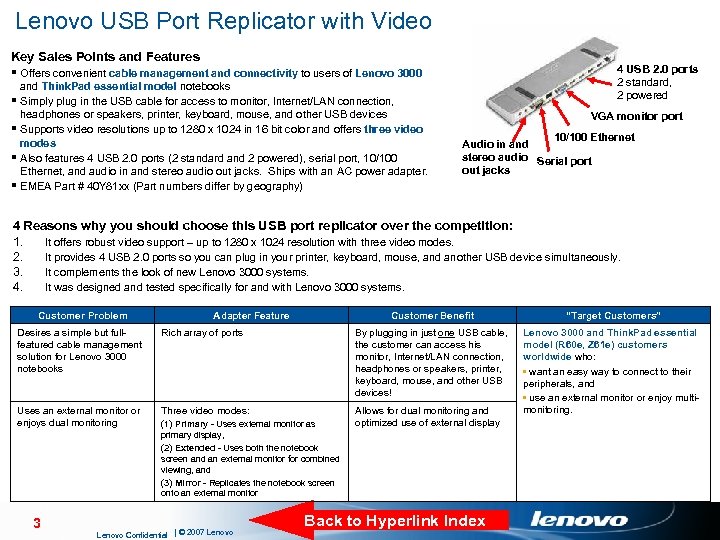
Lenovo USB Port Replicator with Video Key Sales Points and Features § Offers convenient cable management and connectivity to users of Lenovo 3000 § § and Think. Pad essential model notebooks Simply plug in the USB cable for access to monitor, Internet/LAN connection, headphones or speakers, printer, keyboard, mouse, and other USB devices Supports video resolutions up to 1280 x 1024 in 16 bit color and offers three video modes Also features 4 USB 2. 0 ports (2 standard and 2 powered), serial port, 10/100 Ethernet, and audio in and stereo audio out jacks. Ships with an AC power adapter. EMEA Part # 40 Y 81 xx (Part numbers differ by geography) 4 USB 2. 0 ports 2 standard, 2 powered VGA monitor port 10/100 Ethernet Audio in and stereo audio Serial port out jacks 4 Reasons why you should choose this USB port replicator over the competition: 1. It offers robust video support – up to 1280 x 1024 resolution with three video modes. 2. It provides 4 USB 2. 0 ports so you can plug in your printer, keyboard, mouse, and another USB device simultaneously. 3. It complements the look of new Lenovo 3000 systems. 4. It was designed and tested specifically for and with Lenovo 3000 systems. Customer Problem Adapter Feature Customer Benefit “Target Customers” Lenovo 3000 and Think. Pad essential model (R 60 e, Z 61 e) customers worldwide who: • want an easy way to connect to their peripherals, and • use an external monitor or enjoy multimonitoring. Desires a simple but fullfeatured cable management solution for Lenovo 3000 notebooks Rich array of ports By plugging in just one USB cable, the customer can access his monitor, Internet/LAN connection, headphones or speakers, printer, keyboard, mouse, and other USB devices! Uses an external monitor or enjoys dual monitoring Three video modes: Allows for dual monitoring and optimized use of external display 3 (1) Primary - Uses external monitor as primary display, (2) Extended - Uses both the notebook screen and an external monitor for combined viewing, and (3) Mirror - Replicates the notebook screen onto an external monitor Lenovo Confidential | © 2007 Lenovo Back to Hyperlink Index
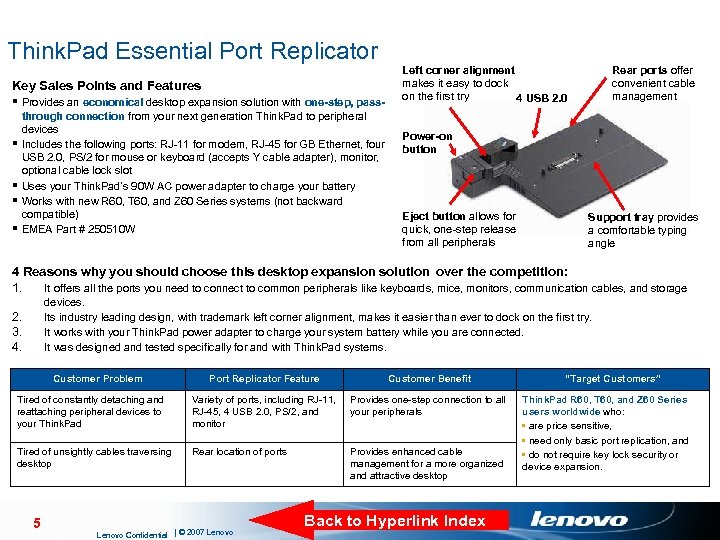
Think. Pad Essential Port Replicator Key Sales Points and Features § Provides an economical desktop expansion solution with one-step, pass§ § through connection from your next generation Think. Pad to peripheral devices Includes the following ports: RJ-11 for modem, RJ-45 for GB Ethernet, four USB 2. 0, PS/2 for mouse or keyboard (accepts Y cable adapter), monitor, optional cable lock slot Uses your Think. Pad’s 90 W AC power adapter to charge your battery Works with new R 60, T 60, and Z 60 Series systems (not backward compatible) EMEA Part # 250510 W Left corner alignment makes it easy to dock on the first try 4 USB 2. 0 Rear ports offer convenient cable management Power-on button Eject button allows for quick, one-step release from all peripherals Support tray provides a comfortable typing angle 4 Reasons why you should choose this desktop expansion solution over the competition: 1. It offers all the ports you need to connect to common peripherals like keyboards, mice, monitors, communication cables, and storage devices. Its industry leading design, with trademark left corner alignment, makes it easier than ever to dock on the first try. It works with your Think. Pad power adapter to charge your system battery while you are connected. It was designed and tested specifically for and with Think. Pad systems. 2. 3. 4. Customer Problem Port Replicator Feature Customer Benefit Tired of constantly detaching and reattaching peripheral devices to your Think. Pad Variety of ports, including RJ-11, RJ-45, 4 USB 2. 0, PS/2, and monitor Provides one-step connection to all your peripherals Tired of unsightly cables traversing desktop Rear location of ports Provides enhanced cable management for a more organized and attractive desktop 5 Lenovo Confidential | © 2007 Lenovo Back to Hyperlink Index “Target Customers” Think. Pad R 60, T 60, and Z 60 Series users worldwide who: • are price sensitive, • need only basic port replication, and • do not require key lock security or device expansion.
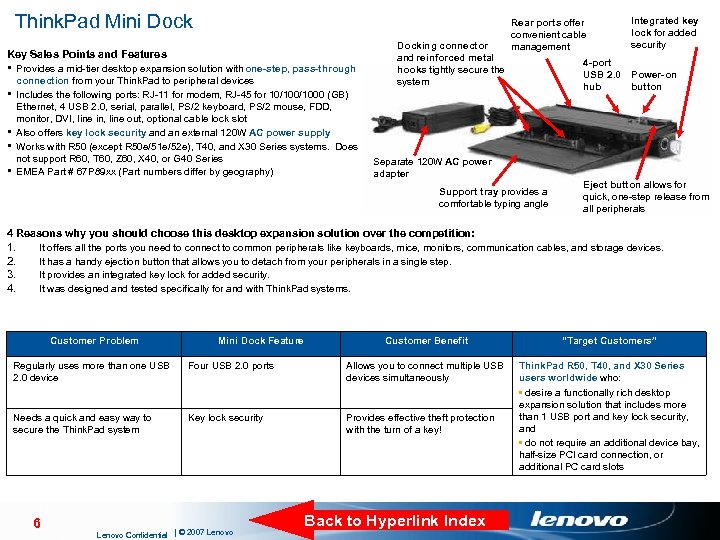
Think. Pad Mini Dock Key Sales Points and Features § Provides a mid-tier desktop expansion solution with one-step, pass-through § § connection from your Think. Pad to peripheral devices Includes the following ports: RJ-11 for modem, RJ-45 for 10/1000 (GB) Ethernet, 4 USB 2. 0, serial, parallel, PS/2 keyboard, PS/2 mouse, FDD, monitor, DVI, line in, line out, optional cable lock slot Also offers key lock security and an external 120 W AC power supply Works with R 50 (except R 50 e/51 e/52 e), T 40, and X 30 Series systems. Does not support R 60, T 60, Z 60, X 40, or G 40 Series EMEA Part # 67 P 89 xx (Part numbers differ by geography) Docking connector and reinforced metal hooks tightly secure the system Rear ports offer convenient cable management 4 -port USB 2. 0 hub Separate 120 W AC power adapter Support tray provides a comfortable typing angle Integrated key lock for added security Power-on button Eject button allows for quick, one-step release from all peripherals 4 Reasons why you should choose this desktop expansion solution over the competition: 1. 2. 3. 4. It offers all the ports you need to connect to common peripherals like keyboards, mice, monitors, communication cables, and storage devices. It has a handy ejection button that allows you to detach from your peripherals in a single step. It provides an integrated key lock for added security. It was designed and tested specifically for and with Think. Pad systems. Customer Problem Mini Dock Feature Customer Benefit “Target Customers” Think. Pad R 50, T 40, and X 30 Series users worldwide who: • desire a functionally rich desktop expansion solution that includes more than 1 USB port and key lock security, and • do not require an additional device bay, half-size PCI card connection, or additional PC card slots Regularly uses more than one USB 2. 0 device Four USB 2. 0 ports Allows you to connect multiple USB devices simultaneously Needs a quick and easy way to secure the Think. Pad system Key lock security Provides effective theft protection with the turn of a key! 6 Lenovo Confidential | © 2007 Lenovo Back to Hyperlink Index
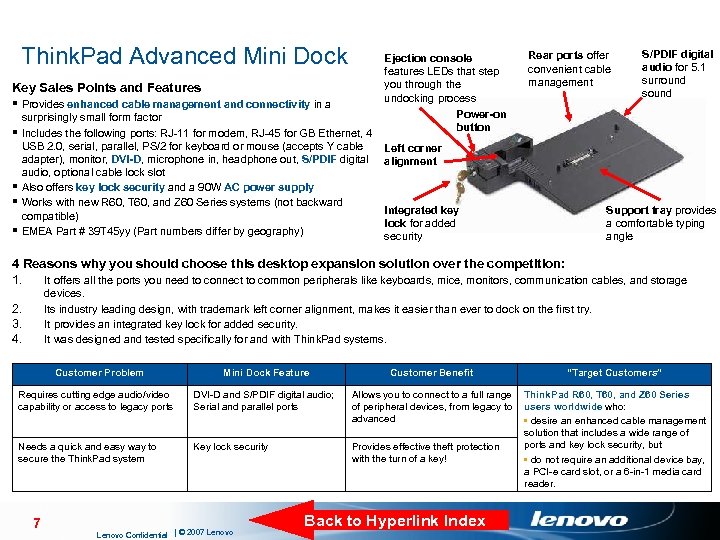
Think. Pad Advanced Mini Dock Key Sales Points and Features § Provides enhanced cable management and connectivity in a § § surprisingly small form factor Includes the following ports: RJ-11 for modem, RJ-45 for GB Ethernet, 4 USB 2. 0, serial, parallel, PS/2 for keyboard or mouse (accepts Y cable adapter), monitor, DVI-D, microphone in, headphone out, S/PDIF digital audio, optional cable lock slot Also offers key lock security and a 90 W AC power supply Works with new R 60, T 60, and Z 60 Series systems (not backward compatible) EMEA Part # 39 T 45 yy (Part numbers differ by geography) Ejection console features LEDs that step you through the undocking process Power-on button Rear ports offer convenient cable management S/PDIF digital audio for 5. 1 surround sound Left corner alignment Integrated key lock for added security Support tray provides a comfortable typing angle 4 Reasons why you should choose this desktop expansion solution over the competition: 1. It offers all the ports you need to connect to common peripherals like keyboards, mice, monitors, communication cables, and storage devices. Its industry leading design, with trademark left corner alignment, makes it easier than ever to dock on the first try. It provides an integrated key lock for added security. It was designed and tested specifically for and with Think. Pad systems. 2. 3. 4. Customer Problem Mini Dock Feature Requires cutting edge audio/video capability or access to legacy ports DVI-D and S/PDIF digital audio; Serial and parallel ports Needs a quick and easy way to secure the Think. Pad system Key lock security 7 Lenovo Confidential | © 2007 Lenovo Customer Benefit “Target Customers” Allows you to connect to a full range Think. Pad R 60, T 60, and Z 60 Series of peripheral devices, from legacy to users worldwide who: advanced • desire an enhanced cable management solution that includes a wide range of ports and key lock security, but Provides effective theft protection with the turn of a key! • do not require an additional device bay, a PCI-e card slot, or a 6 -in-1 media card reader. Back to Hyperlink Index
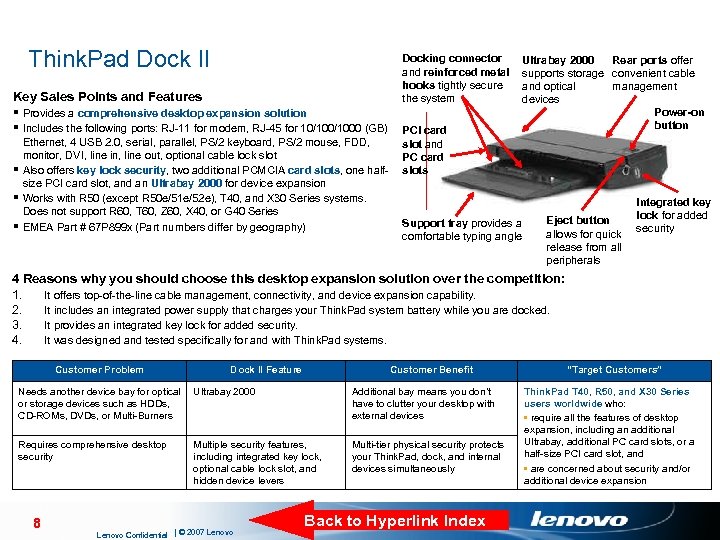
Think. Pad Dock II Docking connector and reinforced metal hooks tightly secure the system Key Sales Points and Features § Provides a comprehensive desktop expansion solution § Includes the following ports: RJ-11 for modem, RJ-45 for 10/1000 (GB) PCI card Ethernet, 4 USB 2. 0, serial, parallel, PS/2 keyboard, PS/2 mouse, FDD, monitor, DVI, line in, line out, optional cable lock slot § Also offers key lock security, two additional PCMCIA card slots, one halfsize PCI card slot, and an Ultrabay 2000 for device expansion § Works with R 50 (except R 50 e/51 e/52 e), T 40, and X 30 Series systems. Does not support R 60, T 60, Z 60, X 40, or G 40 Series § EMEA Part # 67 P 899 x (Part numbers differ by geography) Ultrabay 2000 Rear ports offer supports storage convenient cable and optical management devices Power-on button slot and PC card slots Support tray provides a comfortable typing angle Eject button allows for quick release from all peripherals Integrated key lock for added security 4 Reasons why you should choose this desktop expansion solution over the competition: 1. It offers top-of-the-line cable management, connectivity, and device expansion capability. 2. It includes an integrated power supply that charges your Think. Pad system battery while you are docked. 3. It provides an integrated key lock for added security. 4. It was designed and tested specifically for and with Think. Pad systems. Customer Problem Dock II Feature Customer Benefit Needs another device bay for optical Ultrabay 2000 or storage devices such as HDDs, CD-ROMs, DVDs, or Multi-Burners Additional bay means you don’t have to clutter your desktop with external devices Requires comprehensive desktop security Multi-tier physical security protects your Think. Pad, dock, and internal devices simultaneously 8 Multiple security features, including integrated key lock, optional cable lock slot, and hidden device levers Lenovo Confidential | © 2007 Lenovo Back to Hyperlink Index “Target Customers” Think. Pad T 40, R 50, and X 30 Series users worldwide who: • require all the features of desktop expansion, including an additional Ultrabay, additional PC card slots, or a half-size PCI card slot, and • are concerned about security and/or additional device expansion
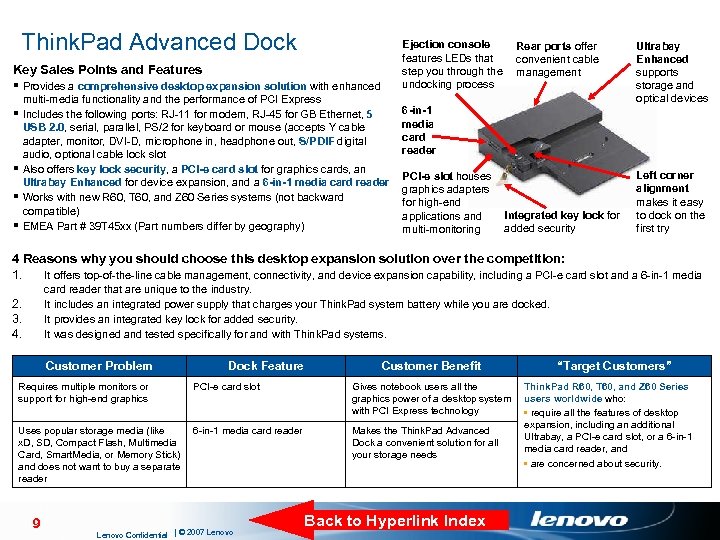
Think. Pad Advanced Dock Key Sales Points and Features § Provides a comprehensive desktop expansion solution with enhanced § § multi-media functionality and the performance of PCI Express Includes the following ports: RJ-11 for modem, RJ-45 for GB Ethernet, 5 USB 2. 0, serial, parallel, PS/2 for keyboard or mouse (accepts Y cable adapter, monitor, DVI-D, microphone in, headphone out, S/PDIF digital audio, optional cable lock slot Also offers key lock security, a PCI-e card slot for graphics cards, an Ultrabay Enhanced for device expansion, and a 6 -in-1 media card reader Works with new R 60, T 60, and Z 60 Series systems (not backward compatible) EMEA Part # 39 T 45 xx (Part numbers differ by geography) Ejection console Rear ports offer features LEDs that convenient cable step you through the management undocking process 6 -in-1 media card reader PCI-e slot houses graphics adapters for high-end Integrated key lock for applications and added security multi-monitoring Ultrabay Enhanced supports storage and optical devices Left corner alignment makes it easy to dock on the first try 4 Reasons why you should choose this desktop expansion solution over the competition: 1. It offers top-of-the-line cable management, connectivity, and device expansion capability, including a PCI-e card slot and a 6 -in-1 media card reader that are unique to the industry. It includes an integrated power supply that charges your Think. Pad system battery while you are docked. It provides an integrated key lock for added security. It was designed and tested specifically for and with Think. Pad systems. 2. 3. 4. Customer Problem Requires multiple monitors or support for high-end graphics Dock Feature PCI-e card slot Uses popular storage media (like 6 -in-1 media card reader x. D, SD, Compact Flash, Multimedia Card, Smart. Media, or Memory Stick) and does not want to buy a separate reader 9 Lenovo Confidential | © 2007 Lenovo Customer Benefit Gives notebook users all the graphics power of a desktop system with PCI Express technology Makes the Think. Pad Advanced Dock a convenient solution for all your storage needs Back to Hyperlink Index “Target Customers” Think. Pad R 60, T 60, and Z 60 Series users worldwide who: • require all the features of desktop expansion, including an additional Ultrabay, a PCI-e card slot, or a 6 -in-1 media card reader, and • are concerned about security.
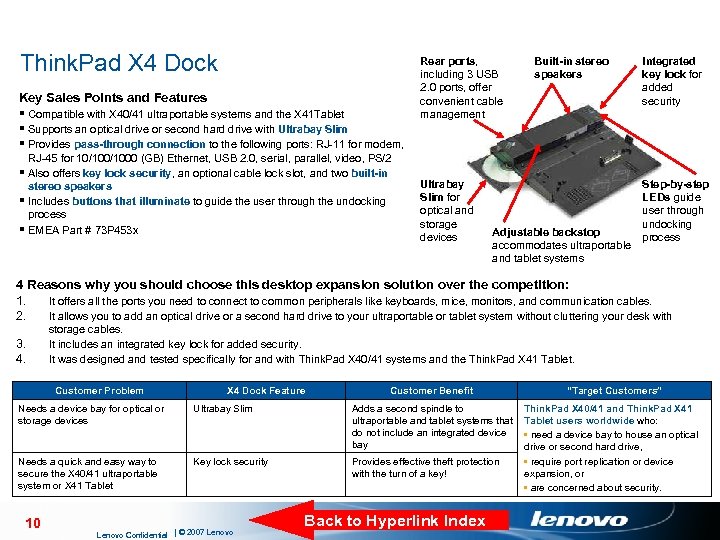
Think. Pad X 4 Dock Key Sales Points and Features § Compatible with X 40/41 ultraportable systems and the X 41 Tablet § Supports an optical drive or second hard drive with Ultrabay Slim § Provides pass-through connection to the following ports: RJ-11 for modem, RJ-45 for 10/1000 (GB) Ethernet, USB 2. 0, serial, parallel, video, PS/2 § Also offers key lock security, an optional cable lock slot, and two built-in stereo speakers § Includes buttons that illuminate to guide the user through the undocking process § EMEA Part # 73 P 453 x Rear ports, including 3 USB 2. 0 ports, offer convenient cable management Ultrabay Slim for optical and storage devices Built-in stereo speakers Adjustable backstop accommodates ultraportable and tablet systems Integrated key lock for added security Step-by-step LEDs guide user through undocking process 4 Reasons why you should choose this desktop expansion solution over the competition: 1. It offers all the ports you need to connect to common peripherals like keyboards, mice, monitors, and communication cables. 2. It allows you to add an optical drive or a second hard drive to your ultraportable or tablet system without cluttering your desk with 3. 4. storage cables. It includes an integrated key lock for added security. It was designed and tested specifically for and with Think. Pad X 40/41 systems and the Think. Pad X 41 Tablet. Customer Problem X 4 Dock Feature Customer Benefit “Target Customers” Think. Pad X 40/41 and Think. Pad X 41 Tablet users worldwide who: • need a device bay to house an optical drive or second hard drive, • require port replication or device expansion, or • are concerned about security. Needs a device bay for optical or storage devices Ultrabay Slim Adds a second spindle to ultraportable and tablet systems that do not include an integrated device bay Needs a quick and easy way to secure the X 40/41 ultraportable system or X 41 Tablet Key lock security Provides effective theft protection with the turn of a key! 10 Lenovo Confidential | © 2007 Lenovo Back to Hyperlink Index
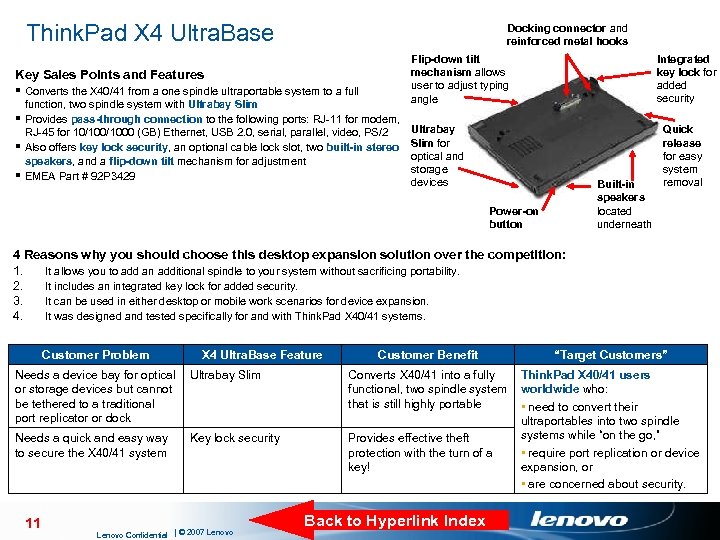
Think. Pad X 4 Ultra. Base Docking connector and reinforced metal hooks Key Sales Points and Features § Converts the X 40/41 from a one spindle ultraportable system to a full function, two spindle system with Ultrabay Slim § Provides pass-through connection to the following ports: RJ-11 for modem, RJ-45 for 10/1000 (GB) Ethernet, USB 2. 0, serial, parallel, video, PS/2 § Also offers key lock security, an optional cable lock slot, two built-in stereo speakers, and a flip-down tilt mechanism for adjustment § EMEA Part # 92 P 3429 Integrated key lock for added security Flip-down tilt mechanism allows user to adjust typing angle Ultrabay Slim for optical and storage devices Built-in speakers located underneath Power-on button Quick release for easy system removal 4 Reasons why you should choose this desktop expansion solution over the competition: 1. It allows you to add an additional spindle to your system without sacrificing portability. 2. It includes an integrated key lock for added security. 3. It can be used in either desktop or mobile work scenarios for device expansion. 4. It was designed and tested specifically for and with Think. Pad X 40/41 systems. Customer Problem X 4 Ultra. Base Feature Needs a device bay for optical Ultrabay Slim or storage devices but cannot be tethered to a traditional port replicator or dock Needs a quick and easy way to secure the X 40/41 system 11 Key lock security Lenovo Confidential | © 2007 Lenovo Customer Benefit “Target Customers” Converts X 40/41 into a fully Think. Pad X 40/41 users functional, two spindle system worldwide who: that is still highly portable • need to convert their ultraportables into two spindle systems while “on the go, ” Provides effective theft • require port replication or device protection with the turn of a expansion, or key! • are concerned about security. Back to Hyperlink Index
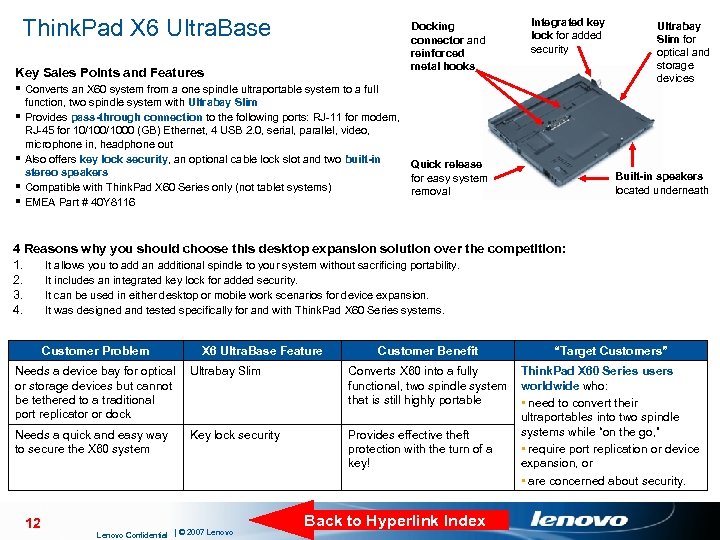
Think. Pad X 6 Ultra. Base Key Sales Points and Features § Converts an X 60 system from a one spindle ultraportable system to a full § § Docking connector and reinforced metal hooks Integrated key lock for added security function, two spindle system with Ultrabay Slim Provides pass-through connection to the following ports: RJ-11 for modem, RJ-45 for 10/1000 (GB) Ethernet, 4 USB 2. 0, serial, parallel, video, microphone in, headphone out Also offers key lock security, an optional cable lock slot and two built-in Quick release stereo speakers for easy system Compatible with Think. Pad X 60 Series only (not tablet systems) removal EMEA Part # 40 Y 8116 Ultrabay Slim for optical and storage devices Built-in speakers located underneath 4 Reasons why you should choose this desktop expansion solution over the competition: 1. It allows you to add an additional spindle to your system without sacrificing portability. 2. It includes an integrated key lock for added security. 3. It can be used in either desktop or mobile work scenarios for device expansion. 4. It was designed and tested specifically for and with Think. Pad X 60 Series systems. Customer Problem X 6 Ultra. Base Feature Needs a device bay for optical Ultrabay Slim or storage devices but cannot be tethered to a traditional port replicator or dock Needs a quick and easy way to secure the X 60 system 12 Key lock security Lenovo Confidential | © 2007 Lenovo Customer Benefit “Target Customers” Converts X 60 into a fully Think. Pad X 60 Series users functional, two spindle system worldwide who: that is still highly portable • need to convert their ultraportables into two spindle systems while “on the go, ” Provides effective theft • require port replication or device protection with the turn of a expansion, or key! • are concerned about security. Back to Hyperlink Index
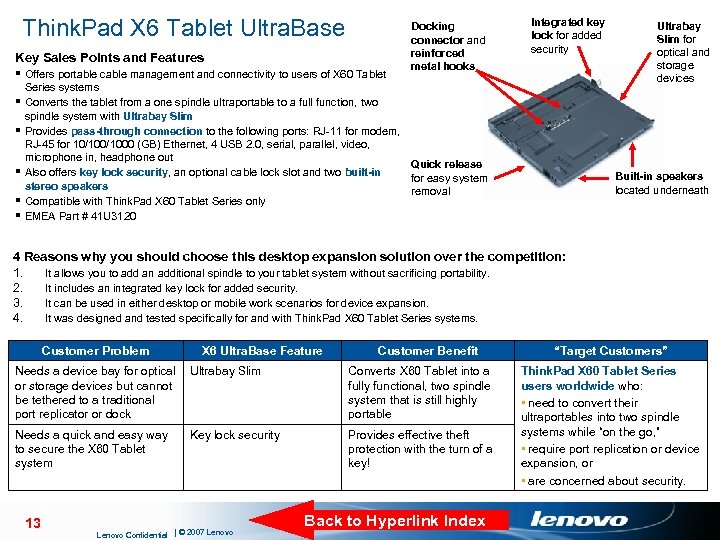
Think. Pad X 6 Tablet Ultra. Base Key Sales Points and Features § Offers portable cable management and connectivity to users of X 60 Tablet § § § Docking connector and reinforced metal hooks Integrated key lock for added security Series systems Converts the tablet from a one spindle ultraportable to a full function, two spindle system with Ultrabay Slim Provides pass-through connection to the following ports: RJ-11 for modem, RJ-45 for 10/1000 (GB) Ethernet, 4 USB 2. 0, serial, parallel, video, microphone in, headphone out Quick release Also offers key lock security, an optional cable lock slot and two built-in for easy system stereo speakers removal Compatible with Think. Pad X 60 Tablet Series only EMEA Part # 41 U 3120 Ultrabay Slim for optical and storage devices Built-in speakers located underneath 4 Reasons why you should choose this desktop expansion solution over the competition: 1. It allows you to add an additional spindle to your tablet system without sacrificing portability. 2. It includes an integrated key lock for added security. 3. It can be used in either desktop or mobile work scenarios for device expansion. 4. It was designed and tested specifically for and with Think. Pad X 60 Tablet Series systems. Customer Problem X 6 Ultra. Base Feature Customer Benefit Needs a device bay for optical Ultrabay Slim or storage devices but cannot be tethered to a traditional port replicator or dock Converts X 60 Tablet into a fully functional, two spindle system that is still highly portable Needs a quick and easy way to secure the X 60 Tablet system Provides effective theft protection with the turn of a key! 13 Key lock security Lenovo Confidential | © 2007 Lenovo Back to Hyperlink Index “Target Customers” Think. Pad X 60 Tablet Series users worldwide who: • need to convert their ultraportables into two spindle systems while “on the go, ” • require port replication or device expansion, or • are concerned about security.
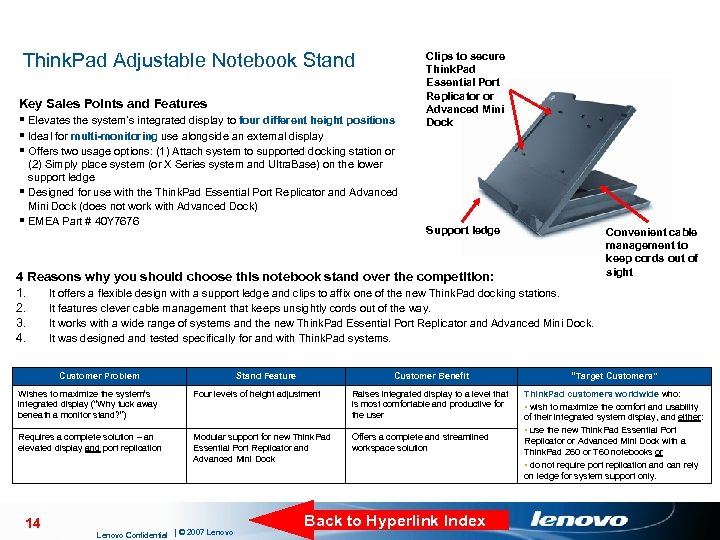
Think. Pad Adjustable Notebook Stand Key Sales Points and Features § Elevates the system’s integrated display to four different height positions § Ideal for multi-monitoring use alongside an external display § Offers two usage options: (1) Attach system to supported docking station or (2) Simply place system (or X Series system and Ultra. Base) on the lower support ledge § Designed for use with the Think. Pad Essential Port Replicator and Advanced Mini Dock (does not work with Advanced Dock) § EMEA Part # 40 Y 7676 Clips to secure Think. Pad Essential Port Replicator or Advanced Mini Dock Support ledge 4 Reasons why you should choose this notebook stand over the competition: 1. It offers a flexible design with a support ledge and clips to affix one of the new Think. Pad docking stations. 2. It features clever cable management that keeps unsightly cords out of the way. 3. It works with a wide range of systems and the new Think. Pad Essential Port Replicator and Advanced Mini Dock. 4. It was designed and tested specifically for and with Think. Pad systems. Customer Problem Stand Feature Customer Benefit “Target Customers” Think. Pad customers worldwide who: • wish to maximize the comfort and usability of their integrated system display, and either: • use the new Think. Pad Essential Port Replicator or Advanced Mini Dock with a Think. Pad Z 60 or T 60 notebooks or • do not require port replication and can rely on ledge for system support only. Wishes to maximize the system’s integrated display (“Why tuck away beneath a monitor stand? ”) Four levels of height adjustment Raises integrated display to a level that is most comfortable and productive for the user Requires a complete solution – an elevated display and port replication Modular support for new Think. Pad Essential Port Replicator and Advanced Mini Dock Offers a complete and streamlined workspace solution 14 Lenovo Confidential | © 2007 Lenovo Convenient cable management to keep cords out of sight Back to Hyperlink Index
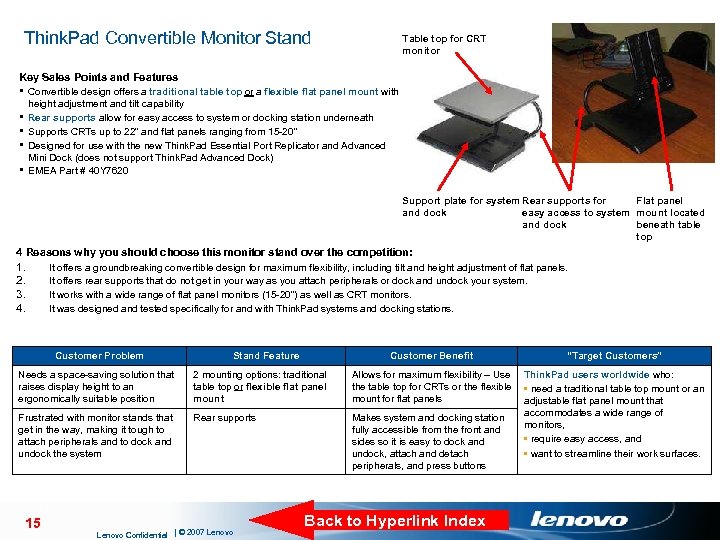
Think. Pad Convertible Monitor Stand Table top for CRT monitor Key Sales Points and Features § Convertible design offers a traditional table top or a flexible flat panel mount with height adjustment and tilt capability Rear supports allow for easy access to system or docking station underneath Supports CRTs up to 22” and flat panels ranging from 15 -20” Designed for use with the new Think. Pad Essential Port Replicator and Advanced Mini Dock (does not support Think. Pad Advanced Dock) EMEA Part # 40 Y 7620 § § Support plate for system Rear supports for Flat panel and dock easy access to system mount located and dock beneath table top 4 Reasons why you should choose this monitor stand over the competition: 1. 2. 3. 4. It offers a groundbreaking convertible design for maximum flexibility, including tilt and height adjustment of flat panels. It offers rear supports that do not get in your way as you attach peripherals or dock and undock your system. It works with a wide range of flat panel monitors (15 -20”) as well as CRT monitors. It was designed and tested specifically for and with Think. Pad systems and docking stations. Customer Problem Stand Feature Customer Benefit Needs a space-saving solution that raises display height to an ergonomically suitable position 2 mounting options: traditional table top or flexible flat panel mount Frustrated with monitor stands that get in the way, making it tough to attach peripherals and to dock and undock the system Rear supports 15 Lenovo Confidential | © 2007 Lenovo “Target Customers” Allows for maximum flexibility – Use Think. Pad users worldwide who: the table top for CRTs or the flexible • need a traditional table top mount or an mount for flat panels adjustable flat panel mount that accommodates a wide range of Makes system and docking station monitors, fully accessible from the front and • require easy access, and sides so it is easy to dock and • want to streamline their work surfaces. undock, attach and detach peripherals, and press buttons Back to Hyperlink Index
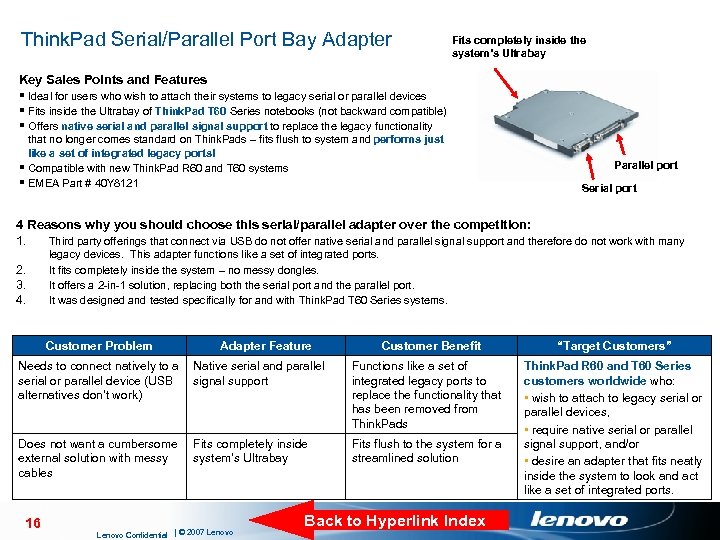
Think. Pad Serial/Parallel Port Bay Adapter Fits completely inside the system’s Ultrabay Key Sales Points and Features § Ideal for users who wish to attach their systems to legacy serial or parallel devices § Fits inside the Ultrabay of Think. Pad T 60 Series notebooks (not backward compatible) § Offers native serial and parallel signal support to replace the legacy functionality that no longer comes standard on Think. Pads – fits flush to system and performs just like a set of integrated legacy ports! § Compatible with new Think. Pad R 60 and T 60 systems § EMEA Part # 40 Y 8121 Parallel port Serial port 4 Reasons why you should choose this serial/parallel adapter over the competition: 1. Third party offerings that connect via USB do not offer native serial and parallel signal support and therefore do not work with many 2. 3. 4. legacy devices. This adapter functions like a set of integrated ports. It fits completely inside the system – no messy dongles. It offers a 2 -in-1 solution, replacing both the serial port and the parallel port. It was designed and tested specifically for and with Think. Pad T 60 Series systems. Customer Problem Customer Benefit “Target Customers” Needs to connect natively to a Native serial and parallel serial or parallel device (USB signal support alternatives don’t work) Functions like a set of integrated legacy ports to replace the functionality that has been removed from Think. Pads Does not want a cumbersome external solution with messy cables Fits flush to the system for a streamlined solution Think. Pad R 60 and T 60 Series customers worldwide who: • wish to attach to legacy serial or parallel devices, • require native serial or parallel signal support, and/or • desire an adapter that fits neatly inside the system to look and act like a set of integrated ports. 16 Adapter Feature Fits completely inside system’s Ultrabay Lenovo Confidential | © 2007 Lenovo Back to Hyperlink Index
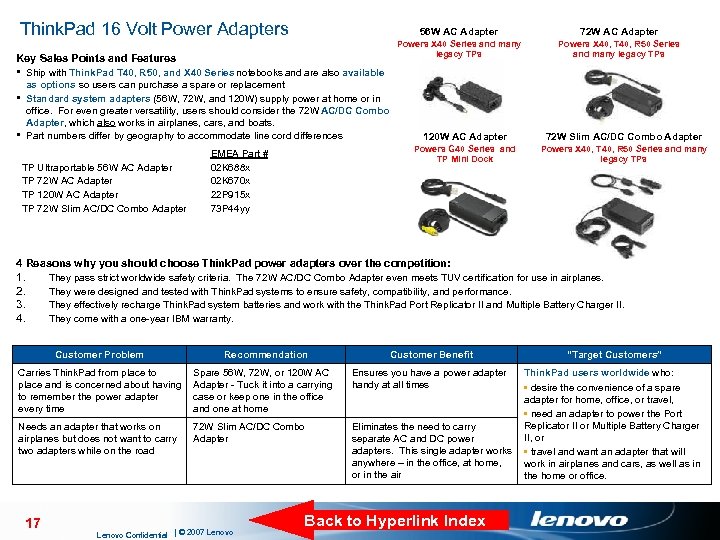
Think. Pad 16 Volt Power Adapters 56 W AC Adapter Key Sales Points and Features 72 W AC Adapter Powers X 40 Series and many legacy TPs Powers X 40, T 40, R 50 Series and many legacy TPs § Ship with Think. Pad T 40, R 50, and X 40 Series notebooks and are also available as options so users can purchase a spare or replacement § Standard system adapters (56 W, 72 W, and 120 W) supply power at home or in office. For even greater versatility, users should consider the 72 W AC/DC Combo Adapter, which also works in airplanes, cars, and boats. § Part numbers differ by geography to accommodate line cord differences TP Ultraportable 56 W AC Adapter TP 72 W AC Adapter TP 120 W AC Adapter TP 72 W Slim AC/DC Combo Adapter EMEA Part # 02 K 688 x 02 K 670 x 22 P 915 x 73 P 44 yy 120 W AC Adapter 72 W Slim AC/DC Combo Adapter Powers G 40 Series and TP Mini Dock Powers X 40, T 40, R 50 Series and many legacy TPs 4 Reasons why you should choose Think. Pad power adapters over the competition: 1. 2. 3. 4. They pass strict worldwide safety criteria. The 72 W AC/DC Combo Adapter even meets TUV certification for use in airplanes. They were designed and tested with Think. Pad systems to ensure safety, compatibility, and performance. They effectively recharge Think. Pad system batteries and work with the Think. Pad Port Replicator II and Multiple Battery Charger II. They come with a one-year IBM warranty. Customer Problem Recommendation Customer Benefit Carries Think. Pad from place to place and is concerned about having to remember the power adapter every time Spare 56 W, 72 W, or 120 W AC Adapter - Tuck it into a carrying case or keep one in the office and one at home Ensures you have a power adapter handy at all times Needs an adapter that works on airplanes but does not want to carry two adapters while on the road 72 W Slim AC/DC Combo Adapter 17 Lenovo Confidential | © 2007 Lenovo “Target Customers” Think. Pad users worldwide who: • desire the convenience of a spare adapter for home, office, or travel, • need an adapter to power the Port Replicator II or Multiple Battery Charger Eliminates the need to carry II, or separate AC and DC power adapters. This single adapter works • travel and want an adapter that will anywhere – in the office, at home, work in airplanes and cars, as well as in or in the air the home or office. Back to Hyperlink Index
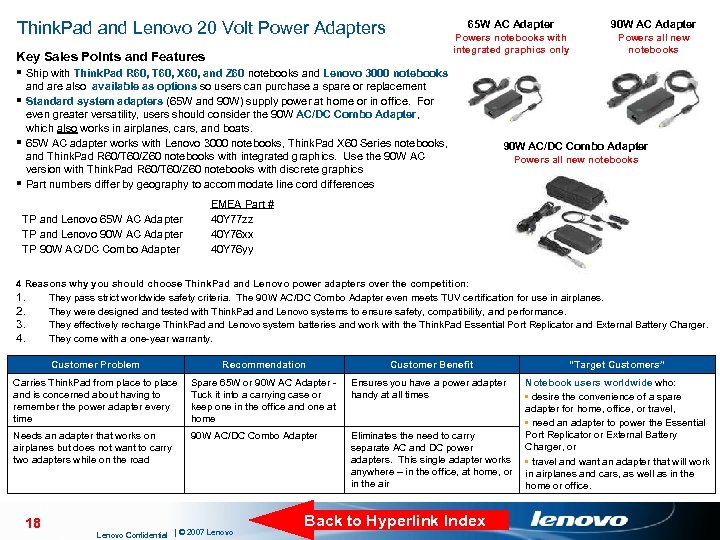
Think. Pad and Lenovo 20 Volt Power Adapters 65 W AC Adapter Key Sales Points and Features § Ship with Think. Pad R 60, T 60, X 60, and Z 60 notebooks and Lenovo 3000 notebooks 90 W AC Adapter Powers notebooks with integrated graphics only Powers all new notebooks and are also available as options so users can purchase a spare or replacement § Standard system adapters (65 W and 90 W) supply power at home or in office. For even greater versatility, users should consider the 90 W AC/DC Combo Adapter, which also works in airplanes, cars, and boats. § 65 W AC adapter works with Lenovo 3000 notebooks, Think. Pad X 60 Series notebooks, and Think. Pad R 60/T 60/Z 60 notebooks with integrated graphics. Use the 90 W AC version with Think. Pad R 60/T 60/Z 60 notebooks with discrete graphics § Part numbers differ by geography to accommodate line cord differences TP and Lenovo 65 W AC Adapter TP and Lenovo 90 W AC Adapter TP 90 W AC/DC Combo Adapter Powers all new notebooks EMEA Part # 40 Y 77 zz 40 Y 76 xx 40 Y 76 yy 4 Reasons why you should choose Think. Pad and Lenovo power adapters over the competition: 1. They pass strict worldwide safety criteria. The 90 W AC/DC Combo Adapter even meets TUV certification for use in airplanes. 2. They were designed and tested with Think. Pad and Lenovo systems to ensure safety, compatibility, and performance. 3. They effectively recharge Think. Pad and Lenovo system batteries and work with the Think. Pad Essential Port Replicator and External Battery Charger. 4. They come with a one-year warranty. Customer Problem Recommendation Customer Benefit “Target Customers” Carries Think. Pad from place to place and is concerned about having to remember the power adapter every time Spare 65 W or 90 W AC Adapter - Tuck it into a carrying case or keep one in the office and one at home Ensures you have a power adapter handy at all times Needs an adapter that works on airplanes but does not want to carry two adapters while on the road 90 W AC/DC Combo Adapter Eliminates the need to carry separate AC and DC power adapters. This single adapter works anywhere – in the office, at home, or in the air Notebook users worldwide who: • desire the convenience of a spare adapter for home, office, or travel, • need an adapter to power the Essential Port Replicator or External Battery Charger, or • travel and want an adapter that will work in airplanes and cars, as well as in the home or office. 18 Lenovo Confidential | © 2007 Lenovo Back to Hyperlink Index
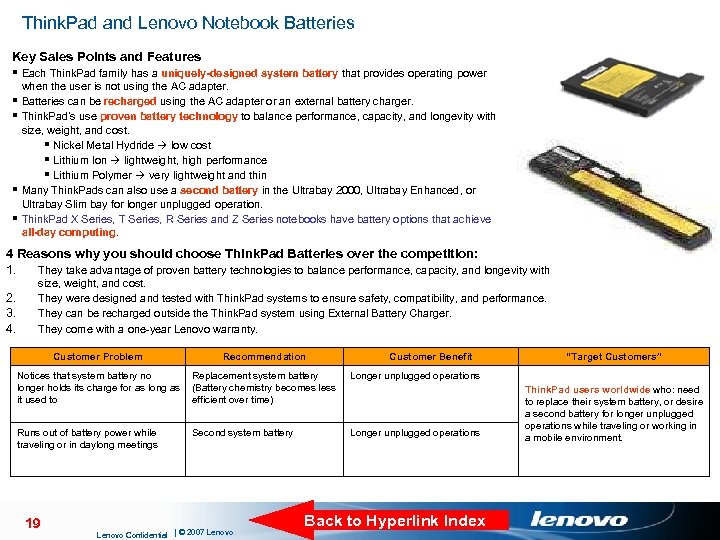
Think. Pad and Lenovo Notebook Batteries Key Sales Points and Features § Each Think. Pad family has a uniquely-designed system battery that provides operating power § § when the user is not using the AC adapter. Batteries can be recharged using the AC adapter or an external battery charger. Think. Pad’s use proven battery technology to balance performance, capacity, and longevity with size, weight, and cost. § Nickel Metal Hydride low cost § Lithium Ion lightweight, high performance § Lithium Polymer very lightweight and thin Many Think. Pads can also use a second battery in the Ultrabay 2000, Ultrabay Enhanced, or Ultrabay Slim bay for longer unplugged operation. Think. Pad X Series, T Series, R Series and Z Series notebooks have battery options that achieve all-day computing. 4 Reasons why you should choose Think. Pad Batteries over the competition: 1. They take advantage of proven battery technologies to balance performance, capacity, and longevity with 2. 3. 4. size, weight, and cost. They were designed and tested with Think. Pad systems to ensure safety, compatibility, and performance. They can be recharged outside the Think. Pad system using External Battery Charger. They come with a one-year Lenovo warranty. Customer Problem Recommendation Customer Benefit Notices that system battery no Replacement system battery longer holds its charge for as long as (Battery chemistry becomes less it used to efficient over time) Longer unplugged operations Runs out of battery power while traveling or in daylong meetings Longer unplugged operations “Target Customers” 19 Second system battery Lenovo Confidential | © 2007 Lenovo Back to Hyperlink Index Think. Pad users worldwide who: need to replace their system battery, or desire a second battery for longer unplugged operations while traveling or working in a mobile environment.
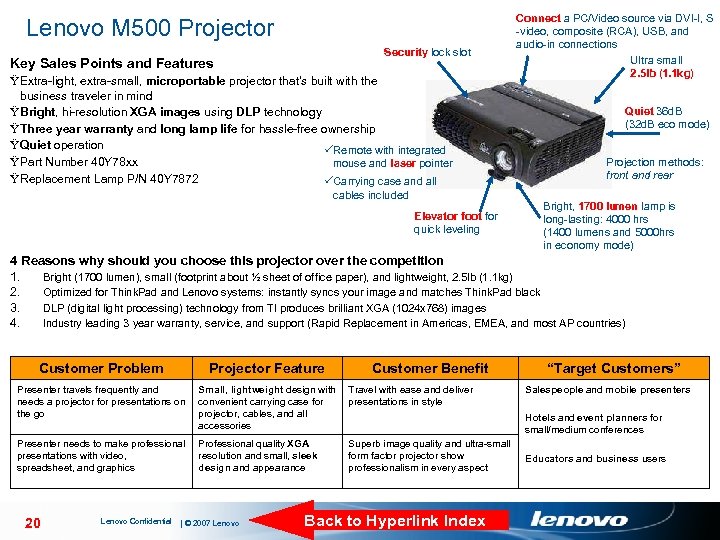
Lenovo M 500 Projector Security lock slot Key Sales Points and Features Ÿ Extra-light, extra-small, microportable projector that's built with the business traveler in mind Ÿ Bright, hi-resolution XGA images using DLP technology Ÿ Three year warranty and long lamp life for hassle-free ownership Ÿ Quiet operation Remote with integrated Ÿ Part Number 40 Y 78 xx mouse and laser pointer Ÿ Replacement Lamp P/N 40 Y 7872 Carrying case and all cables included Elevator foot for quick leveling Connect a PC/Video source via DVI-I, S -video, composite (RCA), USB, and audio-in connections Ultra small 2. 5 lb (1. 1 kg) Quiet 36 d. B (32 d. B eco mode) Projection methods: front and rear Bright, 1700 lumen lamp is long-lasting: 4000 hrs (1400 lumens and 5000 hrs in economy mode) 4 Reasons why should you choose this projector over the competition 1. Bright (1700 lumen), small (footprint about ½ sheet of office paper), and lightweight, 2. 5 lb (1. 1 kg) 2. Optimized for Think. Pad and Lenovo systems: instantly syncs your image and matches Think. Pad black 3. DLP (digital light processing) technology from TI produces brilliant XGA (1024 x 768) images 4. Industry leading 3 year warranty, service, and support (Rapid Replacement in Americas, EMEA, and most AP countries) Customer Problem Projector Feature Customer Benefit Presenter travels frequently and needs a projector for presentations on the go Small, lightweight design with Travel with ease and deliver convenient carrying case for presentations in style projector, cables, and all accessories Presenter needs to make professional presentations with video, spreadsheet, and graphics Professional quality XGA resolution and small, sleek design and appearance 20 Lenovo Confidential | © 2007 Lenovo Superb image quality and ultra-small form factor projector show professionalism in every aspect Back to Hyperlink Index “Target Customers” Salespeople and mobile presenters Hotels and event planners for small/medium conferences Educators and business users
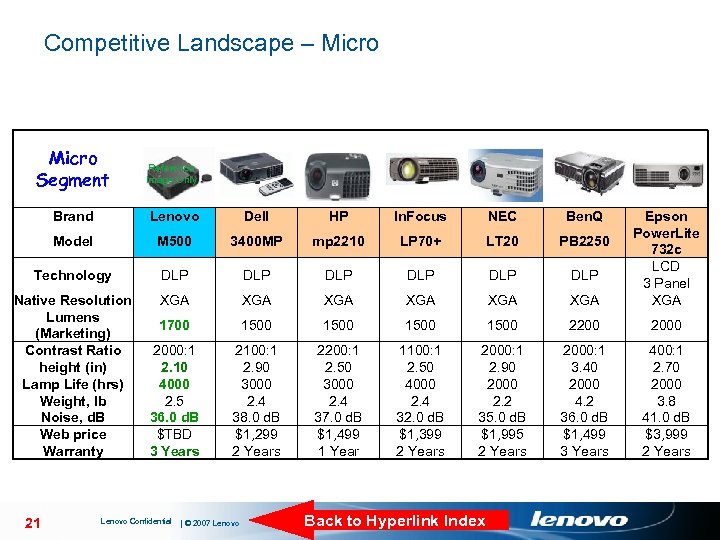
Competitive Landscape – Micro Segment Reference Image Only Brand Lenovo Dell HP In. Focus NEC Ben. Q Model M 500 3400 MP mp 2210 LP 70+ LT 20 PB 2250 Technology DLP DLP DLP Native Resolution Lumens (Marketing) Contrast Ratio height (in) Lamp Life (hrs) Weight, lb Noise, d. B Web price Warranty XGA XGA XGA 1700 1500 2200 2000: 1 2. 10 4000 2. 5 36. 0 d. B $TBD 3 Years 2100: 1 2. 90 3000 2. 4 38. 0 d. B $1, 299 2 Years 2200: 1 2. 50 3000 2. 4 37. 0 d. B $1, 499 1 Year 1100: 1 2. 50 4000 2. 4 32. 0 d. B $1, 399 2 Years 2000: 1 2. 90 2000 2. 2 35. 0 d. B $1, 995 2 Years 2000: 1 3. 40 2000 4. 2 36. 0 d. B $1, 499 3 Years 400: 1 2. 70 2000 3. 8 41. 0 d. B $3, 999 2 Years 21 Lenovo Confidential | © 2007 Lenovo Back to Hyperlink Index Epson Power. Lite 732 c LCD 3 Panel XGA
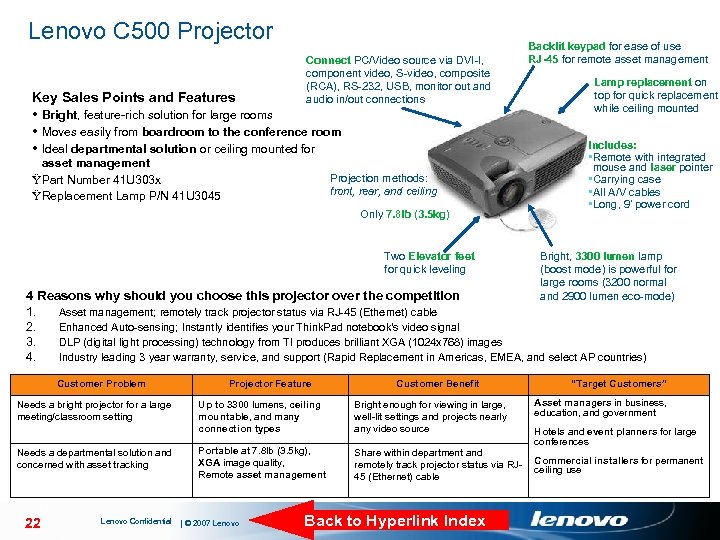
Lenovo C 500 Projector Key Sales Points and Features Connect PC/Video source via DVI-I, component video, S-video, composite (RCA), RS-232, USB, monitor out and audio in/out connections Bright, feature-rich solution for large rooms Moves easily from boardroom to the conference room Ideal departmental solution or ceiling mounted for asset management Projection methods: ŸPart Number 41 U 303 x front, rear, and ceiling ŸReplacement Lamp P/N 41 U 3045 Only 7. 8 lb (3. 5 kg) Two Elevator feet for quick leveling Backlit keypad for ease of use RJ-45 for remote asset management Lamp replacement on top for quick replacement while ceiling mounted Includes: • Remote with integrated mouse and laser pointer • Carrying case • All A/V cables • Long, 9’ power cord Bright, 3300 lumen lamp (boost mode) is powerful for large rooms (3200 normal and 2900 lumen eco-mode) 4 Reasons why should you choose this projector over the competition 1. Asset management; remotely track projector status via RJ-45 (Ethernet) cable 2. Enhanced Auto-sensing; Instantly identifies your Think. Pad notebook's video signal 3. DLP (digital light processing) technology from TI produces brilliant XGA (1024 x 768) images 4. Industry leading 3 year warranty, service, and support (Rapid Replacement in Americas, EMEA, and select AP countries) Customer Problem Needs a bright projector for a large meeting/classroom setting Needs a departmental solution and concerned with asset tracking 22 Lenovo Confidential Projector Feature Customer Benefit Up to 3300 lumens, ceiling mountable, and many connection types Bright enough for viewing in large, well-lit settings and projects nearly any video source Portable at 7. 8 lb (3. 5 kg), XGA image quality, Remote asset management Share within department and remotely track projector status via RJ 45 (Ethernet) cable | © 2007 Lenovo Back to Hyperlink Index “Target Customers” Asset managers in business, education, and government Hotels and event planners for large conferences Commercial installers for permanent ceiling use
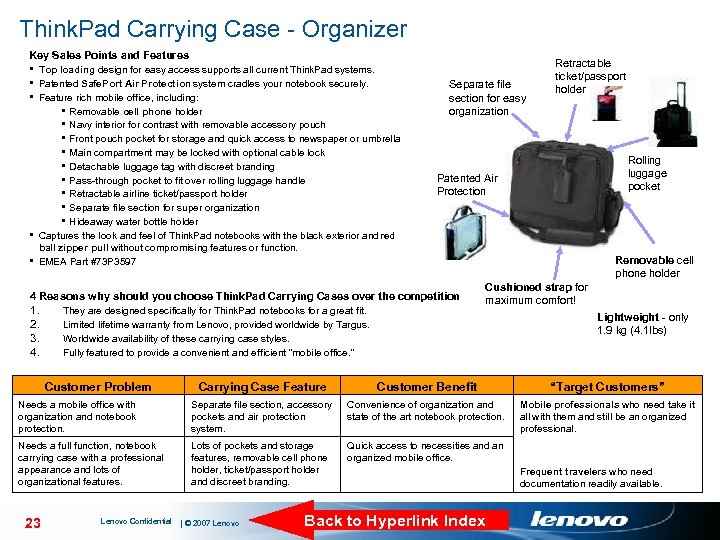
Think. Pad Carrying Case - Organizer Key Sales Points and Features § Top loading design for easy access supports all current Think. Pad systems. § Patented Safe. Port Air Protection system cradles your notebook securely. § Feature rich mobile office, including: § Removable cell phone holder § Navy interior for contrast with removable accessory pouch § Front pouch pocket for storage and quick access to newspaper or umbrella § Main compartment may be locked with optional cable lock § Detachable luggage tag with discreet branding § Pass-through pocket to fit over rolling luggage handle § Retractable airline ticket/passport holder § Separate file section for super organization § Hideaway water bottle holder § Captures the look and feel of Think. Pad notebooks with the black exterior and red Separate file section for easy organization Retractable ticket/passport holder Rolling luggage pocket Patented Air Protection ball zipper pull without compromising features or function. § EMEA Part #73 P 3597 Removable cell phone holder 4 Reasons why should you choose Think. Pad Carrying Cases over the competition 1. 2. 3. 4. They are designed specifically for Think. Pad notebooks for a great fit. Limited lifetime warranty from Lenovo, provided worldwide by Targus. Worldwide availability of these carrying case styles. Fully featured to provide a convenient and efficient “mobile office. ” Customer Problem Cushioned strap for maximum comfort! Lightweight - only 1. 9 kg (4. 1 lbs) Carrying Case Feature Customer Benefit “Target Customers” Needs a mobile office with organization and notebook protection. Separate file section, accessory pockets and air protection system. Convenience of organization and state of the art notebook protection. Mobile professionals who need take it all with them and still be an organized professional. Needs a full function, notebook carrying case with a professional appearance and lots of organizational features. Lots of pockets and storage features, removable cell phone holder, ticket/passport holder and discreet branding. Quick access to necessities and an organized mobile office. 23 Lenovo Confidential | © 2007 Lenovo Back to Hyperlink Index Frequent travelers who need documentation readily available.
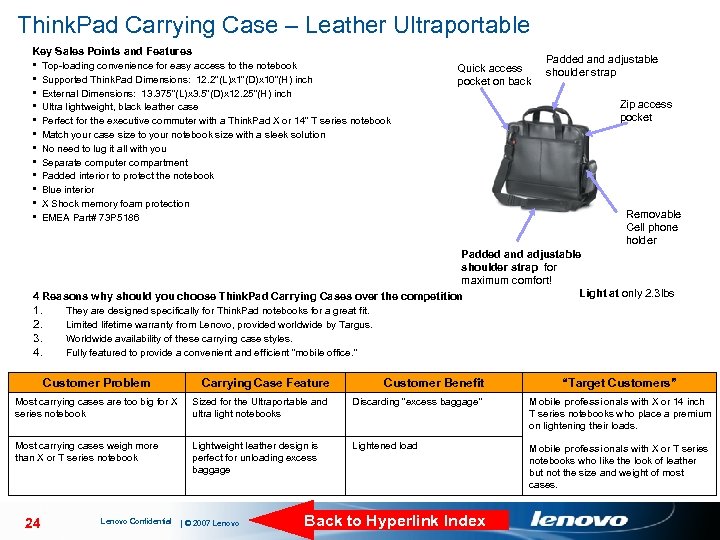
Think. Pad Carrying Case – Leather Ultraportable Key Sales Points and Features § § § Top-loading convenience for easy access to the notebook Supported Think. Pad Dimensions: 12. 2”(L)x 1”(D)x 10”(H) inch External Dimensions: 13. 375”(L)x 3. 5”(D)x 12. 25”(H) inch Ultra lightweight, black leather case Perfect for the executive commuter with a Think. Pad X or 14” T series notebook Match your case size to your notebook size with a sleek solution No need to lug it all with you Separate computer compartment Padded interior to protect the notebook Blue interior X Shock memory foam protection EMEA Part# 73 P 5186 Quick access pocket on back Padded and adjustable shoulder strap Zip access pocket Removable Cell phone holder Padded and adjustable shoulder strap for maximum comfort! Light at only 2. 3 lbs 4 Reasons why should you choose Think. Pad Carrying Cases over the competition 1. 2. 3. 4. They are designed specifically for Think. Pad notebooks for a great fit. Limited lifetime warranty from Lenovo, provided worldwide by Targus. Worldwide availability of these carrying case styles. Fully featured to provide a convenient and efficient “mobile office. ” Customer Problem Carrying Case Feature Customer Benefit Most carrying cases are too big for X series notebook Sized for the Ultraportable and ultra light notebooks Discarding “excess baggage” Mobile professionals with X or 14 inch T series notebooks who place a premium on lightening their loads. Most carrying cases weigh more than X or T series notebook Lightweight leather design is perfect for unloading excess baggage Lightened load Mobile professionals with X or T series notebooks who like the look of leather but not the size and weight of most cases. 24 Lenovo Confidential | © 2007 Lenovo Back to Hyperlink Index “Target Customers”
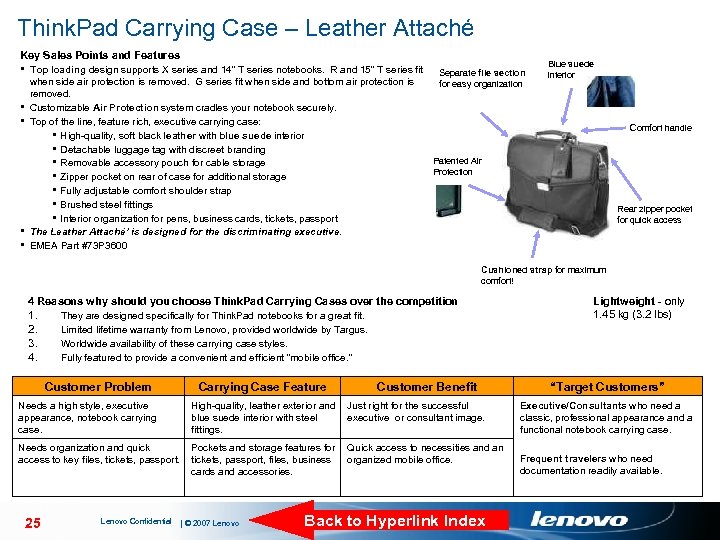
Think. Pad Carrying Case – Leather Attaché Key Sales Points and Features § Top loading design supports X series and 14” T series notebooks. R and 15” T series fit § § when side air protection is removed. G series fit when side and bottom air protection is removed. Customizable Air Protection system cradles your notebook securely. Top of the line, feature rich, executive carrying case: § High-quality, soft black leather with blue suede interior § Detachable luggage tag with discreet branding § Removable accessory pouch for cable storage § Zipper pocket on rear of case for additional storage § Fully adjustable comfort shoulder strap § Brushed steel fittings § Interior organization for pens, business cards, tickets, passport The Leather Attaché’ is designed for the discriminating executive. EMEA Part #73 P 3600 Separate file section for easy organization Blue suede interior Comfort handle Patented Air Protection Rear zipper pocket for quick access Cushioned strap for maximum comfort! 4 Reasons why should you choose Think. Pad Carrying Cases over the competition 1. 2. 3. 4. They are designed specifically for Think. Pad notebooks for a great fit. Limited lifetime warranty from Lenovo, provided worldwide by Targus. Worldwide availability of these carrying case styles. Fully featured to provide a convenient and efficient “mobile office. ” Customer Problem Carrying Case Feature Customer Benefit Lightweight - only 1. 45 kg (3. 2 lbs) “Target Customers” Needs a high style, executive appearance, notebook carrying case. High-quality, leather exterior and Just right for the successful blue suede interior with steel executive or consultant image. fittings. Executive/Consultants who need a classic, professional appearance and a functional notebook carrying case. Needs organization and quick access to key files, tickets, passport. Pockets and storage features for Quick access to necessities and an tickets, passport, files, business organized mobile office. cards and accessories. Frequent travelers who need documentation readily available. 25 Lenovo Confidential | © 2007 Lenovo Back to Hyperlink Index
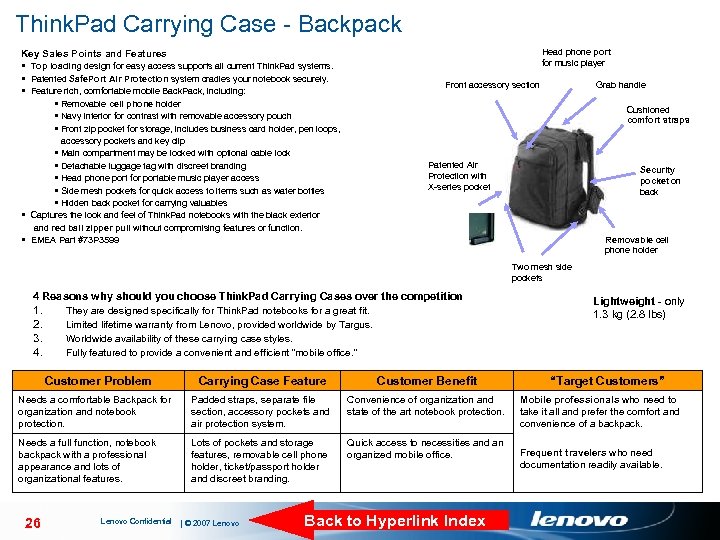
Think. Pad Carrying Case - Backpack Head phone port for music player Key Sales Points and Features § Top loading design for easy access supports all current Think. Pad systems. § Patented Safe. Port Air Protection system cradles your notebook securely. § Feature rich, comfortable mobile Back. Pack, including: § Removable cell phone holder § Navy interior for contrast with removable accessory pouch § Front zip pocket for storage, includes business card holder, pen loops, Front accessory section Grab handle Cushioned comfort straps accessory pockets and key clip § Main compartment may be locked with optional cable lock § Detachable luggage tag with discreet branding § Head phone port for portable music player access § Side mesh pockets for quick access to items such as water bottles § Hidden back pocket for carrying valuables § Captures the look and feel of Think. Pad notebooks with the black exterior and red ball zipper pull without compromising features or function. § EMEA Part #73 P 3599 Patented Air Protection with X-series pocket Security pocket on back Removable cell phone holder Two mesh side pockets 4 Reasons why should you choose Think. Pad Carrying Cases over the competition 1. 2. 3. 4. They are designed specifically for Think. Pad notebooks for a great fit. Limited lifetime warranty from Lenovo, provided worldwide by Targus. Worldwide availability of these carrying case styles. Fully featured to provide a convenient and efficient “mobile office. ” Customer Problem Carrying Case Feature Customer Benefit Needs a comfortable Backpack for organization and notebook protection. Padded straps, separate file section, accessory pockets and air protection system. Convenience of organization and state of the art notebook protection. Needs a full function, notebook backpack with a professional appearance and lots of organizational features. Lots of pockets and storage features, removable cell phone holder, ticket/passport holder and discreet branding. Quick access to necessities and an organized mobile office. 26 Lenovo Confidential | © 2007 Lenovo Back to Hyperlink Index Lightweight - only 1. 3 kg (2. 8 lbs) “Target Customers” Mobile professionals who need to take it all and prefer the comfort and convenience of a backpack. Frequent travelers who need documentation readily available.
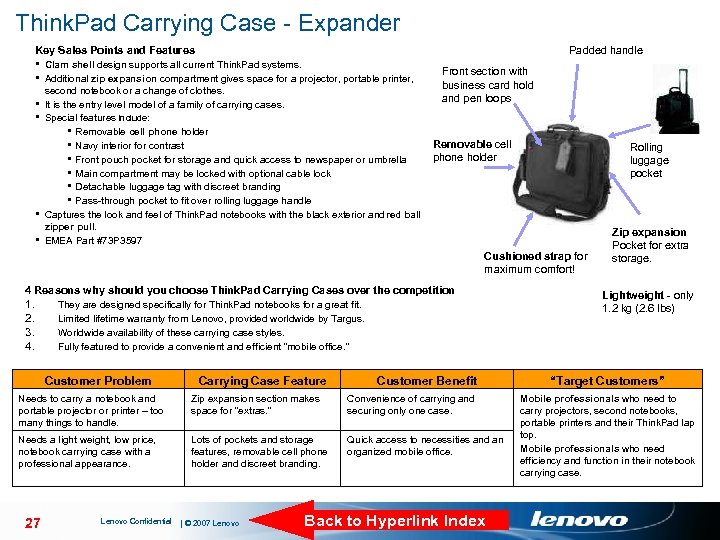
Think. Pad Carrying Case - Expander Key Sales Points and Features Padded handle § Clam shell design supports all current Think. Pad systems. § Additional zip expansion compartment gives space for a projector, portable printer, second notebook or a change of clothes. § It is the entry level model of a family of carrying cases. § Special features include: § Removable cell phone holder § Navy interior for contrast § Front pouch pocket for storage and quick access to newspaper or umbrella § Main compartment may be locked with optional cable lock § Detachable luggage tag with discreet branding § Pass-through pocket to fit over rolling luggage handle § Captures the look and feel of Think. Pad notebooks with the black exterior and red ball Front section with business card hold and pen loops Removable cell phone holder Rolling luggage pocket zipper pull. § EMEA Part #73 P 3597 Cushioned strap for maximum comfort! 4 Reasons why should you choose Think. Pad Carrying Cases over the competition 1. 2. 3. 4. They are designed specifically for Think. Pad notebooks for a great fit. Limited lifetime warranty from Lenovo, provided worldwide by Targus. Worldwide availability of these carrying case styles. Fully featured to provide a convenient and efficient “mobile office. ” Customer Problem Carrying Case Feature Customer Benefit Needs to carry a notebook and portable projector or printer – too many things to handle. Zip expansion section makes space for “extras. ” Convenience of carrying and securing only one case. Needs a light weight, low price, notebook carrying case with a professional appearance. Lots of pockets and storage features, removable cell phone holder and discreet branding. Quick access to necessities and an organized mobile office. 27 Lenovo Confidential | © 2007 Lenovo Back to Hyperlink Index Zip expansion Pocket for extra storage. Lightweight - only 1. 2 kg (2. 6 lbs) “Target Customers” Mobile professionals who need to carry projectors, second notebooks, portable printers and their Think. Pad lap top. Mobile professionals who need efficiency and function in their notebook carrying case.
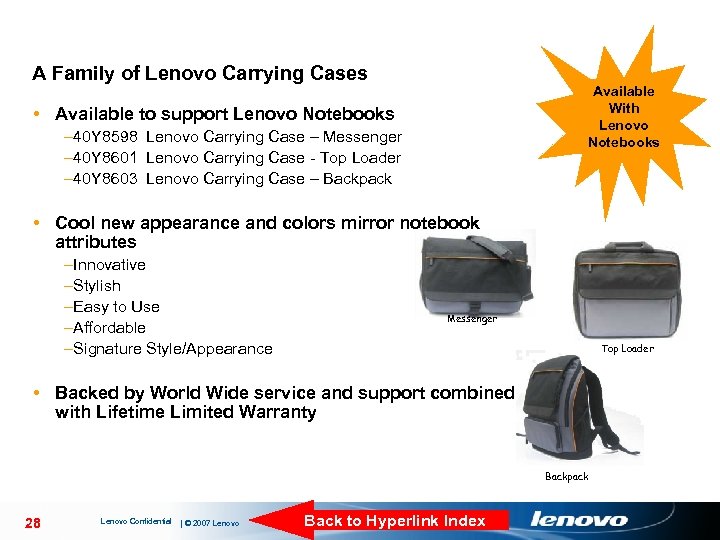
A Family of Lenovo Carrying Cases Available With Lenovo Notebooks • Available to support Lenovo Notebooks – 40 Y 8598 Lenovo Carrying Case – Messenger – 40 Y 8601 Lenovo Carrying Case - Top Loader – 40 Y 8603 Lenovo Carrying Case – Backpack • Cool new appearance and colors mirror notebook attributes –Innovative –Stylish –Easy to Use –Affordable –Signature Style/Appearance Messenger Top Loader • Backed by World Wide service and support combined with Lifetime Limited Warranty Backpack 28 Lenovo Confidential | © 2007 Lenovo Back to Hyperlink Index
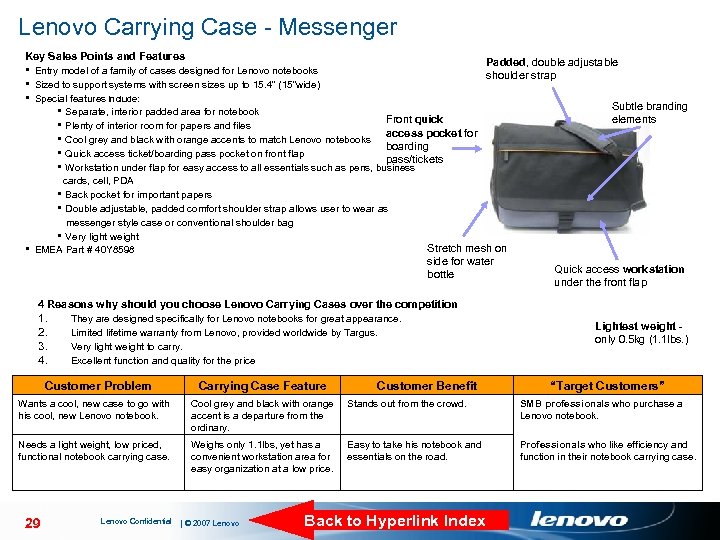
Lenovo Carrying Case - Messenger Key Sales Points and Features Padded, double adjustable § Entry model of a family of cases designed for Lenovo notebooks shoulder strap § Sized to support systems with screen sizes up to 15. 4” (15”wide) § Special features include: § Separate, interior padded area for notebook Front quick § Plenty of interior room for papers and files access pocket for § Cool grey and black with orange accents to match Lenovo notebooks boarding § Quick access ticket/boarding pass pocket on front flap pass/tickets § Workstation under flap for easy access to all essentials such as pens, business cards, cell, PDA § Back pocket for important papers § Double adjustable, padded comfort shoulder strap allows user to wear as messenger style case or conventional shoulder bag § Very light weight § EMEA Part # 40 Y 8598 Stretch mesh on side for water bottle Subtle branding elements Quick access workstation under the front flap 4 Reasons why should you choose Lenovo Carrying Cases over the competition 1. 2. 3. 4. They are designed specifically for Lenovo notebooks for great appearance. Limited lifetime warranty from Lenovo, provided worldwide by Targus. Very light weight to carry. Excellent function and quality for the price Customer Problem Carrying Case Feature Wants a cool, new case to go with his cool, new Lenovo notebook. Cool grey and black with orange accent is a departure from the ordinary. Stands out from the crowd. SMB professionals who purchase a Lenovo notebook. Needs a light weight, low priced, functional notebook carrying case. Weighs only 1. 1 lbs, yet has a convenient workstation area for easy organization at a low price. Easy to take his notebook and essentials on the road. Professionals who like efficiency and function in their notebook carrying case. 29 Lenovo Confidential | © 2007 Lenovo Customer Benefit Lightest weight - only 0. 5 kg (1. 1 lbs. ) Back to Hyperlink Index “Target Customers”
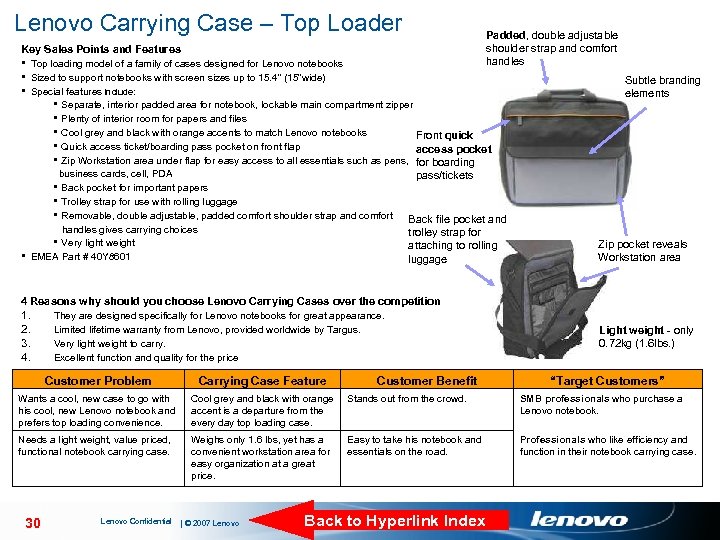
Lenovo Carrying Case – Top Loader Padded, double adjustable shoulder strap and comfort handles Key Sales Points and Features § Top loading model of a family of cases designed for Lenovo notebooks § Sized to support notebooks with screen sizes up to 15. 4” (15”wide) § Special features include: § Separate, interior padded area for notebook, lockable main compartment zipper § Plenty of interior room for papers and files § Cool grey and black with orange accents to match Lenovo notebooks Front quick § Quick access ticket/boarding pass pocket on front flap access pocket § Zip Workstation area under flap for easy access to all essentials such as pens, for boarding business cards, cell, PDA § Back pocket for important papers § Trolley strap for use with rolling luggage § Removable, double adjustable, padded comfort shoulder strap and comfort handles gives carrying choices § Very light weight § EMEA Part # 40 Y 8601 Subtle branding elements pass/tickets Back file pocket and trolley strap for attaching to rolling luggage Zip pocket reveals Workstation area 4 Reasons why should you choose Lenovo Carrying Cases over the competition 1. 2. 3. 4. They are designed specifically for Lenovo notebooks for great appearance. Limited lifetime warranty from Lenovo, provided worldwide by Targus. Very light weight to carry. Excellent function and quality for the price Customer Problem Carrying Case Feature Wants a cool, new case to go with his cool, new Lenovo notebook and prefers top loading convenience. Cool grey and black with orange accent is a departure from the every day top loading case. Stands out from the crowd. SMB professionals who purchase a Lenovo notebook. Needs a light weight, value priced, functional notebook carrying case. Weighs only 1. 6 lbs, yet has a convenient workstation area for easy organization at a great price. Easy to take his notebook and essentials on the road. Professionals who like efficiency and function in their notebook carrying case. 30 Lenovo Confidential | © 2007 Lenovo Customer Benefit Light weight - only 0. 72 kg (1. 6 lbs. ) Back to Hyperlink Index “Target Customers”
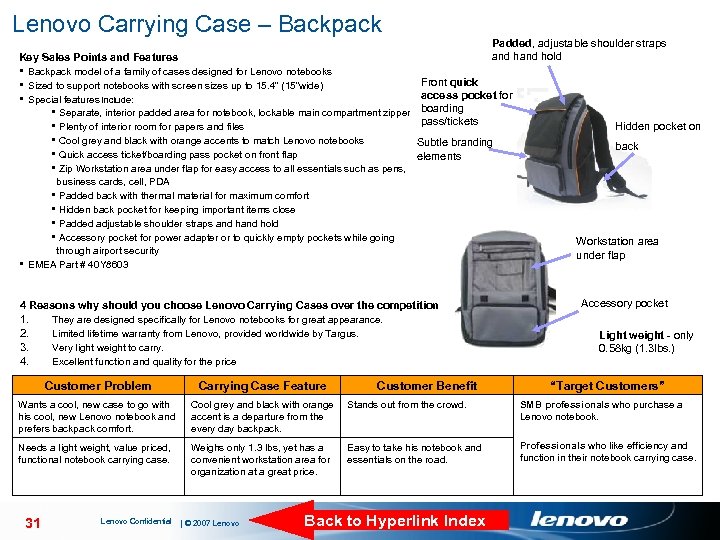
Lenovo Carrying Case – Backpack Padded, adjustable shoulder straps and hold Key Sales Points and Features § Backpack model of a family of cases designed for Lenovo notebooks § Sized to support notebooks with screen sizes up to 15. 4” (15”wide) § Special features include: § Separate, interior padded area for notebook, lockable main compartment zipper § Plenty of interior room for papers and files § Cool grey and black with orange accents to match Lenovo notebooks § Quick access ticket/boarding pass pocket on front flap § Zip Workstation area under flap for easy access to all essentials such as pens, Front quick access pocket for boarding pass/tickets Subtle branding elements business cards, cell, PDA § Padded back with thermal material for maximum comfort § Hidden back pocket for keeping important items close § Padded adjustable shoulder straps and hold § Accessory pocket for power adapter or to quickly empty pockets while going through airport security § EMEA Part # 40 Y 8603 4 Reasons why should you choose Lenovo Carrying Cases over the competition 1. 2. 3. 4. They are designed specifically for Lenovo notebooks for great appearance. Limited lifetime warranty from Lenovo, provided worldwide by Targus. Very light weight to carry. Excellent function and quality for the price back Workstation area under flap Accessory pocket Light weight - only 0. 58 kg (1. 3 lbs. ) Customer Problem Carrying Case Feature Wants a cool, new case to go with his cool, new Lenovo notebook and prefers backpack comfort. Cool grey and black with orange accent is a departure from the every day backpack. Stands out from the crowd. SMB professionals who purchase a Lenovo notebook. Needs a light weight, value priced, functional notebook carrying case. Weighs only 1. 3 lbs, yet has a convenient workstation area for organization at a great price. Easy to take his notebook and essentials on the road. Professionals who like efficiency and function in their notebook carrying case. 31 Lenovo Confidential | © 2007 Lenovo Customer Benefit Hidden pocket on Back to Hyperlink Index “Target Customers”
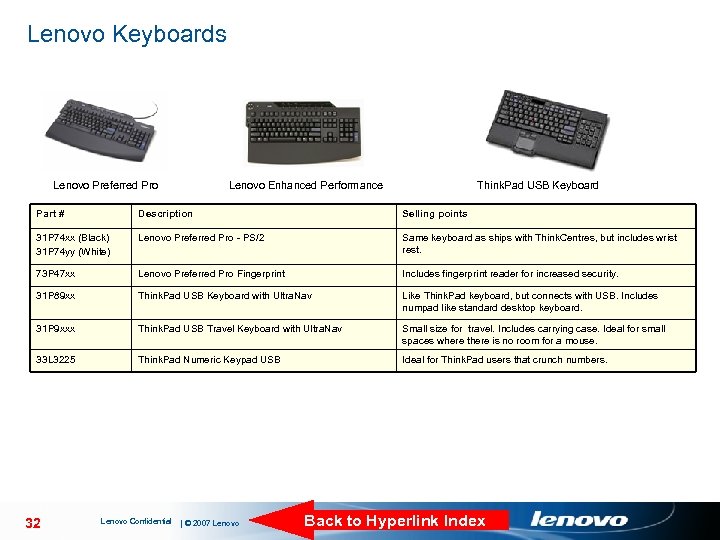
Lenovo Keyboards Lenovo Preferred Pro Lenovo Enhanced Performance Think. Pad USB Keyboard Part # Description Selling points 31 P 74 xx (Black) 31 P 74 yy (White) Lenovo Preferred Pro - PS/2 Same keyboard as ships with Think. Centres, but includes wrist rest. 73 P 47 xx Lenovo Preferred Pro Fingerprint Includes fingerprint reader for increased security. 31 P 89 xx Think. Pad USB Keyboard with Ultra. Nav Like Think. Pad keyboard, but connects with USB. Includes numpad like standard desktop keyboard. 31 P 9 xxx Think. Pad USB Travel Keyboard with Ultra. Nav Small size for travel. Includes carrying case. Ideal for small spaces where there is no room for a mouse. 33 L 3225 Think. Pad Numeric Keypad USB Ideal for Think. Pad users that crunch numbers. 32 Lenovo Confidential | © 2007 Lenovo Back to Hyperlink Index
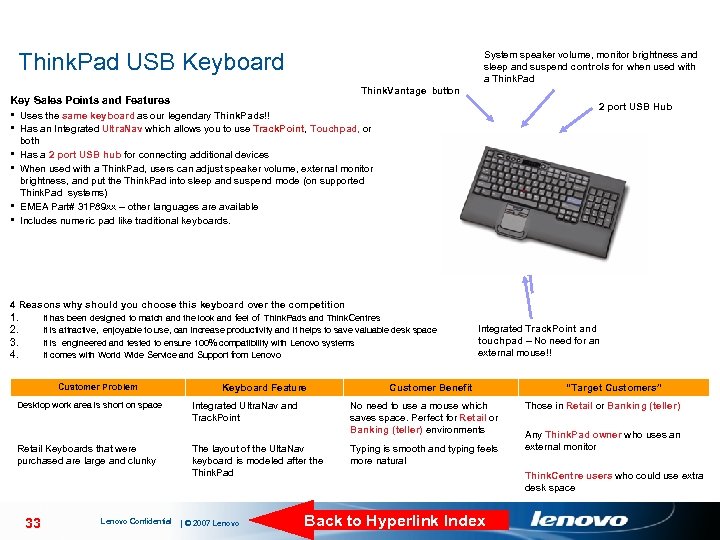
Think. Pad USB Keyboard System speaker volume, monitor brightness and sleep and suspend controls for when used with a Think. Pad Think. Vantage button Key Sales Points and Features 2 port USB Hub § Uses the same keyboard as our legendary Think. Pads!! § Has an Integrated Ultra. Nav which allows you to use Track. Point, Touchpad, or both § Has a 2 port USB hub for connecting additional devices § When used with a Think. Pad, users can adjust speaker volume, external monitor brightness, and put the Think. Pad into sleep and suspend mode (on supported Think. Pad systems) § EMEA Part# 31 P 89 xx – other languages are available § Includes numeric pad like traditional keyboards. 4 Reasons why should you choose this keyboard over the competition 1. 2. 3. 4. It has been designed to match and the look and feel of Think. Pads and Think. Centres It is attractive, enjoyable to use, can increase productivity and it helps to save valuable desk space It is engineered and tested to ensure 100% compatibility with Lenovo systems It comes with World Wide Service and Support from Lenovo Customer Problem Keyboard Feature Integrated Track. Point and touchpad – No need for an external mouse!! Customer Benefit Desktop work area is short on space Integrated Ultra. Nav and Track. Point No need to use a mouse which saves space. Perfect for Retail or Banking (teller) environments Retail Keyboards that were purchased are large and clunky The layout of the Ulta. Nav keyboard is modeled after the Think. Pad Typing is smooth and typing feels more natural 33 Lenovo Confidential | © 2007 Lenovo Back to Hyperlink Index “Target Customers” Those in Retail or Banking (teller) Any Think. Pad owner who uses an external monitor Think. Centre users who could use extra desk space
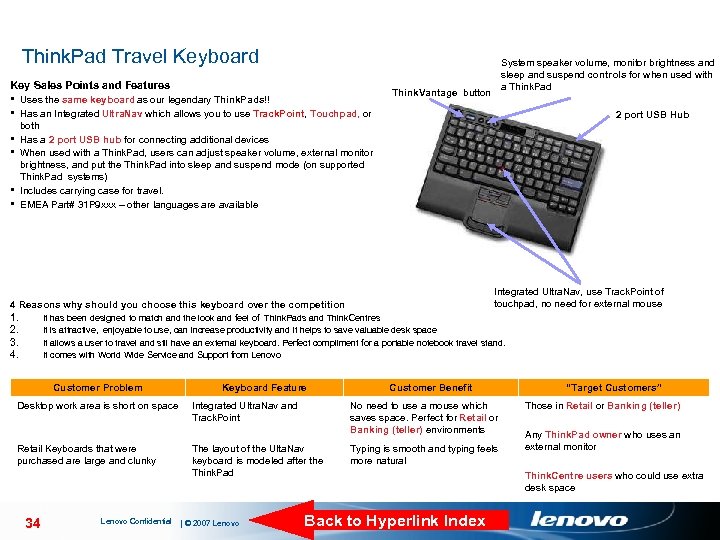
Think. Pad Travel Keyboard Key Sales Points and Features § Uses the same keyboard as our legendary Think. Pads!! § Has an Integrated Ultra. Nav which allows you to use Track. Point, Touchpad, or Think. Vantage button System speaker volume, monitor brightness and sleep and suspend controls for when used with a Think. Pad 2 port USB Hub both Has a 2 port USB hub for connecting additional devices When used with a Think. Pad, users can adjust speaker volume, external monitor brightness, and put the Think. Pad into sleep and suspend mode (on supported Think. Pad systems) Includes carrying case for travel. EMEA Part# 31 P 9 xxx – other languages are available § § Integrated Ultra. Nav, use Track. Point of touchpad, no need for external mouse 4 Reasons why should you choose this keyboard over the competition 1. 2. 3. 4. It has been designed to match and the look and feel of Think. Pads and Think. Centres It is attractive, enjoyable to use, can increase productivity and it helps to save valuable desk space It allows a user to travel and stil have an external keyboard. Perfect compliment for a portable notebook travel stand. It comes with World Wide Service and Support from Lenovo Customer Problem Keyboard Feature Customer Benefit Desktop work area is short on space Integrated Ultra. Nav and Track. Point No need to use a mouse which saves space. Perfect for Retail or Banking (teller) environments Retail Keyboards that were purchased are large and clunky The layout of the Ulta. Nav keyboard is modeled after the Think. Pad Typing is smooth and typing feels more natural 34 Lenovo Confidential | © 2007 Lenovo Back to Hyperlink Index “Target Customers” Those in Retail or Banking (teller) Any Think. Pad owner who uses an external monitor Think. Centre users who could use extra desk space
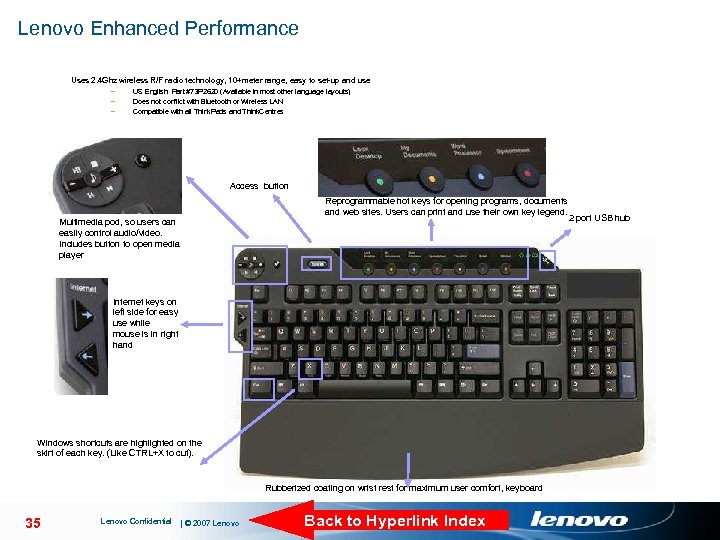
Lenovo Enhanced Performance Uses 2. 4 Ghz wireless R/F radio technology, 10+meter range, easy to set-up and use – – – US English Part #73 P 2620 (Available in most other language layouts) Does not conflict with Bluetooth or Wireless LAN Compatible with all Think. Pads and Think. Centres Access button Multimedia pod, so users can easily control audio/video. Includes button to open media player Reprogrammable hot keys for opening programs, documents and web sites. Users can print and use their own key legend. 2 port USB hub Internet keys on left side for easy use while mouse is in right hand Windows shortcuts are highlighted on the skirt of each key. (Like CTRL+X to cut). Rubberized coating on wrist rest for maximum user comfort, keyboard 35 Lenovo Confidential | © 2007 Lenovo Back to Hyperlink Index
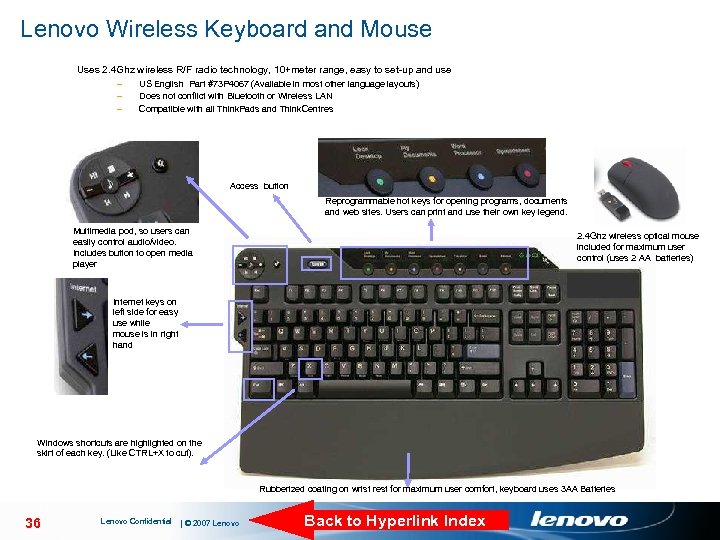
Lenovo Wireless Keyboard and Mouse Uses 2. 4 Ghz wireless R/F radio technology, 10+meter range, easy to set-up and use – – – US English Part #73 P 4067 (Available in most other language layouts) Does not conflict with Bluetooth or Wireless LAN Compatible with all Think. Pads and Think. Centres Access button Reprogrammable hot keys for opening programs, documents and web sites. Users can print and use their own key legend. Multimedia pod, so users can easily control audio/video. Includes button to open media player 2. 4 Ghz wireless optical mouse included for maximum user control (uses 2 AA batteries) Internet keys on left side for easy use while mouse is in right hand Windows shortcuts are highlighted on the skirt of each key. (Like CTRL+X to cut). Rubberized coating on wrist rest for maximum user comfort, keyboard uses 3 AA Batteries 36 Lenovo Confidential | © 2007 Lenovo Back to Hyperlink Index
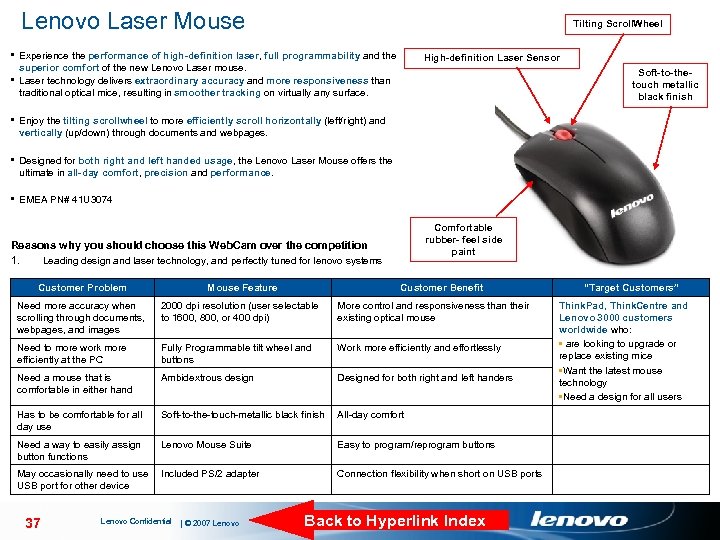
Lenovo Laser Mouse Tilting Scroll. Wheel § Experience the performance of high-definition laser, full programmability and the High-definition Laser Sensor superior comfort of the new Lenovo Laser mouse. § Laser technology delivers extraordinary accuracy and more responsiveness than traditional optical mice, resulting in smoother tracking on virtually any surface. Soft-to-thetouch metallic black finish § Enjoy the tilting scrollwheel to more efficiently scroll horizontally (left/right) and vertically (up/down) through documents and webpages. § Designed for both right and left handed usage, the Lenovo Laser Mouse offers the ultimate in all-day comfort, precision and performance. § EMEA PN# 41 U 3074 Comfortable rubber- feel side paint Reasons why you should choose this Web. Cam over the competition 1. Leading design and laser technology, and perfectly tuned for lenovo systems Customer Problem Mouse Feature Need more accuracy when scrolling through documents, webpages, and images 2000 dpi resolution (user selectable to 1600, 800, or 400 dpi) More control and responsiveness than their existing optical mouse Need to more work more efficiently at the PC Fully Programmable tilt wheel and buttons Work more efficiently and effortlessly Need a mouse that is comfortable in either hand Ambidextrous design Designed for both right and left handers Has to be comfortable for all day use Soft-to-the-touch-metallic black finish All-day comfort Need a way to easily assign button functions Lenovo Mouse Suite Easy to program/reprogram buttons May occasionally need to use Included PS/2 adapter USB port for other device 37 Lenovo Confidential | © 2007 Lenovo Customer Benefit Connection flexibility when short on USB ports Back to Hyperlink Index “Target Customers” Think. Pad, Think. Centre and Lenovo 3000 customers worldwide who: • are looking to upgrade or replace existing mice • Want the latest mouse technology • Need a design for all users
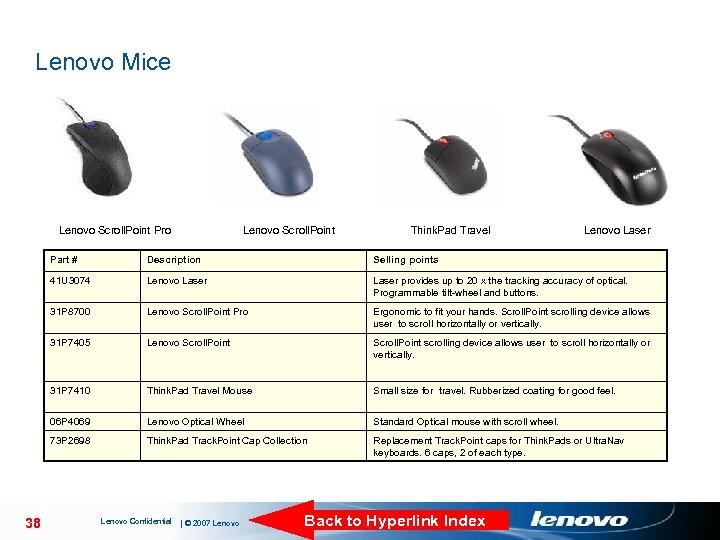
Lenovo Mice Lenovo Scroll. Point Pro Lenovo Scroll. Point Think. Pad Travel Lenovo Laser Part # Selling points 41 U 3074 Lenovo Laser provides up to 20 x the tracking accuracy of optical. Programmable tilt-wheel and buttons. 31 P 8700 Lenovo Scroll. Point Pro Ergonomic to fit your hands. Scroll. Point scrolling device allows user to scroll horizontally or vertically. 31 P 7405 Lenovo Scroll. Point scrolling device allows user to scroll horizontally or vertically. 31 P 7410 Think. Pad Travel Mouse Small size for travel. Rubberized coating for good feel. 06 P 4069 Lenovo Optical Wheel Standard Optical mouse with scroll wheel. 73 P 2698 38 Description Think. Pad Track. Point Cap Collection Replacement Track. Point caps for Think. Pads or Ultra. Nav keyboards. 6 caps, 2 of each type. Lenovo Confidential | © 2007 Lenovo Back to Hyperlink Index
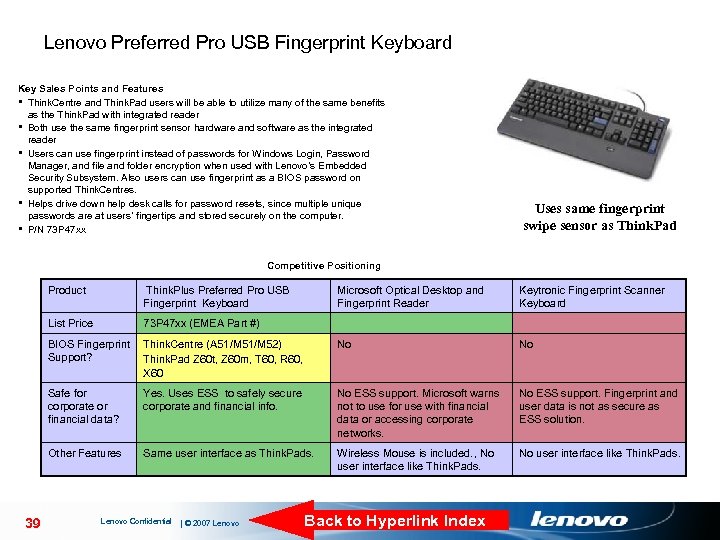
Lenovo Preferred Pro USB Fingerprint Keyboard Key Sales Points and Features § Think. Centre and Think. Pad users will be able to utilize many of the same benefits as the Think. Pad with integrated reader § Both use the same fingerprint sensor hardware and software as the integrated reader § Users can use fingerprint instead of passwords for Windows Login, Password Manager, and file and folder encryption when used with Lenovo’s Embedded Security Subsystem. Also users can use fingerprint as a BIOS password on supported Think. Centres. § Helps drive down help desk calls for password resets, since multiple unique passwords are at users’ fingertips and stored securely on the computer. § P/N 73 P 47 xx Uses same fingerprint swipe sensor as Think. Pad Competitive Positioning Product List Price Microsoft Optical Desktop and Fingerprint Reader Keytronic Fingerprint Scanner Keyboard BIOS Fingerprint Think. Centre (A 51/M 52) Support? Think. Pad Z 60 t, Z 60 m, T 60, R 60, X 60 No No Safe for corporate or financial data? Yes. Uses ESS to safely secure corporate and financial info. No ESS support. Microsoft warns not to use for use with financial data or accessing corporate networks. No ESS support. Fingerprint and user data is not as secure as ESS solution. Other Features 39 Think. Plus Preferred Pro USB Fingerprint Keyboard 73 P 47 xx (EMEA Part #) Same user interface as Think. Pads. Wireless Mouse is included. , No user interface like Think. Pads. No user interface like Think. Pads. Lenovo Confidential | © 2007 Lenovo Back to Hyperlink Index
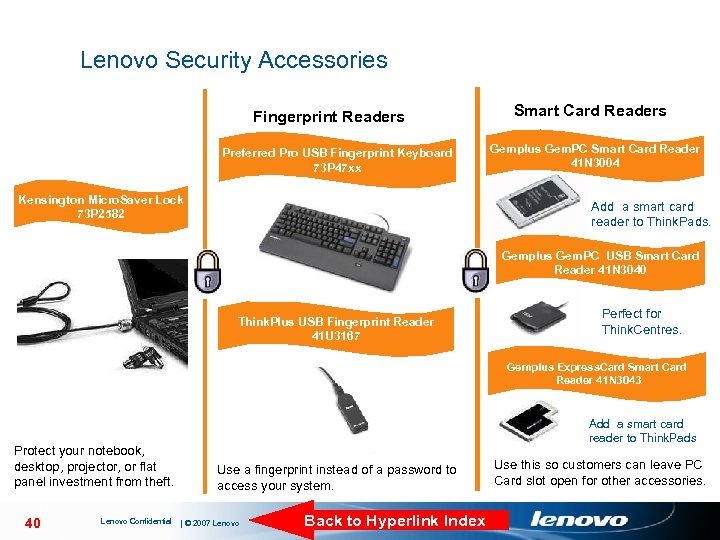
Lenovo Security Accessories Fingerprint Readers Preferred Pro USB Fingerprint Keyboard 73 P 47 xx Kensington Micro. Saver Lock 73 P 2582 Smart Card Readers Gemplus Gem. PC Smart Card Reader 41 N 3004 Add a smart card reader to Think. Pads. Gemplus Gem. PC USB Smart Card Reader 41 N 3040 Think. Plus USB Fingerprint Reader 41 U 3167 Perfect for Think. Centres. Gemplus Express. Card Smart Card Reader 41 N 3043 Protect your notebook, desktop, projector, or flat panel investment from theft. 40 Lenovo Confidential Add a smart card reader to Think. Pads Use a fingerprint instead of a password to access your system. | © 2007 Lenovo Back to Hyperlink Index Use this so customers can leave PC Card slot open for other accessories.
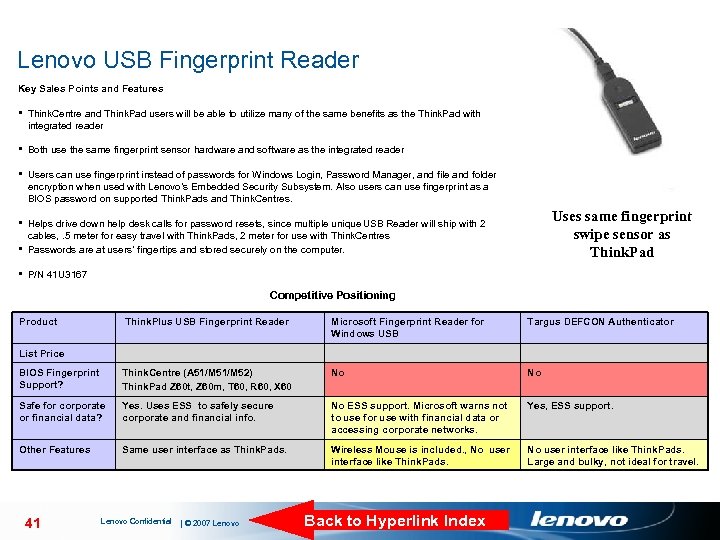
Lenovo USB Fingerprint Reader Key Sales Points and Features § Think. Centre and Think. Pad users will be able to utilize many of the same benefits as the Think. Pad with integrated reader § Both use the same fingerprint sensor hardware and software as the integrated reader § Users can use fingerprint instead of passwords for Windows Login, Password Manager, and file and folder encryption when used with Lenovo’s Embedded Security Subsystem. Also users can use fingerprint as a BIOS password on supported Think. Pads and Think. Centres. Uses same fingerprint swipe sensor as Think. Pad § Helps drive down help desk calls for password resets, since multiple unique USB Reader will ship with 2 cables, . 5 meter for easy travel with Think. Pads, 2 meter for use with Think. Centres § Passwords are at users’ fingertips and stored securely on the computer. § P/N 41 U 3167 Competitive Positioning Product Think. Plus USB Fingerprint Reader Microsoft Fingerprint Reader for Windows USB Targus DEFCON Authenticator BIOS Fingerprint Support? Think. Centre (A 51/M 52) Think. Pad Z 60 t, Z 60 m, T 60, R 60, X 60 No No Safe for corporate or financial data? Yes. Uses ESS to safely secure corporate and financial info. No ESS support. Microsoft warns not to use for use with financial data or accessing corporate networks. Yes, ESS support. Other Features Same user interface as Think. Pads. Wireless Mouse is included. , No user interface like Think. Pads. Large and bulky, not ideal for travel. List Price 41 Lenovo Confidential | © 2007 Lenovo Back to Hyperlink Index
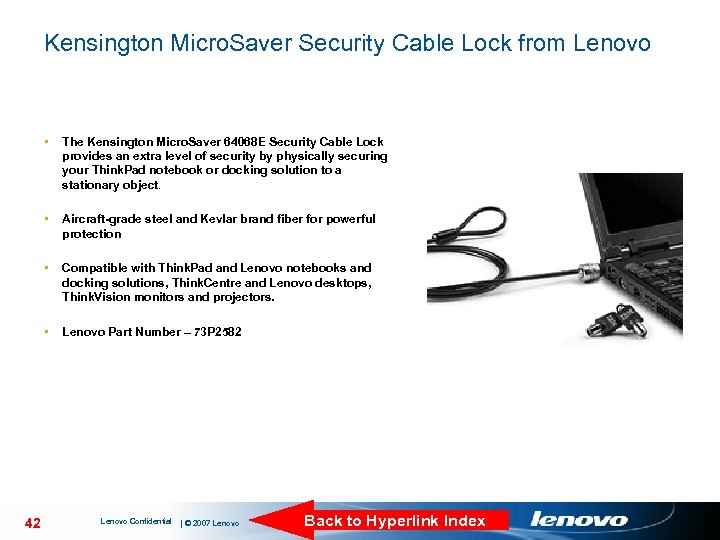
Kensington Micro. Saver Security Cable Lock from Lenovo • • Aircraft-grade steel and Kevlar brand fiber for powerful protection • Compatible with Think. Pad and Lenovo notebooks and docking solutions, Think. Centre and Lenovo desktops, Think. Vision monitors and projectors. • 42 The Kensington Micro. Saver 64068 E Security Cable Lock provides an extra level of security by physically securing your Think. Pad notebook or docking solution to a stationary object. Lenovo Part Number – 73 P 2582 Lenovo Confidential | © 2007 Lenovo Back to Hyperlink Index
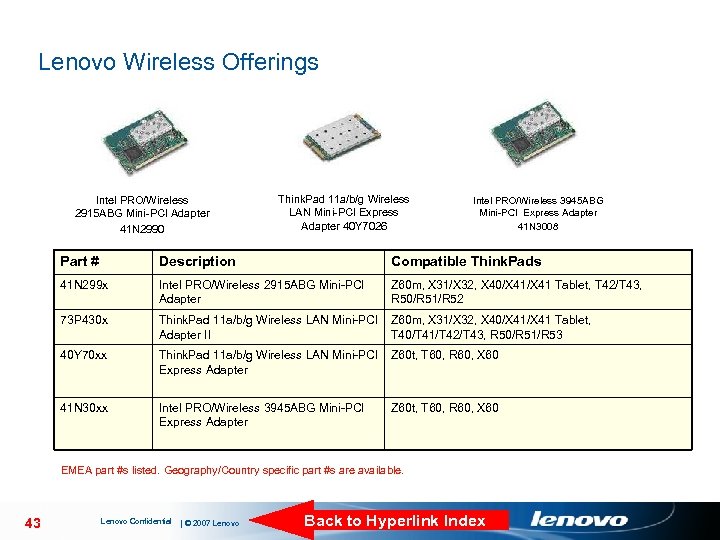
Lenovo Wireless Offerings Intel PRO/Wireless 2915 ABG Mini-PCI Adapter 41 N 2990 Think. Pad 11 a/b/g Wireless LAN Mini-PCI Express Adapter 40 Y 7026 Intel PRO/Wireless 3945 ABG Mini-PCI Express Adapter 41 N 3008 Part # Description Compatible Think. Pads 41 N 299 x Intel PRO/Wireless 2915 ABG Mini-PCI Adapter Z 60 m, X 31/X 32, X 40/X 41 Tablet, T 42/T 43, R 50/R 51/R 52 73 P 430 x Think. Pad 11 a/b/g Wireless LAN Mini-PCI Z 60 m, X 31/X 32, X 40/X 41 Tablet, Adapter II T 40/T 41/T 42/T 43, R 50/R 51/R 53 40 Y 70 xx Think. Pad 11 a/b/g Wireless LAN Mini-PCI Z 60 t, T 60, R 60, X 60 Express Adapter 41 N 30 xx Intel PRO/Wireless 3945 ABG Mini-PCI Express Adapter Z 60 t, T 60, R 60, X 60 EMEA part #s listed. Geography/Country specific part #s are available. 43 Lenovo Confidential | © 2007 Lenovo Back to Hyperlink Index
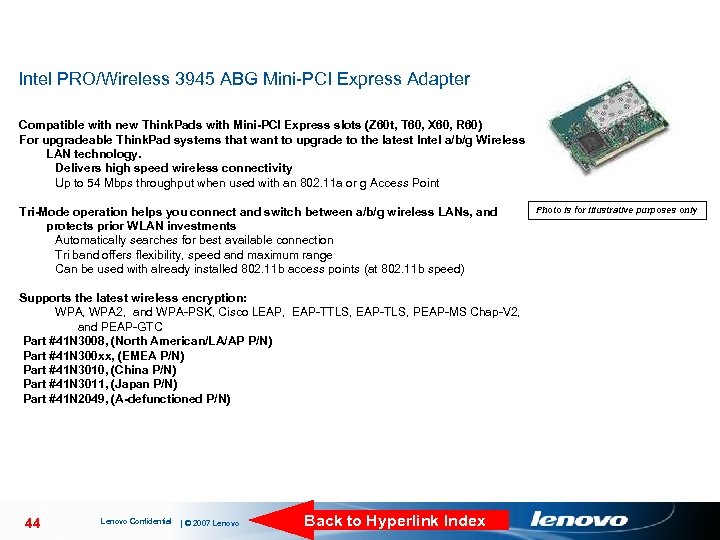
Intel PRO/Wireless 3945 ABG Mini-PCI Express Adapter Compatible with new Think. Pads with Mini-PCI Express slots (Z 60 t, T 60, X 60, R 60) For upgradeable Think. Pad systems that want to upgrade to the latest Intel a/b/g Wireless LAN technology. Delivers high speed wireless connectivity Up to 54 Mbps throughput when used with an 802. 11 a or g Access Point Tri-Mode operation helps you connect and switch between a/b/g wireless LANs, and protects prior WLAN investments Automatically searches for best available connection Tri band offers flexibility, speed and maximum range Can be used with already installed 802. 11 b access points (at 802. 11 b speed) Supports the latest wireless encryption: WPA, WPA 2, and WPA-PSK, Cisco LEAP, EAP-TTLS, EAP-TLS, PEAP-MS Chap-V 2, and PEAP-GTC Part #41 N 3008, (North American/LA/AP P/N) Part #41 N 300 xx, (EMEA P/N) Part #41 N 3010, (China P/N) Part #41 N 3011, (Japan P/N) Part #41 N 2049, (A-defunctioned P/N) 44 Lenovo Confidential | © 2007 Lenovo Back to Hyperlink Index Photo is for illustrative purposes only
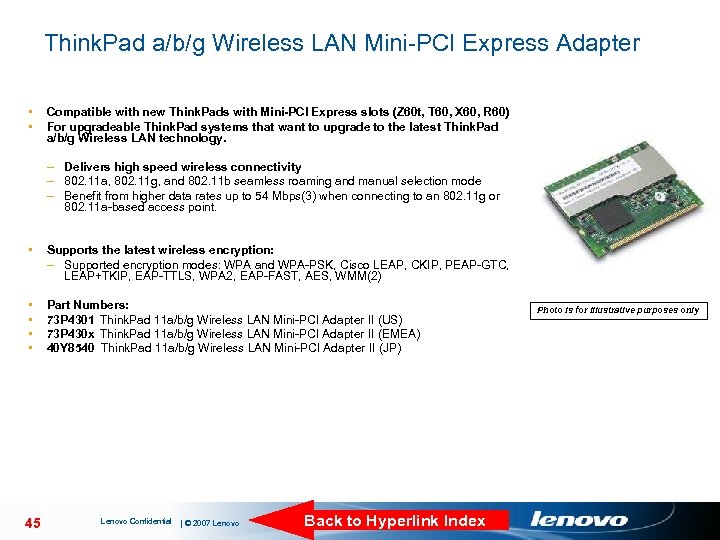
Think. Pad a/b/g Wireless LAN Mini-PCI Express Adapter • • Compatible with new Think. Pads with Mini-PCI Express slots (Z 60 t, T 60, X 60, R 60) For upgradeable Think. Pad systems that want to upgrade to the latest Think. Pad a/b/g Wireless LAN technology. – Delivers high speed wireless connectivity – 802. 11 a, 802. 11 g, and 802. 11 b seamless roaming and manual selection mode – Benefit from higher data rates up to 54 Mbps(3) when connecting to an 802. 11 g or 802. 11 a-based access point. • Supports the latest wireless encryption: – Supported encryption modes: WPA and WPA-PSK, Cisco LEAP, CKIP, PEAP-GTC, LEAP+TKIP, EAP-TTLS, WPA 2, EAP-FAST, AES, WMM(2) • • Part Numbers: 73 P 4301 Think. Pad 11 a/b/g Wireless LAN Mini-PCI Adapter II (US) 73 P 430 x Think. Pad 11 a/b/g Wireless LAN Mini-PCI Adapter II (EMEA) 40 Y 8540 Think. Pad 11 a/b/g Wireless LAN Mini-PCI Adapter II (JP) 45 Lenovo Confidential | © 2007 Lenovo Back to Hyperlink Index Photo is for illustrative purposes only
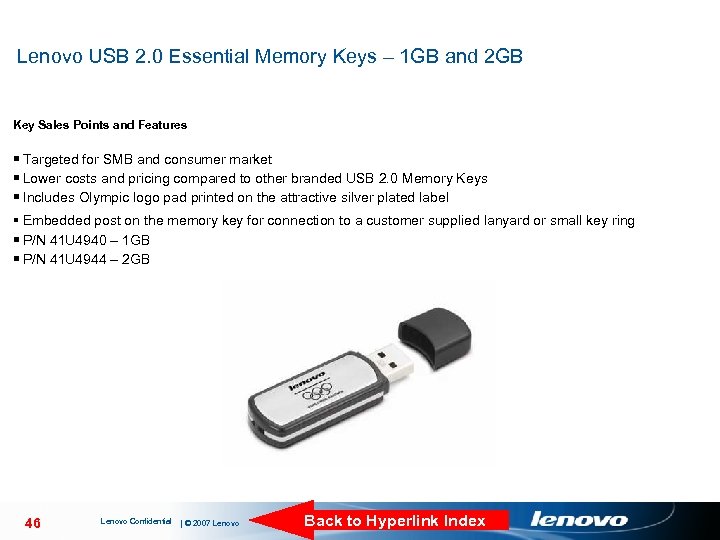
Lenovo USB 2. 0 Essential Memory Keys – 1 GB and 2 GB Key Sales Points and Features § Targeted for SMB and consumer market § Lower costs and pricing compared to other branded USB 2. 0 Memory Keys § Includes Olympic logo pad printed on the attractive silver plated label § Embedded post on the memory key for connection to a customer supplied lanyard or small key ring § P/N 41 U 4940 – 1 GB § P/N 41 U 4944 – 2 GB 46 Lenovo Confidential | © 2007 Lenovo Back to Hyperlink Index
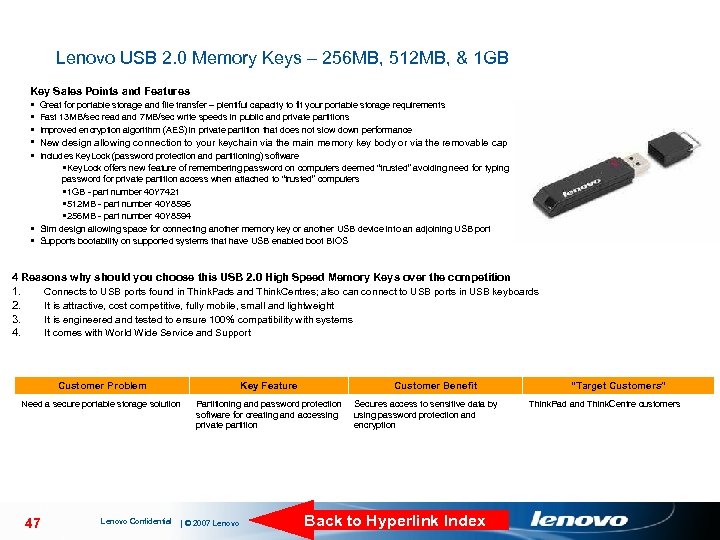
Lenovo USB 2. 0 Memory Keys – 256 MB, 512 MB, & 1 GB Key Sales Points and Features § Great for portable storage and file transfer – plentiful capacity to fit your portable storage requirements § Fast 13 MB/sec read and 7 MB/sec write speeds in public and private partitions § Improved encryption algorithm (AES) in private partition that does not slow down performance § New design allowing connection to your keychain via the main memory key body or via the removable cap § Includes Key. Lock (password protection and partitioning) software §Key. Lock offers new feature of remembering password on computers deemed “trusted” avoiding need for typing password for private partition access when attached to “trusted” computers § 1 GB - part number 40 Y 7421 Driver Support § 512 MB - part number 40 Y 8596 § 256 MB - part number 40 Y 8594 § Slim design allowing space for connecting another memory key or another USB device into an adjoining USB port § Supports bootability on supported systems that have USB enabled boot BIOS 4 Reasons why should you choose this USB 2. 0 High Speed Memory Keys over the competition 1. 2. 3. 4. Connects to USB ports found in Think. Pads and Think. Centres; also can connect to USB ports in USB keyboards It is attractive, cost competitive, fully mobile, small and lightweight It is engineered and tested to ensure 100% compatibility with systems It comes with World Wide Service and Support Customer Problem Key Feature Need a secure portable storage solution Partitioning and password protection software for creating and accessing private partition 47 Lenovo Confidential | © 2007 Lenovo Customer Benefit Secures access to sensitive data by using password protection and encryption Back to Hyperlink Index “Target Customers” Think. Pad and Think. Centre customers
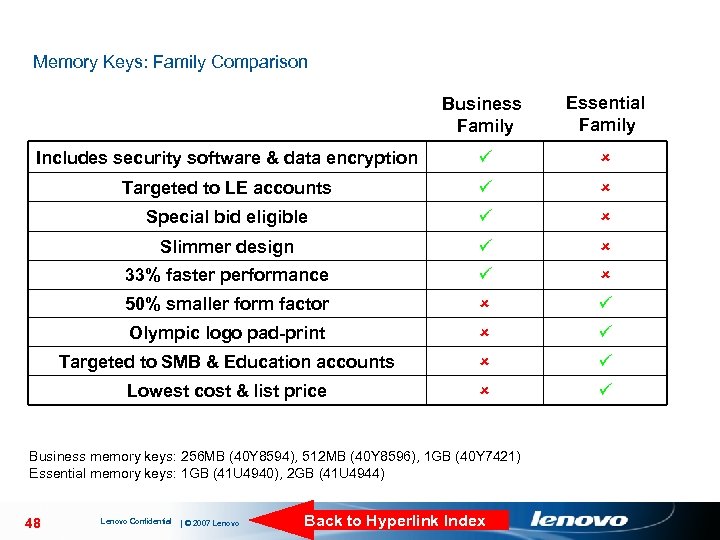
Memory Keys: Family Comparison Business Family Essential Family Includes security software & data encryption Targeted to LE accounts Special bid eligible Slimmer design 33% faster performance 50% smaller form factor Olympic logo pad-print Targeted to SMB & Education accounts Lowest cost & list price Business memory keys: 256 MB (40 Y 8594), 512 MB (40 Y 8596), 1 GB (40 Y 7421) Essential memory keys: 1 GB (41 U 4940), 2 GB (41 U 4944) 48 Lenovo Confidential | © 2007 Lenovo Back to Hyperlink Index
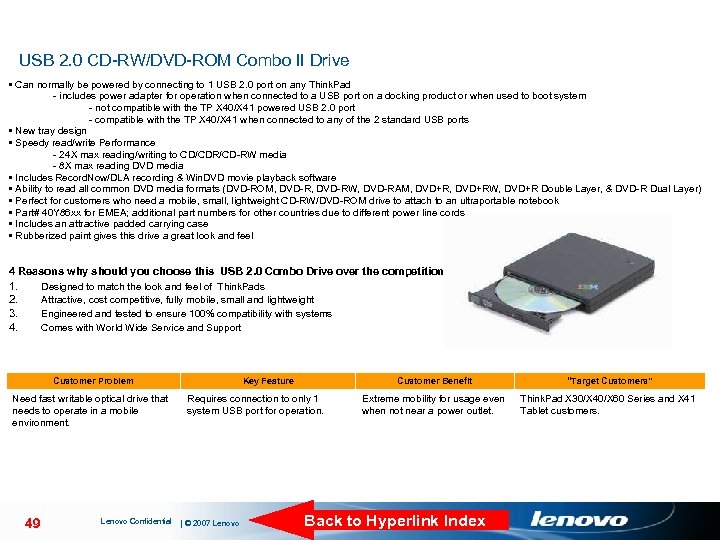
USB 2. 0 CD-RW/DVD-ROM Combo II Drive • Can normally be powered by connecting to 1 USB 2. 0 port on any Think. Pad - includes power adapter for operation when connected to a USB port on a docking product or when used to boot system - not compatible with the TP X 40/X 41 powered USB 2. 0 port - compatible with the TP X 40/X 41 when connected to any of the 2 standard USB ports • New tray design • Speedy read/write Performance - 24 X max reading/writing to CD/CDR/CD-RW media - 8 X max reading DVD media • Includes Record. Now/DLA recording & Win. DVD movie playback software • Ability to read all common DVD media formats (DVD-ROM, DVD-RW, DVD-RAM, DVD+RW, DVD+R Double Layer, & DVD-R Dual Layer) • Perfect for customers who need a mobile, small, lightweight CD-RW/DVD-ROM drive to attach to an ultraportable notebook Driver Support • Part# 40 Y 86 xx for EMEA; additional part numbers for other countries due to different power line cords • Includes an attractive padded carrying case • Rubberized paint gives this drive a great look and feel 4 Reasons why should you choose this USB 2. 0 Combo Drive over the competition 1. 2. 3. 4. Designed to match the look and feel of Think. Pads Attractive, cost competitive, fully mobile, small and lightweight Engineered and tested to ensure 100% compatibility with systems Comes with World Wide Service and Support Customer Problem Need fast writable optical drive that needs to operate in a mobile environment. 49 Lenovo Confidential Key Feature Customer Benefit Requires connection to only 1 system USB port for operation. | © 2007 Lenovo “Target Customers” Extreme mobility for usage even when not near a power outlet. Think. Pad X 30/X 40/X 60 Series and X 41 Tablet customers. Back to Hyperlink Index
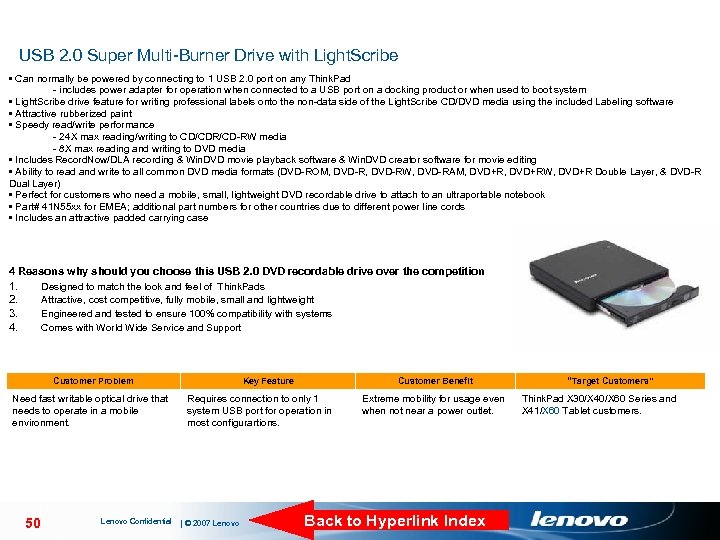
USB 2. 0 Super Multi-Burner Drive with Light. Scribe • Can normally be powered by connecting to 1 USB 2. 0 port on any Think. Pad - includes power adapter for operation when connected to a USB port on a docking product or when used to boot system • Light. Scribe drive feature for writing professional labels onto the non-data side of the Light. Scribe CD/DVD media using the included Labeling software • Attractive rubberized paint • Speedy read/write performance - 24 X max reading/writing to CD/CDR/CD-RW media - 8 X max reading and writing to DVD media • Includes Record. Now/DLA recording & Win. DVD movie playback software & Win. DVD creator software for movie editing • Ability to read and write to all common DVD media formats (DVD-ROM, DVD-RW, DVD-RAM, DVD+RW, DVD+R Double Layer, & DVD-R Dual Layer) • Perfect for customers who need a mobile, small, lightweight DVD recordable drive to attach to an ultraportable notebook • Part# 41 N 55 xx for EMEA; additional part numbers for other countries due to different power line cords Driver Support • Includes an attractive padded carrying case 4 Reasons why should you choose this USB 2. 0 DVD recordable drive over the competition 1. 2. 3. 4. Designed to match the look and feel of Think. Pads Attractive, cost competitive, fully mobile, small and lightweight Engineered and tested to ensure 100% compatibility with systems Comes with World Wide Service and Support Customer Problem Need fast writable optical drive that needs to operate in a mobile environment. 50 Lenovo Confidential Key Feature Customer Benefit Requires connection to only 1 system USB port for operation in most configurartions. | © 2007 Lenovo Extreme mobility for usage even when not near a power outlet. Back to Hyperlink Index “Target Customers” Think. Pad X 30/X 40/X 60 Series and X 41/X 60 Tablet customers.
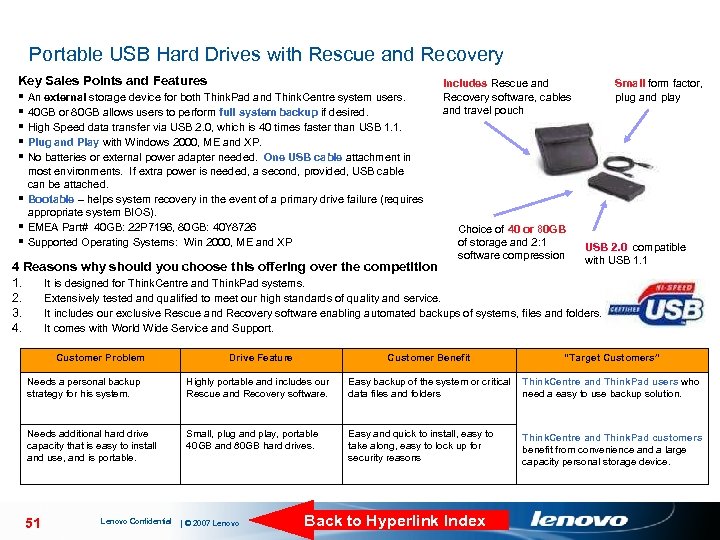
Portable USB Hard Drives with Rescue and Recovery Key Sales Points and Features § An external storage device for both Think. Pad and Think. Centre system users. § 40 GB or 80 GB allows users to perform full system backup if desired. § High Speed data transfer via USB 2. 0, which is 40 times faster than USB 1. 1. § Plug and Play with Windows 2000, ME and XP. § No batteries or external power adapter needed. One USB cable attachment in most environments. If extra power is needed, a second, provided, USB cable can be attached. § Bootable – helps system recovery in the event of a primary drive failure (requires appropriate system BIOS). § EMEA Part# 40 GB: 22 P 7196, 80 GB: 40 Y 8726 § Supported Operating Systems: Win 2000, ME and XP Includes Rescue and Recovery software, cables and travel pouch Choice of 40 or 80 GB of storage and 2: 1 software compression Small form factor, plug and play USB 2. 0, compatible with USB 1. 1 4 Reasons why should you choose this offering over the competition 1. It is designed for Think. Centre and Think. Pad systems. 2. Extensively tested and qualified to meet our high standards of quality and service. 3. It includes our exclusive Rescue and Recovery software enabling automated backups of systems, files and folders. 4. It comes with World Wide Service and Support. Customer Problem Drive Feature Customer Benefit “Target Customers” Needs a personal backup strategy for his system. Highly portable and includes our Rescue and Recovery software. Easy backup of the system or critical Think. Centre and Think. Pad users who data files and folders need a easy to use backup solution. Needs additional hard drive capacity that is easy to install and use, and is portable. Small, plug and play, portable 40 GB and 80 GB hard drives. Easy and quick to install, easy to take along, easy to lock up for security reasons 51 Lenovo Confidential | © 2007 Lenovo Back to Hyperlink Index Think. Centre and Think. Pad customers benefit from convenience and a large capacity personal storage device.
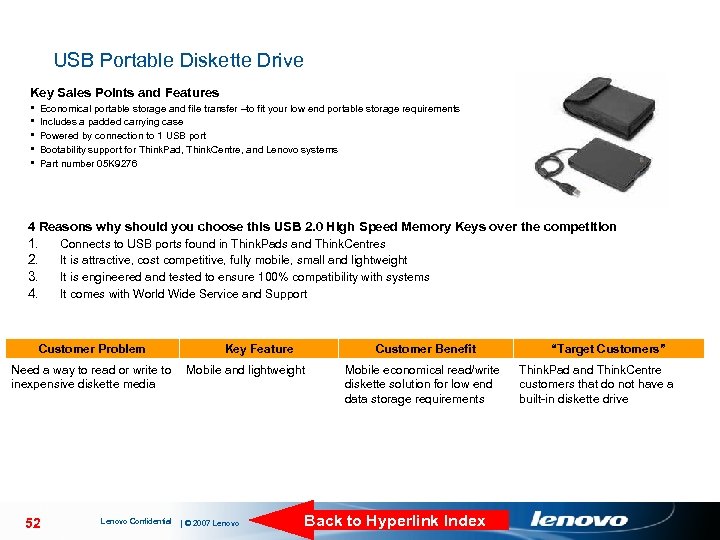
USB Portable Diskette Drive Key Sales Points and Features § § § Economical portable storage and file transfer –to fit your low end portable storage requirements Includes a padded carrying case Powered by connection to 1 USB port Bootability support for Think. Pad, Think. Centre, and Lenovo systems Part number 05 K 9276 Driver Support 4 Reasons why should you choose this USB 2. 0 High Speed Memory Keys over the competition 1. 2. 3. 4. Connects to USB ports found in Think. Pads and Think. Centres It is attractive, cost competitive, fully mobile, small and lightweight It is engineered and tested to ensure 100% compatibility with systems It comes with World Wide Service and Support Customer Problem Key Feature Customer Benefit Need a way to read or write to Mobile and lightweight inexpensive diskette media 52 Lenovo Confidential | © 2007 Lenovo Mobile economical read/write diskette solution for low end data storage requirements Back to Hyperlink Index “Target Customers” Think. Pad and Think. Centre customers that do not have a built-in diskette drive
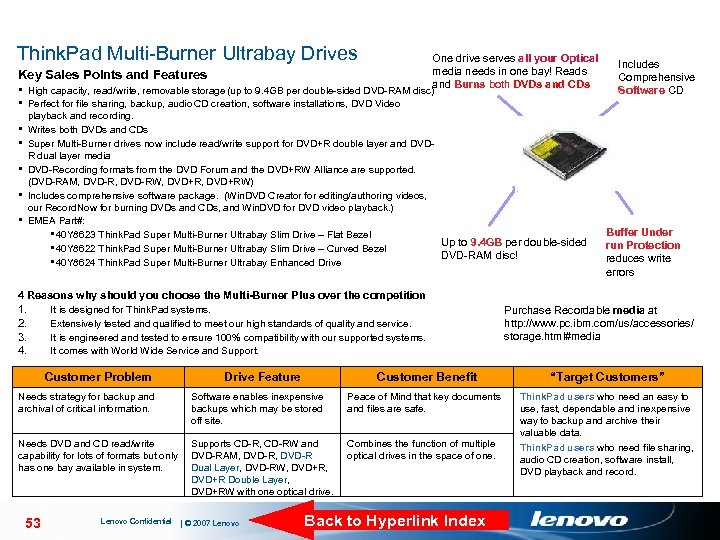
Think. Pad Multi-Burner Ultrabay Drives One drive serves all your Optical media needs in one bay! Reads Key Sales Points and Features and Burns both DVDs and CDs § High capacity, read/write, removable storage (up to 9. 4 GB per double-sided DVD-RAM disc) Includes Comprehensive Software CD § Perfect for file sharing, backup, audio CD creation, software installations, DVD Video § § § playback and recording. Writes both DVDs and CDs Super Multi-Burner drives now include read/write support for DVD+R double layer and DVDR dual layer media DVD-Recording formats from the DVD Forum and the DVD+RW Alliance are supported. (DVD-RAM, DVD-RW, DVD+RW) Includes comprehensive software package. (Win. DVD Creator for editing/authoring videos, our Record. Now for burning DVDs and CDs, and Win. DVD for DVD video playback. ) EMEA Part#: § 40 Y 8623 Think. Pad Super Multi-Burner Ultrabay Slim Drive – Flat Bezel Up to 9. 4 GB per double-sided § 40 Y 8622 Think. Pad Super Multi-Burner Ultrabay Slim Drive – Curved Bezel DVD-RAM disc! § 40 Y 8624 Think. Pad Super Multi-Burner Ultrabay Enhanced Drive Buffer Under run Protection reduces write errors 4 Reasons why should you choose the Multi-Burner Plus over the competition 1. 2. 3. 4. It is designed for Think. Pad systems. Extensively tested and qualified to meet our high standards of quality and service. It is engineered and tested to ensure 100% compatibility with our supported systems. It comes with World Wide Service and Support. Customer Problem Drive Feature Customer Benefit “Target Customers” Think. Pad users who need an easy to use, fast, dependable and inexpensive way to backup and archive their valuable data. Think. Pad users who need file sharing, audio CD creation, software install, DVD playback and record. Needs strategy for backup and archival of critical information. Software enables inexpensive backups which may be stored off site. Peace of Mind that key documents and files are safe. Needs DVD and CD read/write capability for lots of formats but only has one bay available in system. Supports CD-R, CD-RW and DVD-RAM, DVD-R Dual Layer, DVD-RW, DVD+R, DVD+R Double Layer, DVD+RW with one optical drive. Combines the function of multiple optical drives in the space of one. 53 Lenovo Confidential | © 2007 Lenovo Purchase Recordable media at http: //www. pc. ibm. com/us/accessories/ storage. html#media Back to Hyperlink Index
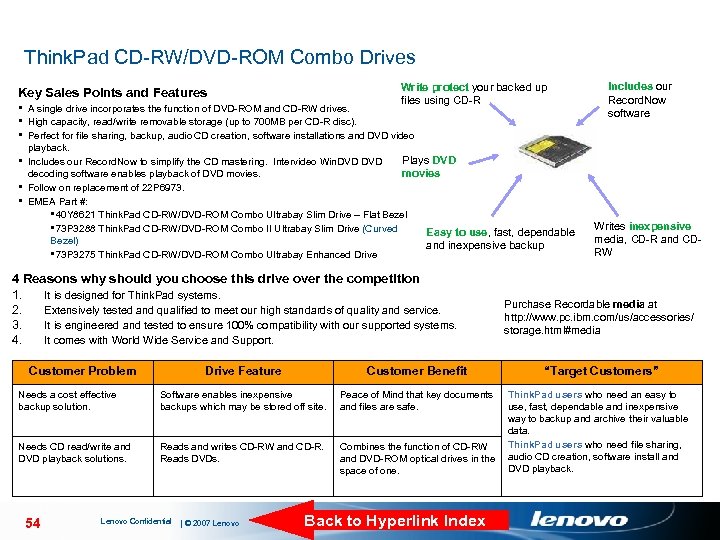
Think. Pad CD-RW/DVD-ROM Combo Drives Write protect your backed up files using CD-R Key Sales Points and Features § A single drive incorporates the function of DVD-ROM and CD-RW drives. § High capacity, read/write removable storage (up to 700 MB per CD-R disc). § Perfect for file sharing, backup, audio CD creation, software installations and DVD video playback. Plays DVD § Includes our Record. Now to simplify the CD mastering. Intervideo Win. DVD decoding software enables playback of DVD movies § Follow on replacement of 22 P 6973. § EMEA Part #: § 40 Y 8621 Think. Pad CD-RW/DVD-ROM Combo Ultrabay Slim Drive – Flat Bezel § 73 P 3288 Think. Pad CD-RW/DVD-ROM Combo II Ultrabay Slim Drive (Curved Easy to use, fast, dependable Bezel) and inexpensive backup § 73 P 3275 Think. Pad CD-RW/DVD-ROM Combo Ultrabay Enhanced Drive 4 Reasons why should you choose this drive over the competition 1. It is designed for Think. Pad systems. 2. Extensively tested and qualified to meet our high standards of quality and service. 3. It is engineered and tested to ensure 100% compatibility with our supported systems. 4. It comes with World Wide Service and Support. Customer Problem Drive Feature Customer Benefit Needs a cost effective backup solution. Software enables inexpensive backups which may be stored off site. Peace of Mind that key documents and files are safe. Needs CD read/write and DVD playback solutions. Reads and writes CD-RW and CD-R. Reads DVDs. 54 Lenovo Confidential | © 2007 Lenovo Includes our Record. Now software Writes inexpensive media, CD-R and CDRW Purchase Recordable media at http: //www. pc. ibm. com/us/accessories/ storage. html#media “Target Customers” Think. Pad users who need an easy to use, fast, dependable and inexpensive way to backup and archive their valuable data. Think. Pad users who need file sharing, Combines the function of CD-RW and DVD-ROM optical drives in the audio CD creation, software install and DVD playback. space of one. Back to Hyperlink Index
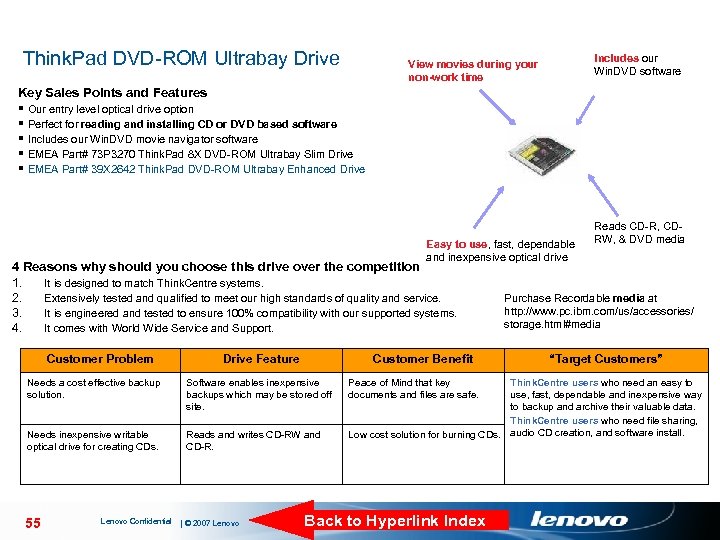
Think. Pad DVD-ROM Ultrabay Drive Includes our Win. DVD software View movies during your non-work time Key Sales Points and Features § Our entry level optical drive option § Perfect for reading and installing CD or DVD based software § Includes our Win. DVD movie navigator software § EMEA Part# 73 P 3270 Think. Pad 8 X DVD-ROM Ultrabay Slim Drive § EMEA Part# 39 X 2642 Think. Pad DVD-ROM Ultrabay Enhanced Drive Easy to use, fast, dependable and inexpensive optical drive 4 Reasons why should you choose this drive over the competition 1. It is designed to match Think. Centre systems. 2. Extensively tested and qualified to meet our high standards of quality and service. 3. It is engineered and tested to ensure 100% compatibility with our supported systems. 4. It comes with World Wide Service and Support. Customer Problem Drive Feature Customer Benefit Needs a cost effective backup solution. Software enables inexpensive backups which may be stored off site. Needs inexpensive writable optical drive for creating CDs. Reads and writes CD-RW and CD-R. 55 Lenovo Confidential | © 2007 Lenovo Peace of Mind that key documents and files are safe. Reads CD-R, CDRW, & DVD media Purchase Recordable media at http: //www. pc. ibm. com/us/accessories/ storage. html#media “Target Customers” Think. Centre users who need an easy to use, fast, dependable and inexpensive way to backup and archive their valuable data. Think. Centre users who need file sharing, Low cost solution for burning CDs. audio CD creation, and software install. Back to Hyperlink Index
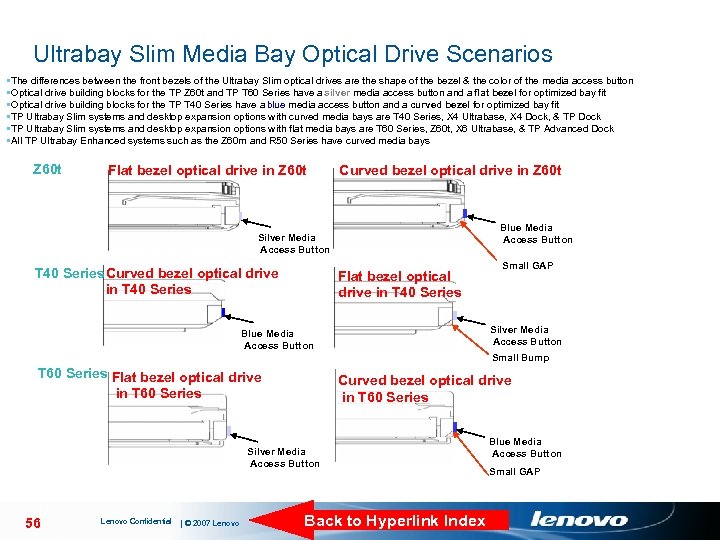
Ultrabay Slim Media Bay Optical Drive Scenarios • The differences between the front bezels of the Ultrabay Slim optical drives are the shape of the bezel & the color of the media access button • Optical drive building blocks for the TP Z 60 t and TP T 60 Series have a silver media access button and a flat bezel for optimized bay fit • Optical drive building blocks for the TP T 40 Series have a blue media access button and a curved bezel for optimized bay fit • TP Ultrabay Slim systems and desktop expansion options with curved media bays are T 40 Series, X 4 Ultrabase, X 4 Dock, & TP Dock • TP Ultrabay Slim systems and desktop expansion options with flat media bays are T 60 Series, Z 60 t, X 6 Ultrabase, & TP Advanced Dock • All TP Ultrabay Enhanced systems such as the Z 60 m and R 50 Series have curved media bays Z 60 t Flat bezel optical drive in Z 60 t Curved bezel optical drive in Z 60 t Blue Media Access Button Silver Media Access Button T 40 Series Curved bezel optical drive in T 40 Series Flat bezel optical drive in T 40 Series Small GAP Silver Media Access Button Blue Media Access Button Small Bump T 60 Series Flat bezel optical drive in T 60 Series Curved bezel optical drive in T 60 Series Silver Media Access Button 56 Lenovo Confidential | © 2007 Lenovo Back to Hyperlink Index Blue Media Access Button Small GAP
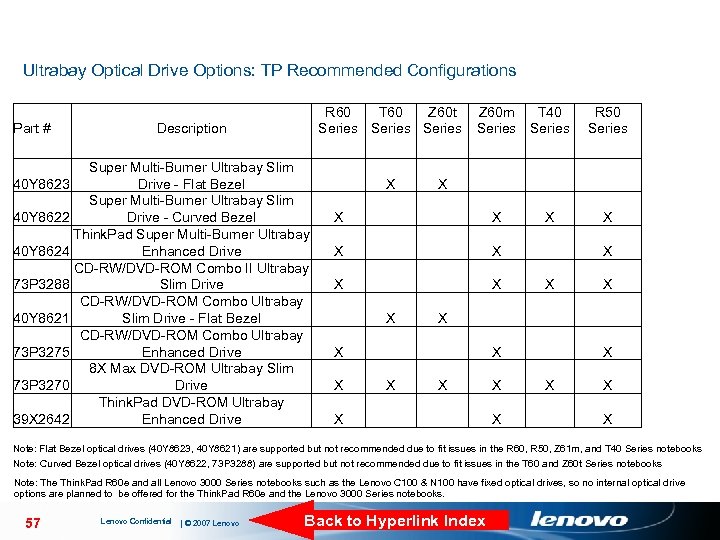
Ultrabay Optical Drive Options: TP Recommended Configurations Part # R 60 T 60 Z 60 t Series Description Super Multi-Burner Ultrabay Slim 40 Y 8623 Drive - Flat Bezel Super Multi-Burner Ultrabay Slim 40 Y 8622 Drive - Curved Bezel Think. Pad Super Multi-Burner Ultrabay 40 Y 8624 Enhanced Drive CD-RW/DVD-ROM Combo II Ultrabay 73 P 3288 Slim Drive CD-RW/DVD-ROM Combo Ultrabay 40 Y 8621 Slim Drive - Flat Bezel CD-RW/DVD-ROM Combo Ultrabay 73 P 3275 Enhanced Drive 8 X Max DVD-ROM Ultrabay Slim 73 P 3270 Drive Think. Pad DVD-ROM Ultrabay 39 X 2642 Enhanced Drive X Z 60 m T 40 Series X X X X X R 50 Series X X X X Note: Flat Bezel optical drives (40 Y 8623, 40 Y 8621) are supported but not recommended due to fit issues in the R 60, R 50, Z 61 m, and T 40 Series notebooks Note: Curved Bezel optical drives (40 Y 8622, 73 P 3288) are supported but not recommended due to fit issues in the T 60 and Z 60 t Series notebooks Note: The Think. Pad R 60 e and all Lenovo 3000 Series notebooks such as the Lenovo C 100 & N 100 have fixed optical drives, so no internal optical drive options are planned to be offered for the Think. Pad R 60 e and the Lenovo 3000 Series notebooks. 57 Lenovo Confidential | © 2007 Lenovo Back to Hyperlink Index
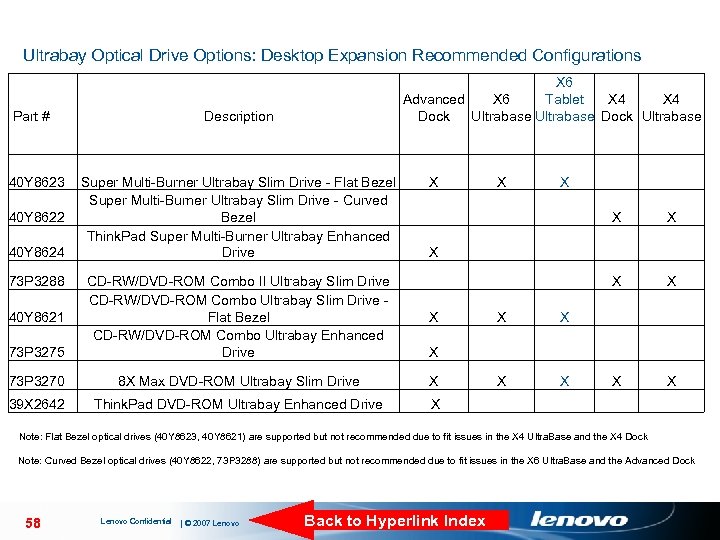
Ultrabay Optical Drive Options: Desktop Expansion Recommended Configurations Part # 40 Y 8623 40 Y 8622 40 Y 8624 73 P 3288 X 6 Tablet X 4 Advanced X 6 X 4 Dock Ultrabase Description Super Multi-Burner Ultrabay Slim Drive - Flat Bezel Super Multi-Burner Ultrabay Slim Drive - Curved Bezel Think. Pad Super Multi-Burner Ultrabay Enhanced Drive X X X 73 P 3275 CD-RW/DVD-ROM Combo II Ultrabay Slim Drive CD-RW/DVD-ROM Combo Ultrabay Slim Drive - Flat Bezel CD-RW/DVD-ROM Combo Ultrabay Enhanced Drive 73 P 3270 8 X Max DVD-ROM Ultrabay Slim Drive X 39 X 2642 Think. Pad DVD-ROM Ultrabay Enhanced Drive X 40 Y 8621 X X X Note: Flat Bezel optical drives (40 Y 8623, 40 Y 8621) are supported but not recommended due to fit issues in the X 4 Ultra. Base and the X 4 Dock Note: Curved Bezel optical drives (40 Y 8622, 73 P 3288) are supported but not recommended due to fit issues in the X 6 Ultra. Base and the Advanced Dock 58 Lenovo Confidential | © 2007 Lenovo Back to Hyperlink Index
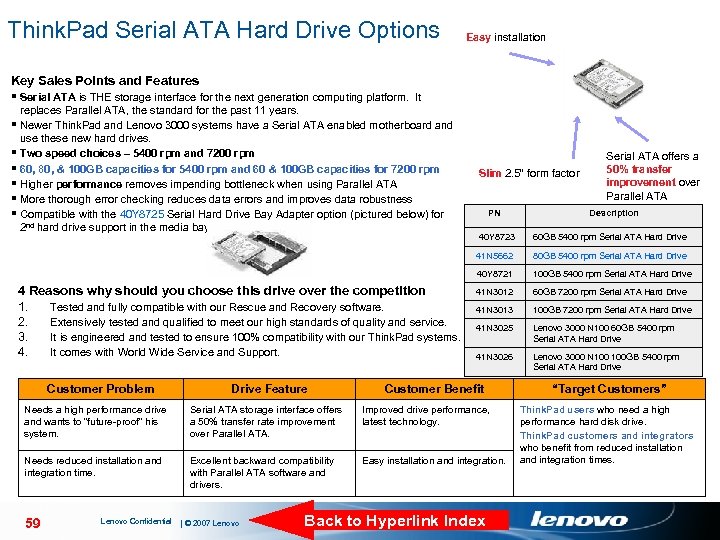
Think. Pad Serial ATA Hard Drive Options Easy installation Key Sales Points and Features § Serial ATA is THE storage interface for the next generation computing platform. It § § § replaces Parallel ATA, the standard for the past 11 years. Newer Think. Pad and Lenovo 3000 systems have a Serial ATA enabled motherboard and use these new hard drives. Two speed choices – 5400 rpm and 7200 rpm 60, 80, & 100 GB capacities for 5400 rpm and 60 & 100 GB capacities for 7200 rpm Higher performance removes impending bottleneck when using Parallel ATA More thorough error checking reduces data errors and improves data robustness Compatible with the 40 Y 8725 Serial Hard Drive Bay Adapter option (pictured below) for 2 nd hard drive support in the media bay Slim 2. 5” form factor PN Serial ATA offers a 50% transfer improvement over Parallel ATA Description Drive Feature 80 GB 5400 rpm Serial ATA Hard Drive 40 Y 8721 Customer Problem 60 GB 5400 rpm Serial ATA Hard Drive 41 N 5662 4 Reasons why should you choose this drive over the competition 1. Tested and fully compatible with our Rescue and Recovery software. 2. Extensively tested and qualified to meet our high standards of quality and service. 3. It is engineered and tested to ensure 100% compatibility with our Think. Pad systems. 4. It comes with World Wide Service and Support. 40 Y 8723 100 GB 5400 rpm Serial ATA Hard Drive 41 N 3012 60 GB 7200 rpm Serial ATA Hard Drive 41 N 3013 100 GB 7200 rpm Serial ATA Hard Drive 41 N 3025 Lenovo 3000 N 100 60 GB 5400 rpm Serial ATA Hard Drive 41 N 3026 Lenovo 3000 N 100 GB 5400 rpm Serial ATA Hard Drive Customer Benefit Needs a high performance drive and wants to “future-proof” his system. Serial ATA storage interface offers a 50% transfer rate improvement over Parallel ATA. Improved drive performance, latest technology. Needs reduced installation and integration time. Excellent backward compatibility with Parallel ATA software and drivers. Easy installation and integration. 59 Lenovo Confidential | © 2007 Lenovo Back to Hyperlink Index “Target Customers” Think. Pad users who need a high performance hard disk drive. Think. Pad customers and integrators who benefit from reduced installation and integration times.
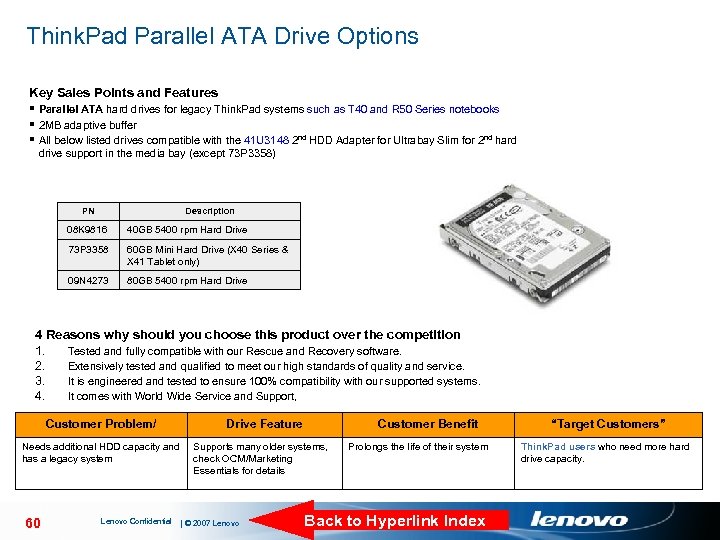
Think. Pad Parallel ATA Drive Options Key Sales Points and Features § Parallel ATA hard drives for legacy Think. Pad systems such as T 40 and R 50 Series notebooks § 2 MB adaptive buffer § All below listed drives compatible with the 41 U 3148 2 nd HDD Adapter for Ultrabay Slim for 2 nd hard drive support in the media bay (except 73 P 3358) PN Description 08 K 9816 40 GB 5400 rpm Hard Drive 73 P 3358 60 GB Mini Hard Drive (X 40 Series & X 41 Tablet only) 09 N 4273 80 GB 5400 rpm Hard Drive 4 Reasons why should you choose this product over the competition 1. Tested and fully compatible with our Rescue and Recovery software. 2. Extensively tested and qualified to meet our high standards of quality and service. 3. It is engineered and tested to ensure 100% compatibility with our supported systems. 4. It comes with World Wide Service and Support, Customer Problem/ Drive Feature Needs additional HDD capacity and has a legacy system Supports many older systems, check OCM/Marketing Essentials for details 60 Lenovo Confidential | © 2007 Lenovo Customer Benefit Prolongs the life of their system Back to Hyperlink Index “Target Customers” Think. Pad users who need more hard drive capacity.
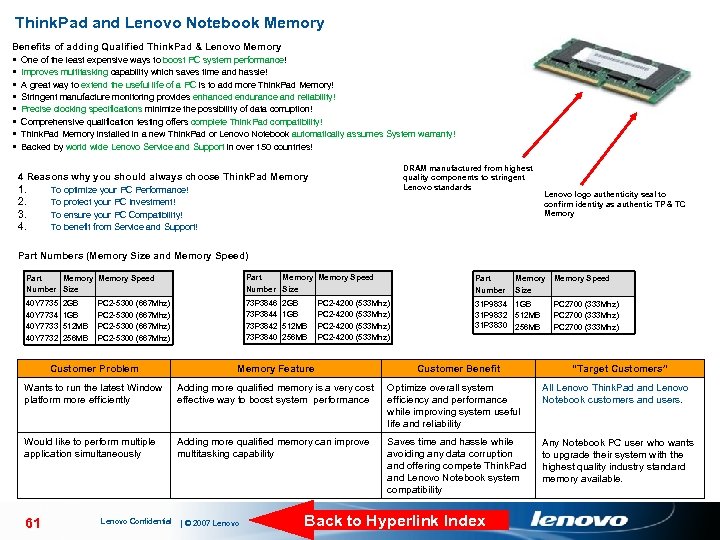
Think. Pad and Lenovo Notebook Memory Benefits of adding Qualified Think. Pad & Lenovo Memory § One of the least expensive ways to boost PC system performance! § Improves multitasking capability which saves time and hassle! § A great way to extend the useful life of a PC is to add more Think. Pad Memory! § Stringent manufacture monitoring provides enhanced endurance and reliability! § Precise clocking specifications minimize the possibility of data corruption! § Comprehensive qualification testing offers complete Think. Pad compatibility! § Think. Pad Memory installed in a new Think. Pad or Lenovo Notebook automatically assumes System warranty! § Backed by world wide Lenovo Service and Support in over 150 countries! DRAM manufactured from highest quality components to stringent Lenovo standards 4 Reasons why you should always choose Think. Pad Memory 1. 2. 3. 4. To optimize your PC Performance! To protect your PC Investment! To ensure your PC Compatibility! To benefit from Service and Support! Lenovo logo authenticity seal to confirm identity as authentic TP & TC Memory Part Numbers (Memory Size and Memory Speed) Part Memory Speed Number Size Part Number Memory Speed Size 40 Y 7735 40 Y 7734 40 Y 7733 40 Y 7732 73 P 3846 73 P 3844 73 P 3842 73 P 3840 31 P 9834 31 P 9832 31 P 3830 1 GB 512 MB 256 MB 2 GB 1 GB 512 MB 256 MB PC 2 -5300 (667 Mhz) 2 GB 1 GB 512 MB 256 MB PC 2 -4200 (533 Mhz) Customer Problem Memory Feature Wants to run the latest Window platform more efficiently Adding more qualified memory is a very cost effective way to boost system performance Optimize overall system efficiency and performance while improving system useful life and reliability All Lenovo Think. Pad and Lenovo Notebook customers and users. Would like to perform multiple application simultaneously Adding more qualified memory can improve multitasking capability Saves time and hassle while avoiding any data corruption and offering compete Think. Pad and Lenovo Notebook system compatibility Any Notebook PC user who wants to upgrade their system with the highest quality industry standard memory available. 61 Lenovo Confidential | © 2007 Lenovo Customer Benefit PC 2700 (333 Mhz) Back to Hyperlink Index “Target Customers”
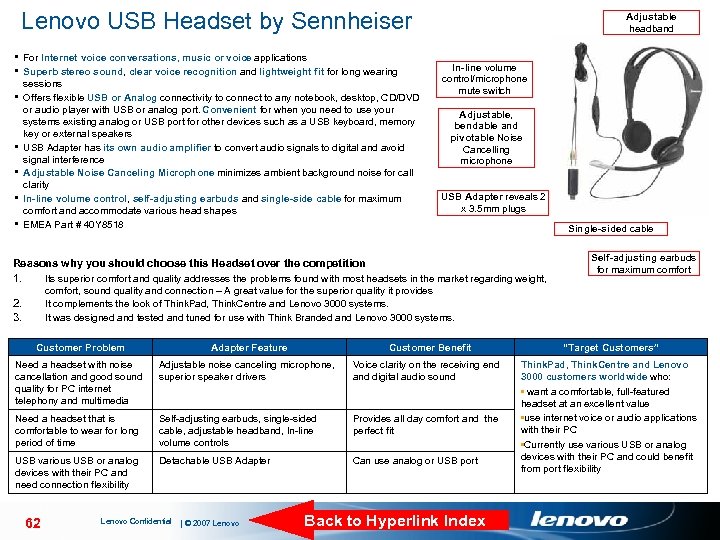
Lenovo USB Headset by Sennheiser § For Internet voice conversations, music or voice applications § Superb stereo sound, clear voice recognition and lightweight fit for long wearing § § § sessions Offers flexible USB or Analog connectivity to connect to any notebook, desktop, CD/DVD or audio player with USB or analog port. Convenient for when you need to use your systems existing analog or USB port for other devices such as a USB keyboard, memory key or external speakers USB Adapter has its own audio amplifier to convert audio signals to digital and avoid signal interference Adjustable Noise Canceling Microphone minimizes ambient background noise for call clarity In-line volume control, self-adjusting earbuds and single-side cable for maximum comfort and accommodate various head shapes EMEA Part # 40 Y 8518 Adjustable headband In-line volume control/microphone mute switch Adjustable, bendable and pivotable Noise Cancelling microphone USB Adapter reveals 2 x 3. 5 mm plugs Single-sided cable Reasons why you should choose this Headset over the competition 1. Its superior comfort and quality addresses the problems found with most headsets in the market regarding weight, comfort, sound quality and connection – A great value for the superior quality it provides It complements the look of Think. Pad, Think. Centre and Lenovo 3000 systems. It was designed and tested and tuned for use with Think Branded and Lenovo 3000 systems. 2. 3. Self-adjusting earbuds for maximum comfort Customer Problem Adapter Feature Customer Benefit “Target Customers” Need a headset with noise cancellation and good sound quality for PC internet telephony and multimedia Adjustable noise canceling microphone, superior speaker drivers Voice clarity on the receiving end and digital audio sound Need a headset that is comfortable to wear for long period of time Self-adjusting earbuds, single-sided cable, adjustable headband, In-line volume controls Provides all day comfort and the perfect fit USB various USB or analog devices with their PC and need connection flexibility Detachable USB Adapter Can use analog or USB port Think. Pad, Think. Centre and Lenovo 3000 customers worldwide who: • want a comfortable, full-featured headset at an excellent value • use internet voice or audio applications with their PC • Currently use various USB or analog devices with their PC and could benefit from port flexibility 62 Lenovo Confidential | © 2007 Lenovo Back to Hyperlink Index
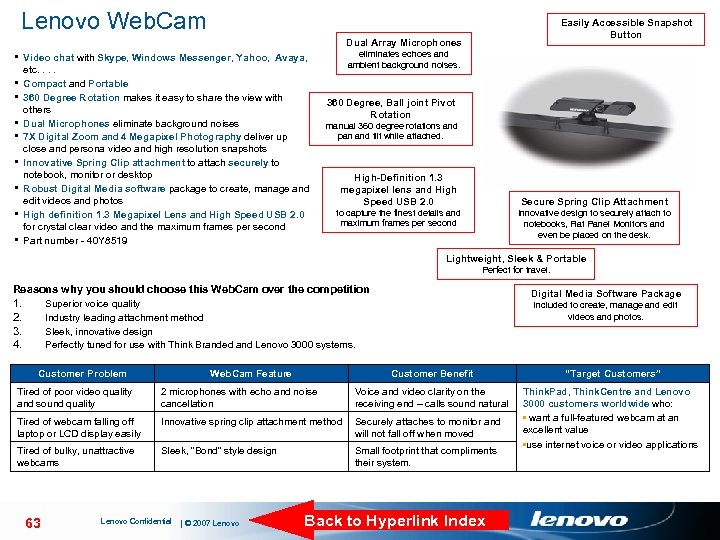
Lenovo Web. Cam Easily Accessible Snapshot Button Dual Array Microphones eliminates echoes and ambient background noises. § Video chat with Skype, Windows Messenger, Yahoo, Avaya, etc. . § Compact and Portable § 360 Degree Rotation makes it easy to share the view with § § § others Dual Microphones eliminate background noises 7 X Digital Zoom and 4 Megapixel Photography deliver up close and persona video and high resolution snapshots Innovative Spring Clip attachment to attach securely to notebook, monitor or desktop Robust Digital Media software package to create, manage and edit videos and photos High definition 1. 3 Megapixel Lens and High Speed USB 2. 0 for crystal clear video and the maximum frames per second Part number - 40 Y 8519 360 Degree, Ball joint Pivot Rotation manual 360 degree rotations and pan and tilt while attached. High-Definition 1. 3 megapixel lens and High Speed USB 2. 0 Secure Spring Clip Attachment to capture the finest details and maximum frames per second Innovative design to securely attach to notebooks, Flat Panel Monitors and even be placed on the desk. Lightweight, Sleek & Portable Perfect for travel. Reasons why you should choose this Web. Cam over the competition 1. 2. 3. 4. Digital Media Software Package Superior voice quality Industry leading attachment method Sleek, innovative design Perfectly tuned for use with Think Branded and Lenovo 3000 systems. Customer Problem Web. Cam Feature included to create, manage and edit videos and photos. Customer Benefit “Target Customers” Think. Pad, Think. Centre and Lenovo 3000 customers worldwide who: • want a full-featured webcam at an excellent value • use internet voice or video applications Tired of poor video quality and sound quality 2 microphones with echo and noise cancellation Voice and video clarity on the receiving end – calls sound natural Tired of webcam falling off laptop or LCD display easily Innovative spring clip attachment method Securely attaches to monitor and will not fall off when moved Tired of bulky, unattractive webcams Sleek, “Bond” style design Small footprint that compliments their system. 63 Lenovo Confidential | © 2007 Lenovo Back to Hyperlink Index
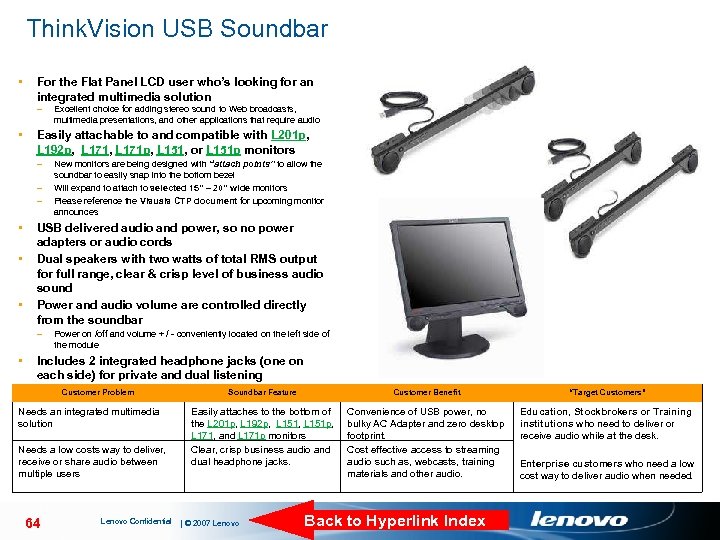
Think. Vision USB Soundbar • For the Flat Panel LCD user who’s looking for an integrated multimedia solution – • Easily attachable to and compatible with L 201 p, L 192 p, L 171 p, L 151, or L 151 p monitors – – – • • New monitors are being designed with “attach points” to allow the soundbar to easily snap into the bottom bezel Will expand to attach to selected 15” – 20” wide monitors Please reference the Visuals CTP document for upcoming monitor announces USB delivered audio and power, so no power adapters or audio cords Dual speakers with two watts of total RMS output for full range, clear & crisp level of business audio sound Power and audio volume are controlled directly from the soundbar – • Excellent choice for adding stereo sound to Web broadcasts, multimedia presentations, and other applications that require audio Power on /off and volume + / - conveniently located on the left side of the module Includes 2 integrated headphone jacks (one on each side) for private and dual listening Soundbar Feature Part Customer Problem Number 40 Y 7616 Needs an integrated multimedia solution Needs a low costs way to deliver, receive or share audio between multiple users 64 Lenovo Confidential Customer Benefit Easily attaches to the bottom of the L 201 p, L 192 p, L 151, L 151 p, L 171, and L 171 p monitors Clear, crisp business audio and dual headphone jacks. | © 2007 Lenovo “Target Customers” Convenience of USB power, no bulky AC Adapter and zero desktop footprint. Cost effective access to streaming audio such as, webcasts, training materials and other audio. Education, Stockbrokers or Training institutions who need to deliver or receive audio while at the desk. Back to Hyperlink Index Enterprise customers who need a low cost way to deliver audio when needed.
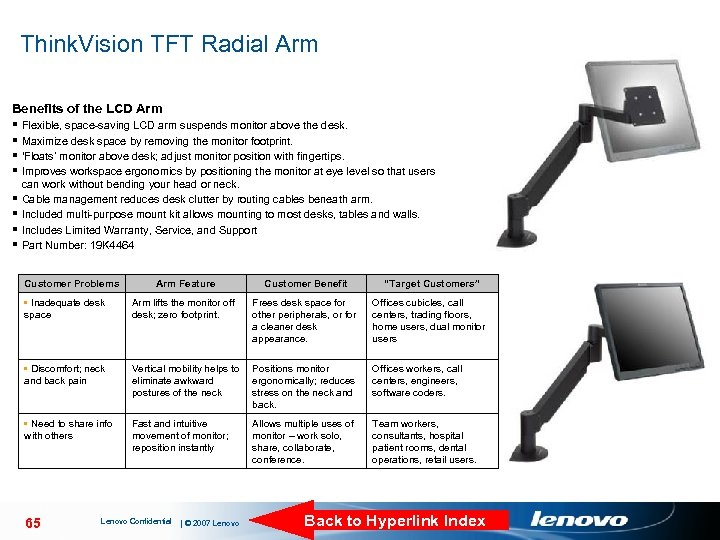
Think. Vision TFT Radial Arm Benefits of the LCD Arm § Flexible, space-saving LCD arm suspends monitor above the desk. § Maximize desk space by removing the monitor footprint. § ‘Floats’ monitor above desk; adjust monitor position with fingertips. § Improves workspace ergonomics by positioning the monitor at eye level so that users can work without bending your head or neck. § Cable management reduces desk clutter by routing cables beneath arm. § Included multi-purpose mount kit allows mounting to most desks, tables and walls. § Includes Limited Warranty, Service, and Support § Part Number: 19 K 4464 Customer Problems Arm Feature Customer Benefit “Target Customers” • Inadequate desk space Arm lifts the monitor off desk; zero footprint. Frees desk space for other peripherals, or for a cleaner desk appearance. Offices cubicles, call centers, trading floors, home users, dual monitor users • Discomfort; neck and back pain Vertical mobility helps to eliminate awkward postures of the neck Positions monitor ergonomically; reduces stress on the neck and back. Offices workers, call centers, engineers, software coders. • Need to share info with others Fast and intuitive movement of monitor; reposition instantly Allows multiple uses of monitor – work solo, share, collaborate, conference. Team workers, consultants, hospital patient rooms, dental operations, retail users. 65 Lenovo Confidential | © 2007 Lenovo Back to Hyperlink Index
Скачать презентацию Notebook Peripherals Sales Education March 2007
33c1bcee1c2583134a631fe9dd5a4804.ppt