


 Скачать презентацию Networks Tuning-in Task 1 Study this example of
30-45.pptx
- Количество слайдов: 15
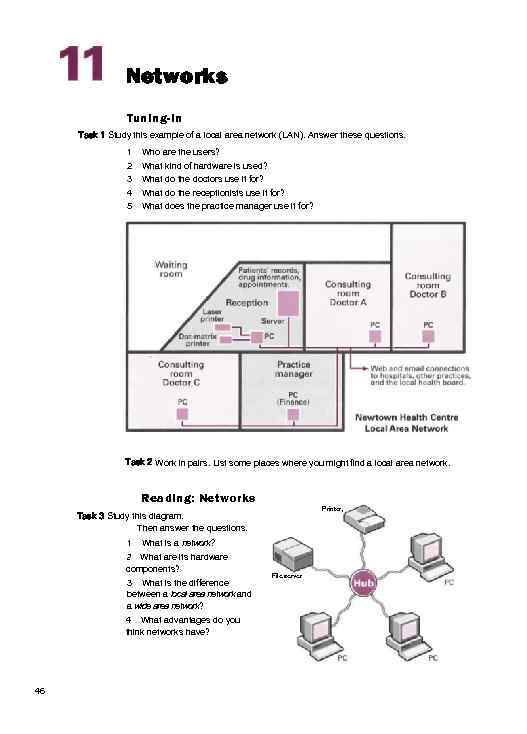 Networks Tuning-in Task 1 Study this example of a local area network (LAN). Answer these questions. 1 2 3 4 5 Who are the users? What kind of hardware is used? What do the doctors use it for? What do the receptionists use it for? What does the practice manager use it for? Task 2 Work in pairs. List some places where you might find a local area network. Reading: Networks Printer, Task 3 Study this diagram. Then answer the questions. 1 What is a network? 2 What are its hardware components? 3 What is the difference between a local area network and a wide area network? 4 What advantages do you think networks have? 46 File server
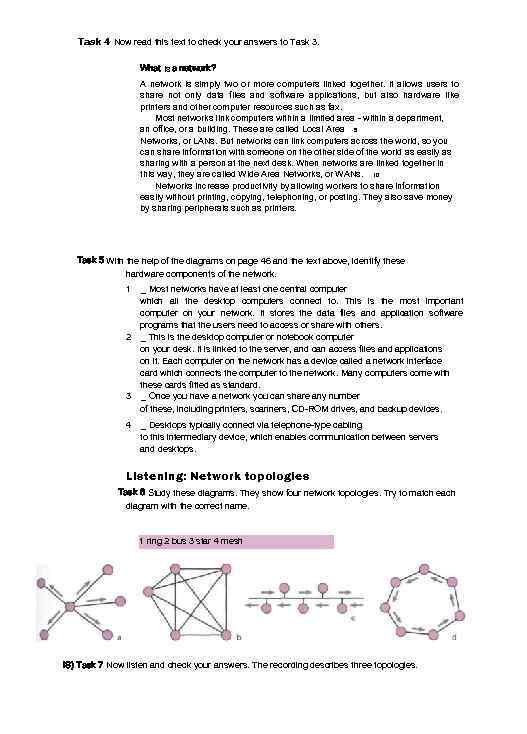 Task 4 Now read this text to check your answers to Task 3. What is a network? A network is simply two or more computers linked together. It allows users to share not only data files and software applications, but also hardware like printers and other computer resources such as fax. Most networks link computers within a limited area - within a department, an office, or a building. These are called Local Area 5 Networks, or LANs. But networks can link computers across the world, so you can share information with someone on the other side of the world as easily as sharing with a person at the next desk. When networks are linked together in this way, they are called Wide Area Networks, or WANs. 10 Networks increase productivity by allowing workers to share information easily without printing, copying, telephoning, or posting. They also save money by sharing peripherals such as printers. Task 5 With the help of the diagrams on page 46 and the text above, identify these hardware components of the network. 1 _ Most networks have at least one central computer which all the desktop computers connect to. This is the most important computer on your network. It stores the data files and application software programs that the users need to access or share with others. 2 _ This is the desktop computer or notebook computer on your desk. It is linked to the server, and can access files and applications on it. Each computer on the network has a device called a network interface card which connects the computer to the network. Many computers come with these cards fitted as standard. 3 _ Once you have a network you can share any number of these, including printers, scanners, CD-ROM drives, and backup devices. 4 _ Desktops typically connect via telephone-type cabling to this intermediary device, which enables communication between servers and desktops. Listening: Network topologies Task 6 Study these diagrams. They show four network topologies. Try to match each diagram with the correct name. 1 ring 2 bus 3 star 4 mesh IS) Task 7 Now listen and check your answers. The recording describes three topologies.
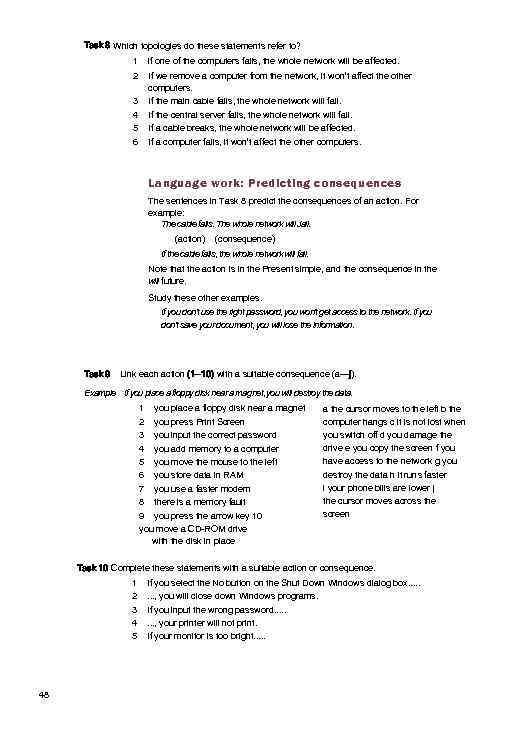 Task 8 Which topologies do these statements refer to? 1 if one of the computers fails, the whole network will be affected. 2 If we remove a computer from the network, it won’t affect the other computers. If the main cable fails, the whole network will fail. If the central server fails, the whole network will fail. If a cable breaks, the whole network will be affected. If a computer fails, it won’t affect the other computers. 3 4 5 6 Language work: Predicting consequences The sentences in Task 8 predict the consequences of an action. For example: The cable fails. The whole network will Jail. (action) (consequence) If the cable fails, the whole network will fail. Note that the action is in the Present simple, and the consequence in the will future. Study these other examples. If you don't use the right password, you won't get access to the network. If you don't save your document, you will lose the information. Task 9 Link each action (1— 10) with a suitable consequence (a—j). Example If you place a floppy disk near a magnet, you will destroy the data. 1 you place a floppy disk near a magnet 2 you press Print Screen 3 you input the correct password 4 you add memory to a computer 5 you move the mouse to the left 6 you store data in RAM 7 you use a faster modem 8 there is a memory fault 9 you press the arrow key 10 you move a CD-ROM drive with the disk in place a the cursor moves to the left b the computer hangs c it is not lost when you switch off d you damage the drive e you copy the screen f you have access to the network g you destroy the data h it runs faster i your phone bills are lower j the cursor moves across the screen Task 10 Complete these statements with a suitable action or consequence. 1 2 3 4 5 48 If you select the No button on the Shut Down Windows dialog box. . . . , you will close down Windows programs. If you input the wrong password. . . . , your printer will not print. If your monitor is too bright. . .
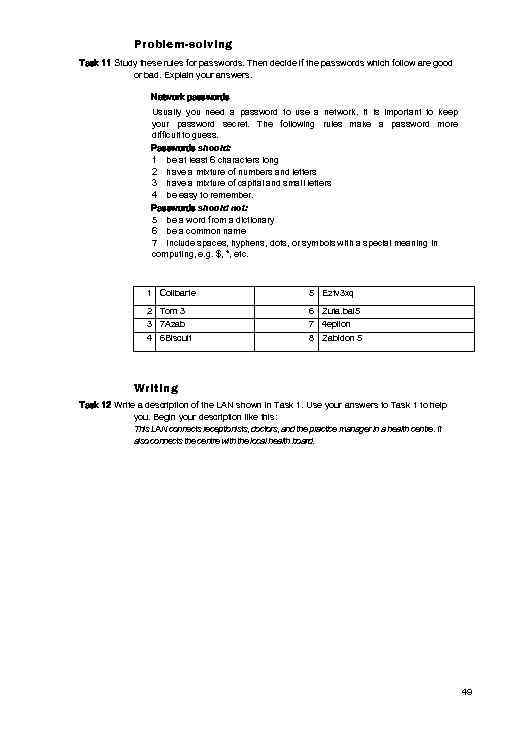 Problem-solving Task 11 Study these rules for passwords. Then decide if the passwords which follow are good or bad. Explain your answers. Network passwords Usually you need a password to use a network. It is important to keep your password secret. The following rules make a password more difficult to guess. Passwords should: 1 be at least 6 characters long 2 have a mixture of numbers and letters 3 have a mixture of capital and small letters 4 be easy to remember. Passwords should not: 5 be a word from a dictionary 6 be a common name 7 include spaces, hyphens, dots, or symbols with a special meaning in computing, e. g. $, *, etc. 1 Colibarte 5 Eztv 3 xq 2 Tom 3 3 7 Azab 6 Zuta. bal 5 7 4 epilon 4 6 Biscuit 8 Zabidon 5 Writing Task 12 Write a description of the LAN shown in Task 1. Use your answers to Task 1 to help you. Begin your description like this: This LAN connects receptionists, doctors, and the practice manager in a health centre. It also connects the centre with the local health board. 49
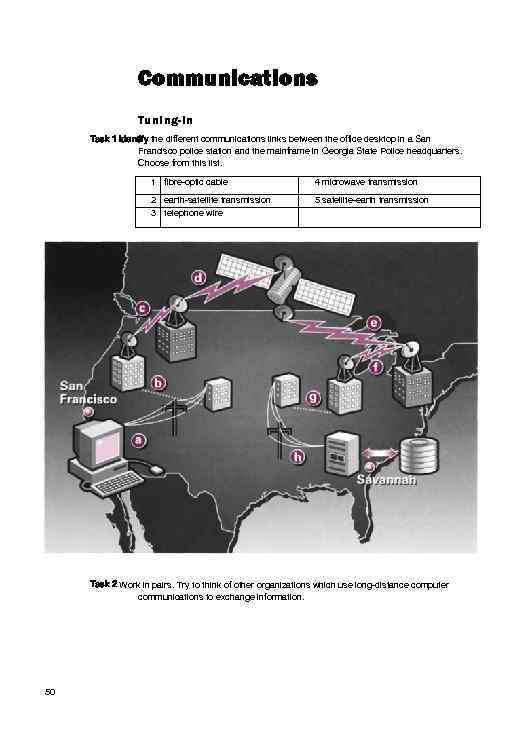 Communications Tuning-in Task 1 Identify the different communications links between the office desktop in a San Francisco police station and the mainframe in Georgia State Police headquarters. Choose from this list. 1 fibre-optic cable 4 microwave transmission 2 earth-satellite transmission 3 telephone wire 5 satellite-earth transmission Task 2 Work in pairs. Try to think of other organizations which use long-distance computer communications to exchange information. 50
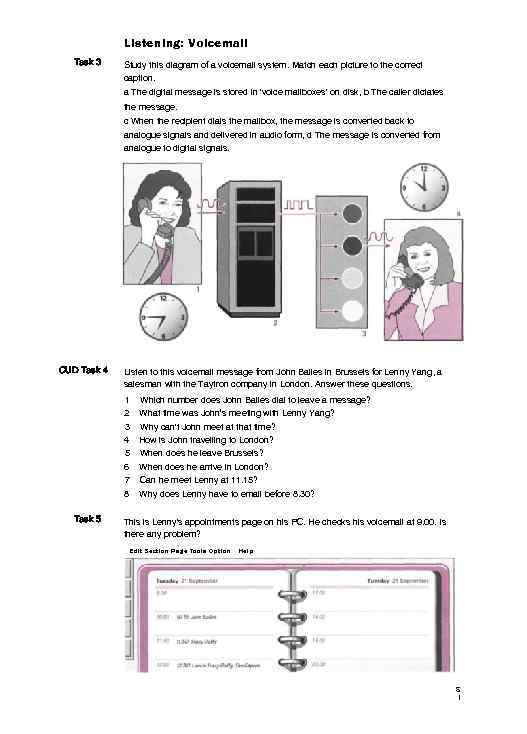 Listening: Voicemail Task 3 Study this diagram of a voicemail system. Match each picture to the correct caption. a The digital message is stored in 'voice mailboxes' on disk, b The caller dictates the message. c When the recipient dials the mailbox, the message is converted back to analogue signals and delivered in audio form, d The message is converted from analogue to digital signals. CUD Task 4 Listen to this voicemail message from John Bailes in Brussels for Lenny Yang, a salesman with the Taytron company in London. Answer these questions. 1 Which number does John Bailes dial to leave a message? 2 What time was John’s meeting with Lenny Yang? 3 Why can't John meet at that time? 4 5 6 7 8 Task 5 How is John travelling to London? When does he leave Brussels? When does he arrive in London? Can he meet Lenny at 11. 15? Why does Lenny have to email before 8. 30? This is Lenny's appointments page on his PC. He checks his voicemail at 9. 00. Is there any problem? Edit Section Page Tools Option Help S I
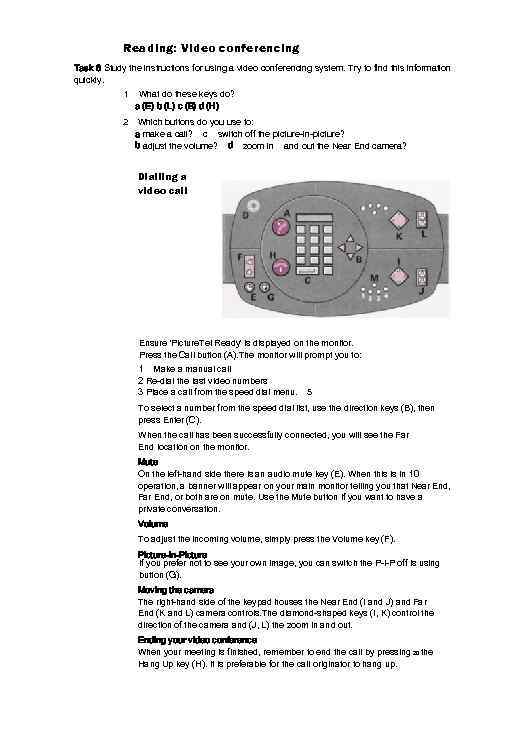 Reading: Video conferencing Task 6 Study the instructions for using a video conferencing system. Try to find this information quickly. 1 What do these keys do? a (E) b (L) c (B) d (H) 2 Which buttons do you use to: a make a call? c switch off the picture-in-picture? b adjust the volume? d zoom in and out the Near End camera? Dialling a video call Ensure 'Picture. Tel Ready' is displayed on the monitor. Press the Call button (A). The monitor will prompt you to: 1 Make a manual call 2 Re-dial the last video numbers 3 Place a call from the speed dial menu. 5 To select a number from the speed dial list, use the direction keys (B), then press Enter (C). When the call has been successfully connected, you will see the Far End location on the monitor. Mute On the left-hand side there is an audio mute key (E). When this is in 10 operation, a banner will appear on your main monitor telling you that Near End, Far End, or both are on mute. Use the Mute button if you want to have a private conversation. Volume To adjust the incoming volume, simply press the Volume key (F). Picture-in-Picture If you prefer not to see your own image, you can switch the P-l-P off is using button (G). Moving the camera The right-hand side of the keypad houses the Near End (I and J) and Far End (K and L) camera controls. The diamond-shaped keys (I, K) control the direction of the camera and (J, L) the zoom in and out. Ending your video conference When your meeting is finished, remember to end the call by pressing 20 the Hang Up key (H). It is preferable for the call originator to hang up.
 Language work: Present passive Study these steps in using the communications links to exchange data between San Francisco and Savannah, Georgia. 1 2 A police officer requests records of a suspect. Her computer sends the message via lines and libre-optic cable to a local microwave station. 3 The local microwave station transmits the request to the nearest earth satellite station. Look at the active form - the agent is as important as the action. A police officer (= agent) requests (= action) records of a suspect. If we want to make the action more important than the agent, or if it is very clear who or what the agent is. we can say: Records of a suspect are requested. This is the Present passive form. We make this using is or are plus the -ed form of the verb (requested, transmitted, relayed). With irregular verbs, we use the irregular past participle form (sent, given, spoken). Task 7 Fill in the gaps in these sentences. They describe how the police send a request from San Francisco to Savannah. Use the passive form of these verbs. relay request send transmit 1 Records of a suspect 2 The message_ to a local microwave station, to the 3 The request _ nearest earth satellite station. _ to a 4 The message_ satellite in space. 5 The message_ 6 It _ 7 It_ _ back to an earth satellite station. to a microwave station. via the telephone lines to the headquarters computer. Task 8 Now describe how the records are sent from Savannah to San Francisco. Problem-solving Task 9 Work in pairs. Students in another country want to study the same computing course as yours without coming to your country. What communications links could your college or university use to make this possible? Speaking Task 10 Work in pairs. With the help of the rules provided, explain to your partner why these samples of handwriting are not easy for computers to read. 57320 Kent 5 BE 49068 LOXTP Student A Your rules are on page 1 18. Student B Your rules are on page 119. S 3
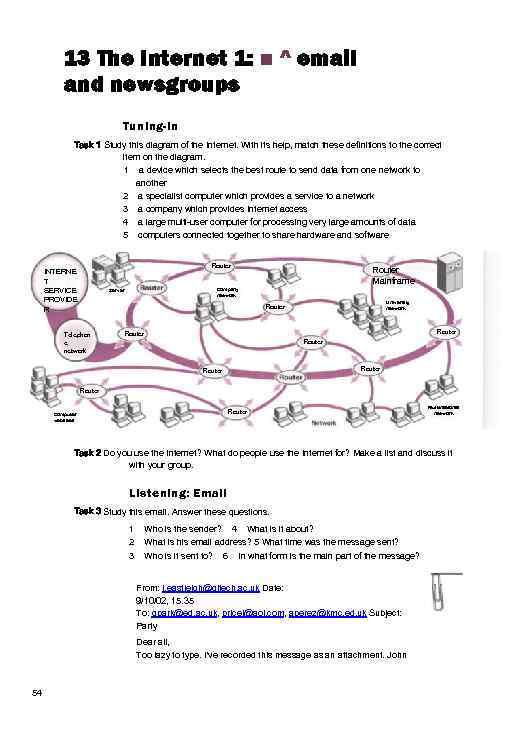 13 The Internet 1: ■ ^ email and newsgroups Tuning-in Task 1 Study this diagram of the Internet. With its help, match these definitions to the correct item on the diagram. 1 a device which selects the best route to send data from one network to another 2 a specialist computer which provides a service to a network 3 a company which provides Internet access 4 a large multi-user computer for processing very large amounts of data 5 computers connected together to share hardware and software Router INTERNE T SERVICE PROVIDE R Router Mainframe Company network Server University network Router Telephon e network Router Router Computer websites Multinational network Task 2 Do you use the Internet? What do people use the Internet for? Make a list and discuss it with your group. Listening: Email Task 3 Study this email. Answer these questions. 1 2 3 Who is the sender? 4 What is it about? What is his email address? 5 What time was the message sent? Who is it sent to? 6 In what form is the main part of the message? From: j. eastleigh@gltech. ac. uk Date: 9/10/02, 15. 35 To: gpark@ed. ac. uk, pricel@aol. com, aperez@kmc. ed. uk Subject: Party Dear all, Too lazy to type. I've recorded this message as an attachment. John 54
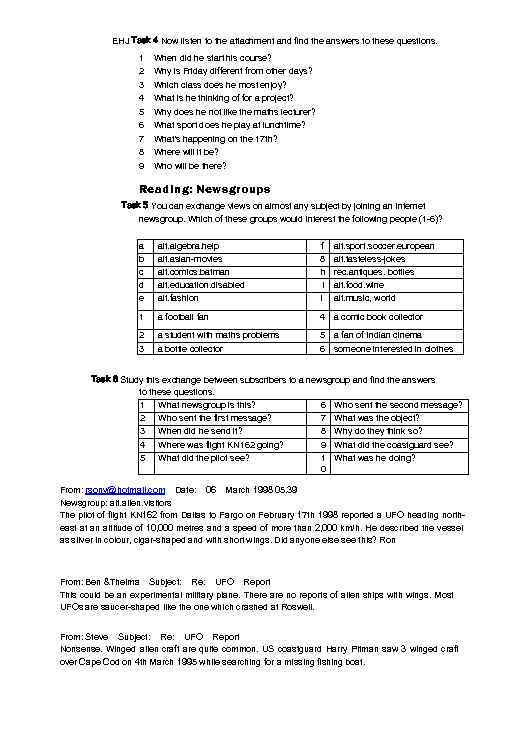 EHJ Task 4 Now listen to the attachment and find the answers to these questions. 1 2 3 4 5 6 7 8 9 When did he start his course? Why is Friday different from other days? Which class does he most enjoy? What is he thinking of for a project? Why does he not like the maths lecturer? What sport does he play at lunchtime? What's happening on the 17 th? Where will it be? Who will be there? Reading: Newsgroups Task 5 You can exchange views on almost any subject by joining an Internet newsgroup. Which of these groups would interest the following people (1 -6)? a b c d e alt. algebra. help alt. asian-movies alt. comics. batman alt. education. disabled alt. fashion f 8 h i i alt. sport. soccer. european alt. tasteless-jokes rec. antiques. bottles alt. food. wine alt. music, world 1 a football fan 4 a comic book collector 2 a student with maths problems 5 a fan of Indian cinema 3 a bottle collector 6 someone interested in clothes Task 6 Study this exchange between subscribers to a newsgroup and find the answers to these questions. 1 2 3 4 What newsgroup is this? Who sent the first message? When did he send it? Where was flight KN 162 going? 6 7 8 9 Who sent the second message? What was the object? Why do they think so? What did the coastguard see? 5 What did the pilot see? 1 What was he doing? 0 From: rsony@hotmail. com Date: 06 March 1998 05. 39 Newsgroup: alt. alien. visitors The pilot of flight KN 162 from Dallas to Fargo on February 17 th 1998 reported a UFO heading northeast at an altitude of 10, 000 metres and a speed of more than 2, 000 km/h. He described the vessel as silver in colour, cigar-shaped and with short wings. Did anyone else see this? Ron From: Ben &Thelma Subject: Re: UFO Report This could be an experimental military plane. There are no reports of alien ships with wings. Most UFOs are saucer-shaped like the one which crashed at Roswell. From: Steve Subject: Re: UFO Report Nonsense. Winged alien craft are quite common. US coastguard Harry Pitman saw 3 winged craft over Cape Cod on 4 th March 1995 while searching for a missing fishing boat.
 Language work: Past simple vs Past continuous We make the Past continuous with was/were + the -ing form of the verb. We often use it to provide the context for actions in the past. He was flying from Dallas to Fargo. He saw a UFO. (action 1) (action 2) To show that one past action happened in the middle of another past action, we can link them using when. as. and while. He was flying from Dallas to Fargo when he saw a UFO. As he was flying from Dallas to Fargo, he saw a UFO. While he was flying from Dallas to Fargo, he saw a UFO. We use the Past simple for completed actions, especially those which take very little time. We use the Past continuous to describe actions which happen over a period of time. He saw a UFO. It was heading north-east. It was travelling at 2. 000 km/h. Task 7 Put the verb in brackets into the Past simple or the Past continuous. 1 The plane_(go) to Fargo. 2 The UFO_(fly) at 10, 000 metres. 3 The pilot _(notice) it had short wings. 4 The pilot _ (report) the incident. 5 He _ (describe) the vessel as silver in colour. 6 No one else _(see) the UFO. 7 The UFO _ (head) north-east. 8 The coastguard _ (see) three winged craft. 9 He _(search) for a missing fishing boat. 10 A UFO _(crash) at Roswell. Task 8 Link these actions to show that one action happened during the other action. Put each verb in the correct tense, and use an appropriate time word: while, as. or when. 1 He_ (fly) from London to Edinburgh. He_(see) a UFO. 2 Her computer_(crash). She_(search) the Internet. 3 They_(study). A fire_(start) in the Computer Lab. 4 She_ (print) out her email. The printer_ (develop) a fault. 5 They_(work) on the computer. Someone_ (switch) on the power. 56
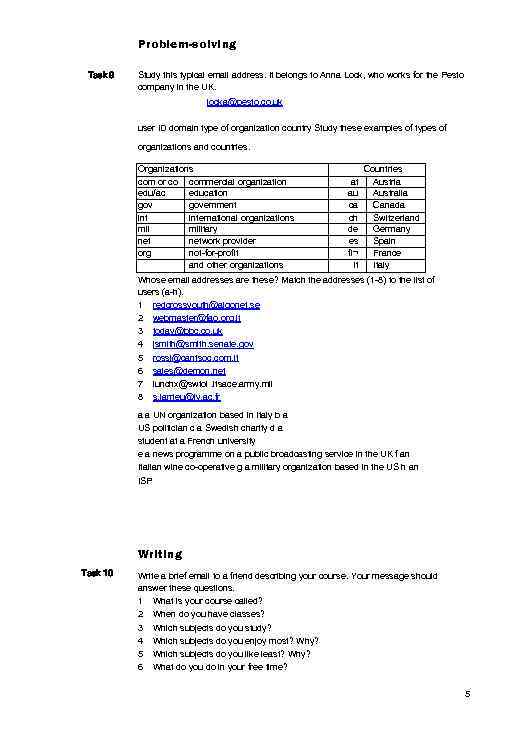 Problem-solving Task 9 Study this typical email address. It belongs to Anna Lock, who works for the Pesto company in the UK. locka@pesto. co. uk user ID domain type of organization country Study these examples of types of organizations and countries. Organizations com or co commercial organization edu/ac education government international organizations military network provider org not-for-profit and other organizations at au ca ch de es fl¬ it Countries Austria Australia Canada Switzerland Germany Spain France Italy Whose email addresses are these? Match the addresses (1 -8) to the list of users (a-h). 1 redcrossyouth@algonet. se 2 webmaster@fao. org. it 3 today@bbc. co. uk 4 jsmith@smith. senate. gov 5 rossi@cantsoc. com. it 6 sales@demon. net 7 lunchx@swtoi. itsace. army. mil 8 s. larrieu@ly. ac. fr a a UN organization based in Italy b a US politician c a Swedish charity d a student at a French university e a news programme on a public broadcasting service in the UK f an Italian wine co-operative g a military organization based in the US h an ISP Writing Task 10 Write a brief email to a friend describing your course. Your message should answer these questions. 1 What is your course called? 2 When do you have classes? 3 Which subjects do you study? 4 Which subjects do you enjoy most? Why? 5 Which subjects do you like least? Why? 6 What do you do in your free time? 5
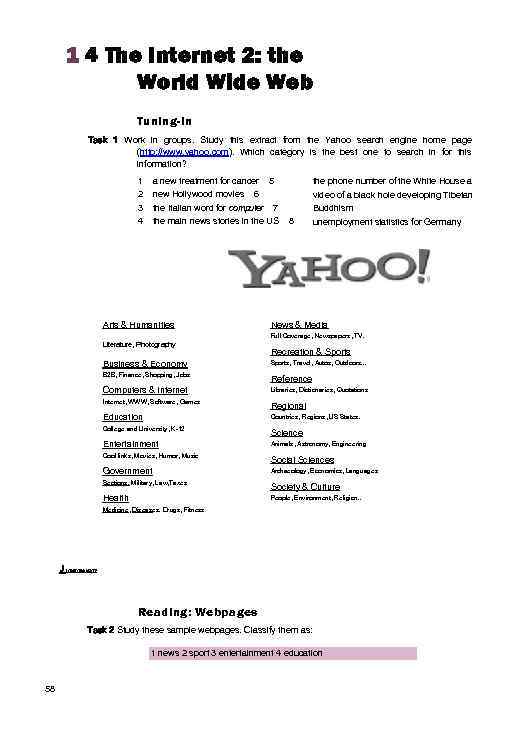 1 4 The Internet 2: the World Wide Web Tuning-in Task 1 Work in groups. Study this extract from the Yahoo search engine home page (http: //www. yahoo. com). Which category is the best one to search in for this information? 1 2 3 4 a new treatment for cancer 5 new Hollywood movies 6 the Italian word for computer 7 the main news stories in the US Arts & Humanities 8 the phone number of the White House a video of a black hole developing Tibetan Buddhism unemployment statistics for Germany News & Media Full Coverage, Newspapers, TV. Literature, Photography Recreation & Sports Business & Economy Sports, Travel, Autos, Outdoors. . . B 2 B, Finance, Shopping, Jobs Reference Computers & Internet Libraries, Dictionaries, Quotations Internet, WWW, Software, Games Regional Education Countries, Regions, US States. College and University, K-12 Science Entertainment Animals, Astronomy, Engineering Cool links, Movies, Humor, Music Social Sciences Government Archaeology, Economics, Languages Sections. Military, Law, Taxes Society & Culture Health People, Environment, Religion. . Medicine, Diseases. Drugs, Fitness J Internet ton? Reading: Webpages Task 2 Study these sample webpages. Classify them as: 1 news 2 sport 3 entertainment 4 education 58
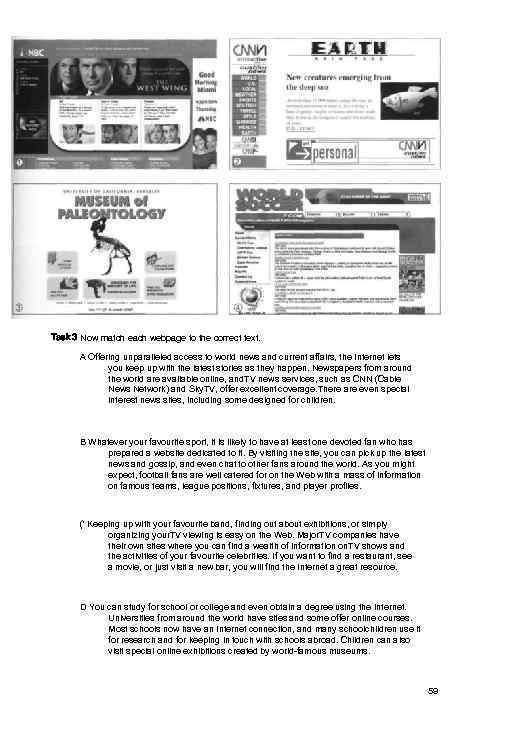 Task 3 Now match each webpage to the correct text. A Offering unparalleled access to world news and current affairs, the Internet lets you keep up with the latest stories as they happen. Newspapers from around the world are available online, and. TV news services, such as CNN (Cable News Network) and Sky. TV, offer excellent coverage. There are even special interest news sites, including some designed for children. B Whatever your favourite sport, it is likely to have at least one devoted fan who has prepared a website dedicated to it. By visiting the site, you can pick up the latest news and gossip, and even chat to other fans around the world. As you might expect, football fans are well catered for on the Web with a mass of information on famous teams, league positions, fixtures, and player profiles. (' Keeping up with your favourite band, finding out about exhibitions, or simply organizing your. TV viewing is easy on the Web. Major. TV companies have their own sites where you can find a wealth of information on. TV shows and the activities of your favourite celebrities. If you want to find a restaurant, see a movie, or just visit a new bar, you will find the Internet a great resource. D You can study for school or college and even obtain a degree using the Internet. Universities from around the world have sites and some offer online courses. Most schools now have an Internet connection, and many schoolchildren use it for research and for keeping in touch with schools abroad. Children can also visit special online exhibitions created by world-famous museums. 59
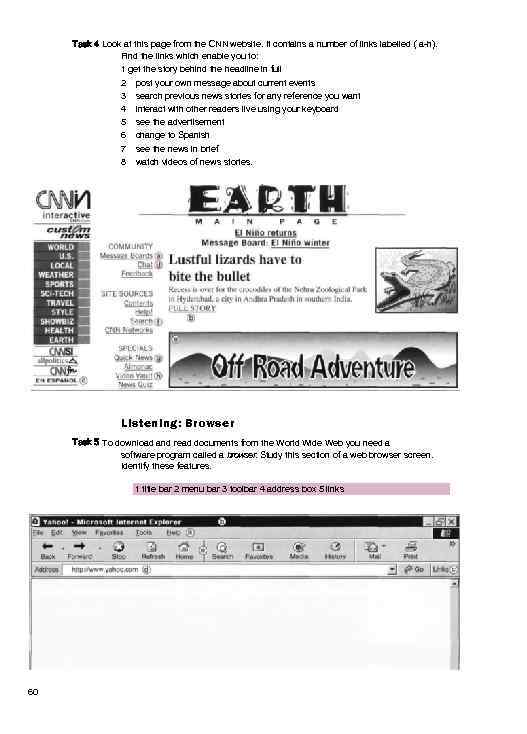 Task 4 Look at this page from the CNN website. It contains a number of links labelled ( a-h). Find the links which enable you to: 1 get the story behind the headline in full 2 post your own message about current events 3 search previous news stories for any reference you want 4 interact with other readers live using your keyboard 5 see the advertisement 6 change to Spanish 7 see the news in brief 8 watch videos of news stories. Listening: Browser Task 5 To download and read documents from the World Wide Web you need a software program called a browser. Study this section of a web browser screen. Identify these features. 1 title bar 2 menu bar 3 toolbar 4 address box 5 links 60