 Скачать презентацию Network Virtualization Brings Huge Payoffs University of
43d0e7af23e5f7bb7eec945bbfbbadf5.ppt
- Количество слайдов: 47



Network Virtualization Brings Huge Payoffs • University of British Columbia Overview • UBCNET Network Overview (10 min. ) • Statement of Problem (5 min. ) • Network Virtualization (35 min. ) Concepts, Functionality, Payoffs, Discussion November, 2009 Dennis O’Reilly dennis. oreilly@ubc. ca UBC IT – Network Architect University of BC 1
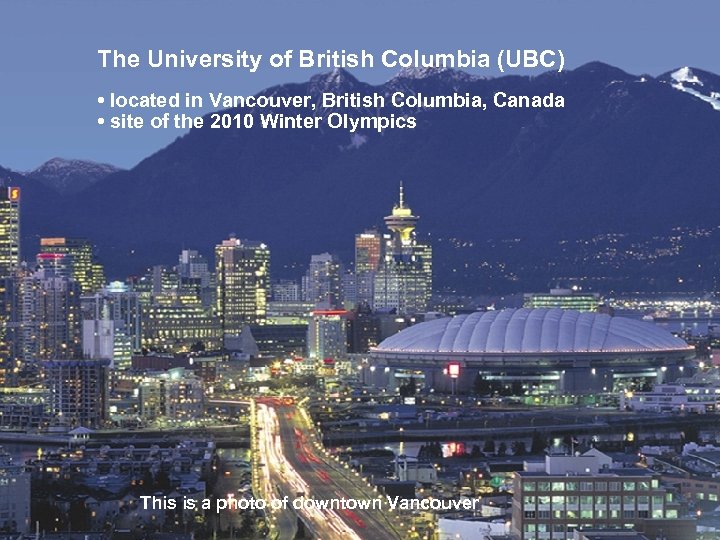
The University of British Columbia (UBC) • located in Vancouver, British Columbia, Canada • site of the 2010 Winter Olympics This is a photo of downtown Vancouver 2
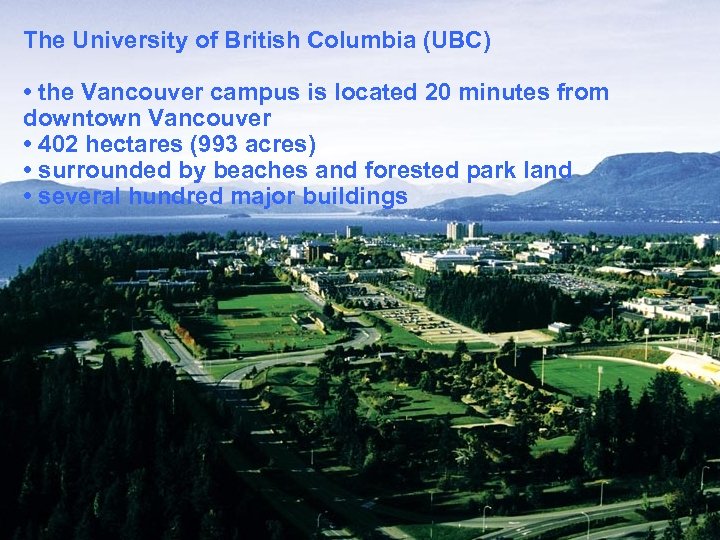
The University of British Columbia (UBC) • the Vancouver, British Columbia, Canada • located in campus is located 20 minutes from downtown Vancouver • site of the 2010 Winter Olympics • this is a (993 of downtown Vancouver • 402 hectares photoacres) • surrounded by beaches and forested park land • several hundred major buildings 3
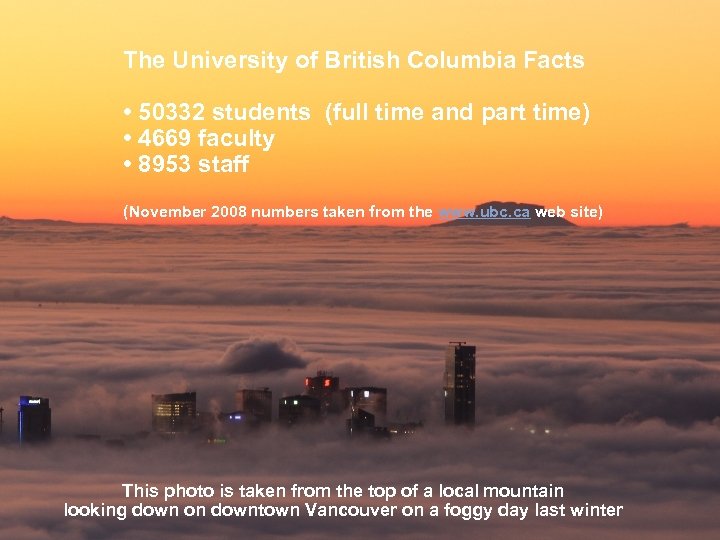
The University of British Columbia Facts • 50332 students (full time and part time) • 4669 faculty • 8953 staff (November 2008 numbers taken from the www. ubc. ca web site) This photo is taken from the top of a local mountain looking down on downtown Vancouver on a foggy day last winter 4
Part 1 • UBCNET Network Overview Network Architecture, 10 GIG Core Upgrade, Internet Edge 5
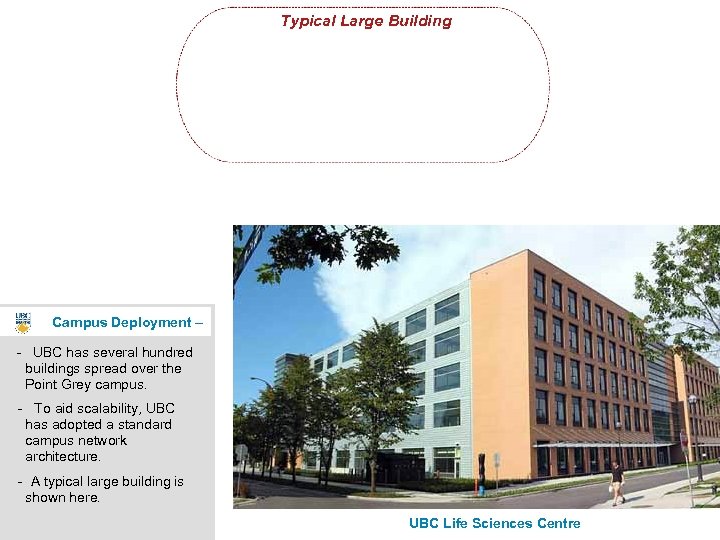
Typical Large Building Campus Deployment – - UBC has several hundred buildings spread over the Point Grey campus. - To aid scalability, UBC has adopted a standard campus network architecture. - A typical large building is shown here. UBC Life Sciences Centre 6
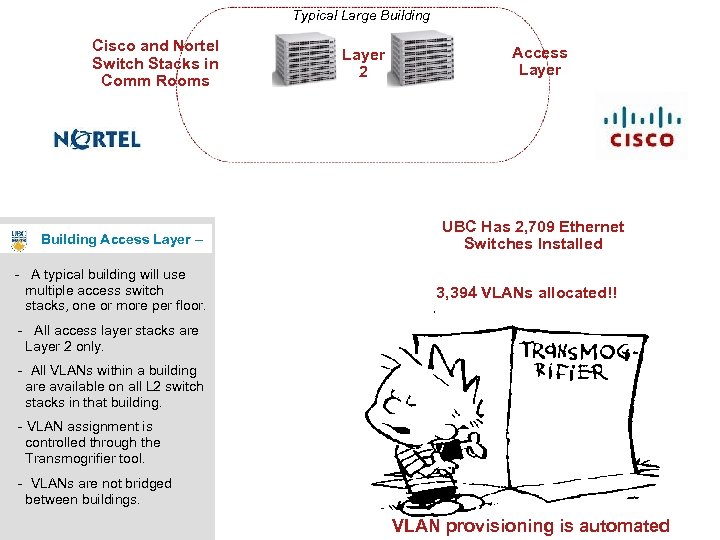
Typical Large Building Cisco and Nortel Switch Stacks in Comm Rooms Building Access Layer – - A typical building will use multiple access switch stacks, one or more per floor. Layer 2 Access Layer UBC Has 2, 709 Ethernet Switches Installed 3, 394 VLANs allocated!! - All access layer stacks are Layer 2 only. - All VLANs within a building are available on all L 2 switch stacks in that building. - VLAN assignment is controlled through the Transmogrifier tool. - VLANs are not bridged between buildings. VLAN provisioning is automated 7
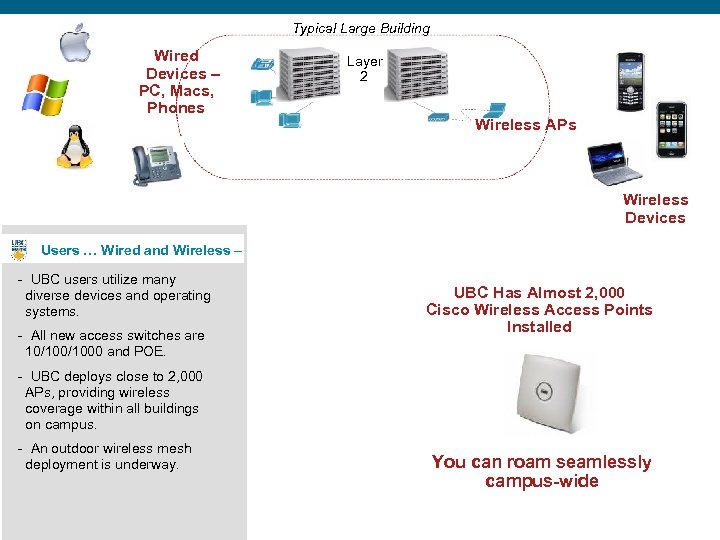
Typical Large Building Wired Devices – PC, Macs, Phones Layer 2 Wireless APs Wireless Devices Users … Wired and Wireless – - UBC users utilize many diverse devices and operating systems. - All new access switches are 10/1000 and POE. UBC Has Almost 2, 000 Cisco Wireless Access Points Installed - UBC deploys close to 2, 000 APs, providing wireless coverage within all buildings on campus. - An outdoor wireless mesh deployment is underway. You can roam seamlessly campus-wide 8
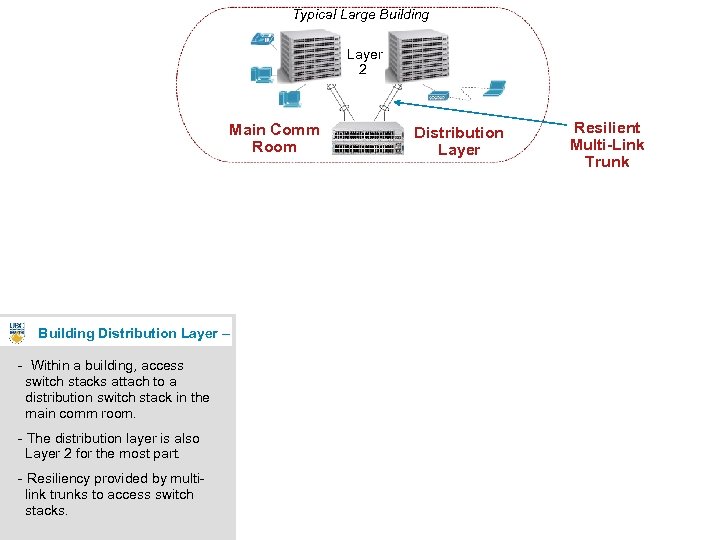
Typical Large Building Layer 2 Main Comm Room Distribution Layer Resilient Multi-Link Trunk Building Distribution Layer – - Within a building, access switch stacks attach to a distribution switch stack in the main comm room. - The distribution layer is also Layer 2 for the most part. - Resiliency provided by multilink trunks to access switch stacks. 9
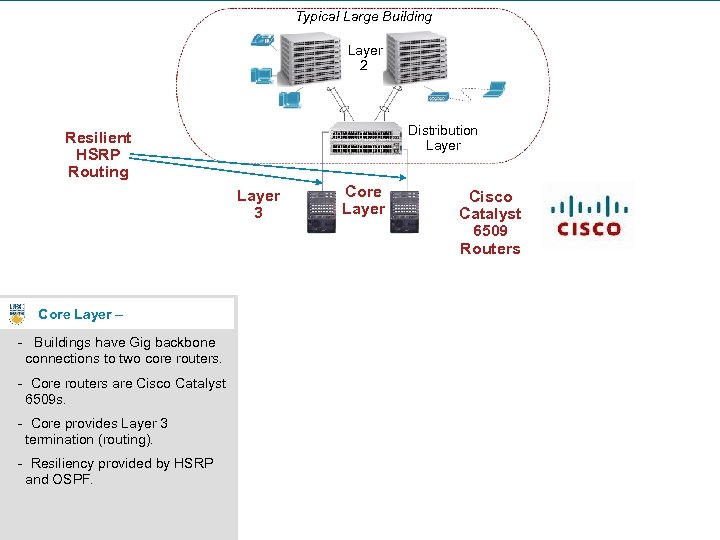
Typical Large Building Layer 2 Distribution Layer Resilient HSRP Routing Layer 3 Core Layer Cisco Catalyst 6509 Routers Core Layer – - Buildings have Gig backbone connections to two core routers. - Core routers are Cisco Catalyst 6509 s. - Core provides Layer 3 termination (routing). - Resiliency provided by HSRP and OSPF. 10
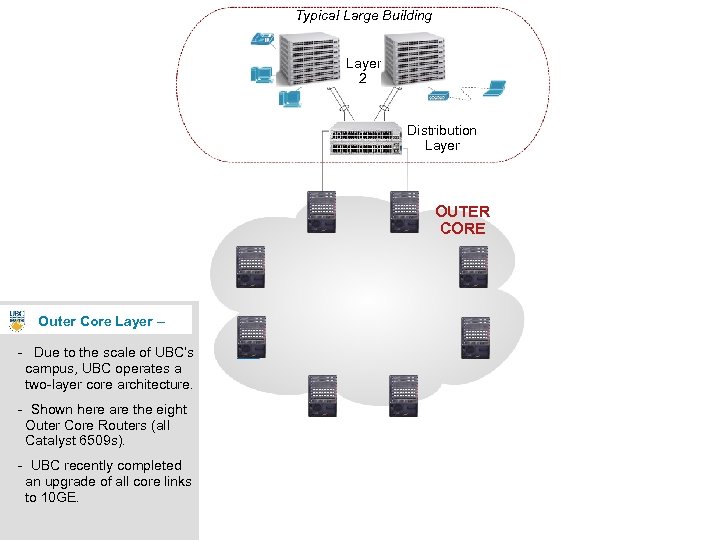
Typical Large Building Layer 2 Distribution Layer OUTER CORE Outer Core Layer – - Due to the scale of UBC’s campus, UBC operates a two-layer core architecture. - Shown here are the eight Outer Core Routers (all Catalyst 6509 s). - UBC recently completed an upgrade of all core links to 10 GE. 11
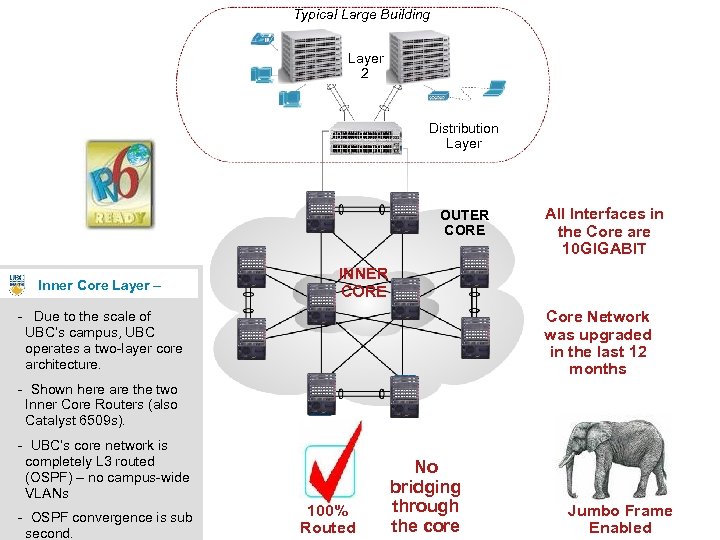
Typical Large Building Layer 2 Distribution Layer OUTER CORE Inner Core Layer – All Interfaces in the Core are 10 GIGABIT INNER CORE Core Network was upgraded in the last 12 months - Due to the scale of UBC’s campus, UBC operates a two-layer core architecture. - Shown here are the two Inner Core Routers (also Catalyst 6509 s). - UBC’s core network is completely L 3 routed (OSPF) – no campus-wide VLANs - OSPF convergence is sub second. 100% Routed No bridging through the core Jumbo Frame Enabled 12
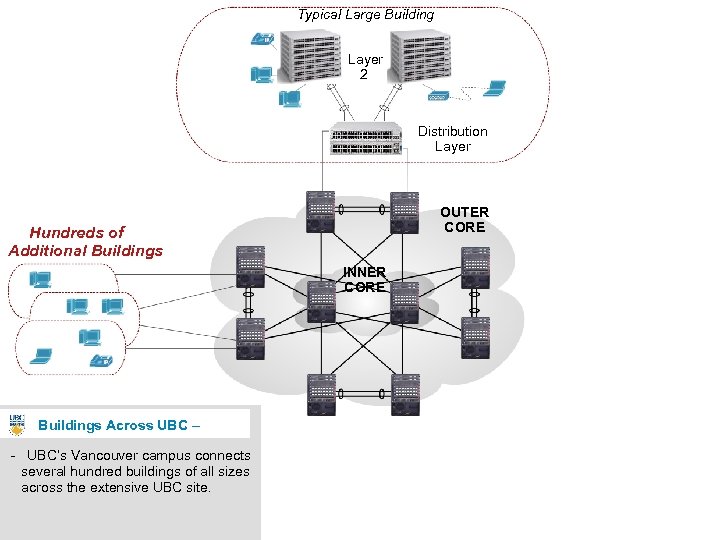
Typical Large Building Layer 2 Distribution Layer OUTER CORE Hundreds of Additional Buildings INNER CORE Buildings Across UBC – - UBC’s Vancouver campus connects several hundred buildings of all sizes across the extensive UBC site. 13
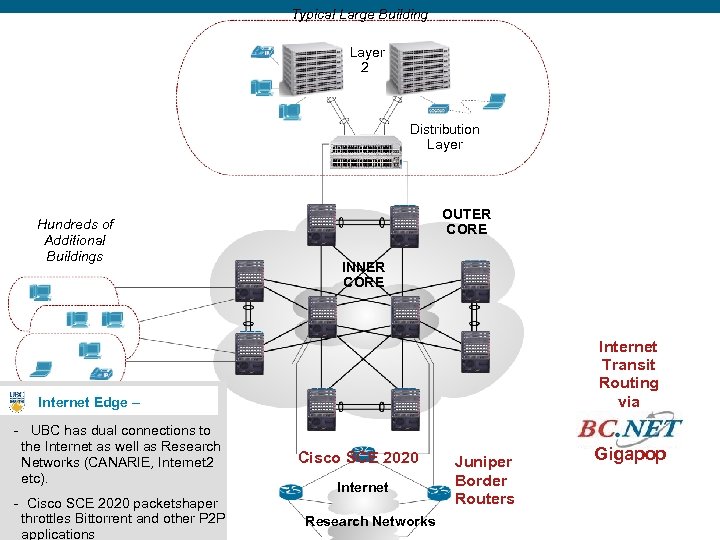
Typical Large Building Layer 2 Distribution Layer Hundreds of Additional Buildings OUTER CORE INNER CORE Internet Transit Routing via Internet Edge – - UBC has dual connections to the Internet as well as Research Networks (CANARIE, Internet 2 etc). - Cisco SCE 2020 packetshaper throttles Bittorrent and other P 2 P applications Cisco SCE 2020 Internet Research Networks Juniper Border Routers Gigapop 14
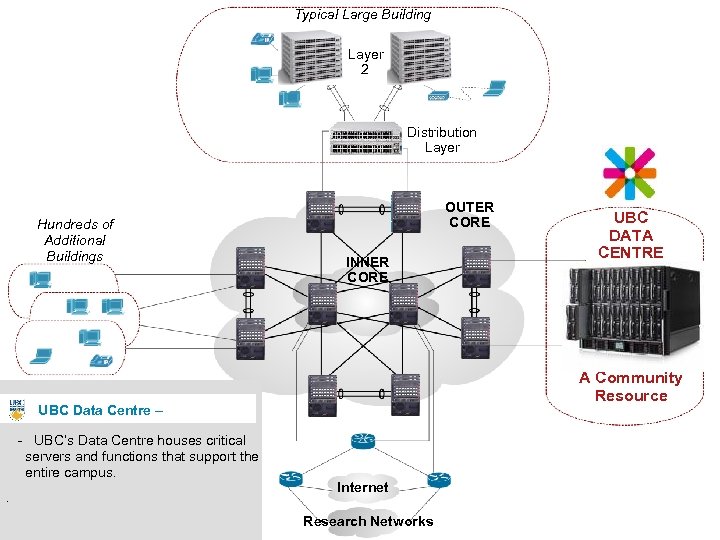
Typical Large Building Layer 2 Distribution Layer Hundreds of Additional Buildings OUTER CORE INNER CORE A Community Resource UBC Data Centre – - UBC’s Data Centre houses critical servers and functions that support the entire campus. . UBC DATA CENTRE Internet Research Networks 15
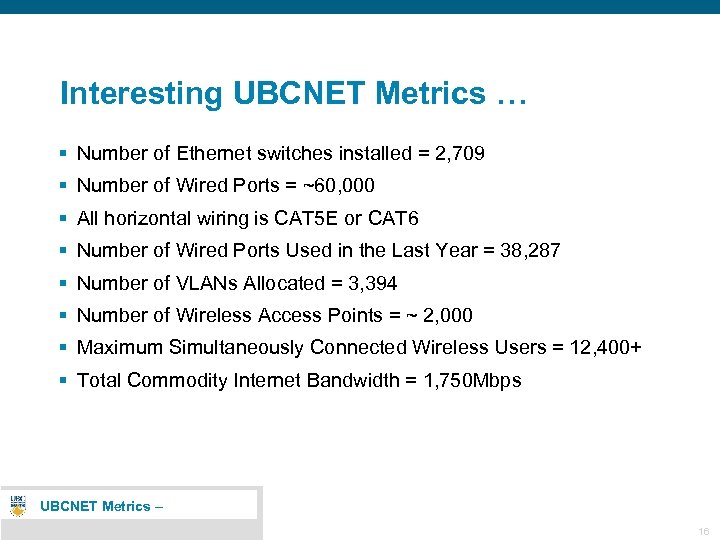
Interesting UBCNET Metrics … § Number of Ethernet switches installed = 2, 709 § Number of Wired Ports = ~60, 000 § All horizontal wiring is CAT 5 E or CAT 6 § Number of Wired Ports Used in the Last Year = 38, 287 § Number of VLANs Allocated = 3, 394 § Number of Wireless Access Points = ~ 2, 000 § Maximum Simultaneously Connected Wireless Users = 12, 400+ § Total Commodity Internet Bandwidth = 1, 750 Mbps UBCNET Metrics – 16
Part 2 • Statement of Problem 17
UBC – Statement of Problem § UBC is typical of many large university campuses § There are hundreds of buildings § There are 12 faculties and hundreds of departments § Faculties and departments have space in multiple buildings (e. g. , Faculty of Arts has space in 31 buildings) § A requirement of all faculties and departments is to have a single central firewall to control access to all of their subnets in all buildings where they have space. § Bridging VLANs is technically possible, but doesn’t scale on large university networks. § In this talk I will describe how we solved this problem at UBC, and in doing so how this let us virtualize many other services 18
Part 3 • Network Virtualization New Concepts, New Functionality, Discussion 19
UBC – Network Virtualization - Concept - VLANs § VLANs – Virtualization at Layer 2 Network Virtualization isn’t new. VLANs are a type of network virtualization. Everyone is familiar with VLANs. We have deployed over 3, 394 unique VLANs at UBC. § VLANs provide Privacy, Security, Reliability Some buildings have over a 100 VLANs. Departments use VLANs to segregate servers, students, faculty & staff, and admin office computers. If a large building has multiple departments, each department can have their own VLANs. Departments self-manage their own VLAN assignments using our Transmogrifier tool. 20
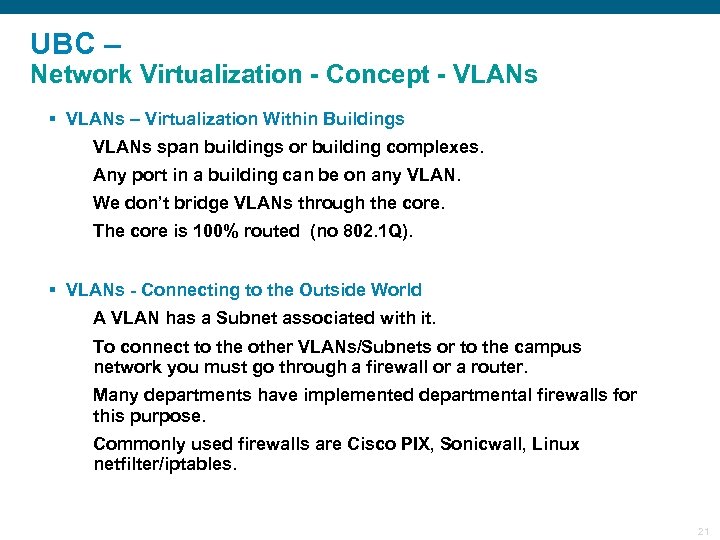
UBC – Network Virtualization - Concept - VLANs § VLANs – Virtualization Within Buildings VLANs span buildings or building complexes. Any port in a building can be on any VLAN. We don’t bridge VLANs through the core. The core is 100% routed (no 802. 1 Q). § VLANs - Connecting to the Outside World A VLAN has a Subnet associated with it. To connect to the other VLANs/Subnets or to the campus network you must go through a firewall or a router. Many departments have implemented departmental firewalls for this purpose. Commonly used firewalls are Cisco PIX, Sonicwall, Linux netfilter/iptables. 21
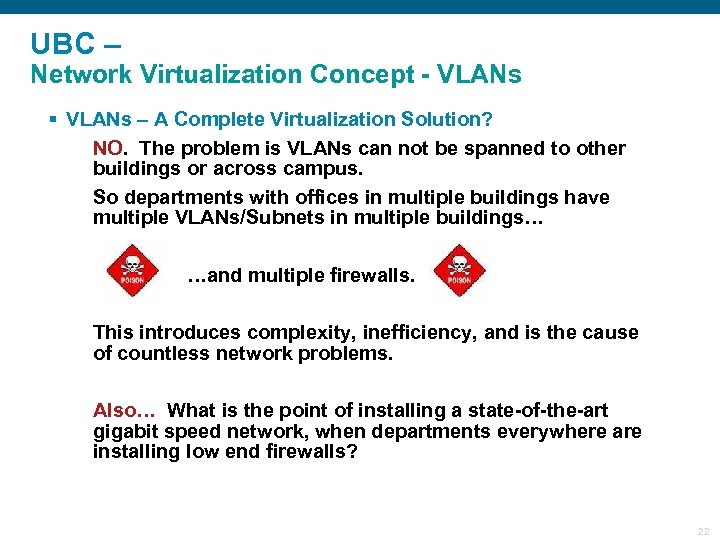
UBC – Network Virtualization Concept - VLANs § VLANs – A Complete Virtualization Solution? NO. The problem is VLANs can not be spanned to other buildings or across campus. So departments with offices in multiple buildings have multiple VLANs/Subnets in multiple buildings… …and multiple firewalls. This introduces complexity, inefficiency, and is the cause of countless network problems. Also… What is the point of installing a state-of-the-art gigabit speed network, when departments everywhere are installing low end firewalls? 22
UBC – Network Virtualization - Concept Campus-Wide Virtualization § Demand For Campus-Wide Network Virtualization Many departments have asked UBC IT to bridge VLANs campus-wide. A nice idea, but it doesn’t scale. So we have always said NO. § Campus-Wide Network Virtualization VLANs work by virtualizing the ethernet switches in the buildings, effectively giving each department their own ethernet switches. § Question of the day: But how do we extend network virtualization campus-wide without using VLANs ? ? ? 23
UBC – Network Virtualization - New Concept - VRFs § Campus-Wide Network Virtualization To extend network virtualization campus-wide we have virtualized the routers in the core network, effectively giving each department their own private campus-wide network. § Introducing “VRFs” (pronounced “verfs”) Virtual private campus-wide networks are called VRFs (Virtual Router Forwarding instances). Just as VLANs work by having separate layer 2 forwarding tables (MAC address tables) in the switches, so VRFs work by having separate layer 3 forwarding tables (route tables) in the routers. Just as VLANs can extend through all switches in a building, so VRFs can extend through all routers campus-wide. Just as VLANs are named, so VRFs are named. Just as now everyone is comfortable with the term VLAN, so in two years will everyone be comfortable with the term VRF. 24
UBC – Network Virtualization - New Concept - VRFs § What is a VRF? A VRF is completely private campus-wide network. It is as if you had your own private routers. A VRF has a name, like ARTS-SERVERS or MATH-LABS. VRFs are named after UBC organizational units. Any Subnets in any buildings campus-wide can be assigned to a particular VRF. A Subnet can be in only one VRF. A Subnet does not have to be in a VRF. In that case it is in the global routing table. A department can have as many VRFs as they require to implement their security policies. Routing between Subnets within a VRF is direct. No firewall is involved. It is wire speed (1 Gbps or 10 Gbps). To connect to a Subnet outside of a VRF you have to go through a firewall. Usually this is a virtual firewall. 25
UBC – Network Virtualization - New Concept - VRFs § What a VRF Isn’t A VRF is not a campus-wide bridged VLAN. A VRF allows different Subnets in different buildings anywhere on the campus to communicate directly, in a completely secure way. But there are different Subnets in each building. 26
UBC – Network Virtualization - New Concept Virtual Networks § Introducing “Virtual Networks” Previously departments could construct private networks within buildings using VLANs. Now departments can construct private networks across campus using combinations of VLANs and VRFs. A Virtual Network is the set of all VLANs, Subnets, and VRFs belonging to a particular faculty or department, including the virtual firewall that ties all of the VRFs together. Virtual Networks are named after organizational units (e. g. , ARTS 01 or MATH 01). § Real Life Example Business Operations Virtual network. A picture is worth 1000 words. 27
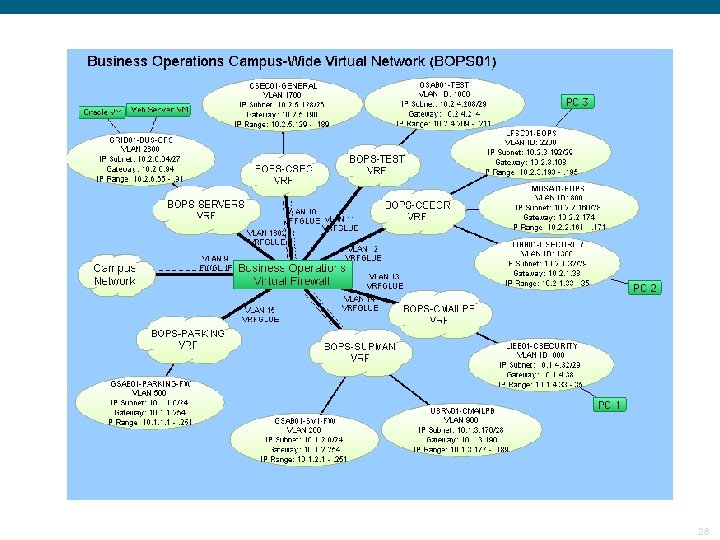
28
UBC – Network Virtualization - Advantages § Advantages of Virtual Networks Departments can have offices in any buildings campuswide, and can have a single firewall controlling access. Departments can centralize security policies. For the first time, network security is an integral part of network provisioning. § Virtual Networks are a new layer of security 29
UBC – Network Virtualization - Advantages § Virtual Networking is Completely Optional However, if you want to take advantage of any of the following new features, then you will have to convert to using Virtual Networking. Like the Transmogrifier tool, the idea was to create a service so good that everyone would want to use it. 30
UBC – Network Virtualization - New Functionality § Virtual Firewalls All 8 UBC Outer Core Cisco 6509 Routers contain Firewall Service Modules (FWSM’s). 5 Gigabit per second aggregate throughput. Redundant failover firewall. Looks and feels like a real hardware Cisco PIX firewall. Departments are responsible for firewall rules. Help from UBC IT in configuring your security policies and troubleshooting your firewall if and when you need it. 31
UBC – Network Virtualization - New Functionality § Campus-Wide Multicast For the first time campus-wide multicast is available, but only in the context of Virtual Networks. Multicast within all subnets in a VRF. E. g. , Ghostcast computer images campus-wide. Multicast between VRFs, without going through a firewall. E. g. , Broadcast HDTV campus-wide. Subscribe to UBC campus-wide multicast channels. Receive multicast broadcasts from external research network sites. (Multicast within or between VRFs does not go through the virtual firewalls. ) 32
UBC – Network Virtualization - New Functionality § Identity-Based Wireless Connect to the UBC wireless network and be placed on a Subnet in a VRF behind your department’s firewall. It’s as if you had your own departmental wireless network. Based on campus-wide login role. For example, enter credentials joe. math to get connected to a Subnet in a VRF in the Math network. Departments are in control of delegation of campus-wide login roles to their faculty, staff, and students. key idea 33
UBC – Network Virtualization - New Functionality § Identity-Based VPN Connect to the new UBC SSL VPN server and be placed on a Subnet in a VRF behind your department’s firewall. It’s as if you had your own departmental VPN Server. Based on campus-wide login role. Departments are in control of delegation of campus-wide login roles to their faculty, staff, and students. key idea 34
UBC – Network Virtualization - New Functionality § Virtual Devices Subscribe to UBC IT’s new VMware-based Virtual Devices service. Red Hat Linux, Windows Server, or Solaris. Virtual Devices are on your department’s virtual network, behind your departmental firewall, on the VRF of your choice. Underlying SAN data storage is automatically replicated off site (for disaster recovery (DR)). key idea 35
UBC – Network Virtualization - New Functionality § Virtual Storage Subscribe to UBC IT’s new SAN-based Virtual Storage service. Access storage across the network at gigabit speeds (e. g. , using NFS or CIFS). Virtual Storage is on your department’s virtual network, behind your departmental firewall, on the VRF of your choice. Underlying SAN data storage is automatically replicated off site (for disaster recovery (DR)). key idea 36
UBC – Network Virtualization - New Functionality Virtual Desktop Subscribe to UBC IT’s new Virtual Desktop service. Virtual Desktop Servers are on your department’s virtual network, behind your departmental firewall, on the VRF of your choice. There is no firewall in between the virtual desktop client and the virtual desktop server. This is enterprise class virtual desktop. key ideas 37
UBC – Network Virtualization - New Functionality § Virtual Load Balancers Like virtual firewalls, departments can also subscribe to our virtual load balancer service. Suitable for high demand applications like library, student systems, financial systems, email, etc. Virtual load balancer is on your department’s virtual network, behind your departmental firewall, on the VRF of your choice. Based on Cisco ACE technology. Looks and feels like a real hardware Cisco ACE load balancer. Departments are responsible for load balancer rules. 38
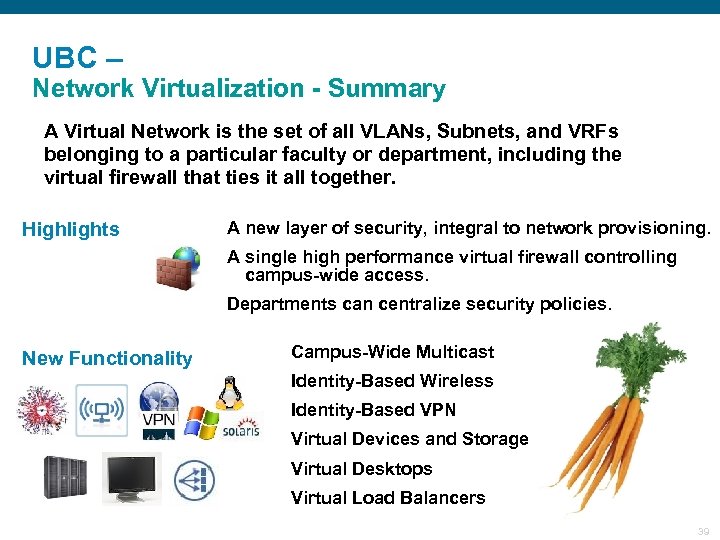
UBC – Network Virtualization - Summary A Virtual Network is the set of all VLANs, Subnets, and VRFs belonging to a particular faculty or department, including the virtual firewall that ties it all together. Highlights A new layer of security, integral to network provisioning. A single high performance virtual firewall controlling campus-wide access. Departments can centralize security policies. New Functionality Campus-Wide Multicast Identity-Based Wireless Identity-Based VPN Virtual Devices and Storage Virtual Desktops Virtual Load Balancers 39
UBC – Network Virtualization – User FAQs § Is Virtual Networking mandatory? No, it’s not mandatory. In fact, it’s completely optional. If you don’t want to take advantage of virtual networking then you don’t have to. It will be business as usual. All of your Subnets will continue to be in the global routing table. § If I decide to use Virtual Networking, does it impact my existing VLANs and Subnets? The only impact is that you have to let the UBC IT know what VRF each subnet should be assigned to. Other than that, it’s business as usual. No VLANs or IP addresses change. § How many VRFs can a department have? A department can have as many VRFs as they want. One for every subnet if necessary. Although in practice most departments will only need a small number (~6) to implement their security policies. 40
UBC – Network Virtualization – User FAQs § Where is my virtual firewall located? All eight outer core 6509 routers contain Firewall Service Modules (FWSM) modules. Your virtual firewall could be located in any pair of these. However, in practice your virtual firewall will be located in the pair of 6509 routers providing service to the main building for your faculty or department. § If I don’t want to use a virtual firewall, can I use my own firewall? Yes you can, but we strongly advise using virtual firewalls. Virtual firewalls are very high performance. 41
UBC – Network Virtualization – Technical Details § What technology are VRFs based upon? VRFs are an industry standard technology supported by many vendors including Cisco Systems. The underlying technology leverages MPLS and BGP protocols. The defining document is RFC 2547 - BGP/MPLS VPNs. § Does using VRFs impact network performance? No, it doesn’t. The router hardware always go through the decision making process to decide what routing table to use even if you don’t use VRFs. § How many VRFs can a Cisco router support? Up to 512 without any performance hit. Up to 1024 with a minor performance hit. § Is all traffic MPLS encapsulated? No. Only traffic in VRFs is MPLS-encapsulated. Traffic in the global routing table is not MPLS-encapsulated. So you can implement BGP MPLS as on overlay on your existing campus network. 42
UBC – Network Virtualization – Technical Details § Is implementing BGP MPLS easy? Yes, surprisingly easy. Really the only difference is that you use BGP rather than OSPF as the IGP. It’s no more complicated than implementing a traditional OSPF-based core network. The secret is that you need a management system (scripts and a database) to register VRFs and to automatically generate Cisco IOS configurations. This isn’t hard to do. Even if you don’t do the automation part, it’s still easier to use BGP MPLS than manually creating VRFs and meshing them using OSPF. § What Cisco documents describe how to do this? The key documents are the “Network Virtualization – Path Isolation Design Guide” and the “Enterprise Network Virtualization – Path Isolation System Assurance Guide”. 43
UBC – Network Virtualization – Technical Details § Are there any special hardware or software requirements? Yes, your Cisco 6500 routers must be up to Supervisor 720 Policy Feature Card PFC 3 B or PFC 3 C. You also need the Advanced IP Services image to get the BGP and MPLS support. And you need a pair of BGP Route Reflectors. Any low end Cisco router will do. § Is supporting MPLS difficult? No, for campus networks supporting MPLS is trivial. It’s essentially a one time configuration effort. Just a few statements of IOS commands per router. 44
Progress to Date… Since this project began on January 1, 2009 we have created virtual networks for 35 departments, each with it’s own virtual firewall context. In total we have allocated 175 VRFs. When the network virtualization project is finished in 2011 we will max out at about 500 VRFs. Since we only create VRFs in the routers where they touch down, no one Cisco router will have more than about 250 VRFs. Uptake and buy in from the faculties and departments has been overwhelming. We are struggling to keep up with the requests. (Router configurations are automated. ) Progress to Date – 45
Payoffs… Implementing a BGP MPLS core and virtualizing the network has enabled us to virtualize many other services including wireless, VPN, virtual devices (VMs), virtual storage (SAN), virtual desktops, and virtual load balancers. Because the virtualized services appear on the departments virtual network behind the department’s firewall, access is secure without requiring a firewall in between and access is wire speed. Because the virtual devices (VMs) and virtual storage (SAN) appear on the department’s virtual network behind the department’s firewall, departments are eager and willing to use centrally provisioned services. key idea This lets the University centralize hardware resources, reap the benefits of economies of scale and energy savings … without having a totally centralized model of IT provisioning. Payoffs– 46
That’s All. • Questions, Discussion 47
Скачать презентацию Network Virtualization Brings Huge Payoffs University of
43d0e7af23e5f7bb7eec945bbfbbadf5.ppt