


 Скачать презентацию Network Security Dr Steve Gordon ICT SIIT
51d0aa3aee1f6d03f1b1e94c2a2b565a.ppt
- Количество слайдов: 31
 Network Security Dr Steve Gordon ICT, SIIT
 Contents • Security Attacks and Services • Encryption – Symmetric Key – Public Key • Authentication and Data Integrity • Internet Security Protocols ITS 413 - Internet Technologies and Applications 2
 Aspects of Security 1. Security Attack – Any action that attempts to compromise the security of information or facilities 2. Security Mechanism – A method of preventing, detecting or recovering from an attack 3. Security Service – Uses security mechanisms to enhance the security of information or facilities in order to stop attacks ITS 413 - Internet Technologies and Applications 3
 Security Attacks • Passive Attacks – Make use of information, but not affect system resources – Eavesdropping or monitoring transmissions of information • Release message contents • Traffic analysis – Relatively hard to detect, but easier to prevent • Active Attacks – Alter system resources or operation. Four sub-types: • • Masquerade: pretend to be someone else Replay: retransmission of captured information Modification: change message contents Denial of service: reduce the availability of resources – Relatively hard to prevent, but easier to detect • (Ability to detect may act as a deterrent or prevent attacks) ITS 413 - Internet Technologies and Applications 4
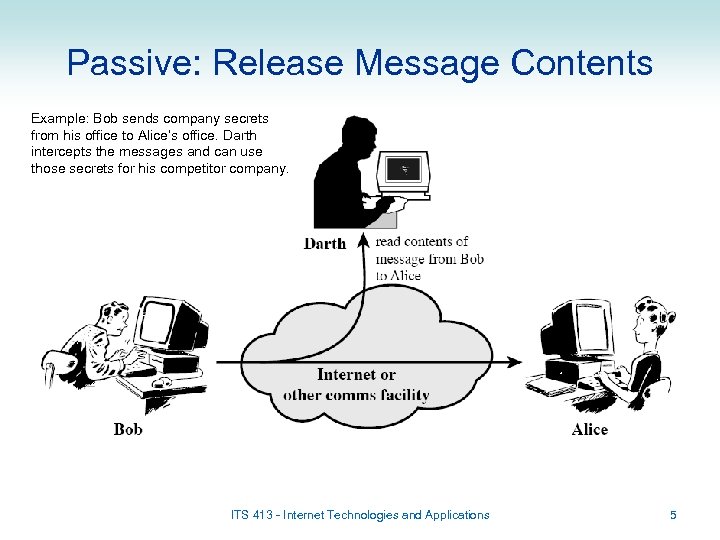 Passive: Release Message Contents Example: Bob sends company secrets from his office to Alice’s office. Darth intercepts the messages and can use those secrets for his competitor company. ITS 413 - Internet Technologies and Applications 5
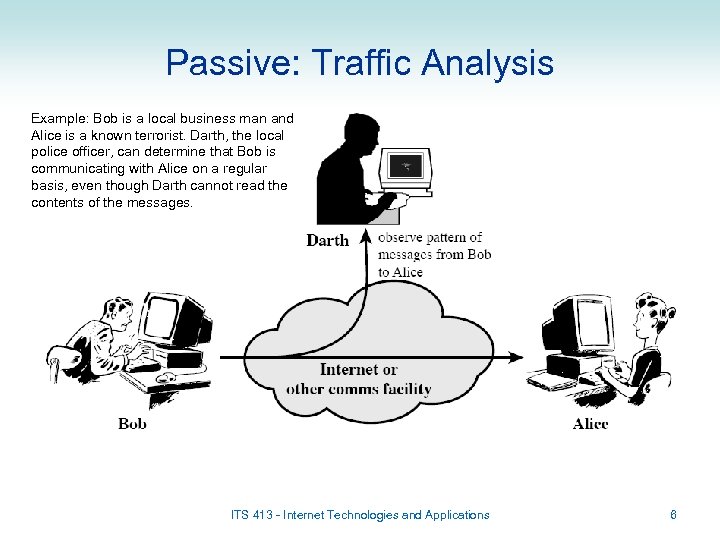 Passive: Traffic Analysis Example: Bob is a local business man and Alice is a known terrorist. Darth, the local police officer, can determine that Bob is communicating with Alice on a regular basis, even though Darth cannot read the contents of the messages. ITS 413 - Internet Technologies and Applications 6
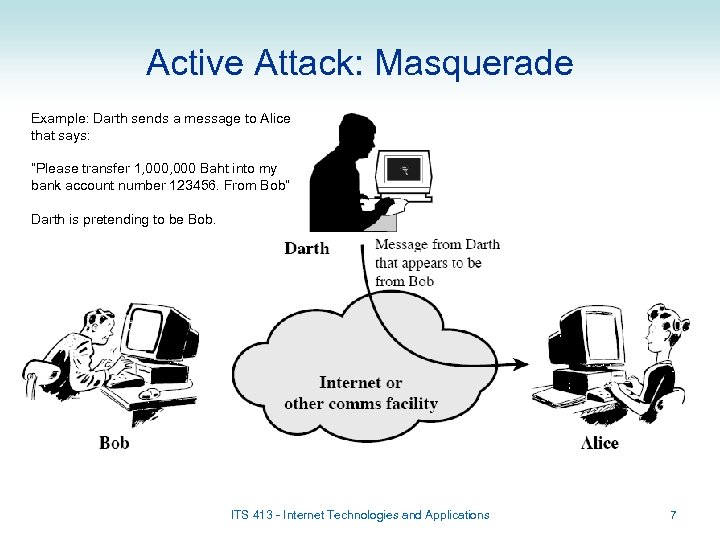 Active Attack: Masquerade Example: Darth sends a message to Alice that says: “Please transfer 1, 000 Baht into my bank account number 123456. From Bob” Darth is pretending to be Bob. ITS 413 - Internet Technologies and Applications 7
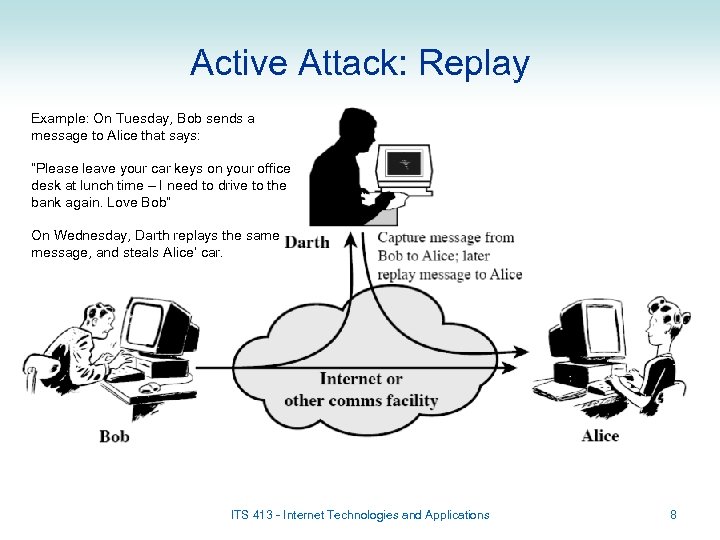 Active Attack: Replay Example: On Tuesday, Bob sends a message to Alice that says: “Please leave your car keys on your office desk at lunch time – I need to drive to the bank again. Love Bob” On Wednesday, Darth replays the same message, and steals Alice’ car. ITS 413 - Internet Technologies and Applications 8
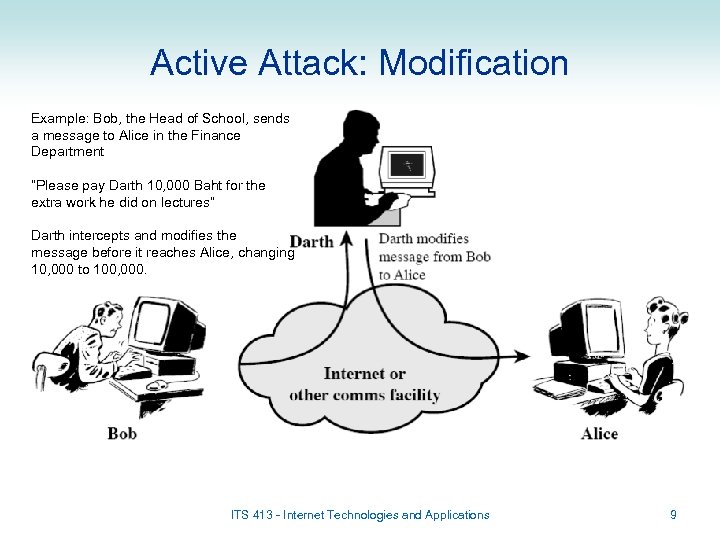 Active Attack: Modification Example: Bob, the Head of School, sends a message to Alice in the Finance Department “Please pay Darth 10, 000 Baht for the extra work he did on lectures” Darth intercepts and modifies the message before it reaches Alice, changing 10, 000 to 100, 000. ITS 413 - Internet Technologies and Applications 9
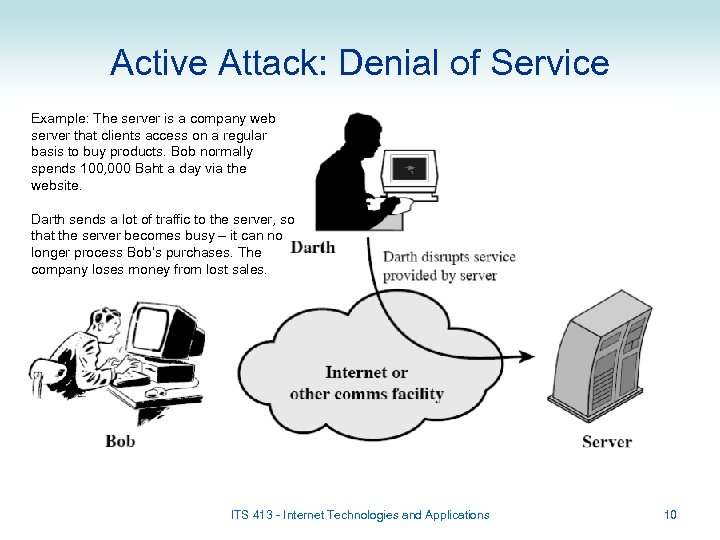 Active Attack: Denial of Service Example: The server is a company web server that clients access on a regular basis to buy products. Bob normally spends 100, 000 Baht a day via the website. Darth sends a lot of traffic to the server, so that the server becomes busy – it can no longer process Bob’s purchases. The company loses money from lost sales. ITS 413 - Internet Technologies and Applications 10
 Security Services • The IETF defines Security Services as (RFC 2828): – “A processing or communication service that is provided by a system to give a specific kind of protection to system resources” • The main security services can be classified as: – Authentication: assure that the communication and the communicating entities are authentic, e. g. a warning signal is real; a person is who they claim to be – Data Confidentiality: protect data from passive attacks; privacy of communications – Data Integrity: assure data sent is not duplicated, modified, inserted, replayed, deleted, … – Access Control: limit and control access to computers, network resources and applications, e. g. firewalls – Non-repudiation: prevent sender or receiver from denying a message has been sent, e. g. an electronic receipt – Availability Service: protect system so it is available for intended purpose, e. g. defend against Denial of Service attacks 11
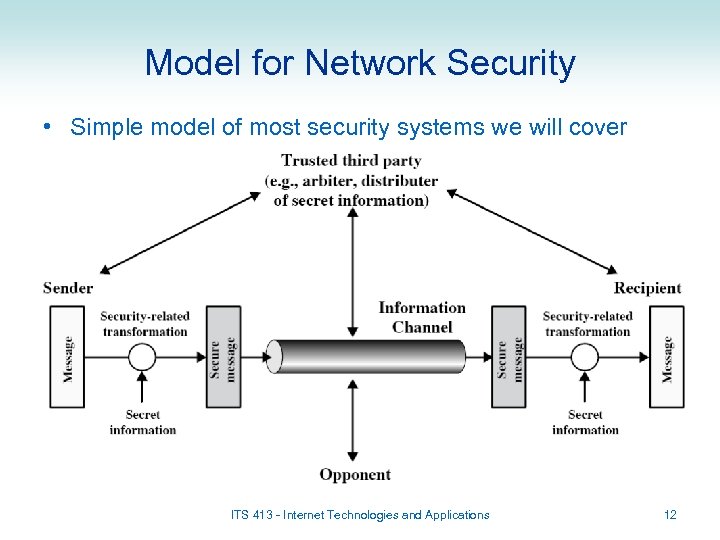 Model for Network Security • Simple model of most security systems we will cover ITS 413 - Internet Technologies and Applications 12
 Encryption for Network Security Symmetric Key Encryption Public Key Encryption
 Encryption • Encryption involves transforming a message into undecipherable message; only a user with knowledge of transformation algorithm/key can obtain original message • Components of encryption: – Plaintext: the original message – Ciphertext: the encrypted message – Key: used to change the output of the encryption algorithm for a given plaintext – Encryption algorithm: transforms the plaintext into ciphertext • Substitution: replace characters in plaintext with others • Transposition: re-arrange characters – Decryption algorithm: transforms ciphertext into plaintext • Encryption plays an important role in network security – Used to provide almost all security services • Two types of encryption: – Symmetric Key Encryption (or Secret Key, or Shared Key) – Public Key Encryption (or Asymmetric Key) ITS 413 - Internet Technologies and Applications 14
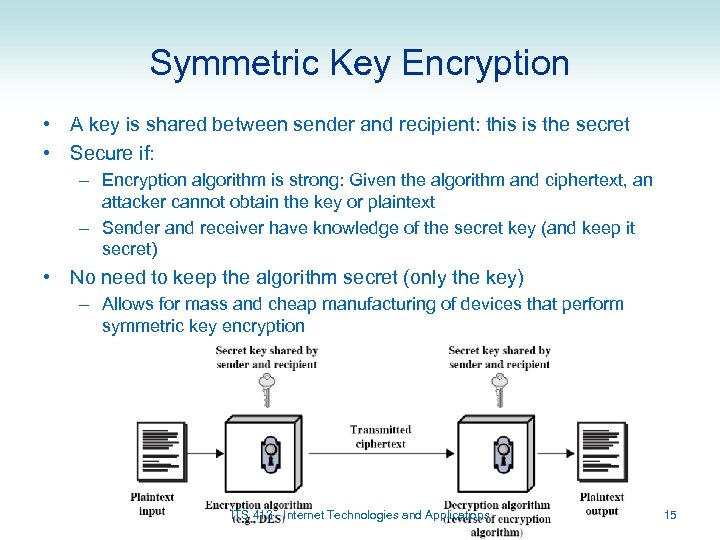 Symmetric Key Encryption • A key is shared between sender and recipient: this is the secret • Secure if: – Encryption algorithm is strong: Given the algorithm and ciphertext, an attacker cannot obtain the key or plaintext – Sender and receiver have knowledge of the secret key (and keep it secret) • No need to keep the algorithm secret (only the key) – Allows for mass and cheap manufacturing of devices that perform symmetric key encryption ITS 413 - Internet Technologies and Applications 15
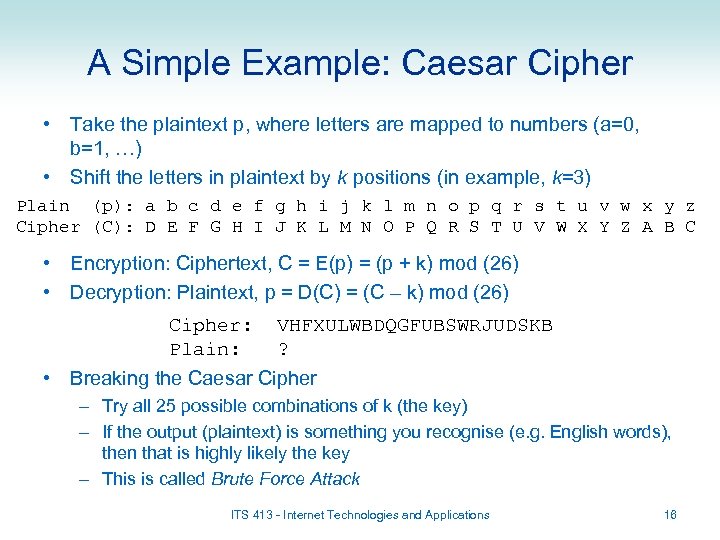 A Simple Example: Caesar Cipher • Take the plaintext p, where letters are mapped to numbers (a=0, b=1, …) • Shift the letters in plaintext by k positions (in example, k=3) Plain (p): a b c d e f g h i j k l m n o p q r s t u v w x y z Cipher (C): D E F G H I J K L M N O P Q R S T U V W X Y Z A B C • Encryption: Ciphertext, C = E(p) = (p + k) mod (26) • Decryption: Plaintext, p = D(C) = (C – k) mod (26) Cipher: Plain: VHFXULWBDQGFUBSWRJUDSKB ? • Breaking the Caesar Cipher – Try all 25 possible combinations of k (the key) – If the output (plaintext) is something you recognise (e. g. English words), then that is highly likely the key – This is called Brute Force Attack ITS 413 - Internet Technologies and Applications 16
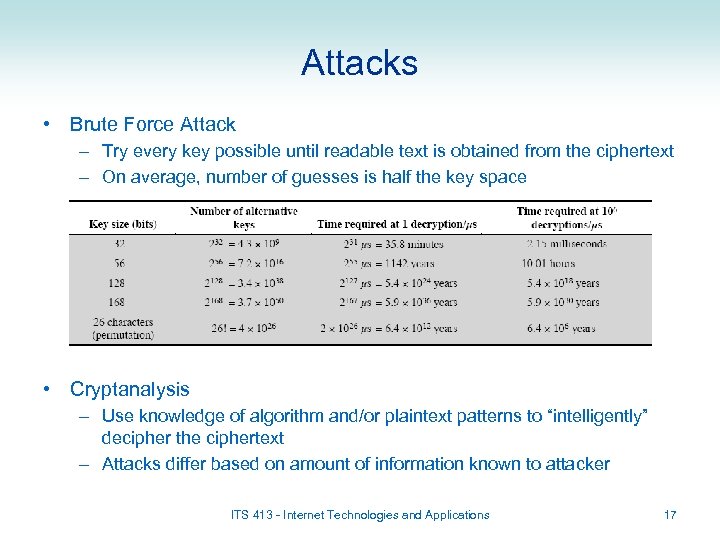 Attacks • Brute Force Attack – Try every key possible until readable text is obtained from the ciphertext – On average, number of guesses is half the key space • Cryptanalysis – Use knowledge of algorithm and/or plaintext patterns to “intelligently” decipher the ciphertext – Attacks differ based on amount of information known to attacker ITS 413 - Internet Technologies and Applications 17
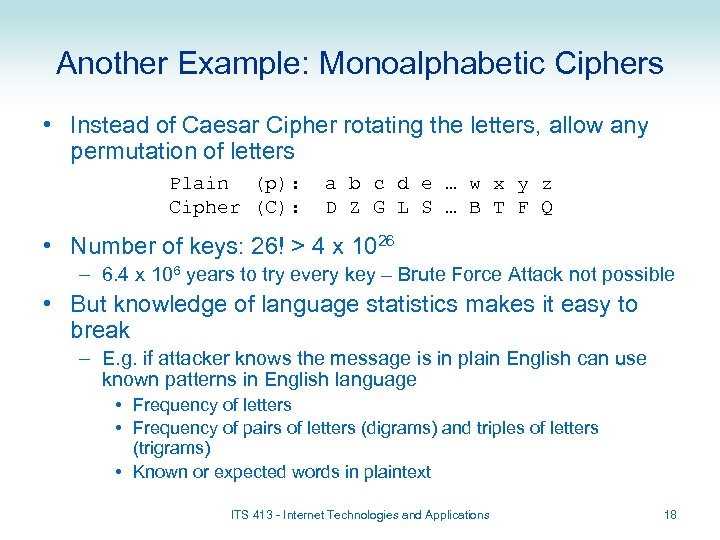 Another Example: Monoalphabetic Ciphers • Instead of Caesar Cipher rotating the letters, allow any permutation of letters Plain (p): Cipher (C): a b c d e … w x y z D Z G L S … B T F Q • Number of keys: 26! > 4 x 1026 – 6. 4 x 10⁶ years to try every key – Brute Force Attack not possible • But knowledge of language statistics makes it easy to break – E. g. if attacker knows the message is in plain English can use known patterns in English language • Frequency of letters • Frequency of pairs of letters (digrams) and triples of letters (trigrams) • Known or expected words in plaintext ITS 413 - Internet Technologies and Applications 18
 Real Symmetric Key Algorithms • Data Encryption Standard (DES) – Published as standard in 1977 by NIST • Developed by IBM with input from NSA – 56 -bit key – today it is not strong enough – In 1999 NIST recommended Triple DES (3 DES) to be used: 128 biy keys • Advanced Encryption Standard (AES) – Published as standard in 2001 by NIST • Designed and developed in an open forum – Keys of 128, 192 or 256 bits – Used today in many network standards/products • Others: IDEA, RC 4/RC 5, Skipjack, … ITS 413 - Internet Technologies and Applications 19
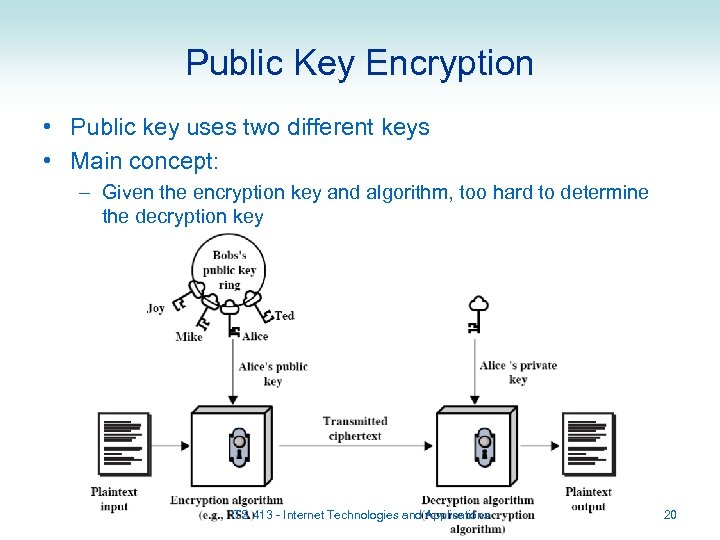 Public Key Encryption • Public key uses two different keys • Main concept: – Given the encryption key and algorithm, too hard to determine the decryption key ITS 413 - Internet Technologies and Applications 20
 Public Key Encryption • Public key – Key used by sender to encrypt plaintext – Owned by the receiver – Anyone can know the public key • Private (Secret) Key – Key used to decrypt ciphertext – Must be kept secret by the receiver • The public key and private key are related – Each user must have their own pair of keys – For confidentiality, the pair belong to the receiver: (Public, Secret) or (P, S) • Public Key Algorithm – If plaintext is encrypted with Public key, can only successfully decrypt with corresponding Private key – Or if plaintext is encrypted with Private key, can only successfully decrypt with corresponding Public key • Public key encryption requires: – Very hard (impossible) for someone to recover plaintext if they only know ciphertext and Public key – Very hard (impossible) for someone to determine Private key if they only know Public key ITS 413 - Internet Technologies and Applications 21
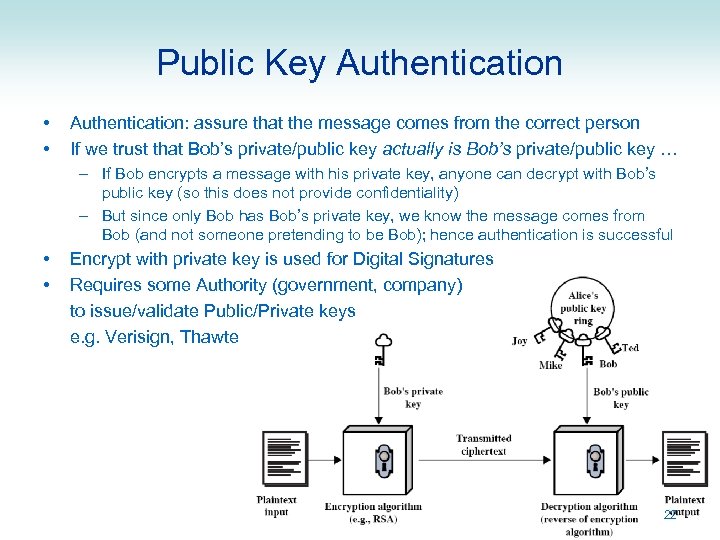 Public Key Authentication • • Authentication: assure that the message comes from the correct person If we trust that Bob’s private/public key actually is Bob’s private/public key … – If Bob encrypts a message with his private key, anyone can decrypt with Bob’s public key (so this does not provide confidentiality) – But since only Bob has Bob’s private key, we know the message comes from Bob (and not someone pretending to be Bob); hence authentication is successful • • Encrypt with private key is used for Digital Signatures Requires some Authority (government, company) to issue/validate Public/Private keys e. g. Verisign, Thawte 22
 Public Key Algorithms • RSA – Created in 1978 – Now most used Public Key algorithm – Key sizes of 1024 are generally considered secure • Attacks have been developed for key sizes up to 640 bits • Others: – Elliptic curve, Diffie Hellman, DSS, … • Practical applications: – Encryption/decryption for confidentiality – Digital Signature (authentication) – Key exchange (e. g. to securely exchange Symmetric Secret keys) ITS 413 - Internet Technologies and Applications 23
 Symmetric vs Public Key • Symmetric • Public Key – Sender and receiver use same shared Secret key – Requires secure distribution of Secret key • Difficult to manage – Encryption/decryption algorithms are fast, computationally efficient – Each user has a public/private key pair – One key used to encrypt, the other to decrypt – Easy to distribute the Public key • Post on web page, email, tell everyone – its public! – Encryption/decryption algorithms are slower Often Public Key encryption is used to exchange Symmetric Secret keys, then Symmetric key encryption to encrypt data ITS 413 - Internet Technologies and Applications 24
 Authentication and Data Integrity
 Data Integrity • • Ensure the message isn’t modified on the way Transmit a fingerprint of message with the message – Re-compute fingerprint at receiver from the message • If the received fingerprint and the fingerprint computed by the receiver are identical, then message is ok • If they are different, then something has gone wrong (e. g. message modified) • Message Digests – Use a one way hash function, H • h = H(M); h is hash value, M is message • Practically impossible to find M from h • H(M 1) ≠ H(M 2) • – Sender transmits (MTx, h. Tx) – Receiver receives (MRx, h. Rx) – Receiver re-computes h = H(MRx); if h equals h. Rx, then assume MRx = MTx Digital Signature - for authentication – Encrypt a Hash value of message (rather than entire message) with senders Private Key • Message Authentication Code (MAC) – for authentication – Use Symmetric Private key to obtain MAC of message, and send with message ITS 413 - Internet Technologies and Applications 26
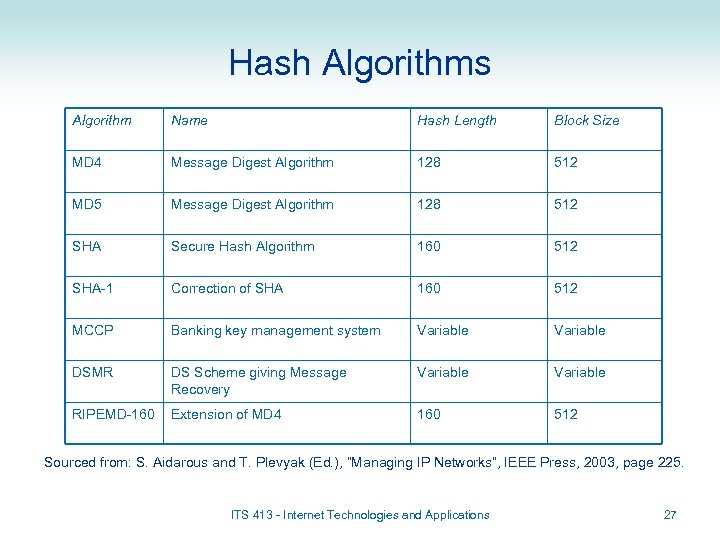 Hash Algorithms Algorithm Name Hash Length Block Size MD 4 Message Digest Algorithm 128 512 MD 5 Message Digest Algorithm 128 512 SHA Secure Hash Algorithm 160 512 SHA-1 Correction of SHA 160 512 MCCP Banking key management system Variable DSMR DS Scheme giving Message Recovery Variable RIPEMD-160 Extension of MD 4 160 512 Sourced from: S. Aidarous and T. Plevyak (Ed. ), “Managing IP Networks”, IEEE Press, 2003, page 225. ITS 413 - Internet Technologies and Applications 27
 Internet Security
 Internet Security • Most Internet protocols did not initially include security mechanisms – But today, security can be an “optional extra” for almost all protocols • Tradeoff: more security leads to more complex implementations and less performance – Most protocols use encryption for confidentiality • Physical layer security – Encryption can be applied for high security applications • Data Link Layer Security – LAN and WANs often don’t have built-in encryption because the network/link is owned by one organisation (“trusted”) – But options are available, especially in wireless networks • E. g. WEP and WPA for IEEE 802. 11 wireless LANs ITS 413 - Internet Technologies and Applications 29
 Internet Security • Network Layer – IP does not provide security – IPsec is an option of IP • Provides encryption (confidentiality and data integrity) of IP datagrams • Also authentication of senders (verify the sender) – If IPsec is used, all higher layer traffic can be secured (TCP, UDP, ICMP; web browsing, voice, instant message, …) – Requires implementation on PCs and routers • Transport Layer – TCP and UDP do not provide security – Secure Sockets Layer (SSL) (also called Transport Layer Security (TLS)) is an optional extra for TCP • Provides encryption (confidentiality and data integrity) of TCP traffic • Does not support UDP applications – Requires implementation on PCs (in OS or application) ITS 413 - Internet Technologies and Applications 30
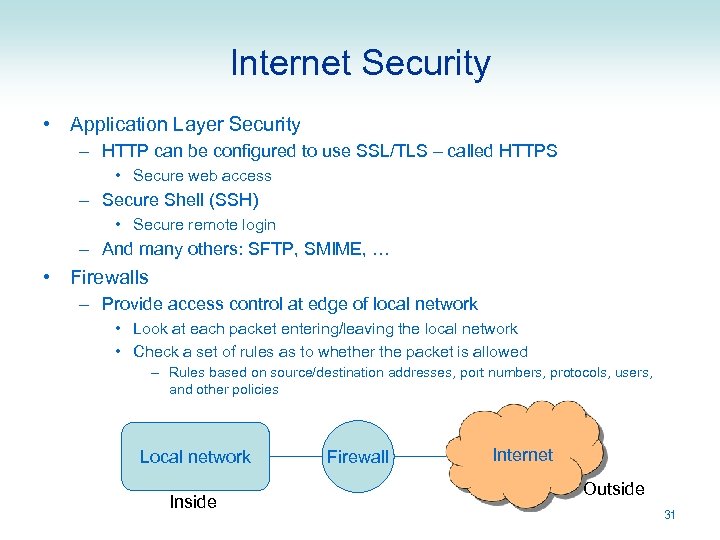 Internet Security • Application Layer Security – HTTP can be configured to use SSL/TLS – called HTTPS • Secure web access – Secure Shell (SSH) • Secure remote login – And many others: SFTP, SMIME, … • Firewalls – Provide access control at edge of local network • Look at each packet entering/leaving the local network • Check a set of rules as to whether the packet is allowed – Rules based on source/destination addresses, port numbers, protocols, users, and other policies Local network Inside Firewall Internet Outside 31