 Скачать презентацию Network Object-Oriented and Other Database Models University of
1bb26c23eef54d998c99f74955d6ab8a.ppt
- Количество слайдов: 37



Network, Object-Oriented and Other Database Models University of California, Berkeley School of Information Management and Systems SIMS 257: Database Management 11/7/2000 Database Management -- R. Larson
Review • OLAP • Data Mining 11/7/2000 Database Management -- R. Larson
OLAP • Online Line Analytical Processing – Intended to provide multidimensional views of the data – I. e. , the “Data Cube” – The Pivot. Tables in MS Excel are examples of OLAP tools 11/7/2000 Database Management -- R. Larson
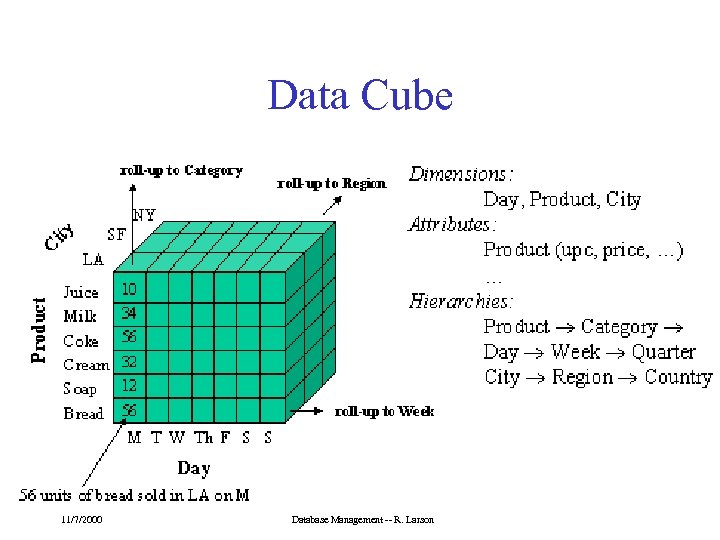
Data Cube 11/7/2000 Database Management -- R. Larson
Operations on Data Cubes • Slicing the cube – Extracts a 2 d table from the multidimensional data cube – Example… • Drill-Down – Analyzing a given set of data at a finer level of detail 11/7/2000 Database Management -- R. Larson
Data Mining • Data mining is knowledge discovery rather than question answering – May have no pre-formulated questions – Derived from • Traditional Statistics • Artificial intelligence • Computer graphics (visualization) 11/7/2000 Database Management -- R. Larson
Goals of Data Mining • Explanatory – Explain some observed event or situation • Why have the sales of SUVs increased in California but not in Oregon? • Confirmatory – To confirm a hypothesis • Whether 2 -income families are more likely to buy family medical coverage • Exploratory – To analyze data for new or unexpected relationships • What spending patterns seem to indicate credit card fraud? 11/7/2000 Database Management -- R. Larson
Data Mining Applications • • • Profiling Populations Analysis of business trends Target marketing Usage Analysis Campaign effectiveness Product affinity 11/7/2000 Database Management -- R. Larson
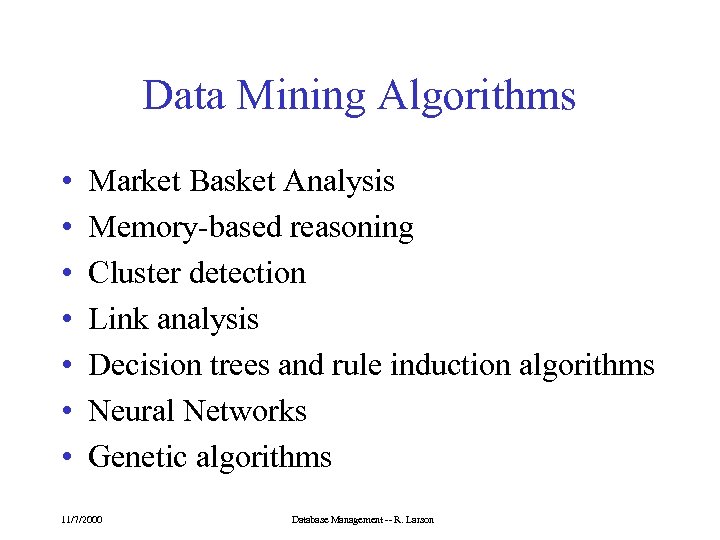
Data Mining Algorithms • • Market Basket Analysis Memory-based reasoning Cluster detection Link analysis Decision trees and rule induction algorithms Neural Networks Genetic algorithms 11/7/2000 Database Management -- R. Larson
Today • • Hierarchical Database Systems Network Database Systems Object-Oriented Database Systems Inverted File and Flat File DBMS 11/7/2000 Database Management -- R. Larson
Hierarchical Model • Data items are structured in a Parent-Child hierarchical relationship • Data items are grouped into “logical record types”. Each of these approximately corresponds to a table in the relational model. • FOCUS permits “virtual segments” that are stored as files. 11/7/2000 Database Management -- R. Larson
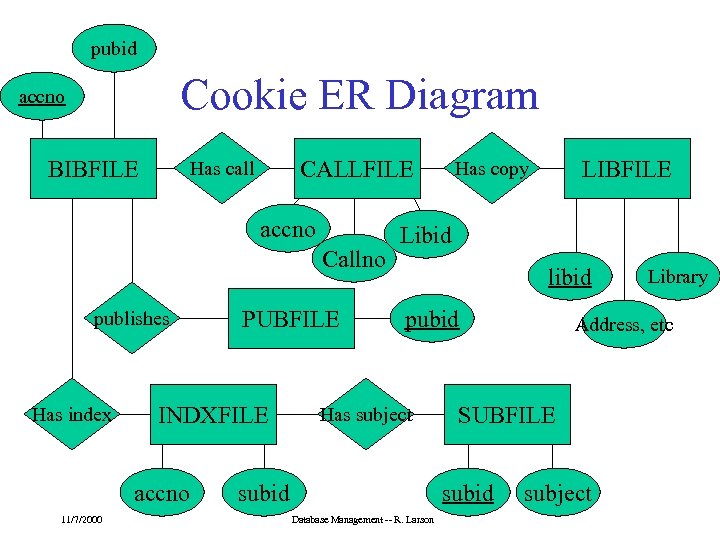
pubid Cookie ER Diagram accno BIBFILE CALLFILE Has call accno Callno publishes Has index INDXFILE accno 11/7/2000 PUBFILE LIBFILE Has copy Libid libid pubid Has subject subid Database Management -- R. Larson Address, etc SUBFILE subid Library subject
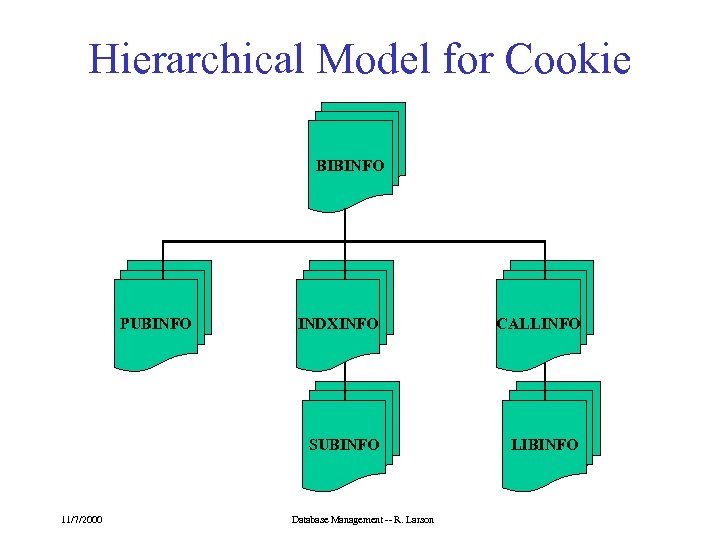
Hierarchical Model for Cookie BIBINFO PUBINFO CALLINFO SUBINFO 11/7/2000 INDXINFO LIBINFO Database Management -- R. Larson
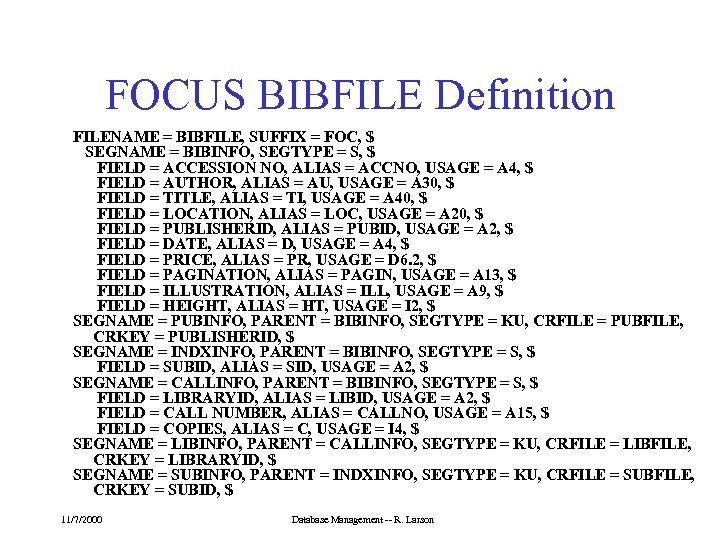
FOCUS BIBFILE Definition FILENAME = BIBFILE, SUFFIX = FOC, $ SEGNAME = BIBINFO, SEGTYPE = S, $ FIELD = ACCESSION NO, ALIAS = ACCNO, USAGE = A 4, $ FIELD = AUTHOR, ALIAS = AU, USAGE = A 30, $ FIELD = TITLE, ALIAS = TI, USAGE = A 40, $ FIELD = LOCATION, ALIAS = LOC, USAGE = A 20, $ FIELD = PUBLISHERID, ALIAS = PUBID, USAGE = A 2, $ FIELD = DATE, ALIAS = D, USAGE = A 4, $ FIELD = PRICE, ALIAS = PR, USAGE = D 6. 2, $ FIELD = PAGINATION, ALIAS = PAGIN, USAGE = A 13, $ FIELD = ILLUSTRATION, ALIAS = ILL, USAGE = A 9, $ FIELD = HEIGHT, ALIAS = HT, USAGE = I 2, $ SEGNAME = PUBINFO, PARENT = BIBINFO, SEGTYPE = KU, CRFILE = PUBFILE, CRKEY = PUBLISHERID, $ SEGNAME = INDXINFO, PARENT = BIBINFO, SEGTYPE = S, $ FIELD = SUBID, ALIAS = SID, USAGE = A 2, $ SEGNAME = CALLINFO, PARENT = BIBINFO, SEGTYPE = S, $ FIELD = LIBRARYID, ALIAS = LIBID, USAGE = A 2, $ FIELD = CALL NUMBER, ALIAS = CALLNO, USAGE = A 15, $ FIELD = COPIES, ALIAS = C, USAGE = I 4, $ SEGNAME = LIBINFO, PARENT = CALLINFO, SEGTYPE = KU, CRFILE = LIBFILE, CRKEY = LIBRARYID, $ SEGNAME = SUBINFO, PARENT = INDXINFO, SEGTYPE = KU, CRFILE = SUBFILE, CRKEY = SUBID, $ 11/7/2000 Database Management -- R. Larson
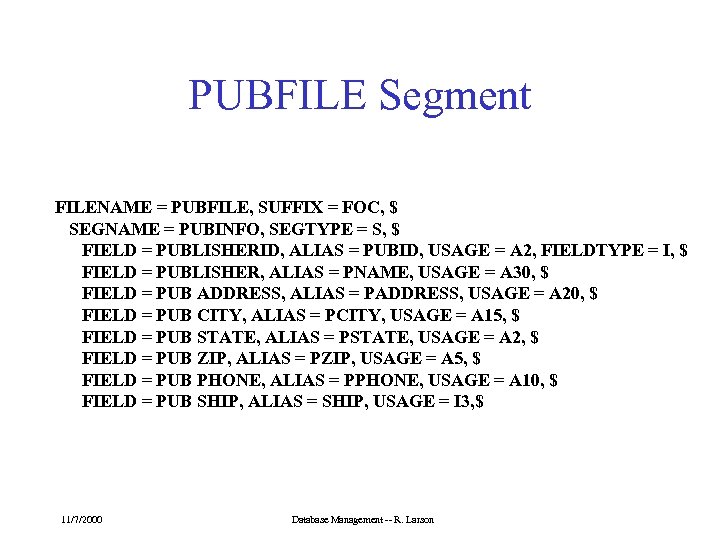
PUBFILE Segment FILENAME = PUBFILE, SUFFIX = FOC, $ SEGNAME = PUBINFO, SEGTYPE = S, $ FIELD = PUBLISHERID, ALIAS = PUBID, USAGE = A 2, FIELDTYPE = I, $ FIELD = PUBLISHER, ALIAS = PNAME, USAGE = A 30, $ FIELD = PUB ADDRESS, ALIAS = PADDRESS, USAGE = A 20, $ FIELD = PUB CITY, ALIAS = PCITY, USAGE = A 15, $ FIELD = PUB STATE, ALIAS = PSTATE, USAGE = A 2, $ FIELD = PUB ZIP, ALIAS = PZIP, USAGE = A 5, $ FIELD = PUB PHONE, ALIAS = PPHONE, USAGE = A 10, $ FIELD = PUB SHIP, ALIAS = SHIP, USAGE = I 3, $ 11/7/2000 Database Management -- R. Larson
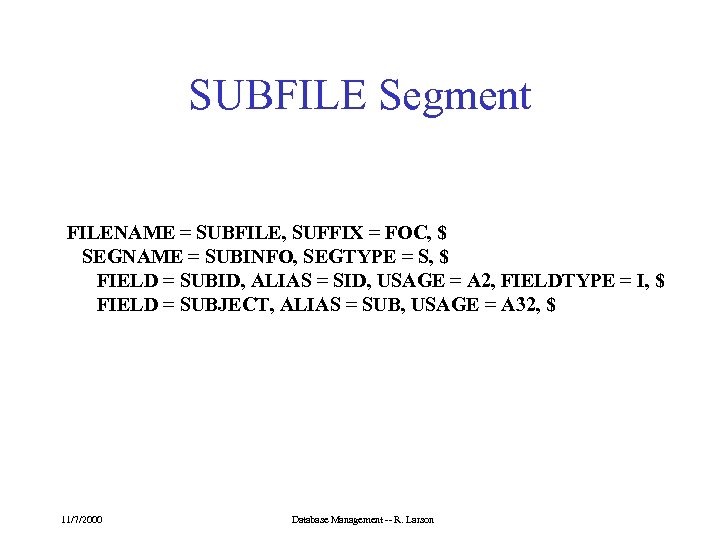
SUBFILE Segment FILENAME = SUBFILE, SUFFIX = FOC, $ SEGNAME = SUBINFO, SEGTYPE = S, $ FIELD = SUBID, ALIAS = SID, USAGE = A 2, FIELDTYPE = I, $ FIELD = SUBJECT, ALIAS = SUB, USAGE = A 32, $ 11/7/2000 Database Management -- R. Larson
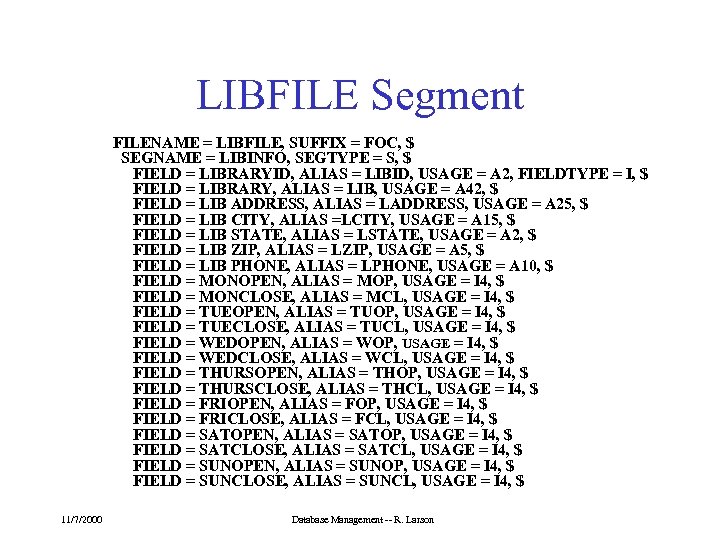
LIBFILE Segment FILENAME = LIBFILE, SUFFIX = FOC, $ SEGNAME = LIBINFO, SEGTYPE = S, $ FIELD = LIBRARYID, ALIAS = LIBID, USAGE = A 2, FIELDTYPE = I, $ FIELD = LIBRARY, ALIAS = LIB, USAGE = A 42, $ FIELD = LIB ADDRESS, ALIAS = LADDRESS, USAGE = A 25, $ FIELD = LIB CITY, ALIAS =LCITY, USAGE = A 15, $ FIELD = LIB STATE, ALIAS = LSTATE, USAGE = A 2, $ FIELD = LIB ZIP, ALIAS = LZIP, USAGE = A 5, $ FIELD = LIB PHONE, ALIAS = LPHONE, USAGE = A 10, $ FIELD = MONOPEN, ALIAS = MOP, USAGE = I 4, $ FIELD = MONCLOSE, ALIAS = MCL, USAGE = I 4, $ FIELD = TUEOPEN, ALIAS = TUOP, USAGE = I 4, $ FIELD = TUECLOSE, ALIAS = TUCL, USAGE = I 4, $ FIELD = WEDOPEN, ALIAS = WOP, USAGE = I 4, $ FIELD = WEDCLOSE, ALIAS = WCL, USAGE = I 4, $ FIELD = THURSOPEN, ALIAS = THOP, USAGE = I 4, $ FIELD = THURSCLOSE, ALIAS = THCL, USAGE = I 4, $ FIELD = FRIOPEN, ALIAS = FOP, USAGE = I 4, $ FIELD = FRICLOSE, ALIAS = FCL, USAGE = I 4, $ FIELD = SATOPEN, ALIAS = SATOP, USAGE = I 4, $ FIELD = SATCLOSE, ALIAS = SATCL, USAGE = I 4, $ FIELD = SUNOPEN, ALIAS = SUNOP, USAGE = I 4, $ FIELD = SUNCLOSE, ALIAS = SUNCL, USAGE = I 4, $ 11/7/2000 Database Management -- R. Larson
Hierarchic Querying • All searches must proceed from the “root” of the hierarchy, and traverse each segment containing required information 11/7/2000 Database Management -- R. Larson
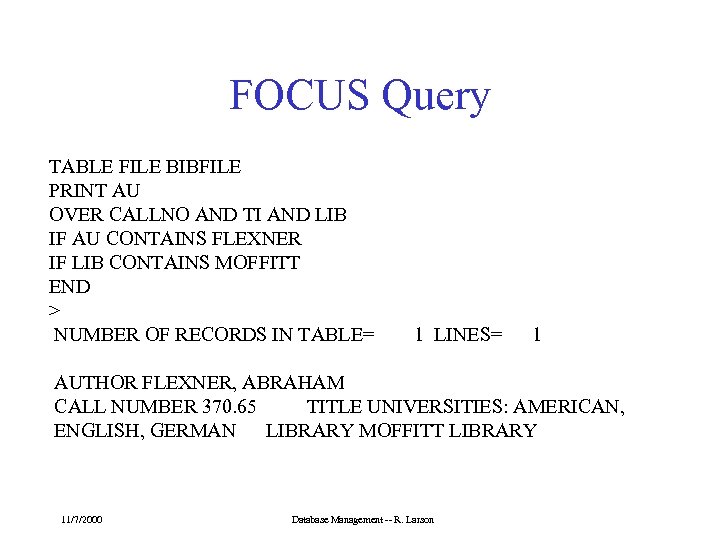
FOCUS Query TABLE FILE BIBFILE PRINT AU OVER CALLNO AND TI AND LIB IF AU CONTAINS FLEXNER IF LIB CONTAINS MOFFITT END > NUMBER OF RECORDS IN TABLE= 1 LINES= 1 AUTHOR FLEXNER, ABRAHAM CALL NUMBER 370. 65 TITLE UNIVERSITIES: AMERICAN, ENGLISH, GERMAN LIBRARY MOFFITT LIBRARY 11/7/2000 Database Management -- R. Larson
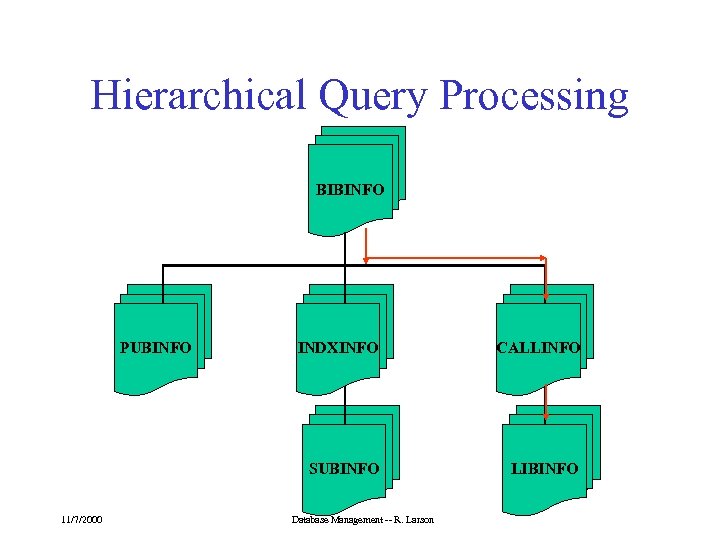
Hierarchical Query Processing BIBINFO PUBINFO CALLINFO SUBINFO 11/7/2000 INDXINFO LIBINFO Database Management -- R. Larson
Network Database Systems • Network DBMS are an evolutionary step from Hierarchical systems. • Hierarchical systems can be considered a subset of Network systems. 11/7/2000 Database Management -- R. Larson
History • Specifications for network systems came from CODASYL (Conference on Data and Systems Languages) -- The same fine folks who brought you COBOL. • The DTBG (Data Base Task Group) was founded in 1965 to specify a “standard language for manipulating records” • The result was a report (published in 1971) 11/7/2000 Database Management -- R. Larson
History • The CODASYL DBTG report contained specifications for: – A DDL - Data Definition Language – A DML - Data Manipulation Language – Inherent in the report was the underlying Network database structure. 11/7/2000 Database Management -- R. Larson
Components of DDL and DML • DDL is used to describe or define: – database records – individual data items – the associations that exist between record types – security – record positioning • The database definition created by the DDL is called the database schema • User views can also be defined in the DDL and are called subschemas 11/7/2000 Database Management -- R. Larson
DDL Continued • DDL is also used by the database designer to define all associations between record types – These associations are called Sets and are sometimes referred to as DTBG Sets. – Sets describe a one to many relationship between two distinct record types. – The record on the “one” side of the set is called the “owner” – The record on the “many” side of the set is called the “member” 11/7/2000 Database Management -- R. Larson
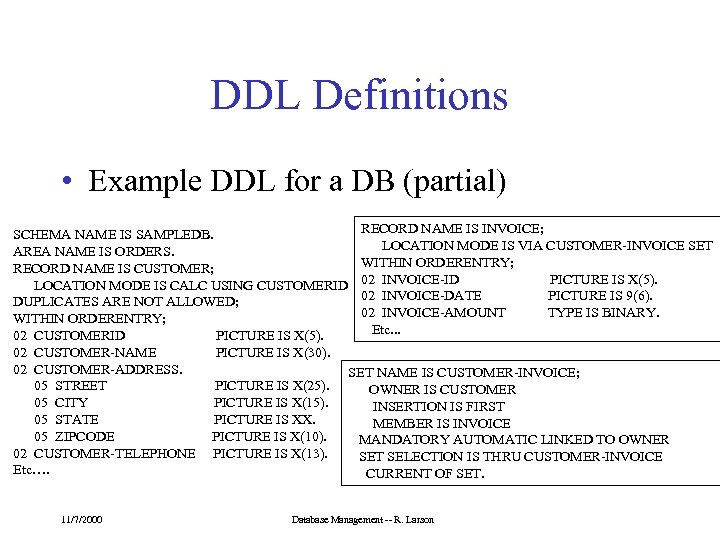
DDL Definitions • Example DDL for a DB (partial) RECORD NAME IS INVOICE; SCHEMA NAME IS SAMPLEDB. LOCATION MODE IS VIA CUSTOMER-INVOICE SET AREA NAME IS ORDERS. WITHIN ORDERENTRY; RECORD NAME IS CUSTOMER; PICTURE IS X(5). LOCATION MODE IS CALC USING CUSTOMERID 02 INVOICE-DATE PICTURE IS 9(6). DUPLICATES ARE NOT ALLOWED; 02 INVOICE-AMOUNT TYPE IS BINARY. WITHIN ORDERENTRY; Etc. . . 02 CUSTOMERID PICTURE IS X(5). 02 CUSTOMER-NAME PICTURE IS X(30). 02 CUSTOMER-ADDRESS. SET NAME IS CUSTOMER-INVOICE; 05 STREET PICTURE IS X(25). OWNER IS CUSTOMER 05 CITY PICTURE IS X(15). INSERTION IS FIRST 05 STATE PICTURE IS XX. MEMBER IS INVOICE 05 ZIPCODE PICTURE IS X(10). MANDATORY AUTOMATIC LINKED TO OWNER 02 CUSTOMER-TELEPHONE PICTURE IS X(13). SET SELECTION IS THRU CUSTOMER-INVOICE Etc…. CURRENT OF SET. 11/7/2000 Database Management -- R. Larson
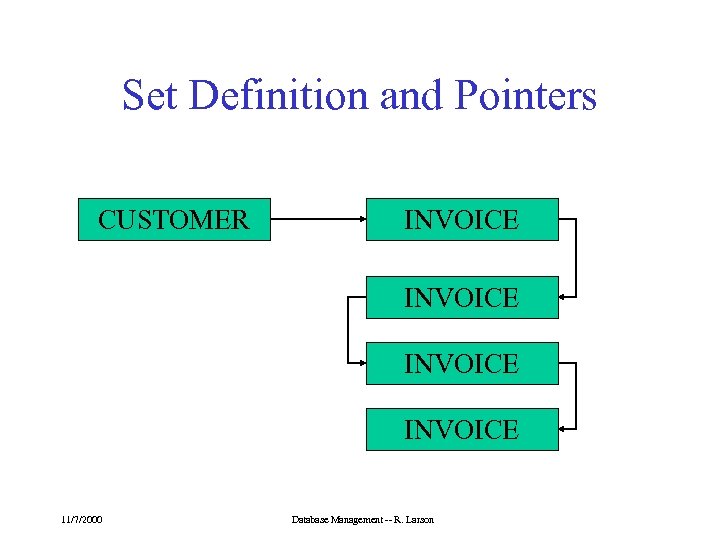
Set Definition and Pointers CUSTOMER INVOICE 11/7/2000 Database Management -- R. Larson
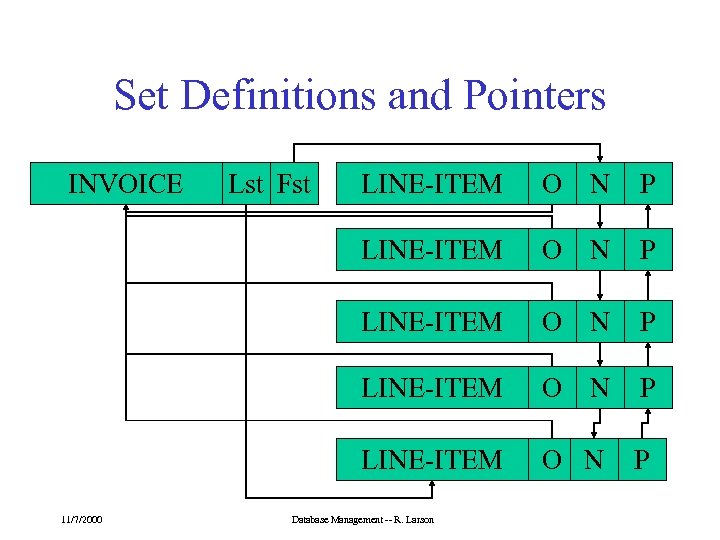
Set Definitions and Pointers INVOICE LINE-ITEM O N P LINE-ITEM 11/7/2000 Lst Fst O N P Database Management -- R. Larson
Object-Oriented DBMS Basic Concepts • Each real-world entity is modeled by an object. Each object is associated with a unique identifier (sometimes call the object ID or OID) 11/7/2000 Database Management -- R. Larson
Object-Oriented DBMS Basic Concepts • Each object has a set of instance attributes (or instance variables) and methods. – The value of an attribute can be an object or set of objects. Thus complex object can be constructed from aggregations of other objects. – The set of attributes of the object and the set of methods represent the object structure and behavior, respectively 11/7/2000 Database Management -- R. Larson
Object-Oriented DBMS Basic Concepts • The attribute values of an object represent the object’s status. – Status is accessed or modified by sending messages to the object to invoke the corresponding methods 11/7/2000 Database Management -- R. Larson
Object-Oriented DBMS Basic Concepts • Objects sharing the same structure and behavior are grouped into classes. – A class represents a template for a set of similar objects. – Each object is an instance of some class. 11/7/2000 Database Management -- R. Larson
Object-Oriented DBMS Basic Concepts • A class can be defined as a specialization of of one or more classes. – A class defined as a specialization is called a subclass and inherits attributes and methods from its superclass(es). 11/7/2000 Database Management -- R. Larson
Object-Oriented DBMS Basic Concepts • An OODBMS is a DBMS that directly supports a model based on the objectoriented paradigm. – Like any DBMS it must provide persistent storage for objects and their descriptions (schema). – The system must also provide a language for schema definition and for manipulation of objects and their schema – It will usually include a query language, indexing capabilities, etc. 11/7/2000 Database Management -- R. Larson
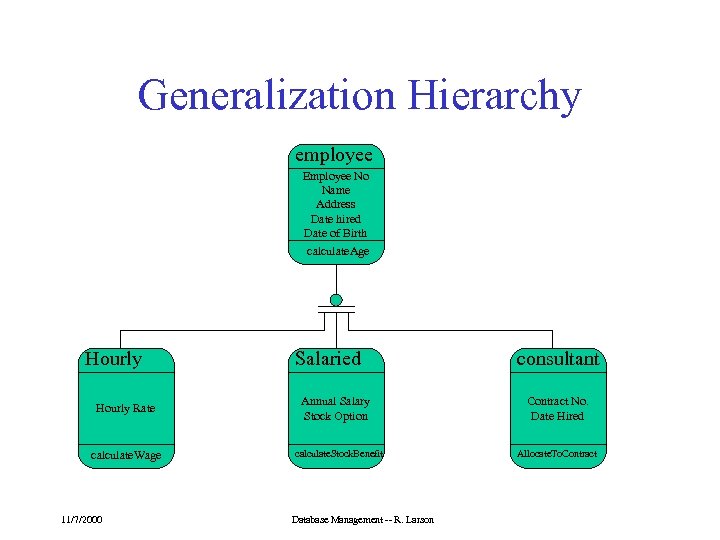
Generalization Hierarchy employee Employee No Name Address Date hired Date of Birth calculate. Age Hourly Rate calculate. Wage 11/7/2000 Salaried Annual Salary Stock Option calculate. Stock. Benefit Database Management -- R. Larson consultant Contract No. Date Hired Allocate. To. Contract
Inverted File DBMS • Usually similar to Hierarchic DBMS in record structure – Support for repeating groups of fields and multiple value fields • All access is via inverted file indexes to DBS specified fields. • Examples: ADABAS DBMS from Software AG -- used in the MELVYL system 11/7/2000 Database Management -- R. Larson
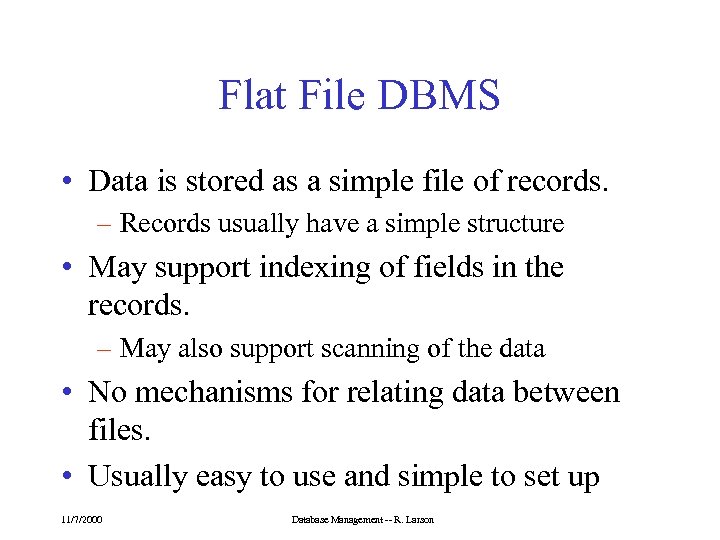
Flat File DBMS • Data is stored as a simple file of records. – Records usually have a simple structure • May support indexing of fields in the records. – May also support scanning of the data • No mechanisms for relating data between files. • Usually easy to use and simple to set up 11/7/2000 Database Management -- R. Larson
Скачать презентацию Network Object-Oriented and Other Database Models University of
1bb26c23eef54d998c99f74955d6ab8a.ppt