 Скачать презентацию Network and Computer Security in the Fermilab Accelerator
eda2529b7aff16ca6d0019c2c4015ba1.ppt
- Количество слайдов: 23



Network and Computer Security in the Fermilab Accelerator Control System Timothy E. Zingelman Control System Cyber-Security Workshop (CS)2/HEP Knoxville, TN October 2007
Agenda I. Overview and Network Layout II. Balancing Risks vs. Usability III. Network Layer Protection IV. OS/Application Layer Protection V. Access Options VI. Future Directions 2
I. Overview • Controls the hardware of the accelerator • A large experimental physics apparatus which is being constantly adjusted and improved • Intrinsically engineered to keep software errors from causing equipment damage • No environmental or life safety systems 3
I. Overview • An inventory of all systems (over 3, 500 in the control system alone) on the network is maintained, including: OS and hardware, location, sysadmin, primary user • Automated notification reports any changes to registered IP and MAC addresses on the network 4
I. Overview • Accelerator configuration is stored 4 times a day, and on demand. This allows return of the accelerator to a known state: – After testing new machine configurations – After replacing or adding new equipment – After scheduled downtime and power outages • Tape backups are done daily and tapes are moved to another area on a regular schedule 5
6
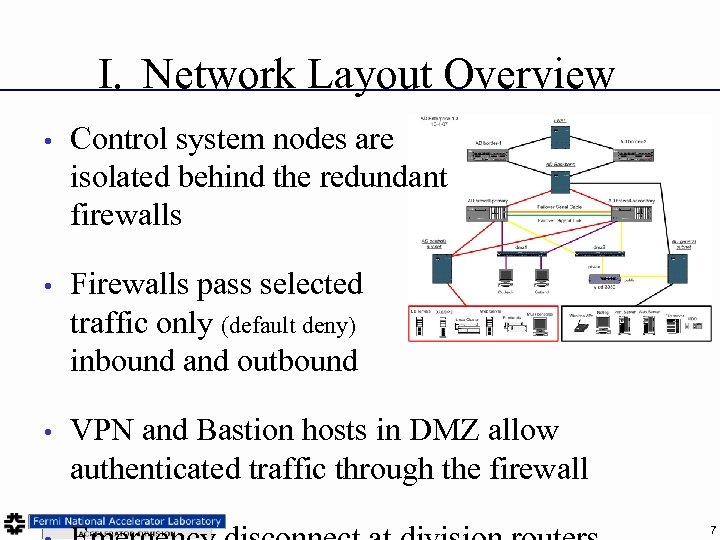
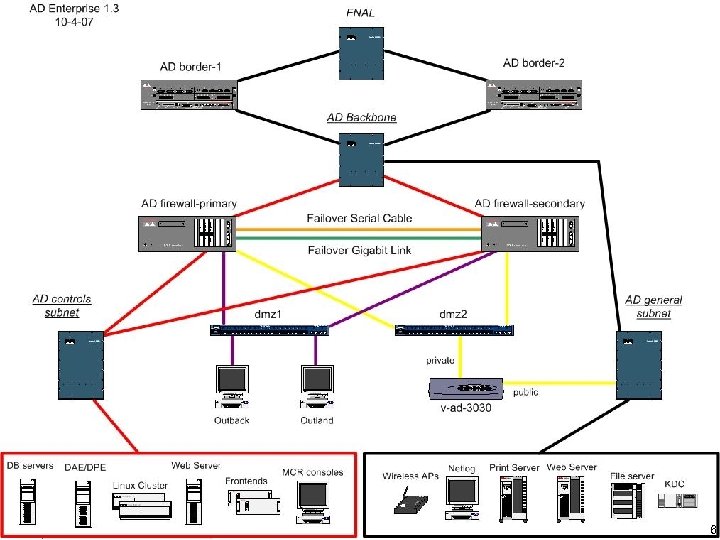
I. Network Layout Overview • Control system nodes are isolated behind the redundant firewalls • Firewalls pass selected traffic only (default deny) inbound and outbound • VPN and Bastion hosts in DMZ allow authenticated traffic through the firewall 7
I. Overview and Network Layout II. Balancing Risks vs. Usability III. Network Layer Protection IV. OS/Application Layer Protection V. Access Options VI. Future Directions 8
II. Balancing Risks vs. Usability • Reducing disruption to operations by cyber threats is important, however, reducing disruption to operations by cyber protections is also very important! • More accelerator downtime due to effects of cyber protection than from cyber attacks 9
II. Cyber Risks • No ‘secret’ information • Equipment designed to be safe at any control setting • Lab is a ‘high profile’, ‘government’ target • So, risks are disruption of operations and embarrassment, not leaks of sensitive data nor fear of equipment damage 10
II. Usability • Accelerator systems are constantly being improved, adjusted and maintained by a large group of Physicists, Engineers, Computer Professionals and others • Accelerator systems are often monitored and problems diagnosed by experts from locations other than the Main Control Room 11
I. Overview and Network Layout II. Balancing Risks vs. Usability III. Network Layer Protection IV. OS/Application Layer Protection V. Access Options VI. Future Directions 12
III. Network Layer Protection • Accelerator Division border disconnect – Emergency disconnect from the world • Border router Access Control Lists – Protect entire Division and PIX firewalls • Redundant Cisco PIX firewalls (outbound) – Traffic allowed to many on-site resources – No email access, No windows remote desktop 13
III. Network Layer Protection • Redundant Cisco PIX Firewalls (inbound) – Full default deny • Offsite access to 5 specific nodes/services • Onsite access to kerberized services (MIT and W 2 K) and a few tightly maintained application services • Accelerator Division hardwired desktop systems access to several more specific protocols • Controls Router Access Control Lists – Isolate controls Vlans from each other 14
I. Overview and Network Layout II. Balancing Risks vs. Usability III. Network Layer Protection IV. OS/Application Layer Protection V. Access Options VI. Future Directions 15
IV. OS/Application Layer Protection • Linux systems use Site auto. YUM service for OS and Applications and Site MIT Kerberos • Windows systems use Division patching services and Site W 2 K Domain, plus Control System Anti-Virus service • Free. BSD and Solaris systems use ‘portaudit’ and vendor email notification – these systems have ‘professional’ administrators 16
I. Overview and Network Layout II. Balancing Risks vs. Usability III. Network Layer Protection IV. OS/Application Layer Protection V. Access Options VI. Future Directions 17
V. Access Options • VPN – Software client, controls ‘key’ & login required – Authenticated & time limited network access – Remote system becomes a ‘Controls’ node – Full inbound and outbound firewall restrictions apply (no ‘split tunnel’) all traffic is ‘inside’ – Still requires further login to get command line access or to start a control system console 18
V. Access Options • Bastion Hosts – Two redundant nodes with minimal services – MIT Kerberized login (or Cryptocard token) – Time limited logins – SSH port forwarding allowed for X 11 and other protocols – NFS mounts of inside disk to allow kerberized FTP access (FTP is otherwise blocked at FW) 19
V. Access Options • Windows Remote Desktop – Terminal server on Division network for email and offsite web access from inside systems – Terminal server on Controls network for access to web and other services inside (scopes, etc) from Onsite network systems – TS nodes disallow file xfer and drag-n-drop – All other inbound/outbound WRD is blocked 20
I. Overview and Network Layout II. Balancing Risks vs. Usability III. Network Layer Protection IV. OS/Application Layer Protection V. Access Options VI. Future Directions 21
VI. Future Directions • Site LDAP service to centralize authentication for non-kerberized services • SSL and KX 509 Client Certificates for some web pages (logbooks, etc. ) • Better integration of Apple OS X systems – Include in MIT Kerberos – Include in anti-virus and auto patching 22
 Скачать презентацию Network and Computer Security in the Fermilab Accelerator
eda2529b7aff16ca6d0019c2c4015ba1.ppt