


 Скачать презентацию national spatial data infrastructure training program Serving Transportation
1fca9b91dd62979eeabf8590e856b5d4.ppt
- Количество слайдов: 56
 national spatial data infrastructure training program Serving Transportation Data Through the NSDI Serving Your Data Via WFS vers. 20070524
 Serving Your Data Via WFS Learning Objectives After completing this Module, the student will be able to Describe three fundamental operations of a Web Feature Service (WFS) Explain several considerations in configuring a WFS system to serve local data as FDS-compliant GML data Use a web browser to examine the capabilities of a WFS over the internet, and retrieve data from it national spatial data infrastructure training program 1
 Serving Your Data Via WFS Primary Topic This Module provides guidance on how to serve your data to the Internet via a Web Feature Service (WFS), using the mapping you’ve created to an FDS-compliant model, as presented in Module 4 There are only two essential notions: convert your data to a form that is consistent with the FDS serve the data through an OGC-compliant Web Feature Service (WFS) national spatial data infrastructure training program 2
 Serving Your Data Via WFS Outline of this Module This Module addresses the following topics: an overview of the Web Feature Service (WFS) and the OGC WFS protocol considerations for automating transformation of your data retrieving and viewing FDS-compliant GML data from a working WFS national spatial data infrastructure training program 3
 Serving Your Data Via WFS Characteristics of the WFS Protocol The WFS protocol, and OGC specifications in general, do NOT constrain: • Data format • Custodial or management policies • Hardware or software platform They DO define: • Lightweight suites of web service operations • Encodings for data transport • Various means for services to describe their contents and capabilities national spatial data infrastructure training program 4
 Serving Your Data Via WFS What Exactly Does a WFS Do? The Web Feature Service (WFS) is simply a wellspecified interface: it provides a known mechanism for interacting with its underlying system The underlying system might be a suite of GIS programs, a simple data handling system, or any other system that holds or can distribute geospatial data national spatial data infrastructure training program 5
 Serving Your Data Via WFS How WFS Get The Data They Serve The WFS specification describes only the interface that a compliant web service presents on the Internet The way that data are stored or acquired, and the additional capabilities provided by the underlying system, are completely independent of the WFS interface itself The WFS server may directly retrieve the data it serves from a database system, or it may accept data via a functional or object-oriented interface, a remote procedure call, or some other programmatic means national spatial data infrastructure training program 6
 Serving Your Data Via WFS and Other Services WFS is one of several data service specifications published by the OGC This document describes WFS version 1. 1. 0 The specification document may be found at http: //www. opengeospatial. org/standards/wfs OGC services include the Web Map Service (WMS) and the Web Coverage Service (WCS) as well as the WFS These services share several characteristics, including the “W*S” pattern of interaction between client and server national spatial data infrastructure training program 7
 Serving Your Data Via WFS OGC Data Services (“W*S”) Pattern The OGC data services follow a typical pattern of interaction with client software: Client asks server, “what data and operations do you provide? ” via the Get. Capabilities operation Server responds with a Capabilities document that describes what it has Client may parse the Capabilities, feed available choices to the user interface or other programmatic components Client issues requests for given data type (e. g. , layer, feature, bands of a gridded coverage) within the bounding box of interest national spatial data infrastructure training program 8
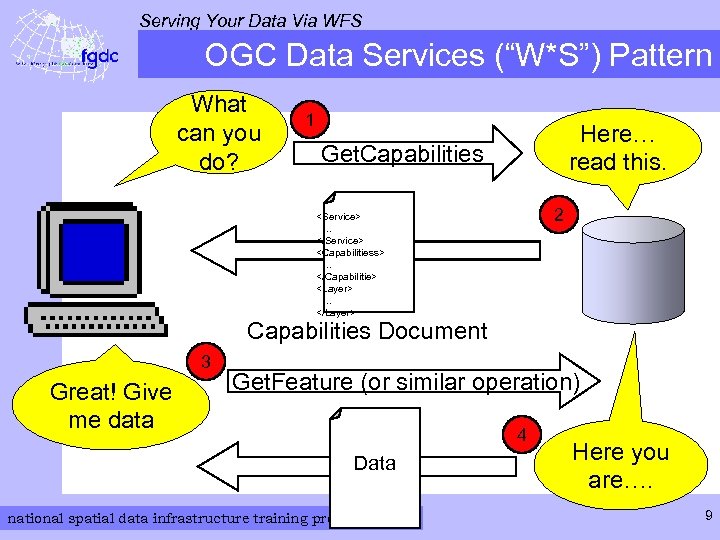 Serving Your Data Via WFS OGC Data Services (“W*S”) Pattern What can you do? 1 Here… read this. Get. Capabilities 2
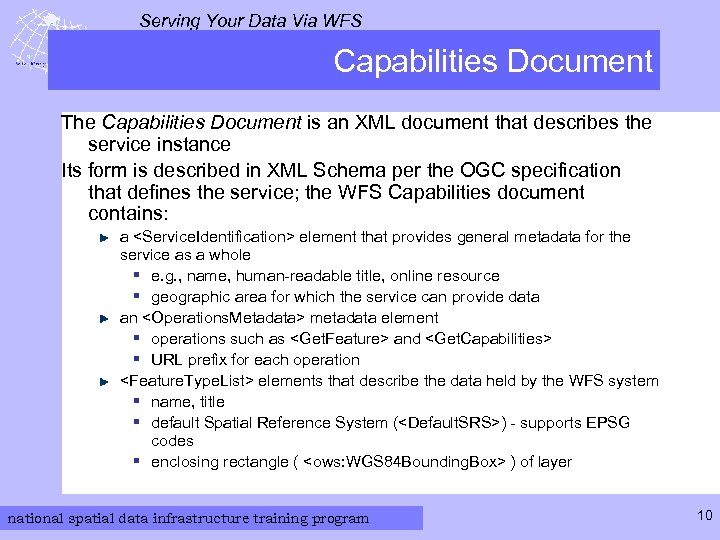 Serving Your Data Via WFS Capabilities Document The Capabilities Document is an XML document that describes the service instance Its form is described in XML Schema per the OGC specification that defines the service; the WFS Capabilities document contains: a
 Serving Your Data Via WFS Web Feature Server Operations Basic WFS operations for data retrieval: Get. Capabilities Describe. Feature. Type Get. Feature Transactional WFS also has operations that support remote update of its datastore: Transaction Lock. Feature national spatial data infrastructure training program 11
 Serving Your Data Via WFS Two Kinds of WFS Requests WFS can be queried by two mechanisms, both using the HTTP protocol One involves sending a request document to the server via an HTTP POST message The other sends an HTTP GET message, with the parameters specified in a Key-Value Pair (KVP) format national spatial data infrastructure training program 12
 Serving Your Data Via WFS One Kind of WFS Response The server’s response depends only on the content of the request, not the form of the HTTP message The response is a GML document whose form and content are specified by the WFS Standard KML, JSON, and other encodings may also be available national spatial data infrastructure training program 13
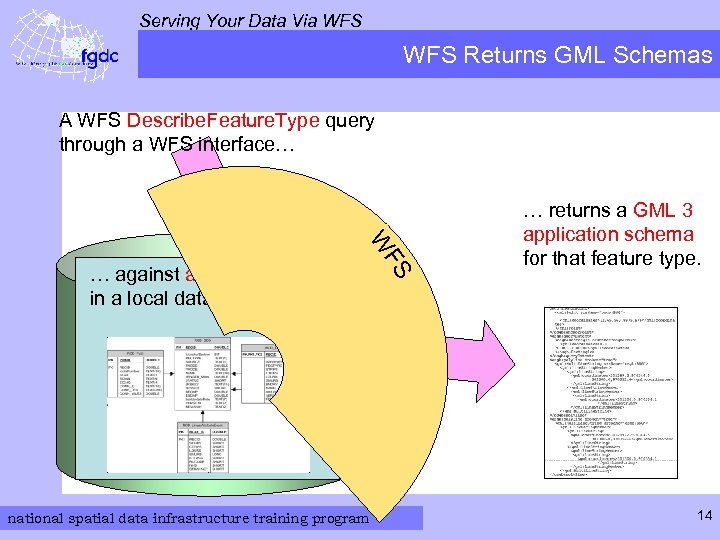 Serving Your Data Via WFS Returns GML Schemas A WFS Describe. Feature. Type query through a WFS interface… national spatial data infrastructure training program FS W … against a feature type in a local data model … … returns a GML 3 application schema for that feature type. 14
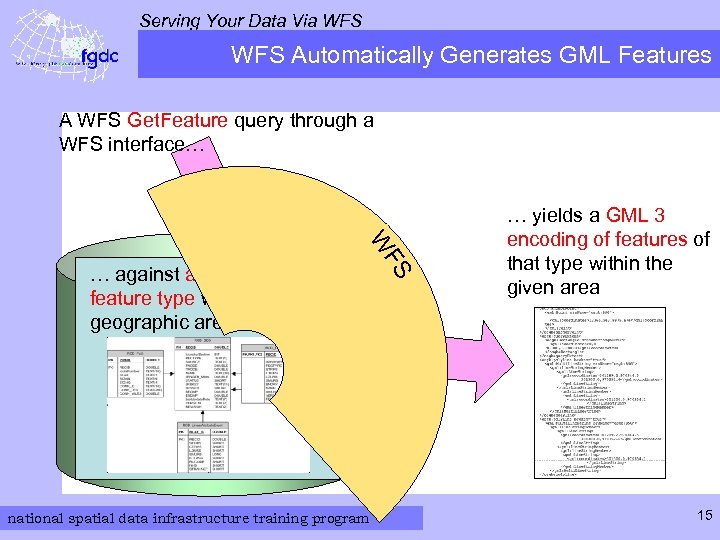 Serving Your Data Via WFS Automatically Generates GML Features A WFS Get. Feature query through a WFS interface… national spatial data infrastructure training program FS W … against a particular feature type within a given geographic area … yields a GML 3 encoding of features of that type within the given area 15
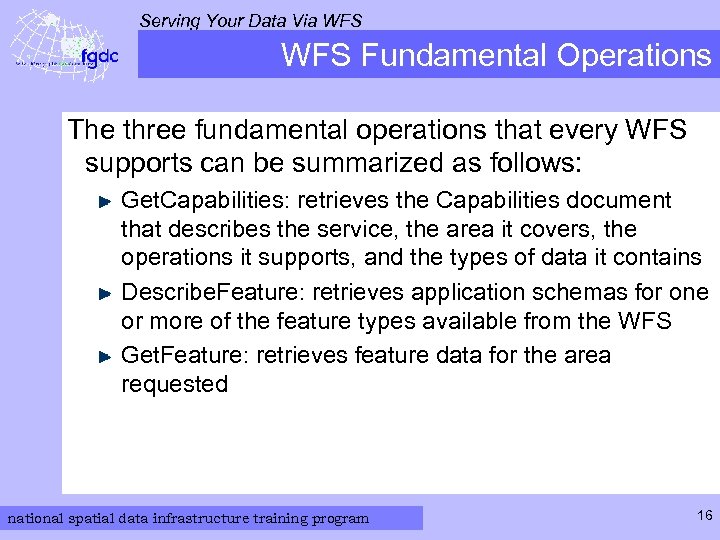 Serving Your Data Via WFS Fundamental Operations The three fundamental operations that every WFS supports can be summarized as follows: Get. Capabilities: retrieves the Capabilities document that describes the service, the area it covers, the operations it supports, and the types of data it contains Describe. Feature: retrieves application schemas for one or more of the feature types available from the WFS Get. Feature: retrieves feature data for the area requested national spatial data infrastructure training program 16
 Serving Your Data Via WFS Query Examples Using HTTP POST The next three slides depict these three operations, supported by all WFS servers, with requests submitted via HTTP POST national spatial data infrastructure training program 17
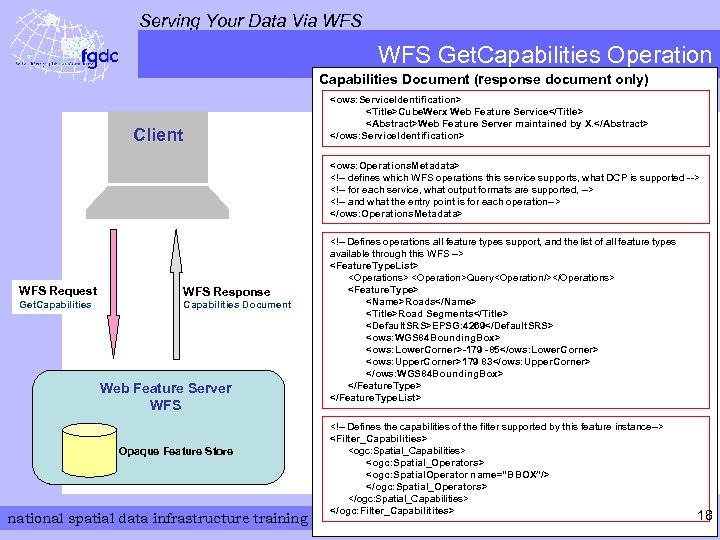 Serving Your Data Via WFS Get. Capabilities Operation Capabilities Document (response document only)
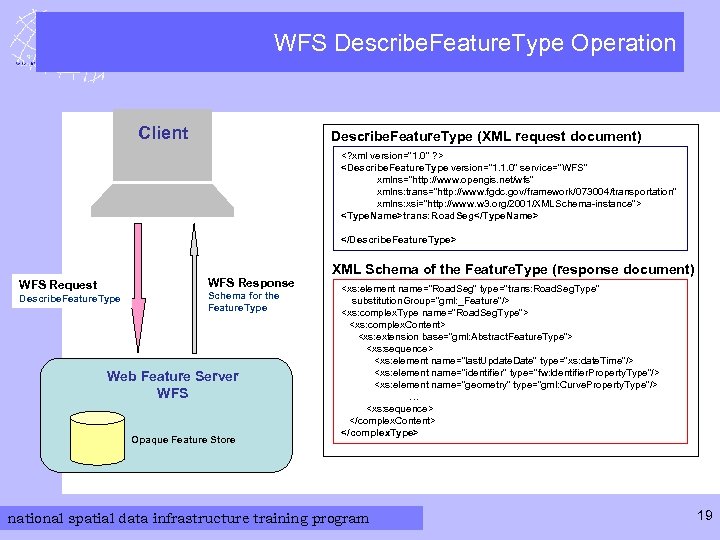 Serving Your Data Via WFS Describe. Feature. Type Operation Client Describe. Feature. Type (XML request document)
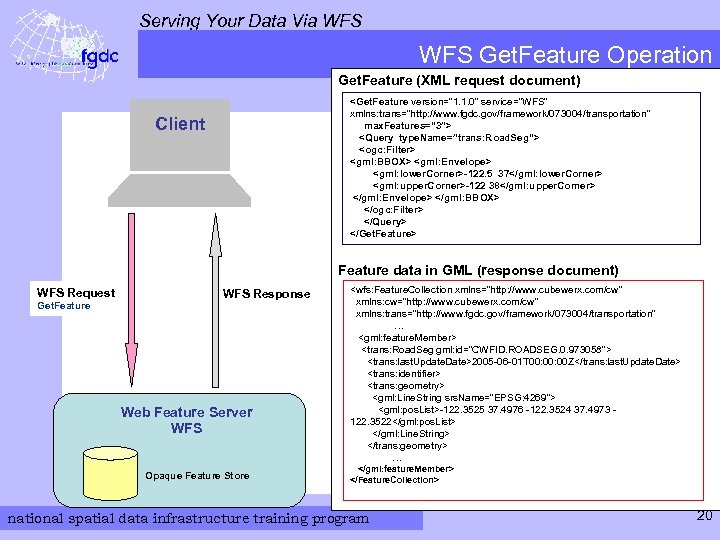 Serving Your Data Via WFS Get. Feature Operation Get. Feature (XML request document)
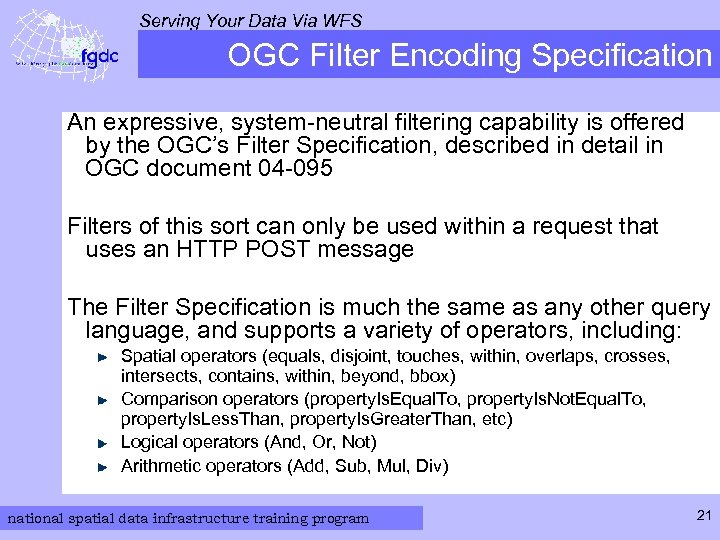 Serving Your Data Via WFS OGC Filter Encoding Specification An expressive, system-neutral filtering capability is offered by the OGC’s Filter Specification, described in detail in OGC document 04 -095 Filters of this sort can only be used within a request that uses an HTTP POST message The Filter Specification is much the same as any other query language, and supports a variety of operators, including: Spatial operators (equals, disjoint, touches, within, overlaps, crosses, intersects, contains, within, beyond, bbox) Comparison operators (property. Is. Equal. To, property. Is. Not. Equal. To, property. Is. Less. Than, property. Is. Greater. Than, etc) Logical operators (And, Or, Not) Arithmetic operators (Add, Sub, Mul, Div) national spatial data infrastructure training program 21
 Serving Your Data Via WFS Queries Using HTTP GET The WFS interface provides for queries that require only a single command line encoded within the URL for an HTTP GET Queries of this type take the form of a string of Key. Value Pairs (KVP), i. e. an ampersand-separated list of parameter names and their values, as is typical for cgi-style web interfaces A web browser is all that is needed to execute such queries national spatial data infrastructure training program 22
 Serving Your Data Via WFS KVP-Encoded Get. Capabilities Request The following KVP-encoded Get. Capabilities request returns a Capabilities document for the USGS WFS that provides the agency’s Framework Data service http: //frameworkwfs. usgs. gov/framework/wfs. cgi? datastore=Framewor k&service=WFS&version=1. 1. 0&request=Get. Capabilities Note the parameters in the KVP-encoded section “datastore” is an implementation-specific parameter, and should be considered part of the base URL “service” and “version” are standard parameters for any WFS, or in fact any of the W*S services “request” is also a part of every KVP-encoded W*S request in this case, the operation requested is “Get. Capabilities” national spatial data infrastructure training program 23
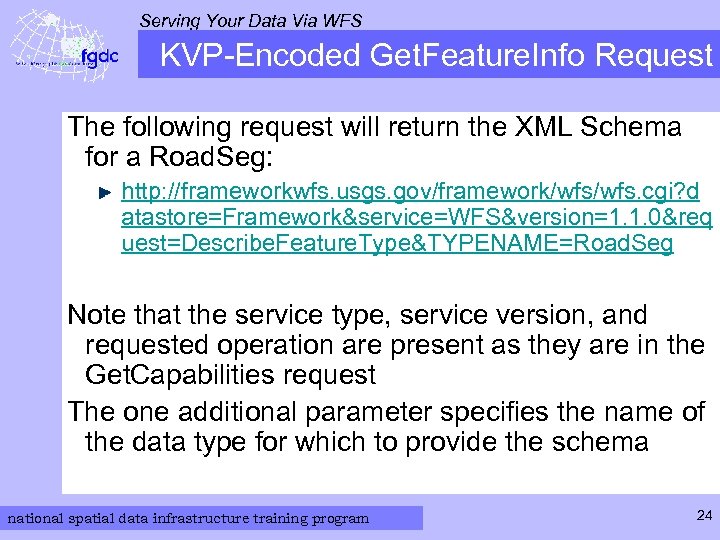 Serving Your Data Via WFS KVP-Encoded Get. Feature. Info Request The following request will return the XML Schema for a Road. Seg: http: //frameworkwfs. usgs. gov/framework/wfs. cgi? d atastore=Framework&service=WFS&version=1. 1. 0&req uest=Describe. Feature. Type&TYPENAME=Road. Seg Note that the service type, service version, and requested operation are present as they are in the Get. Capabilities request The one additional parameter specifies the name of the data type for which to provide the schema national spatial data infrastructure training program 24
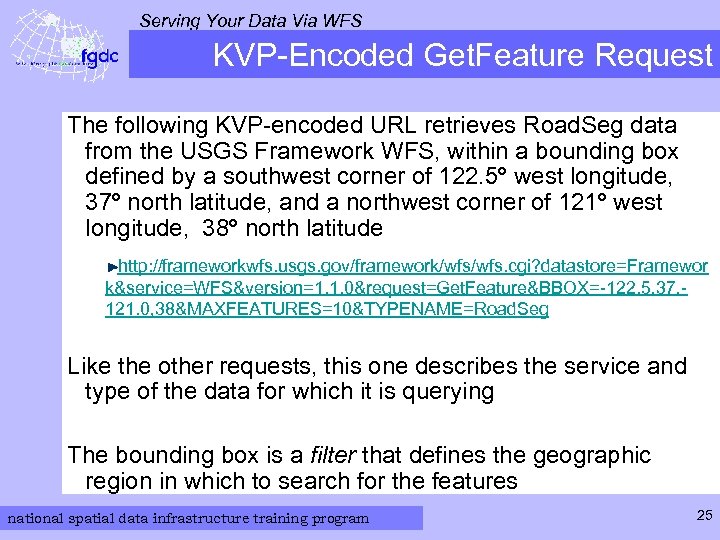 Serving Your Data Via WFS KVP-Encoded Get. Feature Request The following KVP-encoded URL retrieves Road. Seg data from the USGS Framework WFS, within a bounding box defined by a southwest corner of 122. 5º west longitude, 37º north latitude, and a northwest corner of 121º west longitude, 38º north latitude http: //frameworkwfs. usgs. gov/framework/wfs. cgi? datastore=Framewor k&service=WFS&version=1. 1. 0&request=Get. Feature&BBOX=-122. 5, 37, 121. 0, 38&MAXFEATURES=10&TYPENAME=Road. Seg Like the other requests, this one describes the service and type of the data for which it is querying The bounding box is a filter that defines the geographic region in which to search for the features national spatial data infrastructure training program 25
 national spatial data infrastructure training program Your Data and WFS vers. 20070524
 Serving Your Data Via WFS Recall: How WFS Get Their Data As noted earlier: The WFS specification describes only the interface that a compliant web service presents on the Internet The way that data are stored or acquired, and the additional capabilities provided by the underlying system, are completely independent of the WFS interface itself The WFS server may directly retrieve the data it serves from a database system, or it may accept data via a functional or object-oriented interface, a remote procedure call, or some other programmatic means national spatial data infrastructure training program 27
 Serving Your Data Via WFS Data Harmonization and the WFS In Module 4, you learned how to develop a mapping of your data model to an information model that is compatible with the FDS Transportation Model To use this mapping in practical installations, an appropriate Transformation Utility must be implemented in software to apply the mapping to an automated transformation process The Transformation Utility accepts (or retrieves) input data that conform to your local Transportation Model, and delivers the equivalent FDS-compliant data to a WFS, via whatever interface the WFS system provides national spatial data infrastructure training program 28
 Serving Your Data Via WFS Data Transformation Utility It is possible that the WFS system you use provides its own utilities or programming environments for data transformation If a separate transformation utility is required, it can be written in essentially any programming language. Popular choices include: C: a traditional compiled language C++: based upon C, adds object-oriented capabilities Java: a semicompiled object-oriented language Perl: a scripting language frequently used for text processing Python: an object-oriented scripting language Ruby: an object-oriented scripting language with specializations for use with web services (Ruby on Rails) XSLT: explicitly designed to facilitate conversions between models national spatial data infrastructure training program 29
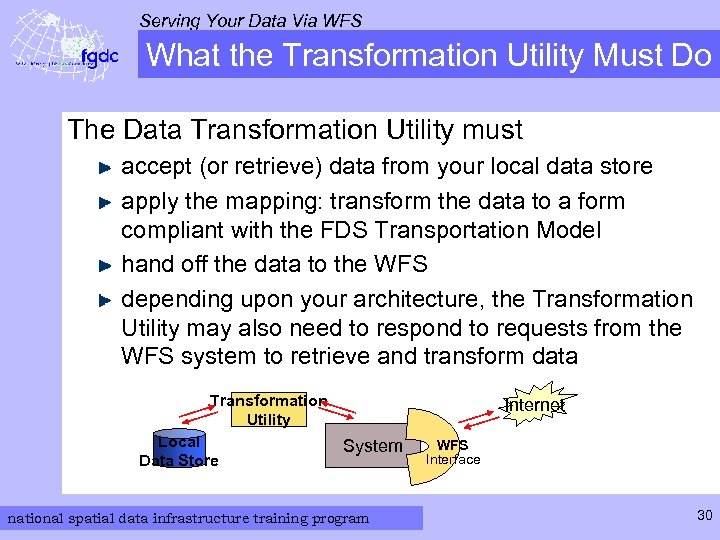 Serving Your Data Via WFS What the Transformation Utility Must Do The Data Transformation Utility must accept (or retrieve) data from your local data store apply the mapping: transform the data to a form compliant with the FDS Transportation Model hand off the data to the WFS depending upon your architecture, the Transformation Utility may also need to respond to requests from the WFS system to retrieve and transform data Transformation Utility Local Data Store Internet System national spatial data infrastructure training program WFS Interface 30
 Serving Your Data Via WFS Form of the Transformation Utility The transformation utility may take many forms, including: a script that runs in the context of your Geographic Information System, and performs an appropriate transformation as data are retrieved an external script or compiled program called as a function by the WFS system - uses a vendor-specific library to pass data back and forth an external process that runs asynchronously in coordination with the WFS - communicates via some interprocess channel (e. g. , pipes, messaging, remote procedure call…), also possibly using a vendorsupplied library an independent application that converts the entire native data store and transfers it to an independent, FDS-compliant data store - runs updates on demand, or is programmed to run at regular intervals The means by which the Transformation Utility passes data to the WFS depends upon the interfaces that your WFS system provides, and the time at which you want the data conversion to be done national spatial data infrastructure training program 31
 Serving Your Data Via WFS Example Configurations The following three slides illustrate some of the possibilities for configuring your Transformation Utility in the context of your data storage system and your WFS system national spatial data infrastructure training program 32
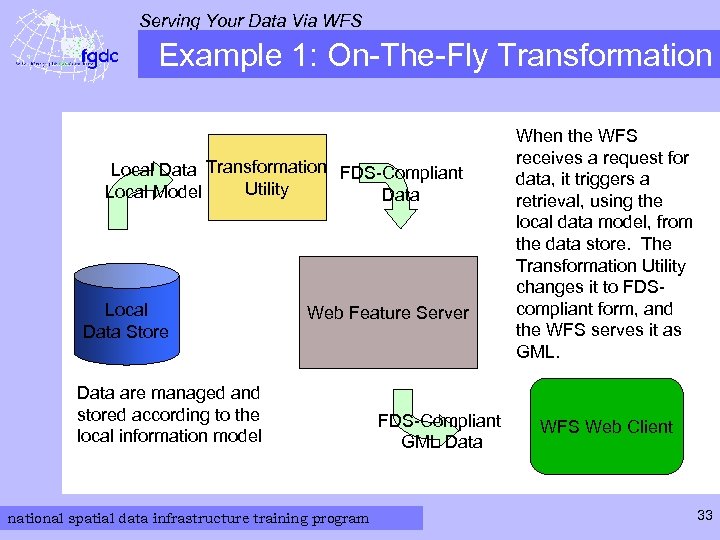 Serving Your Data Via WFS Example 1: On-The-Fly Transformation Local Data Transformation FDS-Compliant Utility Local Model Data Local Data Store Web Feature Server Data are managed and stored according to the local information model national spatial data infrastructure training program FDS-Compliant GML Data When the WFS receives a request for data, it triggers a retrieval, using the local data model, from the data store. The Transformation Utility changes it to FDScompliant form, and the WFS serves it as GML. WFS Web Client 33
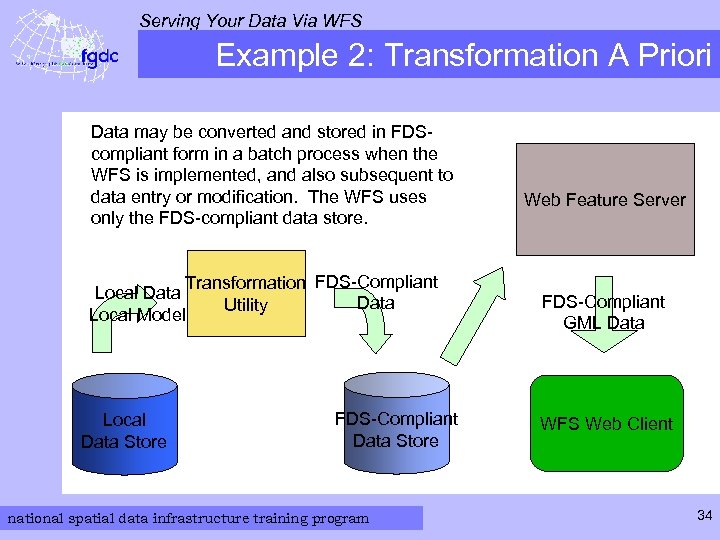 Serving Your Data Via WFS Example 2: Transformation A Priori Data may be converted and stored in FDScompliant form in a batch process when the WFS is implemented, and also subsequent to data entry or modification. The WFS uses only the FDS-compliant data store. Transformation FDS-Compliant Local Data Utility Local Model Local Data Store FDS-Compliant Data Store national spatial data infrastructure training program Web Feature Server FDS-Compliant GML Data WFS Web Client 34
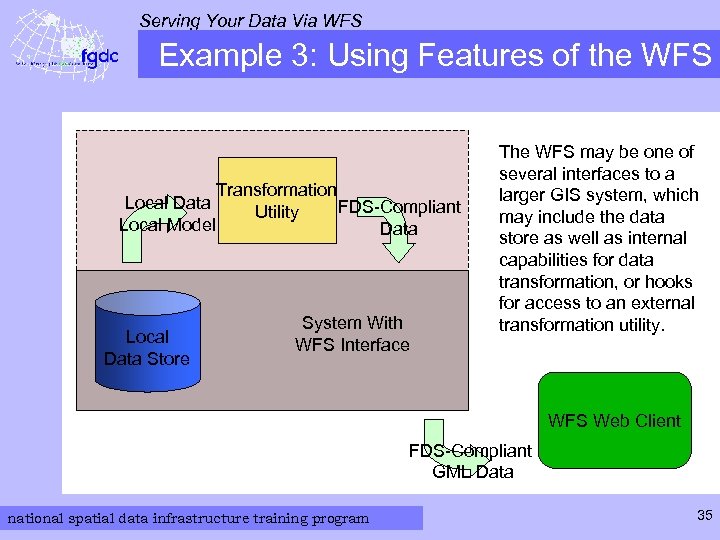 Serving Your Data Via WFS Example 3: Using Features of the WFS Transformation Local Data FDS-Compliant Utility Local Model Data Local Data Store System With WFS Interface The WFS may be one of several interfaces to a larger GIS system, which may include the data store as well as internal capabilities for data transformation, or hooks for access to an external transformation utility. WFS Web Client FDS-Compliant GML Data national spatial data infrastructure training program 35
 Serving Your Data Via WFS Other Strategies There are many ways to structure a system that converts your local data to FDS-compliant data, and presents a WFS interface to the web The foregoing examples are very general possibilities, and there are others The ultimate decision depends upon what systems and tools you already have as much as on the new features you wish to implement national spatial data infrastructure training program 36
 Serving Your Data Via WFS RDBMS and Object Data Stores Among the many types of data stores used by GIS systems, RDBMS and object data stores are among the more common The information model you use to transfer data, or to store transformed data, should mirror the organization of the Tables in the FDS transportation standard documents If your system uses an RDBMS to store the data, you will typically wish to create a table for each data type, with a column for each attribute, precisely as in the FDS documents If your system uses an object data model, it generally makes sense to create a class for each feature type, and store the features’ attributes as properties (data members, instance variables, …) of the class The details, as always, depend upon the particular requirements, capabilities, and programming interfaces of your system national spatial data infrastructure training program 37
 Serving Your Data Via WFS Summary: Considerations for WFS Summary of considerations for implementing WFS for your transportation data: what WFS product to use for your system? § built into existing GIS / Transportation Data System? § external product? § ( listings of OGC-compliant products, including WFS, may be found at http: //www. opengeospatial. org/resource/products ) is a Transformation Utility required? (or is your data model already FDS -compliant? ) translate data a priori or on-the-fly? for a priori translation: what storage solution to use for transformed data? what technology to use for implementing the Transformation Utility? § is support built into your GIS system? what are the detailed interface and functional requirements for your Transformation Utility? national spatial data infrastructure training program 38
 Serving Your Data Via WFS The Data Transformation Process The data transformation process itself can be programmed using the same paradigm as for mapping your local information model to the FDS Transportation Model Recall from Module 4 that there are three cases to consider: perfect matches tolerable matches semantic mismatches national spatial data infrastructure training program 39
 Serving Your Data Via WFS Transforming Perfect Matches Perfect semantic matches between your data elements and components of the FDS Transportation Model should be the simplest to transform in software A straightforward way to accomplish this in code: define and instantiate the target structure or object (representing the FDS model) using the structures, interfaces, and libraries or tools (if any) for your WFS system then assign the value of each attribute from the local data entity to the corresponding attribute in the target (FDS compliant) data entity national spatial data infrastructure training program 40
 Serving Your Data Via WFS Transforming Tolerable Matches “Tolerable” matches should also be straightforward to program The process is similar to the case for perfect semantic matches: defining the target structures or objects assign values to them from the local datastore It may also be desirable to add new information, such as an annotation, to the target object national spatial data infrastructure training program 41
 Serving Your Data Via WFS Transforming Semantic Mismatches Entities that do not map directly to any object within the FDS Transportation model require more programming The same fundamental strategy applies nonetheless: 1. define the target object or structure using the tools and paradigms of the WFS system 2. assign values one by one to the attributes of the target structure The assignment step may require computation that implements the details of your data mapping 42 national spatial data infrastructure training program
 Serving Your Data Via WFS Recall: The WFS Generates GML Unless you are creating your own WFS capability, it is unlikely that you will need to convert your data to GML: that is what the WFS does national spatial data infrastructure training program 43
 Serving Your Data Via WFS Exercises The rest of this material provides three exercises based on the KVP-encoded WFS requests discussed earlier in this module There is also a link to more information about using the Web Feature Service These exercises demonstrate a process that you can use to exercise your own WFS once it is configured and populated with the standardcompliant form of your data national spatial data infrastructure training program 44
 Serving Your Data Via WFS Exercise: Get a Capabilities Document Retrieve the Capabilities Document from a working WFS server: Access the URL of the USGS Framework WFS § http: //frameworkwfs. usgs. gov/framework/wfs. cgi? datastore =Framework&service=WFS&version=1. 1. 0&request=Get. Capa bilities View the result in your web browser The browser may interpret the XML in the document as markup, and render it incorrectly To see the full XML, select the “View Source” option in your browser Note the sections of the document that describe the Service, The Operations it supports, and the Feature Types it contains national spatial data infrastructure training program 45
 Serving Your Data Via WFS Contents of Capabilities Document - 1 The Capabilities Document Contains several major sections, listed on this and the next two slides: The WFS_Capabilities element contains all of the others represents the entire document Service. Identification and Service. Provider sections identify name and characteristics of the service identify and provide contact information for the organization running the service national spatial data infrastructure training program 46
 Serving Your Data Via WFS Contents of Capabilities Document - 2 Operations. Metadata section lists all the operations performed by this service provides base URL, parameter names, and valid parameter values for each operation this information can be used to formulate requests for the operation * note that Road. Seg is a valid parameter for Type. Name in the Describe. Feature operation Feature. Type. List a listing of feature types available from this service provides a geographic bounding box for each type contains all instances of the given feature type * note that Road. Seg is one of the Feature. Types national spatial data infrastructure training program 47
 Serving Your Data Via WFS Contents of Capabilities Document - 3 Supports. GMLObject. Type. List lists the GML types and profiles supported by this service Filter_Capabilities shows filtering (selection) options supported by this service national spatial data infrastructure training program 48
 Serving Your Data Via WFS Exercise: Describe. Feature. Type The following URL will return the XML Schema for a Road. Seg: http: //frameworkwfs. usgs. gov/framework/wfs. cgi? d atastore=Framework&service=WFS&version=1. 1. 0&req uest=Describe. Feature. Type&TYPENAME=Road. Seg Click on the link, view source in your browser Compare the GML definition of the Road. Seg to the tabular definition in FDS 7 c, Table 1 national spatial data infrastructure training program 49
 Serving Your Data Via WFS Contents of Feature Type Document - 1 The Feature Type document returned by the query contains the application schema for Road. Seg note that the structure it contains is an “xs: schema” - an XML schema object The first portions of the structure define namespaces and so forth, and then state that Road. Seg is an extension of the GML Abstract. Feature. Type Each object in the center portion of the document corresponds to a line in the description of Road. Seg in FDS 7 c, Table 1 national spatial data infrastructure training program 50
 Serving Your Data Via WFS Contents of Feature Type Document - 2 As an exercise, find the XML elements that correspond to each item in the section of FDS 7 c Table 1 that describes Road. Seg Note that in the XML document, the optional elements have a “minoccurs” value of 0; the mandatory elements do not national spatial data infrastructure training program 51
 Serving Your Data Via WFS Exercise: Get Feature Data From a WFS Click on the following URL to acquire feature data: http: //frameworkwfs. usgs. gov/framework/wfs. cgi? datastore=Framewor k&service=WFS&version=1. 1. 0&request=Get. Feature&BBOX=-122. 5, 37, 121. 0, 38&MAXFEATURES=10&TYPENAME=Road. Seg …. and select your browser’s “View Source” option as before Examine the contents of the GML instance document returned national spatial data infrastructure training program 52
 Serving Your Data Via WFS Contents of Feature Data Document Note that the structure contained by the document is a GML Feature. Collection Note the various parts of the Feature. Collection: the XML header, namespace, and schemalocation definitions the spatial envelope - a bounding box - within which all the features contained in the collection are located the list of features - in this case Road Segments - included in the Feature. Collection Compare the attributes for each object with the definition for Road. Seg in FDS 7 c, Table 1 are all the mandatory attributes present? which optional ones are present? note the substantial number of Extended Attribute elements included in the representation of each Road Segment national spatial data infrastructure training program 53
 Serving Your Data Via WFS Additional Information on Using WFS There is an excellent tutorial on using WFS at http: //www. ogcnetwork. net/wfstutorial The tutorial uses the same server as the previous exercises national spatial data infrastructure training program 54
 Serving Your Data Via WFS Conclusion Having completed this Module, you should have some understanding of how a WFS works several approaches to configuring a WFS for serving your data in standard-compliant form how to access the capabilities and contents of a WFS This Module, combined with Modules 1 through 4, should give you the basic information necessary to formulate a plan for serving your data, in FDScompliant form, through the National Spatial Data Infrastructure national spatial data infrastructure training program 55