 Скачать презентацию My Life Bits project Jim Gemmell Gordon Bell
8d15434937f9218dcf53834e0b0fd4bd.ppt
- Количество слайдов: 20



My. Life. Bits project Jim Gemmell, Gordon Bell, and Roger Lueder, Microsoft Research, 2006 Min Hong
Contents • • Introduction Related works Guiding principles Implementation Future works Conclusion Discussion
Introduction • When your house burns down, given only one thing that could be saved • Which one would you grab from your house?
Introduction • What is My. Life. Bits project? • In 2001 – A system for storing all of one’s digital media – Documents, images, sounds, and videos • In 2006 – Real time capture • Conversations, meetings, sensor readings, health monitors, and computer activity – SQL-based storage platform
Introduction • Blueprint – In 1945, Vannevar Bush, “Memex” – “A device in which an individual stores all his books, records, and communications, and which is mechanized so that it may be consulted with exceeding speed and flexibility. It is an enlarged intimate supplement to his memory. ”
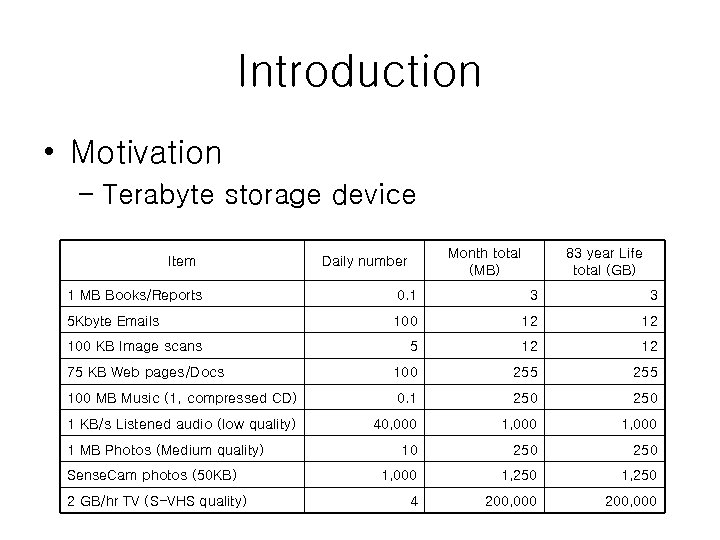
Introduction • Motivation – Terabyte storage device Item Month total (MB) Daily number 83 year Life total (GB) 1 MB Books/Reports 0. 1 3 3 5 Kbyte Emails 100 12 12 5 12 12 75 KB Web pages/Docs 100 255 100 MB Music (1, compressed CD) 0. 1 250 1 KB/s Listened audio (low quality) 40, 000 1, 000 10 250 1, 000 1, 250 4 200, 000 100 KB Image scans 1 MB Photos (Medium quality) Sense. Cam photos (50 KB) 2 GB/hr TV (S-VHS quality)
Related works • Sense. Cam – My. Life. Bits that enable management of Sense. Cam photos and data – It is attached via a neck strap or clip to the front of the user's body – 18 bytes/sec → 760 KB in 12 hours of operation → 128 MB flash memory (2000 images)
Related works • Haystack – software for organizing and retrieving personal information – Client and server architecture
Related works • Google desktop – Retrieving local data like a web site – It support Google’s search engine – Most powerful competitor of My. Life. Bits project
Guiding principles • Collections and search must replace hierarchy for organization • Items may belong in more than one category – Ex) my favorite picture of my sister’s 14 th birthday • Existing file system force the user to place all files in hierarchy • An object to be assigned to zero or collections – A DAG (Directory Acyclic Graph) – Excellent querying capability
Guiding principles • Many visualizations should be supported • There are more than one way of looking at things • Computer visualizations have insight into large datasets • Multiple visualization increase our understanding and insight of our media • Icon, thumbnail, graph, and slideshows
Guiding principles • Annotations are critical to non-text media and must be made easy – Images, video, and audio • It has little value if it is not annotated by any text • It may be difficult to remember what it is • Story are the most valuable form of annotation – Ex) slide shows, photo albums, video highlight reels
Guiding principles • Authoring should be via transclusion • Transclusion – Two-way links between the included and including media – Ex) Web page • A link indicates that one resource annotates another • The links are critical because they let the user find context and commentary
Implementation • My. Life. Bits is a database of resources and links • System overview
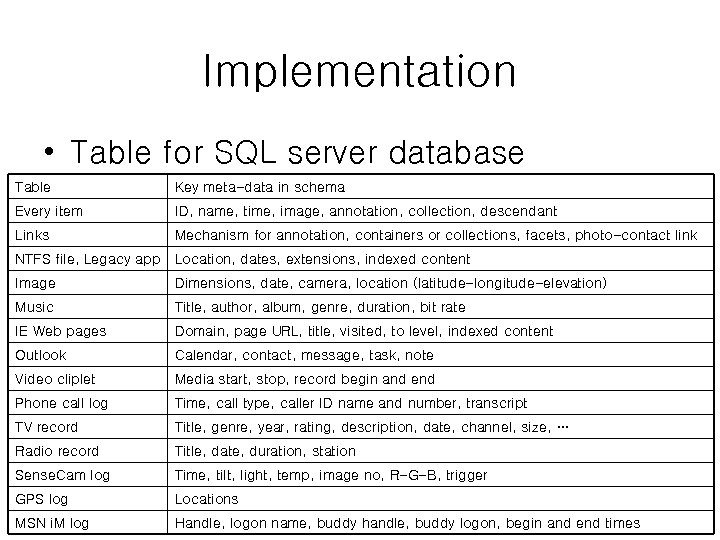
Implementation • Table for SQL server database Table Key meta-data in schema Every item ID, name, time, image, annotation, collection, descendant Links Mechanism for annotation, containers or collections, facets, photo-contact link NTFS file, Legacy app Location, dates, extensions, indexed content Image Dimensions, date, camera, location (latitude-longitude-elevation) Music Title, author, album, genre, duration, bit rate IE Web pages Domain, page URL, title, visited, to level, indexed content Outlook Calendar, contact, message, task, note Video cliplet Media start, stop, record begin and end Phone call log Time, call type, caller ID name and number, transcript TV record Title, genre, year, rating, description, date, channel, size, … Radio record Title, date, duration, station Sense. Cam log Time, tilt, light, temp, image no, R-G-B, trigger GPS log Locations MSN i. M log Handle, logon name, buddy handle, buddy logon, begin and end times
Implementation • Annotation – Easy way to annotation – Voice annotation / automatic annotation • Query result – Time interval – Including location information
Future works • Insuring that a memex lives forever • Automatic recognition of speakers, speech, sound, photos, and video • Control of the bits • Storing personal health information in memex • Memex as a service that would provide for community
Conclusion • My. Life. Bits stores all of one’s digital data • They focus on scaling and performance issues • My. Life. Bits will serve as a platform for research as they continue to study the many issues related to personal lifetime storage
Discussion • Privacy – Lee wisdom’s Accident – Britney Jean Spear’s scandal video – nomination hearing • Taking Information Camera – Camera integrates the image and the object information
Reference • http: //research. microsoft. com/barc/Media. Presence/ My. Life. Bits. aspx • Jim Gemmell, Gordon Bell and Roger Lueder, My. Life. Bits: a personal database for everything, Communications of the ACM, vol. 49, Issue 1, pp. 8895, Jan 2006. • Gemmell, Jim, Aris, Aleks, and Lueder, Roger, Telling Stories With My. Life. Bits, ICME 2005, July 6 -9 2005. • Gemmell, Jim, Lueder, Roger, and Bell, Gordon, The My. Life. Bits Lifetime Store, ACM SIGMM 2003 Workshop on Experiential Telepresence (ETP 2003), November 7, 2003.
Скачать презентацию My Life Bits project Jim Gemmell Gordon Bell
8d15434937f9218dcf53834e0b0fd4bd.ppt