


 Скачать презентацию Mutation Testing The software is first tested
51aa2d61e230be250f790b41cac0bd70.ppt
- Количество слайдов: 24
 Mutation Testing • The software is first tested: – using an initial testing method based on whitebox strategies we already discussed. • After the initial testing is complete, – mutation testing is taken up. • The idea behind mutation testing: – make a few arbitrary small changes to a program at a time.
 Mutation Testing • Each time the program is changed, – it is called a mutated program – the change is called a mutant.
 Mutation Testing • A mutated program: – tested against the full test suite of the program. • If there exists at least one test case in the test suite for which: – a mutant gives an incorrect result, then the mutant is said to be dead.
 Mutation Testing • If a mutant remains alive: – even after all test cases have been exhausted, the test suite is enhanced to kill the mutant. • The process of generation and killing of mutants: – can be automated by predefining a set of primitive changes that can be applied to the program.
 Mutation Testing • The primitive changes can be: – altering an arithmetic operator, – changing the value of a constant, – changing a data type, etc.
 Mutation Testing • A major disadvantage of mutation testing: – computationally very expensive, – a large number of possible mutants can be generated.
 Debugging • Once errors are identified: – it is necessary identify the precise location of the errors and to fix them. • Each debugging approach has its own advantages and disadvantages: – each is useful in appropriate circumstances.
 Brute-force method • This is the most common method of debugging: – least efficient method. – program is loaded with print statements – print the intermediate values – hope that some of printed values will help identify the error.
 Symbolic Debugger • Brute force approach becomes more systematic: – with the use of a symbolic debugger, – symbolic debuggers get their name for historical reasons – early debuggers let you only see values from a program dump: • determine which variable it corresponds to.
 Symbolic Debugger • Using a symbolic debugger: – values of different variables can be easily checked and modified – single stepping to execute one instruction at a time – break points and watch points can be set to test the values of variables.
 Backtracking • This is a fairly common approach. • Beginning at the statement where an error symptom has been observed: – source code is traced backwards until the error is discovered.
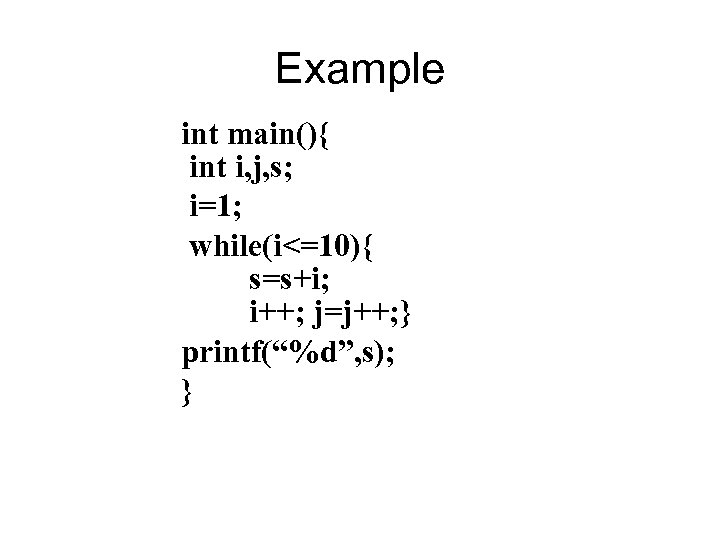 Example int main(){ int i, j, s; i=1; while(i<=10){ s=s+i; i++; j=j++; } printf(“%d”, s); }
 Backtracking • Unfortunately, as the number of source lines to be traced back increases, – the number of potential backward paths increases – becomes unmanageably large for complex programs.
 Cause-elimination method • Determine a list of causes: – which could possibly have contributed to the error symptom. – tests are conducted to eliminate each. • A related technique of identifying error by examining error symptoms: – software fault tree analysis.
 Program Slicing • This technique is similar to back tracking. • However, the search space is reduced by defining slices. • A slice is defined for a particular variable at a particular statement: – set of source lines preceding this statement which can influence the value of the variable.
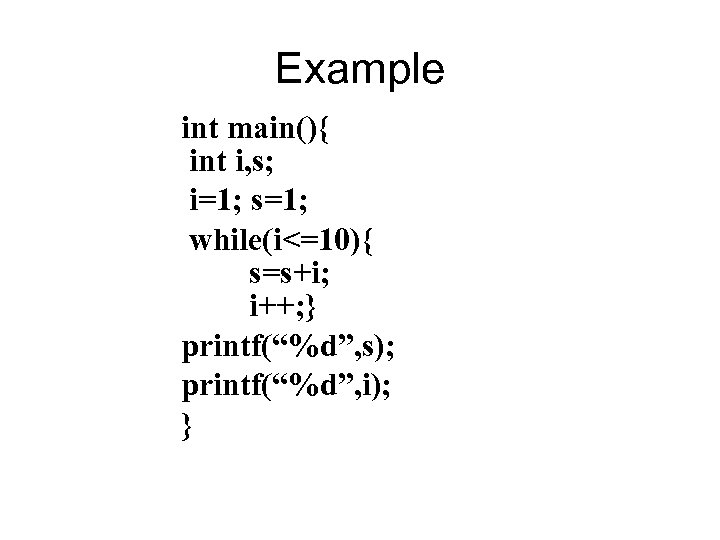 Example int main(){ int i, s; i=1; s=1; while(i<=10){ s=s+i; i++; } printf(“%d”, s); printf(“%d”, i); }
 Debugging Guidelines • Debugging usually requires a thorough understanding of the program design. • Debugging may sometimes require full redesign of the system. • A common mistake novice programmers often make: – not fixing the error but the error symptoms.
 Debugging Guidelines • Be aware of the possibility: – an error correction may introduce new errors. • After every round of error-fixing: – regression testing must be carried out.
 Program Analysis Tools • An automated tool: – takes program source code as input – produces reports regarding several important characteristics of the program, – such as size, complexity, adequacy of commenting, adherence to programming standards, etc.
 Program Analysis Tools • Some program analysis tools: – produce reports regarding the adequacy of the test cases. • There are essentially two categories of program analysis tools: – Static analysis tools – Dynamic analysis tools
 Static Analysis Tools • Static analysis tools: – assess properties of a program without executing it. – Analyze the source code • provide analytical conclusions.
 Static Analysis Tools • Whether coding standards have been adhered to? – Commenting is adequate? • Programming errors such as: – Un-initialized variables – mismatch between actual and formal parameters. – Variables declared but never used, etc.
 Static Analysis Tools • Code walk through and inspection can also be considered as static analysis methods: – however, the term static program analysis is generally used for automated analysis tools.
 Dynamic Analysis Tools • Dynamic program analysis tools require the program to be executed: – its behaviour recorded. – Produce reports such as adequacy of test cases.