


 Скачать презентацию Multi-Switch Ethernet LAN Operation 2009 Pearson Education
38c34aba95ba350e4c7b32e3b3f02013.ppt
- Количество слайдов: 26
 Multi-Switch Ethernet LAN Operation © 2009 Pearson Education, Inc. Publishing as Prentice Hall 4 -1
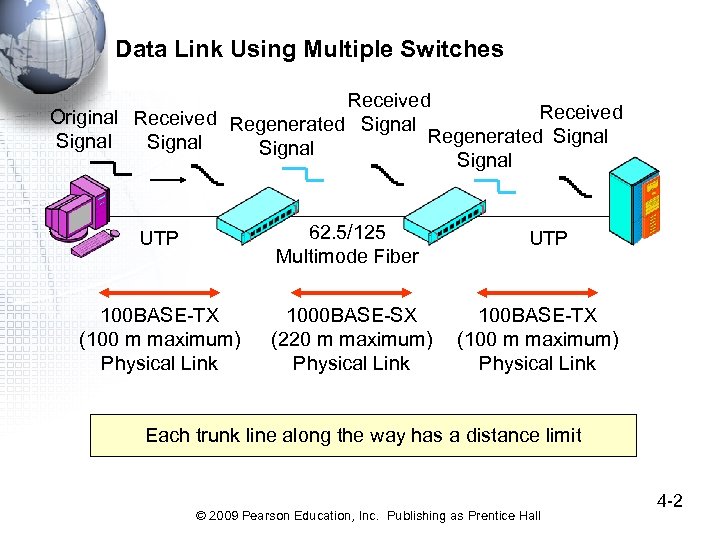 Data Link Using Multiple Switches Received Original Received Regenerated Signal Signal UTP 62. 5/125 Multimode Fiber 100 BASE-TX (100 m maximum) Physical Link 1000 BASE-SX (220 m maximum) Physical Link UTP 100 BASE-TX (100 m maximum) Physical Link Each trunk line along the way has a distance limit © 2009 Pearson Education, Inc. Publishing as Prentice Hall 4 -2
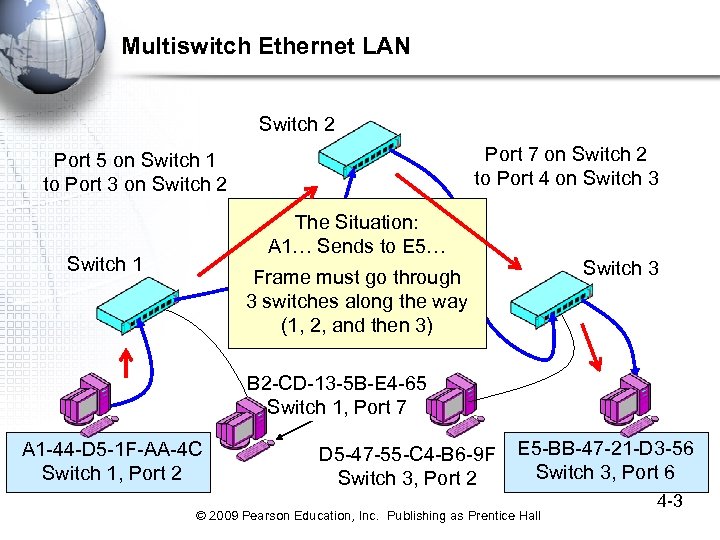 Multiswitch Ethernet LAN Switch 2 Port 7 on Switch 2 to Port 4 on Switch 3 Port 5 on Switch 1 to Port 3 on Switch 2 The Situation: A 1… Sends to E 5… Switch 1 Switch 3 Frame must go through 3 switches along the way (1, 2, and then 3) B 2 -CD-13 -5 B-E 4 -65 Switch 1, Port 7 A 1 -44 -D 5 -1 F-AA-4 C Switch 1, Port 2 D 5 -47 -55 -C 4 -B 6 -9 F Switch 3, Port 2 E 5 -BB-47 -21 -D 3 -56 Switch 3, Port 6 © 2009 Pearson Education, Inc. Publishing as Prentice Hall 4 -3
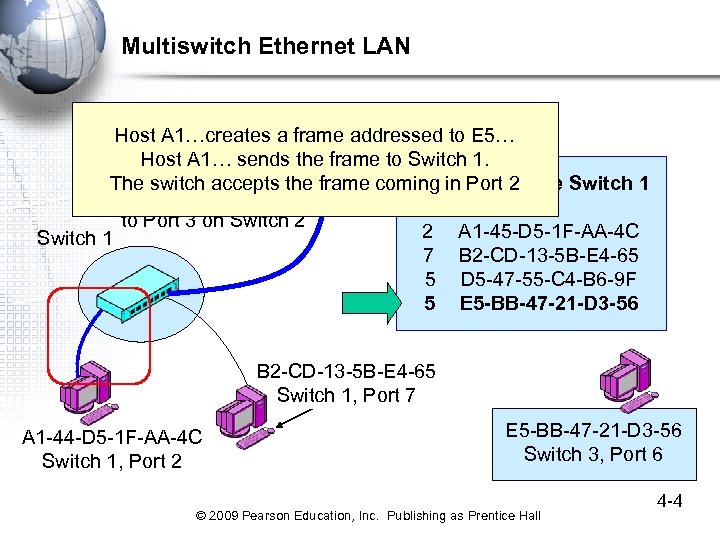 Multiswitch Ethernet LAN Switch 2 Host A 1…creates a frame addressed to E 5… Host A 1… sends the frame to Switch 1. The switch accepts the frame coming in Port 2 Switching Table Switch 1 Port 5 on Switch 1 Port Station to Port 3 on Switch 2 2 A 1 -45 -D 5 -1 F-AA-4 C Switch 1 7 B 2 -CD-13 -5 B-E 4 -65 5 D 5 -47 -55 -C 4 -B 6 -9 F 5 E 5 -BB-47 -21 -D 3 -56 B 2 -CD-13 -5 B-E 4 -65 Switch 1, Port 7 A 1 -44 -D 5 -1 F-AA-4 C Switch 1, Port 2 E 5 -BB-47 -21 -D 3 -56 Switch 3, Port 6 © 2009 Pearson Education, Inc. Publishing as Prentice Hall 4 -4
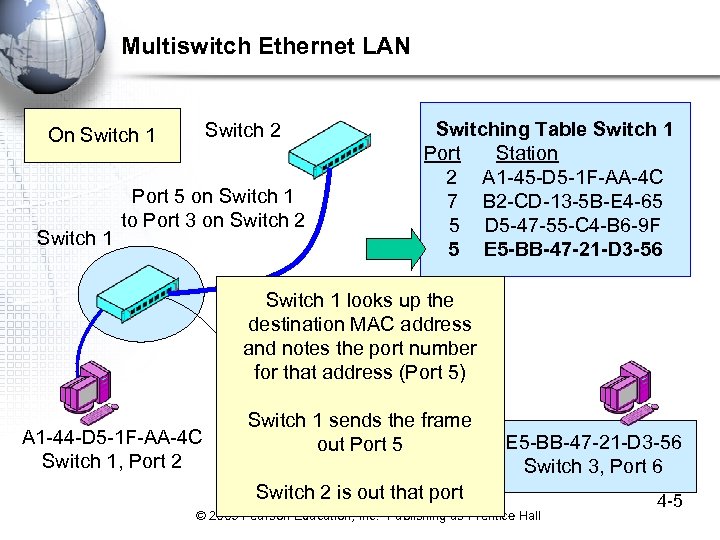 Multiswitch Ethernet LAN Switch 2 On Switch 1 Port 5 on Switch 1 to Port 3 on Switch 2 A 1 -44 -D 5 -1 F-AA-4 C Switch 1, Port 2 Switching Table Switch 1 Port Station 2 A 1 -45 -D 5 -1 F-AA-4 C 7 B 2 -CD-13 -5 B-E 4 -65 5 D 5 -47 -55 -C 4 -B 6 -9 F 5 E 5 -BB-47 -21 -D 3 -56 Switch 1 looks up the destination MAC address and notes the port number B 2 -CD-13 -5 B-E 4 -65 for that address (Port 5) Switch 1, Port 7 Switch 1 sends the frame out Port 5 E 5 -BB-47 -21 -D 3 -56 Switch 3, Port 6 Switch 2 is out that port © 2009 Pearson Education, Inc. Publishing as Prentice Hall 4 -5
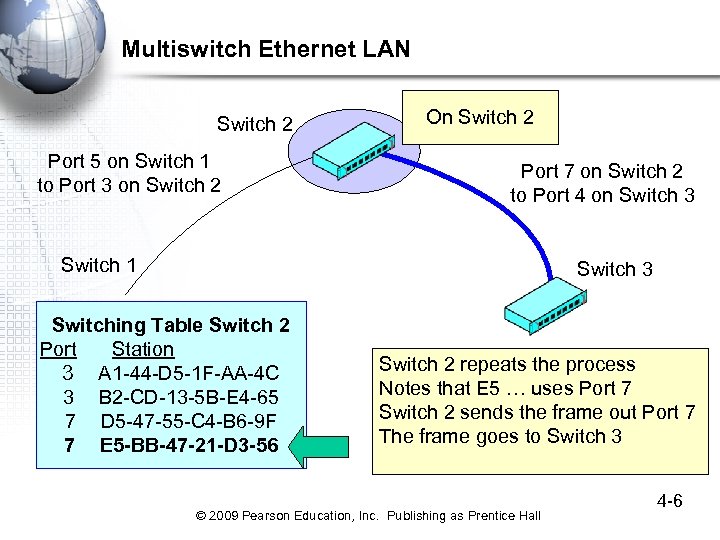 Multiswitch Ethernet LAN Switch 2 Port 5 on Switch 1 to Port 3 on Switch 2 On Switch 2 Port 7 on Switch 2 to Port 4 on Switch 3 Switch 1 Switch 3 Switching Table Switch 2 Port Station 3 A 1 -44 -D 5 -1 F-AA-4 C 3 B 2 -CD-13 -5 B-E 4 -65 7 D 5 -47 -55 -C 4 -B 6 -9 F 7 E 5 -BB-47 -21 -D 3 -56 Switch 2 repeats the process Notes that E 5 … uses Port 7 Switch 2 sends the frame out Port 7 The frame goes to Switch 3 © 2009 Pearson Education, Inc. Publishing as Prentice Hall 4 -6
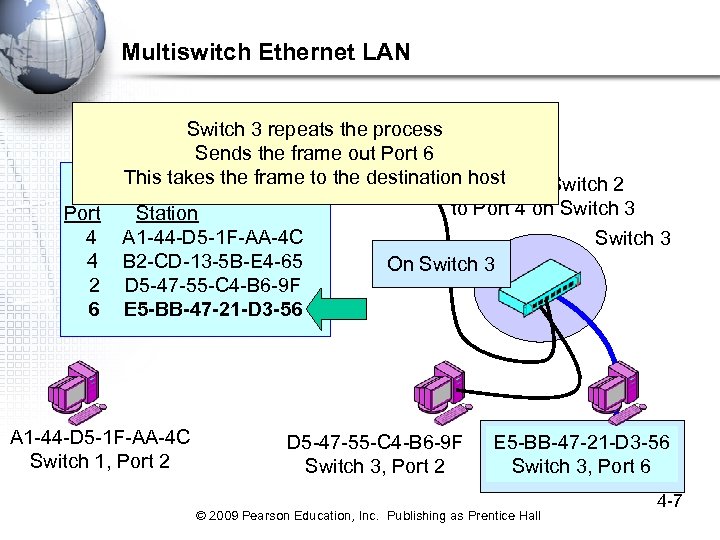 Multiswitch Ethernet LAN Switch 2 Switch 3 repeats the process Sends the frame out Port 6 This takes the frame to the destination host Port 7 on Switch 2 Switching Table Switch 3 to Port 4 on Switch 3 Port Station 4 A 1 -44 -D 5 -1 F-AA-4 C Switch 3 4 B 2 -CD-13 -5 B-E 4 -65 On Switch 3 2 D 5 -47 -55 -C 4 -B 6 -9 F 6 E 5 -BB-47 -21 -D 3 -56 A 1 -44 -D 5 -1 F-AA-4 C Switch 1, Port 2 D 5 -47 -55 -C 4 -B 6 -9 F Switch 3, Port 2 E 5 -BB-47 -21 -D 3 -56 Switch 3, Port 6 © 2009 Pearson Education, Inc. Publishing as Prentice Hall 4 -7
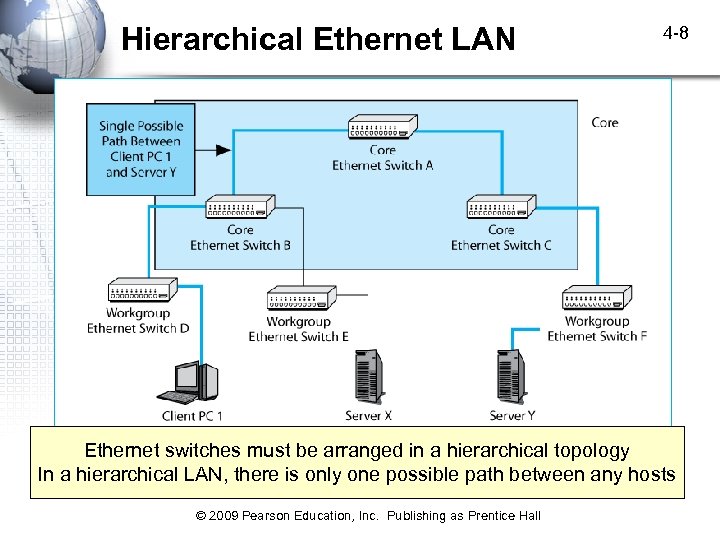 Hierarchical Ethernet LAN 4 -8 Ethernet switches must be arranged in a hierarchical topology In a hierarchical LAN, there is only one possible path between any hosts © 2009 Pearson Education, Inc. Publishing as Prentice Hall
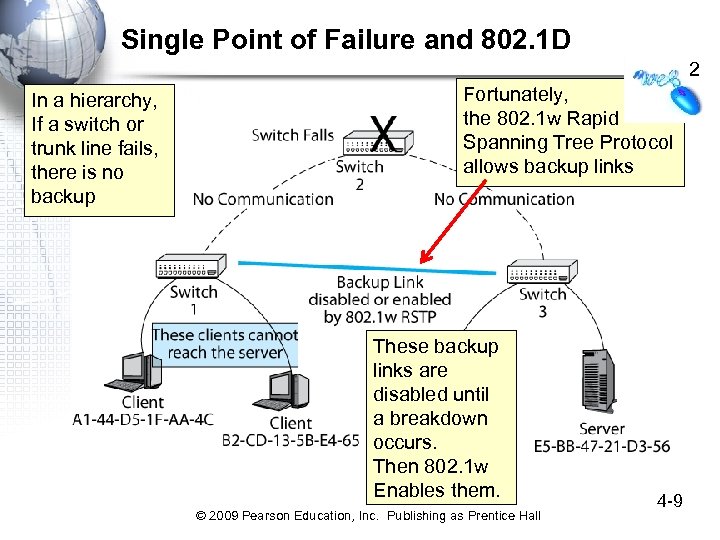 Single Point of Failure and 802. 1 D 2 In a hierarchy, If a switch or trunk line fails, there is no backup Fortunately, the 802. 1 w Rapid Spanning Tree Protocol allows backup links These backup links are disabled until a breakdown occurs. Then 802. 1 w Enables them. © 2009 Pearson Education, Inc. Publishing as Prentice Hall 4 -9
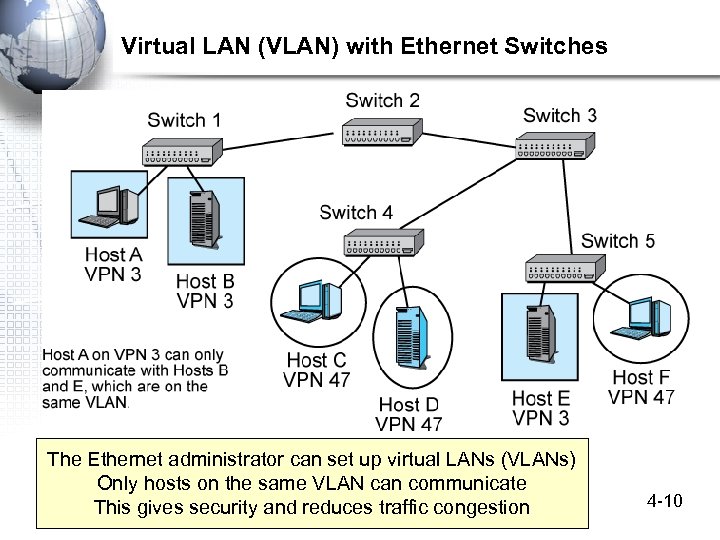 Virtual LAN (VLAN) with Ethernet Switches The Ethernet administrator can set up virtual LANs (VLANs) Only hosts on the same VLAN can communicate This gives security and reduces traffic congestion © 2009 Pearson Education, Inc. Publishing as Prentice Hall 4 -10
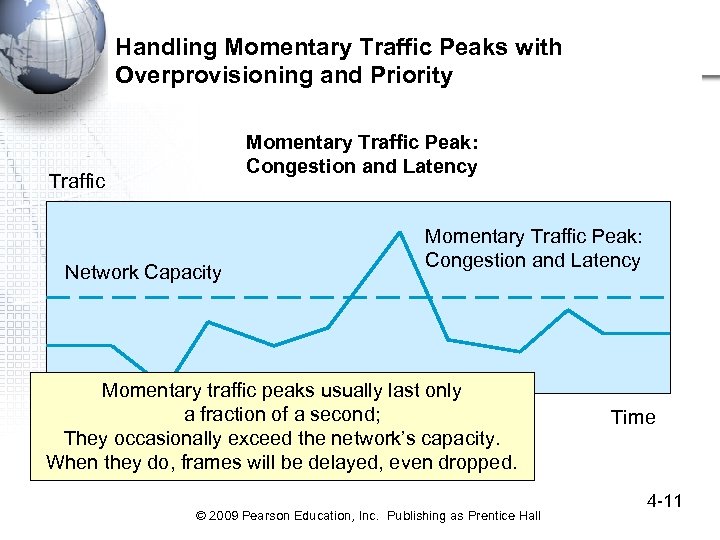 Handling Momentary Traffic Peaks with Overprovisioning and Priority Momentary Traffic Peak: Congestion and Latency Traffic Network Capacity Momentary Traffic Peak: Congestion and Latency Momentary traffic peaks usually last only a fraction of a second; They occasionally exceed the network’s capacity. When they do, frames will be delayed, even dropped. © 2009 Pearson Education, Inc. Publishing as Prentice Hall Time 4 -11
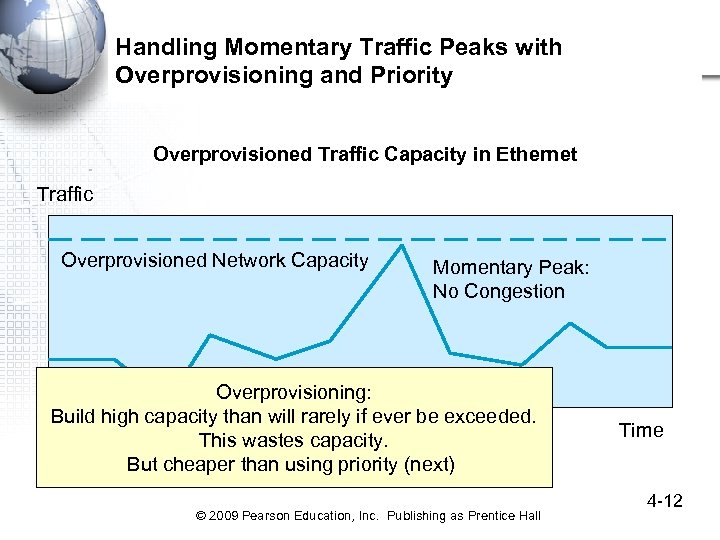 Handling Momentary Traffic Peaks with Overprovisioning and Priority Overprovisioned Traffic Capacity in Ethernet Traffic Overprovisioned Network Capacity Momentary Peak: No Congestion Overprovisioning: Build high capacity than will rarely if ever be exceeded. This wastes capacity. But cheaper than using priority (next) © 2009 Pearson Education, Inc. Publishing as Prentice Hall Time 4 -12
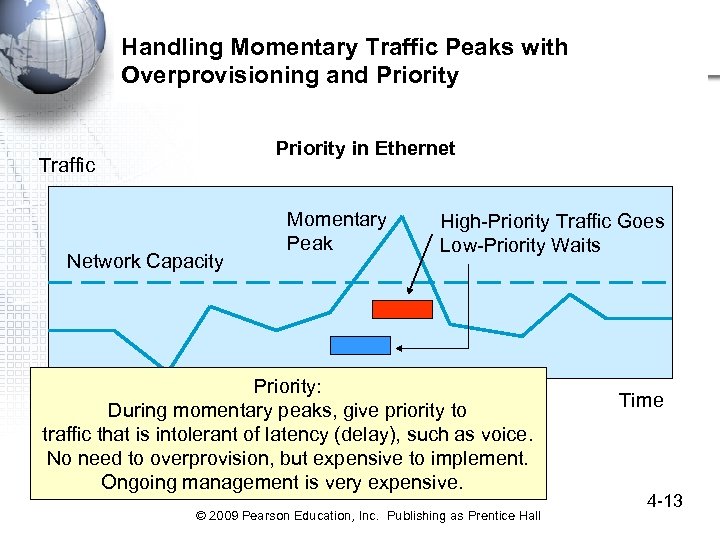 Handling Momentary Traffic Peaks with Overprovisioning and Priority in Ethernet Traffic Network Capacity Momentary Peak High-Priority Traffic Goes Low-Priority Waits Priority: During momentary peaks, give priority to traffic that is intolerant of latency (delay), such as voice. No need to overprovision, but expensive to implement. Ongoing management is very expensive. © 2009 Pearson Education, Inc. Publishing as Prentice Hall Time 4 -13
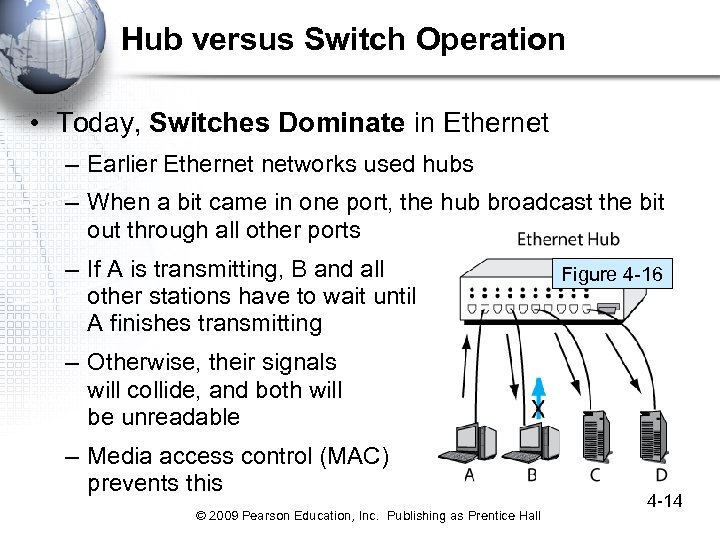 Hub versus Switch Operation • Today, Switches Dominate in Ethernet – Earlier Ethernet networks used hubs – When a bit came in one port, the hub broadcast the bit out through all other ports – If A is transmitting, B and all other stations have to wait until A finishes transmitting Figure 4 -16 – Otherwise, their signals will collide, and both will be unreadable – Media access control (MAC) prevents this © 2009 Pearson Education, Inc. Publishing as Prentice Hall 4 -14
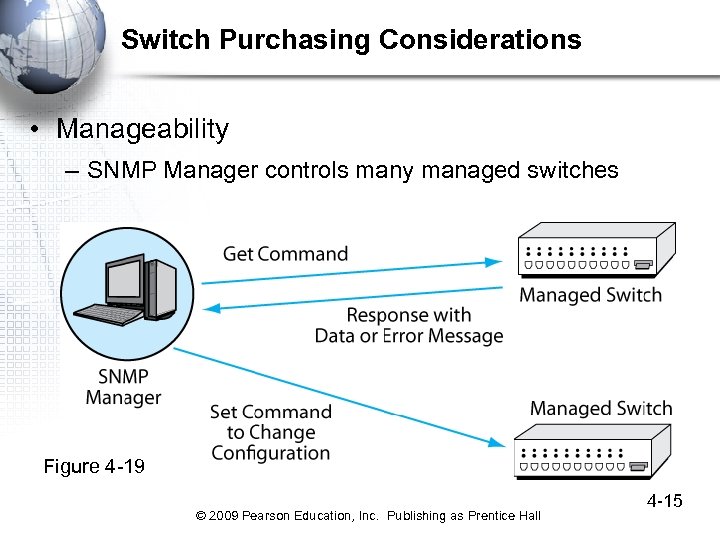 Switch Purchasing Considerations • Manageability – SNMP Manager controls many managed switches Figure 4 -19 © 2009 Pearson Education, Inc. Publishing as Prentice Hall 4 -15
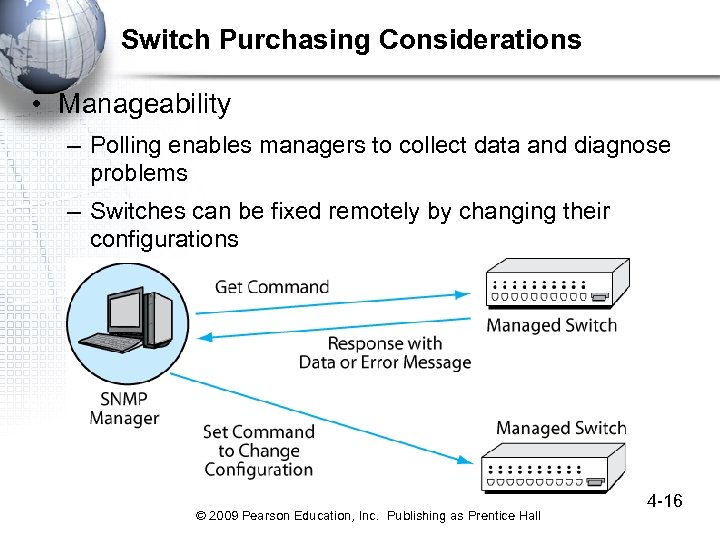 Switch Purchasing Considerations • Manageability – Polling enables managers to collect data and diagnose problems – Switches can be fixed remotely by changing their configurations © 2009 Pearson Education, Inc. Publishing as Prentice Hall 4 -16
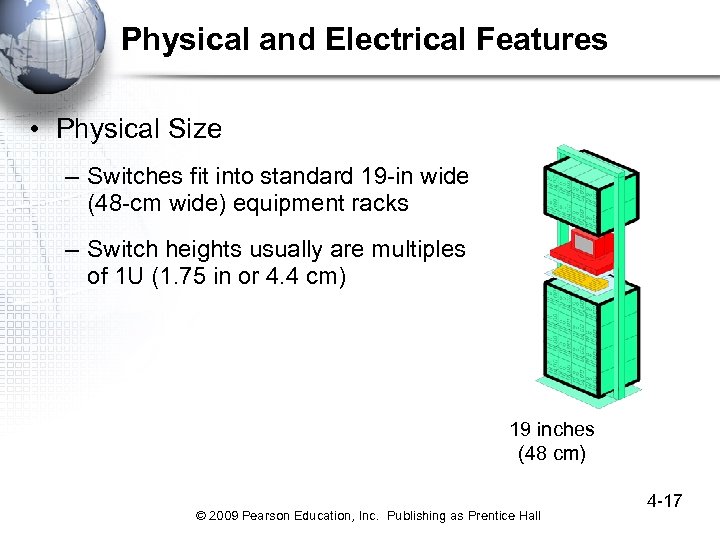 Physical and Electrical Features • Physical Size – Switches fit into standard 19 -in wide (48 -cm wide) equipment racks – Switch heights usually are multiples of 1 U (1. 75 in or 4. 4 cm) 19 inches (48 cm) © 2009 Pearson Education, Inc. Publishing as Prentice Hall 4 -17
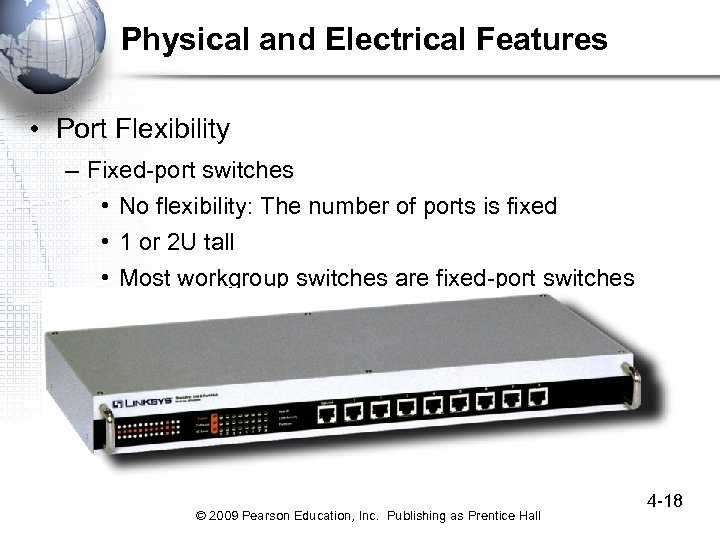 Physical and Electrical Features • Port Flexibility – Fixed-port switches • No flexibility: The number of ports is fixed • 1 or 2 U tall • Most workgroup switches are fixed-port switches © 2009 Pearson Education, Inc. Publishing as Prentice Hall 4 -18
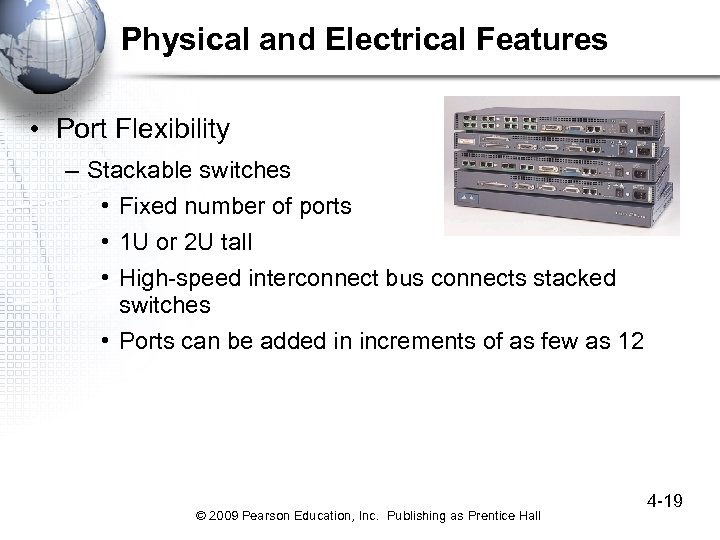 Physical and Electrical Features • Port Flexibility – Stackable switches • Fixed number of ports • 1 U or 2 U tall • High-speed interconnect bus connects stacked switches • Ports can be added in increments of as few as 12 © 2009 Pearson Education, Inc. Publishing as Prentice Hall 4 -19
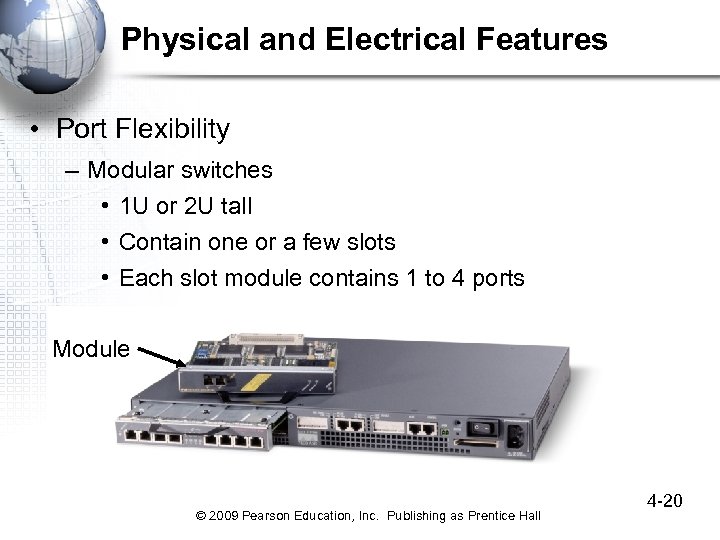 Physical and Electrical Features • Port Flexibility – Modular switches • 1 U or 2 U tall • Contain one or a few slots • Each slot module contains 1 to 4 ports Module © 2009 Pearson Education, Inc. Publishing as Prentice Hall 4 -20
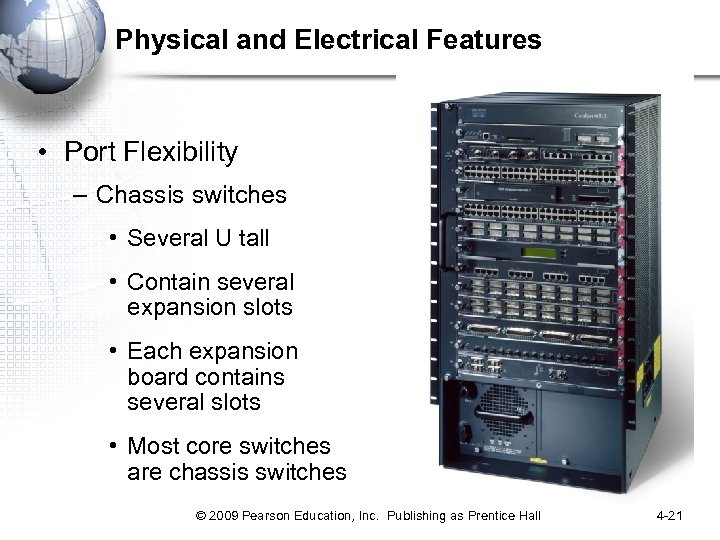 Physical and Electrical Features • Port Flexibility – Chassis switches • Several U tall • Contain several expansion slots • Each expansion board contains several slots • Most core switches are chassis switches © 2009 Pearson Education, Inc. Publishing as Prentice Hall 4 -21
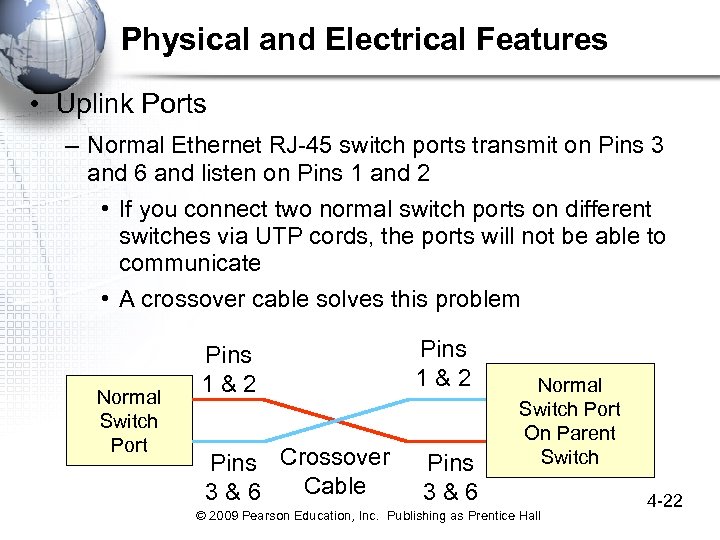 Physical and Electrical Features • Uplink Ports – Normal Ethernet RJ-45 switch ports transmit on Pins 3 and 6 and listen on Pins 1 and 2 • If you connect two normal switch ports on different switches via UTP cords, the ports will not be able to communicate • A crossover cable solves this problem Normal Switch Port Pins 1 & 2 Pins Crossover Cable 3 & 6 Pins 1 & 2 Pins 3 & 6 Normal Switch Port On Parent Switch © 2009 Pearson Education, Inc. Publishing as Prentice Hall 4 -22
 Ethernet Security © 2009 Pearson Education, Inc. Publishing as Prentice Hall 4 -23
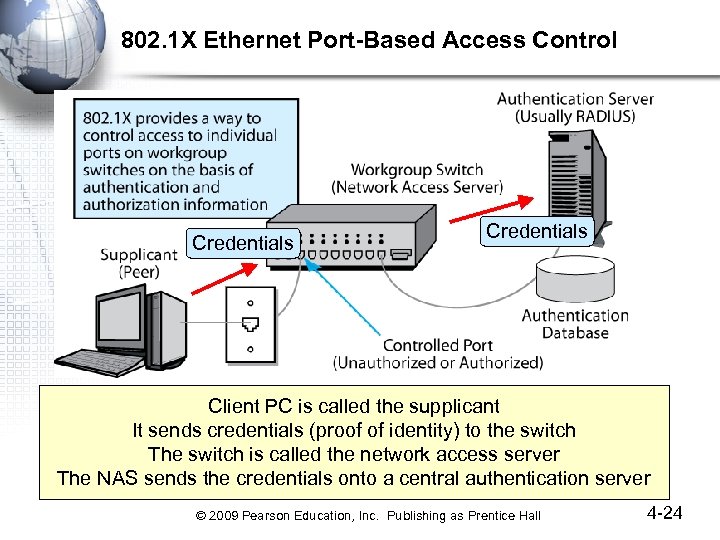 802. 1 X Ethernet Port-Based Access Control Credentials Client PC is called the supplicant It sends credentials (proof of identity) to the switch The switch is called the network access server The NAS sends the credentials onto a central authentication server © 2009 Pearson Education, Inc. Publishing as Prentice Hall 4 -24
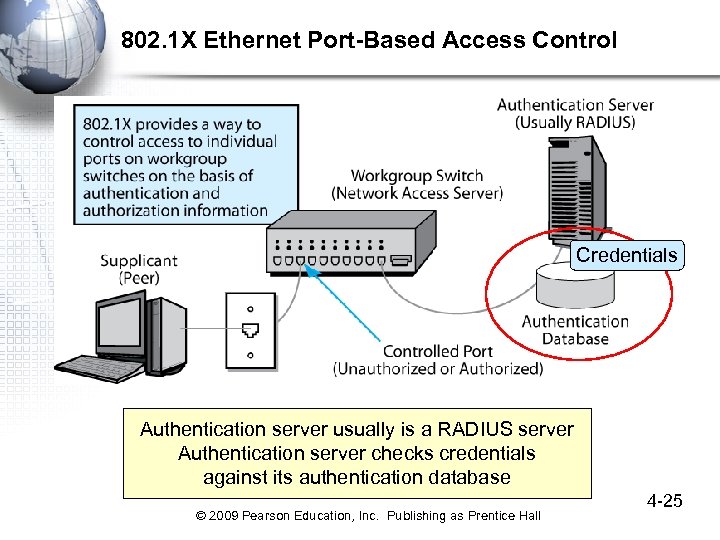 802. 1 X Ethernet Port-Based Access Control Credentials Authentication server usually is a RADIUS server Authentication server checks credentials against its authentication database © 2009 Pearson Education, Inc. Publishing as Prentice Hall 4 -25
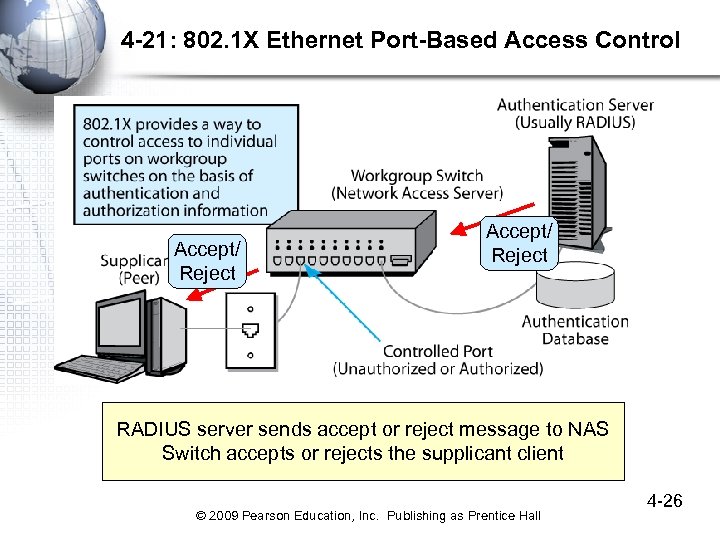 4 -21: 802. 1 X Ethernet Port-Based Access Control Accept/ Reject RADIUS server sends accept or reject message to NAS Switch accepts or rejects the supplicant client © 2009 Pearson Education, Inc. Publishing as Prentice Hall 4 -26