


 Скачать презентацию MSG 307 Exploring Exchange 2003 Deployment Topologies Kieran
7262574e0571335eb2456a567ff836b3.ppt
- Количество слайдов: 43
 MSG 307 Exploring Exchange 2003 Deployment Topologies Kieran Mc. Corry Principal Consultant Technology Leadership Group Hewlett-Packard Company
 Agenda Exchange Server 2003 OWA Publishing Exchange Server 2003 RPC over HTTP Multi-Forest Deployments Branch office deployment scenarios Datacenter platform scaling Recipient update service Perimeter security and anti-spam measures
 Exchange 2003 OWA topology identical to Exchange 2000 OWA topology Front End server proxies connections to Back End server No mailboxes hosted on Front End server Connections proxied to Back End server External access configuration is key Two main approaches Front End server in DMZ Front End server in internal network (recommended)
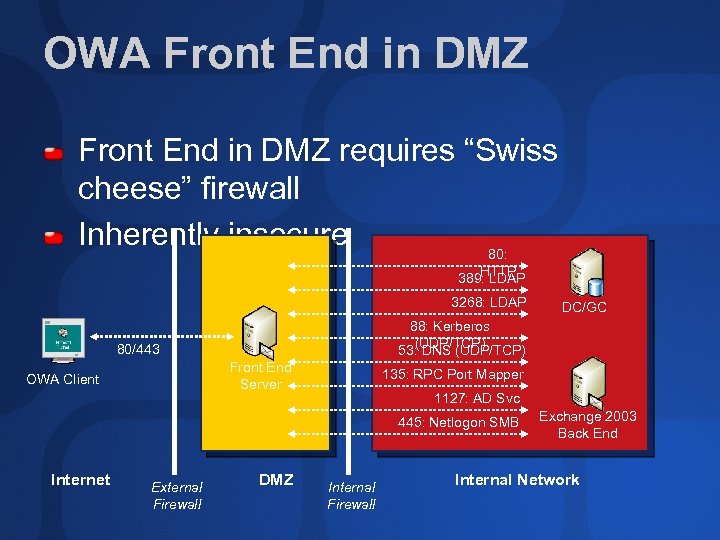 OWA Front End in DMZ requires “Swiss cheese” firewall Inherently insecure 80: HTTP 389: LDAP 3268: LDAP 88: Kerberos (UDP/TCP) 53: DNS (UDP/TCP) 80/443 Front End Server OWA Client 135: RPC Port Mapper 1127: AD Svc 445: Netlogon SMB Internet External Firewall DC/GC DMZ Internal Firewall Exchange 2003 Back End Internal Network
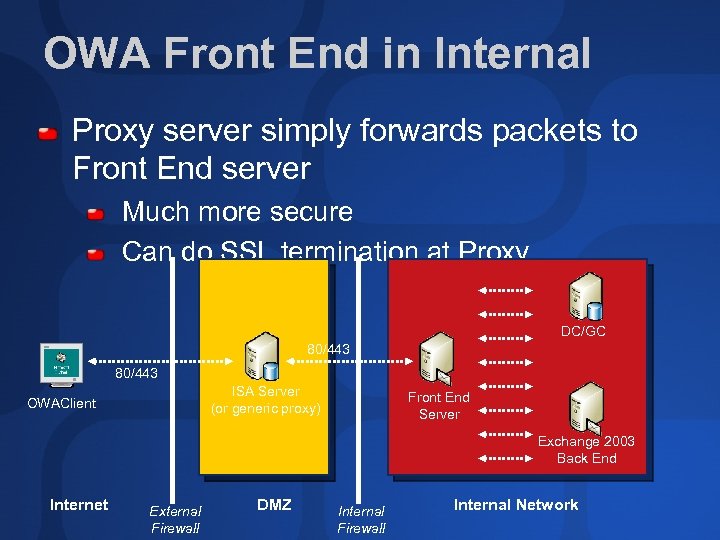 OWA Front End in Internal Proxy server simply forwards packets to Front End server Much more secure Can do SSL termination at Proxy DC/GC 80/443 ISA Server (or generic proxy) OWAClient Front End Server Exchange 2003 Back End Internet External Firewall DMZ Internal Firewall Internal Network
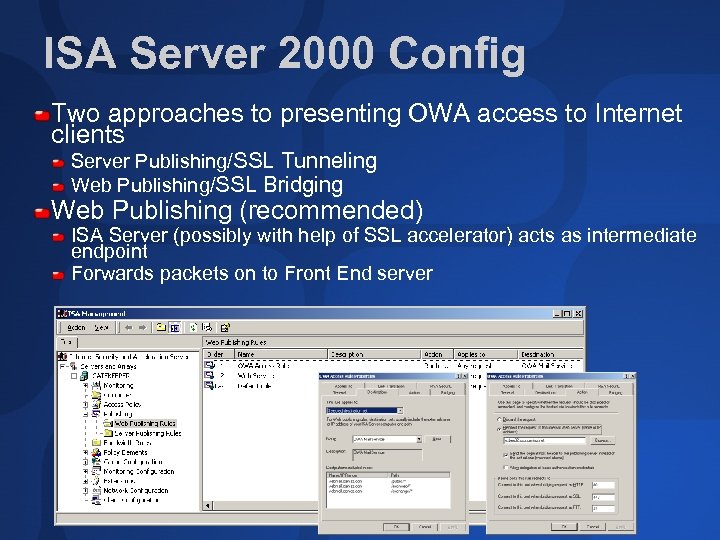 ISA Server 2000 Config Two approaches to presenting OWA access to Internet clients Server Publishing/SSL Tunneling Web Publishing/SSL Bridging Web Publishing (recommended) ISA Server (possibly with help of SSL accelerator) acts as intermediate endpoint Forwards packets on to Front End server
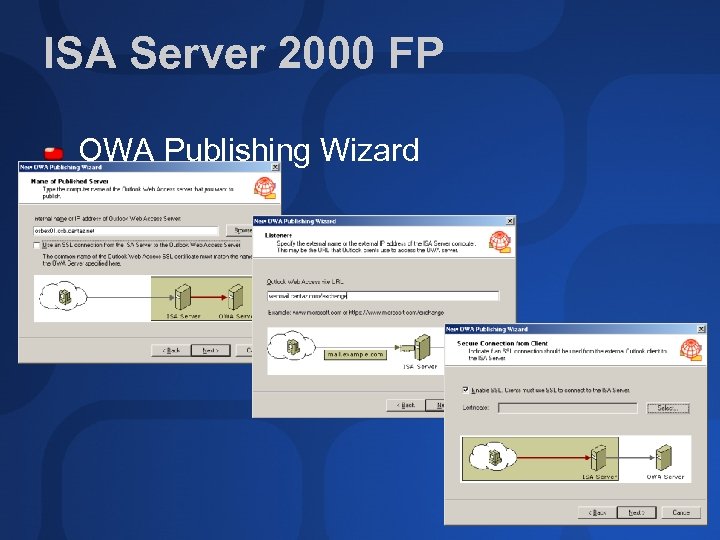 ISA Server 2000 FP OWA Publishing Wizard
 RPC over HTTP (1 of 2) Use Outlook to connect to corporate email over the Internet No need for VPN or OWA RPC over HTTP Needs Windows XP SP 1 and Outlook 2003 on client And 331320 post-SP 1 hotfix Needs Windows 2003 on all participating servers Exchange Servers, DCs, GCs Requires IIS 6. 0 WPIM mode Requires MAPI Profile Update
 RPC over HTTP (2 of 2) Architecture Supports both Front End/Back End model and single server implementation Front End server acts as RPC Proxy server (component of Windows 2003) Client makes HTTP connection to remote RPC Proxy RPC proxy connects to Back End server and DCs/GCs (can be configured across firewalls) Performance is slower than normal access: no figures yet
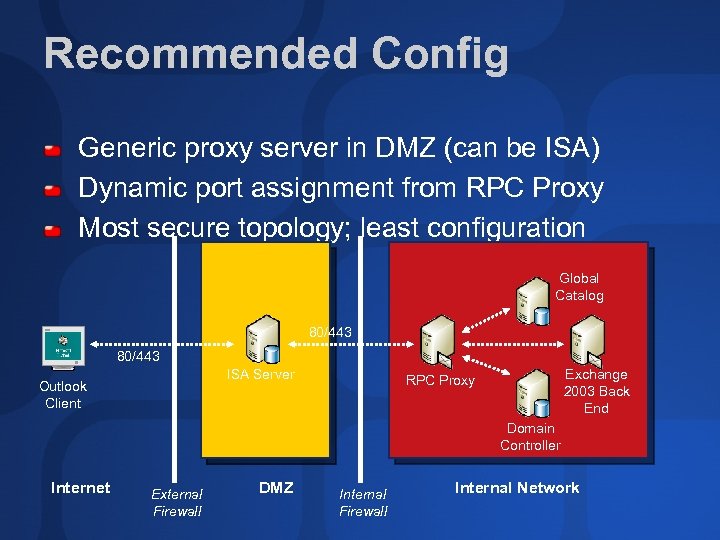 Recommended Config Generic proxy server in DMZ (can be ISA) Dynamic port assignment from RPC Proxy Most secure topology; least configuration Global Catalog 80/443 ISA Server Outlook Client Exchange 2003 Back End RPC Proxy Domain Controller Internet External Firewall DMZ Internal Firewall Internal Network
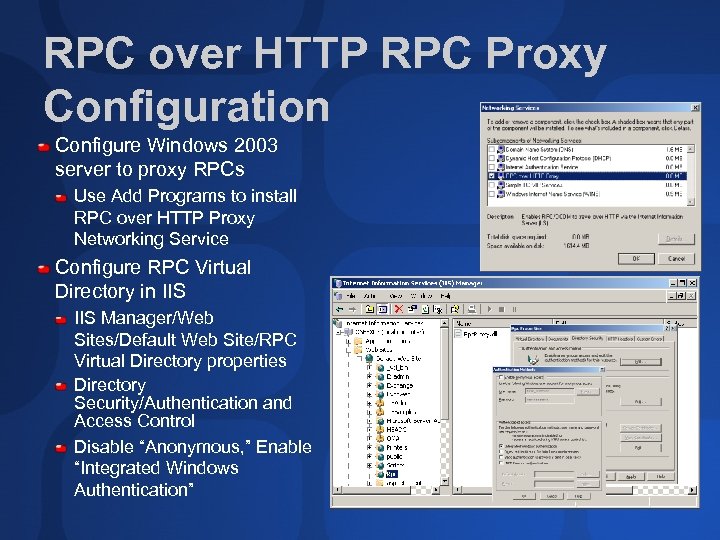 RPC over HTTP RPC Proxy Configuration Configure Windows 2003 server to proxy RPCs Use Add Programs to install RPC over HTTP Proxy Networking Service Configure RPC Virtual Directory in IIS Manager/Web Sites/Default Web Site/RPC Virtual Directory properties Directory Security/Authentication and Access Control Disable “Anonymous, ” Enable “Integrated Windows Authentication”
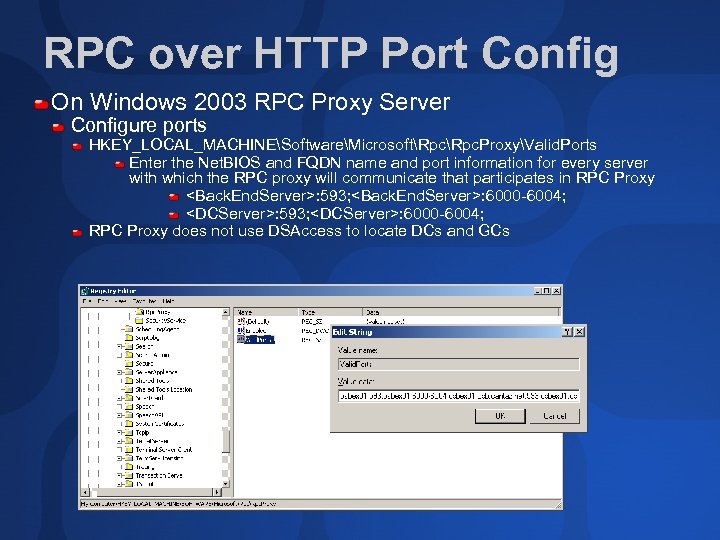 RPC over HTTP Port Config On Windows 2003 RPC Proxy Server Configure ports HKEY_LOCAL_MACHINESoftwareMicrosoftRpc. ProxyValid. Ports Enter the Net. BIOS and FQDN name and port information for every server with which the RPC proxy will communicate that participates in RPC Proxy
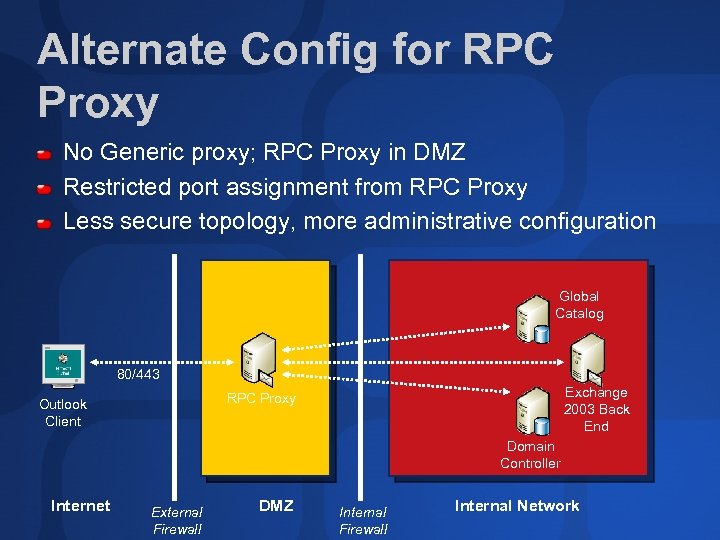 Alternate Config for RPC Proxy No Generic proxy; RPC Proxy in DMZ Restricted port assignment from RPC Proxy Less secure topology, more administrative configuration Global Catalog 80/443 Exchange 2003 Back End RPC Proxy Outlook Client Domain Controller Internet External Firewall DMZ Internal Firewall Internal Network
 RPC over HTTP Port Restrictions Configure RPC Proxy Server to communicate with Back Ends/DCs/GCs Configure every Back End Server/DCs/GCs to communicate with RPC Proxy Server Establish restricted port range, for RPC Proxy to Back End server communication RPC Proxy to DC/GC server communication Back End server to RPC Proxy communication DC/GC server to RPC Proxy communication
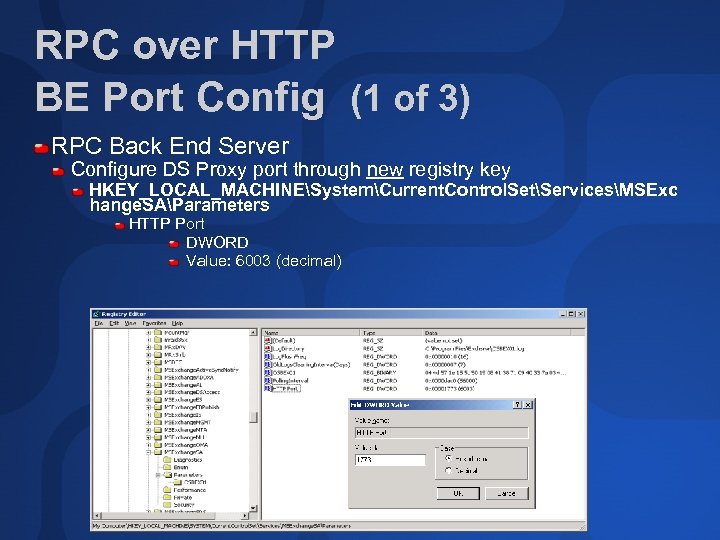 RPC over HTTP BE Port Config (1 of 3) RPC Back End Server Configure DS Proxy port through new registry key HKEY_LOCAL_MACHINESystemCurrent. Control. SetServicesMSExc hange. SAParameters HTTP Port DWORD Value: 6003 (decimal)
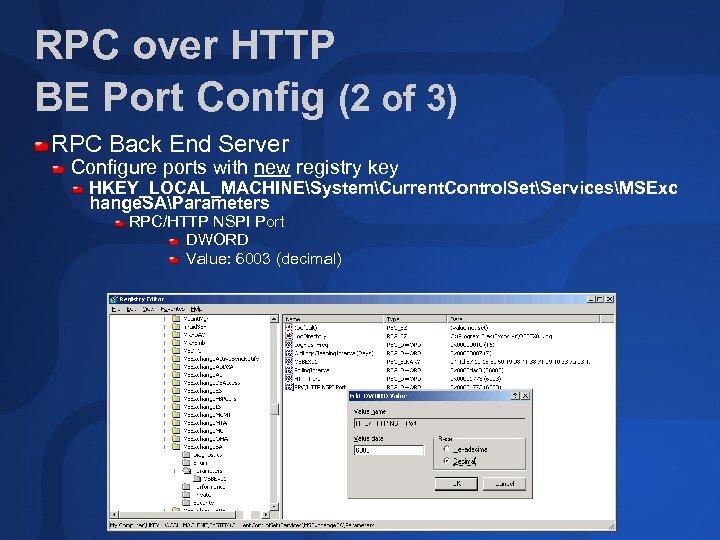 RPC over HTTP BE Port Config (2 of 3) RPC Back End Server Configure ports with new registry key HKEY_LOCAL_MACHINESystemCurrent. Control. SetServicesMSExc hange. SAParameters RPC/HTTP NSPI Port DWORD Value: 6003 (decimal)
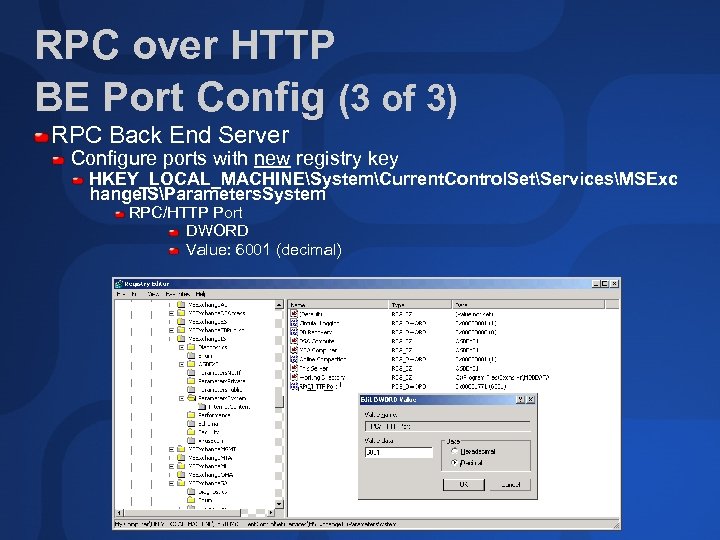 RPC over HTTP BE Port Config (3 of 3) RPC Back End Server Configure ports with new registry key HKEY_LOCAL_MACHINESystemCurrent. Control. SetServicesMSExc hange. ISParameters. System RPC/HTTP Port DWORD Value: 6001 (decimal)
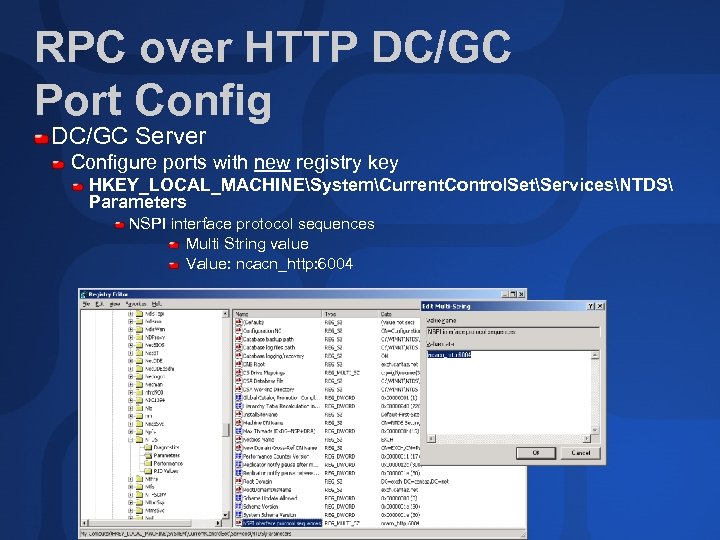 RPC over HTTP DC/GC Port Config DC/GC Server Configure ports with new registry key HKEY_LOCAL_MACHINESystemCurrent. Control. SetServicesNTDS Parameters NSPI interface protocol sequences Multi String value Value: ncacn_http: 6004
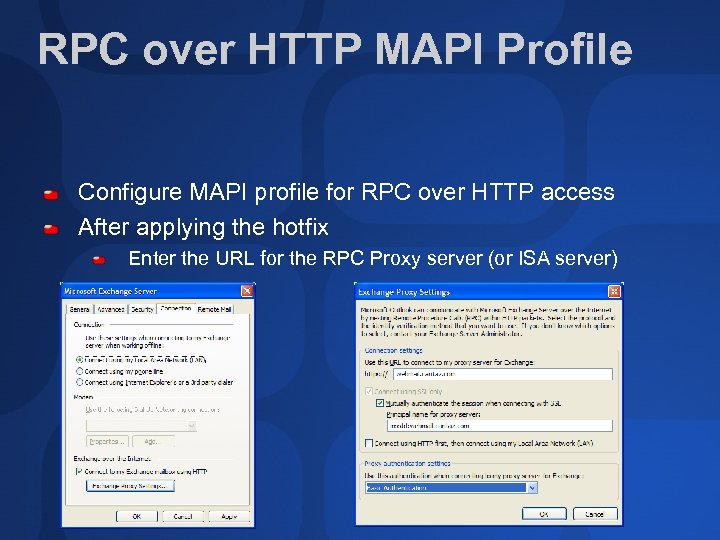 RPC over HTTP MAPI Profile Configure MAPI profile for RPC over HTTP access After applying the hotfix Enter the URL for the RPC Proxy server (or ISA server)
 Multi Forest Deployments Messaging between Forests Through SMTP connector Point-to-point between forests Through switch or smarthost Switch may require directory population Still need a connector to switch Assume separate SMTP namespaces for each forest Can use X. 400 too! May help with SMTP naming conflicts when same SMTP domain used for all forests Can accept SMTP inbound from internet and connect forests with x. 400
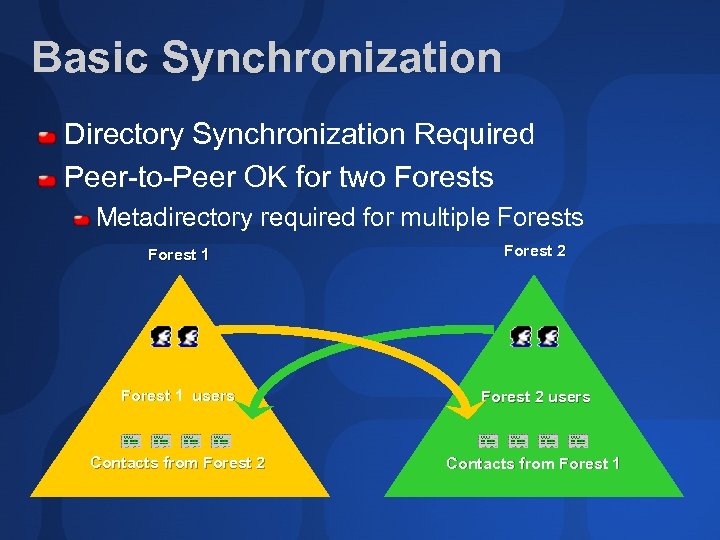 Basic Synchronization Directory Synchronization Required Peer-to-Peer OK for two Forests Metadirectory required for multiple Forests Forest 1 Forest 2 Forest 1 users Forest 2 users Contacts from Forest 2 Contacts from Forest 1
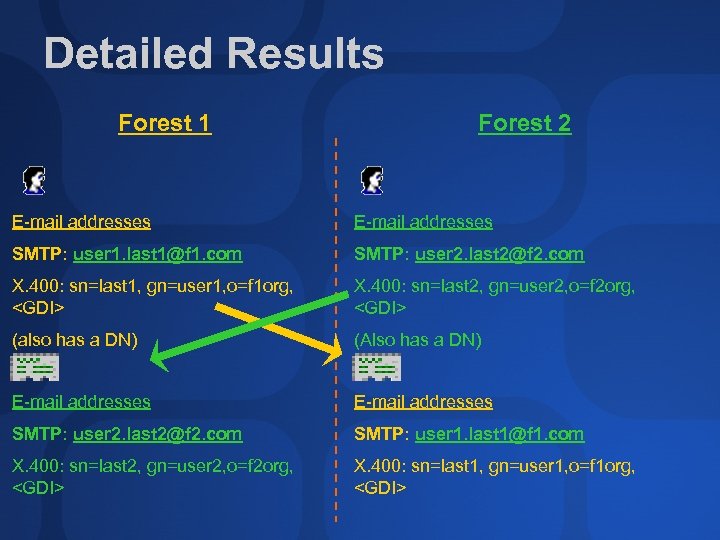 Detailed Results Forest 1 Forest 2 E-mail addresses SMTP: user 1. last 1@f 1. com SMTP: user 2. last 2@f 2. com X. 400: sn=last 1, gn=user 1, o=f 1 org,
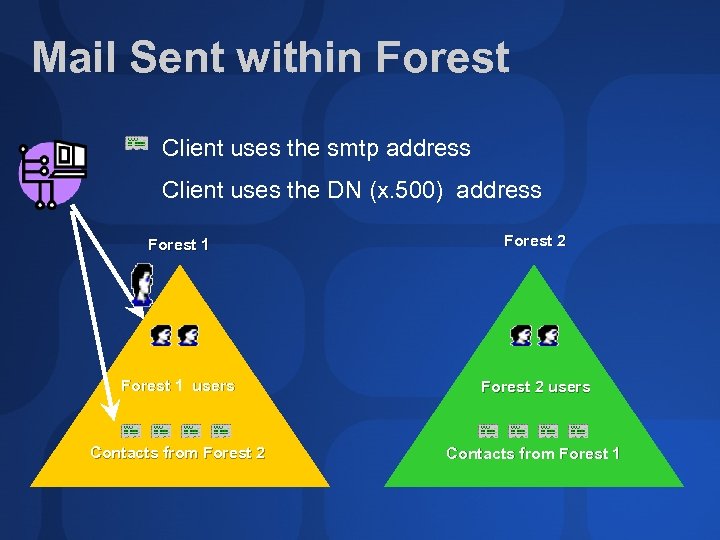 Mail Sent within Forest Client uses the smtp address Client uses the DN (x. 500) address Forest 1 Forest 2 Forest 1 users Forest 2 users Contacts from Forest 2 Contacts from Forest 1
 Branch Office Deployment New features in Windows 2003, Exchange 2003, and Office 2003 make branch office deployments simpler Improved AD replication performance DCpromote from media Link State Update controls Outlook cache mode and synchronization support OWA and RPC over HTTP improvements Easy solutions for `remote’ branch offices No connection to Schema Master during installation
 Exchange 2003 in the Datacenter: General Observations Support for tens or hundreds of thousands of users Clustering is now a much more workable solution Eight-node clustering No Windows Datacenter requirements RAIS is an alternative to clusters Servers booting from SANs Great for “failover“ Connector, Front End, DC, and GC servers better with locally-attached storage Active user ratios tend towards 10% to 15% Users per server often dictated by storage limits rather than by machine performance Keep databases under 40 GB, unless you use VSS Separate Windows 2003 sites for Exchange and GCs from general servers Performance Tuning crucial /3 GB boot switch ESE Virtual Memory Connector server file handles Connector file locations
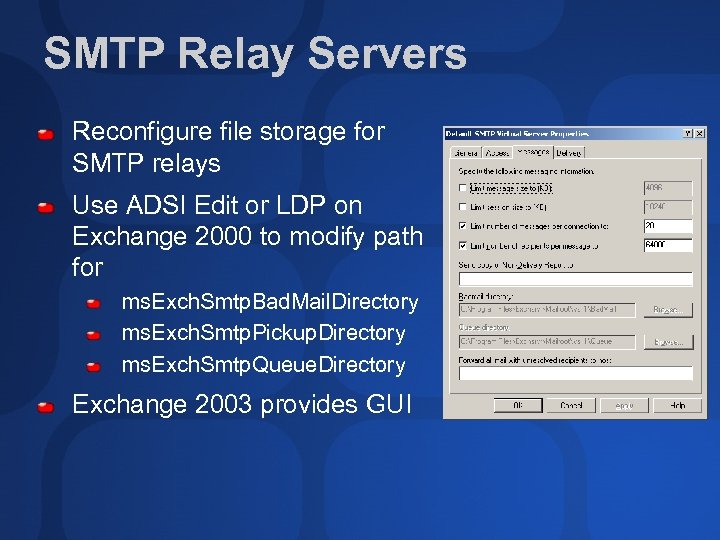 SMTP Relay Servers Reconfigure file storage for SMTP relays Use ADSI Edit or LDP on Exchange 2000 to modify path for ms. Exch. Smtp. Bad. Mail. Directory ms. Exch. Smtp. Pickup. Directory ms. Exch. Smtp. Queue. Directory Exchange 2003 provides GUI
 Hosting and Address Books (1 of 2) Recipient Update Service Maintains Address Lists by populating attributes for mail-enabled objects At least one RUS per domain Plus one for the Enterprise Use more to ensure timely creation of objects
 Hosting and Address Books (2 of 2) Administrator can disable RUS functionality and update objects manually (see 296479) Better Address List maintenance Maintain these for mail-enabled objects legacy. Exchange. DN, proxy. Addresses, text. Encoded. ORAddress, mail. Nickname, display. Name (and target. Address for contacts) And additionally these for mailbox-enabled users ms. Exch. Home. Server. Name, home. MDB, home. MTA, ms. Exch. User. Account. Control, ms. Exch. Master. Account. Sid, ms. Exch. Mailbox. Guid
 Controlling Access to Address Lists in Hosted Environments (1 of 2) For OWA users Access to GAL controlled by ms. Exch. Query. Base. DN Set to an OU or an Address List For MAPI users, we have more configuration Control access to users in OUs (possibly one OU per hosted company? ) Allocate users to Security Groups Create Address Lists per company Example: (&(object. Category=user)(user. Principal. Name=*@acme. com)) Control permissions to Address Lists Deny default access and only permission the respective group
 Controlling Access to Address Lists in Hosted Environments (2 of 2) The Domain RUS is responsible for maintaining Address List membership Executes whenever a mail-enabled object is modified Can bypass it and manually control population of “show. In. Address. Book” attribute
 Exchange and Directory Access DSAccess and DSProxy Outlook 2000 SR 2 and higher use referral, not proxy Use DSAccess to identify working GCs Does not use the DSAccess Recipient cache DSAccess initialization completes in 1 minute or stops Control with HKLMSystemCCSServicesMSExchange. DSAccessTopo. Cre ate. Time. Out. Secs Three key roles Configuration DC High perf DC on same LAN, used for 8 hours at most Working DCs, Working GCs
 How DSAccess Discovers AD Topology Open LDAP connection to local ‘bootstrap’ DC Search for local DCs and GCs Determine server suitability Search to identify secondary sites Lowest Site Link cost to highest Lowest cost sites in secondary topology list Search to identify DCs and GCs in secondary topology sites Compile list of working DCs and GCs
 How DSAccess Determines Server Suitability Tries to connect to server over port 389 or 3268 2 -second limit Reads Security Descriptor of Configuration Naming Context Checks if Domain. Prep has been run Checks if AD has been synchronized Issues DSGet. DCName RPC Netlogon check Disables if traversing a firewall Checks DNS weights and priorities Checks for FSMO PDC role owner Not other roles
 Controlling Server Interaction Static mapping of NSPI Interface and RFR (Referral) interface process with clients HKLMSystemCCSServicesMSExchange. SAParamete rs TCP/IP NSPI Port TCP/IP Port On GCs NSPI port statically mapped with HKLMSystemCCSServicesNTDSParameters TCP/IP Port For Exchange Server in DMZ and GC on internal network HKLMSystemCCSServicesMSExchange. DSAccess Disable. Net. Logon. Check = 1 Ldap. Keepalive. Secs = 0
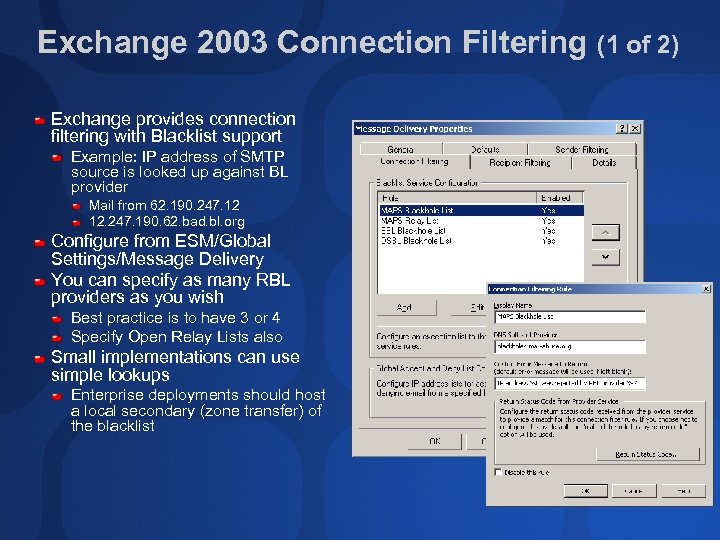 Exchange 2003 Connection Filtering (1 of 2) Exchange provides connection filtering with Blacklist support Example: IP address of SMTP source is looked up against BL provider Mail from 62. 190. 247. 12 12. 247. 190. 62. bad. bl. org Configure from ESM/Global Settings/Message Delivery You can specify as many RBL providers as you wish Best practice is to have 3 or 4 Specify Open Relay Lists also Small implementations can use simple lookups Enterprise deployments should host a local secondary (zone transfer) of the blacklist
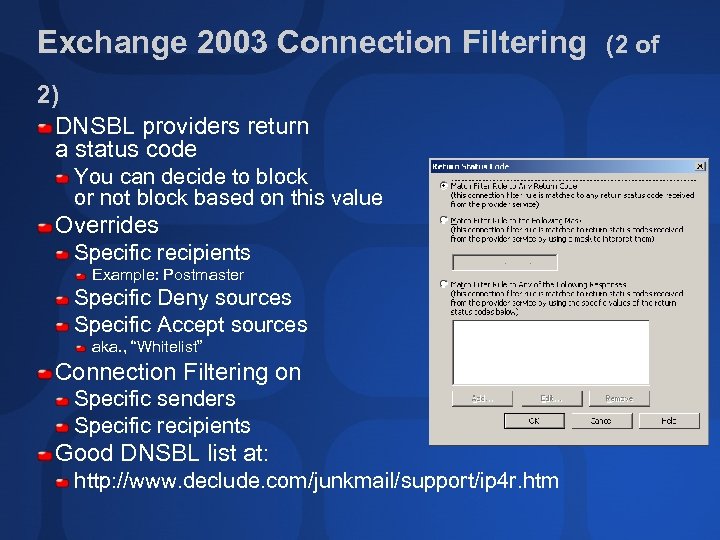 Exchange 2003 Connection Filtering 2) DNSBL providers return a status code You can decide to block or not block based on this value Overrides Specific recipients Example: Postmaster Specific Deny sources Specific Accept sources aka. , “Whitelist” Connection Filtering on Specific senders Specific recipients Good DNSBL list at: http: //www. declude. com/junkmail/support/ip 4 r. htm (2 of
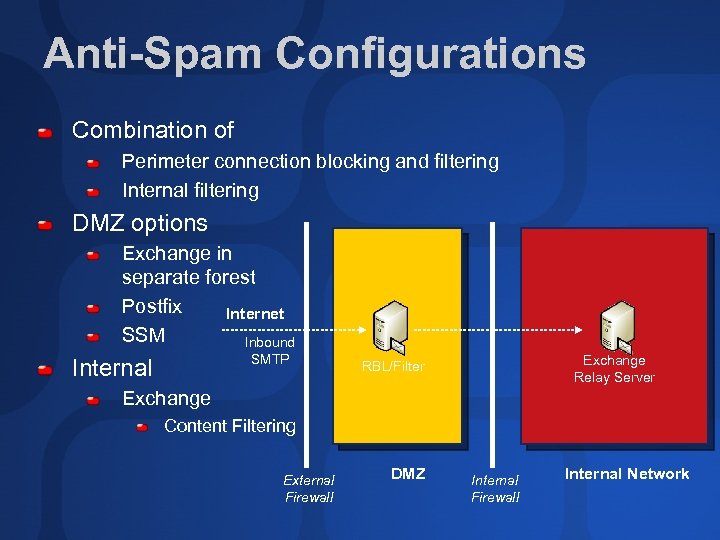 Anti-Spam Configurations Combination of Perimeter connection blocking and filtering Internal filtering DMZ options Exchange in separate forest Postfix Internet SSM Inbound SMTP Internal Exchange Relay Server RBL/Filter Exchange Content Filtering External Firewall DMZ Internal Firewall Internal Network
 Summary (1 of 2) OWA Publishing Wizard straightforward to use Recommended configuration uses HTTP proxy in DMZ For both OWA and RPC over HTTP operation RPC over HTTP configuration is tricky Prototype comprehensively Combined Exchange, Windows, and Outlook new features allow improved branch office deployments Datacenter deployments also very possible Be aware of required AD and system tuning modifications
 Summary (2 of 2) Public Folder referral improvements DSAccess behavioral characteristics Understand Query-based Distribution Group behaviors and limitations Employ improved anti-SPAM and content filtering technologies
 Community Resources http: //www. microsoft. com/communities/default. mspx Most Valuable Professional (MVP) http: //www. mvp. support. microsoft. com/ Newsgroups Converse online with Microsoft Newsgroups, including Worldwide http: //www. microsoft. com/communities/newsgroups/default. mspx User Groups Meet and learn with your peers http: //www. microsoft. com/communities/usergroups/default. mspx
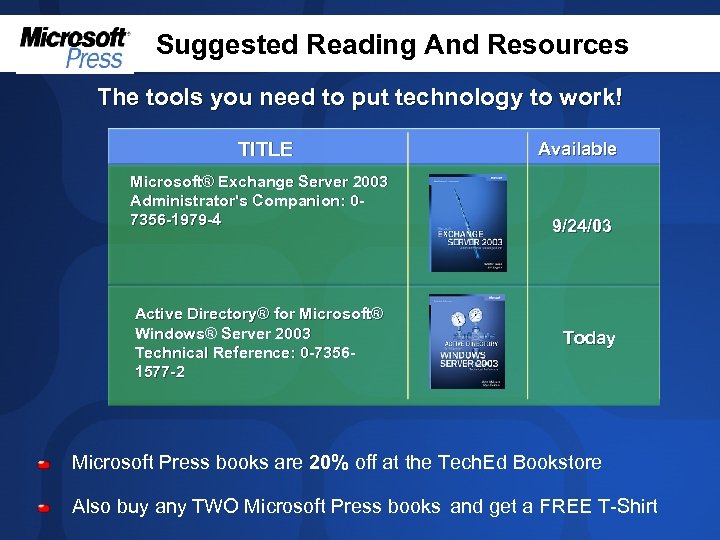 Suggested Reading And Resources The tools you need to put technology to work! TITLE Microsoft® Exchange Server 2003 Administrator's Companion: 07356 -1979 -4 Active Directory® for Microsoft® Windows® Server 2003 Technical Reference: 0 -73561577 -2 Available 9/24/03 Today Microsoft Press books are 20% off at the Tech. Ed Bookstore Also buy any TWO Microsoft Press books and get a FREE T-Shirt
 evaluations
 © 2003 Microsoft Corporation. All rights reserved. This presentation is for informational purposes only. MICROSOFT MAKES NO WARRANTIES, EXPRESS OR IMPLIED, IN THIS SUMMARY.