


 Скачать презентацию Mortgage Credit Certificate Program Lender Training As of
b308a4bd58990ca4e84f5f18009bd3de.ppt
- Количество слайдов: 70
 Mortgage Credit Certificate Program Lender Training (As of December 1, 2016)
 Agenda • • • Welcome Introductions Mortgage Credit Certificate Program Overview/Details Reservation Process Documents Questions 2
 Overview • LHC has $5, 000 available to issue MCC’s. • MCC’s are designed to assist low & moderate income 1 st Time Homebuyers. • Homebuyers are allowed to take up to 40% of their annual mortgage interest payments as a tax credit against their personal income tax. • Homebuyers are allowed this credit as long as the home remains their primary residence. • Homebuyers are allowed a maximum of $2, 000 annually. 3
 Overview A Mortgage Credit Certificate (MCC) is a tax credit which accompanies the first mortgage product. The Mortgage Credit Certificate is a tax “credit” not a tax “deduction”, which results in a dollar for dollar tax benefit to the borrower. This credit can be claimed annually or monthly through your borrower’s adjustment of their W-4 thereby increasing their net or “take home” earnings. 4
 Borrower Eligibility • Reside in Louisiana and have not owned a principal residence in the past three years; and • Purchase a newly built or existing home to be used as primary residence; • Meets the published acquisition & income limits; • New mortgage only (no subordinated mortgage) ; • Meets the qualifying requirements of the first mortgage loan; 5
 Lender Benefits • Increases applicant’s disposable income which improves loan amount qualification • Independent program that can be layered with any first-time homebuyer loan product except MRB’s • Master Servicer approval is not required • Available statewide • Lender earns $500 per MCC 6
 Example Calculations 1. Borrower with a loan amount of $100, 000 at an interest rate of 5. 0% and a 30 year term pays approximately $5, 000 of interest in the first year of the mortgage loan. With an MCC, this borrower receives a direct federal income tax credit of $2, 000 (40% x $5, 000 = $2, 000), and the borrower treats the remaining $3, 000 of mortgage interest paid as an itemized tax deduction. Loan Amount Interest Rate Monthly Interest Total Interest Paid 1 st Year Mortgage Credit Rate $100, 000 5. 0% $417 $5, 000 x 0. 40 $2, 000 7
 Example Calculations • Borrower with a loan amount of $150, 000 at an interest rate of 4. 875% for 30 years pays approximately $7, 312. 56 of interest in the first year of the mortgage loan. With an MCC, this borrower receives a direct federal income tax credit of $2, 000 (40% x $7, 312. 56 = $2, 925 however the maximum allowed is $2, 000). The borrower treats the remaining $5, 312. 56 of mortgage interest paid as an itemized tax deduction. Loan Amount Interest Rate Monthly Interest Total Interest Paid 1 st Year Mortgage Credit Rate $150, 000 4. 875% $609. 38 $7, 312. 56 x 0. 40 $2, 000 NOTE: Because the MCC is a nonrefundable tax credit, the benefit cannot exceed the Mortgagor’s federal income tax liability for the year. 8
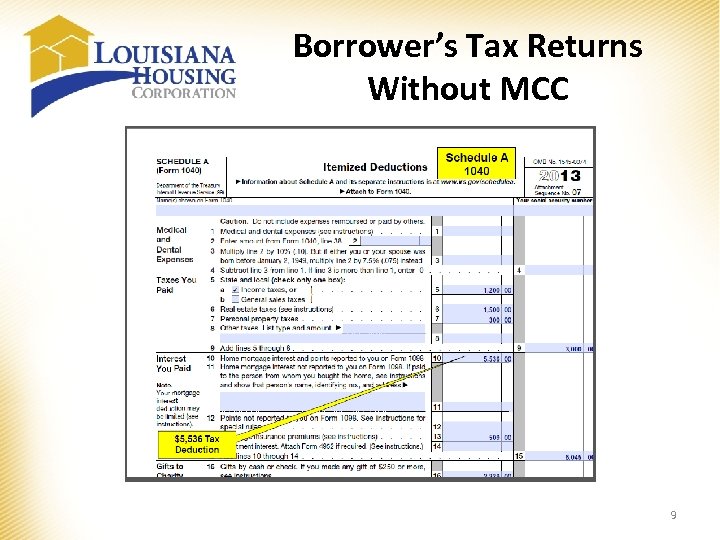 Borrower’s Tax Returns Without MCC 9
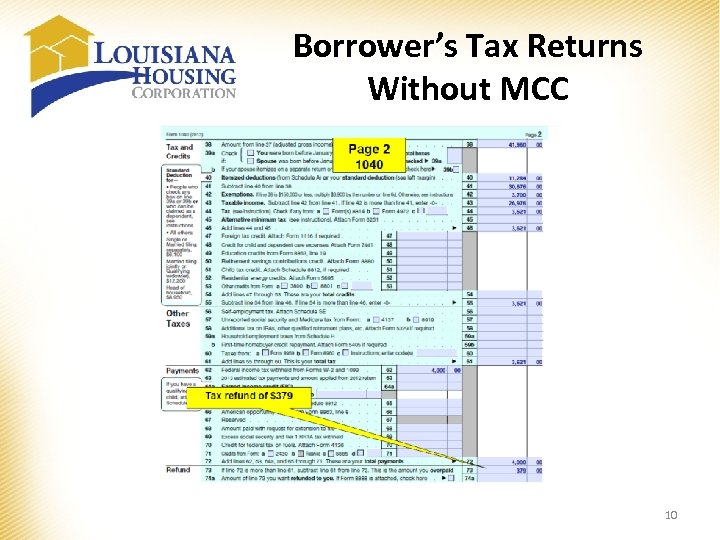 Borrower’s Tax Returns Without MCC 10
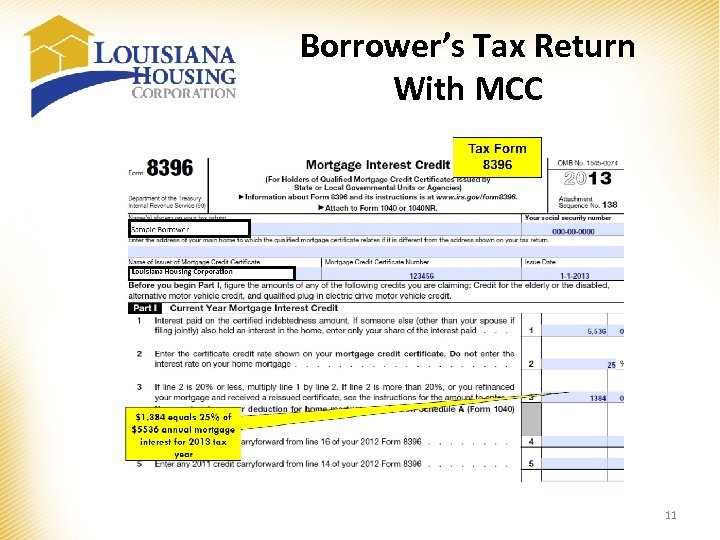 Borrower’s Tax Return With MCC 11
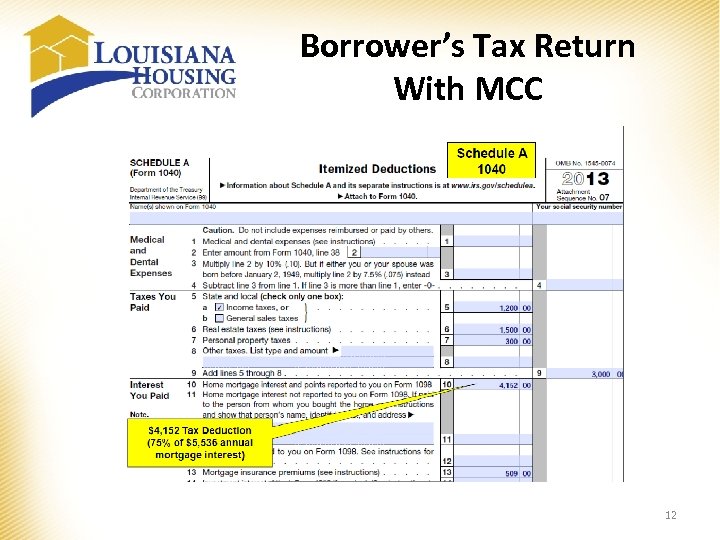 Borrower’s Tax Return With MCC 12
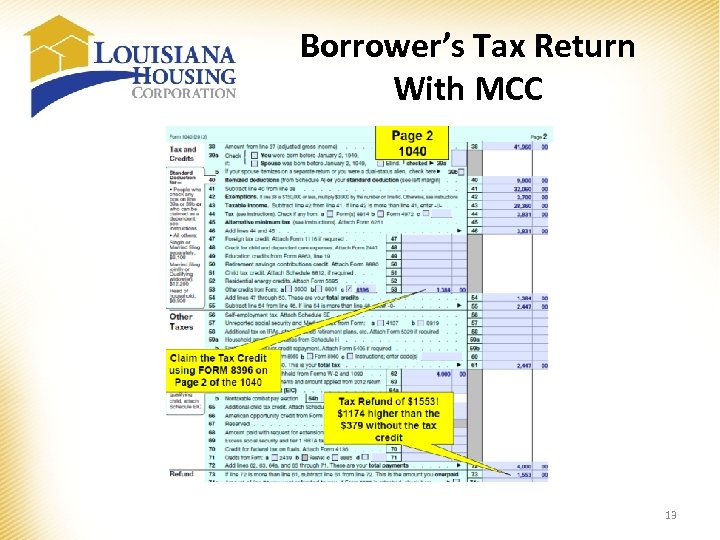 Borrower’s Tax Return With MCC 13
 First-time Homebuyer Exceptions The program allows two (2) exceptions for eligible borrowers looking to participate in the program. 1. Federally Designated Targeted Area: Borrower’s are exempted from the First Time Homebuyer requirement if they are purchasing a home located in a targeted area census tract. The Targeted Area Census Tracts can be found on Exhibit Y. 2. Veteran’s Exemption: The Veteran’s Exemption gives those who served a chance to save. Veterans who served in active duty and were honorably discharged as evidenced by Form DD-214, and have not previously had a mortgage financed through a mortgage revenue bond program are exempt from the first time homebuyer requirement. NOTE: Borrowers must still meet the applicable acquisition and purchase price limit requirements of a nontargeted area unless purchasing in a targeted area census tract. 14
 Program Requirements MCC processing coincide with the regular mortgage loan process. During this process, lenders will complete these steps: • Verify residence is located in Louisiana; • Provide the applicant with the MCC Information Guide; • Determine if the applicant meets Acquisition and Income requirements, 1 st Time Homebuyer requirement, etc. ; • Reserve the loan through LHC’s online reservation system; • Applicant reviews and signs Exhibit G, Owner Occupancy Certification and Exhibit E, Notice of Potential Recapture Tax and Mortgagor Affidavit; • Collect the MCC Application Fee of $500 from the applicant; 15
 Compliance File Submission The lender will submit the following documents to LHC for review and issuance of the MCC Commitment Letter: Exhibit A, Compliance File Checklist Compliance Fee of $75 Exhibit B, Completed Household Income Calculation Worksheet; Final 1003 Loan Application signed by applicant(s); Fully executed Sales Contract; Appraisal; Income Documentation (VOE, most recent paystubs, Self Employment P&L, Child Support/Alimony legal documents, SSI, etc. ); • Past Three (3) years of Complete Tax Returns w/all W-2’s, Schedules, 1099’s, etc. • Applicant’s Homebuyers Education Certificate; NOTE: Underwriter must complete the online Underwriter’s Certification in the Online Reservation System. • • 16
 Compliance File Submission • LHC reviews the documents received for completion and accuracy. • LHC issues MCC Conditional Commitment Letter – Exhibit C. • MCC Commitment letters may not be transferred from one lender to another. 17
 Lender Loan Approval • Lender may consider the MCC monthly savings when determining the amount of disposable income available for the monthly house payment. • Lender obtains the applicants most recent three years complete tax returns and W-2’s. • Lender confirms applicant is 1 st Time Homebuyer – has not owned a primary residence in the past three years. • Lender performs follows standard underwriting procedures. NOTE: If the loan is in a Targeted Area or if the Applicant is a Qualified Veteran, only the prior year’s tax returns are required. 18
 Lender Requirements • Loan Requirement – MCC may not be issued in conjunction with the acquisition or replacement of an existing mortgage; – MCC may be issued in conjunction with the replacement of construction period loans or bridge loans of a temporary nature. • Prohibited Mortgages – MCC may not be used in conjunction with a qualified mortgage bond or a qualified veterans’ mortgage bond. • No Interest Paid to Related Persons – No interest on the Certified Indebtedness Amount of the Loan can be paid to a person who is a “related person” to the MCC holder. 19
 Loan Closing & Submission of Final MCC Program Documents • Lender confirms the MCC Conditional Commitment Letter has not expired and closes the Loan. • Lender provides the Applicant with the Notice of Potential Recapture Tax – Exhibit E which must be signed by Applicant. • Lender submits to the Corporation a completed and executed Closing Package. 20
 Loan Closing & Submission of Final MCC Program Documents • The Closing Package includes: Original Compliance Checklist – Exhibit A; 1% Original Fee collected by the Lender from the Applicant at closing; Original executed Notice of Potential Recapture Tax and Mortgagor Affidavit; Original executed Owner Occupancy Certification – Exhibit G; Original executed Military Veteran’s Eligibility Affidavit – Exhibit I with a copy of the Qualified Veteran's discharge papers, if applicable; – Affidavit of Seller – Exhibit J; – Executed Closing Disclosure, all pages; – Closing Affidavit – Exhibit K; – Certificate of Lender – Exhibit L; – Reaffirmation of Applicant – Exhibit M; – Tax Return Affidavit – Exhibit N. NOTE: Lender agrees to provide information to be reported under the Federal Home Mortgage Disclosure Act (HMDA) AND all documents and 1% Origination Fee must be submitted within 30 days after the closing date. – – – 21
 Issuance of MCC • The Corporation confirms, based on documentation submitted by Lender, that the Applicant’s file is complete, MCC Commitment Letter was exercised, that the Loan was Closed as evidenced by the Closing Package, that the Applicant have met the requirements set forth in the Program Documents for issuance of an MCC. • LHC will forward to the Applicant an executed Mortgage Credit Certificate dated as of the Closing Date of the Loan. • A copy of the MCC will be forwarded to the Lender. 22
 Resubmission of MCC Documents • Refer to the MCC manual for the following program guidelines: – Compliance or Closing Package returned or denied – Compliance or Closing package resubmitted 23
 Extensions of MCC Commitments • An extension may be requested for an MCC Commitment Letter which is outstanding if the loan has not Closed. • A two(2) month extension of the MCC Commitment Letter will be given upon Lender’s submission of the MCC Commitment Extension Request Form – Exhibit O and a $25 MCC Extension Fee. 24
 MCC Commitment Cancellations & Commitment Amendments • Lender must notify LHC of MCC Commitment Letters to be canceled by submitting written notification and returning the original MCC Commitment Letter. • Address change, increase in loan amount, change in martial status, etc. would necessitate the refiling of an amended Notice of Potential Recapture Tax and Mortgagor Affidavit. – Lender would submit the amended documents with a cover letter referring to the original MCC Commitment Letter number requesting the revision of the MCC Commitment Letter. 25
 Changes Prior to Closing • Lender must notify LHC of any changes that affect the conditions under which the MCC Commitment Letter was issued. • Changes include, but are not limited to, Applicant’s financial status, family size or income, employment status, martial status, and amount of Loan. 26
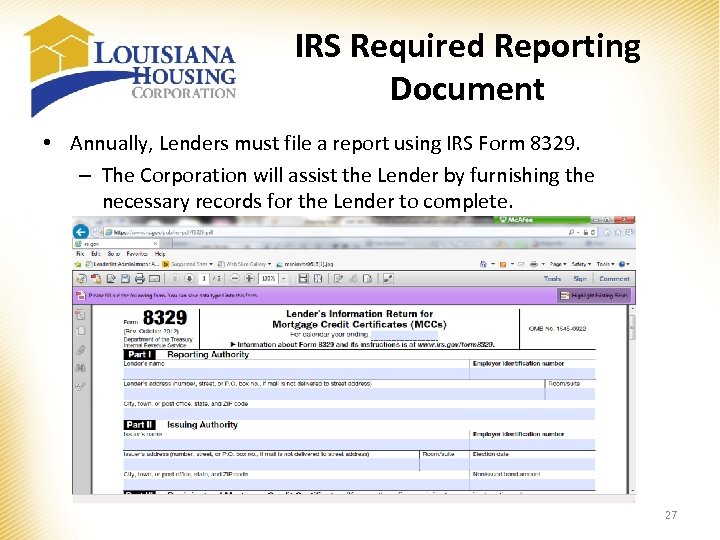 IRS Required Reporting Document • Annually, Lenders must file a report using IRS Form 8329. – The Corporation will assist the Lender by furnishing the necessary records for the Lender to complete. 27
 Record Keeping and Report Filing • For six (6) years, the Lender must retain: – Name, address and taxpayer identification number of each MCC holder; – Name, address and taxpayer identification number of the Corporation; and – Date of Loan, Certified Indebtedness Amount, and Mortgage Credit Certificate Rate. • In January following each year which MCC’s are issued, LHC will mail IRS Form 8396 to each MCC holder (borrower) of record as a reminder to properly declare the MCC tax credit for federal income tax purposes. 28
 MCC Exhibits Lender Required • Exhibit A – Compliance File Checklist • Exhibit B – Household Income Calculation Worksheet • Exhibit D – Confirmation Report • Exhibit E – Notice to Borrower of Potential Recapture Tax & Mortgagor Affidavit • Exhibit G – Owner Occupancy Certification • Exhibit J – Seller Affidavit • Exhibit K – Closing Affidavit • Exhibit L – Certificate of Lender • Exhibit M – Reaffirmation of Applicant • Exhibit N – Tax Return Affidavit 29
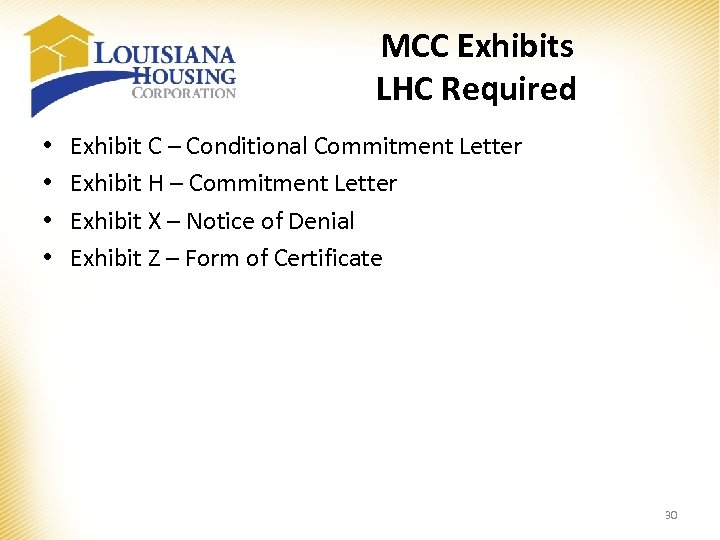 MCC Exhibits LHC Required • • Exhibit C – Conditional Commitment Letter Exhibit H – Commitment Letter Exhibit X – Notice of Denial Exhibit Z – Form of Certificate 30
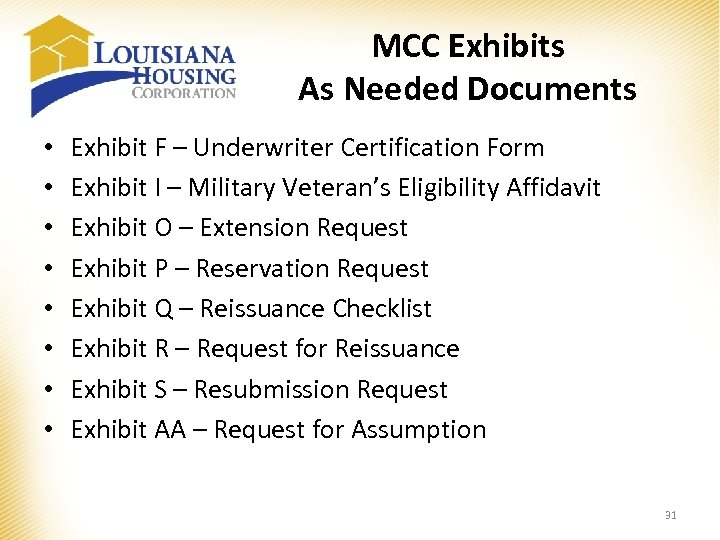 MCC Exhibits As Needed Documents • • Exhibit F – Underwriter Certification Form Exhibit I – Military Veteran’s Eligibility Affidavit Exhibit O – Extension Request Exhibit P – Reservation Request Exhibit Q – Reissuance Checklist Exhibit R – Request for Reissuance Exhibit S – Resubmission Request Exhibit AA – Request for Assumption 31
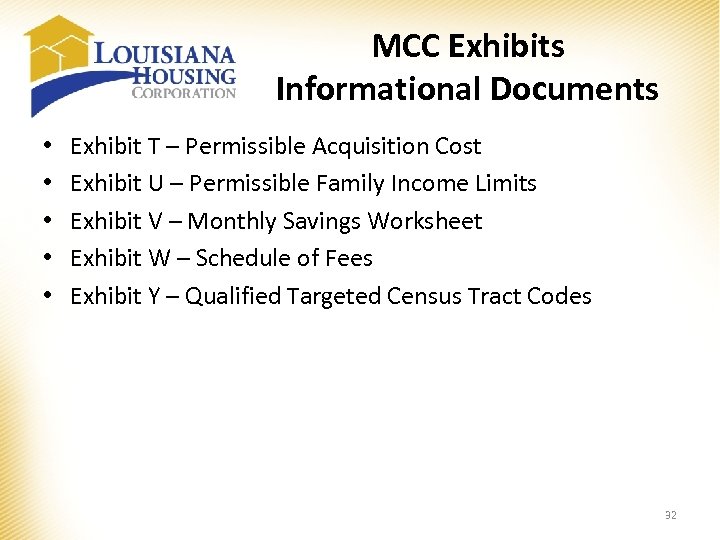 MCC Exhibits Informational Documents • • • Exhibit T – Permissible Acquisition Cost Exhibit U – Permissible Family Income Limits Exhibit V – Monthly Savings Worksheet Exhibit W – Schedule of Fees Exhibit Y – Qualified Targeted Census Tract Codes 32
 Property Eligibility All properties MUST be Owner Occupied Principal Residences Single Family Detached Homes Condominiums Townhome Any manufactured home eligible for FHA lending, must be fixed to a permanent foundation. • Modular • • 33
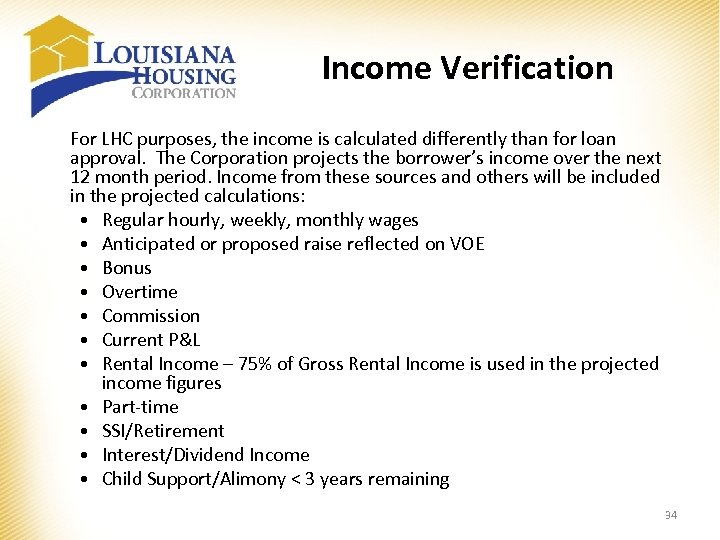 Income Verification For LHC purposes, the income is calculated differently than for loan approval. The Corporation projects the borrower’s income over the next 12 month period. Income from these sources and others will be included in the projected calculations: • Regular hourly, weekly, monthly wages • Anticipated or proposed raise reflected on VOE • Bonus • Overtime • Commission • Current P&L • Rental Income – 75% of Gross Rental Income is used in the projected income figures • Part-time • SSI/Retirement • Interest/Dividend Income • Child Support/Alimony < 3 years remaining 34
 Income Calculations • Hourly wages by # of hours worked per year (2080 hours for full-time employment) – if no overtime, commission, bonus, or other extra income • Weekly wages by 52 • Bi-weekly wages (paid every other week) by 26 • Semi-monthly wages (paid twice a month) by 24 • Monthly wages by 12 • Other than full time (if borrower earns overtime, commission, bonus or other income)—use YTD earnings and divide by the applicable months/days then multiply by 12 months (Example: YTD through 9/30/16 - $31, 642 divided by 9 months = $3, 515. 78 x 12 months = $42, 189. 33 annual) VOEs, paystubs, and any other income documentation will be required for every adult member of the household. 35
 Income Calculations Example for Borrower reflecting an upcoming raise on their VOE: VOE dated 10/01/16 indicates that Mr. Brown receives $9. 50 per hour for 40 hours but he will receive a. 50 raise to $10. 00 per hour effective 11/1/16 ***Calculation*** Oct 1 through Nov 1 = 4 weeks or 160 hours at $9. 50/hour = $1, 520 Nov 1, 2016 through Sept 30, 2017 = 48 weeks or 1920 hours 2080 hours minus 160 hours = 1920 hours at $10. 00/hour = $19, 200 Annual Income = $1520 + $19, 200 = $20, 720 36
 Income Calculations Areas for Caution: • Inconsistency of income between VOE and Pay stub • Borrower paid bi-weekly versus 24 pay periods per year • Number of pay periods for teachers - 9 or 12 months • Overtime - rate and average may need written clarification from employer • Bonuses/Commissions • Future raises referenced on the VOE • Self Employed – YTD P&L required (will be used to project earnings) 37
 Schedule of Fees LHC Fees • Origination Fee - 1% to be charged to the borrower • Compliance Fee - $75 to be paid by either the lender or the borrower Provisional LHC Fees • Resubmission Fee - $25 • Extension Fee - $25 • Reissuance Fee - $125 • Assumption Fee - $325 Lender Fees (Lender customary fees allowed) • Application Fee - $500 38
 Contacts • • Director of Housing Development • Brenda Evans, bevans@lhc. la. gov 225 -763 -8852 Administrative Assistant • Carlette Powell, cpowell@lhc. la. gov 225 -763 -8867 Manager • Mary Antoon, mantoon@lhc. la. gov 225 -763 -8649 Compliance Supervisor • Mary Boudreaux, mboudreaux@lhc. la. gov 225 -763 -8640 Technical Supervisor • Sonja Smith, ssmith@lhc. la. gov 225 -763 -8654 Compliance Specialist • Cody Henderson, chenderson@lhc. la. gov 225 -763 -8650 Marketing Representative • Casie Mc. Murray, cmcmurray@lhc. la. gov 225 -763 -8671 39
 Questions? 40
 Reservation Process 41
 Louisiana Housing Corporation Program Reservation Guide This is a comprehensive guide to the programs’ reservation process for Louisiana Housing Corporation – Single Family. If at any time assistance is needed, please contact Single Family at (225) 763 -8700. NOTE: You will see a button at the top called [Save Info]. DO NOT HIT THIS BUTTON AFTER EVERY TAB!! We will go over that feature towards the end of the reservation process. 42
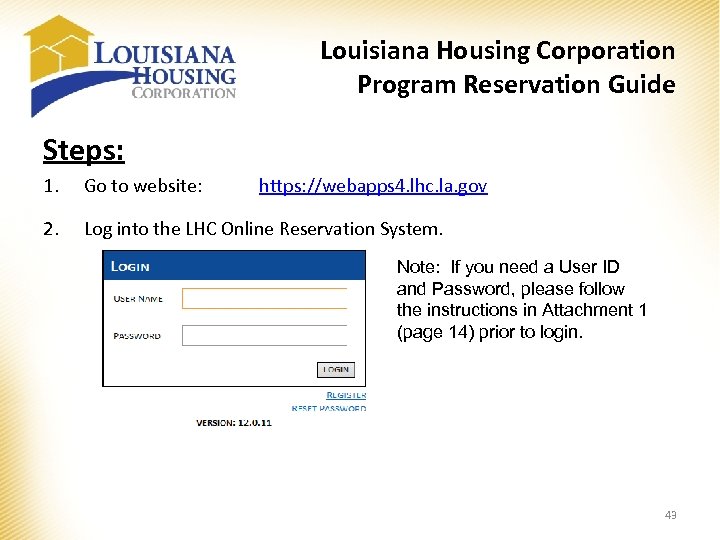 Louisiana Housing Corporation Program Reservation Guide Steps: 1. Go to website: 2. Log into the LHC Online Reservation System. https: //webapps 4. lhc. la. gov Note: If you need a User ID and Password, please follow the instructions in Attachment 1 (page 14) prior to login. 43
![Louisiana Housing Corporation Program Reservation Guide 3. Select [Single Family Web Management] from the](https://present5.com/presentation/b308a4bd58990ca4e84f5f18009bd3de/image-44.jpg "Louisiana Housing Corporation Program Reservation Guide 3. Select [Single Family Web Management] from the") Louisiana Housing Corporation Program Reservation Guide 3. Select [Single Family Web Management] from the system menu by double clicking on it. 44
Louisiana Housing Corporation Program Reservation Guide 3. Select [Single Family Web Management] from the system menu by double clicking on it. 44
![Louisiana Housing Corporation Program Reservation Guide 4. Select [Reserve Loan] from the Main Menu.](https://present5.com/presentation/b308a4bd58990ca4e84f5f18009bd3de/image-45.jpg "Louisiana Housing Corporation Program Reservation Guide 4. Select [Reserve Loan] from the Main Menu.") Louisiana Housing Corporation Program Reservation Guide 4. Select [Reserve Loan] from the Main Menu. 45
Louisiana Housing Corporation Program Reservation Guide 4. Select [Reserve Loan] from the Main Menu. 45
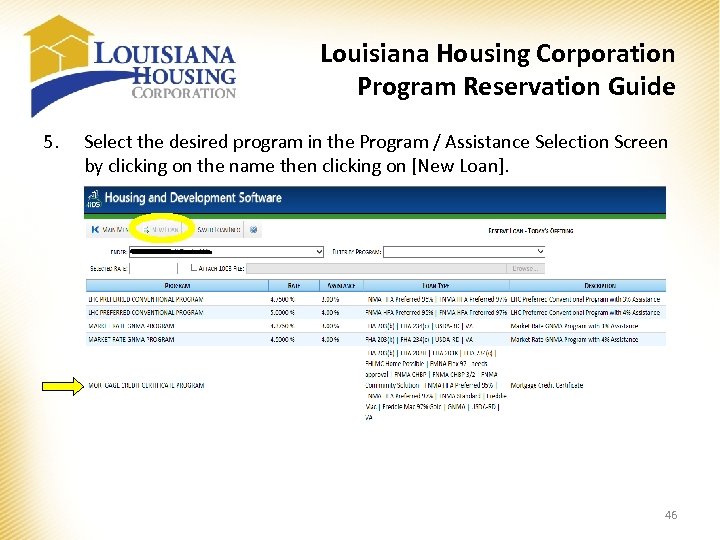 Louisiana Housing Corporation Program Reservation Guide 5. Select the desired program in the Program / Assistance Selection Screen by clicking on the name then clicking on [New Loan]. 46
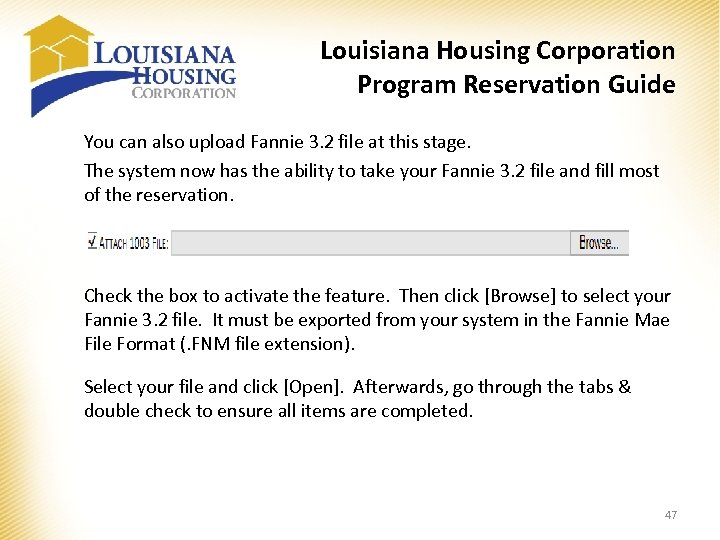 Louisiana Housing Corporation Program Reservation Guide You can also upload Fannie 3. 2 file at this stage. The system now has the ability to take your Fannie 3. 2 file and fill most of the reservation. Check the box to activate the feature. Then click [Browse] to select your Fannie 3. 2 file. It must be exported from your system in the Fannie Mae File Format (. FNM file extension). Select your file and click [Open]. Afterwards, go through the tabs & double check to ensure all items are completed. 47
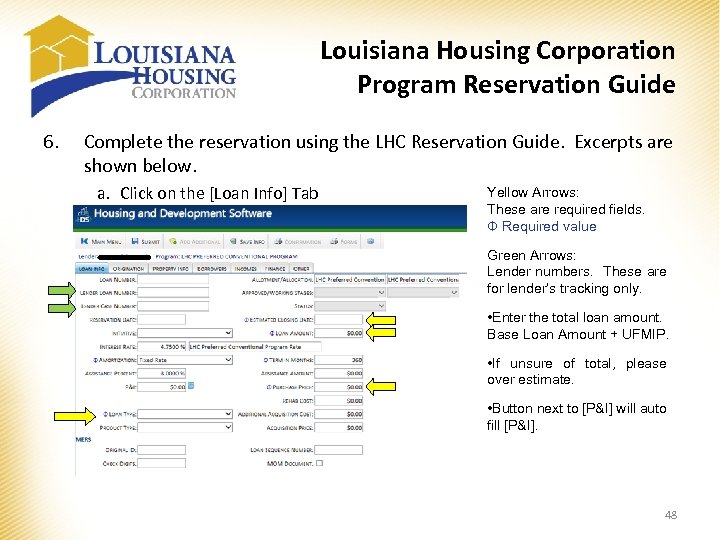 Louisiana Housing Corporation Program Reservation Guide 6. Complete the reservation using the LHC Reservation Guide. Excerpts are shown below. a. Click on the [Loan Info] Tab Yellow Arrows: These are required fields. Φ Required value Green Arrows: Lender numbers. These are for lender’s tracking only. • Enter the total loan amount. Base Loan Amount + UFMIP. • If unsure of total, please over estimate. • Button next to [P&I] will auto fill [P&I]. 48
![Louisiana Housing Corporation Program Reservation Guide b. Click on the [Origination] Tab Yellow Arrows:](https://present5.com/presentation/b308a4bd58990ca4e84f5f18009bd3de/image-49.jpg "Louisiana Housing Corporation Program Reservation Guide b. Click on the [Origination] Tab Yellow Arrows:") Louisiana Housing Corporation Program Reservation Guide b. Click on the [Origination] Tab Yellow Arrows: Make sure that the correct [Lender] name is shown and choose the name of the [Loan Officer] in the drop down. If the loan officer is not found, please notify LHC Single Family Department, so the loan officer can be added. 49
Louisiana Housing Corporation Program Reservation Guide b. Click on the [Origination] Tab Yellow Arrows: Make sure that the correct [Lender] name is shown and choose the name of the [Loan Officer] in the drop down. If the loan officer is not found, please notify LHC Single Family Department, so the loan officer can be added. 49
![Louisiana Housing Corporation Program Reservation Guide c. Click on the [Property Info] Tab Yellow](https://present5.com/presentation/b308a4bd58990ca4e84f5f18009bd3de/image-50.jpg "Louisiana Housing Corporation Program Reservation Guide c. Click on the [Property Info] Tab Yellow") Louisiana Housing Corporation Program Reservation Guide c. Click on the [Property Info] Tab Yellow Arrows: Required Fields. Φ Required value Notes: • When the [City] is selected in the drop down, the [State] and [Parish] will auto populate. • If [Census Tract] cannot be found, please enter 9999. 99 for unknown. This can be changed once the appraisal is received. • [Target/Non Target] goes with the [Census Tract] number for the property. The system will auto select this field. • The box after the Census Tract is not part of the Census Tract number. Please just skip. [Census Tract] is required. You can get it from the appraisal or the website listed: https: //geomap. ffiec. gov/FFIECGeoc. Map/Geocode. Map 1. aspx 50
Louisiana Housing Corporation Program Reservation Guide c. Click on the [Property Info] Tab Yellow Arrows: Required Fields. Φ Required value Notes: • When the [City] is selected in the drop down, the [State] and [Parish] will auto populate. • If [Census Tract] cannot be found, please enter 9999. 99 for unknown. This can be changed once the appraisal is received. • [Target/Non Target] goes with the [Census Tract] number for the property. The system will auto select this field. • The box after the Census Tract is not part of the Census Tract number. Please just skip. [Census Tract] is required. You can get it from the appraisal or the website listed: https: //geomap. ffiec. gov/FFIECGeoc. Map/Geocode. Map 1. aspx 50
![Louisiana Housing Corporation Program Reservation Guide d. Click on the [Borrowers] Tab Yellow Arrows:](https://present5.com/presentation/b308a4bd58990ca4e84f5f18009bd3de/image-51.jpg "Louisiana Housing Corporation Program Reservation Guide d. Click on the [Borrowers] Tab Yellow Arrows:") Louisiana Housing Corporation Program Reservation Guide d. Click on the [Borrowers] Tab Yellow Arrows: Required Fields. Φ Required value Notes: • The main borrower holds the first line by default. • Click on the line [Borrower] to select and then [Edit] to open the borrower detailed screen. • If any co-borrowers are needed, then click the [Add] button for a new line then double click on the new line to open the detailed borrower screen. • Do not worry about income at this time. The [Income] Section is coming up. 51
Louisiana Housing Corporation Program Reservation Guide d. Click on the [Borrowers] Tab Yellow Arrows: Required Fields. Φ Required value Notes: • The main borrower holds the first line by default. • Click on the line [Borrower] to select and then [Edit] to open the borrower detailed screen. • If any co-borrowers are needed, then click the [Add] button for a new line then double click on the new line to open the detailed borrower screen. • Do not worry about income at this time. The [Income] Section is coming up. 51
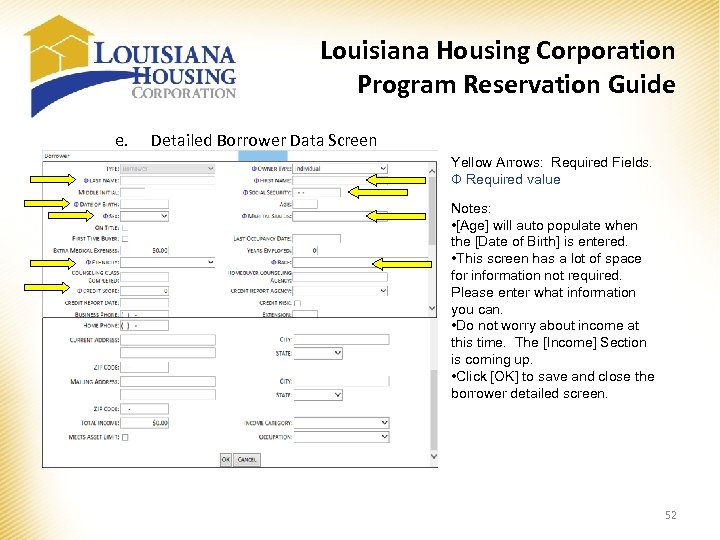 Louisiana Housing Corporation Program Reservation Guide e. Detailed Borrower Data Screen Yellow Arrows: Required Fields. Φ Required value Notes: • [Age] will auto populate when the [Date of Birth] is entered. • This screen has a lot of space for information not required. Please enter what information you can. • Do not worry about income at this time. The [Income] Section is coming up. • Click [OK] to save and close the borrower detailed screen. 52
![Louisiana Housing Corporation Program Reservation Guide f. Click on the [Income] Tab Notes: •](https://present5.com/presentation/b308a4bd58990ca4e84f5f18009bd3de/image-53.jpg "Louisiana Housing Corporation Program Reservation Guide f. Click on the [Income] Tab Notes: •") Louisiana Housing Corporation Program Reservation Guide f. Click on the [Income] Tab Notes: • To enter income, click [Add]. • [Income] is entered as components. Each [Income Source] will have its own line. IE. Federal Wage, Commission, Child Support, SSI, etc. • Each borrower will go through this income assignment. 53
Louisiana Housing Corporation Program Reservation Guide f. Click on the [Income] Tab Notes: • To enter income, click [Add]. • [Income] is entered as components. Each [Income Source] will have its own line. IE. Federal Wage, Commission, Child Support, SSI, etc. • Each borrower will go through this income assignment. 53
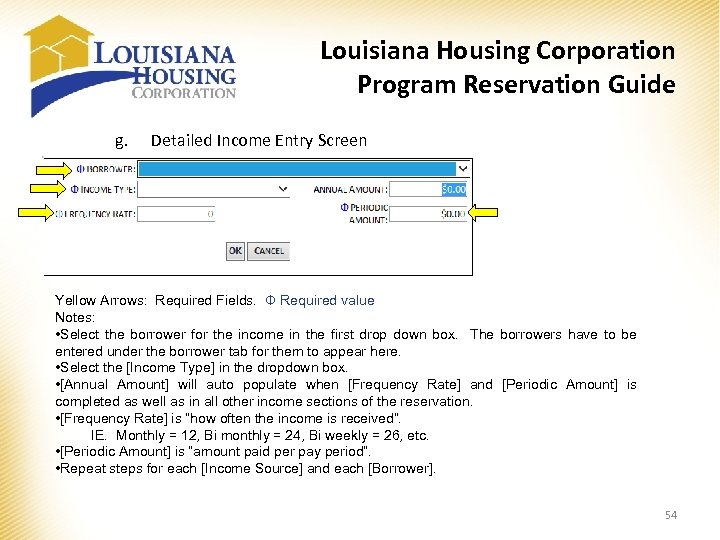 Louisiana Housing Corporation Program Reservation Guide g. Detailed Income Entry Screen Yellow Arrows: Required Fields. Φ Required value Notes: • Select the borrower for the income in the first drop down box. The borrowers have to be entered under the borrower tab for them to appear here. • Select the [Income Type] in the dropdown box. • [Annual Amount] will auto populate when [Frequency Rate] and [Periodic Amount] is completed as well as in all other income sections of the reservation. • [Frequency Rate] is “how often the income is received”. IE. Monthly = 12, Bi monthly = 24, Bi weekly = 26, etc. • [Periodic Amount] is “amount paid per pay period”. • Repeat steps for each [Income Source] and each [Borrower]. 54
![Louisiana Housing Corporation Program Reservation Guide h. Click on the [Other] Tab Notes: •](https://present5.com/presentation/b308a4bd58990ca4e84f5f18009bd3de/image-55.jpg "Louisiana Housing Corporation Program Reservation Guide h. Click on the [Other] Tab Notes: •") Louisiana Housing Corporation Program Reservation Guide h. Click on the [Other] Tab Notes: • Enter the number of borrowers. • Enter the Servicer’s Loan Number. • Select the AMI percentage. 55
Louisiana Housing Corporation Program Reservation Guide h. Click on the [Other] Tab Notes: • Enter the number of borrowers. • Enter the Servicer’s Loan Number. • Select the AMI percentage. 55
![Louisiana Housing Corporation Program Reservation Guide i. Submission Click on the [Submit] button. This](https://present5.com/presentation/b308a4bd58990ca4e84f5f18009bd3de/image-56.jpg "Louisiana Housing Corporation Program Reservation Guide i. Submission Click on the [Submit] button. This") Louisiana Housing Corporation Program Reservation Guide i. Submission Click on the [Submit] button. This will save and submit the reservation to LHC. Once the request is submitted, one of two things will happen. 1) Error Code • The system will identify the location and the error. • Correct the errors and re click [Submit]. 2) Acceptance • Once accepted, the [Loan Number] and [Reservation Date] will auto populate. 56
Louisiana Housing Corporation Program Reservation Guide i. Submission Click on the [Submit] button. This will save and submit the reservation to LHC. Once the request is submitted, one of two things will happen. 1) Error Code • The system will identify the location and the error. • Correct the errors and re click [Submit]. 2) Acceptance • Once accepted, the [Loan Number] and [Reservation Date] will auto populate. 56
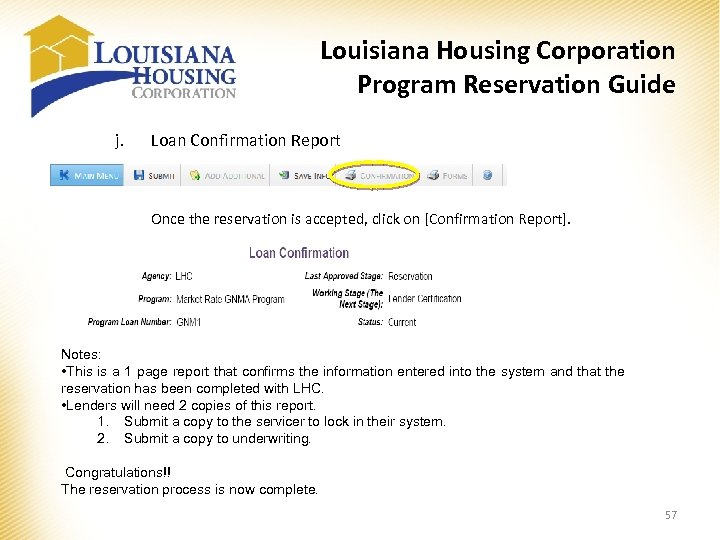 Louisiana Housing Corporation Program Reservation Guide j. Loan Confirmation Report Once the reservation is accepted, click on [Confirmation Report]. Notes: • This is a 1 page report that confirms the information entered into the system and that the reservation has been completed with LHC. • Lenders will need 2 copies of this report. 1. Submit a copy to the servicer to lock in their system. 2. Submit a copy to underwriting. Congratulations!! The reservation process is now complete. 57
 Louisiana Housing Corporation Program Reservation Guide Attachment 1 ATTACHMENT 1 – Requesting a User ID and Password. To request an User ID and password, please email the following information to singlefamily@lhc. la. gov. • Name • Position • Company Name • Physical Address • Phone Number • Fax Number • Email Address • Chums # (if underwriter) When entering the address, phone and fax numbers, please enter your actual location, not the home office. Once you are set up in the system, you will receive an email from Sonja Andrews (ssmith@lhc. la. gov) or Cody Henderson (chenderson@lhc. la. gov) with your user ID and password in it. Once you receive this email, you will be able to log into the system and complete your reservation request. 58
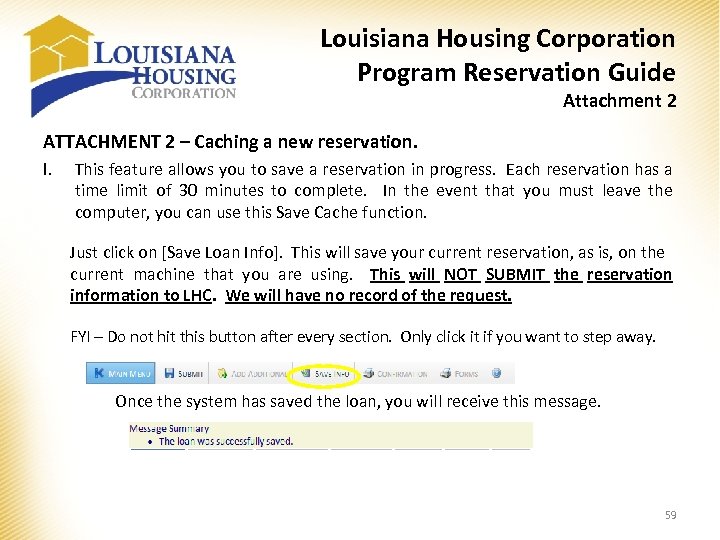 Louisiana Housing Corporation Program Reservation Guide Attachment 2 ATTACHMENT 2 – Caching a new reservation. I. This feature allows you to save a reservation in progress. Each reservation has a time limit of 30 minutes to complete. In the event that you must leave the computer, you can use this Save Cache function. Just click on [Save Loan Info]. This will save your current reservation, as is, on the current machine that you are using. This will NOT SUBMIT the reservation information to LHC. We will have no record of the request. FYI – Do not hit this button after every section. Only click it if you want to step away. Once the system has saved the loan, you will receive this message. 59
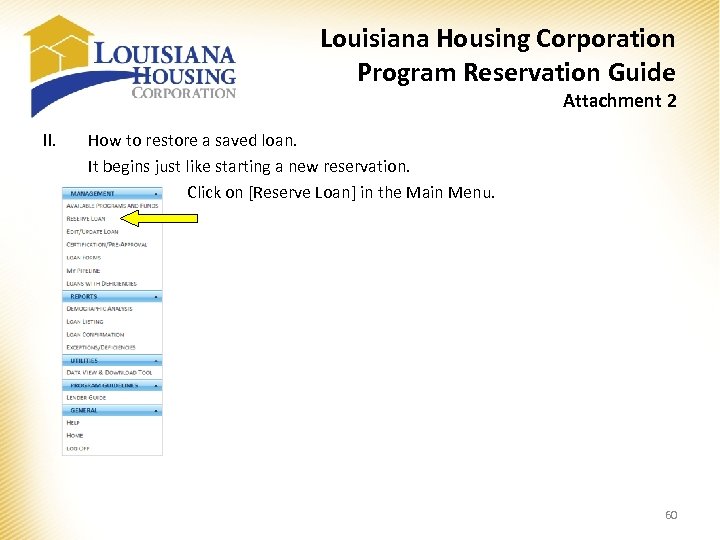 Louisiana Housing Corporation Program Reservation Guide Attachment 2 II. How to restore a saved loan. It begins just like starting a new reservation. Click on [Reserve Loan] in the Main Menu. 60
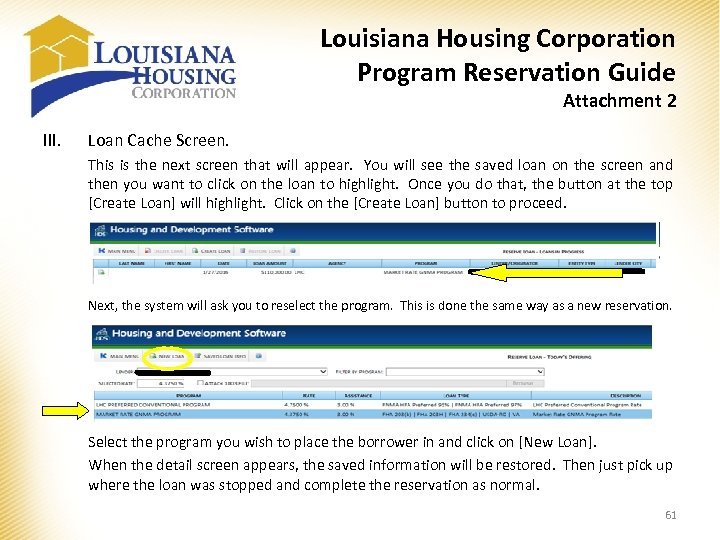 Louisiana Housing Corporation Program Reservation Guide Attachment 2 III. Loan Cache Screen. This is the next screen that will appear. You will see the saved loan on the screen and then you want to click on the loan to highlight. Once you do that, the button at the top [Create Loan] will highlight. Click on the [Create Loan] button to proceed. Next, the system will ask you to reselect the program. This is done the same way as a new reservation. Select the program you wish to place the borrower in and click on [New Loan]. When the detail screen appears, the saved information will be restored. Then just pick up where the loan was stopped and complete the reservation as normal. 61
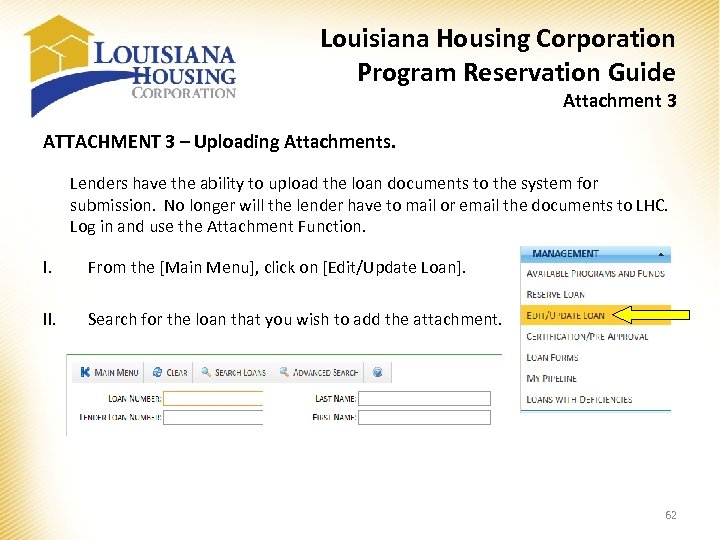 Louisiana Housing Corporation Program Reservation Guide Attachment 3 ATTACHMENT 3 – Uploading Attachments. Lenders have the ability to upload the loan documents to the system for submission. No longer will the lender have to mail or email the documents to LHC. Log in and use the Attachment Function. I. From the [Main Menu], click on [Edit/Update Loan]. II. Search for the loan that you wish to add the attachment. 62
![Louisiana Housing Corporation Program Reservation Guide Attachment 3 III. Click on [Attachments] Tab. LHC](https://present5.com/presentation/b308a4bd58990ca4e84f5f18009bd3de/image-63.jpg "Louisiana Housing Corporation Program Reservation Guide Attachment 3 III. Click on [Attachments] Tab. LHC") Louisiana Housing Corporation Program Reservation Guide Attachment 3 III. Click on [Attachments] Tab. LHC will also load documents into this section that are sent to us by email so they can be retrieved. We will load the Exhibit B – Reservation Request (if used), the Exhibit C – Lender Certification, and the Exhibit D – Extension Request (if used). Name the document in the [Description] area and select the file using the [Browse…] button. After the document to upload is selected, click on the [Upload] button to send the file to LHC. Once the upload is complete, you will see it in the bottom section under [Documents]. You can come back at anytime and retrieve any submitted document. By clicking the [Download] link next to the document that is needed, you can retrieve the document. 63
Louisiana Housing Corporation Program Reservation Guide Attachment 3 III. Click on [Attachments] Tab. LHC will also load documents into this section that are sent to us by email so they can be retrieved. We will load the Exhibit B – Reservation Request (if used), the Exhibit C – Lender Certification, and the Exhibit D – Extension Request (if used). Name the document in the [Description] area and select the file using the [Browse…] button. After the document to upload is selected, click on the [Upload] button to send the file to LHC. Once the upload is complete, you will see it in the bottom section under [Documents]. You can come back at anytime and retrieve any submitted document. By clicking the [Download] link next to the document that is needed, you can retrieve the document. 63
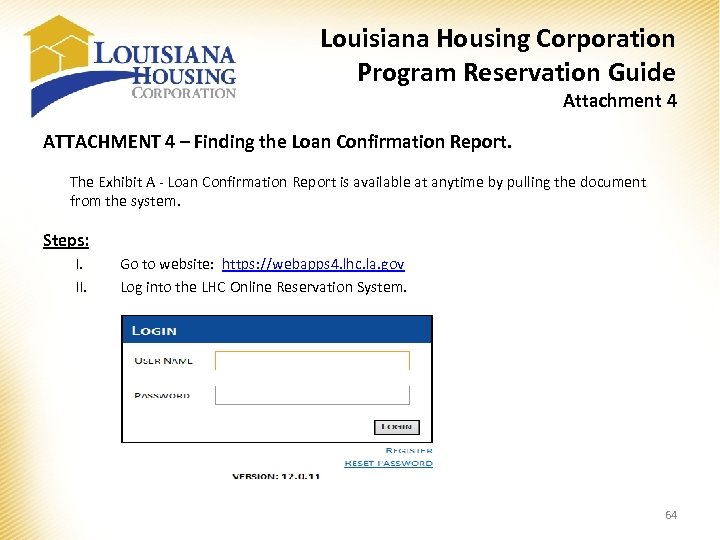 Louisiana Housing Corporation Program Reservation Guide Attachment 4 ATTACHMENT 4 – Finding the Loan Confirmation Report. The Exhibit A - Loan Confirmation Report is available at anytime by pulling the document from the system. Steps: I. II. Go to website: https: //webapps 4. lhc. la. gov Log into the LHC Online Reservation System. 64
![Louisiana Housing Corporation Program Reservation Guide Attachment 4 III. Select [Single Family Web Management]](https://present5.com/presentation/b308a4bd58990ca4e84f5f18009bd3de/image-65.jpg "Louisiana Housing Corporation Program Reservation Guide Attachment 4 III. Select [Single Family Web Management]") Louisiana Housing Corporation Program Reservation Guide Attachment 4 III. Select [Single Family Web Management] from the system menu by double clicking on it. IV. Select [Edit/Update Loan] from the Main Menu. 65
Louisiana Housing Corporation Program Reservation Guide Attachment 4 III. Select [Single Family Web Management] from the system menu by double clicking on it. IV. Select [Edit/Update Loan] from the Main Menu. 65
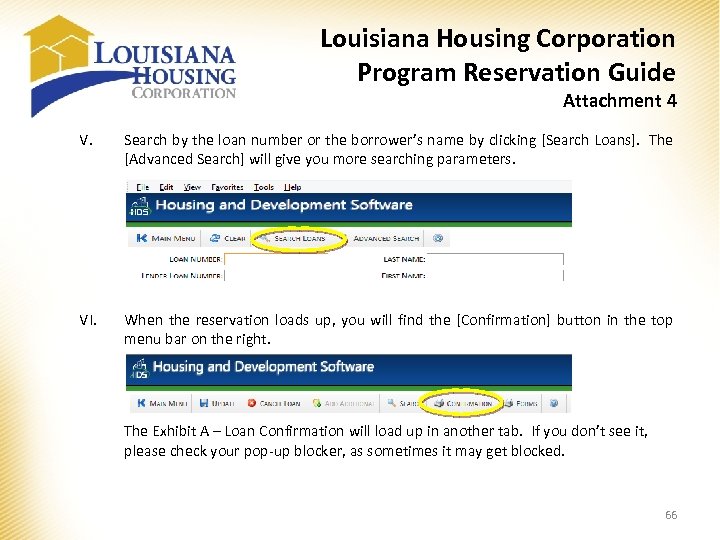 Louisiana Housing Corporation Program Reservation Guide Attachment 4 V. Search by the loan number or the borrower’s name by clicking [Search Loans]. The [Advanced Search] will give you more searching parameters. VI. When the reservation loads up, you will find the [Confirmation] button in the top menu bar on the right. The Exhibit A – Loan Confirmation will load up in another tab. If you don’t see it, please check your pop-up blocker, as sometimes it may get blocked. 66
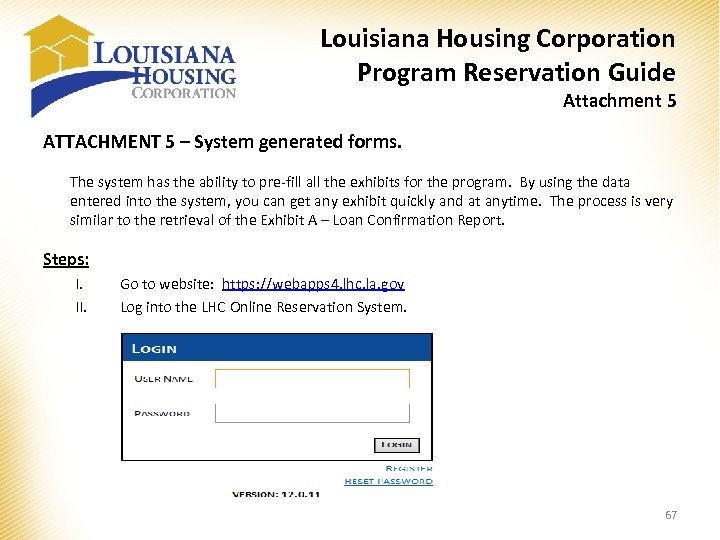 Louisiana Housing Corporation Program Reservation Guide Attachment 5 ATTACHMENT 5 – System generated forms. The system has the ability to pre-fill all the exhibits for the program. By using the data entered into the system, you can get any exhibit quickly and at anytime. The process is very similar to the retrieval of the Exhibit A – Loan Confirmation Report. Steps: I. II. Go to website: https: //webapps 4. lhc. la. gov Log into the LHC Online Reservation System. 67
![Louisiana Housing Corporation Program Reservation Guide Attachment 5 III. Select [Single Family Web Management]](https://present5.com/presentation/b308a4bd58990ca4e84f5f18009bd3de/image-68.jpg "Louisiana Housing Corporation Program Reservation Guide Attachment 5 III. Select [Single Family Web Management]") Louisiana Housing Corporation Program Reservation Guide Attachment 5 III. Select [Single Family Web Management] from the system menu by double clicking on it. IV. Select [Edit/Update Loan] from the Main Menu. 68
Louisiana Housing Corporation Program Reservation Guide Attachment 5 III. Select [Single Family Web Management] from the system menu by double clicking on it. IV. Select [Edit/Update Loan] from the Main Menu. 68
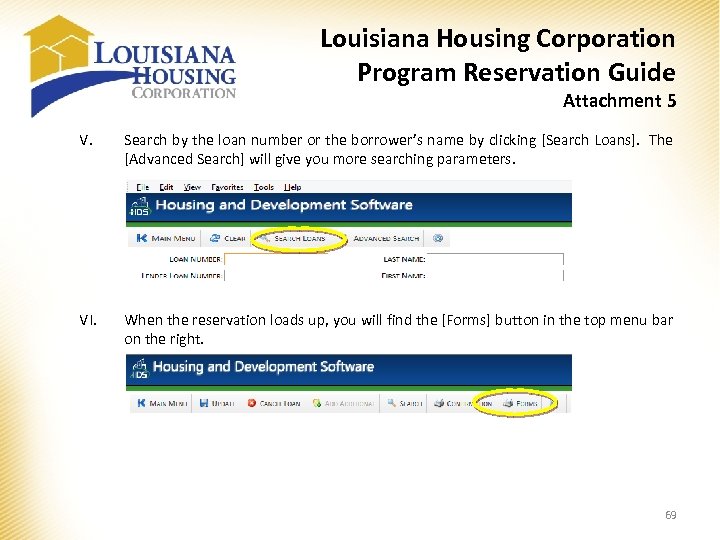 Louisiana Housing Corporation Program Reservation Guide Attachment 5 V. Search by the loan number or the borrower’s name by clicking [Search Loans]. The [Advanced Search] will give you more searching parameters. VI. When the reservation loads up, you will find the [Forms] button in the top menu bar on the right. 69
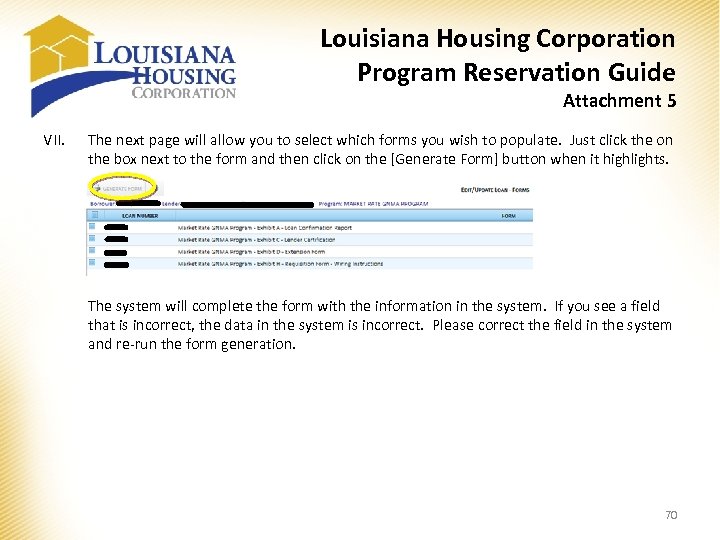 Louisiana Housing Corporation Program Reservation Guide Attachment 5 VII. The next page will allow you to select which forms you wish to populate. Just click the on the box next to the form and then click on the [Generate Form] button when it highlights. The system will complete the form with the information in the system. If you see a field that is incorrect, the data in the system is incorrect. Please correct the field in the system and re-run the form generation. 70