 Скачать презентацию Middleware Implementation Case Studies Tom Barton The University
d31f614f6bd8b25a45e6b3d0f2b16a5e.ppt
- Количество слайдов: 81



Middleware Implementation Case Studies Tom Barton, The University of Memphis Renee Woodten Frost, Internet 2 & UMich Louise Miller-Finn, Johns Hopkins University Dewitt Latimer, University of Tennessee Todd Piket, Michigan Tech University Robert Banz, UMBC 27 October 2001
Middleware Case Studies Agenda • • • Introductions - Tom Setting the Middleware Stage - Renee Case Studies: U of Memphis – Tom Johns Hopkins – Louise BREAK 2: 30 pm • Mini Cases i. Planet to AD – Rob, UMBC edu. Person – Todd, MTU Multi-campus Directory – Dewitt, Tennessee Network Access Services – Tom, Memphis E-Provisioning – Louise, Hopkins BREAK 3: 30 pm Round Table Discussions • • Wrap up - Tom Ongoing Middleware Initiatives – Renee 27 October 2001 2
Middleware Case Studies Introductions …. and tell us about your middleware “burning issue” 27 October 2001 3
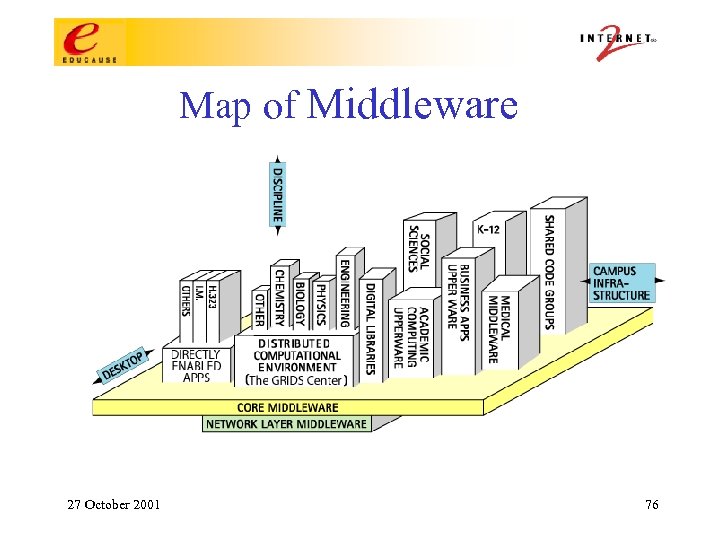
Core Middleware Identity - unique markers of who you (person, machine, service, group) are Authentication - how you prove or establish that you are that identity Directories - where an identity’s basic characteristics are kept Authorization - what an identity is permitted to do PKI - emerging tools for security services 27 October 2001 4
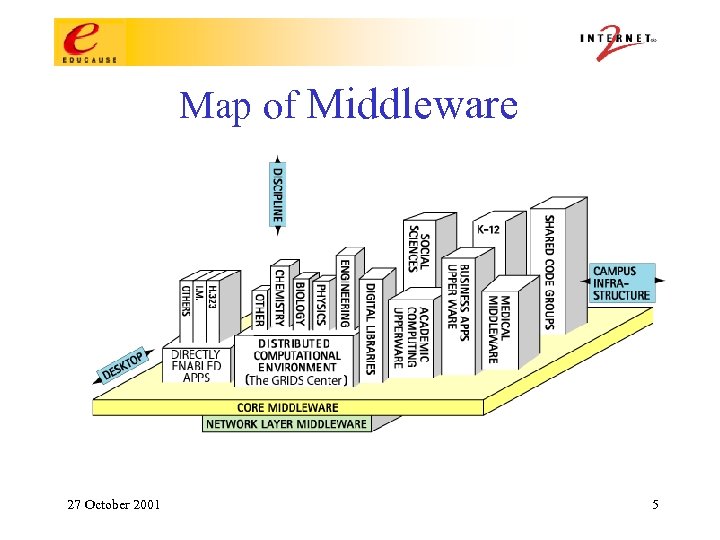
Map of Middleware 27 October 2001 5
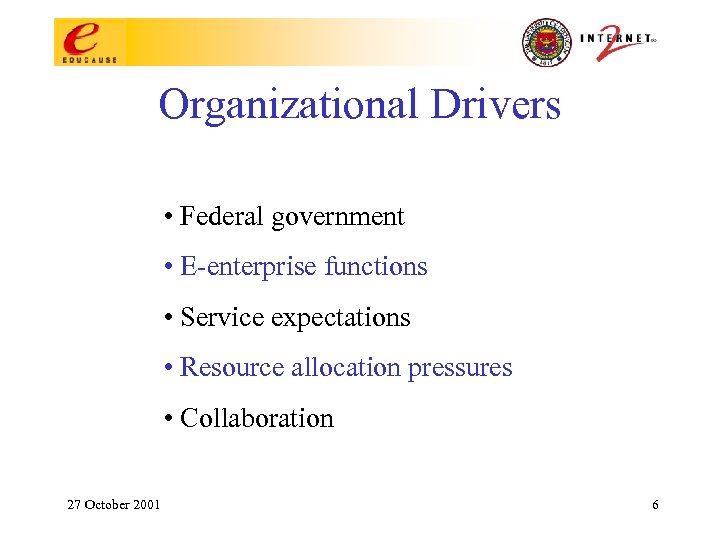
Organizational Drivers • Federal government • E-enterprise functions • Service expectations • Resource allocation pressures • Collaboration 27 October 2001 6
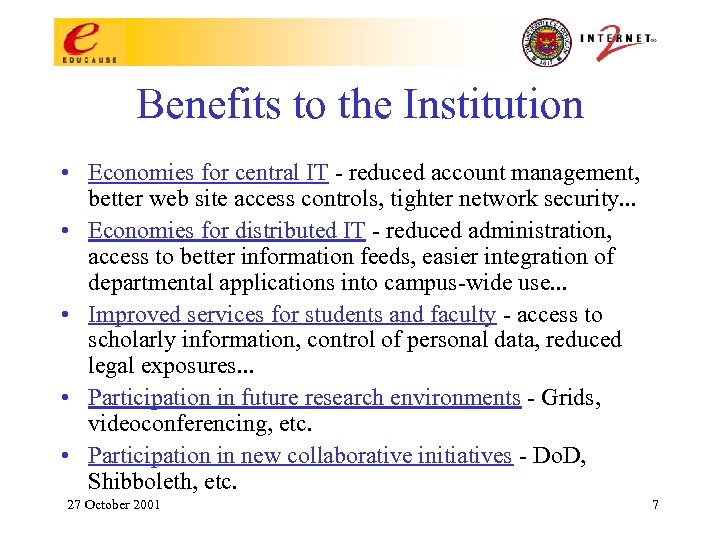
Benefits to the Institution • Economies for central IT - reduced account management, better web site access controls, tighter network security. . . • Economies for distributed IT - reduced administration, access to better information feeds, easier integration of departmental applications into campus-wide use. . . • Improved services for students and faculty - access to scholarly information, control of personal data, reduced legal exposures. . . • Participation in future research environments - Grids, videoconferencing, etc. • Participation in new collaborative initiatives - Do. D, Shibboleth, etc. 27 October 2001 7
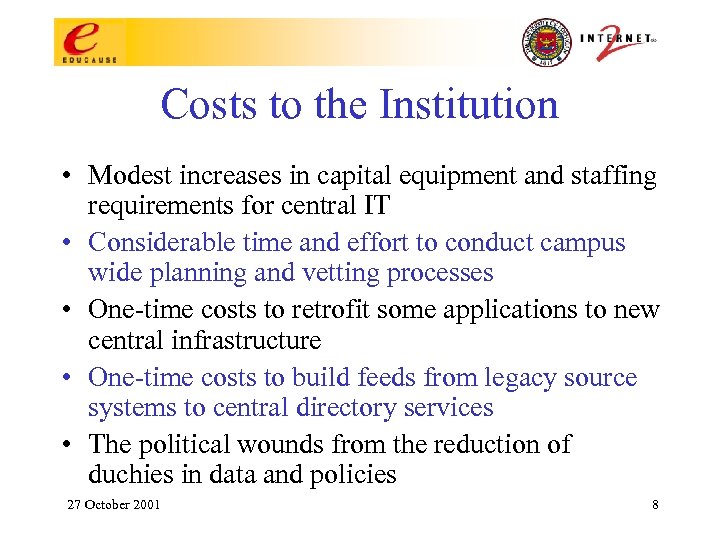
Costs to the Institution • Modest increases in capital equipment and staffing requirements for central IT • Considerable time and effort to conduct campus wide planning and vetting processes • One-time costs to retrofit some applications to new central infrastructure • One-time costs to build feeds from legacy source systems to central directory services • The political wounds from the reduction of duchies in data and policies 27 October 2001 8
Nature of the Work • Technology – Establish campus-wide services: name space, authentication – Build an enterprise directory service – Populate the directory from source systems – Enable applications to use the directory 27 October 2001 9
Nature of the Work • Policies and Politics – Clarify relationships between individuals and institution – Determine who manages, who can update and who can see common data – Structure information access and use rules between departments and central administrative units – Reconcile business rules and practices 27 October 2001 10
Enterprise Directory Service: What Is It? • Anti-stovepipe architecture that can provide authentication, attribute, & group services to applications. • Adds value by improving cost/benefit of online services and by improving security. • A new & visible flow of administrative data. When someone finally begins to understand what you’re talking about, they react to the prospect of change. 27 October 2001 11
Managed Objects • Objects that describe: –People –Groups –Aliases, Roles, Affiliations –Network devices –Security policies –Network services –Org structure • The object classes and source data to populate them are determined by the applications to be directory enabled. 27 October 2001 12
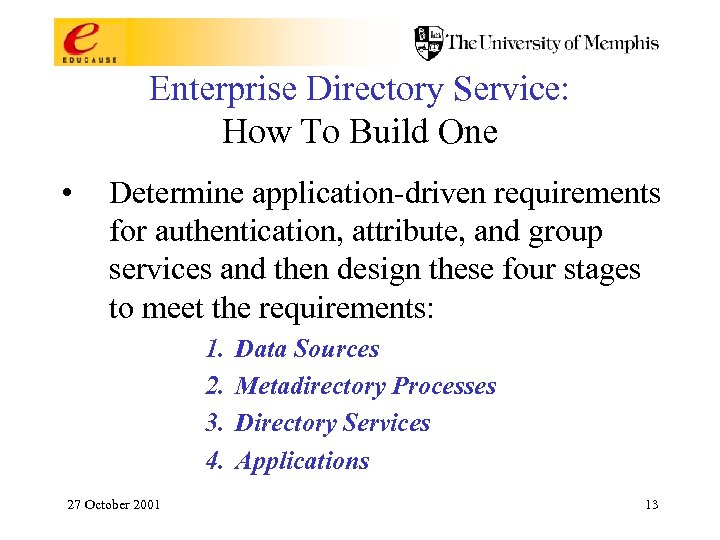
Enterprise Directory Service: How To Build One • Determine application-driven requirements for authentication, attribute, and group services and then design these four stages to meet the requirements: 1. 2. 3. 4. 27 October 2001 Data Sources Metadirectory Processes Directory Services Applications 13
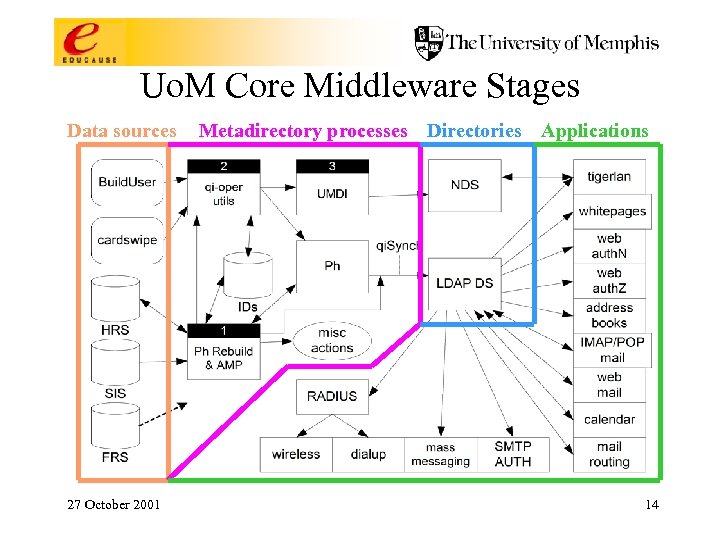
Uo. M Core Middleware Stages Data sources 27 October 2001 Metadirectory processes Directories Applications 14
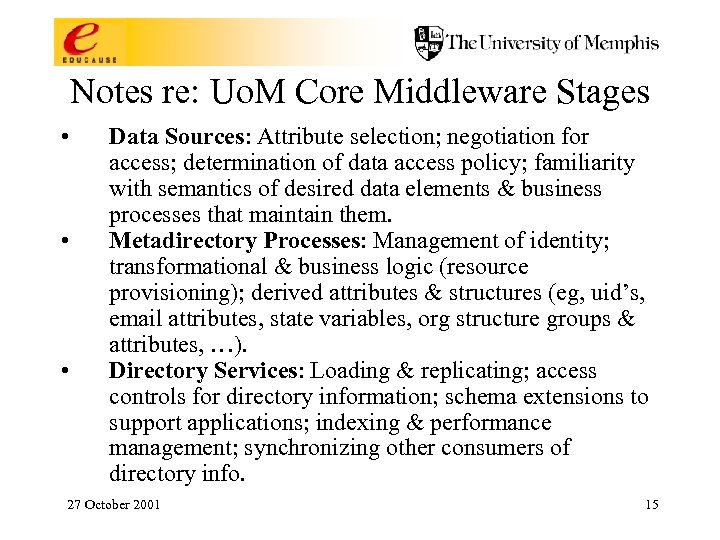
Notes re: Uo. M Core Middleware Stages • • • Data Sources: Attribute selection; negotiation for access; determination of data access policy; familiarity with semantics of desired data elements & business processes that maintain them. Metadirectory Processes: Management of identity; transformational & business logic (resource provisioning); derived attributes & structures (eg, uid’s, email attributes, state variables, org structure groups & attributes, …). Directory Services: Loading & replicating; access controls for directory information; schema extensions to support applications; indexing & performance management; synchronizing other consumers of directory info. 27 October 2001 15
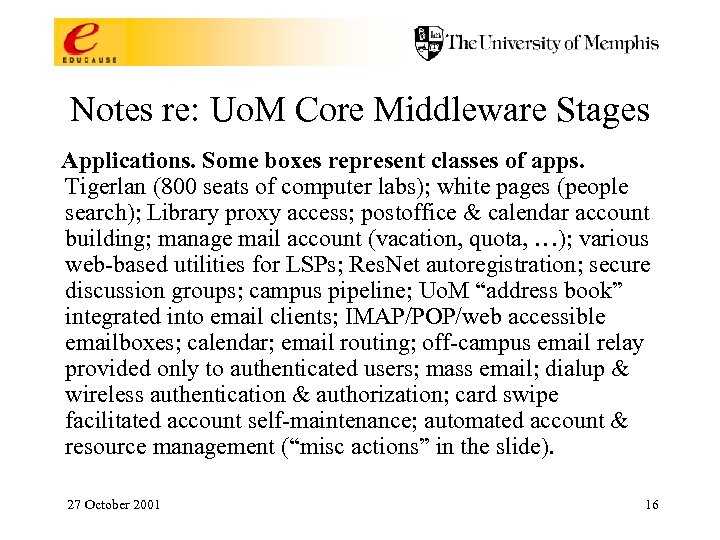
Notes re: Uo. M Core Middleware Stages Applications. Some boxes represent classes of apps. Tigerlan (800 seats of computer labs); white pages (people search); Library proxy access; postoffice & calendar account building; manage mail account (vacation, quota, …); various web-based utilities for LSPs; Res. Net autoregistration; secure discussion groups; campus pipeline; Uo. M “address book” integrated into email clients; IMAP/POP/web accessible emailboxes; calendar; email routing; off-campus email relay provided only to authenticated users; mass email; dialup & wireless authentication & authorization; card swipe facilitated account self-maintenance; automated account & resource management (“misc actions” in the slide). 27 October 2001 16
Notes re: Uo. M Core Middleware Stages Applications - upcoming: Web. CT; data warehouse; suite of applications directly managed by AD; shell account, home directory & personal web page access; FASTLane (Faculty & Staff LAN); storage & distribution of digital certificates, a key element of PKI; PIN synchronization? ? ; new Uo. M ID card based applications? ? ; authentication of Library patrons? ? 27 October 2001 17
Issues With Current Data Sources HRS: • All accounts paid from, not just primary department. SIS: • Select students from current, future, and previous term and add’l data elements to support 2 nd generation group messaging. • Pull instructor data too. 27 October 2001 ADS (Alumni): initiate DRA (Library): initiate Async (Clientele): • New web based account self-maintenance to replace card swipes. • “Challenge” Qs & As for identification in non faceto-face circumstances. 18
Issues With the Current Metadirectory • NDS update channel is too slow • Ancient, frozen technology (especially Ph) • Anticipate new policy regarding account & resource management, especially to handle off-campus students & alumni. • 9 years of spaghetti • Tightly bound to particular source and directory technologies. 27 October 2001 19
Issues With Current Directories • Must bring Active Directory into this infrastructure. • Need better representations & procedures for non-people objects: static groups; dynamic groups; org structure related groups, roles, and people attributes; affiliations & other “correlated” info. • Need to include new types of metadirectory consumers such as list processors 27 October 2001 20
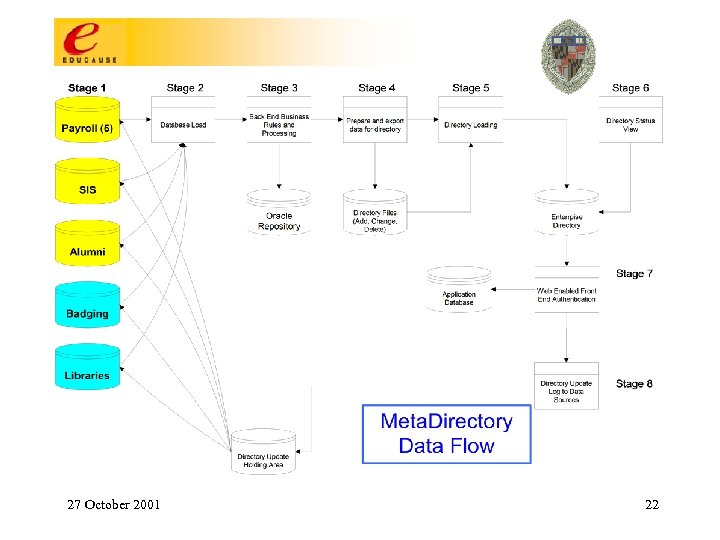
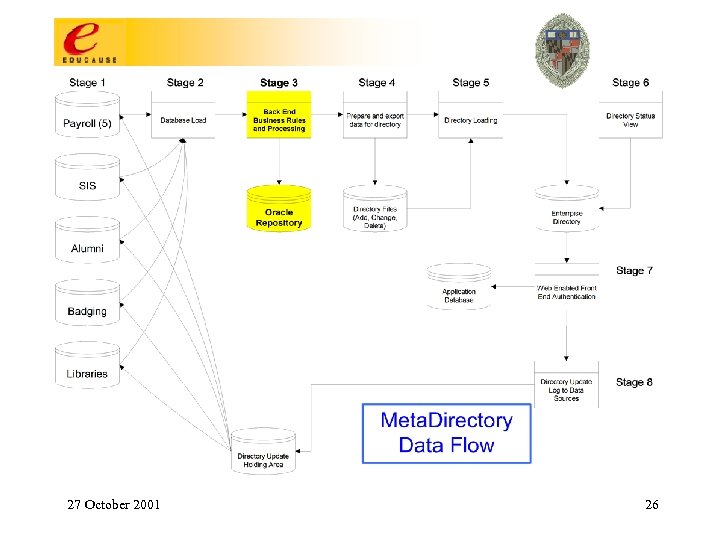
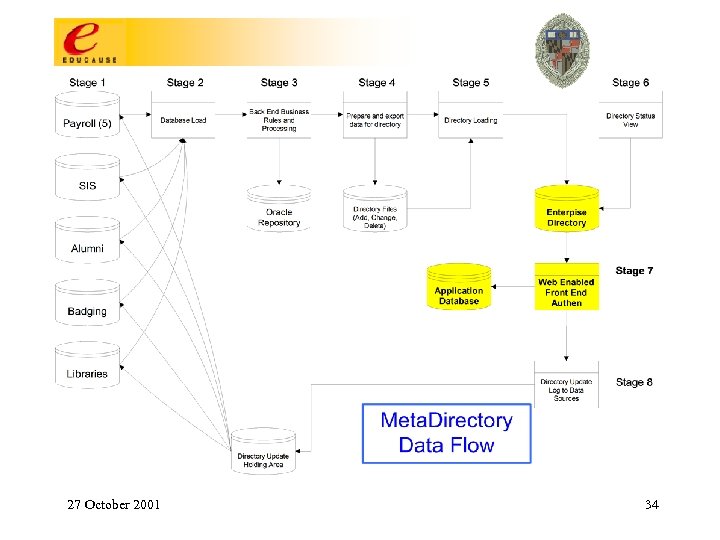
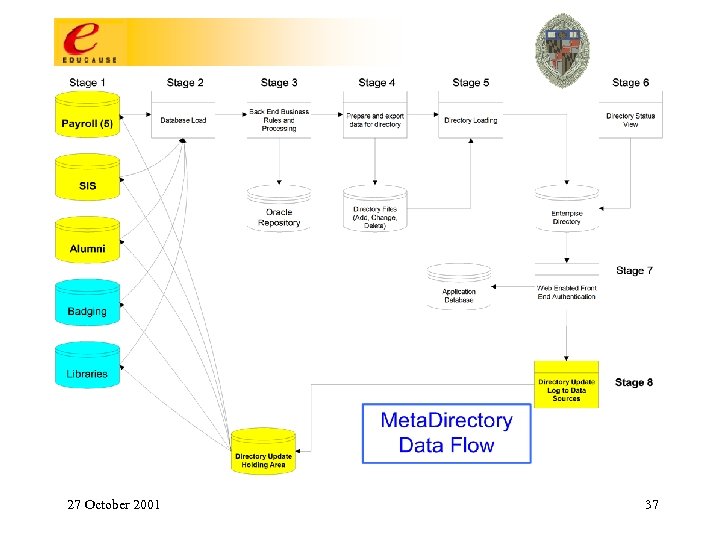
Meta. Directory Data Pump Overview • Provide complete SOR data-to-directory path; • Push the data through first cycle to kickoff development process; (prime the pump) – Review first iteration, and prepare next iteration with updates; • Each iteration flushes more detail to the requirements in a rapid application development process adding data, business rules and/or policy changes; • Document and store standard deployment procedures; • Each iteration provides intense unit testing followed by QC test cycle, then move to production 27 October 2001 21
27 October 2001 22
Stage 1 – Analyze Data Sources • Common Identifiers on campus • Identify systems of record and data owners – What data do we need? – Frequency of the feed – Provide Standard Data Collection Model • Define database load procedure and produce audit log 27 October 2001 23
27 October 2001 24
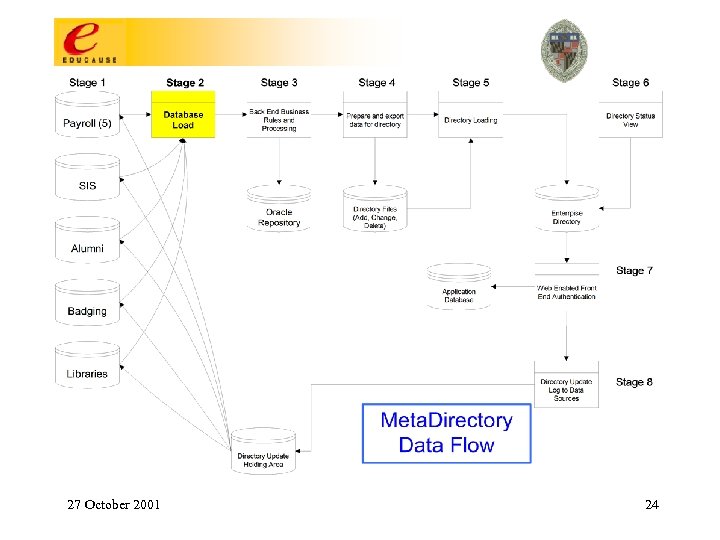
Stage 2 – Database Requirements • Create tables to mirror the feeder files • Establish key using most common identifier • Create and use loader scripts that can be re-used • Track nightly loads to log, reporting exceptional situations using thresholds 27 October 2001 25
27 October 2001 26
Stage 3 – Back End Processing (BEP) • Load data using weighted priority – Full time affiliation creates the record • Secondary systems add value to a person’s data • Eligibility for services determined and flagged • Unique friendly login id assigned • Unique opaque id assigned and stored • Result: one record person 27 October 2001 27
27 October 2001 28
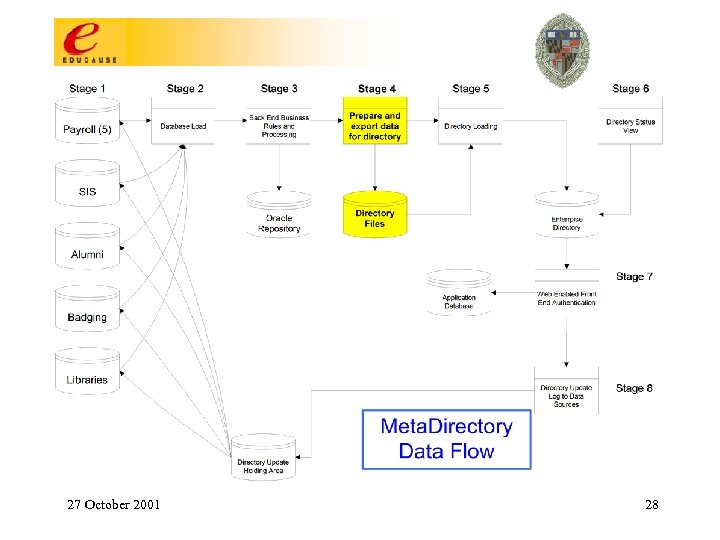
Stage 4 – Database Table Export • Compare today’s data with yesterday (t vs t-1) – Insert operation into record • Add, Update, Delete, No Change • Write the export file if status = active in any primary system of record 27 October 2001 29
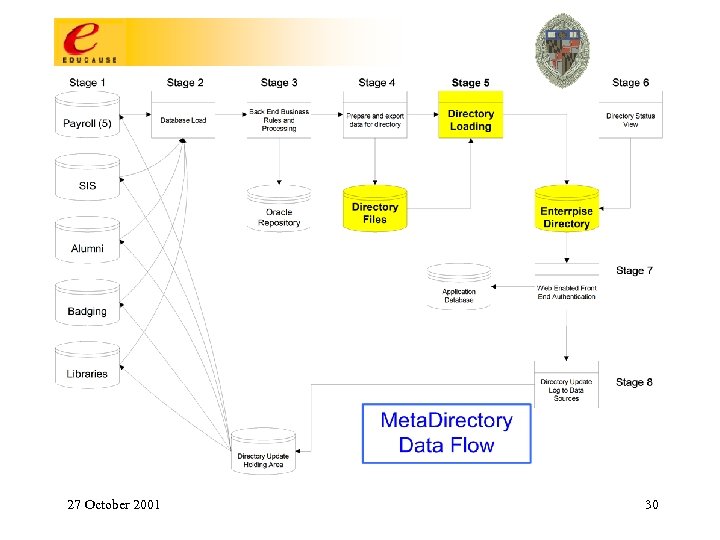
27 October 2001 30
Stage 5 – Directory Import • Process export files using generic (PERL) script to import/update enterprise directory; – Keep code free of business rules; • Provide web base report interface to track activity and status; • Provide audit log • Found that mass deletes would crash the system 27 October 2001 31
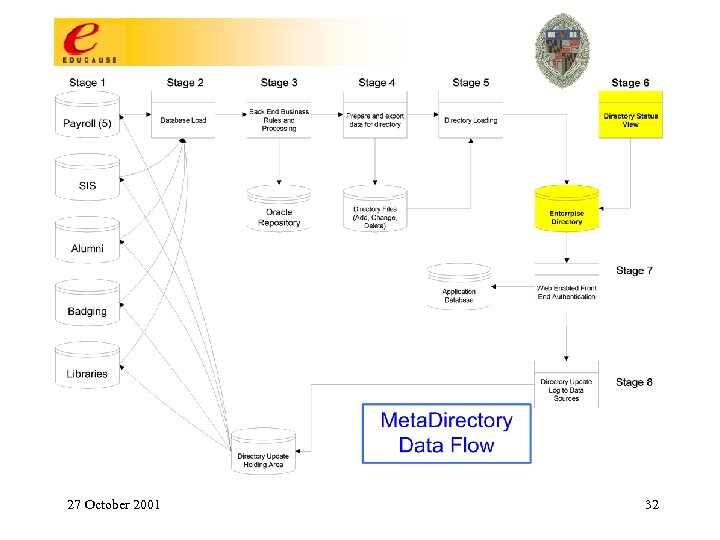
27 October 2001 32
Stage 6 – Directory Status • Web interface into the operational integrity of the data pump – Monitor thresholds of activity – Monitor backups – Monitor replication services – Monitor application proxy server load/failovers 27 October 2001 33
27 October 2001 34
Stage 7 – Front End Processing (FEP) • Define and deploy access control (ACL); – Define JHI policy for the global user, the person, and the administrator; – Develop and document scope and visibility to the directory attributes; • Develop and deploy common web enabled directory access (a common ‘look and feel’ to the front end); – Use a common set of development tools (e. g. Cold. Fusion); • Apply front end application level business rules (more specific rules than the back end process); 27 October 2001 35
Stage 7 – Front End Processing (FEP) • Developer Tool Kit – Registration application – EDIR – Example code snip-its for auth. N and auth. Z • Cold Fusion, JAVA, ASP, VB • Directory-enabling an application ‘process’ – 10 -12 applications in the queue – Demanding of our time – May outsource 27 October 2001 36
27 October 2001 37
Stage 8 – Directory Updates • Our Holy Grail…. . we receive the updates and feed them back to the systems of record. • We are no longer held accountable for their “bad data” and the institution has a central site for all updates, no matter who they are. 27 October 2001 38
Summary • Don’t underestimate the need to keep repeating the message • Support from the top is critical • Continual auditing: data feeds will disappear or show up corrupted • Hire the best, otherwise you will waste much time and $$$ • Maintain KISS principle 27 October 2001 39
Mini Case I Synchronizing i. Planet and AD Rob Banz 27 October 2001 40
Background • UMBC’s Stats: • Enrollment of approx. 11, 200 • 750 full & part-time faculty, 1500 staff 27 October 2001 41
Existing Infrastructure • i. Planet-based LDAP directory • Kerberos 5 used for authentication • Campus-wide AFS-based file-store – For instructional, research, and other use • LAN file & print services provided by Novell 4 – Used by administrative & academic departments 27 October 2001 42
Why Not AD Everywhere? • Pros: – Reasonably well performing LDAP server – Already part of Win 2 k Server – Powerful schema managment • Cons: – Objectclass/Attribute definitions not 100% standard • ex: cn (Common Name) not Multi-Valued – New, “unproven” technology 27 October 2001 43
The Problem • Integrate: • Existing campus directory and account management system, based on the i. Planet directory server • Existing campus-wide authentication, based on MIT Kerberos 5 27 October 2001 44
Kerberos 5 Integration • • • Already “supported” by Microsoft! http: //www. microsoft. com/technet/prodtec hnol/windows 2000 serv/deploy/confeat/ke rbstep. asp Solves “most” of the authentication problem … more on this later. 27 October 2001 45
Resources • Directory Team – – – • Experienced with LDAP Existing directory tools & connectors written in Perl Group generally takes on software development projects Windows/LAN Team – – – Little LDAP experience Little Active Directory experience … does anyone have a lot ? Not a software development oriented group 27 October 2001 46
Choices… • Updates: – Batch, or – “real time” ? • Development platform – Windows w/ADSI, or – UNIX w/Perl ? 27 October 2001 47
Our Choice • Develop on Unix with Perl – our platform of choice • Aim for near “real time” updates 27 October 2001 48
Components Needed • Interface to the i. Planet Directory Server’s “changelog” (already have) • Logic to create Active Directory account “objects” from a “umbc. Account” object • Interface to the Active Directory 27 October 2001 49
Translation Logic • Perl module • Given a “umbc. Account” LDAP entry, generate an appropriate Active Directory entry • Includes a “standard” API used by the changelog interface 27 October 2001 50
AD Interface • AD accepts LDAP and SSL-LDAP connections • “All” AD attributes can be queried and modified via the LDAP interface • Microsoft’s ADSI uses this interface too! 27 October 2001 51
The Completed System • Consists of: • A script to populate/mass modify all Active Directory account objects, and • A daemon to monitor the LDAP changelog, and write appropriate changes to Active Directory 27 October 2001 52
Pre Windows 2000 Clients • Windows 2 k/XP can use Cross Realm Kerberos 5 • Win 3. 1, 95, 98, NT 4? Fat Chance. • Requires the account password be stored in Active Directory 27 October 2001 53
Mini Case II Implementing edu. Person Todd Piket 27 October 2001 54
Mini Case II Implementing edu. Person • Pitfalls and Snares – Use Latest Version – What attributes to populate? – What to populate the attributes with? • Benefits – Standards Conformance – Reduce Data Redundancy – Application Integration (possibly across institutions) 27 October 2001 55
Mini Case III Multi-Campus Implementation Dr. Dewitt Latimer – University of Tennessee 27 October 2001 56
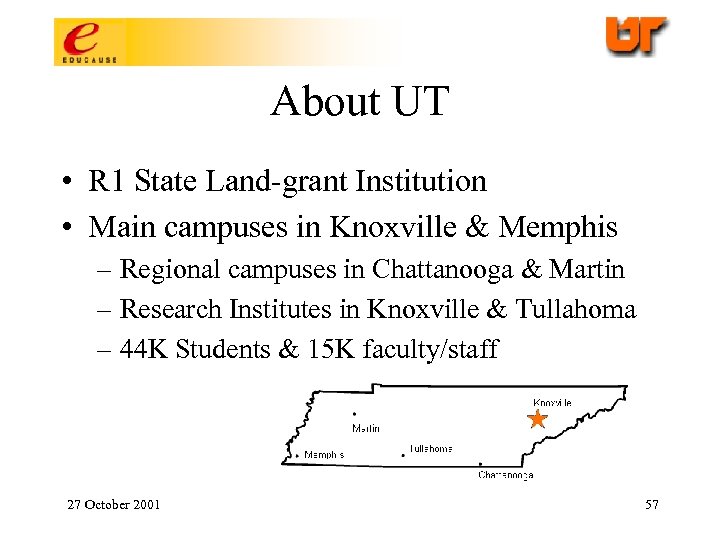
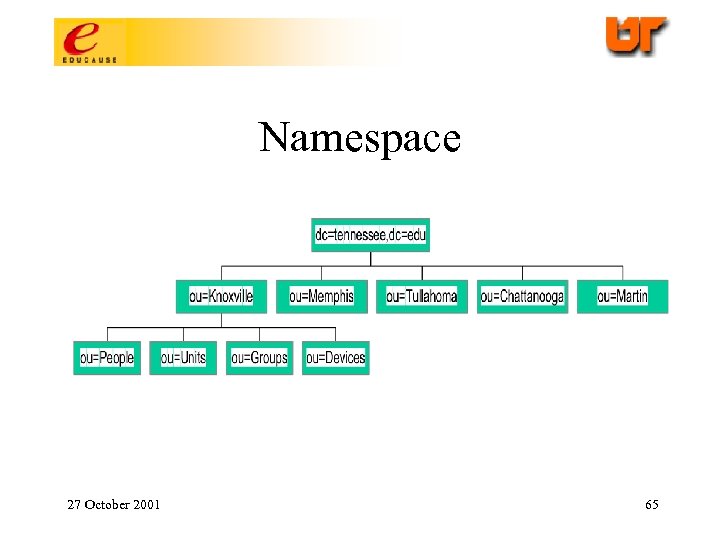
About UT • R 1 State Land-grant Institution • Main campuses in Knoxville & Memphis – Regional campuses in Chattanooga & Martin – Research Institutes in Knoxville & Tullahoma – 44 K Students & 15 K faculty/staff 27 October 2001 57
Problem Statement • How to build a directory service that can efficiently handle the needs of a 5 campus university system yet still permit individual campus autonomy & administrative control where necessary. 27 October 2001 58
Preexisting Constraints • Legacy whitepage information in ph databases • Multiple sources of student data (vs. Single source of HR data) • Lack of unique identifier across UT system • Conflicting policies and politics at the local campus level 27 October 2001 59
Solution • Distributed directory that appears and behaves as a unified directory. – One which permits local administrative control of directory sub-trees. – One which reflects multiple campus associations to permit robust authorization services at the application level. 27 October 2001 60
Design Issues -- Architecture • Thin person master registry with a subdividable master directory which permits campus-level mastering when/if necessary 27 October 2001 61
Design Issues – Unique Net. ID • Getting political buy-in from campuses • Permutation issues with 8 character identifier • Issues associated with single HRIS and multiple campus SIS systems • Different longevity policies – Staff vs. student – Per campus vis a vis student Net. IDs 27 October 2001 62
Design Issues -- Schema • Multi-campus Conundrum – If people must be unique, then how do you represent multiple campus associations across separate campus subtrees. – Has implications with ASPs when they access directory for their authorization roles. 27 October 2001 63
Design Issues -- Schema • Person (locality or “L” attribute for office location) • inetorgperson • eduperson • tneduperson (tnstudentcampus, tnemployeecampus) • [campus]eduperson 27 October 2001 64
Namespace 27 October 2001 65
Known Issues • Out-of-the-box applications whose authorization capabilities are limited to “search base” methods will not be able to handle multi-campus associations. – Might deny where it should permit • Multi-campus directories will require multimastering available in i. Planet V 5 to keep data in sync 27 October 2001 66
Mini Case IV Authentication for Network Access Services Dr. Tom Barton 27 October 2001 67
Authorizing Network Access Services The Problem. Off the shelf RADIUS servers provide LDAP-based authentication service to dialups and wireless access points, but support for a finer grained access control policy was needed. Examples: Different virtual modem pools; wireless access servers covering selected locations. 27 October 2001 68
Authorizing Network Access Services, 2 Approach: Create special objects in LDAP directory that express access control policy for each NAS. Use a RADIUS server that supports conditional execution of LDAP queries. Conclusion: Works great, permits delegated administration of NASes using existing standard tools. Helped us to manage Code. Red & Nimda, too! 27 October 2001 69
Mini Case V E-Provisioning Louise Miller-Finn Johns Hopkins University 27 October 2001 70
Johns Hopkins University E-Provisioning Statement of the Problem: Provide accounts for 1500 incoming students 200 new faculty who normally line up at the Business Office and wait for hours to get an account each Fall Semester Solution: Automate the creation of the account, not in advance, but just in time. 27 October 2001 71
E-Provisioning Johns Hopkins University User education: getting the word out Smart Web Interface: based on eligibility rules New Object Classes: inetmailuser, inetlocalmailrecipient, userpresenceprofile Attributes: mail. Delivery. Option=mailbox mail. User. Status=active inet. User. Status=active mailhost= 27 October 2001 Johns. Hopkinsedu. Localid= 72
Wrap Up Parking Lot issues 27 October 2001 73
NSF Middleware Initiative (NMI) • NSF award for integrators to –Internet 2, EDUCAUSE, and SURA –The GRIDs Center (NCSA, UCSD, University of Chicago, USC/ ISI, and University of Wisconsin) • Build on the successes of the Internet 2/MACE initiative and the Globus Project • Three year cooperative agreement effective 9/1/01 • To develop and deploy a national middleware infrastructure for science, research and higher education • Separate awards to academic pure research components 27 October 2001 74
NMI: The Problem to Solve • To allow scientists and engineers the ability to transparently use and share distributed resources, such as computers, data, and instruments • To develop effective collaboration and communications tools such as Grid technologies, desktop video, and other advanced services to expedite research and education • To develop a working architecture and approach which can be extended to Internet users around the world Middleware is the stuff that makes “transparently use” happen, providing consistency, security, privacy and capability 27 October 2001 75
Map of Middleware 27 October 2001 76
NMI • Work products –Community standards –Best practices –Schema and object classes –Reference implementations –Open source services –Corporate relations 27 October 2001 • Work areas –Identifiers –Directories –Authentication –Authorization –GRIDs –PKI –Video 77
I 2 Early Adopters Activities • Early Harvest / Early Adopters http: //middleware. internet 2. edu/earlyharvest/ http: //middleware. internet 2. edu/earlyadopters/ • Middleware Business Case and Writer’s Guide version 1. 0 http: //middleware. internet 2. edu/earlyadopters/ Review and send comments to: MW-buscase-comments@internet 2. edu 27 October 2001 78
Related I 2 Directory Activities • MACE-Dir http: //www. middleware. internet 2. edu/dir/ • LDAP Recipe http: //www. georgetown. edu/giia/internet 2/ldaprecipe/ • edu. Person http: //www. educause. edu/eduperson • Directory of Directories for Higher Ed http: //middleware. internet 2. edu/dodhe 27 October 2001 79
Related I 2 Middleware Activities • Shibboleth http: //middleware. internet 2. edu/shibboleth/ • Web. ISO (Web Initial Sign-on) http: //middleware. internet 2. edu/webiso/ • PKI: HEPKI-PAG, HEPKI-TAG http: //www. educause. edu/hepki/ • PKI Labs http: //middleware. internet 2. edu/pkilabs/ • Middleware for Video http: //middleware. internet 2. edu/video/ 27 October 2001 80
For More Information • Tom Barton tbarton@memphis. edu • Renee Woodten Frost rwfrost@internet 2. edu • Louise Miller-Finn lmiller@jhmi. edu 27 October 2001 • Dewitt Latimer dewitt@utk. edu • Rob Banz banz@umbc. edu • Todd Pikett tcpiket@mtu. edu 81
Скачать презентацию Middleware Implementation Case Studies Tom Barton The University
d31f614f6bd8b25a45e6b3d0f2b16a5e.ppt