


 Скачать презентацию Meganet Corporation VME Office 2004 Meganet Corporation
814565791f2c93e6e6618ce428a5733a.ppt
- Количество слайдов: 31
 Meganet Corporation VME Office 2004
 Meganet Corporation is a leading worldwide provider of data security to Governments, Military, Armies, financial institutions, enterprise and large corporations around the world.
 U. S. Department of Labor (DOL) Meganet Corporation has recently won a single source contract to computerize the whole US Department of Labor 18, 000 employees with File Level Encryption, Digital Signatures & PKI.
 Meganet has compiled an unparalleled security application that introduces every feature included in the Virtual Matrix Encryption (VME) engine.
 VME Office The company’s leading product is a suite of 10 integrated applications that answer to the data security challenge and the security needs of any organization.
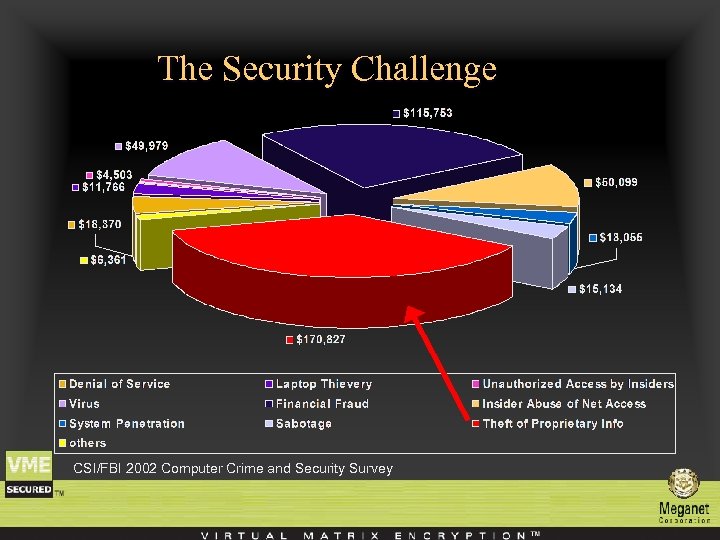 The Security Challenge CSI/FBI 2002 Computer Crime and Security Survey
 The security challenge Various studies have shown how employees use email to send out confidential corporate information. Be it because they are disgruntled and revengeful, or because they fail to realize the potentially harmful impact of such a practice, employees use email to share sensitive data that was officially intended to remain in-house.
 The Solution You can take measures to protect your business now, before disaster strikes. VME Office™ 2004 is a data security suite of applications for preserving the integrity and secrecy of electronic data while stored transferred or communicated in real time using PKI and or symmetric encryption.
 The Solution VME Office provides complete solution to all of the above by providing a single product that is compliant with the US Government standards and on the same time implement the full spectrum of modules needed by the organization. VME Office is the heavy duty guardian of the corporate confidential information while in storage or in transit.
 X. 509 Digital Certificates VME Office support all X. 509 certificates. Digital Certificates can be purchased directly through 3 rd Party Certificate Authorities or issued internally with on-site servers.
 Features found in VME Office 2004 File Level Encryption allowing encryption of individual files. The encryption is done at the binary level, so any file can be encrypted, regardless of file type.
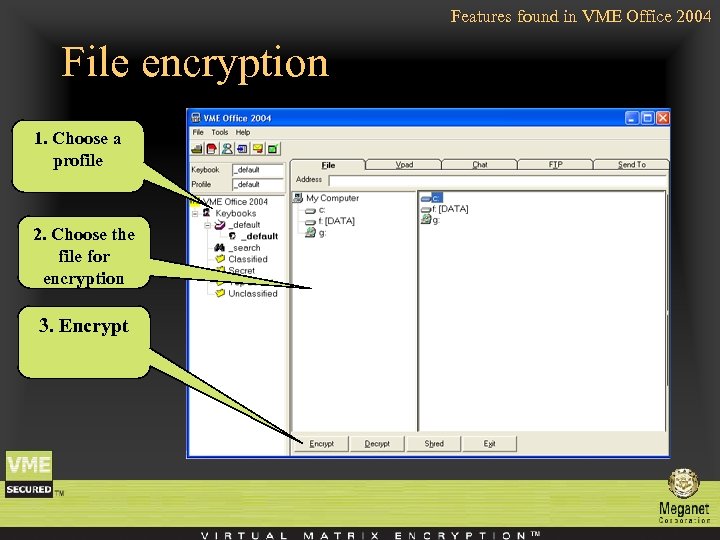 Features found in VME Office 2004 File encryption 1. Choose a profile 2. Choose the file for encryption 3. Encrypt
 Features found in VME Office 2004 Directory Level Encryption allows whole directories and even a full hard drive encryption with a single click of a button. (when using mouse right click encryption)
 Features found in VME Office 2004 Selective Text Encryption allows Cut & Paste of text from any application. The user can encrypt partial text messages in Word, Excel, Access and hundreds of more applications. Using it together with an email application like Outlook gives an instant text encrypted email solution.
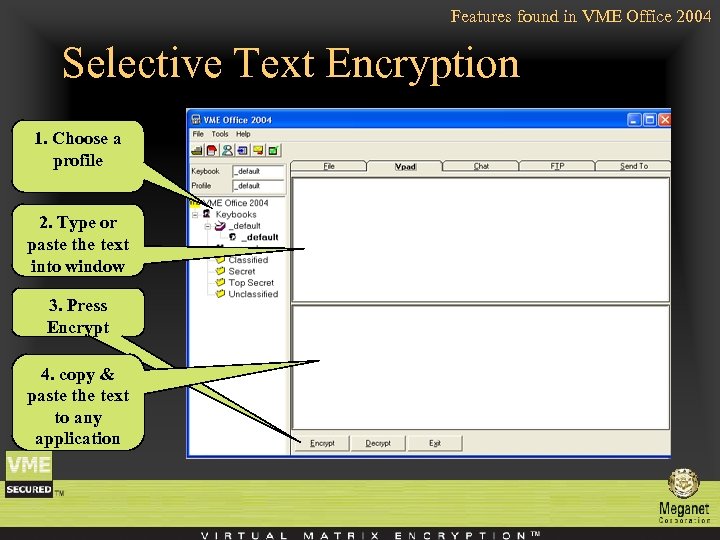 Features found in VME Office 2004 Selective Text Encryption 1. Choose a profile 2. Type or paste the text into window 3. Press Encrypt 4. copy & paste the text to any application
 Features found in VME Office 2004 Secure Chat allows transparent Encrypted Chat. The users can communicate securely over the internal network or across the world over the Internet.
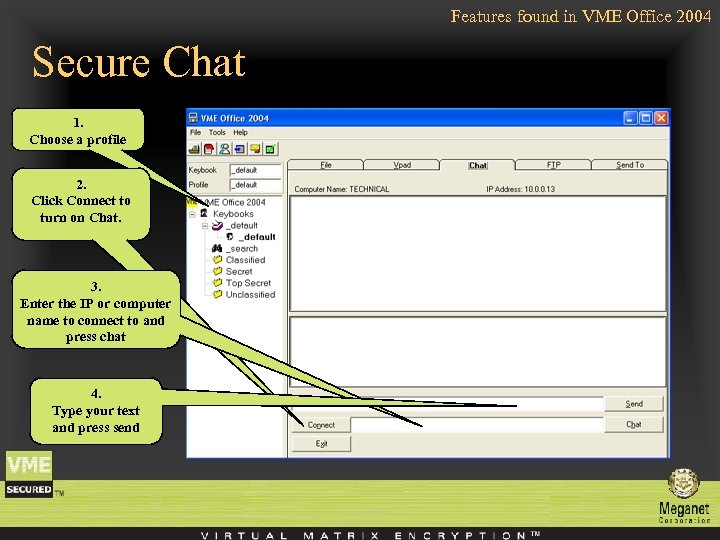 Features found in VME Office 2004 Secure Chat 1. Choose a profile 2. Click Connect to turn on Chat. 3. Enter the IP or computer name to connect to and press chat 4. Type your text and press send
 Features found in VME Office 2004 Secure FTP allows the user transparent encryption and transfer of files to a remote FTP site in a single click, whether it is for backup purposes, sharing or archiving.
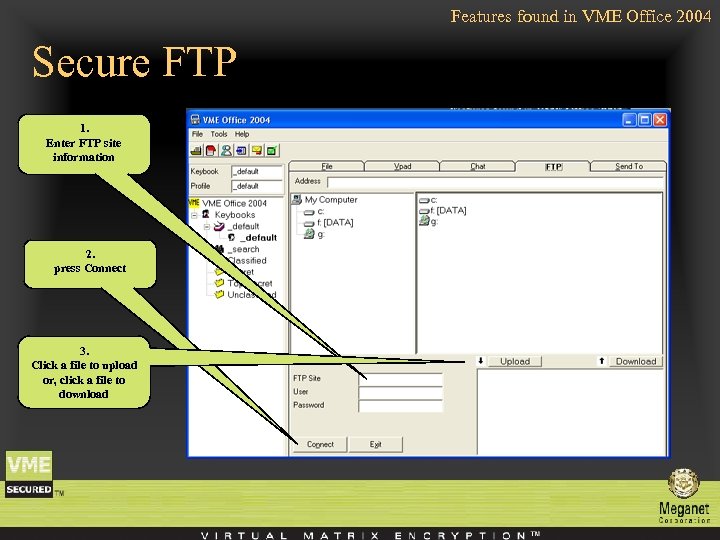 Features found in VME Office 2004 Secure FTP 1. Enter FTP site information 2. press Connect 3. Click a file to upload or, click a file to download
 Features found in VME Office 2004 Send To Automating the process of sending encrypted files using your default email client Utilizing PKI.
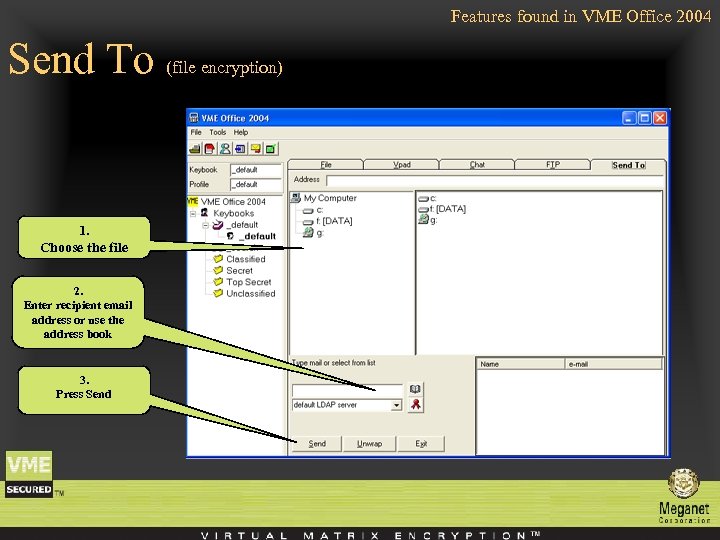 Features found in VME Office 2004 Send To (file encryption) 1. Choose the file 2. Enter recipient email address or use the address book 3. Press Send
 Administrator Settings in VME Office 2004 Profile Settings A unique way of managing multiple passwords and keys for a single session. allowing a much higher level of security with the simplicity of a single click.
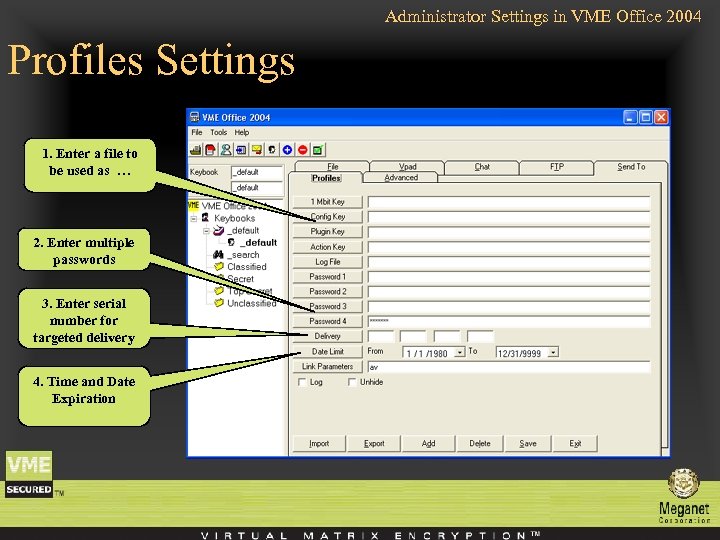 Administrator Settings in VME Office 2004 Profiles Settings 1. Enter a file to be used as … 2. Enter multiple passwords 3. Enter serial number for targeted delivery 4. Time and Date Expiration
 Administrator Settings in VME Office 2004 Keybook/Profile Manager allows managing multiple profiles for the organization.
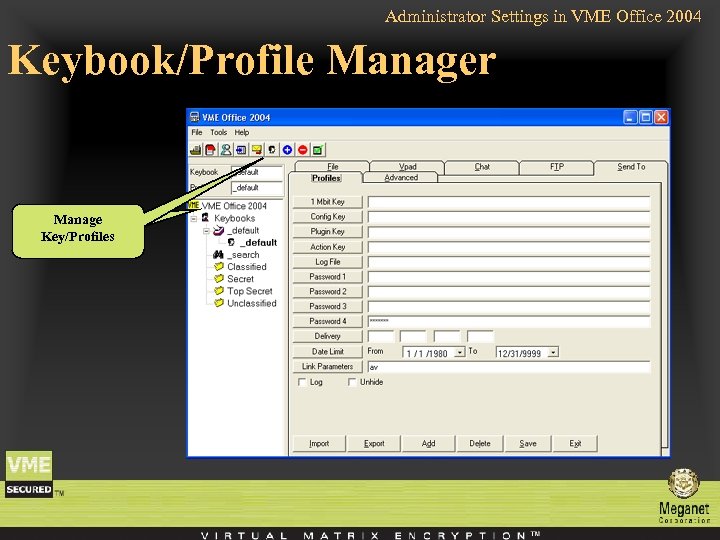 Administrator Settings in VME Office 2004 Keybook/Profile Manager Manage Key/Profiles
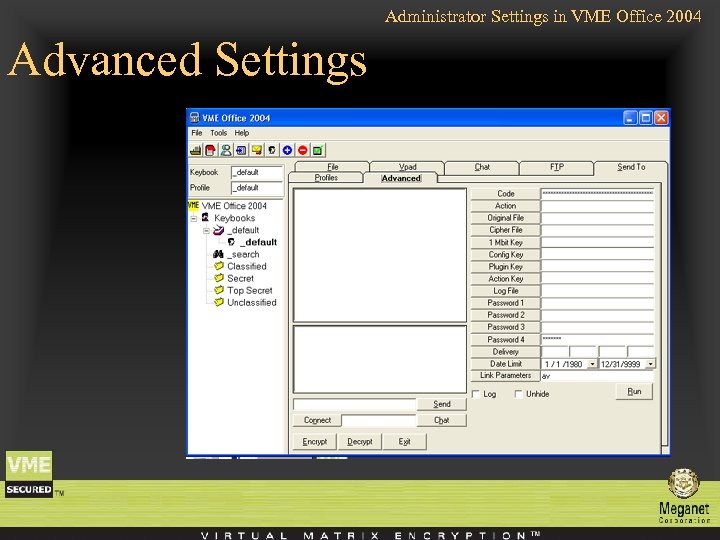 Administrator Settings in VME Office 2004 Advanced Settings
 Additional Features found in VME Office 2004 One-million bit key In addition to four 2048 bit keys, Four 512 bit keys and a unique 2048 bit transaction key.
 Additional Features found in VME Office 2004 Targeted delivery Only the recipient with the correct serial number can decrypt.
 Additional Features found in VME Office 2004 Date limit The ability to set a date range and even with the correct keys decryption will be impossible when it expires.
 System Requirements Windows™ 98/ME/NT/2000/XP
 Meganet Corporation Contact us … Meganet Corporation World Trade Center 350 S. Figueroa St. #450 Los Angeles, CA 90071 -1201 Sales : 1 -800 -MEGANET Phone : 213 -620 -1666 Fax : 213 -620 -1655 E-mail: sales@meganet. com