Скачать презентацию Maximising Sales Impact Through Successful Demo Techniques Ian
047ee5b9158e4adf5131c1efa2824c70.ppt
- Количество слайдов: 36
 Maximising Sales Impact Through Successful Demo Techniques Ian Palangio – Microsoft Australia
 Agenda 1) 1: 1 Demonstrations - Key in MSSP 2) Lecture Style Presentations 3) Slide Structure 4) Techniques for Success 5) Resources Available to You
 Agenda 1)1: 1 Demonstrations - Key in MSSP 2) Lecture Style Presentations 3) Slide Structure 4) Techniques for Success 5) Resources Available to You
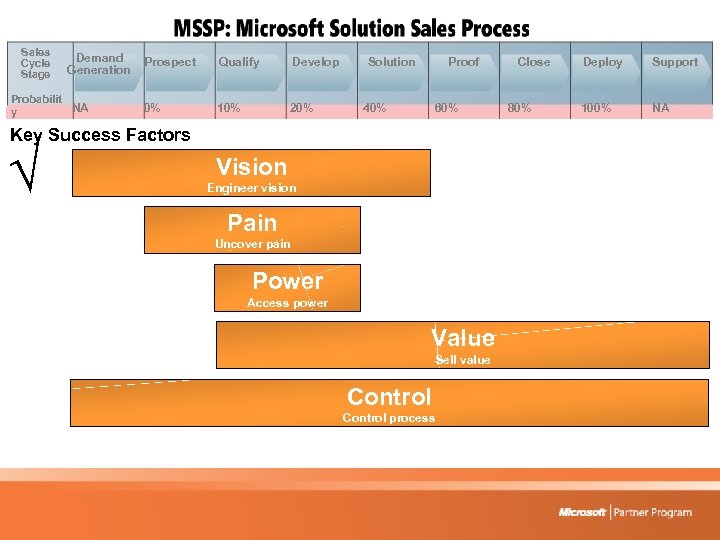 Sales Cycle Stage Demand Generation Probabilit NA y Prospect Qualify Develop 0% 10% 20% Solution Proof 40% 60% Key Success Factors Vision Engineer vision Pain Uncover pain Power Access power Value Sell value Control process Close 80% Deploy Support 100% NA

 Core Belief Even though we demo and sell the same things over and over, the business situation and needs are different for each organisation. Key is that we need to understand cause and effect relationships within the client organisation.
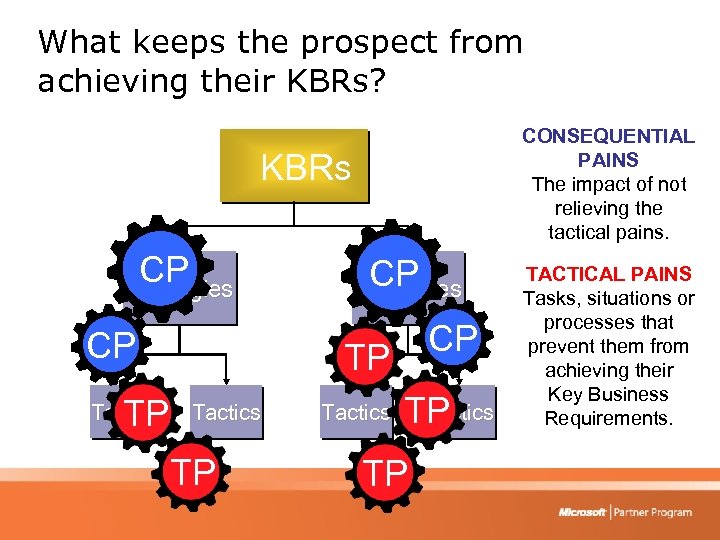 What keeps the prospect from achieving their KBRs? CONSEQUENTIAL PAINS The impact of not relieving the tactical pains. KBRs CP Strategies CP TP Tactics TP TP TACTICAL PAINS Tasks, situations or processes that prevent them from achieving their Key Business Requirements.
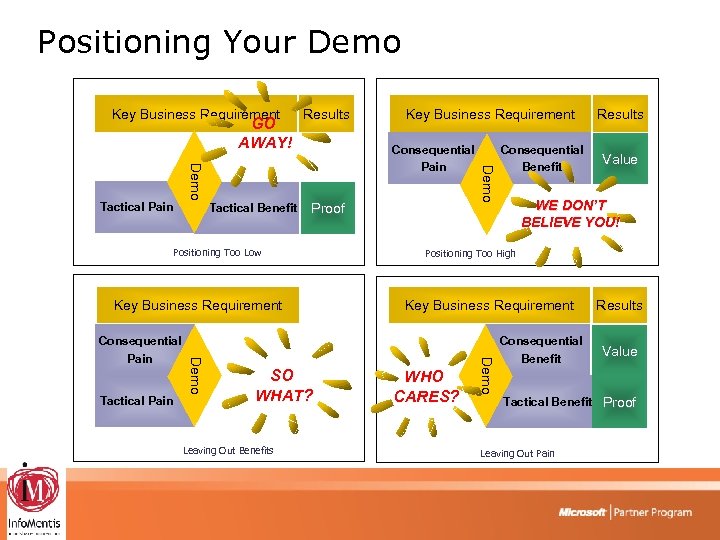 Positioning Your Demo Key Business Requirement GO AWAY! Results Tactical Benefit Proof Positioning Too Low Key Business Requirement SO WHAT? Leaving Out Benefits Consequential Benefit Results Value WE DON’T BELIEVE YOU! Positioning Too High Key Business Requirement WHO CARES? Demo Tactical Pain Demo Consequential Pain Demo Tactical Pain Key Business Requirement Consequential Benefit Results Value Tactical Benefit Proof Leaving Out Pain
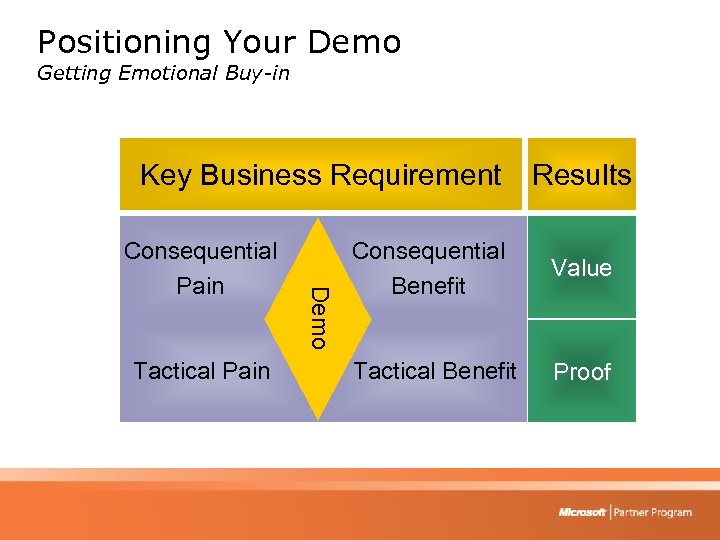 Positioning Your Demo Getting Emotional Buy-in Key Business Requirement Tactical Pain Demo Consequential Pain Results Consequential Benefit Value Tactical Benefit Proof
 The “DEMO” Deliver Exactly Matching Opportunity If you speak much, it makes you deaf to others - Dhammavadaka
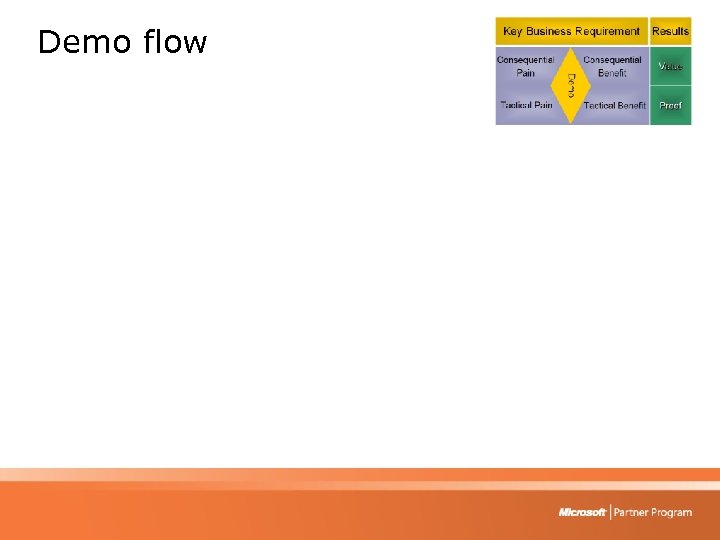 Demo flow
 Agenda 1) 1: 1 Demonstrations - Key in MSSP 2) Lecture Style Presentations 3) Slide Structure 4) Techniques for Success 5) Resources Available to You
 How Humans Learn? • Humans do not learn like VCR’s • We reduce information into small meaningful chunks – We then fit these chunks into categories we already understand, or create new categories • Telling a story helps the audience reduce it to manageable chunks • Dr. Karl Kruszelnicki is a master of incorporating stories around his facts • Make your Demo a story
 Jade A great “lecture” presentation from 5 years ago • Keeping the crowd alert • Having fun • Using an anchor
 How to mix it up! • Adults only have an attention span of 15 minutes – so mix it up • Interject illustrations, activities and discussion regularly • Make the environment a social one, not one where people can hide out passively • How I “lecture” on Share. Point….
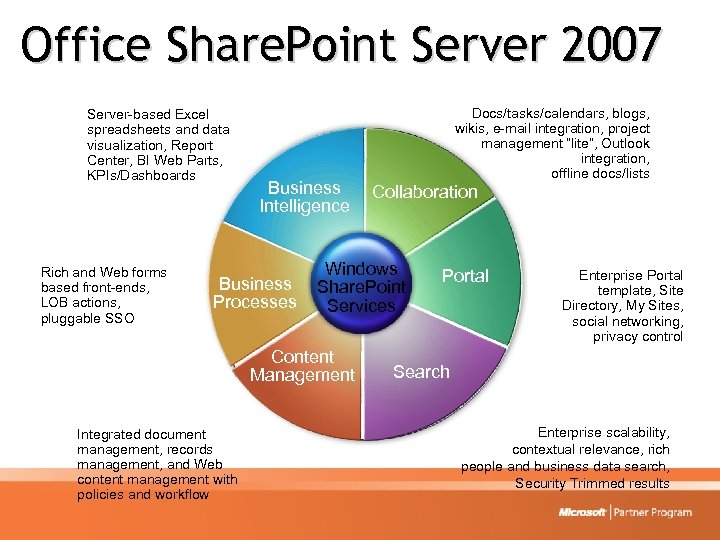 Office Share. Point Server 2007 Server-based Excel spreadsheets and data visualization, Report Center, BI Web Parts, KPIs/Dashboards Rich and Web forms based front-ends, LOB actions, pluggable SSO Business Intelligence Business Processes Collaboration Windows Share. Point Services Content Management Integrated document management, records management, and Web content management with policies and workflow Docs/tasks/calendars, blogs, wikis, e-mail integration, project management “lite”, Outlook integration, offline docs/lists Portal Enterprise Portal template, Site Directory, My Sites, social networking, privacy control Search Enterprise scalability, contextual relevance, rich people and business data search, Security Trimmed results
 Agenda 1) 1: 1 Demonstrations - Key in MSSP 2) Lecture Style Presentations 3) Slide Structure 4) Resources Available to You
 www. presentationzen. com • Presentation Zen: • Power. Point slides with bullets - conventional, safe, easy and expected. • Doing something different requires a lot more effort, but the impact can be huge on the day, and into the long term • Simple, elegant slides are not easy or simple to achieve
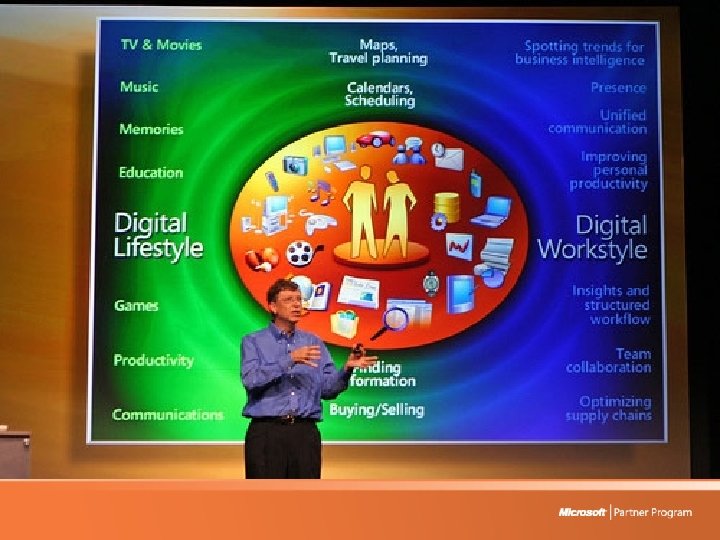
 Top Slide Tip Q: How much Text should be on the slides? A: As little as possible! • Make “send me the. ppt” impossible • The slides are there to supplement the speaker • Keep it Simple - Limit Bullets and Text • Have prepared handouts to distribute
 Agenda 1) 1: 1 Demonstrations - Key in MSSP 2) Lecture Style Presentations 3) Slide Structure 4)Techniques for Success 5) Resources Available to You
 Keys to Successful Demos • Keep the Demo Gods happy! • Read Presentation Zen • Pre-record your presentation using Audio and Video • Send your recordings to peers for review and feedback. • Seek feedback after every presentation • Make the demo a story, not dry technical detail • Presentation skills course!
 Thoughts… • • • Present often Work hard on making it simple and easy Use a clear presentation Structure Use multiple presenters In case things go wrong…. have a backup – Presenter – Computer • Provide time and gaps for discussion/questions
 Tricks of the trade • Bring your own projector that you know works • Be your own Roadie – power bars, extension cords, VGA cables, Gaff Tape • No admin in front of customer: – Preload and warmup VPC’s – Preload your slides – Practice all your steps for the presentation (if you never use hibernate on your laptop, don’t do it for the first time going to the demo)
 Agenda 1) 1: 1 Demonstrations - Key in MSSP 2) Lecture Style Presentations 3) Slide Structure 4) Techniques for Success 5)Resources Available to You
 Technical Demonstration Toolkit (TDT) Core content is updated on a regular basis and includes: 1. Sales Tools 2. Technical Demonstrations
 Sales Tools • • Power. Point presentations Case Studies Whitepapers Battlecards Used to learn, prepare, and present the value of Microsoft's products and solutions to customers.
 Technical Demonstrations (Demos) • Videos • Walk Through Instructions and Scripts • Virtual Machines – Sales Demonstrations – Hands-on Labs – Base images to build on
 Partner Demo Resources • www. microsoft. com/partner – Partner Portal includes: • Telephone Pre-Sales Technical Support • Online training for the products to assist with knowledge for the demos
 Conclusion
 Partner Readiness Roadmap © 2005 Microsoft Corporation
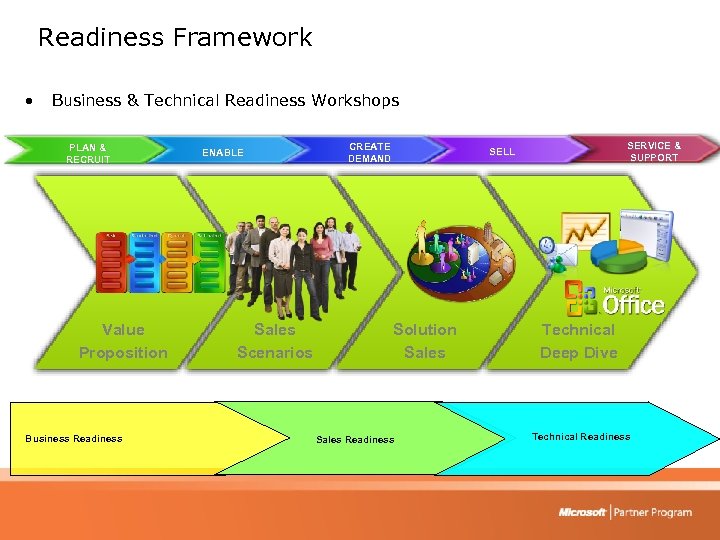 Readiness Framework • Business & Technical Readiness Workshops PLAN & RECRUIT Value Proposition Business Readiness ENABLE Sales Scenarios CREATE DEMAND SERVICE & SUPPORT SELL Solution Sales Readiness Technical Deep Dive Technical Readiness
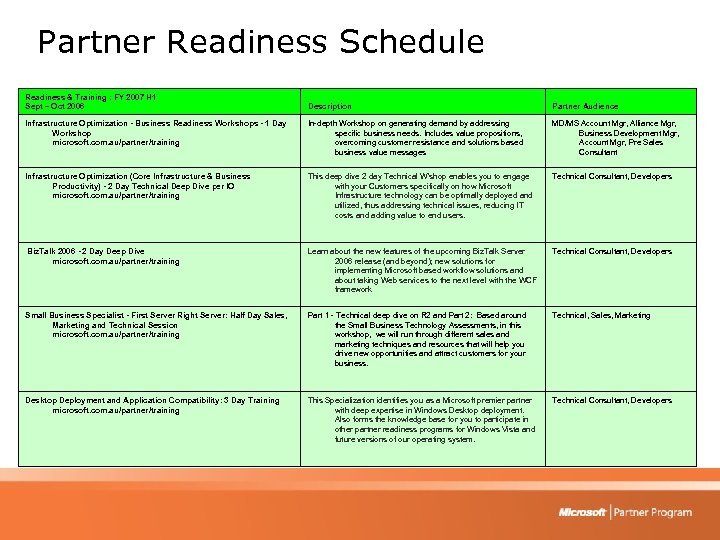 Partner Readiness Schedule Readiness & Training : FY 2007 H 1 Sept – Oct 2006 Description Partner Audience Infrastructure Optimization - Business Readiness Workshops - 1 Day Workshop microsoft. com. au/partner/training In-depth Workshop on generating demand by addressing specific business needs. Includes value propositions, overcoming customer resistance and solutions based business value messages MD/MS Account Mgr, Alliance Mgr, Business Development Mgr, Account Mgr, Pre Sales Consultant Infrastructure Optimization (Core Infrastructure & Business Productivity) - 2 Day Technical Deep Dive per IO microsoft. com. au/partner/training This deep dive 2 day Technical W'shop enables you to engage with your Customers specifically on how Microsoft Infrastructure technology can be optimally deployed and utilized, thus addressing technical issues, reducing IT costs and adding value to end users. Technical Consultant, Developers Biz. Talk 2006 - 2 Day Deep Dive microsoft. com. au/partner/training Learn about the new features of the upcoming Biz. Talk Server 2006 release (and beyond); new solutions for implementing Microsoft based workflow solutions and about taking Web services to the next level with the WCF framework Technical Consultant, Developers Small Business Specialist - First Server Right Server: Half Day Sales, Marketing and Technical Session microsoft. com. au/partner/training Part 1 - Technical deep dive on R 2 and Part 2: Based around the Small Business Technology Assessments, in this workshop, we will run through different sales and marketing techniques and resources that will help you drive new opportunities and attract customers for your business. Technical, Sales, Marketing Desktop Deployment and Application Compatibility: 3 Day Training microsoft. com. au/partner/training This Specialization identifies you as a Microsoft premier partner with deep expertise in Windows Desktop deployment. Also forms the knowledge base for you to participate in other partner readiness programs for Windows Vista and future versions of our operating system. Technical Consultant, Developers
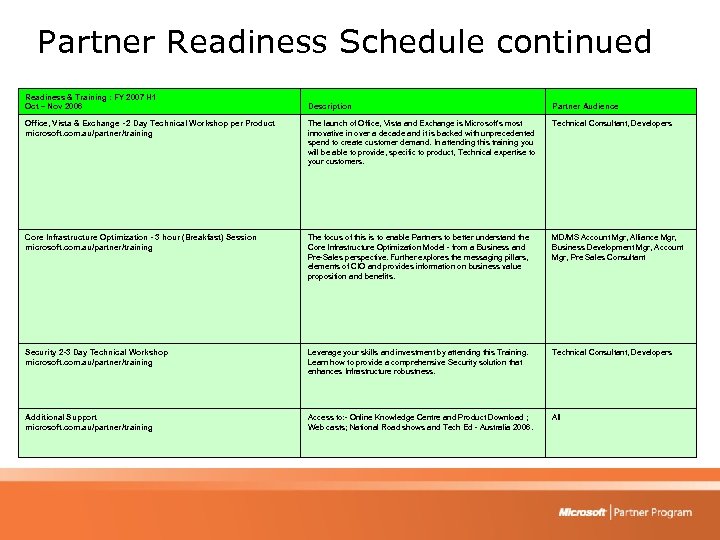 Partner Readiness Schedule continued Readiness & Training : FY 2007 H 1 Oct – Nov 2006 Description Partner Audience Office, Vista & Exchange - 2 Day Technical Workshop per Product microsoft. com. au/partner/training The launch of Office, Vista and Exchange is Microsoft's most innovative in over a decade and it is backed with unprecedented spend to create customer demand. In attending this training you will be able to provide, specific to product, Technical expertise to your customers. Technical Consultant, Developers Core Infrastructure Optimization - 3 hour (Breakfast) Session microsoft. com. au/partner/training The focus of this is to enable Partners to better understand the Core Infrastructure Optimization Model - from a Business and Pre-Sales perspective. Further explores the messaging pillars, elements of CIO and provides information on business value proposition and benefits. MD/MS Account Mgr, Alliance Mgr, Business Development Mgr, Account Mgr, Pre Sales Consultant Security 2 -3 Day Technical Workshop microsoft. com. au/partner/training Leverage your skills and investment by attending this Training. Learn how to provide a comprehensive Security solution that enhances Infrastructure robustness. Technical Consultant, Developers Additional Support microsoft. com. au/partner/training Access to: - Online Knowledge Centre and Product Download ; Web casts; National Road shows and Tech Ed - Australia 2006. All
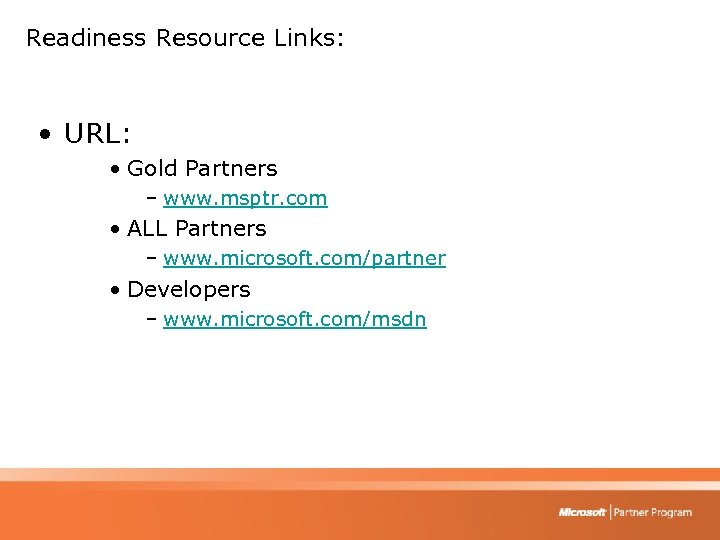 Readiness Resource Links: • URL: • Gold Partners – www. msptr. com • ALL Partners – www. microsoft. com/partner • Developers – www. microsoft. com/msdn