 Скачать презентацию MANAGEMENT INFORMATION SYSTEMS Presented by Neels Bothma 26
4ae9f7823f42241ad1aaedd0f59b59e6.ppt
- Количество слайдов: 192



MANAGEMENT INFORMATION SYSTEMS Presented by Neels Bothma 26 January 2006
TOPICS FOR THE DAY • • • • • What is information? Why do you need information Characteristics of information Information and managers Uptake of information in the new economy Key challenges Information systems Information in organisations Information as a key resource Nature of managerial work Types of information systems Information systems in functional areas Effectiveness and efficiency Groupware, telecomms, networks & protocols System Development Lifecycle Project Management System integration
TOPICS FOR THE DAY • • • The Internet Intranets and Extranets E-commerce B 2 B and B 2 C e-commerce Search engines and the role of portals E-government What is e-government E-government services Critical e-government factors Human resources for e-gov Implementing e-government Ethics & information
WHAT IS INFORMATION? • • • The word information is derived from Latin informare which means "give form to". Information can thus be defined as data that has been processed, manipulated and organised in a way suitable for human interpretation and that adds to the knowledge of the person receiving it Information is usually compiled in response to a specific need and often with the purpose of revealing trends or patterns
WHAT IS DATA? • Data can be defined as “a collection of facts from which conclusions may be drawn” • Put another way, data are distinct pieces of factual information used as a basis for reasoning; a “given” or fact; a number, a statement, or a picture, discussion, or calculation • Data is the raw material – the input – of information
WHAT IS KNOWLEDGE? • Knowledge is "a fluid mix of experience, values, contextual information, and expert insight that provides a framework for evaluating and incorporating new experiences and information. “ • Knowledge can further be described as the awareness and understanding of interconnected details, facts, truths or information gained through experience or learning, which, in isolation, are of lesser value. • In other words, knowledge is about what one knows and understands
WHAT IS KNOWLEDGE…cont? • Knowledge can be categorised as either unstructured or explicit or tacit. • What one knows is explicit knowledge. • Knowledge that is unstructured and understood, but not clearly expressed is implicit knowledge. • If the knowledge is organised and easy to share then it is called structured knowledge. • To convert implicit knowledge into explicit knowledge, it must be extracted and formatted
WHY DO PEOPLE NEED INFORMATION? • • Decision-making Problem-solving Entertainment Enlightenment
INFORMATION, POLITICS, AND POWER • Politics – Development and control of Information Systems often involves problematic politics • Power – Information affords power which can be problematic • Who owns the system? • Who pays for developing the system? • Who accesses what information? • Who has update privileges?
THE UPTAKE OF INFORMATION Emergence of the global economy • • • Competition 24 x 7 Global village Travel Television
THE UPTAKE OF INFORMATION Transformation of industrial economies • Knowledge- and information-based economies in developed world • Knowledge: a central productive and strategic asset • High margin and tougher to replicate • Marked by time-based competition, shorter product life, and turbulent environment • Low-knowledge jobs more commodity-like and mostly fled to LDCs • Allows some poorer economies to leapfrog in status (e. g. , Finland, India and Ireland)
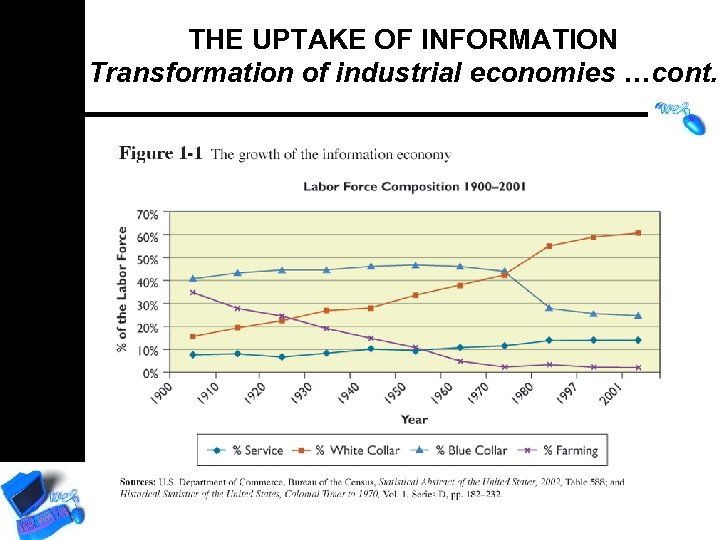
THE UPTAKE OF INFORMATION Transformation of industrial economies …cont.
THE UPTAKE OF INFORMATION Transformation of the modern enterprise IT accommodates management in orgs that are: • Flattening • Decentralising • Flexible • Location independent • And striving for: –Low transaction and coordination costs; empowerment; collaborative work and teamwork
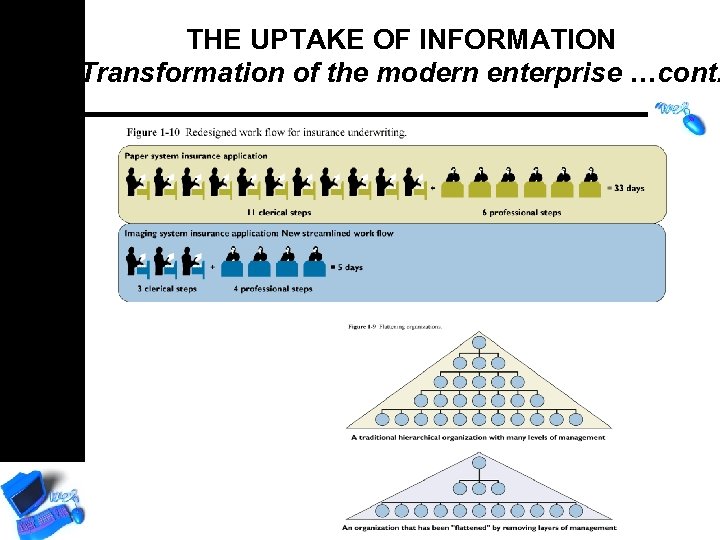
THE UPTAKE OF INFORMATION Transformation of the modern enterprise …cont.
THE UPTAKE OF INFORMATION Emergence of the digital firm • • Basically, digital firms use digital networks throughout their processes. Digital networks send digital information across them. For purposes of understanding what it is to be a digital firm, please consider the following definition from Whatis. com – – Prior to digital technology, electronic transmission was limited to analog technology, which conveys data as electronic signals of varying frequency or amplitude that are added to carrier waves of a given frequency. Broadcast and phone transmission has conventionally used analog technology. Digital technology is primarily used with new physical communications media, such as satellite and fiber optic transmission. A modem is used to convert the digital information in your computer to analog signals for your phone line and to convert analog phone signals to digital information for your computer.
THE UPTAKE OF INFORMATION Convergence of technology • • Computers Networks Satellites Telecommunications Microchip Nanotechnology Cellular technology Internet
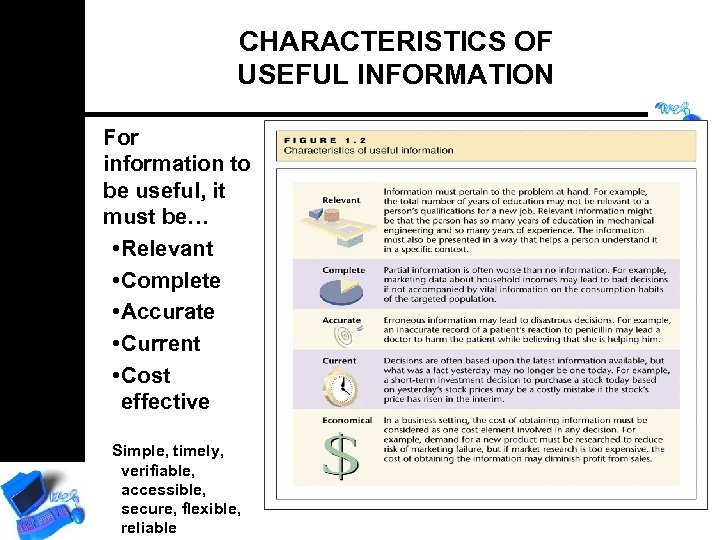
CHARACTERISTICS OF USEFUL INFORMATION For information to be useful, it must be… • Relevant • Complete • Accurate • Current • Cost effective Simple, timely, verifiable, accessible, secure, flexible, reliable
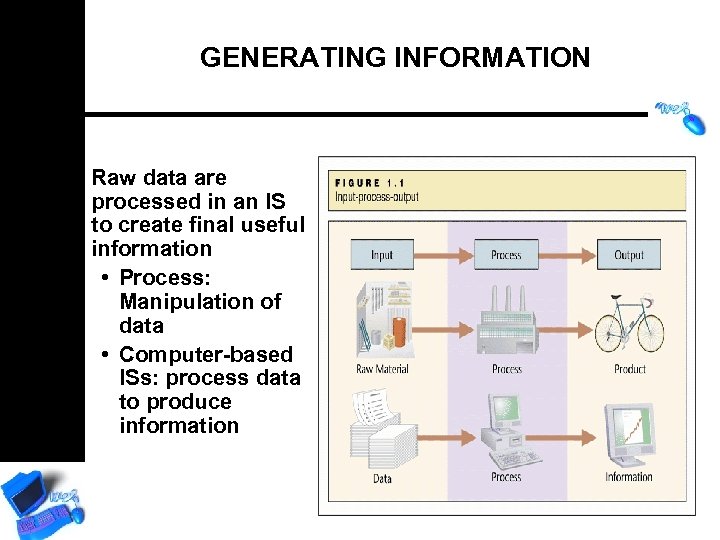
GENERATING INFORMATION Raw data are processed in an IS to create final useful information • Process: Manipulation of data • Computer-based ISs: process data to produce information
INFORMATION AND MANAGERS Systems thinking: • Viewing organisation in terms of suborganisations or subsystems • A framework for problem solving and decision making • Managers focus on overall goals and operations of business
INFORMATION AND MANAGERS…cont. Systems thinking (Cont. ) • Information Map: data and information flow within an organisation • Information Technology: all technologies that facilitate construction and maintenance of information systems
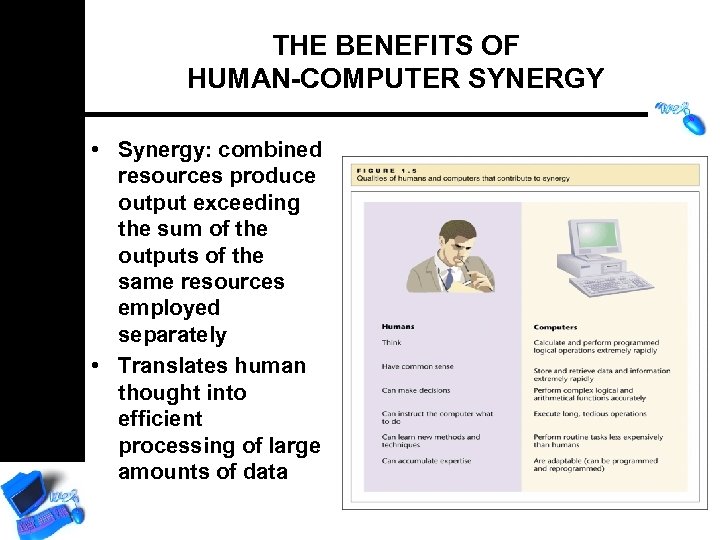
THE BENEFITS OF HUMAN-COMPUTER SYNERGY • Synergy: combined resources produce output exceeding the sum of the outputs of the same resources employed separately • Translates human thought into efficient processing of large amounts of data
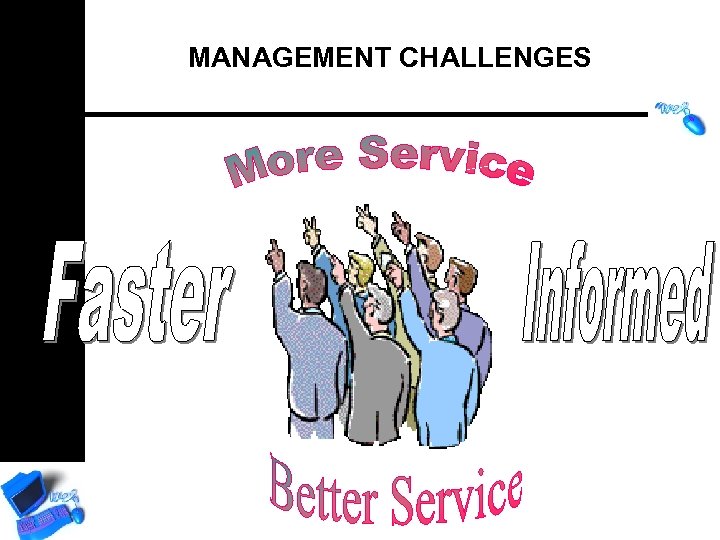
MANAGEMENT CHALLENGES
MANAGEMENT CHALLENGES ANOTHER VIEW • Reduced Control over Information Resources • Reduced Budgetary Control • Cost/Benefit Analysis • Scalability • Security • Education
OUR PERSPECTIVES ABOUT INFORMATION TECHNOLOGY IS CHANGING. . . • Automate – use IT to do same things • “Informate” – use IT to learn and continuously improve • “Strategimate” – use IT to support organisation’s mission and strategy • Integrate – Use IT to bring organisations together
INFORMATION AGE REFORM • • • Increased efficiency Decentralisation Increased accountability Improved resource management Marketisation
WHAT IS AN INFORMATION SYSTEM? Technical definition: An organized set of interrelated components that collect (or retrieve), transmit, process, store, and distribute information to support decision making, control, analysis and visualization in an organization.
REFINED OBJECTIVES OF INFORMATION SYSTEMS • Must support the strategic direction of organisation • Must allow access to a broad group of users • Must enhance organisational learning • Must do in a cost-effective manner
WHAT IS A SYSTEM? • System: A set of components that work together to achieve a common goal • Subsystem: One part of a system where the products of more than one system are combined to reach an ultimate goal • Closed system: Stand-alone system that has no contact with other systems • Open system: System that interfaces with other systems
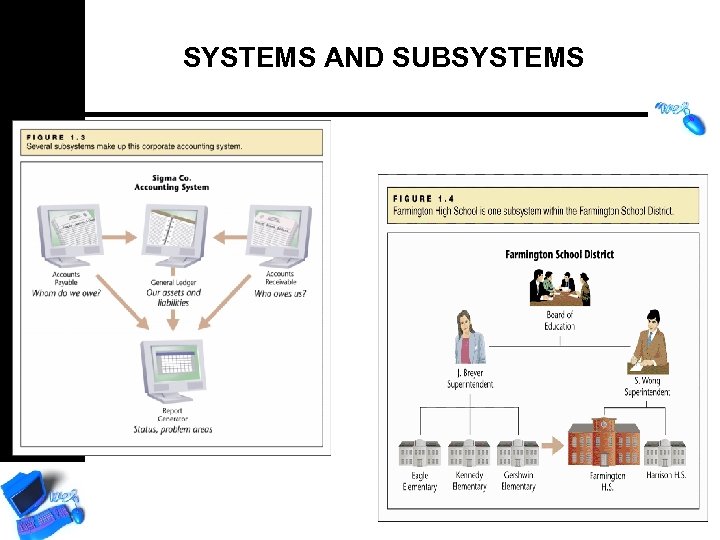
SYSTEMS AND SUBSYSTEMS
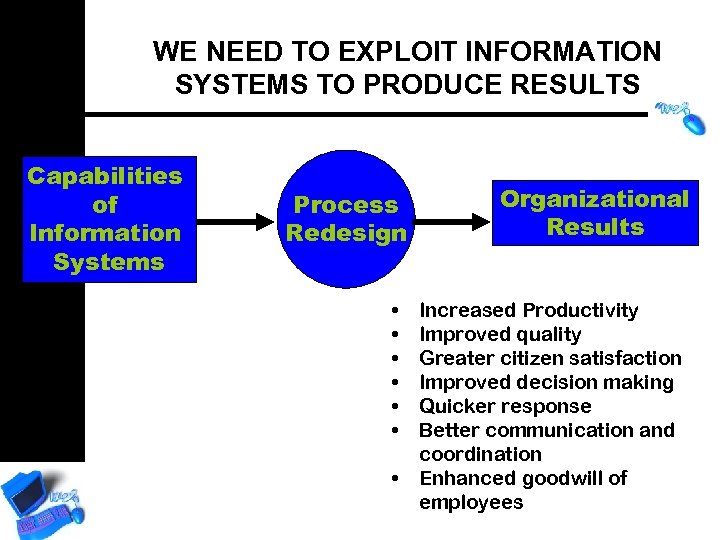
WE NEED TO EXPLOIT INFORMATION SYSTEMS TO PRODUCE RESULTS Capabilities of Information Systems Process Redesign • • Organizational Results Increased Productivity Improved quality Greater citizen satisfaction Improved decision making Quicker response Better communication and coordination Enhanced goodwill of employees
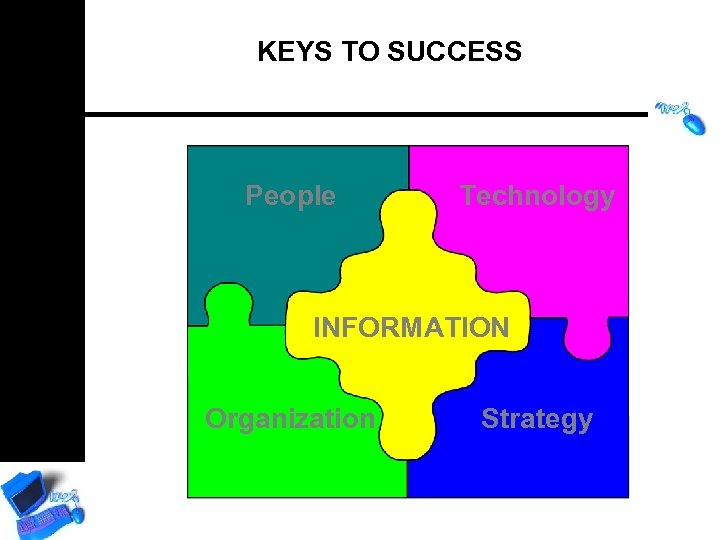
KEYS TO SUCCESS People Technology INFORMATION Organization Strategy
CAPABILITIES OF INFORMATION SYSTEMS • Fast and accurate data processing with large-capacity storage and rapid communication between sites • Instantaneous access to information • Means of coordination • Boundary spanning • Support for decision making
CAPABILITIES OF INFORMATION SYSTEMS…cont. • Supporting organizational memory and learning • Routinising organisational practice • Differentiation of services • Modeling • Automation
MANAGERS AND INFORMATION • Different levels of managers need different types of information for different types of decisions • Increased flexibility of IS allows for changes in organisational structure • However, politics of information is an issue
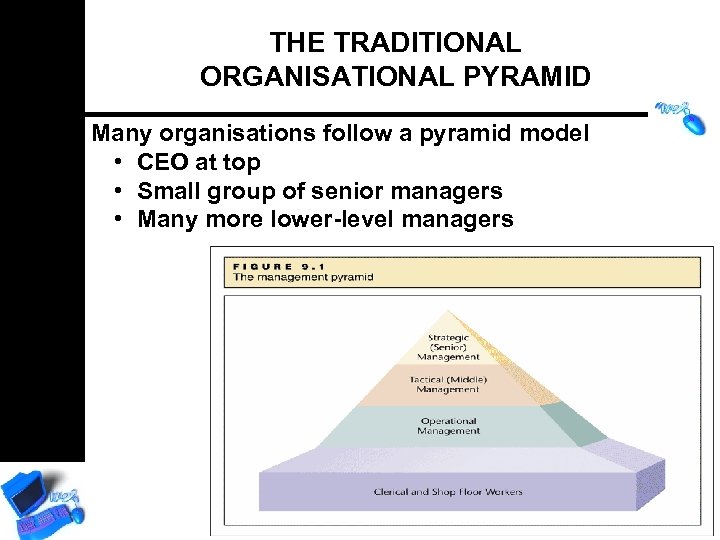
THE TRADITIONAL ORGANISATIONAL PYRAMID Many organisations follow a pyramid model • CEO at top • Small group of senior managers • Many more lower-level managers
THE TRADITIONAL ORGANISATIONAL PYRAMID…cont. • Strategic Management – Decisions affect entire or large parts of the organisation; “what to do” decisions – Aggregate past organisational data and make future predictions – Improve organisational strategy and planning • Tactical Management – Wide-ranging decisions within general directions handed down; “how to do it” decisions – Automation of monitoring and controlling of organisational activities – Improve organisational effectiveness
THE TRADITIONAL ORGANISATIONAL PYRAMID …cont. • Operational Management, Forepersons, Supervisors – Comply with general policies handed down – Automation of routine and repetitive activities – Improve organisational efficiency • Clerical and Shop Floor Workers – No management-level decisions required
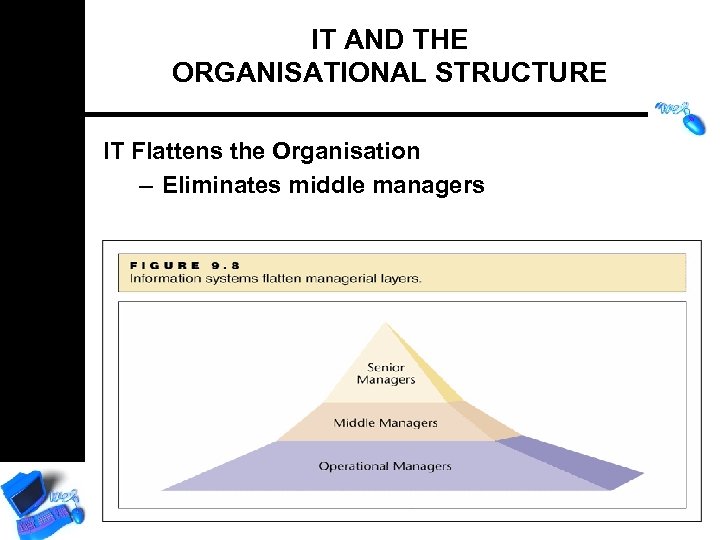
IT AND THE ORGANISATIONAL STRUCTURE IT Flattens the Organisation – Eliminates middle managers
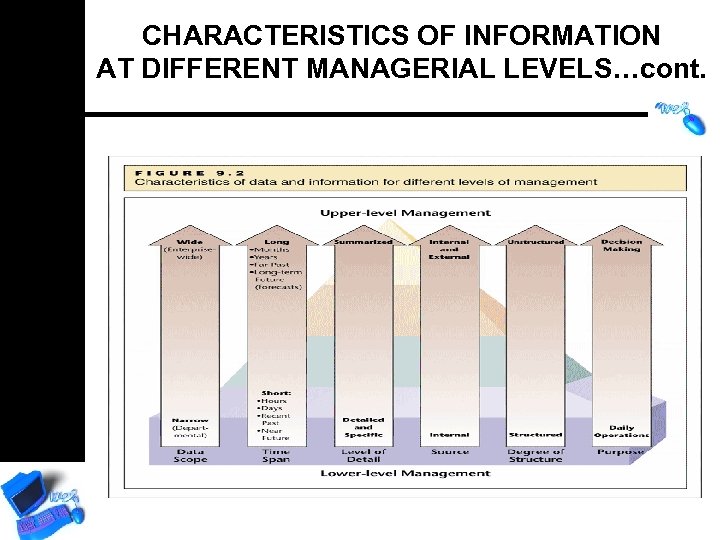
CHARACTERISTICS OF INFORMATION AT DIFFERENT MANAGERIAL LEVELS • Data Scope – Amount of data from which information is extracted • Time Span – How long a period the data covers • Level of Detail – Degree to which information is specific
CHARACTERISTICS OF INFORMATION AT DIFFERENT MANAGERIAL LEVELS …cont. • Source: Internal vs. External – Internal data: collected within the organisation – External data: collected from outside sources • Media, newsletters, government agencies, Internet
CHARACTERISTICS OF INFORMATION AT DIFFERENT MANAGERIAL LEVELS…cont. Structured and Unstructured data • Structured data: numbers and facts easily stored and retrieved • Unstructured data: drawn from meetings, conversations, documents, presentations, etc.
CHARACTERISTICS OF INFORMATION AT DIFFERENT MANAGERIAL LEVELS…cont.
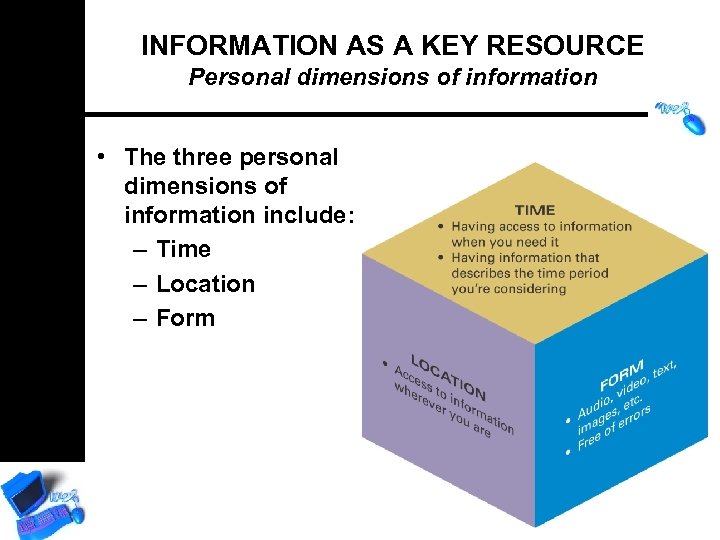
INFORMATION AS A KEY RESOURCE Personal dimensions of information • The three personal dimensions of information include: – Time – Location – Form
INFORMATION AS A KEY RESOURCE Organisational dimensions of information
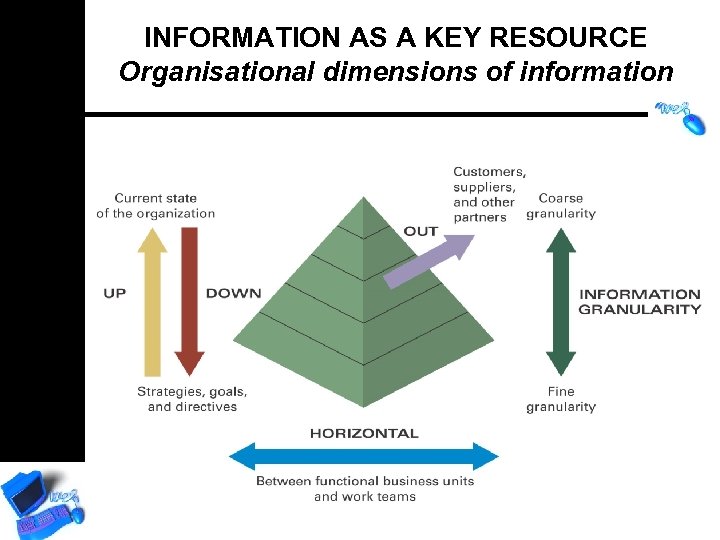
INFORMATION AS A KEY RESOURCE Organisational dimensions of information • Strategic management – provides overall direction and guidance • Tactical management – develops the goals and strategies • Operational management – manages and directs the day-to-day operations • Nonmanagement employees – perform daily activities
INFORMATION AS A KEY RESOURCE Organisational dimensions of information The four flows of information include: – Upward – describes the current state of the organisation based on its daily transactions – Downward – consists of the strategies, goals, and directives that originate at one level and are passed to lower levels
INFORMATION AS A KEY RESOURCE Organisational dimensions of information …Information flows continued – Horizontal – between functional business units and work teams. – Outward – information that is communicated to customers, suppliers, distributors, and other partners for the purpose of doing business.
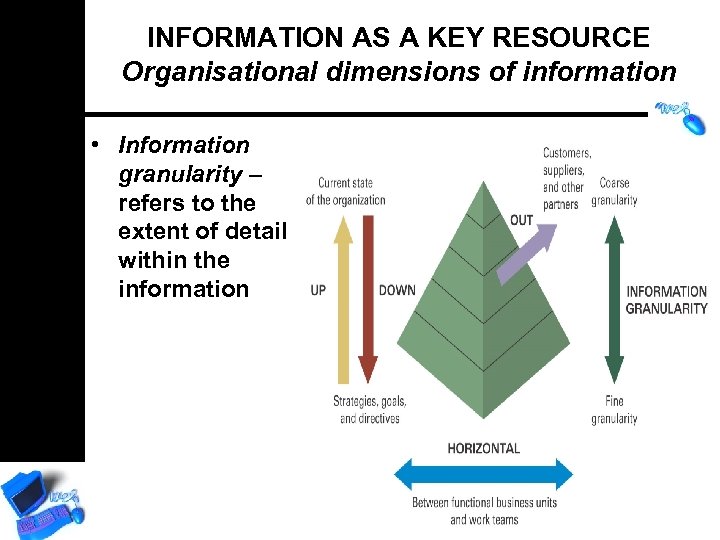
INFORMATION AS A KEY RESOURCE Organisational dimensions of information • Information granularity – refers to the extent of detail within the information
INFORMATION AS A KEY RESOURCE Organisational dimensions of information What the information describes can include: – Internal information – specific operational aspects of the organization. – External information – the environment surrounding the organization. – Objective information – something that is known. – Subjective information – something that is unknown.
THE MATRIX STRUCTURE • People report to different supervisors, depending on project, product, or location of work • More successful for smaller, entrepreneurial firms • IT supports matrix structure – Easier access to cross-functional information
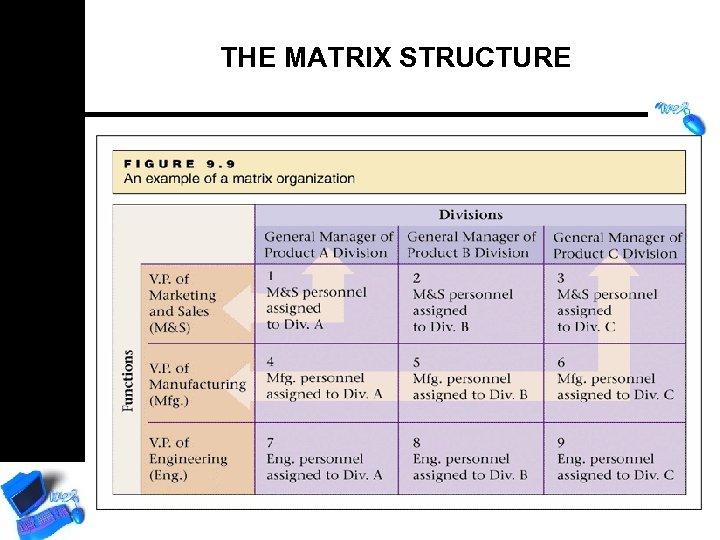
THE MATRIX STRUCTURE
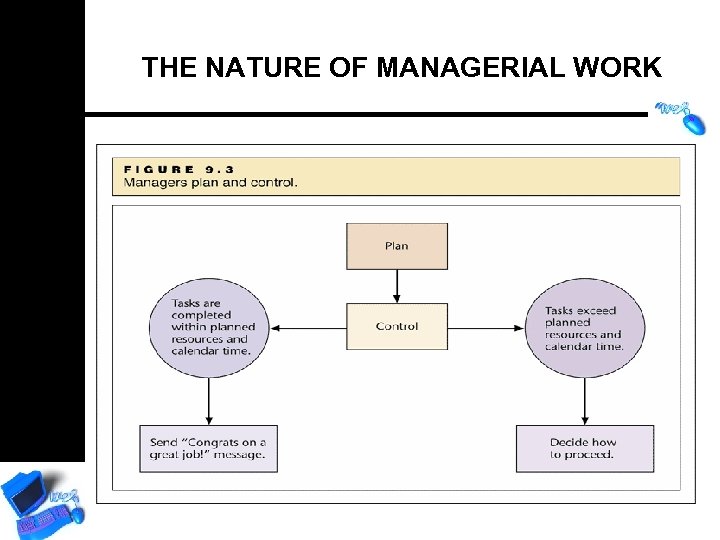
THE NATURE OF MANAGERIAL WORK
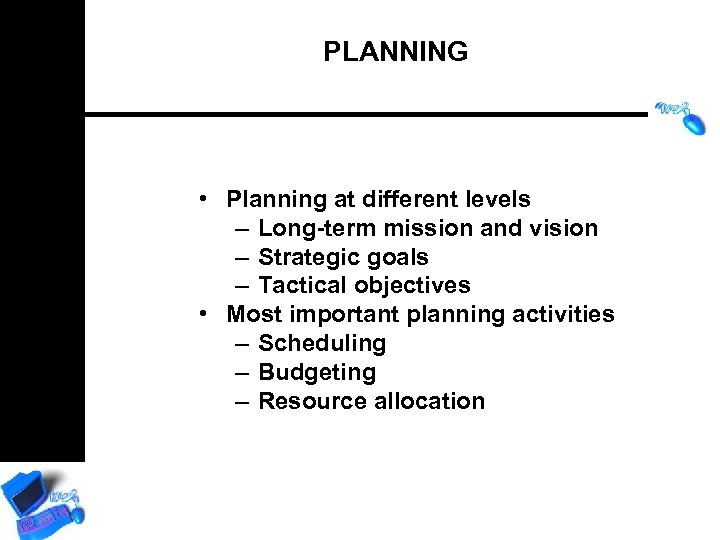
PLANNING • Planning at different levels – Long-term mission and vision – Strategic goals – Tactical objectives • Most important planning activities – Scheduling – Budgeting – Resource allocation
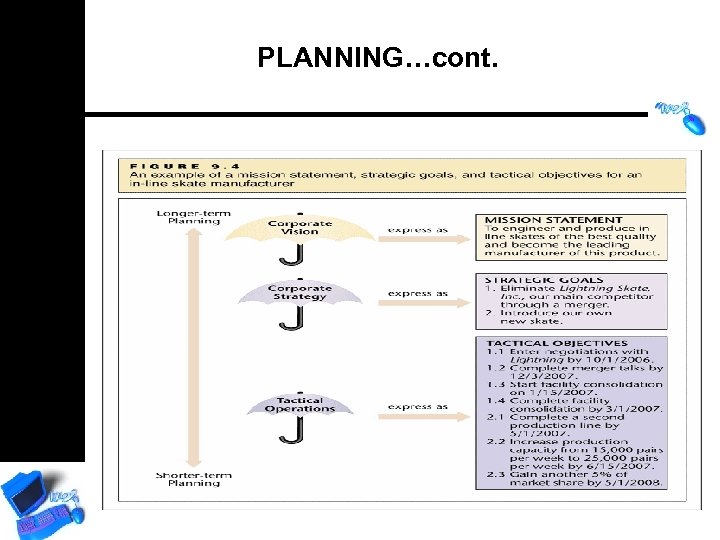
PLANNING…cont.
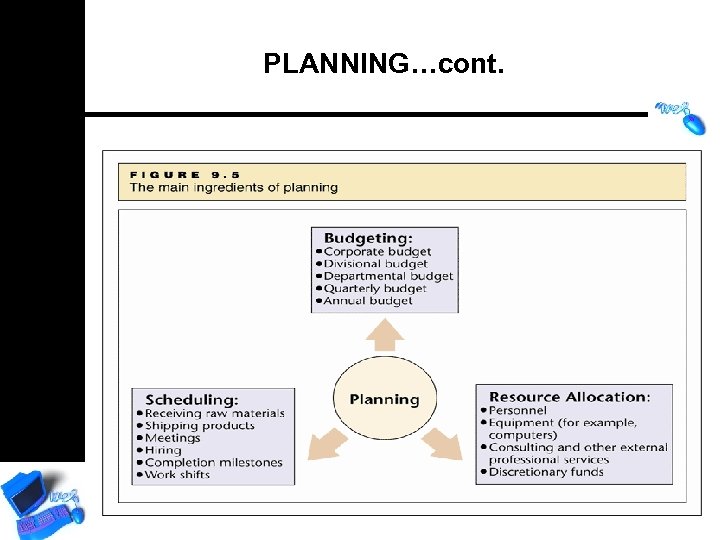
PLANNING…cont.
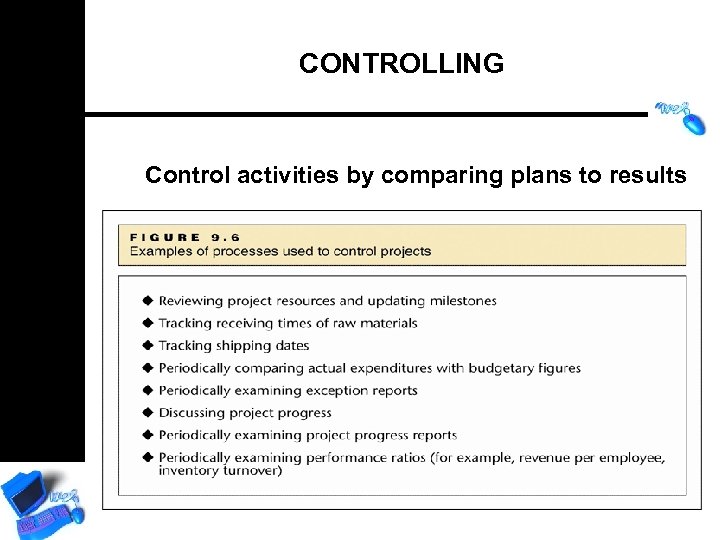
CONTROLLING Control activities by comparing plans to results
DECISION MAKING • Both planning and control call for decision making • The higher the level of management: – The less routine the manager’s activities – The more open the options – The more decision-making involved
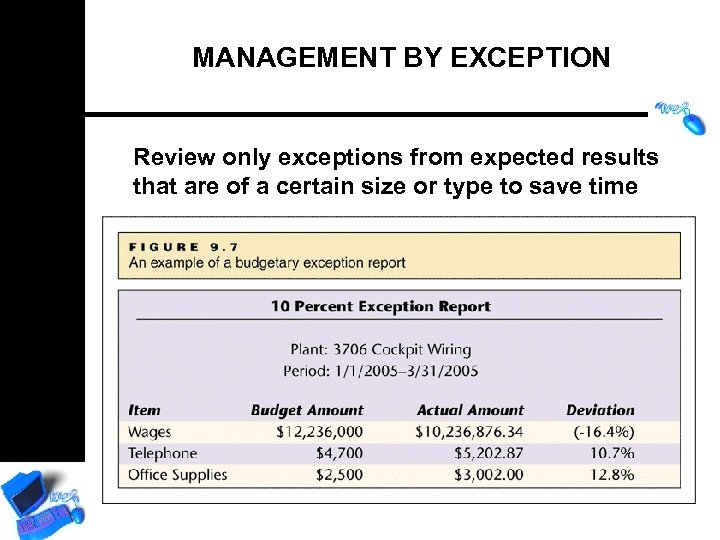
MANAGEMENT BY EXCEPTION Review only exceptions from expected results that are of a certain size or type to save time
LEADING MANAGERS REQUIRE THESE SKILLS AND ABILITIES • Vision and creating confidence in others • Encouraging and inspiring subordinates • Initiating activities for efficient and effective work • Creating new techniques to achieve corporate goals • Presenting a role model for desired behavior • Taking responsibility for undesired consequences • Delegating authority
CHARACTERISTICS OF EFFECTIVE INFORMATION • Tabular and Graphical Representation – Certain information better presented graphically • Trends as lines • Distributions as pie charts • Performance comparisons as bar charts – Many people prefer tabular data for complex problem solving
LOVE-HATE RELATIONSHIP WITH INFORMATION TECHNOLOGY “If the auto industry had kept up with technology like the computer industry has, we would all be driving $25 cars that get 1, 000 miles per gallon”. – CEO, Fortune 1000 software fime, spring 1998

WELL… THIS IS TRUE BUT… • Your car would crash twice a day • Every time they repainted the lines in the road, you have to buy a new car. • The air bag system would say, “Are you sure? ” before going off. • When your car died on the freeway for no reason, you would just accept this, restart, and drive on. • Executing a maneuver would cause your car to stop, and you would have to reinstall the engine. For some strange reason, you would accept this, too.
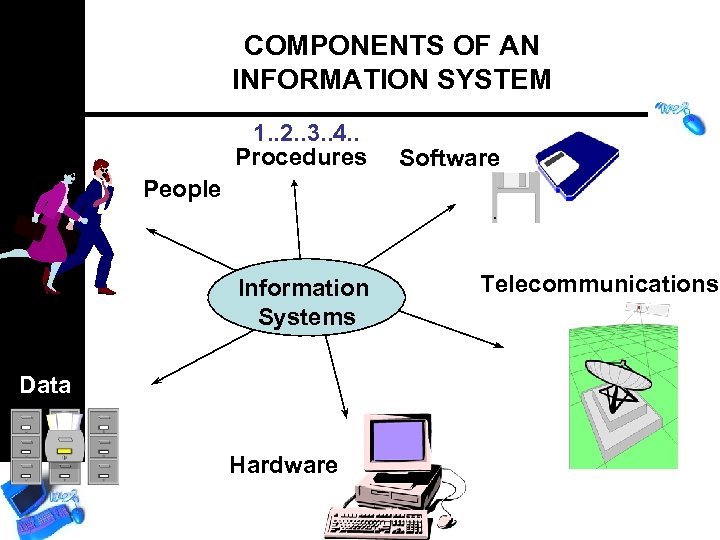
COMPONENTS OF AN INFORMATION SYSTEM 1. . 2. . 3. . 4. . Procedures Software People Information Systems Data Hardware Telecommunications
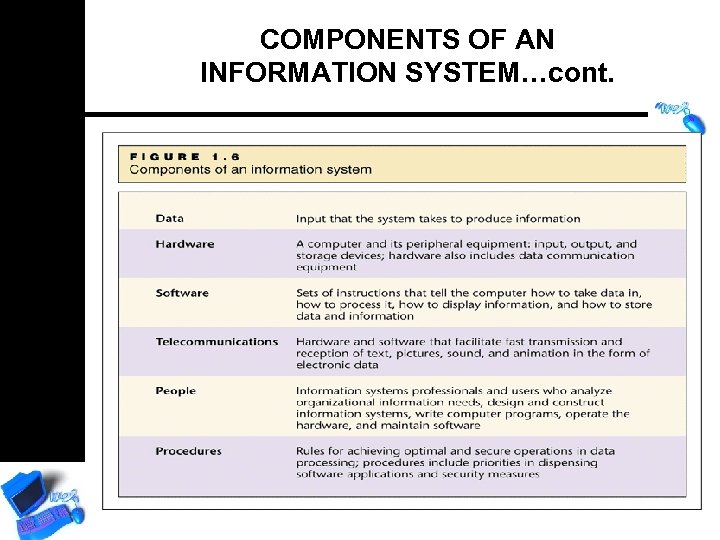
COMPONENTS OF AN INFORMATION SYSTEM…cont.
PEOPLE AS A KEY RESOURCE Information and technology literacy • The single most important resource in any organisation is its people. • Technology-literate knowledge worker – a person who knows how and when to apply technology.
THE FOUR STAGES OF DATA PROCESSING • Input: Data are collected and entered into computer • Data processing: Data are manipulated into information using mathematical, statistical, and other tools • Output: Information is displayed or presented • Storage: Data and information are maintained for later use
COMPUTER EQUIPMENT FOR INFORMATION SYSTEM • Input devices: introduce data into the IS • Processor: manipulates data through the IS • Output devices: display information • Storage devices: store data and information
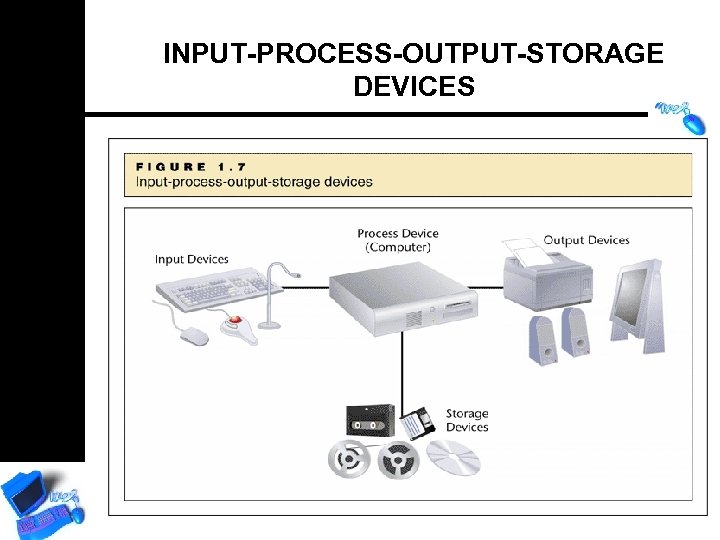
INPUT-PROCESS-OUTPUT-STORAGE DEVICES
TYPES OF MANAGEMENT INFORMATION SYSTEMS • Transaction Processing Systems (TPS) – Record data and perform basic processing – Cash registers and ATMs • Management Information Systems (MIS) – Recorded transactions and other data produce information for problem solving and decision making • Decision Support Systems (DSS) – Contain models, or formulas, that manipulate data into information – Often answer “what if? ” questions
TYPES OF INFORMATION SYSTEMS…cont. • Group Decision Support Systems (GDSS) – Generate ideas, establish priorities, and reach decisions in group environment • Executive Information Systems (EIS) – Can gather information from vast amounts of data for high-level executives – Highly useful in control and planning • Expert Systems (ES) – Programmed with human expertise – Can help solve problems of unstructured nature – Also referred to as a knowledge worker system (KWS)
TYPES OF INFORMATION SYSTEMS…cont. • Geographic Information Systems (GIS) – Represents local conditions or features – Allows planning, decision-making, and monitoring of local conditions or activities • On-demand Output – Managers can obtain reports tailored to their needs at any time • Office automations system (OAS) – Managers can obtain reports tailored to their needs at any time
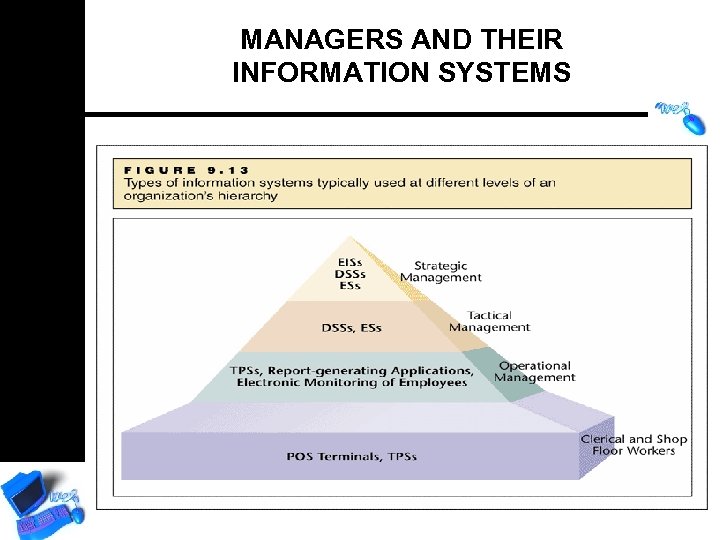
MANAGERS AND THEIR INFORMATION SYSTEMS
INFORMATION SYSTEMS IN FUNCTIONAL BUSINESS AREAS • Accounting – Record business transactions, produce periodic financial statements, and create reports required by law • Finance – Organise budgets, manage the flow of cash, analyse investments, and make decisions that could reduce interest payments and increase revenues • Marketing – Analyse demand for various products in different regions and population groups
INFORMATION SYSTEMS IN FUNCTIONAL BUSINESS AREAS…cont. • Human Resources – Help with record keeping and employee evaluation • Manufacturing – Allocate resources such as personnel, raw material, and time – Control inventory, process customer orders, prepare production schedules, perform quality assurance, and prepare shipping documents
INFORMATION SYSTEMS IN FUNCTIONAL BUSINESS AREAS…cont. • Service – ISs are often the backbone of service organisations • Retail – Some retail stores (e. g. , Wal-Mart, Sears) are now linked to communication networks by satellite – Management can determine which items move quickly and which do not
INFORMATION SYSTEMS IN DIFFERENT BUSINESS SECTORS • New Businesses – ISs have made new products and services possible, such as credit reports and shipment tracking, online businesses • Government – Tax authorities, national insurance and welfare agencies, defense departments, economic organisations, immigration authorities
EFFECTIVENESS AND EFFICIENCY Information Systems can help companies attain more effective and efficient business processes • Effectiveness – The degree to which a task is accomplished • Efficiency – Determined by the relationship between resources expended and benefits gained in achieving a goal
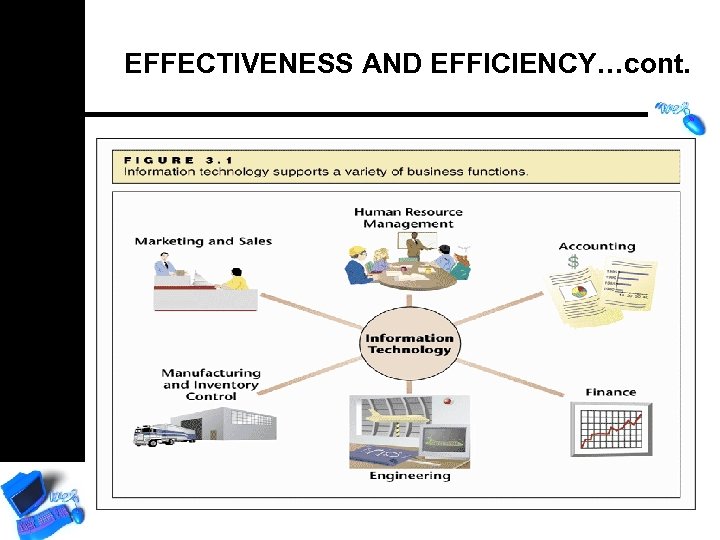
EFFECTIVENESS AND EFFICIENCY…cont.
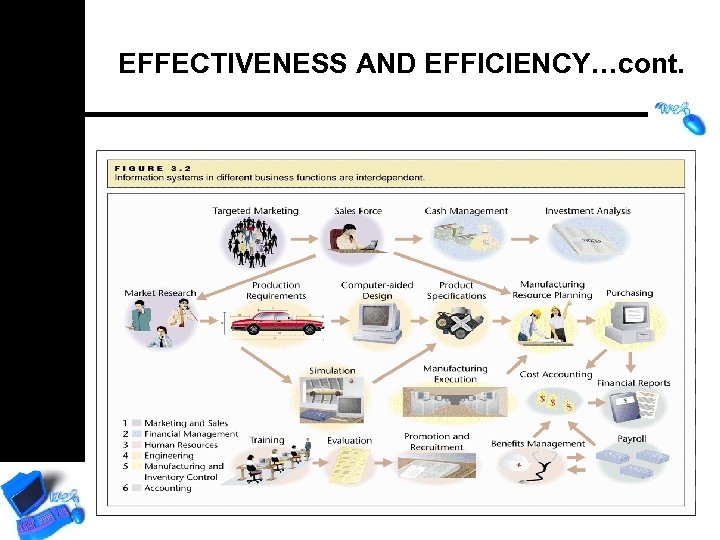
EFFECTIVENESS AND EFFICIENCY…cont.
ENTERPRISE RESOURCE PLANNING (ERP) • All business functions served by one system that supports different activities for different departments • Support supply chain management, the series of main and supporting activities from order to delivery
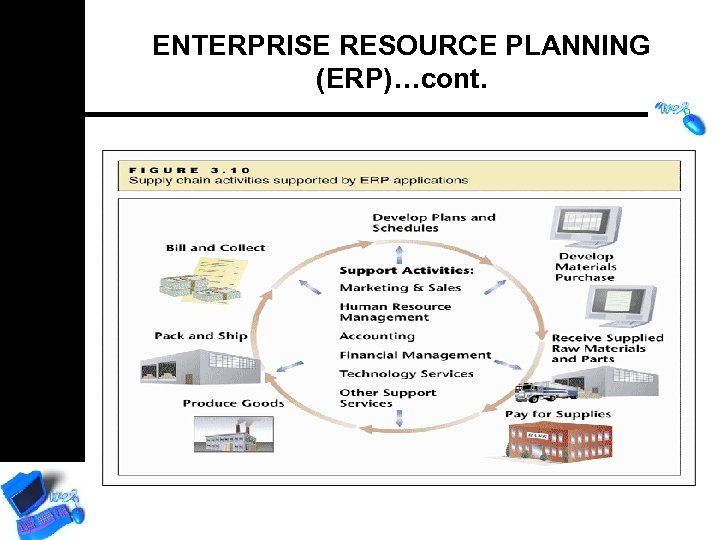
ENTERPRISE RESOURCE PLANNING (ERP)…cont.
GROUPWARE AND COLLABORATIVE WORK • Group. Ware lets workers in different locations communicate ideas, brainstorm, and work together as if they were in the same place • Document Control – Users can distribute and track electronic documents without working with outdated information • Collaborative Projects – Users can coordinate work on a single document from many different terminals
TELECOMMUNICATIONS IN BUSINESS • Transmittal of data from one computer to another over a distance • Telecommunications has improved business in three main ways: – Better communication – Higher efficiency – Better distribution of data
TELECOMMUNICATIONS IN DAILY USE • • • Cellular phones SMSs/MMs Video-conferenceing Voice mail Facsimile Information kiosks Pay-at-the-Pump Instant messaging Vo. IP - Skype
BANDWIDTH AND MEDIA • Communications medium – Physical medium through which data can be communicated – Telephone lines, television cables • Capacity – Speed at which data are communicated – Also called the transmission rate – It is often called “bandwidth” • Bandwidth is measured in bits per second (bps) – The greater the capacity, the faster the transmission
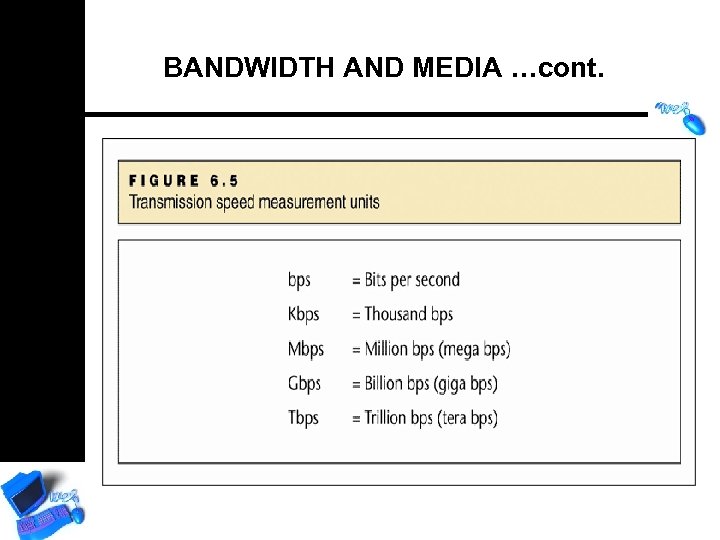
BANDWIDTH AND MEDIA …cont.
BANDWIDTH AND MEDIA …cont. • Bandwidth – Narrowband is low speed – Broadband has greater capacity • Media – A medium is any means by which data can be transmitted
NETWORKS • LANs (Local Area Networks) – Networks within a building, or within a group of adjacent buildings • WANs (Wide Area Networks) – Networks that cross organisational boundaries or reach outside the company • Value-added networks (VANs/VPNs) • Wireless communication
PROTOCOLS • Communication protocols – Rules governing the communication between computers or between computers and other computer-related devices (TCP/IP and HTTP) • Network protocols – Rules governing a network of devices
THE WIRELESS REVOLUTION • Popular wireless technologies – Wi-Fi, Bluetooth, Infra. Red, Wireless. Mircowave, GPS, Edge, 3 G • Would you like Wi-Fi with that? • Combining technologies
WIRELESS TECHNOLOGIES …cont.
WIRELESS TECHNOLOGIES …cont.
DYNAMIC REPRESENTATION • Data presented in real time • Includes moving images representing speed or direction • Changing colors represent rate of change • Use expected to grow
THE SYSTEM DEVELOPMENT LIFECYCLE (SDLC)
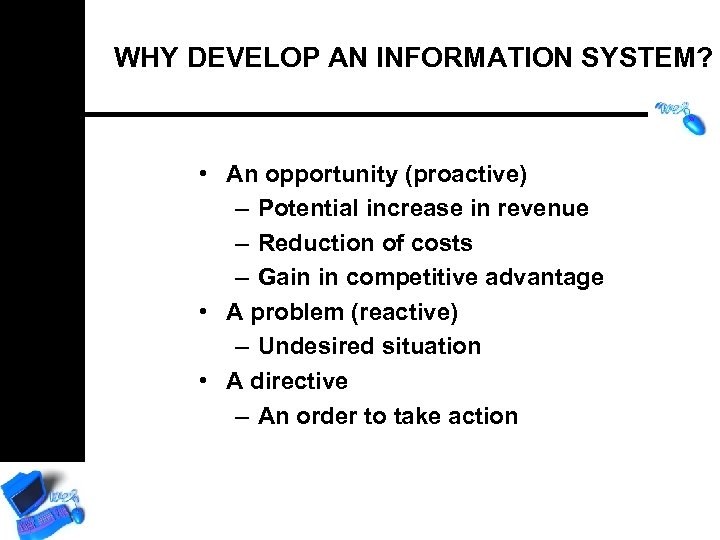
WHY DEVELOP AN INFORMATION SYSTEM? • An opportunity (proactive) – Potential increase in revenue – Reduction of costs – Gain in competitive advantage • A problem (reactive) – Undesired situation • A directive – An order to take action
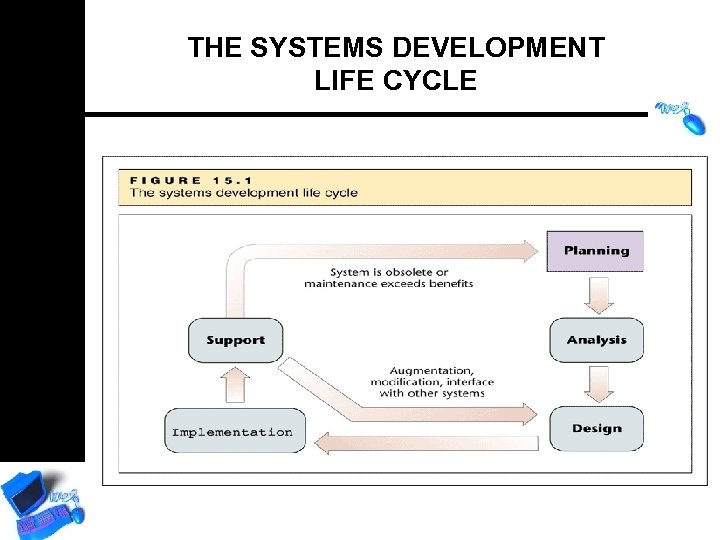
THE SYSTEMS DEVELOPMENT LIFE CYCLE
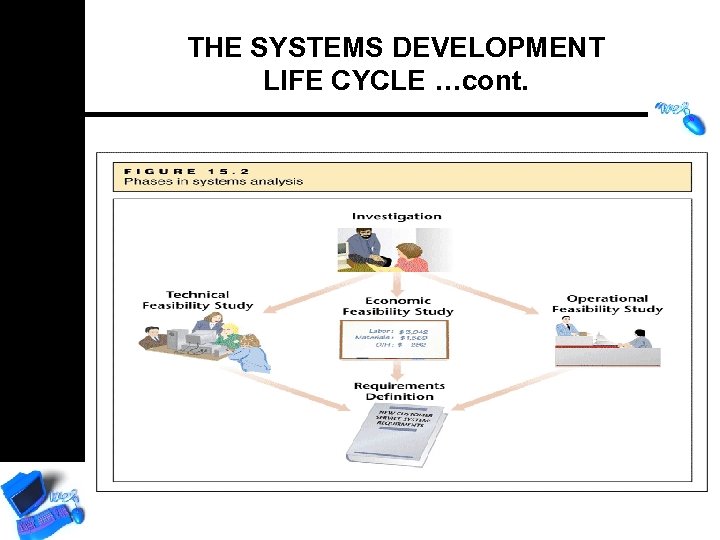
THE SYSTEMS DEVELOPMENT LIFE CYCLE …cont.
ANALYSIS • Investigation • Developers interview managers and perspective users to determine business needs • Three feasibility studies performed
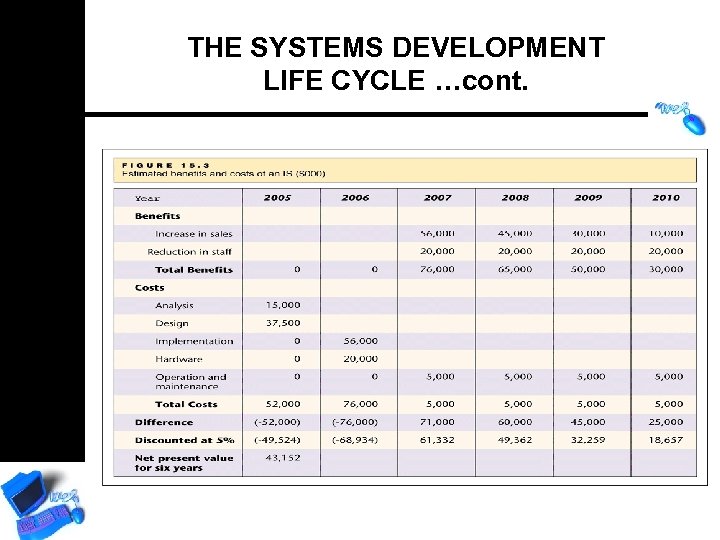
ANALYSIS …cont. • Technical Feasibility Study – Ensures hardware and software exist to build the system • Economic Feasibility Study – Determines resources needed for implementation – Determines if benefits outweigh the costs
THE SYSTEMS DEVELOPMENT LIFE CYCLE …cont.
ANALYSIS …cont. • Operational Feasibility Study – Determines if system will be used as intended at its full capacity • Requirements Definition – Specific features and interface requirements of the system defined
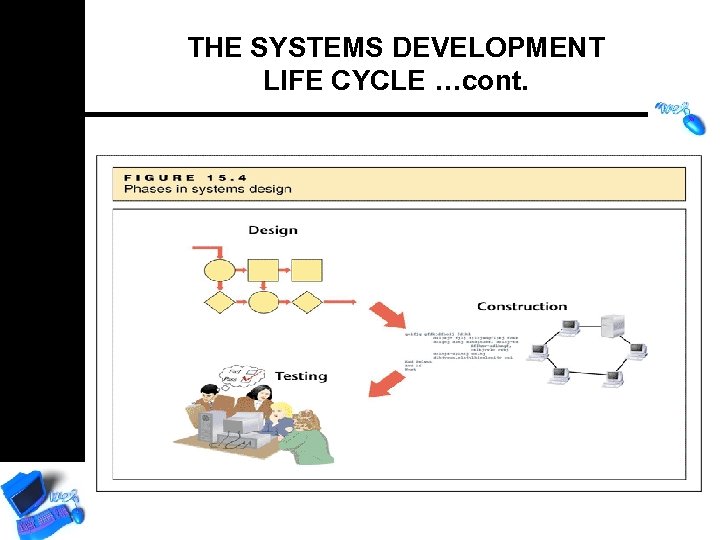
THE SYSTEMS DEVELOPMENT LIFE CYCLE …cont.
DESIGN • Translation of user requirements into detailed functions of the system – Input files – Procedures – Output files – User Dialog – Interfaces
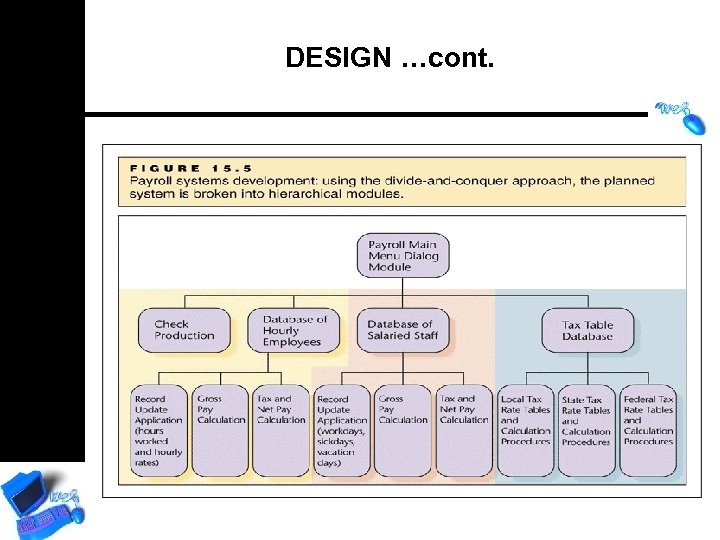
DESIGN …cont.
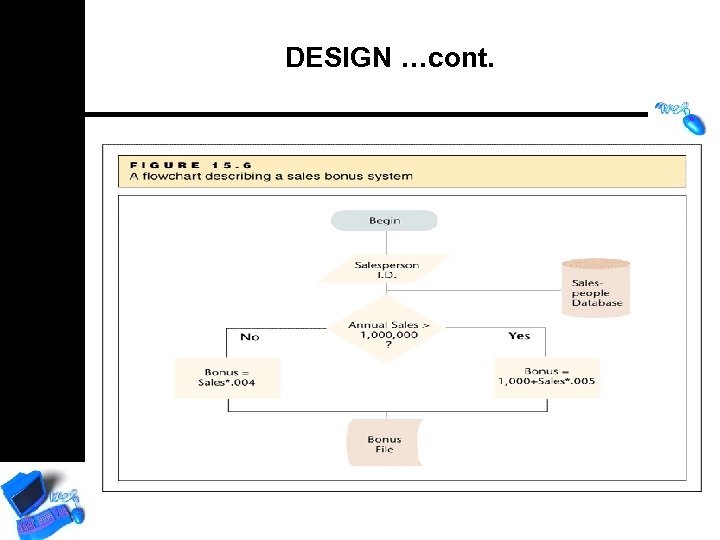
DESIGN …cont. • Software development tools – Flowcharts • Graphical symbols illustrating system • Logical and physical elements • Over 30 symbols for events, hardware, processes and more
DESIGN …cont.
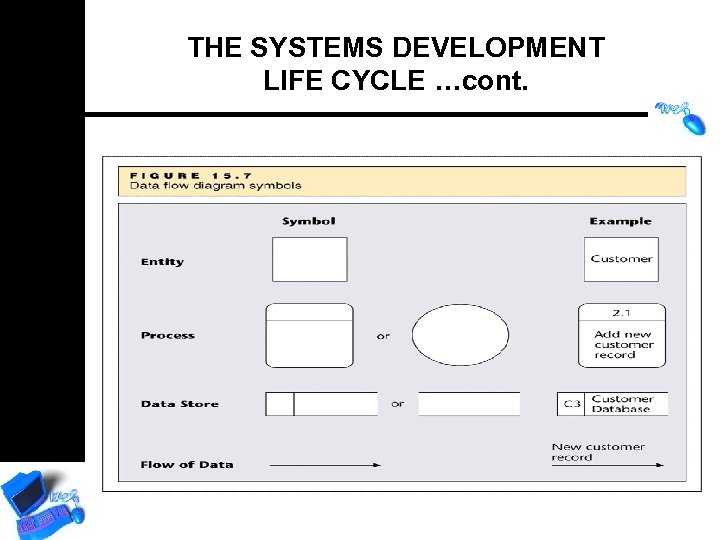
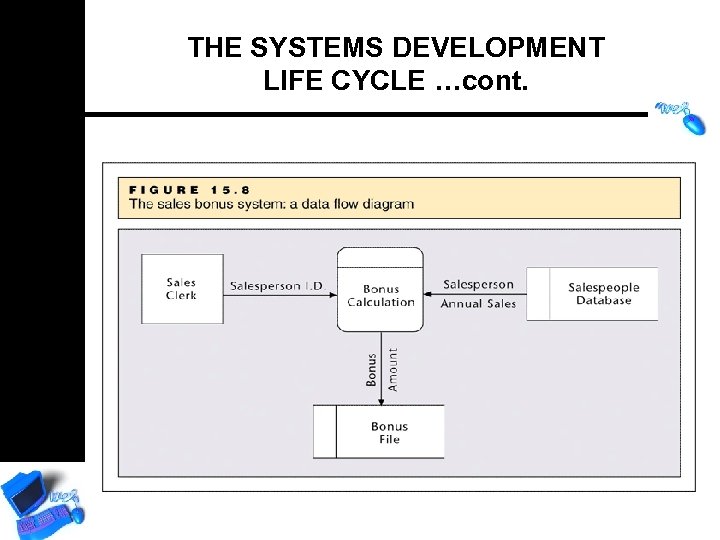
DESIGN …cont. • Software development tools – Data flow diagram • Describe flow of data in system with only four symbols: – External entities – Processes – Data stores – Data direction
THE SYSTEMS DEVELOPMENT LIFE CYCLE …cont.
THE SYSTEMS DEVELOPMENT LIFE CYCLE …cont.
DESIGN …cont. • Software development tools – Unified Modeling Language • Graphical standard for visualizing, specifying, and documenting software • Independent of programming language • Describe types of software • Use case, class, interaction, state, activity, and physical components
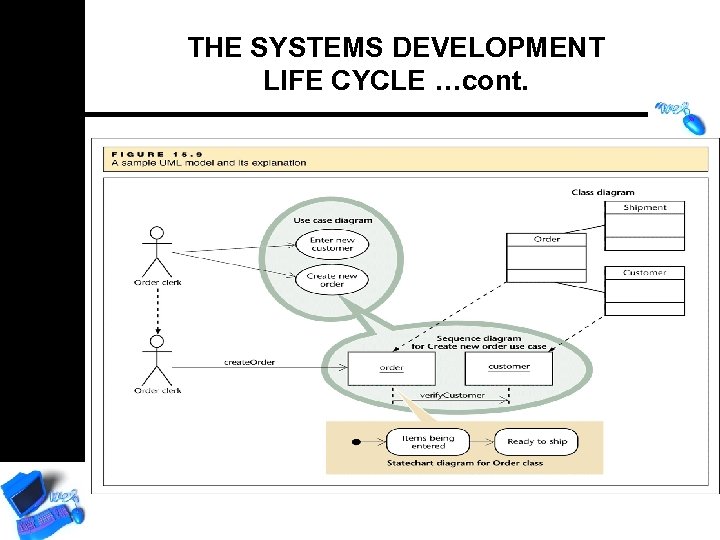
THE SYSTEMS DEVELOPMENT LIFE CYCLE …cont.
DESIGN …cont. • Construction – Programming • Systems Testing – Checked against system requirements – Attempts to make system fail
IMPLEMENTATION • Training • Conversion – Parallel Conversion – Phased Conversion – Cut Over Conversion – Pilot Conversion
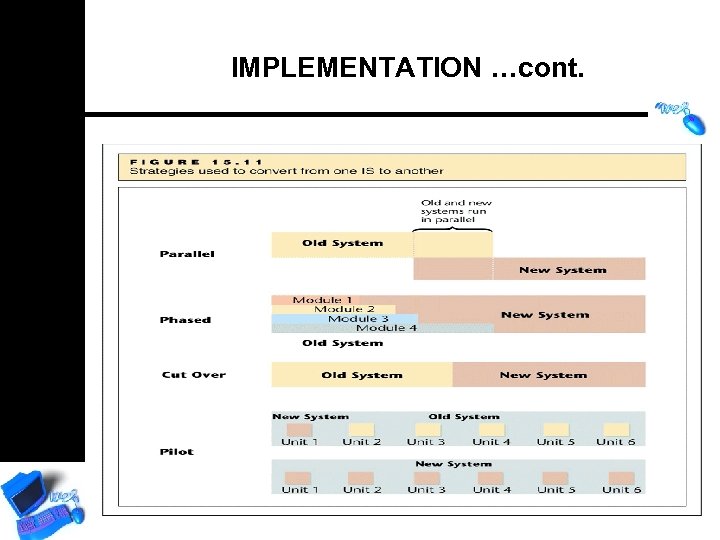
IMPLEMENTATION …cont.
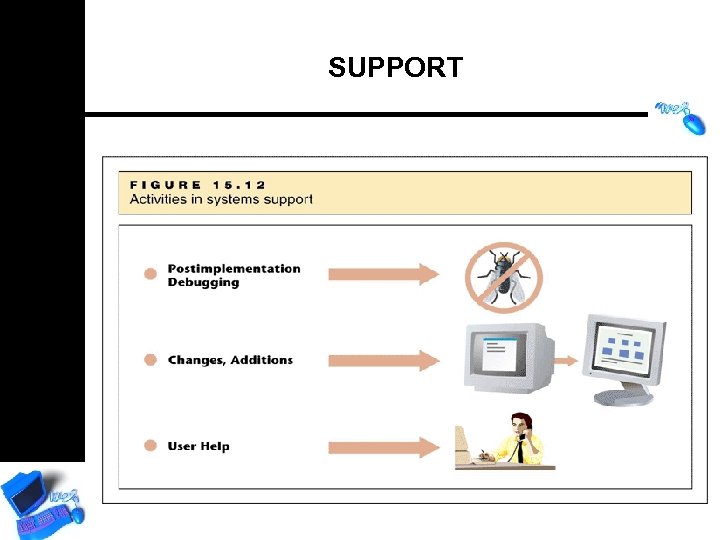
SUPPORT
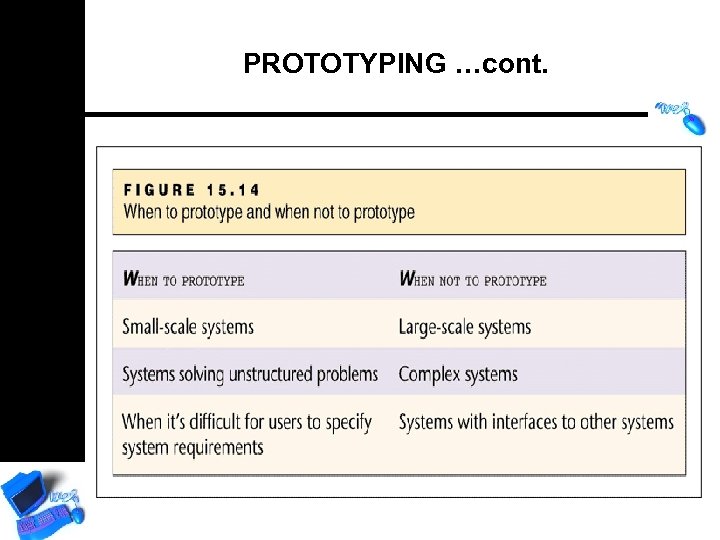
PROTOTYPING • Systems developed using an iterative process – Purpose is to develop a working model as quickly as possible, which can be tweaked and revised – Significantly shortens systems development backlog – Can increase risk of incompatibility and other unforeseen mishaps
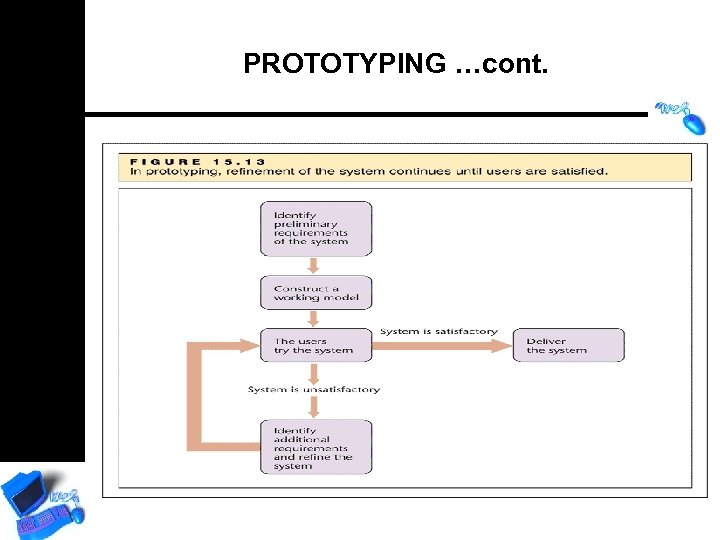
PROTOTYPING …cont.
PROTOTYPING …cont.
PROJECT MANAGEMENT OF INFORMATION SYSTEM
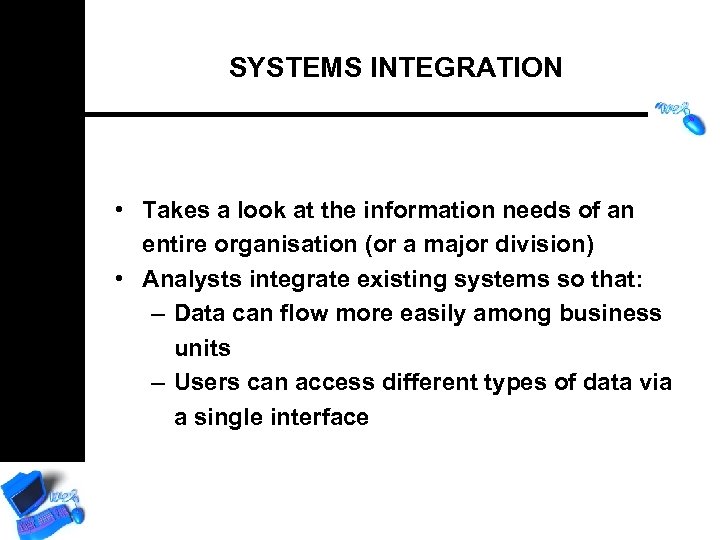
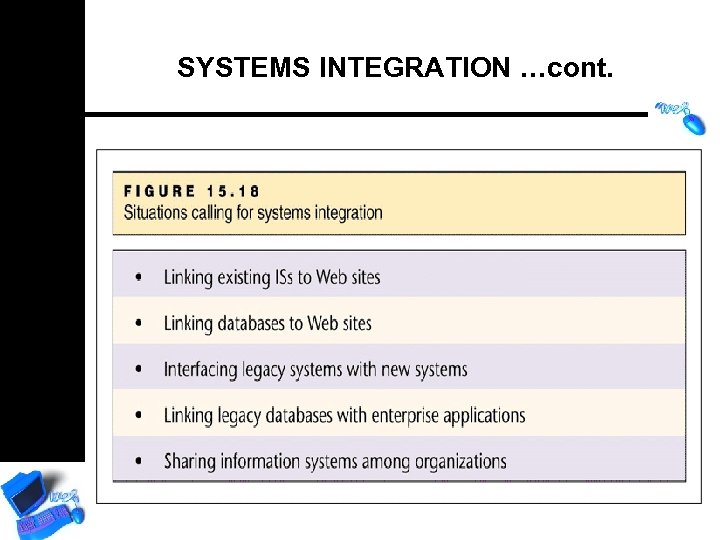
SYSTEMS INTEGRATION • Takes a look at the information needs of an entire organisation (or a major division) • Analysts integrate existing systems so that: – Data can flow more easily among business units – Users can access different types of data via a single interface
SYSTEMS INTEGRATION …cont.
THE INTERNET, THE WEB AND E-COMMERCE
WHAT IS THE INTERNET? WHAT IS THE WEB? • The Internet is generally defined as a global network of computer networks • The Web is a way of organising, presenting and accessing the Information on the Internet
GROWTH OF THE INTERNET • Number of servers – 147 million in mid-2003 • Number of users – More than 600 million; 10 percent of the world population
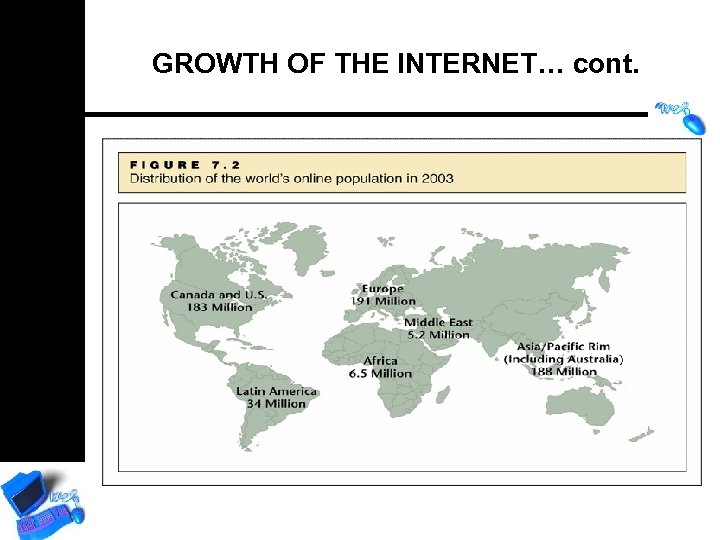
GROWTH OF THE INTERNET… cont.
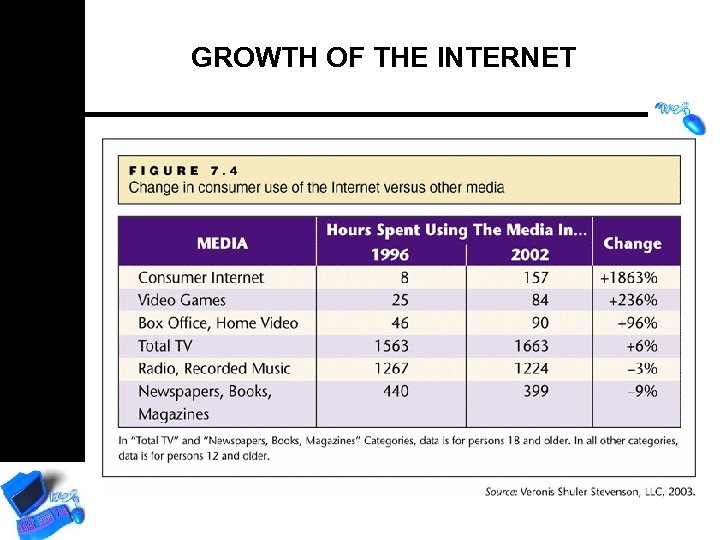
GROWTH OF THE INTERNET
HOW THE INTERNET WORKS Definitions • Uniform Resource Locator (URL) • Hypertext Transfer Protocol (HTTP) • Domain Name • Hypertext Markup Language (HTML) • Top Level Domain (TLD)
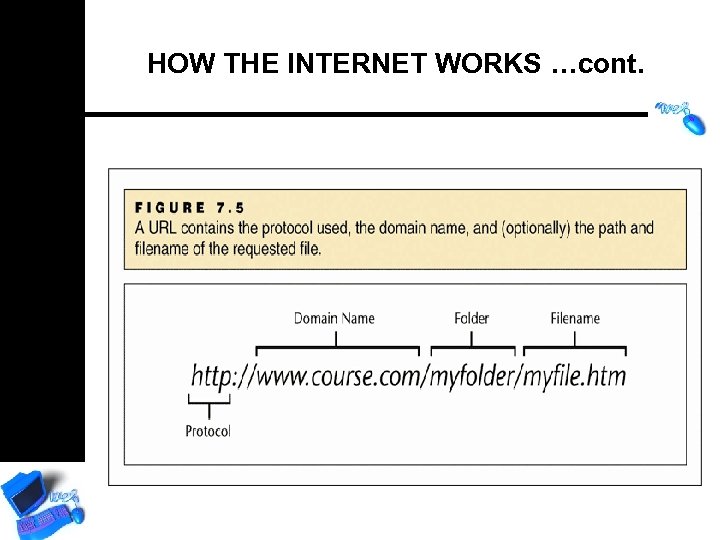
HOW THE INTERNET WORKS …cont.
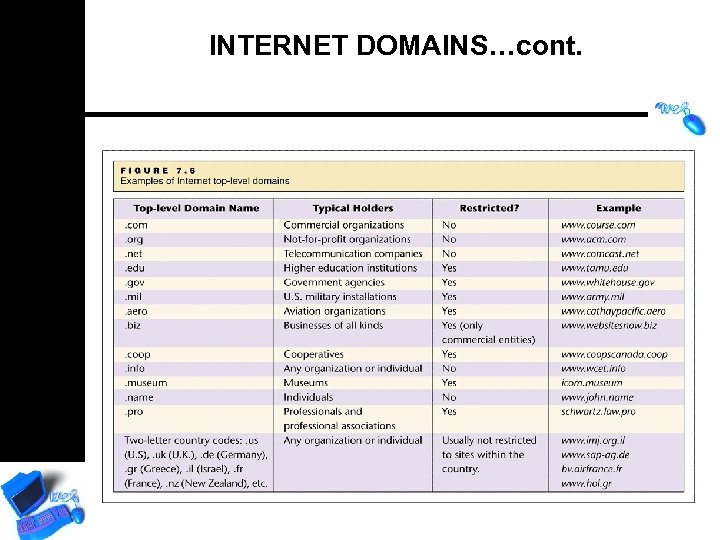
INTERNET DOMAINS • • IP Number Domain Naming System (DNS) A domain name is assigned to each IP address Domain names are registered by one of a group of companies authorized to assign unique names
INTERNET DOMAINS…cont.
COMMON INTERNET APPLICATIONS • • E-mail (POP & SMTP) File transfer (FTP) Usenet newsgroups and Blogs Instant Messaging Internet Telephoning (Vo. IP – Skype) Web browsers Search engines
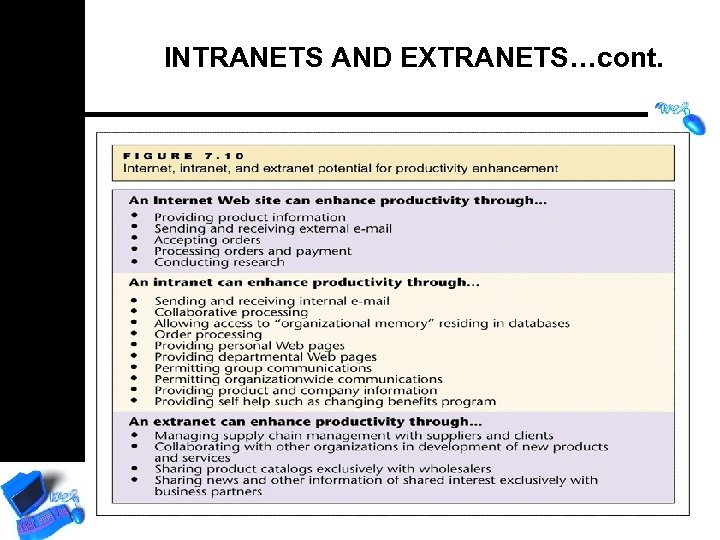
INTRANETS AND EXTRANETS Intranet • A within-organisation computer network that uses Internet technologies to communicate Extranet • Uses Internet technologies to facilitate communication and trade between an organisation and its business partners, such as suppliers (VPN – virtual private network)
INTRANETS AND EXTRANETS…cont.
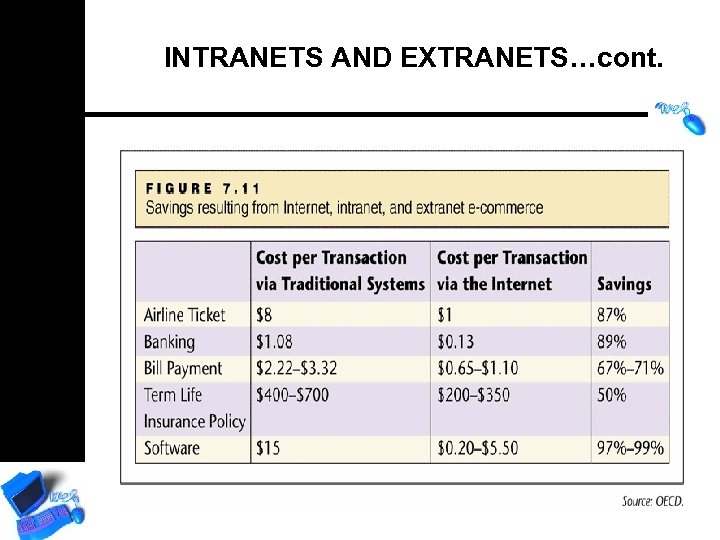
INTRANETS AND EXTRANETS…cont.
E-COMMERCE • Business-to-business and businessto-consumer transactions done electronically via networks • Database management online makes information cheaper to distribute • E-commerce is now synonymous with “doing business on the Internet”
B 2 B E-COMMERCE • • Electronic Data Interchange Market exchanges and auctions Online Business Alliances Application and Storage Service Providers • Vortals
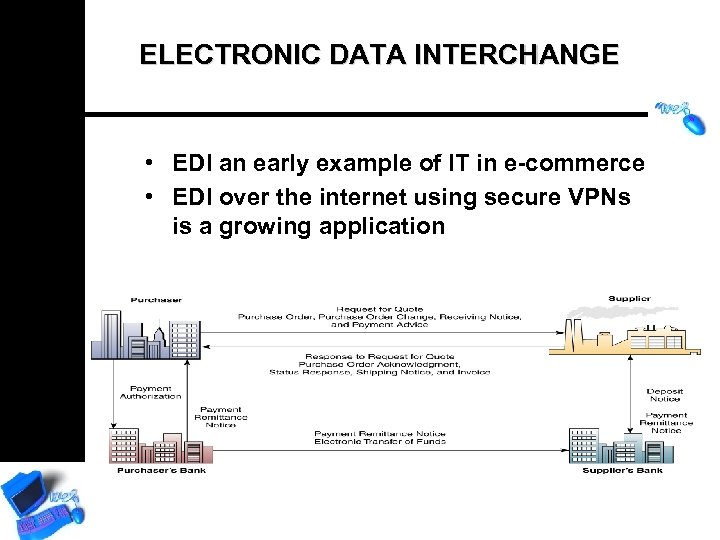
ELECTRONIC DATA INTERCHANGE • EDI an early example of IT in e-commerce • EDI over the internet using secure VPNs is a growing application
B 2 C E-COMMERCE • • • Advertising & PR Marketplaces Brochureware sites Auctions & reverse auctions E-tailing Portals
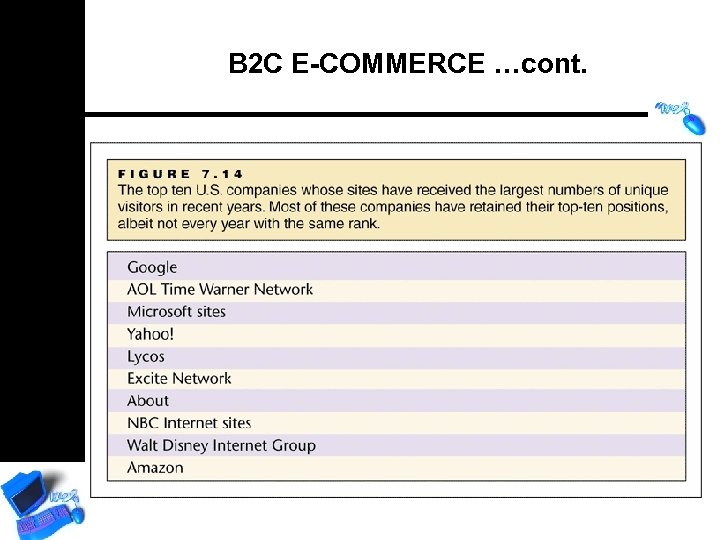
B 2 C E-COMMERCE …cont.
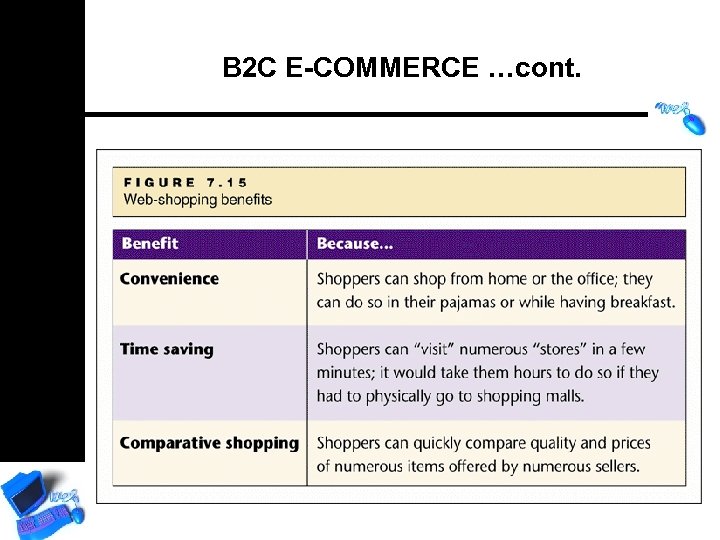
B 2 C E-COMMERCE …cont.
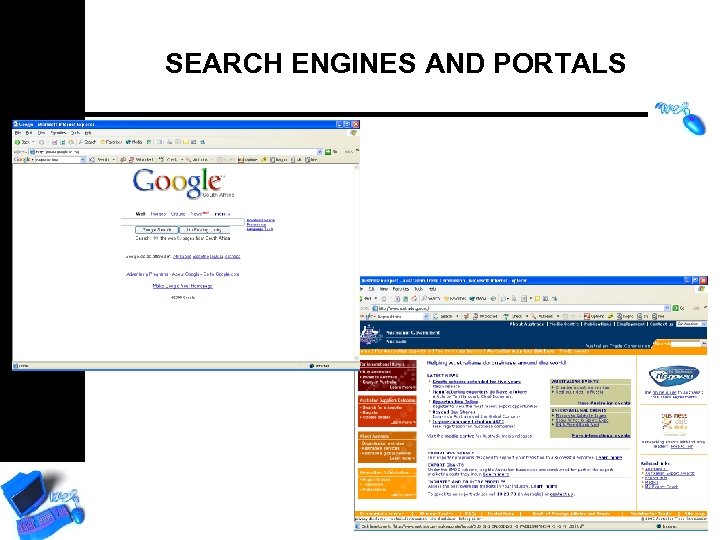
SEARCH ENGINES AND PORTALS
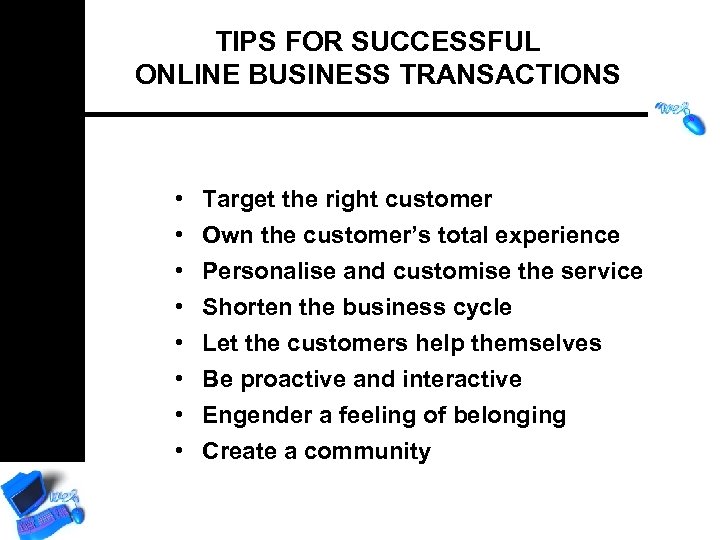
TIPS FOR SUCCESSFUL ONLINE BUSINESS TRANSACTIONS • • Target the right customer Own the customer’s total experience Personalise and customise the service Shorten the business cycle Let the customers help themselves Be proactive and interactive Engender a feeling of belonging Create a community
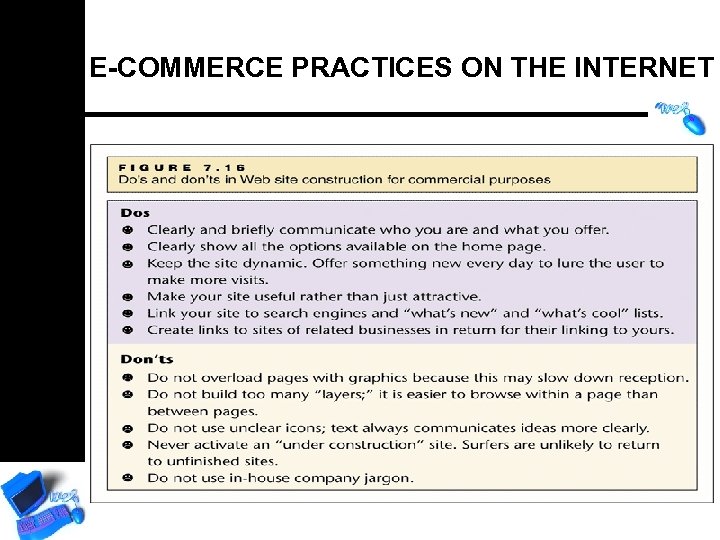
E-COMMERCE PRACTICES ON THE INTERNET
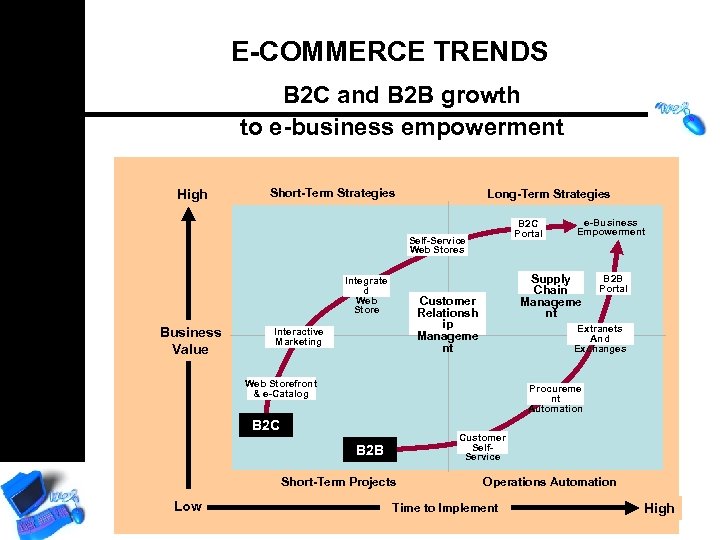
E-COMMERCE TRENDS B 2 C and B 2 B growth to e-business empowerment High Short-Term Strategies Long-Term Strategies B 2 C Portal Self-Service Web Stores Integrate d Web Store Business Value Supply Chain Manageme nt Customer Relationsh ip Manageme nt Interactive Marketing B 2 B Portal Extranets And Exchanges Web Storefront & e-Catalog Procureme nt Automation B 2 C Customer Self. Service B 2 B Short-Term Projects Low e-Business Empowerment Operations Automation Time to Implement High
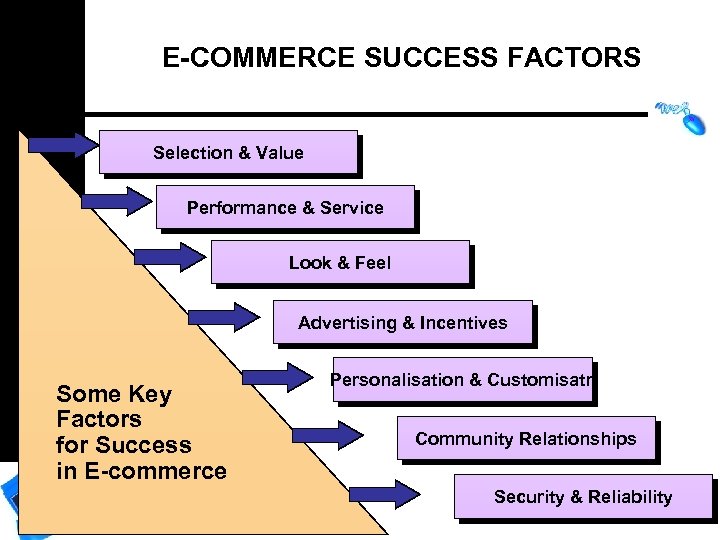
E-COMMERCE SUCCESS FACTORS Selection & Value Performance & Service Look & Feel Advertising & Incentives Some Key Factors for Success in E-commerce Personalisation & Customisatn Community Relationships Security & Reliability
E-GOVERNMENT
GOVERNANCE : AN INFORMATION PERSPECTIVE • Representative democracy relies on supposition that best way to make a decision is wider participation for all its citizens having access to relevant information • Government is by nature an information intensive organization • Information is power and information management is political
WWW. THEDTI. GOV. ZA
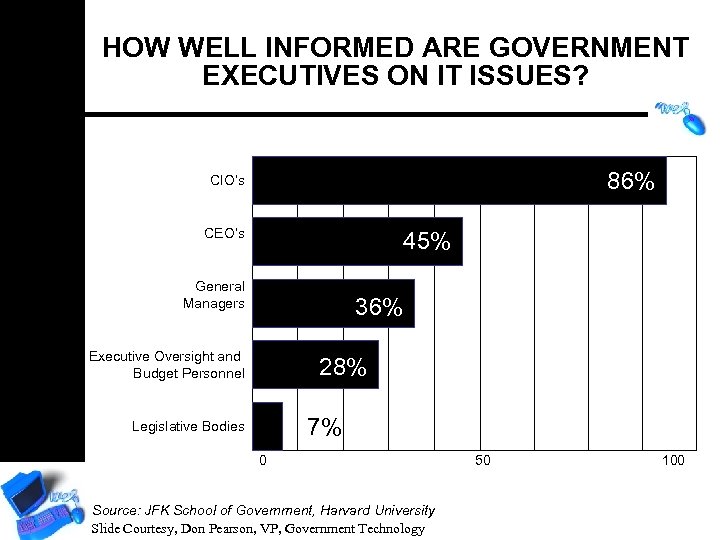
HOW WELL INFORMED ARE GOVERNMENT EXECUTIVES ON IT ISSUES? 86% CIO’s CEO’s 45% General Managers 36% Executive Oversight and Budget Personnel 28% 7% Legislative Bodies 0 Source: JFK School of Government, Harvard University Slide Courtesy, Don Pearson, VP, Government Technology 50 100
INFORMATION TECHNOLOGY’S ROLE IN GOVERNMENT Government largest collector, user, holder and producer of information • “In pursuing the democratic/political process, in managing resources, executing functions, measuring performance and in service delivery, information is the basic ingredient”
GOVERNMENT WORK IS INFORMATION-INTENSIVE • Information to support internal management • Information to support public administration and regulation • Information to support public services • Information made publicly available
WHAT IS E-GOVERNMENT? E-Government refers to the use by government agencies of information technologies (such as Wide Area Networks, the Internet, and mobile computing) that have the ability to transform relations with citizens, businesses, and other arms of government. These technologies can serve a variety of different ends: better delivery of government services to citizens, improved interactions with business and industry, citizen empowerment through access to information, or more efficient government management. The resulting benefits can be less corruption, increased transparency, greater convenience, revenue growth, and/or cost reductions. Source: World Bank
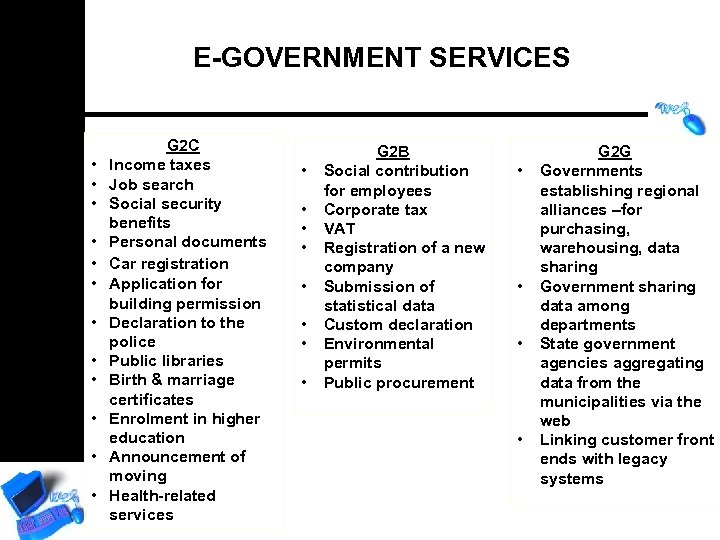
E-GOVERNMENT SERVICES • • • G 2 C Income taxes Job search Social security benefits Personal documents Car registration Application for building permission Declaration to the police Public libraries Birth & marriage certificates Enrolment in higher education Announcement of moving Health-related services • • G 2 B Social contribution for employees Corporate tax VAT Registration of a new company Submission of statistical data Custom declaration Environmental permits Public procurement • • G 2 G Governments establishing regional alliances –for purchasing, warehousing, data sharing Government sharing data among departments State government agencies aggregating data from the municipalities via the web Linking customer front ends with legacy systems
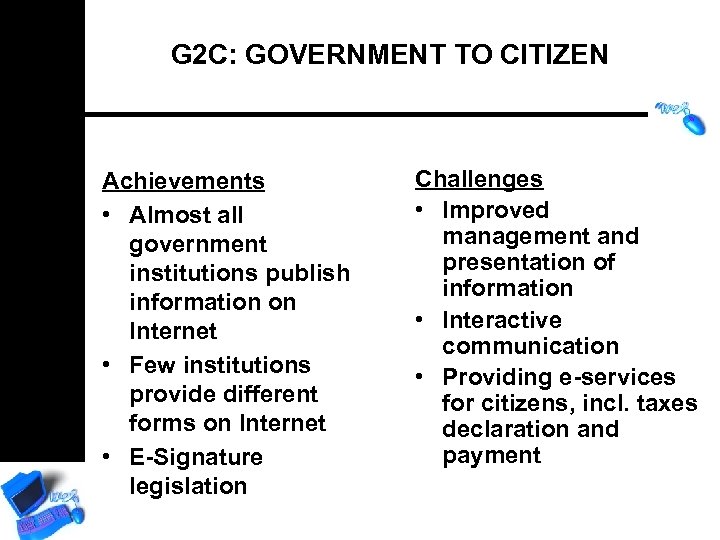
G 2 C: GOVERNMENT TO CITIZEN Achievements • Almost all government institutions publish information on Internet • Few institutions provide different forms on Internet • E-Signature legislation Challenges • Improved management and presentation of information • Interactive communication • Providing e-services for citizens, incl. taxes declaration and payment
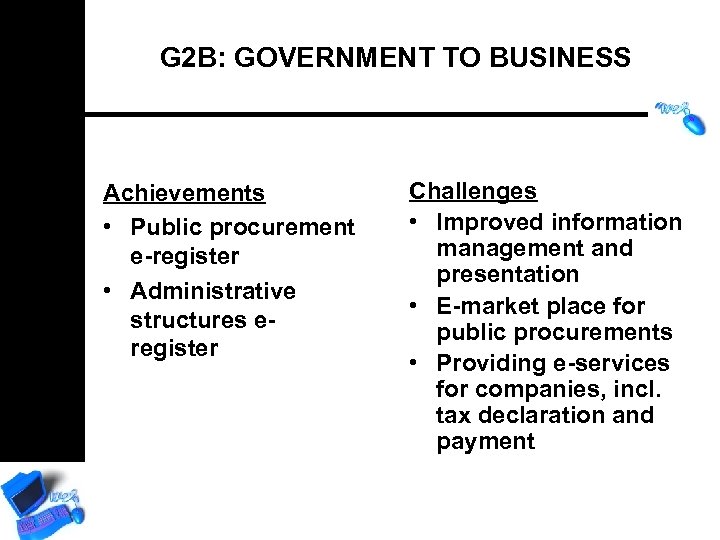
G 2 B: GOVERNMENT TO BUSINESS Achievements • Public procurement e-register • Administrative structures eregister Challenges • Improved information management and presentation • E-market place for public procurements • Providing e-services for companies, incl. tax declaration and payment
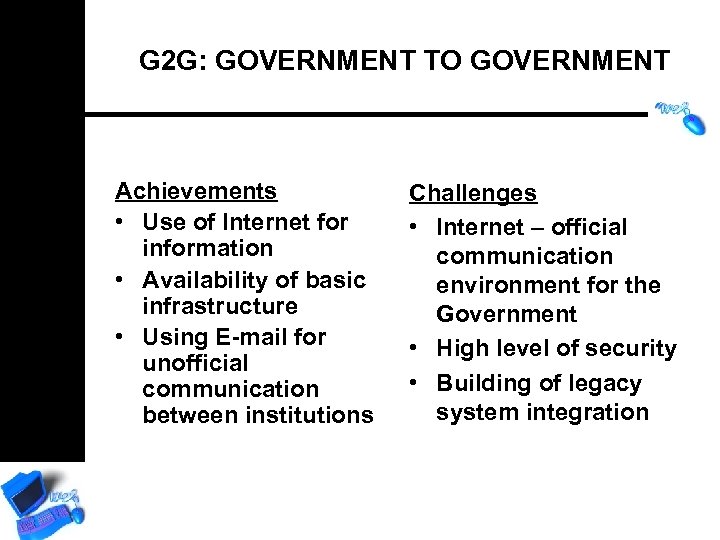
G 2 G: GOVERNMENT TO GOVERNMENT Achievements • Use of Internet for information • Availability of basic infrastructure • Using E-mail for unofficial communication between institutions Challenges • Internet – official communication environment for the Government • High level of security • Building of legacy system integration
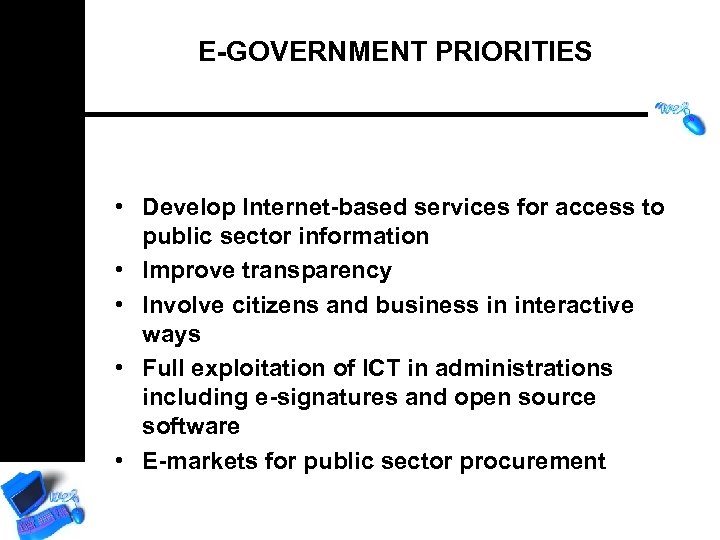
E-GOVERNMENT PRIORITIES • Develop Internet-based services for access to public sector information • Improve transparency • Involve citizens and business in interactive ways • Full exploitation of ICT in administrations including e-signatures and open source software • E-markets for public sector procurement
INTERNAL EFFECTIVENESS AND EFFICIENCY Adoption of business best practices in government operations: § knowledge management § operations research and optimisation § supply chain management, incl. CRM § human resources § automation and integration § document workflow
E-GOVERNMENT RESULTING BENEFITS • Increased transparency => less corruption • New and better services, incl. Reduced time delays and speed up delivery of services and information • Services delivery independent of place and time – open 24/7 • Greater convenience • Revenue growth and/or cost reductions
CRITICAL FACTORS Based on the realities mentioned, the following critical factors for a successful e-government have been defined: • Presence of political will • Provision of vision, strategy and necessary financial resources • Awareness in the society of the need for egovernment development • Education and training, practical skills of the human resource pool for participation in the egovernment • Provision of employment for highly qualified IT professionals • Effective feedback
CRITICAL FACTORS…cont. • • • Creation of IT Infrastructure Standards for e-governance procedures Reengineering the existing system Technology should be used to enable the delivery of results not merely as a substitute to reduce inertia within processes Technological innovations for public services Technology should not be used to preserve legacy systems Focus on results not on process Governance should be a collaborative approach Create leadership in Technology ; Security & Privacy
HUMAN RESOURCES • The implementation of new technologies requires constant knowledge acquisition. The education level of the public administration employees is comparatively high, but their training for the use of IT does not comply with the requirements of egovernment. • It is difficult to attract and keep highly qualified IT and management specialists in the state administration because of the more attractive remuneration terms and clearer career perspectives in the private sector
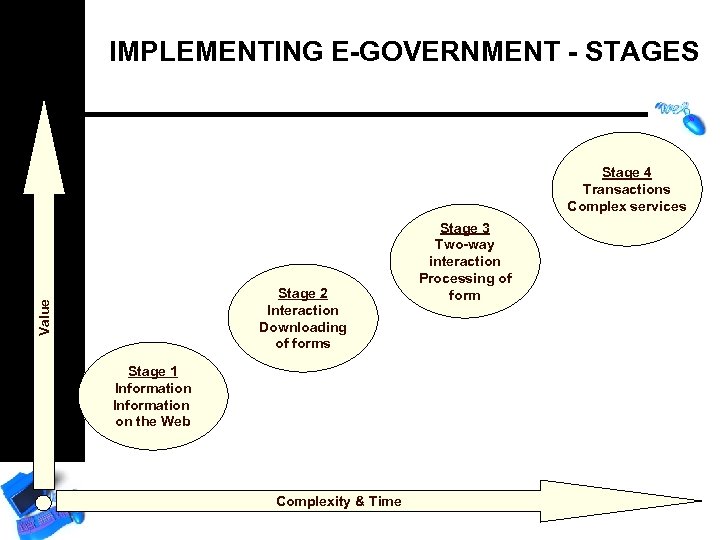
IMPLEMENTING E-GOVERNMENT - STAGES Stage 4 Transactions Complex services Value Stage 2 Interaction Downloading of forms Stage 1 Information on the Web Complexity & Time Stage 3 Two-way interaction Processing of form
GOVERNMENT OBJECTIVE: INTERNET INFRASTRUCTURE • Invest, develop and exploit sensibly telecommunication network • Reach the average level of Internet capacity in the region • Satisfy quantity and quality of Internet lines • Extend internet access points • ADSL in industrial parks
E-GOVERNMENT VISION OF BULGARIA The vision for the e-government in Bulgaria is: The Government of the Republic of Bulgaria will provide modern and efficient governance, while using the means of contemporary information technologies in order to meet the real needs of citizens and businesses at any time and any place
E-GOVERNMENT STRATEGIC OBJECTIVES OF BULGARIA The Government of the Republic of Bulgaria has formulated the following strategic objectives with regard to e-government: • To provide, through electronic means, high-quality, efficient and accessible public services to citizens and business; • To expand the technological capabilities of citizens and businesses for participation in the government decision-making process; • To form organisational, communication and information environment for effective and transparent functioning of the public administration in accordance with the principles, standards and best practices of the European Union
RELUCTANCE TO EMBRACE E-GOVERNMENT The major concerns in implementing e-government are: • Confidence and reliability of the electronic process • Expensive infrastructure required • Internal competence-building issues • Security of the system and data integrity • Legal issues associated with e-commerce • Competence in providing support • Licenses and cost of development of solutions • Digital divide • Fear of loosing power base It is not only about Software and Hardware competence. It is about working environment and process understanding as a whole.
GOVERNANCE: IN IT FRAMEWORK • Expansion of Internet and electronic commerce, is redefining relationships among various stake holders in the process of Governance. • A new model of governance would be based upon the transactions in virtual space, digital economy and dealing with knowledge oriented societies. • Electronic Governance is an emerging trend to re-invent the way the Government works.
BASIC FEATURES OF PRESENT MODEL OF E-GOVERNANCE • • • Government is simple ; moral; transparent ; efficient. Commodity to deliver is service but delivering agency is Government Legacy problems of existing Government is assumed to be resolved over Technology Backbone Basic orientation of this model is not to reduce the role of Government in Citizen’s life but to serve it more efficiently. Citizen is demanded to orient himself to fit with the way government works.
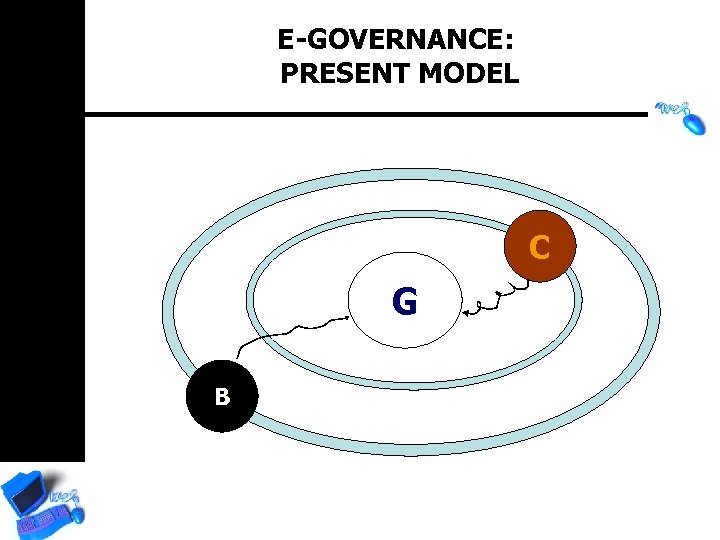
E-GOVERNANCE: PRESENT MODEL C G B
RE-ORIENTING G TO G : AN ALTERNATIVE MODEL OF E-GOVERNANCE • Emphasis is accorded for self-service. Citizen is more self reliant. He may access “online” government as per the need. But he is in charge of the affairs. • Role of governance is limited as facilitator. The internal fabrics of G to G system is having higher intelligence. The regulatory interface with business and revenue activities are more market and community driven • It is the government which tries to fit with the life of the Citizen, particularly those who are under-privileged, whereas in previous model it was other way round
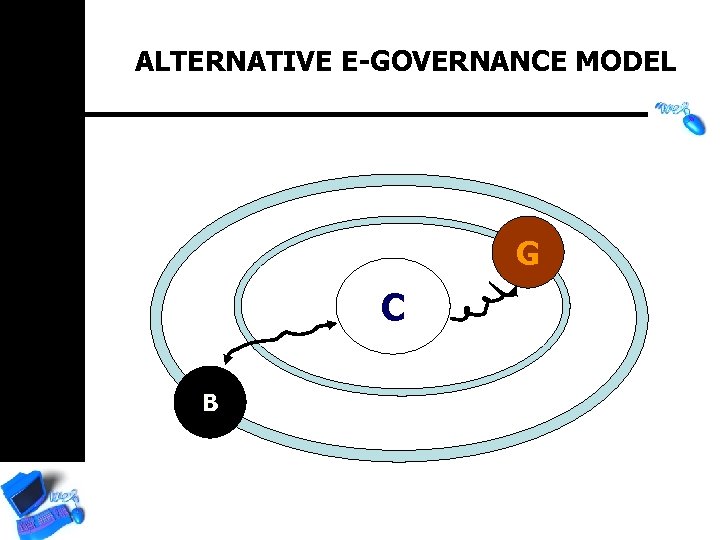
ALTERNATIVE E-GOVERNANCE MODEL G C B
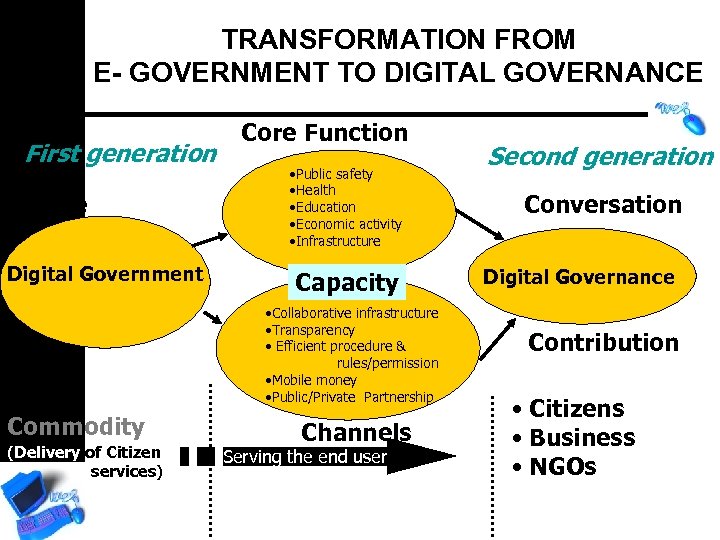
TRANSFORMATION FROM E- GOVERNMENT TO DIGITAL GOVERNANCE First generation Choice Digital Government Cost Commodity (Delivery of Citizen services) Core Function • Public safety • Health • Education • Economic activity • Infrastructure Capacity • Collaborative infrastructure • Transparency • Efficient procedure & rules/permission • Mobile money • Public/Private Partnership Channels Serving the end user Second generation Conversation Digital Governance Contribution • Citizens • Business • NGOs
E-GOVERNANCE : CHALLENGES FOR RURAL AREAS The other set of challenges lie in extending the reach of e-governance services to large portions of the population that live in rural areas. These include: • Assessment of local needs and customising e-governance solutions to meet those needs • Connectivity • Content (local content based on local language) • Building human capacities • E-commerce • Sustainability
E-GOVERNANCE : CHALLENGES The key challenges with electronic governance are not technology or internet issues but organisational issues like • Redefining rules and procedures • Information transparency • Legal issues • Infrastructure ; Skill and awareness • Access to right information • Interdepartmental collaboration • Tendency to resist the change in work culture

ETHICS AND INFORMATION
ETHICAL AND SOCIETAL ISSUES The not-so-bright side • Consumer Privacy – Organizations collect (and sometimes sell) huge amounts of data on individuals • Employee Privacy – IT supports remote monitoring of employees, violating privacy and creating stress

ETHICAL AND SOCIETAL ISSUES The not-so-bright side • Freedom of Speech – Opportunities increase for pornography, hate speech, intellectual property crime, and other intrusions – Prevention may abridge free speech
ETHICAL AND SOCIETAL ISSUES The not-so-bright side • IT Professionalism – No mandatory or enforced code of ethics for IT professionals--unlike other professions • Social Inequality – Less than 20% of the world’s population have ever used a PC; less than 3% have Internet access
ETHICAL AND SOCIETAL ISSUES Privacy? What privacy? • What is Privacy? – One’s right to control information about oneself – Not a constitutional right per se; secured by laws or convention – Increasing number of organizations may access information via better IT hardware and software – Business and civil rights advocates dispute degree of privacy vs. utility of information access
ETHICAL AND SOCIETAL ISSUES Privacy? What privacy? • Business Arguments – Necessary to collect basic financial and personal information as cheaply as possible – Consumers benefit eventually from competitive environment augmented by readily available information
ETHICAL AND SOCIETAL ISSUES Privacy? What privacy? • Consumer Arguments – Resent unsolicited mail and telephone calls – Resent being refused credit because of credit bureau mistakes – Frightened by “dossier phenomenon” – Loss of control over information unfair – information gathered for a particular purpose with permission should remain restricted
ETHICAL AND SOCIETAL ISSUES Privacy? What privacy? • Seven Commandments of Personal Data Collection and Maintenance – Purpose: Companies should inform people who provide information of specific, exclusive purpose – Relevance: Companies should record and use only data necessary to fulfill their own purposes – Accuracy: Companies should ensure that their data are accurate
ETHICAL AND SOCIETAL ISSUES Privacy? What privacy? • Currency: Companies should make sure that all data about an individual are current • Security: Companies should limit data access to only those who need to know • Time Limitation: Companies should retain data only for the time period necessary • Scrutiny: Companies should establish procedures to let individuals review their records and correct inaccuracies
ETHICAL AND SOCIETAL ISSUES Electronic monitoring of employees • The Microchips Are Watching – Video cameras – Software to count keystrokes – Artificial intelligence to monitor cash disbursement and detect fraud – Monitoring e-mail and Web access
ETHICAL AND SOCIETAL ISSUES Electronic monitoring of employees • The Employers’ Position – Entitled to know how employees spend time – Believe monitoring is an objective, nondiscriminatory method to gauge output • The Employees’ Position – Deprives them of autonomy and dignity – Increases stress and stress-related illness and injury
ETHICAL AND SOCIETAL ISSUES Telecommuting: pros and cons Pros • Saves travel cost and time • Decreases pollution • May reduce unemployment • Productivity higher among telecommuters
ETHICAL AND SOCIETAL ISSUES Telecommuting: pros and cons Cons • Employers tend to pressure telecommuters to work harder than workers in the office. • No office to foster new social ties and camaraderie. • May negatively impact some segments of the economy – Restaurants – Downtown business and industries

Thank You! Neels Bothma chb@cbothma. co. za ireality@icon. co. za Cell: 082 8808549 Tel: 012 6676064 Fax: 012 -6676065
SOURCES Reaching the Unreached Dr. N. Vijayaditya Essentials of Management Information Systems

Trends • Power of computers increasing; prices dropping • Increase in programming variety and ingenuity • Internet access faster and more reliable • Internet growth resulting in opportunities • Increasing ratio of computer-literate
Скачать презентацию MANAGEMENT INFORMATION SYSTEMS Presented by Neels Bothma 26
4ae9f7823f42241ad1aaedd0f59b59e6.ppt