 Скачать презентацию LOGICA System LOGICA SYSTEM Presented by Lenzi Marco
7b3fc33850a49a0dfdc9408abba7906e.ppt
- Количество слайдов: 35



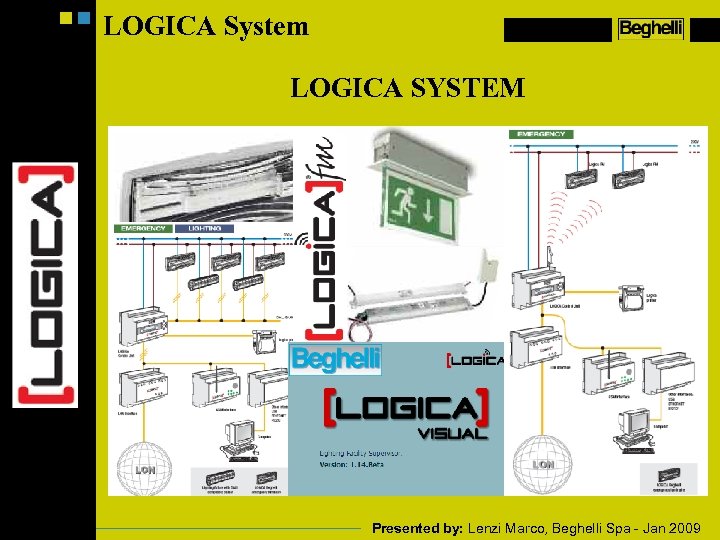
LOGICA System LOGICA SYSTEM Presented by: Lenzi Marco, Beghelli Spa - Jan 2009
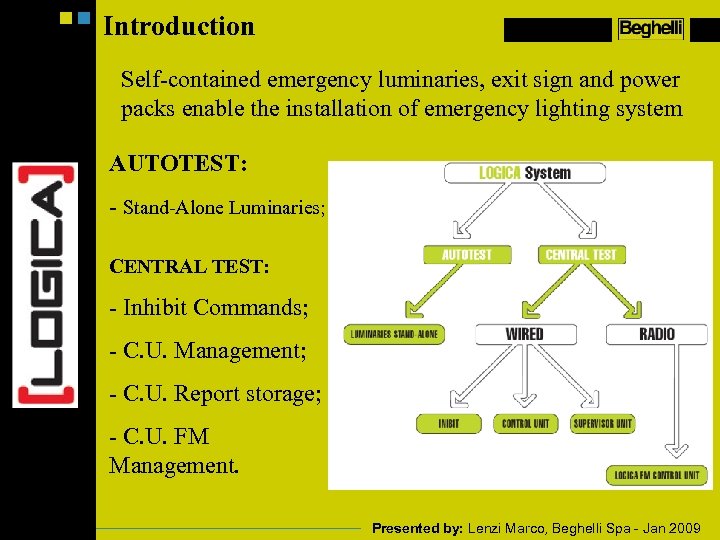
Introduction Self-contained emergency luminaries, exit sign and power packs enable the installation of emergency lighting system AUTOTEST: - Stand-Alone Luminaries; CENTRAL TEST: - Inhibit Commands; - C. U. Management; - C. U. Report storage; - C. U. FM Management. Presented by: Lenzi Marco, Beghelli Spa - Jan 2009
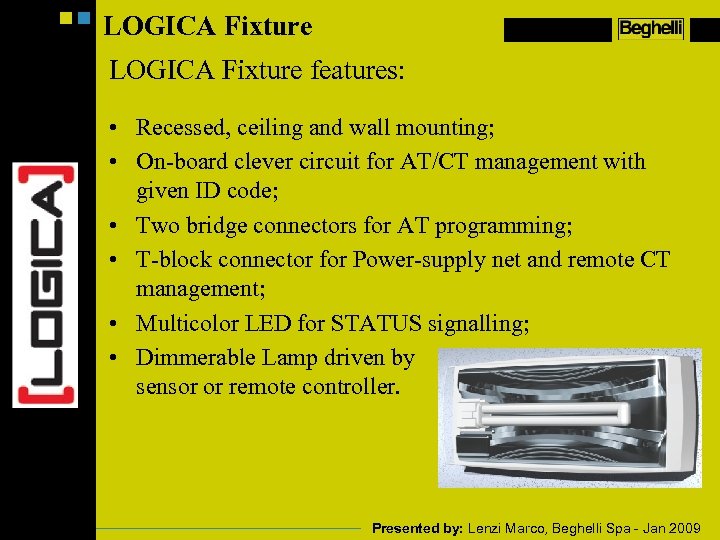
LOGICA Fixture features: • Recessed, ceiling and wall mounting; • On-board clever circuit for AT/CT management with given ID code; • Two bridge connectors for AT programming; • T-block connector for Power-supply net and remote CT management; • Multicolor LED for STATUS signalling; • Dimmerable Lamp driven by sensor or remote controller. Presented by: Lenzi Marco, Beghelli Spa - Jan 2009
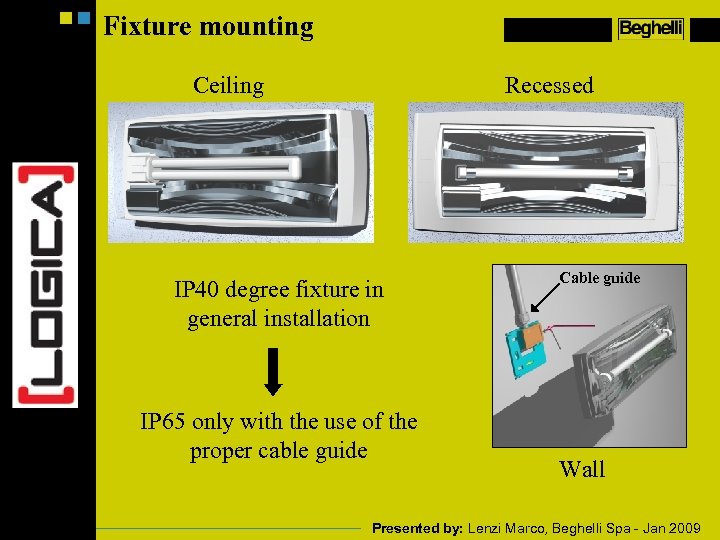
Fixture mounting Ceiling Recessed IP 40 degree fixture in general installation IP 65 only with the use of the proper cable guide Cable guide Wall Presented by: Lenzi Marco, Beghelli Spa - Jan 2009
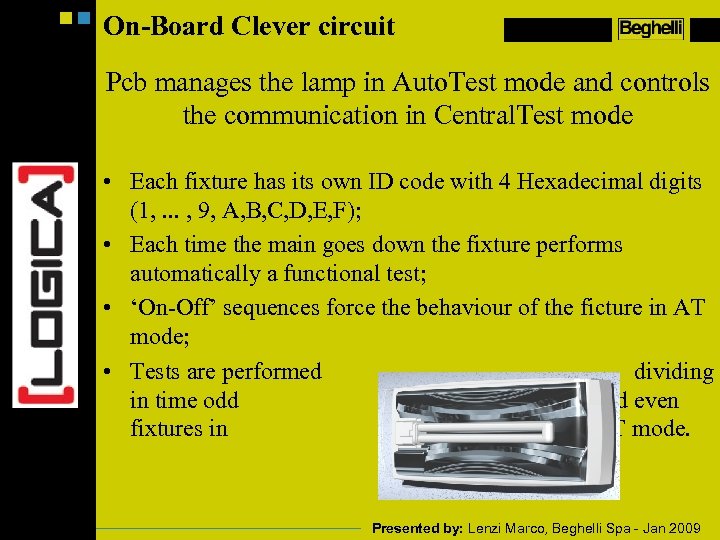
On-Board Clever circuit Pcb manages the lamp in Auto. Test mode and controls the communication in Central. Test mode • Each fixture has its own ID code with 4 Hexadecimal digits (1, . . . , 9, A, B, C, D, E, F); • Each time the main goes down the fixture performs automatically a functional test; • ‘On-Off’ sequences force the behaviour of the ficture in AT mode; • Tests are performed dividing in time odd and even fixtures in AT mode. Presented by: Lenzi Marco, Beghelli Spa - Jan 2009
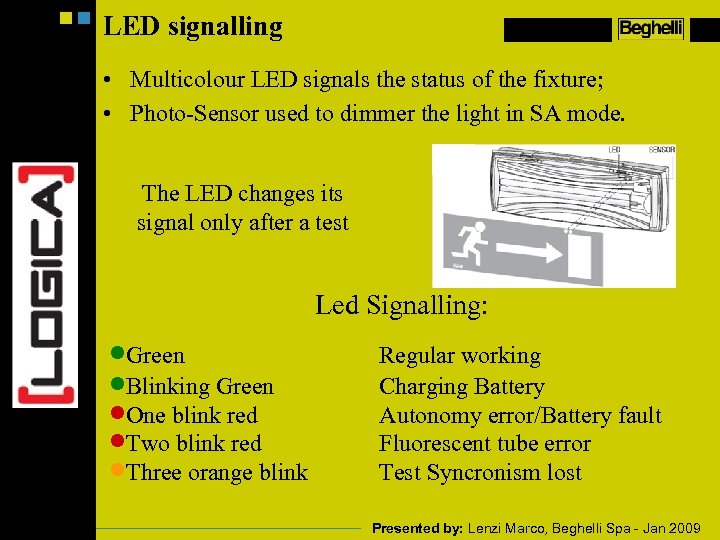
LED signalling • Multicolour LED signals the status of the fixture; • Photo-Sensor used to dimmer the light in SA mode. The LED changes its signal only after a test Led Signalling: ·Green ·Blinking Green ·One blink red ·Two blink red ·Three orange blink Regular working Charging Battery Autonomy error/Battery fault Fluorescent tube error Test Syncronism lost Presented by: Lenzi Marco, Beghelli Spa - Jan 2009
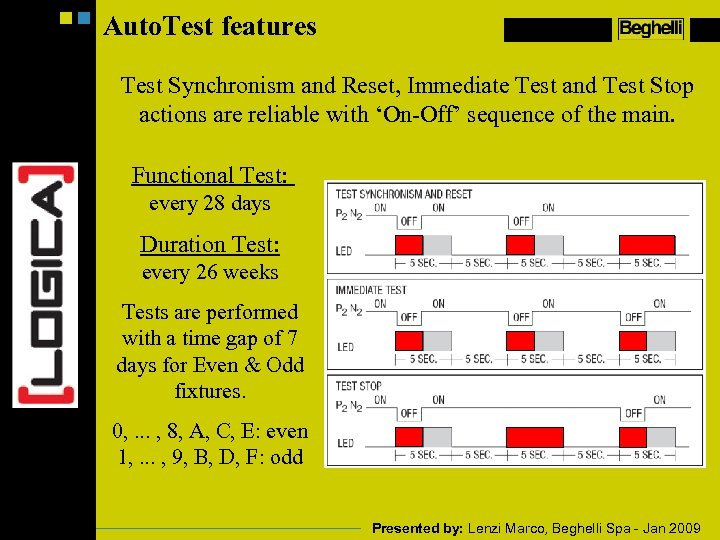
Auto. Test features Test Synchronism and Reset, Immediate Test and Test Stop actions are reliable with ‘On-Off’ sequence of the main. Functional Test: every 28 days Duration Test: every 26 weeks Tests are performed with a time gap of 7 days for Even & Odd fixtures. 0, . . . , 8, A, C, E: even 1, . . . , 9, B, D, F: odd Presented by: Lenzi Marco, Beghelli Spa - Jan 2009
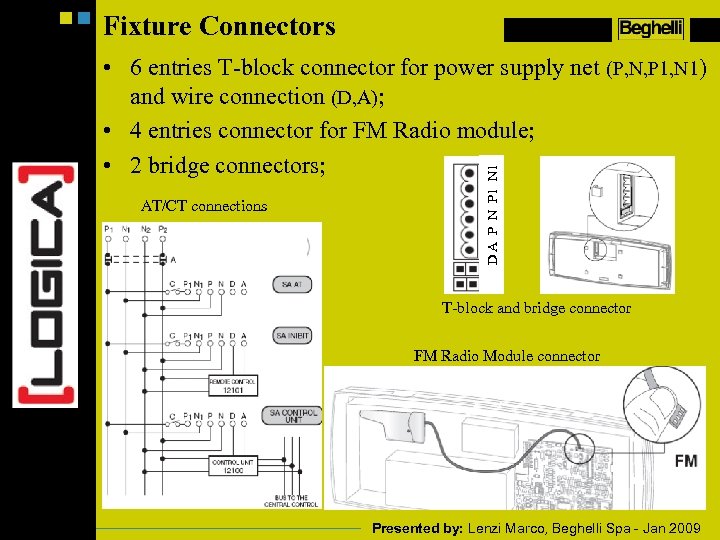
Fixture Connectors AT/CT connections D A P N P 1 N 1 • 6 entries T-block connector for power supply net (P, N, P 1, N 1) and wire connection (D, A); • 4 entries connector for FM Radio module; • 2 bridge connectors; T-block and bridge connector FM Radio Module connector Presented by: Lenzi Marco, Beghelli Spa - Jan 2009
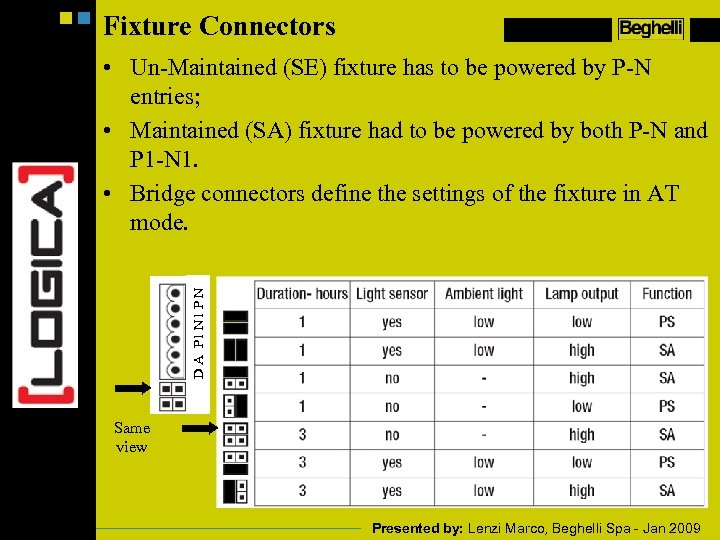
Fixture Connectors D A P 1 N 1 P N • Un-Maintained (SE) fixture has to be powered by P-N entries; • Maintained (SA) fixture had to be powered by both P-N and P 1 -N 1. • Bridge connectors define the settings of the fixture in AT mode. Same view Presented by: Lenzi Marco, Beghelli Spa - Jan 2009
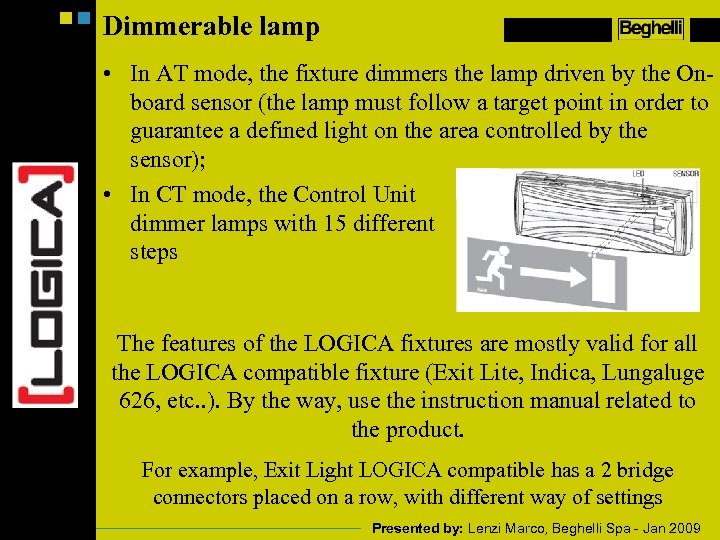
Dimmerable lamp • In AT mode, the fixture dimmers the lamp driven by the Onboard sensor (the lamp must follow a target point in order to guarantee a defined light on the area controlled by the sensor); • In CT mode, the Control Unit dimmer lamps with 15 different steps The features of the LOGICA fixtures are mostly valid for all the LOGICA compatible fixture (Exit Lite, Indica, Lungaluge 626, etc. . ). By the way, use the instruction manual related to the product. For example, Exit Light LOGICA compatible has a 2 bridge connectors placed on a row, with different way of settings Presented by: Lenzi Marco, Beghelli Spa - Jan 2009
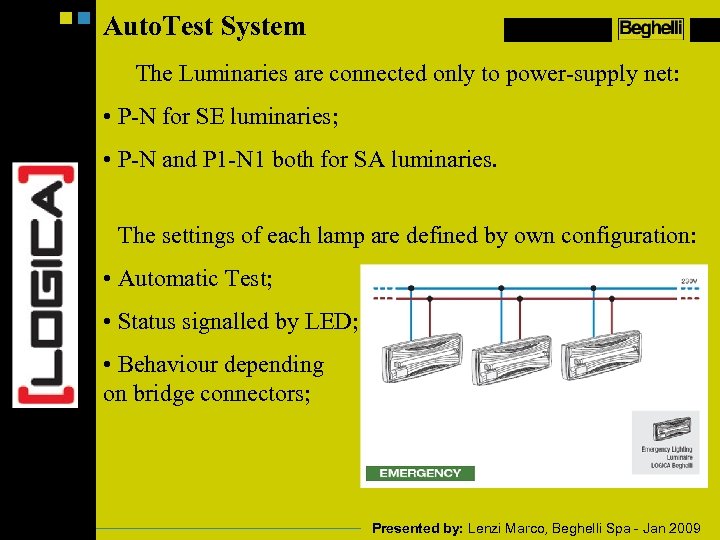
Auto. Test System The Luminaries are connected only to power-supply net: • P-N for SE luminaries; • P-N and P 1 -N 1 both for SA luminaries. The settings of each lamp are defined by own configuration: • Automatic Test; • Status signalled by LED; • Behaviour depending on bridge connectors; Presented by: Lenzi Marco, Beghelli Spa - Jan 2009
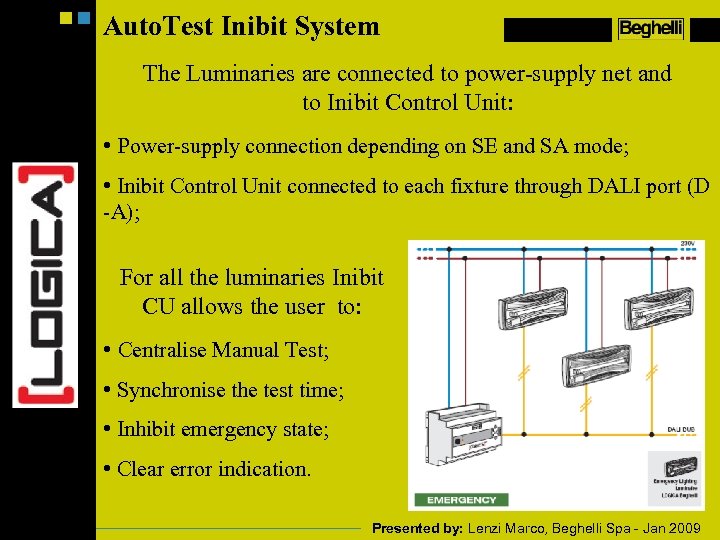
Auto. Test Inibit System The Luminaries are connected to power-supply net and to Inibit Control Unit: • Power-supply connection depending on SE and SA mode; • Inibit Control Unit connected to each fixture through DALI port (D -A); For all the luminaries Inibit CU allows the user to: • Centralise Manual Test; • Synchronise the test time; • Inhibit emergency state; • Clear error indication. Presented by: Lenzi Marco, Beghelli Spa - Jan 2009
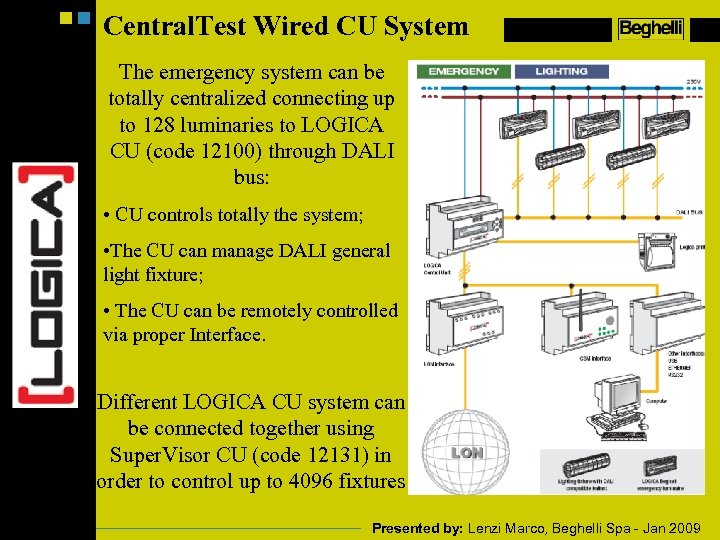
Central. Test Wired CU System The emergency system can be totally centralized connecting up to 128 luminaries to LOGICA CU (code 12100) through DALI bus: • CU controls totally the system; • The CU can manage DALI general light fixture; • The CU can be remotely controlled via proper Interface. Different LOGICA CU system can be connected together using Super. Visor CU (code 12131) in order to control up to 4096 fixtures Presented by: Lenzi Marco, Beghelli Spa - Jan 2009
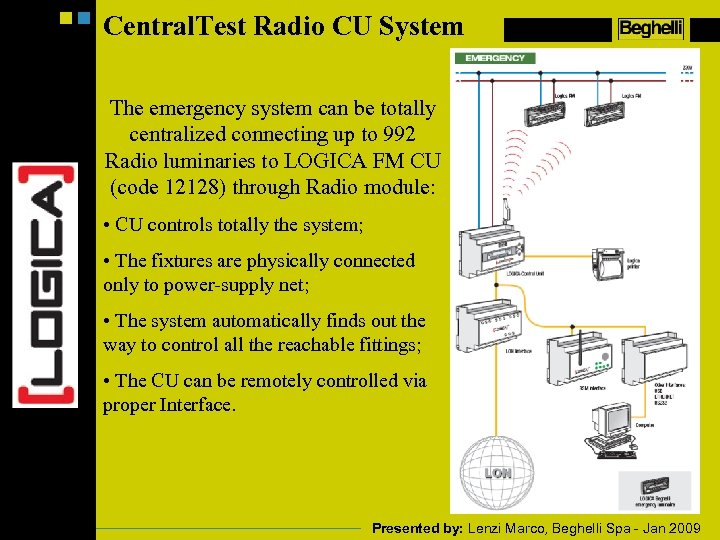
Central. Test Radio CU System The emergency system can be totally centralized connecting up to 992 Radio luminaries to LOGICA FM CU (code 12128) through Radio module: • CU controls totally the system; • The fixtures are physically connected only to power-supply net; • The system automatically finds out the way to control all the reachable fittings; • The CU can be remotely controlled via proper Interface. Presented by: Lenzi Marco, Beghelli Spa - Jan 2009
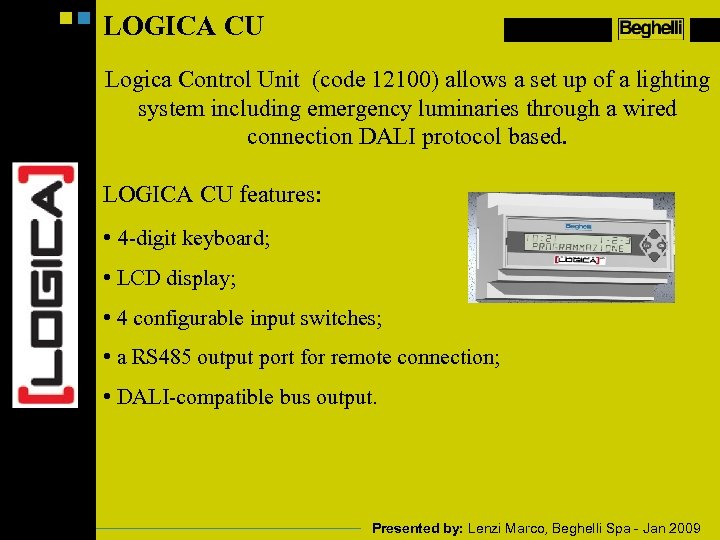
LOGICA CU Logica Control Unit (code 12100) allows a set up of a lighting system including emergency luminaries through a wired connection DALI protocol based. LOGICA CU features: • 4 -digit keyboard; • LCD display; • 4 configurable input switches; • a RS 485 output port for remote connection; • DALI-compatible bus output. Presented by: Lenzi Marco, Beghelli Spa - Jan 2009
DALI CU The LOGICA CU manages LOGICA emergency luminaries and can be considered a DALI controller for General Lighting System. • The fixtures are dimmed from 1% to 100% of brightness; • The devices can be controlled one by one, totally or by groups; • The devices can be divided into 16 different groups; • DALI sensor can be used to automatically dimmer a group of DALI lamps; • 16 different scenes can be set for each devices: – Scene: level of brightness set in advanced which can be obtained instantaneously. Presented by: Lenzi Marco, Beghelli Spa - Jan 2009
DALI CU The LOGICA CU manages LOGICA emergency luminaries and can be considered a DALI controller for General Lighting System. • 4 different sensors input can be activated: – Input-Output switch: Groups associated to the switch can be manually controlled by the switch. Switch On-Off and dimmering over the group is achievable. – Scene activated by sensor with timer: when activated, the proper scene is performed, after a defined time a second scene is activated. – Scene activated by external input: work over two defined scene, each activation the scene is changed with the other one. – Scene activated by timer: Scene are changed with CU set time, each day is divided into two parts, each of them has associated one proper scene. Presented by: Lenzi Marco, Beghelli Spa - Jan 2009
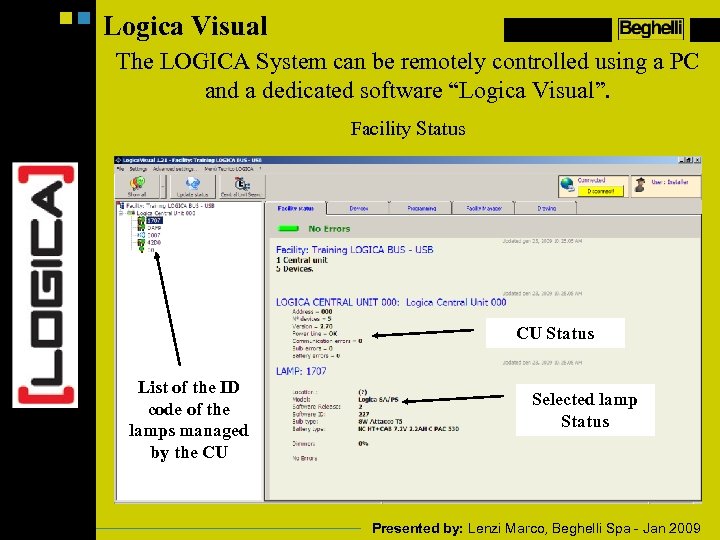
Logica Visual The LOGICA System can be remotely controlled using a PC and a dedicated software “Logica Visual”. Facility Status CU Status List of the ID code of the lamps managed by the CU Selected lamp Status Presented by: Lenzi Marco, Beghelli Spa - Jan 2009
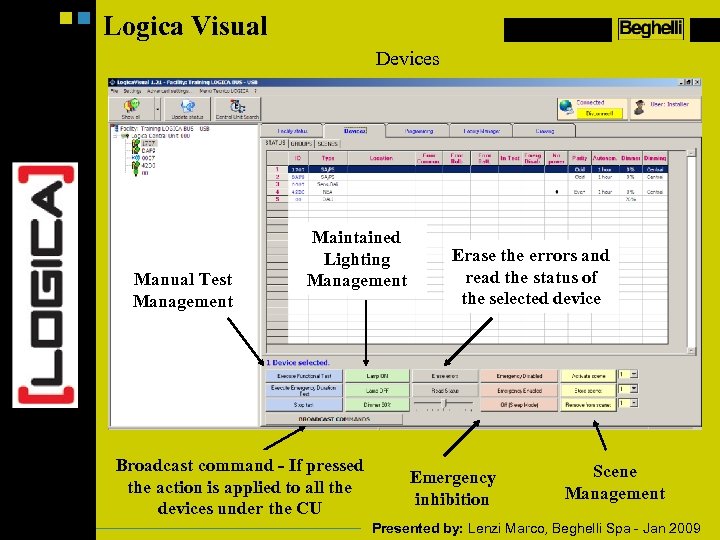
Logica Visual Devices Manual Test Management Maintained Lighting Management Broadcast command - If pressed the action is applied to all the devices under the CU Erase the errors and read the status of the selected device Emergency inhibition Scene Management Presented by: Lenzi Marco, Beghelli Spa - Jan 2009
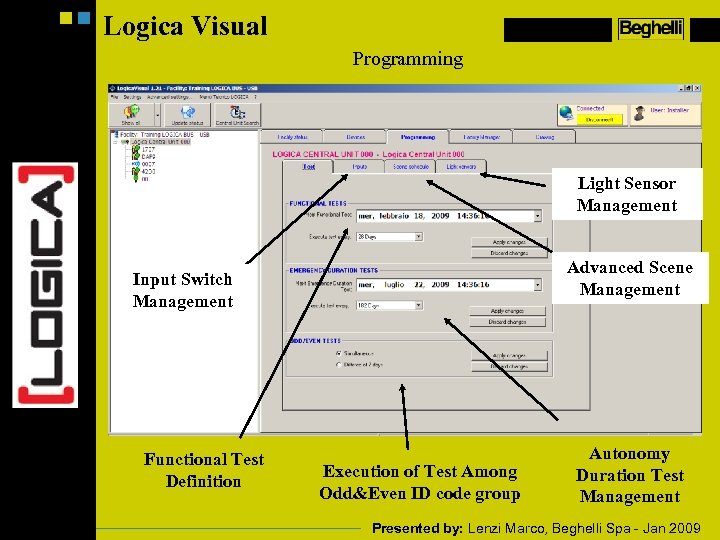
Logica Visual Programming Light Sensor Management Advanced Scene Management Input Switch Management Functional Test Definition Execution of Test Among Odd&Even ID code group Autonomy Duration Test Management Presented by: Lenzi Marco, Beghelli Spa - Jan 2009
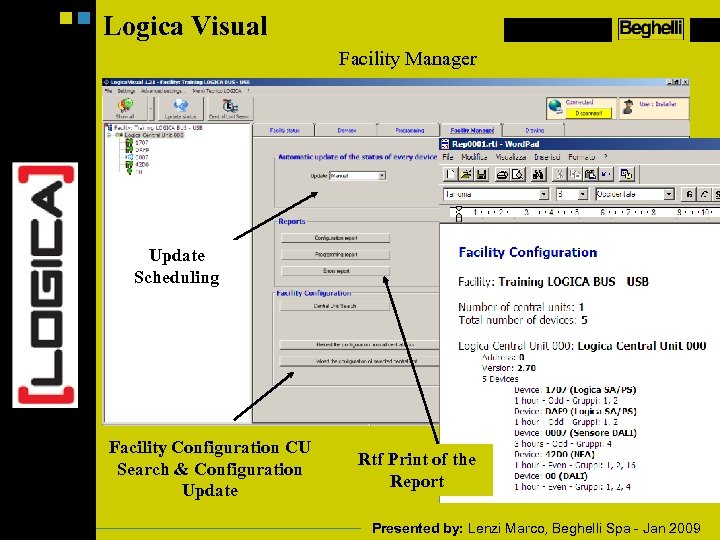
Logica Visual Facility Manager Update Scheduling Facility Configuration CU Search & Configuration Update Rtf Print of the Report Presented by: Lenzi Marco, Beghelli Spa - Jan 2009
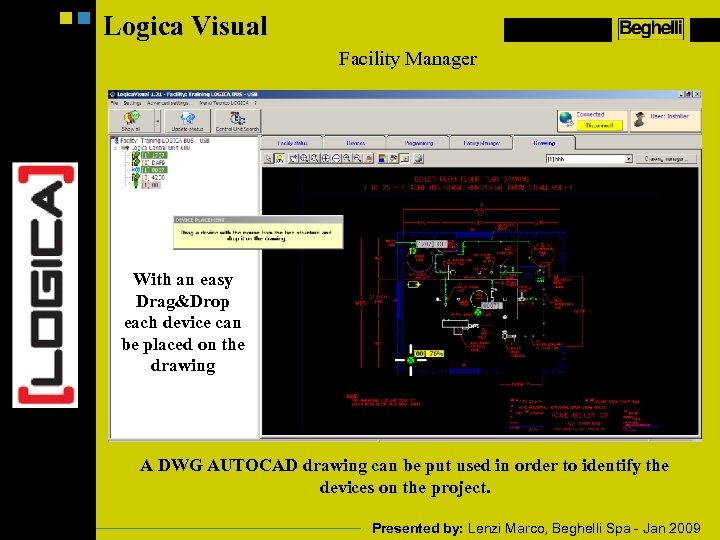
Logica Visual Facility Manager With an easy Drag&Drop each device can be placed on the drawing A DWG AUTOCAD drawing can be put used in order to identify the devices on the project. Presented by: Lenzi Marco, Beghelli Spa - Jan 2009
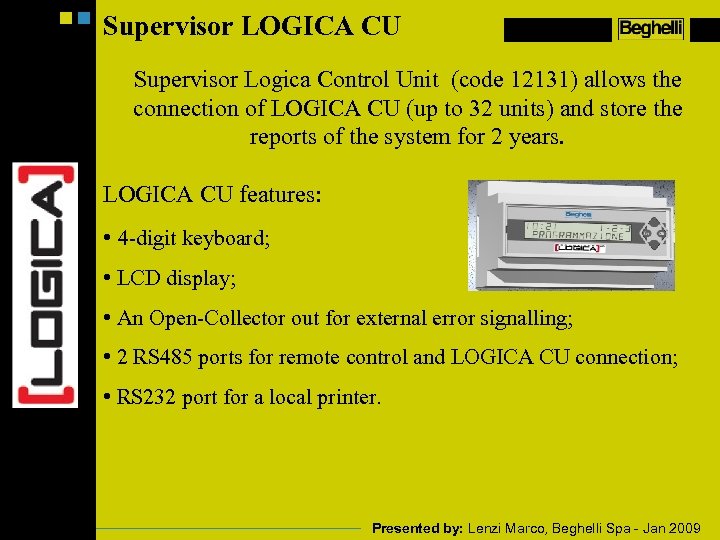
Supervisor LOGICA CU Supervisor Logica Control Unit (code 12131) allows the connection of LOGICA CU (up to 32 units) and store the reports of the system for 2 years. LOGICA CU features: • 4 -digit keyboard; • LCD display; • An Open-Collector out for external error signalling; • 2 RS 485 ports for remote control and LOGICA CU connection; • RS 232 port for a local printer. Presented by: Lenzi Marco, Beghelli Spa - Jan 2009
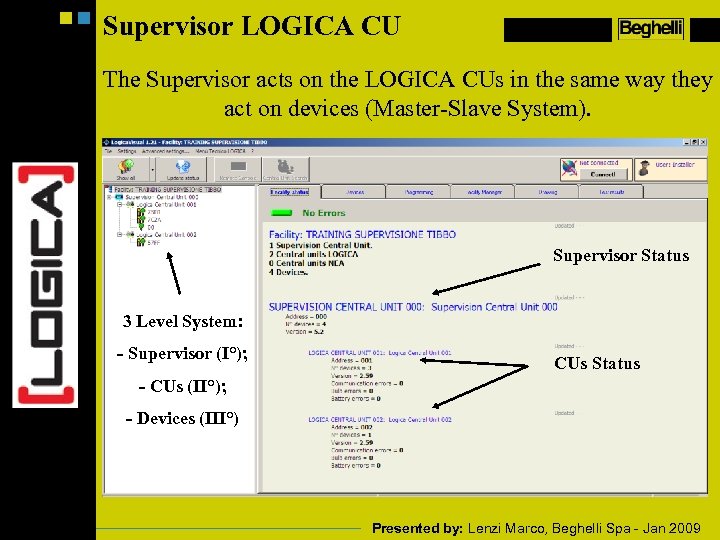
Supervisor LOGICA CU The Supervisor acts on the LOGICA CUs in the same way they act on devices (Master-Slave System). Supervisor Status 3 Level System: - Supervisor (I°); CUs Status - CUs (II°); - Devices (III°) Presented by: Lenzi Marco, Beghelli Spa - Jan 2009
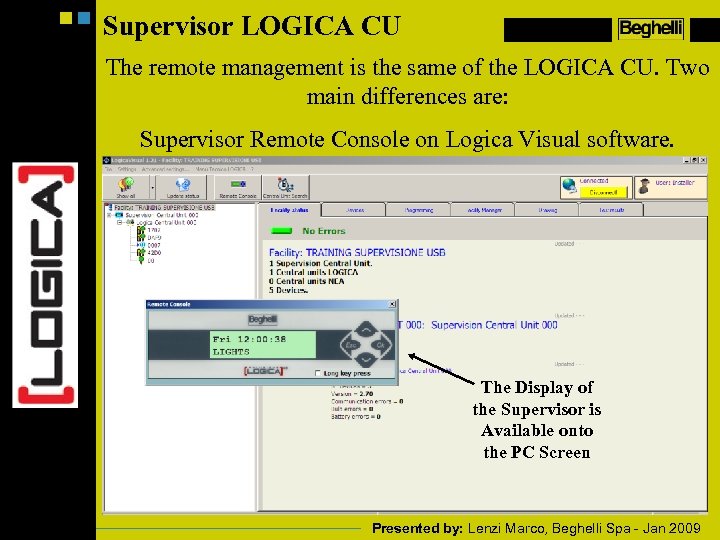
Supervisor LOGICA CU The remote management is the same of the LOGICA CU. Two main differences are: Supervisor Remote Console on Logica Visual software. The Display of the Supervisor is Available onto the PC Screen Presented by: Lenzi Marco, Beghelli Spa - Jan 2009
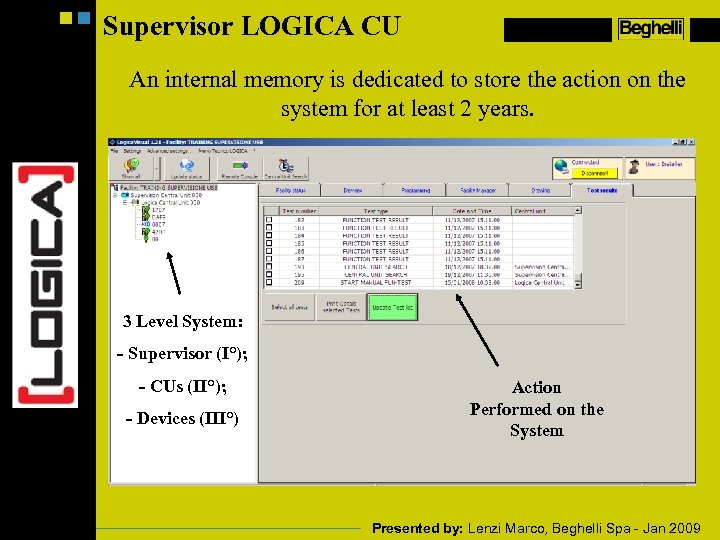
Supervisor LOGICA CU An internal memory is dedicated to store the action on the system for at least 2 years. 3 Level System: - Supervisor (I°); - CUs (II°); - Devices (III°) Action Performed on the System Presented by: Lenzi Marco, Beghelli Spa - Jan 2009
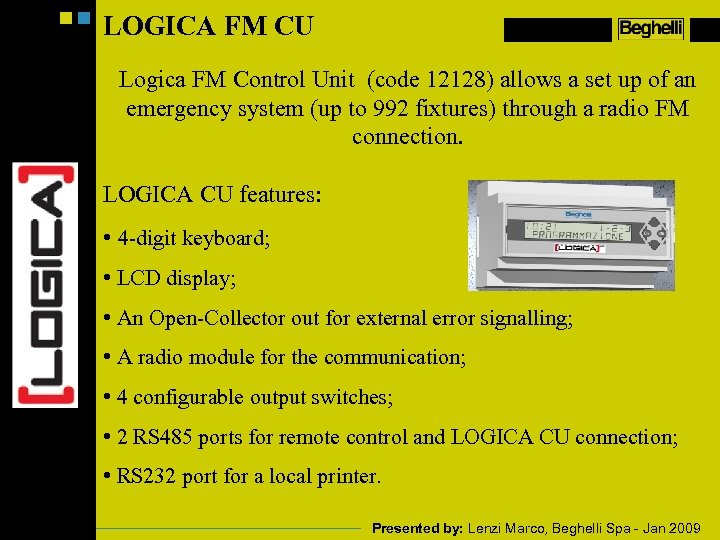
LOGICA FM CU Logica FM Control Unit (code 12128) allows a set up of an emergency system (up to 992 fixtures) through a radio FM connection. LOGICA CU features: • 4 -digit keyboard; • LCD display; • An Open-Collector out for external error signalling; • A radio module for the communication; • 4 configurable output switches; • 2 RS 485 ports for remote control and LOGICA CU connection; • RS 232 port for a local printer. Presented by: Lenzi Marco, Beghelli Spa - Jan 2009
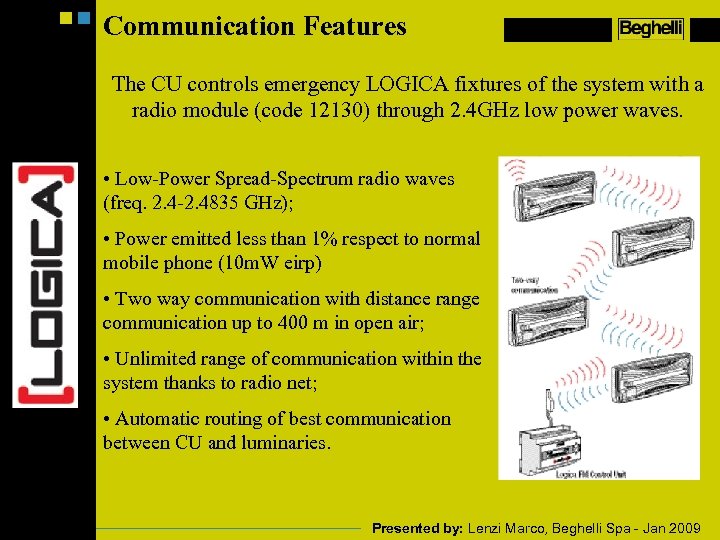
Communication Features The CU controls emergency LOGICA fixtures of the system with a radio module (code 12130) through 2. 4 GHz low power waves. • Low-Power Spread-Spectrum radio waves (freq. 2. 4 -2. 4835 GHz); • Power emitted less than 1% respect to normal mobile phone (10 m. W eirp) • Two way communication with distance range communication up to 400 m in open air; • Unlimited range of communication within the system thanks to radio net; • Automatic routing of best communication between CU and luminaries. Presented by: Lenzi Marco, Beghelli Spa - Jan 2009
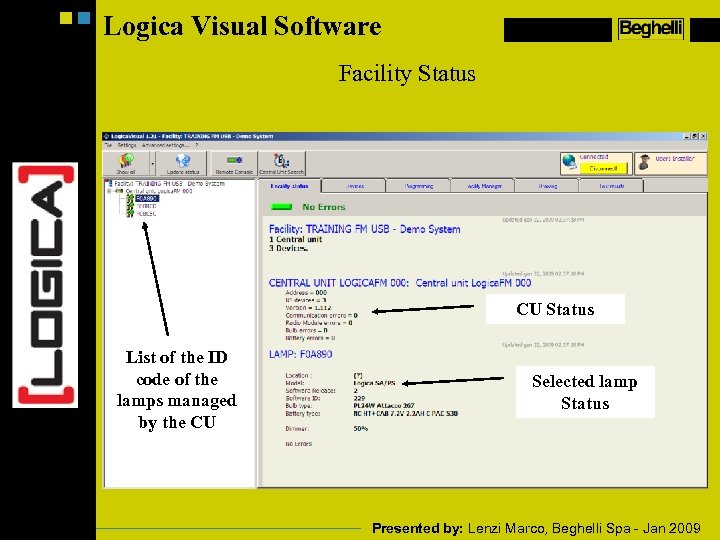
Logica Visual Software Facility Status CU Status List of the ID code of the lamps managed by the CU Selected lamp Status Presented by: Lenzi Marco, Beghelli Spa - Jan 2009
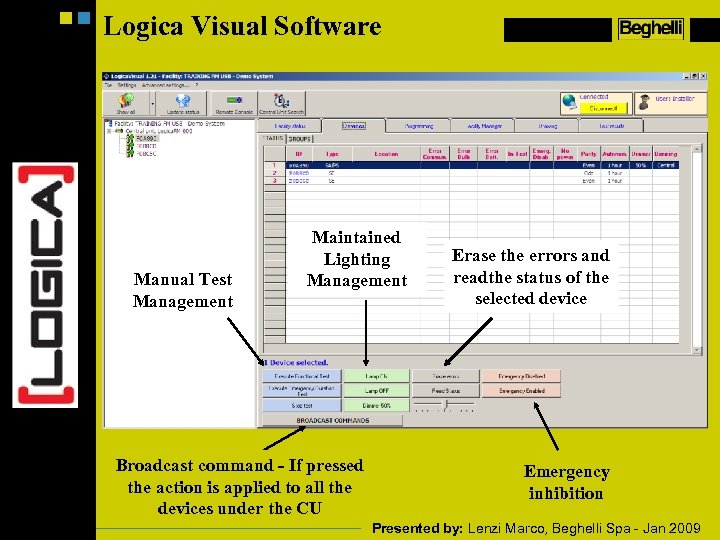
Logica Visual Software Manual Test Management Maintained Lighting Management Broadcast command - If pressed the action is applied to all the devices under the CU Erase the errors and readthe status of the selected device Emergency inhibition Presented by: Lenzi Marco, Beghelli Spa - Jan 2009
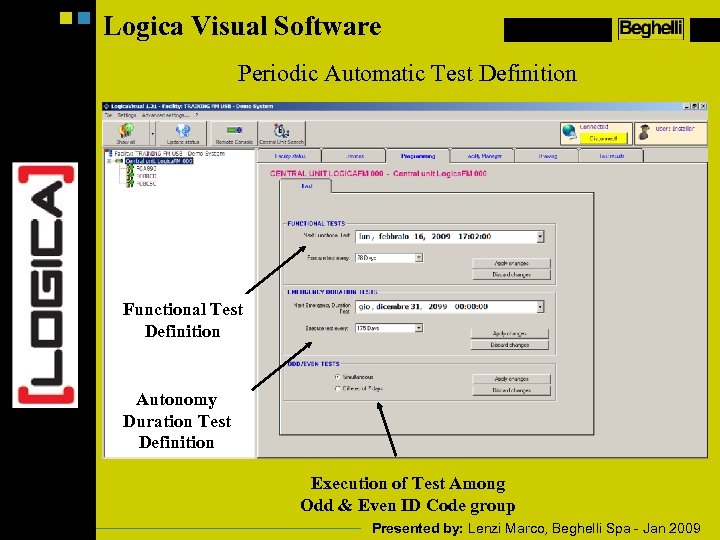
Logica Visual Software Periodic Automatic Test Definition Functional Test Definition Autonomy Duration Test Definition Execution of Test Among Odd & Even ID Code group Presented by: Lenzi Marco, Beghelli Spa - Jan 2009
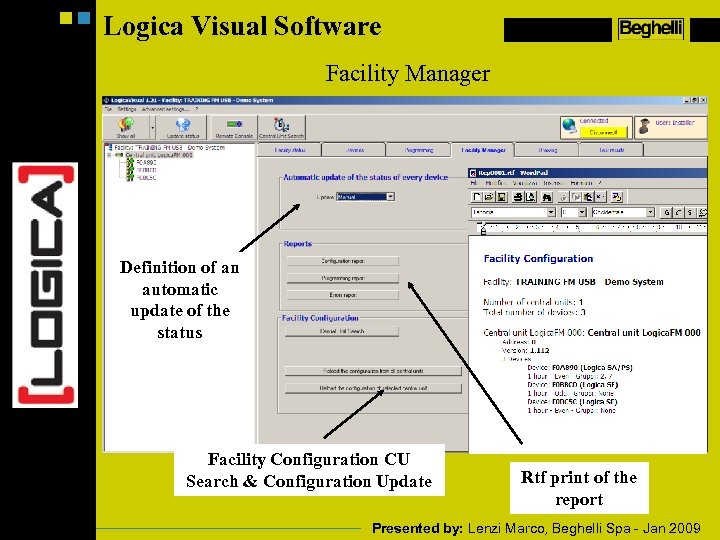
Logica Visual Software Facility Manager Definition of an automatic update of the status Facility Configuration CU Search & Configuration Update Rtf print of the report Presented by: Lenzi Marco, Beghelli Spa - Jan 2009
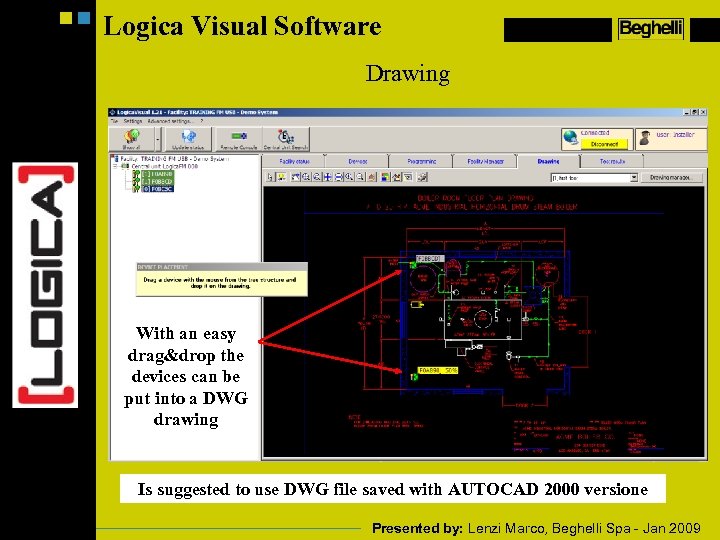
Logica Visual Software Drawing With an easy drag&drop the devices can be put into a DWG drawing Is suggested to use DWG file saved with AUTOCAD 2000 versione Presented by: Lenzi Marco, Beghelli Spa - Jan 2009
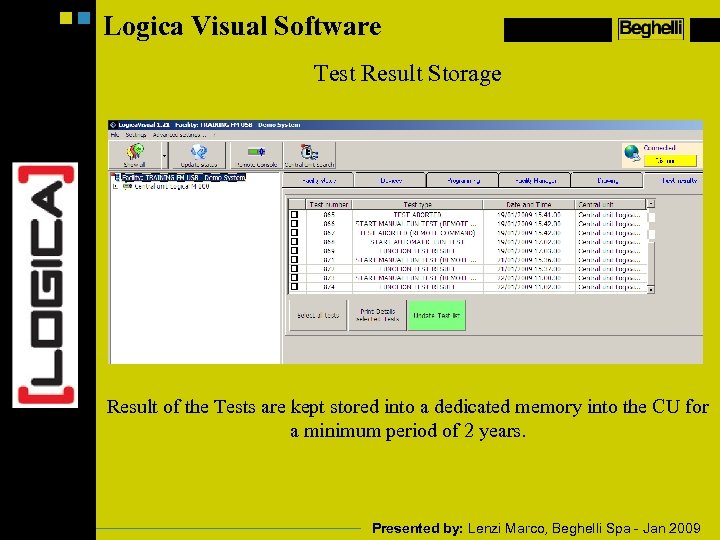
Logica Visual Software Test Result Storage Result of the Tests are kept stored into a dedicated memory into the CU for a minimum period of 2 years. Presented by: Lenzi Marco, Beghelli Spa - Jan 2009
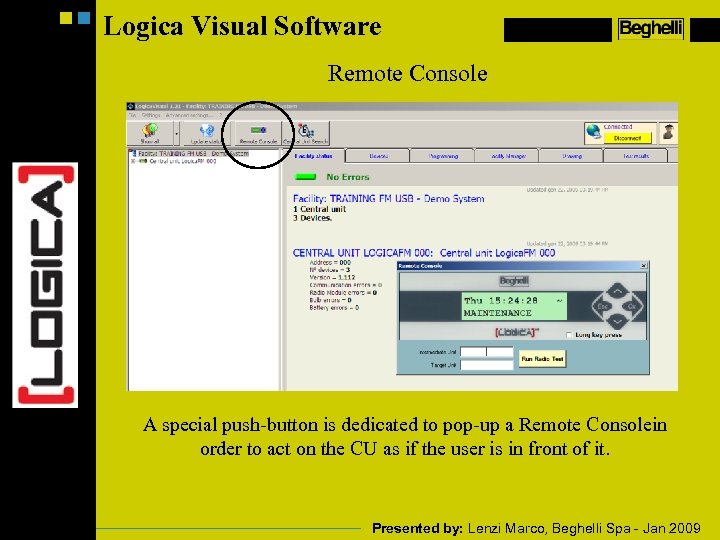
Logica Visual Software Remote Console A special push-button is dedicated to pop-up a Remote Consolein order to act on the CU as if the user is in front of it. Presented by: Lenzi Marco, Beghelli Spa - Jan 2009
Скачать презентацию LOGICA System LOGICA SYSTEM Presented by Lenzi Marco
7b3fc33850a49a0dfdc9408abba7906e.ppt