


 Скачать презентацию Local Metropolitan Area Networks ACOE 322 Lecture
52bd8aab0fa884d5266347102388bbeb.ppt
- Количество слайдов: 115
 Local & Metropolitan Area Networks ACOE 322 Lecture 4 Metropolitan Area Networks Dr. L. Christofi 1
 0. Overview • In this section the following topics will be covered: 1. Internetworking devices 2. Wide Area Networks 2. 1 ISDN and Broadband ISDN 2. 2 X. 25 2. 3 Frame Relay 2. 4 ATM 3. Congestion & Quality of Service Dr. L. Christofi 2
 1. Internetworking • In most cases, a LAN or WAN is not an isolated entity • An organization may have multiple LANs of the same type at various sites and need them to be interconnected via a WAN • An interconnected set of networks may appear as a larger network from the user’s point of view. • If each of the constituent networks retains its identity, and special mechanisms are needed for communicating across multiple networks, then the entire configuration is called an Internet. • Private internets within the same organization or company are called Intranets Dr. L. Christofi 3
 Interconnecting devices • How to get more users attached to a LAN? • How to extend a single LAN? • How to connect different LANs? Dr. L. Christofi 4
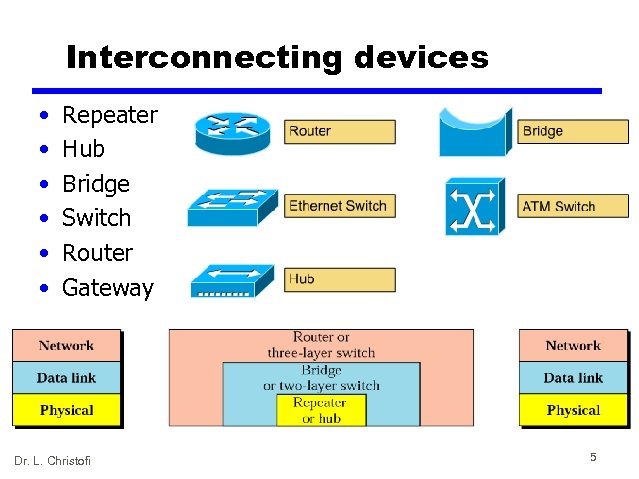 Interconnecting devices • • • Repeater Hub Bridge Switch Router Gateway Dr. L. Christofi 5
 Repeater: what is it? • Connects segments of a LAN. • It forwards every frame; it has no filtering capability • A repeater is a regenerator, not an amplifier • works at the Physical layer — Regenerates received bits before it sends them out • connects different half-duplex network segments • either extends the number of users or the total span (by improving the quality of the transmitted signal) • no separation of collision domains Dr. L. Christofi 6
 Repeater: how it works? • To begin understanding how a repeater works, it is important to understand first that as data leaves a source and goes out over the network, it is transformed into either electrical or light pulses that pass along the networking media. • These pulses are referred to as signals. • When signals first leave a transmitting station, they are clean and easily recognizable. • However, the longer the cable length, the weaker and more deteriorated the signals become as they pass along the networking media. • The purpose of a repeater is to regenerate and retime network signals at the bit level to allow them to travel a longer distance on the media. • The term repeater originally meant a single port “in” and a single port “out” device. But today, multiple-port repeaters also exist. Repeaters are classified as Layer 1 devices in the OSI model, because they act only on the bit level and look at no other information. Dr. L. Christofi 7
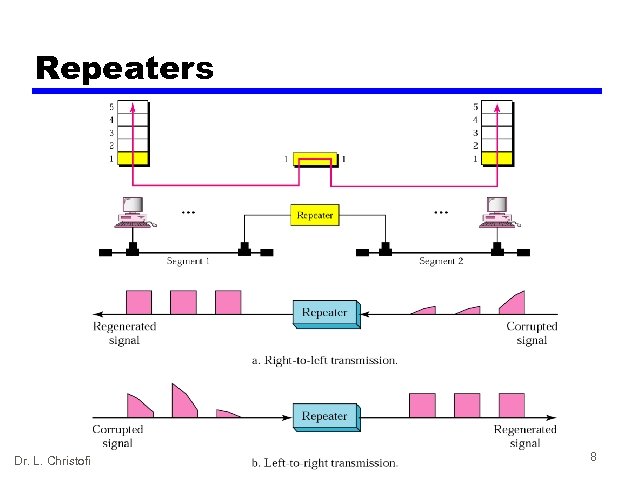 Repeaters Dr. L. Christofi 8
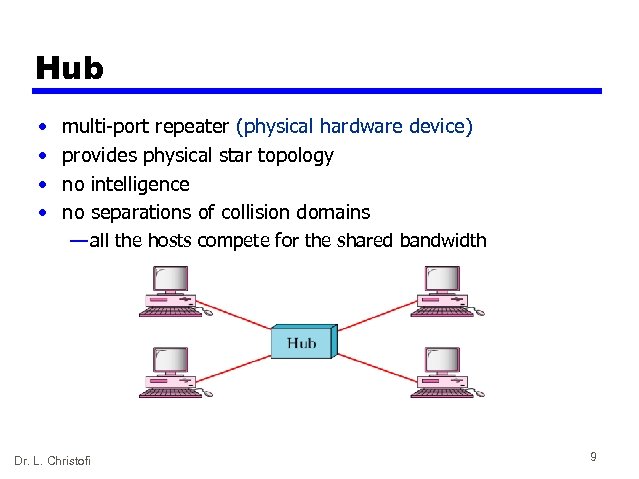 Hub • • multi-port repeater (physical hardware device) provides physical star topology no intelligence no separations of collision domains — all the hosts compete for the shared bandwidth Dr. L. Christofi 9
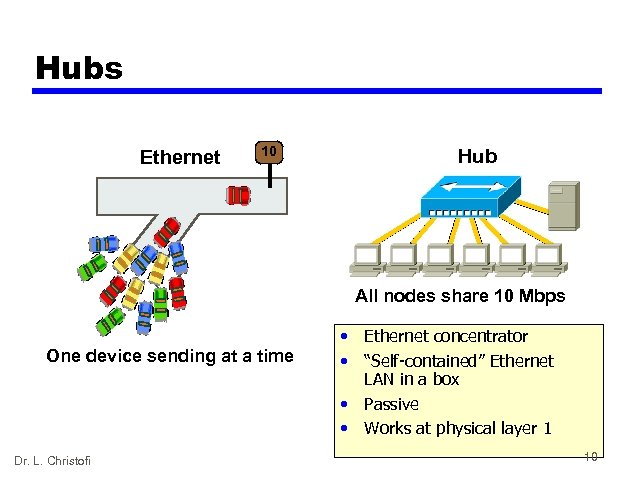 Hubs Ethernet 10 Hub All nodes share 10 Mbps One device sending at a time Dr. L. Christofi • Ethernet concentrator • “Self-contained” Ethernet LAN in a box • Passive • Works at physical layer 1 10
 Hubs (more explanation) • • The purpose of a hub is to regenerate and retime network signals. Similar characteristics to those of the repeater. The difference between a repeater and a hub is the number of cables that connect to the device. Whereas a repeater typically has only 2 ports, a hub generally has from 4 to 20 or more ports. Whereas a repeater receives on one port and repeats on the other, a hub receives on one port and transmits on all other ports. The following are the most important properties of hubs: — Hubs amplify and propagate signals through the network. — Hubs do not require filtering, or path determination or switching. — Hubs are used as network concentration points. Hubs are used most commonly in Ethernet 10 BASE-T or 100 BASE-T networks. Hubs are used to create a central connection point for the wiring media and to increase the reliability of the network. Allowing any single cable to fail without disrupting the entire network increases the reliability of the network. This feature differs from the bus topology where having one cable fail disrupts the entire network. (Network topology is discussed later in this module. ) Hubs are considered Layer 1 devices because they only regenerate the signal and repeat it out all of their ports (network connections). Dr. L. Christofi 11
 Bridge (1) • works at the layer 2 (requires software) • connects two networks of the same type — LAN to LAN (example: WLAN to Fast Ethernet) • forwards data (1 packet @ the time) depending on the destination address in the data packet (not the IP address, but the physical (MAC) address that is unique for every Network Interface Card (NIC)) • all computers are in the same sub-network • packet filtering • separates collision domains – larger network spans • a stand alone device or a PC with the special NIC and the accompanied software Dr. L. Christofi 12
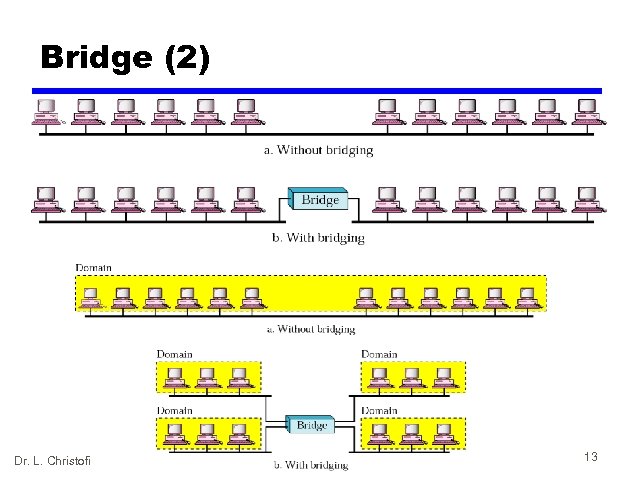 Bridge (2) Dr. L. Christofi 13
 Bridges explained (1) • • • A bridge is a Layer 2 device designed to create two or more LAN segments, each of which is a separate collision domain. That is, they were designed to create more useable bandwidth. The purpose of a bridge is to filter traffic on a LAN—to keep local traffic local—yet allow connectivity to other parts (segments) of the LAN for traffic that is directed there. You might wonder, then, how the bridge knows which traffic is local and which is not. The answer is the same one the postal service uses when asked how it knows which mail is local. It looks at the local address. Every networking device has a unique MAC address on the NIC. The bridge keeps track of which MAC addresses are on each side of the bridge and makes its decisions based on this MAC address list. Bridges filter network traffic by looking only at the MAC address. Therefore, they can rapidly forward traffic representing any network layer protocol. Because bridges look only at MAC addresses, they are not concerned with network layer protocols. Consequently, bridges are concerned only with passing or not passing frames, based on their destination MAC addresses. The following are the important properties of bridges: — Bridges are more intelligent than hubs—that is, they can analyze incoming frames and forward (or drop) them based on addressing information. Bridges collect and pass packets between two or more LAN segments. — Bridges create more collision domains, allowing more than one device to transmit simultaneously without causing a collision. — Bridges maintain address tables. 14 Dr. L. Christofi
 Bridges explained (2) • • What really defines a bridge is its Layer 2 filtering of frames and how this is actually accomplished. Just as was the case of the repeater/hub combination, another device, called a switch (which you learn about next in this section), is used for multiple bridge connections. In order to filter or selectively deliver network traffic, bridges build tables of all MAC addresses located on a network and other networks and map them. — If data comes along the network media, a bridge compares the destination MAC address carried by the data to MAC addresses contained in its tables. — If the bridge determines that the destination MAC address of the data is from the same network segment as the source, it does not forward the data to other segments of the network. — If the bridge determines that the destination MAC address of the data is not from the same network segment as the source, it forwards the data to the appropriate segment. — By performing this process, bridges can significantly reduce the amount of traffic between network segments by eliminating unnecessary traffic. Dr. L. Christofi 15
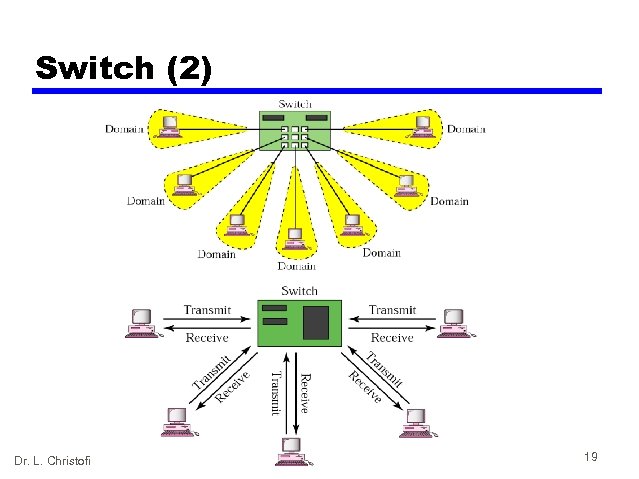
 Switch (1) • basically a multi-port bridge • provides a better network performance — forwards more than a single packet at a time • separates collision domains – larger total network span • bandwidth not shared Dr. L. Christofi 16
 Switches explained • Switches, also referred to as LAN switches often replace shared hubs and work with existing cable infrastructures to ensure that they are installed with minimal disruption of existing networks. • Like bridges, switches connect LAN segments, use a table of MAC addresses to determine the segment on which a datagram needs to be transmitted, and reduce traffic. Switches operate at much higher speeds than bridges, and can support new functionality, such as virtual LANs. • Switches are data link layer devices that, like bridges, enable multiple physical LAN segments to be interconnected into single larger network. Similar to bridges, switches forward and flood traffic based on MAC addresses. Because switching is performed in hardware instead of in software, it is significantly faster. You can think of each switch port as a microbridge; this process is called microsegmentation. • Thus each switch port acts as a separate bridge and gives the full bandwidth of the medium to each host. Dr. L. Christofi 17
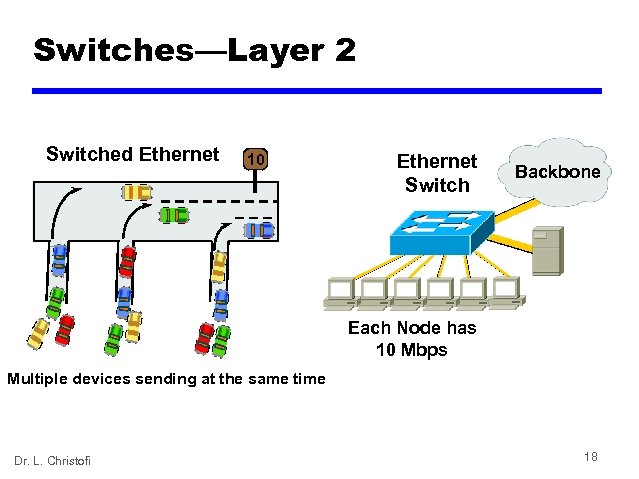 Switches—Layer 2 Switched Ethernet 10 Ethernet Switch Backbone Each Node has 10 Mbps Multiple devices sending at the same time Dr. L. Christofi 18
 Switch (2) Dr. L. Christofi 19
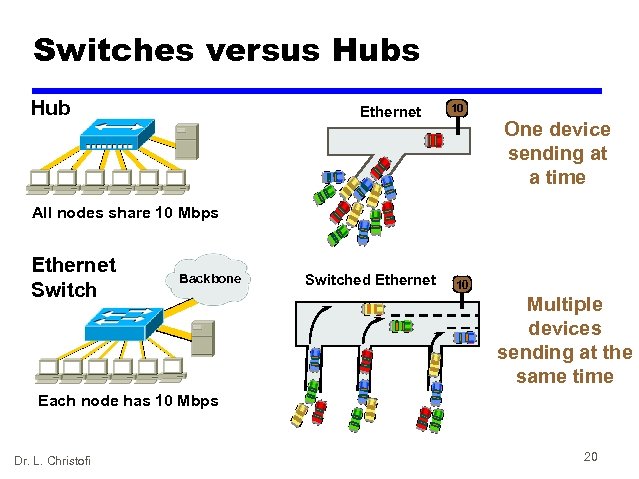 Switches versus Hub Ethernet 10 One device sending at a time All nodes share 10 Mbps Ethernet Switch Backbone Switched Ethernet 10 Multiple devices sending at the same time Each node has 10 Mbps Dr. L. Christofi 20
 Router • connects different sub-networks • Layer 3 (Network layer) device • forwarding of packets (routing) is based on IP addresses not on MAC addresses • more expensive than a switch (requires CPU) • Layer 3 switches (only work with IP packets) Dr. L. Christofi 21
 Gateway • A gateway is a network point that acts as an entrance to another network. On the internet, in terms of routing, the network consists of gateway nodes and host nodes. • Host nodes are computer of network users and the computers that serve contents (such as Web pages). • Gateway nodes are computers that control traffic within your company’s network or at your local internet service provider (ISP) Dr. L. Christofi 22
 What is the difference between? • Bridge: device to interconnect two LANs that use the SAME Logical Link Control protocol but may use different medium access control protocols. • Router: device to interconnect SIMILAR networks, e. g. similar protocols and workstations and servers • Gateway: device to interconnect DISSIMILAR protocols and servers, and Macintosh and IBM LANs and equipment Dr. L. Christofi 23
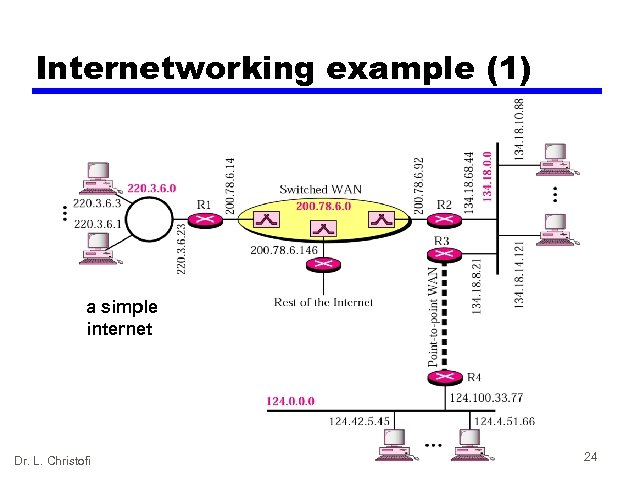 Internetworking example (1) a simple internet Dr. L. Christofi 24
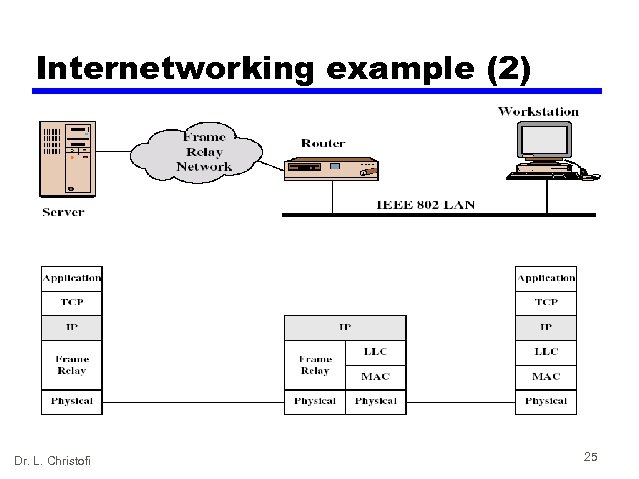 Internetworking example (2) Dr. L. Christofi 25
 2. Wide Area Networks 2. 1 ISDN and Broadband ISDN 2. 2 X. 25 2. 3 Frame Relay 2. 4 ATM Dr. L. Christofi 26
 Integration of Voice, Video & Data • Also called “Convergence” — Networks that were previously transmitted using separate networks will merge into a single, high speed, multimedia network in the near future • First step (already underway) — Integration of voice and data • Next Step — Video merging with voice and data — Will take longer partly due to the high data rates required for video Dr. L. Christofi 27
 2. 1 Integrated Services Digital Network (ISDN) • Was develop by ITU-T in 1976 • Combines digital telephony and data transport services • Aim is to digitise the telephone network so that it allows the integration and transmission of voice, data and video over existing telephone lines • The goal of ISDN is to form a wide area network that provides universal end-to-end connectivity over digital media Dr. L. Christofi 28
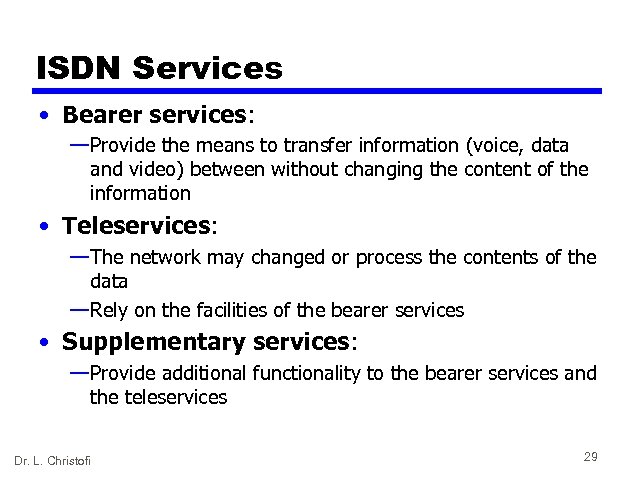 ISDN Services • Bearer services: — Provide the means to transfer information (voice, data and video) between without changing the content of the information • Teleservices: — The network may changed or process the contents of the data — Rely on the facilities of the bearer services • Supplementary services: — Provide additional functionality to the bearer services and the teleservices Dr. L. Christofi 29
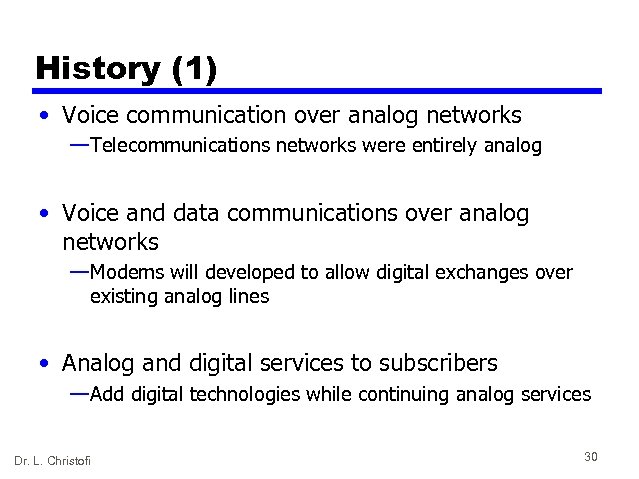 History (1) • Voice communication over analog networks — Telecommunications networks were entirely analog • Voice and data communications over analog networks — Modems will developed to allow digital exchanges over existing analog lines • Analog and digital services to subscribers — Add digital technologies while continuing analog services Dr. L. Christofi 30
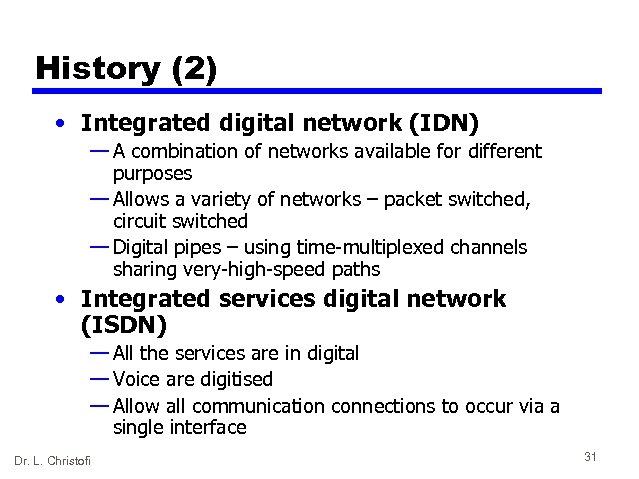 History (2) • Integrated digital network (IDN) — A combination of networks available for different purposes — Allows a variety of networks – packet switched, circuit switched — Digital pipes – using time-multiplexed channels sharing very-high-speed paths • Integrated services digital network (ISDN) — All the services are in digital — Voice are digitised — Allow all communication connections to occur via a single interface Dr. L. Christofi 31
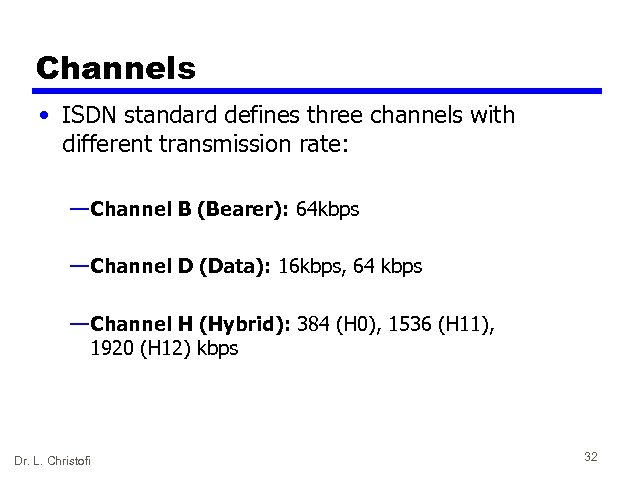 Channels • ISDN standard defines three channels with different transmission rate: — Channel B (Bearer): 64 kbps — Channel D (Data): 16 kbps, 64 kbps — Channel H (Hybrid): 384 (H 0), 1536 (H 11), 1920 (H 12) kbps Dr. L. Christofi 32
 Interface types • Two types of digital subscriber loops: — Basic rate interface (BRI): • consisting of two B channels and one 16 kbps D channel (2 B+D) • Used in residential and small office • User-to-user communication — Primary rate interface (PRI): consisting 30 B channels and one 64 kbps D channel (30 B+D) • User-to-network communication • LAN connect to other LANs Dr. L. Christofi 33
 Broadband ISDN • The original ISDN is known as narrowband ISDN (N-ISDN) • As technology advances, N-ISDN is not enough to cope with the requirement. • Broadband ISDN (B-ISDN) is developed to provide for the needs for the next generation, with data rates in the range of 600 Mbps (400 times faster than the PRI) • B-ISDN is based on the change from metal cable to fiberoptic cable. Dr. L. Christofi 34
 B-ISDN: Types of Services • Interactive: — Those that require two-way exchanges between either two subscribers or between a subscriber and a service provider — There are three types: • Conversational: phone calls or real time services (video telephony, video conferencing) • Messaging: store and forward exchanges (voice mail, data mail, video mail) • Retrieval: retrieve information from information centre (videotex: allows subscribers to select video data from an on-line library) Dr. L. Christofi 35
 B-ISDN: Types of Services • Distributive: — Unidirectional sent from provider to subscribers — Without user control: broadcast to user without user’s having requested them or having control over either broadcast times or content (commercial TV) — With user control: broadcast to user in a round-robin fashion (educational broadcasting, pay TV – a program is made available in a limited number of time slots, a user need to activate the television to receive it) Dr. L. Christofi 36
 2. 2 X. 25 • It is a packet switching wide area network • Introduced in 1976 • • • Interface between host and packet switched network Almost universal on packet switched networks and packet switching in ISDN Defines three layers • Physical • Link • Packet Dr. L. Christofi 37
 X. 25 Layers • Physical • • • Interface between attached station and link to node Data terminal equipment DTE (user equipment) Data circuit terminating equipment DCE (node) Uses physical layer specification X. 21 Reliable transfer across physical link Sequence of frames • Link Access Protocol Balanced (LAPB) • Subset of HDLC • Packet • External virtual circuits • Logical connections (virtual circuits) between subscribers Dr. L. Christofi 38
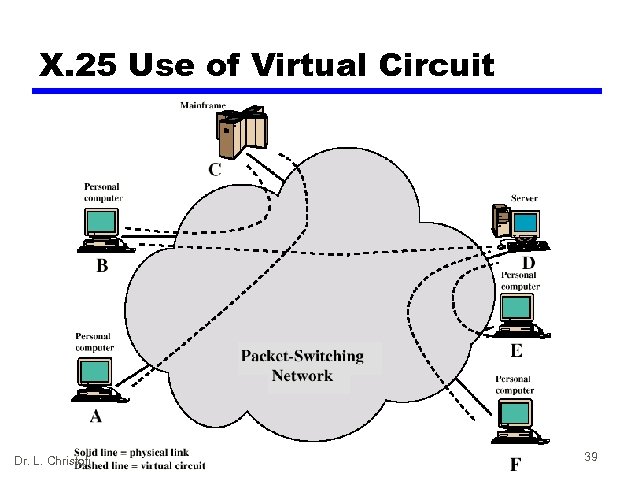 X. 25 Use of Virtual Circuit Dr. L. Christofi 39
 Virtual Circuit Service • Virtual Call — Dynamically established • Permanent Virtual Circuit (PVC) — Fixed network assigned virtual circuit • Multiplexing — DTE can establish 4095 simultaneous virtual circuits with other DTEs over a single DTC-DCE link — Packets contain 12 bit virtual circuit number Dr. L. Christofi 40
 2. 3 Frame Relay • Designed to be more efficient than X. 25 • Developed before ATM • Larger installed base than ATM • ATM now of more interest on high speed networks Dr. L. Christofi 41
 Frame Relay - Differences • Call control carried in separate logical connection • Multiplexing and switching at layer 2 — Eliminates one layer of processing • No hop-by-hop error or flow control • End to end flow and error control (if used) are done by higher layer • Single user data frame sent from source to destination and ACK (from higher layer) sent back Dr. L. Christofi 42
 Comparing Frame Relay • Advantages: — Operates at higher speed — Operates in just the physical and data link layers – can be used easily as a backbone network to provide services to protocols that already have a network layer protocol — Allows bursty data – do not have fixed data rate, user can send 6 Mbps for 2 sec, 3. 44 Mbps for 1 sec and nothing for 7 sec — Allows a frame size of 9000 bytes which is enough for all LAN frames — Less expensive than other traditional WANs Dr. L. Christofi 43
 Comparing Frame Relay • Disadvantages: — Although can operate at 44. 376 Mbps but is still not high enough for protocols with higher data rates (BISDN) — As it allows variable length frames – may create varying delays for different users — Because of varying delay, it is not suitable to send sensitive data like real time voice or video Dr. L. Christofi 44
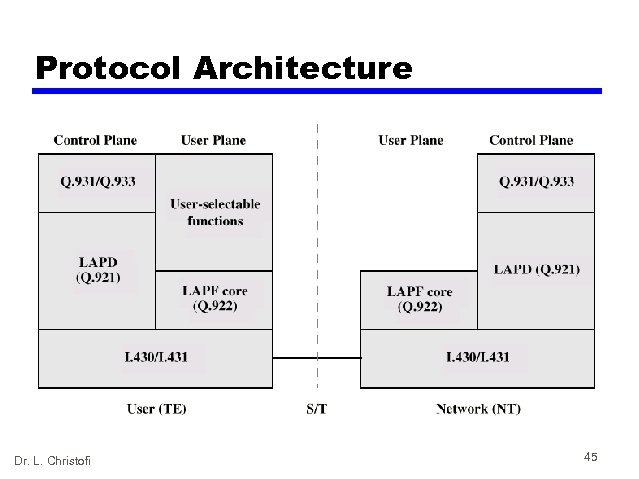 Protocol Architecture Dr. L. Christofi 45
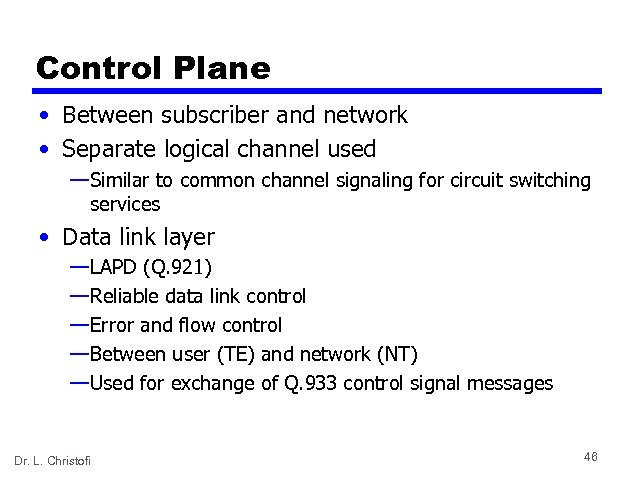 Control Plane • Between subscriber and network • Separate logical channel used — Similar to common channel signaling for circuit switching services • Data link layer — LAPD (Q. 921) — Reliable data link control — Error and flow control — Between user (TE) and network (NT) — Used for exchange of Q. 933 control signal messages Dr. L. Christofi 46
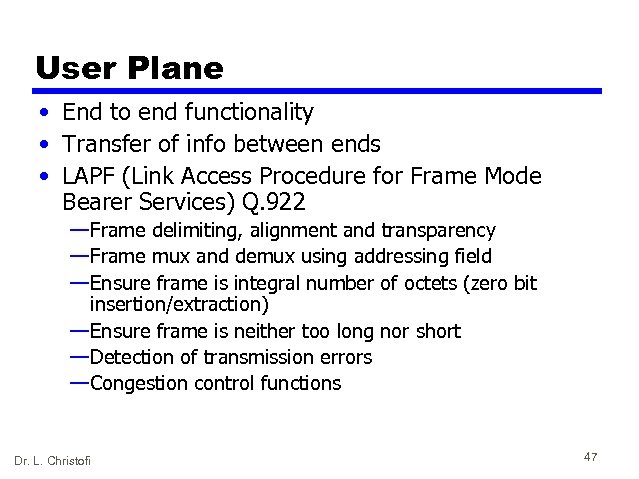 User Plane • End to end functionality • Transfer of info between ends • LAPF (Link Access Procedure for Frame Mode Bearer Services) Q. 922 — Frame delimiting, alignment and transparency — Frame mux and demux using addressing field — Ensure frame is integral number of octets (zero bit insertion/extraction) — Ensure frame is neither too long nor short — Detection of transmission errors — Congestion control functions Dr. L. Christofi 47
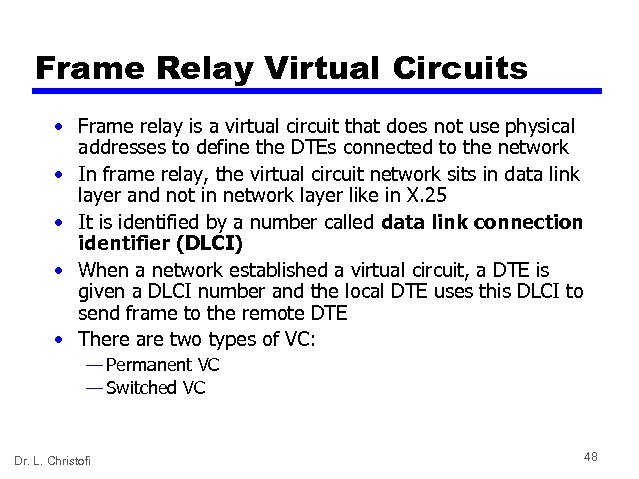 Frame Relay Virtual Circuits • Frame relay is a virtual circuit that does not use physical addresses to define the DTEs connected to the network • In frame relay, the virtual circuit network sits in data link layer and not in network layer like in X. 25 • It is identified by a number called data link connection identifier (DLCI) • When a network established a virtual circuit, a DTE is given a DLCI number and the local DTE uses this DLCI to send frame to the remote DTE • There are two types of VC: — Permanent VC — Switched VC Dr. L. Christofi 48
 Factors of Frame Relay Traffic — Committed Information Rate (CIR) • defines an average rate in bits per second — Excess burst size • defines the maximum number of bits in excess of committed burst size that a user can send during a predefined period of time. Dr. L. Christofi 49
 2. 4 Asynchronous Transfer Mode (ATM) • ATM can transmit voice, video and data across LANs, MANs, and WANs. • ATM is an international standard that implements a high-speed, connection-oriented, cell-switching, and multiplexing technology that is designed to provide users with virtually unlimited bandwidth. • ATM is the cell relay protocol • The combination of ATM and B-ISDN will allow high speed interconnection of all of the world’s network Dr. L. Christofi 50
 Cell Network • A cell is a small data unit of fixed size • As cell is of fixed size, the transmission is thus predictable and uniform • In packet switching, to avoid the wastage of large unused data field, some protocols provide variable sizes to users and thus unpredictable • In cell networks, packets of different sizes and formats reach the cell network, are split into multiple small data units of equal length and loaded into cells • The cells are then multiplexed with other cells and routed through the cell network Dr. L. Christofi 51
 Advantages of Cells • Due to small and fixed cells, cells from each line arrive at their respective destinations in an approximation of a continuous stream — this allow real time transmissions like phone call • The predictability of the fixed cell size allows switches and terminals to treat each cell as a unit rather than as a bit stream — this makes the network operation more efficient and cheaper Dr. L. Christofi 52
 Protocol Architecture • Similarities between ATM and packet switching — Transfer of data in discrete chunks — Multiple logical connections over single physical interface • In ATM flow on each logical connection is in fixed sized packets called cells • Minimal error and flow control — Reduced overhead • Data rates (physical layer) 2 Mbps to 622 Mbps Dr. L. Christofi 53
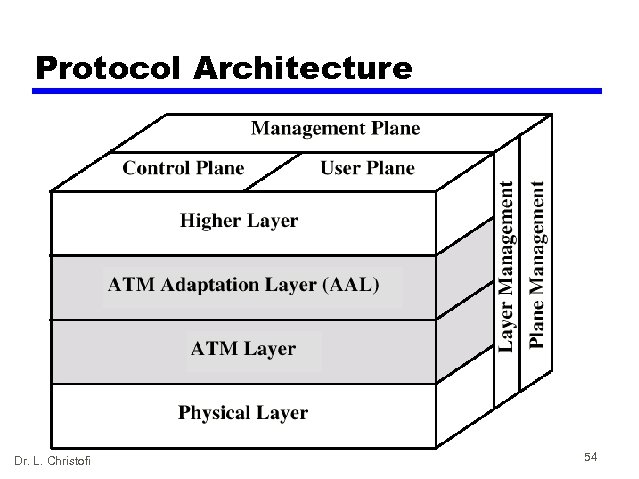 Protocol Architecture Dr. L. Christofi 54
 Reference Model Planes • User plane — Provides for user information transfer • Control plane — Call and connection control • Management plane — Plane management • whole system functions — Layer management • Resources and parameters in protocol entities Dr. L. Christofi 55
 ATM Logical Connections • • Virtual Channel connections (VC) Analogous to virtual circuit in X. 25 Basic unit of switching Between two end users Full duplex Fixed size cells Data, user-network exchange (control) and network exchange (network management and routing) • Virtual Path connection (VP) — Bundle of VCC with same end points Dr. L. Christofi 56
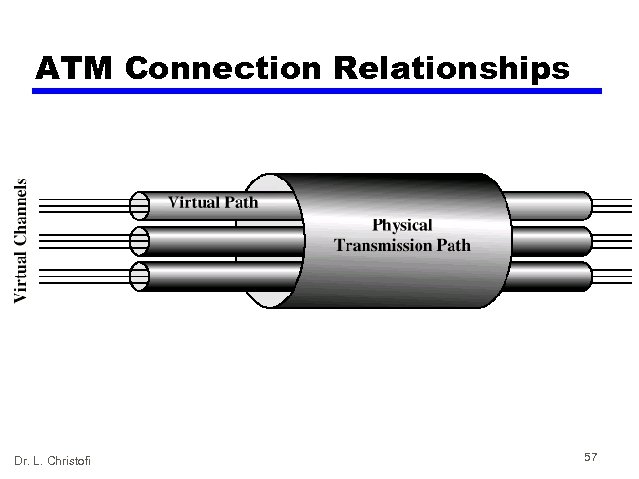 ATM Connection Relationships Dr. L. Christofi 57
 ATM Architecture • The user devices (end points) are connected through user-to-network interface (UNI) to switches inside the network • ATM uses switches to route cell from a source end point to the destination end point • The switches are connected through network-tonetwork interfaces (NNIs) • Connection between two end points is accomplished through transmission paths (TPs), virtual paths (VPs), and virtual circuits (VCs) Dr. L. Christofi 58
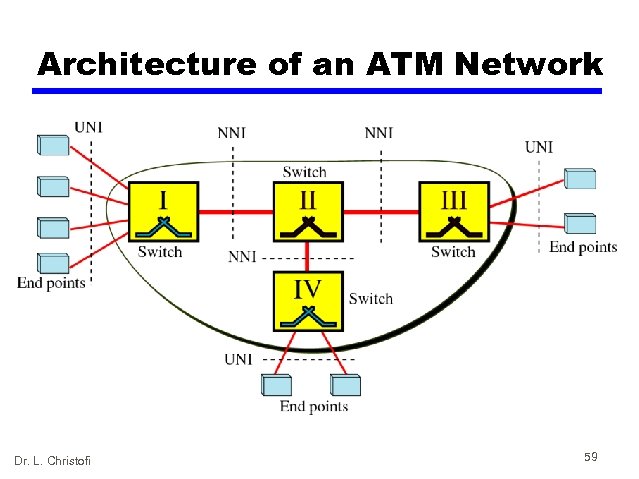 Architecture of an ATM Network Dr. L. Christofi 59
 ATM Architecture • Transmission Path (TP) is the physical connection between an end point and a switch or between two switches • A TP is divided into several virtual path • Virtual Path (VP) provides a connection or a set of connections between two switches • Cell network is based on Virtual Circuits (VCs) • In VC, to route data from one end point to another, the virtual connections need to be identified Dr. L. Christofi 60
 ATM Identifiers • ATM has a hierarchical identifier with two levels: — Virtual path identifier (VPI): defines the specific VP — Virtual circuit identifier (VCI): defines a particular VC • The VPI is the same for all virtual connections that are bundled (logically) into one VP • Like X. 25 and Frame Relay, ATM uses Permanent Virtual Circuit (PVC) and Switched Virtual Circuit (SVC) • In PVC, VPIs and VCIs are defined for the permanent connections • In SVC, it needs network layer addresses and the services of another protocol like B-ISDN to establish a VC each time an end point wants to make a connection Dr. L. Christofi 61
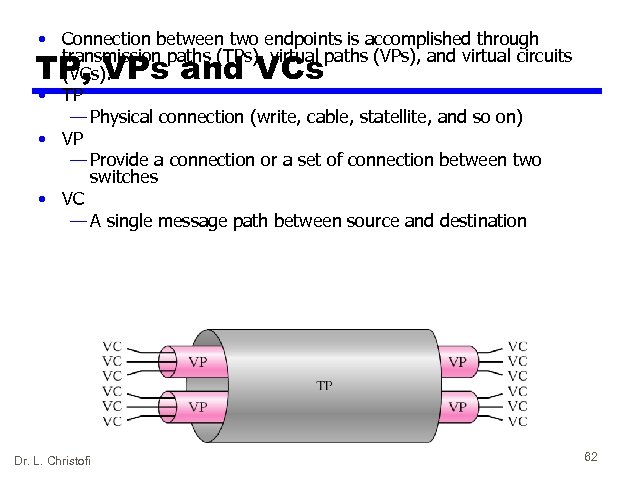 • Connection between two endpoints is accomplished through transmission paths (TPs), virtual paths (VPs), and virtual circuits (VCs). • TP — Physical connection (write, cable, statellite, and so on) • VP — Provide a connection or a set of connection between two switches • VC — A single message path between source and destination TP, VPs and VCs Dr. L. Christofi 62
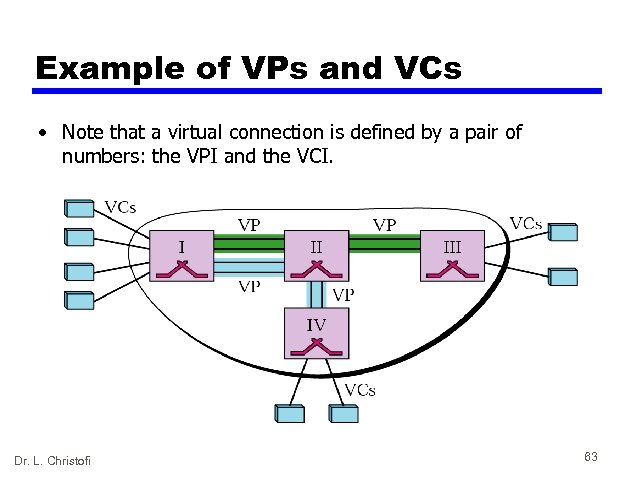 Example of VPs and VCs • Note that a virtual connection is defined by a pair of numbers: the VPI and the VCI. Dr. L. Christofi 63
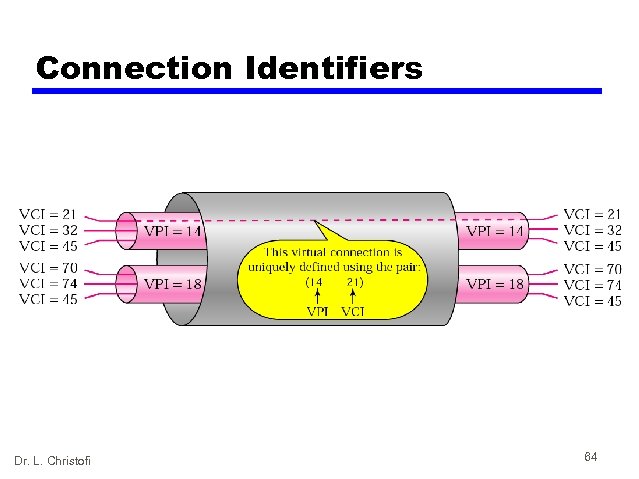 Connection Identifiers Dr. L. Christofi 64
 AN ATM CELL An ATM cell Header format Dr. L. Christofi 65
 ATM switching • Cells are “self routing” — Virtual channel/path determined during call setup — Same channel/path for all cells — Routing tables in each node in path updated with next node address • When cell reaches a node: — — Node retrieves channel/path identifier from cell header Looks up identifier routing table to get next node in path Sends cell out port associated with next node May modify header along the way if necessary • Switching method and high speed physical links allow use with real time, isochronous data: — Cells arrive at destination in order of sending — Cells arrive at destination at rate comparable to sending Dr. L. Christofi 66
 Advantages of Virtual Paths • • • Simplified network architecture Increased network performance and reliability Reduced processing Short connection setup time Enhanced network services Dr. L. Christofi 67
 Virtual Channel connection Uses • Between end users — End to end user data — Control signals — VPC provides overall capacity • VCC organization done by users • Between end user and network — Control signaling • Between network entities — Network traffic management — Routing Dr. L. Christofi 68
 VP/VC Characteristics • Quality of Service (Qo. S) — A user of a VC is provided with a quality of service specified by parameters such as cell loss ratio and cell delay variation • Switched and semi-permanent channel connections — A switched VC (SVC) is an on-demand connection, which requires call control signaling for setup and tearing down • Call sequence integrity — The sequence of transmitted cells within a VCC is preserved • Traffic parameter negotiation and usage monitoring — Can be negotiated between a user and the network for each VC • VP connection only — Virtual channel identifier restriction within VP Dr. L. Christofi 69
 Control Signaling - VC • Done on separate connection • Semi-permanent VC • Meta-signaling channel — Used as permanent control signal channel • User to network signaling virtual channel — For control signaling — Used to set up VCs to carry user data • User to user signaling virtual channel — Within pre-established VP — Used by two end users without network intervention to establish and release user to user VC Dr. L. Christofi 70
 Control Signaling - VP • Semi-permanent • Customer controlled • Network controlled Dr. L. Christofi 71
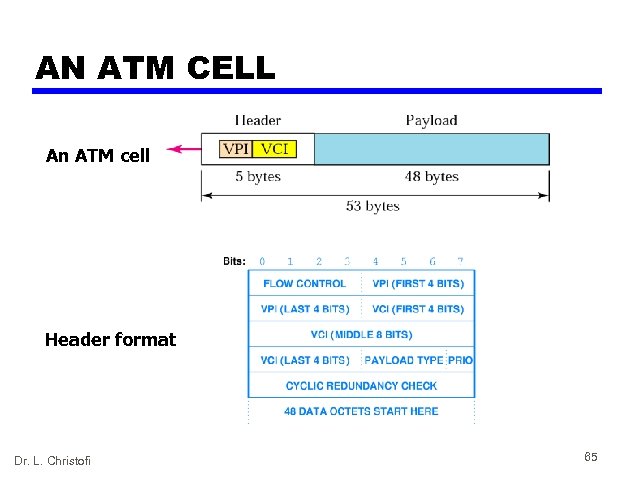
 ATM Cells • • Fixed size 5 Byte header 48 Byte information field Small cells reduce queuing delay for high priority cells • Small cells can be switched more efficiently • Easier to implement switching of small cells in hardware Dr. L. Christofi 72
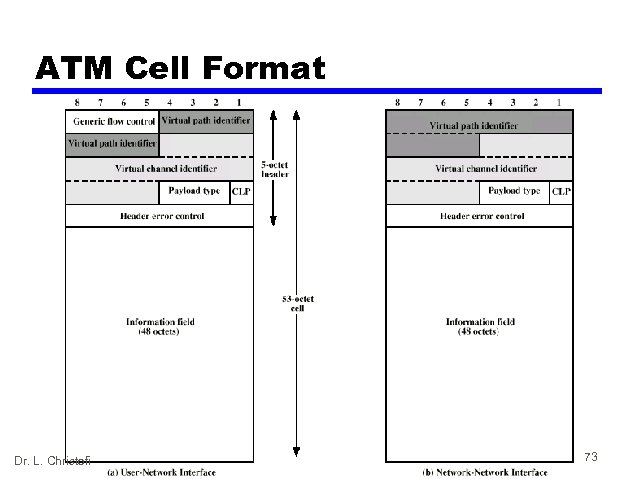 ATM Cell Format Dr. L. Christofi 73
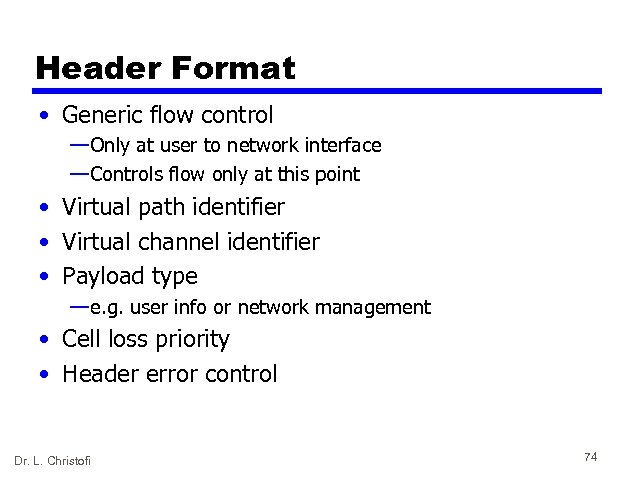 Header Format • Generic flow control — Only at user to network interface — Controls flow only at this point • Virtual path identifier • Virtual channel identifier • Payload type — e. g. user info or network management • Cell loss priority • Header error control Dr. L. Christofi 74
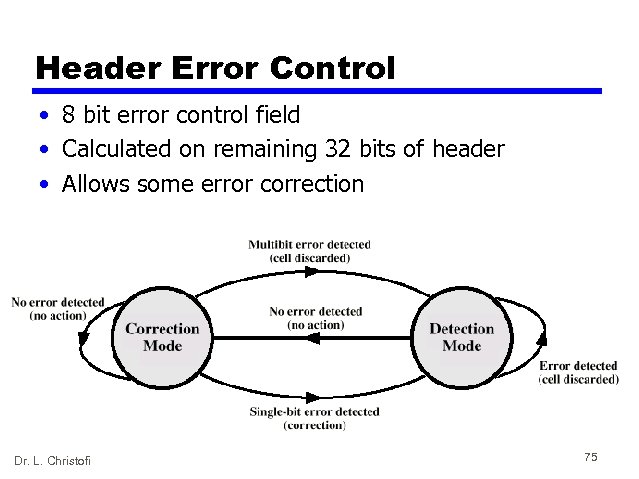 Header Error Control • 8 bit error control field • Calculated on remaining 32 bits of header • Allows some error correction Dr. L. Christofi 75
 Transmission of ATM Cells • ATM cells can be transmitted at one of several data rates: — 622. 08 Mbps — 155. 52 Mbps — 51. 84 Mbps — 25. 6 Mbps — 2. 048 Mbps • Transmission infrastructure to carry ATM payload — Cell Based physical layer — SDH based physical layer Dr. L. Christofi 76
 Cell Based Physical Layer • No framing imposed • Continuous stream of 53 octet cells • Cell delineation based on header error control field Dr. L. Christofi 77
 SDH Based Physical Layer • • • Imposes structure on ATM stream e. g. for 155. 52 Mbps Use STM-1 (STS-3) frame Can carry ATM and STM payloads Specific connections can be circuit switched using SDH channel • SDH multiplexing techniques can combine several ATM streams Dr. L. Christofi 78
 ATM Service Categories • Real time — Constant bit rate (CBR) — Real time variable bit rate (rt-VBR) • Non-real time — Non-real time variable bit rate (nrt-VBR) — Available bit rate (ABR) — Unspecified bit rate (UBR) — Guaranteed frame rate (GFR) Dr. L. Christofi 79
 Real Time Services • Amount of delay • Variation of delay (jitter) Dr. L. Christofi 80
 CBR • Fixed data rate continuously available • Tight upper bound on delay • Uncompressed audio and video — Video conferencing — Interactive audio — A/V distribution and retrieval Dr. L. Christofi 81
 rt-VBR • Time sensitive application — Tightly constrained delay and delay variation • rt-VBR applications transmit at a rate that varies with time • e. g. compressed video — Produces varying sized image frames — Original (uncompressed) frame rate constant — So compressed data rate varies • Can statistically multiplex connections Dr. L. Christofi 82
 nrt-VBR • May be able to characterize expected traffic flow • Improve Qo. S in loss and delay • End system specifies: — Peak cell rate — Sustainable or average rate — Measure of how bursty traffic is • e. g. Airline reservations, banking transactions Dr. L. Christofi 83
 UBR • May be additional capacity over and above that used by CBR and VBR traffic — Not all resources dedicated — Bursty nature of VBR • For application that can tolerate some cell loss or variable delays — e. g. TCP based traffic • Cells forwarded on First In First Out (FIFO) basis • Best-effort service Dr. L. Christofi 84
 ABR • Application specifies peak cell rate (PCR) and minimum cell rate (MCR) • Resources allocated to give at least MCR • Spare capacity shared among all ARB sources • e. g. LAN interconnection Dr. L. Christofi 85
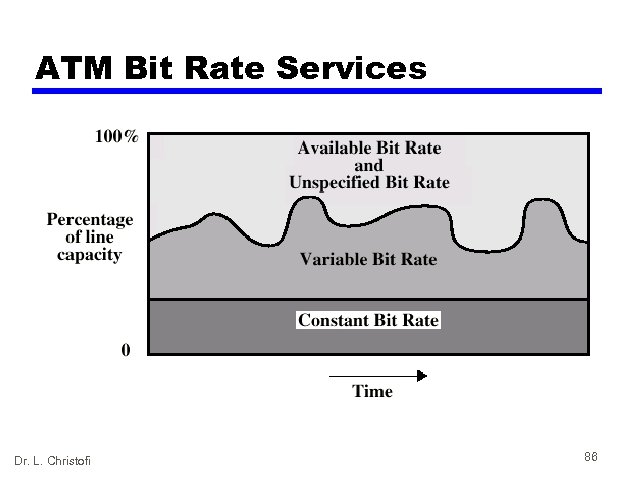 ATM Bit Rate Services Dr. L. Christofi 86
 Guaranteed Frame Rate (GFR) • Designed to support IP backbone subnetworks • Better service than UBR for frame based traffic — Including IP and Ethernet • Optimize handling of frame based traffic passing from LAN through router to ATM backbone — Used by enterprise, carrier and ISP networks — Consolidation and extension of IP over WAN • ABR difficult to implement between routers over ATM network • GFR better alternative for traffic originating on Ethernet — — Dr. L. Christofi Network aware of frame/packet boundaries When congested, all cells from frame discarded Guaranteed minimum capacity Additional frames carried of not congested 87
 ATM Adaptation Layer • Support for information transfer protocol not based on ATM • PCM (voice) — Assemble bits into cells — Re-assemble into constant flow • IP — Map IP packets onto ATM cells — Fragment IP packets — Use LAPF over ATM to retain all IP infrastructure Dr. L. Christofi 88
 Adaptation Layer Services • • Handle transmission errors Segmentation and re-assembly Handle lost and mis-inserted cells Flow control and timing Dr. L. Christofi 89
 Supported Application types • • • Circuit emulation VBR voice and video General data service IP over ATM Multiprotocol encapsulation over ATM (MPOA) — IPX, Apple. Talk, DECNET) • LAN emulation Dr. L. Christofi 90
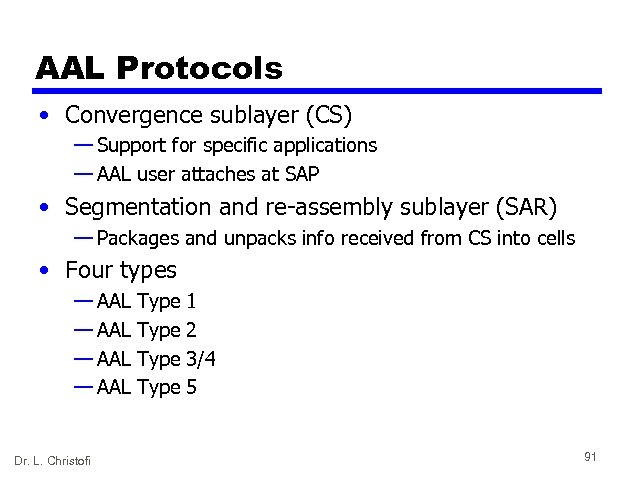 AAL Protocols • Convergence sublayer (CS) — Support for specific applications — AAL user attaches at SAP • Segmentation and re-assembly sublayer (SAR) — Packages and unpacks info received from CS into cells • Four types — AAL Dr. L. Christofi Type 1 2 3/4 5 91
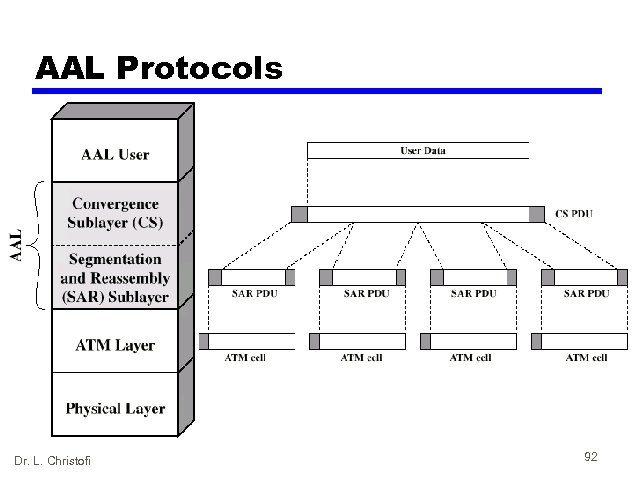 AAL Protocols Dr. L. Christofi 92
 AAL Types • AAL Type 1 (AAL 1) — CBR source — SAR packs and unpacks bits — Block accompanied by sequence number • AAL Type 2 (AAL 2) — VBR — Analog applications • AAL Types 3/4 (AAL 3/4) — Connectionless or connected — Message mode or stream mode • AAL Type 5 (AAL 5) — Streamlined transport for connection oriented higher layer protocols Dr. L. Christofi 93
 3. CONGESTION • What Is Congestion? — Congestion occurs when the number of packets being transmitted through the network approaches the packet handling capacity of the network — Congestion control aims to keep number of packets below level at which performance falls off dramatically — Data network is a network of queues — Generally 80% utilization is critical — Finite queues mean data may be lost Dr. L. Christofi 94
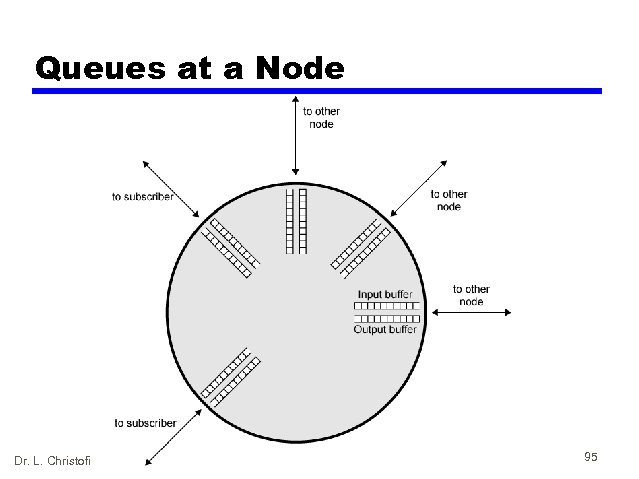 Queues at a Node Dr. L. Christofi 95
 Effects of Congestion • • Packets arriving are stored at input buffers Routing decision made Packet moves to output buffer Packets queued for output transmitted as fast as possible — Statistical time division multiplexing • If packets arrive to fast to be routed, or to be output, buffers will fill • Can discard packets • Can use flow control — Can propagate congestion through network Dr. L. Christofi 96
 Practical Performance • Ideal assumes infinite buffers and no overhead • Buffers are finite • Overheads occur in exchanging congestion control messages Dr. L. Christofi 97
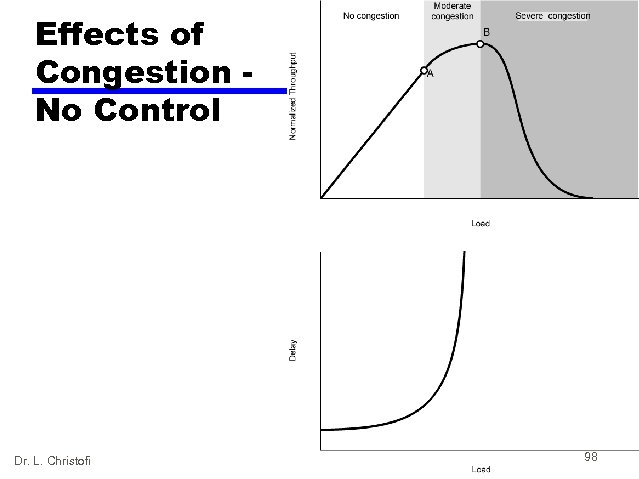 Effects of Congestion No Control Dr. L. Christofi 98
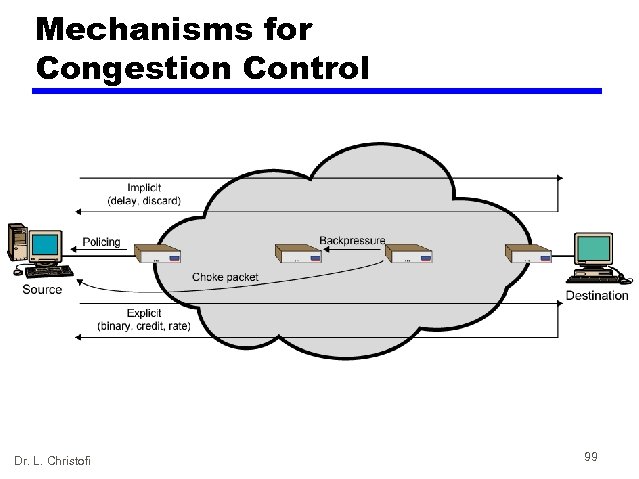 Mechanisms for Congestion Control Dr. L. Christofi 99
 Backpressure • If node becomes congested it can slow down or halt flow of packets from other nodes • May mean that other nodes have to apply control on incoming packet rates • Propagates back to source • Can restrict to logical connections generating most traffic • Used in connection oriented that allow hop by hop congestion control (e. g. X. 25) • Not used in ATM nor frame relay • Only recently developed for IP Dr. L. Christofi 100
 Choke Packet • Control packet — Generated at congested node — Sent to source node — e. g. ICMP source quench • From router or destination • Source cuts back until no more source quench message • Sent for every discarded packet, or anticipated • Rather crude mechanism Dr. L. Christofi 101
 Implicit Congestion Signaling • Transmission delay may increase with congestion • Packet may be discarded • Source can detect these as implicit indications of congestion • Useful on connectionless (datagram) networks — e. g. IP based • (TCP includes congestion and flow control - see chapter 17) • Used in frame relay LAPF Dr. L. Christofi 102
 Explicit Congestion Signaling • Network alerts end systems of increasing congestion • End systems take steps to reduce offered load • Backwards — Congestion avoidance in opposite direction to packet required • Forwards — Congestion avoidance in same direction as packet required Dr. L. Christofi 103
 Categories of Explicit Signaling • Binary — A bit set in a packet indicates congestion • Credit based — Indicates how many packets source may send — Common for end to end flow control • Rate based — Supply explicit data rate limit — e. g. ATM Dr. L. Christofi 104
 Traffic Management • Fairness • Quality of service — May want different treatment for different connections • Reservations — e. g. ATM — Traffic contract between user and network Dr. L. Christofi 105
 Congestion Control in Packet Switched Networks • Send control packet to some or all source nodes — Requires additional traffic during congestion • Rely on routing information — May react too quickly • End to end probe packets — Adds to overhead • Add congestion info to packets as they cross nodes — Either backwards or forwards Dr. L. Christofi 106
 Frame Relay Congestion Control • • Minimize discards Maintain agreed Qo. S Minimize probability of one end user monopoly Simple to implement — Little overhead on network or user • • • Create minimal additional traffic Distribute resources fairly Limit spread of congestion Operate effectively regardless of traffic flow Minimum impact on other systems Minimize variance in Qo. S Dr. L. Christofi 107
 Traffic Rate Management • Must discard frames to cope with congestion — Arbitrarily, no regard for source — No reward for restraint so end systems transmit as fast as possible — Committed information rate (CIR) • Data in excess of this liable to discard • Not guaranteed • Aggregate CIR should not exceed physical data rate • Committed burst size • Excess burst size Dr. L. Christofi 108
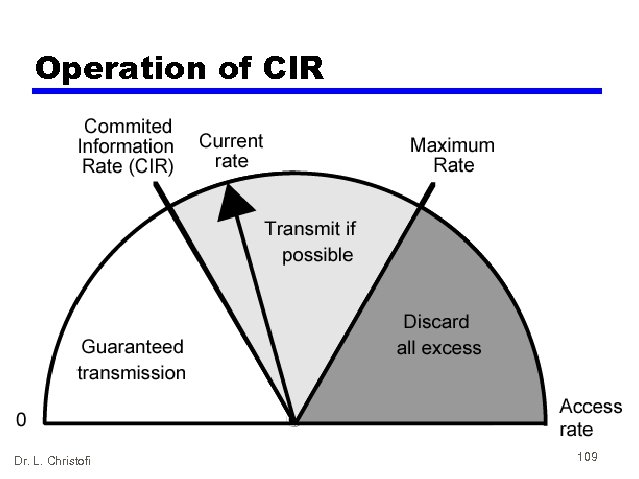 Operation of CIR Dr. L. Christofi 109
 ATM Traffic Management • High speed, small cell size, limited overhead bits • Still evolving • Requirements — Majority of traffic not amenable to flow control — Feedback slow due to reduced transmission time compared with propagation delay — Wide range of application demands — Different traffic patterns — Different network services — High speed switching and transmission increases volatility Dr. L. Christofi 110
 Cell Delay Variation • • • For ATM voice/video, data is a stream of cells Delay across network must be short Rate of delivery must be constant There will always be some variation in transit Delay cell delivery to application so that constant bit rate can be maintained to application Dr. L. Christofi 111
 Network Contribution to Cell Delay Variation • Packet switched networks — Queuing delays — Routing decision time • Frame relay — As above but to lesser extent • ATM — Less than frame relay — ATM protocol designed to minimize processing overheads at switches — ATM switches have very high throughput — Only noticeable delay is from congestion — Must not accept load that causes congestion Dr. L. Christofi 112
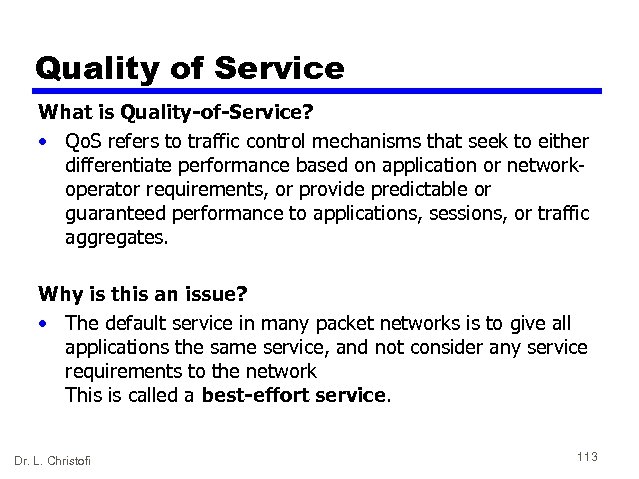 Quality of Service What is Quality-of-Service? • Qo. S refers to traffic control mechanisms that seek to either differentiate performance based on application or networkoperator requirements, or provide predictable or guaranteed performance to applications, sessions, or traffic aggregates. Why is this an issue? • The default service in many packet networks is to give all applications the same service, and not consider any service requirements to the network This is called a best-effort service. Dr. L. Christofi 113
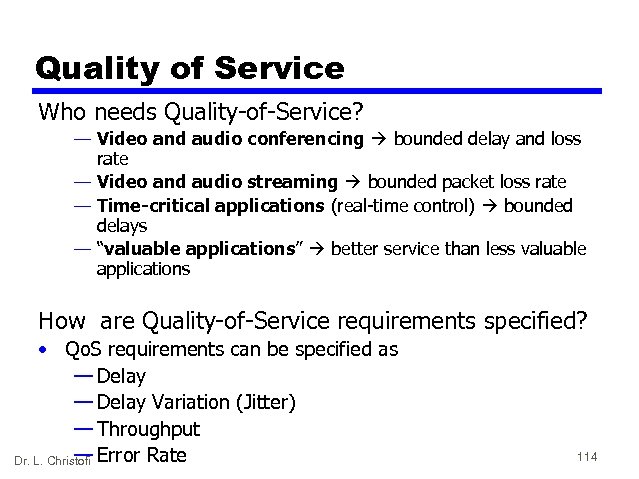 Quality of Service Who needs Quality-of-Service? — Video and audio conferencing bounded delay and loss rate — Video and audio streaming bounded packet loss rate — Time-critical applications (real-time control) bounded delays — “valuable applications” better service than less valuable applications How are Quality-of-Service requirements specified? • Qo. S requirements can be specified as — Delay Variation (Jitter) — Throughput — Dr. L. Christofi Error Rate 114
 References • W. Stalling, Local and Metropolitan Area Networks, 6 th edition, Prentice Hall, 2000 • B. A. Forouzan, Data Communications and Networking, 3 rd edition, Mc. Graw-Hill, 2004 • W. Stallings, Data and Computer Communications, 7 th edition, Prentice Hall, 2004 • F. Halsall, Data Communications, Computer Networks and Open Systems, 4 th edition, Addison Wesley, 1995 Dr. L. Christofi 115