


 Скачать презентацию LMS Selecting the Right Tool Kevin Corcoran Assoc
f9677009a066a94f75d2f446b4b4fc0f.ppt
- Количество слайдов: 19
 LMS: Selecting the Right Tool Kevin Corcoran Assoc. Executive Director CT Distance Learning Consortium George F. Claffey Jr. Chief Information Officer CTDLC & Charter Oak State College
 CTDLC: Who We Are • Consortium, 50+ Members • 10 Years Experience providing e. Learning Experience in Northeast • Non-Profit, State Agency, Higher-Ed Space
 CTDLC: What We Do • Provide e. Learning services • Implementation, project management, and best practices consulting • Instructional Design • Tech Support (Helpdesk) • SIS Integration • Remote Management / Hosted Services • Custom Development
 Who We Support • Higher Education – 2 -Year & 4 -Year – Public & Private • • K-12 and Adult Ed Program Non-Profits State Agencies Corporate (training)
 What Do We Support • Learning Management Systems – Angel – Moodle – Blackboard Vista – Blackboard Enterprise Edition • Ancillary Products – Adobe Connect – Elluminate – i. Tunes U – Misc. Web 2. 0 (Wikis, Blogs, etc. )
 What We’ve Developed • e. Portfolio – Multi-use portfolio focusing on the student • e. Tutoring – Collaborative online tutoring platform • Virtual Learning Center – CT State Virtual High School
 Why Are Institutions Using LMS? -Supporting an Online Program -Hybrid Learning -Augment On-Ground Courses -Informational Portal -Prospective Students: Technological Competitiveness -Continuing Ed / Adult Learners -Multi-Institution Partnership Programs
 Catalysts for Change • • • Cost / Cost Avoidance Vendor Experience / Roadmap Product Features Support / Supportability / Resources SIS Integration
 Considerations • • Required Core Functionality Product Learning Curve Interoperability with existing systems Integration Scalability Migration Resources required
 Required Core Functionality • What are “Must Have’s” – Multi-institutional – Portal – Branding – Portability (offline, pda, smartphone/iphone) – Adaptive Learning / Assessment – Suite of Complimentary Products
 Product Learning Curve • Faculty Adoption – Easy to use for beginners – Rich feature set for sophisticated users • Student Adoption – Easy to Use – Community features
 Interoperability • Third-Party Tools (Respondus, Soft. Chalk, Lectora, Turn-It-In) • Publisher Content • Co-Production • SCORM and IMS Compliant – IMS (Instructional Management Systems)- specs and standards that allow system/data integration – SCORM (Sharable Content Object Reference Model)specs and standards allowing portable course content
 Integration • Single Sign-on – Directory Services – Public Cookie • SIS Integration – Real-Time (message broker vs. direct connection) – Batch – Business Rules • Data Stream Security
 Scalability How many users are we going to connect at the same time? ? ? Shared • Multiple Institutions on same infrastructure • Economies of Scale create significant cost savings • May Create Limits (branding, customization, etc. ) Dedicated • Single Server (serves as both app and DB) • Dedicated App and Database • Clustered (Load-Balanced) • High-Availability (Redundant)
 Migration • IMS Compliant Import / Export – Batch vs. Individual – Clean-up – Rebuild
 Resources Required • In-House – Number of FTE to support – 24/7/365 vs Office Hours Support – OS / Server Support – Network / Security / Storage Support – Application Tier / Database Tier Support – End-User Support – Project Management – Training (Faculty & Student)
 Resources Required • ASP Support – – – Additional Budget Local Project Management Local End-User Support Manager Training (Faculty & Student) Who is supporting integration? – – – – Number of FTE to support 24/7/365 vs Office Hour Support OS / Server Support Network / Security / Storage Support Application Tier / Database Tier Support End-User Support Project Management Training (Faculty & Student)
 Decision Committee • Create an Inclusive decision committee – Can’t solely be an Academics or IT decision – Diverse group can create campus-wide buy-in – Survey all your potential users • Document your research – Share the findings with the stakeholders – Let them understand the ‘whys’: benefits, risks, etc. – Create a Scoring Rubric
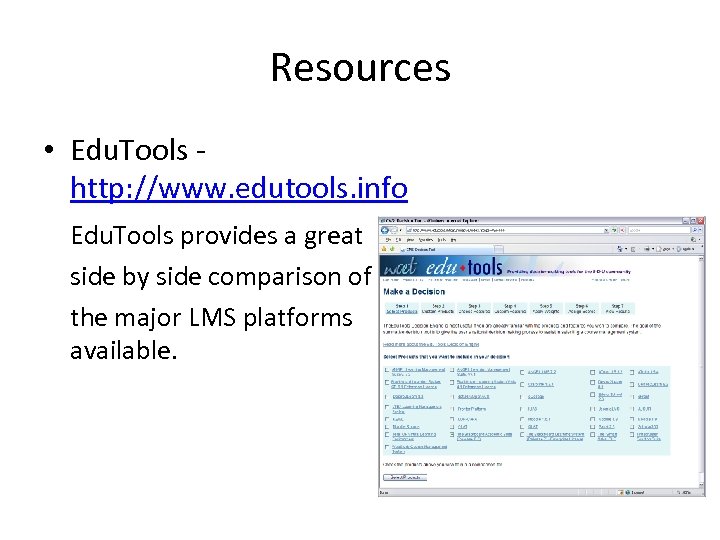 Resources • Edu. Tools http: //www. edutools. info Edu. Tools provides a great side by side comparison of the major LMS platforms available.