


 Скачать презентацию Life Size Video Center New Product Introduction
0588cf1df632efc46bff62a8a72d676e.ppt
- Количество слайдов: 55
 ® Life. Size Video Center New Product Introduction Training April 2010 - Life. Size Confidential. For Internal Partner Use Only © 2004 Life. Size Communications. Confidential - do not copy.
 Agenda • Market Overview, Applications & Use Cases • Streaming Background • Current Solutions • Life. Size Solution è 220 s + Video Center • Product Tour • Tools & Resources • How to Demo & Sell • Overcoming Objections • Wrap-up 2 - Life. Size Confidential. For Internal Partner Use Only -
 Market Overview • Organizations need a solution to broadcast video and data, over the internet, to large audiences - both live and on-demand • The market for these products is large and growing è $437 M and growing at 30%1 • Solutions available today are expensive, cumbersome, and of poor quality • Life. Size Video Center defines a new approach to Recording/Streaming from video endpoints that brings tremendous benefits è Unmatched performance è Simple to deploy, single appliance solution è Simple to use, push button recording and auto-publishing 1: Wainhouse Research 3 - Life. Size Confidential. For Internal Partner Use Only -
 Target Applications • Executive & Corporate Communication è Communicate with employees across your organization and around the world both live and on demand • Training è Extend training to employees in High Definition for greater engagement and understanding wherever and whenever they are • Education & Distance Learning è Broadcast and record classes at the press of a button. Bring faculty to students across distance without compromises in quality • Healthcare è 4 Extend medical expertise without boundaries. Monitor and serve patients remotely in the highest quality - Life. Size Confidential. For Internal Partner Use Only -
 Use Case: Community College è Problem • Want to allow students to attend class, even if they can’t appear in person • School shutdowns for weather, flu, etc. • Want to enrich curriculum and improve learning • To be utilized, the solution must be simple to use è Solution • Life. Size Video Center allows students to watch a lecture from the convenience of their home PC • Class can continue despite weather or illness • Students can re-watch lectures to prepare for exams • Push-button recording and automatic publishing drives adoption 5 - Life. Size Confidential. For Internal Partner Use Only -
 Use Case: Executive Communications è Problem • VP of Operations, with teams around the globe, needs a way to communicate effectively with the team • Looking for a way to break down cultural, language, and time zone barriers that plague voice conference calls • The solution must be simple to use and high quality è Solution • Life. Size Video Center allows executives to quickly and simply record and broadcast video messages • Employees can view the recording live or on-demand from their PC, anywhere in the world • Video Center can be used in conjunction with a voice conference call to allow viewers to ask questions at the end of the call 6 - Life. Size Confidential. For Internal Partner Use Only -
 Agenda • Market Overview, Applications & Use Cases • Streaming Background • Current Solutions • Life. Size Solution è 220 s + Video Center • Product Tour • Tools & Resources • How to Demo & Sell • Overcoming Objections • Wrap-up 7 - Life. Size Confidential. For Internal Partner Use Only -
 What is Streaming? Streaming is a way to deliver rich media (audio, video, and content) to large numbers of users on the internet • Live or On-Demand è Broadcast video live, or record it for on-demand playback • Examples è You. Tube, Hulu, Daily. Motion • Business Applications Executive & Corporate Communication è Training è Education & Distance Learning è Healthcare è 8 - Life. Size Confidential. For Internal Partner Use Only -
 Streaming vs. Video Conferencing • Streaming is good for communications that are 1 to many • Streaming is a one-way communication • Streaming is available both live and ondemand • Streaming does not require viewers to have video endpoints, only a computer 9 - Life. Size Confidential. For Internal Partner Use Only -
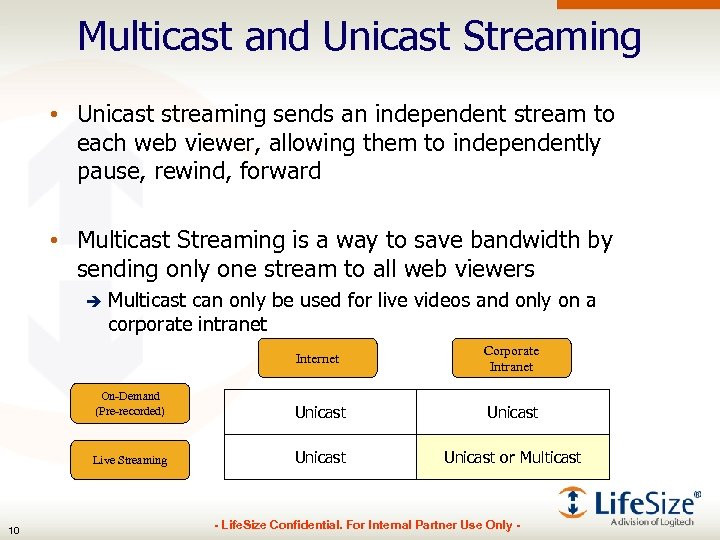 Multicast and Unicast Streaming • Unicast streaming sends an independent stream to each web viewer, allowing them to independently pause, rewind, forward • Multicast Streaming is a way to save bandwidth by sending only one stream to all web viewers è Multicast can only be used for live videos and only on a corporate intranet Internet On-Demand (Pre-recorded) Unicast Live Streaming 10 Corporate Intranet Unicast or Multicast - Life. Size Confidential. For Internal Partner Use Only -
 Multicast Streaming • Multicast only applies to Live Streaming on a corporate intranet è Multicast cannot be used for on-demand playback or for streaming over the regular internet • Multicast requires that the corporate intranet is ‘multicast enabled’ è Requires network engineers to architect the network to support multicast media • Today, only Windows Media and Quick. Time Media players support Multicast • Life. Size Video Center does not offer native Multicast in the current release 11 - Life. Size Confidential. For Internal Partner Use Only -
 Agenda • Market Overview, Applications & Use Cases • Streaming Background • Current Solutions • Life. Size Solution è 220 s + Video Center • Product Tour • Tools & Resources • How to Demo & Sell • Overcoming Objections • Wrap-up 12 - Life. Size Confidential. For Internal Partner Use Only -
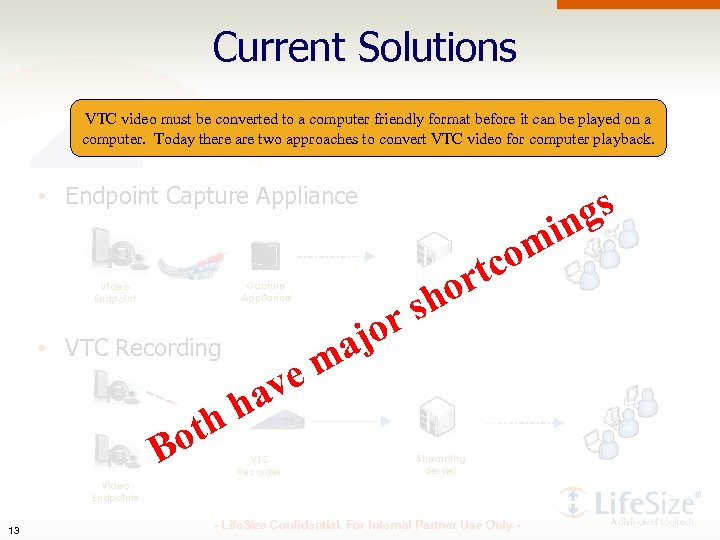 Current Solutions VTC video must be converted to a computer friendly format before it can be played on a computer. Today there are two approaches to convert VTC video for computer playback. • Endpoint Capture Appliance om tc or sh or aj em Capture Appliance Video Endpoint gs in • VTC Recording Streaming Server av h h ot B VTC Recorder Streaming Server Video Endpoints 13 - Life. Size Confidential. For Internal Partner Use Only -
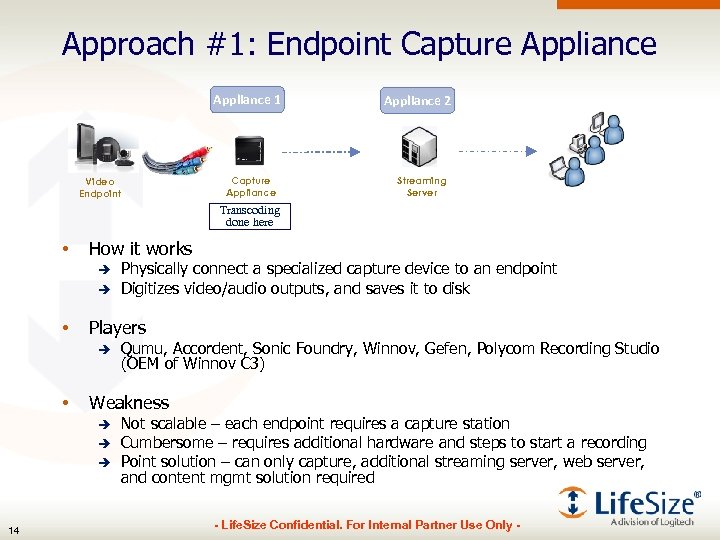 Approach #1: Endpoint Capture Appliance 1 Capture Appliance Video Endpoint Appliance 2 Streaming Server Transcoding done here • How it works è è • Players è • Qumu, Accordent, Sonic Foundry, Winnov, Gefen, Polycom Recording Studio (OEM of Winnov C 3) Weakness è è è 14 Physically connect a specialized capture device to an endpoint Digitizes video/audio outputs, and saves it to disk Not scalable – each endpoint requires a capture station Cumbersome – requires additional hardware and steps to start a recording Point solution – can only capture, additional streaming server, web server, and content mgmt solution required - Life. Size Confidential. For Internal Partner Use Only -
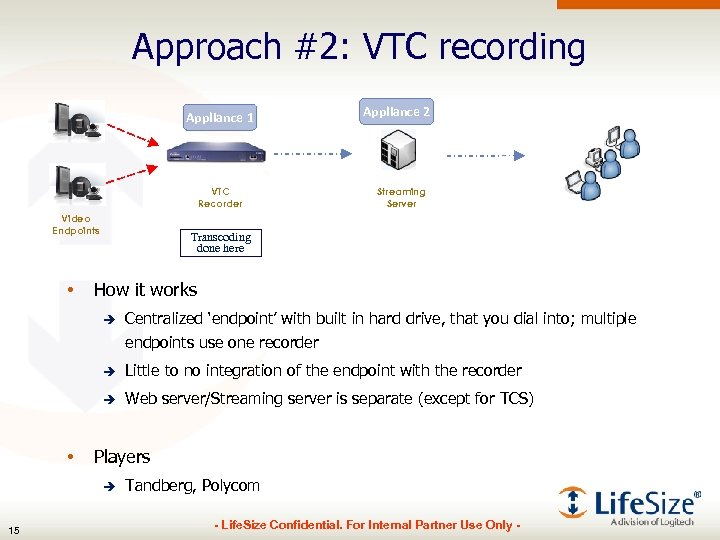 Approach #2: VTC recording Appliance 1 VTC Recorder Video Endpoints • Appliance 2 Streaming Server Transcoding done here How it works è è Little to no integration of the endpoint with the recorder è • Centralized ‘endpoint’ with built in hard drive, that you dial into; multiple endpoints use one recorder Web server/Streaming server is separate (except for TCS) Players è 15 Tandberg, Polycom - Life. Size Confidential. For Internal Partner Use Only -
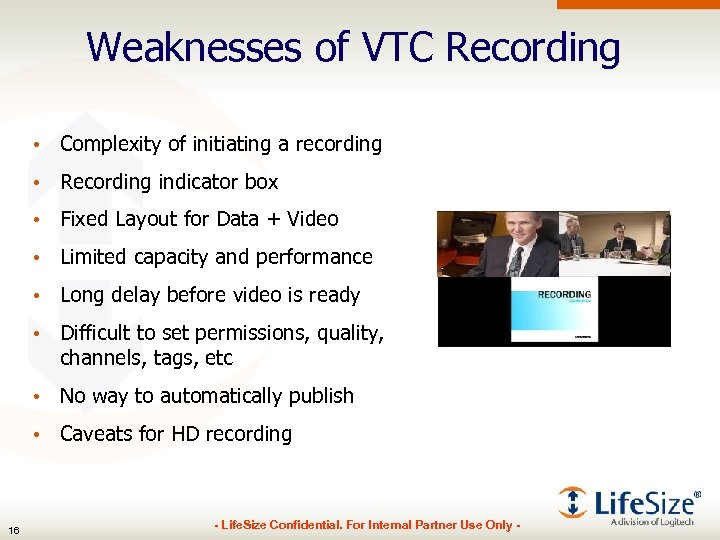 Weaknesses of VTC Recording • Complexity of initiating a recording • Recording indicator box • Fixed Layout for Data + Video • Limited capacity and performance • Long delay before video is ready • Difficult to set permissions, quality, channels, tags, etc • No way to automatically publish • Caveats for HD recording 16 - Life. Size Confidential. For Internal Partner Use Only -
 Agenda • Market Overview, Applications & Use Cases • Streaming Background • Current Solutions • Life. Size Solution è 220 s + Video Center • Product Tour • Tools & Resources • How to Demo & Sell • Overcoming Objections • Wrap-up 17 - Life. Size Confidential. For Internal Partner Use Only -
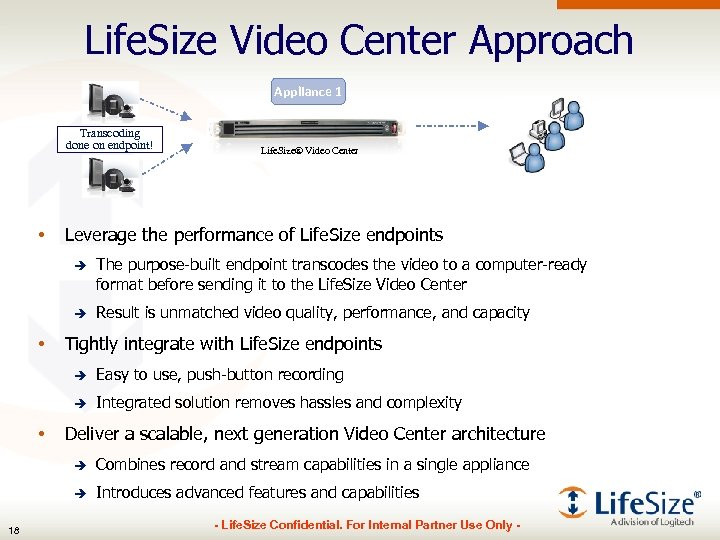 Life. Size Video Center Approach Appliance 1 Transcoding done on endpoint! • Life. Size® Video Center Leverage the performance of Life. Size endpoints è è • The purpose-built endpoint transcodes the video to a computer-ready format before sending it to the Life. Size Video Center Result is unmatched video quality, performance, and capacity Tightly integrate with Life. Size endpoints è è • Easy to use, push-button recording Integrated solution removes hassles and complexity Deliver a scalable, next generation Video Center architecture è è 18 Combines record and stream capabilities in a single appliance Introduces advanced features and capabilities - Life. Size Confidential. For Internal Partner Use Only -
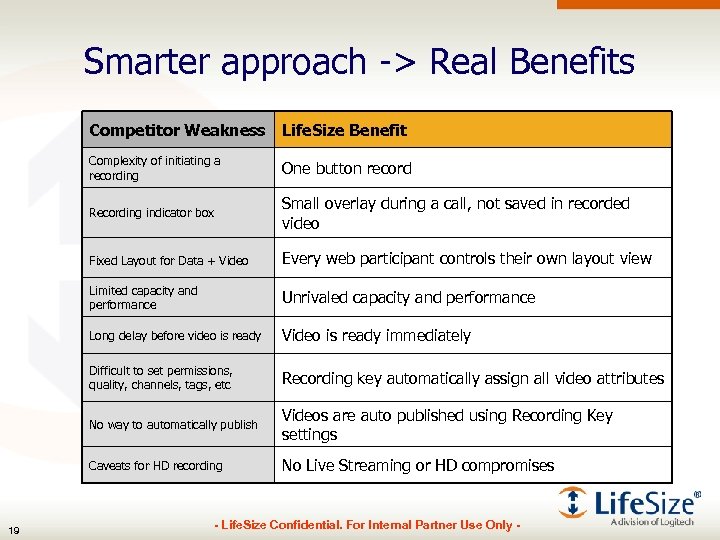 Smarter approach -> Real Benefits Competitor Weakness Complexity of initiating a recording One button record Recording indicator box Small overlay during a call, not saved in recorded video Fixed Layout for Data + Video Every web participant controls their own layout view Limited capacity and performance Unrivaled capacity and performance Long delay before video is ready Video is ready immediately Difficult to set permissions, quality, channels, tags, etc Recording key automatically assign all video attributes No way to automatically publish Videos are auto published using Recording Key settings Caveats for HD recording 19 Life. Size Benefit No Live Streaming or HD compromises - Life. Size Confidential. For Internal Partner Use Only -
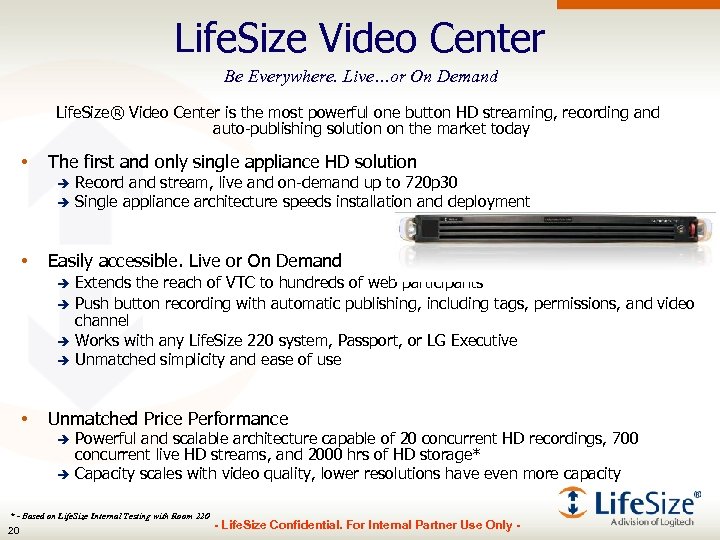 Life. Size Video Center Be Everywhere. Live…or On Demand Life. Size® Video Center is the most powerful one button HD streaming, recording and auto-publishing solution on the market today • The first and only single appliance HD solution Record and stream, live and on-demand up to 720 p 30 è Single appliance architecture speeds installation and deployment è • Easily accessible. Live or On Demand Extends the reach of VTC to hundreds of web participants è Push button recording with automatic publishing, including tags, permissions, and video channel è Works with any Life. Size 220 system, Passport, or LG Executive è Unmatched simplicity and ease of use è • Unmatched Price Performance Powerful and scalable architecture capable of 20 concurrent HD recordings, 700 concurrent live HD streams, and 2000 hrs of HD storage* è Capacity scales with video quality, lower resolutions have even more capacity è * - Based on Life. Size Internal Testing with Room 220 20 - Life. Size Confidential. For Internal Partner Use Only -
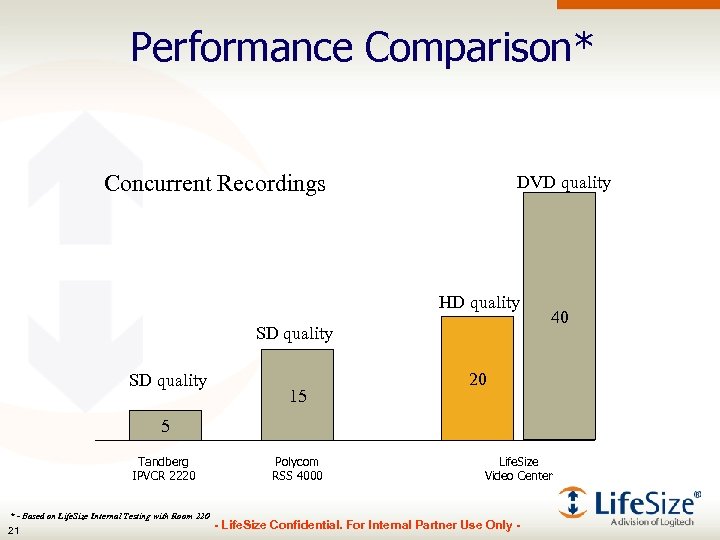 Performance Comparison* Concurrent Recordings DVD quality HD quality SD quality 15 40 20 5 Tandberg IPVCR 2220 * - Based on Life. Size Internal Testing with Room 220 21 Polycom RSS 4000 Life. Size Video Center - Life. Size Confidential. For Internal Partner Use Only -
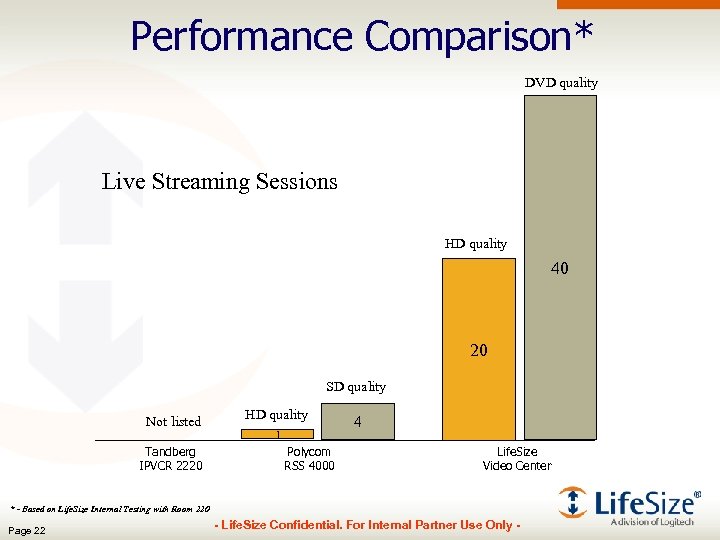 Performance Comparison* DVD quality Live Streaming Sessions HD quality 40 20 SD quality Not listed Tandberg IPVCR 2220 HD quality 1 Polycom RSS 4000 4 Life. Size Video Center * - Based on Life. Size Internal Testing with Room 220 Page 22 - Life. Size Confidential. For Internal Partner Use Only -
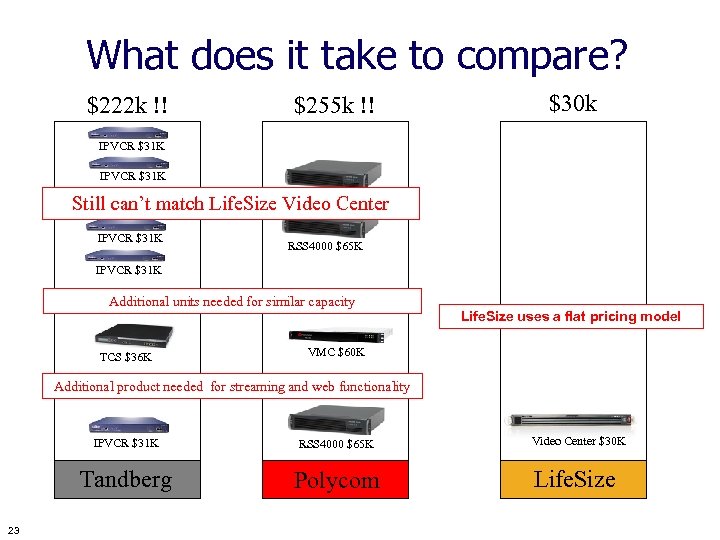 What does it take to compare? $222 k !! $30 k $255 k !! IPVCR $31 K RSS 4000 $65 K Still can’t match Life. Size Video Center IPVCR $31 K RSS 4000 $65 K IPVCR $31 K Additional units needed for similar capacity TCS $36 K Life. Size uses a flat pricing model VMC $60 K Additional product needed for streaming and web functionality IPVCR $31 K Tandberg 23 RSS 4000 $65 K Polycom - Life. Size Confidential. For Internal Partner Use Only - Video Center $30 K Life. Size
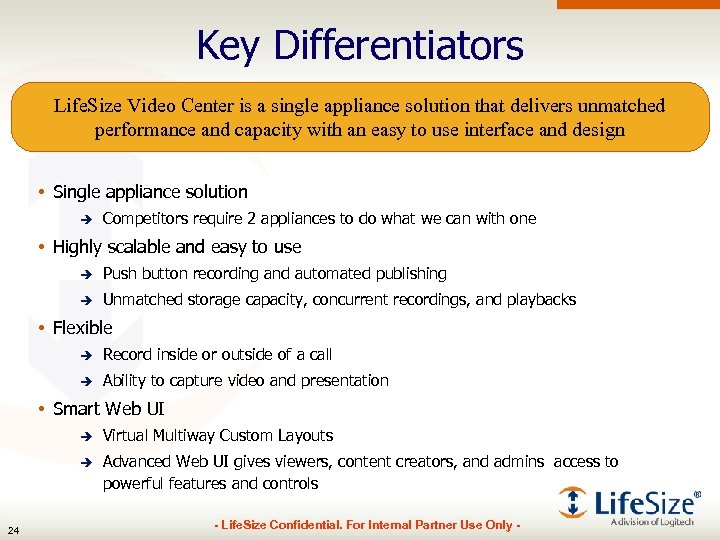 Key Differentiators Life. Size Video Center is a single appliance solution that delivers unmatched performance and capacity with an easy to use interface and design • Single appliance solution è Competitors require 2 appliances to do what we can with one • Highly scalable and easy to use è Push button recording and automated publishing è Unmatched storage capacity, concurrent recordings, and playbacks • Flexible è Record inside or outside of a call è Ability to capture video and presentation • Smart Web UI è è 24 Virtual Multiway Custom Layouts Advanced Web UI gives viewers, content creators, and admins access to powerful features and controls - Life. Size Confidential. For Internal Partner Use Only -
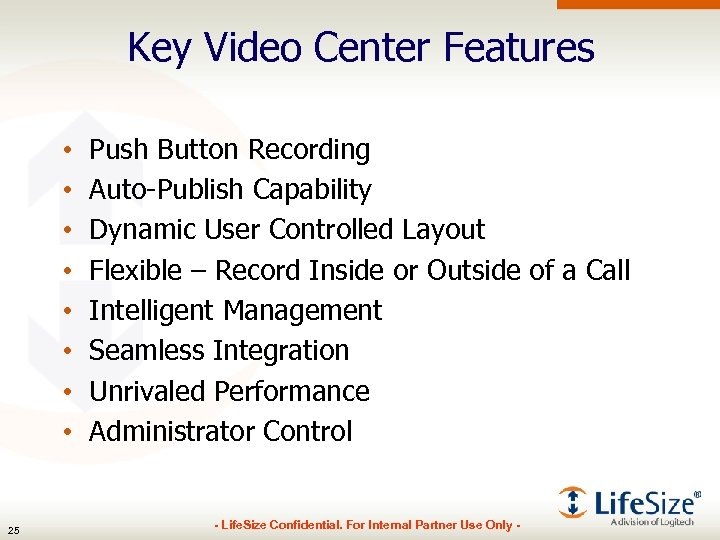 Key Video Center Features • • 25 Push Button Recording Auto-Publish Capability Dynamic User Controlled Layout Flexible – Record Inside or Outside of a Call Intelligent Management Seamless Integration Unrivaled Performance Administrator Control - Life. Size Confidential. For Internal Partner Use Only -
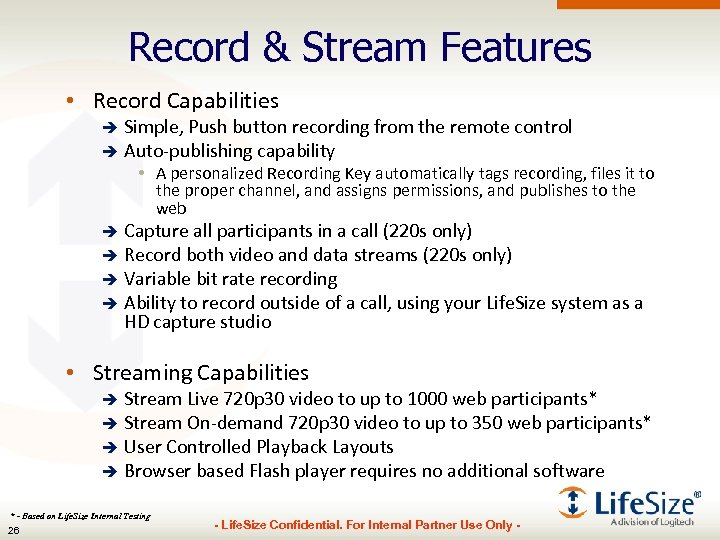 Record & Stream Features • Record Capabilities Simple, Push button recording from the remote control è Auto-publishing capability è • A personalized Recording Key automatically tags recording, files it to the proper channel, and assigns permissions, and publishes to the web Capture all participants in a call (220 s only) è Record both video and data streams (220 s only) è Variable bit rate recording è Ability to record outside of a call, using your Life. Size system as a HD capture studio è • Streaming Capabilities Stream Live 720 p 30 video to up to 1000 web participants* è Stream On-demand 720 p 30 video to up to 350 web participants* è User Controlled Playback Layouts è Browser based Flash player requires no additional software è * - Based on Life. Size Internal Testing 26 - Life. Size Confidential. For Internal Partner Use Only -
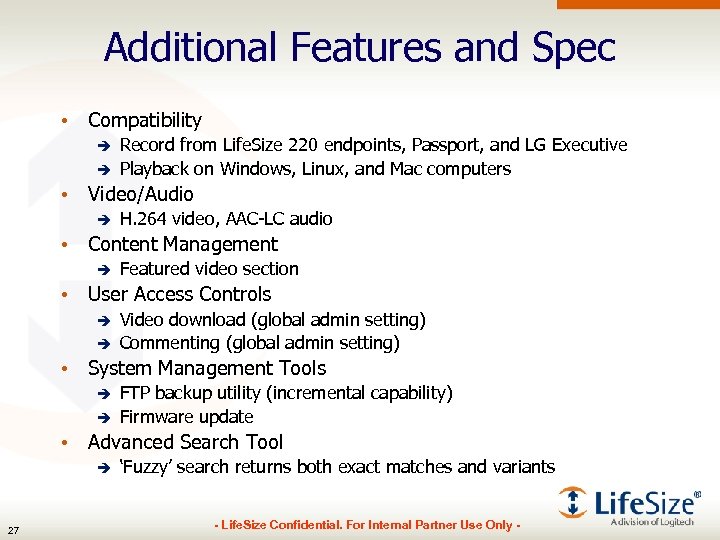 Additional Features and Spec • Compatibility è è Record from Life. Size 220 endpoints, Passport, and LG Executive Playback on Windows, Linux, and Mac computers • Video/Audio è H. 264 video, AAC-LC audio • Content Management è Featured video section • User Access Controls è è Video download (global admin setting) Commenting (global admin setting) • System Management Tools è è FTP backup utility (incremental capability) Firmware update • Advanced Search Tool è 27 ‘Fuzzy’ search returns both exact matches and variants - Life. Size Confidential. For Internal Partner Use Only -
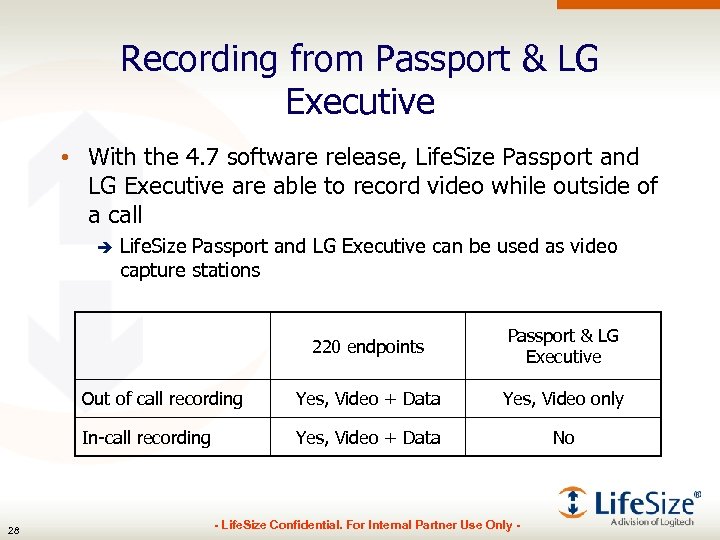 Recording from Passport & LG Executive • With the 4. 7 software release, Life. Size Passport and LG Executive are able to record video while outside of a call è Life. Size Passport and LG Executive can be used as video capture stations 220 endpoints Out of call recording Yes, Video + Data Yes, Video only In-call recording 28 Passport & LG Executive Yes, Video + Data No - Life. Size Confidential. For Internal Partner Use Only -
 Agenda • Market Overview, Applications & Use Cases • Streaming Background • Current Solutions • Life. Size Solution è 220 s + Video Center • Product Tour • Tools & Resources • How to Demo & Sell • Overcoming Objections • Wrap-up 29 - Life. Size Confidential. For Internal Partner Use Only -
 Video Center Demo Site • To really experience the full solution, you need to record from a 220 system with 4. 6 software to Video Center and watch the stream live through your web browser • You can experience just the Video Center piece at: • http: //videocenter. demo. lifesize. com You will only see what “Anonymous Viewers” can see è To see what administrators or content creators would see, buy a demo system and/or contact your local SE è To record to Video Center from your 220 system, buy a demo Video Center and/or contact your local SE è 30 - Life. Size Confidential. For Internal Partner Use Only -
 Setting up the endpoint • Before you can record from your 220 endpoint, you must first point it to your Video Center • Administrator Preferences->Video Enable/Disable Stream/Record è IP address of Video Center è Port è Default Recording Key (optional) è • If a default Recording Key is specified, then when the record button is pressed, the system will not prompt you for a Recording Key, it will simply begin recording 31 - Life. Size Confidential. For Internal Partner Use Only -
 Start/Stop Recording • To record while outside of a call è Go to your ‘Self View’ (green button), ensure the camera is pointed at what you want to record, press ‘Record’ (blue button) • To record during a video call è Press ‘Record’ (blue button) • Stop recording by pressing blue button again • You cannot pause or rewind a recording è Instead, simply press stop and then record again 32 - Life. Size Confidential. For Internal Partner Use Only -
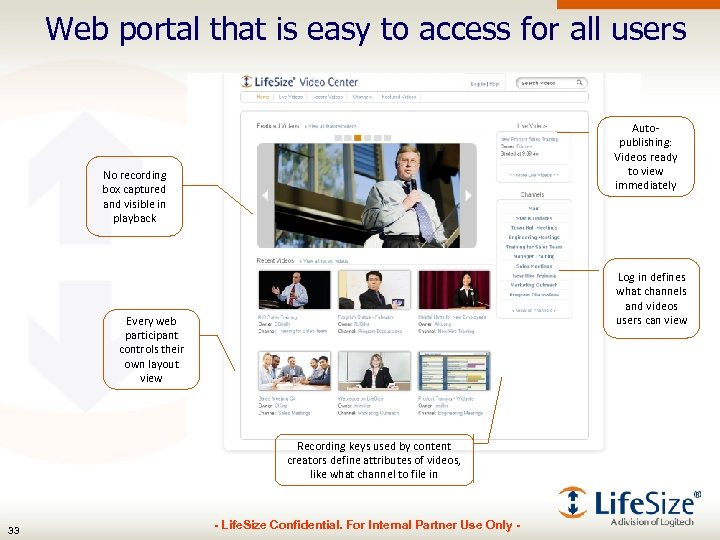 Web portal that is easy to access for all users Autopublishing: Videos ready to view immediately No recording box captured and visible in playback Log in defines what channels and videos users can view Every web participant controls their own layout view Recording keys used by content creators define attributes of videos, like what channel to file in 33 - Life. Size Confidential. For Internal Partner Use Only -
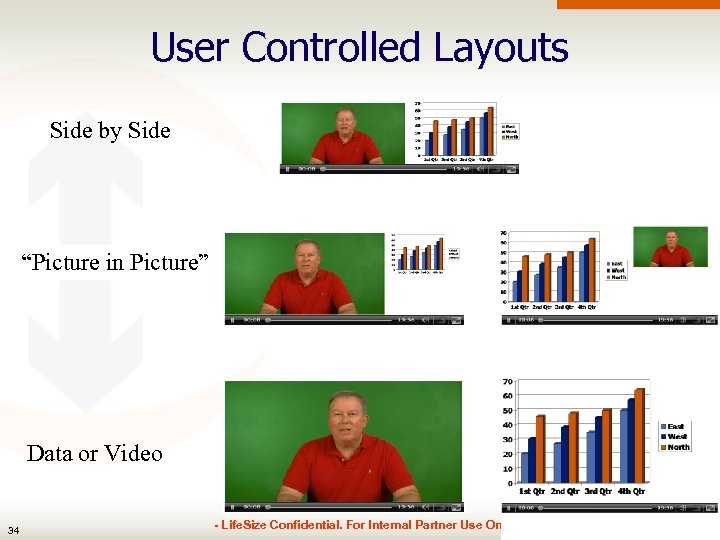 User Controlled Layouts Side by Side “Picture in Picture” Data or Video 34 - Life. Size Confidential. For Internal Partner Use Only -
 Recording Keys • Recording keys are a unique feature that enables content creators to auto-publish their videos • Content creators simply press record, enter their key and they’re done! They don’t have to do anything else, the technology does the work for them. • The key tells Life. Size Video Center the following attributes è 35 Name, Channel, Description, Tags, Access Privileges, Live and/or Record Video, Quality level, Presentation Bandwidth - Life. Size Confidential. For Internal Partner Use Only -
 Agenda • Market Overview, Applications & Use Cases • Streaming Background • Current Solutions • Life. Size Solution è 220 s + Video Center • Product Tour • Tools & Resources • How to Demo & Sell • Overcoming Objections • Wrap-up 36 - Life. Size Confidential. For Internal Partner Use Only -
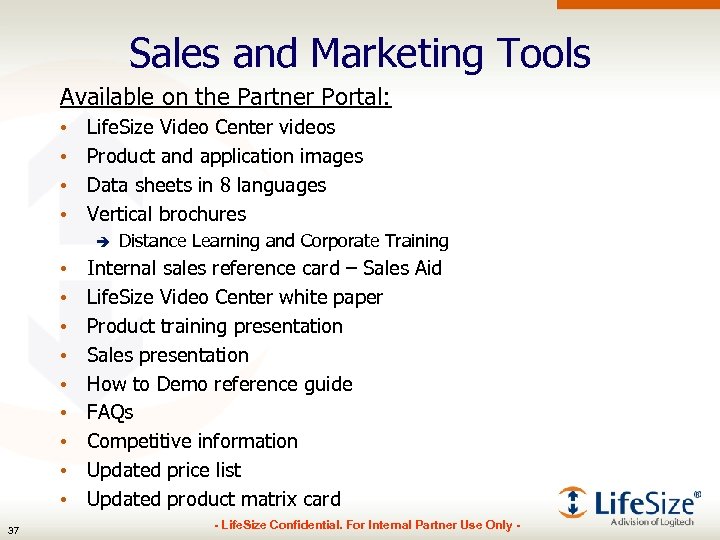 Sales and Marketing Tools Available on the Partner Portal: • • Life. Size Video Center videos Product and application images Data sheets in 8 languages Vertical brochures è • • • 37 Distance Learning and Corporate Training Internal sales reference card – Sales Aid Life. Size Video Center white paper Product training presentation Sales presentation How to Demo reference guide FAQs Competitive information Updated price list Updated product matrix card - Life. Size Confidential. For Internal Partner Use Only -
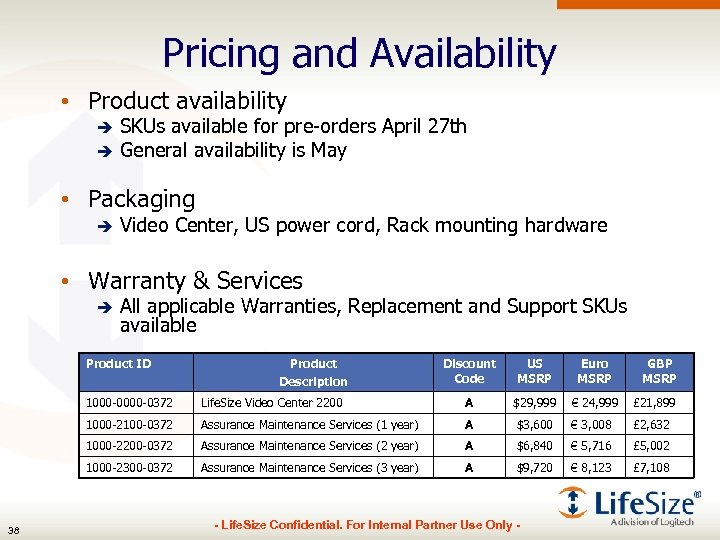 Pricing and Availability • Product availability SKUs available for pre-orders April 27 th è General availability is May è • Packaging è Video Center, US power cord, Rack mounting hardware • Warranty & Services è All applicable Warranties, Replacement and Support SKUs available Product ID Product Description Discount Code US MSRP Euro MSRP GBP MSRP 1000 -0372 A $29, 999 € 24, 999 £ 21, 899 1000 -2100 -0372 Assurance Maintenance Services (1 year) A $3, 600 € 3, 008 £ 2, 632 1000 -2200 -0372 Assurance Maintenance Services (2 year) A $6, 840 € 5, 716 £ 5, 002 1000 -2300 -0372 38 Life. Size Video Center 2200 Assurance Maintenance Services (3 year) A $9, 720 € 8, 123 £ 7, 108 - Life. Size Confidential. For Internal Partner Use Only -
 Agenda • Market Overview, Applications & Use Cases • Streaming Background • Current Solutions • Life. Size Solution è 220 s + Video Center • Product Tour • Tools & Resources • How to Demo & Sell • Overcoming Objections • Wrap-up 39 - Life. Size Confidential. For Internal Partner Use Only -
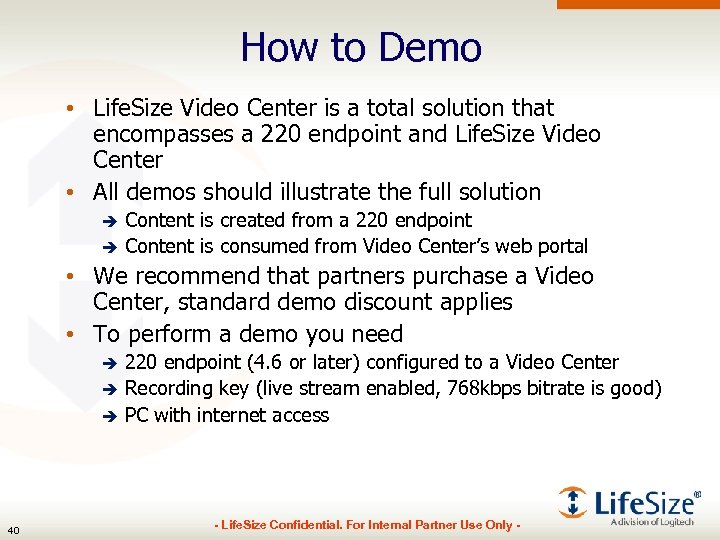 How to Demo • Life. Size Video Center is a total solution that encompasses a 220 endpoint and Life. Size Video Center • All demos should illustrate the full solution Content is created from a 220 endpoint è Content is consumed from Video Center’s web portal è • We recommend that partners purchase a Video Center, standard demo discount applies • To perform a demo you need 220 endpoint (4. 6 or later) configured to a Video Center è Recording key (live stream enabled, 768 kbps bitrate is good) è PC with internet access è 40 - Life. Size Confidential. For Internal Partner Use Only -
 Demo: Recording while in a call • On the 220 endpoint è Place a video call to another endpoint è Press record (blue button), enter recording key è Connect your PC and share presentation from your PC • Visit the Video Center Web portal on the PC è Home page has ‘Live Videos’ in right column, click the link to watch your own live stream è You will see your video and your PC being shared with about a 5 second delay è You can toggle playback layouts using the ‘toggle’ button on the web player è You can go Full Screen 41 - Life. Size Confidential. For Internal Partner Use Only -
 Demo: Recording while in a call • Items to highlight è How simple it is to begin recording è The way the video is automatically titled and published to Video Center to the right channel è How the web viewer can control toggle layouts between video and presentation è The amazing video quality è All call participants are recorded, regardless of what type of endpoint the far end è There is no intrusive recording indicator box, just a small overlay, which isn’t seen on Video Center 42 - Life. Size Confidential. For Internal Partner Use Only -
 Demo: Recording out of a call • On the 220 endpoint è Navigate to Local View (green button) è Press record (blue button), enter recording key è Connect your PC and share presentation from your PC • Visit the Video Center Web portal on the PC è Home page has ‘Live Videos’ in right column, click the link to watch your own live stream è You will see your video and your PC being shared with about a 5 second delay è You can toggle playback layouts using the ‘toggle’ button on the web player è You can go Full Screen 43 - Life. Size Confidential. For Internal Partner Use Only -
 Demo: Recording out of a call • Items to highlight è You can record outside of a call! è This opens up new uses for Life. Size 220 endpoints, they can be used as video studios è How simple it is to begin recording è The way the video is automatically titled and published to Video Center to the right channel è How the web viewer can control toggle layouts between video and presentation è The amazing video quality è There is no intrusive recording indicator box, just a small overlay, which isn’t seen on Video Center 44 - Life. Size Confidential. For Internal Partner Use Only -
 Demo: Solution and Performance • New, better approach to solving how to record and stream from a video endpoint • Superior solution architecture leverages performance of Life. Size endpoint to do intensive transcode work • Unmatched performance and capacity • Push button recording • Single box solution for record and stream 45 - Life. Size Confidential. For Internal Partner Use Only -
 Demo: Web Portal • Demo the Web Portal è Visit the Video Center URL è Home page has a ‘Featured Video carousel’ at the top and recent videos below è Link to any Live Videos appears on the right side è Channels list appears on the right side • UI designed to support hundreds of channels è Search tool returns exact and similar matches è Toggle playback layout in videos that also have presentation 46 - Life. Size Confidential. For Internal Partner Use Only -
 How to Sell • Customer without video endpoints è Position 220 system for any room where they may want to record/stream • Customer with existing video endpoints è Install 220 systems in primary conference rooms, move the non-220 systems to 2 nd and 3 rd level conference rooms • Existing Stream/Record Customer è Replace competitor’s record/stream solution with Video Center + Life. Size 220 systems è Transfer any existing video content to Video Center 47 - Life. Size Confidential. For Internal Partner Use Only -
 Agenda • Market Overview, Applications & Use Cases • Streaming Background • Current Solutions • Life. Size Solution è 220 s + Video Center • Product Tour • Tools & Resources • How to Demo & Sell • Overcoming Objections • Wrap-up 48 - Life. Size Confidential. For Internal Partner Use Only -
 Overcoming Objections • • • 49 No Interop, 220 s only No Multicast No LDAP/AD Flash Only More Frequently Asked Questions & Answers can be found in the FAQ document on Partner Portal - Life. Size Confidential. For Internal Partner Use Only -
 Objection #1: Interop • Objection: è Video Center works only with Life. Size 220 systems, Passport, and LG Executive • Resolution è The tight integration of Life. Size Video Center and the 220 system is what enables our Recording and Streaming solution to overcome the many shortcomings of the current SIP/H. 323 recorders. • It allows for numerous benefits including auto-publishing, unmatched performance, no processing delay, no large recording indicator è Non-220 system cannot initiate a recording, but they can be part of a recording that is hosted on a 220 system • Any endpoint that is in a video call with a 220 system can be recorded to Life. Size Video Center, including 3 rd party systems. 50 - Life. Size Confidential. For Internal Partner Use Only -
 Objection #2: No Multicast • Objection: è • Background Information è è • Video Center does not have Multicast support Multicast is a way to send one stream to many people at once, minimizing network traffic Multicast can only be used for Live Streaming on a Corporate Intranet Resolution è è Multicast is useful only for live streaming on a corporate intranet On-demand streaming is all Unicast Live Streaming over the public internet is all Unicast In order to use Multicast, the corporate network must be specially configured by a network engineer • • è 51 Routers must be configured LAN Reflectors must be installed If the customer insists on multicast, Multipoint Extension is a good Recording and Streaming with built in Multicast support - Life. Size Confidential. For Internal Partner Use Only -
 Objection #3: No LDAP/AD Support • Objection: è Video Center does not have integrated LDAP/AD Support • Resolution è 52 Video Center has built in user management tools that offer robust control at both user and group levels - Life. Size Confidential. For Internal Partner Use Only -
 Objection #4: Flash Only • Objection: è Video Center only supports one media format - Flash • Resolution 99% of computers have Flash installed. è It’s cross platform - working on PCs, Macs, and Linux machines è It’s the leading format of mobile media è 53 - Life. Size Confidential. For Internal Partner Use Only -
 Agenda • Market Overview, Applications & Use Cases • Streaming Background • Current Solutions • Life. Size Solution è 220 s + Video Center • Product Tour • Tools & Resources • How to Demo & Sell • Overcoming Objections • Wrap-up 54 - Life. Size Confidential. For Internal Partner Use Only -
 Wrap Up • Key Dates Product Announcement – April 27 th è General Availability – late-May; MSRP - $29, 999 USD è • Key points Life. Size Video Center uses a new, better approach to record/stream from video endpoints è This new approach yields unmatched performance and capacity è Single appliance solution enables fast, simple deployment è Tight integration with 220 endpoints allows for simple pushbutton recording and auto-publishing, inside & outside a call è Be Everywhere. Live…or On-Demand è 55 - Life. Size Confidential. For Internal Partner Use Only -