


 Скачать презентацию Lessons of UNIX GMT FORTRAN Naota Hanasaki IIS UT LOGO
53e3c2f86176f5b924bf14dc68389c3f.ppt
- Количество слайдов: 96
 Lessons of UNIX/GMT/FORTRAN Naota Hanasaki IIS, UT LOGO PRism project DRAFT 1
 Acknowledgement LOGO PRism project n n I thank all attendees (2002 -2005): T. Yamada, Y. Suga, A. Aslam, C. Manusthiparom, C. Apirumanekul, T. Okazawa, T. Kokubo, K. Takagaki, W. Saita, K. Kubo, Y. Koiwa, Y. Ishizaki, Q. Tang, N. S. Farzin, J. Cho, M. Lin, T. Inuzuka, T. Sakimura, D. Ikari, Y. Arai and N. Utsumi I thank all advisors (2002 -2005): Dr. T. Oki, Dr. S. Kanae, Dr. Y. Agata, Dr. S. Seto, Dr. Y. Hirabayashi, Dr. S. Miyazaki, Dr. D. Komori, Dr. Y. Shen and Dr. S. Islam 2 YOUR SITE HERE
 Table of Contents LOGO PRism project n n Introduction Lesson 1 – – n Lesson 2 – – n Linking command files Redirect/Pipe/Wildcard/Awk Lesson 3 – – n Operating UNIX Basic UNIX commands (cp, ls, etc. ) Drawing global precipitation distribution GMT scripts (xyz 2 grd, grdimage, pscoast etc. ) Lesson 4 – – Processing grid data 1 Arithmetic of grid data using simple programs 3 YOUR SITE HERE
 Table of Contents LOGO PRism project n Lesson 5 – Reading/Writing binary – Fortran IO n Lesson 6 – Processing grid data 2 – Masking grid data using simple programs n Lesson 7 – Fortran and Makefile – Useful fortran tips, function/subroutine, makefile n Lesson 8 – Bourne shell script – do-loop, for-loop, if-statement n Lesson 9 – Setting UNIX environment –. cshrc 4 YOUR SITE HERE
 Introduction Why UNIX? LOGO PRism project 5
 Introduction LOGO PRism project n An assignment of “Advanced Hydrology” in 2001 – Read the following article n Xie and Arkin 1997: Global Precipitation: A 17 -year monthly Analysis Based on Gauge Observations, Satellite Estimates and Numerical Model Outputs. BAMS, 78, 25392558 – Summarize their methodology – List up advantage/disadvantage – Compare the data with other data (station observation, global dataset, etc. ) – See the site below for original data ftp: //ftp. ncep. noaa. gov/pub/precip/cmap/mon thly/ 6 YOUR SITE HERE
 Introduction (continued) LOGO PRism project n To submit a good report, you need – Powerful computation environment n UNIX – Skill to process large data n FORTRAN (or any other language) – Skill to create beautiful/complex figures n GMT (or any graphic package) – Skill to manage iterative process n Shell script 7 YOUR SITE HERE
 Introduction (continued) LOGO PRism project n Target of this seminar – Tutorial of the assignment – Using CMAP dataset, analyze global precipitation n n How different global precipitation pattern between El Nino year, La Nina year? How many people in the world live with less than 500 mm/year? – Practical and applicable lessons for your bachelor/master/doctor research 8 YOUR SITE HERE
 Lesson 1 Basic UNIX operation (1) Fundamental UNIX commands LOGO PRism project 9
 Today’s goal LOGO PRism project n n n Where can we use UNIX? How do we log in? How do we operate UNIX? 10 YOUR SITE HERE
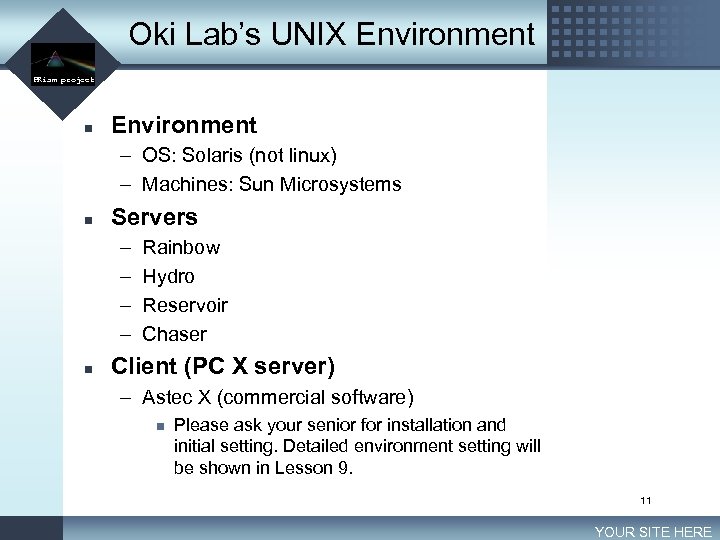 Oki Lab’s UNIX Environment LOGO PRism project n Environment – OS: Solaris (not linux) – Machines: Sun Microsystems n Servers – – n Rainbow Hydro Reservoir Chaser Client (PC X server) – Astec X (commercial software) n Please ask your senior for installation and initial setting. Detailed environment setting will be shown in Lesson 9. 11 YOUR SITE HERE
![Login/Logout LOGO PRism project n n Go to login screen Select language – [Options]-[languages]-[select]](https://present5.com/presentation/53e3c2f86176f5b924bf14dc68389c3f/image-12.jpg "Login/Logout LOGO PRism project n n Go to login screen Select language – [Options]-[languages]-[select]") Login/Logout LOGO PRism project n n Go to login screen Select language – [Options]-[languages]-[select] n n Type user name & password Open terminal window – [Third button]-[Tools]-[Terminal] 12 YOUR SITE HERE
Login/Logout LOGO PRism project n n Go to login screen Select language – [Options]-[languages]-[select] n n Type user name & password Open terminal window – [Third button]-[Tools]-[Terminal] 12 YOUR SITE HERE
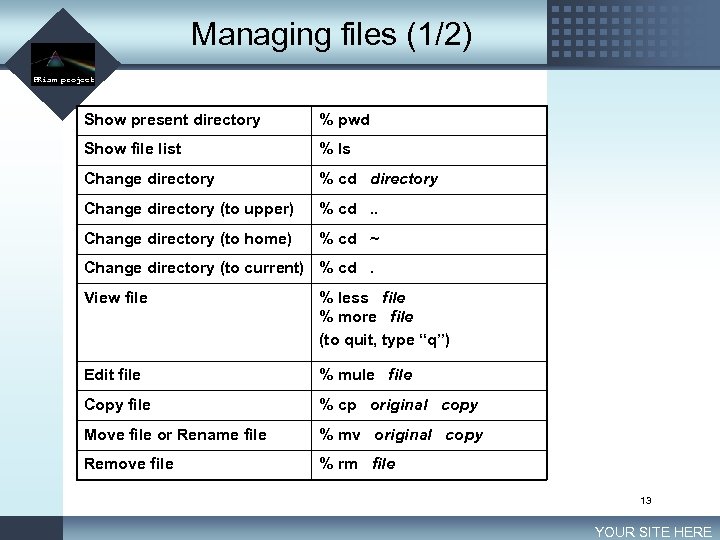 Managing files (1/2) LOGO PRism project Show present directory % pwd Show file list % ls Change directory % cd directory Change directory (to upper) % cd. . Change directory (to home) % cd ~ Change directory (to current) % cd. View file % less file % more file (to quit, type “q”) Edit file % mule file Copy file % cp original copy Move file or Rename file % mv original copy Remove file % rm file 13 YOUR SITE HERE
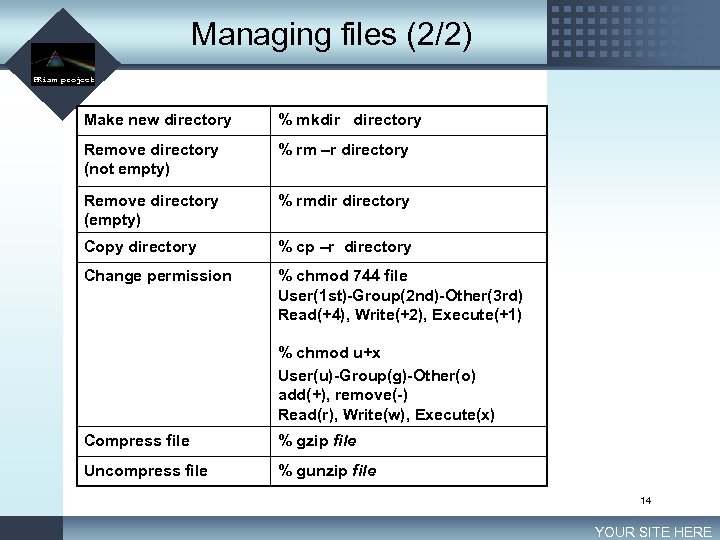 Managing files (2/2) LOGO PRism project Make new directory % mkdir directory Remove directory (not empty) % rm –r directory Remove directory (empty) % rmdir directory Copy directory % cp –r directory Change permission % chmod 744 file User(1 st)-Group(2 nd)-Other(3 rd) Read(+4), Write(+2), Execute(+1) % chmod u+x User(u)-Group(g)-Other(o) add(+), remove(-) Read(r), Write(w), Execute(x) Compress file % gzip file Uncompress file % gunzip file 14 YOUR SITE HERE
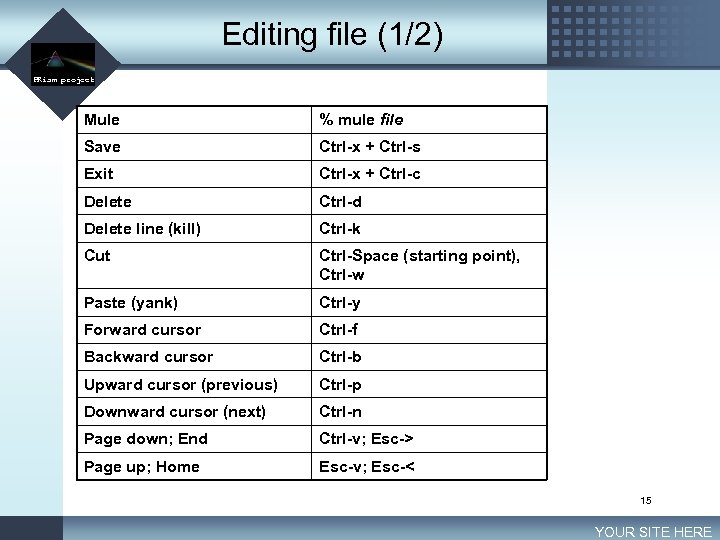 Editing file (1/2) LOGO PRism project Mule % mule file Save Ctrl-x + Ctrl-s Exit Ctrl-x + Ctrl-c Delete Ctrl-d Delete line (kill) Ctrl-k Cut Ctrl-Space (starting point), Ctrl-w Paste (yank) Ctrl-y Forward cursor Ctrl-f Backward cursor Ctrl-b Upward cursor (previous) Ctrl-p Downward cursor (next) Ctrl-n Page down; End Ctrl-v; Esc-> Page up; Home Esc-v; Esc-< 15 YOUR SITE HERE
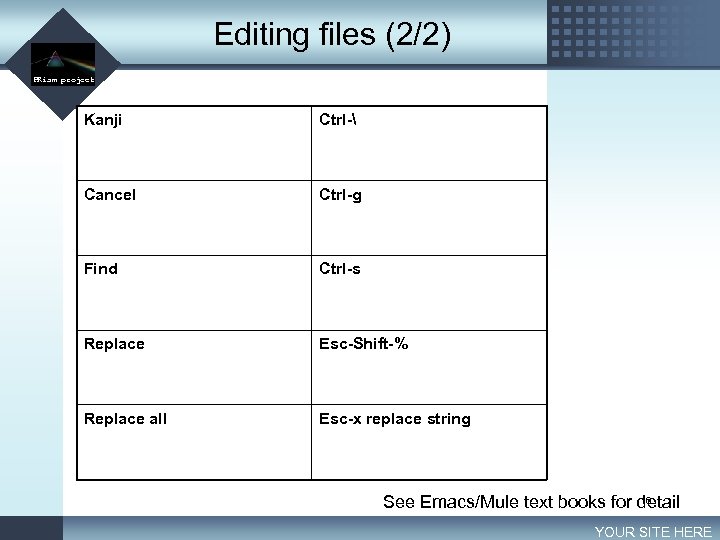 Editing files (2/2) LOGO PRism project Kanji Ctrl- Cancel Ctrl-g Find Ctrl-s Replace Esc-Shift-% Replace all Esc-x replace string 16 See Emacs/Mule text books for detail YOUR SITE HERE
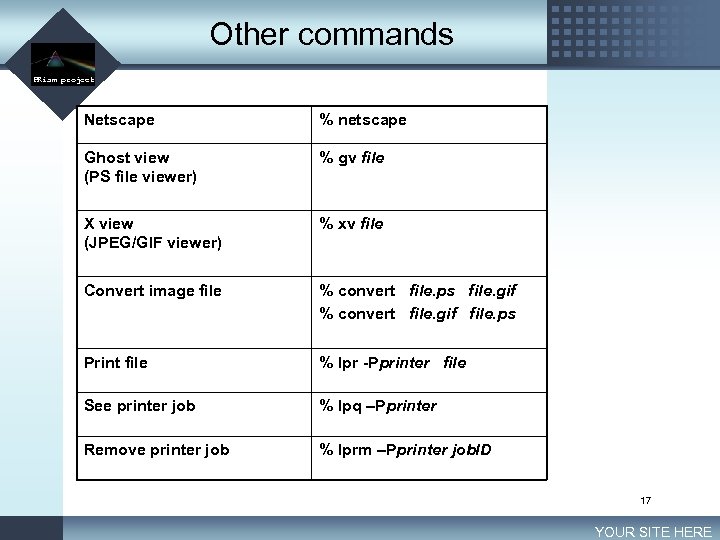 Other commands LOGO PRism project Netscape % netscape Ghost view (PS file viewer) % gv file X view (JPEG/GIF viewer) % xv file Convert image file % convert file. ps file. gif % convert file. gif file. ps Print file % lpr -Pprinter file See printer job % lpq –Pprinter Remove printer job % lprm –Pprinter job. ID 17 YOUR SITE HERE
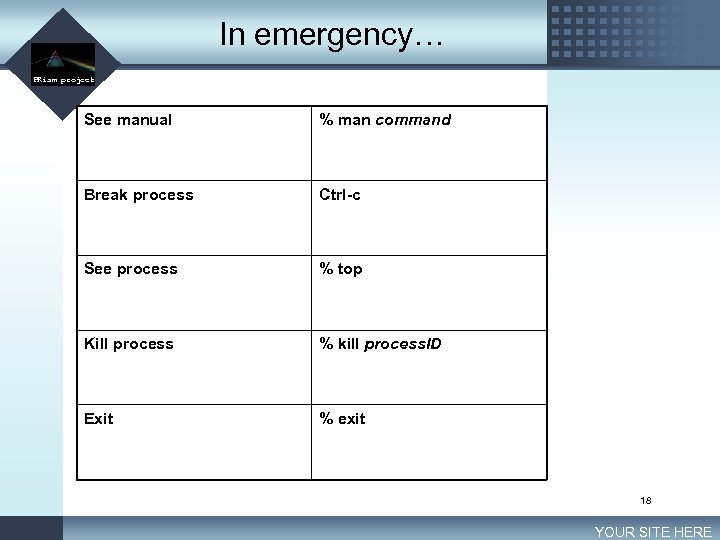 In emergency… LOGO PRism project See manual % man command Break process Ctrl-c See process % top Kill process % kill process. ID Exit % exit 18 YOUR SITE HERE
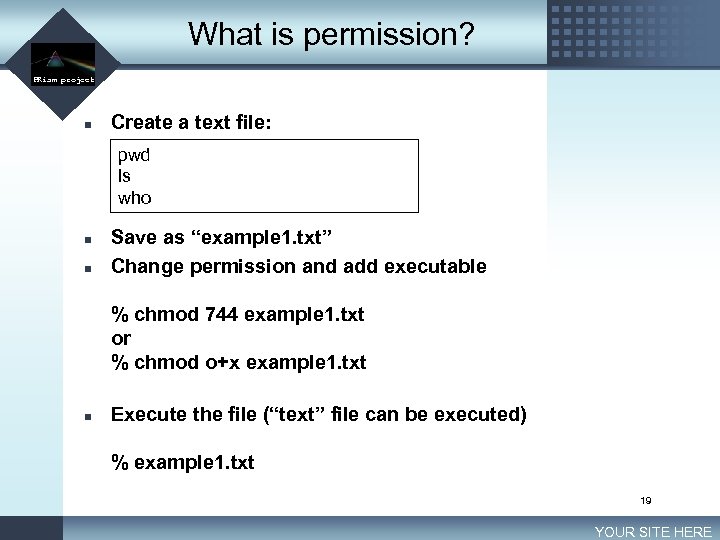 What is permission? LOGO PRism project n Create a text file: pwd ls who n n Save as “example 1. txt” Change permission and add executable % chmod 744 example 1. txt or % chmod o+x example 1. txt n Execute the file (“text” file can be executed) % example 1. txt 19 YOUR SITE HERE
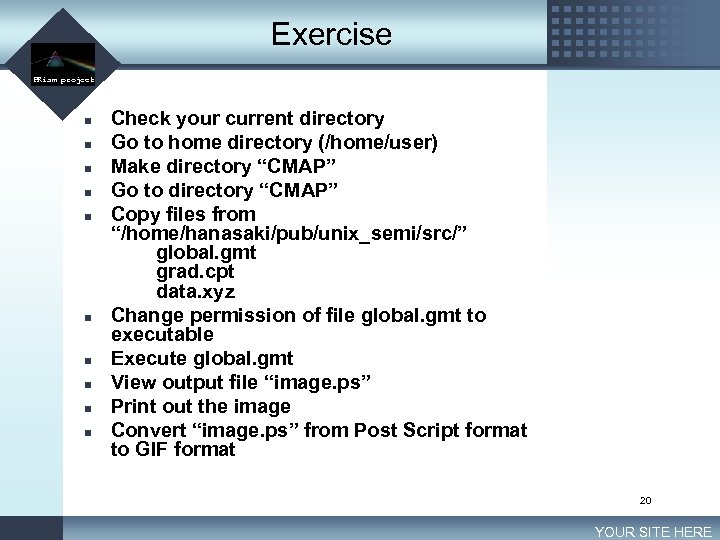 Exercise LOGO PRism project n n n n n Check your current directory Go to home directory (/home/user) Make directory “CMAP” Go to directory “CMAP” Copy files from “/home/hanasaki/pub/unix_semi/src/” global. gmt grad. cpt data. xyz Change permission of file global. gmt to executable Execute global. gmt View output file “image. ps” Print out the image Convert “image. ps” from Post Script format to GIF format 20 YOUR SITE HERE
 Lesson 2 Basic UNIX operation (2) Redirect/Pipe/Wildcard/Awk LOGO PRism project 21
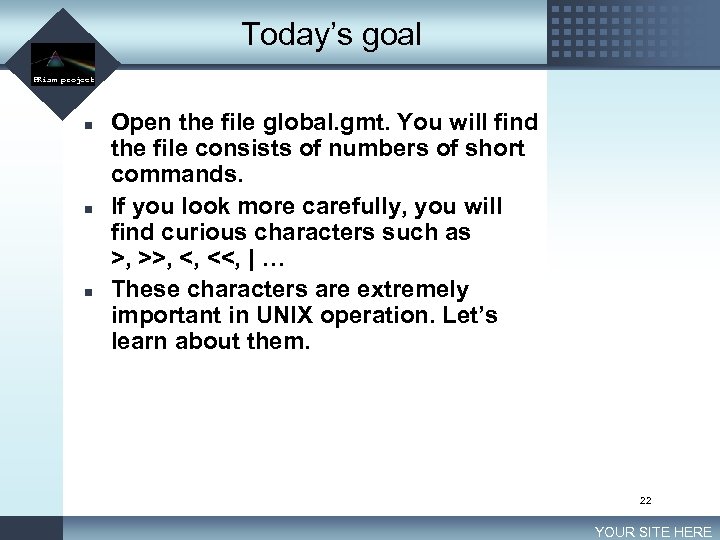 Today’s goal LOGO PRism project n n n Open the file global. gmt. You will find the file consists of numbers of short commands. If you look more carefully, you will find curious characters such as >, >>, <, <<, | … These characters are extremely important in UNIX operation. Let’s learn about them. 22 YOUR SITE HERE
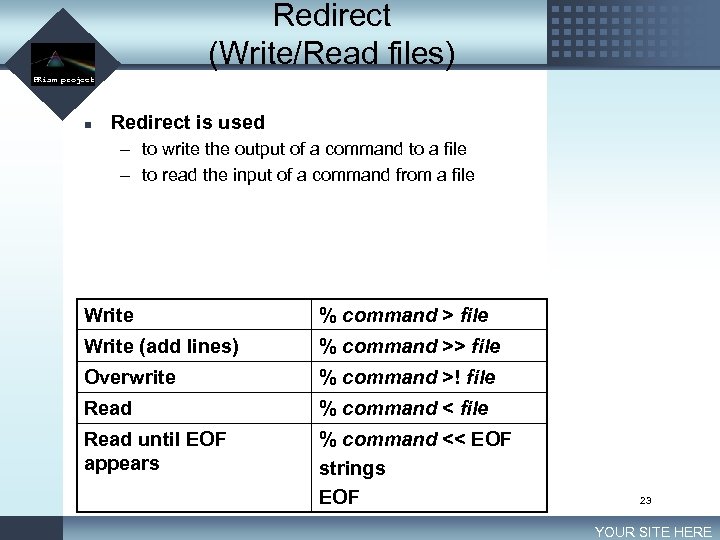 Redirect (Write/Read files) LOGO PRism project n Redirect is used – to write the output of a command to a file – to read the input of a command from a file Write % command > file Write (add lines) % command >> file Overwrite % command >! file Read % command < file Read until EOF appears % command << EOF strings EOF 23 YOUR SITE HERE
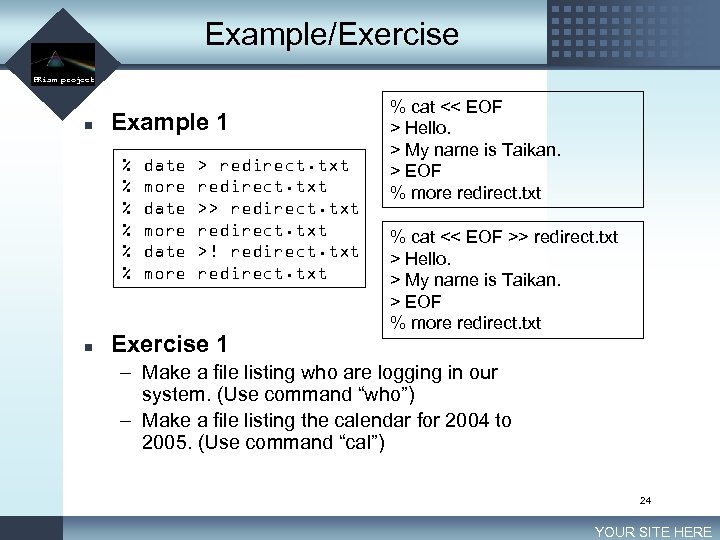 Example/Exercise LOGO PRism project n Example 1 % % % n date more > redirect. txt >! redirect. txt Exercise 1 % cat << EOF > Hello. > My name is Taikan. > EOF % more redirect. txt % cat << EOF >> redirect. txt > Hello. > My name is Taikan. > EOF % more redirect. txt – Make a file listing who are logging in our system. (Use command “who”) – Make a file listing the calendar for 2004 to 2005. (Use command “cal”) 24 YOUR SITE HERE
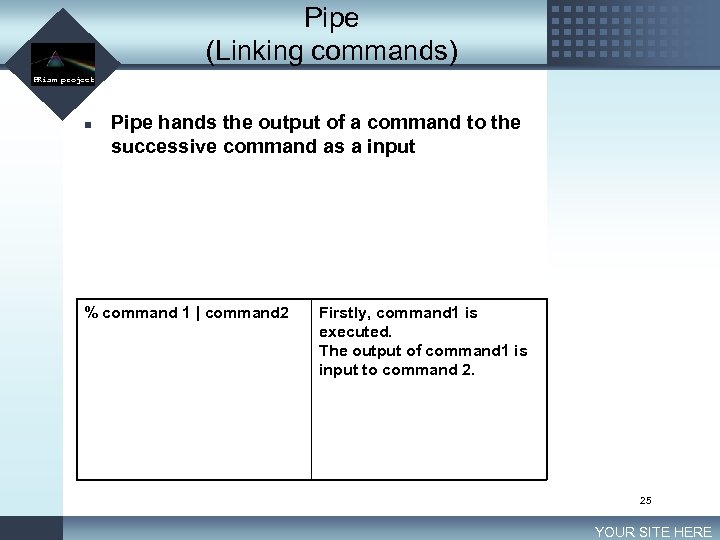 LOGO Pipe (Linking commands) PRism project n Pipe hands the output of a command to the successive command as a input % command 1 | command 2 Firstly, command 1 is executed. The output of command 1 is input to command 2. 25 YOUR SITE HERE
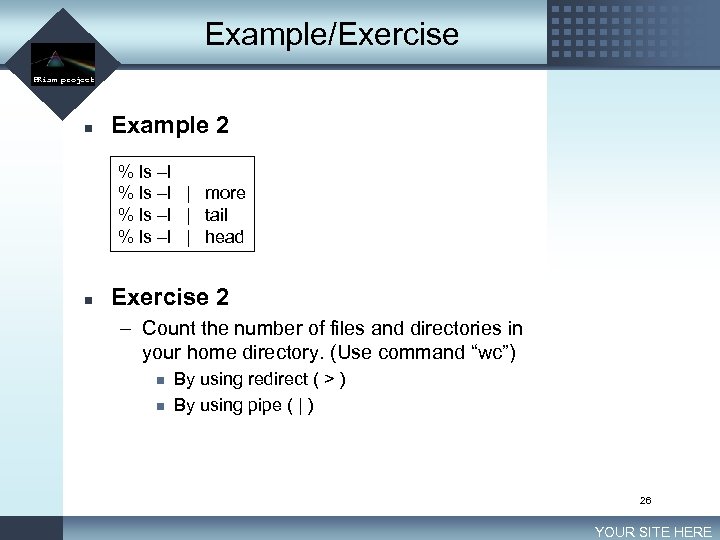 Example/Exercise LOGO PRism project n Example 2 % ls –l | more % ls –l | tail % ls –l | head n Exercise 2 – Count the number of files and directories in your home directory. (Use command “wc”) n n By using redirect ( > ) By using pipe ( | ) 26 YOUR SITE HERE
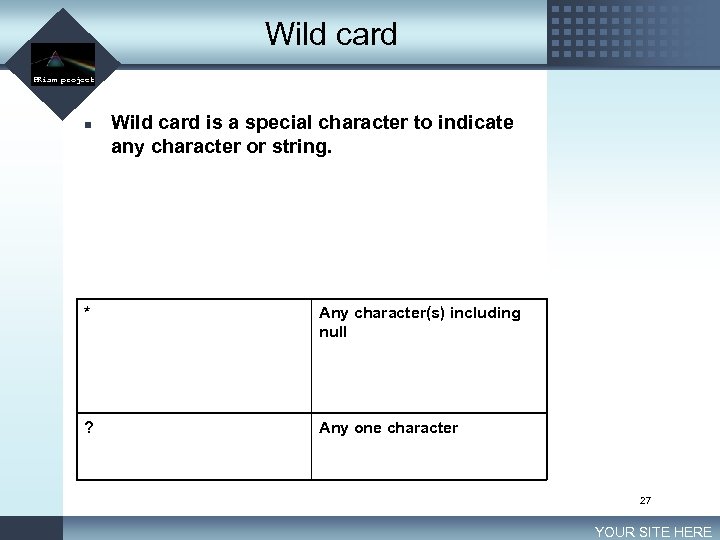 Wild card LOGO PRism project n Wild card is a special character to indicate any character or string. * Any character(s) including null ? Any one character 27 YOUR SITE HERE
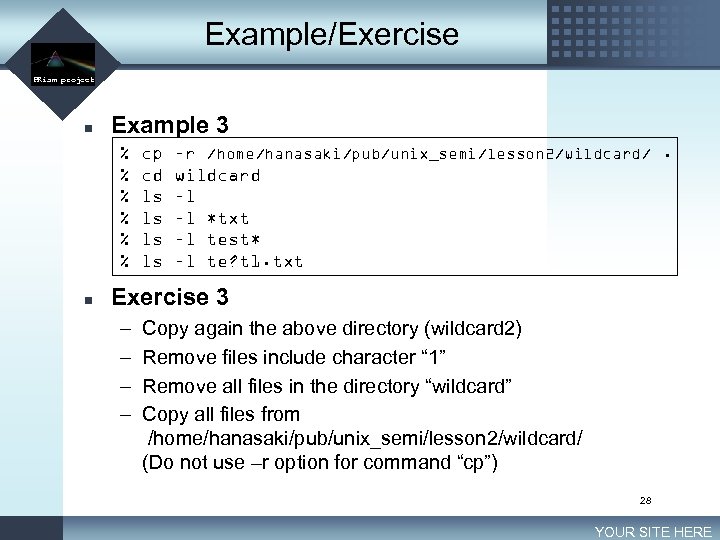 Example/Exercise LOGO PRism project n Example 3 % % % n cp cd ls ls –r /home/hanasaki/pub/unix_semi/lesson 2/wildcard/. wildcard –l –l *txt –l test* –l te? t 1. txt Exercise 3 – – Copy again the above directory (wildcard 2) Remove files include character “ 1” Remove all files in the directory “wildcard” Copy all files from /home/hanasaki/pub/unix_semi/lesson 2/wildcard/ (Do not use –r option for command “cp”) 28 YOUR SITE HERE
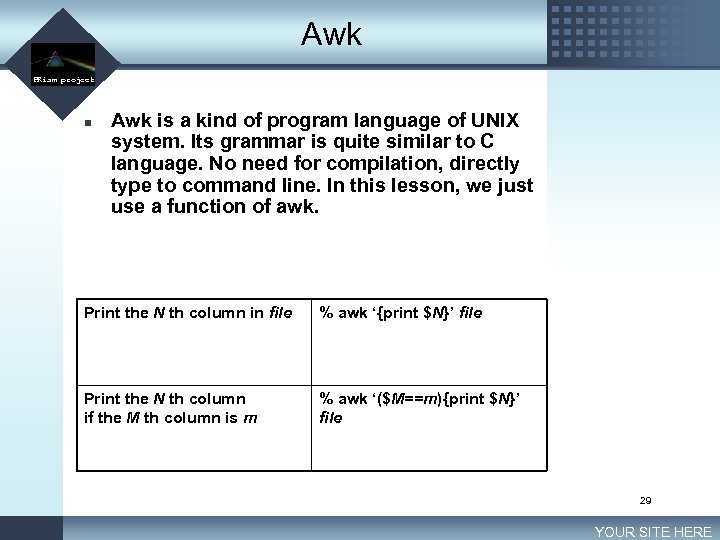 Awk LOGO PRism project n Awk is a kind of program language of UNIX system. Its grammar is quite similar to C language. No need for compilation, directly type to command line. In this lesson, we just use a function of awk. Print the N th column in file % awk ‘{print $N}’ file Print the N th column if the M th column is m % awk ‘($M==m){print $N}’ file 29 YOUR SITE HERE
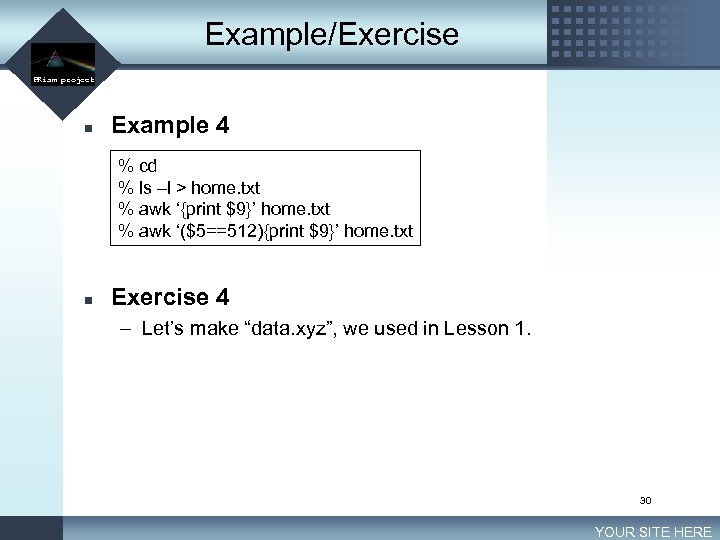 Example/Exercise LOGO PRism project n Example 4 % cd % ls –l > home. txt % awk ‘{print $9}’ home. txt % awk ‘($5==512){print $9}’ home. txt n Exercise 4 – Let’s make “data. xyz”, we used in Lesson 1. 30 YOUR SITE HERE
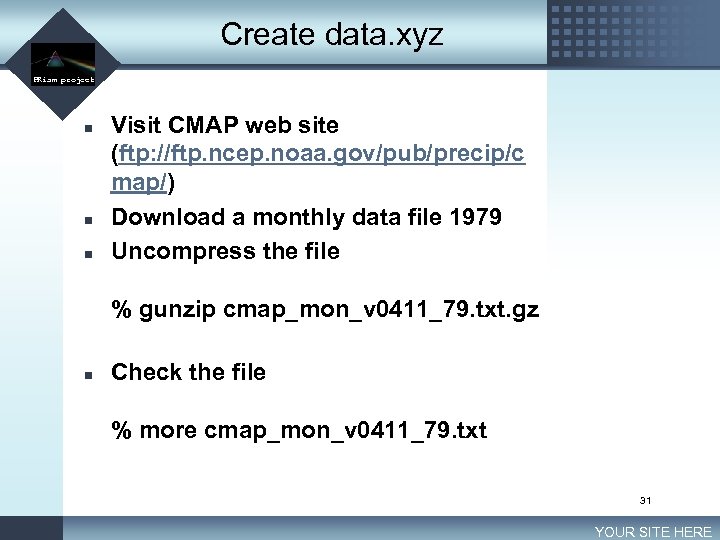 Create data. xyz LOGO PRism project n n n Visit CMAP web site (ftp: //ftp. ncep. noaa. gov/pub/precip/c map/) Download a monthly data file 1979 Uncompress the file % gunzip cmap_mon_v 0411_79. txt. gz n Check the file % more cmap_mon_v 0411_79. txt 31 YOUR SITE HERE
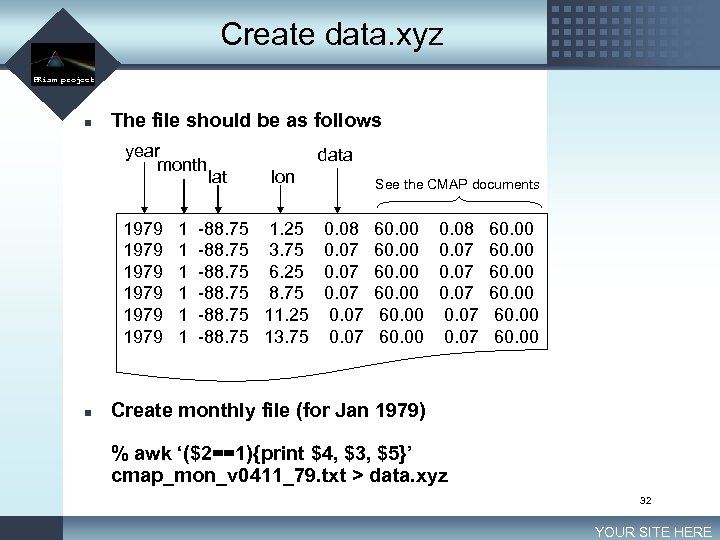 Create data. xyz LOGO PRism project n The file should be as follows year month 1979 1979 n 1 1 1 data lat lon -88. 75 1. 25 -88. 75 3. 75 -88. 75 6. 25 -88. 75 11. 25 -88. 75 13. 75 See the CMAP documents 0. 08 0. 07 0. 07 60. 00 60. 00 Create monthly file (for Jan 1979) % awk ‘($2==1){print $4, $3, $5}’ cmap_mon_v 0411_79. txt > data. xyz 32 YOUR SITE HERE
 Lesson 3 Drawing figure
 Today’s goal LOGO PRism project n In lesson 1, we drew a nice figure by executing global. gmt. – How was the figure drawn? – How we can modify it? n By the way, what is GMT? – GMT is short for Generic Mapping Tool – Free software developed by Paul Wessel and Walter H. F. Smith in Hawaii University. – See: http: //gmt. soest. hawaii. edu/ 34 YOUR SITE HERE
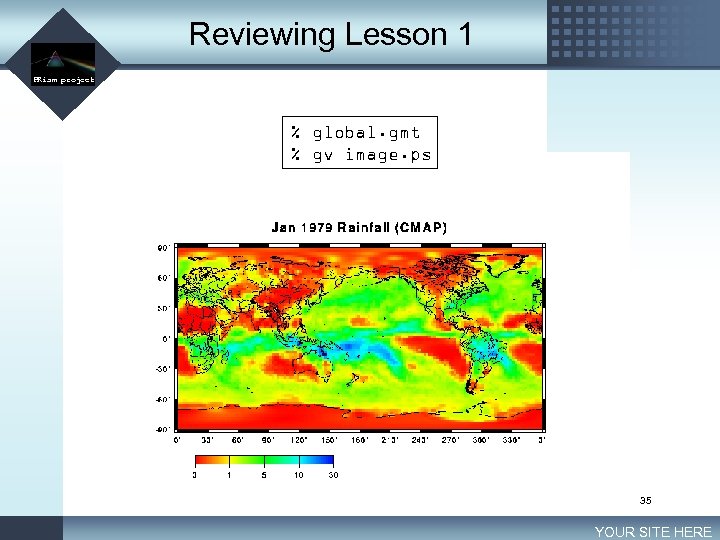 Reviewing Lesson 1 LOGO PRism project % global. gmt % gv image. ps 35 YOUR SITE HERE
 Files needed for GMT LOGO PRism project n GMT source file (GMT script file) – global. gmt n Data file – data. xyz n CPT file (Color Palette Table file) – grad. cpt 36 YOUR SITE HERE
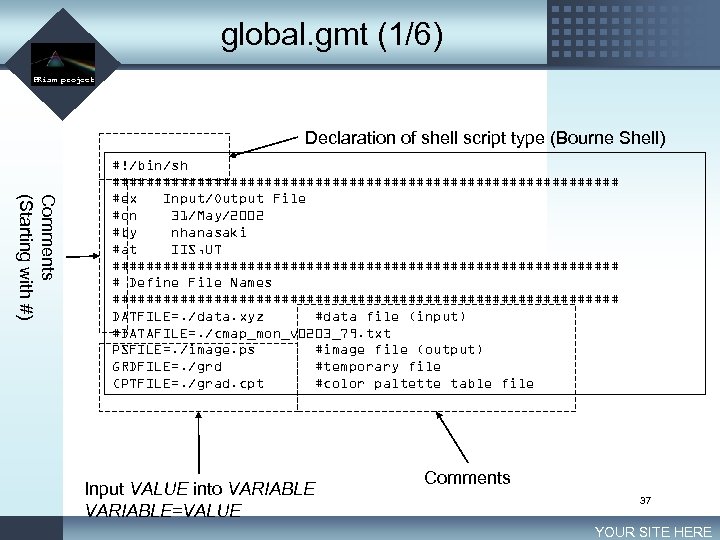 global. gmt (1/6) LOGO PRism project Declaration of shell script type (Bourne Shell) Comments (Starting with #) #!/bin/sh ############################## #ex Input/Output File #on 31/May/2002 #by nhanasaki #at IIS, UT ############################## # Define File Names ############################## DATFILE=. /data. xyz #data file (input) #DATAFILE=. /cmap_mon_v 0203_79. txt PSFILE=. /image. ps #image file (output) GRDFILE=. /grd #temporary file CPTFILE=. /grad. cpt #color paltette table file Input VALUE into VARIABLE=VALUE Comments 37 YOUR SITE HERE
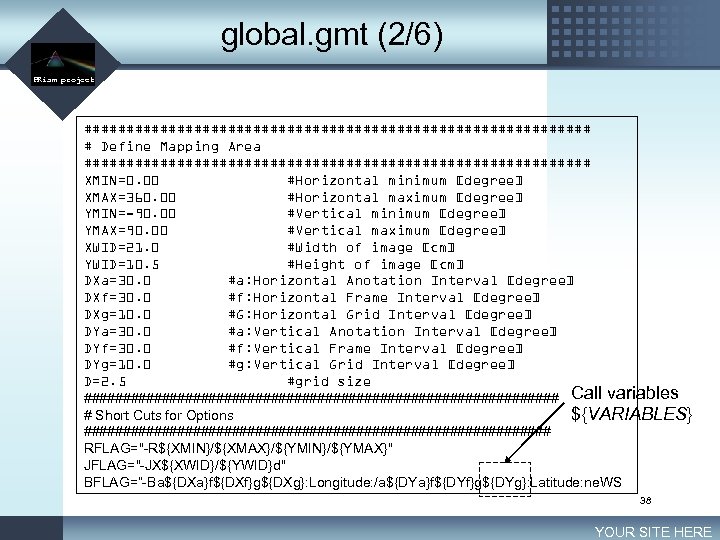 global. gmt (2/6) LOGO PRism project ############################## # Define Mapping Area ############################## XMIN=0. 00 #Horizontal minimum [degree] XMAX=360. 00 #Horizontal maximum [degree] YMIN=-90. 00 #Vertical minimum [degree] YMAX=90. 00 #Vertical maximum [degree] XWID=21. 0 #Width of image [cm] YWID=10. 5 #Height of image [cm] DXa=30. 0 #a: Horizontal Anotation Interval [degree] DXf=30. 0 #f: Horizontal Frame Interval [degree] DXg=10. 0 #G: Horizontal Grid Interval [degree] DYa=30. 0 #a: Vertical Anotation Interval [degree] DYf=30. 0 #f: Vertical Frame Interval [degree] DYg=10. 0 #g: Vertical Grid Interval [degree] D=2. 5 #grid size ############################### Call variables # Short Cuts for Options ${VARIABLES} ############################## RFLAG="-R${XMIN}/${XMAX}/${YMIN}/${YMAX}" JFLAG="-JX${XWID}/${YWID}d" BFLAG=“-Ba${DXa}f${DXf}g${DXg}: Longitude: /a${DYa}f${DYf}g${DYg}: Latitude: ne. WS 38 YOUR SITE HERE
![global. gmt (3/6) LOGO PRism project YMAX [deg] Annotation Grid YWID [cm] Frame cannot](https://present5.com/presentation/53e3c2f86176f5b924bf14dc68389c3f/image-39.jpg "global. gmt (3/6) LOGO PRism project YMAX [deg] Annotation Grid YWID [cm] Frame cannot") global. gmt (3/6) LOGO PRism project YMAX [deg] Annotation Grid YWID [cm] Frame cannot see D each grid YMIN [deg] XWID [cm] XMIN [deg] XMAX [deg] 39 YOUR SITE HERE
global. gmt (3/6) LOGO PRism project YMAX [deg] Annotation Grid YWID [cm] Frame cannot see D each grid YMIN [deg] XWID [cm] XMIN [deg] XMAX [deg] 39 YOUR SITE HERE
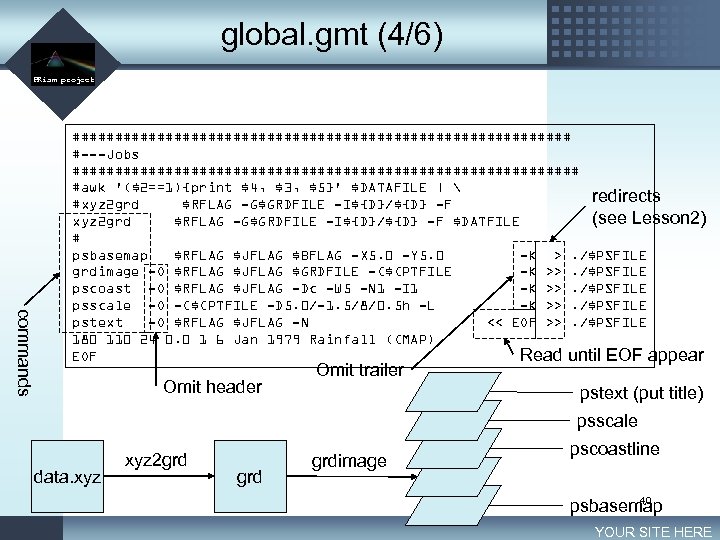 global. gmt (4/6) LOGO PRism project commands ############################## #---Jobs ############################## #awk '($2==1){print $4, $3, $5}' $DATAFILE | redirects #xyz 2 grd $RFLAG -G$GRDFILE -I${D}/${D} -F (see Lesson 2) xyz 2 grd $RFLAG -G$GRDFILE -I${D}/${D} -F $DATFILE # psbasemap $RFLAG $JFLAG $BFLAG -X 5. 0 -Y 5. 0 -K >. /$PSFILE grdimage -O $RFLAG $JFLAG $GRDFILE -C$CPTFILE -K >>. /$PSFILE pscoast -O $RFLAG $JFLAG -Dc -W 5 -N 1 -I 1 -K >>. /$PSFILE psscale -O -C$CPTFILE -D 5. 0/-1. 5/8/0. 5 h -L -K >>. /$PSFILE pstext -O $RFLAG $JFLAG -N << EOF >>. /$PSFILE 180 110 24 0. 0 1 6 Jan 1979 Rainfall (CMAP) EOF Read until EOF appear Omit header Omit trailer pstext (put title) psscale data. xyz 2 grd grdimage pscoastline 40 psbasemap YOUR SITE HERE
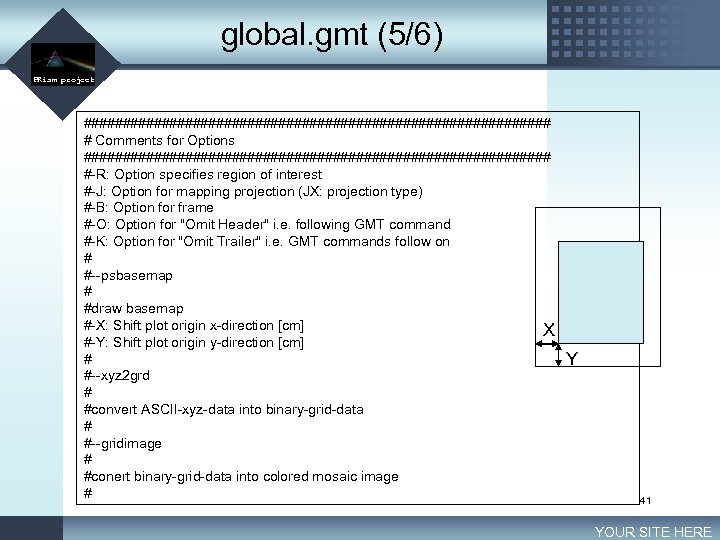 global. gmt (5/6) LOGO PRism project ############################## # Comments for Options ############################## #-R: Option specifies region of interest #-J: Option for mapping projection (JX: projection type) #-B: Option for frame #-O: Option for "Omit Header" i. e. following GMT command #-K: Option for "Omit Trailer" i. e. GMT commands follow on # #--psbasemap # #draw basemap #-X: Shift plot origin x-direction [cm] X #-Y: Shift plot origin y-direction [cm] # #--xyz 2 grd # #convert ASCII-xyz-data into binary-grid-data # #--gridimage # #conert binary-grid-data into colored mosaic image # Y 41 YOUR SITE HERE
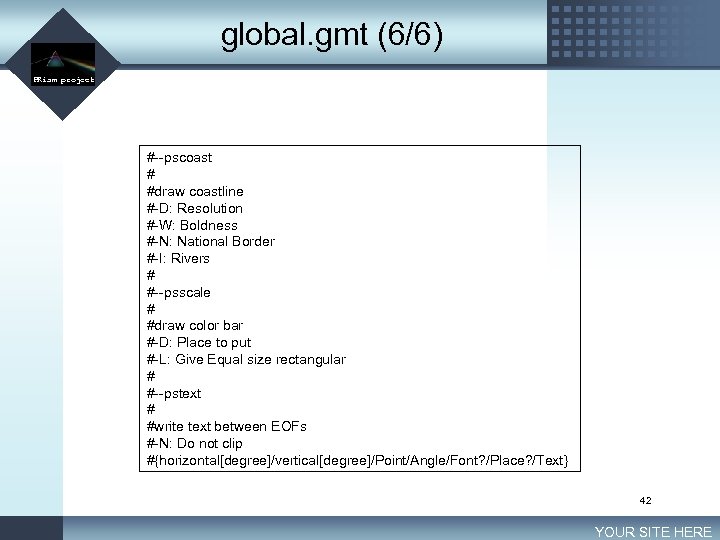 global. gmt (6/6) LOGO PRism project #--pscoast # #draw coastline #-D: Resolution #-W: Boldness #-N: National Border #-I: Rivers # #--psscale # #draw color bar #-D: Place to put #-L: Give Equal size rectangular # #--pstext # #write text between EOFs #-N: Do not clip #{horizontal[degree]/vertical[degree]/Point/Angle/Font? /Place? /Text} 42 YOUR SITE HERE
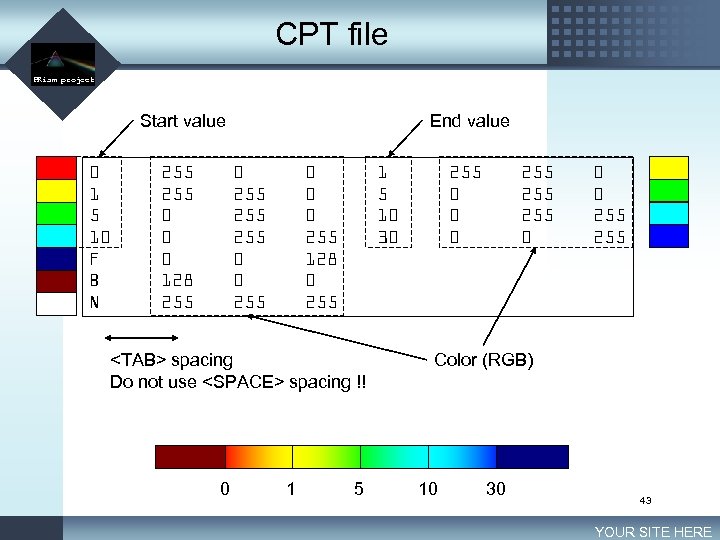 CPT file LOGO PRism project Start value 0 1 5 10 F B N 255 0 0 0 128 255 End value 0 255 255 0 0 0 255 128 0 255 1 5 10 30
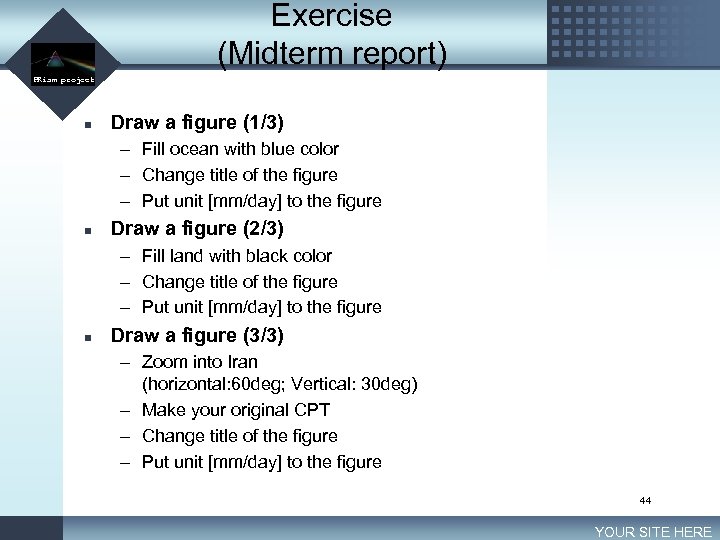 LOGO Exercise (Midterm report) PRism project n Draw a figure (1/3) – Fill ocean with blue color – Change title of the figure – Put unit [mm/day] to the figure n Draw a figure (2/3) – Fill land with black color – Change title of the figure – Put unit [mm/day] to the figure n Draw a figure (3/3) – Zoom into Iran (horizontal: 60 deg; Vertical: 30 deg) – Make your original CPT – Change title of the figure – Put unit [mm/day] to the figure 44 YOUR SITE HERE
 Lesson 4 Processing grid data 1
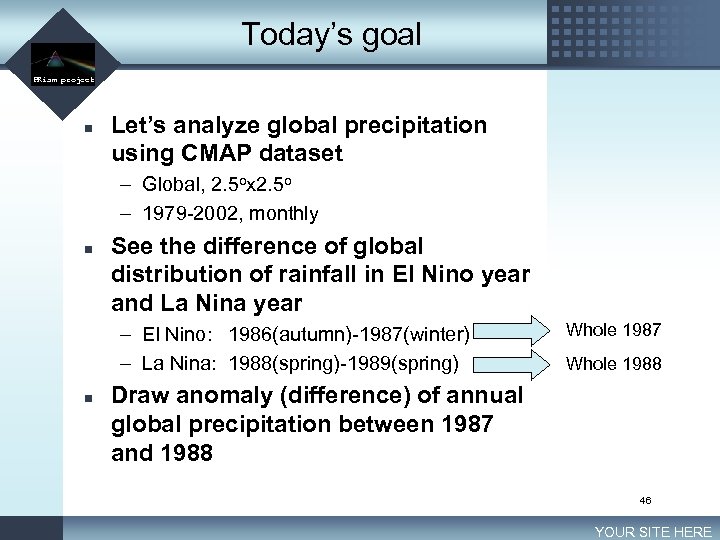 Today’s goal LOGO PRism project n Let’s analyze global precipitation using CMAP dataset – Global, 2. 5 ox 2. 5 o – 1979 -2002, monthly n See the difference of global distribution of rainfall in El Nino year and La Nina year – El Nino: 1986(autumn)-1987(winter) – La Nina: 1988(spring)-1989(spring) n Whole 1987 Whole 1988 Draw anomaly (difference) of annual global precipitation between 1987 and 1988 46 YOUR SITE HERE
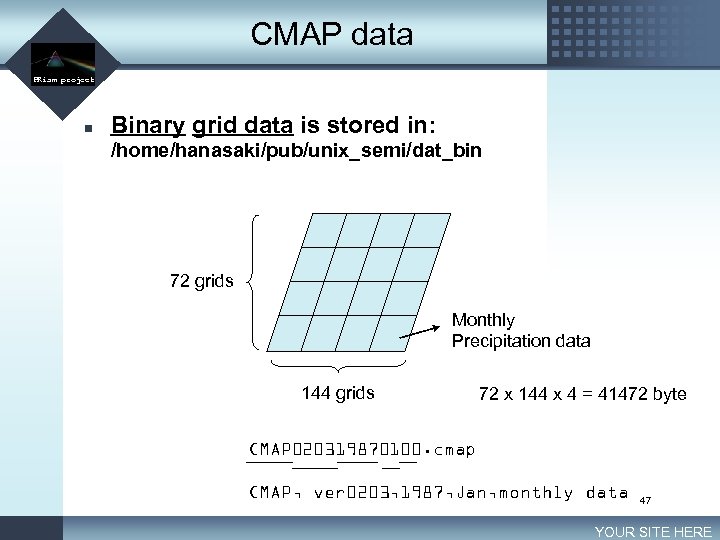 CMAP data LOGO PRism project n Binary grid data is stored in: /home/hanasaki/pub/unix_semi/dat_bin 72 grids Monthly Precipitation data 144 grids 72 x 144 x 4 = 41472 byte CMAP 020319870100. cmap CMAP, ver 0203, 1987, Jan, monthly data 47 YOUR SITE HERE
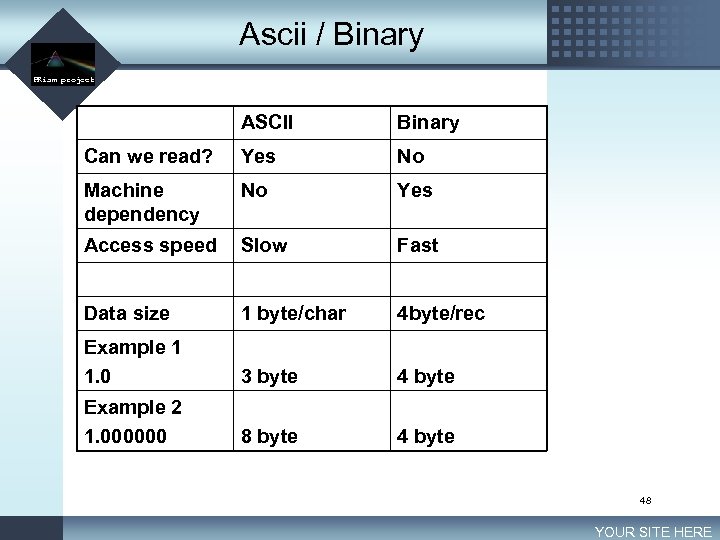 Ascii / Binary LOGO PRism project ASCII Binary Can we read? Yes No Machine dependency No Yes Access speed Slow Fast Data size 1 byte/char 4 byte/rec Example 1 1. 0 3 byte 4 byte Example 2 1. 000000 8 byte 48 YOUR SITE HERE
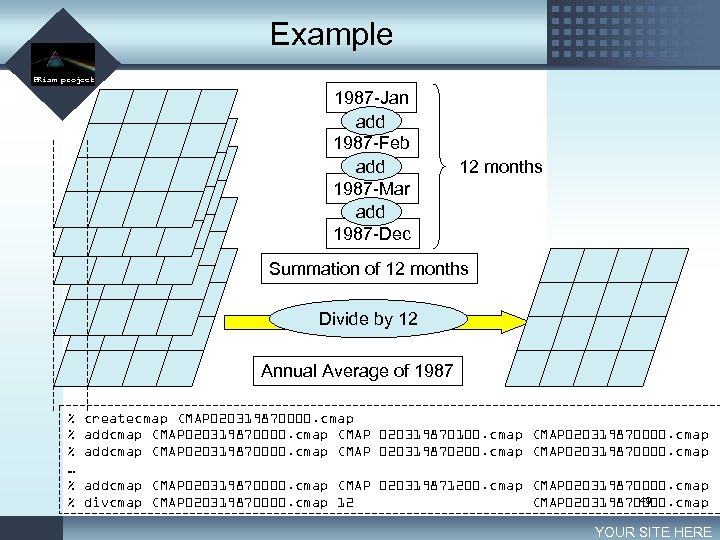 Example LOGO PRism project 1987 -Jan add 1987 -Feb add 1987 -Mar add 1987 -Dec 12 months Summation of 12 months Divide by 12 Annual Average of 1987 % % % … % % createcmap CMAP 020319870000. cmap addcmap CMAP 020319870000. cmap CMAP 020319870100. cmap CMAP 020319870000. cmap addcmap CMAP 020319870000. cmap CMAP 020319870200. cmap CMAP 020319870000. cmap addcmap CMAP 020319870000. cmap CMAP 020319871200. cmap CMAP 020319870000. cmap 49 divcmap CMAP 020319870000. cmap 12 CMAP 020319870000. cmap YOUR SITE HERE
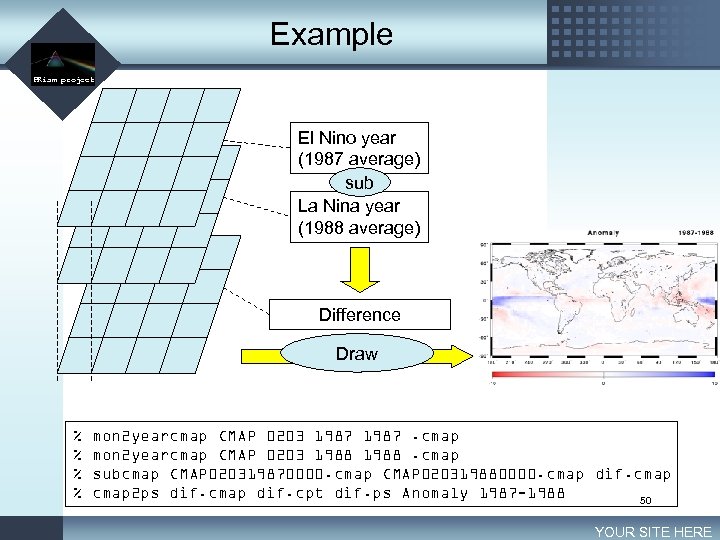 Example LOGO PRism project El Nino year (1987 average) sub La Nina year (1988 average) Difference Draw % % mon 2 yearcmap CMAP 0203 1987. cmap mon 2 yearcmap CMAP 0203 1988. cmap subcmap CMAP 020319870000. cmap CMAP 020319880000. cmap dif. cmap 2 ps dif. cmap dif. cpt dif. ps Anomaly 1987 -1988 50 YOUR SITE HERE
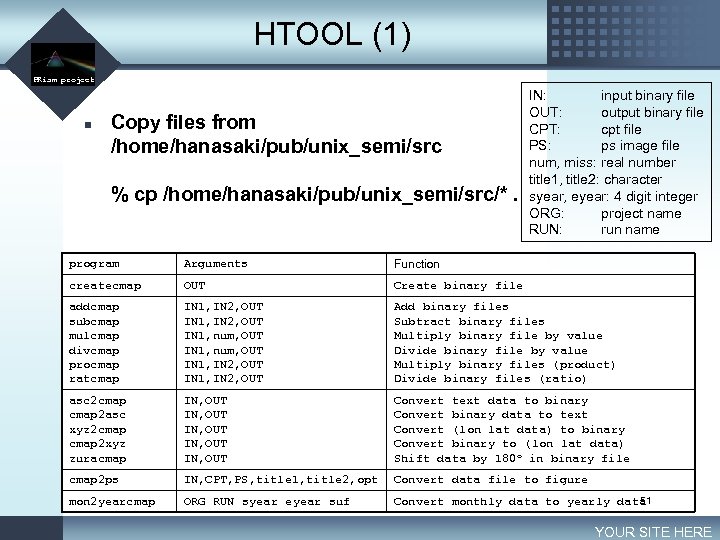 HTOOL (1) LOGO PRism project n Copy files from /home/hanasaki/pub/unix_semi/src % cp /home/hanasaki/pub/unix_semi/src/*. IN: input binary file OUT: output binary file CPT: cpt file PS: ps image file num, miss: real number title 1, title 2: character syear, eyear: 4 digit integer ORG: project name RUN: run name program Arguments Function createcmap OUT Create binary file addcmap subcmap mulcmap divcmap procmap ratcmap IN 1, IN 2, OUT IN 1, num, OUT IN 1, IN 2, OUT Add binary files Subtract binary files Multiply binary file by value Divide binary file by value Multiply binary files (product) Divide binary files (ratio) asc 2 cmap 2 asc xyz 2 cmap 2 xyz zuracmap IN, OUT IN, OUT Convert text data to binary Convert binary data to text Convert (lon lat data) to binary Convert binary to (lon lat data) Shift data by 180 o in binary file cmap 2 ps IN, CPT, PS, title 1, title 2, opt Convert data file to figure mon 2 yearcmap ORG RUN syear eyear suf 51 Convert monthly data to yearly data YOUR SITE HERE
 Exercise LOGO PRism project n n Create JJA (June-July-August) and DJF (December-January-February) precipitation for 1987 and 1988 and create anomaly figure. (Create your original CPT file for your analysis) Draw normalized anomaly between 1987 and 1988. (Create your original CPT file for your analysis) 52 YOUR SITE HERE
 Lesson 5 Reading/Writing binary files
 Today’s goal LOGO PRism project n Master FORTRAN input/output – Change binary and ascii data n FORTRAN 77 – In this seminar, we use FORTRAN 77. However, you can use whatever programming language you like (C, FORTRAN 90, C++, C#, Java, Ruby…) – FORTRAN 77 is “out of date” programming language, however, it is still widely used in science community. – Especially important programs in our laboratory CCSR/NIES AGCM, MATSIRO, TRIP are written in FORTRAN 77 n Reference – Fortran 90 プログラミング 冨田博之 培風館 – Numerical recipes in Fortran 77 54 YOUR SITE HERE
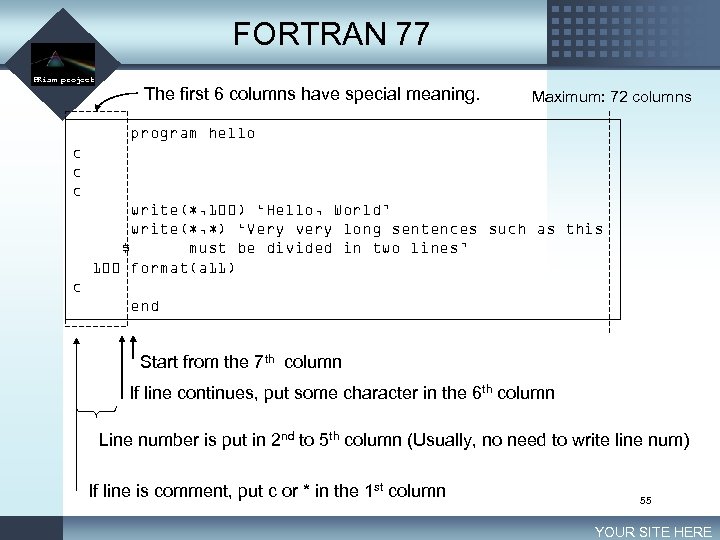 FORTRAN 77 LOGO PRism project The first 6 columns have special meaning. Maximum: 72 columns program hello c c c write(*, 100) ‘Hello, World’ write(*, *) ‘Very very long sentences such as this $ must be divided in two lines’ 100 format(a 11) c end Start from the 7 th column If line continues, put some character in the 6 th column Line number is put in 2 nd to 5 th column (Usually, no need to write line num) If line is comment, put c or * in the 1 st column 55 YOUR SITE HERE
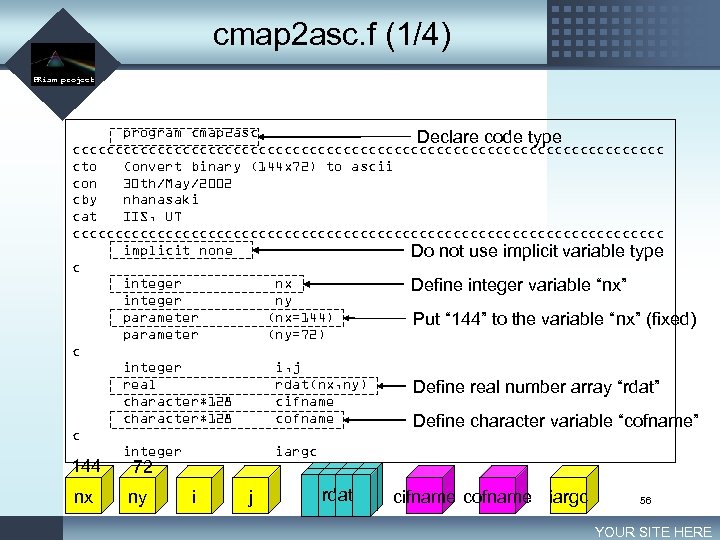 cmap 2 asc. f (1/4) LOGO PRism project program cmap 2 asc Declare code type ccccccccccccccccccccccccccccccccccc cto Convert binary (144 x 72) to ascii con 30 th/May/2002 cby nhanasaki cat IIS, UT ccccccccccccccccccccccccccccccccccc implicit none Do not use implicit variable type c integer nx Define integer variable “nx” integer ny parameter (nx=144) Put “ 144” to the variable “nx” (fixed) parameter (ny=72) c integer i, j real rdat(nx, ny) Define real number array “rdat” character*128 cifname character*128 cofname Define character variable “cofname” c integer iargc 144 72 nx ny i j rdat cifname cofname iargc 56 YOUR SITE HERE
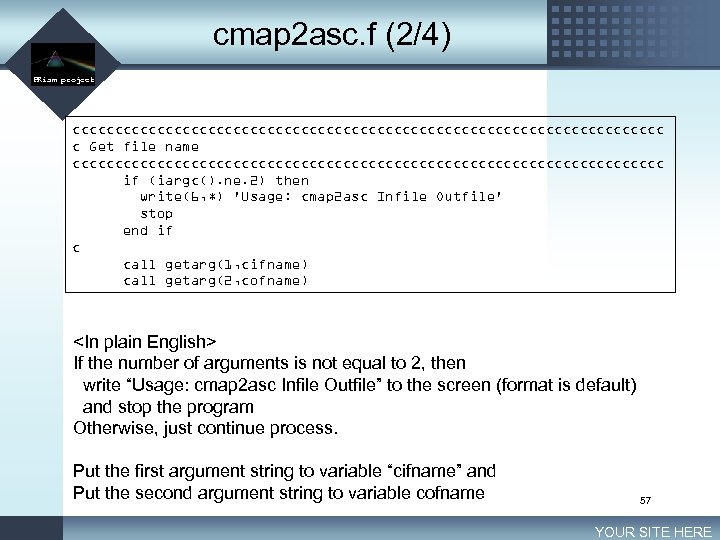 cmap 2 asc. f (2/4) LOGO PRism project ccccccccccccccccccccccccccccccccccc c Get file name ccccccccccccccccccccccccccccccccccc if (iargc(). ne. 2) then write(6, *) 'Usage: cmap 2 asc Infile Outfile' stop end if c call getarg(1, cifname) call getarg(2, cofname)
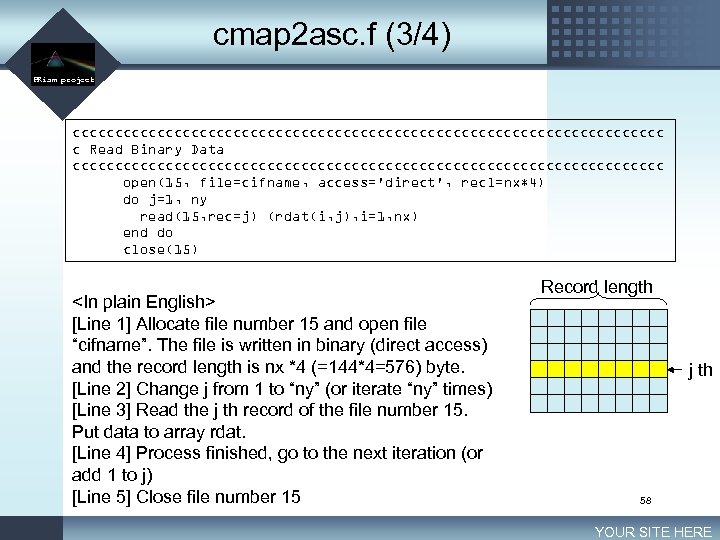 cmap 2 asc. f (3/4) LOGO PRism project ccccccccccccccccccccccccccccccccccc c Read Binary Data ccccccccccccccccccccccccccccccccccc open(15, file=cifname, access='direct', recl=nx*4) do j=1, ny read(15, rec=j) (rdat(i, j), i=1, nx) end do close(15)
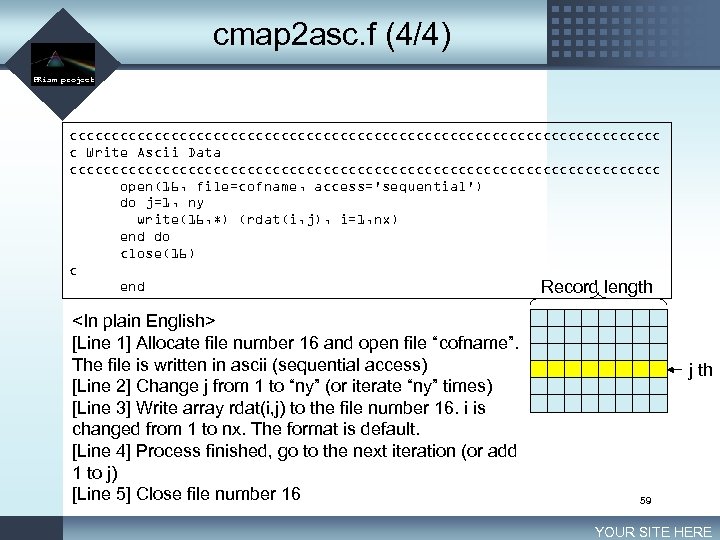 cmap 2 asc. f (4/4) LOGO PRism project ccccccccccccccccccccccccccccccccccc c Write Ascii Data ccccccccccccccccccccccccccccccccccc open(16, file=cofname, access='sequential') do j=1, ny write(16, *) (rdat(i, j), i=1, nx) end do close(16) c end Record length
 Excercise LOGO PRism project n n Read a FORTRAN source code addcmap. f and translate into plain English or Japanese. (/home/hanasaki/bin/addcmap. f) Write a program asc 2 cmap. f that has the opposite function of cmap 2 asc. f. (After finish editing, type % make asc 2 cmap on the terminal) 60 YOUR SITE HERE
 Unix Seminar Lesson 6 Grid data processing 2 LOGO PRism project 61
 Today’s goal LOGO PRism project n n How much annual precipitation we have in Tokyo? [E 138. 75 -N 36. 25]* How much is the annual average precipitation of the whole world? How large area in the world has more annual precipitation than Tokyo? How many people in the world live in the place less than 500 mm/year precipitation? * Actually, the geographic location for the lon/lat is Takasaki City in Gunma prefecture. Because of large grid size of CMAP, This is the nearest grid from Tokyo! 62 YOUR SITE HERE
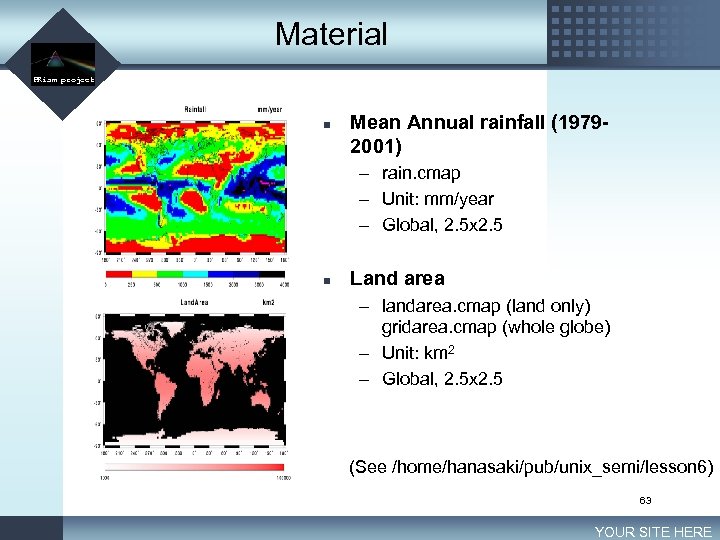 Material LOGO PRism project n Mean Annual rainfall (19792001) – rain. cmap – Unit: mm/year – Global, 2. 5 x 2. 5 n Land area – landarea. cmap (land only) gridarea. cmap (whole globe) – Unit: km 2 – Global, 2. 5 x 2. 5 (See /home/hanasaki/pub/unix_semi/lesson 6) 63 YOUR SITE HERE
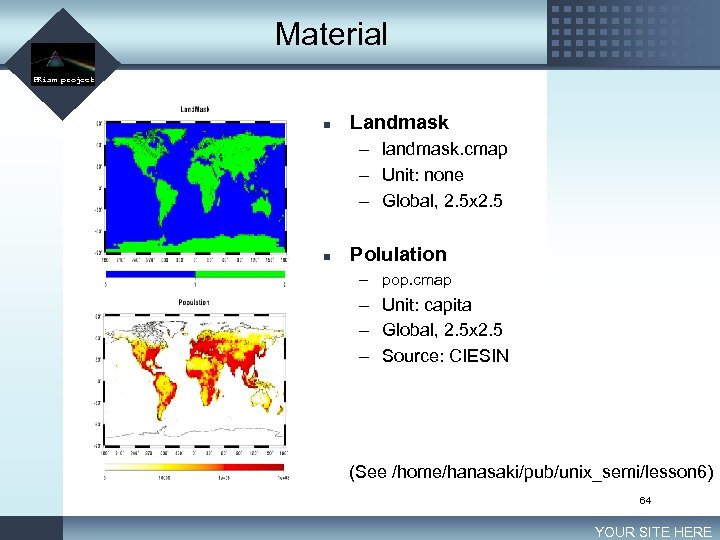 Material LOGO PRism project n Landmask – landmask. cmap – Unit: none – Global, 2. 5 x 2. 5 n Polulation – pop. cmap – Unit: capita – Global, 2. 5 x 2. 5 – Source: CIESIN (See /home/hanasaki/pub/unix_semi/lesson 6) 64 YOUR SITE HERE
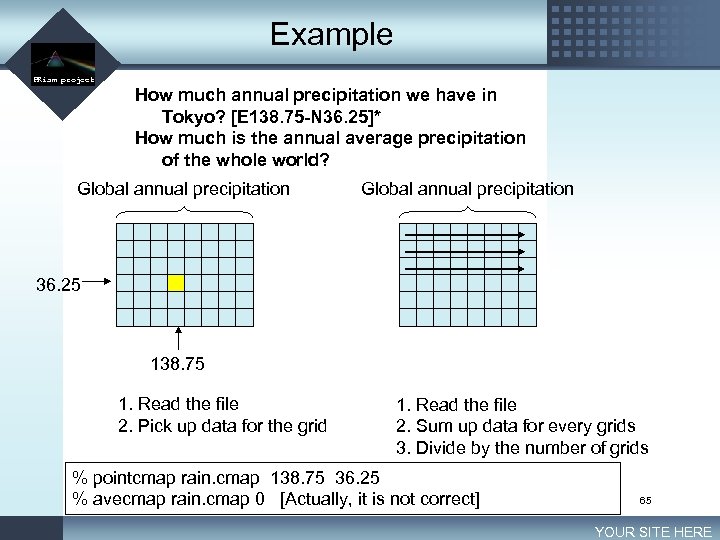 Example LOGO PRism project How much annual precipitation we have in Tokyo? [E 138. 75 -N 36. 25]* How much is the annual average precipitation of the whole world? Global annual precipitation 36. 25 138. 75 1. Read the file 2. Pick up data for the grid 1. Read the file 2. Sum up data for every grids 3. Divide by the number of grids % pointcmap rain. cmap 138. 75 36. 25 % avecmap rain. cmap 0 [Actually, it is not correct] 65 YOUR SITE HERE
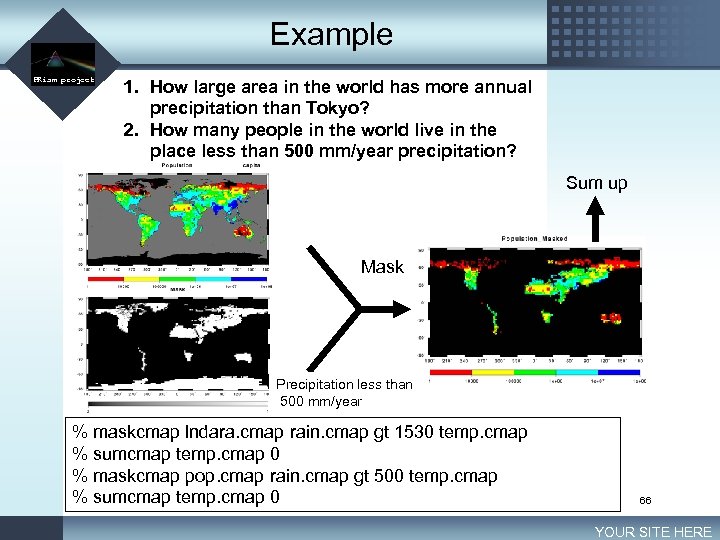 Example LOGO PRism project 1. How large area in the world has more annual precipitation than Tokyo? 2. How many people in the world live in the place less than 500 mm/year precipitation? Sum up Mask Precipitation less than 500 mm/year % maskcmap lndara. cmap rain. cmap gt 1530 temp. cmap % sumcmap temp. cmap 0 % maskcmap pop. cmap rain. cmap gt 500 temp. cmap % sumcmap temp. cmap 0 66 YOUR SITE HERE
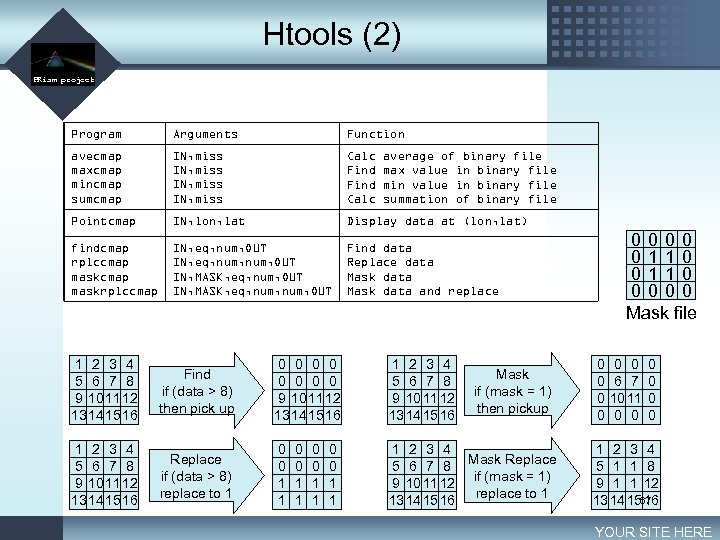 Htools (2) LOGO PRism project Program Arguments Function avecmap maxcmap mincmap sumcmap IN, miss Calc Find Calc Pointcmap IN, lon, lat Display data at (lon, lat) findcmap rplccmap maskrplccmap IN, eq, num, OUT IN, MASK, eq, num, OUT Find data Replace data Mask data and replace average of binary file max value in binary file min value in binary file summation of binary file 1 2 3 4 5 6 7 8 9 10 11 12 13 14 15 16 Find if (data > 8) then pick up 0 0 0 0 9 10 11 12 13 14 15 16 1 2 3 4 5 6 7 8 9 10 11 12 13 14 15 16 Replace if (data > 8) replace to 1 0 0 1 1 1 2 3 4 Mask Replace 5 6 7 8 if (mask = 1) 9 10 11 12 replace to 1 13 14 15 16 0 0 1 1 Mask if (mask = 1) then pickup 0000 0110 0000 Mask file 0 0 0 6 7 10 11 0 0 0 1 2 3 4 5 1 1 8 9 1 1 12 13 14 1567 16 YOUR SITE HERE
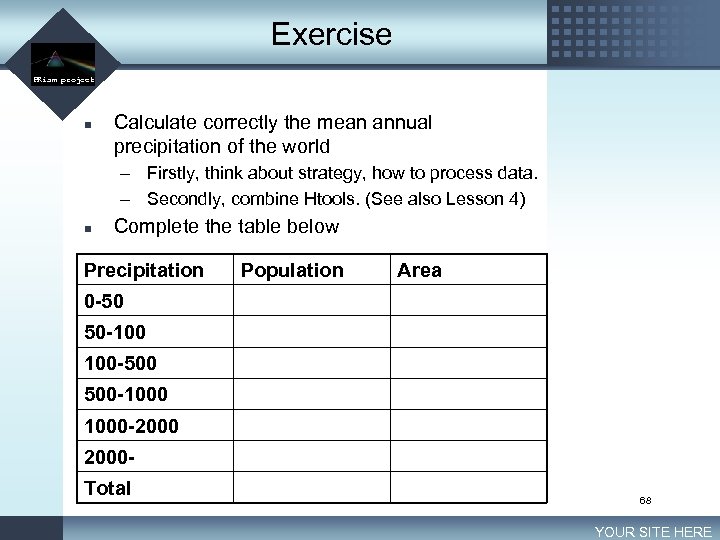 Exercise LOGO PRism project n Calculate correctly the mean annual precipitation of the world – Firstly, think about strategy, how to process data. – Secondly, combine Htools. (See also Lesson 4) n Complete the table below Precipitation Population Area 0 -50 50 -100 100 -500 500 -1000 -2000 Total 68 YOUR SITE HERE
 Lesson 7 Fortran and Makefile LOGO PRism project 69
 Today’s goal LOGO PRism project n n Learn some important techniques for effective handling of temporal varying files Understand what is “Makefile” (/home/hanasaki/pub/unix_semi/src/Makefile) 70 YOUR SITE HERE
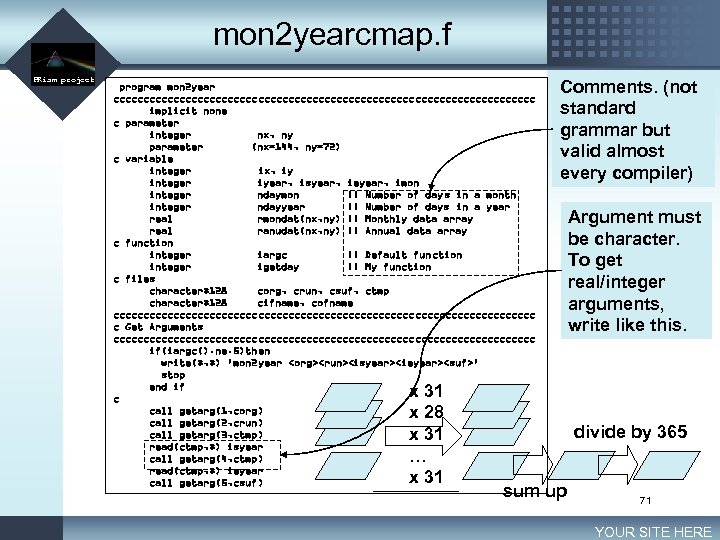 mon 2 yearcmap. f LOGO PRism project program mon 2 year ccccccccccccccccccccccccccccccccccc implicit none c parameter integer nx, ny parameter (nx=144, ny=72) c variable integer ix, iy integer iyear, isyear, ieyear, imon integer ndaymon !! Number of days in a month integer ndayyear !! Number of days in a year real rmondat(nx, ny) !! Monthly data array real ranudat(nx, ny) !! Annual data array c function integer iargc !! Default function integer igetday !! My function c files character*128 corg, crun, csuf, ctmp character*128 cifname, cofname ccccccccccccccccccccccccccccccccccc c Get Arguments ccccccccccccccccccccccccccccccccccc if(iargc(). ne. 5)then write(*, *) 'mon 2 year
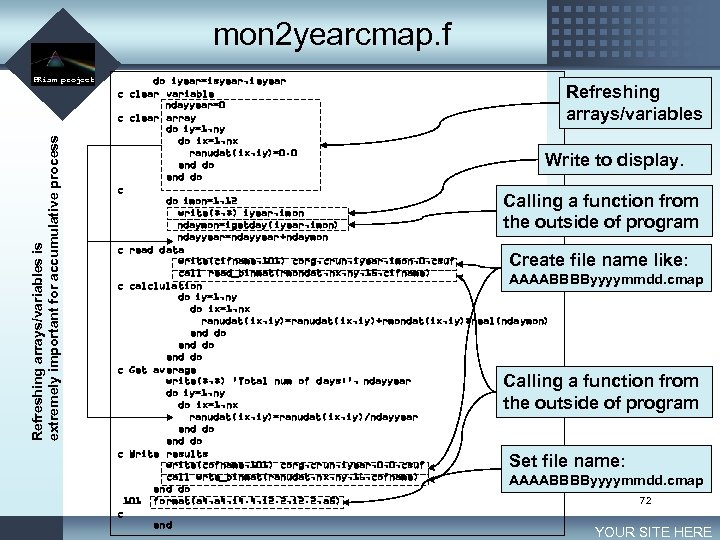 mon 2 yearcmap. f LOGO Refreshing arrays/variables is extremely important for accumulative process PRism project do iyear=isyear, ieyear c clear variable ndayyear=0 c clear array do iy=1, ny do ix=1, nx ranudat(ix, iy)=0. 0 end do c do imon=1, 12 write(*, *) iyear, imon ndaymon=igetday(iyear, imon) ndayyear=ndayyear+ndaymon c read data write(cifname, 101) corg, crun, iyear, imon, 0, csuf call read_binmat(rmondat, nx, ny, 15, cifname) AAAABBBByyyymmdd. cmap c calclulation do iy=1, ny do ix=1, nx ranudat(ix, iy)=ranudat(ix, iy)+rmondat(ix, iy)*real(ndaymon) end do c Get average write(*, *) 'Total num of days: ', ndayyear do iy=1, ny do ix=1, nx ranudat(ix, iy)=ranudat(ix, iy)/ndayyear end do c Write results write(cofname, 101) corg, crun, iyear, 0, 0, csuf call wrte_binmat(ranudat, nx, ny, 16, cofname) AAAABBBByyyymmdd. cmap end do 72 101 format(a 4, i 4. 4, i 2. 2, a 5) c end Refreshing arrays/variables Write to display. Calling a function from the outside of program Create file name like: Calling a function from the outside of program Set file name: YOUR SITE HERE
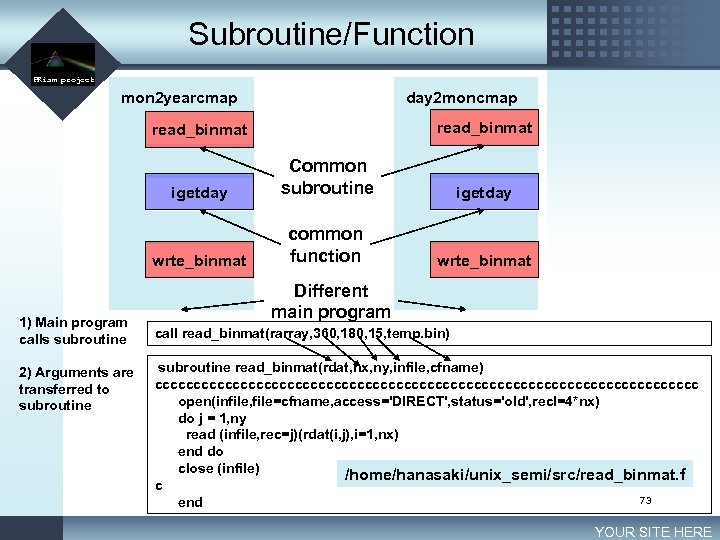 Subroutine/Function LOGO PRism project mon 2 yearcmap day 2 moncmap read_binmat igetday 2) Arguments are transferred to subroutine igetday wrte_binmat 1) Main program calls subroutine Common subroutine common function wrte_binmat Different main program call read_binmat(rarray, 360, 180, 15, temp. bin) subroutine read_binmat(rdat, nx, ny, infile, cfname) ccccccccccccccccccccccccccccccccccc open(infile, file=cfname, access='DIRECT', status='old', recl=4*nx) do j = 1, ny read (infile, rec=j)(rdat(i, j), i=1, nx) end do close (infile) /home/hanasaki/unix_semi/src/read_binmat. f c 73 end YOUR SITE HERE
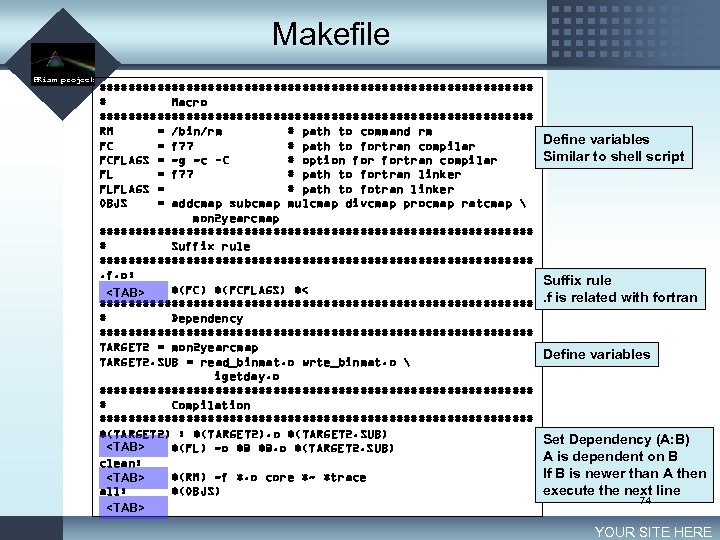 Makefile LOGO PRism project ############################## # Macro ############################## RM = /bin/rm # path to command rm FC = f 77 # path to fortran compilar FCFLAGS = -g -c –C # option fortran compilar FL = f 77 # path to fortran linker FLFLAGS = # path to fotran linker OBJS = addcmap subcmap mulcmap divcmap procmap ratcmap mon 2 yearcmap ############################## # Suffix rule ##############################. f. o: $(FC) $(FCFLAGS) $<
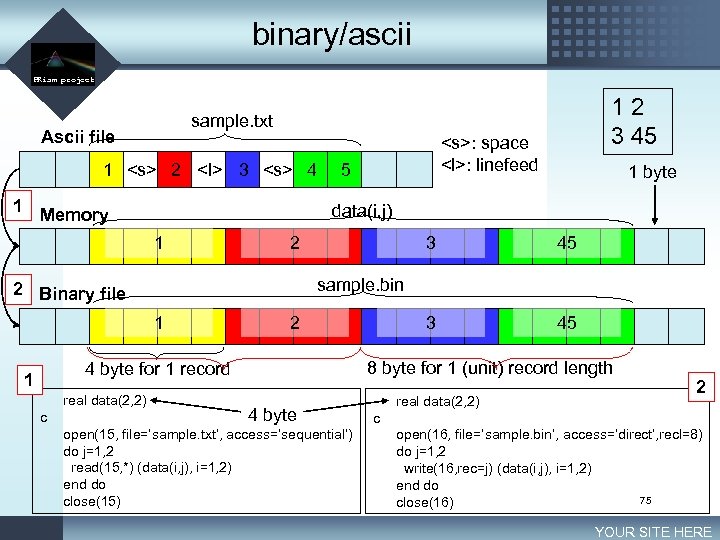 binary/ascii LOGO PRism project Ascii file 1
 2 4 1 1 5 2 1 3 45 3 2 45 8 byte for 1 (unit) record length 4 byte for 1 record c 1 byte sample. bin 2 Binary file real data(2, 2) : space
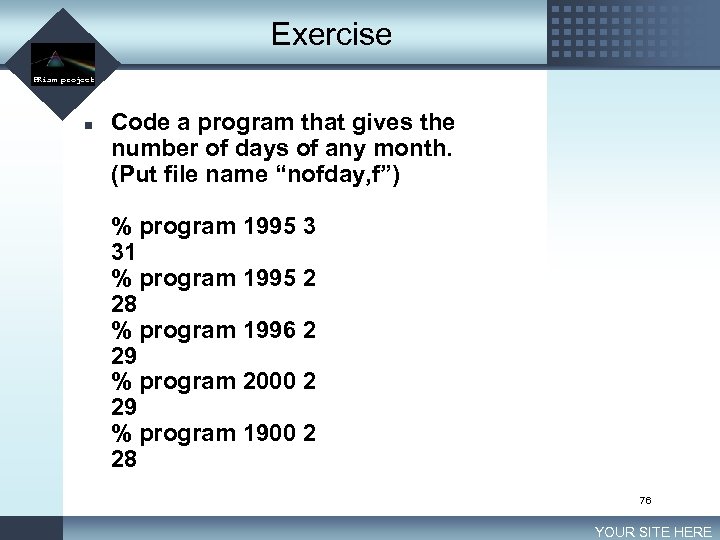 Exercise LOGO PRism project n Code a program that gives the number of days of any month. (Put file name “nofday, f”) % program 1995 3 31 % program 1995 2 28 % program 1996 2 29 % program 2000 2 29 % program 1900 2 28 76 YOUR SITE HERE
 Lesson 8 Shell script LOGO PRism project 77
 Today’s goal LOGO PRism project n To complete Exercise 2 of Lesson 6, we need to type 42 commands on the terminal. How can we reduce this troublesome procedure? 78 YOUR SITE HERE
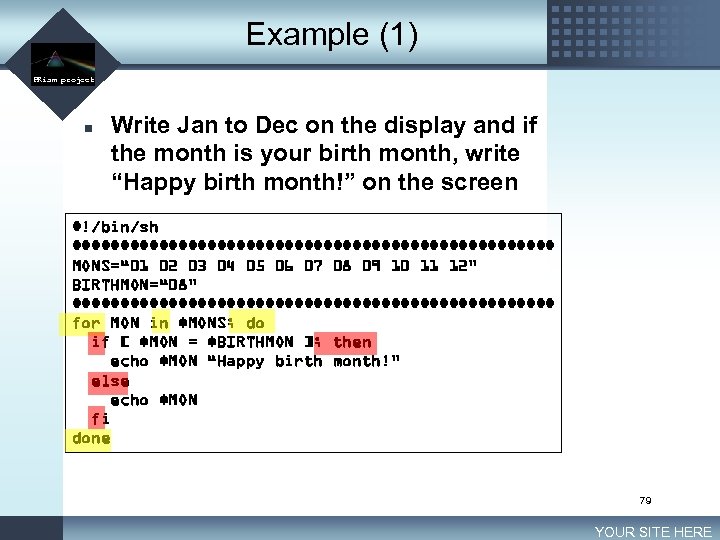 Example (1) LOGO PRism project n Write Jan to Dec on the display and if the month is your birth month, write “Happy birth month!” on the screen #!/bin/sh ######################### MONS=“ 01 02 03 04 05 06 07 08 09 10 11 12” BIRTHMON=“ 08” ######################### for MON in $MONS; do if [ $MON = $BIRTHMON ]; then echo $MON “Happy birth month!” else echo $MON fi done 79 YOUR SITE HERE
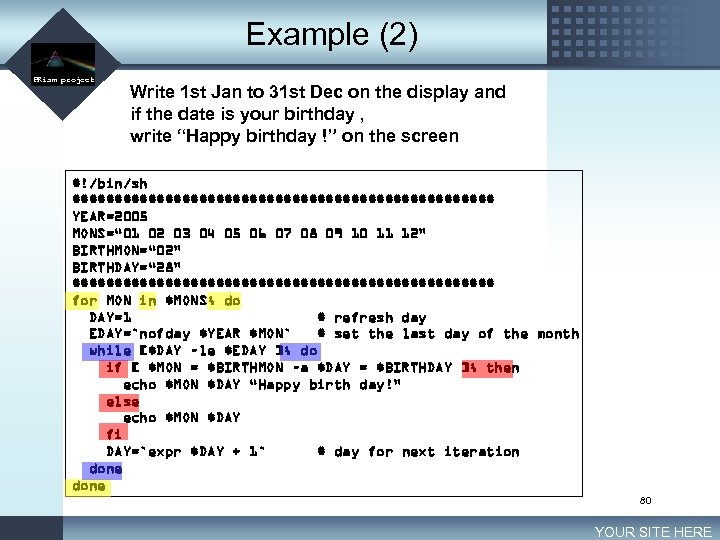 Example (2) LOGO PRism project Write 1 st Jan to 31 st Dec on the display and if the date is your birthday , write “Happy birthday !” on the screen #!/bin/sh ######################### YEAR=2005 MONS=“ 01 02 03 04 05 06 07 08 09 10 11 12” BIRTHMON=“ 02” BIRTHDAY=“ 28” ######################### for MON in $MONS; do DAY=1 # refresh day EDAY=`nofday $YEAR $MON` # set the last day of the month while [$DAY –le $EDAY ]; do if [ $MON = $BIRTHMON –a $DAY = $BIRTHDAY ]; then echo $MON $DAY “Happy birth day!” else echo $MON $DAY fi DAY=`expr $DAY + 1` # day for next iteration done 80 YOUR SITE HERE
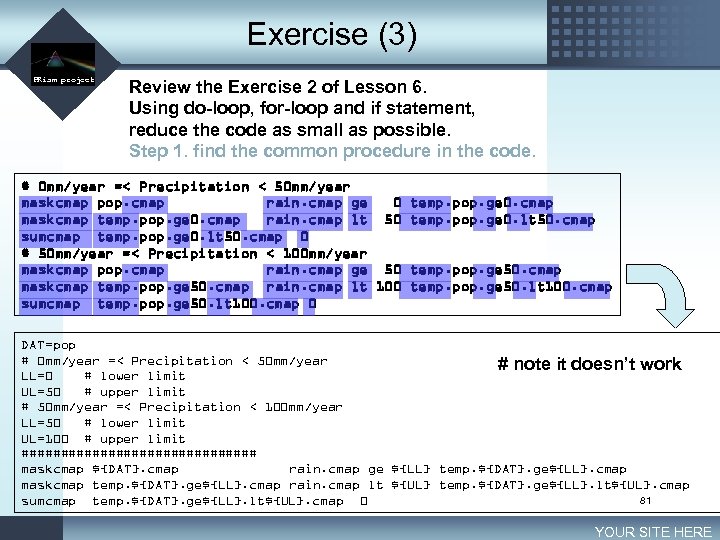 Exercise (3) LOGO PRism project Review the Exercise 2 of Lesson 6. Using do-loop, for-loop and if statement, reduce the code as small as possible. Step 1. find the common procedure in the code. # 0 mm/year =< Precipitation < 50 mm/year maskcmap pop. cmap rain. cmap ge 0 maskcmap temp. pop. ge 0. cmap rain. cmap lt 50 sumcmap temp. pop. ge 0. lt 50. cmap 0 # 50 mm/year =< Precipitation < 100 mm/year maskcmap pop. cmap rain. cmap ge 50 maskcmap temp. pop. ge 50. cmap rain. cmap lt 100 sumcmap temp. pop. ge 50. lt 100. cmap 0 temp. pop. ge 0. cmap temp. pop. ge 0. lt 50. cmap temp. pop. ge 50. lt 100. cmap DAT=pop # 0 mm/year =< Precipitation < 50 mm/year # note it doesn’t work LL=0 # lower limit UL=50 # upper limit # 50 mm/year =< Precipitation < 100 mm/year LL=50 # lower limit UL=100 # upper limit ############### maskcmap ${DAT}. cmap rain. cmap ge ${LL} temp. ${DAT}. ge${LL}. cmap maskcmap temp. ${DAT}. ge${LL}. cmap rain. cmap lt ${UL} temp. ${DAT}. ge${LL}. lt${UL}. cmap 81 sumcmap temp. ${DAT}. ge${LL}. lt${UL}. cmap 0 YOUR SITE HERE
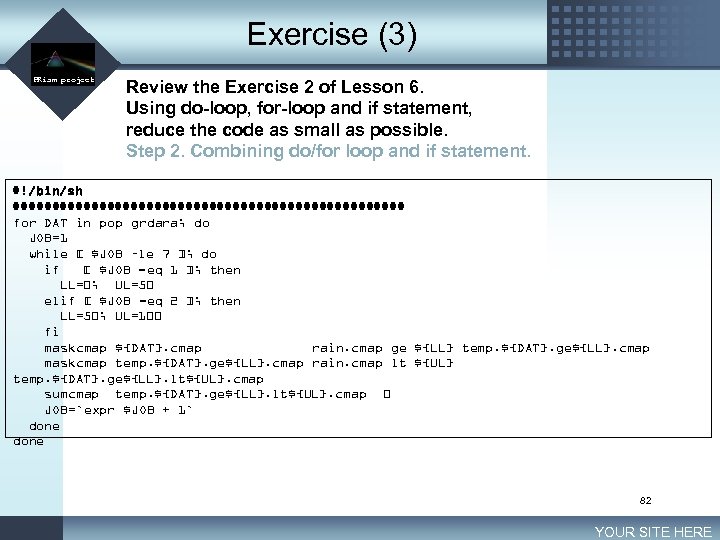 Exercise (3) LOGO PRism project Review the Exercise 2 of Lesson 6. Using do-loop, for-loop and if statement, reduce the code as small as possible. Step 2. Combining do/for loop and if statement. #!/bin/sh ######################### for DAT in pop grdara; do JOB=1 while [ $JOB –le 7 ]; do if [ $JOB -eq 1 ]; then LL=0; UL=50 elif [ $JOB -eq 2 ]; then LL=50; UL=100 fi maskcmap ${DAT}. cmap rain. cmap ge ${LL} temp. ${DAT}. ge${LL}. cmap maskcmap temp. ${DAT}. ge${LL}. cmap rain. cmap lt ${UL} temp. ${DAT}. ge${LL}. lt${UL}. cmap sumcmap temp. ${DAT}. ge${LL}. lt${UL}. cmap 0 JOB=`expr $JOB + 1` done 82 YOUR SITE HERE
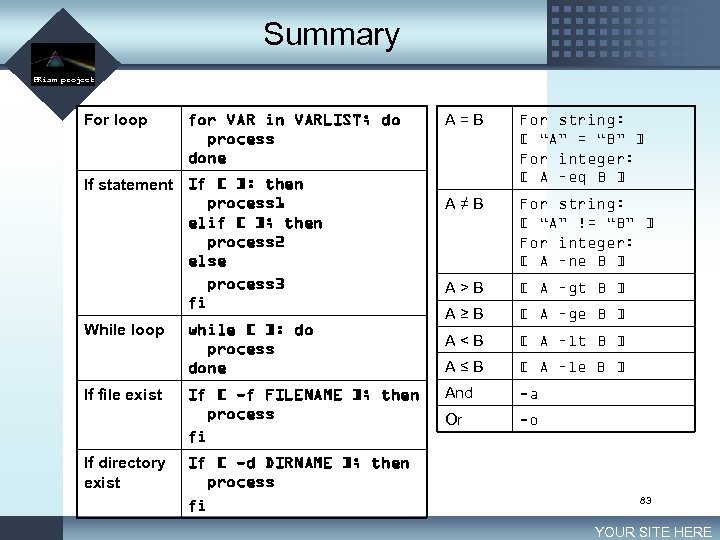 Summary LOGO PRism project For loop for VAR in VARLIST; do process done If statement If [ ]: then process 1 elif [ ]; then process 2 else process 3 fi While loop If file exist If directory exist while [ ]: do process done If [ -f FILENAME ]; then process fi If [ -d DIRNAME ]; then process fi A=B For string: [ “A” = “B” ] For integer: [ A –eq B ] A≠B For string: [ “A” != “B” ] For integer: [ A –ne B ] A>B [ A –gt B ] A≥B [ A –ge B ] A
 Exercise (Final exam) LOGO PRism project n Create a shell script that generates binary data files (144 x 72 x 4 byte) for whole period from the original CMAP ascii data files. ftp: //ftp. ncep. noaa. gov/pub/precip/cmap/monthly/ 84 YOUR SITE HERE
 Lesson 9 Set UNIX environment LOGO PRism project 85
 Today’s goal LOGO PRism project n Understanding – What is etc directory in your home directory – Why “rm –f” still ask you for your permission? – Why the command “lpr” knows our default printer – Why we can execute “ls” even the file does not exist in the current directory n Understanding our lab’s UNIX environment. 86 YOUR SITE HERE
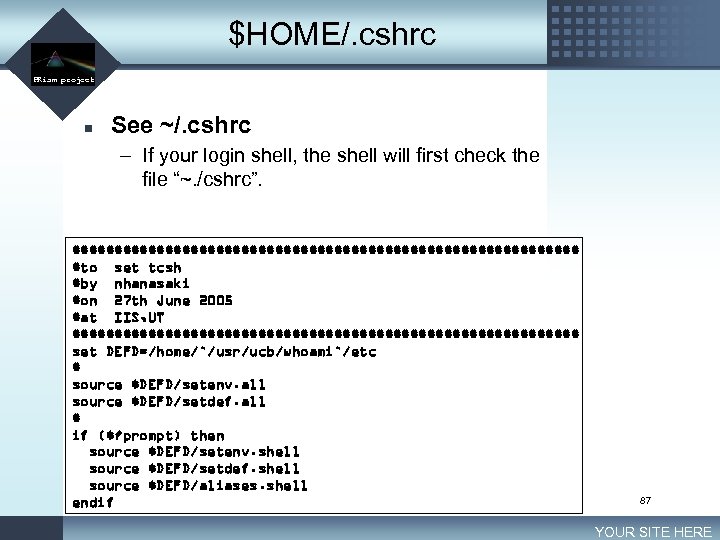 $HOME/. cshrc LOGO PRism project n See ~/. cshrc – If your login shell, the shell will first check the file “~. /cshrc”. ############################## #to set tcsh #by nhanasaki #on 27 th June 2005 #at IIS, UT ############################## set DEFD=/home/`/usr/ucb/whoami`/etc # source $DEFD/setenv. all source $DEFD/setdef. all # if ($? prompt) then source $DEFD/setenv. shell source $DEFD/setdef. shell source $DEFD/aliases. shell endif 87 YOUR SITE HERE
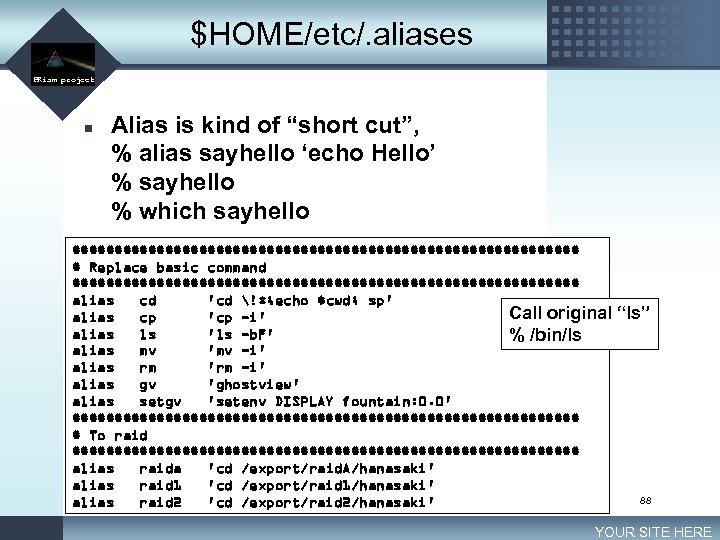 $HOME/etc/. aliases LOGO PRism project n Alias is kind of “short cut”, % alias sayhello ‘echo Hello’ % sayhello % which sayhello ############################## # Replace basic command ############################## alias cd 'cd !*; echo $cwd; sp' Call original alias cp 'cp -i' alias ls 'ls -b. F' % /bin/ls alias mv 'mv -i' alias rm 'rm -i' alias gv 'ghostview' alias setgv 'setenv DISPLAY fountain: 0. 0' ############################## # To raid ############################## alias raida 'cd /export/raid. A/hanasaki' alias raid 1 'cd /export/raid 1/hanasaki' alias raid 2 'cd /export/raid 2/hanasaki' “ls” 88 YOUR SITE HERE
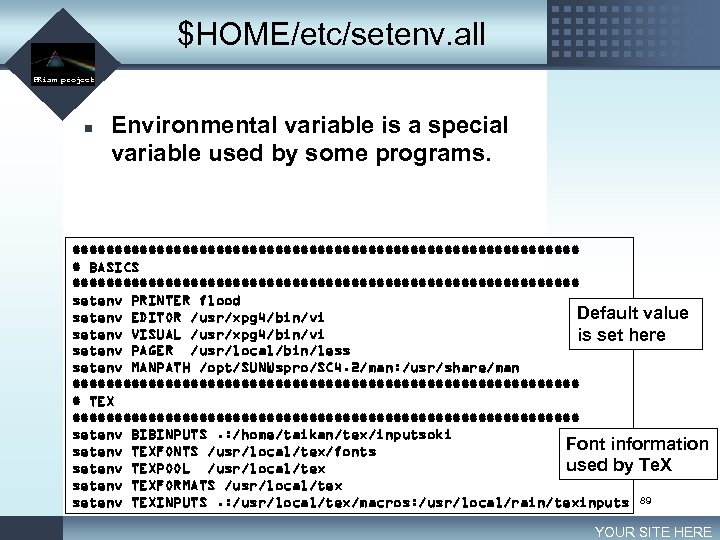 $HOME/etc/setenv. all LOGO PRism project n Environmental variable is a special variable used by some programs. ############################## # BASICS ############################## setenv PRINTER flood Default value setenv EDITOR /usr/xpg 4/bin/vi setenv VISUAL /usr/xpg 4/bin/vi is set here setenv PAGER /usr/local/bin/less setenv MANPATH /opt/SUNWspro/SC 4. 2/man: /usr/share/man ############################## # TEX ############################## setenv BIBINPUTS. : /home/taikan/tex/inputsoki Font information setenv TEXFONTS /usr/local/tex/fonts used by Te. X setenv TEXPOOL /usr/local/tex setenv TEXFORMATS /usr/local/tex setenv TEXINPUTS. : /usr/local/tex/macros: /usr/local/rain/texinputs 89 YOUR SITE HERE
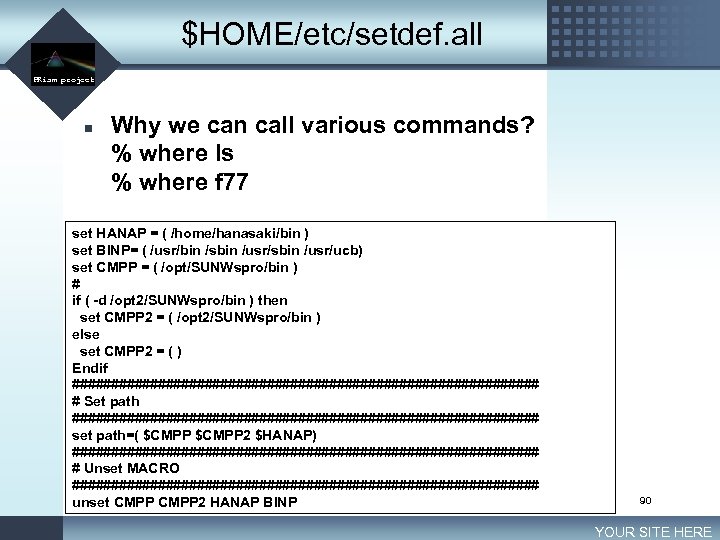 $HOME/etc/setdef. all LOGO PRism project n Why we can call various commands? % where ls % where f 77 set HANAP = ( /home/hanasaki/bin ) set BINP= ( /usr/bin /sbin /usr/ucb) set CMPP = ( /opt/SUNWspro/bin ) # if ( -d /opt 2/SUNWspro/bin ) then set CMPP 2 = ( /opt 2/SUNWspro/bin ) else set CMPP 2 = ( ) Endif ############################## # Set path ############################## set path=( $CMPP 2 $HANAP) ############################## # Unset MACRO ############################## unset CMPP 2 HANAP BINP 90 YOUR SITE HERE
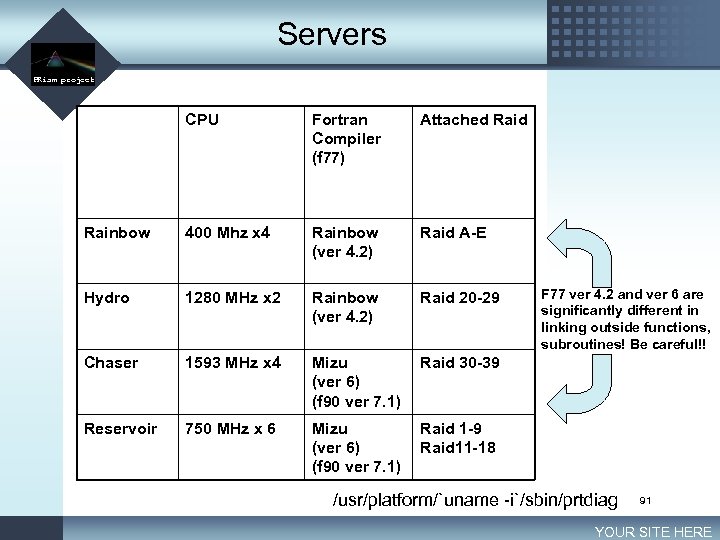 Servers LOGO PRism project CPU Fortran Compiler (f 77) Attached Rainbow 400 Mhz x 4 Rainbow (ver 4. 2) Raid A-E Hydro 1280 MHz x 2 Rainbow (ver 4. 2) Raid 20 -29 Chaser 1593 MHz x 4 Mizu (ver 6) (f 90 ver 7. 1) Raid 30 -39 Reservoir 750 MHz x 6 Mizu (ver 6) (f 90 ver 7. 1) Raid 1 -9 Raid 11 -18 F 77 ver 4. 2 and ver 6 are significantly different in linking outside functions, subroutines! Be careful!! /usr/platform/`uname -i`/sbin/prtdiag 91 YOUR SITE HERE
 Exercise LOGO PRism project n Set alias to “cd” to your export directory % which raid. A aliased to /export/raid. A/hanasaki n Make directory bin in your home directory and set path, so as to use any commands in $HOME/bin at whatever directory. 92 YOUR SITE HERE
 After word LOGO PRism project 93
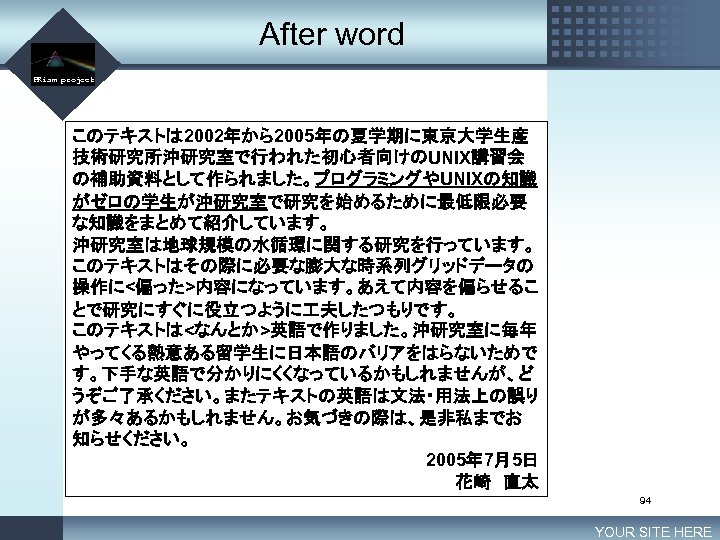 After word LOGO PRism project このテキストは 2002年から2005年の夏学期に東京大学生産 技術研究所沖研究室で行われた初心者向けのUNIX講習会 の補助資料として作られました。プログラミングやUNIXの知識 がゼロの学生が沖研究室で研究を始めるために最低限必要 な知識をまとめて紹介しています。 沖研究室は地球規模の水循環に関する研究を行っています。 このテキストはその際に必要な膨大な時系列グリッドデータの 操作に<偏った>内容になっています。あえて内容を偏らせるこ とで研究にすぐに役立つように 夫したつもりです。 このテキストは<なんとか>英語で作りました。沖研究室に毎年 やってくる熱意ある留学生に日本語のバリアをはらないためで す。下手な英語で分かりにくくなっているかもしれませんが、ど うぞご了承ください。またテキストの英語は文法・用法上の誤り が多々あるかもしれません。お気づきの際は、是非私までお 知らせください。 2005年 7月5日 花崎 直太 94 YOUR SITE HERE
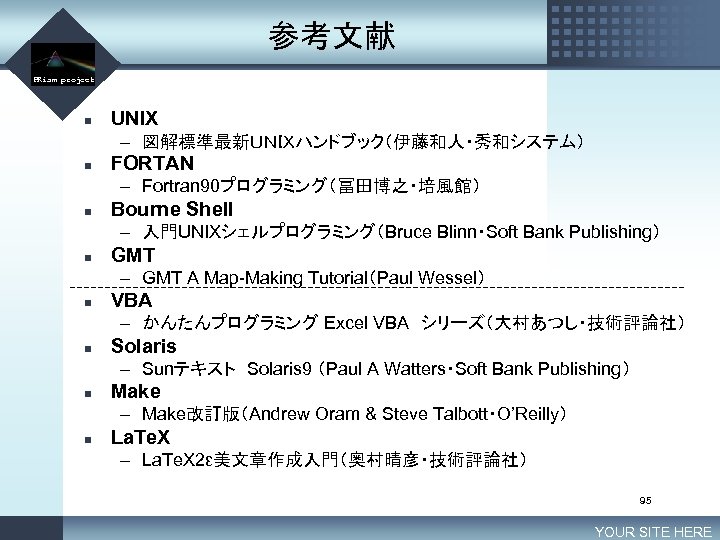 参考文献 LOGO PRism project n UNIX – 図解標準最新UNIXハンドブック(伊藤和人・秀和システム) n FORTAN – Fortran 90プログラミング(冨田博之・培風館) n Bourne Shell – 入門UNIXシェルプログラミング(Bruce Blinn・Soft Bank Publishing) n GMT – GMT A Map-Making Tutorial(Paul Wessel) n VBA – かんたんプログラミング Excel VBA シリーズ(大村あつし・技術評論社) n Solaris – Sunテキスト Solaris 9 (Paul A Watters・Soft Bank Publishing) n Make – Make改訂版(Andrew Oram & Steve Talbott・O’Reilly) n La. Te. X – La. Te. X 2ε美文章作成入門(奥村晴彦・技術評論社) 95 YOUR SITE HERE
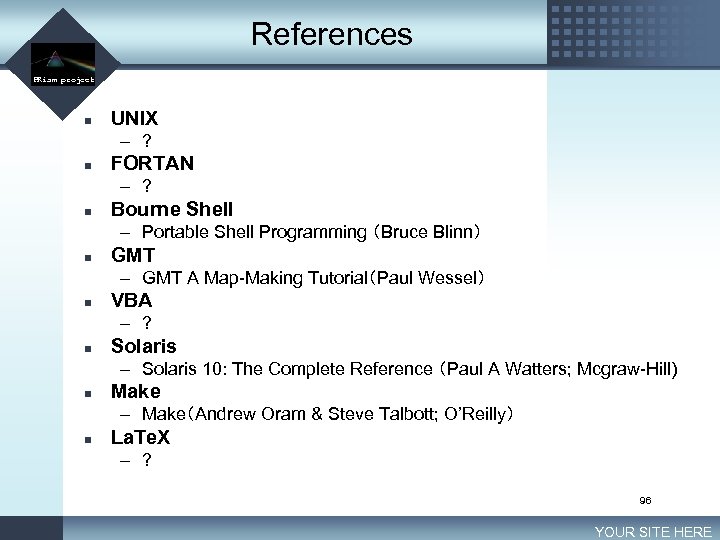 References LOGO PRism project n UNIX – ? n FORTAN – ? n Bourne Shell – Portable Shell Programming (Bruce Blinn) n GMT – GMT A Map-Making Tutorial(Paul Wessel) n VBA – ? n Solaris – Solaris 10: The Complete Reference (Paul A Watters; Mcgraw-Hill) n Make – Make(Andrew Oram & Steve Talbott; O’Reilly) n La. Te. X – ? 96 YOUR SITE HERE