


 Скачать презентацию Lecture on Computer Organization for System and Application
0b91eb5c4e31cc64ef34ab4ce68215d3.ppt
- Количество слайдов: 55
 Lecture on Computer Organization for System and Application Programmers Walter Kriha
 Goals • Learn a canonical computer architecture and associated data and control flow • Understand the instruction set as the programming interface to the cpu • Learn how peripheral devices are accessed • Understand the event based structure of CPU and OS • Learn about the memory subsystem and how the OS handles it. • Think performance This part will not turn you into a hardware or system software specialist. But it will provide a basic understanding of how a computer works. Some patterns like the cache handling algorithms are equally important for application design.
 Overview • State machines and clocks • Computer architecture, components, data and control, protection • Computer organization: memory, devices, I/O, interrupts • Firmware • Instruction set, assembler and how a program is executed • The execution environment of a program: memory, CPU How is a byte written to a printer? How does a computer react on inputs?
 Principles • Layering of functionality to provide abstractions and independent variation • Caching data to save access costs • A bus to provide a means for future extensions • Synchronous vs. asynchronous communication • Speed vs. size • optimization vs. genericity You will learn that many low-level hardware principles or architectures are actually general principles: e. g. a bus is a communication platform and interface which can be represented in hardware OR software. Caching is a performance principle also in hardware OR software. Many of those principle will be extremely useful for application development as well.
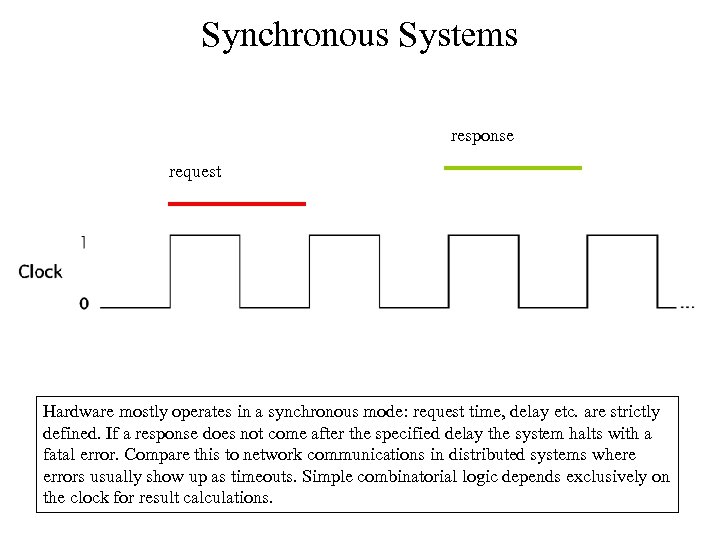 Synchronous Systems response request Hardware mostly operates in a synchronous mode: request time, delay etc. are strictly defined. If a response does not come after the specified delay the system halts with a fatal error. Compare this to network communications in distributed systems where errors usually show up as timeouts. Simple combinatorial logic depends exclusively on the clock for result calculations.
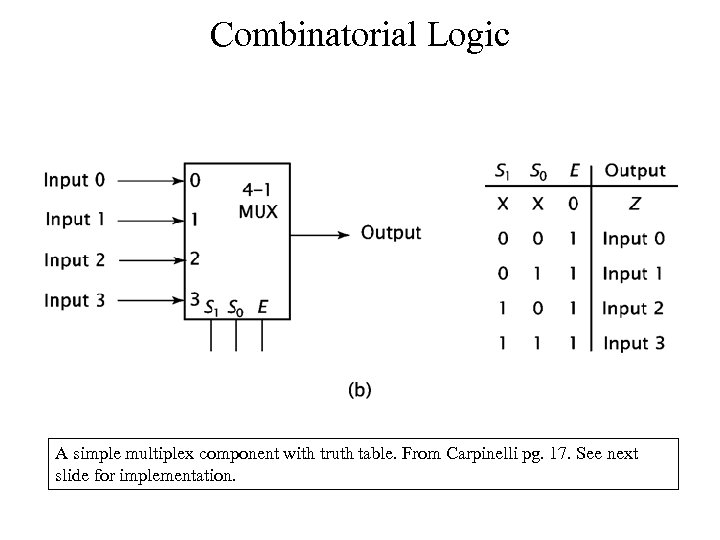 Combinatorial Logic A simple multiplex component with truth table. From Carpinelli pg. 17. See next slide for implementation.
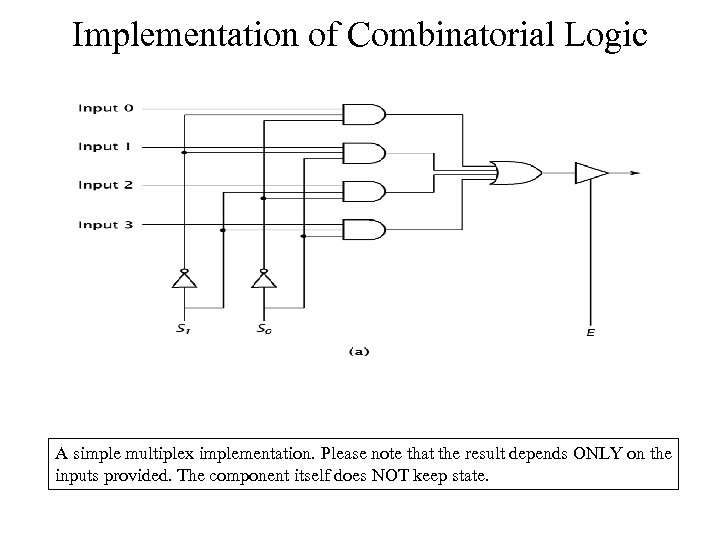 Implementation of Combinatorial Logic A simple multiplex implementation. Please note that the result depends ONLY on the inputs provided. The component itself does NOT keep state.
 State Machines
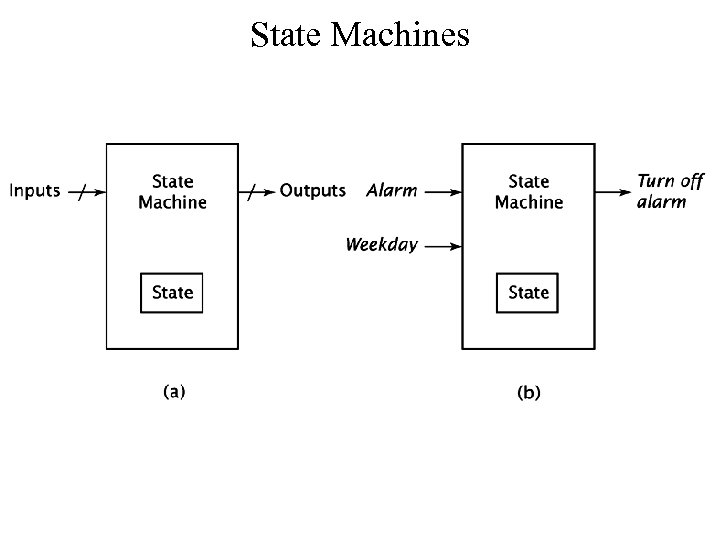
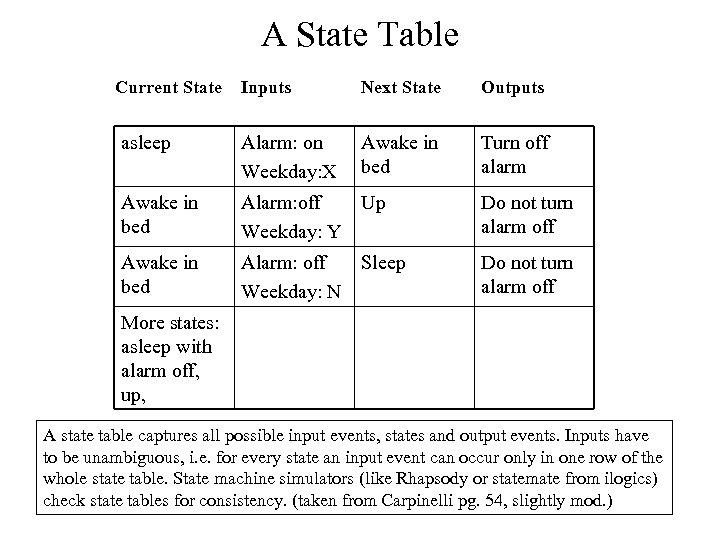 A State Table Current State Inputs Next State Outputs asleep Alarm: on Weekday: X Awake in bed Turn off alarm Awake in bed Alarm: off Up Weekday: Y Do not turn alarm off Awake in bed Alarm: off Sleep Weekday: N Do not turn alarm off More states: asleep with alarm off, up, A state table captures all possible input events, states and output events. Inputs have to be unambiguous, i. e. for every state an input event can occur only in one row of the whole state table. State machine simulators (like Rhapsody or statemate from ilogics) check state tables for consistency. (taken from Carpinelli pg. 54, slightly mod. )
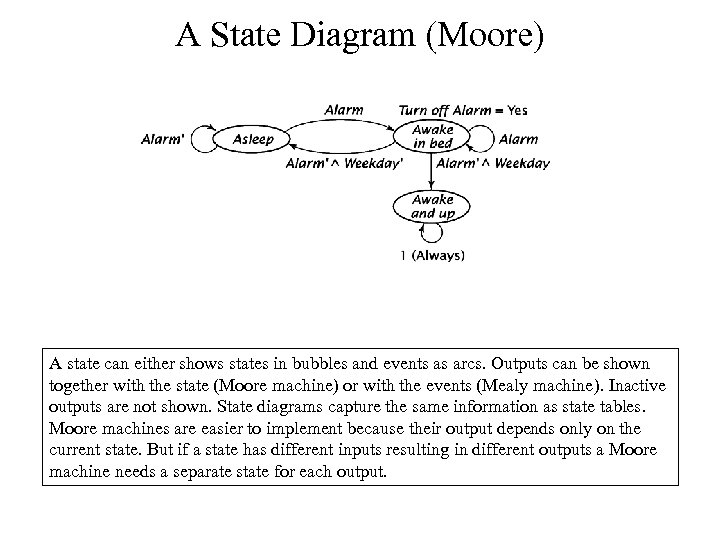 A State Diagram (Moore) A state can either shows states in bubbles and events as arcs. Outputs can be shown together with the state (Moore machine) or with the events (Mealy machine). Inactive outputs are not shown. State diagrams capture the same information as state tables. Moore machines are easier to implement because their output depends only on the current state. But if a state has different inputs resulting in different outputs a Moore machine needs a separate state for each output.
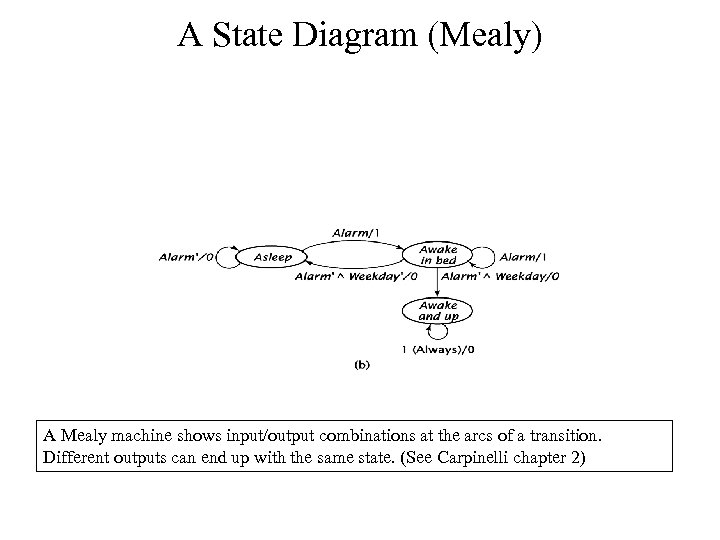 A State Diagram (Mealy) A Mealy machine shows input/output combinations at the arcs of a transition. Different outputs can end up with the same state. (See Carpinelli chapter 2)
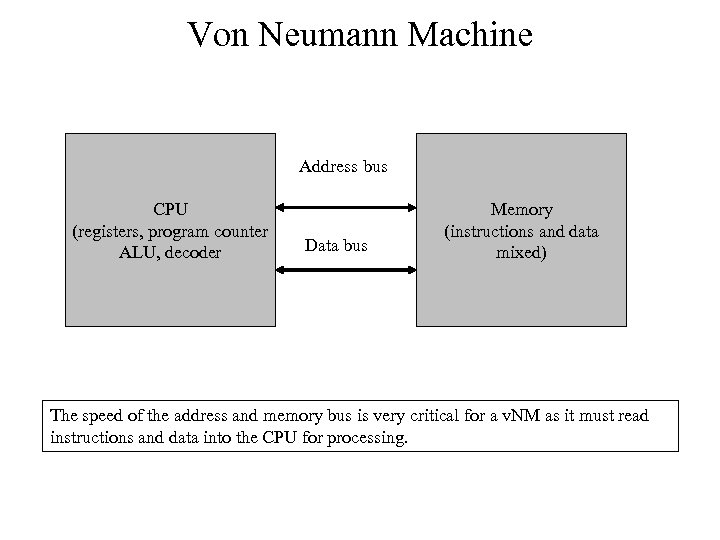 Von Neumann Machine Address bus CPU (registers, program counter ALU, decoder Data bus Memory (instructions and data mixed) The speed of the address and memory bus is very critical for a v. NM as it must read instructions and data into the CPU for processing.
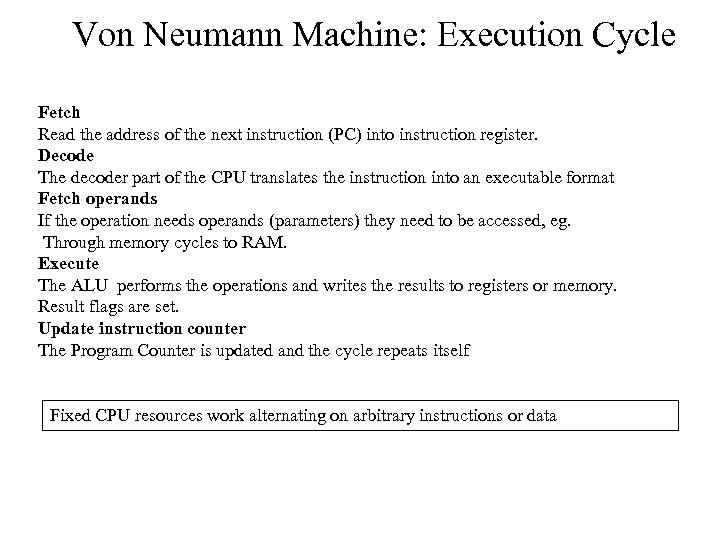 Von Neumann Machine: Execution Cycle Fetch Read the address of the next instruction (PC) into instruction register. Decode The decoder part of the CPU translates the instruction into an executable format Fetch operands If the operation needs operands (parameters) they need to be accessed, eg. Through memory cycles to RAM. Execute The ALU performs the operations and writes the results to registers or memory. Result flags are set. Update instruction counter The Program Counter is updated and the cycle repeats itself Fixed CPU resources work alternating on arbitrary instructions or data
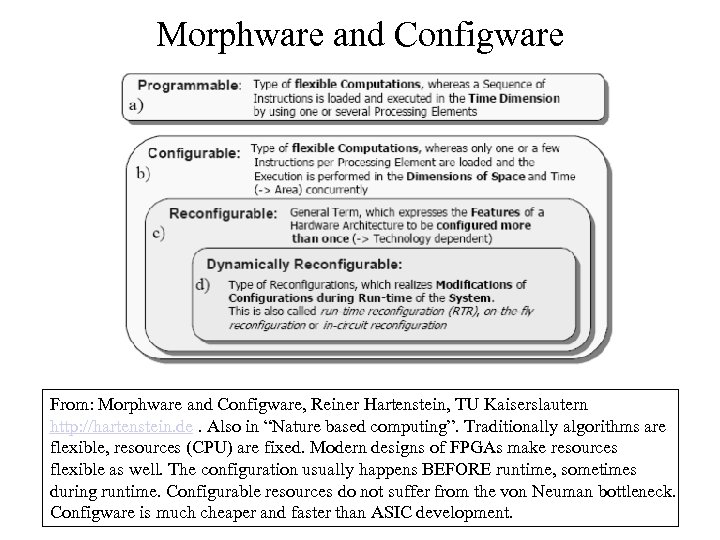 Morphware and Configware From: Morphware and Configware, Reiner Hartenstein, TU Kaiserslautern http: //hartenstein. de. Also in “Nature based computing”. Traditionally algorithms are flexible, resources (CPU) are fixed. Modern designs of FPGAs make resources flexible as well. The configuration usually happens BEFORE runtime, sometimes during runtime. Configurable resources do not suffer from the von Neuman bottleneck. Configware is much cheaper and faster than ASIC development.
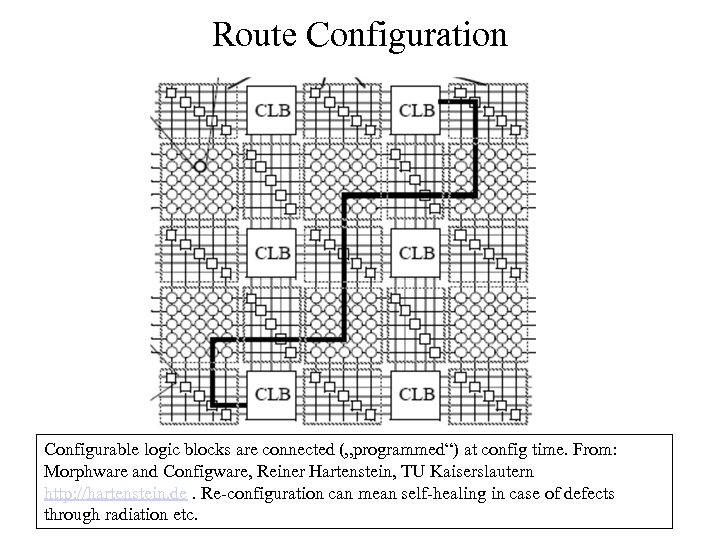 Route Configuration Configurable logic blocks are connected („programmed“) at config time. From: Morphware and Configware, Reiner Hartenstein, TU Kaiserslautern http: //hartenstein. de. Re-configuration can mean self-healing in case of defects through radiation etc.
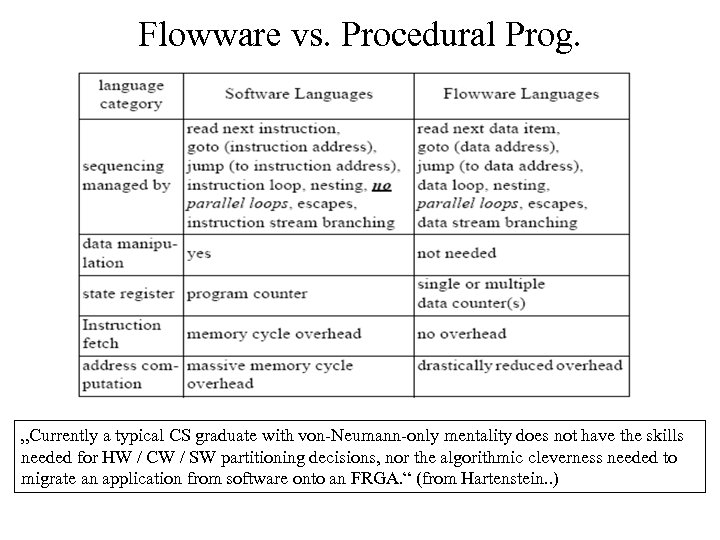 Flowware vs. Procedural Prog. „Currently a typical CS graduate with von-Neumann-only mentality does not have the skills needed for HW / CW / SW partitioning decisions, nor the algorithmic cleverness needed to migrate an application from software onto an FRGA. “ (from Hartenstein. . )
 Instruction Sets • Bytecodes for virtual machines • Machine code for real CPUs
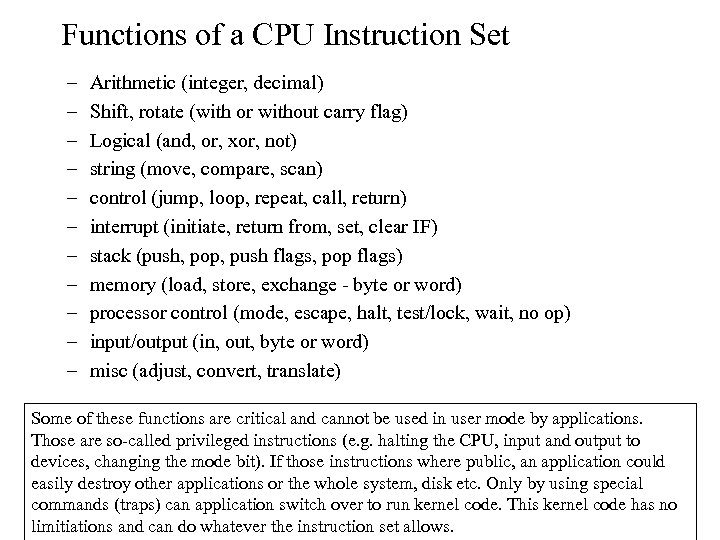 Functions of a CPU Instruction Set – – – Arithmetic (integer, decimal) Shift, rotate (with or without carry flag) Logical (and, or, xor, not) string (move, compare, scan) control (jump, loop, repeat, call, return) interrupt (initiate, return from, set, clear IF) stack (push, pop, push flags, pop flags) memory (load, store, exchange - byte or word) processor control (mode, escape, halt, test/lock, wait, no op) input/output (in, out, byte or word) misc (adjust, convert, translate) Some of these functions are critical and cannot be used in user mode by applications. Those are so-called privileged instructions (e. g. halting the CPU, input and output to devices, changing the mode bit). If those instructions where public, an application could easily destroy other applications or the whole system, disk etc. Only by using special commands (traps) can application switch over to run kernel code. This kernel code has no limitiations and can do whatever the instruction set allows.
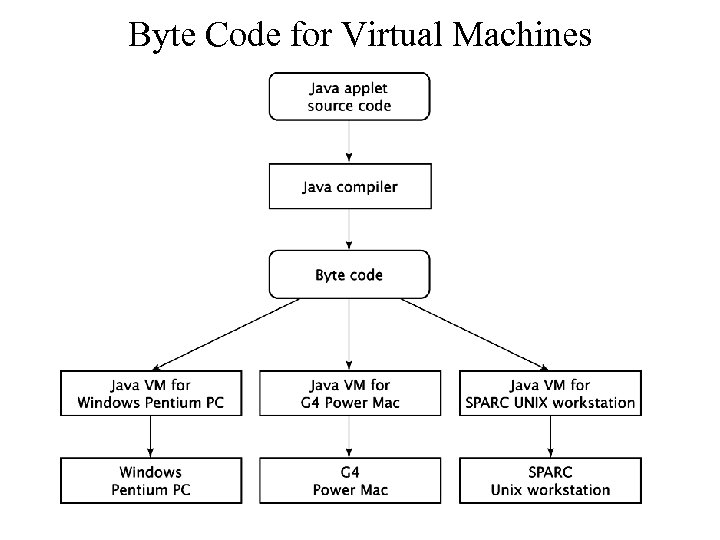 Byte Code for Virtual Machines
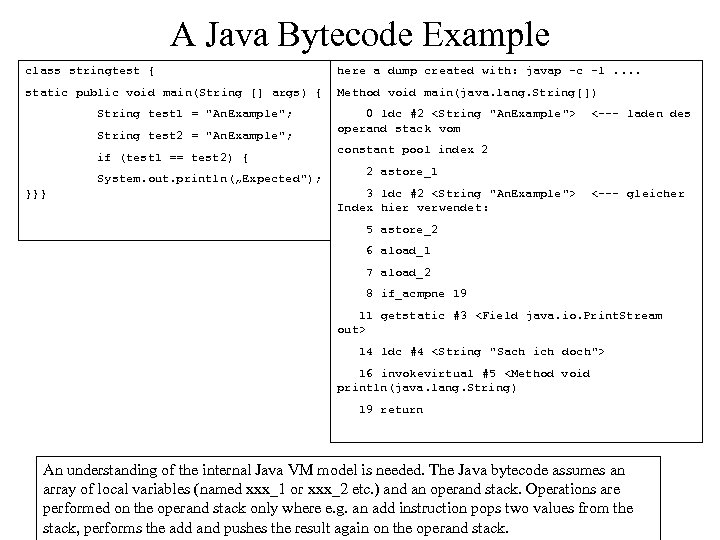 A Java Bytecode Example class stringtest { here a dump created with: javap -c -l. . static public void main(String [] args) { Method void main(java. lang. String[]) String test 1 = "An. Example"; String test 2 = "An. Example"; if (test 1 == test 2) { System. out. println(„Expected"); }}} 0 ldc #2
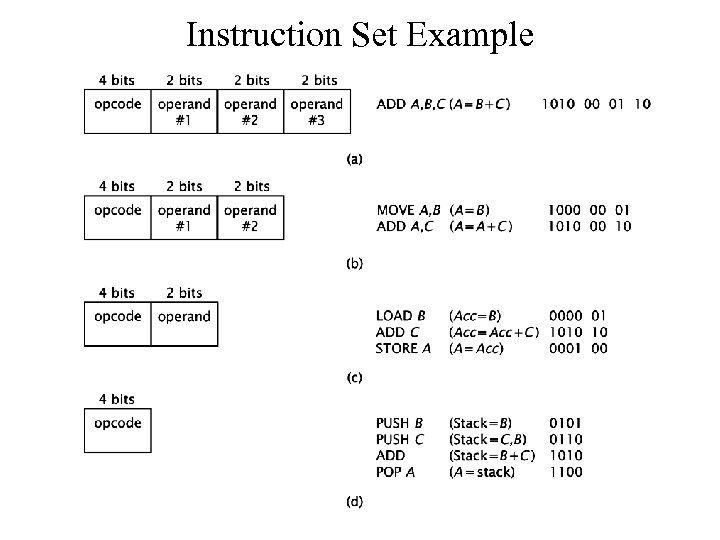 Instruction Set Example
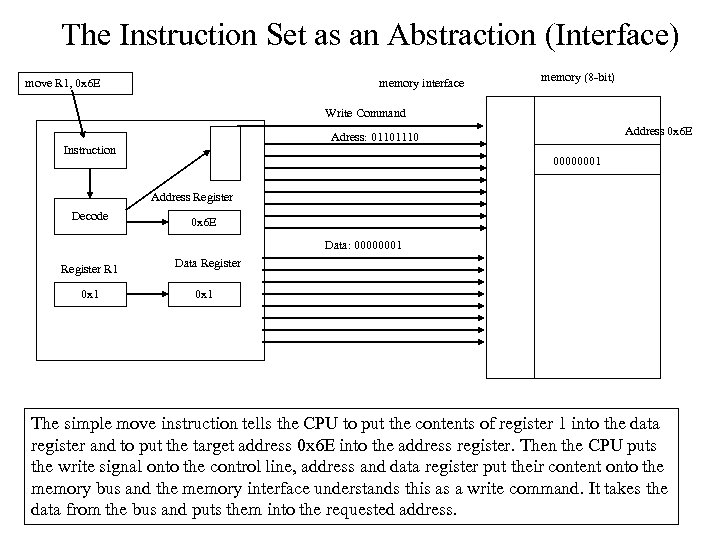 The Instruction Set as an Abstraction (Interface) move R 1, 0 x 6 E memory interface memory (8 -bit) Write Command Address 0 x 6 E Adress: 01101110 Instruction 00000001 Address Register Decode 0 x 6 E Data: 00000001 Register R 1 0 x 1 Data Register 0 x 1 The simple move instruction tells the CPU to put the contents of register 1 into the data register and to put the target address 0 x 6 E into the address register. Then the CPU puts the write signal onto the control line, address and data register put their content onto the memory bus and the memory interface understands this as a write command. It takes the data from the bus and puts them into the requested address.
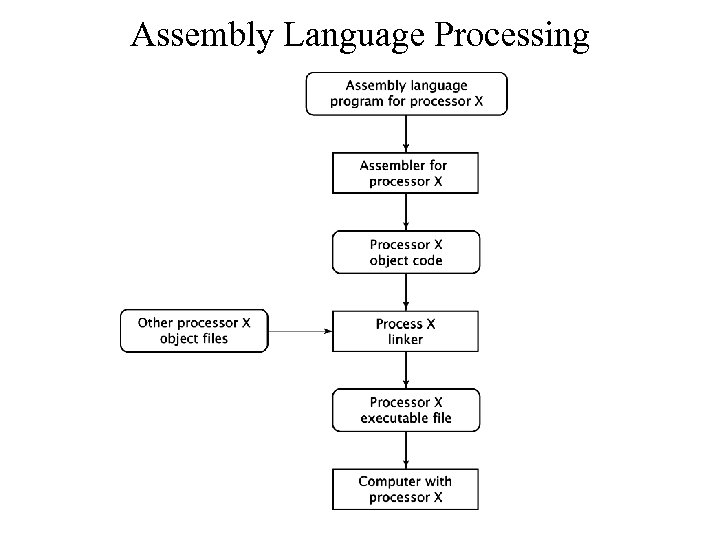 Assembly Language Processing
 Computer Architecture • • CPU Architecture Address, Data and Control Input/Output Interrupts
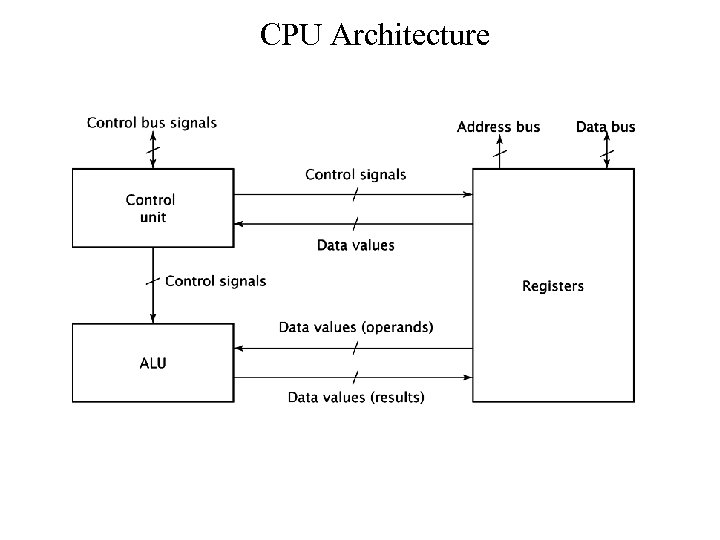 CPU Architecture
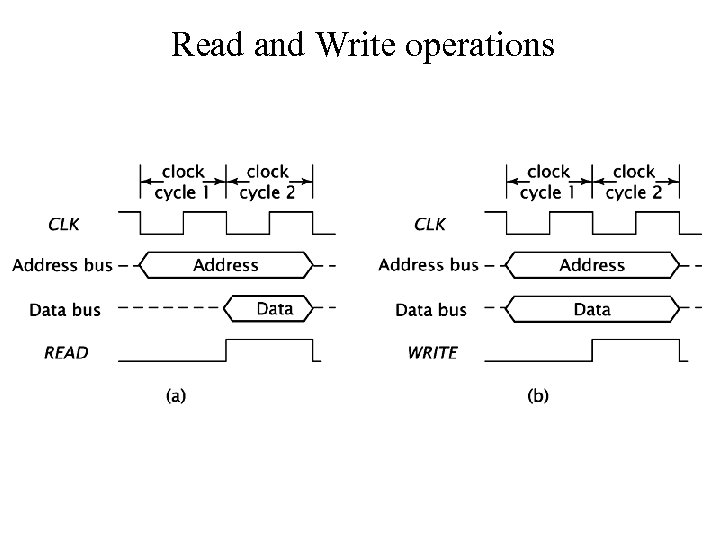 Read and Write operations
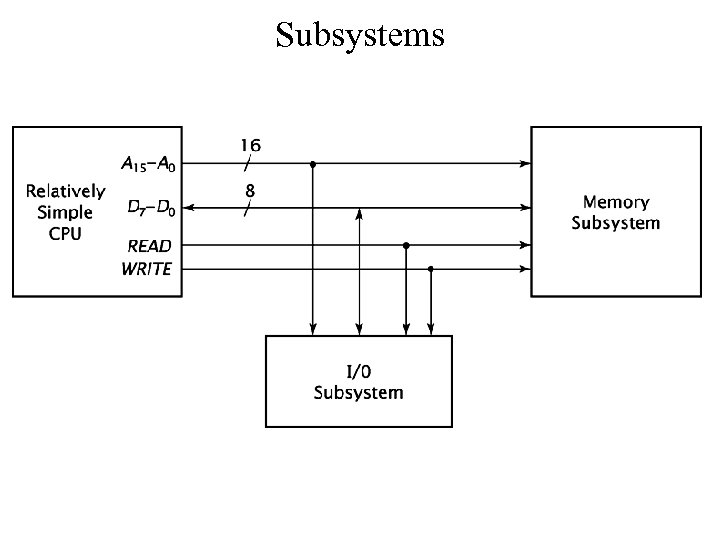 Subsystems
 Devices and Peripherals • • Bus Systems Interrupts vs. Polling Bus Masters (DMA) Device Driver Architecture
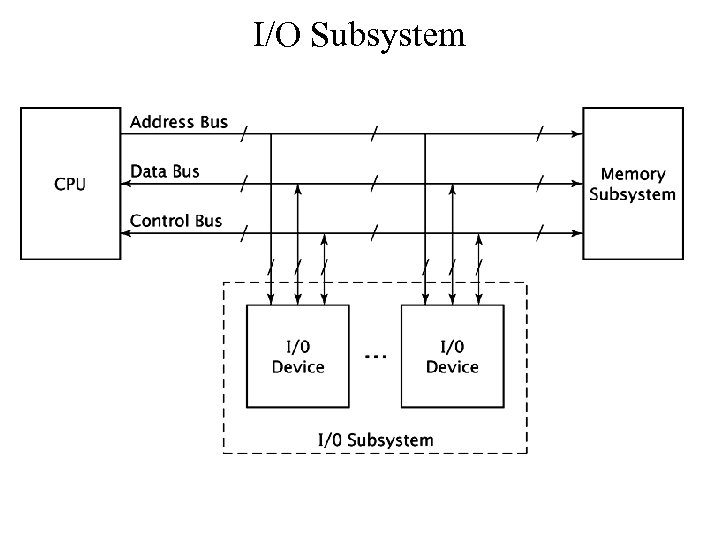 I/O Subsystem
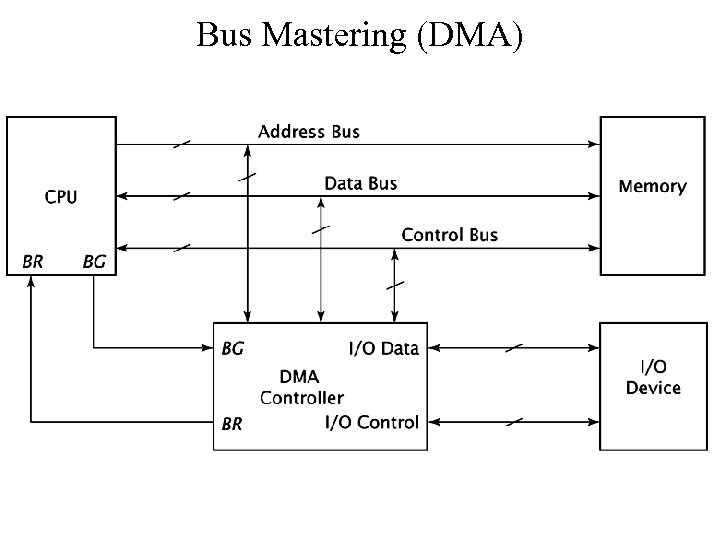 Bus Mastering (DMA)
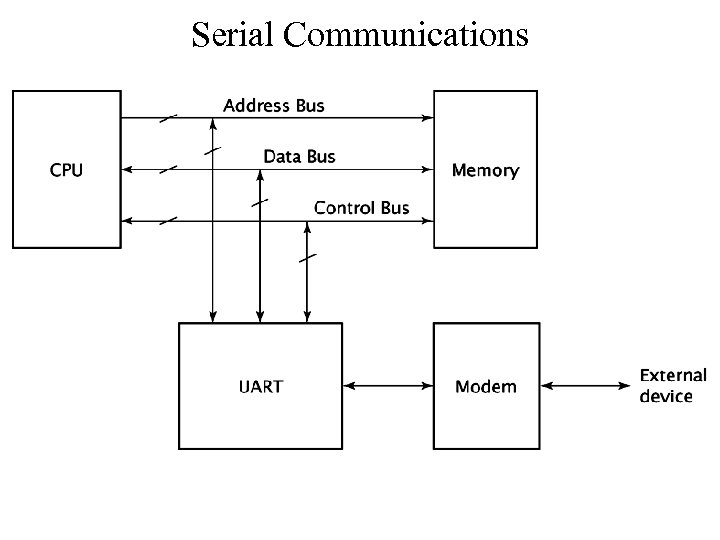 Serial Communications
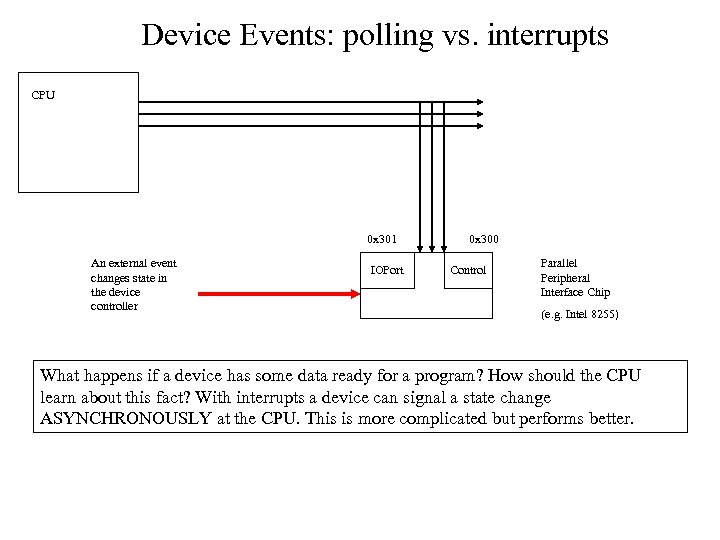 Device Events: polling vs. interrupts CPU 0 x 301 An external event changes state in the device controller IOPort 0 x 300 Control Parallel Peripheral Interface Chip (e. g. Intel 8255) What happens if a device has some data ready for a program? How should the CPU learn about this fact? With interrupts a device can signal a state change ASYNCHRONOUSLY at the CPU. This is more complicated but performs better.
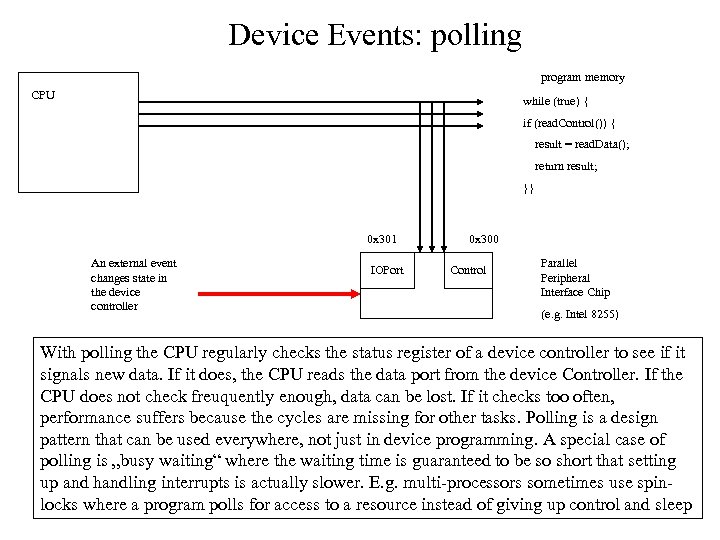 Device Events: polling program memory CPU while (true) { if (read. Control()) { result = read. Data(); return result; }} 0 x 301 An external event changes state in the device controller IOPort 0 x 300 Control Parallel Peripheral Interface Chip (e. g. Intel 8255) With polling the CPU regularly checks the status register of a device controller to see if it signals new data. If it does, the CPU reads the data port from the device Controller. If the CPU does not check freuquently enough, data can be lost. If it checks too often, performance suffers because the cycles are missing for other tasks. Polling is a design pattern that can be used everywhere, not just in device programming. A special case of polling is „busy waiting“ where the waiting time is guaranteed to be so short that setting up and handling interrupts is actually slower. E. g. multi-processors sometimes use spinlocks where a program polls for access to a resource instead of giving up control and sleep
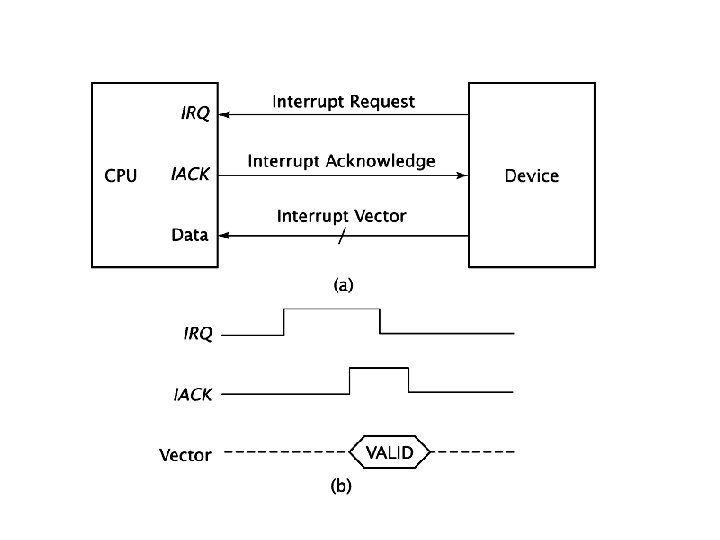
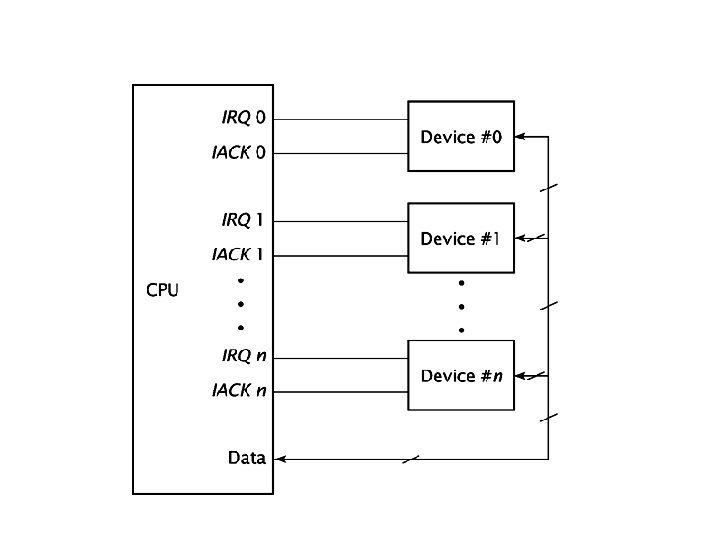
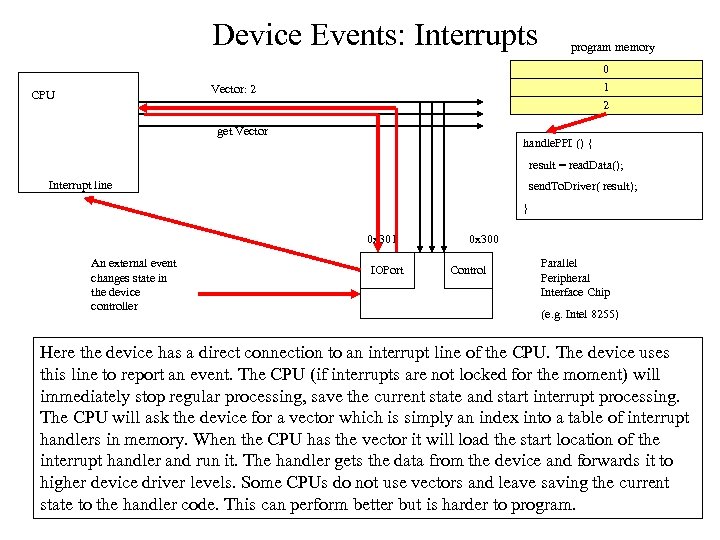 Device Events: Interrupts program memory 0 1 2 Vector: 2 CPU get Vector handle. PPI () { result = read. Data(); Interrupt line send. To. Driver( result); } 0 x 301 An external event changes state in the device controller IOPort 0 x 300 Control Parallel Peripheral Interface Chip (e. g. Intel 8255) Here the device has a direct connection to an interrupt line of the CPU. The device uses this line to report an event. The CPU (if interrupts are not locked for the moment) will immediately stop regular processing, save the current state and start interrupt processing. The CPU will ask the device for a vector which is simply an index into a table of interrupt handlers in memory. When the CPU has the vector it will load the start location of the interrupt handler and run it. The handler gets the data from the device and forwards it to higher device driver levels. Some CPUs do not use vectors and leave saving the current state to the handler code. This can perform better but is harder to program.
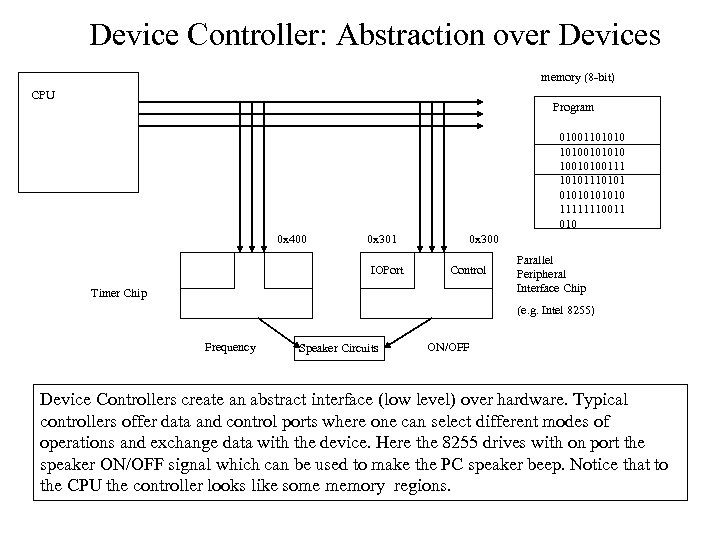 Device Controller: Abstraction over Devices memory (8 -bit) CPU Program 010011010100101010 10010100111 10101110101010 11111110011 010 0 x 400 0 x 301 IOPort 0 x 300 Control Timer Chip Parallel Peripheral Interface Chip (e. g. Intel 8255) Frequency Speaker Circuits ON/OFF Device Controllers create an abstract interface (low level) over hardware. Typical controllers offer data and control ports where one can select different modes of operations and exchange data with the device. Here the 8255 drives with on port the speaker ON/OFF signal which can be used to make the PC speaker beep. Notice that to the CPU the controller looks like some memory regions.
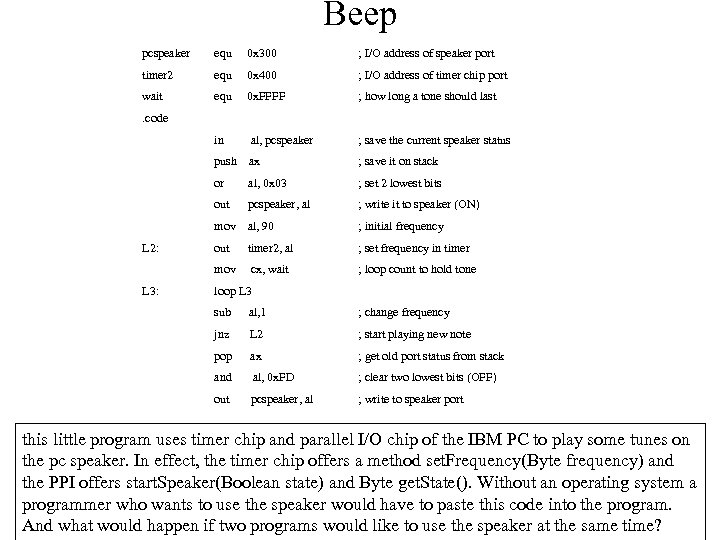 Beep pcspeaker equ 0 x 300 ; I/O address of speaker port timer 2 equ 0 x 400 ; I/O address of timer chip port wait equ 0 x. FFFF ; how long a tone should last . code in al, pcspeaker ; save the current speaker status push ax or ; set 2 lowest bits pcspeaker, al ; write it to speaker (ON) mov al, 90 ; initial frequency out timer 2, al ; set frequency in timer mov L 3: al, 0 x 03 out L 2: ; save it on stack cx, wait ; loop count to hold tone loop L 3 sub al, 1 ; change frequency jnz L 2 ; start playing new note pop ax ; get old port status from stack and al, 0 x. FD ; clear two lowest bits (OFF) out pcspeaker, al ; write to speaker port this little program uses timer chip and parallel I/O chip of the IBM PC to play some tunes on the pc speaker. In effect, the timer chip offers a method set. Frequency(Byte frequency) and the PPI offers start. Speaker(Boolean state) and Byte get. State(). Without an operating system a programmer who wants to use the speaker would have to paste this code into the program. And what would happen if two programs would like to use the speaker at the same time?
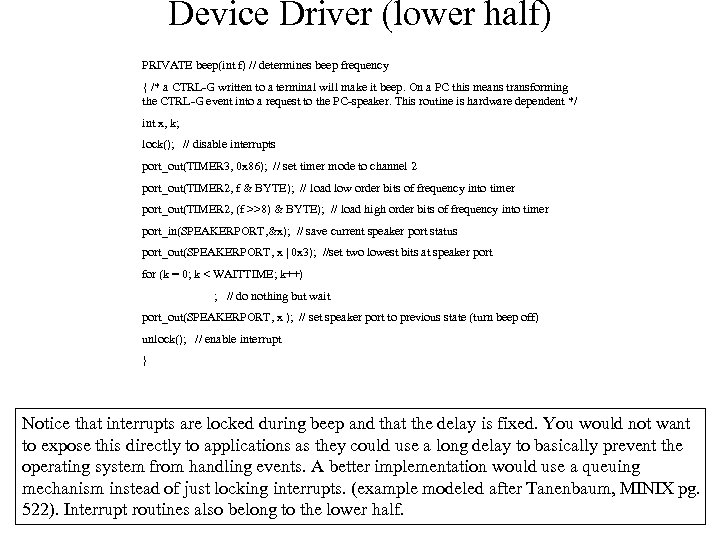 Device Driver (lower half) PRIVATE beep(int f) // determines beep frequency { /* a CTRL-G written to a terminal will make it beep. On a PC this means transforming the CTRL-G event into a request to the PC-speaker. This routine is hardware dependent */ int x, k; lock(); // disable interrupts port_out(TIMER 3, 0 x 86); // set timer mode to channel 2 port_out(TIMER 2, f & BYTE); // load low order bits of frequency into timer port_out(TIMER 2, (f >>8) & BYTE); // load high order bits of frequency into timer port_in(SPEAKERPORT, &x); // save current speaker port status port_out(SPEAKERPORT, x | 0 x 3); //set two lowest bits at speaker port for (k = 0; k < WAITTIME; k++) ; // do nothing but wait port_out(SPEAKERPORT, x ); // set speaker port to previous state (turn beep off) unlock(); // enable interrupt } Notice that interrupts are locked during beep and that the delay is fixed. You would not want to expose this directly to applications as they could use a long delay to basically prevent the operating system from handling events. A better implementation would use a queuing mechanism instead of just locking interrupts. (example modeled after Tanenbaum, MINIX pg. 522). Interrupt routines also belong to the lower half.
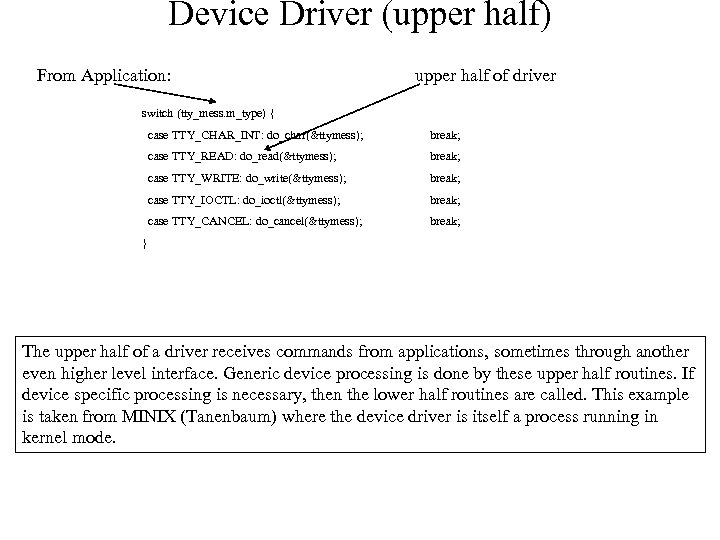 Device Driver (upper half) From Application: upper half of driver switch (tty_mess. m_type) { case TTY_CHAR_INT: do_char(&ttymess); break; case TTY_READ: do_read(&ttymess); break; case TTY_WRITE: do_write(&ttymess); break; case TTY_IOCTL: do_ioctl(&ttymess); break; case TTY_CANCEL: do_cancel(&ttymess); break; } The upper half of a driver receives commands from applications, sometimes through another even higher level interface. Generic device processing is done by these upper half routines. If device specific processing is necessary, then the lower half routines are called. This example is taken from MINIX (Tanenbaum) where the device driver is itself a process running in kernel mode.
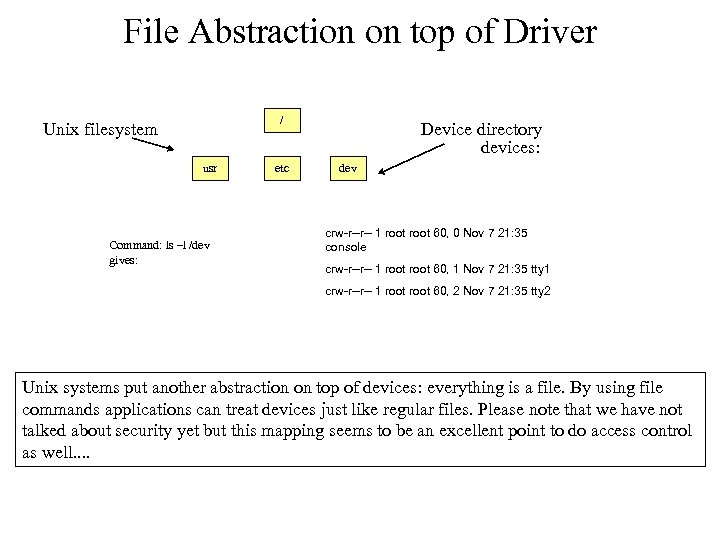 File Abstraction on top of Driver / Unix filesystem usr Command: ls –l /dev gives: etc Device directory devices: dev crw-r--r-- 1 root 60, 0 Nov 7 21: 35 console crw-r--r-- 1 root 60, 1 Nov 7 21: 35 tty 1 crw-r--r-- 1 root 60, 2 Nov 7 21: 35 tty 2 Unix systems put another abstraction on top of devices: everything is a file. By using file commands applications can treat devices just like regular files. Please note that we have not talked about security yet but this mapping seems to be an excellent point to do access control as well. .
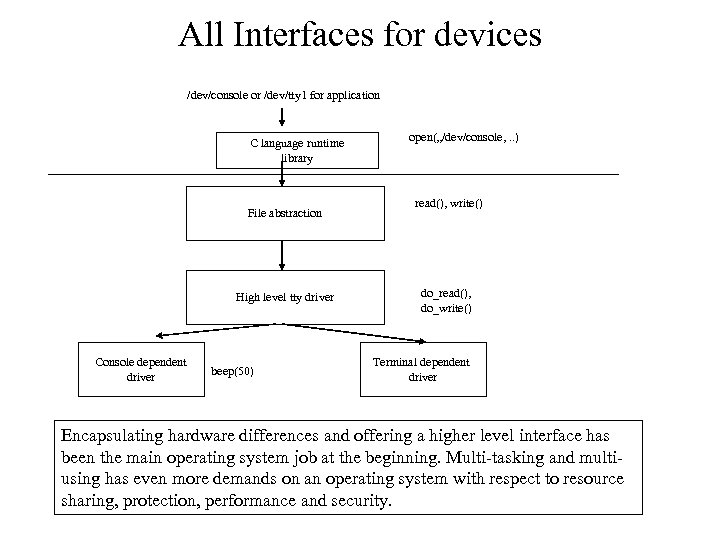 All Interfaces for devices /dev/console or /dev/tty 1 for application C language runtime library File abstraction High level tty driver Console dependent driver beep(50) open(„/dev/console, . . ) read(), write() do_read(), do_write() Terminal dependent driver Encapsulating hardware differences and offering a higher level interface has been the main operating system job at the beginning. Multi-tasking and multiusing has even more demands on an operating system with respect to resource sharing, protection, performance and security.
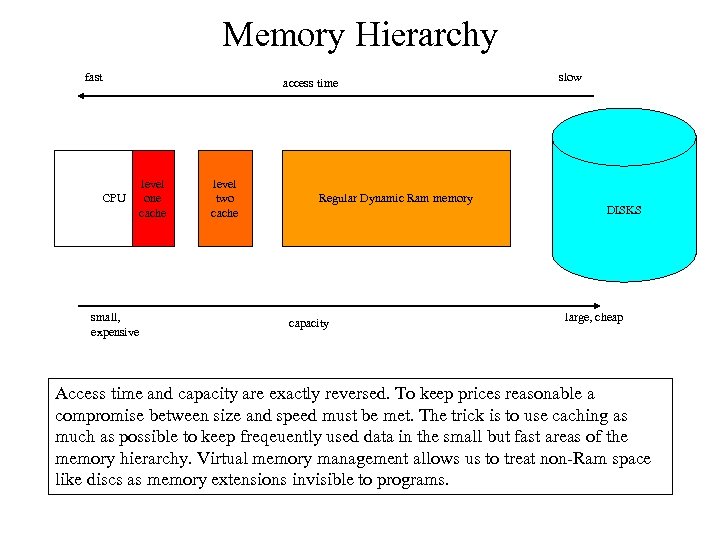 Memory Hierarchy fast CPU small, expensive access time level one cache level two cache Regular Dynamic Ram memory capacity slow DISKS large, cheap Access time and capacity are exactly reversed. To keep prices reasonable a compromise between size and speed must be met. The trick is to use caching as much as possible to keep freqeuently used data in the small but fast areas of the memory hierarchy. Virtual memory management allows us to treat non-Ram space like discs as memory extensions invisible to programs.
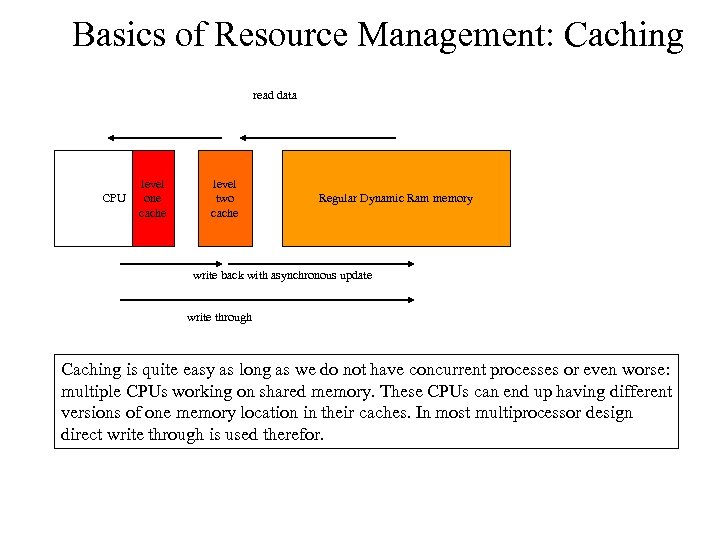 Basics of Resource Management: Caching read data CPU level one cache level two cache Regular Dynamic Ram memory write back with asynchronous update write through Caching is quite easy as long as we do not have concurrent processes or even worse: multiple CPUs working on shared memory. These CPUs can end up having different versions of one memory location in their caches. In most multiprocessor design direct write through is used therefor.
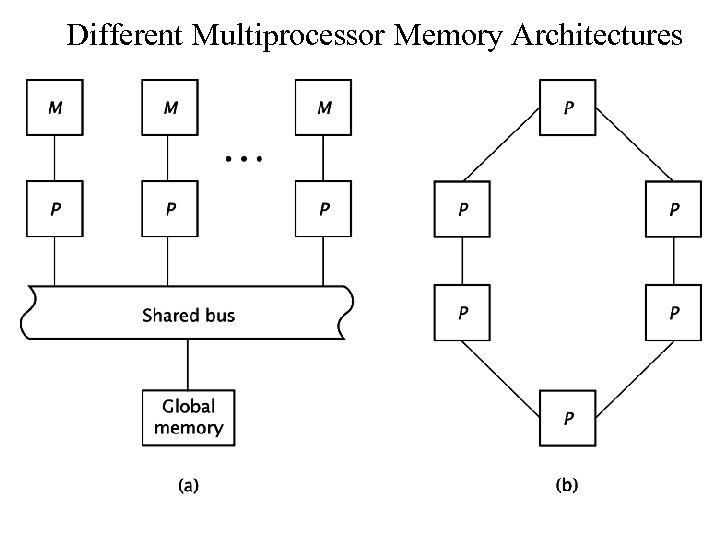 Different Multiprocessor Memory Architectures
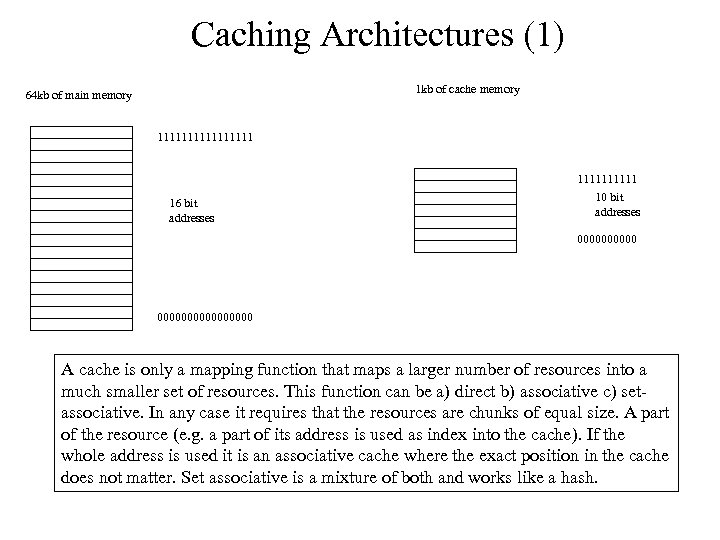 Caching Architectures (1) 1 kb of cache memory 64 kb of main memory 11111111 16 bit addresses 11111 10 bit addresses 0000000000000000 A cache is only a mapping function that maps a larger number of resources into a much smaller set of resources. This function can be a) direct b) associative c) setassociative. In any case it requires that the resources are chunks of equal size. A part of the resource (e. g. a part of its address is used as index into the cache). If the whole address is used it is an associative cache where the exact position in the cache does not matter. Set associative is a mixture of both and works like a hash.
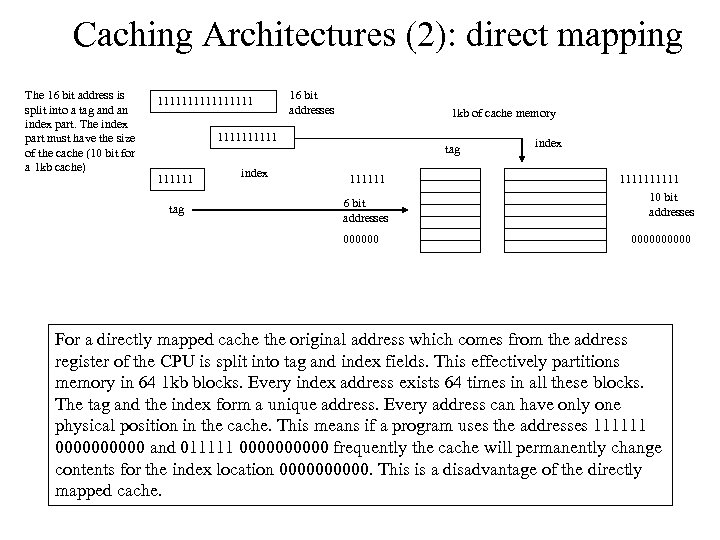 Caching Architectures (2): direct mapping The 16 bit address is split into a tag and an index part. The index part must have the size of the cache (10 bit for a 1 kb cache) 11111111 16 bit addresses 1 kb of cache memory 111111 tag index tag 111111 6 bit addresses 000000 index 11111 10 bit addresses 00000 For a directly mapped cache the original address which comes from the address register of the CPU is split into tag and index fields. This effectively partitions memory in 64 1 kb blocks. Every index address exists 64 times in all these blocks. The tag and the index form a unique address. Every address can have only one physical position in the cache. This means if a program uses the addresses 111111 00000 and 011111 00000 frequently the cache will permanently change contents for the index location 00000. This is a disadvantage of the directly mapped cache.
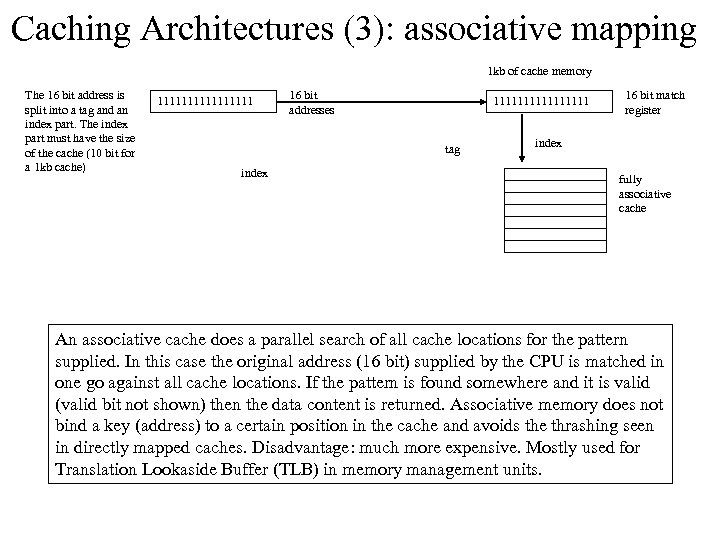 Caching Architectures (3): associative mapping 1 kb of cache memory The 16 bit address is split into a tag and an index part. The index part must have the size of the cache (10 bit for a 1 kb cache) 11111111 16 bit addresses 11111111 tag index 16 bit match register index fully associative cache An associative cache does a parallel search of all cache locations for the pattern supplied. In this case the original address (16 bit) supplied by the CPU is matched in one go against all cache locations. If the pattern is found somewhere and it is valid (valid bit not shown) then the data content is returned. Associative memory does not bind a key (address) to a certain position in the cache and avoids the thrashing seen in directly mapped caches. Disadvantage: much more expensive. Mostly used for Translation Lookaside Buffer (TLB) in memory management units.
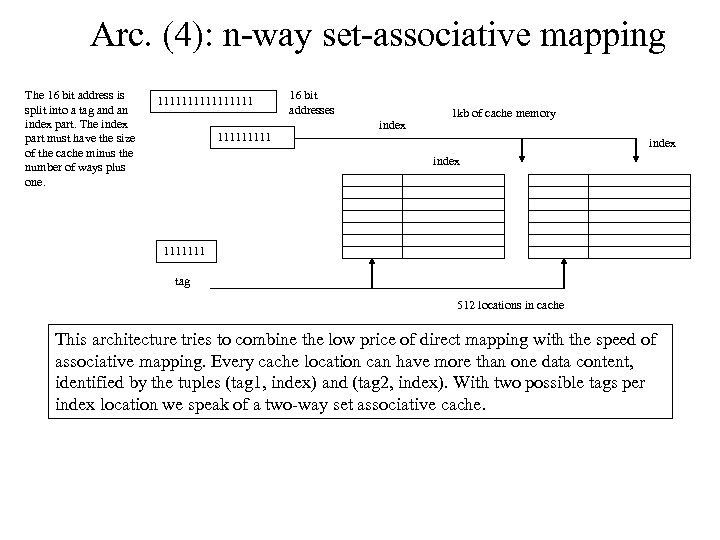 Arc. (4): n-way set-associative mapping The 16 bit address is split into a tag and an index part. The index part must have the size of the cache minus the number of ways plus one. 11111111 16 bit addresses index 1 kb of cache memory index 1111111 tag 512 locations in cache This architecture tries to combine the low price of direct mapping with the speed of associative mapping. Every cache location can have more than one data content, identified by the tuples (tag 1, index) and (tag 2, index). With two possible tags per index location we speak of a two-way set associative cache.
 Design Problems in Caches • Determining the size of the cache: how big should it be? what is the most cost effective size? • How is data consistency guaranteed? This is especially important if concurrency issues are present, e. g. multiple CPUs. How does the cache write data back to RAM? • Replacement policies? When and how to replace cached data with others. Avoid replacing what will be needed soon again. In every cache you build (believe me, even as an application programmer you will build a number of caches in your live. . ) you will have to answer those questions.
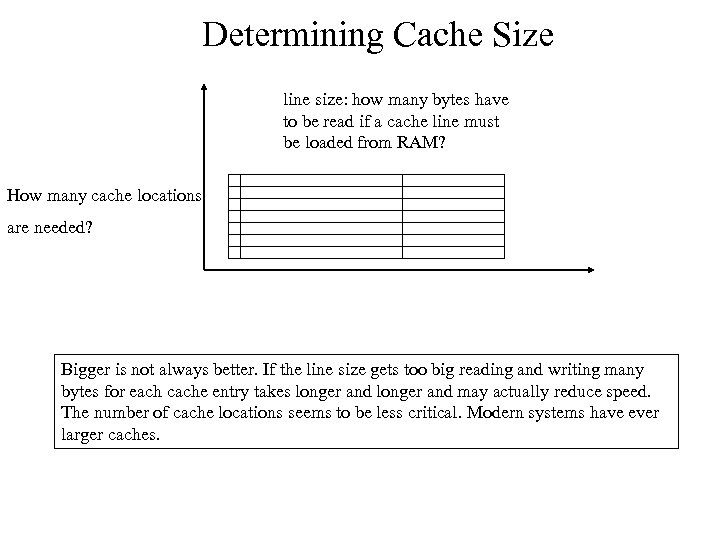 Determining Cache Size line size: how many bytes have to be read if a cache line must be loaded from RAM? How many cache locations are needed? Bigger is not always better. If the line size gets too big reading and writing many bytes for each cache entry takes longer and may actually reduce speed. The number of cache locations seems to be less critical. Modern systems have ever larger caches.
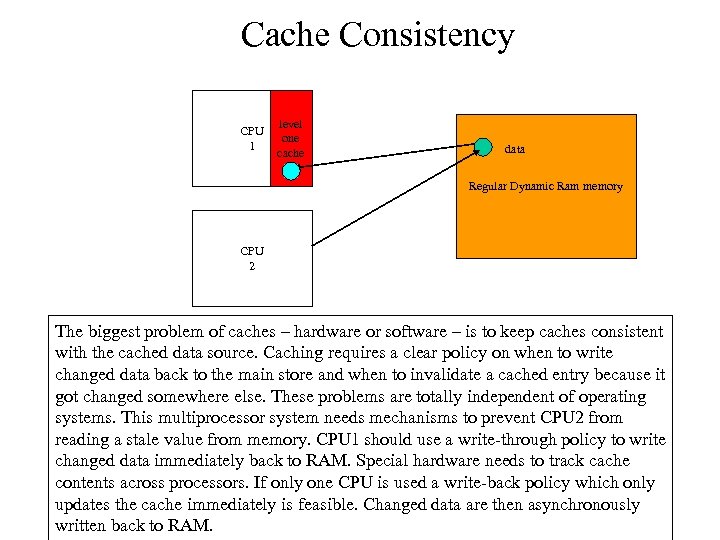 Cache Consistency CPU 1 level one cache data Regular Dynamic Ram memory CPU 2 The biggest problem of caches – hardware or software – is to keep caches consistent with the cached data source. Caching requires a clear policy on when to write changed data back to the main store and when to invalidate a cached entry because it got changed somewhere else. These problems are totally independent of operating systems. This multiprocessor system needs mechanisms to prevent CPU 2 from reading a stale value from memory. CPU 1 should use a write-through policy to write changed data immediately back to RAM. Special hardware needs to track cache contents across processors. If only one CPU is used a write-back policy which only updates the cache immediately is feasible. Changed data are then asynchronously written back to RAM.
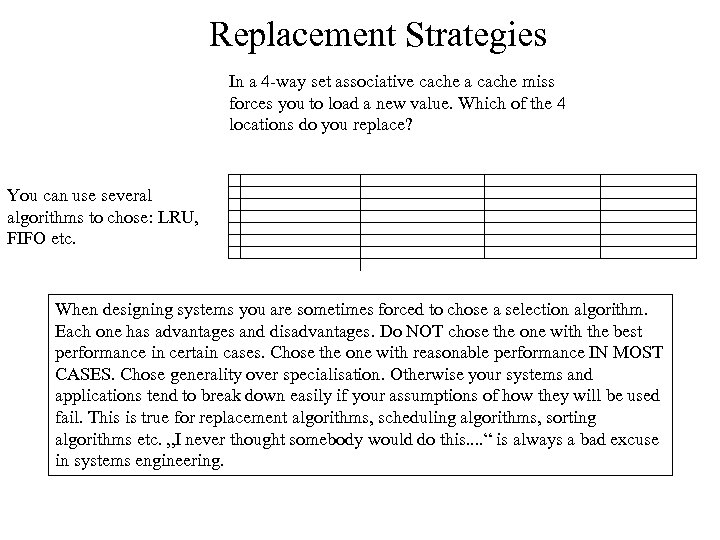 Replacement Strategies In a 4 -way set associative cache a cache miss forces you to load a new value. Which of the 4 locations do you replace? You can use several algorithms to chose: LRU, FIFO etc. When designing systems you are sometimes forced to chose a selection algorithm. Each one has advantages and disadvantages. Do NOT chose the one with the best performance in certain cases. Chose the one with reasonable performance IN MOST CASES. Chose generality over specialisation. Otherwise your systems and applications tend to break down easily if your assumptions of how they will be used fail. This is true for replacement algorithms, scheduling algorithms, sorting algorithms etc. „I never thought somebody would do this. . “ is always a bad excuse in systems engineering.
 Resources (1) • • • John D. Carpinelli, Computer Systems, Organization and Architecture. Explains digital logic, CPU and computer components using a simple CPU. Only few assembler examples. Focus on how to build a CPU. Statemachines etc. Very good foundation and good to read. www. awl. com/carpinelli additional material from Carpinelli‘s book. Links to good applets with demo cpu systems. http: //www. dcs. ed. ac. uk/home/hase/simjava 1. 2/examples/app_cache/jarindex. html a simple cache demonstration applet. Nice java based toolkit too! (found via www. gridbus. org/gridsim) Hennessy and Patterson, Computer Architecture, a quantitative approach. The classic on CA. I learnt a lot about the connection between technical design and financial costs from this book. Daniel Hillis, a pattern on the stone. A short and wonderful introduction to what computers are. No tech speak involved. Tracy Kidder, the soul of a new machine. If you ever wanted to know what makes system designers tick and how it feels to see the first prompt on a new machine. . .
 Resources (1) • • Computer Architecture Simulators http: //www. sosresearch. org/caalesimulators. html A set of tools for the simulation of different hypothetical or real computer architectures Nisan, Schocken: The Elements of Computing Systems. Building a Modern Computer from First Principles. MIT Press 2005. Probably the best intro to computer systems and software. Starts with gates and ends with software. Listen to this 9 min version: http: //www. youtube. com/watch? v=Jt. Xv. Uo. Px 4 Qs and then the 1 hour version: http: //video. google. com/videoplay? docid=76540437620211565 07 (thanks to Raju Varghese for the video and to Andreas Kapp for the book hint)