Скачать презентацию Lecture 7 Java Script Senior- Lecturer Sarsenova Zh Скачать презентацию Lecture 7 Java Script Senior- Lecturer Sarsenova Zh

SDP1_Lecture 7.pptx

  • Количество слайдов: 38

Lecture 7 Java. Script Senior- Lecturer: Sarsenova Zh. N. Lecture 7 Java. Script Senior- Lecturer: Sarsenova Zh. N.
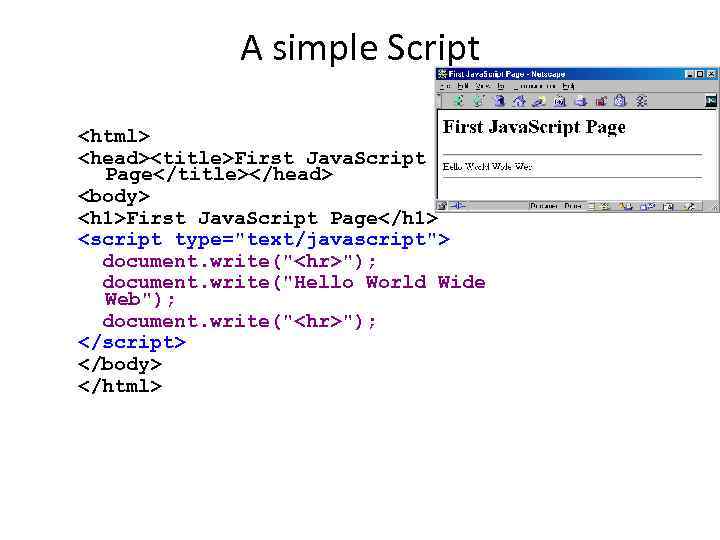
A simple Script <html> <head><title>First Java. Script Page</title></head> <body> <h 1>First Java. Script Page</h A simple Script First Java. Script Page First Java. Script Page

" src="https://present5.com/presentation/417428619_454586952/image-3.jpg" alt="Embedding Java. Script First Java. Script Program " /> Embedding Java. Script First Java. Script Program Inside your_source_file. js document. write("


"); document. write("Hello World Wide Web"); document. write("
"); • Use the src attribute to include Java. Script codes from an external file. • The included code is inserted in place.

Popup Boxes • Alert box • Confirm box • Prompts box Popup Boxes • Alert box • Confirm box • Prompts box

alert("This is an Alert method"); confirm("Are you OK?" src="https://present5.com/presentation/417428619_454586952/image-5.jpg" alt="alert(), confirm(), and prompt()

The typeof operator • typeof operator used to find the type of a Java. The typeof operator • typeof operator used to find the type of a Java. Script variable.

Example Example

Undefined data type • In Java. Script, a variable without a value, has the Undefined data type • In Java. Script, a variable without a value, has the value undefined. The typeof is also undefined.

Null • In Java. Script null is Null • In Java. Script null is "nothing". It is supposed to be something that doesn't exist. • Unfortunately, in Java. Script, the data type of null is an object.

Primitive Data Primitive Data

Complex Data Complex Data

Line Breaks • To display line breaks inside a popup box, use a back Line Breaks • To display line breaks inside a popup box, use a back –slash followed by the character n. • Example: alert(“Hellon How are you? ”);

Java. Script Objects • Objects in real life is for instance Students • Properties: Java. Script Objects • Objects in real life is for instance Students • Properties: name, ID, weigh, height etc. • Methods: eat, speak, walk, read, do something and etc.

Java. Script Objects • You have already learned that Java. Script variables are containers Java. Script Objects • You have already learned that Java. Script variables are containers for data values.

Objects • Objects are variables too. • Objects can contain many values Objects • Objects are variables too. • Objects can contain many values

Example This code assigns many values (Fiat, 500, white) to a variable named car Example This code assigns many values (Fiat, 500, white) to a variable named car The values are written as name: value pairs (name and value separated by a colon)

Object Properties • The name: values pairs are called properties. Property value Object Properties • The name: values pairs are called properties. Property value

Object Methods • Methods are actions that can be performed on objects. • Methods Object Methods • Methods are actions that can be performed on objects. • Methods are stored in properties as function definitions

Example Example

Accessing Object Properties • 2 ways Or Accessing Object Properties • 2 ways Or

Accessing Object methods • Object. Name. method. Name() Accessing Object methods • Object. Name. method. Name()

Example Example

Do Not Declare Strings, Numbers, and Booleans as Objects! • When a Java. Script Do Not Declare Strings, Numbers, and Booleans as Objects! • When a Java. Script variable is declared with the keyword "new", the variable is created as an object:

Conditional Statements • Very often when you write code, you want to perform different Conditional Statements • Very often when you write code, you want to perform different actions for different decisions. You can use conditional statements in your code to do this.

Types of conditional statements • if statement - use this statement if you want Types of conditional statements • if statement - use this statement if you want to execute some code only if a specified condition is true • if. . . else statement - use this statement if you want to execute some code if the condition is true and another code if the condition is false • if. . . else if. . else statement - use this statement if you want to select one of many blocks of code to be executed • switch statement - use this statement if you want to select one of many blocks of code to be executed

If statement Syntax and example • If (expression) { Statements to be executed if If statement Syntax and example • If (expression) { Statements to be executed if expression is true }

If. . Else statement If. . Else statement

If…else if… statement syntax If…else if… statement syntax

If…else if… statement example If…else if… statement example

Switch Statement • You should use the Switch statement if you want to select Switch Statement • You should use the Switch statement if you want to select one of many blocks of code to be executed.

Switch statement’s syntax Switch statement’s syntax

The break Keyword • When Java. Script reaches a break keyword, it breaks out The break Keyword • When Java. Script reaches a break keyword, it breaks out of the switch block. • This will stop the execution of more code and case testing inside the block. • When a match is found, and the job is done, it's time for a break. There is no need for more testing

The default Keyword • The default keyword specifies the code to run if there The default Keyword • The default keyword specifies the code to run if there is no case match:

Java. Script Math Objects • allows you to perform mathematical tasks on numbers • Java. Script Math Objects • allows you to perform mathematical tasks on numbers • Math. round(x) returns the value of x rounded to its nearest integer • Math. round(4. 7); // returns 5 Math. round(4. 4); // returns 4: • Math. pow(x, y) returns the value of x to the power of y: • Math. pow(8, 2); // returns 64 • Math. sqrt(x) returns the square root of x: • Math. sqrt(64); // returns 8 • Math. abs(x) returns the absolute (positive) value of x: • Math. abs(-4. 7); // returns 4. 7 • Math. ceil(x) returns the value of x rounded up to its nearest integer: • Math. ceil(4. 4); // returns 5 • Math. floor(x) returns the value of x rounded down to its nearest integer: • Math. floor(4. 7); // returns 4 • Math. min() and Math. max() can be used to find the lowest or highest value in a list of arguments: • Math. min(0, 150, 30, 20, -8, -200); // returns -200 • Math. max(0, 150, 30, 20, -8, -200); // returns 150 • Math. random() returns a random number between 0 (inclusive), and 1 (exclusive): • Math. random();

Math Properties (Constants) • Math. E // returns Euler's number Math. PI // returns Math Properties (Constants) • Math. E // returns Euler's number Math. PI // returns PI Math. SQRT 2 // returns the square root of 2 Math. SQRT 1_2 // returns the square root of 1/2 Math. LN 2 // returns the natural logarithm of 2 Math. LN 10 // returns the natural logarithm of 10 Math. LOG 2 E // returns base 2 logarithm of E Math. LOG 10 E // returns base 10 logarithm of E

Java. Script Random Integers • Math. random() used with Math. floor() can be used Java. Script Random Integers • Math. random() used with Math. floor() can be used to return random integers. • Math. floor(Math. random() * 10); //returns a number between 0 and 9

Home work: read Chapter 15 Home work: read Chapter 15