


 Скачать презентацию Lecture 35 of 42 Animation 3 Character Modeling
5af39e827a238b86e0a6e1310dcbc661.ppt
- Количество слайдов: 91
 Lecture 35 of 42 Animation 3: Character Modeling, IK Spatial Sorting Concluded Wednesday, 23 April 2008 William H. Hsu Department of Computing and Information Sciences, KSU KSOL course pages: http: //snipurl. com/1 y 5 gc Course web site: http: //www. kddresearch. org/Courses/CIS 636 Instructor home page: http: //www. cis. ksu. edu/~bhsu Readings: Chapter 6, Eberly 2 e – see http: //snurl. com/1 ye 72 CIS 636/736: (Introduction to) Computer Graphics Lecture 35 of 42 Computing & Information Sciences Kansas State University
 Depth Comparison using a Z-Buffer – Image Precision l The Z-buffer algorithm The Z-buffer is initialized to the background value (furthest plane of view volume = 1. 0) As each object is traversed, the z-values of all its sample points are compared to the z-value in the same (x, y) location in the Z-buffer ð z could be determined by plugging x and y into the plane equation for the polygon (ax + by + cz + d = 0) ð in reality, we calculate the z at vertices and interpolate the rest If the new point has z value less than the previous one (i. e. , closer to the eye), its z-value is placed in the z-buffer and its color placed in the frame buffer at the same (x, y); otherwise the previous z-value and frame buffer color are unchanged Can store depth as integers or floats or fixed points ð i. e. for 8 -bit (1 byte) integer z-buffer, set 0. 0 ->0 and 1. 0 ->255 ð each representation has its advantages in terms of precision avd CIS 636/736: (Introduction to) Computer Graphics November 4, 2003 Lecture 35 of 42 VSD 30/46 Computing & Information Sciences Kansas State University
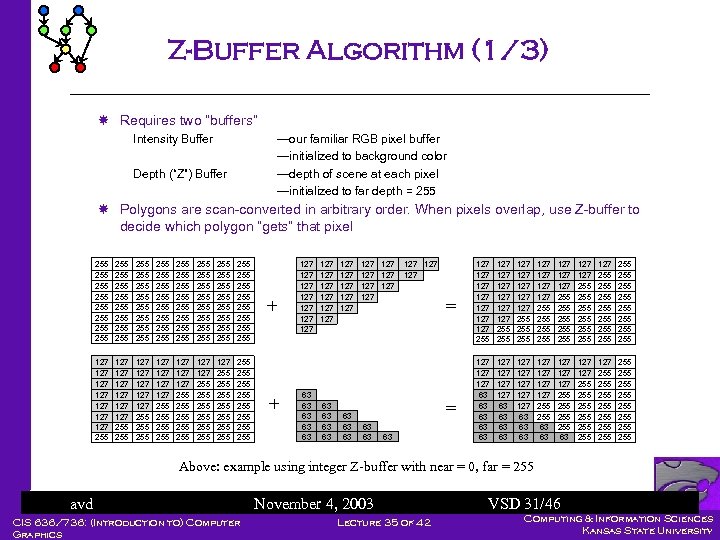 Z-Buffer Algorithm (1/3) Requires two “buffers” Intensity Buffer —our familiar RGB pixel buffer —initialized to background color —depth of scene at each pixel —initialized to far depth = 255 Depth (“Z”) Buffer Polygons are scan-converted in arbitrary order. When pixels overlap, use Z-buffer to decide which polygon “gets” that pixel 255 255 255 255 255 255 255 255 255 255 255 255 255 255 255 255 127 127 255 127 127 127 255 255 127 127 255 255 255 127 255 255 255 255 + + 127 127 63 63 63 127 127 127 63 63 63 127 127 127 = = 63 63 63 127 127 255 127 127 127 255 255 127 127 255 255 255 127 255 255 255 255 127 127 63 63 63 127 127 127 63 63 63 127 127 255 255 63 127 255 255 255 255 255 255 Above: example using integer Z-buffer with near = 0, far = 255 avd CIS 636/736: (Introduction to) Computer Graphics November 4, 2003 Lecture 35 of 42 VSD 31/46 Computing & Information Sciences Kansas State University
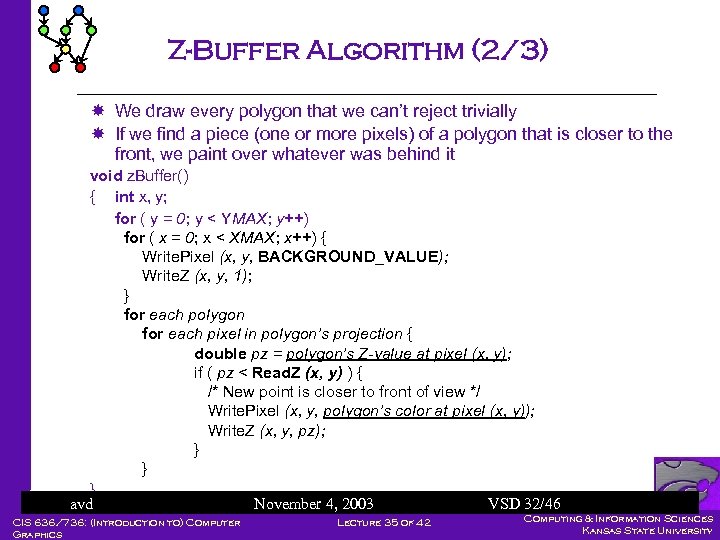 Z-Buffer Algorithm (2/3) We draw every polygon that we can’t reject trivially If we find a piece (one or more pixels) of a polygon that is closer to the front, we paint over whatever was behind it void z. Buffer() { int x, y; for ( y = 0; y < YMAX; y++) for ( x = 0; x < XMAX; x++) { Write. Pixel (x, y, BACKGROUND_VALUE); Write. Z (x, y, 1); } for each polygon for each pixel in polygon’s projection { double pz = polygon’s Z-value at pixel (x, y); if ( pz < Read. Z (x, y) ) { /* New point is closer to front of view */ Write. Pixel (x, y, polygon’s color at pixel (x, y)); Write. Z (x, y, pz); } } } avd November 4, 2003 VSD 32/46 CIS 636/736: (Introduction to) Computer Z-Buffer Applet: Graphics Lecture 35 of 42 Computing & Information Sciences Kansas State University
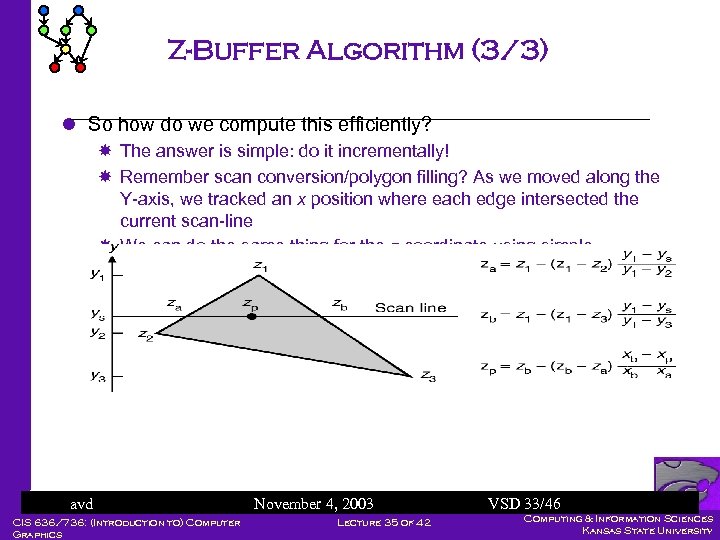 Z-Buffer Algorithm (3/3) l So how do we compute this efficiently? The answer is simple: do it incrementally! Remember scan conversion/polygon filling? As we moved along the Y-axis, we tracked an x position where each edge intersected the current scan-line We can do the same thing for the z coordinate using simple “remainder” calculations with the y-z slope and zb for each avd Once we have za. November 4, 2003 edge, we can incrementally VSD 33/46 Lecture calculate z as we scan across 35 of 42 CIS 636/736: (Introduction to) Computer p Graphics Computing & Information Sciences Kansas State University
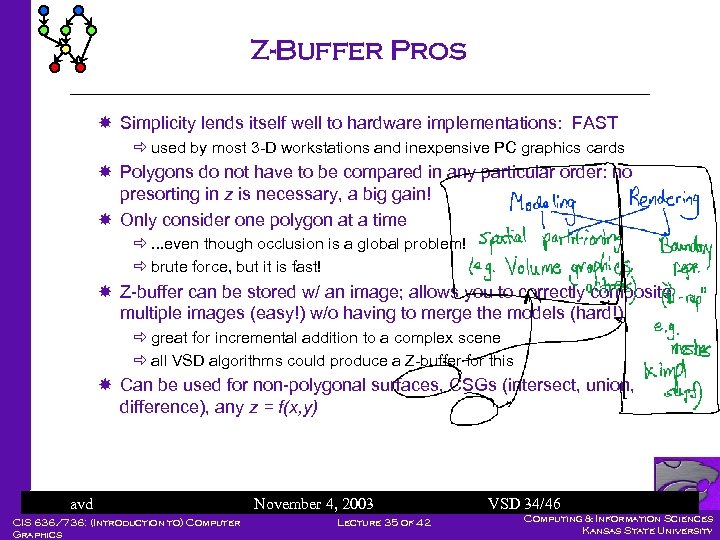 Z-Buffer Pros Simplicity lends itself well to hardware implementations: FAST ð used by most 3 -D workstations and inexpensive PC graphics cards Polygons do not have to be compared in any particular order: no presorting in z is necessary, a big gain! Only consider one polygon at a time ð. . . even though occlusion is a global problem! ð brute force, but it is fast! Z-buffer can be stored w/ an image; allows you to correctly composite multiple images (easy!) w/o having to merge the models (hard!) ð great for incremental addition to a complex scene ð all VSD algorithms could produce a Z-buffer for this Can be used for non-polygonal surfaces, CSGs (intersect, union, difference), any z = f(x, y) avd CIS 636/736: (Introduction to) Computer Graphics November 4, 2003 Lecture 35 of 42 VSD 34/46 Computing & Information Sciences Kansas State University
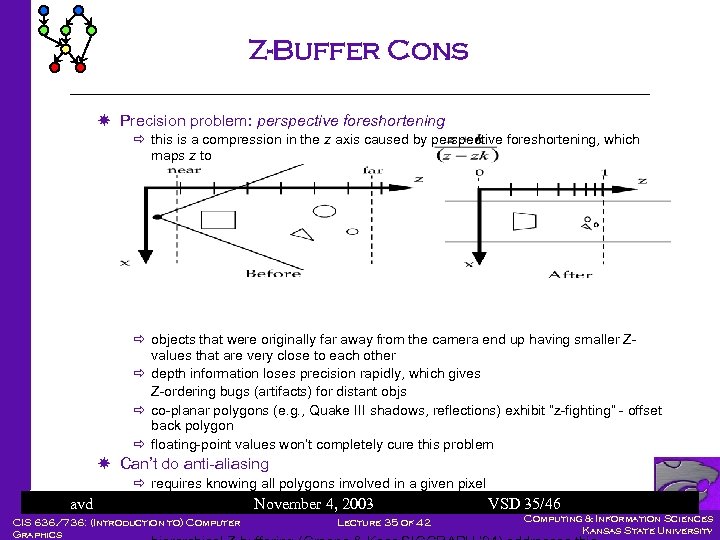 Z-Buffer Cons Precision problem: perspective foreshortening ð this is a compression in the z axis caused by perspective foreshortening, which maps z to ð objects that were originally far away from the camera end up having smaller Zvalues that are very close to each other ð depth information loses precision rapidly, which gives Z-ordering bugs (artifacts) for distant objs ð co-planar polygons (e. g. , Quake III shadows, reflections) exhibit “z-fighting” - offset back polygon ð floating-point values won’t completely cure this problem Can’t do anti-aliasing avd ð requires knowing all polygons involved in a given pixel ð related A-buffer algorithm used 2003 November 4, for anti-aliasing VSD 35/46 Lecture 35 Must scan-convert all unclipped objects of 42 CIS 636/736: (Introduction to) Computer Graphics Computing & Information Sciences Kansas State University
 Painter’s Algorithm – Image Precision l A better way to resolve visibility exactly Create drawing order, each poly overwriting the previous ones, that guarantees correct visibility at any pixel resolution Strategy is to work back to front; find a way to sort polygons by depth (z), then draw them in that order ð do a rough sort of the polygons by the smallest (farthest) z-coordinate in each polygon ð scan-convert the most distant polygon first, then work forward towards the viewpoint (“painters’ algorithm”) We can either do a complete sort and then scan-convert, or we can paint as we go – see 3 D depth-sort algorithm by Newell, and Sancha Any problems? avd CIS 636/736: (Introduction to) Computer Graphics November 4, 2003 Lecture 35 of 42 VSD 36/46 Computing & Information Sciences Kansas State University
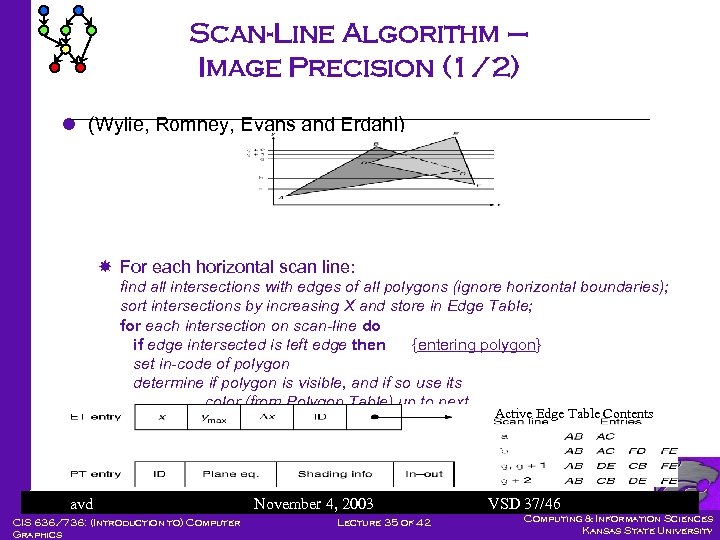 Scan-Line Algorithm – Image Precision (1/2) l (Wylie, Romney, Evans and Erdahl) For each horizontal scan line: find all intersections with edges of all polygons (ignore horizontal boundaries); sort intersections by increasing X and store in Edge Table; for each intersection on scan-line do if edge intersected is left edge then {entering polygon} set in-code of polygon determine if polygon is visible, and if so use its color (from Polygon Table) up to next Active Edge Table Contents intersection; else edge is a right edge then {leaving polygon} determine which polygon is visible to right of edge, and use its color up to next intersection; avd CIS 636/736: (Introduction to) Computer Graphics November 4, 2003 Lecture 35 of 42 VSD 37/46 Computing & Information Sciences Kansas State University
 Scan-Line Algorithm (2/2) Generalization of single polygon scan conversion, with IN flags for polygons Handles transparency and anti-aliasing well Hybrid algorithm: use single scan-line z-buffer to determine visibility ð sort polygons by scan line like this algorithm. ð draw each scan line to a single-line Z-buffer; output colors, then clear the buffer and re-use for the next scan line ð saves space, but loses good transparency, anti-aliasing qualities Pretty much old school avd CIS 636/736: (Introduction to) Computer Graphics November 4, 2003 Lecture 35 of 42 VSD 38/46 Computing & Information Sciences Kansas State University
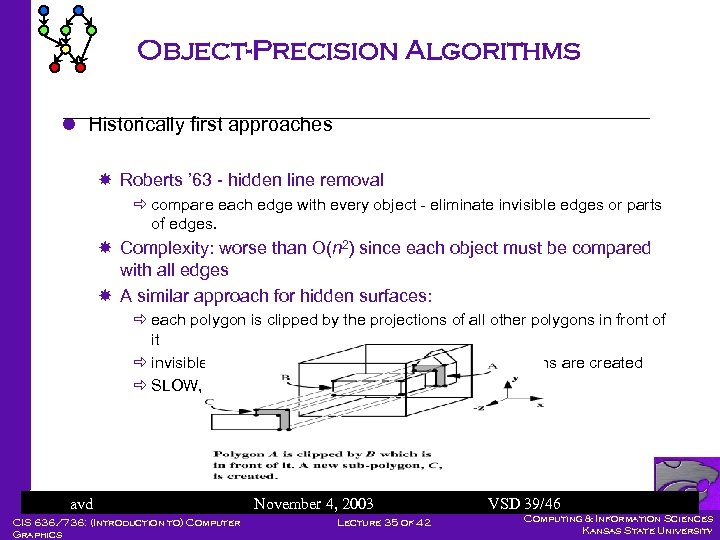 Object-Precision Algorithms l Historically first approaches Roberts ’ 63 - hidden line removal ð compare each edge with every object - eliminate invisible edges or parts of edges. Complexity: worse than O(n 2) since each object must be compared with all edges A similar approach for hidden surfaces: ð each polygon is clipped by the projections of all other polygons in front of it ð invisible surfaces are eliminated and visible sub-polygons are created ð SLOW, ugly special cases, polygons only avd CIS 636/736: (Introduction to) Computer Graphics November 4, 2003 Lecture 35 of 42 VSD 39/46 Computing & Information Sciences Kansas State University
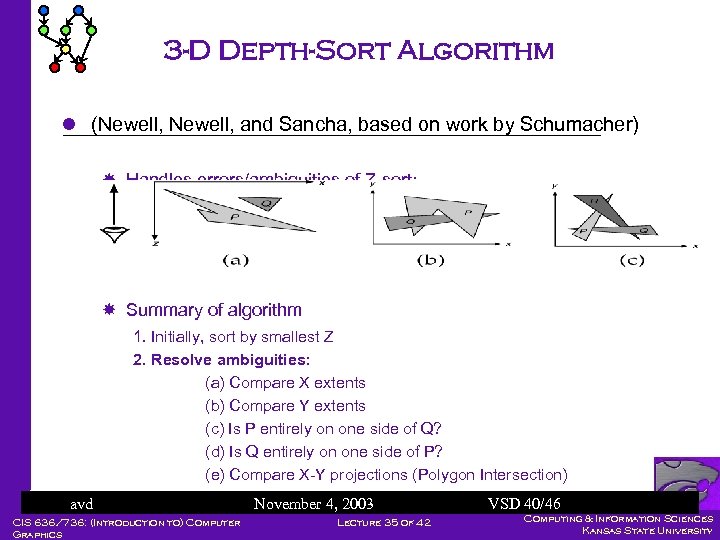 3 -D Depth-Sort Algorithm l (Newell, and Sancha, based on work by Schumacher) Handles errors/ambiguities of Z-sort: Summary of algorithm 1. Initially, sort by smallest Z 2. Resolve ambiguities: (a) Compare X extents (b) Compare Y extents (c) Is P entirely on one side of Q? (d) Is Q entirely on one side of P? (e) Compare X-Y projections (Polygon Intersection) (f) Swap or split 4, 2003 avd November polygons VSD 40/46 Computing & Information Sciences CIS 636/736: (Introduction to) Computer back to front Lecture 35 of 42 3. Scan convert Kansas State University Graphics
 3 -D Depth-Sort Algorithm l Advantages Fast enough for simple scenes Fairly intuitive l Disadvantages Slow for even moderately complex scenes Hard to implement and debug Lots of special cases avd CIS 636/736: (Introduction to) Computer Graphics November 4, 2003 Lecture 35 of 42 VSD 41/46 Computing & Information Sciences Kansas State University
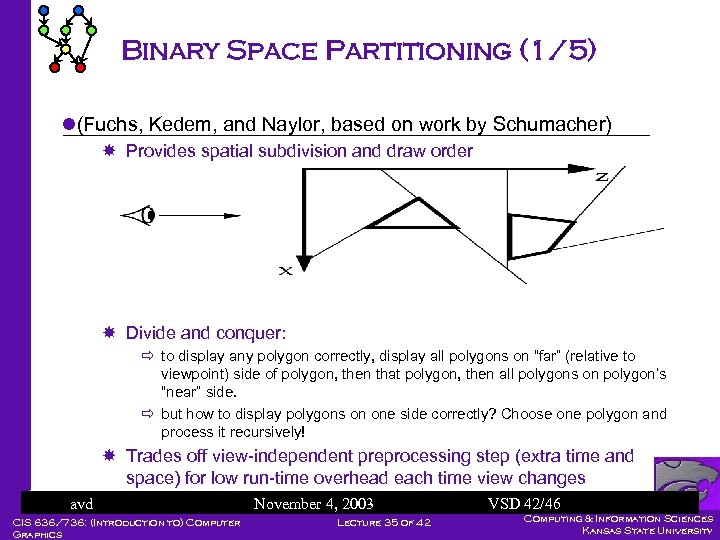 Binary Space Partitioning (1/5) l(Fuchs, Kedem, and Naylor, based on work by Schumacher) Provides spatial subdivision and draw order Divide and conquer: ð to display any polygon correctly, display all polygons on “far” (relative to viewpoint) side of polygon, then that polygon, then all polygons on polygon’s “near” side. ð but how to display polygons on one side correctly? Choose one polygon and process it recursively! Trades off view-independent preprocessing step (extra time and space) for low run-time overhead each time view changes avd CIS 636/736: (Introduction to) Computer Graphics November 4, 2003 Lecture 35 of 42 VSD 42/46 Computing & Information Sciences Kansas State University
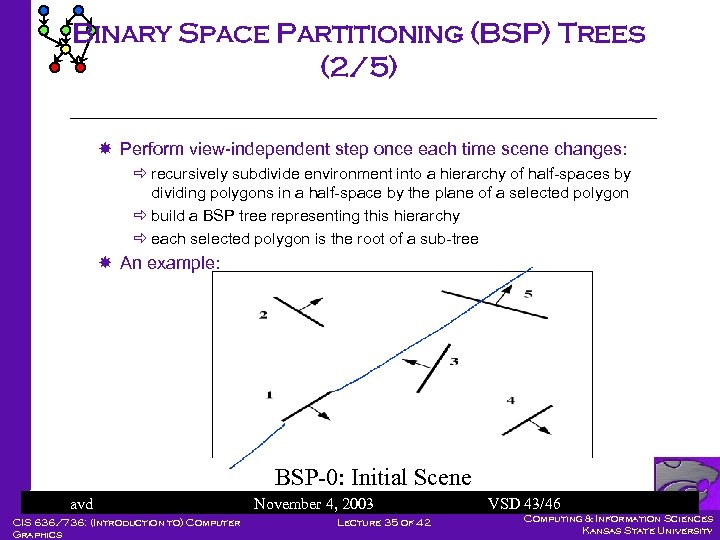 Binary Space Partitioning (BSP) Trees (2/5) Perform view-independent step once each time scene changes: ð recursively subdivide environment into a hierarchy of half-spaces by dividing polygons in a half-space by the plane of a selected polygon ð build a BSP tree representing this hierarchy ð each selected polygon is the root of a sub-tree An example: BSP-0: Initial Scene avd CIS 636/736: (Introduction to) Computer Graphics November 4, 2003 Lecture 35 of 42 VSD 43/46 Computing & Information Sciences Kansas State University
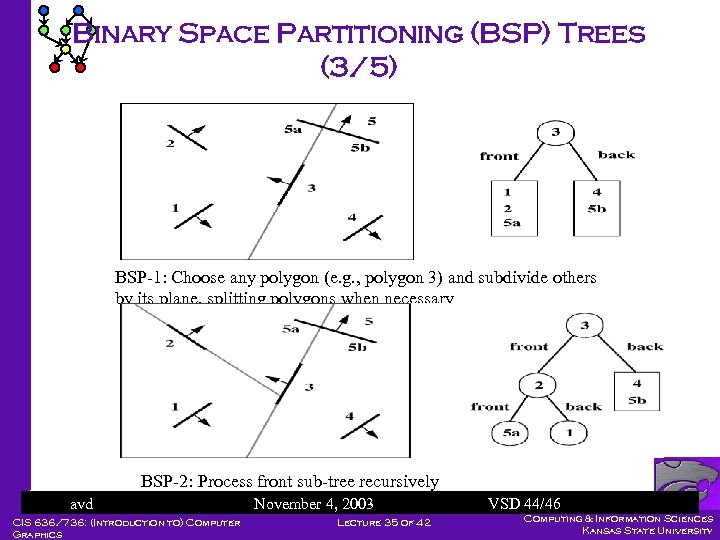 Binary Space Partitioning (BSP) Trees (3/5) BSP-1: Choose any polygon (e. g. , polygon 3) and subdivide others by its plane, splitting polygons when necessary BSP-2: Process front sub-tree recursively avd CIS 636/736: (Introduction to) Computer Graphics November 4, 2003 Lecture 35 of 42 VSD 44/46 Computing & Information Sciences Kansas State University
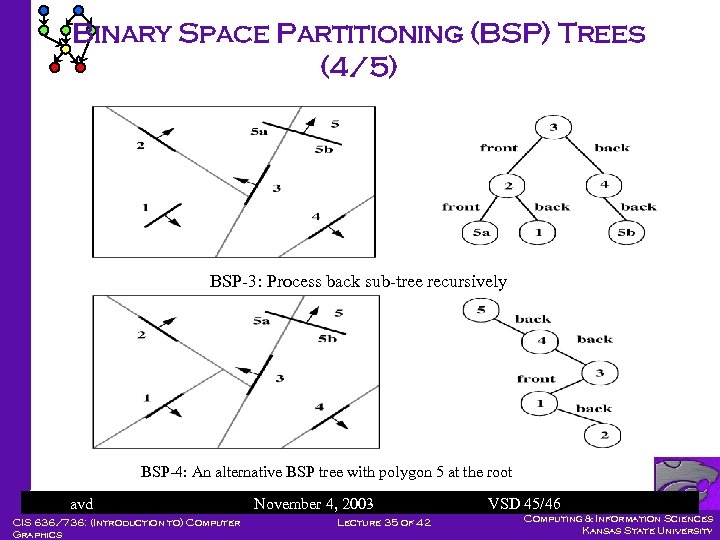 Binary Space Partitioning (BSP) Trees (4/5) BSP-3: Process back sub-tree recursively BSP-4: An alternative BSP tree with polygon 5 at the root avd CIS 636/736: (Introduction to) Computer Graphics November 4, 2003 Lecture 35 of 42 VSD 45/46 Computing & Information Sciences Kansas State University
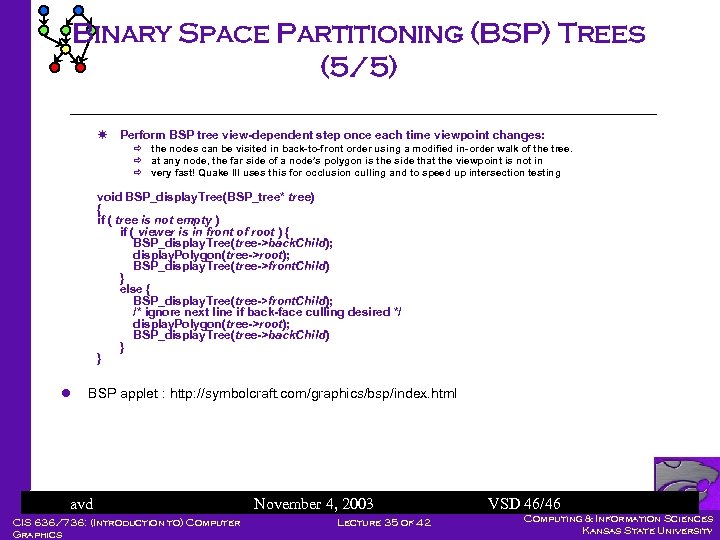 Binary Space Partitioning (BSP) Trees (5/5) Perform BSP tree view-dependent step once each time viewpoint changes: ð the nodes can be visited in back-to-front order using a modified in-order walk of the tree. ð at any node, the far side of a node’s polygon is the side that the viewpoint is not in ð very fast! Quake III uses this for occlusion culling and to speed up intersection testing void BSP_display. Tree(BSP_tree* tree) { if ( tree is not empty ) if ( viewer is in front of root ) { BSP_display. Tree(tree->back. Child); display. Polygon(tree->root); BSP_display. Tree(tree->front. Child) } else { BSP_display. Tree(tree->front. Child); /* ignore next line if back-face culling desired */ display. Polygon(tree->root); BSP_display. Tree(tree->back. Child) } } l BSP applet : http: //symbolcraft. com/graphics/bsp/index. html avd CIS 636/736: (Introduction to) Computer Graphics November 4, 2003 Lecture 35 of 42 VSD 46/46 Computing & Information Sciences Kansas State University
 CS 352: Computer Graphics Hierarchical Graphics, Modeling, And Animation CIS 636/736: (Introduction to) Computer Graphics Lecture 35 of 42 Computing & Information Sciences Kansas State University
 Overview l Modeling l Animation l Data structures for interactive graphics CSG-tree BSP-tree Quadtrees and Octrees Visibility precomputation l Many figures and examples in this set of lectures are from The Art of 3 D Computer Animation and Imaging, by I. Kerlow Slides © 2004 Perkowski, M. , Penn State University ECE 579/679 Intelligent Robotics II CIS 636/736: (Introduction to) Computer Graphics Lecture 35 of 42 Computing & Information Sciences Kansas State University
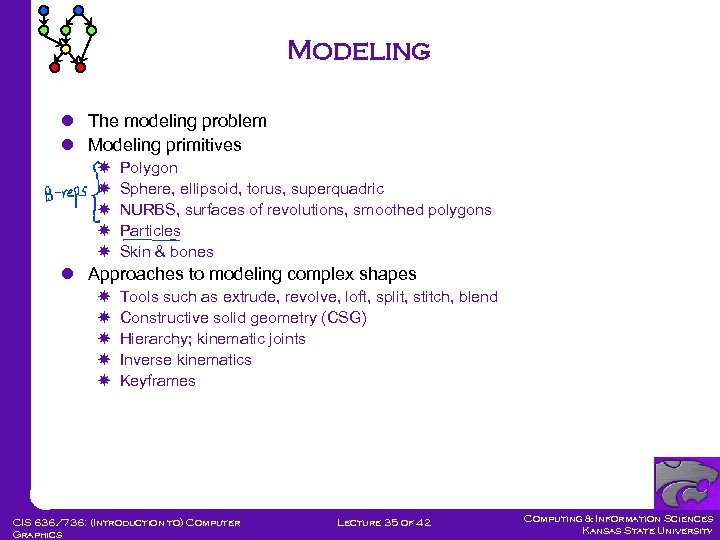 Modeling l The modeling problem l Modeling primitives Polygon Sphere, ellipsoid, torus, superquadric NURBS, surfaces of revolutions, smoothed polygons Particles Skin & bones l Approaches to modeling complex shapes Tools such as extrude, revolve, loft, split, stitch, blend Constructive solid geometry (CSG) Hierarchy; kinematic joints Inverse kinematics Keyframes CIS 636/736: (Introduction to) Computer Graphics Lecture 35 of 42 Computing & Information Sciences Kansas State University
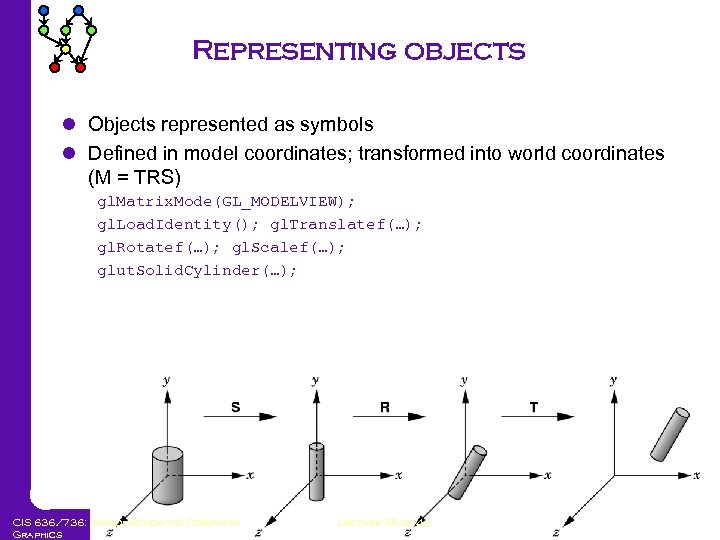 Representing objects l Objects represented as symbols l Defined in model coordinates; transformed into world coordinates (M = TRS) gl. Matrix. Mode(GL_MODELVIEW); gl. Load. Identity(); gl. Translatef(…); gl. Rotatef(…); gl. Scalef(…); glut. Solid. Cylinder(…); CIS 636/736: (Introduction to) Computer Graphics Lecture 35 of 42 Computing & Information Sciences Kansas State University
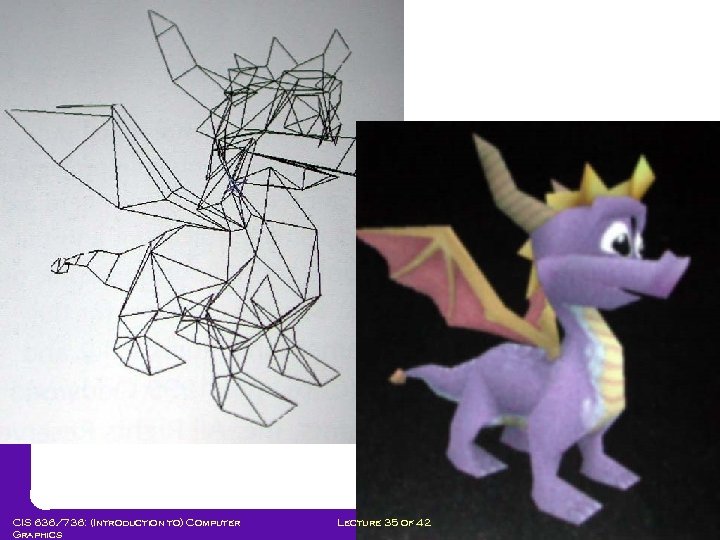
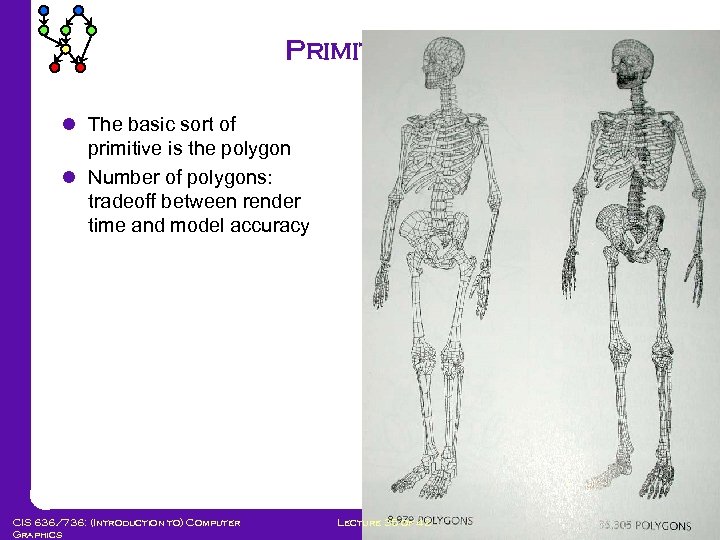 Primitives l The basic sort of primitive is the polygon l Number of polygons: tradeoff between render time and model accuracy CIS 636/736: (Introduction to) Computer Graphics Lecture 35 of 42 Computing & Information Sciences Kansas State University
 CIS 636/736: (Introduction to) Computer Graphics Lecture 35 of 42 Computing & Information Sciences Kansas State University
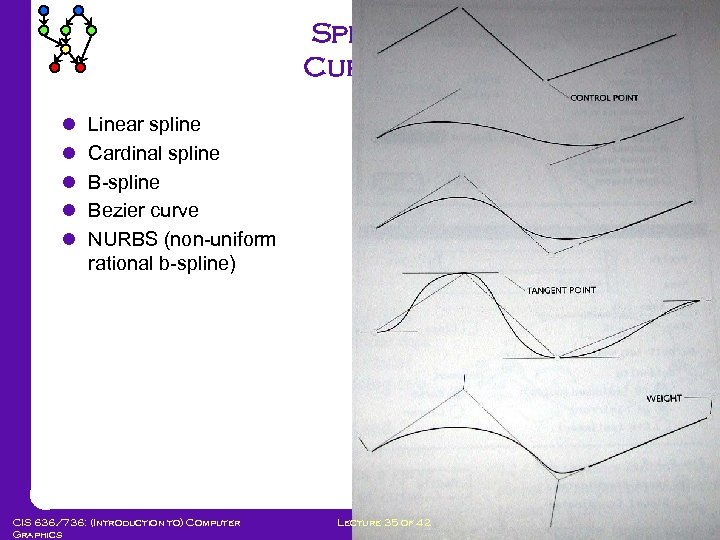 Spline Curves l l l Linear spline Cardinal spline B-spline Bezier curve NURBS (non-uniform rational b-spline) CIS 636/736: (Introduction to) Computer Graphics Lecture 35 of 42 Computing & Information Sciences Kansas State University
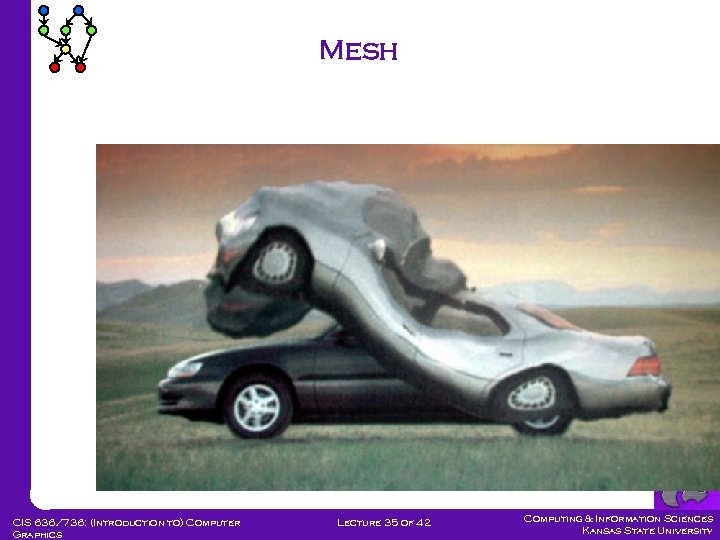 Mesh CIS 636/736: (Introduction to) Computer Graphics Lecture 35 of 42 Computing & Information Sciences Kansas State University
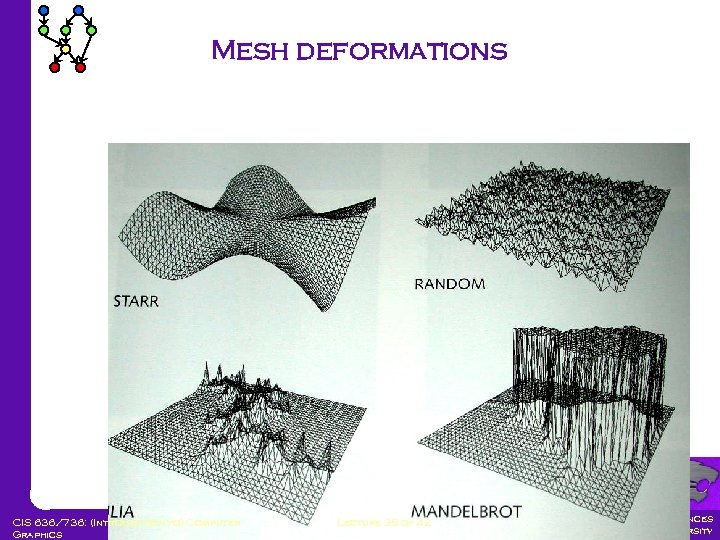 Mesh deformations CIS 636/736: (Introduction to) Computer Graphics Lecture 35 of 42 Computing & Information Sciences Kansas State University
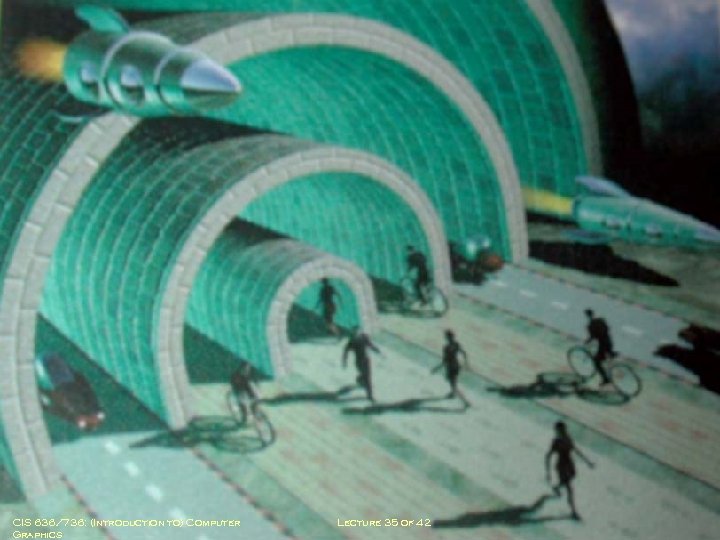
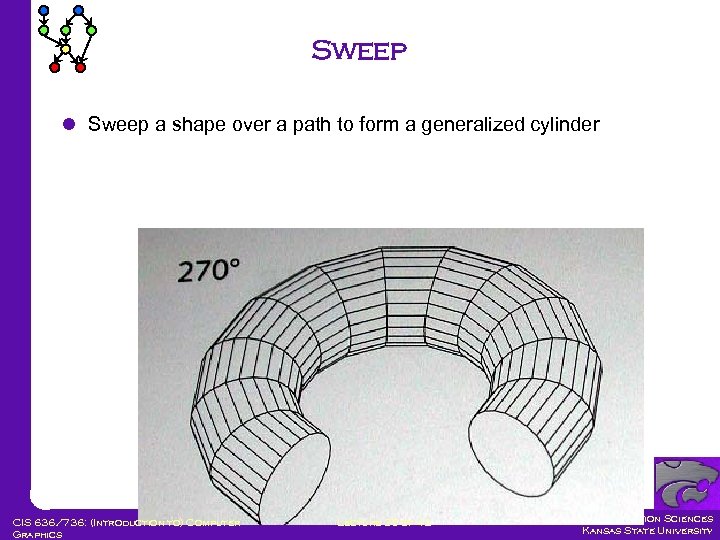 Sweep l Sweep a shape over a path to form a generalized cylinder CIS 636/736: (Introduction to) Computer Graphics Lecture 35 of 42 Computing & Information Sciences Kansas State University
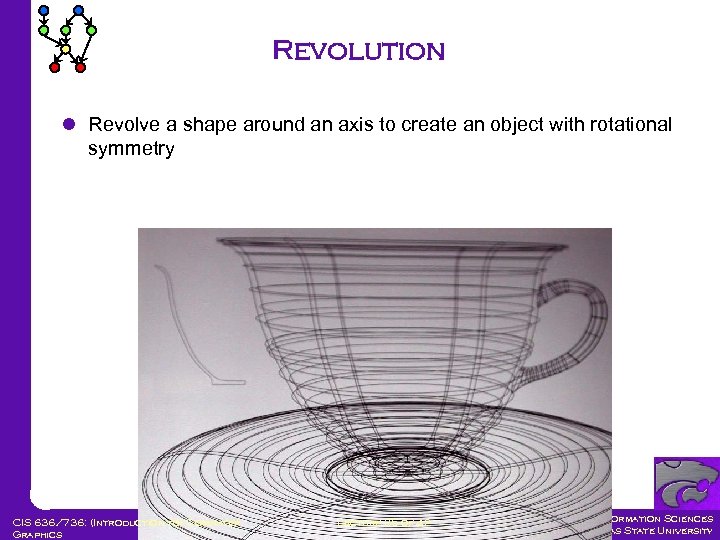 Revolution l Revolve a shape around an axis to create an object with rotational symmetry CIS 636/736: (Introduction to) Computer Graphics Lecture 35 of 42 Computing & Information Sciences Kansas State University
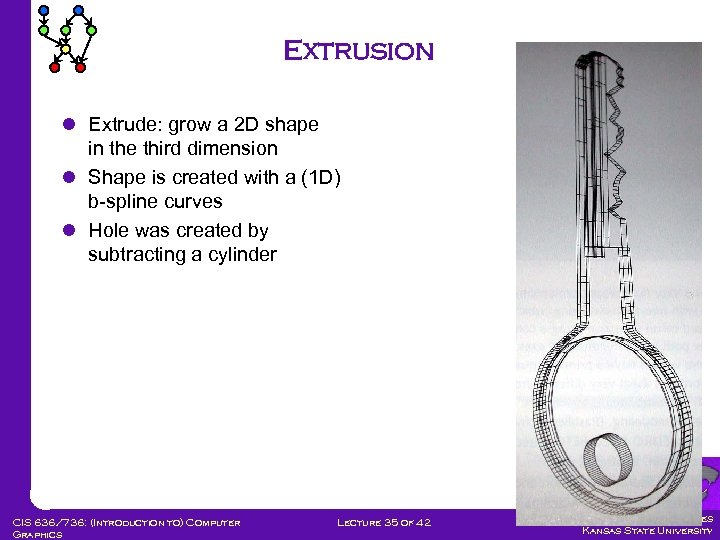 Extrusion l Extrude: grow a 2 D shape in the third dimension l Shape is created with a (1 D) b-spline curves l Hole was created by subtracting a cylinder CIS 636/736: (Introduction to) Computer Graphics Lecture 35 of 42 Computing & Information Sciences Kansas State University
 CIS 636/736: (Introduction to) Computer Graphics Lecture 35 of 42 Computing & Information Sciences Kansas State University
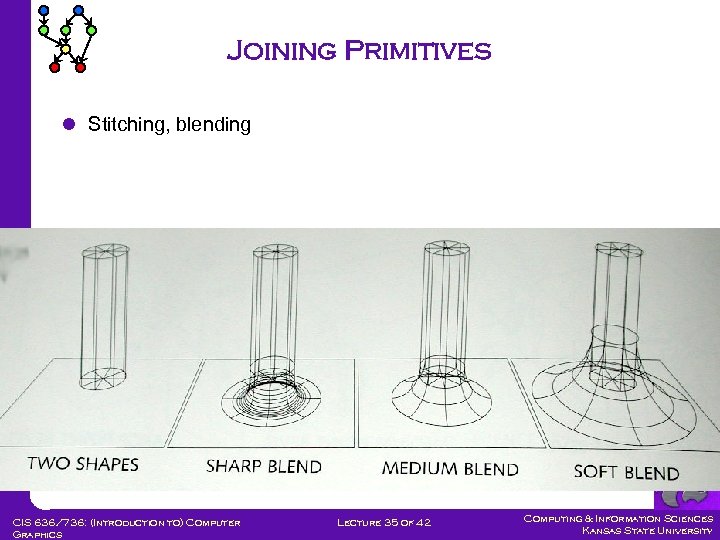 Joining Primitives l Stitching, blending CIS 636/736: (Introduction to) Computer Graphics Lecture 35 of 42 Computing & Information Sciences Kansas State University
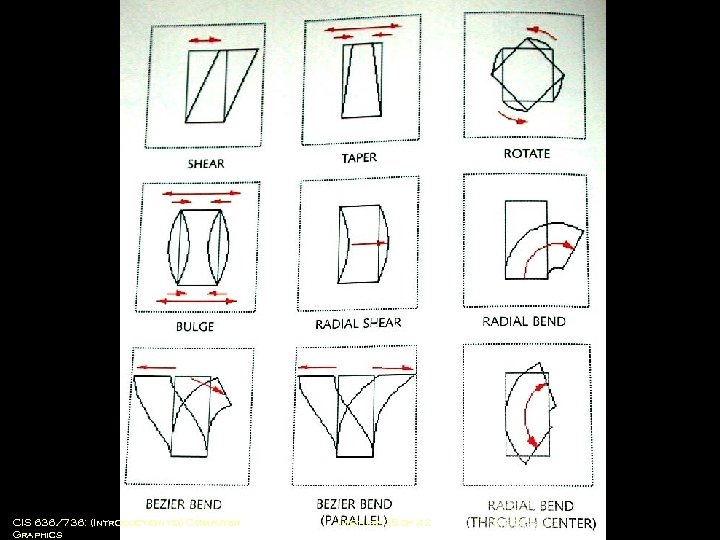 Modifying Primitives CIS 636/736: (Introduction to) Computer Graphics Lecture 35 of 42 Computing & Information Sciences Kansas State University
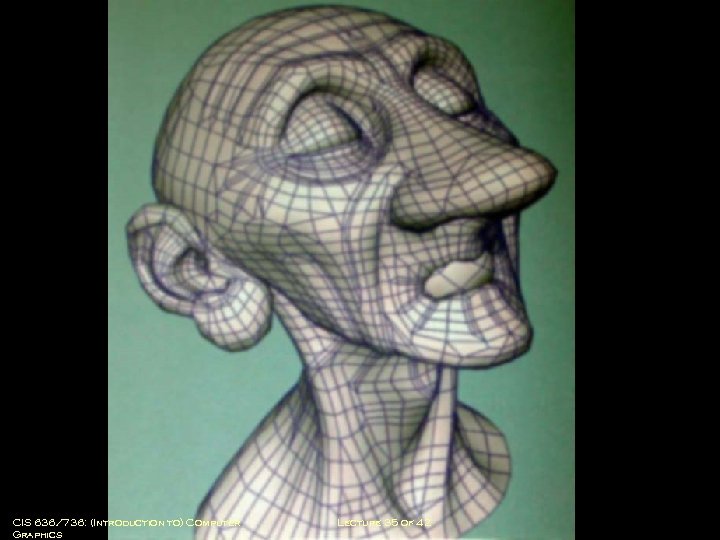
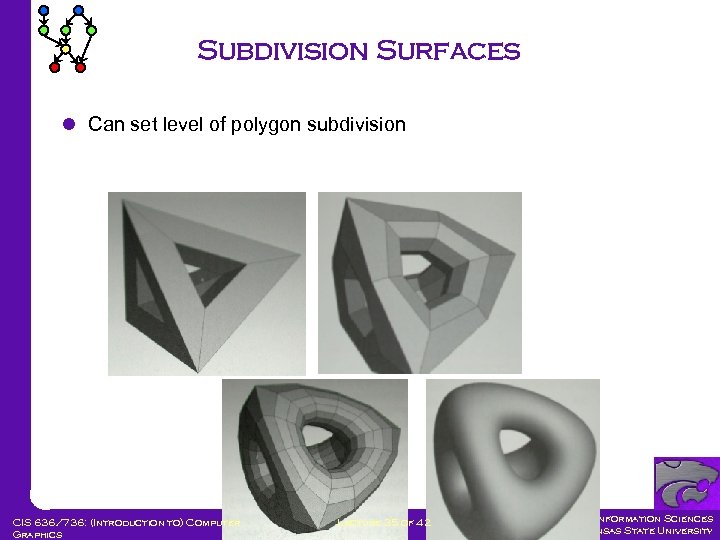 Subdivision Surfaces l Can set level of polygon subdivision CIS 636/736: (Introduction to) Computer Graphics Lecture 35 of 42 Computing & Information Sciences Kansas State University
 CIS 636/736: (Introduction to) Computer Graphics Lecture 35 of 42 Computing & Information Sciences Kansas State University
 CIS 636/736: (Introduction to) Computer Graphics Lecture 35 of 42 Computing & Information Sciences Kansas State University
 CIS 636/736: (Introduction to) Computer Graphics Lecture 35 of 42 Computing & Information Sciences Kansas State University
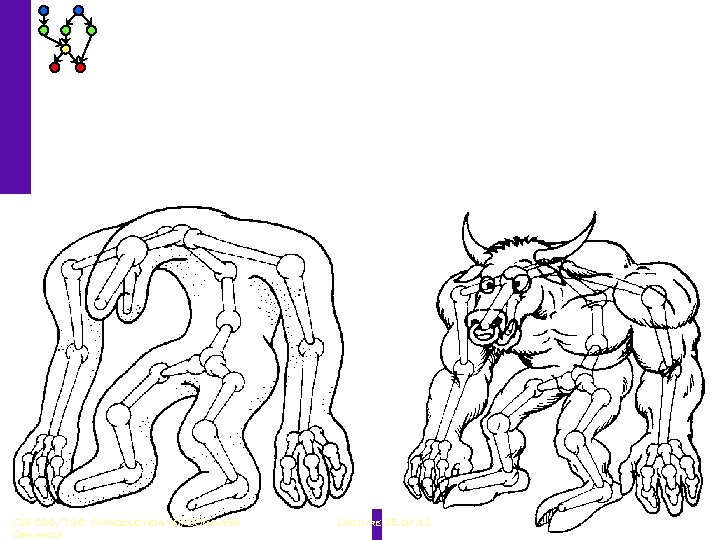
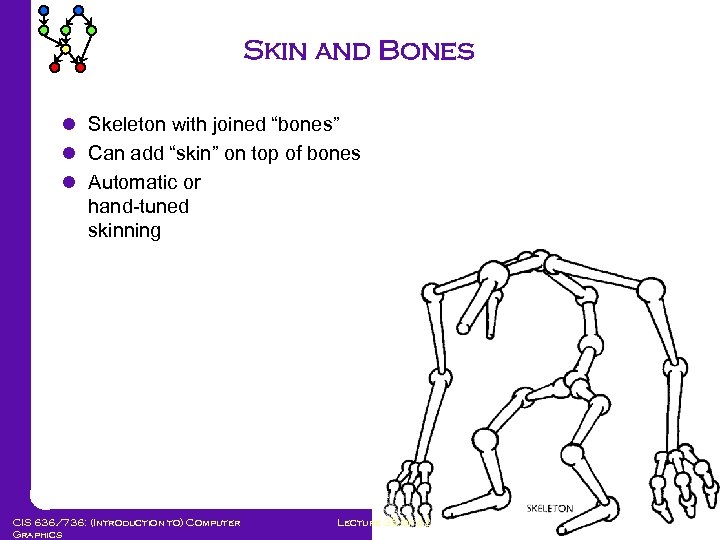 Skin and Bones l Skeleton with joined “bones” l Can add “skin” on top of bones l Automatic or hand-tuned skinning CIS 636/736: (Introduction to) Computer Graphics Lecture 35 of 42 Computing & Information Sciences Kansas State University
 CIS 636/736: (Introduction to) Computer Graphics Lecture 35 of 42 Computing & Information Sciences Kansas State University
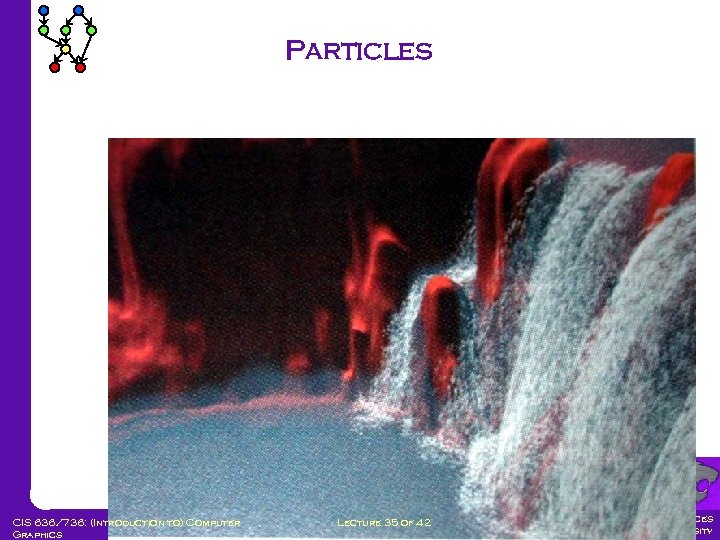 Particles CIS 636/736: (Introduction to) Computer Graphics Lecture 35 of 42 Computing & Information Sciences Kansas State University
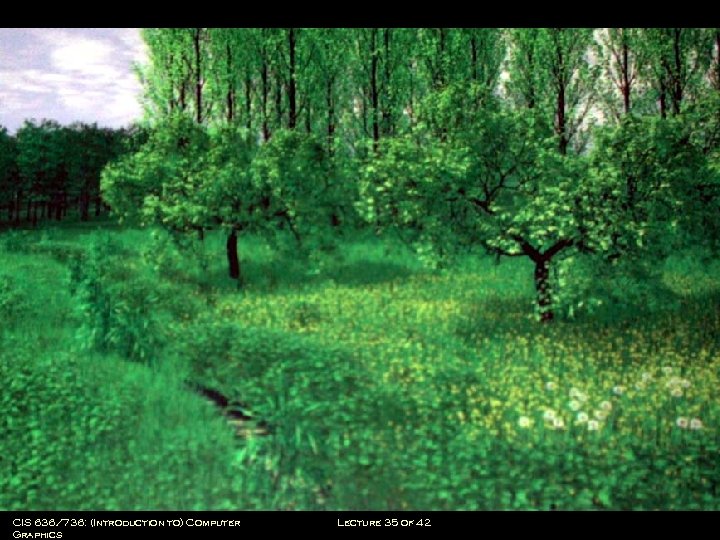
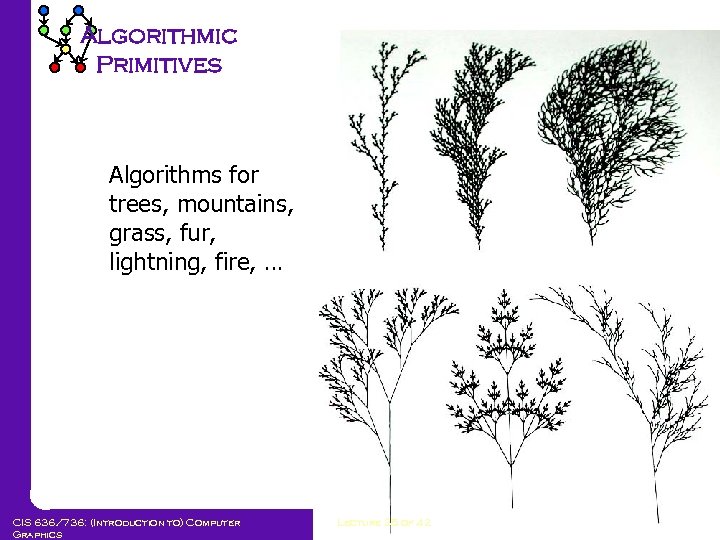 Algorithmic Primitives Algorithms for trees, mountains, grass, fur, lightning, fire, … CIS 636/736: (Introduction to) Computer Graphics Lecture 35 of 42 Computing & Information Sciences Kansas State University
 CIS 636/736: (Introduction to) Computer Graphics Lecture 35 of 42 Computing & Information Sciences Kansas State University
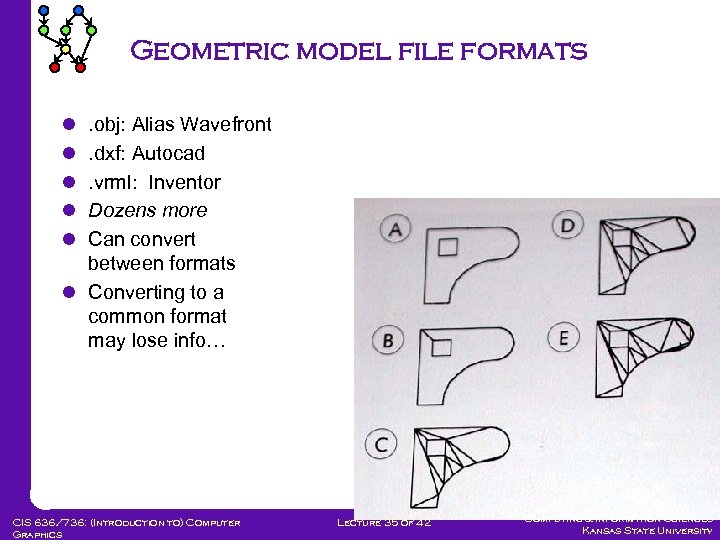 Geometric model file formats l l l . obj: Alias Wavefront. dxf: Autocad. vrml: Inventor Dozens more Can convert between formats l Converting to a common format may lose info… CIS 636/736: (Introduction to) Computer Graphics Lecture 35 of 42 Computing & Information Sciences Kansas State University
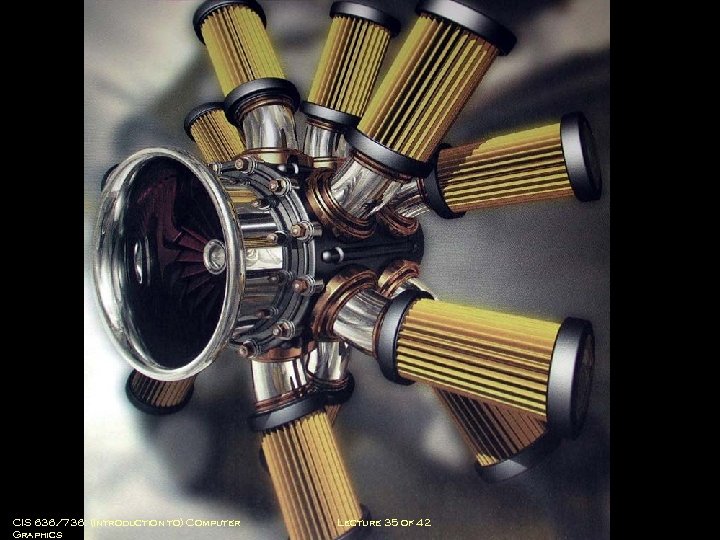
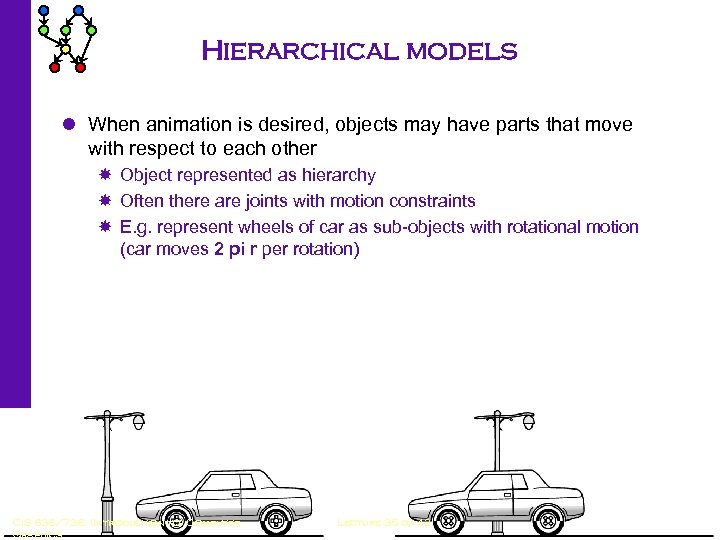 Hierarchical models l When animation is desired, objects may have parts that move with respect to each other Object represented as hierarchy Often there are joints with motion constraints E. g. represent wheels of car as sub-objects with rotational motion (car moves 2 pi r per rotation) CIS 636/736: (Introduction to) Computer Graphics Lecture 35 of 42 Computing & Information Sciences Kansas State University
 CIS 636/736: (Introduction to) Computer Graphics Lecture 35 of 42 Computing & Information Sciences Kansas State University
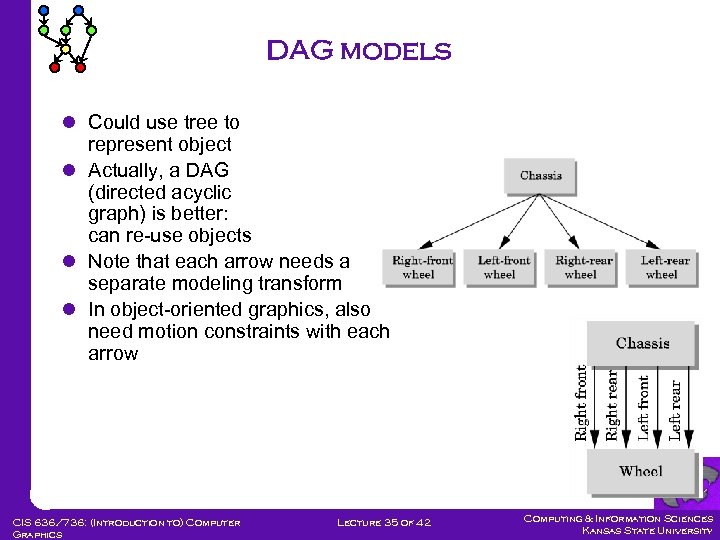 DAG models l Could use tree to represent object l Actually, a DAG (directed acyclic graph) is better: can re-use objects l Note that each arrow needs a separate modeling transform l In object-oriented graphics, also need motion constraints with each arrow CIS 636/736: (Introduction to) Computer Graphics Lecture 35 of 42 Computing & Information Sciences Kansas State University
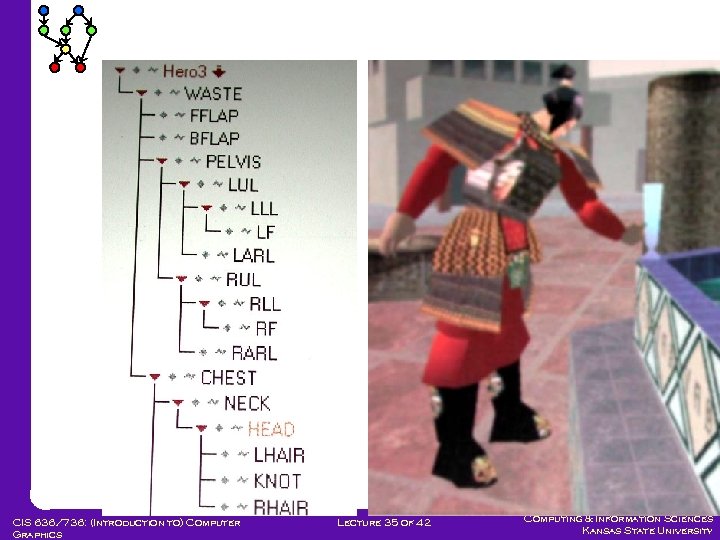
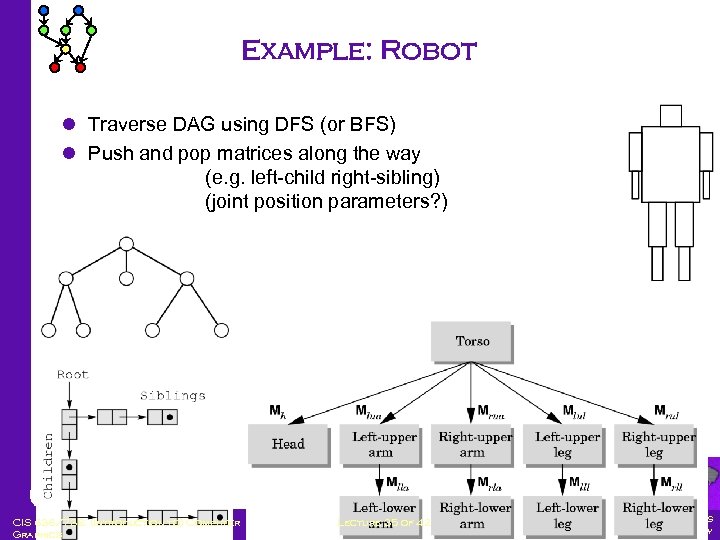 Example: Robot l Traverse DAG using DFS (or BFS) l Push and pop matrices along the way (e. g. left-child right-sibling) (joint position parameters? ) CIS 636/736: (Introduction to) Computer Graphics Lecture 35 of 42 Computing & Information Sciences Kansas State University
 CIS 636/736: (Introduction to) Computer Graphics Lecture 35 of 42 Computing & Information Sciences Kansas State University
 Modeling Programs l Moray Shareware Limited functionality Easy l Lightwave, Maya NOT shareware Very full-featured Difficult to learn and use l Moray, Maya demos; Lightwave video CIS 636/736: (Introduction to) Computer Graphics Lecture 35 of 42 Computing & Information Sciences Kansas State University
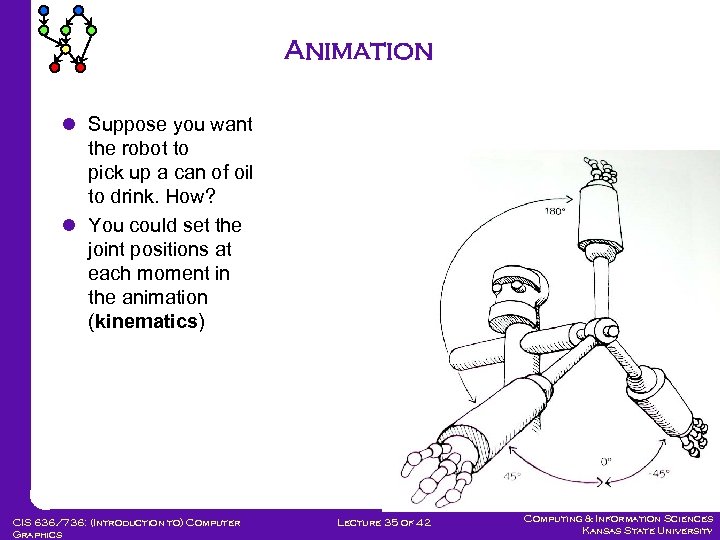 Animation l Suppose you want the robot to pick up a can of oil to drink. How? l You could set the joint positions at each moment in the animation (kinematics) CIS 636/736: (Introduction to) Computer Graphics Lecture 35 of 42 Computing & Information Sciences Kansas State University
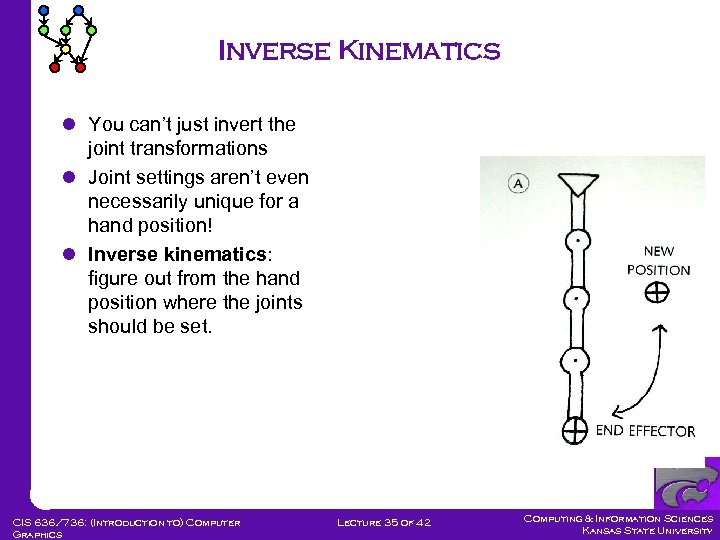 Inverse Kinematics l You can’t just invert the joint transformations l Joint settings aren’t even necessarily unique for a hand position! l Inverse kinematics: figure out from the hand position where the joints should be set. CIS 636/736: (Introduction to) Computer Graphics Lecture 35 of 42 Computing & Information Sciences Kansas State University
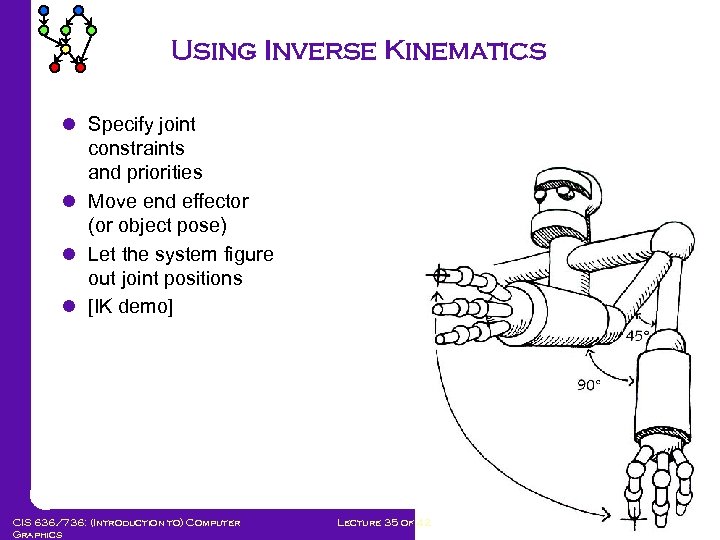 Using Inverse Kinematics l Specify joint constraints and priorities l Move end effector (or object pose) l Let the system figure out joint positions l [IK demo] CIS 636/736: (Introduction to) Computer Graphics Lecture 35 of 42 Computing & Information Sciences Kansas State University
 Keyframe Animation l In traditional key frame animation the animator draws several important frames, and helpers do the “inbetweening” or “tweening” l Computer animation is also key-frame based l At key frames, animator positions objects and lights, sets parameters, etc. l The system interpolates parameter values linearly or along a curve l To get from one object pose to the next, inverse kinematics determine joint motions l [Keyframe animation demo] CIS 636/736: (Introduction to) Computer Graphics Lecture 35 of 42 Computing & Information Sciences Kansas State University
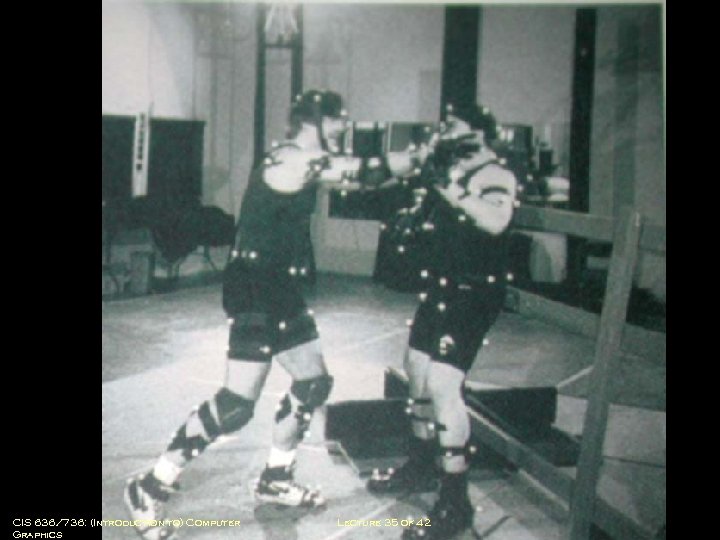
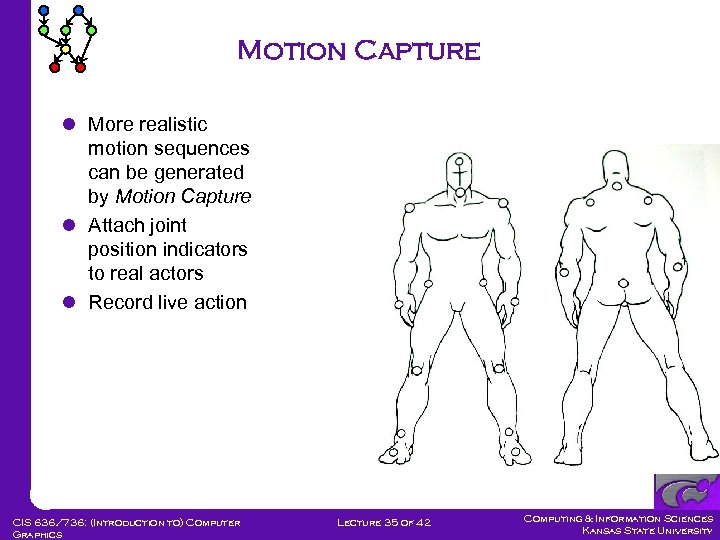 Motion Capture l More realistic motion sequences can be generated by Motion Capture l Attach joint position indicators to real actors l Record live action CIS 636/736: (Introduction to) Computer Graphics Lecture 35 of 42 Computing & Information Sciences Kansas State University
 CIS 636/736: (Introduction to) Computer Graphics Lecture 35 of 42 Computing & Information Sciences Kansas State University
 Morphing l Morphing: smoothly shifting from one image to another l First popularized in a Michael Jackson video l Method: a combination of Warping both images, gradually moving control points from location in first image to location in the second Cross-fading from first image sequence to second CIS 636/736: (Introduction to) Computer Graphics Lecture 35 of 42 Computing & Information Sciences Kansas State University
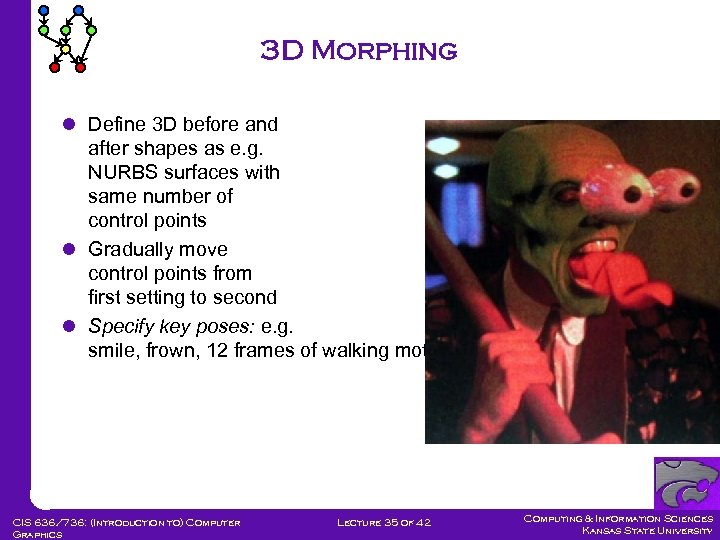 3 D Morphing l Define 3 D before and after shapes as e. g. NURBS surfaces with same number of control points l Gradually move control points from first setting to second l Specify key poses: e. g. smile, frown, 12 frames of walking motion CIS 636/736: (Introduction to) Computer Graphics Lecture 35 of 42 Computing & Information Sciences Kansas State University
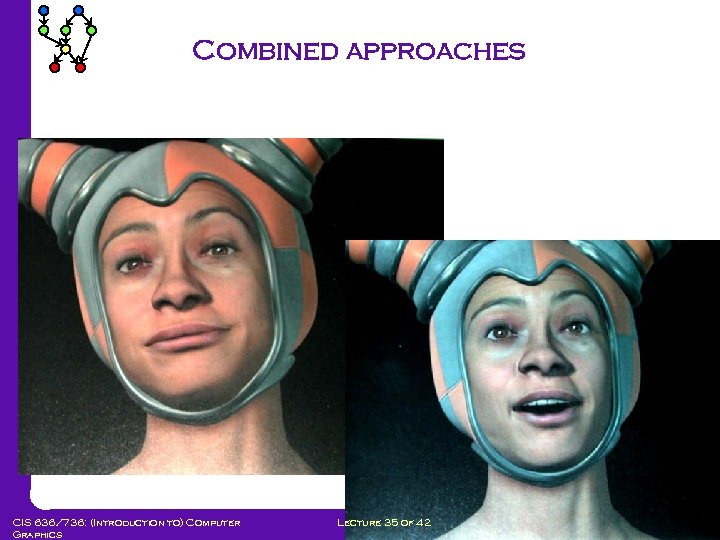 Combined approaches CIS 636/736: (Introduction to) Computer Graphics Lecture 35 of 42 Computing & Information Sciences Kansas State University
 Example: virtual puppetry l Suppose you want to display virtual puppet shows How could you animate puppet movements? How could you control the animations externally? CIS 636/736: (Introduction to) Computer Graphics Lecture 35 of 42 Computing & Information Sciences Kansas State University
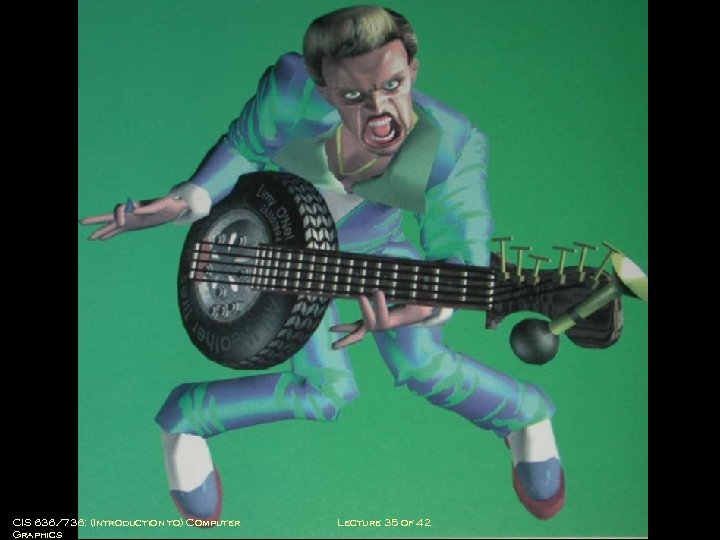
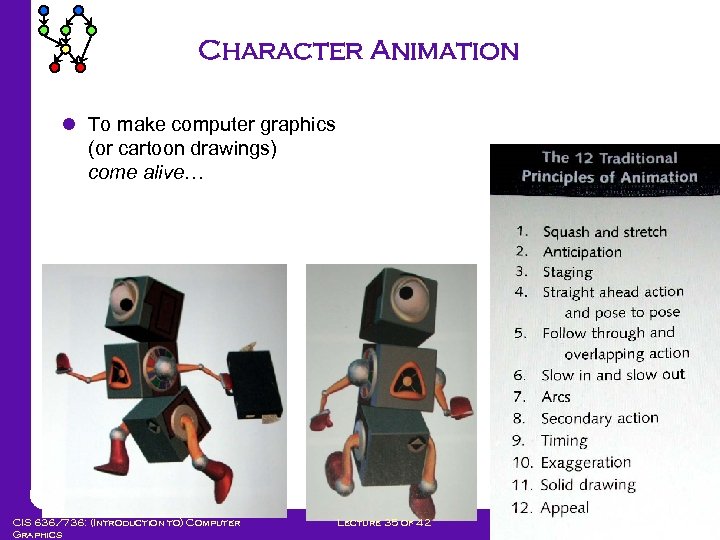 Character Animation l To make computer graphics (or cartoon drawings) come alive… CIS 636/736: (Introduction to) Computer Graphics Lecture 35 of 42 Computing & Information Sciences Kansas State University
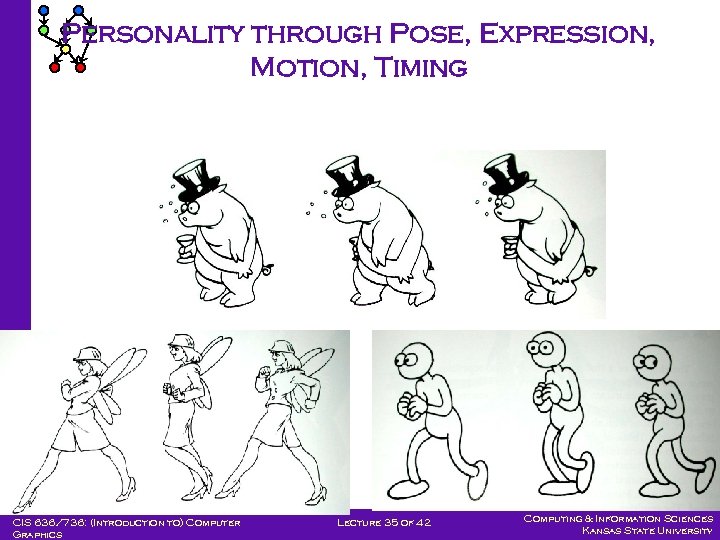 Personality through Pose, Expression, Motion, Timing CIS 636/736: (Introduction to) Computer Graphics Lecture 35 of 42 Computing & Information Sciences Kansas State University
 CIS 636/736: (Introduction to) Computer Graphics Lecture 35 of 42 Computing & Information Sciences Kansas State University
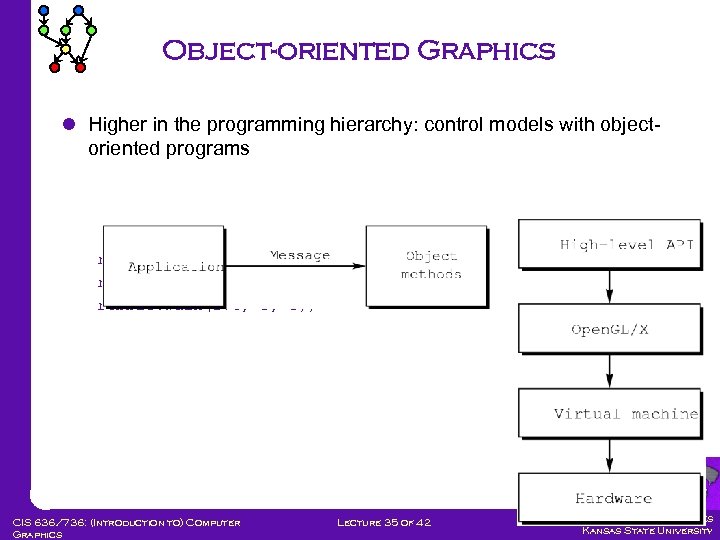 Object-oriented Graphics l Higher in the programming hierarchy: control models with objectoriented programs robot robbie; robbie. smile(); robbie. walk(270, 5, 3); CIS 636/736: (Introduction to) Computer Graphics Lecture 35 of 42 Computing & Information Sciences Kansas State University
 Data Structures for Modeling l This part of chapter: how some example applications be done efficiently (i. e. topics without a better home…) l Tree-based subdivisions of space l Example 1: how to represent complex objects made up of union, intersection, difference of other objects CIS 636/736: (Introduction to) Computer Graphics Lecture 35 of 42 Computing & Information Sciences Kansas State University
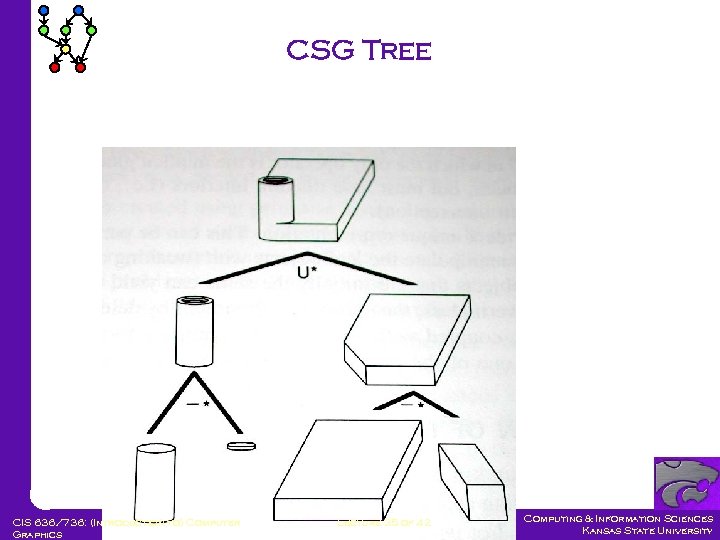 CSG Tree CIS 636/736: (Introduction to) Computer Graphics Lecture 35 of 42 Computing & Information Sciences Kansas State University
 Application 2: HSR l How to render in 3 D with hidden surface removal when you don’t have a hardware depth-buffer? l Can you think of any other ways of removing hidden surfaces quickly? l Principle: a polygon can’t be occluded by another polygon that is behind it. CIS 636/736: (Introduction to) Computer Graphics Lecture 35 of 42 Computing & Information Sciences Kansas State University
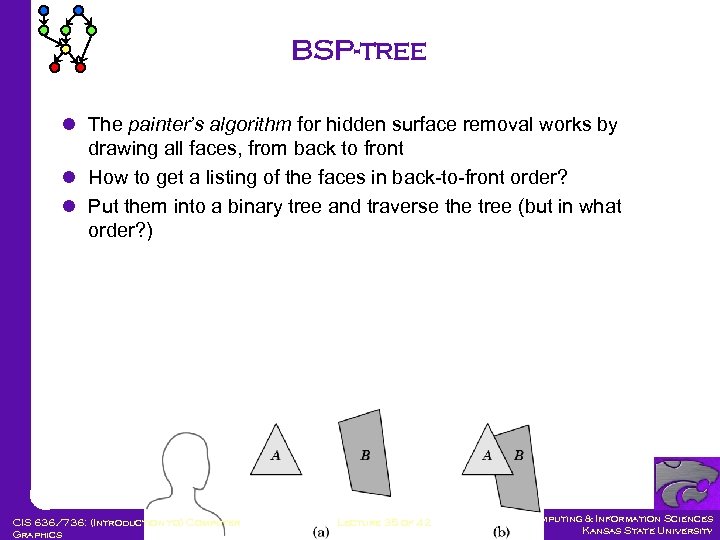 BSP-tree l The painter’s algorithm for hidden surface removal works by drawing all faces, from back to front l How to get a listing of the faces in back-to-front order? l Put them into a binary tree and traverse the tree (but in what order? ) CIS 636/736: (Introduction to) Computer Graphics Lecture 35 of 42 Computing & Information Sciences Kansas State University
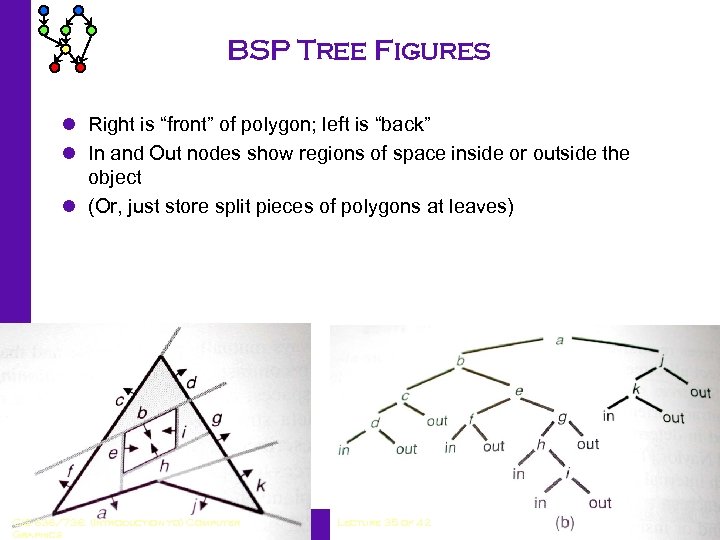 BSP Tree Figures l Right is “front” of polygon; left is “back” l In and Out nodes show regions of space inside or outside the object l (Or, just store split pieces of polygons at leaves) CIS 636/736: (Introduction to) Computer Graphics Lecture 35 of 42 Computing & Information Sciences Kansas State University
 Traversing a BSP tree l Binary Space Partition tree: a binary tree with a polygon at each node Children in left subtree are behind polygon Children in right subtree are in front of polygon l Traversing a BSP-tree: If null pointer, do nothing Else, draw far subtree, then polygon at current node, then near subtree Far and near are determined by location of viewer l Runtime of traversal? l Drawbacks? CIS 636/736: (Introduction to) Computer Graphics Lecture 35 of 42 Computing & Information Sciences Kansas State University
 Building a BSP tree l Inserting a polygon: If tree is empty make it the root If polygon to be inserted intersects plane of polygon of current node, split and insert half on each side recursively. Else insert on appropriate side recursively l Problem: the number of faces could grow dramatically Worst case (O(n 2))…but usually it doesn’t grow too badly in practice… CIS 636/736: (Introduction to) Computer Graphics Lecture 35 of 42 Computing & Information Sciences Kansas State University
 BSP-tree Summary l Returns polygons not necessarily in sorted order, but in an order that is correct for back-to-front rendering l Widely used when Z-buffer hardware may not be available (e. g. game engines) l Guarantees back-to-front rendering for alpha blending l Works well (linear-time traversals) in the number of split polygons l [And we hope the number of polygons doesn’t grow too much through splitting] CIS 636/736: (Introduction to) Computer Graphics Lecture 35 of 42 Computing & Information Sciences Kansas State University
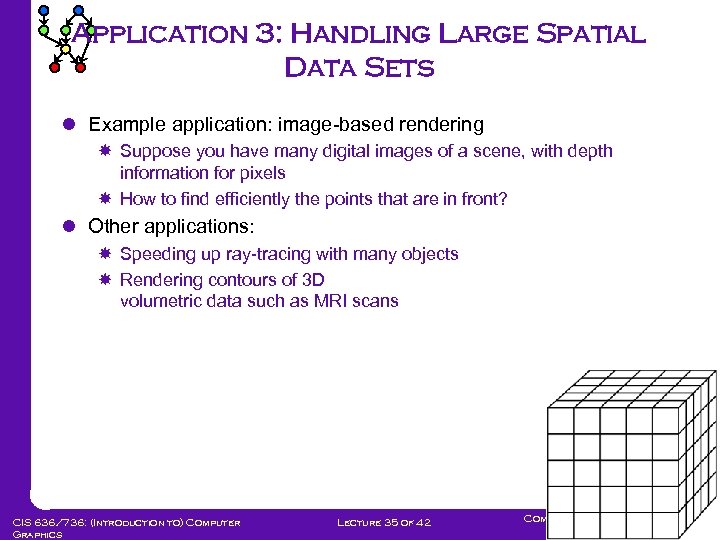 Application 3: Handling Large Spatial Data Sets l Example application: image-based rendering Suppose you have many digital images of a scene, with depth information for pixels How to find efficiently the points that are in front? l Other applications: Speeding up ray-tracing with many objects Rendering contours of 3 D volumetric data such as MRI scans CIS 636/736: (Introduction to) Computer Graphics Lecture 35 of 42 Computing & Information Sciences Kansas State University
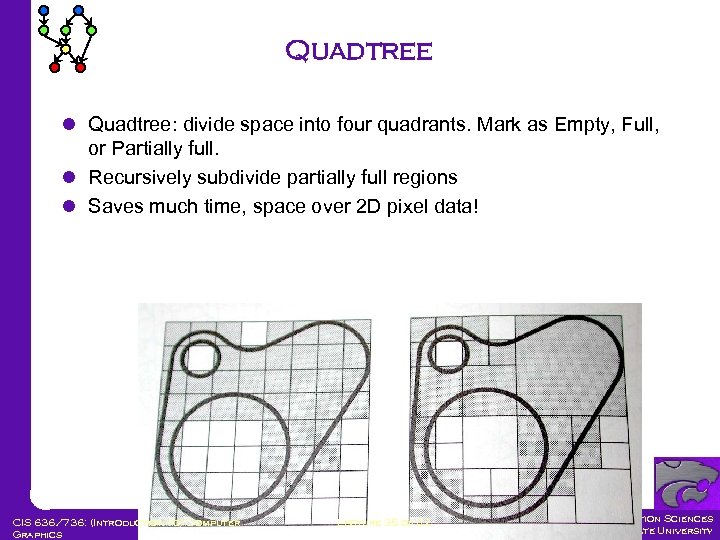 Quadtree l Quadtree: divide space into four quadrants. Mark as Empty, Full, or Partially full. l Recursively subdivide partially full regions l Saves much time, space over 2 D pixel data! CIS 636/736: (Introduction to) Computer Graphics Lecture 35 of 42 Computing & Information Sciences Kansas State University
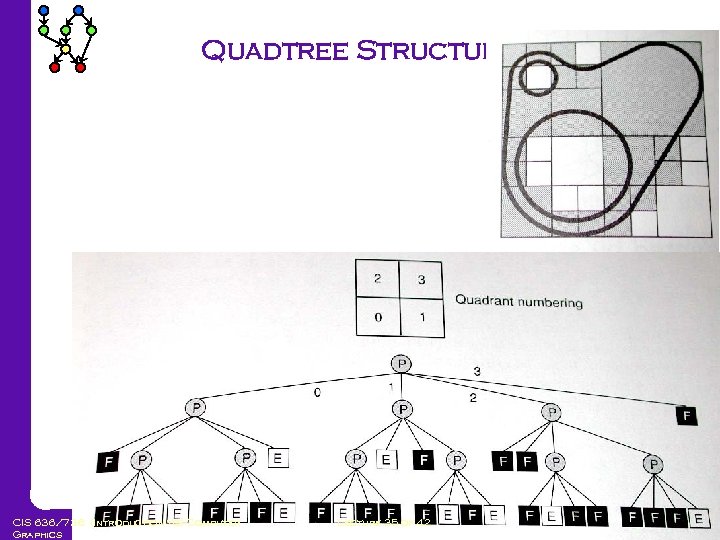 Quadtree Structure CIS 636/736: (Introduction to) Computer Graphics Lecture 35 of 42 Computing & Information Sciences Kansas State University
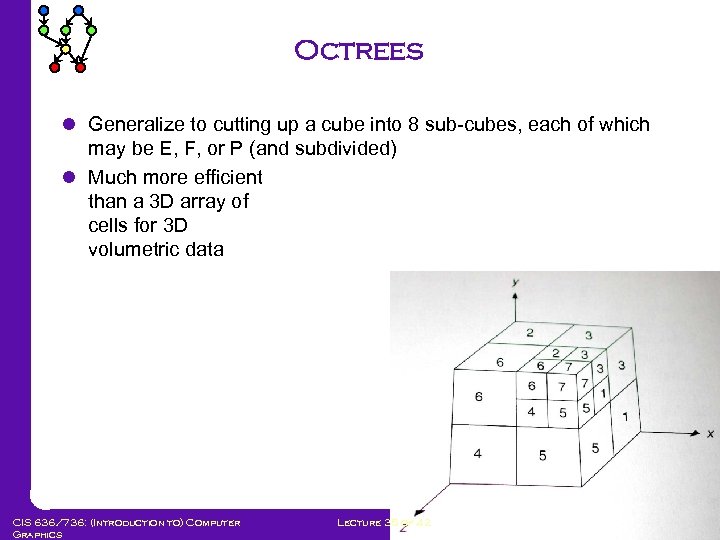 Octrees l Generalize to cutting up a cube into 8 sub-cubes, each of which may be E, F, or P (and subdivided) l Much more efficient than a 3 D array of cells for 3 D volumetric data CIS 636/736: (Introduction to) Computer Graphics Lecture 35 of 42 Computing & Information Sciences Kansas State University
 Quadtree Algorithms l How would you render a quadtree shape? find the intersection of a ray with a quadtree shape? Take the union of two quadtrees? Intersection? Find the neighbors of a cell? CIS 636/736: (Introduction to) Computer Graphics Lecture 35 of 42 Computing & Information Sciences Kansas State University
 Applications of Octrees l l Contour finding in MRI data 3 D scanning and rendering Efficient ray tracing Intersection, collision testing CIS 636/736: (Introduction to) Computer Graphics Lecture 35 of 42 Computing & Information Sciences Kansas State University
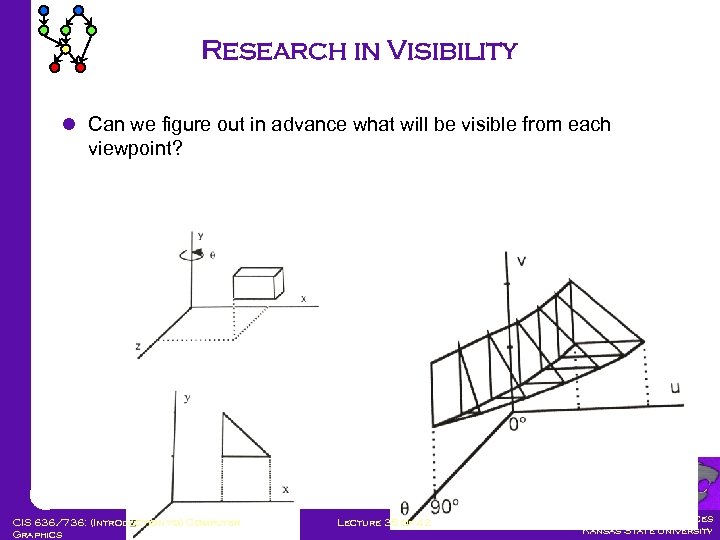 Research in Visibility l Can we figure out in advance what will be visible from each viewpoint? CIS 636/736: (Introduction to) Computer Graphics Lecture 35 of 42 Computing & Information Sciences Kansas State University
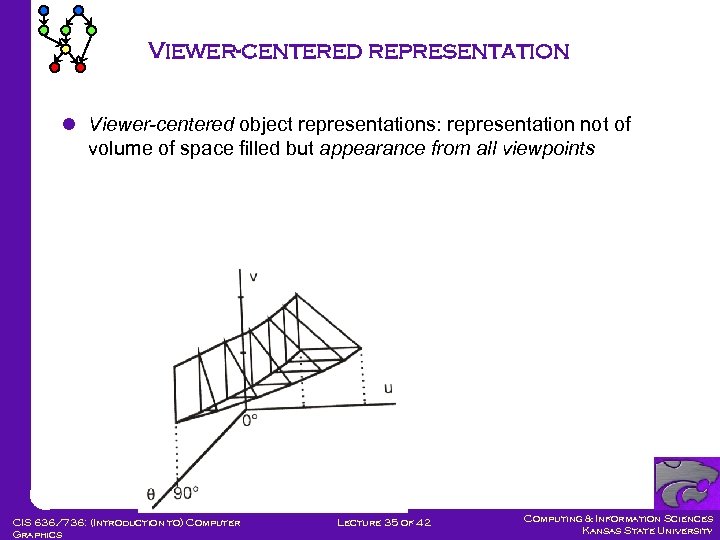 Viewer-centered representation l Viewer-centered object representations: representation not of volume of space filled but appearance from all viewpoints CIS 636/736: (Introduction to) Computer Graphics Lecture 35 of 42 Computing & Information Sciences Kansas State University
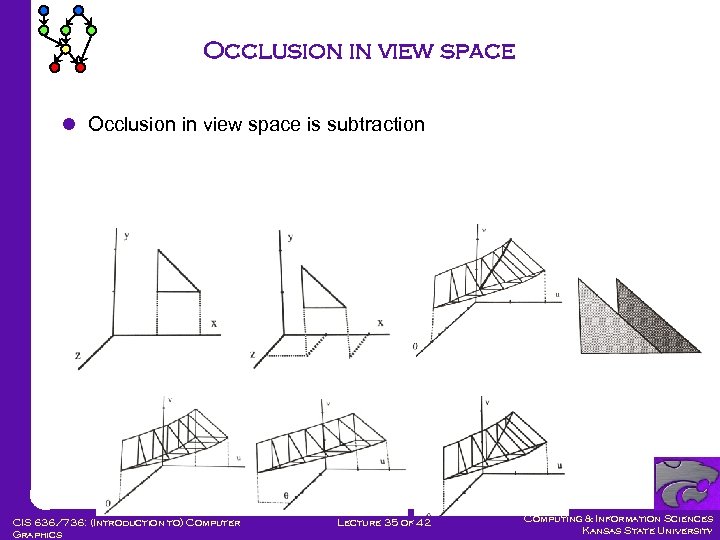 Occlusion in view space l Occlusion in view space is subtraction CIS 636/736: (Introduction to) Computer Graphics Lecture 35 of 42 Computing & Information Sciences Kansas State University
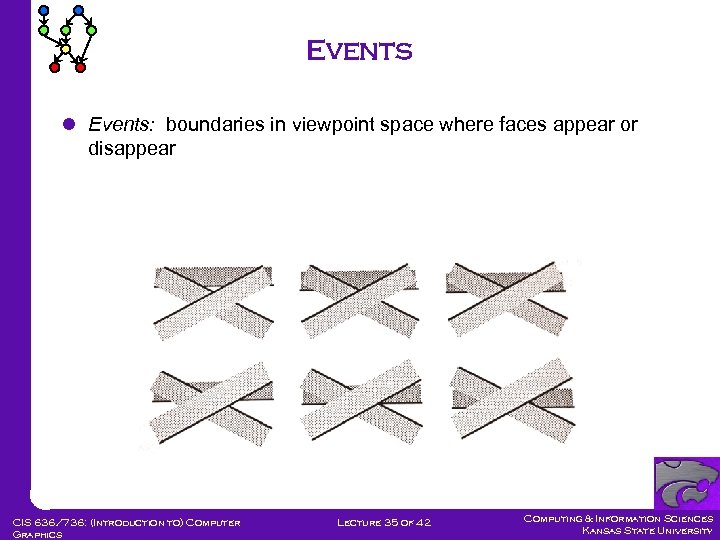 Events l Events: boundaries in viewpoint space where faces appear or disappear CIS 636/736: (Introduction to) Computer Graphics Lecture 35 of 42 Computing & Information Sciences Kansas State University
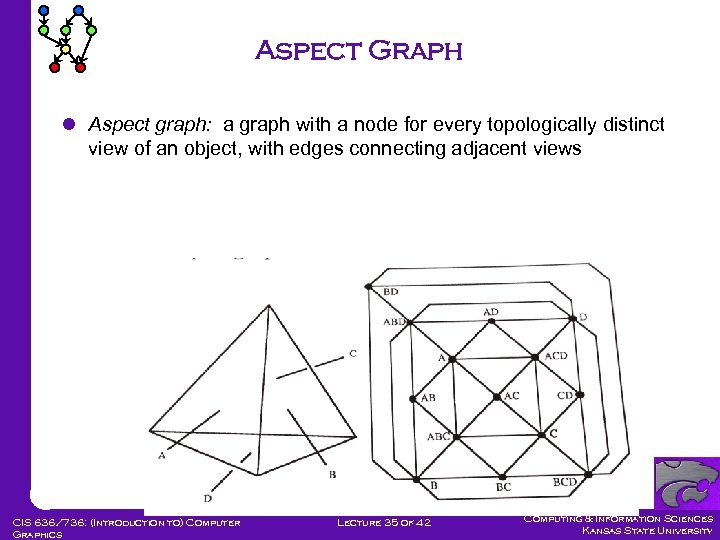 Aspect Graph l Aspect graph: a graph with a node for every topologically distinct view of an object, with edges connecting adjacent views CIS 636/736: (Introduction to) Computer Graphics Lecture 35 of 42 Computing & Information Sciences Kansas State University
 Aspect graph varieties l Aspect graphs can be constructed for 3 D: space 2 D: multiple axis rotations or planar motions 1 D: single-axis rotations CIS 636/736: (Introduction to) Computer Graphics Lecture 35 of 42 Computing & Information Sciences Kansas State University
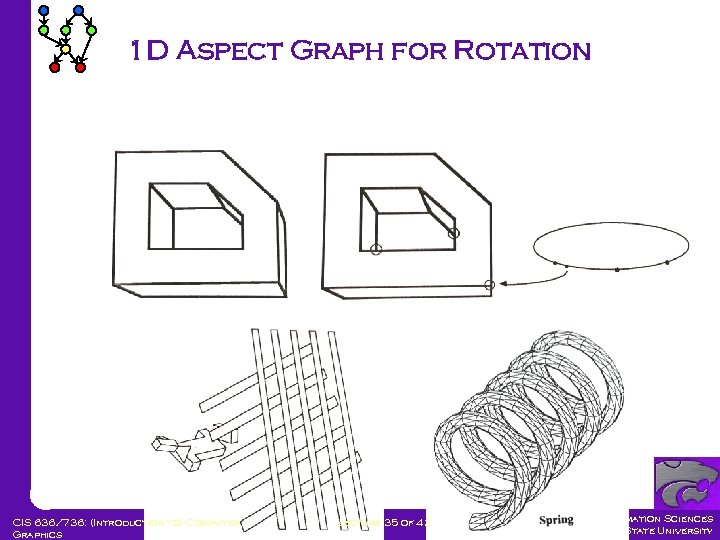 1 D Aspect Graph for Rotation CIS 636/736: (Introduction to) Computer Graphics Lecture 35 of 42 Computing & Information Sciences Kansas State University
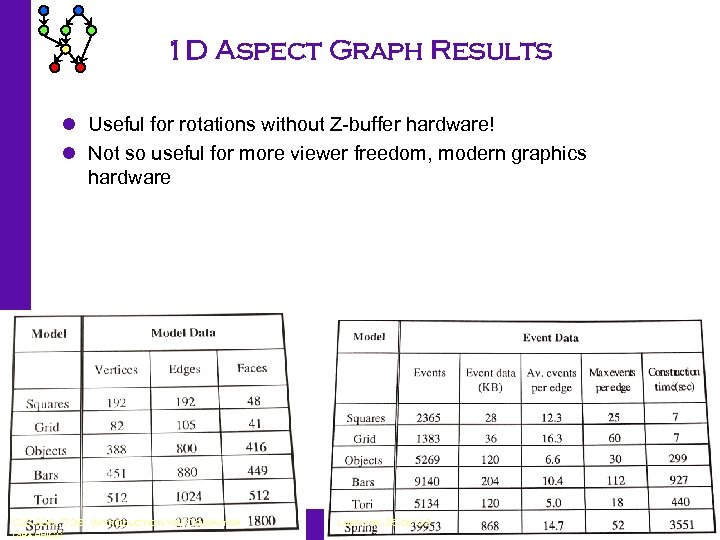 1 D Aspect Graph Results l Useful for rotations without Z-buffer hardware! l Not so useful for more viewer freedom, modern graphics hardware CIS 636/736: (Introduction to) Computer Graphics Lecture 35 of 42 Computing & Information Sciences Kansas State University
 Conservative Visibility Preprocessing l Q. can we take advantage of z-buffer? l Definition: weak visibility. A polygon is weakly visible from a region if any part of the polygon is visible from any viewpoint in the region l Conservative visibility preprocessing: computing in advance a (super-)set of the polygons that are weakly visible from some region l Rendering with Z-buffer yields correct image, but it’s faster since fewer polygons are drawn CIS 636/736: (Introduction to) Computer Graphics Lecture 35 of 42 Computing & Information Sciences Kansas State University
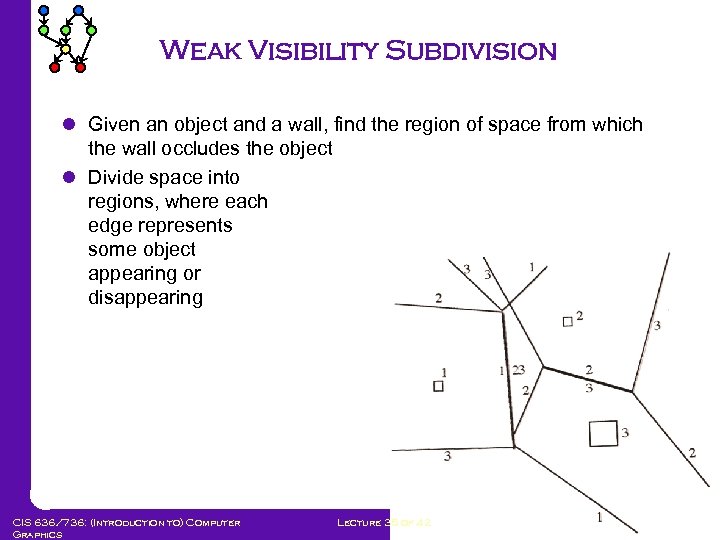 Weak Visibility Subdivision l Given an object and a wall, find the region of space from which the wall occludes the object l Divide space into regions, where each edge represents some object appearing or disappearing CIS 636/736: (Introduction to) Computer Graphics Lecture 35 of 42 Computing & Information Sciences Kansas State University
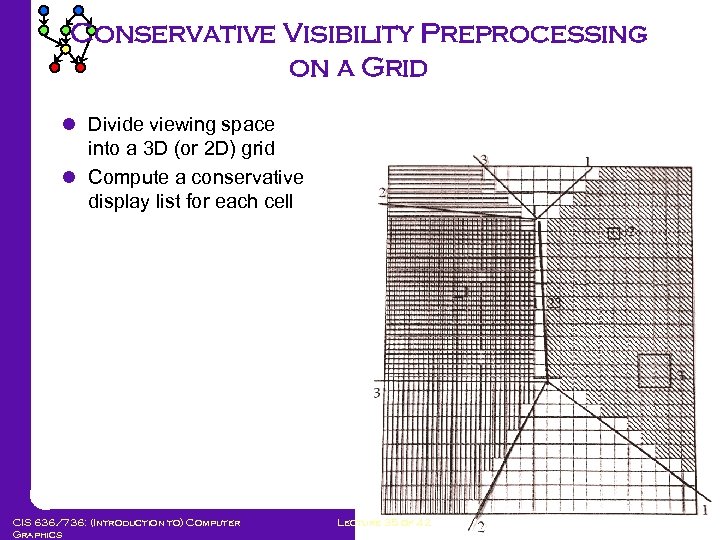 Conservative Visibility Preprocessing on a Grid l Divide viewing space into a 3 D (or 2 D) grid l Compute a conservative display list for each cell CIS 636/736: (Introduction to) Computer Graphics Lecture 35 of 42 Computing & Information Sciences Kansas State University
 Conservative visibility algorithm l Initialize a display list for each grid cell l Algorithm: for each object, wall, and cell If the object is not weakly visible from the cell, remove from cell’s display list l You can churn away at this computation as long as you like, increasing runtimes, but you can stop at any time with usable results. (Results improve over time!) CIS 636/736: (Introduction to) Computer Graphics Lecture 35 of 42 Computing & Information Sciences Kansas State University
 Perspective l What good did this visibility research do for the world? l It wasn’t enough for me I left graphics research and went into digital libraries Left University of Pittsburgh and went to Wheaton College CIS 636/736: (Introduction to) Computer Graphics Lecture 35 of 42 Computing & Information Sciences Kansas State University
 Summary l 3 D modeling uses advanced primitives and ways of cutting, joining them l Inverse kinematics determines joint position from end effector motions l Keyframe animation involves important poses and inbetweening l 3 D morphing animates surface control points l 3 D spatial subdivision trees include CSG-trees, BSP-trees, Quadtrees, and Octrees l Visibility preprocessing speeds walkthrough CIS 636/736: (Introduction to) Computer Graphics Lecture 35 of 42 Computing & Information Sciences Kansas State University