


 Скачать презентацию Lecture 2 Chapter 1 Heim Interaction Paradigms COMPSCI
70da12bec7ff315321883952432484cd.ppt
- Количество слайдов: 31
 Lecture 2 Chapter 1 (Heim) Interaction Paradigms COMPSCI 345 S 1 C and Soft. Eng 350 S 1 C
 Interaction Paradigms • • Innovation Computing Environments Analyzing Interaction Paradigms © Heim 2008 2
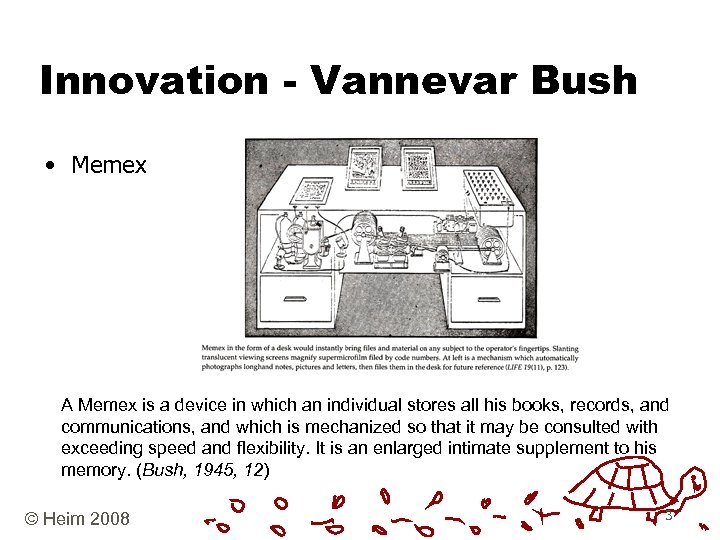 Innovation - Vannevar Bush • Memex A Memex is a device in which an individual stores all his books, records, and communications, and which is mechanized so that it may be consulted with exceeding speed and flexibility. It is an enlarged intimate supplement to his memory. (Bush, 1945, 12) © Heim 2008 3
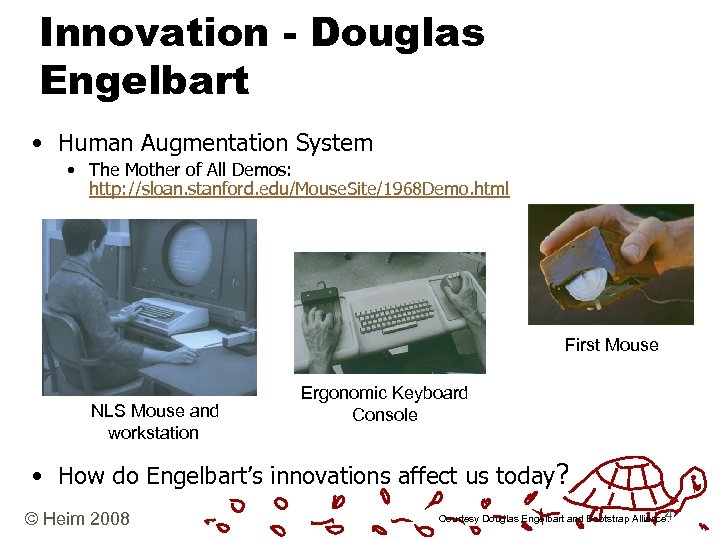 Innovation - Douglas Engelbart • Human Augmentation System • The Mother of All Demos: http: //sloan. stanford. edu/Mouse. Site/1968 Demo. html First Mouse NLS Mouse and workstation Ergonomic Keyboard Console • How do Engelbart’s innovations affect us today? © Heim 2008 4 Courtesy Douglas Engelbart and Bootstrap Alliance.
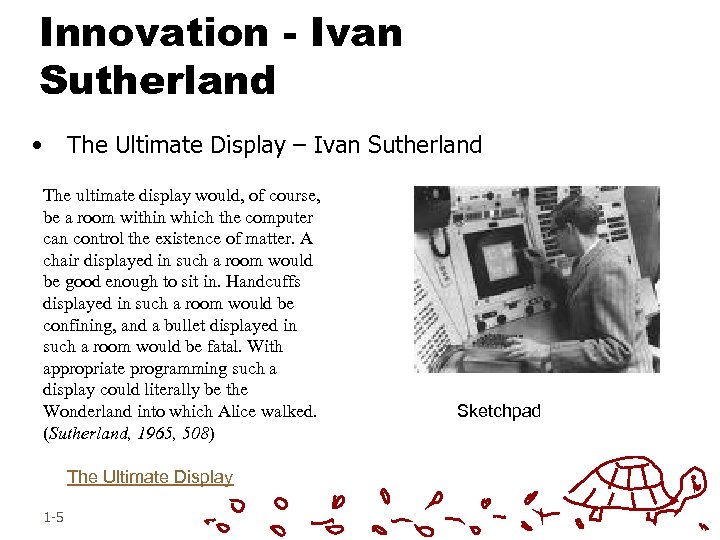 Innovation - Ivan Sutherland • The Ultimate Display – Ivan Sutherland The ultimate display would, of course, be a room within which the computer can control the existence of matter. A chair displayed in such a room would be good enough to sit in. Handcuffs displayed in such a room would be confining, and a bullet displayed in such a room would be fatal. With appropriate programming such a display could literally be the Wonderland into which Alice walked. (Sutherland, 1965, 508) The Ultimate Display 1 -5 Sketchpad
 Computing Environments • Physical Computing Environment • Social Computing Environment • Cognitive Computing Environment © Heim 2008 6
 Computing Environments • Physical Computing Environment • Safety • Efficiency • User Space • Work Space • Lighting • Noise • Pollution • Default settings must be carefully thought out © Heim 2008 7
 Computing Environments • Social Computing Environment • The social environment affects the way people use computers. • Computer use has also been shown to affect human social interaction. • Different computing paradigms imply different social environments. • For instance, personal computing is usually a solitary activity done in an office or an isolated corner of the house. Mobile computing is often done outside and in public places © Heim 2008 8
 Computing Environments • Cognitive Computing Environment • • • Age Disabilities Degree of technical knowledge Degree of focus Cognitive Stress © Heim 2008 9
 Analyzing Interaction Paradigms • 5 W + H • What/How • Where/When • Who/Why © Heim 2008 10
 Interaction Paradigms • • Large Scale Computing Personal Computing Networked Computing Mobile Computing Collaborative Environments Virtual Reality Augmented Reality © Heim 2008 11
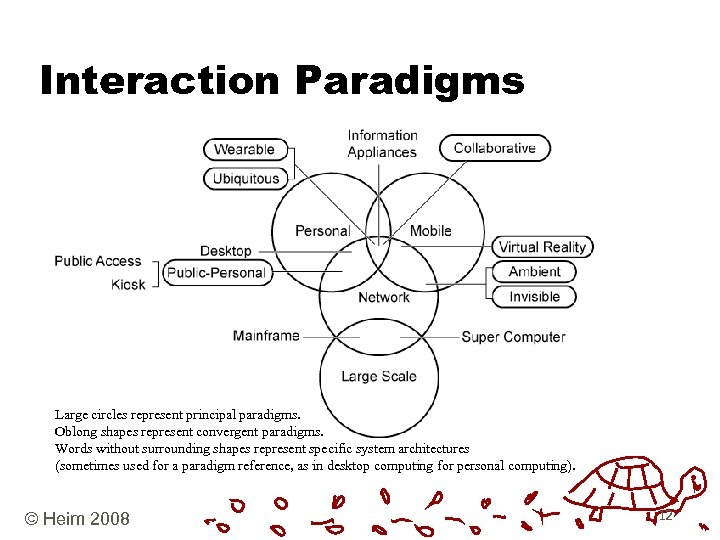 Interaction Paradigms Large circles represent principal paradigms. Oblong shapes represent convergent paradigms. Words without surrounding shapes represent specific system architectures (sometimes used for a paradigm reference, as in desktop computing for personal computing). © Heim 2008 12
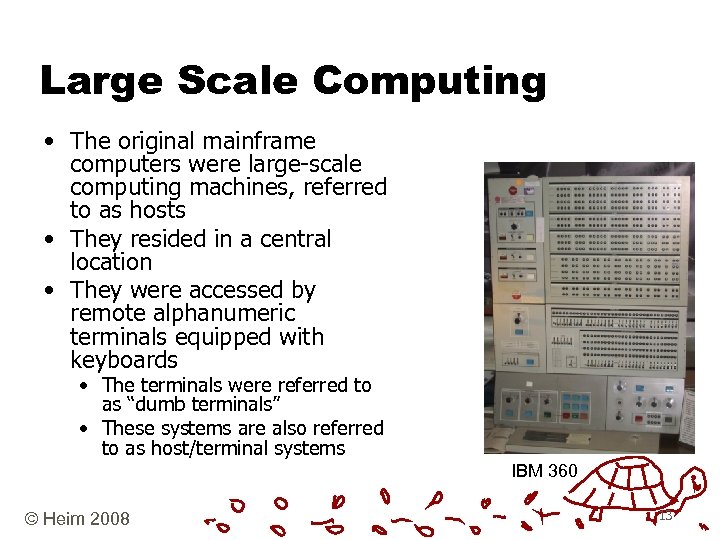 Large Scale Computing • The original mainframe computers were large-scale computing machines, referred to as hosts • They resided in a central location • They were accessed by remote alphanumeric terminals equipped with keyboards • The terminals were referred to as “dumb terminals” • These systems are also referred to as host/terminal systems IBM 360 © Heim 2008 13
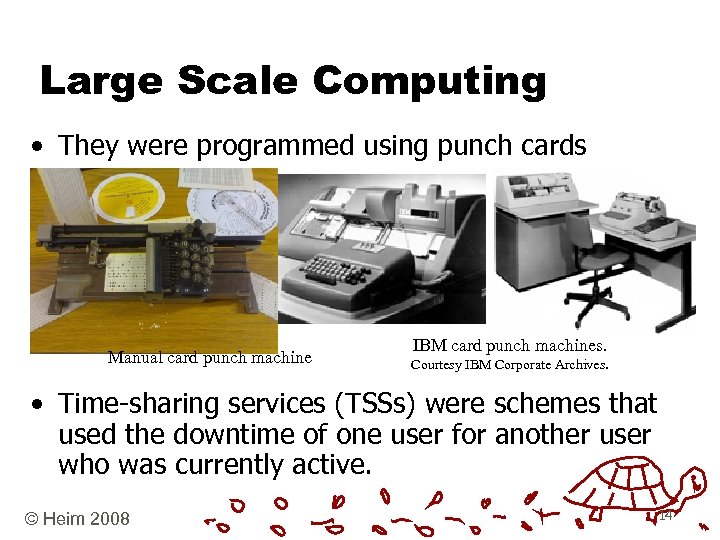 Large Scale Computing • They were programmed using punch cards Manual card punch machine IBM card punch machines. Courtesy IBM Corporate Archives. • Time-sharing services (TSSs) were schemes that used the downtime of one user for another user who was currently active. © Heim 2008 14
 Large Scale Computing • Super Computers • These highly specialized machines crunch large amounts of data at high speed, as in computing fluid dynamics, weather patterns, seismic activity predictions, and nuclear explosion dynamics. • Supercomputers are used for the very high speed backbone (v. BNS) connections that constitute the core of the Internet. National Center for Super Computing Applications (NCSA) University of Canterbury Super Computer http: //www. bluefern. canterbury. ac. nz/ © Heim 2008 15
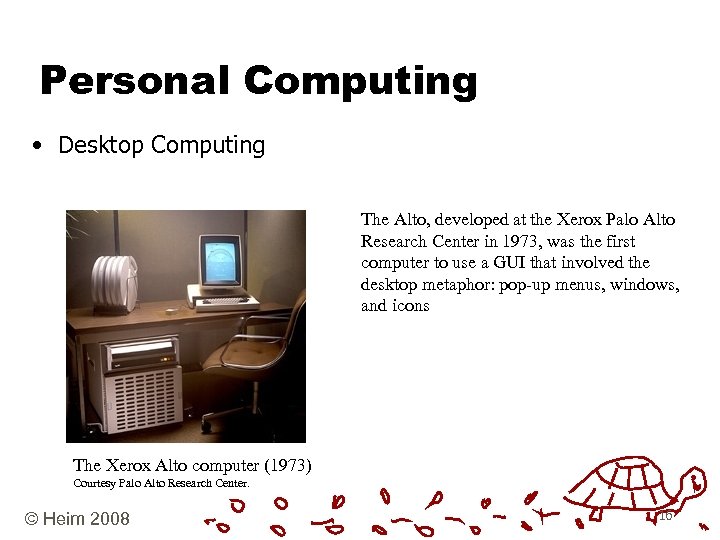 Personal Computing • Desktop Computing The Alto, developed at the Xerox Palo Alto Research Center in 1973, was the first computer to use a GUI that involved the desktop metaphor: pop-up menus, windows, and icons The Xerox Alto computer (1973) Courtesy Palo Alto Research Center. © Heim 2008 16
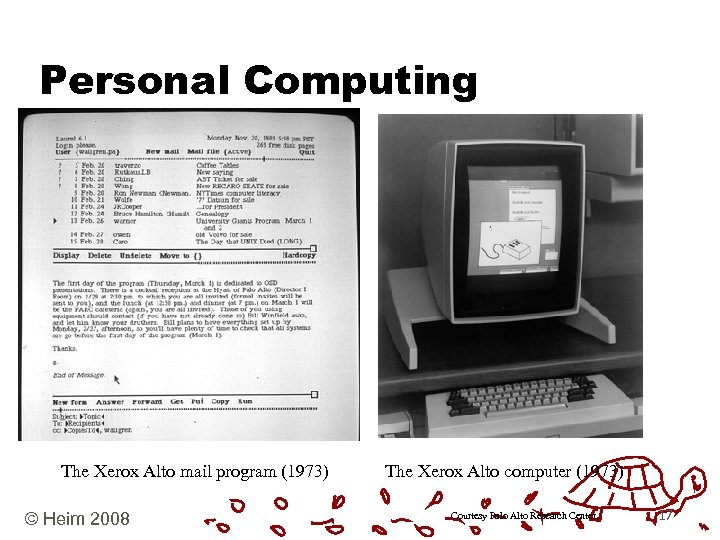 Personal Computing The Xerox Alto mail program (1973) © Heim 2008 The Xerox Alto computer (1973) Courtesy Palo Alto Research Center . 17
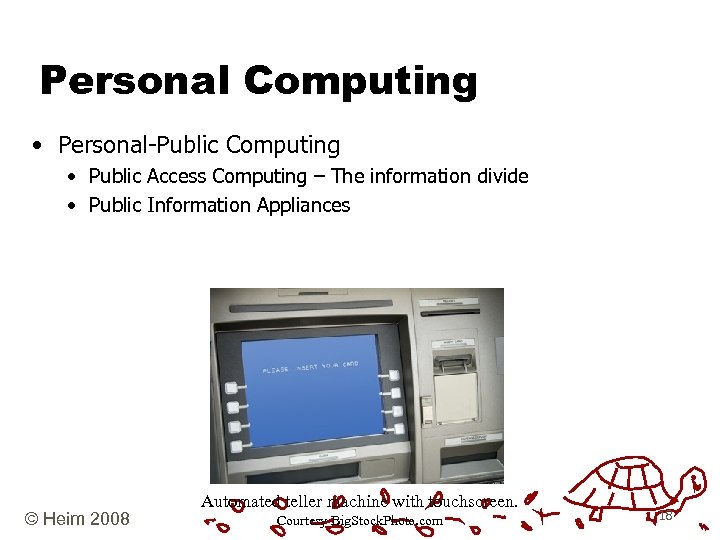 Personal Computing • Personal-Public Computing • Public Access Computing – The information divide • Public Information Appliances © Heim 2008 Automated teller machine with touchscreen. Courtesy Big. Stock. Photo. com 18
 Networked Computing • Licklider – The Galactic Network • ARPAnet - 10: 30 pm on October 29, 1969 • Scope • • WAN – Wide Area Network MAN – Metropolitan Area Network LAN – Local Area Network PAN – Personal Area Network • Wired - Wireless • Wi-Fi (IEEE 802. 11 x) • Bluetooth • 3 G © Heim 2008 19
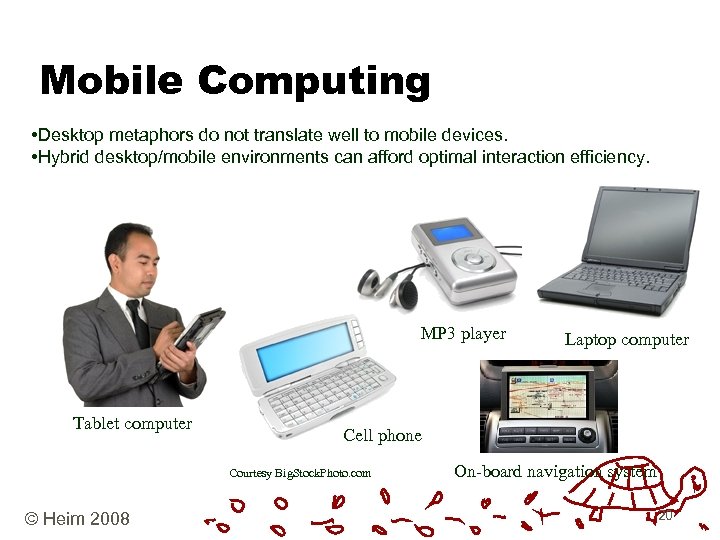 Mobile Computing • Desktop metaphors do not translate well to mobile devices. • Hybrid desktop/mobile environments can afford optimal interaction efficiency. MP 3 player Tablet computer Cell phone Courtesy Big. Stock. Photo. com © Heim 2008 Laptop computer On-board navigation system 20
 Collaborative Environments • Networks allow members of a group to interact with other members on shared files and documents. • This creates a virtual space where people can collaborate and work collectively. • Groupware © Heim 2008 21
 Collaborative Environments • Collaborative work • • Communication Coordination Organization Presentation • Computer-mediated communication (CMC) • Computer-supported cooperative work (CSCW) • What are some of the different types of groupware? © Heim 2008 22
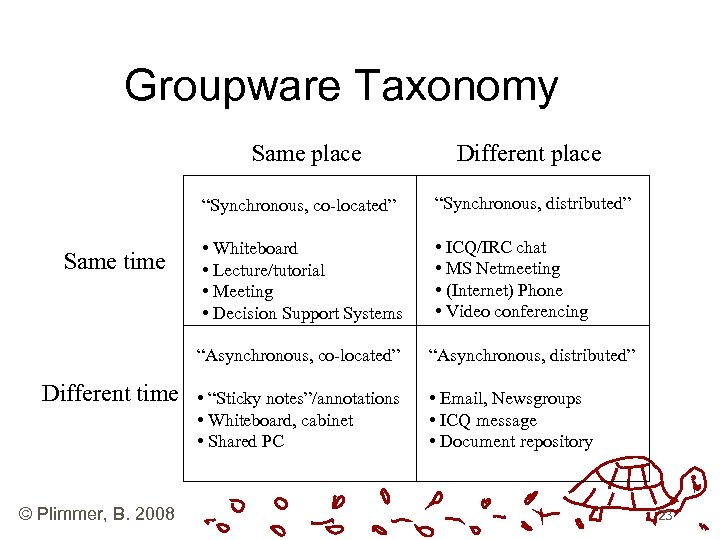 Groupware Taxonomy Same place Different place “Synchronous, co-located” Same time “Synchronous, distributed” • Whiteboard • Lecture/tutorial • Meeting • Decision Support Systems • ICQ/IRC chat • MS Netmeeting • (Internet) Phone • Video conferencing “Asynchronous, co-located” Different time © Plimmer, B. 2008 “Asynchronous, distributed” • “Sticky notes”/annotations • Whiteboard, cabinet • Shared PC • Email, Newsgroups • ICQ message • Document repository 23
 Embodied Virtuality • Emerging fields • Ubiquitous/pervasive computing • Invisible/transparent computing • Wearable computing Some of us use the term “embodied virtuality” to refer to the process of drawing computers out of their electronic shells. The “virtuality” of computer-readable data—all the different ways in which it can be altered, processed analyzed—is brought into the physical world. (Weiser, 1991, 95) © Heim 2008 24
 Virtual Reality • Virtual reality technologies can be divided into two distinct groups: • Nonimmersive environments • screen-based, pointer-driven, three-dimensional (3 D) graphical presentations that may involve haptic feedback • Immersive environments • • © Heim 2008 designed to create a sense of “being” in a world populated by virtual objects. to create a convincing illusion, they must use as many human perceptual channels as possible. 25
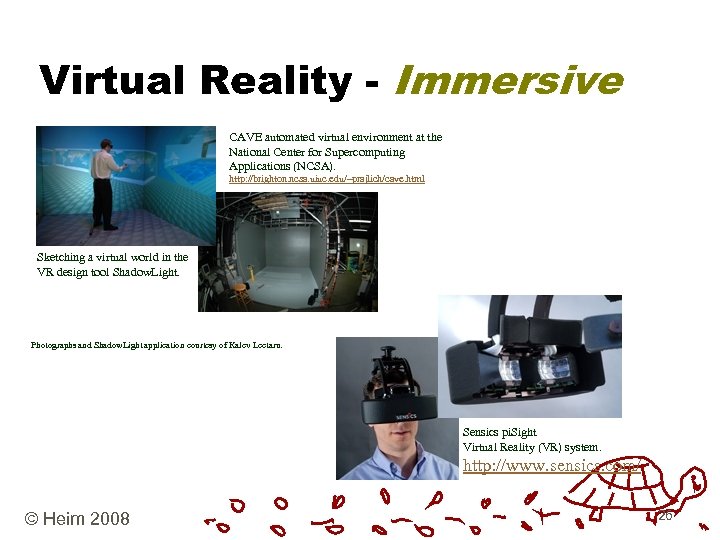 Virtual Reality - Immersive CAVE automated virtual environment at the National Center for Supercomputing Applications (NCSA). http: //brighton. ncsa. uiuc. edu/~prajlich/cave. html Sketching a virtual world in the VR design tool Shadow. Light. Photographs and Shadow. Light application courtesy of Kalev Leetaru. Sensics pi. Sight Virtual Reality (VR) system. http: //www. sensics. com/ © Heim 2008 26
 Augmented Reality • The goal of AR is to create a seamless integration between real and virtual objects in a way that augments the user’s perception and experience. • Criteria for AR environments • The virtual information must be: • • © Heim 2008 Relevant to and in sync with the real-world environment. 27
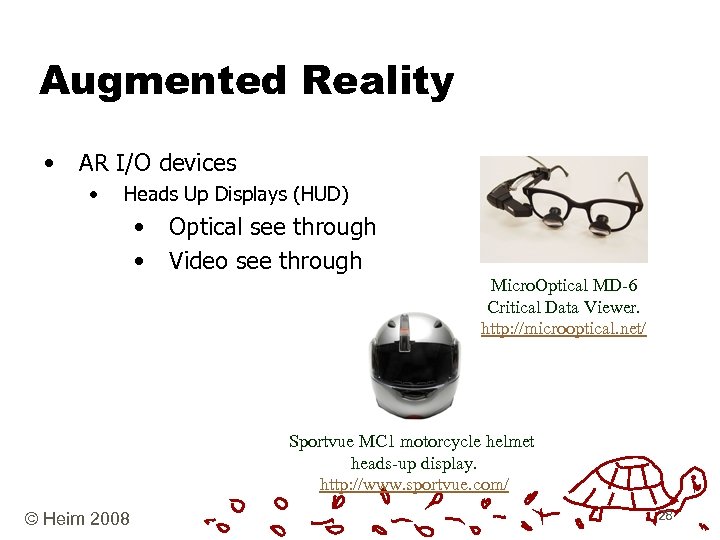 Augmented Reality • AR I/O devices • Heads Up Displays (HUD) • • Optical see through Video see through Micro. Optical MD-6 Critical Data Viewer. http: //microoptical. net/ Sportvue MC 1 motorcycle helmet heads-up display. http: //www. sportvue. com/ © Heim 2008 28
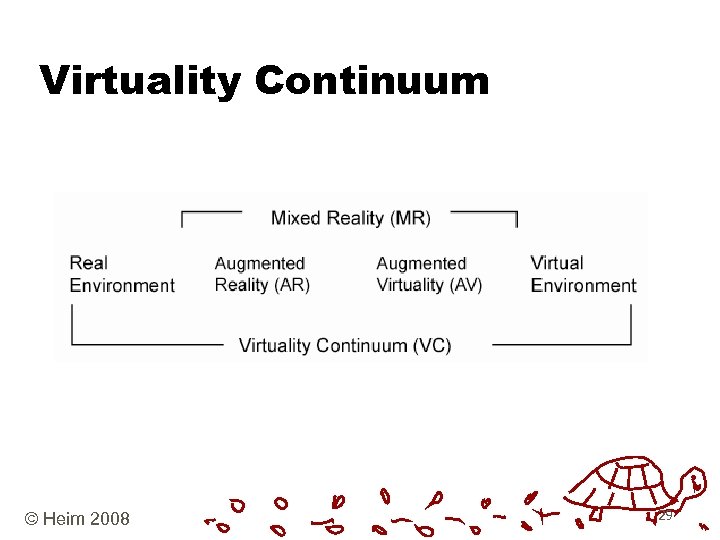 Virtuality Continuum © Heim 2008 29
 Summary • Many interaction paradigms and many more to come in the future…. • When designing we need to consider • Which paradigm best suit the needs of our intended user • Analyse using 5 W + H • Consider physical, social & cognitive environment • Next Lecture: Interaction Frameworks (Heim Ch. 2. 12. 2) 30
 Questions • What is the difference between Embodied Virtuality (EV) and Virtual Reality (VR)? • Where would EV and VR sit on the virtuality continuum? 31