


 Скачать презентацию Lecture 11 AUTOMATION TECHNOLOGIES FOR MANUFACTURING SYSTEMS
624c59a420d820bd030f3375adc8953a.ppt
- Количество слайдов: 50
 Lecture # 11 AUTOMATION TECHNOLOGIES FOR MANUFACTURING SYSTEMS 1. 2. 3. 4. Automation Fundamentals Hardware Components for Automation Computer Numerical Control Industrial Robotics
 Manufacturing Systems A manufacturing system can be defined as a collection of integrated equipment and human resources that performs one or more processing and/or assembly operations on a starting work material, part, or set of parts § The integrated equipment consists of production machines, material handling and positioning devices, and computer systems § The manufacturing systems accomplish the valueadded work on the part or product
 Automation Fundamentals Automation can be defined as the technology by which a process or procedure is performed without human assistance § Humans may be present, but the process itself operates under is own self-direction § Three components of an automated system: 1. Power 2. A program of instructions 3. A control system to carry out the instructions
 Three Basic Types of Automation § Fixed automation - the processing or assembly steps and their sequence are fixed by the equipment configuration § Programmable automation - equipment is designed with the capability to change the program of instructions to allow production of different parts or products § Flexible automation - an extension of programmable automation in which there is virtually no lost production time for setup changes or reprogramming
 Features of Fixed Automation § High initial investment for specialized equipment § High production rates § The program of instructions cannot be easily changed because it is fixed by the equipment configuration § Thus, little or no flexibility to accommodate product variety
 Features of Programmable Automation § High investment in general purpose equipment that can be reprogrammed § Ability to cope with product variety by reprogramming the equipment § Suited to batch production of different product and part styles § Lost production time to reprogram and change the physical setup § Lower production rates than fixed automation
 Features of Flexible Automation § High investment cost for custom-engineered equipment § Capable of producing a mixture of different parts or products without lost production time for changeovers and reprogramming § Thus, continuous production of different part or product styles § Medium production rates § Between fixed and programmable automation types
 Hardware Components for Automation § § Sensors Actuators Interface devices Process controllers - usually computer-based devices such as a programmable logic controller
 Sensors A sensor is a device that converts a physical stimulus or variable of interest (e. g. , force, temperature) into a more convenient physical form (e. g. , electrical voltage) for purpose of measuring the variable § Two types § An analog sensor measures a continuous analog variable and converts it into a continuous signal § A discrete sensor produces a signal that can have only a limited number of values
 Actuators An actuator is a device that converts a control signal into a physical action, usually a change in a process input parameter § The action is typically mechanical, such as a change in position of a worktable or speed of a motor § The control signal is usually low level, and an amplifier may be required to increase the power of the signal to drive the actuator § Amplifiers are electrical, hydraulic, or pneumatic
 Interface Devices § Interface devices allow the process to be connected to the controller and vice versa § Sensor signals form the process are fed into the controller § Command signals from the controller are sent to the process
 Process Controllers § Most process control systems use some type of digital computer as the controller § Requirements for real-time computer control: § Respond to incoming signals from process § Transmit commands to the process § Execute certain actions at specific points in time § Communicate with other computers that may be connected to the process § Accept inputs from operating personnel
 Programmable Logic Controllers (PLCs) A PLC is a microcomputer-based controller that uses stored instructions in programmable memory to implement logic, sequencing, timing, counting, and arithmetic control functions, through digital or analog input/output modules, for controlling machines and processes § PLCs are widely used process controllers that satisfy the preceding real-time controller requirements
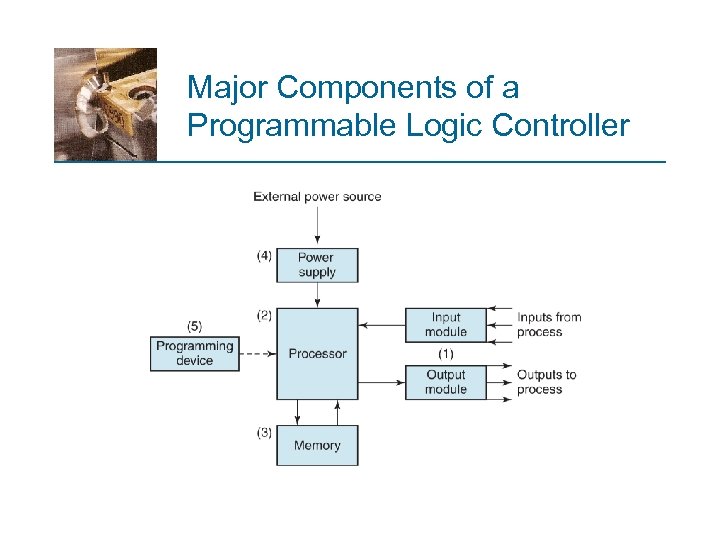 Major Components of a Programmable Logic Controller
 Computer Numerical Control (CNC) A form of programmable automation in which the mechanical actions of a piece of equipment are controlled by a computer program which generates coded alphanumeric data § The data represent relative positions between a workhead (e. g. , a cutting tool) and a workpart § CNC operating principle is to control the motion of the workhead relative to the workpart and to control the sequence of motions
 Components of a CNC System 1. Part program - detailed set of commands to be followed by the processing equipment 2. Machine control unit (MCU) - microcomputer that stores and executes the program by converting each command into actions by the processing equipment, one command at a time 3. Processing equipment - accomplishes the sequence of processing steps to transform the starting workpart into completed part
 CNC Coordinate System § Consists of three linear axes (x, y, z) of Cartesian coordinate system, plus three rotational axes (a, b, c) § Rotational axes are used to orient workpart or workhead to access different surfaces for machining § Most CNC systems do not require all six axes
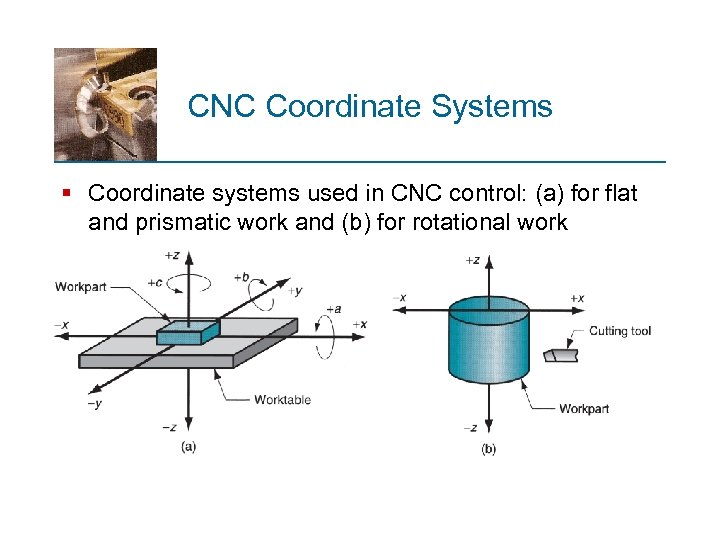 CNC Coordinate Systems § Coordinate systems used in CNC control: (a) for flat and prismatic work and (b) for rotational work
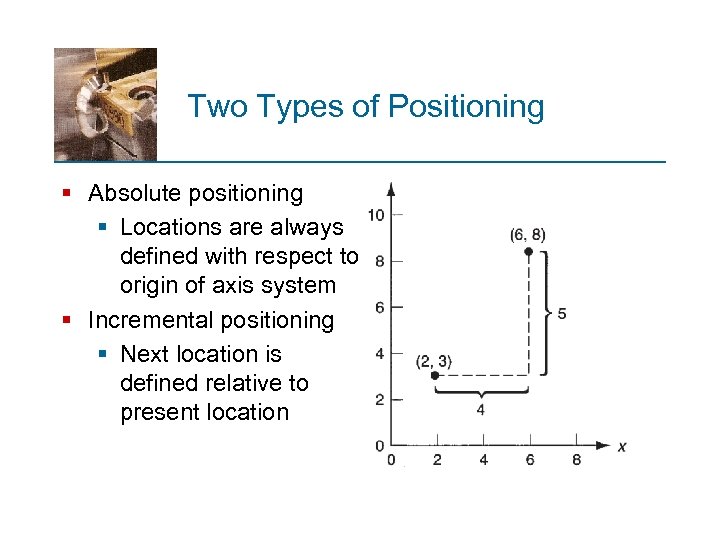 Two Types of Positioning § Absolute positioning § Locations are always defined with respect to origin of axis system § Incremental positioning § Next location is defined relative to present location
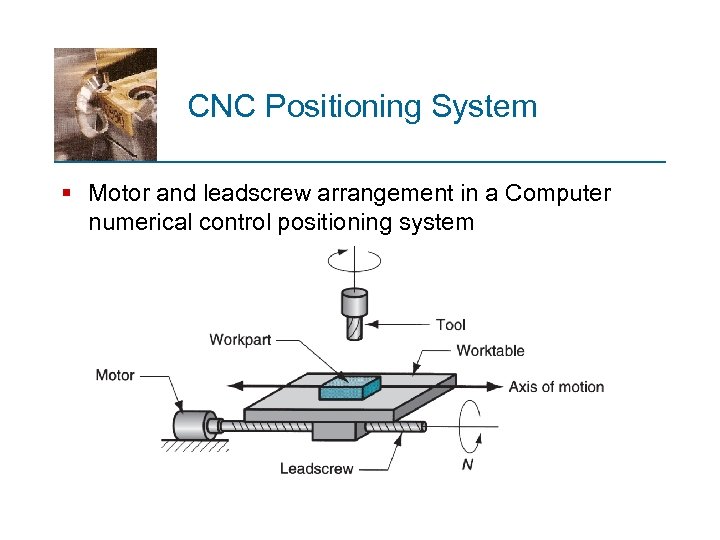 CNC Positioning System § Motor and leadscrew arrangement in a Computer numerical control positioning system
 CNC Positioning System Converts the coordinates specified in the CNC part program into relative positions and velocities between tool and workpart § Leadscrew pitch p - table is moved a distance equal to the pitch for each revolution § Table velocity (e. g. , feed rate in machining) is set by the RPM of leadscrew § To provide x‑y capability, a single-axis system is piggybacked on top of a second perpendicular axis
 Two Basic Types of Control in Computer Numerical Control § Open loop system § Operates without verifying that the actual position is equal to the specified position § Closed loop control system § Uses feedback measurement to verify that the actual position is equal to the specified location
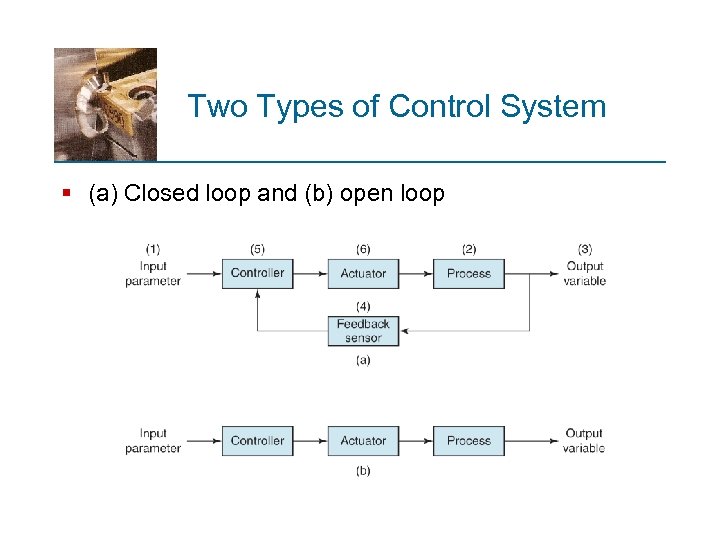 Two Types of Control System § (a) Closed loop and (b) open loop
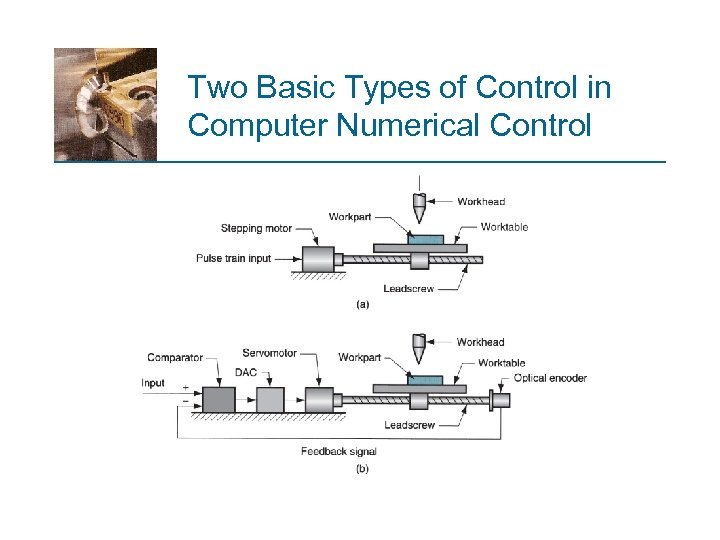 Two Basic Types of Control in Computer Numerical Control
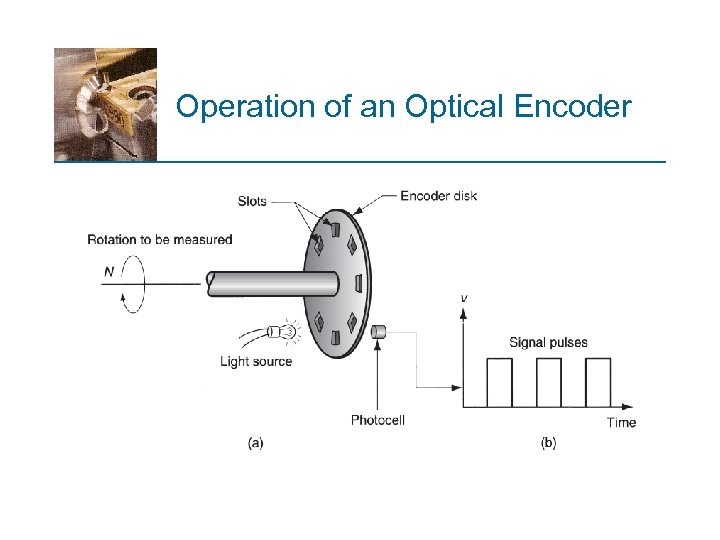 Operation of an Optical Encoder
 Precision in Positioning § Three critical measures of precision in positioning: 1. Control resolution 2. Accuracy 3. Repeatability
 Control Resolution (CR) Defined as the distance between two adjacent control points in the axis movement § Control points are locations along the axis to which the worktable can be directed to go § CR depends on: § Electromechanical components of positioning system § Number of bits used by controller to define axis coordinate location
 Statistical Distribution of Mechanical Errors § When a positioning system is directed to move to a given control point, the movement to that point is limited by mechanical errors § Errors are due to various inaccuracies and imperfections, such as gear backlash, play between leadscrew and worktable, and machine deflection § Errors are assumed to form a normal distribution with mean = 0 and constant standard deviation over axis range
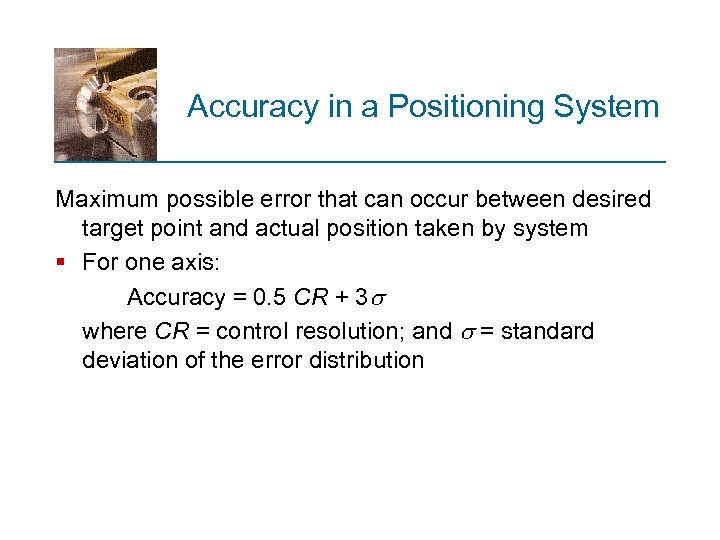 Accuracy in a Positioning System Maximum possible error that can occur between desired target point and actual position taken by system § For one axis: Accuracy = 0. 5 CR + 3 where CR = control resolution; and = standard deviation of the error distribution
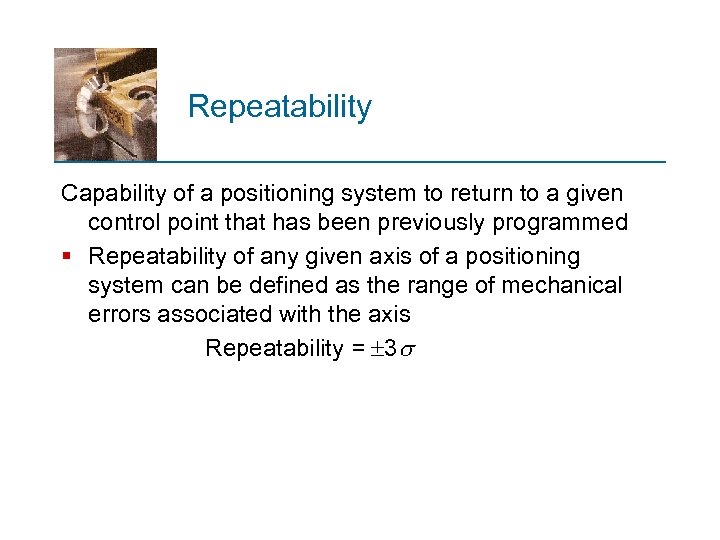 Repeatability Capability of a positioning system to return to a given control point that has been previously programmed § Repeatability of any given axis of a positioning system can be defined as the range of mechanical errors associated with the axis Repeatability = 3
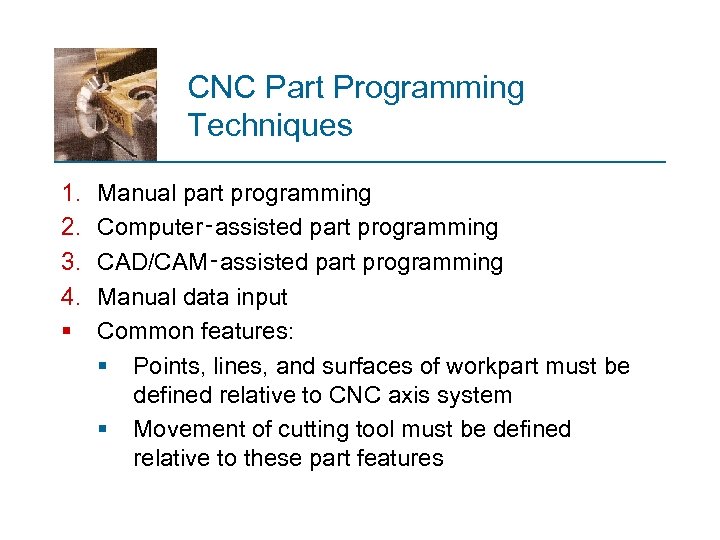 CNC Part Programming Techniques 1. 2. 3. 4. § Manual part programming Computer‑assisted part programming CAD/CAM‑assisted part programming Manual data input Common features: § Points, lines, and surfaces of workpart must be defined relative to CNC axis system § Movement of cutting tool must be defined relative to these part features
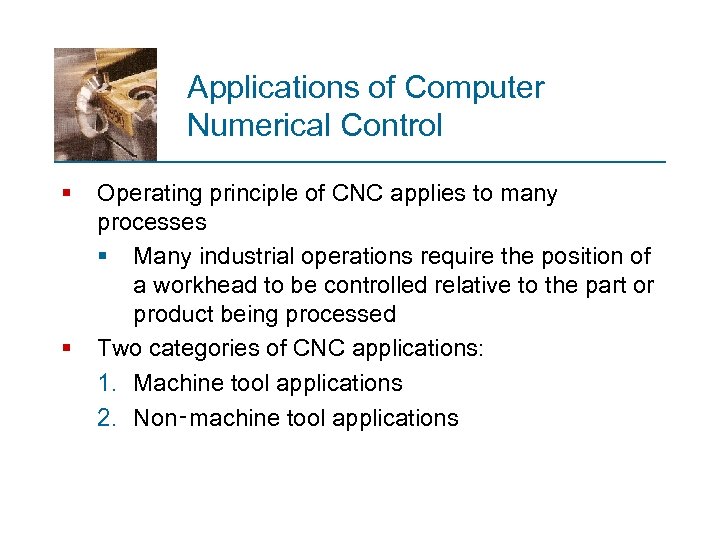 Applications of Computer Numerical Control § § Operating principle of CNC applies to many processes § Many industrial operations require the position of a workhead to be controlled relative to the part or product being processed Two categories of CNC applications: 1. Machine tool applications 2. Non‑machine tool applications
 Machine Tool Applications § CNC widely used for machining operations such as turning, drilling, and milling § CNC has motivated development of machining centers, which change their own cutting tools to perform a variety of machining operations § Other CNC machine tools: § Grinding machines § Sheet metal pressworking machines § Thermal cutting processes
 Non‑Machine Tool Applications § Tape laying machines and filament winding machines for composites § Welding machines, both arc welding and resistance welding § Component insertion machines in electronics assembly § Drafting machines (x-y plotters) § Coordinate measuring machines for inspection
 Benefits of CNC § Reduced non‑productive time § Results in shorter cycle times § Lower manufacturing lead times § Simpler fixtures § Greater manufacturing flexibility § Improved accuracy § Reduced human error
 Industrial Robotics An industrial robot is a general purpose programmable machine that possesses certain anthropomorphic features § The most apparent anthropomorphic feature is the robot’s mechanical arm, or manipulator § Robots can perform a variety of tasks such as loading and unloading machine tools, spot welding automobile bodies, and spray painting § Robots are typically used as substitutes for human workers in these tasks
 Robot Anatomy An industrial robot consists of § Mechanical manipulator § A set of joints and links to position and orient the end of the manipulator relative to its base § Controller § Operates the joints in a coordinated fashion to execute a programmed work cycle
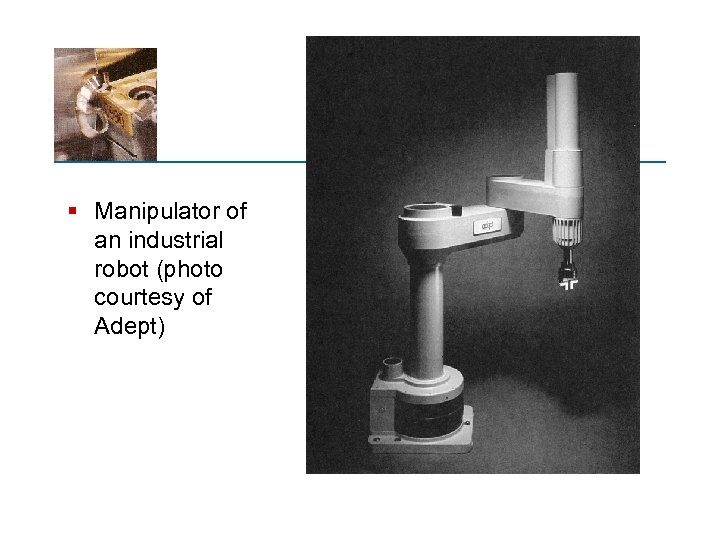 § Manipulator of an industrial robot (photo courtesy of Adept)
 Manipulator Joints and Links § A robot joint is similar to a human body joint § It provides relative movement between two parts of the body § Typical industrial robots have five or six joints § Manipulator joints - classified as linear or rotating § Each joint moves its output link relative to its input link § Coordinated movement of joints enables robot to move, position, and orient objects
 Manipulator Design Robot manipulators can usually be divided into two sections: § Arm‑and‑body assembly - function is to position an object or tool § Three joints are typical for arm‑and‑body § Wrist assembly - function is to properly orient the object or tool § Two or three joints are associated with wrist
 Five Basic Arm‑and‑Body Configurations 1. 2. 3. 4. 5. Polar Cylindrical Cartesian coordinate Jointed‑arm SCARA (Selectively Compliant Assembly Robot Arm)
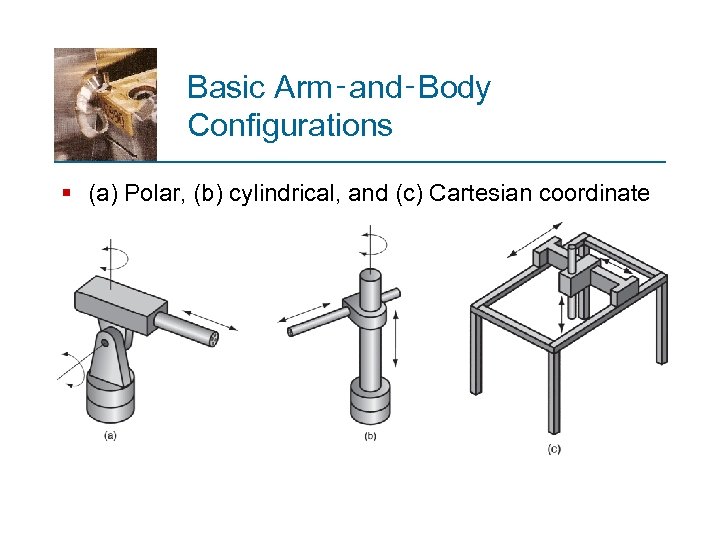 Basic Arm‑and‑Body Configurations § (a) Polar, (b) cylindrical, and (c) Cartesian coordinate
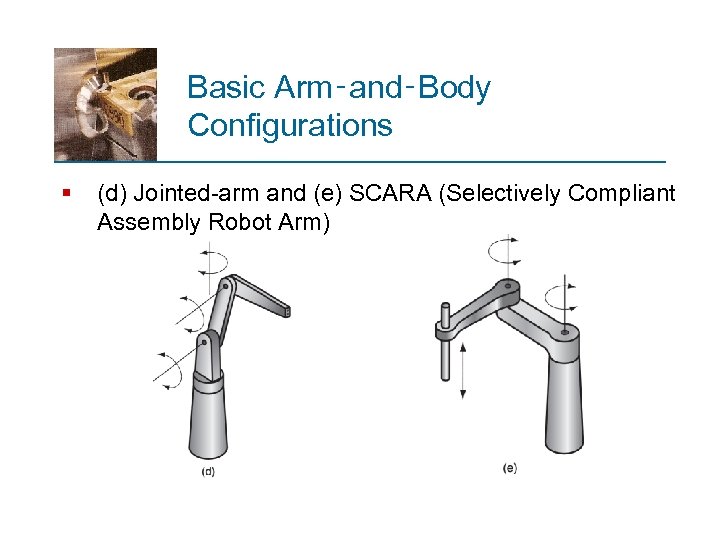 Basic Arm‑and‑Body Configurations § (d) Jointed-arm and (e) SCARA (Selectively Compliant Assembly Robot Arm)
 Manipulator Wrist § The wrist is assembled to the last link of the arm‑and‑body § The SCARA is sometimes an exception because it is almost always used for simple handling and assembly tasks involving vertical motions § A wrist is not usually present at the end of its manipulator § Substituting for the wrist on the SCARA is usually a gripper to grasp components for movement and/or assembly
 End Effectors Special tooling that connects to the robot's wrist to perform the specific task 1. Tools - used for a processing operation § Applications: spot welding guns, spray painting nozzles, rotating spindles, heating torches, assembly tools 2. Grippers - designed to grasp and move objects (usually parts) § Applications: part placement, machine loading and unloading, and palletizing
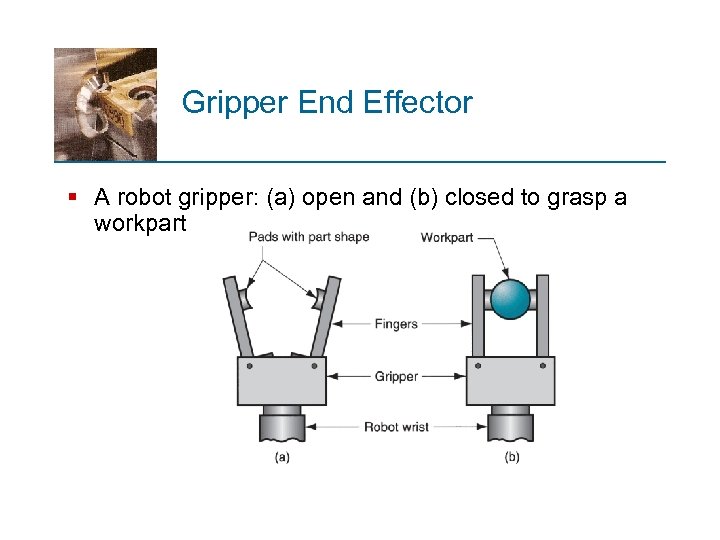 Gripper End Effector § A robot gripper: (a) open and (b) closed to grasp a workpart
 Robot Programming § Robots execute a stored program of instructions that define the sequence of motions and positions in the work cycle § Much like a part program in CNC § In addition to motion instructions, the program may include commands for other functions: § Interacting with external equipment § Responding to sensors § Processing data
 Two Basic Robot Programming Methods 1. Leadthrough programming § Teaching‑by‑showing - manipulator is moved through sequence of positions in the work cycle and the controller records each position in memory for subsequent playback 2. Computer programming languages § Robot program is prepared at least partially offline for subsequent downloading to robot controller
 Where Should Robots be Used? § § § § Work environment is hazardous for humans Work cycle is repetitive The work is performed at a stationary location Part or tool handling is difficult for humans Multi-shift operation Long production runs and infrequent changeovers Part positioning and orientation are established at the beginning of work cycle, since most robots cannot see
 Applications of Industrial Robots § Three basic categories: 1. Material handling - Moving materials or parts (e. g. , machine loading and unloading) 2. Processing operations - Manipulating a tool (e. g. , spot welding, spray painting) 3. Assembly and inspection - May involve moving parts or tools