


 Скачать презентацию LDAP DNS Keyword and Content Indexing Zachary G
775b5a7d7274ae813e5e2f808578bebb.ppt
- Количество слайдов: 30
 LDAP, DNS, Keyword and Content Indexing Zachary G. Ives University of Pennsylvania CIS 455 / 555 – Internet and Web Systems February 1, 2010 Some portions derived from slides by Raghu Ramakrishnan
 Readings & Reminders § Read next: § Doan et al. Chapter 8, XML, schema, and XPath § XSLT tutorial § Reminder: HW 1 Milestone 1 due Wednesday 2/3 2
 Naming People and Devices: LDAP § Lightweight Directory Access Protocol § Hierarchical naming system that can be partitioned and replicated § See http: //www. seas. upenn. edu/cets/answers/ldap. html to set up your email client to access Penn’s LDAP server 3
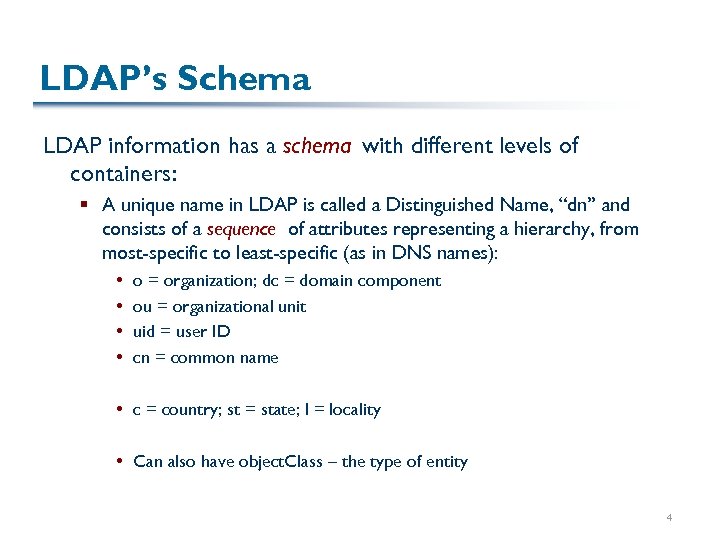 LDAP’s Schema LDAP information has a schema with different levels of containers: § A unique name in LDAP is called a Distinguished Name, “dn” and consists of a sequence of attributes representing a hierarchy, from most-specific to least-specific (as in DNS names): o = organization; dc = domain component ou = organizational unit uid = user ID cn = common name c = country; st = state; l = locality Can also have object. Class – the type of entity 4
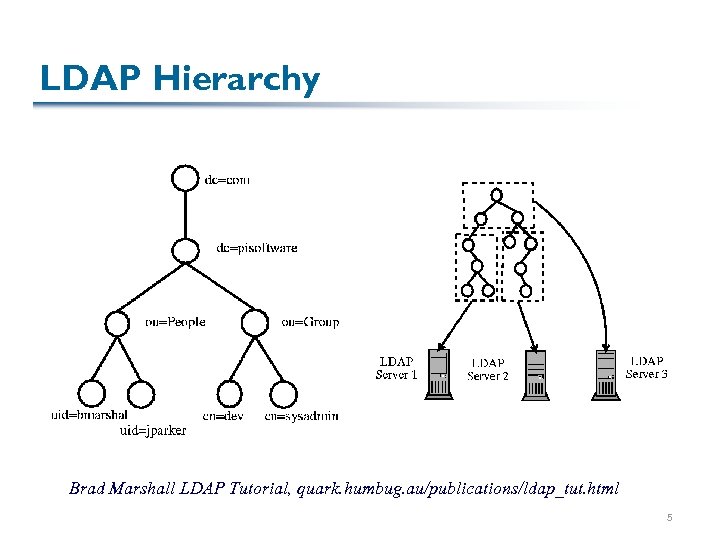 LDAP Hierarchy Brad Marshall LDAP Tutorial, quark. humbug. au/publications/ldap_tut. html 5
 Querying LDAP queries are mostly attribute-value predicates: § uid=zives; o=upenn; c = usa § (|(cn=Susan Davidson)(cn=Boon Thau Loo)(cn=Val Tannen)) § objectclass=posix. Account § (!cn=Val Tannen) How might we process these queries? 6
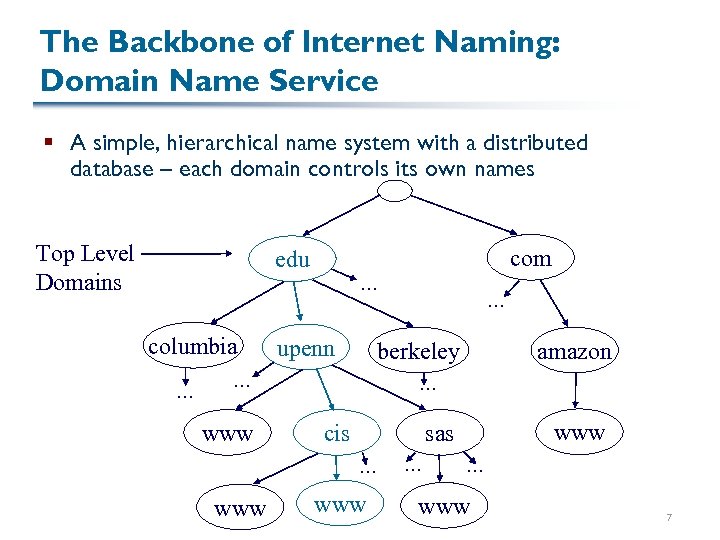 The Backbone of Internet Naming: Domain Name Service § A simple, hierarchical name system with a distributed database – each domain controls its own names Top Level Domains com edu … columbia … upenn berkeley … www amazon … cis www sas … www … … www 7
 Top-Level Domains (TLDs) Mostly controlled by Network Solutions, Inc. today § § § § § . com: commercial. edu: educational institution. gov: US government. mil: US military. net: networks and ISPs (now also a number of other things). org: other organizations 244, 2 -letter country suffixes, e. g. , . us, . uk, . cz, . tv, … some variants on this for other institutions, e. g. , . eu and a bunch of new suffixes that are not very common, e. g. , . biz, . mobi, . name, . pro, … 8
 Finding the Root 13 “root servers” store entries for all top level domains (TLDs) DNS servers have a hard-coded mapping to root servers so they can “get started” 9
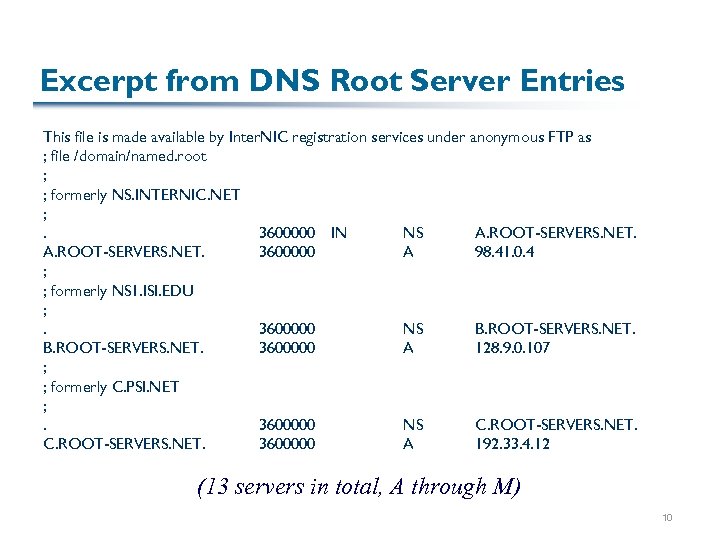 Excerpt from DNS Root Server Entries This file is made available by Inter. NIC registration services under anonymous FTP as ; file /domain/named. root ; ; formerly NS. INTERNIC. NET ; . 3600000 IN NS A. ROOT-SERVERS. NET. 3600000 A 98. 41. 0. 4 ; ; formerly NS 1. ISI. EDU ; . 3600000 NS B. ROOT-SERVERS. NET. 3600000 A 128. 9. 0. 107 ; ; formerly C. PSI. NET ; . 3600000 NS C. ROOT-SERVERS. NET. 3600000 A 192. 33. 4. 12 (13 servers in total, A through M) 10
 Supposing We Were to Build DNS How would we start? How is a lookup performed? (Hint: what do you need to specify when you add a client to a network that doesn’t do DHCP? ) 11
 Issues in DNS § We know that everyone wants to be “mydomain”. com § How does this mesh with the assumptions inherent in our hierarchical naming system? § What happens if things move frequently? § What happens if we want to provide different behavior to different requestors (e. g. , Akamai)? 12
 Directories Summarized An efficient way of finding data, assuming: § Data doesn’t change too often, hence it can be replicated and distributed § Hierarchy is relatively “wide and flat” § Caching is present, helping with repeated queries Directories generally rely on names at their core § Sometimes we want to search based on other content, e. g. , “key”s … 13
 Finding Data by Content We’ve seen two approaches: § Do all the work at the data stores: flood the network with requests § Have a directory based on names § An alternative, two-step process: § Build a content index over what’s out there An index is a key -> value map § Typically limited in what kinds of queries can be supported § Most common instance: an index of document keywords 14
 A Common Model for Search § Index the words in every document § “Inverted index”: word document (ID) § “Forward index”: document (ID) list of words 15
 Inverted Indices § A conceptually very simple map-multiset data structure:
 How Do We Lay Out an Inverted Index? § Some options: § § Unordered list (e. g. , a log) Ordered list Tree Hash table 17
 Unordered and Ordered Lists § Assume that we have entries such as:
 Tree-Based Indices Trees have several benefits over lists: § Potentially logarithmic search time, as with a well, designed sorted list, IF it’s balanced § Ability to handle variable-length records We’ve already seen how trees might make a natural way of distributing data, as well How does a binary search tree fare? § Cost of building? § Cost of finding an item in it? 19
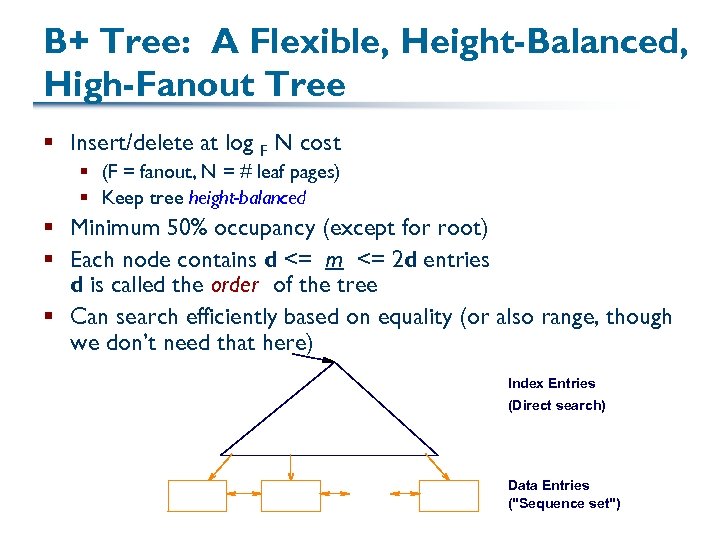 B+ Tree: A Flexible, Height-Balanced, High-Fanout Tree § Insert/delete at log F N cost § (F = fanout, N = # leaf pages) § Keep tree height-balanced § Minimum 50% occupancy (except for root) § Each node contains d <= m <= 2 d entries d is called the order of the tree § Can search efficiently based on equality (or also range, though we don’t need that here) Index Entries (Direct search) Data Entries ("Sequence set")
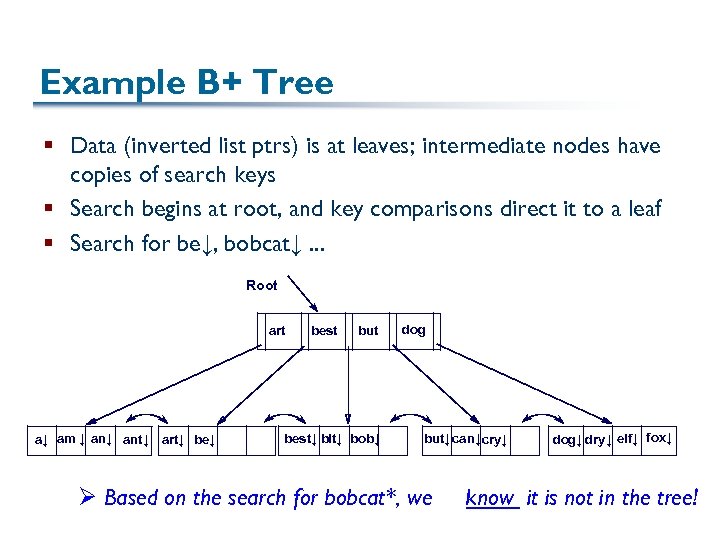 Example B+ Tree § Data (inverted list ptrs) is at leaves; intermediate nodes have copies of search keys § Search begins at root, and key comparisons direct it to a leaf § Search for be↓, bobcat↓. . . Root art a↓ am ↓ ant↓ art↓ best but best↓ bit↓ bob↓ dog but↓ can↓ cry↓ Ø Based on the search for bobcat*, we dog↓ dry↓ elf↓ fox↓ know it is not in the tree!
 Inserting Data into a B+ Tree § Find correct leaf L § Put data entry onto L § If L has enough space, done! § Else, must split L (into L and a new node L 2) Redistribute entries evenly, copy up middle key Insert index entry pointing to L 2 into parent of L § This can happen recursively § To split index node, redistribute entries evenly, but push up middle key. (Contrast with leaf splits. ) § Splits “grow” tree; root split increases height § Tree growth: gets wider or one level taller at top
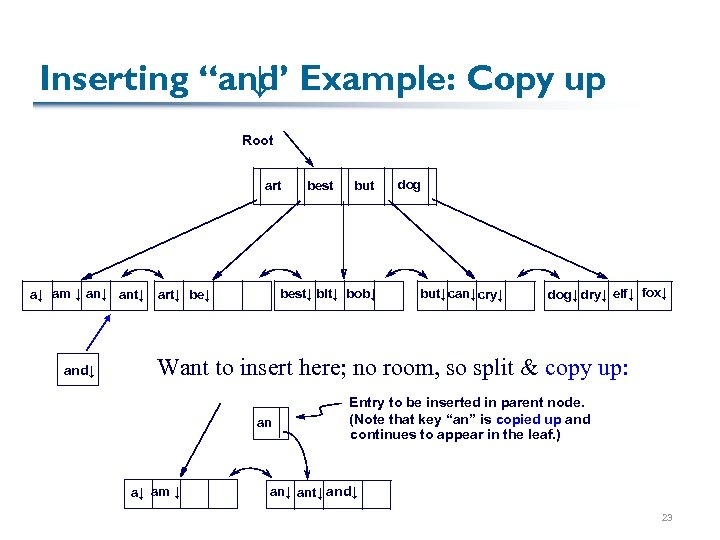 Inserting “and Example: Copy up ↓” Root art but best↓ bit↓ bob↓ a↓ am ↓ ant↓ art↓ be↓ and↓ best dog but↓ can↓ cry↓ dog↓ dry↓ elf↓ fox↓ Want to insert here; no room, so split & copy up: an a↓ am ↓ Entry to be inserted in parent node. (Note that key “an” is copied up and continues to appear in the leaf. ) an↓ ant↓ and↓ 23
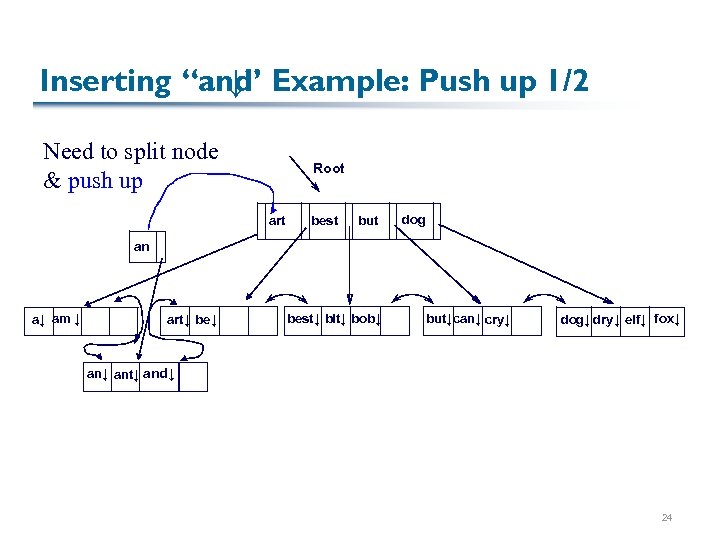 Inserting “and Example: Push up 1/2 ↓” Need to split node & push up Root art best but dog an a↓ am ↓ art↓ best↓ bit↓ bob↓ but↓can↓ cry↓ dog↓ dry↓ elf↓ fox↓ ant↓ and↓ 24
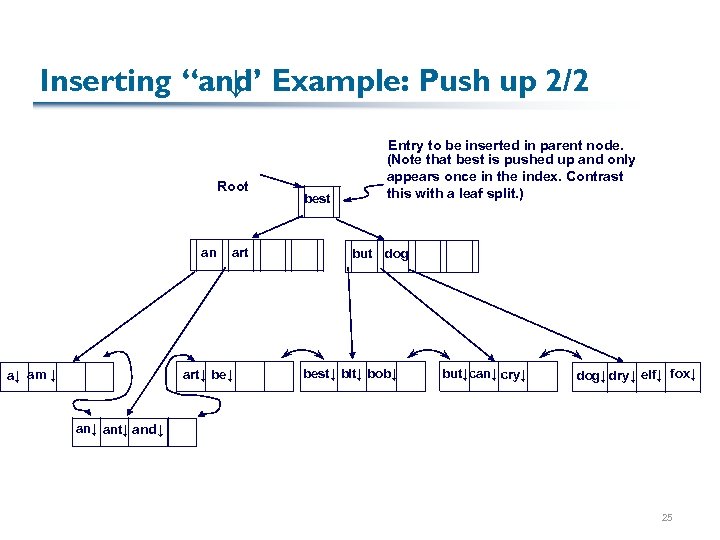 Inserting “and Example: Push up 2/2 ↓” Root an a↓ am ↓ art↓ best Entry to be inserted in parent node. (Note that best is pushed up and only appears once in the index. Contrast this with a leaf split. ) but dog best↓ bit↓ bob↓ but↓can↓ cry↓ dog↓ dry↓ elf↓ fox↓ ant↓ and↓ 25
 Copying vs. Splitting, Summarized § Every keyword (search key) appears in at most one intermediate node § Hence, in splitting an intermediate node, we push up § Every inverted list entry must appear in the leaf § We may also need it in an intermediate node to define a partition point in the tree § We must copy up the key of this entry § Note that B+ trees easily accommodate multiple occurrences of a keyword 26
 Virtues of the B+ Tree § B+ tree and other indices are quite efficient: § § Height-balanced; log. F N cost to search High fanout (F) means depth rarely more than 3 or 4 Almost always better than maintaining a sorted file Typically, 67% occupancy on average § Berkeley DB library (C, C++, Java; Oracle) is a toolkit for B+ trees that you will be using later in the semester: § Interface: open B+ Tree; get and put items based on key § Handles concurrency, caching, etc.
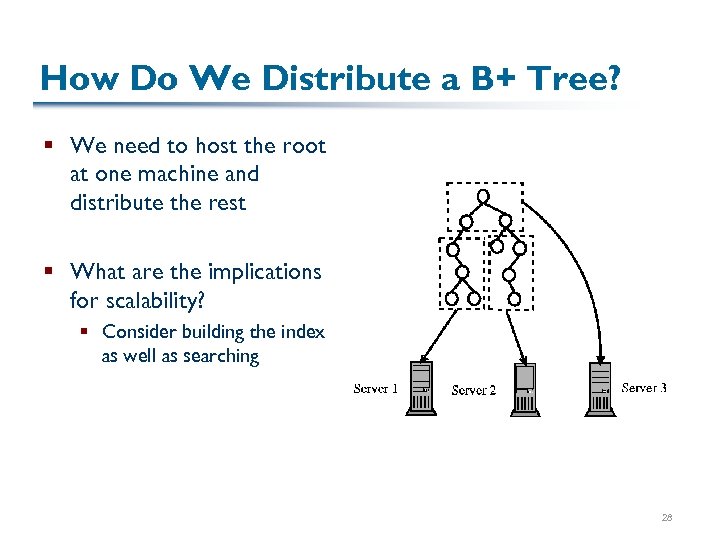 How Do We Distribute a B+ Tree? § We need to host the root at one machine and distribute the rest § What are the implications for scalability? § Consider building the index as well as searching 28
 Eliminating the Root § Sometimes we don’t want a tree-structured system because the higher levels can be a central point of congestion or failure § Two strategies: § Modified tree structure (e. g. , BATON, Jagadish et al. ) § Non-hierarchical structure (distributed hash table, discussed in a couple of weeks) 29
 Next Time § A standard medium for data interchange: XML 30