


 Скачать презентацию Last Time Color The principle of
1ba60b9b3873a2ba888db5c3c50d57e0.ppt
- Количество слайдов: 31
 Last Time • Color – The principle of trichromacy says that any spectrum can be matched using three primaries (but sometimes you have to subtract a primary) – A color system consist of primaries and color matching functions that are used to determine how much of each primary is needed to match a spectrum – RGB, CIE XYZ, HSV, u’v’ are some examples of color systems – Linear color spaces make it easy to convert between colors – matrix multiply – Perceptually uniform color spaces make distances between colors meaningful – Color calibration is an important step to achieving accurate color 9/16/04 © University of Wisconsin, CS 559 Spring 2004
 Today • • Paints and inks behave differently – subtractive color Image file formats Color Quantization Homework 2 – due Sept 28 in class 9/16/04 © University of Wisconsin, CS 559 Spring 2004
 Paint and Ink • Paints are thought of as reflective – Green paint looks green because those are the colors that escape – Combining pigments reflects more colors, so additive color • Red paint + green paint = yellow paint – Paint covers things • Ink is thought of as adsorbing particles – It’s easier to handle the math – You see the color of the paper, filtered by the ink – Combining inks adsorbs more color, so subtractive color • White paper – red – blue = green – The color and texture of the paper affects the color of the image 9/16/04 © University of Wisconsin, CS 559 Spring 2004
 Subtractive mixing • Common inks: Cyan=White−Red; Magenta=White−Green; Yellow=White−Blue – The colors, cyan, magenta, yellow, are how the inks look when printed – To make a red mark, put down magenta and yellow, which removes the green and blue leaving red • For good inks, matching is linear: – C+M+Y=White-White=Black – C+M=White-Red-Green=Blue • Usually require CMY and Black, because colored inks are more expensive, and registration is hard – Registration is the problem of making drops of ink line up 9/16/04 © University of Wisconsin, CS 559 Spring 2004
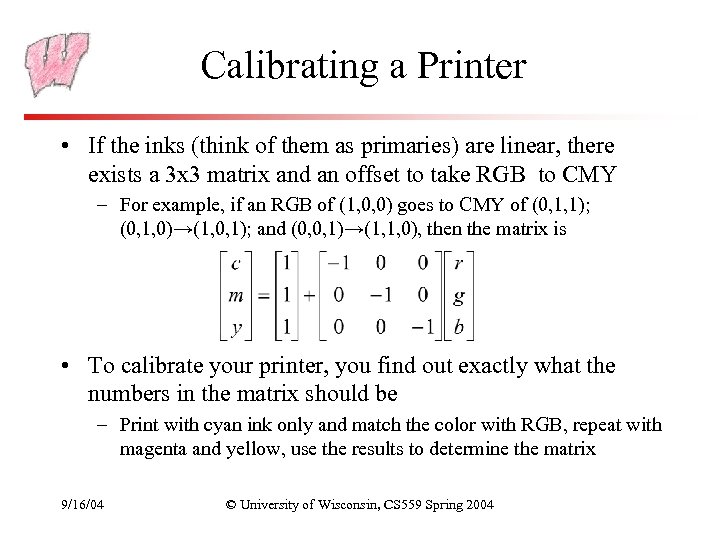 Calibrating a Printer • If the inks (think of them as primaries) are linear, there exists a 3 x 3 matrix and an offset to take RGB to CMY – For example, if an RGB of (1, 0, 0) goes to CMY of (0, 1, 1); (0, 1, 0)→(1, 0, 1); and (0, 0, 1)→(1, 1, 0), then the matrix is • To calibrate your printer, you find out exactly what the numbers in the matrix should be – Print with cyan ink only and match the color with RGB, repeat with magenta and yellow, use the results to determine the matrix 9/16/04 © University of Wisconsin, CS 559 Spring 2004
 Image File Formats • How big is the image? – All files in some way store width and height • How is the image data formatted? – Is it a black and white image, a grayscale image, a color image, an indexed color image? – How many bits per pixel? • What other information? – Color tables, compression codebooks, creator information… • All image formats are a trade-off between ease of use, size of file, and quality of reproduction 9/16/04 © University of Wisconsin, CS 559 Spring 2004
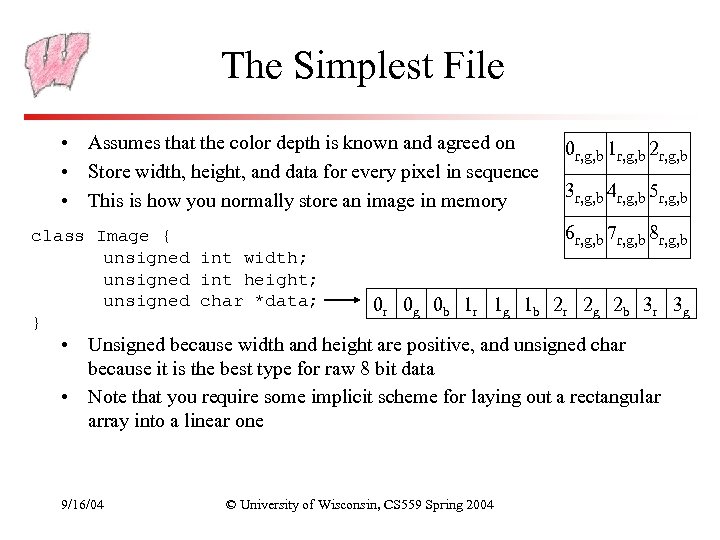 The Simplest File • Assumes that the color depth is known and agreed on • Store width, height, and data for every pixel in sequence • This is how you normally store an image in memory class Image { unsigned int width; unsigned int height; unsigned char *data; } 0 r, g, b 1 r, g, b 2 r, g, b 3 r, g, b 4 r, g, b 5 r, g, b 6 r, g, b 7 r, g, b 8 r, g, b 0 r 0 g 0 b 1 r 1 g 1 b 2 r 2 g 2 b 3 r 3 g • Unsigned because width and height are positive, and unsigned char because it is the best type for raw 8 bit data • Note that you require some implicit scheme for laying out a rectangular array into a linear one 9/16/04 © University of Wisconsin, CS 559 Spring 2004
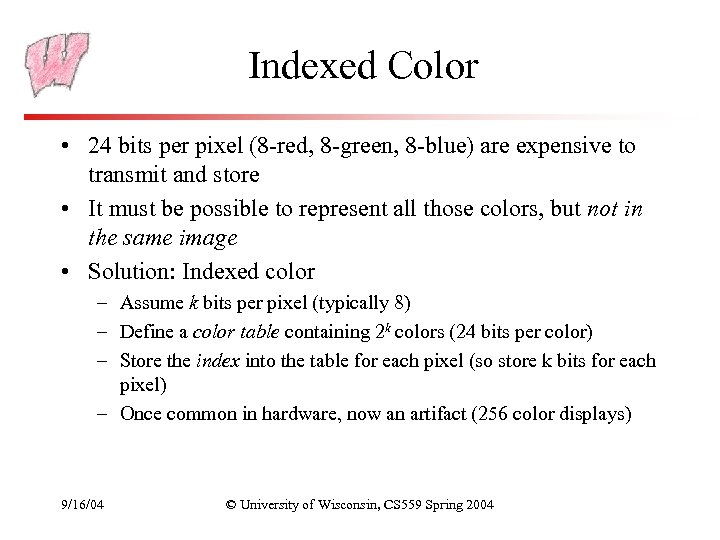 Indexed Color • 24 bits per pixel (8 -red, 8 -green, 8 -blue) are expensive to transmit and store • It must be possible to represent all those colors, but not in the same image • Solution: Indexed color – Assume k bits per pixel (typically 8) – Define a color table containing 2 k colors (24 bits per color) – Store the index into the table for each pixel (so store k bits for each pixel) – Once common in hardware, now an artifact (256 color displays) 9/16/04 © University of Wisconsin, CS 559 Spring 2004
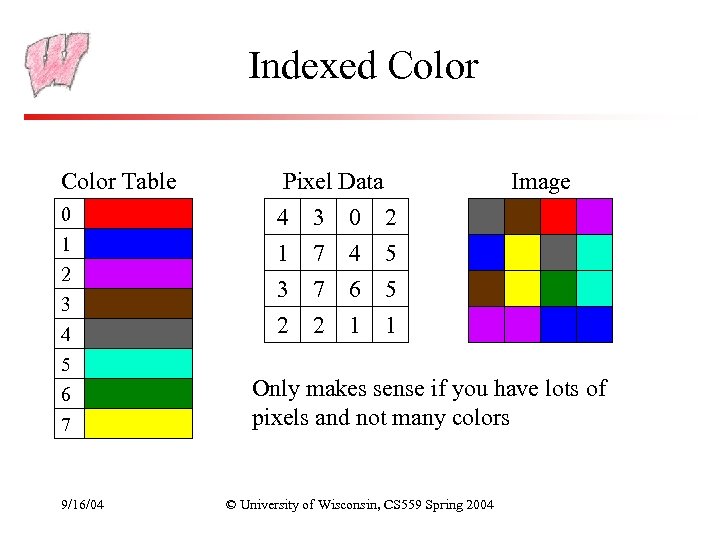 Indexed Color Table 0 1 2 3 4 5 6 7 9/16/04 Pixel Data 4 3 0 2 1 7 4 5 3 7 6 5 2 2 1 1 Image Only makes sense if you have lots of pixels and not many colors © University of Wisconsin, CS 559 Spring 2004
 Image Compression • Indexed color is one form of image compression – Special case of vector quantization – in color space, reducing the range of available colors • Alternative 1: Store the image in a simple format and then compress with your favorite compressor – Doesn’t exploit image specific information – Doesn’t exploit perceptual shortcuts • Two historically common compressed file formats: GIF and JPEG – GIF should now be replaced with PNG, because GIF is patented and the owner started enforcing the patent 9/16/04 © University of Wisconsin, CS 559 Spring 2004
 GIF • Header – Color Table – Image Data – Extensions • Header gives basic information such as size of image and size of color table • Color table gives the colors found in the image – Biggest it can be is 256 colors, smallest is 2 • Image data is LZW compressed color indices • To create a GIF: – Choose colors – Create an array of color indices – Compress it with LZW 9/16/04 © University of Wisconsin, CS 559 Spring 2004
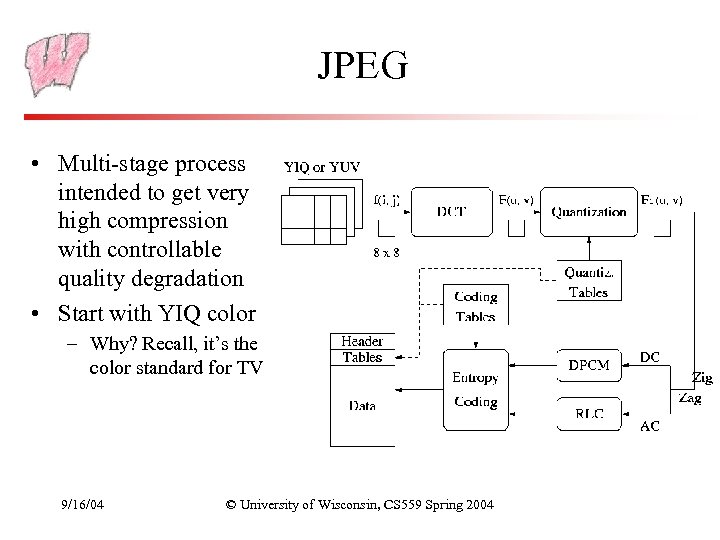 JPEG • Multi-stage process intended to get very high compression with controllable quality degradation • Start with YIQ color – Why? Recall, it’s the color standard for TV 9/16/04 © University of Wisconsin, CS 559 Spring 2004
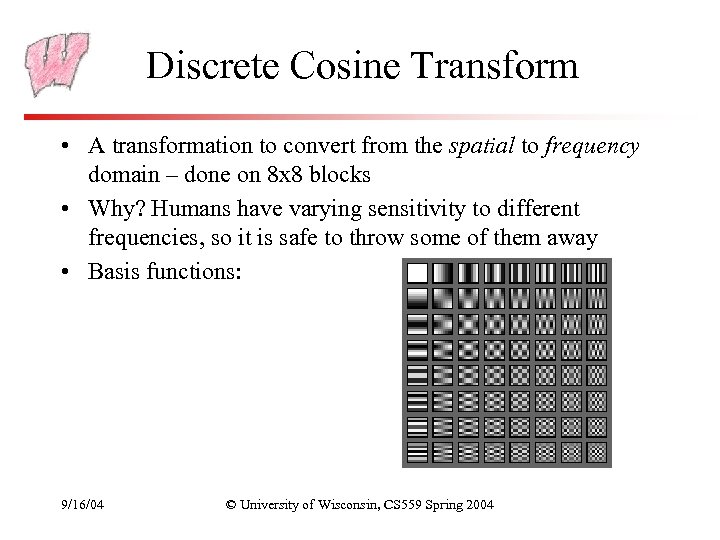 Discrete Cosine Transform • A transformation to convert from the spatial to frequency domain – done on 8 x 8 blocks • Why? Humans have varying sensitivity to different frequencies, so it is safe to throw some of them away • Basis functions: 9/16/04 © University of Wisconsin, CS 559 Spring 2004
 Quantization • Reduce the number of bits used to store each coefficient by dividing by a given value – If you have an 8 bit number (0 -255) and divide it by 8, you get a number between 0 -31 (5 bits = 8 bits – 3 bits) – Different coefficients are divided by different amounts – Perceptual issues come in here • Achieves the greatest compression, but also quality loss • “Quality” knob controls how much quantization is done 9/16/04 © University of Wisconsin, CS 559 Spring 2004
 Entropy Coding • Standard lossless compression on quantized coefficients – Delta encode the DC components – Run length encode the AC components • Lots of zeros, so store number of zeros then next value – Huffman code the encodings 9/16/04 © University of Wisconsin, CS 559 Spring 2004
 Lossless JPEG With Prediction • Predict what the value of the pixel will be based on neighbors • Record error from prediction – Mostly error will be near zero • Huffman encode the error stream • Variation works really well for fax messages 9/16/04 © University of Wisconsin, CS 559 Spring 2004
 Color Quantization • The problem of reducing the number of colors in an image with minimal impact on appearance – Extreme case: 24 bit color to black and white – Less extreme: 24 bit color to 256 colors, or 256 grays • Why do we care? • Sub problems: – Decide which colors to use in the output (if there is a choice) – Decide which of those colors should be used for each input pixel 9/16/04 © University of Wisconsin, CS 559 Spring 2004
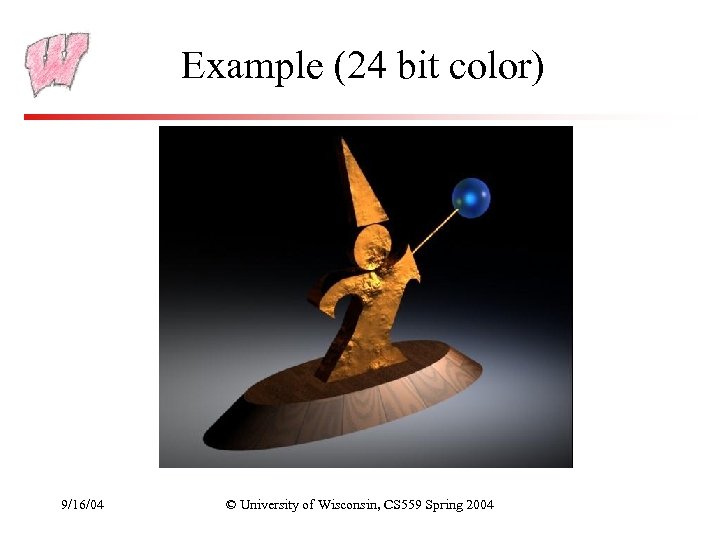 Example (24 bit color) 9/16/04 © University of Wisconsin, CS 559 Spring 2004
 Uniform Quantization • Break the color space into uniform cells • Find the cell that each color is in, and map it to the center • Generally does poorly because it fails to capture the distribution of colors – Some cells may be empty, and are wasted • Equivalent to dividing each color by some number and taking the integer part – Say your original image is 24 bits color (8 red, 8 green, 8 blue) – Say you have 256 colors available, and you choose to use 8 reds, 8 greens and 4 blues (8 × 4 = 256 ) – Divide original red by 32, green by 32, and blue by 64 – Some annoying details 9/16/04 © University of Wisconsin, CS 559 Spring 2004
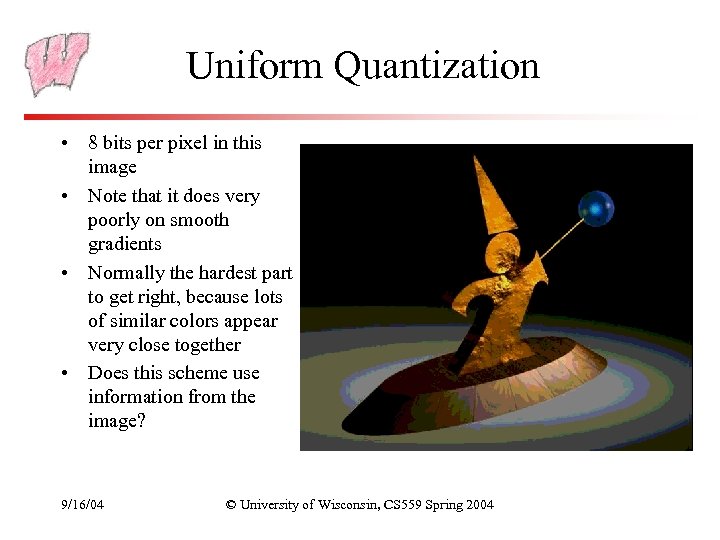 Uniform Quantization • 8 bits per pixel in this image • Note that it does very poorly on smooth gradients • Normally the hardest part to get right, because lots of similar colors appear very close together • Does this scheme use information from the image? 9/16/04 © University of Wisconsin, CS 559 Spring 2004
 Populosity Algorithm • Build a color histogram: count the number of times each color appears • Choose the n most commonly occurring colors – Typically group colors into small cells first using uniform quantization • Map other colors to the closest chosen color • Problem? 9/16/04 © University of Wisconsin, CS 559 Spring 2004
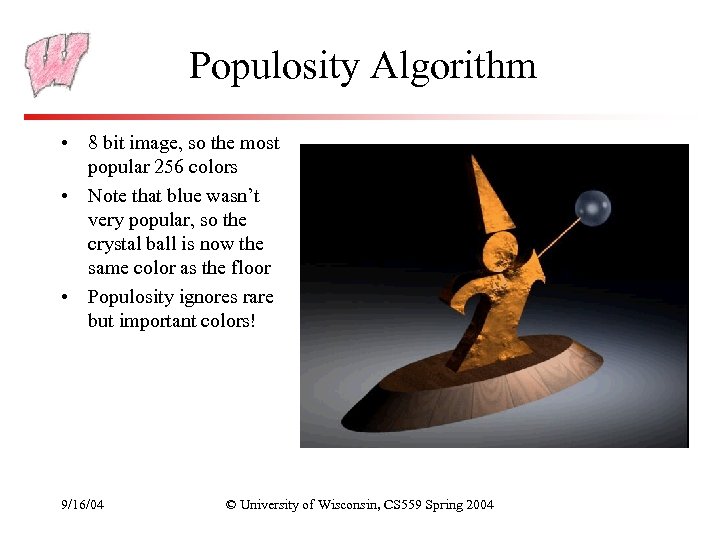 Populosity Algorithm • 8 bit image, so the most popular 256 colors • Note that blue wasn’t very popular, so the crystal ball is now the same color as the floor • Populosity ignores rare but important colors! 9/16/04 © University of Wisconsin, CS 559 Spring 2004
 Median Cut (Clustering) • View the problem as a clustering problem – Find groups of colors that are similar (a cluster) – Replace each input color with one representative of its cluster • Many algorithms for clustering • Median Cut is one: recursively – Find the “longest” dimension (r, g, b are dimensions) – Choose the median of the long dimension as a color to use – Split into two sub-clusters along the median plane, and recurse on both halves • Works very well in practice 9/16/04 © University of Wisconsin, CS 559 Spring 2004
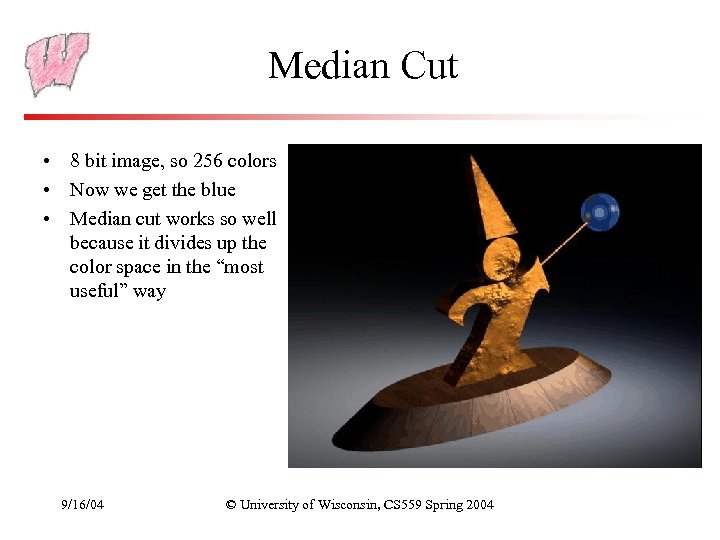 Median Cut • 8 bit image, so 256 colors • Now we get the blue • Median cut works so well because it divides up the color space in the “most useful” way 9/16/04 © University of Wisconsin, CS 559 Spring 2004
 Optimization Algorithms • The quantization problem can be phrased as optimization – Find the set of colors and mapping that result in the lowest quantization error • Several methods to solve the problem, but of limited use unless the number of colors to be chosen is small – It’s expensive to compute the optimum – It’s also a poorly behaved optimization 9/16/04 © University of Wisconsin, CS 559 Spring 2004
 Perceptual Problems • While a good quantization may get close colors, humans still perceive the quantization • Biggest problem: Mach bands – The difference between two colors is more pronounced when they are side by side and the boundary is smooth – This emphasizes boundaries between colors, even if the color difference is small – Rough boundaries are “averaged” by our vision system to give smooth variation 9/16/04 © University of Wisconsin, CS 559 Spring 2004
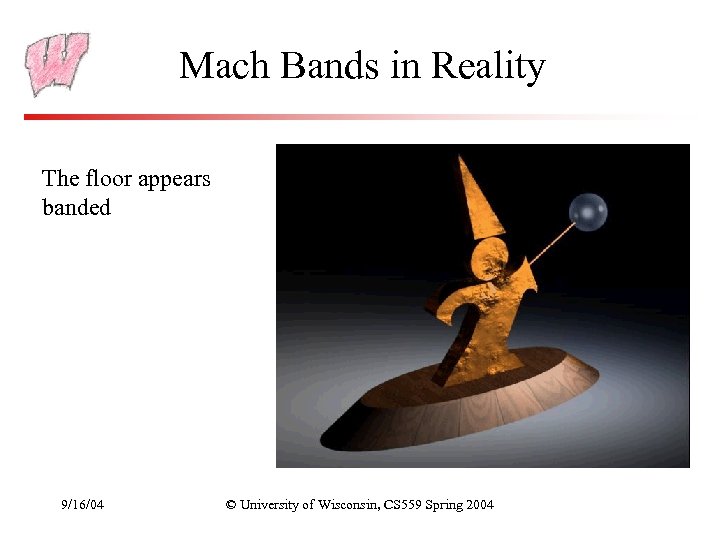 Mach Bands in Reality The floor appears banded 9/16/04 © University of Wisconsin, CS 559 Spring 2004
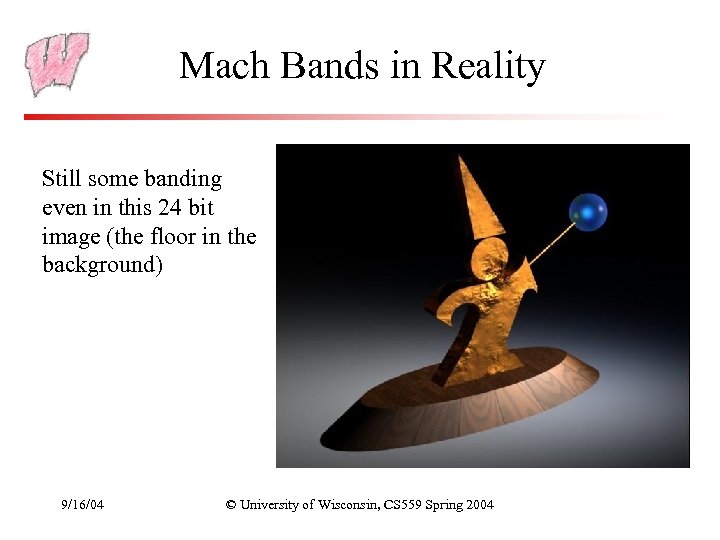 Mach Bands in Reality Still some banding even in this 24 bit image (the floor in the background) 9/16/04 © University of Wisconsin, CS 559 Spring 2004
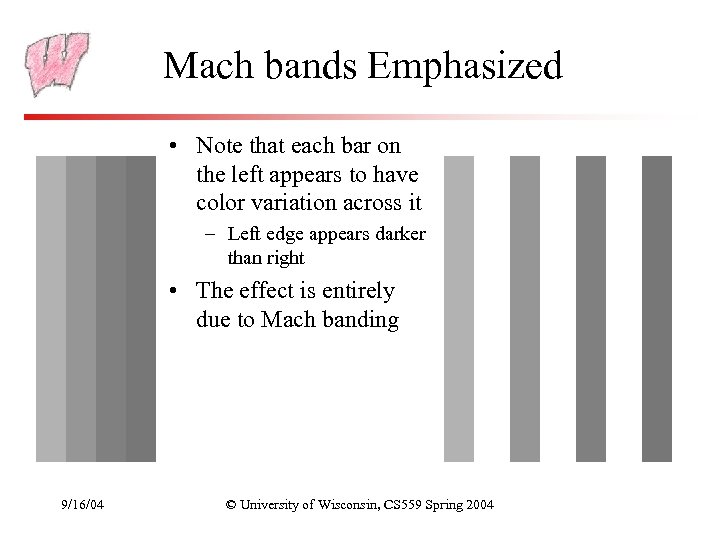 Mach bands Emphasized • Note that each bar on the left appears to have color variation across it – Left edge appears darker than right • The effect is entirely due to Mach banding 9/16/04 © University of Wisconsin, CS 559 Spring 2004
 Dithering (Digital Halftoning) • Mach bands can be removed by adding noise along the boundary lines • General perceptive principle: replaced structured errors with noisy ones and people complain less • Old industry dating to the late 1800’s – Methods for producing grayscale images in newspapers and books 9/16/04 © University of Wisconsin, CS 559 Spring 2004
 Dithering to Black-and-White • Black-and-white is still the preferred way of displaying images in many areas – Black ink is cheaper than color – Printing with black ink is simpler and hence cheaper – Paper for black inks is not special • To get color to black and white, first turn into grayscale: I=0. 299 R+0. 587 G+0. 114 B – This formula reflects the fact that green is more representative of perceived brightness than blue is – NOTE that it is not the equation implied by the RGB->XYZ color space conversion matrix 9/16/04 © University of Wisconsin, CS 559 Spring 2004