 Скачать презентацию Label Assignment Please use speaker notes for additional
c2d280ef4cc18955b82234767e22b6d2.ppt
- Количество слайдов: 8



Label Assignment Please use speaker notes for additional information!
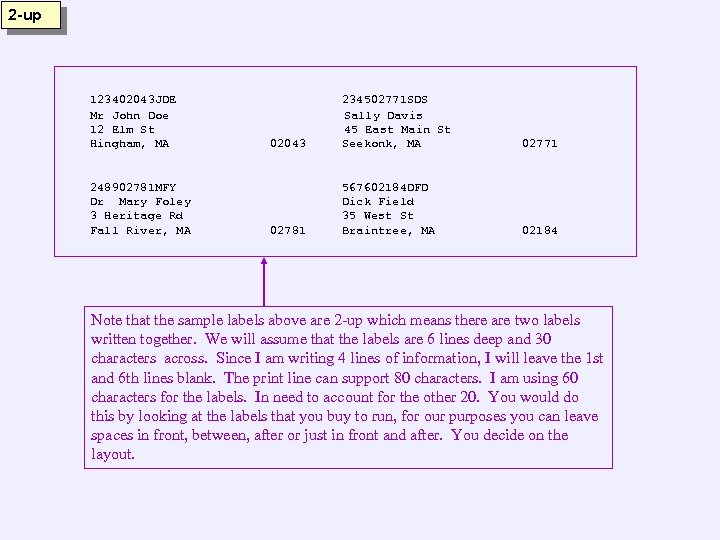
2 -up 123402043 JDE Mr John Doe 12 Elm St Hingham, MA 248902781 MFY Dr Mary Foley 3 Heritage Rd Fall River, MA 02043 234502771 SDS Sally Davis 45 East Main St Seekonk, MA 02771 02781 567602184 DFD Dick Field 35 West St Braintree, MA 02184 Note that the sample labels above are 2 -up which means there are two labels written together. We will assume that the labels are 6 lines deep and 30 characters across. Since I am writing 4 lines of information, I will leave the 1 st and 6 th lines blank. The print line can support 80 characters. I am using 60 characters for the labels. In need to account for the other 20. You would do this by looking at the labels that you buy to run, for our purposes you can leave spaces in front, between, after or just in front and after. You decide on the layout.
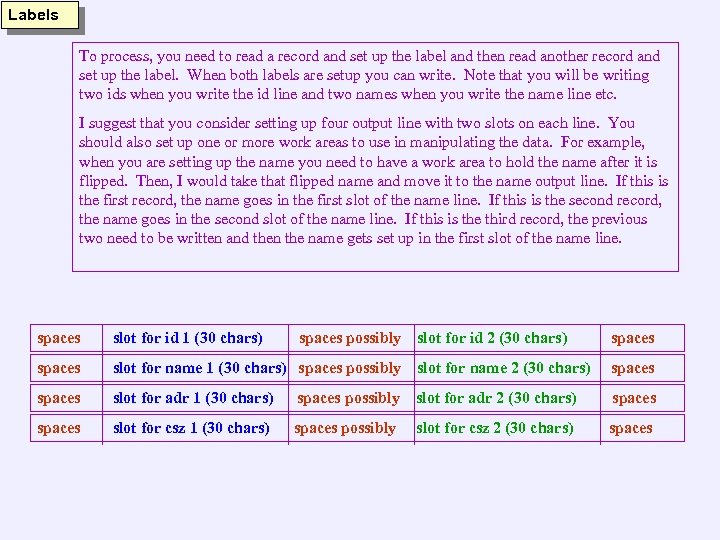
Labels To process, you need to read a record and set up the label and then read another record and set up the label. When both labels are setup you can write. Note that you will be writing two ids when you write the id line and two names when you write the name line etc. I suggest that you consider setting up four output line with two slots on each line. You should also set up one or more work areas to use in manipulating the data. For example, when you are setting up the name you need to have a work area to hold the name after it is flipped. Then, I would take that flipped name and move it to the name output line. If this is the first record, the name goes in the first slot of the name line. If this is the second record, the name goes in the second slot of the name line. If this is the third record, the previous two need to be written and then the name gets set up in the first slot of the name line. spaces slot for id 1 (30 chars) spaces possibly slot for id 2 (30 chars) spaces slot for name 1 (30 chars) spaces possibly slot for name 2 (30 chars) spaces slot for adr 1 (30 chars) spaces possibly slot for adr 2 (30 chars) spaces slot for csz 1 (30 chars) spaces possibly slot for csz 2 (30 chars) spaces
Labels 1234020431234 JDE Mr John Doe 12 Elm St Hingham, MA ID: 1234 Title: 1 Name: Doe/John St Number: 00012 St Name: Elm St Type: St City: Hingham State: MA ZIP: 02043 234502771 SDS Sally Davis 45 East Main St Seekonk, MA 02771
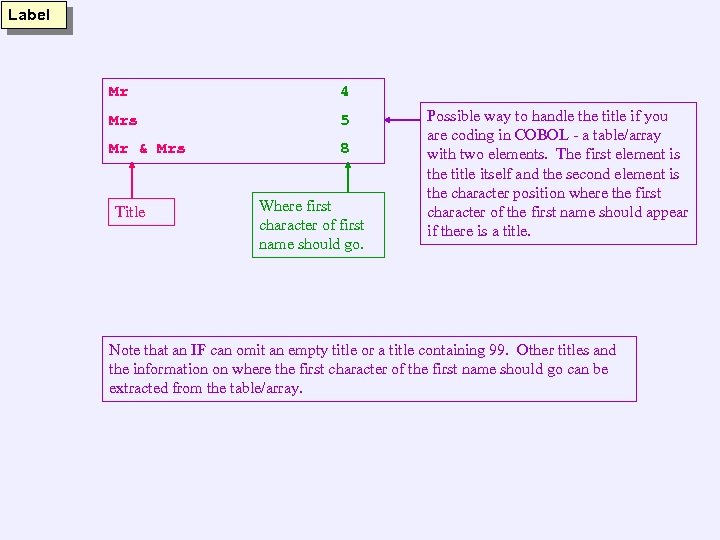
Label Mr 4 Mrs 5 Mr & Mrs 8 Title Where first character of first name should go. Possible way to handle the title if you are coding in COBOL - a table/array with two elements. The first element is the title itself and the second element is the character position where the first character of the first name should appear if there is a title. Note that an IF can omit an empty title or a title containing 99. Other titles and the information on where the first character of the first name should go can be extracted from the table/array.
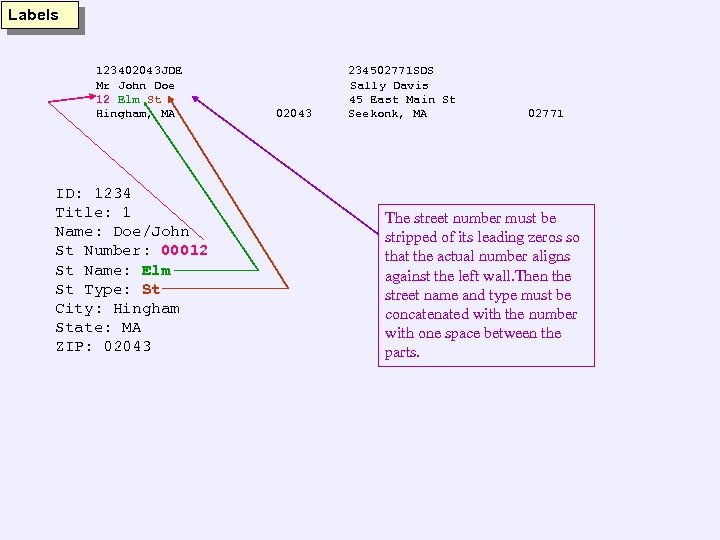
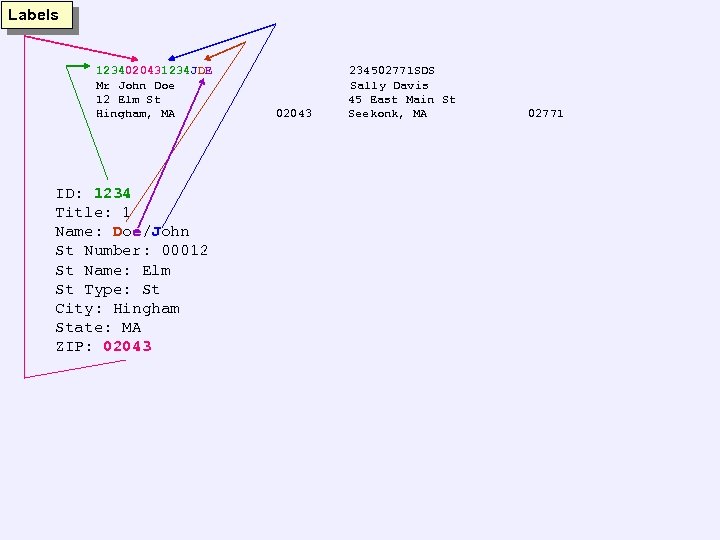
Labels 123402043 JDE Mr John Doe 12 Elm St Hingham, MA ID: 1234 Title: 1 Name: Doe/John St Number: 00012 St Name: Elm St Type: St City: Hingham State: MA ZIP: 02043 234502771 SDS Sally Davis 45 East Main St Seekonk, MA 02771 The street number must be stripped of its leading zeros so that the actual number aligns against the left wall. Then the street name and type must be concatenated with the number with one space between the parts.
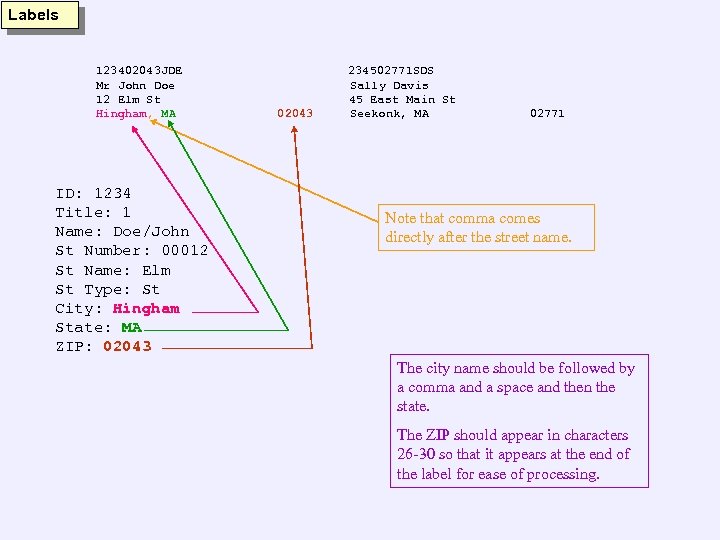
Labels 123402043 JDE Mr John Doe 12 Elm St Hingham, MA ID: 1234 Title: 1 Name: Doe/John St Number: 00012 St Name: Elm St Type: St City: Hingham State: MA ZIP: 02043 234502771 SDS Sally Davis 45 East Main St Seekonk, MA 02771 Note that comma comes directly after the street name. The city name should be followed by a comma and a space and then the state. The ZIP should appear in characters 26 -30 so that it appears at the end of the label for ease of processing.
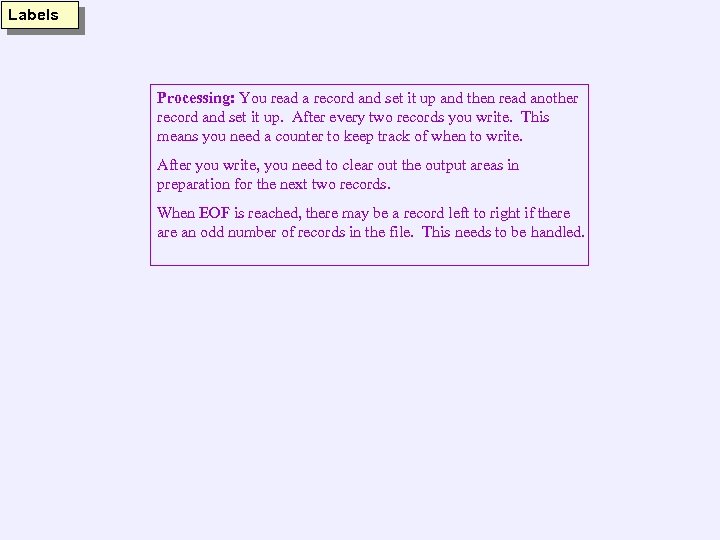
Labels Processing: You read a record and set it up and then read another record and set it up. After every two records you write. This means you need a counter to keep track of when to write. After you write, you need to clear out the output areas in preparation for the next two records. When EOF is reached, there may be a record left to right if there an odd number of records in the file. This needs to be handled.
Скачать презентацию Label Assignment Please use speaker notes for additional
c2d280ef4cc18955b82234767e22b6d2.ppt