


 Скачать презентацию KT 4054 Computer Systems Organization and Architecture DR
b5bda60a8713544a65d884efa7387742.ppt
- Количество слайдов: 55
 KT 4054 Computer Systems Organization and Architecture DR. NASHARUDDIN ZAINAL MS. WAN MIMI DIYANA WAN ZAKI
 Who am I? Nasharuddin Zainal nash@vlsi. eng. ukm. my 03 - 8921 6324 Level 2, Room No. 5 (Near JKEES Office)
 Course Synopsis The course begin with design methodology, which consists of modeling and design at the gate, register and processor level. Processor and controller design in computer systems will then be learnt. Memory, I/O organization and parallel processing will also be discussed Pre-requisite : KL 2013 (Digital Electronics) & KL 2023(Microprocessor and Microcomputers)
 Why Study Computer System Architecture? User ◦ Understand system capabilities and limitations ◦ Make informed decisions ◦ Improve communications with information technology professionals Programmer ◦ Create efficient application software for specific processing needs Systems Architect or Systems Analyst ◦ Specify computer systems and architecture to meet application requirements ◦ Make intelligent decisions about system strategy Copyright 2010 John Wiley & Sons, Inc. 14
 Why Study Computer System Architecture? System Administrator / Manager ◦ Install, configure, maintain, and upgrade computer systems ◦ Maximize system availability and efficiency ◦ Optimize system performance ◦ Ensure system security Web Services Designer ◦ Optimize customer accessibility to Web services ◦ Optimize web system configurations ◦ Select appropriate data formats, page designs and scripting languages ◦ Design efficient Web pages Copyright 2010 John Wiley & Sons, Inc. 15
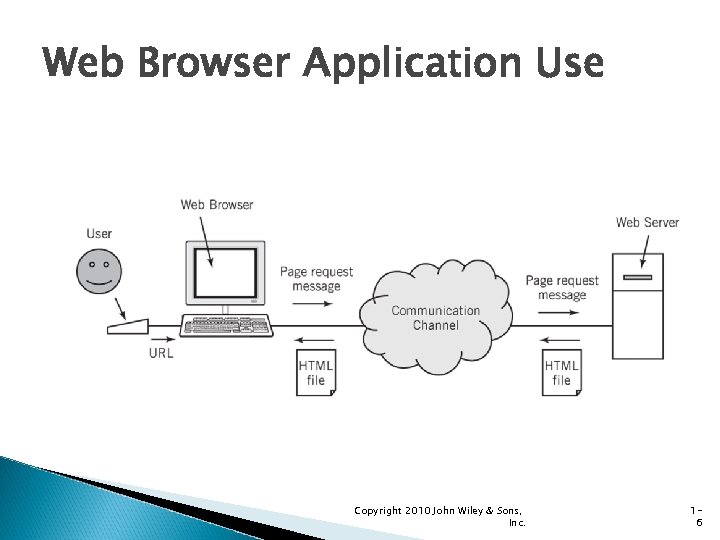 Web Browser Application Use Copyright 2010 John Wiley & Sons, Inc. 16
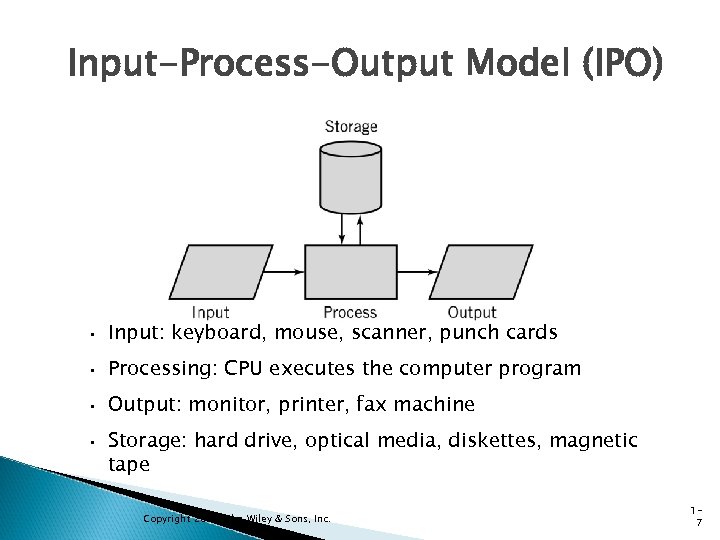 Input-Process-Output Model (IPO) • Input: keyboard, mouse, scanner, punch cards • Processing: CPU executes the computer program • Output: monitor, printer, fax machine • Storage: hard drive, optical media, diskettes, magnetic tape Copyright 2010 John Wiley & Sons, Inc. 17
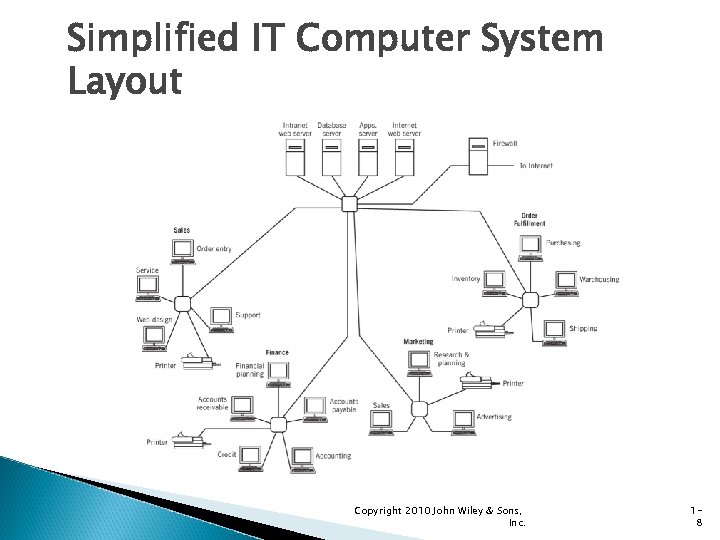 Simplified IT Computer System Layout Copyright 2010 John Wiley & Sons, Inc. 18
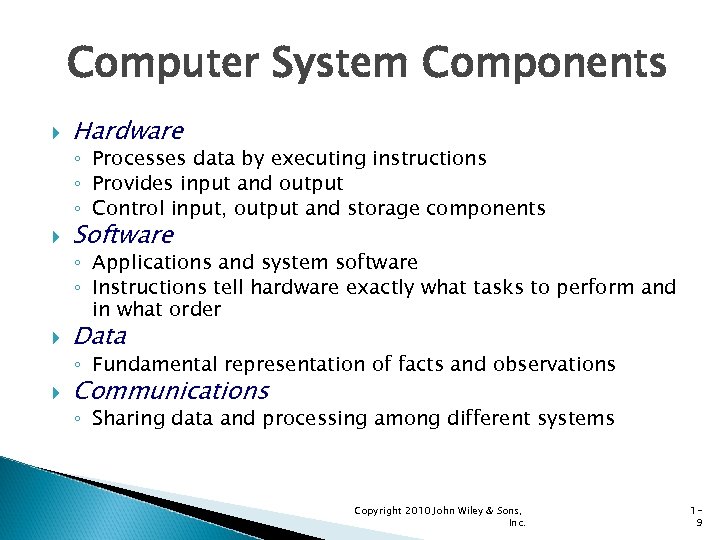 Computer System Components Hardware ◦ Processes data by executing instructions ◦ Provides input and output ◦ Control input, output and storage components Software ◦ Applications and system software ◦ Instructions tell hardware exactly what tasks to perform and in what order Data ◦ Fundamental representation of facts and observations Communications ◦ Sharing data and processing among different systems Copyright 2010 John Wiley & Sons, Inc. 19
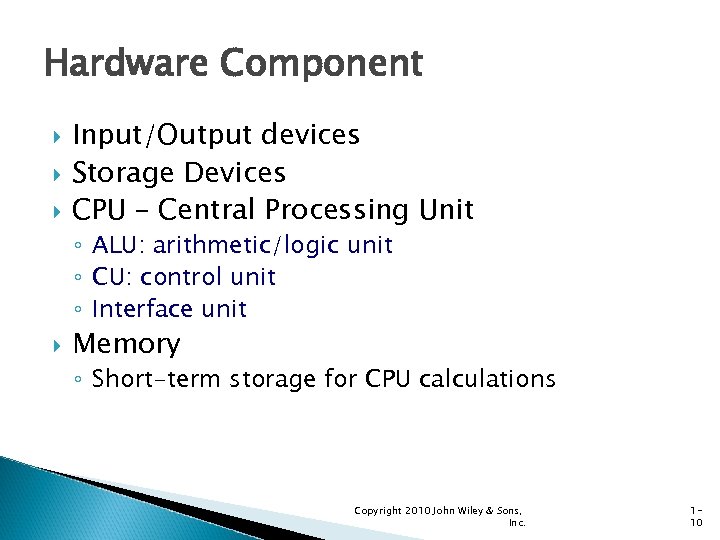 Hardware Component Input/Output devices Storage Devices CPU – Central Processing Unit ◦ ALU: arithmetic/logic unit ◦ CU: control unit ◦ Interface unit Memory ◦ Short-term storage for CPU calculations Copyright 2010 John Wiley & Sons, Inc. 110
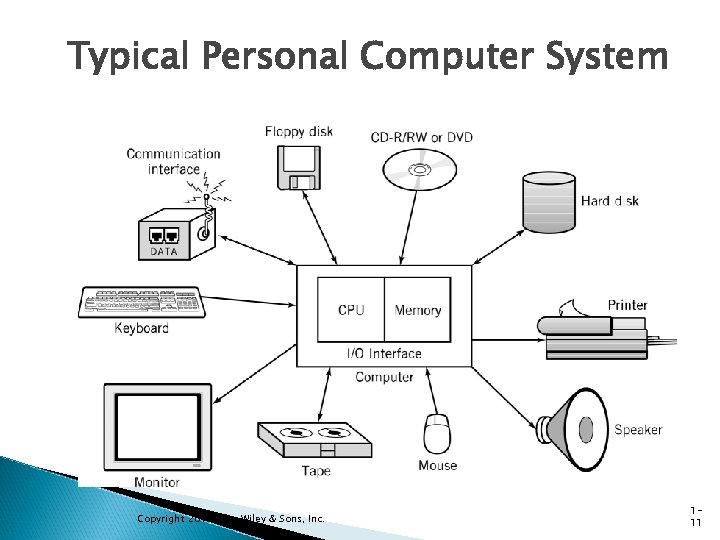 Typical Personal Computer System Copyright 2010 John Wiley & Sons, Inc. 111
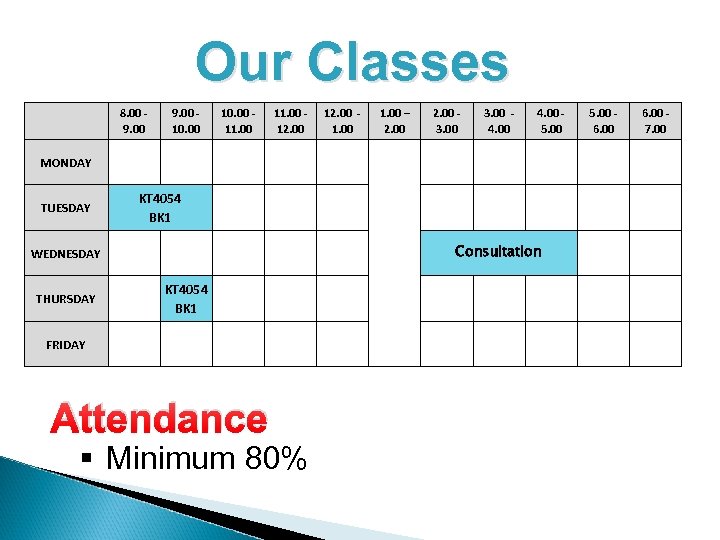 Our Classes 8. 00 9. 00 10. 00 11. 00 12. 00 1. 00 – 2. 00 3. 00 4. 00 5. 00 MONDAY TUESDAY KT 4054 BK 1 Consultation WEDNESDAY THURSDAY KT 4054 BK 1 FRIDAY Attendance § Minimum 80% 5. 00 6. 00 7. 00
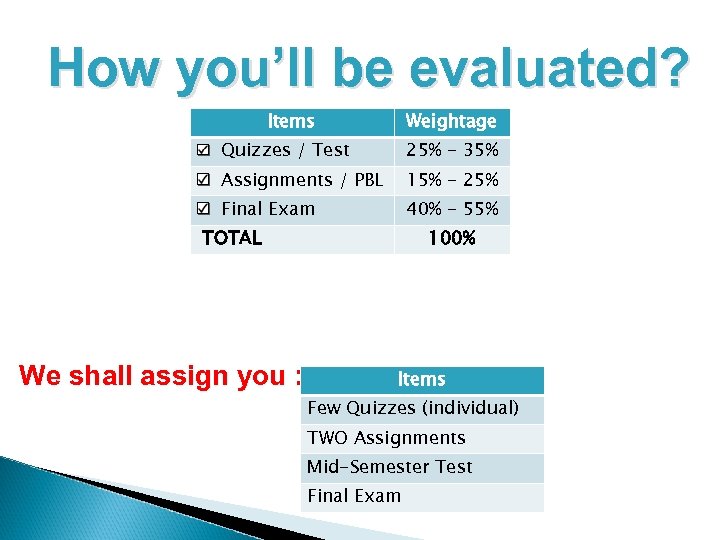 How you’ll be evaluated? Items Weightage Quizzes / Test 25% - 35% Assignments / PBL 15% - 25% Final Exam 40% - 55% TOTAL We shall assign you : 100% Items Few Quizzes (individual) TWO Assignments Mid-Semester Test Final Exam
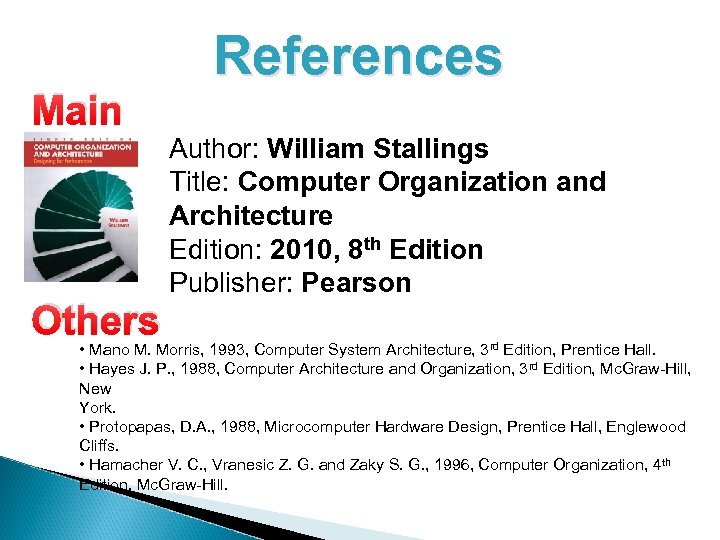 Main Others References Author: William Stallings Title: Computer Organization and Architecture Edition: 2010, 8 th Edition Publisher: Pearson • Mano M. Morris, 1993, Computer System Architecture, 3 rd Edition, Prentice Hall. • Hayes J. P. , 1988, Computer Architecture and Organization, 3 rd Edition, Mc. Graw-Hill, New York. • Protopapas, D. A. , 1988, Microcomputer Hardware Design, Prentice Hall, Englewood Cliffs. • Hamacher V. C. , Vranesic Z. G. and Zaky S. G. , 1996, Computer Organization, 4 th Edition, Mc. Graw-Hill.
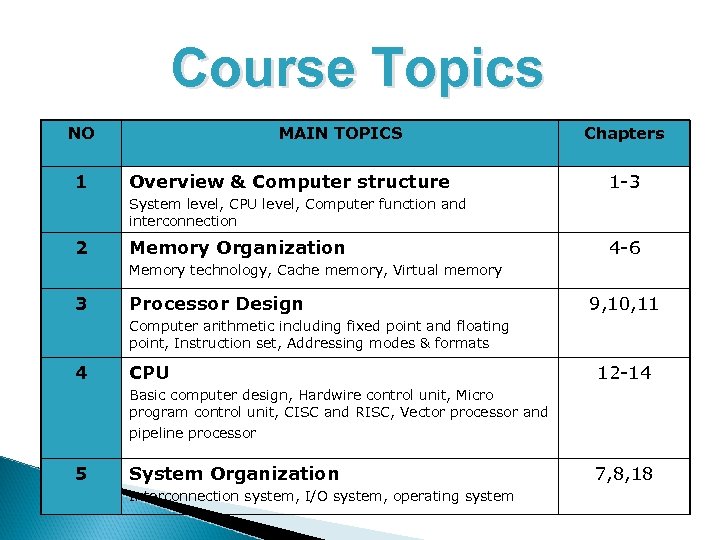 Course Topics NO 1 MAIN TOPICS Overview & Computer structure Chapters 1 -3 System level, CPU level, Computer function and interconnection 2 Memory Organization 4 -6 Memory technology, Cache memory, Virtual memory 3 Processor Design 9, 10, 11 Computer arithmetic including fixed point and floating point, Instruction set, Addressing modes & formats 4 CPU 12 -14 Basic computer design, Hardwire control unit, Micro program control unit, CISC and RISC, Vector processor and pipeline processor 5 System Organization Interconnection system, I/O system, operating system 7, 8, 18
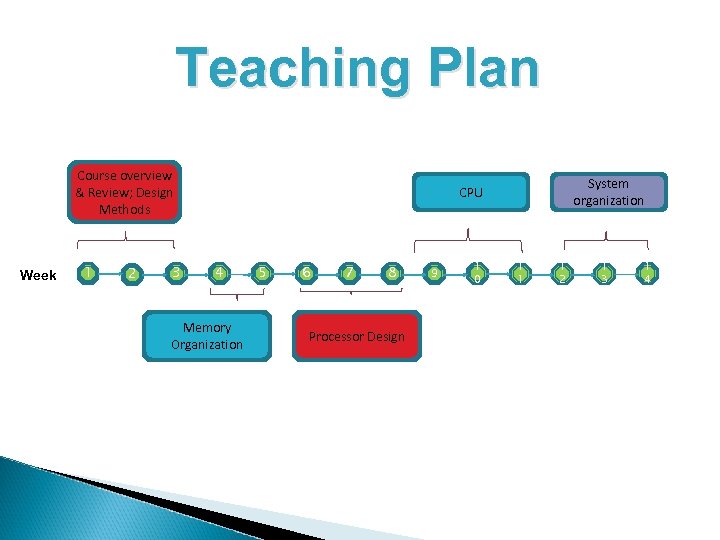 Teaching Plan Course overview & Review; Design Methods Week 1 2 3 System organization CPU 4 Memory Organization 5 6 7 8 Processor Design 9 1 0 1 1 1 2 1 3 1 4
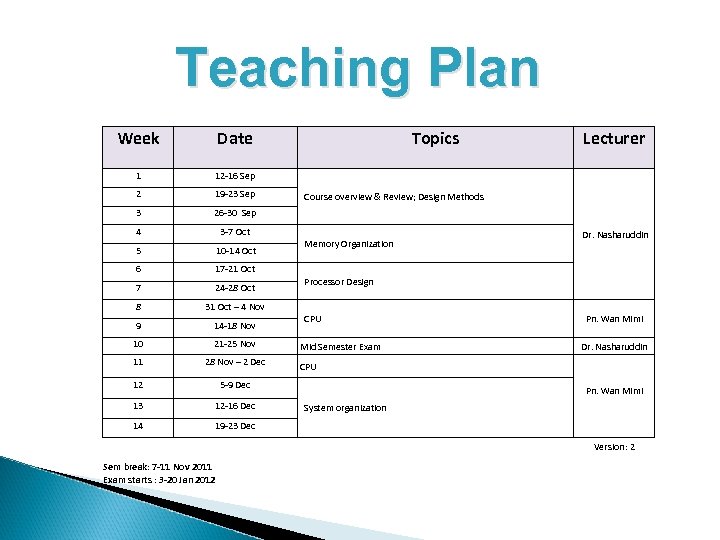 Teaching Plan Week Date 1 12 -16 Sep 2 19 -23 Sep 3 26 -30 Sep 4 3 -7 Oct 5 10 -14 Oct 6 24 -28 Oct 8 14 -18 Nov 10 21 -25 Nov 11 28 Nov – 2 Dec 12 12 -16 Dec 14 Memory Organization 5 -9 Dec 13 Course overview & Review; Design Methods Dr. Nasharuddin 31 Oct – 4 Nov 9 Lecturer 17 -21 Oct 7 Topics 19 -23 Dec Processor Design CPU Mid Semester Exam Pn. Wan Mimi Dr. Nasharuddin CPU Pn. Wan Mimi System organization Version: 2 Sem break: 7 -11 Nov 2011 Exam starts : 3 -20 Jan 2012
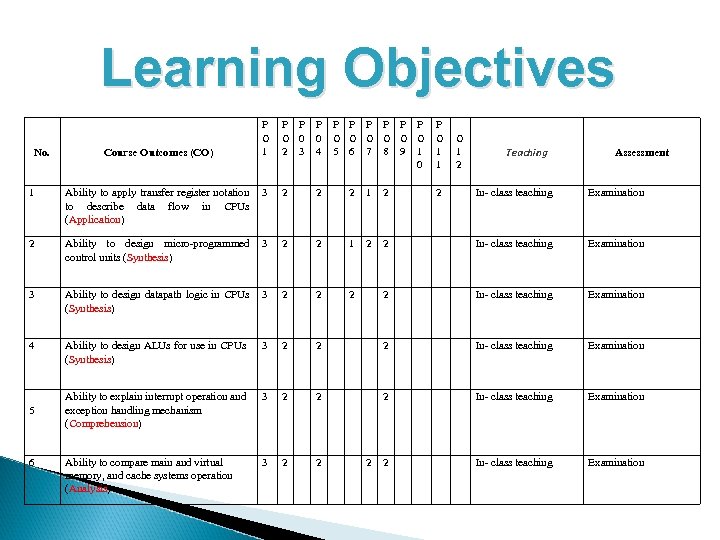 Learning Objectives No. Course Outcomes (CO) P O 1 P P P P P O 0 0 O O O 2 3 4 5 6 7 8 9 1 0 P O 1 1 2 1 Ability to apply transfer register notation to describe data flow in CPUs (Application) 3 2 2 2 1 2 2 Ability to design micro-programmed control units (Synthesis) 3 2 2 1 2 3 Ability to design datapath logic in CPUs (Synthesis) 3 2 2 2 4 Ability to design ALUs for use in CPUs (Synthesis) 3 2 Ability to explain interrupt operation and exception handling mechanism (Comprehension) 3 Ability to compare main and virtual memory, and cache systems operation (Analysis) 3 5 6 O 1 2 Teaching Assessment In- class teaching Examination 2 2 2 In- class teaching Examination 2
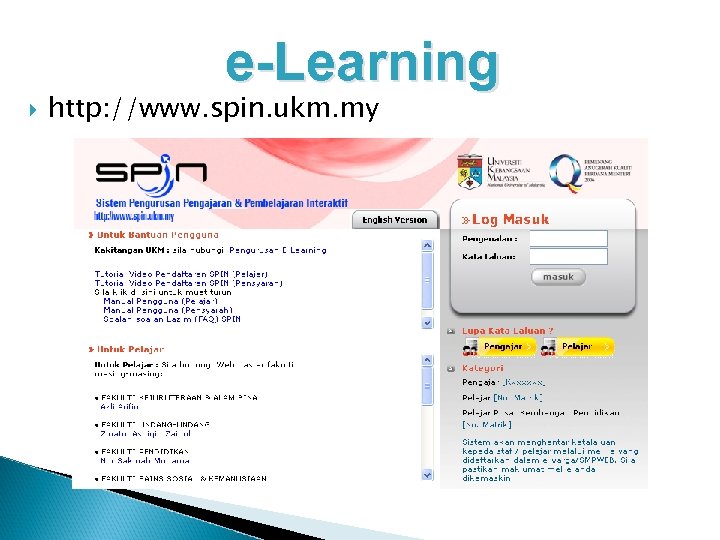 e-Learning http: //www. spin. ukm. my
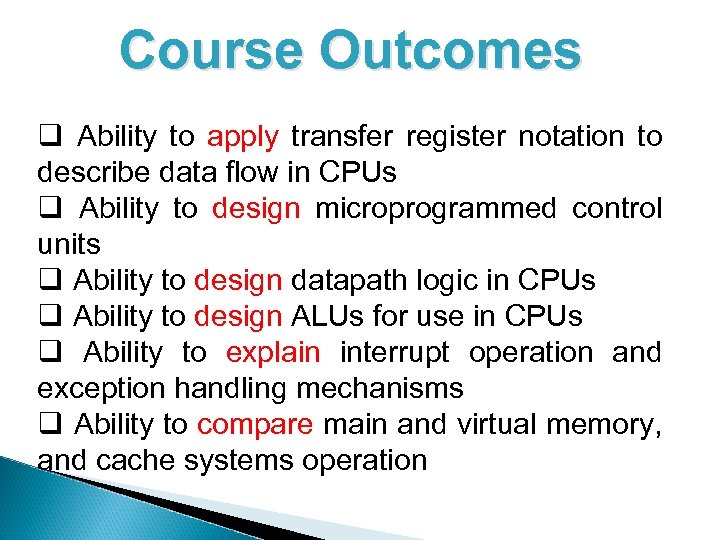 Course Outcomes q Ability to apply transfer register notation to describe data flow in CPUs q Ability to design microprogrammed control units q Ability to design datapath logic in CPUs q Ability to design ALUs for use in CPUs q Ability to explain interrupt operation and exception handling mechanisms q Ability to compare main and virtual memory, and cache systems operation
 Review
 Early History 1642: Blaise Pascal invents a calculating machine 1801: Joseph Marie Jacquard invents a loom that uses punch cards 1800’s: ◦ Charles Babbage attempts to build an analytical engine (mechanical computer) ◦ Augusta Ada Byron develops many of the fundamental concepts of programming ◦ George Boole invents Boolean logic. Copyright 2010 John Wiley & Sons, Inc. 122
 Modern Computer Development 1937: Mark I is built (Aiken, Harvard University, IBM). ◦ First electronic computer using relays. 1939: ABC is built ◦ First fully electronic digital computer. Used vacuum tubes. 1943 -46: ENIAC (Mauchly, Eckert, University of Pennsylvania). ◦ First general purpose digital computer. 1945: Von Neumann architecture proposed. 1947: Creation of transistor 1951 -2: EDVAC and IAS ◦ Still the standard for present day computers. ◦ (Bardeen, Shockley, Brattain, Bell Labs). Copyright 2010 John Wiley & Sons, Inc. 123
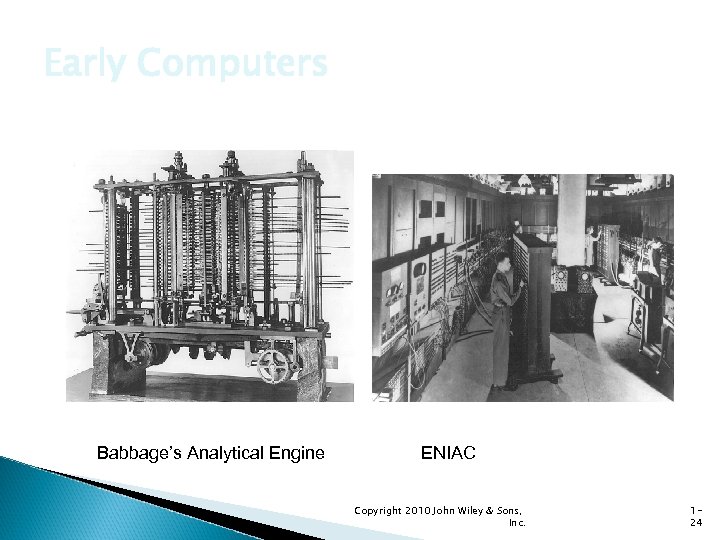 Early Computers Babbage’s Analytical Engine ENIAC Copyright 2010 John Wiley & Sons, Inc. 124
 System Software History Early computers had no operating systems and were single user systems ◦ Programs were entered using switches for each bit or by plugging wires into a panel 1953 -54: First operating system was built by General Motors Research Laboratories for their IBM 701 computer Other early systems ◦ FORTRAN Monitor System (FMS) ◦ IBSYS ◦ Share Operating System (SOS) Copyright 2010 John Wiley & Sons, Inc. 125
 Operating System Development 1963: Master Control Program (MCP) by Burroughs. Included many modern OS features. 1964: OS/360 by IBM. Included batch processing of programs. 1962: MIT Project MAC created a time-sharing OS called CTSS. Shortly afterwards, MIT, Bell Labs, and GE developed Multics (Multiplexed Information and Computing Services). Copyright 2010 John Wiley & Sons, Inc. 126
 UNIX After Bell Labs withdrew from the Multics project, Ken Thompson developed a personal operating system called UNIX using assembly language. Dennis Ritchie developed the programming language C which was used to rewrite much of UNIX in a high-level language. UNIX introduced ◦ ◦ A hierarchical file system The shell concept Document production and formatting Tools for networked and distributed processing Copyright 2010 John Wiley & Sons, Inc. 127
 Graphical User Interfaces 1960 s: Doug Englebart (Stanford Research Institute) ◦ Invented windows and a mouse interface 1970 s: Xerox PARC ◦ Creates a practical windowing system for the Dynabook project 1980 s: Steve Jobs (Apple) ◦ Developed the Apple Lisa and Mac. Intosh Copyright 2010 John Wiley & Sons, Inc. 128
 IBM PC 1982: Stand-alone, single user computer PC-DOS, MS-DOS (disk operating system) Later versions of DOS added ◦ Hierarchical directory file storage ◦ File redirection ◦ Better memory management Windowing systems ◦ Windows 2. 0, Windows 3. 1, Windows 95 ◦ Windows NT, Windows XP, Windows Vista ◦ Windows 7 Copyright 2010 John Wiley & Sons, Inc. 129
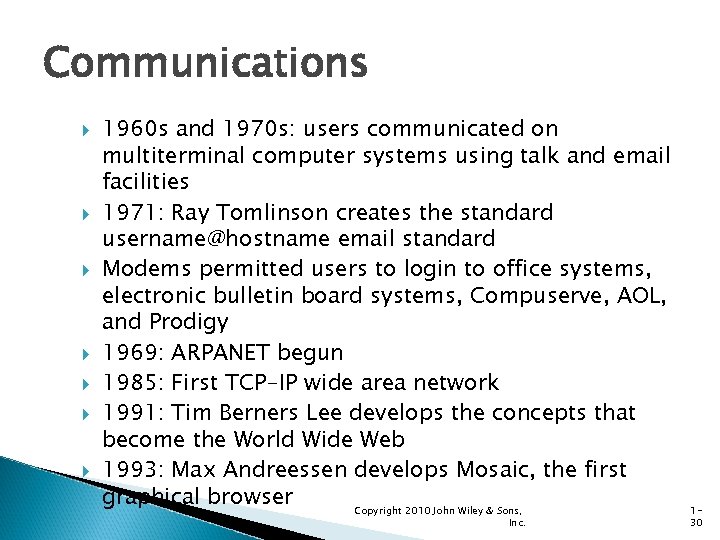 Communications 1960 s and 1970 s: users communicated on multiterminal computer systems using talk and email facilities 1971: Ray Tomlinson creates the standard username@hostname email standard Modems permitted users to login to office systems, electronic bulletin board systems, Compuserve, AOL, and Prodigy 1969: ARPANET begun 1985: First TCP-IP wide area network 1991: Tim Berners Lee develops the concepts that become the World Wide Web 1993: Max Andreessen develops Mosaic, the first graphical browser Copyright 2010 John Wiley & Sons, Inc. 130
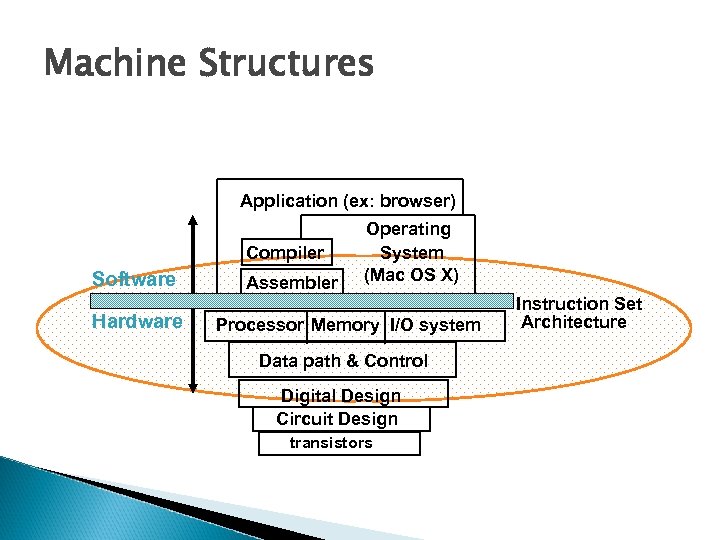 Machine Structures Application (ex: browser) Compiler Software Hardware Assembler Operating System (Mac OS X) Processor Memory I/O system Data path & Control Digital Design Circuit Design transistors Instruction Set Architecture
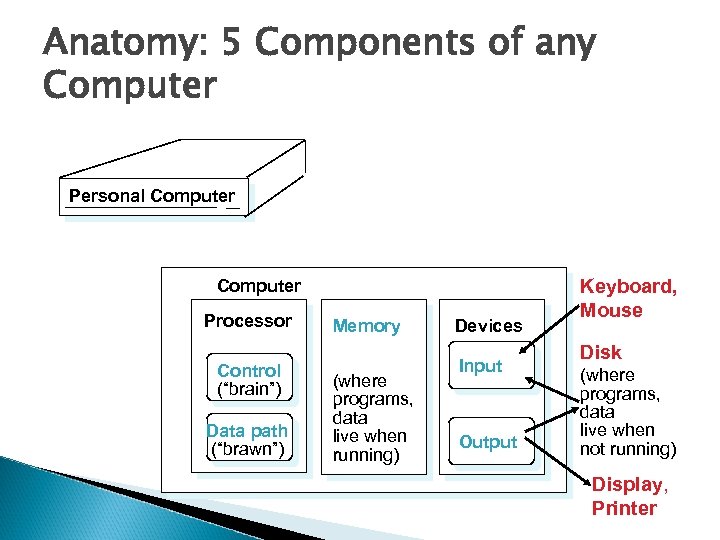 Anatomy: 5 Components of any Computer Personal Computer Processor Control (“brain”) Data path (“brawn”) Memory (where programs, data live when running) Devices Input Output Keyboard, Mouse Disk (where programs, data live when not running) Display, Printer
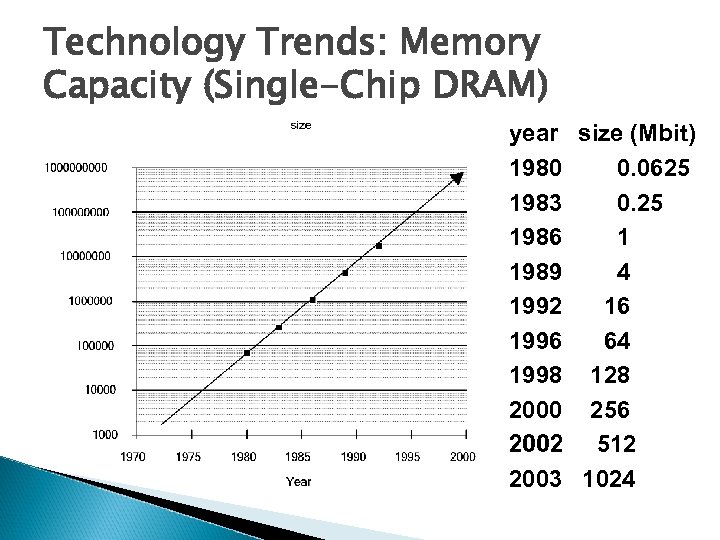 Technology Trends: Memory Capacity (Single-Chip DRAM) year size (Mbit) 1980 0. 0625 1983 0. 25 1986 1 1989 4 1992 16 1996 64 1998 128 2000 256 2002 512 2003 1024
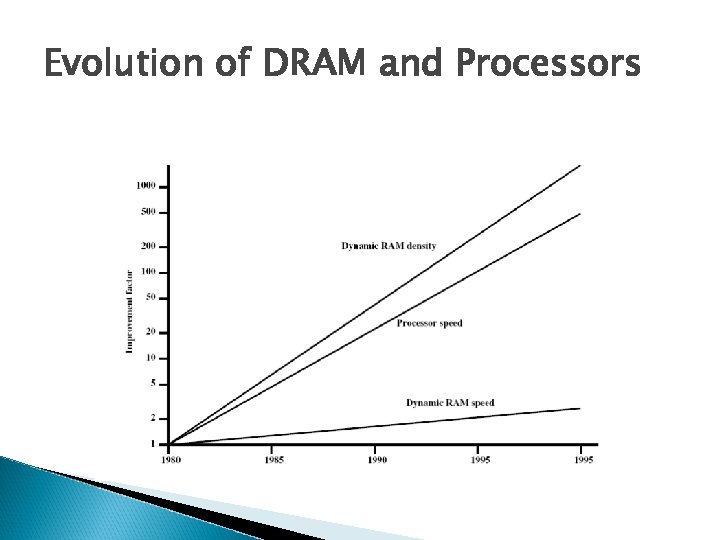 Evolution of DRAM and Processors
 Moore’s Law Gordon Moore – co-founder of Intel Increased density of components on chip Number of transistors on a chip will double every year Since 1970’s development has slowed a little ◦ Number of transistors doubles every 18 months Cost of a chip has remained almost unchanged Higher packing density means shorter electrical paths, giving higher performance Smaller size gives increased flexibility Reduced power and cooling requirements Fewer interconnections increases reliability
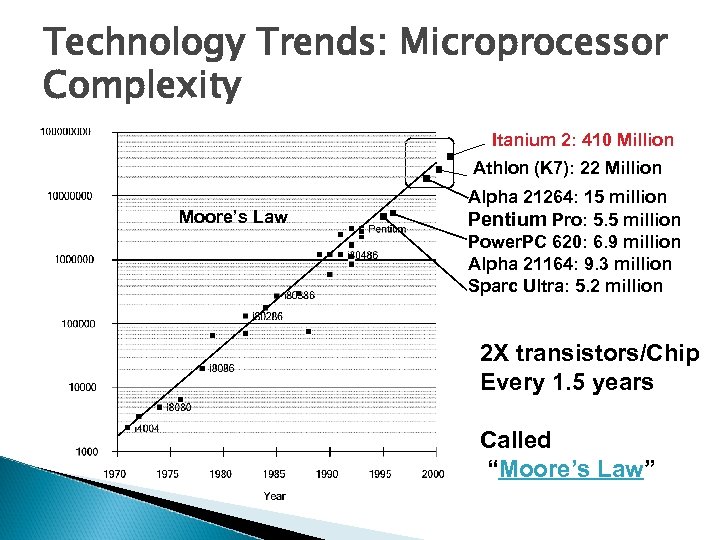 Technology Trends: Microprocessor Complexity Itanium 2: 410 Million Athlon (K 7): 22 Million Moore’s Law Alpha 21264: 15 million Pentium Pro: 5. 5 million Power. PC 620: 6. 9 million Alpha 21164: 9. 3 million Sparc Ultra: 5. 2 million 2 X transistors/Chip Every 1. 5 years Called “Moore’s Law”
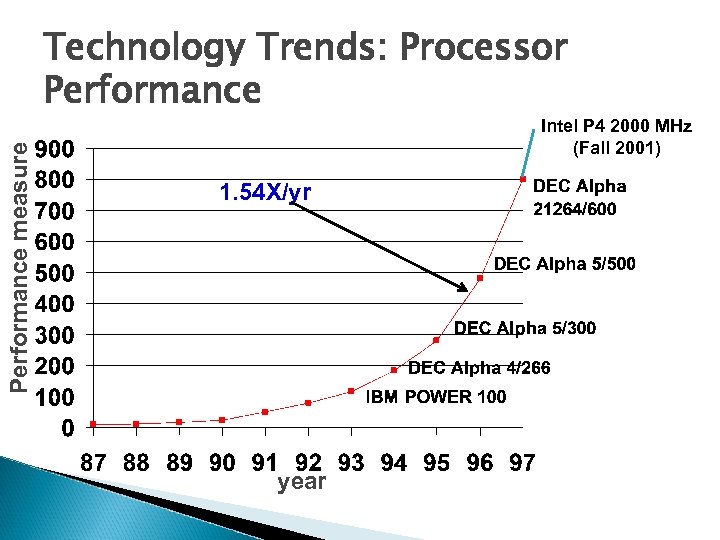 Performance measure Technology Trends: Processor Performance Intel P 4 2000 MHz (Fall 2001) 1. 54 X/yr year
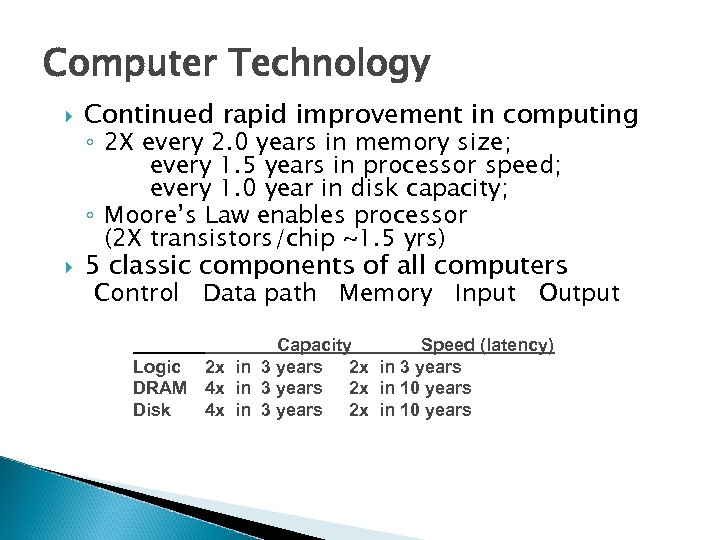 Computer Technology Continued rapid improvement in computing 5 classic components of all computers ◦ 2 X every 2. 0 years in memory size; every 1. 5 years in processor speed; every 1. 0 year in disk capacity; ◦ Moore’s Law enables processor (2 X transistors/chip ~1. 5 yrs) Control Data path Memory Input Output Logic DRAM Disk Capacity Speed (latency) 2 x in 3 years 4 x in 3 years 2 x in 10 years
 Technology in the News BIG ◦ La. Cie the first to offer consumer-level 1. 6 Terabyte disk! ◦ Cost ? ~ US$2, 000 ◦ Weighs 11 pounds! ◦ 5 1/4” form-factor SMALL ◦ Pretec is soon offering a 12 GB Compact. Flash card ◦ Size of a silver dollar ◦ Cost ? ~ US$15, 000 www. lacie. com/products/product. htm? id=10129 www. engadget. com/entry/4463693158281236/
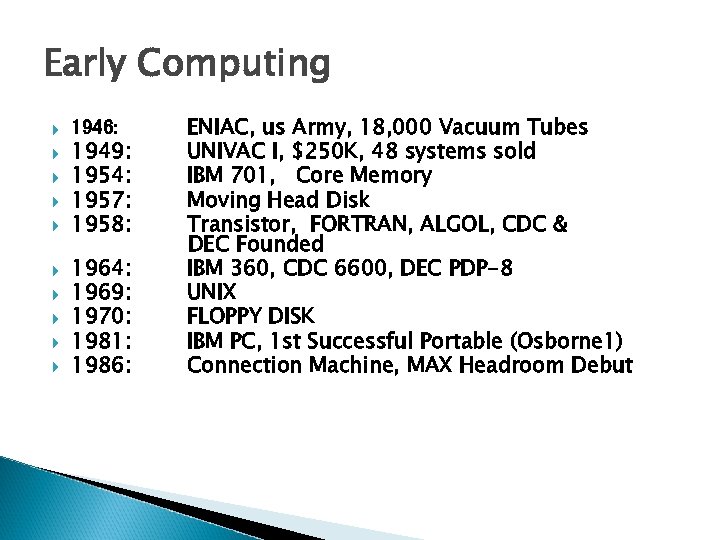 Early Computing 1946: 1949: 1954: 1957: 1958: 1964: 1969: 1970: 1981: 1986: ENIAC, us Army, 18, 000 Vacuum Tubes UNIVAC I, $250 K, 48 systems sold IBM 701, Core Memory Moving Head Disk Transistor, FORTRAN, ALGOL, CDC & DEC Founded IBM 360, CDC 6600, DEC PDP-8 UNIX FLOPPY DISK IBM PC, 1 st Successful Portable (Osborne 1) Connection Machine, MAX Headroom Debut
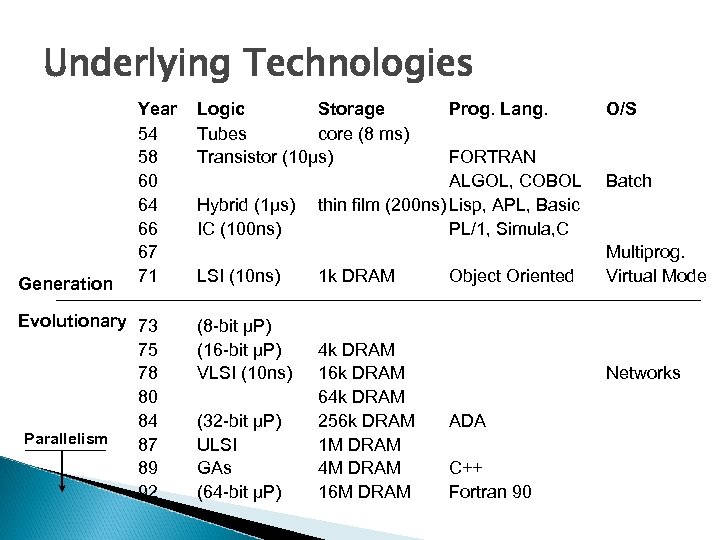 Underlying Technologies Generation Year 54 58 60 64 66 67 71 Evolutionary 73 75 78 80 84 Parallelism 87 89 92 Logic Storage Tubes core (8 ms) Transistor (10µs) Hybrid (1µs) IC (100 ns) LSI (10 ns) (8 -bit µP) (16 -bit µP) VLSI (10 ns) (32 -bit µP) ULSI GAs (64 -bit µP) Prog. Lang. FORTRAN ALGOL, COBOL thin film (200 ns) Lisp, APL, Basic PL/1, Simula, C 1 k DRAM 4 k DRAM 16 k DRAM 64 k DRAM 256 k DRAM 1 M DRAM 4 M DRAM 16 M DRAM Object Oriented O/S Batch Multiprog. Virtual Mode Networks ADA C++ Fortran 90
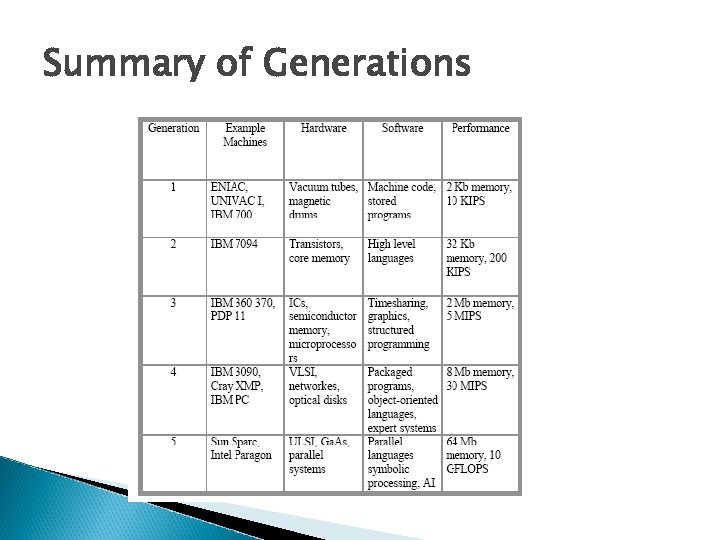 Summary of Generations
 Computer Architecture is the design of computers, including their instruction sets, hardware components, and system organization [Patterson]. Two essential parts of computer architecture: ◦ Instruction-set Architecture (ISA) ◦ Hardware-system Architecture (HSA)
 Instruction Set Architecture (ISA) The instruction set architecture of a computer includes anything a programmer would need to know to make the computer run correctly. This include: ◦ (a) The number and types of registers ◦ (b) Instruction set (what operations can be performed? ) ◦ (c) Instruction format (how are they specified? ) ◦ (d) Addressing mode (how is data obtained? - direct vs. indirect) ◦ (e) Exception handling (what happens when something goes wrong? ) Instruction-set architecture includes the specifications that determine how machine-language programs will interact with the computer. That is, in general, two computers with the same ISA will run the same programs. This is the notion of a computer-family architecture.
 Hardware: System Architecture (HSA) The Hardware-system architecture deals with the computer's major hardware subsystems, including central processing unit (CPU), its storage system, and its input-output system. The computer hardware design determines the implementation of the various computer components. This includes ◦ (a) Capabilities and performance of the functional units (e. g. , registers, ALUs, shifters) ◦ (b) Methods for connecting the functional units (e. g. , data bus) ◦ (c) Control logic for the functional units Typically, the computer hardware is designed based on the instruction set architecture.
 Cont. A successful ISA generally has many implementations (a computer-family) which are different in their HSA. Compatibility is the ability of different computers to run the same programs. ◦ Upward compatibility allows high-performance members of a family to run the same program as do the lowperformance members ◦ Downward compatibility is not always possible, since highperformance family members often have features not available on lower-performance members.
 Introduction – Organization & Architecture Computer Architecture ◦ Architecture is those attributes visible to the programmer ◦ Instruction set, number of bits used for data representation, I/O mechanisms, addressing techniques. ◦ e. g. Is there a multiply instruction? Computer Organization ◦ Organization is how features are implemented to realize the architecture ◦ Control signals, interfaces, memory technology. ◦ e. g. Is there a hardware multiply unit or is it done by repeated addition?
 Introduction – Organization & Architecture Computer manufactures offer several models with the same architecture but with different organization Example : ◦ IBM System/370 family share the same architecture ◦ Intel x 86 family share the same architecture Provides compatibility
 Introduction – Structure & Function Computer is a complex system Best way to describe is through hierarchical flow The system can be divided into subcomponents until the lowest level At each level, the components can be described with structure and function Structure ◦ The way the components are interrelated Function ◦ The operation of each component as part of the structure
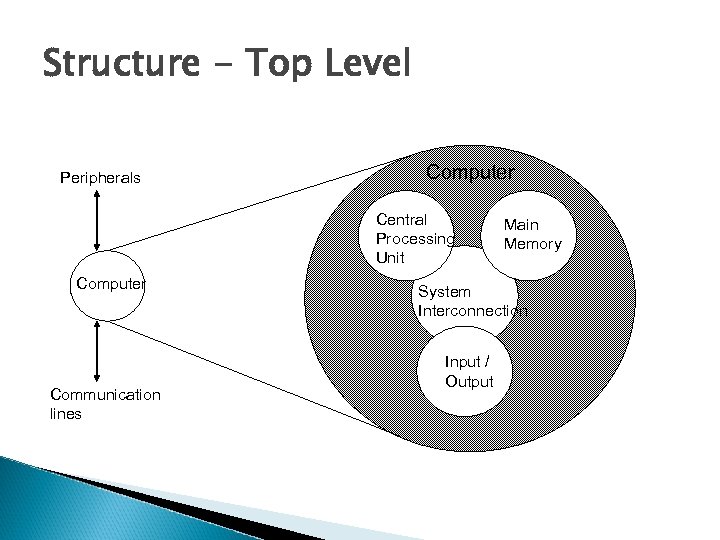 Structure - Top Level Peripherals Computer Central Processing Unit Computer Communication lines Main Memory System Interconnection Input / Output
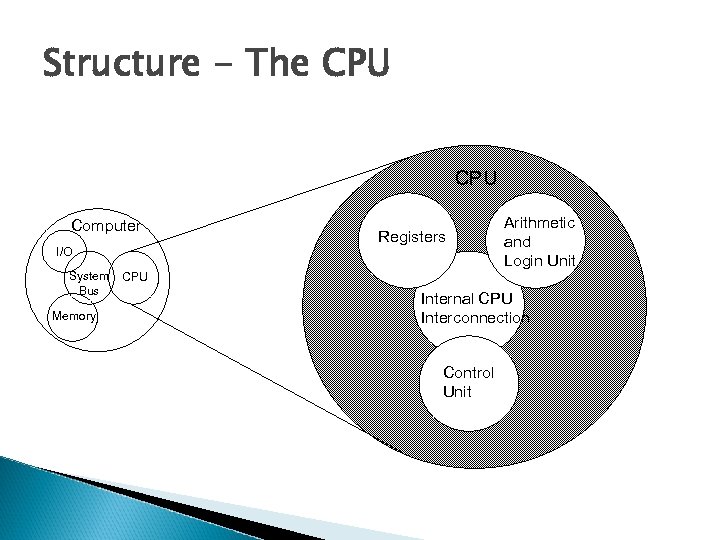 Structure - The CPU Computer I/O System Bus Memory Registers Arithmetic and Login Unit CPU Internal CPU Interconnection Control Unit
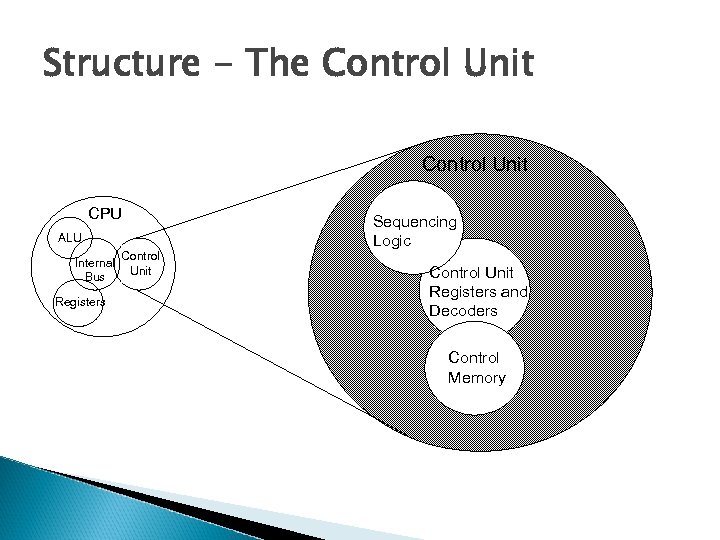 Structure - The Control Unit CPU ALU Internal Bus Registers Control Unit Sequencing Logic Control Unit Registers and Decoders Control Memory
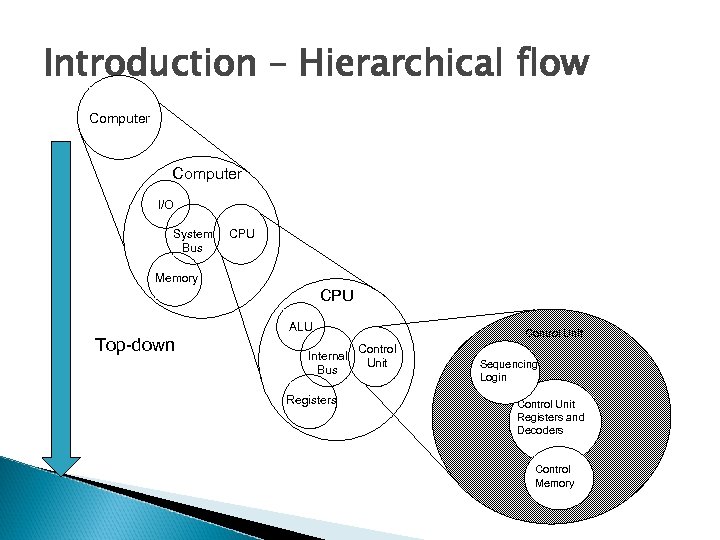 Introduction – Hierarchical flow Computer I/O System Bus CPU Memory CPU ALU Top-down Internal Bus Registers Control Unit Sequencing Login Control Unit Registers and Decoders Control Memory
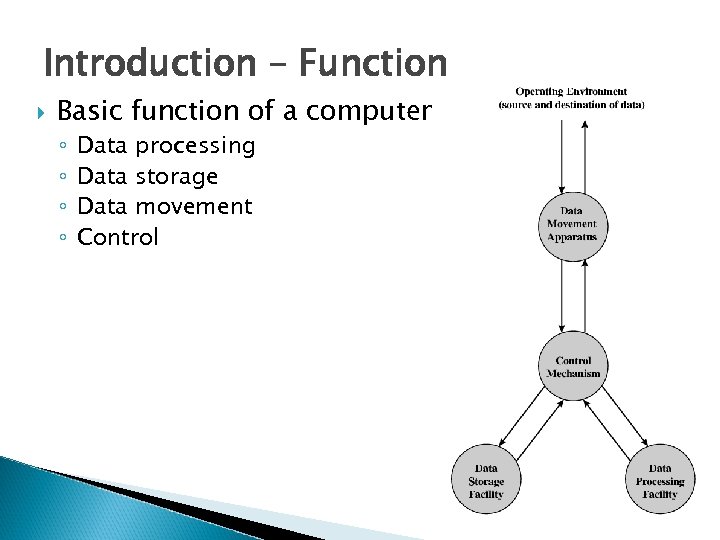 Introduction – Function Basic function of a computer ◦ ◦ Data processing Data storage Data movement Control
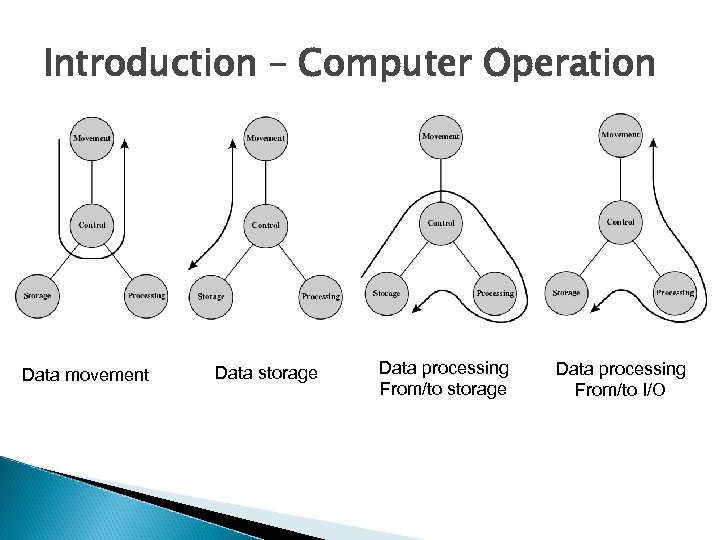 Introduction – Computer Operation Data movement Data storage Data processing From/to I/O