 Скачать презентацию Konica Minolta Printing Solutions Europe BV Agency Briefing
884c9bb4b1d5bb1c1c1464dbb2d0a055.ppt
- Количество слайдов: 30



Konica Minolta Printing Solutions Europe BV Agency Briefing Document This document has been developed to help agencies understand what we want to achieve with the magicolor 2450 Specifications and accessories are based on the information available at the time of generating the presentation, and are subject to change without notice. (17 -02 -2005)

Konica Minolta Printing Solutions Europe BV magicolor 2450 Graphical workgroup colour printer direct photo print ready
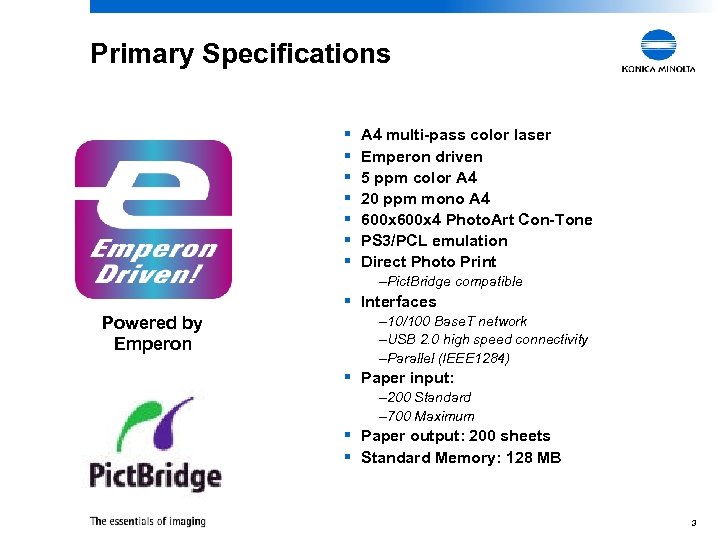
Primary Specifications § § § § A 4 multi-pass color laser Emperon driven 5 ppm color A 4 20 ppm mono A 4 600 x 4 Photo. Art Con-Tone PS 3/PCL emulation Direct Photo Print –Pict. Bridge compatible § Interfaces Powered by Emperon – 10/100 Base. T network –USB 2. 0 high speed connectivity –Parallel (IEEE 1284) § Paper input: – 200 Standard – 700 Maximum § Paper output: 200 sheets § Standard Memory: 128 MB 3
What we want to achieve with magicolor 2450 We are a leading manufacturer in low speed colour laser printers. We need to maintain this position with the magicolor 2400 series. 4
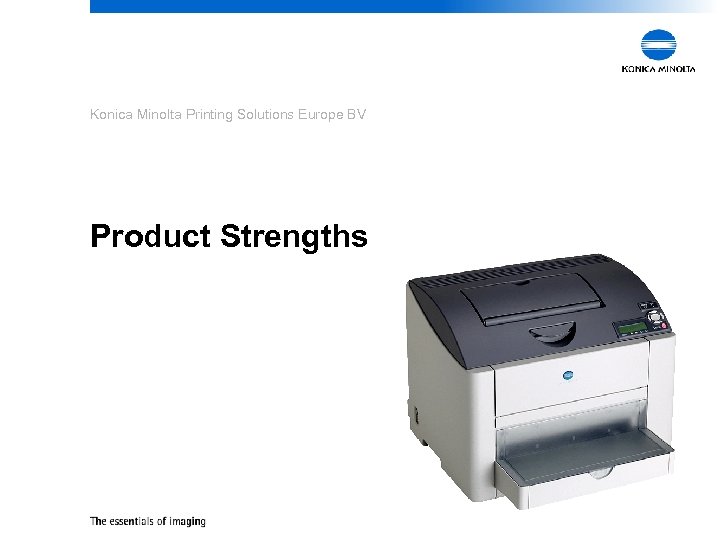
Konica Minolta Printing Solutions Europe BV Product Strengths
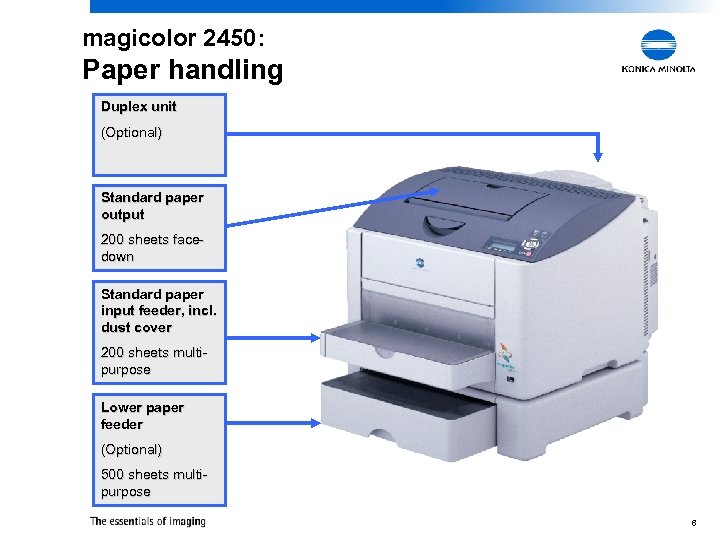
magicolor 2450: Paper handling Duplex unit (Optional) Standard paper output 200 sheets facedown Standard paper input feeder, incl. dust cover 200 sheets multipurpose Lower paper feeder (Optional) 500 sheets multipurpose 6
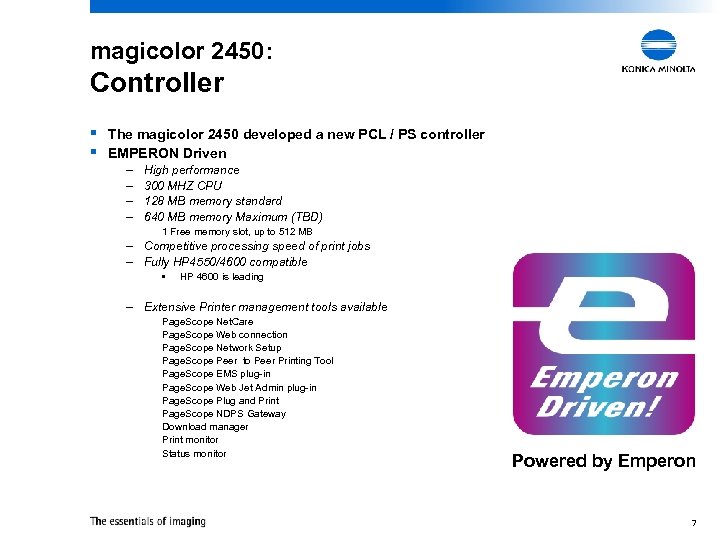
magicolor 2450: Controller § The magicolor 2450 developed a new PCL / PS controller § EMPERON Driven – – High performance 300 MHZ CPU 128 MB memory standard 640 MB memory Maximum (TBD) 1 Free memory slot, up to 512 MB – Competitive processing speed of print jobs – Fully HP 4550/4600 compatible • HP 4600 is leading – Extensive Printer management tools available Page. Scope Net. Care Page. Scope Web connection Page. Scope Network Setup Page. Scope Peer to Peer Printing Tool Page. Scope EMS plug-in Page. Scope Web Jet Admin plug-in Page. Scope Plug and Print Page. Scope NDPS Gateway Download manager Print monitor Status monitor Powered by Emperon 7
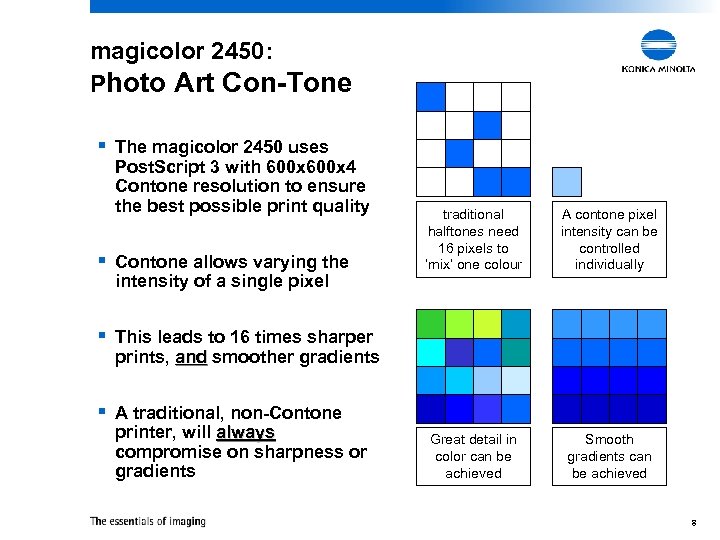
magicolor 2450: Photo Art Con-Tone § The magicolor 2450 uses Post. Script 3 with 600 x 4 Contone resolution to ensure the best possible print quality § Contone allows varying the intensity of a single pixel traditional halftones need 16 pixels to ‘mix’ one colour A contone pixel intensity can be controlled individually Great detail in color can be achieved Smooth gradients can be achieved § This leads to 16 times sharper prints, and smoother gradients § A traditional, non-Contone printer, will always compromise on sharpness or gradients 8
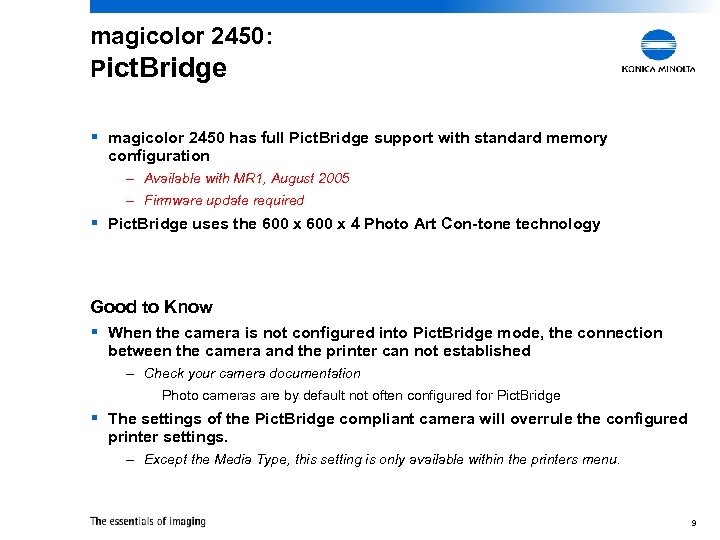
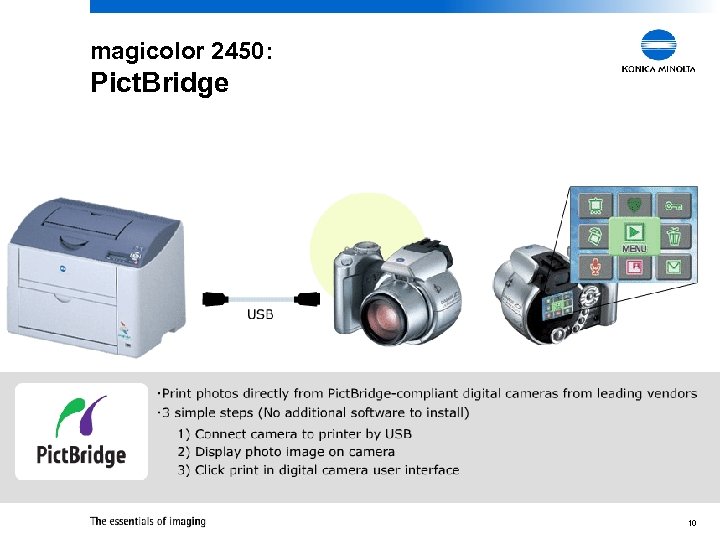
magicolor 2450: Pict. Bridge § magicolor 2450 has full Pict. Bridge support with standard memory configuration – Available with MR 1, August 2005 – Firmware update required § Pict. Bridge uses the 600 x 4 Photo Art Con-tone technology Good to Know § When the camera is not configured into Pict. Bridge mode, the connection between the camera and the printer can not established – Check your camera documentation Photo cameras are by default not often configured for Pict. Bridge § The settings of the Pict. Bridge compliant camera will overrule the configured printer settings. – Except the Media Type, this setting is only available within the printers menu. 9
magicolor 2450: Pict. Bridge 10
magicolor 2450: e. AIDC technology Konica Minolta developed the “enhanced Automatic Image Density Control” (e. AIDC) technology and implements this into the magicolor 2400 series. e. AIDC maintains always the optimum colour density within a variety of environmental conditions. As a result the output quality is consistent during its machine life under many different conditions. 11
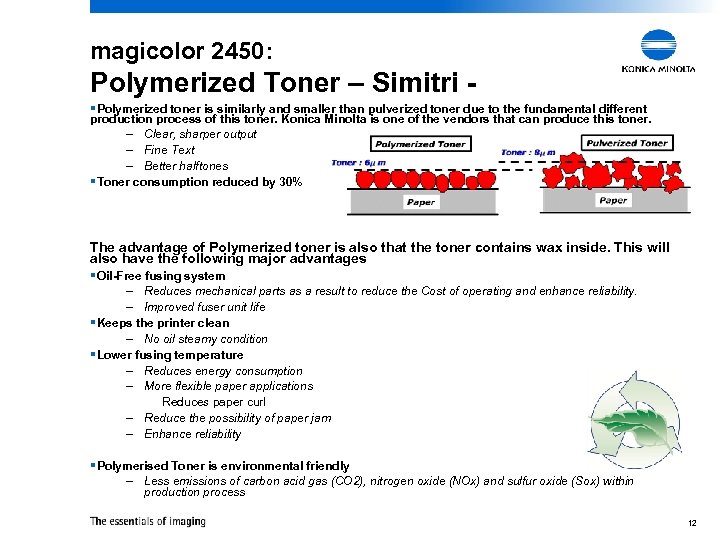
magicolor 2450: Polymerized Toner – Simitri §Polymerized toner is similarly and smaller than pulverized toner due to the fundamental different production process of this toner. Konica Minolta is one of the vendors that can produce this toner. – Clear, sharper output – Fine Text – Better halftones §Toner consumption reduced by 30% The advantage of Polymerized toner is also that the toner contains wax inside. This will also have the following major advantages §Oil-Free fusing system – Reduces mechanical parts as a result to reduce the Cost of operating and enhance reliability. – Improved fuser unit life §Keeps the printer clean – No oil steamy condition §Lower fusing temperature – Reduces energy consumption – More flexible paper applications Reduces paper curl – Reduce the possibility of paper jam – Enhance reliability §Polymerised Toner is environmental friendly – Less emissions of carbon acid gas (CO 2), nitrogen oxide (NOx) and sulfur oxide (Sox) within production process 12
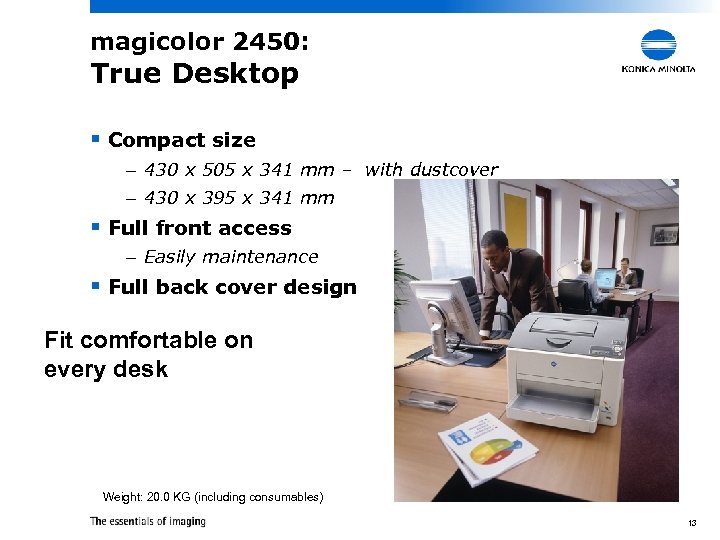
magicolor 2450: True Desktop § Compact size – 430 x 505 x 341 mm – with dustcover – 430 x 395 x 341 mm § Full front access – Easily maintenance § Full back cover design Fit comfortable on every desk Weight: 20. 0 KG (including consumables) 13
Konica Minolta Printing Solutions Europe BV Product Positioning
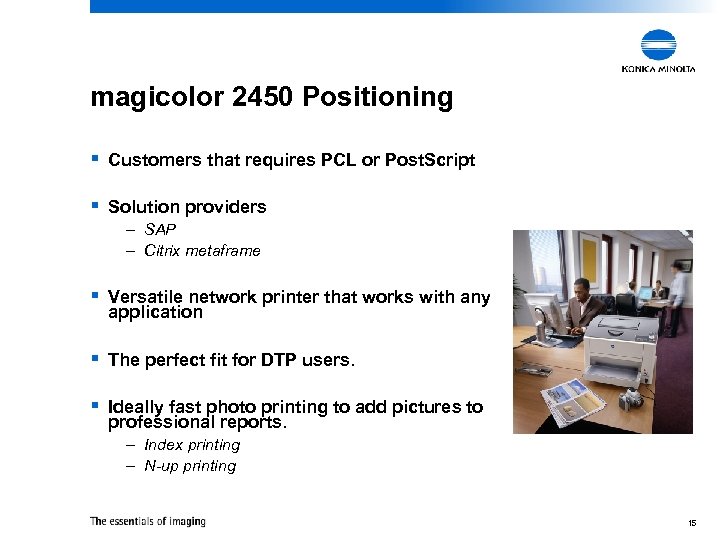
magicolor 2450 Positioning § Customers that requires PCL or Post. Script § Solution providers – SAP – Citrix metaframe § Versatile network printer that works with any application § The perfect fit for DTP users. § Ideally fast photo printing to add pictures to professional reports. – Index printing – N-up printing 15
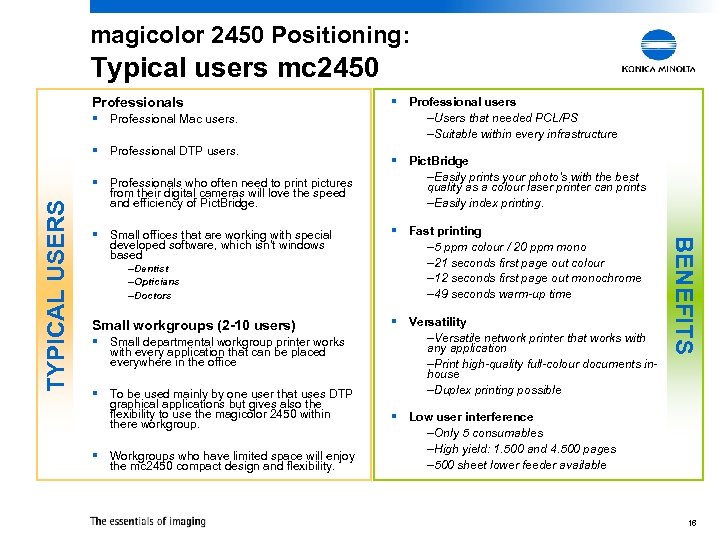
magicolor 2450 Positioning: Typical users mc 2450 Professionals § Professional Mac users. § Professional DTP users. from their digital cameras will love the speed and efficiency of Pict. Bridge. § Small offices that are working with special developed software, which isn't windows based –Dentist –Opticians –Doctors Small workgroups (2 -10 users) § Small departmental workgroup printer works with every application that can be placed everywhere in the office § To be used mainly by one user that uses DTP graphical applications but gives also the flexibility to use the magicolor 2450 within there workgroup. § Workgroups who have limited space will enjoy the mc 2450 compact design and flexibility. –Users that needed PCL/PS –Suitable within every infrastructure § Pict. Bridge –Easily prints your photo’s with the best quality as a colour laser printer can prints –Easily index printing. § Fast printing – 5 ppm colour / 20 ppm mono – 21 seconds first page out colour – 12 seconds first page out monochrome – 49 seconds warm-up time § Versatility –Versatile network printer that works with any application –Print high-quality full-colour documents inhouse –Duplex printing possible BENEFITS TYPICAL USERS § Professionals who often need to print pictures § Professional users § Low user interference –Only 5 consumables –High yield: 1. 500 and 4. 500 pages – 500 sheet lower feeder available 16
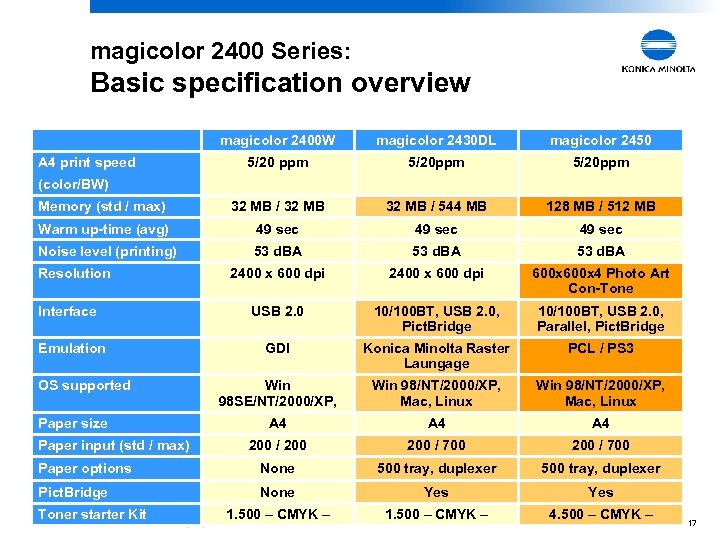
magicolor 2400 Series: Basic specification overview magicolor 2400 W magicolor 2430 DL magicolor 2450 5/20 ppm 5/20 ppm Memory (std / max) 32 MB / 544 MB 128 MB / 512 MB Warm up-time (avg) 49 sec Noise level (printing) 53 d. BA 2400 x 600 dpi 600 x 4 Photo Art Con-Tone USB 2. 0 10/100 BT, USB 2. 0, Pict. Bridge 10/100 BT, USB 2. 0, Parallel, Pict. Bridge GDI Konica Minolta Raster Laungage PCL / PS 3 Win 98 SE/NT/2000/XP, Win 98/NT/2000/XP, Mac, Linux A 4 A 4 200 / 700 200 / 700 Paper options None 500 tray, duplexer Pict. Bridge None Yes 1. 500 – CMYK – 4. 500 – CMYK – A 4 print speed (color/BW) Resolution Interface Emulation OS supported Paper size Paper input (std / max) Toner starter Kit 17
Konica Minolta Printing Solutions Europe BV Product Strengths
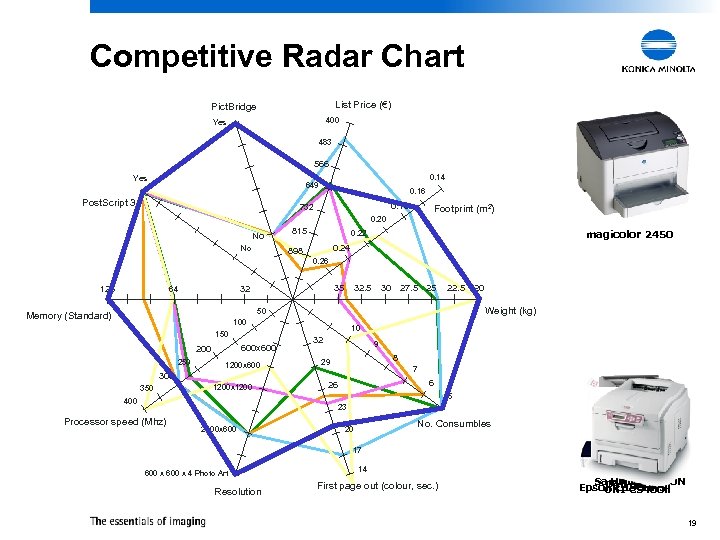
Competitive Radar Chart List Price (€) Pict. Bridge 400 Yes 483 566 Yes 0. 14 649 Post. Script 3 0. 16 0. 18 732 Footprint (m 2) 0. 20 No No 815 magicolor 2450 0. 22 0. 24 898 0. 26 128 35 32 64 32. 5 30 27. 5 25 22. 5 Weight (kg) 50 Memory (Standard) 100 150 600 x 600 250 1200 x 600 350 1200 x 1200 400 20 10 32 9 8 29 7 6 26 5 23 Processor speed (Mhz) 2400 x 600 No. Consumbles 20 17 600 x 4 Photo Art Resolution 14 First page out (colour, sec. ) HP 3100 cn Samsung C 550 N Dell 2550 N Epson C 1900 PS OKI C 5400 n 19
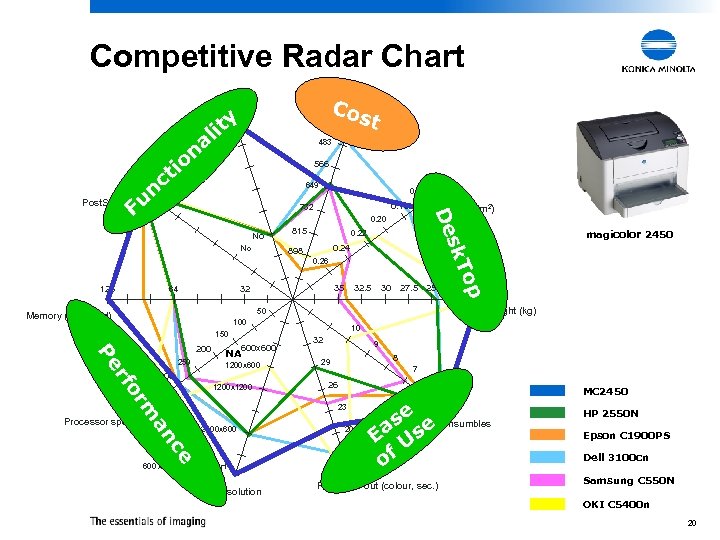
Competitive Radar Chart List Price Cos (€) t Pict. Bridge na o y lit Yes 400 483 ti nc Yes 566 0. 18 732 Footprint (m 2) De Fu Post. Script 3 0. 14 649 0. 20 No 815 0. 22 0. 24 898 0. 26 35 32 64 32. 5 30 27. 5 25 op 128 22. 5 100 150 Pe 200 250 600 x 600 NA 1200 x 600 or rf 300 1200 x 1200 350 400 10 32 9 8 29 7 6 26 5 m 23 2400 x 600 ce an Processor speed (Mhz) 20 17 600 x 4 Photo Art Resolution 20 Weight (kg) 50 Memory (Standard) magicolor 2450 sk. T No 14 se No. Consumbles e Ea Us of First page out (colour, sec. ) MC 2450 HP 2550 N Epson C 1900 PS Dell 3100 cn Samsung C 550 N OKI C 5400 n 20
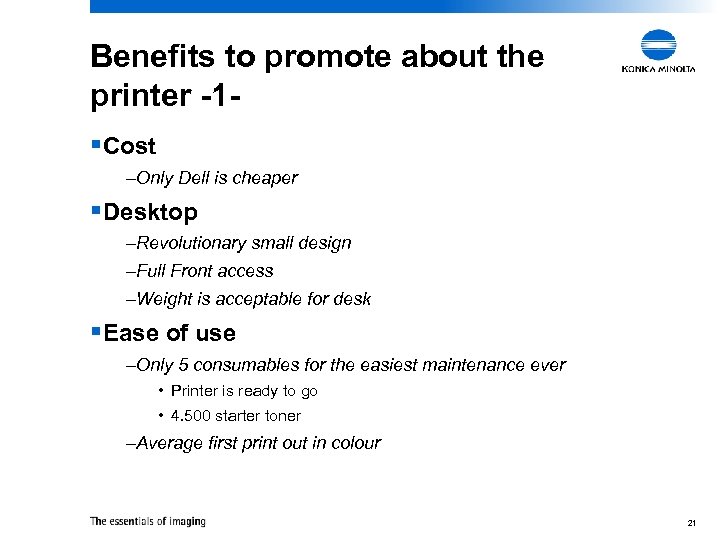
Benefits to promote about the printer -1§Cost –Only Dell is cheaper §Desktop –Revolutionary small design –Full Front access –Weight is acceptable for desk §Ease of use –Only 5 consumables for the easiest maintenance ever • Printer is ready to go • 4. 500 starter toner –Average first print out in colour 21
Benefits to promote about the printer -2§Performance –Very impressive print quality due to the 4 dept print resolution • 600 x 4 Photo Art Con-Tone –High processor speed to have a very fast internal controller • Emperon driven –Standard 128 Mb, enough memory to print duplex with the highest possible resolution §Functionality –Post. Script 3 compatible –PCL 5/6 compatible §Pict. Brigde as a standard option available –The combination Pict. Bridge with 600 x 4 Phot. Art Con-Tone will give you an impressive good printed photo 22
Other things we should keep in mind § Award winning heritage – The magicolor 2450 joins a multi-award winning family § Reputation in the market – We produce competitive products § Dependability – Great service and support – Konica Minolta products are very reliable 23
Conclusion § Best graphical performance in its class § The magicolor 2450 brings a top level addition to the award winner magicolor 2400 series § Versatile network printer that works with any application any operating system – Full HP PCL compatible – Post. Script 3 compatible § The full front access is a major step forward from the magicolor 2350 and is big advantage over competitive products 24
Konica Minolta Printing Solutions Europe BV Where the magicolor 2450 fits into our colour product range
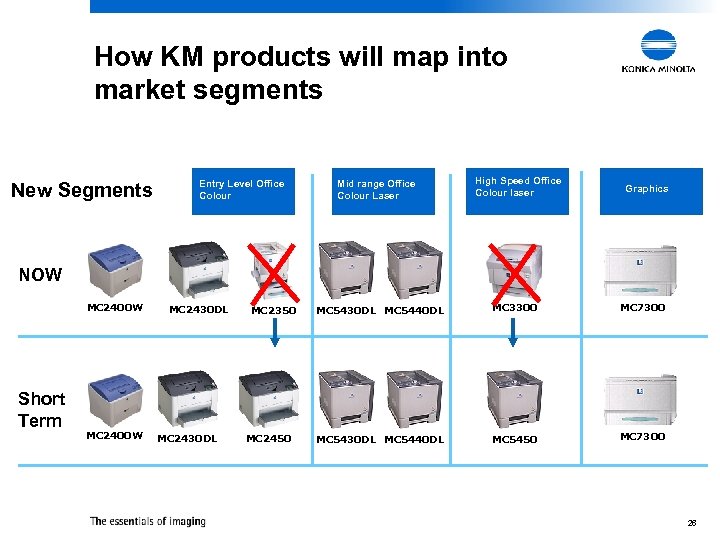
How KM products will map into market segments New Segments Entry Level Office Colour Mid range Office Colour Laser High Speed Office Colour laser Graphics NOW MC 2400 W Short Term MC 2400 W MC 2430 DL MC 2350 MC 2450 MC 5430 DL MC 5440 DL MC 3300 MC 7300 MC 5430 DL MC 5440 DL MC 5450 MC 7300 26
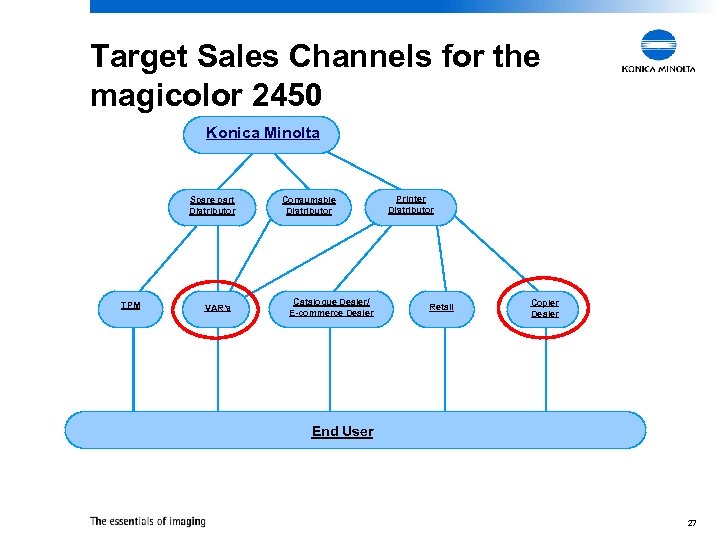
Target Sales Channels for the magicolor 2450 Konica Minolta Spare part Distributor TPM VAR’s Consumable Distributor Catalogue Dealer/ E-commerce Dealer Printer Distributor Retail Copier Dealer End User 27
Who will buy a colour laser printer § Eventually all business users will use colour laser printers instead of monochrome laser printers and inkjets § Users will increasingly use colour because it – Engages Colour improves readership as much as 40 percent. – Informs Colour also accelerates learning between 55 to 78 percent and comprehension by 73 percent. – Persuades Ads in color are up to 42% more effective than the same ads in monochrome § The alternative technology (inkjet) is too slow and expensive 28
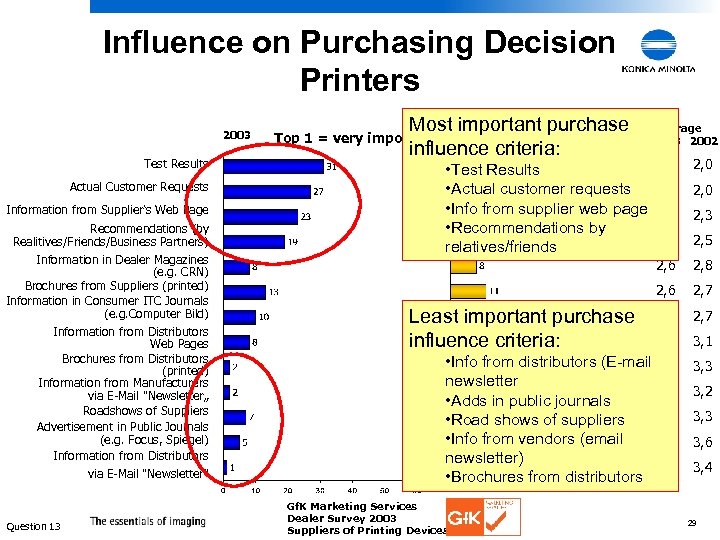
Influence on Purchasing Decision Printers 2003 Test Results Actual Customer Requests Information from Supplier‘s Web Page Recommendations (by Realitives/Friends/Business Partners) Information in Dealer Magazines (e. g. CRN) Brochures from Suppliers (printed) Information in Consumer ITC Journals (e. g. Computer Bild) Information from Distributors Web Pages Brochures from Distributors (printed) Information from Manufacturers via E-Mail "Newsletter„ Roadshows of Suppliers Advertisement in Public Journals (e. g. Focus, Spiegel) Information from Distributors via E-Mail "Newsletter" Question 13 Most important purchase 2002 influence criteria: Top 1 = very important Average 2003 2002 2, 0 2, 2 2, 3 2, 5 2, 6 2, 8 2, 6 2, 7 2, 8 2, 7 3, 1 • Info from distributors (E-mail 3, 2 newsletter 3, 2 • Adds in public journals 3, 3 • Road shows of suppliers • Info from vendors (email 3, 4 newsletter) 3, 4 • Brochures from distributors 3, 3 • Test Results • Actual customer requests • Info from supplier web page • Recommendations by relatives/friends Least important purchase influence criteria: Gf. K Marketing Services Dealer Survey 2003 Suppliers of Printing Devices 3, 2 3, 3 3, 6 3, 4 29
30
Скачать презентацию Konica Minolta Printing Solutions Europe BV Agency Briefing
884c9bb4b1d5bb1c1c1464dbb2d0a055.ppt