 Скачать презентацию Key Slide The physical basis of the infrastructure
b3bf1350618970337cd4c939666a24a1.ppt
- Количество слайдов: 54



Key Slide The physical basis of the infrastructure MIS 300, Chapter 2
Major Concepts • • Hardware and Software for software (operating systems) Software for business (applications) Software to create software (programming languages) • Nagging issues about software MIS 300, Chapter 2 2
Principles and Learning Objectives-1 • Users must work closely with IS professionals to define business needs, evaluate options, and select the hardware and software that provide a cost-effective solution to those needs. – Identify and discuss the role of the essential hardware components of a computer system. – List and describe popular classes of computer systems and discuss the role of each. MIS 300, Chapter 2 3
Principles and Learning Objectives -2 • When selecting an operating system, you must consider the current and future requirements for application software to meet the needs of the organization. In addition, your choice of a particular operating system must be consistent with your choice of hardware. – Identify and briefly describe the functions of the two basic kinds of software. – Outline the role of the operating system and identify the features of several popular operating systems. MIS 300, Chapter 2 4
Principles and Learning Objectives-3 • Do not develop proprietary application software unless doing so will meet a compelling business need that can provide a competitive advantage. Discuss how application software can support personal, workgroup, and enterprise business objectives. – Identify three basic approaches to developing application software and discuss the pros and cons of each. MIS 300, Chapter 2 5
Principles and Learning Objectives-4 • Choose a programming language whose functional characteristics are appropriate for the task at hand, taking into consideration the skills and experience of the programming staff. – Outline the overall evolution of programming languages and clearly differentiate among the five generations of programming languages. MIS 300, Chapter 2 6
Principles and Learning Objectives-5 • The software industry continues to undergo constant change; users need to be aware of recent trends and issues to be effective in their business and personal life. – Identify several key issues and trends that have an impact on organizations and individuals. MIS 300, Chapter 2 7
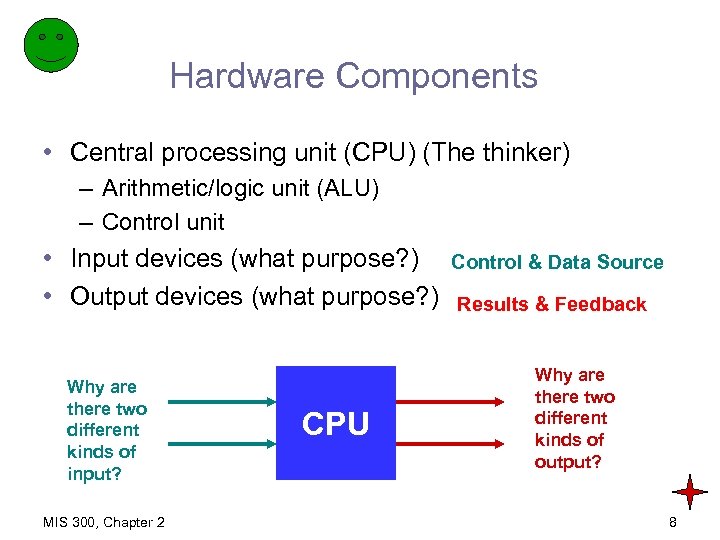
Hardware Components • Central processing unit (CPU) (The thinker) – Arithmetic/logic unit (ALU) – Control unit • Input devices (what purpose? ) • Output devices (what purpose? ) Why are there two different kinds of input? MIS 300, Chapter 2 CPU Control & Data Source Results & Feedback Why are there two different kinds of output? 8
Hardware Components (continued) • Communications devices • Primary storage devices • Secondary storage devices MIS 300, Chapter 2 9
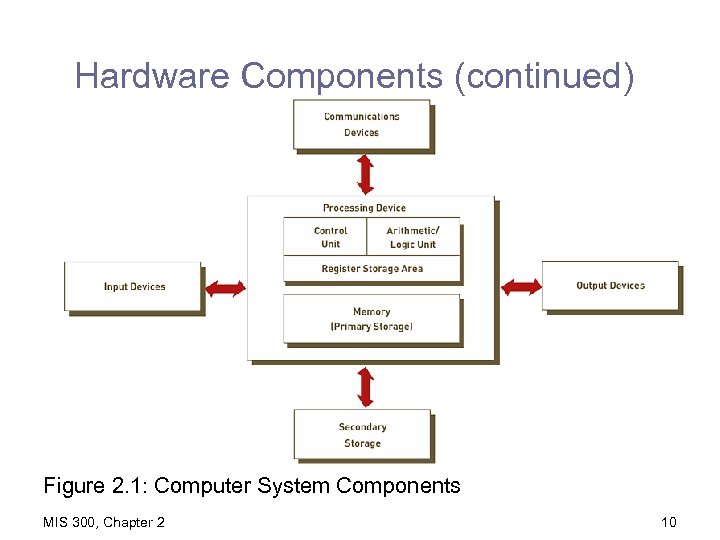
Hardware Components (continued) Figure 2. 1: Computer System Components MIS 300, Chapter 2 10
Processing and Memory Devices: Power, Speed, and Capacity • System unit – Houses CPU and memory • All other devices are linked to the system unit • What is the advantage of this? • How do we measure the “strength” of a computer? See next slide. MIS 300, Chapter 2 11
Processing Characteristics and Functions • Machine cycle time: time to execute the instruction phase and the execution phase • Clock speed: electronic pulses produced at a predetermined rate • Wordlength: number of bits that can be processed at one time MIS 300, Chapter 2 12
Processing Characteristics and Functions (continued) • Physical characteristics of the CPU – Digital circuits on chips – Electrical current flows through silicon MIS 300, Chapter 2 13
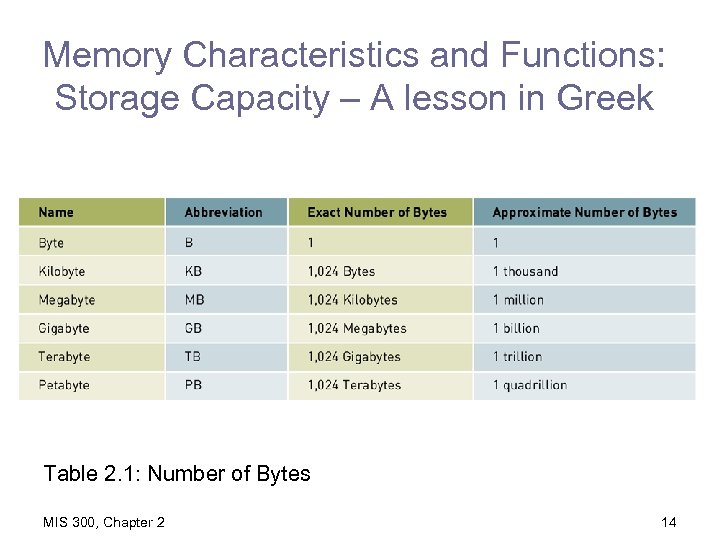
Memory Characteristics and Functions: Storage Capacity – A lesson in Greek Table 2. 1: Number of Bytes MIS 300, Chapter 2 14
Types of Memory • Random access memory (RAM) – Temporary – Volatile • ROM (read-only memory) – Usually nonvolatile • SEDOM (Student Exam Dump Only Memory) MIS 300, Chapter 2 15
Multiprocessing – Doing more than one Thing at a Time • Multiprocessing: simultaneous execution of two or more instructions • Parallel processing: linking hundreds or thousands of processors operating in parallel • Grid computing: collection of computers working to solve a common problem MIS 300, Chapter 2 16
Secondary Storage and Input and Output Devices • Secondary storage – Also called permanent storage – Nonvolatile – Greater capacity and greater economy than memory MIS 300, Chapter 2 17
Secondary Storage Access Methods • Sequential access: records must be retrieved in order – Sequential access storage devices (SASD) • Direct access: records can be retrieved in any order – Direct access storage devices (DASDs) Can this matter at all? What problems are being solved here? What problems are being created? MIS 300, Chapter 2 18
Secondary Storage Devices • Magnetic tapes • Magnetic disks • Redundant array of independent/inexpensive disks (RAID) • Compact disc read-only memory (CD-ROM) MIS 300, Chapter 2 19
SAN • Storage area network • Provides high-speed connections between datastorage devices and computers MIS 300, Chapter 2 20
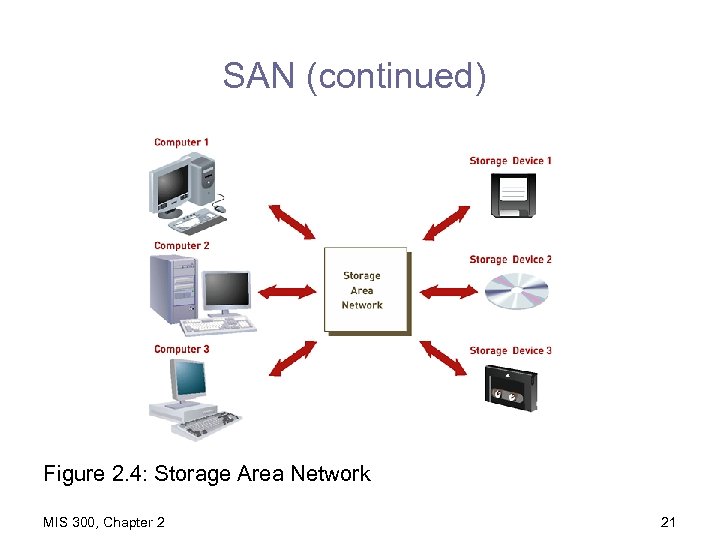
SAN (continued) Figure 2. 4: Storage Area Network MIS 300, Chapter 2 21
Secondary Storage Devices (continued) • • • CD-recordable (CD-R) discs CD-rewritable (CD-RW) discs Digital versatile disc (DVD) Memory cards Expandable storage MIS 300, Chapter 2 22
Input Devices • Personal computer input devices – Keyboard – Mouse • Voice-recognition devices • Terminals • And what else? What can you imagine? What are people like as input devices? MIS 300, Chapter 2 23
Input Devices (continued) • • • Touch-sensitive screens Bar-code scanners Optical data readers Point-of-sale (POS) devices Automatic teller machine (ATM) devices What problem(s) is (are) these sorts of devices trying to solve? MIS 300, Chapter 2 24
Input Devices (continued) • Magnetic ink character recognition (MICR) devices • Radio-frequency identification (RFID) – Go ask Walmart MIS 300, Chapter 2 25
Output Devices • • Display monitors Liquid crystal displays (LCDs) Organic light-emitting diodes (OLEDs) Printers and plotters MIS 300, Chapter 2 26
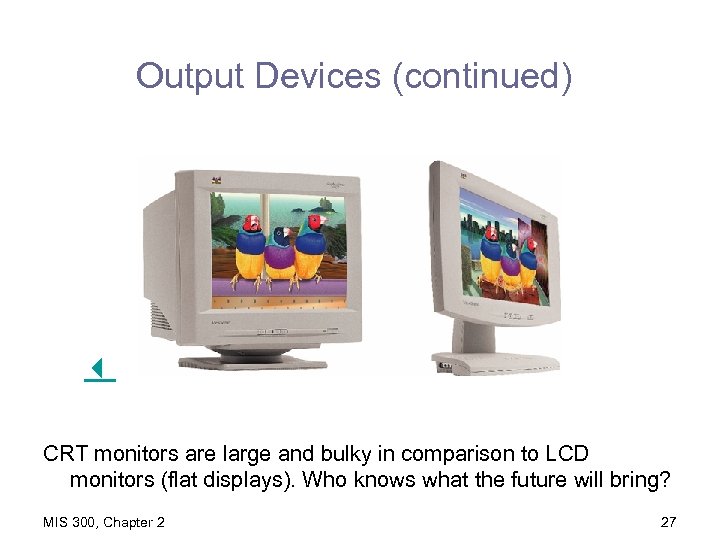
Output Devices (continued) CRT monitors are large and bulky in comparison to LCD monitors (flat displays). Who knows what the future will bring? MIS 300, Chapter 2 27
Computer System Types • • Handheld computers (ideal for …. ? ) Portable computers (solves what problem? ) Thin client (saves what? ) Desktop computers (how much longer? ) MIS 300, Chapter 2 28
Computer System Types (continued) • • • Workstations Servers Mainframe computers Superdupercomputers? MIS 300, Chapter 2 29
Overview of Software • Computer programs: sequences of instructions • Documentation: describes program functions • Systems software: coordinates the activities of hardware and programs: “To serve and protect” • Application software: helps users solve particular problems: “To get the job done” What is software really doing? Why is it important? MIS 300, Chapter 2 30
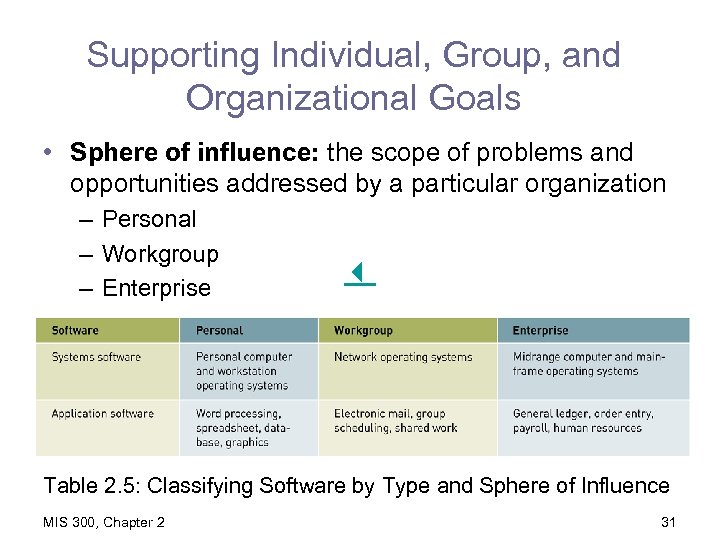
Supporting Individual, Group, and Organizational Goals • Sphere of influence: the scope of problems and opportunities addressed by a particular organization – Personal – Workgroup – Enterprise Table 2. 5: Classifying Software by Type and Sphere of Influence MIS 300, Chapter 2 31
Systems Software: Operating Systems • Operating system (OS): set of programs that control and manage the hardware and act as an interface with applications • Common hardware functions – Get input (e. g. , keyboard) – Retrieve data from disks and store data on disks – Display information on a monitor or printer MIS 300, Chapter 2 32
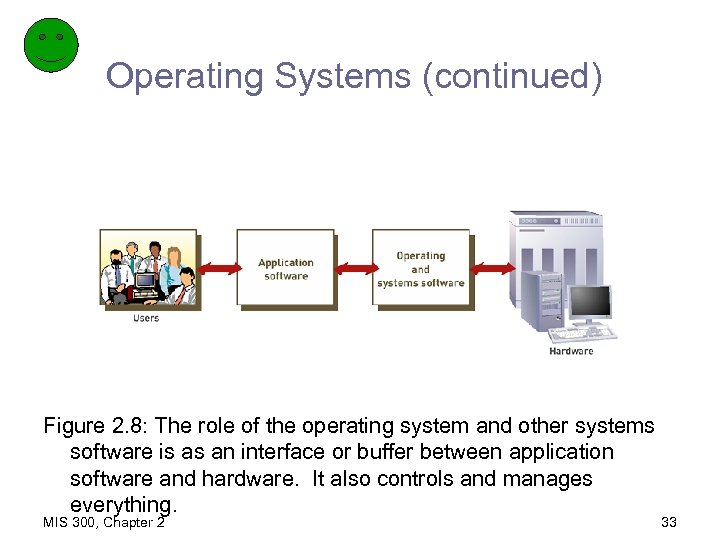
Operating Systems (continued) Figure 2. 8: The role of the operating system and other systems software is as an interface or buffer between application software and hardware. It also controls and manages everything. MIS 300, Chapter 2 33
Operating Systems (continued) • User interface – Allows individuals to access and command the computer system – Command-based user interface: uses text commands – Graphical user interface (GUI): uses icons and menus to send commands to the computer system – Smart interface: anticipates users’ needs MIS 300, Chapter 2 34
Operating Systems (continued) • Hardware independence – Application program interface (API): allows applications to make use of the operating system • Memory management – Control how memory is accessed and maximize available memory and storage MIS 300, Chapter 2 35
Operating Systems (continued) • Processing tasks – Multitasking: more than one program running at the same time – Time-sharing: more than one person using a computer system at the same time – Scalability: ability to handle an increasing number of concurrent users smoothly • Networking capability: features that aid users in connecting to a computer network MIS 300, Chapter 2 36
Operating Systems (continued) • Access to system resources – Protection against unauthorized access – Logons and passwords • File management – Ensures that files in secondary storage are • Available when needed • Protected from access by unauthorized users MIS 300, Chapter 2 37
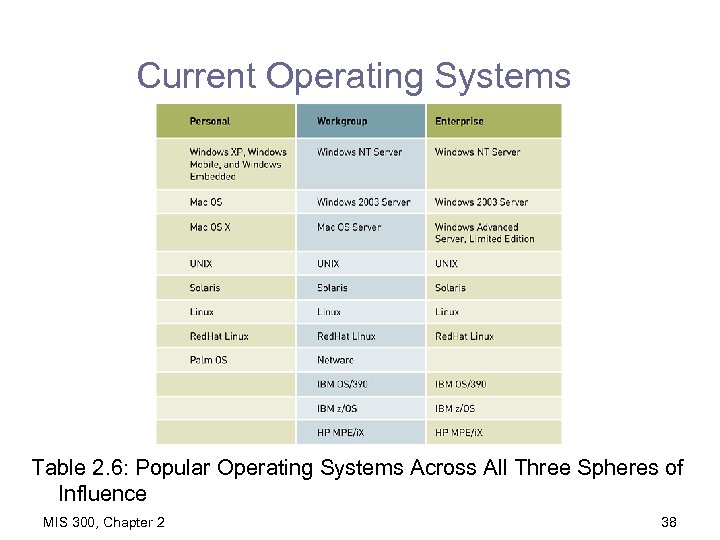
Current Operating Systems Table 2. 6: Popular Operating Systems Across All Three Spheres of Influence MIS 300, Chapter 2 38
Workgroup Operating Systems • • • Windows Server UNIX Net. Ware Red Hat Linux Mac OS X Server MIS 300, Chapter 2 39
Enterprise Operating Systems • z/OS • MPE/i. X and HP-UX • Linux MIS 300, Chapter 2 40
Operating Systems for Small Computers and Special-Purpose Devices • Palm OS • Windows Embedded • Windows Mobile MIS 300, Chapter 2 41
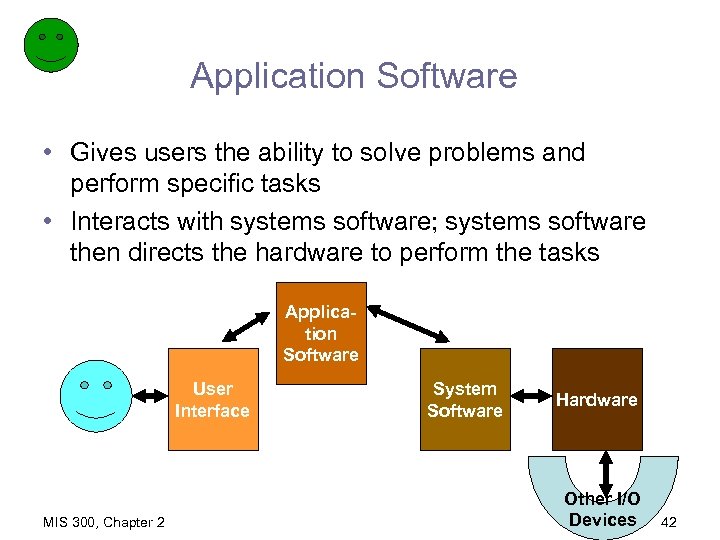
Application Software • Gives users the ability to solve problems and perform specific tasks • Interacts with systems software; systems software then directs the hardware to perform the tasks Application Software User Interface MIS 300, Chapter 2 System Software Hardware Other I/O Devices 42
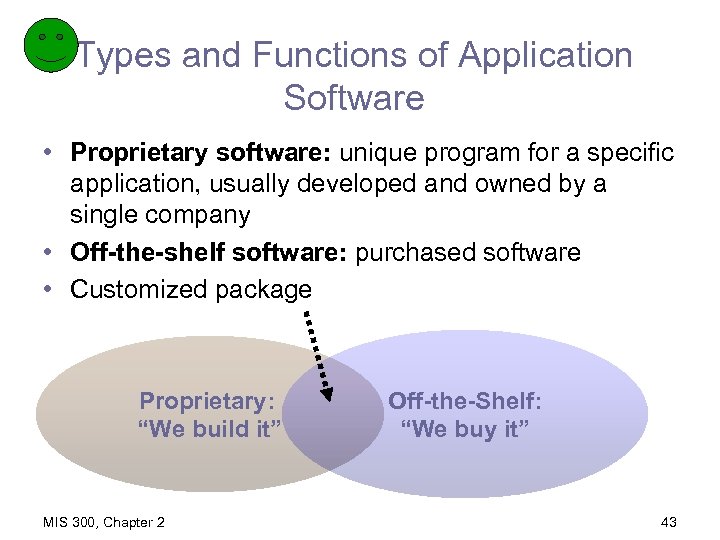
Types and Functions of Application Software • Proprietary software: unique program for a specific application, usually developed and owned by a single company • Off-the-shelf software: purchased software • Customized package Proprietary: “We build it” MIS 300, Chapter 2 Off-the-Shelf: “We buy it” 43
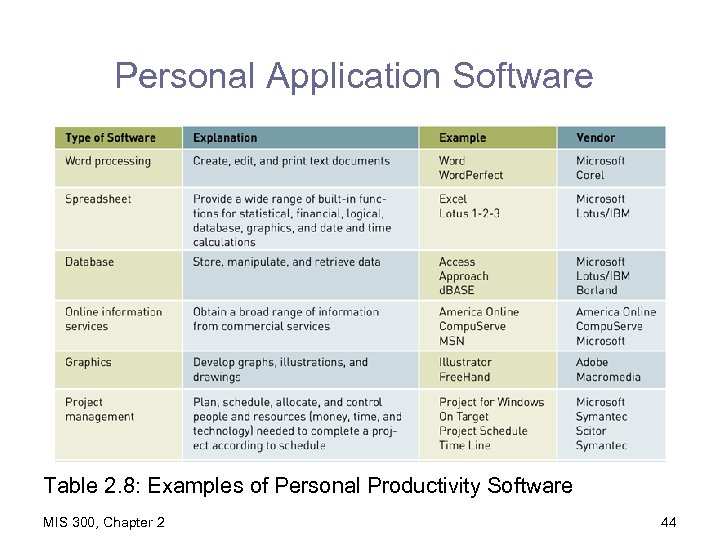
Personal Application Software Table 2. 8: Examples of Personal Productivity Software MIS 300, Chapter 2 44
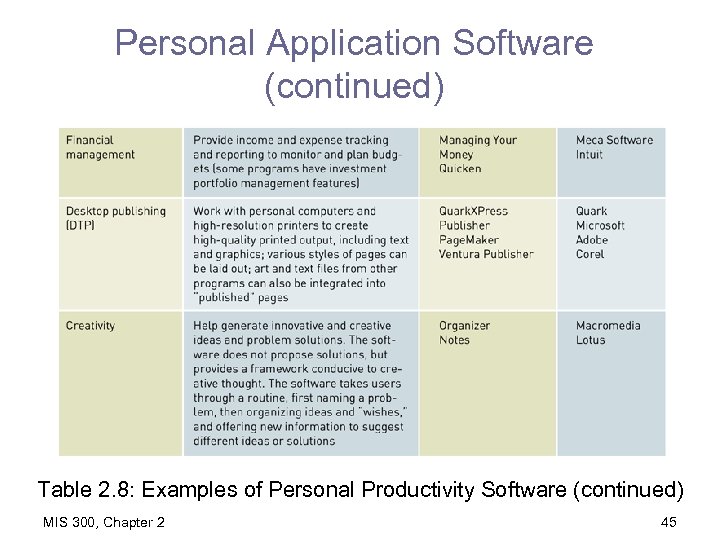
Personal Application Software (continued) Table 2. 8: Examples of Personal Productivity Software (continued) MIS 300, Chapter 2 45
Workgroup Application Software • Workgroup application software: supports teamwork, whether people are in the same location or dispersed around the world • Groupware: software that helps groups of people work together more efficiently and effectively MIS 300, Chapter 2 46
Enterprise Application Software • Software that benefits an entire organization • Enterprise resource planning (ERP) software: programs that manage a company’s vital business operations for an entire multisite, global organization • ERP integrates across functions, destroying silos and making communication easier. MIS 300, Chapter 2 47
Programming Languages • Sets of keywords, symbols, and a system of rules for constructing statements • Allow humans to communicate instructions to be executed by a computer • Syntax: a set of rules associated with a programming language • Different languages have characteristics that make them appropriate for particular types of applications MIS 300, Chapter 2 48
Programming Languages -2 • A programming language is a vehicle through which an organization’s need for processing is translated into commands that will later be executed and turned into work. • Programming is a kind of planning for action. • Programming is always “buggy” in the sense that people make mistakes and organizational needs are imperfectly understood. MIS 300, Chapter 2 49
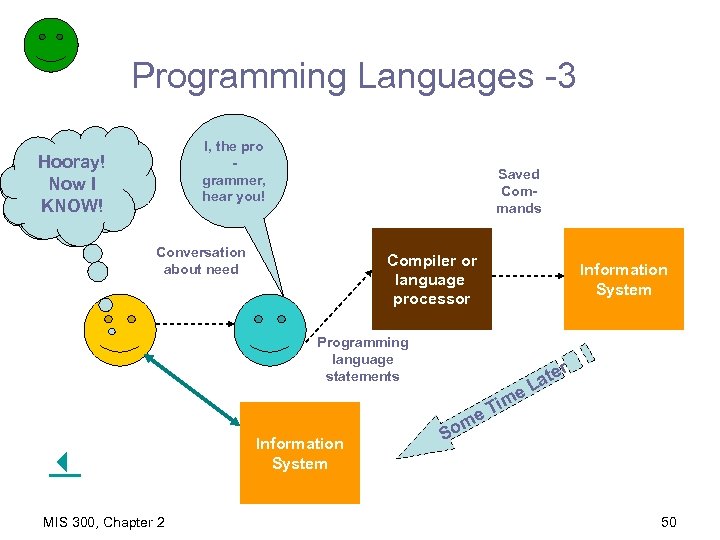
Programming Languages -3 I, the pro grammer, hear you! I need Hooray! informa. Now tion to. I solve a KNOW! problem! Saved Commands Conversation about need Compiler or language processor Information System Programming language statements e e MIS 300, Chapter 2 Information System m So Tim r ate L 50
Software Issues and Trends That Will Effect YOU! • Software bugs – Program defects that keep it from performing correctly • • Copyrights and licenses Global software support Obsolescence Outsourcing Legal issues Commoditization Security MIS 300, Chapter 2 51
Summary • Hardware: central processing unit (CPU), input and output devices, communications devices, primary storage devices, and secondary storage devices • Random access memory (RAM): temporary and volatile • ROM (read-only memory): usually nonvolatile • Multiprocessing: simultaneous execution of two or more instructions MIS 300, Chapter 2 52
Summary (continued) • • Sequential access: records retrieved in order Direct access: records retrieved in any order Computer programs: sequences of instructions Systems software: coordinates the activities of hardware and programs • Application software: helps users solve problems MIS 300, Chapter 2 53
Summary (continued) • Operating system (OS): programs that control the hardware and act as an interface with applications • Graphical user interface (GUI): uses icons and menus to send commands to the computer system • Programming languages: allow humans to communicate instructions to be executed by a computer MIS 300, Chapter 2 54
Скачать презентацию Key Slide The physical basis of the infrastructure
b3bf1350618970337cd4c939666a24a1.ppt