Скачать презентацию JQuery 2012 10 Youn-Hee Han LINK KOREATECH http link Скачать презентацию JQuery 2012 10 Youn-Hee Han LINK KOREATECH http link

50122abd6cf35562c45a5e8e774ab606.ppt

  • Количество слайдов: 28

JQuery 2012. 10 Youn-Hee Han LINK@KOREATECH http: //link. koreatech. ac. kr JQuery 2012. 10 Youn-Hee Han LINK@KOREATECH http: //link. koreatech. ac. kr
j. Query is a lightweight, open-source Java. Script library that simplifies interaction between HTML j. Query is a lightweight, open-source Java. Script library that simplifies interaction between HTML and Java. Script It was and still being developed by John Resig from Mozilla and was first announced in January 2006
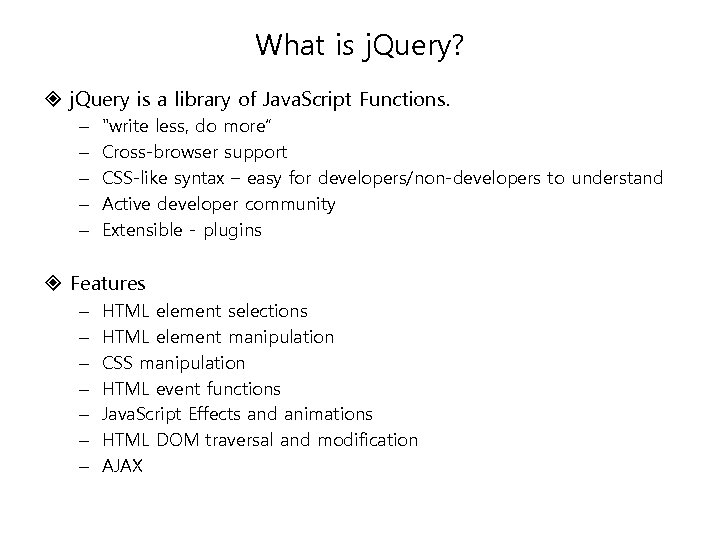
What is j. Query? j. Query is a library of Java. Script Functions. – What is j. Query? j. Query is a library of Java. Script Functions. – – – "write less, do more“ Cross-browser support CSS-like syntax – easy for developers/non-developers to understand Active developer community Extensible - plugins Features – – – – HTML element selections HTML element manipulation CSS manipulation HTML event functions Java. Script Effects and animations HTML DOM traversal and modification AJAX
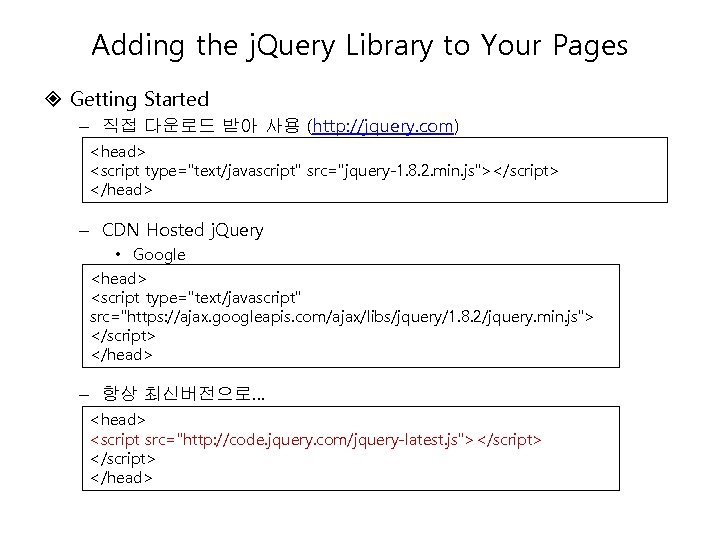
Adding the j. Query Library to Your Pages Getting Started – 직접 다운로드 받아 Adding the j. Query Library to Your Pages Getting Started – 직접 다운로드 받아 사용 (http: //jquery. com) – CDN Hosted j. Query • Google – 항상 최신버전으로…
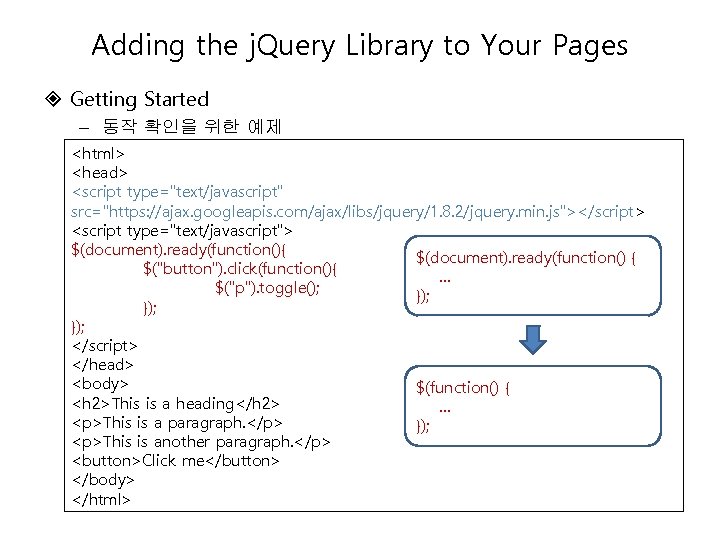
Adding the j. Query Library to Your Pages Getting Started – 동작 확인을 위한 Adding the j. Query Library to Your Pages Getting Started – 동작 확인을 위한 예제 $(function() { This is a heading

This is a paragraph.

});

This is another paragraph.

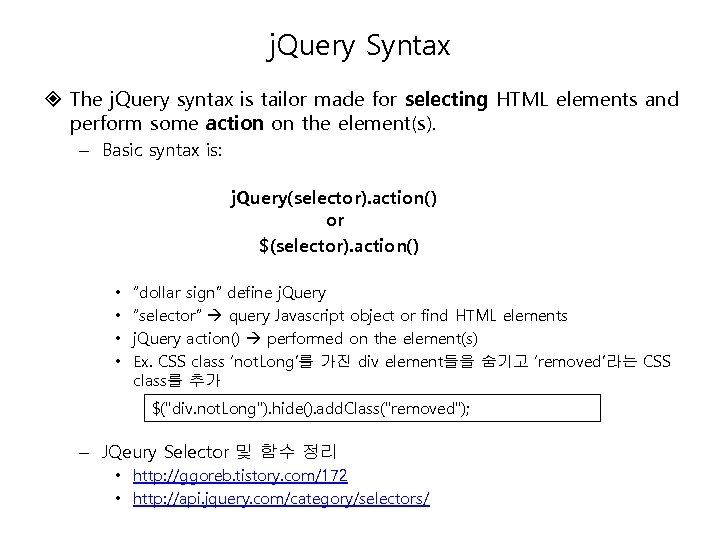
j. Query Syntax The j. Query syntax is tailor made for selecting HTML elements j. Query Syntax The j. Query syntax is tailor made for selecting HTML elements and perform some action on the element(s). – Basic syntax is: j. Query(selector). action() or $(selector). action() • • “dollar sign” define j. Query “selector” query Javascript object or find HTML elements j. Query action() performed on the element(s) Ex. CSS class ‘not. Long’를 가진 div element들을 숨기고 ‘removed’라는 CSS class를 추가 $("div. not. Long"). hide(). add. Class("removed"); – JQeury Selector 및 함수 정리 • http: //ggoreb. tistory. com/172 • http: //api. jquery. com/category/selectors/
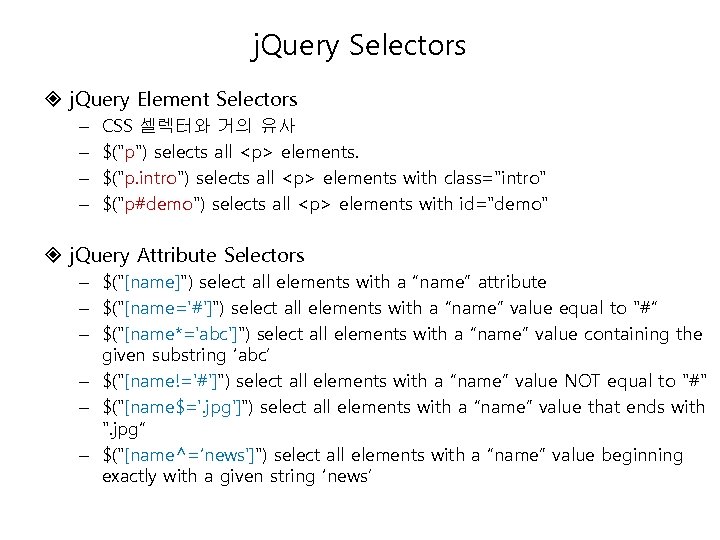
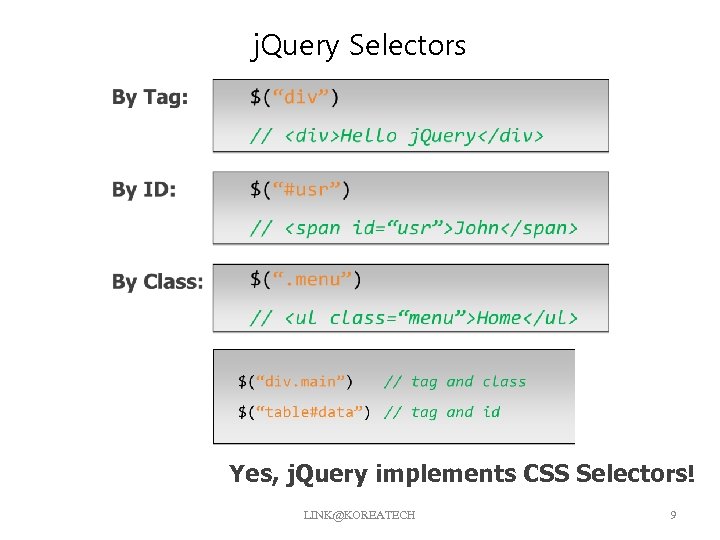
j. Query Selectors j. Query Element Selectors – – CSS 셀렉터와 거의 유사 $( j. Query Selectors j. Query Element Selectors – – CSS 셀렉터와 거의 유사 $("p") selects all

elements. $("p. intro") selects all

elements with class="intro" $("p#demo") selects all

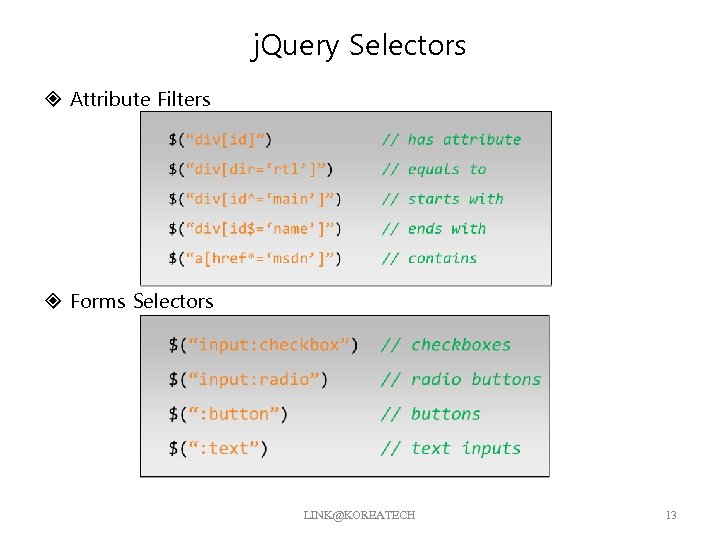
elements with id="demo" j. Query Attribute Selectors – $("[name]") select all elements with a “name” attribute – $("[name='#']") select all elements with a “name” value equal to "#“ – $("[name*='abc']") select all elements with a “name” value containing the given substring ‘abc’ – $("[name!='#']") select all elements with a “name” value NOT equal to "#" – $("[name$='. jpg']") select all elements with a “name” value that ends with ". jpg“ – $("[name^=‘news']") select all elements with a “name” value beginning exactly with a given string ‘news’

" src="https://present5.com/presentation/50122abd6cf35562c45a5e8e774ab606/image-8.jpg" alt="j. Query Selectors Example " /> j. Query Selectors Example LINK@KOREATECH 8

j. Query Selectors Yes, j. Query implements CSS Selectors! LINK@KOREATECH 9 j. Query Selectors Yes, j. Query implements CSS Selectors! LINK@KOREATECH 9

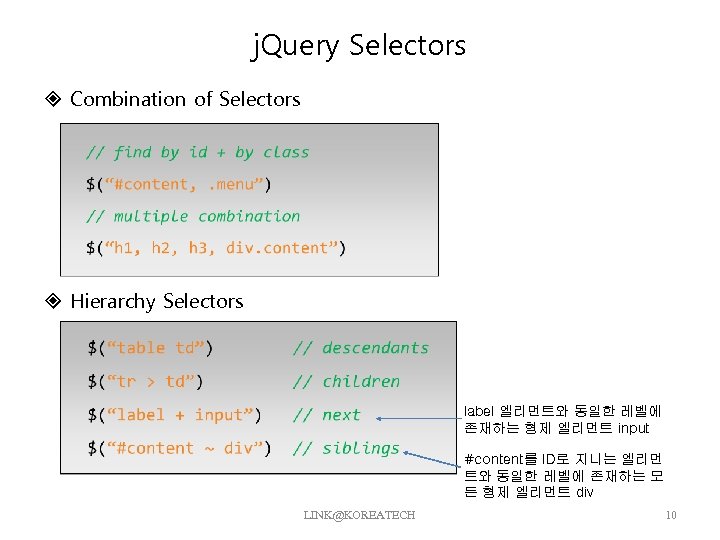
j. Query Selectors Combination of Selectors Hierarchy Selectors label 엘리먼트와 동일한 레벨에 존재하는 형제 j. Query Selectors Combination of Selectors Hierarchy Selectors label 엘리먼트와 동일한 레벨에 존재하는 형제 엘리먼트 input #content를 ID로 지니는 엘리먼 트와 동일한 레벨에 존재하는 모 든 형제 엘리먼트 div LINK@KOREATECH 10

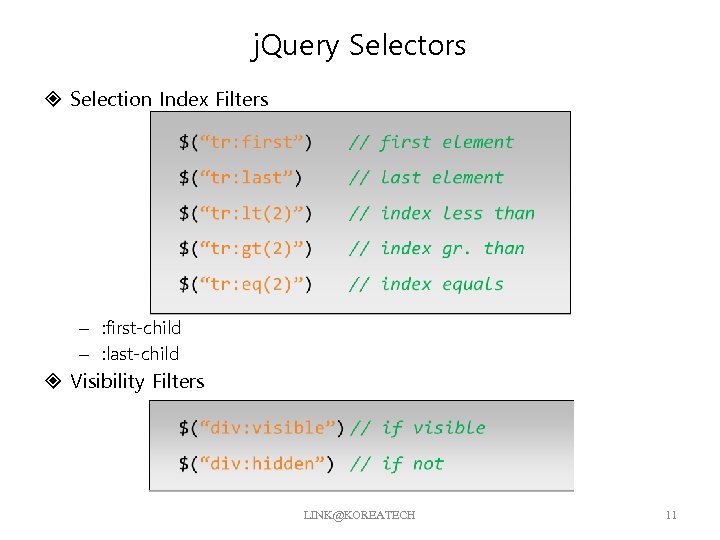
j. Query Selectors Selection Index Filters – : first-child – : last-child Visibility Filters j. Query Selectors Selection Index Filters – : first-child – : last-child Visibility Filters LINK@KOREATECH 11

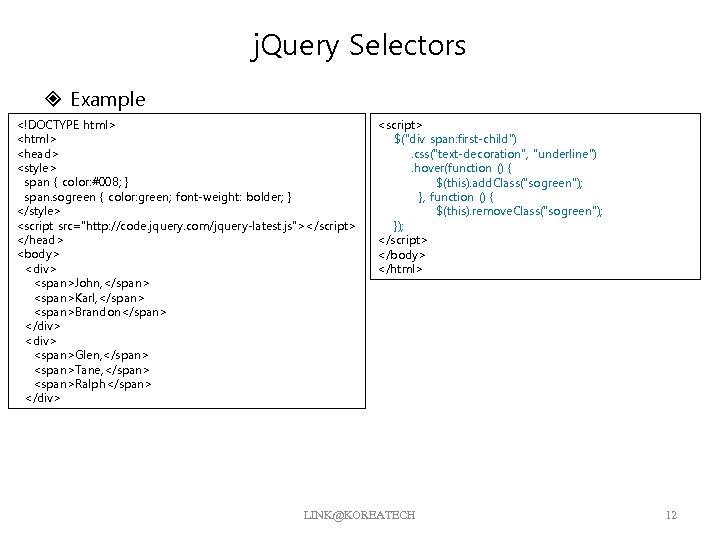
j. Query Selectors Example <!DOCTYPE html> <head> <style> span { color: #008; } span. j. Query Selectors Example

John, Karl, Brandon
Glen, Tane, Ralph
LINK@KOREATECH 12

j. Query Selectors Attribute Filters Forms Selectors LINK@KOREATECH 13 j. Query Selectors Attribute Filters Forms Selectors LINK@KOREATECH 13

j. Query Selectors Forms Filters – Ex. Find Dropdown Selected Item LINK@KOREATECH 14

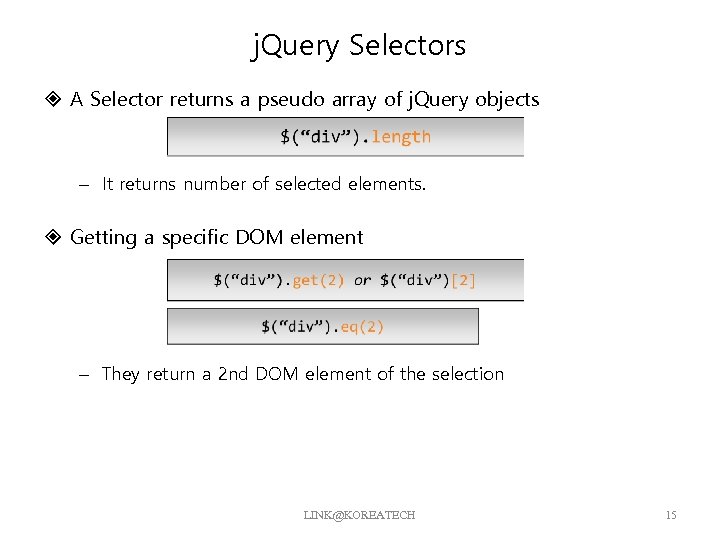
j. Query Selectors A Selector returns a pseudo array of j. Query objects – j. Query Selectors A Selector returns a pseudo array of j. Query objects – It returns number of selected elements. Getting a specific DOM element – They return a 2 nd DOM element of the selection LINK@KOREATECH 15

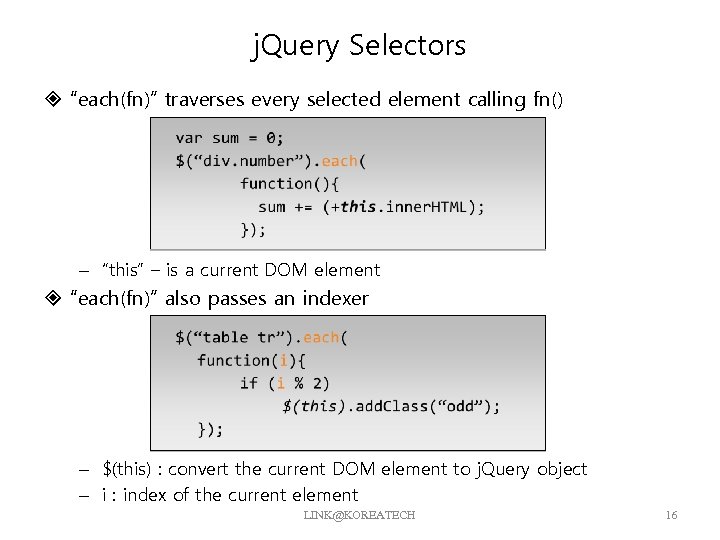
j. Query Selectors “each(fn)” traverses every selected element calling fn() – “this” – is j. Query Selectors “each(fn)” traverses every selected element calling fn() – “this” – is a current DOM element “each(fn)” also passes an indexer – $(this) : convert the current DOM element to j. Query object – i : index of the current element LINK@KOREATECH 16

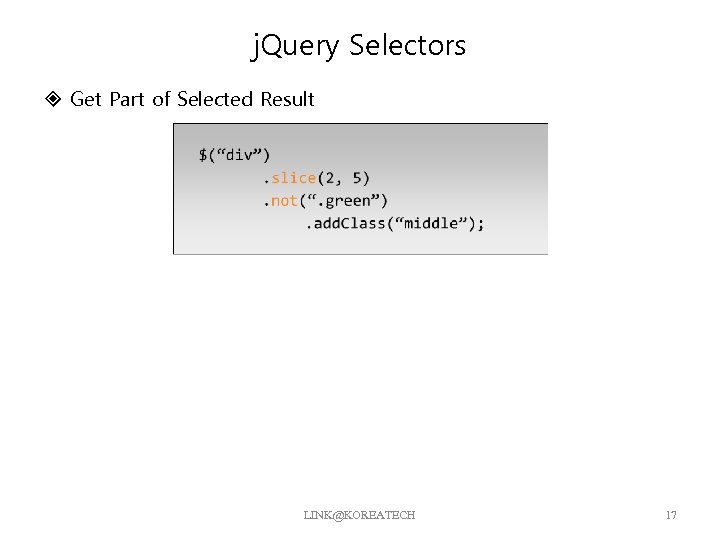
j. Query Selectors Get Part of Selected Result LINK@KOREATECH 17 j. Query Selectors Get Part of Selected Result LINK@KOREATECH 17

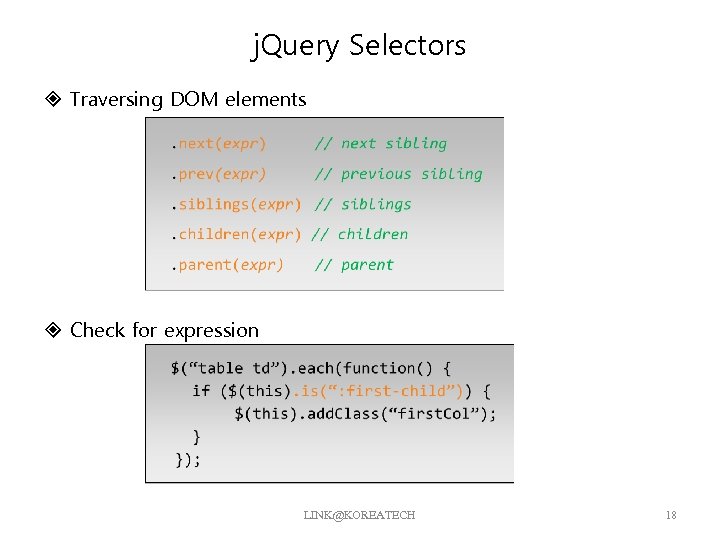
j. Query Selectors Traversing DOM elements Check for expression LINK@KOREATECH 18 j. Query Selectors Traversing DOM elements Check for expression LINK@KOREATECH 18

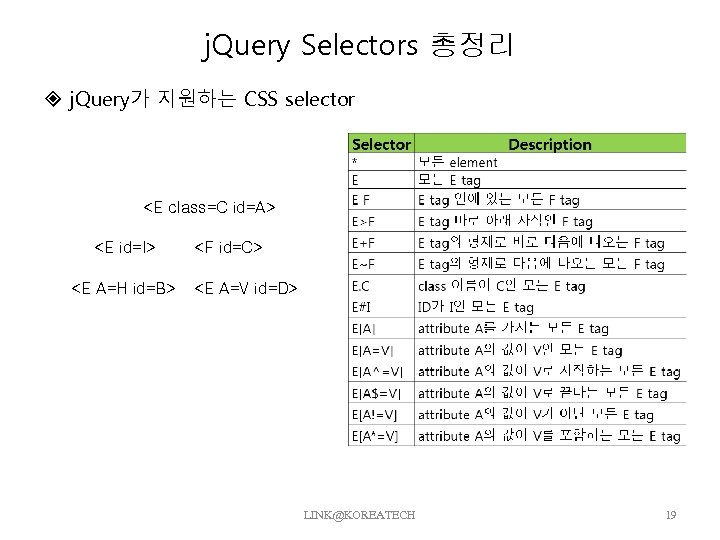
j. Query Selectors 총정리 j. Query가 지원하는 CSS selector <E class=C id=A> <E id=I> j. Query Selectors 총정리 j. Query가 지원하는 CSS selector LINK@KOREATECH 19

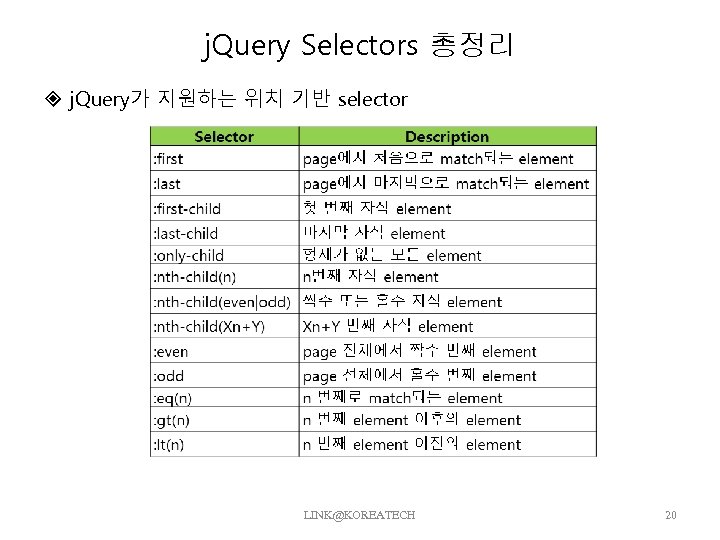
j. Query Selectors 총정리 j. Query가 지원하는 위치 기반 selector LINK@KOREATECH 20 j. Query Selectors 총정리 j. Query가 지원하는 위치 기반 selector LINK@KOREATECH 20

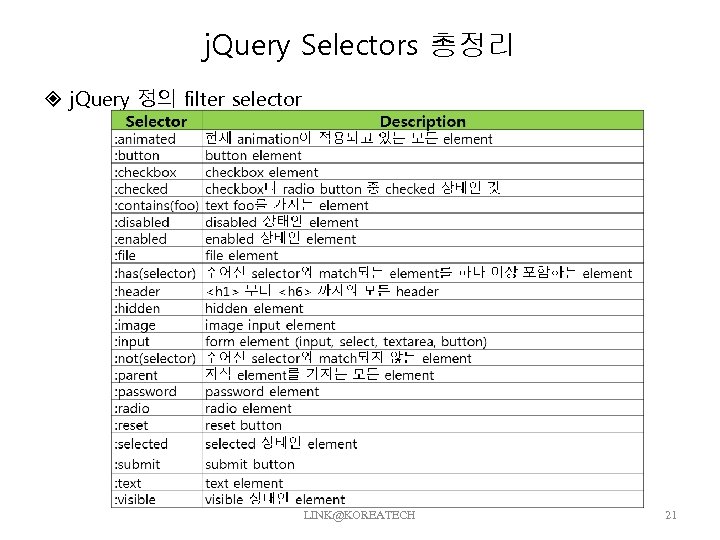
j. Query Selectors 총정리 j. Query 정의 filter selector LINK@KOREATECH 21 j. Query Selectors 총정리 j. Query 정의 filter selector LINK@KOREATECH 21

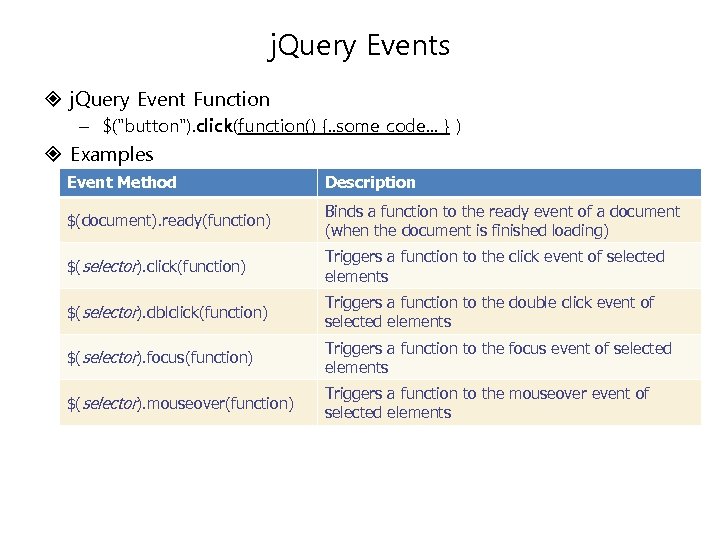
j. Query Events j. Query Event Function – $( j. Query Events j. Query Event Function – $("button"). click(function() {. . some code. . . } ) Examples Event Method Description $(document). ready(function) Binds a function to the ready event of a document (when the document is finished loading) $(selector). click(function) Triggers a function to the click event of selected elements $(selector). dblclick(function) Triggers a function to the double click event of selected elements $(selector). focus(function) Triggers a function to the focus event of selected elements $(selector). mouseover(function) Triggers a function to the mouseover event of selected elements

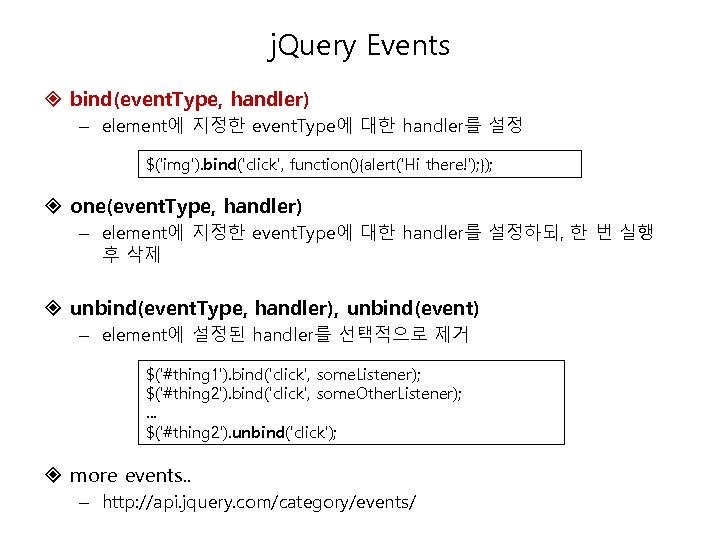
j. Query Events bind(event. Type, handler) – element에 지정한 event. Type에 대한 handler를 설정 j. Query Events bind(event. Type, handler) – element에 지정한 event. Type에 대한 handler를 설정 $('img'). bind('click', function(){alert('Hi there!'); }); one(event. Type, handler) – element에 지정한 event. Type에 대한 handler를 설정하되, 한 번 실행 후 삭제 unbind(event. Type, handler), unbind(event) – element에 설정된 handler를 선택적으로 제거 $('#thing 1'). bind('click', some. Listener); $('#thing 2'). bind('click', some. Other. Listener); . . . $('#thing 2'). unbind('click'); more events. . – http: //api. jquery. com/category/events/

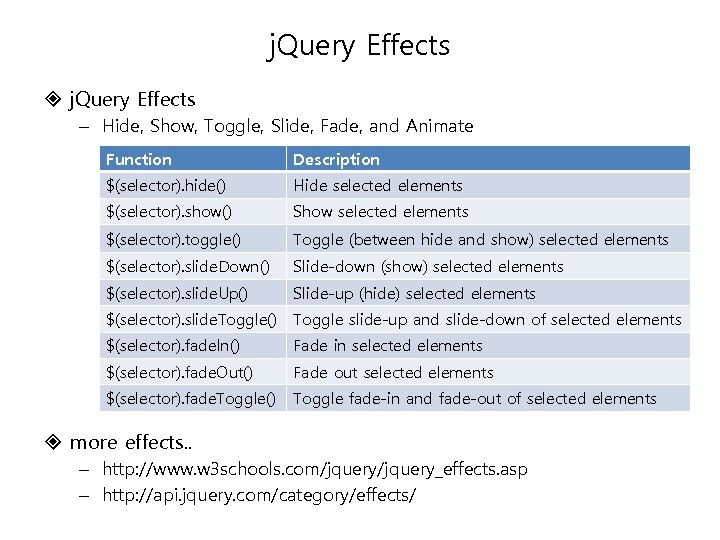
j. Query Effects – Hide, Show, Toggle, Slide, Fade, and Animate Function Description $(selector). j. Query Effects – Hide, Show, Toggle, Slide, Fade, and Animate Function Description $(selector). hide() Hide selected elements $(selector). show() Show selected elements $(selector). toggle() Toggle (between hide and show) selected elements $(selector). slide. Down() Slide-down (show) selected elements $(selector). slide. Up() Slide-up (hide) selected elements $(selector). slide. Toggle() Toggle slide-up and slide-down of selected elements $(selector). fade. In() Fade in selected elements $(selector). fade. Out() Fade out selected elements $(selector). fade. Toggle() Toggle fade-in and fade-out of selected elements more effects. . – http: //www. w 3 schools. com/jquery_effects. asp – http: //api. jquery. com/category/effects/

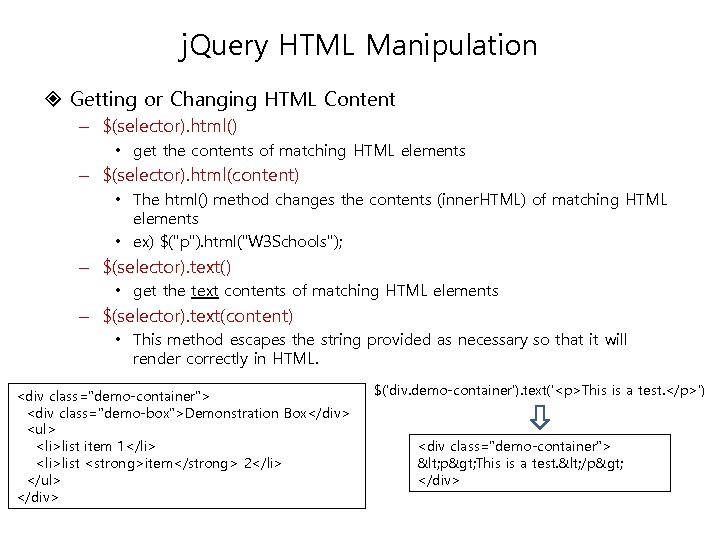
j. Query HTML Manipulation Getting or Changing HTML Content – $(selector). html() • get j. Query HTML Manipulation Getting or Changing HTML Content – $(selector). html() • get the contents of matching HTML elements – $(selector). html(content) • The html() method changes the contents (inner. HTML) of matching HTML elements • ex) $("p"). html("W 3 Schools"); – $(selector). text() • get the text contents of matching HTML elements – $(selector). text(content) • This method escapes the string provided as necessary so that it will render correctly in HTML.

Demonstration Box
  • list item 1
  • list item 2
$('div. demo-container'). text('

This is a test.

')
< p> This is a test. < /p>

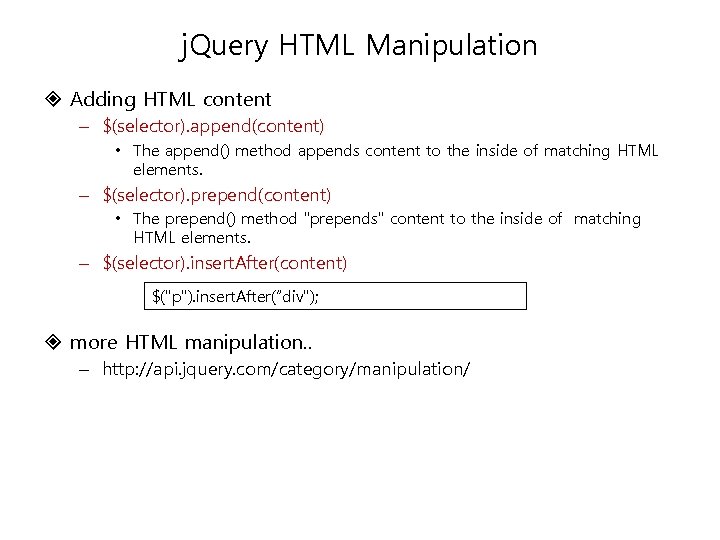
j. Query HTML Manipulation Adding HTML content – $(selector). append(content) • The append() method j. Query HTML Manipulation Adding HTML content – $(selector). append(content) • The append() method appends content to the inside of matching HTML elements. – $(selector). prepend(content) • The prepend() method "prepends" content to the inside of matching HTML elements. – $(selector). insert. After(content) $("p"). insert. After(“div"); more HTML manipulation. . – http: //api. jquery. com/category/manipulation/

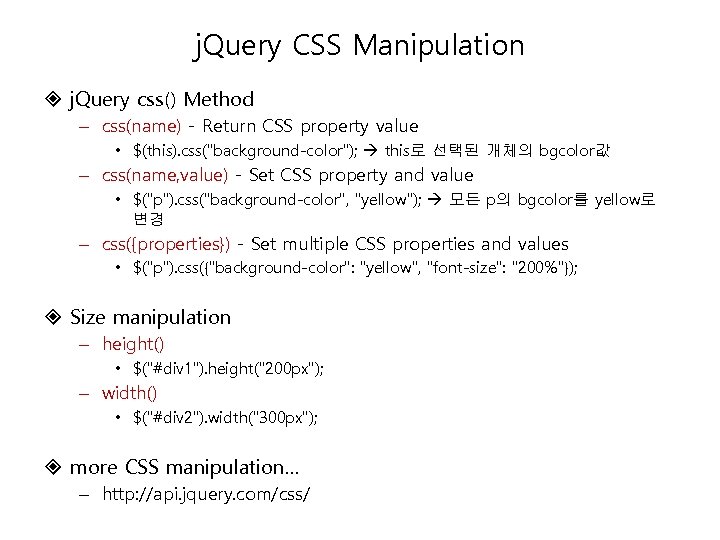
j. Query CSS Manipulation j. Query css() Method – css(name) - Return CSS property j. Query CSS Manipulation j. Query css() Method – css(name) - Return CSS property value • $(this). css("background-color"); this로 선택된 개체의 bgcolor값 – css(name, value) - Set CSS property and value • $("p"). css("background-color", "yellow"); 모든 p의 bgcolor를 yellow로 변경 – css({properties}) - Set multiple CSS properties and values • $("p"). css({"background-color": "yellow", "font-size": "200%"}); Size manipulation – height() • $("#div 1"). height("200 px"); – width() • $("#div 2"). width("300 px"); more CSS manipulation… – http: //api. jquery. com/css/

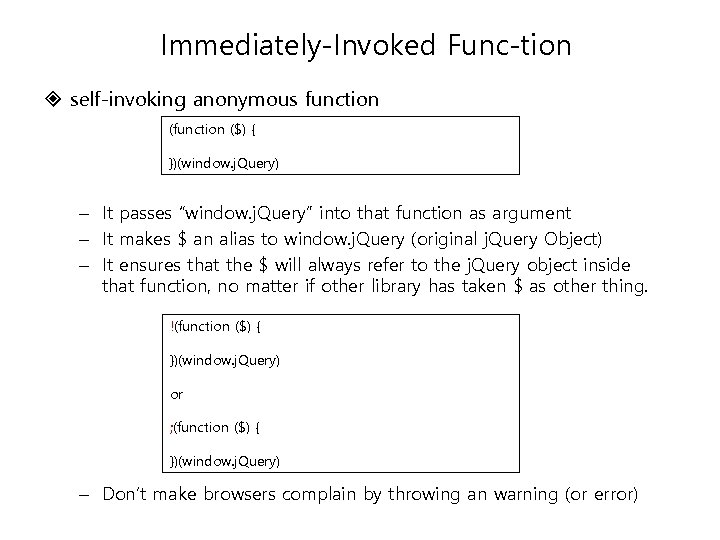
Immediately-Invoked Func tion self-invoking anonymous function ($) { })(window. j. Query) – It passes Immediately-Invoked Func tion self-invoking anonymous function ($) { })(window. j. Query) – It passes “window. j. Query” into that function as argument – It makes $ an alias to window. j. Query (original j. Query Object) – It ensures that the $ will always refer to the j. Query object inside that function, no matter if other library has taken $ as other thing. !(function ($) { })(window. j. Query) or ; (function ($) { })(window. j. Query) – Don’t make browsers complain by throwing an warning (or error)