 Скачать презентацию Java Script Debugging Diagnostic Web Tools and Firefox
23a0572a54627d9e62b87d83a1507ba4.ppt
- Количество слайдов: 33



Java. Script Debugging, Diagnostic Web Tools and Firefox Add-ons By Gennady Feldman March 12, 2008 April 9, 2008 At The Web. Tech. NY. com User Group
Summary • • Introduction Java. Script Add-ons for Firefox Add-ons for IE Fiddler Summary Q&A

Introduction • About Me • About Dynamic Logic
What is this talk about? Java. Script
Java. Script • • Java. Script != Java Sometimes dismissed as not a real programming language. Lots of web developers never really learned Java. Script. There’s a lot of resources on Java. Script, but almost nobody really explains the language and syntax. • Most people know that Java. Script is used for DOM and AJAX scripting. • A lot have heard the buzz words, not many actually know when and why to apply them.
Java. Script • Some of Java. Script features: – hashes / arrays – functions = objects – prototypal inheritance – private variables – closures – and many more… • JSON is based on Java. Script objects.
Java. Script • We know Java. Script as a Web language. • It was actually used in Netscape to script their Web Server (on the server side). • Douglas Crockford did a number of talks on Java. Script at Yahoo. • He covers Java. Script for 3+ hours focusing on syntax alone. • Yahoo has made available many talks as a free download.
Java. Script resource(s) • Yahoo – http: //developer. yahoo. com/yui/theater/ – Specifically Java. Script video sessions by Douglas Crockford – You can subscribe to YUI Theater on i. Tunes • JSLint – Java. Script Validator – http: //www. jslint. com/ - “it will hurt your feelings”. • Quirks. Mode by PPK – http: //www. quirksmode. org/
Web & Java. Script • Web Development is the hardest and the most hostile environment to work in. • HTML, CSS, Java. Script and Ajax are some of the technologies that are used on the web. • Without proper tools web development is almost impossible.
Categories of tools • • • Java. Script debugging & profiling HTML/DOM analysis CSS and layout Color picker Network capture (see what’s being downloaded) • Validation services
Firefox add-ons • Firefox is a great and very powerful browser. It also has a ton of add-ons with more added daily. • There are hundreds of add-ons available which makes it hard to find the ones you really need. • I will cover some of the ones that I use and consider to be a must have.
Firebug • A MUST for any web developer. Grab the 1. 1 B 12 build from http: //getfirebug. com • Provides a number of great tools in a nice and clean interface. • Has Java. Script debugger and profiler built-in. • Allows you to walk the DOM and play with CSS styles on the fly. • Allows you to analyze the time it takes a web page to load. • Provides console debugging API.
YSlow • Another great extension that covers web traffic and performance: http: //developer. yahoo. com/yslow/ • Created and supported by Yahoo. • Built on 14 performance rules from Yahoo. • Requires Firebug to be installed.
Web. Developer • Has a nice toolbar with many menus and options. • Quite popular with Web Designers. • Was one of the first. • Still had a great number of tools. • Firebug still does a lot more out of the box, but what’s missing from firebug is here.
No. Script • Tabs are really popular these days, so is security. • XSS (cross site scripting) and CSRF (cross site request forgery) are the biggest security problems on the web today. • Disables Flash and other plug-ins by default. • Disables 3 rd party Java. Script.
Other Firefox Add-ons • Color. Zilla – Color picker. Comes in very handy at times. • IEView – View this page/link in IE. Great shortcut. • Download Statusbar – Not a web development extension, but I love it anyway. – See download buttons in the statusbar instead of separate download dialogs.
IE tools and add-ons • Internet Explorer is behind in terms of empowering web developers. • Some people have stepped in and created some add-ons to make development easier and better. • These are not as powerful as Firefox based ones, but some of them are quite powerful. • Did you know that there’s a Java. Script debugger that comes with Microsoft Office?
Developer toolbar from Microsoft • This is a free add-on to Internet Explorer. • Has a number of tools that it offers: – – – – DOM tree navigation Showing style information. Color picker Resizer Ruler Validation Links And many more. .
Developer Toolbar from Microsoft • Some of the features are either limited or missing. (when comparing against Firebug) • No Java. Script tools. • Can’t navigate 3 rd party IFrames in the DOM tree. • I am not a big fan of it.
Web. Dev. Helper • • http: //www. codeplex. com/webdevhelper/ This is the new webpage for it. A great FREE add-on with a ton of features. Awesome for ASP. NET developers. (never actually tried this myself) • Has HTTP capture support, Java. Script Console, DOM tree navigation, etc…
Debug. Bar • • Debugbar ( http: //www. debugbar. com/ ) Free for personal/private use. Probably the most powerful of them all. Has a ton of features: – – – DOM tree split up by different element types. HTTP analysis. Different tools setup as tabs for HTML validation. Script analysis and debugging. Etc. .
IE 7 Pro • IE 7 Pro is a promising new free addon that has scripting capabilities. • Claims to work with IE 6. x and 7. x. • Has a lot of potential through scripts and addons. • Somebody has taken a Firebug Lite Java. Script source and created an IE 7 Pro plugin. • Has a growing community and a supporting website listing addons and plugins. • This is an active project that is gaining traction.
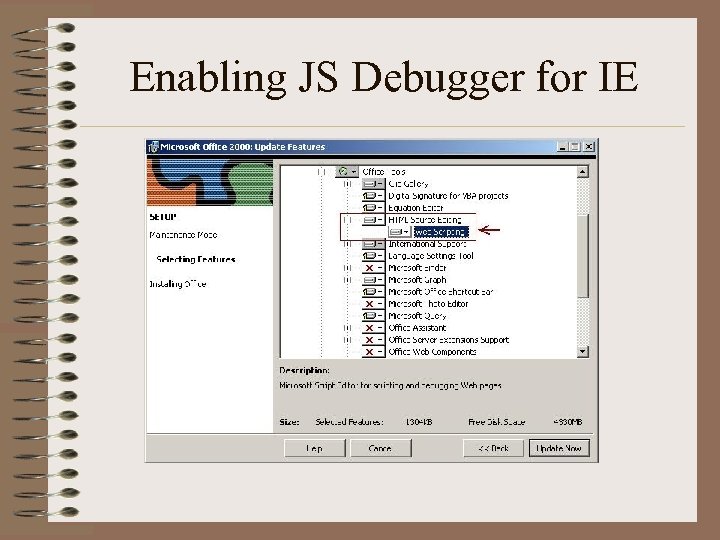
Enabling JS Debugger for IE
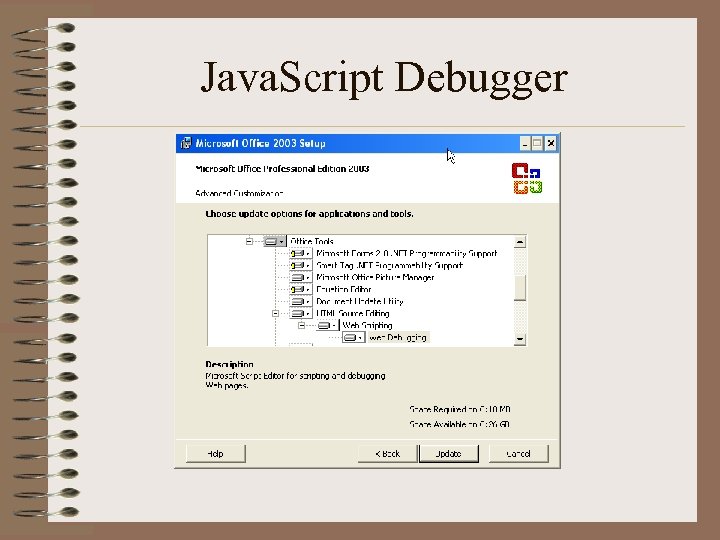
Java. Script Debugger
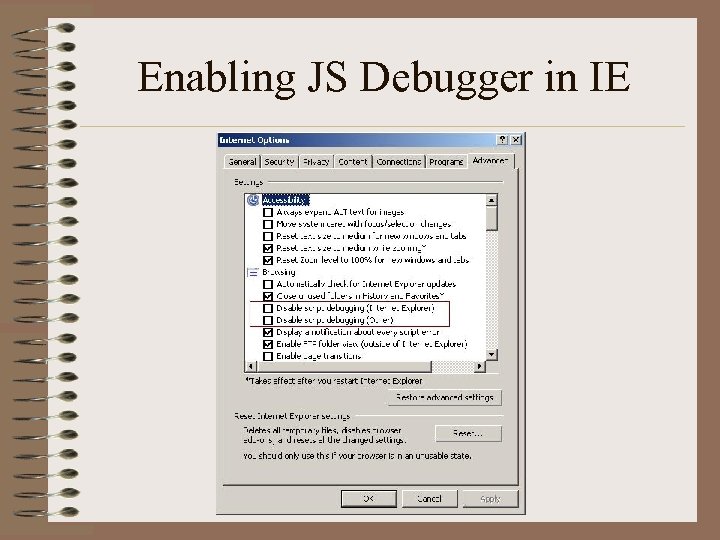
Enabling JS Debugger in IE
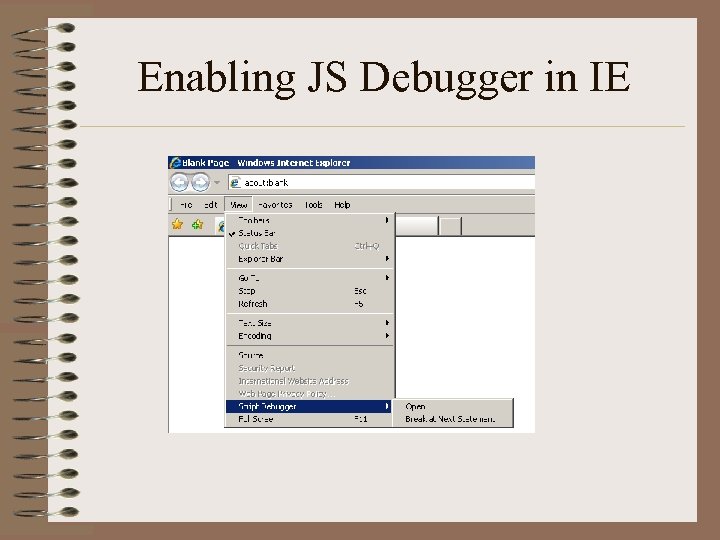
Enabling JS Debugger in IE
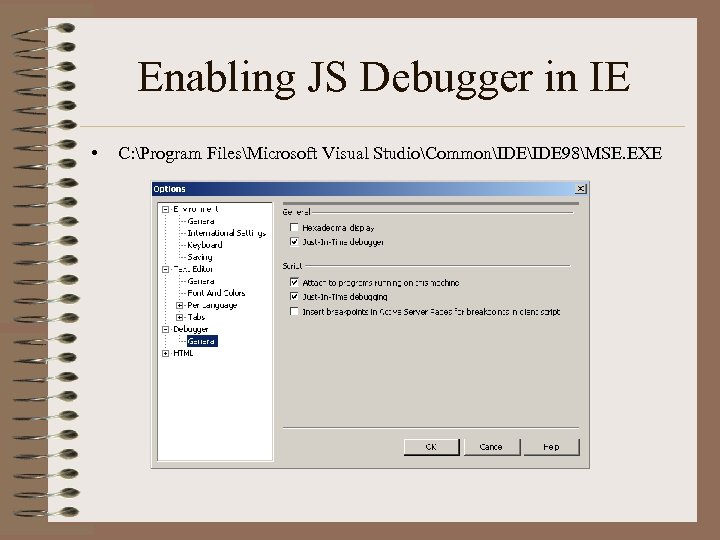
Enabling JS Debugger in IE • C: Program FilesMicrosoft Visual StudioCommonIDE 98MSE. EXE
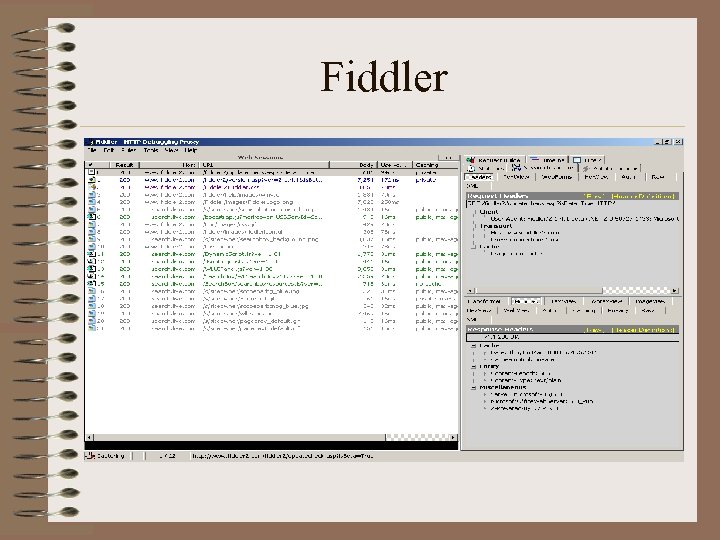
Fiddler • http: //www. fiddler 2. com • Works like a proxy between the internet and the browser. • Ties into Internet Explorer. • You can manually configure your browser to go through Fiddler. • Allows you to see what’s going on behind the scenes (over the network). • Much more powerful than default packet capture tools like Wire. Shark.
Fiddler • Shows HTTP status codes – Missing images – Redirects – Etc. . • • • Dissect HTTP(S) requests and responses. View cookies and headers. Supports plug-ins. Fully scriptable using. NET. Debug Java. Script and HTTP requests. Save captured information for later analysis.
Fiddler

Fiddler Demo
Summary • Web development is getting more complicated. • Java. Script and AJAX are being used to create web applications that run inside a browser. • These applications tend to push browser limits. • Developers need tools to be able to diagnose problems. • There are many great tools available. • I hope I gave you enough information to get you started.

Q&A
Скачать презентацию Java Script Debugging Diagnostic Web Tools and Firefox
23a0572a54627d9e62b87d83a1507ba4.ppt