


 Скачать презентацию IT 2204 Systems Administration I 9 Printing
58f7cd70389a9052c51d3ed106f1f112.ppt
- Количество слайдов: 25
 IT 2204: Systems Administration I 9. Printing
 Printing and print services – – – Printing policies and architecture Printing terms Types of printers LPD, LPRng, CUPS Adding a printer Common printing software 2
 Print Services People depend on print services for – – contracts proofreading quizzes reading unpleasantly long on-screen material Printing is a utility – It should always work 3
 Printer Location At the desktop – Convenient but expensive Location immaterial/ not relevant – As long as the service exists At a central location – e. g at a single high-speed printer, single highquality printer, and one color printer per building 4
 Reality Check People need to be able to print to any printer that they have permission to use Centralized printing services can save money e. g – A group of people may buy a slow, low quality personal printer, without support contracts, – they can buy a single high-quality, fast shared printer with long-term maintenance • the system admin only has to support one printer driver/printer rather than so many 5 for each user.
 Print Architecture How centralized will the printing be? – How many people will share a printer for general printing? – Who qualifies for a personal printer? – How will they be networked? • Networked printers require a central print-spool – Also provides access control – How will they be maintained? – How will they be paid for? 6
 Print Architecture Who orders supplies/ resupplies the printers? – Are the printers re-supplied when they are out (and users complain), or is it done regularly? What kinds of printing technologies are supported? – Postscript/PCL (Printer Control Language) – Duplex printing – Laser vs. Ink. Jet – LPD (Line Printer Daemon) over IP/NT's SMB/Apple. Talk/USB or parallel, etc. How will the printers be named? – You don't want people printing to the wrong building 7 or wrong country (!) by mistake
 Print System Architecture Peer-to-peer – – All hosts spool jobs directly to the destination printer Simplest, but all clients must know current printer IP/name No routing around broken printers Limited by printer spool memory – – – Hosts send print jobs to a central server which distributes Can convert formats Can collect per-page billing Can intelligently select printers 8 Single place for printer drivers Central funnel
 Print Terms Spooler – Daemon that receives print jobs, stores, prioritizes, and sends them sequentially to be printed PDL-Page Description Language – Describes the appearance of a printed page in a higher level that the actual bitmap – Instructs printer how to properly print page being sent from PC – Usually device and resolution independent – Post. Script, PCL (Printer control language), PDF bitmap – JPEG, TIFF, GIF 9
 Print Terms RIP-Raster Image Processor – Accepts PDL input, generates bitmap appropriate for a particular device Filters – Modify print jobs on their way to a printer Post. Script – Most common PDL – also a full programming language 10
 Printer Types Classified by connection interface – Serial and parallel printers • USB faster and the default today for personal printers – Network printers • Contain network interfaces • Accept jobs via one or more printing protocols – Including via LPD (Line Printer Daemon), CIFS (Common Internet File System- for windows file and printer sharing), IPP (Internet Printing Protocol), HP Jet. Direct 11
 Printer Types Classified by type of data – Post. Script is well-supported under Linux/UNIX – Non-postscript printers require special software to convert to unique PDL (vendor supplied, or ghostscript) 12
 Print Server Packages LPD is the old standard – Not found on current distributions LPRng – Designed for backward compatibility with Berkeley and System V printing systems – Was common ages ago (default for Red Hat 7. 3), but is now replaced by. . . CUPS – Common UNIX Printing System – Standard on modern distributions (our focus) 13
 lpr Invoked to submit a print job – Typically use –P printer to choose which printer, default printer used when none is selected % lpr –P howler-lw -# 2 thesis. ps All apps use it Checks for information about printer Under LPD it creates two files in /var/spool/lpd/printername – – One is a control file with handling information (like username) Second is a data file Then tells lpd about file 14
 lpq and lprm lpq –P printer – – Examines the queue of jobs waiting to be printed on the particular printer Shows the job id as well as owner, filename, size lprm jobid – – – Deletes one or more jobs, erasing the stored data files Can delete with job id, or by username Typically must be on machine where job was generated and must be same user (or root) Both work across a network (most of the time) 15
 lpc/lpadmin: make admin changes Can be used to – – – Enable or disable queuing for a printer Enable or disable printing on a printer Remove all jobs from a printer queue Move a job to the top of a printer's queue Start, stop, or restart the lpd daemon Get printer status information lpadmin much more powerful 16
 Filters are typically shell scripts that run on spooled data before sending to the printer Can – – Fix various non-printing sequences Write out accounting records Convert to printer-supported PDL Add banner pages 17
 CUPS Common UNIX Printing System – Latest rewrite of the printing system – Also supports secure printing (SSL, etc. ) – Implements IPP: Internet Printing Protocol (HTTP based) – Supports load-balancing across a class of printers – Supports automatic network configuration – Standard in most Linux distributions 18
 Adding a Printer in CUPS From command line: – lpadmin -p fezmo -E -v socket: //192. 168. 0. 12 -m laserjet. ppd – lpadmin -p groucho -E -v parallel: /dev/lp 0 -m pxlcolor. ppd From browser: http: //localhost: 631/admin From Red Hat/Fedora – Command line: system-config-printer – GUI: System->Administration->Printing 19
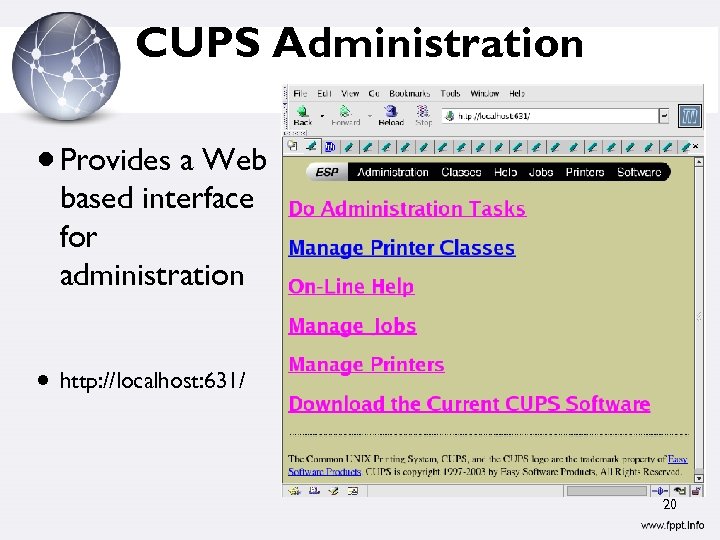 CUPS Administration Provides a Web based interface for administration http: //localhost: 631/ 20
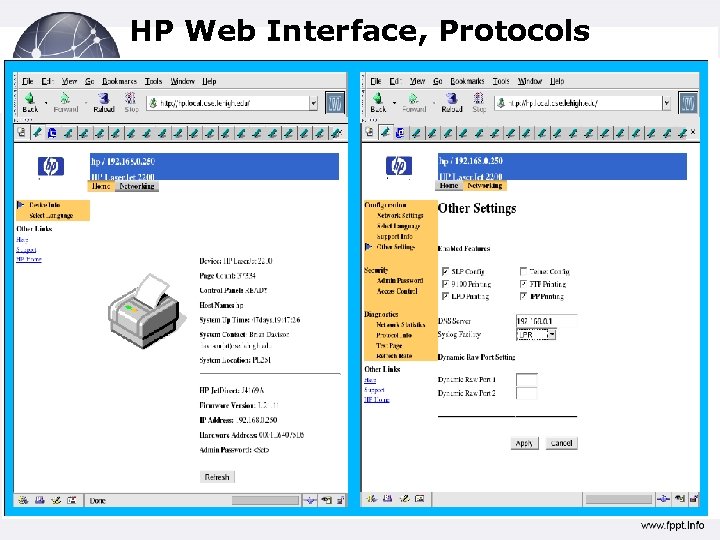 HP Web Interface, Protocols 21
 Other Common Printing Software Ghostscript – – – mpage Free Post. Script interpreter to view PS files onscreen Also used to drive raster devices (cheap printers) by rendering the PS in the format needed Powers front-ends like gv, ggv, KGhost. View – Re-formats text or Post. Script to have multiple logical pages per physical page enscript – Similar to mpage, also has nice page headers 22
 Viewing Print Files Ghostscript – Front-ends like gv, ggv, Kghost. View Acrobat reader Evince xpdf display (Image. Magick) 23
 Resources http: //www. linuxfoundation. org/collaborate/ workgroups/openprinting – Successor to linux-printing. org http: //www. cups. org/ – And if CUPS is installed, http: //localhost: 631/ http: //www. lprng. com/ 24
 Q&A
Q&A