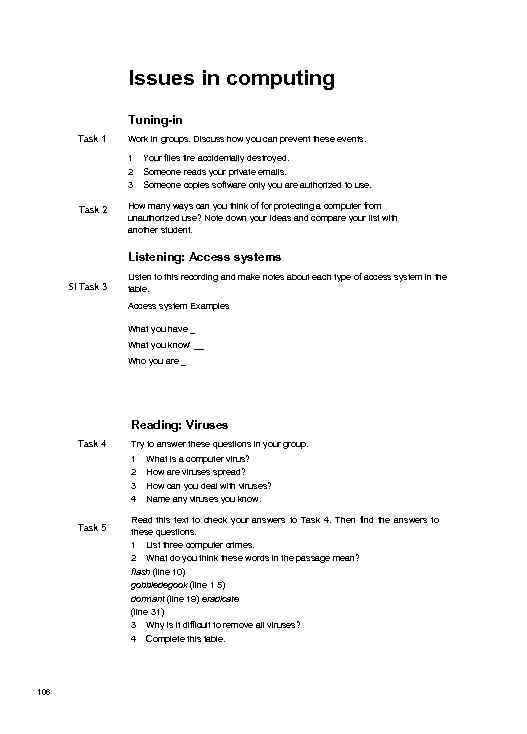
 Issues in computing Tuning-in Task 1 Work in groups. Discuss how you can prevent these events. 1 2 3 Task 2 Your files tire accidentally destroyed. Someone reads your private emails. Someone copies software only you are authorized to use. How many ways can you think of for protecting a computer from unauthorized use? Note down your ideas and compare your list with another student. Listening: Access systems SI Task 3 Listen to this recording and make notes about each type of access system in the table. Access system Examples What you have _ What you know' __ Who you are _ Reading: Viruses Task 4 Try to answer these questions in your group. 1 2 3 4 Task 5 106 What is a computer virus? How are viruses spread? How can you deal with viruses? Name any viruses you know. Read this text to check your answers to Task 4. Then find the answers to these questions. 1 List three computer crimes. 2 What do you think these words in the passage mean? flash (line 10) gobbledegook (line 1 5) dormant (line 19) eradicate (line 31) 3 Why is it difficult to remove all viruses? 4 Complete this table.
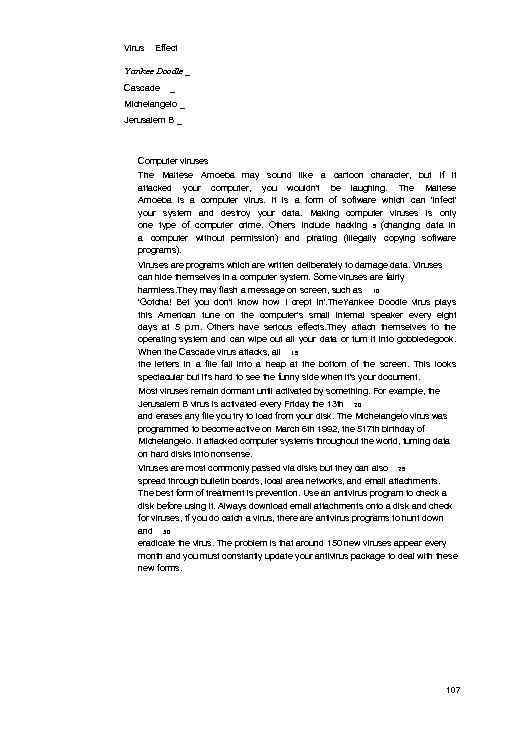 Virus Effect Yankee Doodle _ Cascade _ Michelangelo _ Jerusalem B _ Computer viruses The Maltese Amoeba may sound like a cartoon character, but if it attacked your computer, you wouldn't be laughing. The Maltese Amoeba is a computer virus. It is a form of software which can 'infect' your system and destroy your data. Making computer viruses is only one type of computer crime. Others include hacking 5 (changing data in a computer without permission) and pirating (illegally copying software programs). Viruses are programs which are written deliberately to damage data. Viruses can hide themselves in a computer system. Some viruses are fairly harmless. They may flash a message on screen, such as 10 'Gotcha! Bet you don't know how I crept in'. The. Yankee Doodle virus plays this American tune on the computer's small internal speaker every eight days at 5 p. m. Others have serious effects. They attach themselves to the operating system and can wipe out all your data or turn it into gobbledegook. When the Cascade virus attacks, all 15 the letters in a file fall into a heap at the bottom of the screen. This looks spectacular but it's hard to see the funny side when it's your document. Most viruses remain dormant until activated by something. For example, the Jerusalem B virus is activated every Friday the 13 th 20 and erases any file you try to load from your disk. The Michelangelo virus was programmed to become active on March 6 th 1992, the 517 th birthday of Michelangelo. It attacked computer systems throughout the world, turning data on hard disks into nonsense. Viruses are most commonly passed via disks but they can also 25 spread through bulletin boards, local area networks, and email attachments. The best form of treatment is prevention. Use an antivirus program to check a disk before using it. Always download email attachments onto a disk and check for viruses, tf you do catch a virus, there antivirus programs to hunt down and 30 eradicate the virus. The problem is that around 150 new viruses appear every month and you must constantly update your antivirus package to deal with these new forms. 107
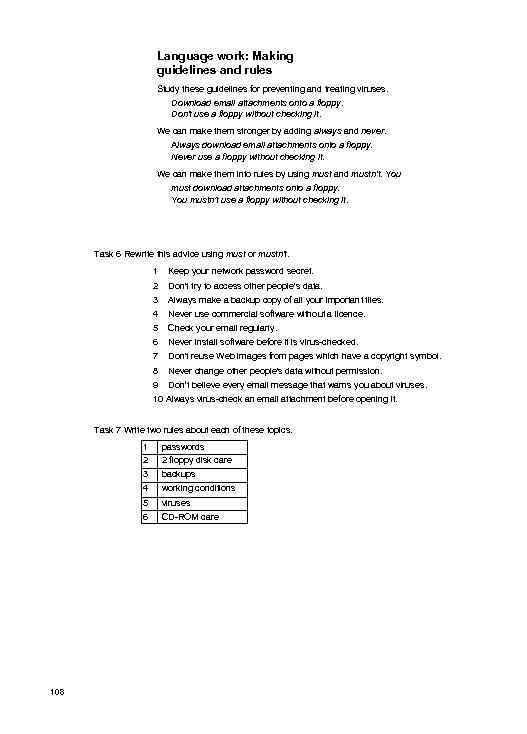 Language work: Making guidelines and rules Study these guidelines for preventing and treating viruses. Download email attachments onto a floppy. Don't use a floppy without checking it. We can make them stronger by adding always and never. Always download email attachments onto a floppy. Never use a floppy without checking it. We can make them into rules by using must and mustn't. You must download attachments onto a floppy. You mustn’t use a floppy without checking it. Task 6 Rewrite this advice using must or mustn't. 1 Keep your network password secret. 2 Don't try to access other people's data. 3 Always make a backup copy of all your important tiles. 4 Never use commercial software without a licence. 5 Check your email regularly. 6 Never install software before it is virus-checked. 7 Don't reuse Web images from pages which have a copyright symbol. 8 Never change other people's data without permission. 9 Don’t believe every email message that warns you about viruses. 10 Always virus-check an email attachment before opening it. Task 7 Write two rules about each of these topics. 1 2 3 backups 4 working conditions 5 6 108 passwords 2 floppy disk care viruses CD-ROM care
 ' Problem-solving Task 8 These headlines cover some of the ethical issues involved in computing. Work in pairs. Try to match the headlines to the first sentence of each story. i NET BOMB BLAST INJURES BOYS 2 Cyberspace faces crucial court test 3 4 Police turning cybercop to net villains Fears that new virus causes Internet chaos 5 CRIME AND PUNISHMENT The Internet may prove to be head of the National Criminal a superhighway to crime for Intelligence Service has warned, technologically-minded villains, the The Scotsman An historic test ease in a German court is to weigh the ethical and commercial question of who controls information on the Internet with the American online services company Compu. Serve being accused of trafficking in pornography and neo. Nazi propaganda. The Guardian The Federation Against Software Theft (FAST) and the mid-Glamorgan Trading Standards office have employed forensic technology to nab a software pirate. PC Pro Two 16 -year-old Finnish schoolboys could face serious charges after a bomb they were making from instructions found on the Internet blew up. The Guardian If you switch on your computer today and a sign appears saying ‘You have GOT to read this’ - do not be tempted, because hidden in this email is a sinister new virus. The Scotsman Writing Task 9 With the help of Task 2 and the recording, write guidelines and rules for protecting a computer from unauthorized use. 109
 Careers in computing Tuning-in Task 1 Work in groups. List some of the jobs you know in computing. Compare your lists with other students in the class. Task 2 Which of the jobs listed would you like to make your career? Explain why to others in your group. Reading: Computing jobs Task 3 Work in groups of three. A, B. and C. Read these descriptions of jobs in computing and make notes about the main responsibilities. Group A Group B Group C Read descriptions 5 -6 Read descriptions 1 -2 3 -4 Example Systems Analyst Studies methods of working within an organization to decide how tasks can be done efficiently by computers. Makes a detailed analysis of the employer's requirements and work patterns to prepare a report on different options for using information technology. This may involve consideration of hardware as well as software. Either uses standard computer packages or writes a specification for programmers to adapt existing software or to prepare new software. May oversee the implementation and testing of a system and acts as a link between the user and the programmer. Job Main responsibilities Systems analyst Studies employer's requirements and working patterns. Reports on different options. Writes specifications for programmers. Oversees implementation and testing. 1 Software Engineer/Designer Produces the programs which control the internal operations of computers. Converts the system analyst's specification to a logical series of steps. Translates these into the appropriate computer language. Often compiles programs from libraries or sub-programs, combining these to make up a complete systems program. Designs, tests, and improves programs for computer-aided design and manufacture, business applications, computer networks, and games.
 2 Computer Salesperson Advises potential customers about available hardware and sells equipment to suit individual requirements. Discusses computing needs with the client to ensure that a suitable system can be supplied. Organizes the sale and delivery and, if necessary, installation and testing. May arrange support or training, maintenance, and consultation. Must have sufficient technical knowledge. Computer Systems Support Person Systems support people are analyst programmers who are responsible for maintaining, updating, and modifying the software used by a company. Some specialize in software which handles the basic operation of the computers. This involves the use of machine codes and specialized lowlevel computer languages. Most handle applications software. May sort out problems encountered by users, Solving problems may involve amending an area of code in the software, retrieving files and data lost when a system crashes, and a basic knowledge of hardware. 4 Computer Systems Analyst Programmer Creates the software programs used by computers. May specialize in the internal operating systems using low level computer language, or in applications programs. May specialize in one aspect of the work, e. g. programming, systems design, systems analysis, or cover them all. May support the system through advice and training, providing user manuals, and by helping users with any problems that arise. ■> Hardware Engineer Researches, designs, and develops computers, or parts of computers and the computerized element of appliances, machines, and vehicles. Also involved in their manufacture, installation, and testing. May specialize in different areas: research and development, design, manufacturing. Has to be aware of cost, efficiency, safety, and environmental factors, as well as engineering aspects. 6 Network Support Person Maintains the link between PCs and workstations connected in a network. Uses telecommunications, software, and electronic skills, and knowledge of the networking software to locate and correct faults. This may involve work with the controlling software, on the wiring, printed circuit boards, software or microchips on a file server, or on cables either within or outside the building. Task 4 Exchange information wit h other students in your group. 11 1
 Listening: Talking about work CH 3 Task 5 Listen to this recording of live people employed in computing talking about their work. Try to match each extract to the correct job from this list. a Hardware Engineer b Network Support Person c Operator d Software Designer g e Systems Analyst Programmer f Systems Support Person Technical Sales Manager Language work: Job requirements Study some of the requirements for the job of Computer Network Support Person. Essential 1 2 3 4 5 Diploma in computing or telecommunications engineering Good communication skills to discuss requirements with users Deductive ability for analysing faults Able to work quickly under pressure Normal colour vision to follow colour-coding of wires Desirable 6 Interest in technology to keep up with new developments 7 Physically lit for lifting, carrying, and bending We can describe the essential requirements like this. They must have a diploma in computing or telecommunications engineering. They must have normal colour vision. We can describe the desirable requirements like this. They should have an interest in technology. They should be physically fit. Task 6 Study these requirements for a Computer Technical Salesperson. Decide which are essential and which are desirable. Then describe each requirement using must have/be or should have/be. 1 a certificate or diploma in computing 2 experience in the computer industry 3 able to put technical ideas into everyday language 4 able to persuade and negotiate 5 a qualification in marketing 6 a thorough understanding of the product 7 a driving licence 8 a high level of communication skills 9 patient, persistent, and diplomatic 10 able to work away from home 112
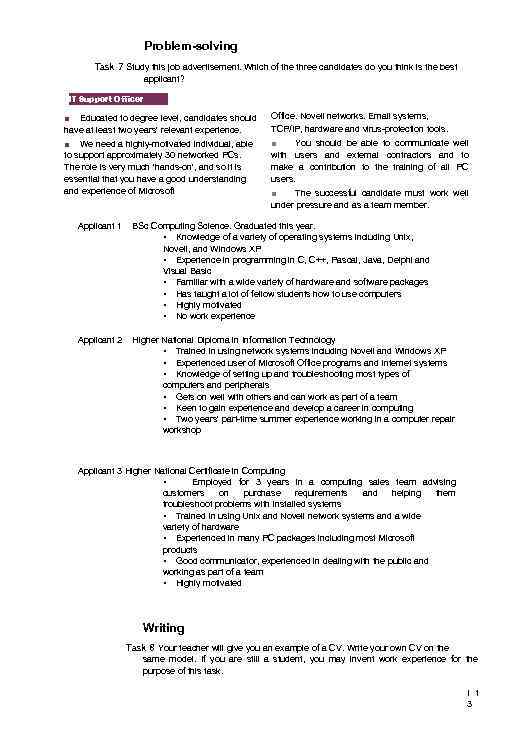 Problem-solving Task 7 Study this job advertisement. Which of the three candidates do you think is the best applicant? IT Support Officer ■ Educated to degree level, candidates should have at least two years' relevant experience. Office. Novell networks. Email systems, TCP/IP, hardware and virus-protection tools. ■ We need a highly-motivated individual, able to support approximately 30 networked PCs. The role is very much 'hands-on', and so it is essential that you have a good understanding and experience of Microsoft ■ You should be able to communicate well with users and external contractors and to make a contribution to the training of all PC users. ■ The successful candidate must work well under pressure and as a team member. Applicant 1 BSc Computing Science. Graduated this year. • Knowledge of a variety of operating systems including Unix, Novell, and Windows XP • Experience in programming in C, C++, Pascal, Java, Delphi and Visual Basic • Familiar with a wide variety of hardware and software packages • Has taught a lot of fellow students how to use computers • Highly motivated • No work experience Applicant 2 Higher National Diploma in Information Technology • Trained in using network systems including Novell and Windows XP • Experienced user of Microsoft Office programs and Internet systems • Knowledge of setting up and troubleshooting most types of computers and peripherals • Gets on well with others and can work as part of a team • Keen to gain experience and develop a career in computing • Two years' part-time summer experience working in a computer repair workshop Applicant 3 Higher National Certificate in Computing • Employed for 3 years in a computing sales team advising customers on purchase requirements and helping them troubleshoot problems with installed systems • Trained in using Unix and Novell network systems and a wide variety of hardware • Experienced in many PC packages including most Microsoft products • Good communicator, experienced in dealing with the public and working as part of a team • Highly motivated Writing Task 8 Your teacher will give you an example of a CV. Write your own CV on the same model. If you are still a student, you may invent work experience for the purpose of this task. I 1 3
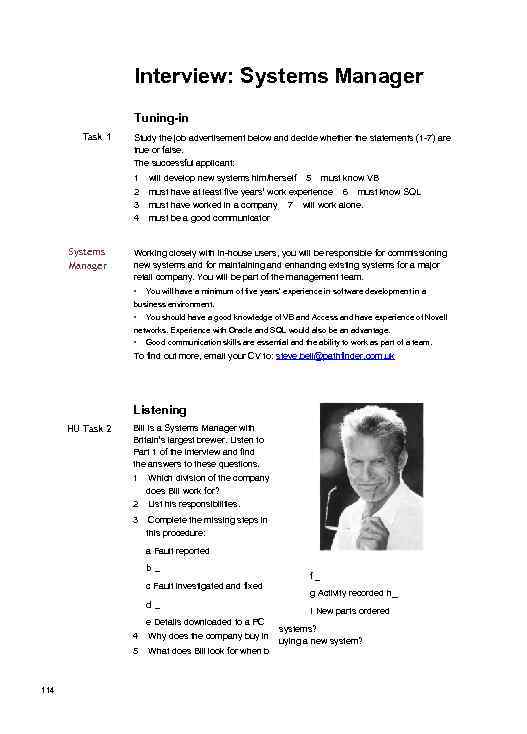 Interview: Systems Manager Tuning-in Task 1 Study the job advertisement below and decide whether the statements (1 -7) are true or false. The successful applicant: 1 2 3 4 Systems Manager will develop new systems him/herself 5 must know VB must have at least five years’ work experience 6 must know SQL must have worked in a company 7 will work alone. must be a good communicator Working closely with in-house users, you will be responsible for commissioning new systems and for maintaining and enhancing existing systems for a major retail company. You will be part of the management team. • You will have a minimum of five years' experience in software development in a business environment. • You should have a good knowledge of VB and Access and have experience of Novell networks. Experience with Oracle and SQL would also be an advantage. • Good communication skills are essential and the ability to work as part of a team. To find out more, email your CV to: steve. bell@pathfinder. com. uk Listening HU Task 2 Bill is a Systems Manager with Britain’s largest brewer. Listen to Part 1 of the interview and find the answers to these questions. 1 Which division of the company does Bill work for? 2 List his responsibilities. 3 Complete the missing steps in this procedure: a Fault reported b_ c Fault investigated and fixed d_ e Details downloaded to a PC 4 5 114 Why does the company buy in What does Bill look for when b f_ g Activity recorded h_ i New parts ordered systems? uying a new system?
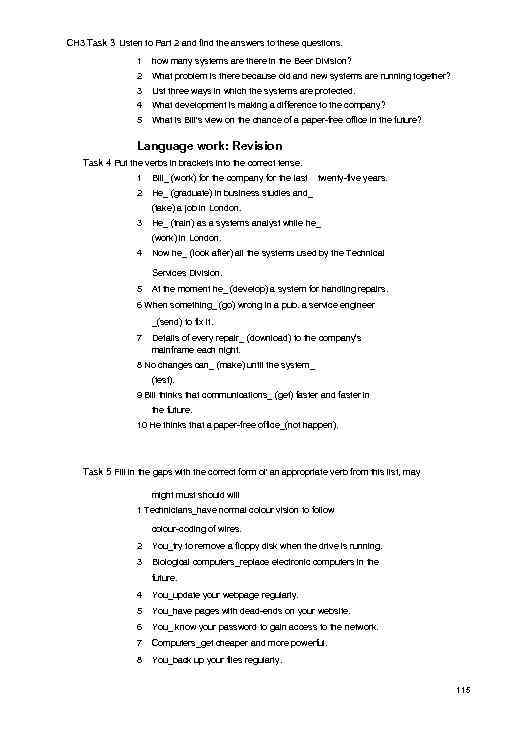 CH 3 Task 3 Listen to Part 2 and find the answers to these questions. 1 how many systems are there in the Beer Division? 2 What problem is there because old and new systems are running together? 3 List three ways in which the systems are protected. 4 What development is making a difference to the company? 5 What is Bill's view on the chance of a paper-free office in the future? Language work: Revision Task 4 Put the verbs in brackets into the correct tense. 1 Bill_ (work) for the company for the last 2 twenty-five years. He_ (graduate) in business studies and_ (take) a job in London. 3 He_ (train) as a systems analyst while he_ (work) in London. 4 Now he_ (look after) all the systems used by the Technical Services Division. 5 At the moment he_ (develop) a system for handling repairs. 6 When something_ (go) wrong in a pub. a service engineer _(send) to fix it. 7 Details of every repair_ (download) to the company’s mainframe each night. 8 No changes can_ (make) until the system_ (test). 9 Bill thinks that communications_ (get) faster and faster in the future. 10 He thinks that a paper-free office_(not happen). Task 5 Fill in the gaps with the correct form ol' an appropriate verb from this list, may might must should will 1 Technicians_have normal colour vision to follow colour-coding of wires. 2 You_try to remove a floppy disk when the drive is running. 3 Biological computers_replace electronic computers in the future. 4 You_update your webpage regularly. 5 You_have pages with dead-ends on your website. 6 You_ know your password to gain access to the network. 7 Computers_get cheaper and more powerful. 8 You_back up your files regularly. 115
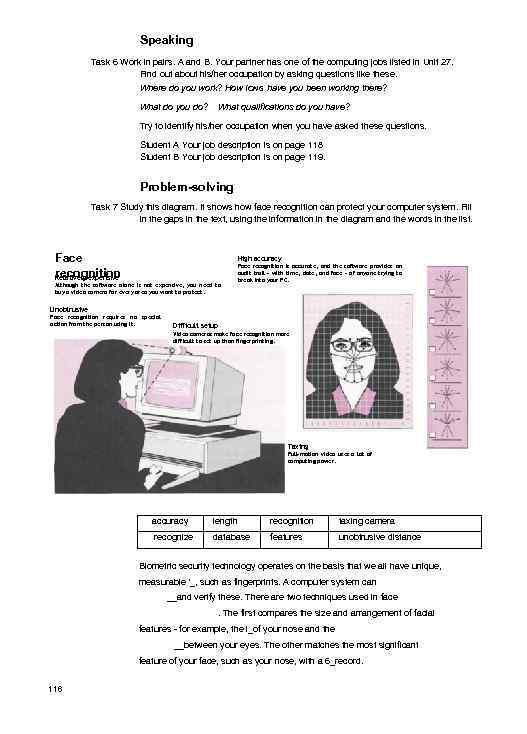 Speaking Task 6 Work in pairs. A and B. Your partner has one of the computing jobs listed in Unit 27. Find out about his/her occupation by asking questions like these. Where do you work? How IONG have you been working there? What do you do? What qualifications do you have? Try to identify his/her occupation when you have asked these questions. Student A Your job description is on page 118 Student B Your job description is on page 119. Problem-solving Task 7 Study this diagram. It shows how face recognition can protect your computer system. Fill in the gaps in the text, using the information in the diagram and the words in the list. Face recognition Relatively expensive High accuracy Although the software alone is not expensive, you need to buy a video camera for every area you want to protect. Face recognition is accurate, and the software provides an audit trail - with time, date, and face - of anyone trying to break into your PC. Unobtrusive Face recognition requires no special action from the person using it. Difficult setup Video cameras make face recognition more difficult to set up than fingerprinting. Taxing Full-motion video uses a lot of computing power. accuracy length recognition taxing camera recognize database features unobtrusive distance Biometric security technology operates on the basis that we all have unique, measurable '_, such as fingerprints. A computer system can __and verify these. There are two techniques used in face. The first compares the size and arrangement of facial features - for example, the i_of your nose and the __between your eyes. The other matches the most significant feature of your face, such as your nose, with a 6_record. 116
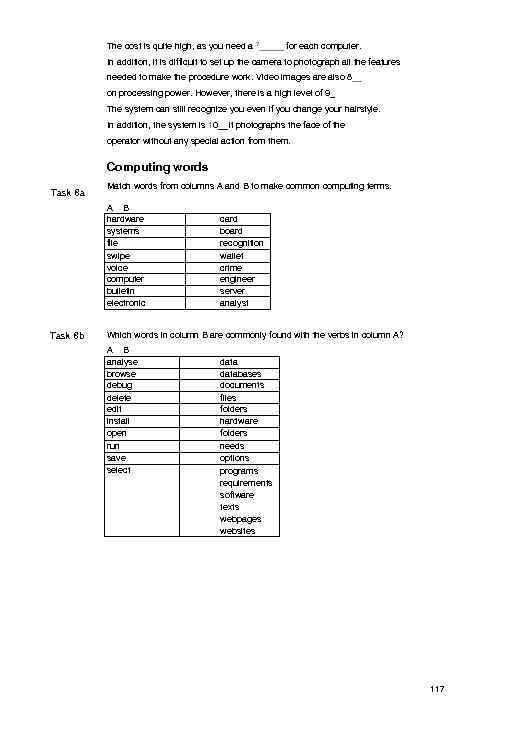 The cost is quite high, as you need a 7_____ for each computer. In addition, it is difficult to set up the camera to photograph all the features needed to make the procedure work. Video images are also 8__ on processing power. However, there is a high level of 9_ The system can still recognize you even if you change your hairstyle. In addition, the system is 10__It photographs the face of the operator without any special action from them. Computing words Task 8 a Match words from columns A and B to make common computing terms. A B hardware systems file swipe voice computer bulletin electronic Task 8 b card board recognition wallet crime engineer server analyst Which words in column B are commonly found with the verbs in column A? A B analyse browse debug delete edit install open run save select databases documents files folders hardware folders needs options programs requirements software texts webpages websites 117
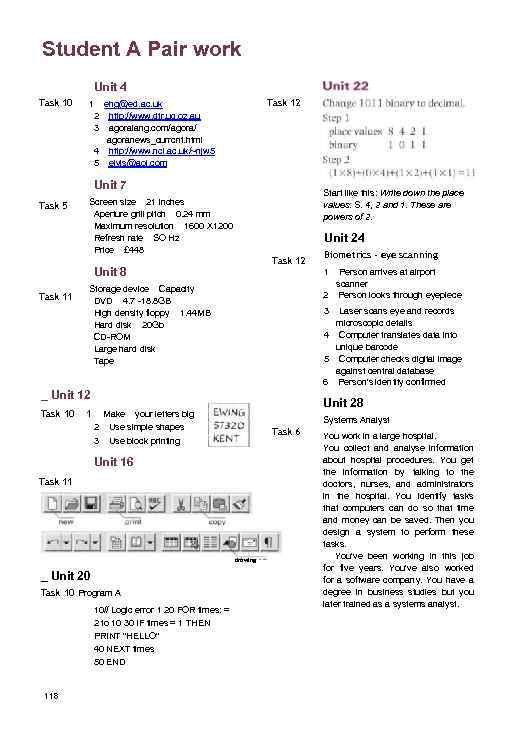 Student A Pair work Unit 4 Task 10 Task 12 1 ehg@ed. ac. uk 2 http: //www. dtr. uq. oz. au 3 agoralang. com/agora/ agoranews_currcnt. html 4 http: //www. ncl. ac. uk/~njw 5 5 elvis@aol. com Unit 7 Task 5 Start like this: Write down the place values: S. 4, 2 and 1. These are powers of 2. Screen size 21 inches Aperture grill pitch 0. 24 mm Maximum resolution 1600 X 1200 Refresh rate SO Hz Price £ 448 Unit 24 Task 12 Unit 8 Task 11 1 Person arrives at airport scanner 2 Person looks through eyepiece Storage device Capacity DVD 4. 7 -18. 8 GB High density floppy 1. 44 MB Hard disk 20 Gb CD-ROM Large hard disk Tape 3 Laser scans eye and records microscopic details 4 Computer translates data into unique barcode 5 Computer checks digital image against central database 6 Person's identity confirmed _ Unit 12 Task 10 1 Unit 28 Make your letters big 2 Use simple shapes 3 Use block printing Systems Analyst Task 6 Unit 16 Task 11 drawing _ Unit 20 Task 10 Program A 10// Logic error 1 20 FOR times: = 2 to 10 30 IF times = 1 THEN PRINT "HELLO" 40 NEXT times 50 END 118 Biometrics - eye scanning You work in a large hospital. You collect and analyse information about hospital procedures. You get the information by talking to the doctors, nurses, and administrators in the hospital. You identify tasks that computers can do so that time and money can be saved. Then you design a system to perform these tasks. You've been working in this job for five years. You've also worked for a software company. You have a degree in business studies but you later trained as a systems analyst.
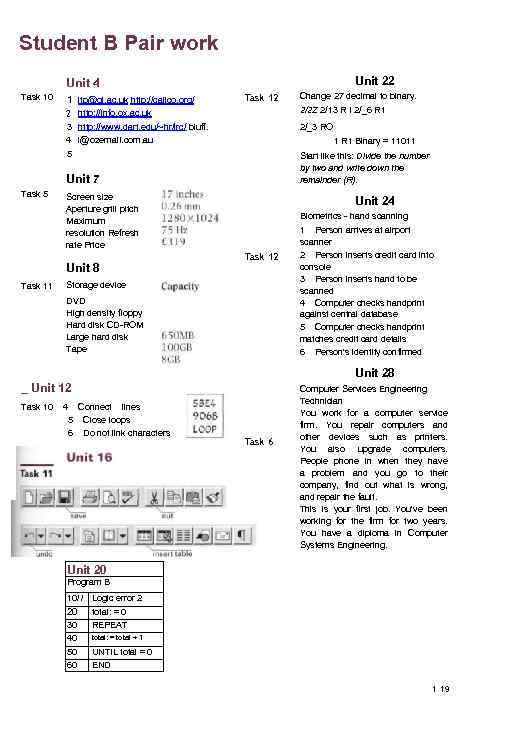 Student B Pair work Unit 22 Unit 4 Task 10 1 jtp@gl. ac. uk http: //calico. org/ Task 12 Change 27 decimal to binary. 2 http: //info. ox. ac. uk 2/2 Z 2/13 R I 2/_6 R 1 3 http: //www. dart. edu/~hr/lrc/ bluff. 4 l@ozemai. I. com. au 2/_3 RO 5 Start like this: Divide the number by two and write down the remainder (R). 1 R 1 Binary = 11011 Unit 7 Task 5 Screen size Aperture grill pitch Maximum resolution Refresh rate Price Unit 8 Task 11 Unit 24 Biometrics - hand scanning Task 12 Storage device DVD High density floppy Hard disk CD-ROM Large hard disk Tape 1 Person arrives at airport scanner 2 Person inserts credit card into console 3 Person inserts hand to be scanned 4 Computer checks handprint against central database 5 Computer checks handprint matches credit card details 6 Person's identity confirmed Unit 28 _ Unit 12 Task 10 4 5 6 Connect lines Close loops Do not link characters Task 6 Computer Services Engineering Technician You work for a computer service firm. You repair computers and other devices such as printers. You also upgrade computers. People phone in when they have a problem and you go to their company, find out what is wrong, and repair the fault. This is your first job. You've been working for the firm for two years. You have a diploma in Computer Systems Engineering. Unit 20 Program B 10/ / Logic error 2 20 total: = 0 30 REPEAT total: = total + 1 40 50 60 UNTIL total = 0 END 1 19