 Скачать презентацию Introduction to XServe Objectives XServe architecture
9fe1913157ec2d47a78c8c4208c0e3f0.ppt
- Количество слайдов: 33



Introduction to XServe Objectives § XServe architecture § Usage summary Lab § § Display mesh data Log data to database View data in database View from a web browser Note: XServe patch needs to be done for Mote. Works 2. 0 A and 2. 0 B. See next slides for patches. WSN Training: XServe Intro 1 February 2007
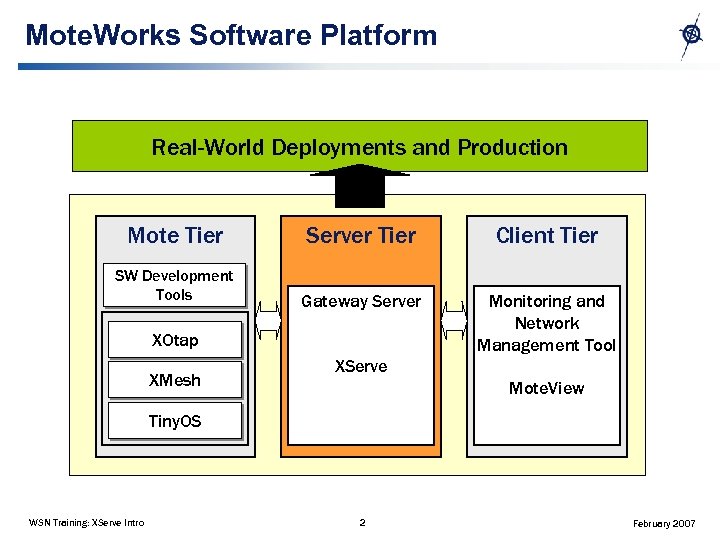
Mote. Works Software Platform Real-World Deployments and Production Mote Tier Server Tier Client Tier SW Development Tools Gateway Server Monitoring and Network Management Tool XOtap XMesh XServe Mote. View Tiny. OS WSN Training: XServe Intro 2 February 2007
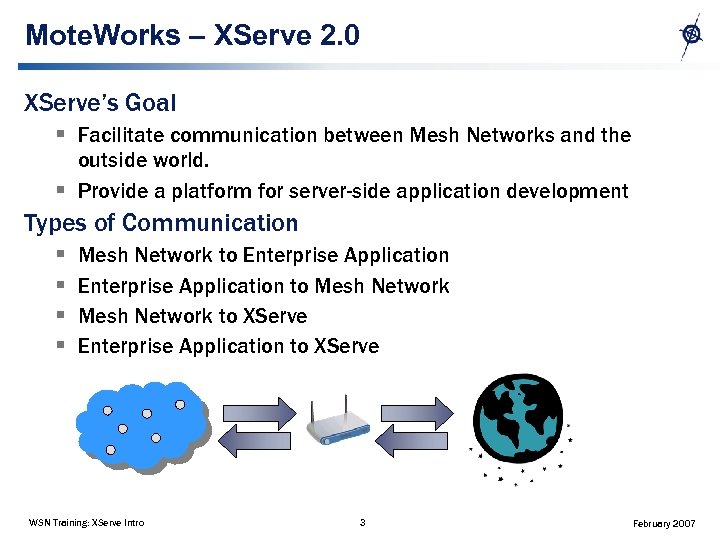
Mote. Works – XServe 2. 0 XServe’s Goal § Facilitate communication between Mesh Networks and the outside world. § Provide a platform for server-side application development Types of Communication § § Mesh Network to Enterprise Application to Mesh Network to XServe Enterprise Application to XServe WSN Training: XServe Intro 3 February 2007
Mote. Works – XServe 2. 0 XServe Core Features § Serial Forwarder: Provide raw interface to Mesh Networks XServe Extendable Features § Packet Parser: Parse mesh packets into a set of fields and values including converting parsed field values into desired units of measure § Data Sinks: Handle server-side application logic including routing parsed packets to enterprise applications § Command Server: Route commands from enterprise applications to server-side logic and/or to Mesh Network WSN Training: XServe Intro 4 February 2007
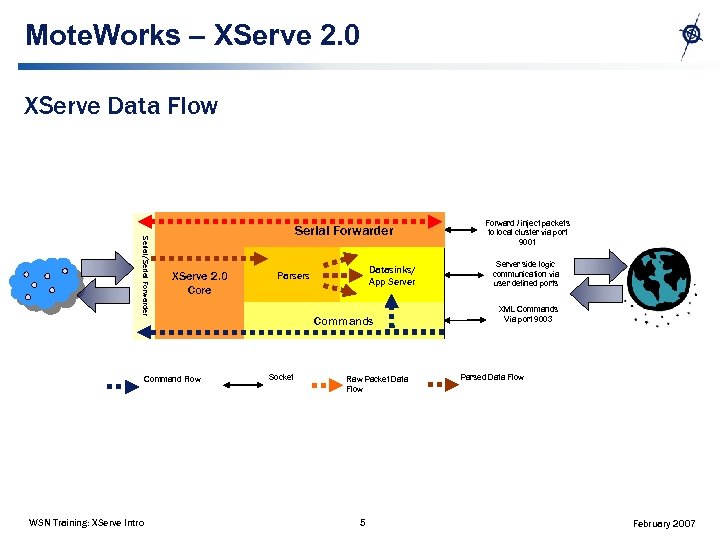
Mote. Works – XServe 2. 0 XServe Data Flow Serial/Serial Forwarder XServe 2. 0 Core Command Flow WSN Training: XServe Intro Datasinks/ App Server Parsers Commands Socket Raw Packet Data Flow 5 Forward / inject packets to local cluster via port 9001 Server side logic communication via user defined ports XML Commands Via port 9003 Parsed Data Flow February 2007
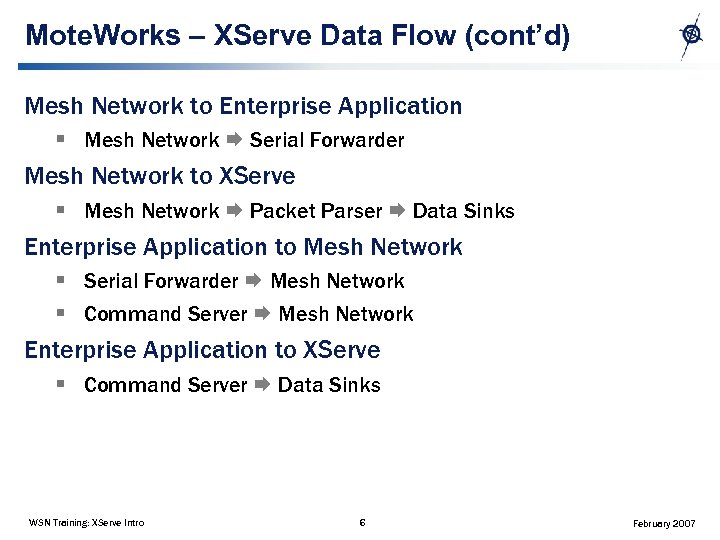
Mote. Works – XServe Data Flow (cont’d) Mesh Network to Enterprise Application § Mesh Network Serial Forwarder Mesh Network to XServe § Mesh Network Packet Parser Data Sinks Enterprise Application to Mesh Network § Serial Forwarder Mesh Network § Command Server Mesh Network Enterprise Application to XServe § Command Server Data Sinks WSN Training: XServe Intro 6 February 2007
Mote. Works – Core Service Serial Forwarder § § Allows sharing of serial connection between multiple clients Provides raw packet stream to and from mesh network Data from Mesh Network is pushed to connected applications Data from connected applications are pushed into Mesh Network WSN Training: XServe Intro 7 February 2007
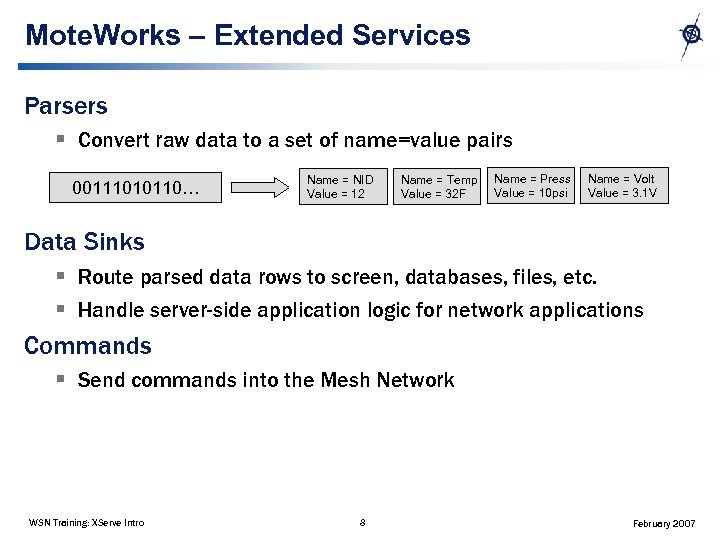
Mote. Works – Extended Services Parsers § Convert raw data to a set of name=value pairs 00111010110… Name = NID Value = 12 Name = Temp Value = 32 F Name = Press Value = 10 psi Name = Volt Value = 3. 1 V Data Sinks § Route parsed data rows to screen, databases, files, etc. § Handle server-side application logic for network applications Commands § Send commands into the Mesh Network WSN Training: XServe Intro 8 February 2007
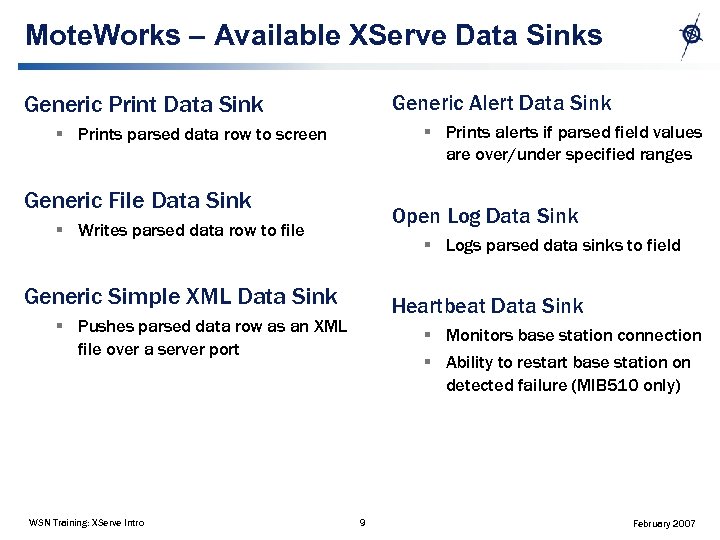
Mote. Works – Available XServe Data Sinks Generic Alert Data Sink Generic Print Data Sink § Prints alerts if parsed field values are over/under specified ranges § Prints parsed data row to screen Generic File Data Sink Open Log Data Sink § Writes parsed data row to file § Logs parsed data sinks to field Generic Simple XML Data Sink Heartbeat Data Sink § Pushes parsed data row as an XML file over a server port WSN Training: XServe Intro § Monitors base station connection § Ability to restart base station on detected failure (MIB 510 only) 9 February 2007
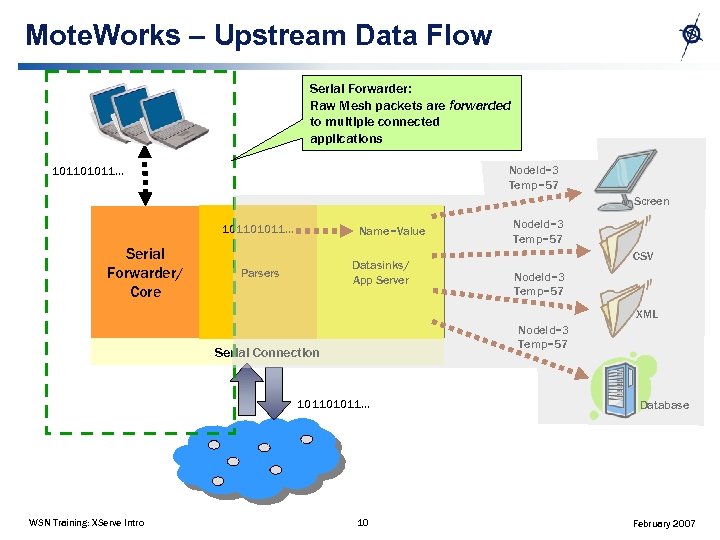
Mote. Works – Upstream Data Flow Serial Forwarder: Raw Mesh packets are forwarded to multiple connected applications Node. Id=3 Temp=57 101101011… Screen 101101011… Serial Forwarder/ Core Name=Value Datasinks/ App Server Parsers Node. Id=3 Temp=57 CSV Node. Id=3 Temp=57 XML Node. Id=3 Temp=57 Serial Connection 101101011… WSN Training: XServe Intro 10 Database February 2007
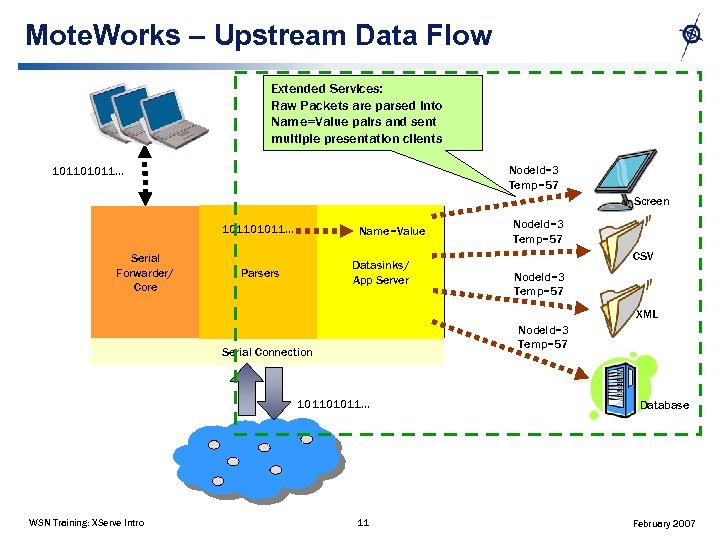
Mote. Works – Upstream Data Flow Extended Services: Raw Packets are parsed into Name=Value pairs and sent multiple presentation clients Node. Id=3 Temp=57 101101011… Screen 101101011… Serial Forwarder/ Core Name=Value Datasinks/ App Server Parsers Node. Id=3 Temp=57 CSV Node. Id=3 Temp=57 XML Node. Id=3 Temp=57 Serial Connection 101101011… WSN Training: XServe Intro 11 Database February 2007
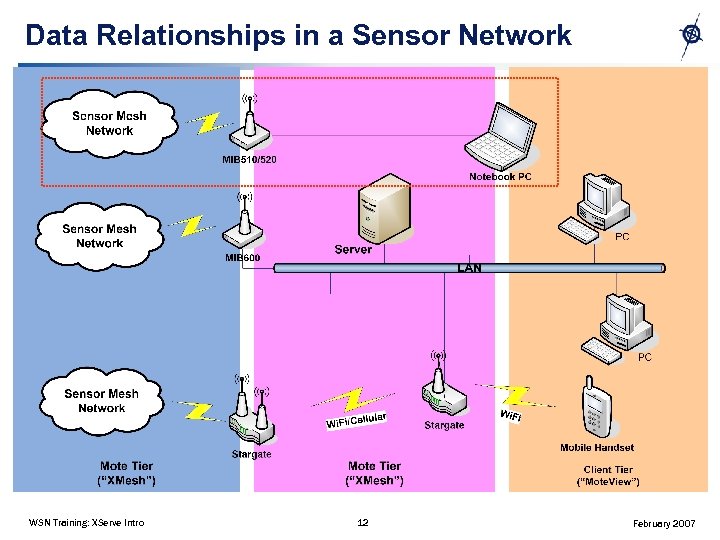
Data Relationships in a Sensor Network WSN Training: XServe Intro 12 February 2007
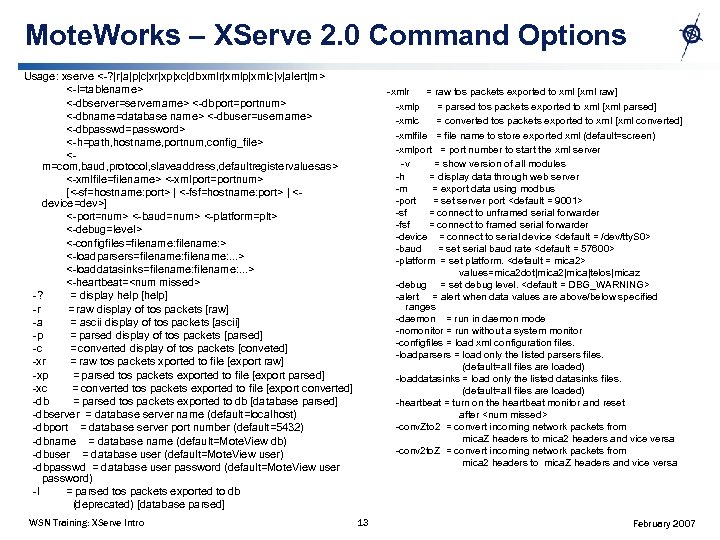
Mote. Works – XServe 2. 0 Command Options Usage: xserve <-? |r|a|p|c|xr|xp|xc|dbxmlr|xmlp|xmlc|v|alert|m> <-l=tablename> <-dbserver=servername> <-dbport=portnum> <-dbname=database name> <-dbuser=username> <-dbpasswd=password> <-h=path, hostname, portnum, config_file> <m=com, baud, protocol, slaveaddress, defaultregistervaluesas> <-xmlfile=filename> <-xmlport=portnum> [<-sf=hostname: port> | <-fsf=hostname: port> | <device=dev>] <-port=num> <-baud=num> <-platform=plt> <-debug=level> <-configfiles=filename: > <-loadparsers=filename: . . . > <-loaddatasinks=filename: . . . > <-heartbeat=<num missed> -? = display help [help] -r = raw display of tos packets [raw] -a = ascii display of tos packets [ascii] -p = parsed display of tos packets [parsed] -c = converted display of tos packets [conveted] -xr = raw tos packets xported to file [export raw] -xp = parsed tos packets exported to file [export parsed] -xc = converted tos packets exported to file [export converted] -db = parsed tos packets exported to db [database parsed] -dbserver = database server name (default=localhost) -dbport = database server port number (default=5432) -dbname = database name (default=Mote. View db) -dbuser = database user (default=Mote. View user) -dbpasswd = database user password (default=Mote. View user password) -l = parsed tos packets exported to db (deprecated) [database parsed] WSN Training: XServe Intro -xmlr = raw tos packets exported to xml [xml raw] -xmlp = parsed tos packets exported to xml [xml parsed] -xmlc = converted tos packets exported to xml [xml converted] -xmlfile = file name to store exported xml (default=screen) -xmlport = port number to start the xml server -v = show version of all modules -h = display data through web server -m = export data using modbus -port = set server port <default = 9001> -sf = connect to unframed serial forwarder -fsf = connect to framed serial forwarder -device = connect to serial device <default = /dev/tty. S 0> -baud = set serial baud rate <default = 57600> -platform = set platform. <default = mica 2> values=mica 2 dot|mica 2|mica|telos|micaz -debug = set debug level. <default = DBG_WARNING> -alert = alert when data values are above/below specified ranges -daemon = run in daemon mode -nomonitor = run without a system monitor -configfiles = load xml configuration files. -loadparsers = load only the listed parsers files. (default=all files are loaded) -loaddatasinks = load only the listed datasinks files. (default=all files are loaded) -heartbeat = turn on the heartbeat monitor and reset after <num missed> -conv. Zto 2 = convert incoming network packets from mica. Z headers to mica 2 headers and vice versa -conv 2 to. Z = convert incoming network packets from mica 2 headers to mica. Z headers and vice versa 13 February 2007
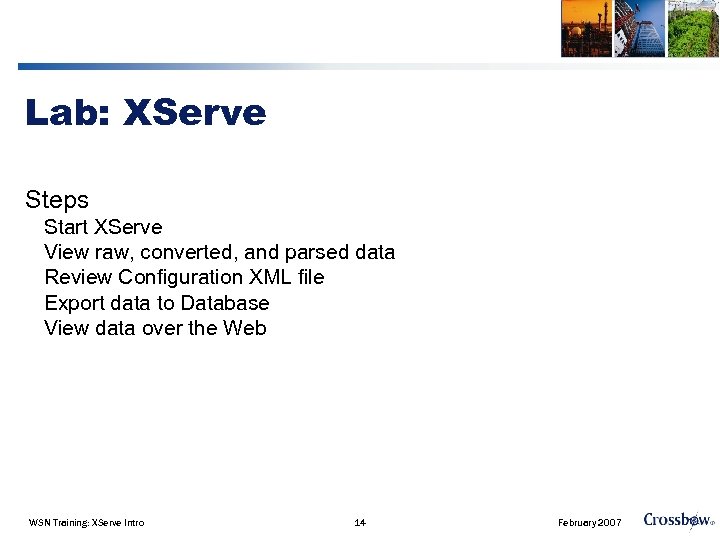
Lab: XServe Steps Start XServe View raw, converted, and parsed data Review Configuration XML file Export data to Database View data over the Web WSN Training: XServe Intro 14 February 2007
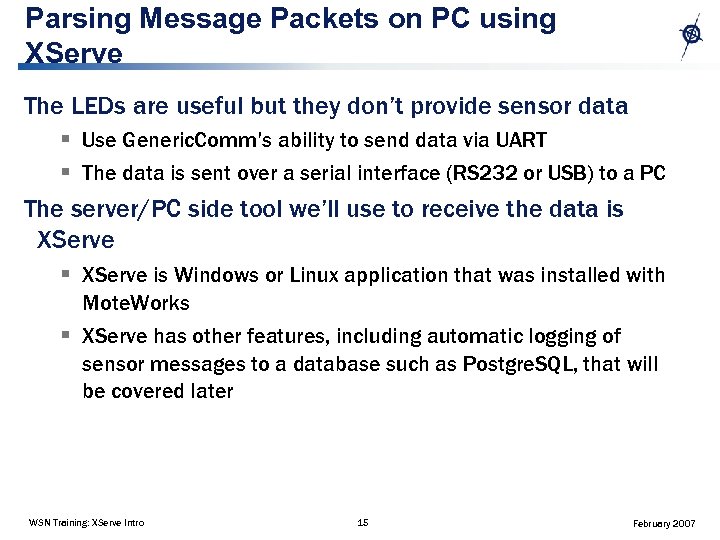
Parsing Message Packets on PC using XServe The LEDs are useful but they don’t provide sensor data § Use Generic. Comm’s ability to send data via UART § The data is sent over a serial interface (RS 232 or USB) to a PC The server/PC side tool we’ll use to receive the data is XServe § XServe is Windows or Linux application that was installed with Mote. Works § XServe has other features, including automatic logging of sensor messages to a database such as Postgre. SQL, that will be covered later WSN Training: XServe Intro 15 February 2007
Parsing Message Packets on PC using XServe Install Mote. Work’s XMesh Sensor applications. § Use Mote. Config to load XMesh sensor applications and XMesh. Base on motes § Similar to Day 1 “Getting Started Mote. View Lab” WSN Training: XServe Intro 16 February 2007
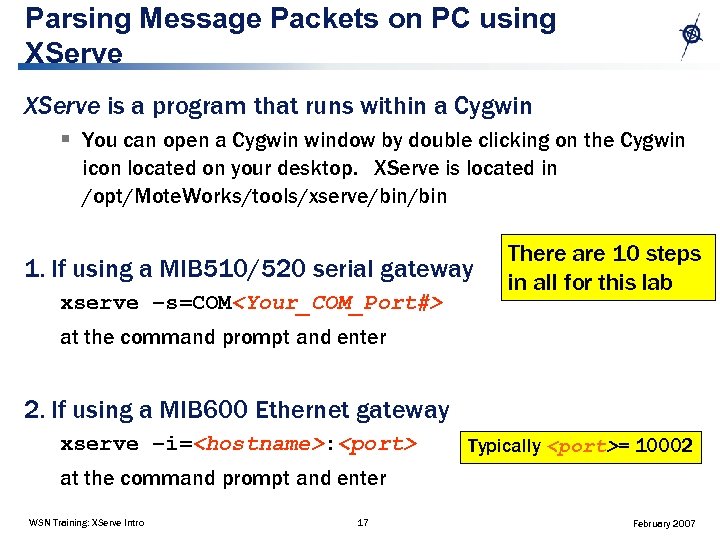
Parsing Message Packets on PC using XServe is a program that runs within a Cygwin § You can open a Cygwin window by double clicking on the Cygwin icon located on your desktop. XServe is located in /opt/Mote. Works/tools/xserve/bin 1. If using a MIB 510/520 serial gateway xserve –s=COM<Your_COM_Port#> There are 10 steps in all for this lab at the command prompt and enter 2. If using a MIB 600 Ethernet gateway xserve –i=<hostname>: <port> Typically <port>= 10002 at the command prompt and enter WSN Training: XServe Intro 17 February 2007
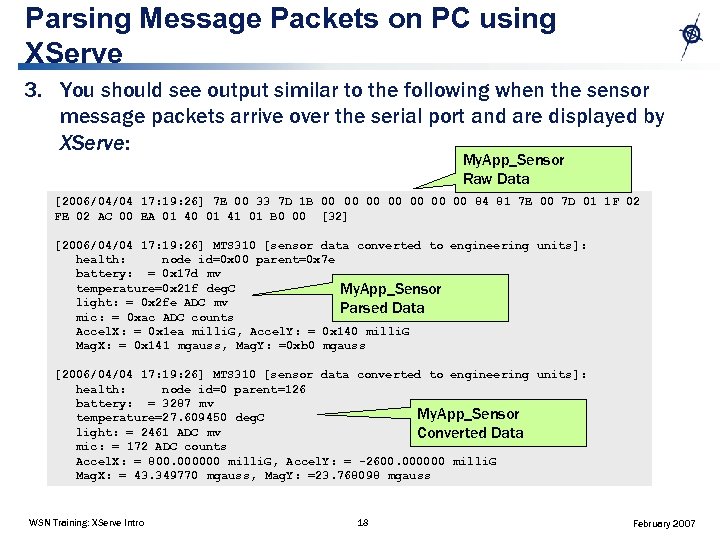
Parsing Message Packets on PC using XServe 3. You should see output similar to the following when the sensor message packets arrive over the serial port and are displayed by XServe: My. App_Sensor Raw Data [2006/04/04 17: 19: 26] 7 E 00 33 7 D 1 B 00 00 84 81 7 E 00 7 D 01 1 F 02 FE 02 AC 00 EA 01 40 01 41 01 B 0 00 [32] [2006/04/04 17: 19: 26] MTS 310 [sensor data converted to engineering units]: health: node id=0 x 00 parent=0 x 7 e battery: = 0 x 17 d mv temperature=0 x 21 f deg. C My. App_Sensor light: = 0 x 2 fe ADC mv Parsed Data mic: = 0 xac ADC counts Accel. X: = 0 x 1 ea milli. G, Accel. Y: = 0 x 140 milli. G Mag. X: = 0 x 141 mgauss, Mag. Y: =0 xb 0 mgauss [2006/04/04 17: 19: 26] MTS 310 [sensor data converted to engineering units]: health: node id=0 parent=126 battery: = 3287 mv My. App_Sensor temperature=27. 609450 deg. C light: = 2461 ADC mv Converted Data mic: = 172 ADC counts Accel. X: = 800. 000000 milli. G, Accel. Y: = -2600. 000000 milli. G Mag. X: = 43. 349770 mgauss, Mag. Y: =23. 768098 mgauss WSN Training: XServe Intro 18 February 2007
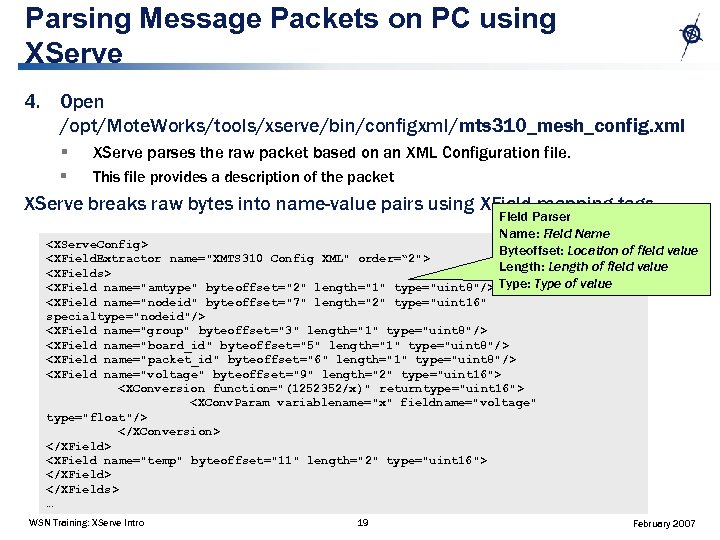
Parsing Message Packets on PC using XServe 4. Open /opt/Mote. Works/tools/xserve/bin/configxml/mts 310_mesh_config. xml § XServe parses the raw packet based on an XML Configuration file. § This file provides a description of the packet XServe breaks raw bytes into name-value pairs using XField mapping tags. Field Parser Name: Field Name <XServe. Config> Byteoffset: Location of field value <XField. Extractor name="XMTS 310 Config XML" order=“ 2"> Length: Length of field value <XFields> <XField name="amtype" byteoffset="2" length="1" type="uint 8"/> Type: Type of value <XField name="nodeid" byteoffset="7" length="2" type="uint 16" specialtype="nodeid"/> <XField name="group" byteoffset="3" length="1" type="uint 8"/> <XField name="board_id" byteoffset="5" length="1" type="uint 8"/> <XField name="packet_id" byteoffset="6" length="1" type="uint 8"/> <XField name="voltage" byteoffset="9" length="2" type="uint 16"> <XConversion function="(1252352/x)" returntype="uint 16"> <XConv. Param variablename="x" fieldname="voltage" type="float"/> </XConversion> </XField> <XField name="temp" byteoffset="11" length="2" type="uint 16"> </XFields> … WSN Training: XServe Intro 19 February 2007
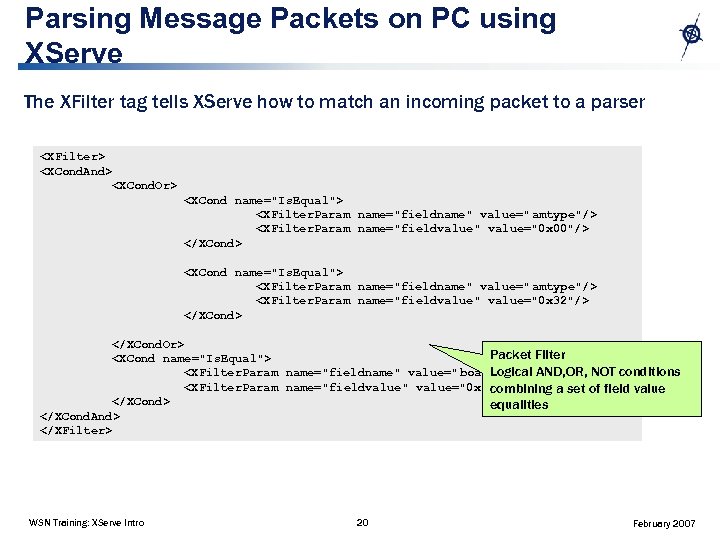
Parsing Message Packets on PC using XServe The XFilter tag tells XServe how to match an incoming packet to a parser <XFilter> <XCond. And> <XCond. Or> <XCond name="Is. Equal"> <XFilter. Param name="fieldname" value=" amtype"/> <XFilter. Param name="fieldvalue" value="0 x 00"/> </XCond> <XCond name="Is. Equal"> <XFilter. Param name="fieldname" value=" amtype"/> <XFilter. Param name="fieldvalue" value="0 x 32"/> </XCond. Or> Packet Filter <XCond name="Is. Equal"> Logical AND, OR, NOT conditions <XFilter. Param name="fieldname" value=" board_id"/> <XFilter. Param name="fieldvalue" value="0 x 84"/> combining a set of field value </XCond> equalities </XCond. And> </XFilter> WSN Training: XServe Intro 20 February 2007
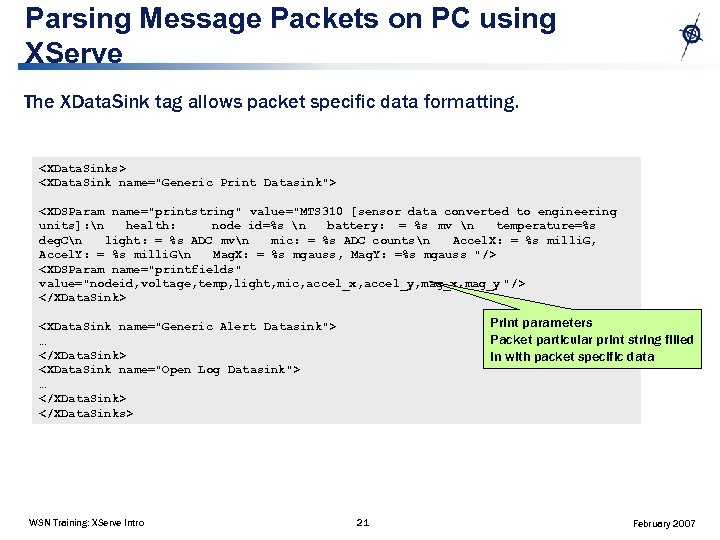
Parsing Message Packets on PC using XServe The XData. Sink tag allows packet specific data formatting. <XData. Sinks> <XData. Sink name="Generic Print Datasink"> <XDSParam name="printstring" value="MTS 310 [sensor data converted to engineering units]: n health: node id=%s n battery: = %s mv n temperature=%s deg. Cn light: = %s ADC mvn mic: = %s ADC countsn Accel. X: = %s milli. G, Accel. Y: = %s milli. Gn Mag. X: = %s mgauss, Mag. Y: =%s mgauss "/> <XDSParam name="printfields" value="nodeid, voltage, temp, light, mic, accel_x, accel_y, mag_x, mag_y "/> </XData. Sink> Print parameters Packet particular print string filled in with packet specific data <XData. Sink name="Generic Alert Datasink"> … </XData. Sink> <XData. Sink name="Open Log Datasink"> … </XData. Sink> </XData. Sinks> WSN Training: XServe Intro 21 February 2007
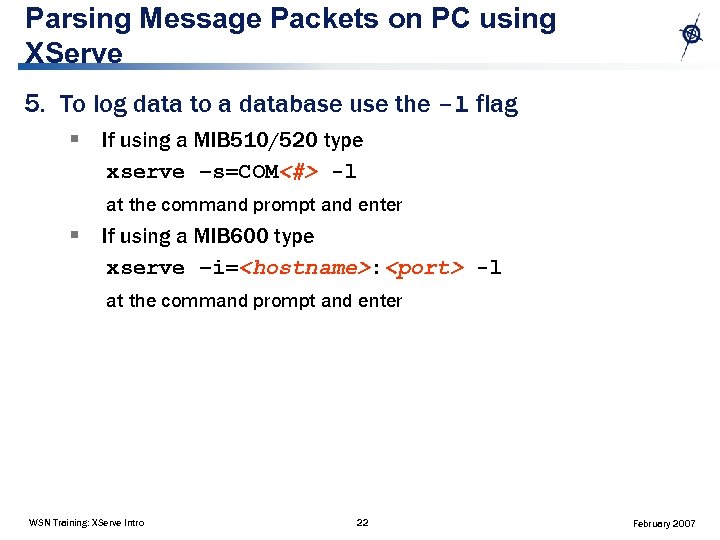
Parsing Message Packets on PC using XServe 5. To log data to a database use the -l flag § If using a MIB 510/520 type xserve –s=COM<#> -l at the command prompt and enter § If using a MIB 600 type xserve –i=<hostname>: <port> -l at the command prompt and enter WSN Training: XServe Intro 22 February 2007
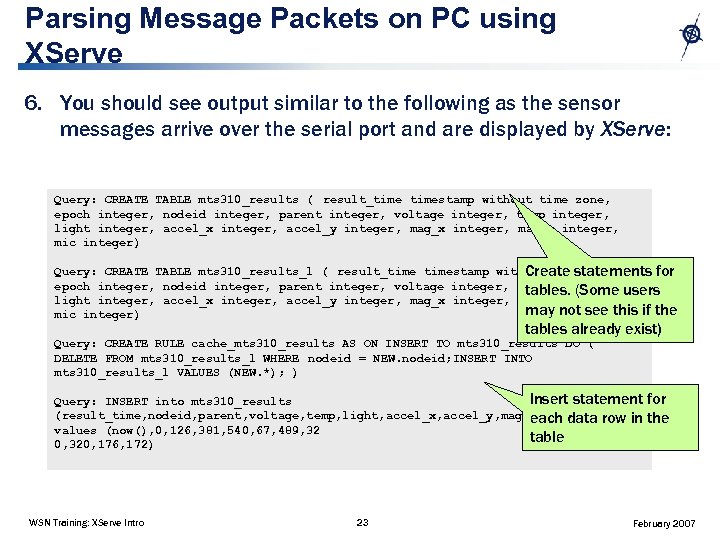
Parsing Message Packets on PC using XServe 6. You should see output similar to the following as the sensor messages arrive over the serial port and are displayed by XServe: Query: CREATE TABLE mts 310_results ( result_timestamp without time zone, epoch integer, nodeid integer, parent integer, voltage integer, temp integer, light integer, accel_x integer, accel_y integer, mag_x integer, mag_y integer, mic integer) Query: CREATE TABLE mts 310_results_l ( result_timestamp without time zone, Create statements for epoch integer, nodeid integer, parent integer, voltage integer, temp integer, users tables. (Some light integer, accel_x integer, accel_y integer, mag_x integer, mag_y integer, may not see this if the mic integer) tables already exist) Query: CREATE RULE cache_mts 310_results AS ON INSERT TO mts 310_results DO ( DELETE FROM mts 310_results_l WHERE nodeid = NEW. nodeid; INSERT INTO mts 310_results_l VALUES (NEW. *); ) Insert statement Query: INSERT into mts 310_results (result_time, nodeid, parent, voltage, temp, light, accel_x, accel_y, mag_x, mag_y, mic ) in each data row values (now(), 0, 126, 381, 540, 67, 489, 32 table 0, 320, 176, 172) WSN Training: XServe Intro 23 for the February 2007
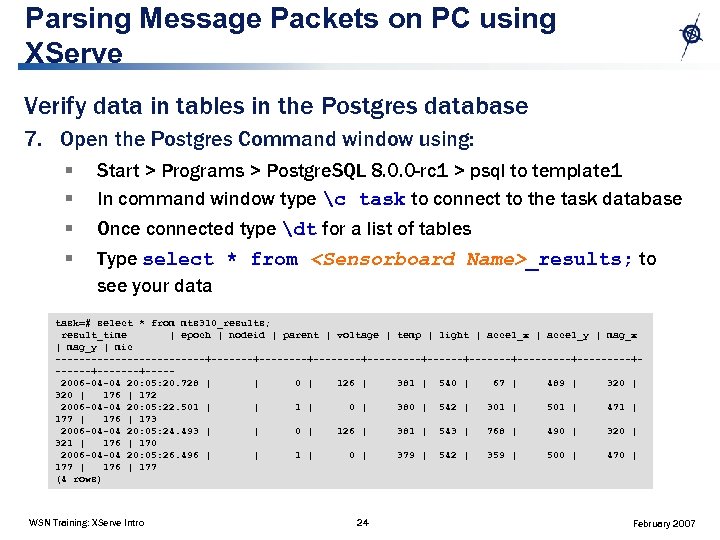
Parsing Message Packets on PC using XServe Verify data in tables in the Postgres database 7. Open the Postgres Command window using: § § Start > Programs > Postgre. SQL 8. 0. 0 -rc 1 > psql to template 1 In command window type c task to connect to the task database Once connected type dt for a list of tables Type select * from <Sensorboard Name>_results; to see your data task=# select * from mts 310_results; result_time | epoch | nodeid | parent | voltage | temp | light | accel_x | accel_y | mag_x | mag_y | mic -------------+--------+---------+-------+---------+-------+----2006 -04 -04 20: 05: 20. 728 | | 0 | 126 | 381 | 540 | 67 | 489 | 320 | 176 | 172 2006 -04 -04 20: 05: 22. 501 | | 1 | 0 | 380 | 542 | 301 | 501 | 471 | 177 | 176 | 173 2006 -04 -04 20: 05: 24. 493 | | 0 | 126 | 381 | 543 | 768 | 490 | 321 | 176 | 170 2006 -04 -04 20: 05: 26. 496 | | 1 | 0 | 379 | 542 | 359 | 500 | 470 | 177 | 176 | 177 (4 rows) WSN Training: XServe Intro 24 February 2007
Parsing Message Packets on PC using XServe 8. To view output in a web browser, use the -h flag If using a MIB 510/520 type xserve –s=COM<#> -h -p at the command prompt and enter If using a MIB 600 type xserve –i=<hostname>: <port> -h –p at the command prompt and enter Flag descriptions: -h starts XServe’s internal web server -p starts XServe’s parsed printing to screen WSN Training: XServe Intro 25 February 2007
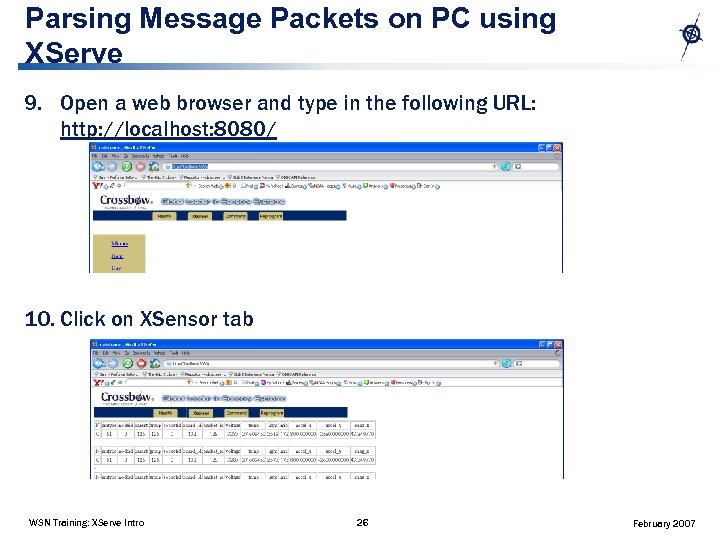
Parsing Message Packets on PC using XServe 9. Open a web browser and type in the following URL: http: //localhost: 8080/ 10. Click on XSensor tab WSN Training: XServe Intro 26 February 2007
Q & A: XServe, Part 1 Objectives: § XServe architecture § Usage summary Lab: § § Display mesh data Log data to database View data in database View from a web browser WSN Training: XServe Intro 27 February 2007
Appendix § Serial Forwarder § Patches to Mote. Works 2. 0 A and 2. 0 B WSN Training: XServe Intro 28 February 2007
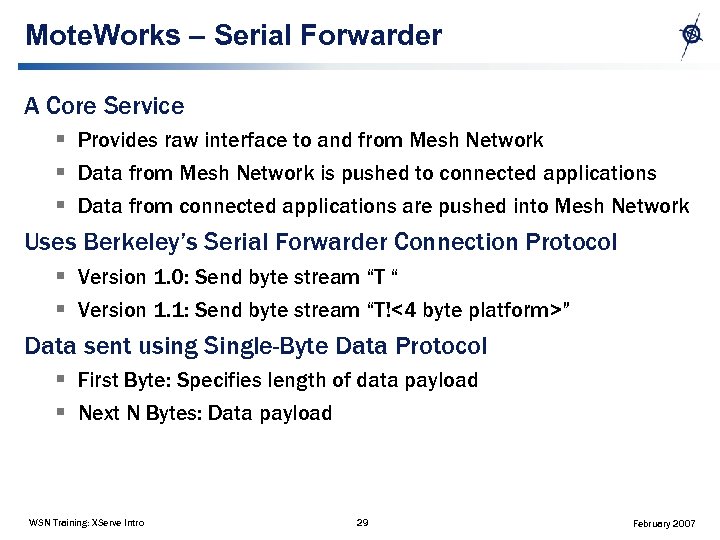
Mote. Works – Serial Forwarder A Core Service § Provides raw interface to and from Mesh Network § Data from Mesh Network is pushed to connected applications § Data from connected applications are pushed into Mesh Network Uses Berkeley’s Serial Forwarder Connection Protocol § Version 1. 0: Send byte stream “T “ § Version 1. 1: Send byte stream “T!<4 byte platform>” Data sent using Single-Byte Data Protocol § First Byte: Specifies length of data payload § Next N Bytes: Data payload WSN Training: XServe Intro 29 February 2007
Patching XServe patch is for Mote. Works 2. 0 A and 2. 0 B. See next slides for patches. WSN Training: XServe Intro 30 February 2007
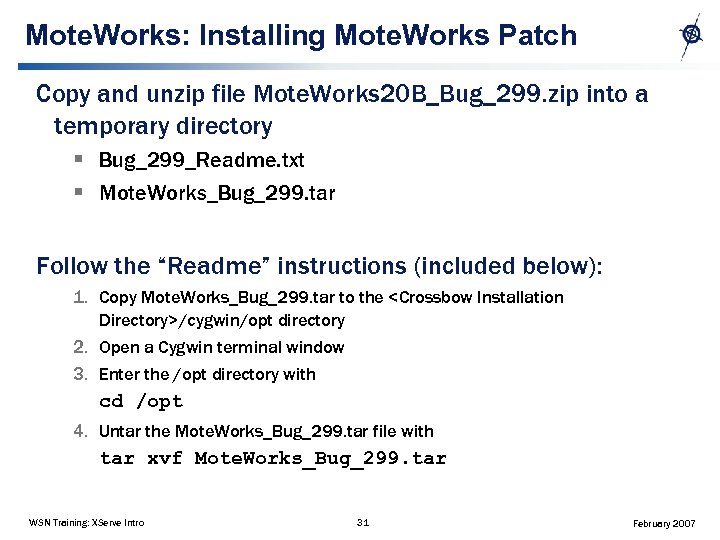
Mote. Works: Installing Mote. Works Patch Copy and unzip file Mote. Works 20 B_Bug_299. zip into a temporary directory § Bug_299_Readme. txt § Mote. Works_Bug_299. tar Follow the “Readme” instructions (included below): 1. Copy Mote. Works_Bug_299. tar to the <Crossbow Installation Directory>/cygwin/opt directory 2. Open a Cygwin terminal window 3. Enter the /opt directory with cd /opt 4. Untar the Mote. Works_Bug_299. tar file with tar xvf Mote. Works_Bug_299. tar WSN Training: XServe Intro 31 February 2007
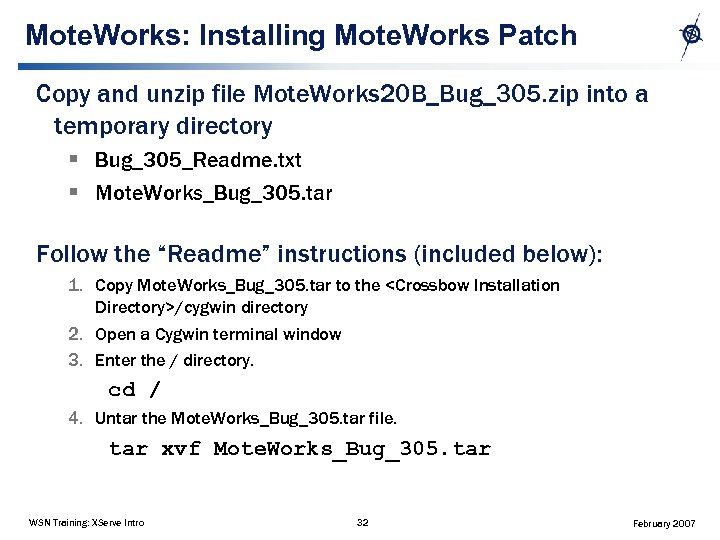
Mote. Works: Installing Mote. Works Patch Copy and unzip file Mote. Works 20 B_Bug_305. zip into a temporary directory § Bug_305_Readme. txt § Mote. Works_Bug_305. tar Follow the “Readme” instructions (included below): 1. Copy Mote. Works_Bug_305. tar to the <Crossbow Installation Directory>/cygwin directory 2. Open a Cygwin terminal window 3. Enter the / directory. cd / 4. Untar the Mote. Works_Bug_305. tar file. tar xvf Mote. Works_Bug_305. tar WSN Training: XServe Intro 32 February 2007
Mote. Works: Installing Mote. Works Patch After installing XServe patches 299 and 305, exit and restart Cygwin This will enable Cygwin to read in the new files WSN Training: XServe Intro 33 February 2007
Скачать презентацию Introduction to XServe Objectives XServe architecture
9fe1913157ec2d47a78c8c4208c0e3f0.ppt