


 Скачать презентацию Introduction to the Application Hosting Environment Stefan Zasada
53d2137f9520d55bd8a14867f1ba898c.ppt
- Количество слайдов: 23
 Introduction to the Application Hosting Environment Stefan Zasada 1
 Contents • Motivation for the AHE • Concepts & functionality • Meeting the AHE design constraints • Architecture of the AHE • AHE client interaction • Deploying the AHE 2
 Motivation for the AHE Problems with current middleware solutions: • Difficult for an end user to configure and/or install • Dependent on lots of supporting software also being installed • Require modified versions of common libraries • Require non-standard ports to be opened on firewall • Large footprint – memory/disk space 3
 The Application Hosting Environment • Based on the idea of applications as web services • Lightweight hosting environment for running unmodified applications on grid resources (NGS, Tera. Grid) and on local resources (departmental clusters) Community model: expert user installs and configures an application and uses the AHE to share it with others Simple clients with very limited dependencies No intrusion onto target grid resources • • • 4
 Virtualizing Applications • Application Instance/Simulation is central entity; represented by a stateful WS-Resource. State properties include: • simulation owner • target grid resource • job ID • simulation input files and urls • simulation output files and urls • job status • Application exposed as web service 5
 AHE Functionality • Launch simulations on multiple grid resources • Single interface to monitor and manipulate all simulations launched on the various grid resource • Run simulations without manually having to stage files and GSISSH in • Retrieve files to local machine when simulation is done • Can use a combination of different clients – PDA, desktop GUI, command line 6
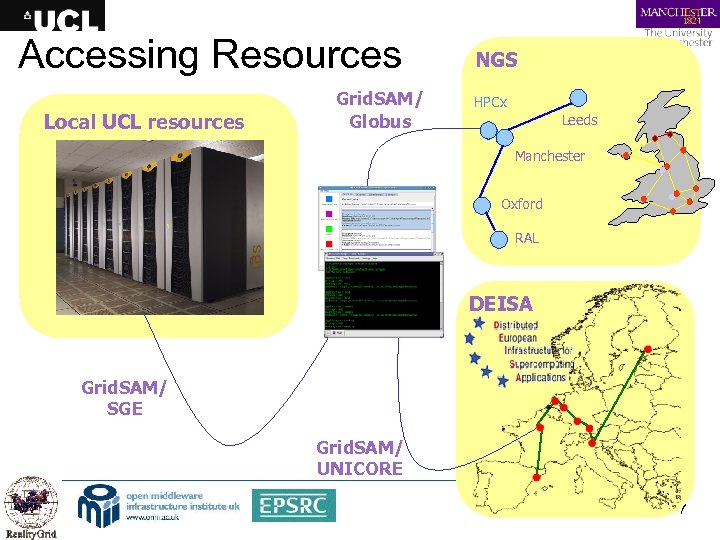 Accessing Resources Local UCL resources Grid. SAM/ Globus NGS UK NGS HPCx Leeds Manchester Oxford RAL DEISA Grid. SAM/ SGE Grid. SAM/ UNICORE 7
 AHE Design Constraints • Client does not have Globus installed locally • Client is NAT'd and firewalled • Client does not have to be a single machine • Client needs to be able to upload and download files but doesn’t have local installation of Grid. FTP • Client doesn’t maintain information on how to run the application • Client doesn’t care about changes to the backend resources 8
 Meeting the Constraints • AHE Client behind firewall => polls server to update job state etc. • Uses intermediate filestaging area => Grid. FTP not installed • All application specific information for running simulations on the grid resource is maintained on a central service => user can switch clients etc. • Location of binary on grid resource configured on server => user doesn’t need to know • Grid. SAM provides interface to job queue 9
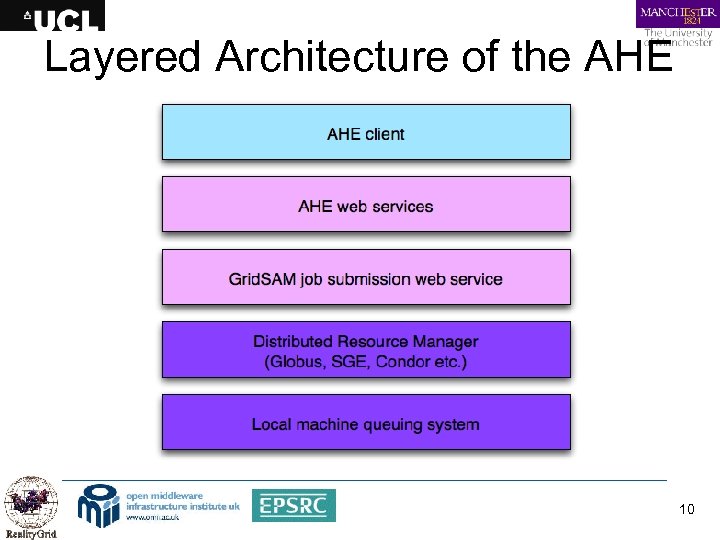 Layered Architecture of the AHE 10
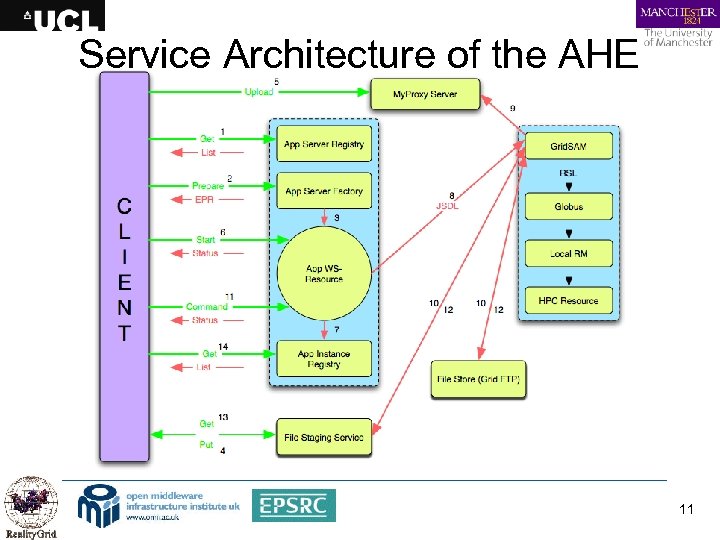 Service Architecture of the AHE 11
 AHE Server Implementation • WSRF: : Lite => services developed in Perl • Web. DAV server • Grid. SAM => Globus grid => Sun Grid Engine => Condor pool => Unicore • My. Proxy • Postgre. SQL database • Apache/Tomcat container 12
 AHE Server Deployment The expert user must: • Set up container to host services: • Apache/WSRF: : Lite or modified Tomcat/WSRF: : Lite • Set up Postgre. SQL database and Web. DAV server • If not already running set up Grid. SAM instance for grid resource • Deploy and configure the AHE services in the container • OMII stack installer will do all of this automatically Once deployed, any number of applications can be hosted 13
 Hosting a New Application Expert user must: • Install and configure application on all resources on which it is being shared • Create a JSDL template for the application (easily cloned from exiting template) • Add the application to the RMInfo. xml file • Run a script to reread the configuration Documentation covers whole process of deploying AHE & applications on NGS and Tera. Grid 14
 Client Implementation • GUI & command line clients implemented in Java • Client allows user to: • Discover appropriate resources • Launch application • Monitor running jobs • Query registry of running jobs • Stage files to and from resource • Terminate jobs • GUI client implements application launching as a wizard 15
 Client Extensibility • Plugins can be added to process application input files to automatically discover the input and output files that need to be staged • If no plugin is available then a default case will allow users to specify input and output files manually • Plugins implement AHEConf. Parser interface and follow specific naming convention • Plugin. class files dropped into plug-in directory and picked up by GUI/command line clients 16
 AHE Client Deployment • Deploying client is trivial for the end user: • User’s machine must have Java installed • User downloads and untars client package • Imports X. 509 certificate into Java keystore using provided script • Configures client with endpoints of AHE services supplied by expert user • Ready to go! 17
 Constructing workflows with the AHE • By calling command line clients from Perl script complex workflows can be achieved • Easily create chained or ensemble simulations • E. g. HIV equilibration protocol implemented by: • ahe-prepare a new simulation for the first step • ahe-start the step • ahe-monitor poll until step complete • ahe-getoutput download output files • repeat for next step 18
 Current Deployed Applications • Currently hosting: • NAMD • LAMMPS • DL_POLY • LB 3 D • Gromacs • CHARMM • Plan to host: • Trubal • POLCOMS 19
 Summary • The AHE provides a lightweight, easily deployable environment for running unmodified scientific applications on the grid and local resources • The AHE server is designed to be deployed by an expert user who uses it to share applications installed on grid resources • The client is easily installed by any end user, requiring no intervention by system/network administrators • By calling the command line clients from scripts, complex scientific workflows can be implemented 20
 Any Questions? • Released in OMII 3. 2. 0 http: //www. omii. ac. uk/downloads/ • Reality. Grid web site: http: //www. realitygrid. org/AHE • Ne. SCForge: http: //forge. nesc. ac. uk/projects/ahe/ • Mailing list: http: //www. mailinglists. ucl. ac. uk/mailman/listinfo/ahediscuss 21
 Exercise 1 • Installing and configuring the AHE client • Tasks: • Install the AHE client on your system • Set up a keystore containing your grid certificate • Configure the client with settings for UCL’s AHE server • Confirm that the client is installed and working • Outcome • Installed and configured AHE client 22
 Exercise 2 Launching an Application on the NGS using the AHE Tasks: • Launch the sort application with the AHE GUI client • Launch the sort application with the AHE command line client • Manually specify input and output files for an application • Retrieve application output from NGS machine • Outcome • Successfully run applications on NGS machines 23