


 Скачать презентацию Introduction to Networks and the Internet CMPE 80
f78d2d37ac9dacda45fae2eda59b283f.ppt
- Количество слайдов: 45
 Introduction to Networks and the Internet CMPE 80 N Winter 2004 Lecture 5 CMPE 80 N - Introduction to Networks and the Internet 1
 Announcements • First quiz on Friday, 01. 16. – Covers material up to and including 01. 14. – Closed books, notes, etc. CMPE 80 N - Introduction to Networks and the Internet 2
 Data Transmission • Analog and digital transmission. • Historically, communication infrastructure for analog transmission. – Digital data needed to be converted: modems (modulator-demodulator). CMPE 80 N - Introduction to Networks and the Internet 3
 Modems • MODEM = Modulator/Demodulator – Converts digital to analog before transmitting over analog channel (e. g. , telephone networks). • To transmit data: DAC (digital-to-analog converter) • To receive data: ADC (analog-to-digital converter) • 2 -way communication: needs two modems. – Each modem contains circuitry to encode outgoing data and decode incoming data. CMPE 80 N - Introduction to Networks and the Internet 4
 Types of Communication • Half-duplex communication: – Only one party can talk at a time. • E. g. , walkie-talkie. • Full-duplex communication: – Both parties can talk at the same time. • E. g. , telephone • Modems use full-duplex communication. CMPE 80 N - Introduction to Networks and the Internet 5
 Modems (cont’d) • Modems contain complex circuitry to: – Modulate/demodulate the analog signal. • Allows for the transmission of moderately high bit-rate over the telephone line. – Compress the data. • Reduces the amount of bits to be transmitted – Detect bit errors due to transmission. • Achievable bit rates. – E. g. , 14. 4 - 56 Kb/s CMPE 80 N - Introduction to Networks and the Internet 6
 Input/Output Connections CMPE 80 N - Introduction to Networks and the Internet 7
 I/O Connections • How to connect peripheral devices to a computer. • Serial and parallel connections. – Serial: bits are sent one at a time. – Sequence of bits sent in parallel using parallel wires. CMPE 80 N - Introduction to Networks and the Internet 8
 I/O Connections: Standards • Standard: defines the details of a particular technology. • RS-232 is a standard for serial communication between digital devices. – It’s full duplex. – 20 -30 Kb/s. – Can only connect one device at a time. • So if you want to connect a PC to many devices, you need as many cables coming out of your PC. CMPE 80 N - Introduction to Networks and the Internet 9
 USB and Fire. Wire • USB (Universal Serial Bus). – Can connect many devices through a USB hub. – Bitrates: 12 Mb/s (USB 1. 1) to 480 Mb/s (USB 2. 0). – Provides power to small devices (e. g. , mouse). • Firewire (IEEE 1394). – Can connect many devices through a Fire. Wire hub. – Bitrates: up to 400 Mb/s. – Very popular for video cameras and storage systems, also to connect two devices (without a PC). – Can provide power to small devices (e. g. , video cameras). CMPE 80 N - Introduction to Networks and the Internet 10
 Some Considerations • RS-232, USB, Firewire, all have constraints on the maximum length of the wire. • We already know a solution: modem. – Uses the telephone network. • However, modems provide insufficient bitrate. – Also, when using the modem, you cannot use the telephone for voice communication! CMPE 80 N - Introduction to Networks and the Internet 11
 Solution: Broadband Coonections CMPE 80 N - Introduction to Networks and the Internet 12
 Broadband Connection Types – – Integrated Services Digital Network (ISDN). Asymmetric Digital Subscriber Line (ADSL). Cable Modem. Wireless. – Satellite Links. CMPE 80 N - Introduction to Networks and the Internet 13
 ISDN • ISDN provides for communication of digitized voice and data to subscribers over the conventional “local loop” (i. e. , using the same wiring as for analog telephone). • In the Basic Rate Interface (BRI), ISDN offers three separate digital channels (2 B+D). • All on the same wire! (Multiplexing) • Primary Rate Interface (23 B+D). – Requires higher capacity lines than local loop! CMPE 80 N - Introduction to Networks and the Internet 14
 ISDN (cont’d) • The two B channels are intended to carry digital voice, data, or digital streams – Bitrate of each B-channel: 64 kb/s (overall, 128 kb/s) • The D channel is used as a control channel – E. g. , to request services which are then supplied over the B channels, to carry caller ID information, etc. – Bitrate of D channel: 16 kb/s. CMPE 80 N - Introduction to Networks and the Internet 15
 ISDN (cont’d) • To connect computer to ISDN, user needs a special network termination device (NT 1). – NT 1 device a. k. a. ISDN modem. • A modem converts a digital signal to an analog signal; ISDN is inherently digital, so no such conversion is necessary. • Need to dial a number to start a connection CMPE 80 N - Introduction to Networks and the Internet 16
 ISDN (cont’d) • ISDN was initiated in 1984, and was available in the USA in the early 90 s. • It was an attempt to replace the analog phone system with a digital voice+data system. – It never really succeeded… • Currently, ISDN is obsolete, because it offers limited bitrate at a fairly high price. • Still a possibility for Internet connection where other forms of broadband are not available. CMPE 80 N - Introduction to Networks and the Internet 17
 ADSL • ADSL allows transmission of high bit-rates over local loop. – It does not require any changes in the wiring. • In addition, it does not preempt the local loop. – A user can use the telephone for analog voice communication and at the same time transmit data or stream video. • It requires a splitter and a ADSL modem – The splitter separates voice/fax signals from data stream. – PC to ADSL modem: typically USB. CMPE 80 N - Introduction to Networks and the Internet 18
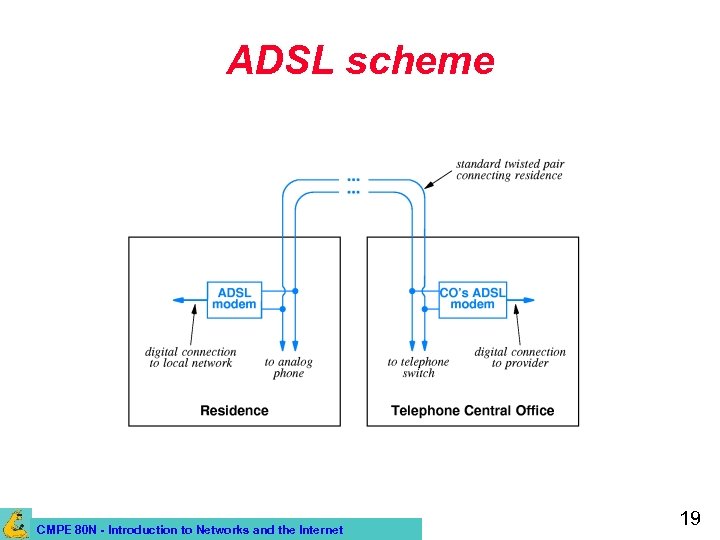 ADSL scheme CMPE 80 N - Introduction to Networks and the Internet 19
 ADSL (cont’d) • To achieve high bitrate transmission, ADSL must use sophisticated technology – It is “adaptive”: ADSL modems at the two ends probe the line between them to find its characteristics, and then agree to communicate using techniques that are optimal for that line. • Depending on the characteristics of the wiring, different bit-rates can be achieved – If a house is too far form the “End office” (switching center), ADSL is not available. CMPE 80 N - Introduction to Networks and the Internet 20
 ADSL (cont’d) • ADSL is asymmetric: it provides a higher bitrate downstream than upstream. – Downstream: 32 kb/s to 6. 4 Mb/s (more typically, 1. 5 Mb/s) – Upstream: 32 to 640 kb/s (more typically, 256 kb/s) • Asymmetry is OK when high bitrate data is transmitted to the user. – E. g. : Video-On-Demand, Internet radio… • In some cases, symmetric communication is preferable. – E. g. : Videoconferences CMPE 80 N - Introduction to Networks and the Internet 21
 Cable Modems • CATV (Community Antenna TV, or cable TV) uses coax cable (less susceptible to interference) – 1 -Km coax cable can accommodate bitrates of 1 -2 Gb/s! • Only one cable is used for a neighborhood – Different TV channels are multiplexed on it. • Cable systems are designed to carry many more television signals than currently available. – There is unused capacity that can be used for data communication! – >80% of US homes are already reached by CATV CMPE 80 N - Introduction to Networks and the Internet 22
 Cable Modems (cont’d) • User can connect using a cable modem – A splitter separates the TV and the data signals. • Problem: all users in the neighborhood share the same available capacity in the same cable! – If all users in the neighborhood transmit data at the same time, the available bitrate is reduced. • E. g. , if there are 50 Mb/s available, and 100 users in the neighborhood use it simultaneously, each user has only 0. 5 Mb/s CMPE 80 N - Introduction to Networks and the Internet 23
 Cable Modems (cont’d) • Coax cables from several neighborhoods connect to a concentrator – The concentrator uses high capacity fiber optics cables to connect to the head end, which is connected to the Internet. • Communication is asymmetric – Originally, CATV was designed only for downstream communication! • Available bitrates: – Downstream: 1. 5 to 2 Mb/s – Upstream: 128 kb/s CMPE 80 N - Introduction to Networks and the Internet 24
 Satellite Systems • Digital communication satellites were deployed by telecommunication companies as an alternative to terrestrial lines. – They can now be used as “local loop” technology (e. g. , Direct. PC). • Advantages: – Can reach arbitrary geographic locations. – Does not require wiring. – Has high bandwidth. – Perfect for broadcasting (can reach many users at once). CMPE 80 N - Introduction to Networks and the Internet 25
 Satellite Systems (cont’d) • Disadvantages: – It’s a shared medium (the bitrate depends on the number of simultaneous users). – Delay (latency) can be relatively high (<1 s) • Not ideal for playing interactive app’s (e. g. , games). – You have to put a dish on your roof! • Initially, uplink was not provided. – Needed to use a separate phone line to uplink information. • Nowadays it is a two-way system. CMPE 80 N - Introduction to Networks and the Internet 26
 Physical Layer: Summary • Different types of signal: – Analog and digital. • Analog communication infrastructure: – Need to convert digital to analog before transmitting: ADC. – DAC before entering computer. • Digitization: – – Sampling period and frequency (samples/sec or Hertz). Sample representation (quantization). Bit rate. CMPE 80 N - Introduction to Networks and the Internet 27
 Physical Layer: Summary (Cont’d) • Modems. • Input/output connections. – RS 232. – USB. – Firewire. • Broadband. – ISDN. – ADSL. – Cable modem. – Satellite. CMPE 80 N - Introduction to Networks and the Internet 28
 Other Wireless Networks CMPE 80 N - Introduction to Networks and the Internet 29
 Cellular Networks • • Cellular phones: voice. Cellular networks: shift from voice to data. New wireless devices: pagers, PDAs. New services: Web access, e-mail, instant messaging, etc. CMPE 80 N - Introduction to Networks and the Internet 30
 Cellular Concept: Motivation • Early mobile radio systems: – Large coverage with single, high-powered transmitter. – But, no frequency re-use due to interference. • Since finite spectrum allocation, need: high capacity (number of users) with limited spectrum and wide coverage. CMPE 80 N - Introduction to Networks and the Internet 31
 Some Cellular Terminology • • • Mobile. Base station. Mobile Switching Center (MSC). Handoff. Cell. CMPE 80 N - Introduction to Networks and the Internet 32
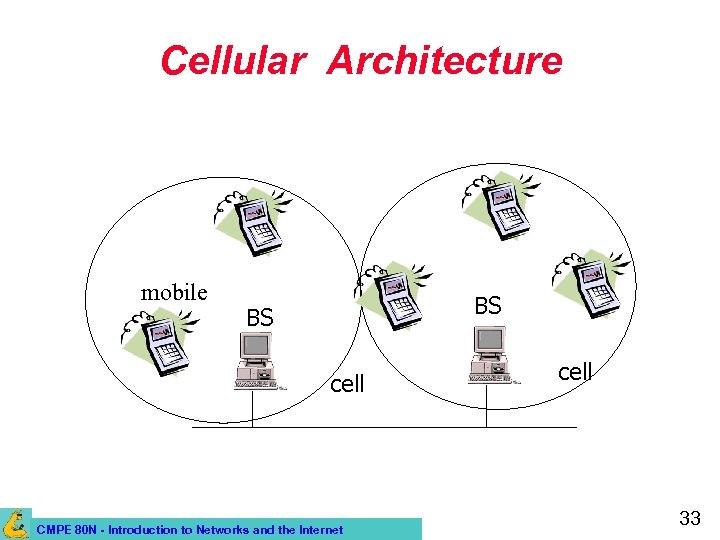 Cellular Architecture mobile BS BS cell CMPE 80 N - Introduction to Networks and the Internet cell 33
 Cellular Fundamentals • System-level idea, no major technological changes. – Many low-power transmitters instead of single, high power on (large cell). – Service area divided into small cells covered by each low power transmitter. – Each transmitter (or base station) allocated a portion of the spectrum. – Nearby BSs assigned different channel group to minimize interference. – Scalability: as more users subscribe, more BSs can be added using lower transmission power). CMPE 80 N - Introduction to Networks and the Internet 34
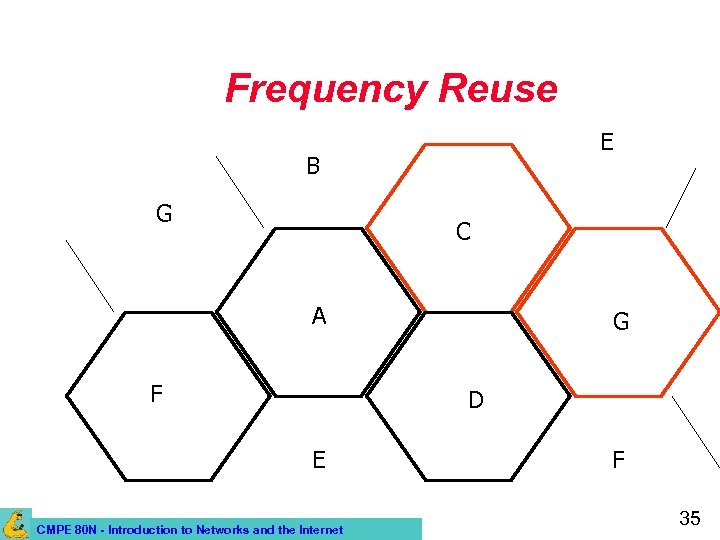 Frequency Reuse E B G C A F G D E CMPE 80 N - Introduction to Networks and the Internet F 35
 Handoff/Handover • Mobile hosts can change cells while communicating. • Hand-off occurs when a mobile host starts communicating via a new base station. • Handoff decision made based on signal strength. CMPE 80 N - Introduction to Networks and the Internet 36
 Cellular Networks: Evolution • Evidence of the wireless success! – Since 1996, number of new mobile phone subscribers exceeded number of new fixed phone subscribers! • 1 st. Generation (1 G): analog technology. – FDMA. – Analog FM. CMPE 80 N - Introduction to Networks and the Internet 37
 Second Generation (2 G) • Most of today’s cellular networks use 2 G standards. • Early 90 s. • Digital technology. – Lighter, smaller devices with longer battery life. – Better reception and channel utilization. CMPE 80 N - Introduction to Networks and the Internet 38
 3 G Wireless Networks • Multi-megabit Internet access, Vo. IP, ubiquitous “always-on” access. • Single mobile device for everything (integrated service approach). • New, world-wide standard. – International Mobile Telephone 2000 (IMT 2000) CMPE 80 N - Introduction to Networks and the Internet 39
 Wireless Local Area Networks • Local area network connectivity using wireless communication. • IEEE 802. 11 WLAN standard. • Example: Wave. Lan, Aironet • Wireless LAN may be used for – Last hop to a wireless host. – Wireless connectivity between hosts on the LAN. CMPE 80 N - Introduction to Networks and the Internet 40
 Other WLAN Standards • Home. RF – Proponents of 802. 11 frequency hopingspread spectrum (FH-SS). – Home. RF 2. 0 – 10 Mbps FH-SS. • HIPERLAN – Europe, mid 1990 s. – Similar capability to IEEE 802. 11 b. CMPE 80 N - Introduction to Networks and the Internet 41
 MANETs • Mobile, (wireless), multi-hop ad-hoc networks. • Formed by wireless hosts which may be mobile. • Without (necessarily) using a pre-existing infrastructure. • Routes between nodes may potentially contain multiple hops. • Mobilitty cause routes to change. CMPE 80 N - Introduction to Networks and the Internet 42
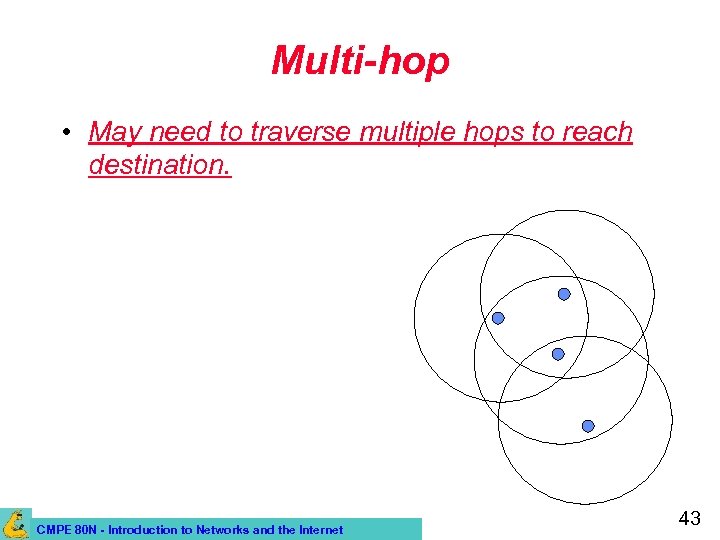 Multi-hop • May need to traverse multiple hops to reach destination. CMPE 80 N - Introduction to Networks and the Internet 43
 Why MANETs ? • Ease of deployment. • Speed of deployment. • Decreased dependence on infrastructure. CMPE 80 N - Introduction to Networks and the Internet 44
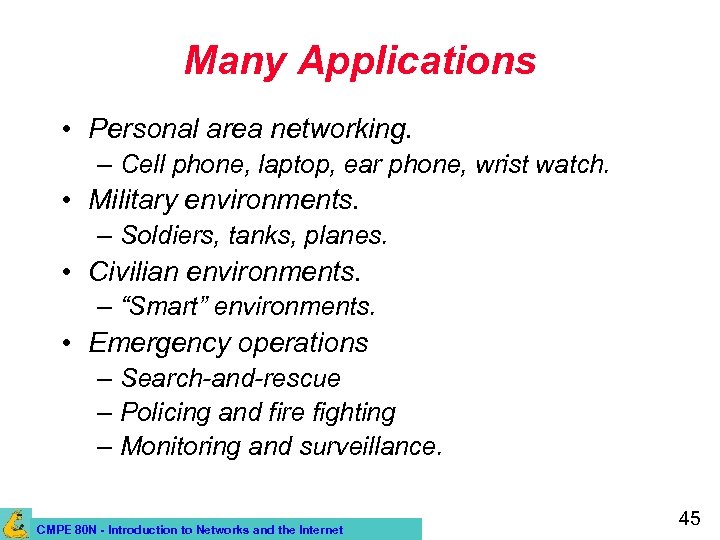 Many Applications • Personal area networking. – Cell phone, laptop, ear phone, wrist watch. • Military environments. – Soldiers, tanks, planes. • Civilian environments. – “Smart” environments. • Emergency operations – Search-and-rescue – Policing and fire fighting – Monitoring and surveillance. CMPE 80 N - Introduction to Networks and the Internet 45