


 Скачать презентацию Introduction to Microsoft Windows 2000
c126f27b14ef3b2b6f2e30d9aeb92ac9.ppt
- Количество слайдов: 36
 Introduction to Microsoft Windows 2000 • • • Windows 2000 Overview Windows 2000 Architecture Overview Windows 2000 Directory Services Overview Logging On to Windows 2000 The Windows Security Dialog Box 1
 Windows 2000 Overview • Overview of Windows 2000 • • Multipurpose OS with integrated support for client/server and peer-to-peer networks. • Incorporates technologies that reduce total cost of ownership (TCO). • TCO includes software and hardware updates, training, maintenance, administration, technical support, and lost productivity. Windows 2000 Network Environments • A Windows 2000 network can be created as a workgroup or a domain model. • Windows 2000 Professional and Windows 2000 Server can participate in either of these two models. • Administrative differences between the two products depend on the network environmental model. 2
 Windows 2000 Versions • • Windows 2000 Professional Windows 2000 Server Windows 2000 Advanced Server Windows 2000 Datacenter Server 3
 Windows 2000 Professional • High performance, secure network client computer and corporate desktop OS • • Includes best features of Windows 98 • • Allows access to all the Microsoft Back. Office products Extends manageability, reliability, security, and performance of Microsoft Windows NT Workstation 4. 0 Main Microsoft desktop OS for businesses of all sizes 4
 Windows 2000 Server • Ideal for small- to medium-sized enterprise application deployments, supporting file, print, terminal, application, and Web servers • Contains all of the features of Windows 2000 Professional, plus many new server-specific functions 5
 Windows 2000 Features Active Directory • • • Active Directory Service Interfaces (ADSI) LDAP support 6
 Windows 2000 Features Lower Total Cost of Ownership • • Group Policy Intelli. Mirror Remote Installation Services (RIS) Windows Script Host (WSH) 7
 Windows 2000 Features Performance and Scalability • • • Message queuing OS migration, support, and integration Quality of Service (Qo. S) 8
 Windows 2000 Features Network Security • • Certificate Services Component Services Encrypting File System (EFS) Kerberos V 5 Protocol support Layer 2 Tunneling Protocol (L 2 TP) support PKI and smart card infrastructure Smart card infrastructure 9
 Windows 2000 Features Networking and Communication Services • • Asynchronous Transfer Mode (ATM) DHCP with DNS and Active Directory Indexing Service Routing and Remote Access service TAPI 3. 0 Terminal Services Virtual Private Network (VPN) 10
 Windows 2000 Features Internet Integration • • • Internet Authentication Service (IAS) Internet connection sharing Internet Information Services (IIS) 5. 0 Internet Security (IPSec) support Network Address Translation (NAT) Windows Media Services 11
 Windows 2000 Features Administrative Tools • • • Disk quota support Graphical Disk Management Microsoft Management Console (MMC) 12
 Windows 2000 Features Hardware Support • • • Plug and Play Removable Storage and Remote Storage Safe Mode Startup 13
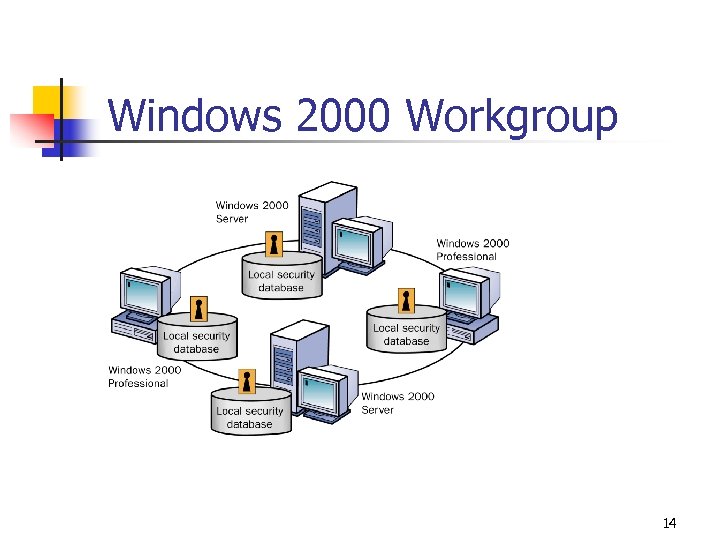 Windows 2000 Workgroup 14
 Windows 2000 Workgroup Advantages • Does not require a computer running Windows 2000 Server to hold centralized security information • • Simple to design and implement • Convenient for a limited number of computers in close proximity Does not require the extensive planning and administration that a domain requires 15
 Windows 2000 Workgroup Disadvantages • User must have a user account on each computer to which he or she wants access. • Any changes to user accounts must be made on each computer in the workgroup. • Device and file sharing is handled by individual computers, and only for the users who have accounts on each individual computer. • A workgroup is impractical in environments with more than 10 computers. 16
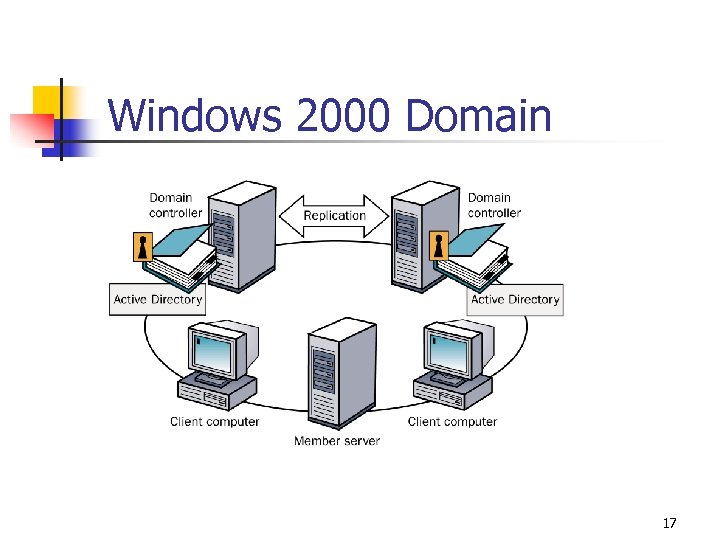 Windows 2000 Domain 17
 Windows 2000 Domain Benefits • • Centralized administration • Scalability, so that an administrator can create very large networks Single logon process for users to gain access to network resources for which they have permissions 18
 Windows 2000 Architecture Overview • • Windows 2000 Layers, Subsystems, and Managers User Mode Environment Subsystems Kernel Mode 19
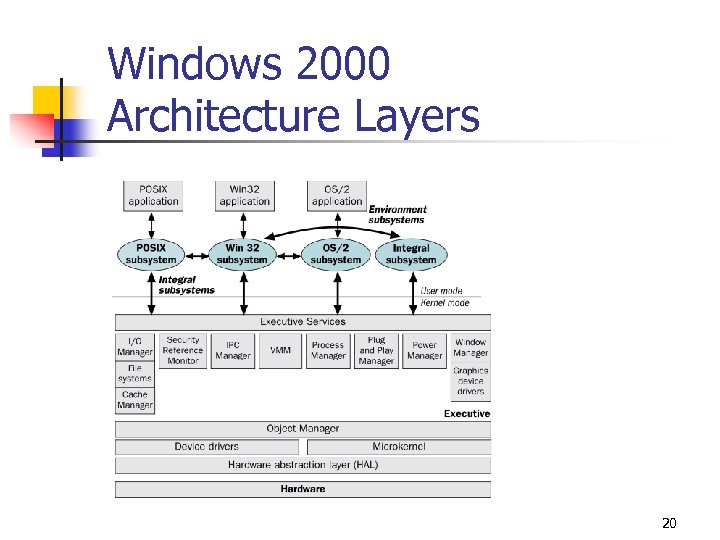 Windows 2000 Architecture Layers 20
 Windows 2000 Integral Subsystems • Security subsystem • • Tracks rights and permissions associated with user accounts. • Tracks which system resources are audited. Workstation service • • Provides an API to access the network redirector. • Allows a user running Windows 2000 to access the network. Server service • Provides an API to access the network server. • Allows a computer running Windows 2000 to provide network resources. 21
 Windows 2000 Executive Components • • • I/O Manager Security Reference Monitor Interprocess Communication (IPC) Manager Virtual Memory Manager (VMM) Process Manager Plug and Play Power Manager Window Manager and GDI Object Manager 22
 Windows 2000 Directory Services Overview • • • What Is a Directory Service? Why Have a Directory Service? Windows 2000 Directory Services Active Directory in the Windows 2000 Architecture Active Directory Architecture 23
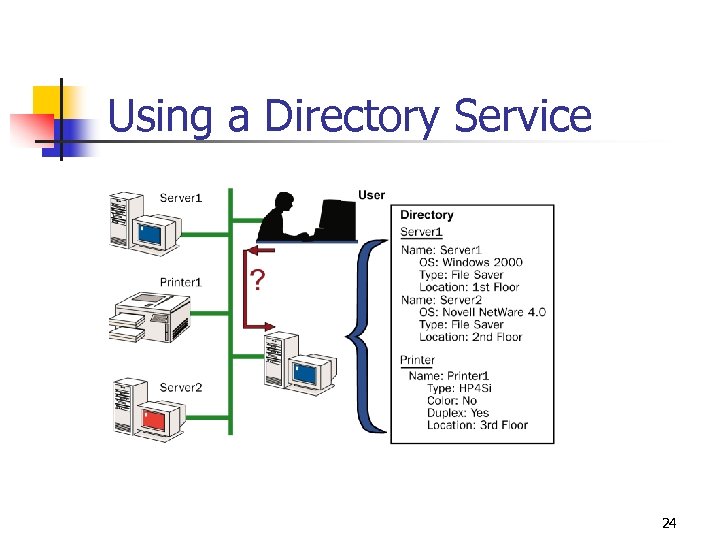 Using a Directory Service 24
 Active Directory Provides • • Simplified administration Scalability Open standards support Support for standard name formats 25
 Standard Name Formats • • RFC 822: e-mail address HTTP: http: //domain/path-to-page UNC: \microsoft. comxl BUDGET. XLS LDAP URL: RFC 1779 26
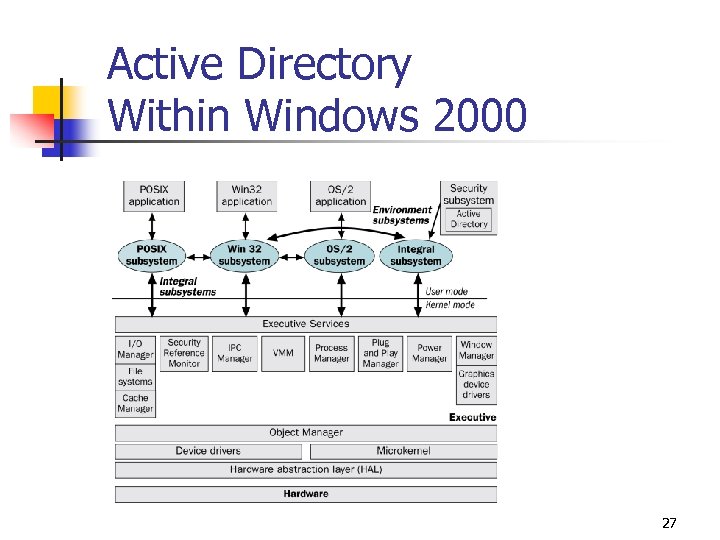 Active Directory Within Windows 2000 27
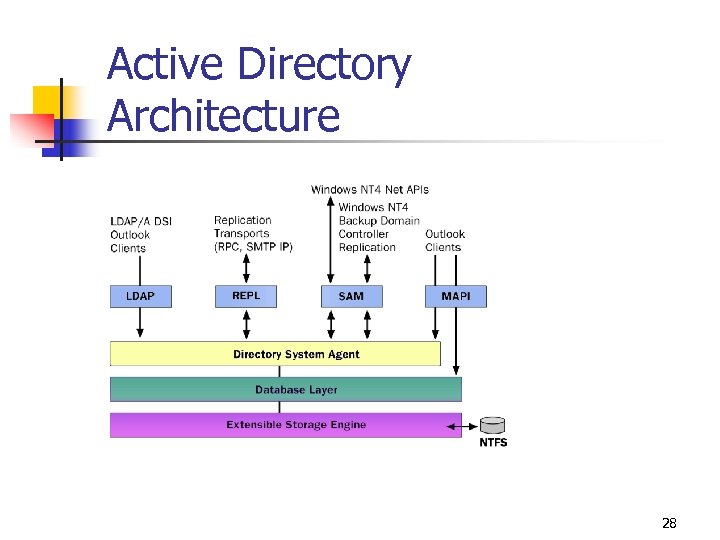 Active Directory Architecture 28
 Key Service Components • Directory System Agent (DSA) builds a hierarchy from the parent -child relationships stored in the directory. • Database Layer provides an abstraction layer between applications and the database. • Extensible Storage Engine communicates directly with individual records in the directory data store on the basis of the object’s relative distinguished name attribute. • Data store (the database file NTDS. DIT) is manipulated only by the Extensible Storage Engine database engine. 29
 DSA Supports the Following Access Mechanisms • Lightweight Directory Access Protocol (LDAP)/Active Directory Service Interfaces (ADSI) • • • Messaging API (MAPI) Security Accounts Manager (SAM) Replication (REPL) 30
 Logging On to Windows 2000 • • Logging On to a Domain Logging On to a Local Computer Windows 2000 Authentication Process Practice: Logging On to a Stand-Alone Server 31
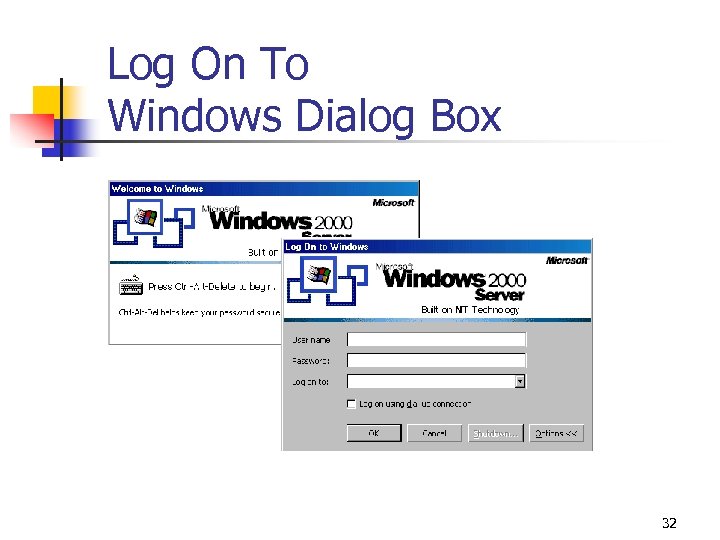 Log On To Windows Dialog Box 32
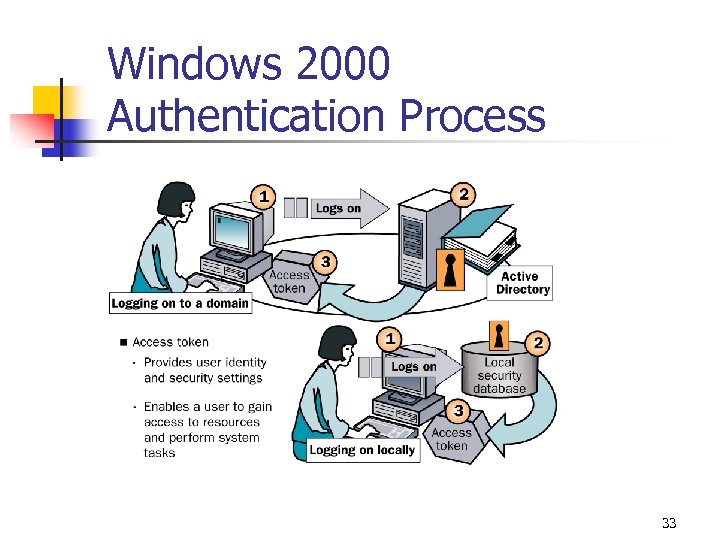 Windows 2000 Authentication Process 33
 Windows 2000 Authentication Process Steps • • User provides user name and password. • If the information matches and the user account is enabled, then an access token is created for the user. • If the logon information does not match or the user account is not validated, access to the domain or local computer is denied. Windows 2000 compares the logon information with the user information that is stored in the appropriate database. 34
 The Windows 2000 Security Dialog Box • • Using the Windows Security Dialog Box Practice: Using the Windows Security Dialog Box 35
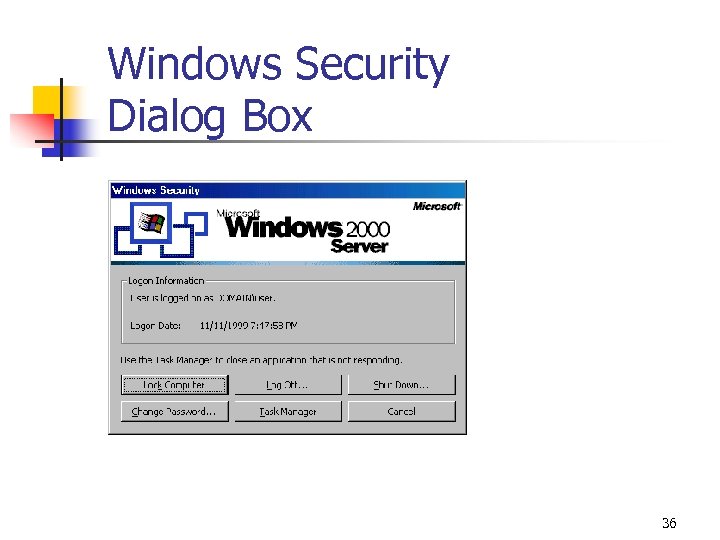 Windows Security Dialog Box 36