


 Скачать презентацию Introduction to Computer Engineering CS ECE 252 Fall 2010
9ed080ca0cb4702355dfc8d15cd520db.ppt
- Количество слайдов: 36
 Introduction to Computer Engineering CS/ECE 252, Fall 2010 Prof. Guri Sohi Computer Sciences Department University of Wisconsin – Madison
 Chapter 8 & 9. 1 I/O and Traps
 Copyright © The Mc. Graw-Hill Companies, Inc. Permission required for reproduction or display. I/O: Connecting to Outside World So far, we’ve learned how to: • compute with values in registers • load data from memory to registers • store data from registers to memory But where does data in memory come from? And how does data get out of the system so that humans can use it? 8 -3
 Copyright © The Mc. Graw-Hill Companies, Inc. Permission required for reproduction or display. I/O: Connecting to the Outside World Types of I/O devices characterized by: • behavior: input, output, storage Ø input: keyboard, motion detector, network interface Ø output: monitor, printer, network interface Ø storage: disk, CD-ROM • data rate: how fast can data be transferred? Ø keyboard: 100 bytes/sec Ø disk: 30 MB/s Ø network: 1 Mb/s - 1 Gb/s 8 -4
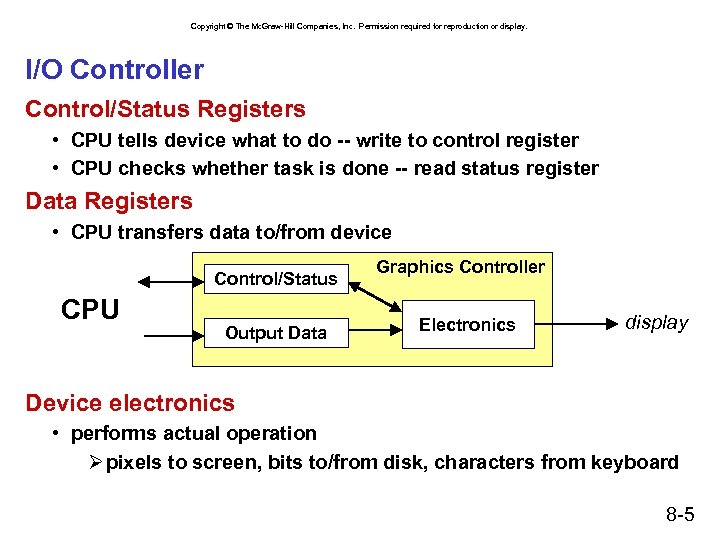 Copyright © The Mc. Graw-Hill Companies, Inc. Permission required for reproduction or display. I/O Controller Control/Status Registers • CPU tells device what to do -- write to control register • CPU checks whether task is done -- read status register Data Registers • CPU transfers data to/from device Control/Status CPU Output Data Graphics Controller Electronics display Device electronics • performs actual operation Ø pixels to screen, bits to/from disk, characters from keyboard 8 -5
 Copyright © The Mc. Graw-Hill Companies, Inc. Permission required for reproduction or display. Programming Interface How are device registers identified? • Memory-mapped vs. special instructions How is timing of transfer managed? • Asynchronous vs. synchronous Who controls transfer? • CPU (polling) vs. device (interrupts) 8 -6
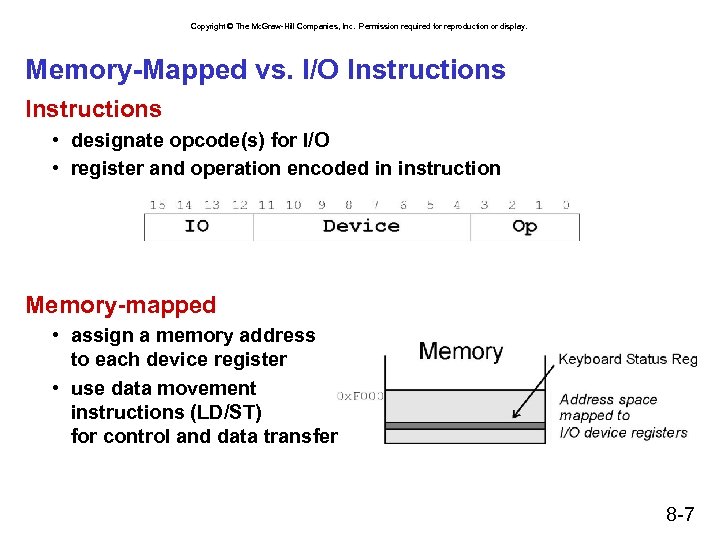 Copyright © The Mc. Graw-Hill Companies, Inc. Permission required for reproduction or display. Memory-Mapped vs. I/O Instructions • designate opcode(s) for I/O • register and operation encoded in instruction Memory-mapped • assign a memory address to each device register • use data movement instructions (LD/ST) for control and data transfer 8 -7
 Copyright © The Mc. Graw-Hill Companies, Inc. Permission required for reproduction or display. Transfer Timing I/O events generally happen much slower than CPU cycles. Synchronous • data supplied at a fixed, predictable rate • CPU reads/writes every X cycles Asynchronous • data rate less predictable • CPU must synchronize with device, so that it doesn’t miss data or write too quickly 8 -8
 Copyright © The Mc. Graw-Hill Companies, Inc. Permission required for reproduction or display. Transfer Control Who determines when the next data transfer occurs? Polling • CPU keeps checking status register until new data arrives OR device ready for next data • “Are we there yet? ” Interrupts • Device sends a special signal to CPU when new data arrives OR device ready for next data • CPU can be performing other tasks instead of polling device. • “Wake me when we get there. ” 8 -9
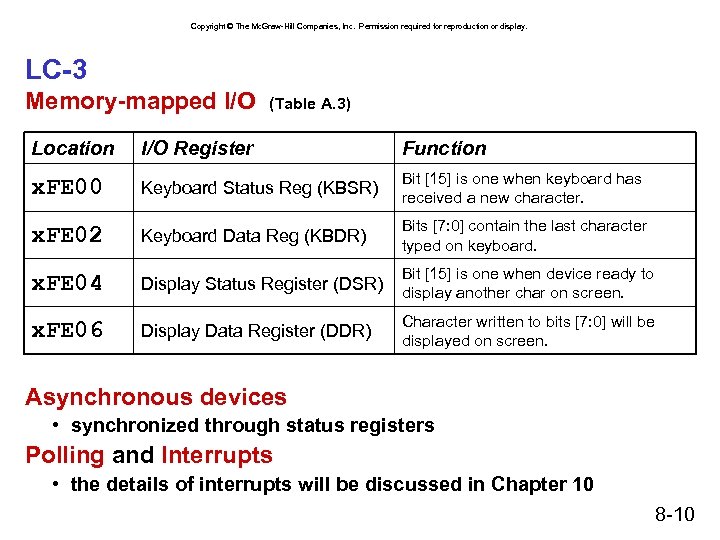 Copyright © The Mc. Graw-Hill Companies, Inc. Permission required for reproduction or display. LC-3 Memory-mapped I/O (Table A. 3) Location I/O Register Function x. FE 00 Keyboard Status Reg (KBSR) Bit [15] is one when keyboard has received a new character. x. FE 02 Keyboard Data Reg (KBDR) Bits [7: 0] contain the last character typed on keyboard. x. FE 04 Display Status Register (DSR) Bit [15] is one when device ready to display another char on screen. x. FE 06 Display Data Register (DDR) Character written to bits [7: 0] will be displayed on screen. Asynchronous devices • synchronized through status registers Polling and Interrupts • the details of interrupts will be discussed in Chapter 10 8 -10
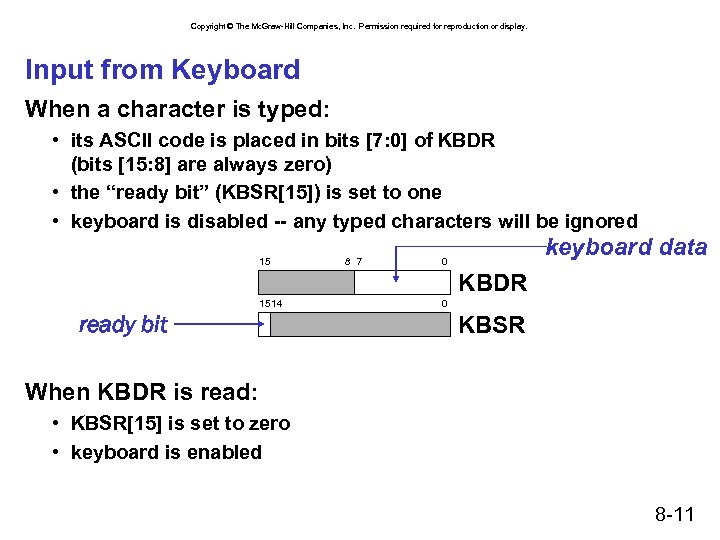 Copyright © The Mc. Graw-Hill Companies, Inc. Permission required for reproduction or display. Input from Keyboard When a character is typed: • its ASCII code is placed in bits [7: 0] of KBDR (bits [15: 8] are always zero) • the “ready bit” (KBSR[15]) is set to one • keyboard is disabled -- any typed characters will be ignored 15 8 7 keyboard data 0 KBDR 1514 ready bit 0 KBSR When KBDR is read: • KBSR[15] is set to zero • keyboard is enabled 8 -11
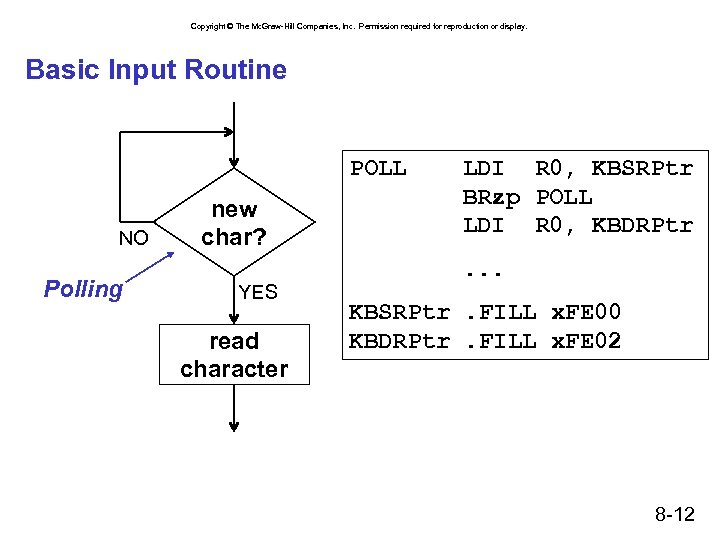 Copyright © The Mc. Graw-Hill Companies, Inc. Permission required for reproduction or display. Basic Input Routine POLL NO Polling new char? YES read character LDI R 0, KBSRPtr BRzp POLL LDI R 0, KBDRPtr. . . KBSRPtr. FILL x. FE 00 KBDRPtr. FILL x. FE 02 8 -12
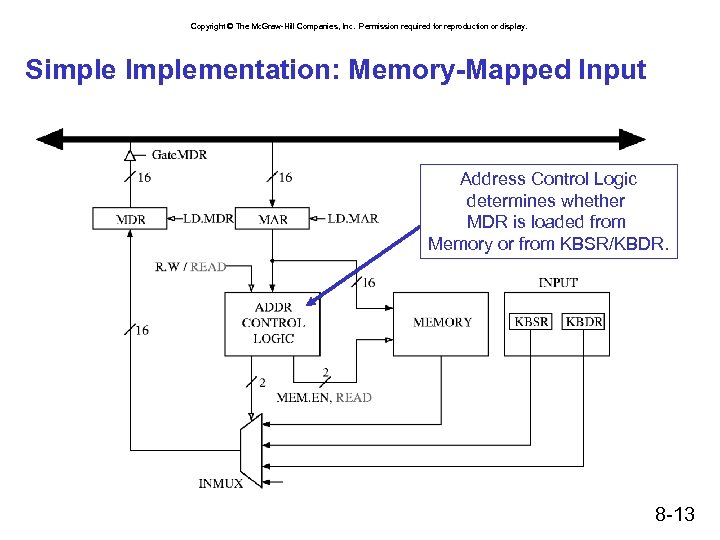 Copyright © The Mc. Graw-Hill Companies, Inc. Permission required for reproduction or display. Simple Implementation: Memory-Mapped Input Address Control Logic determines whether MDR is loaded from Memory or from KBSR/KBDR. 8 -13
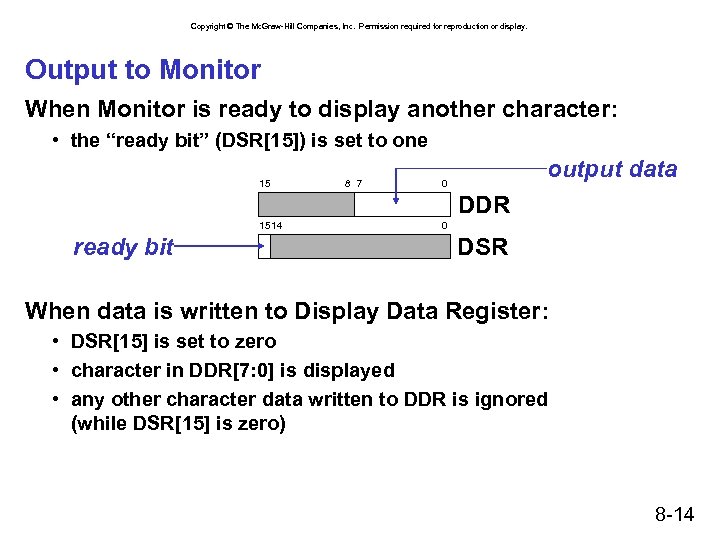 Copyright © The Mc. Graw-Hill Companies, Inc. Permission required for reproduction or display. Output to Monitor When Monitor is ready to display another character: • the “ready bit” (DSR[15]) is set to one 15 8 7 output data 0 DDR 1514 ready bit 0 DSR When data is written to Display Data Register: • DSR[15] is set to zero • character in DDR[7: 0] is displayed • any other character data written to DDR is ignored (while DSR[15] is zero) 8 -14
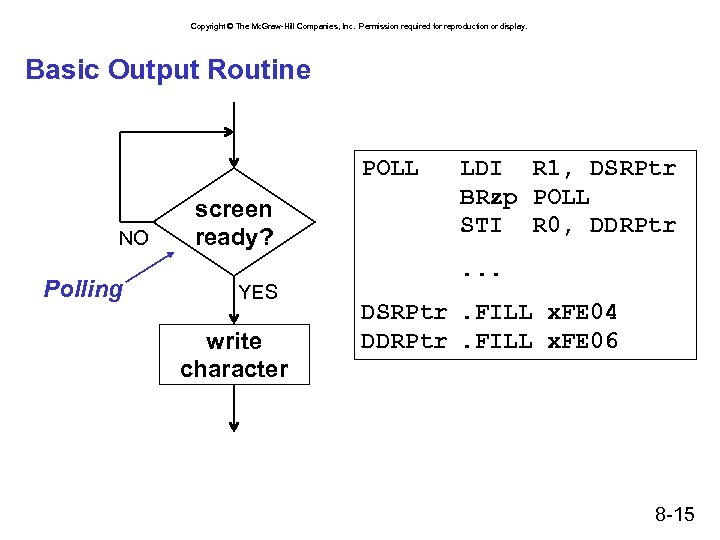 Copyright © The Mc. Graw-Hill Companies, Inc. Permission required for reproduction or display. Basic Output Routine POLL NO Polling screen ready? YES write character LDI R 1, DSRPtr BRzp POLL STI R 0, DDRPtr. . . DSRPtr. FILL x. FE 04 DDRPtr. FILL x. FE 06 8 -15
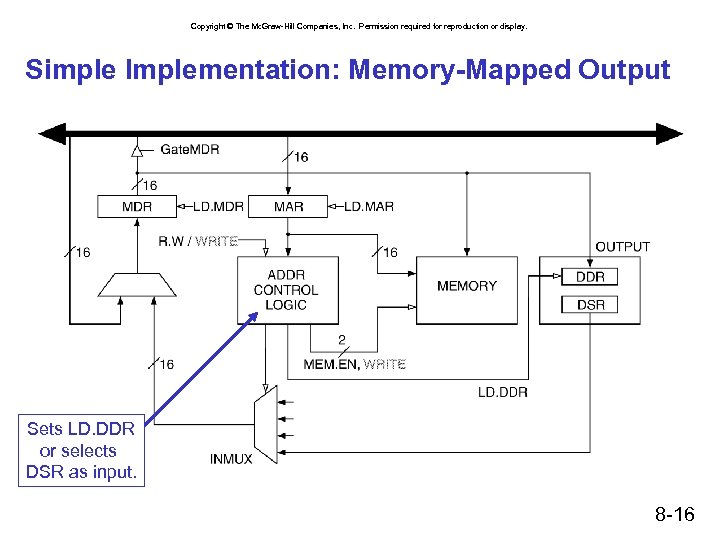 Copyright © The Mc. Graw-Hill Companies, Inc. Permission required for reproduction or display. Simple Implementation: Memory-Mapped Output Sets LD. DDR or selects DSR as input. 8 -16
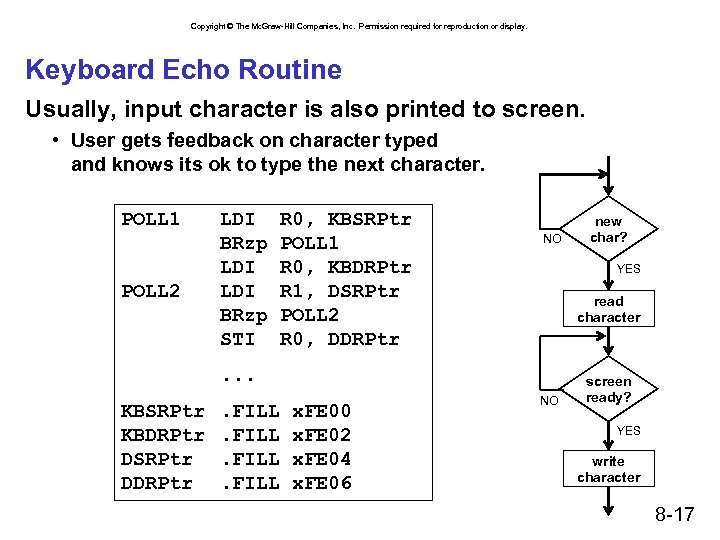 Copyright © The Mc. Graw-Hill Companies, Inc. Permission required for reproduction or display. Keyboard Echo Routine Usually, input character is also printed to screen. • User gets feedback on character typed and knows its ok to type the next character. POLL 1 POLL 2 LDI BRzp STI R 0, KBSRPtr POLL 1 R 0, KBDRPtr R 1, DSRPtr POLL 2 R 0, DDRPtr NO YES read character . . . KBSRPtr KBDRPtr DSRPtr DDRPtr . FILL x. FE 00 x. FE 02 x. FE 04 x. FE 06 new char? NO screen ready? YES write character 8 -17
 Copyright © The Mc. Graw-Hill Companies, Inc. Permission required for reproduction or display. Interrupt-Driven I/O External device can: (1) Force currently executing program to stop; (2) Have the processor satisfy the device’s needs; and (3) Resume the stopped program as if nothing happened. Why? • • Polling consumes a lot of cycles, especially for rare events – these cycles can be used for more computation. Example: Process previous input while collecting current input. (See Example 8. 1 in text. ) 8 -18
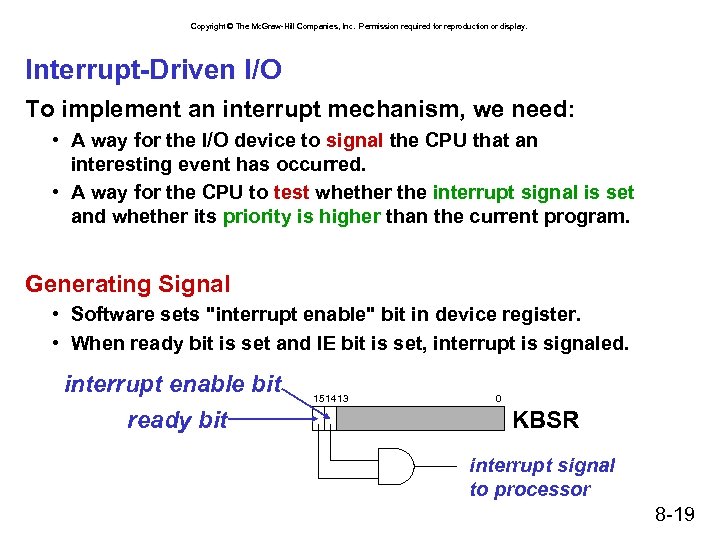 Copyright © The Mc. Graw-Hill Companies, Inc. Permission required for reproduction or display. Interrupt-Driven I/O To implement an interrupt mechanism, we need: • A way for the I/O device to signal the CPU that an interesting event has occurred. • A way for the CPU to test whether the interrupt signal is set and whether its priority is higher than the current program. Generating Signal • Software sets "interrupt enable" bit in device register. • When ready bit is set and IE bit is set, interrupt is signaled. interrupt enable bit ready bit 1514 13 0 KBSR interrupt signal to processor 8 -19
 Copyright © The Mc. Graw-Hill Companies, Inc. Permission required for reproduction or display. Priority Every instruction executes at a stated level of urgency. LC-3: 8 priority levels (PL 0 -PL 7) • Example: Ø Payroll program runs at PL 0. Ø Nuclear power plant control program runs at PL 6. • It’s OK for PL 6 device to interrupt PL 0 program, but not the other way around. Priority encoder selects highest-priority device, compares to current processor priority level, and generates interrupt signal if appropriate. 8 -20
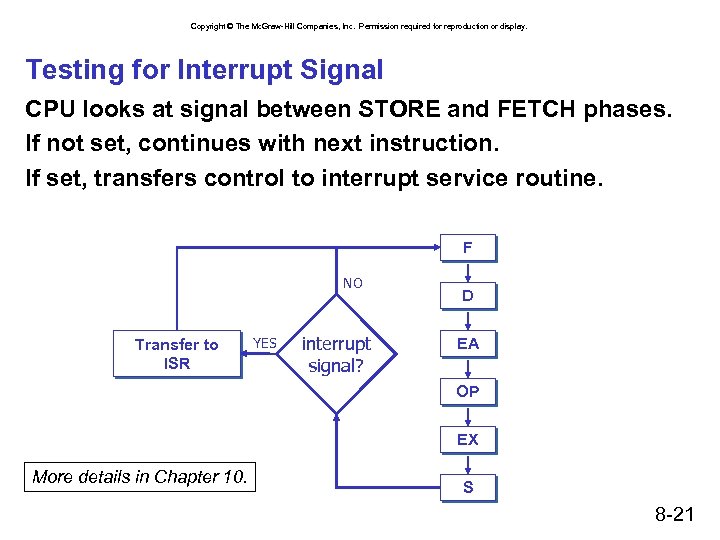 Copyright © The Mc. Graw-Hill Companies, Inc. Permission required for reproduction or display. Testing for Interrupt Signal CPU looks at signal between STORE and FETCH phases. If not set, continues with next instruction. If set, transfers control to interrupt service routine. F NO Transfer to ISR YES interrupt signal? D EA OP EX More details in Chapter 10. S 8 -21
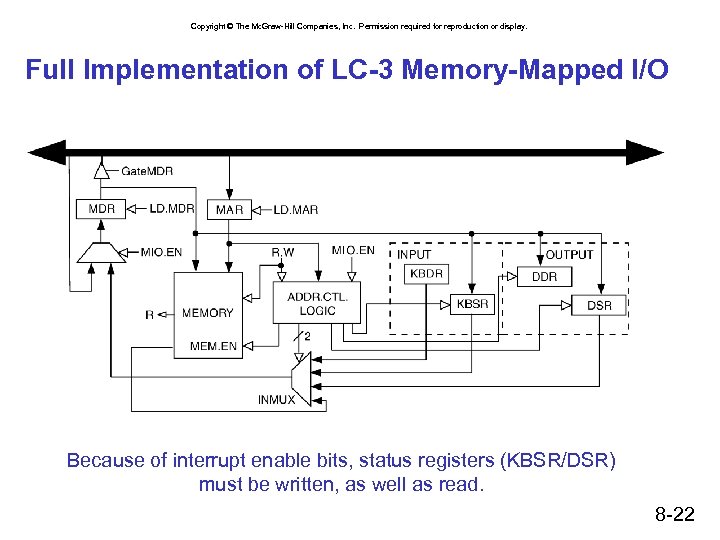 Copyright © The Mc. Graw-Hill Companies, Inc. Permission required for reproduction or display. Full Implementation of LC-3 Memory-Mapped I/O Because of interrupt enable bits, status registers (KBSR/DSR) must be written, as well as read. 8 -22
 Copyright © The Mc. Graw-Hill Companies, Inc. Permission required for reproduction or display. System Calls Certain operations require specialized knowledge and protection: • specific knowledge of I/O device registers and the sequence of operations needed to use them • I/O resources shared among multiple users/programs; a mistake could affect lots of other users! Not every programmer knows (or wants to know) this level of detail Provide service routines or system calls (part of operating system) to safely and conveniently perform low-level, privileged operations 8 -23
 Copyright © The Mc. Graw-Hill Companies, Inc. Permission required for reproduction or display. System Call 1. User program invokes system call. 2. Operating system code performs operation. 3. Returns control to user program. In LC-3, this is done through the TRAP mechanism. 8 -24
 Copyright © The Mc. Graw-Hill Companies, Inc. Permission required for reproduction or display. LC-3 TRAP Mechanism 1. A set of service routines. • part of operating system -- routines start at arbitrary addresses (convention is that system code is below x 3000) • up to 256 routines 2. Table of starting addresses. • stored at x 0000 through x 00 FF in memory • called System Control Block in some architectures 3. TRAP instruction. • used by program to transfer control to operating system • 8 -bit trap vector names one of the 256 service routines 4. A linkage back to the user program. • want execution to resume immediately after the TRAP instruction 8 -25
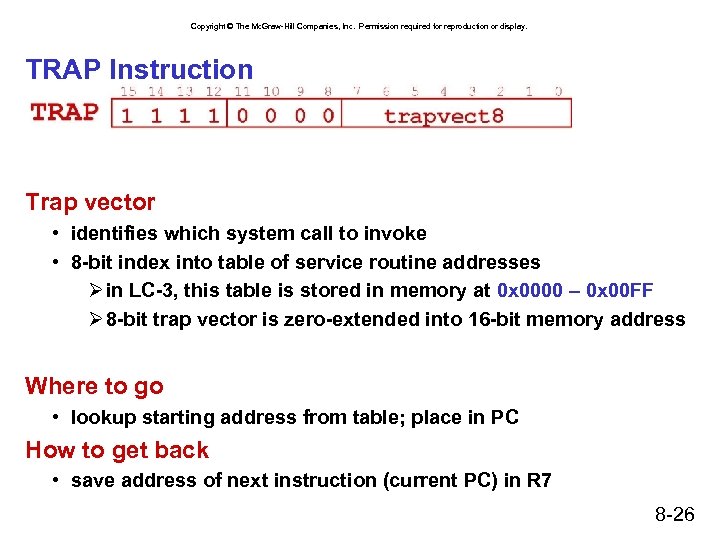 Copyright © The Mc. Graw-Hill Companies, Inc. Permission required for reproduction or display. TRAP Instruction Trap vector • identifies which system call to invoke • 8 -bit index into table of service routine addresses Ø in LC-3, this table is stored in memory at 0 x 0000 – 0 x 00 FF Ø 8 -bit trap vector is zero-extended into 16 -bit memory address Where to go • lookup starting address from table; place in PC How to get back • save address of next instruction (current PC) in R 7 8 -26
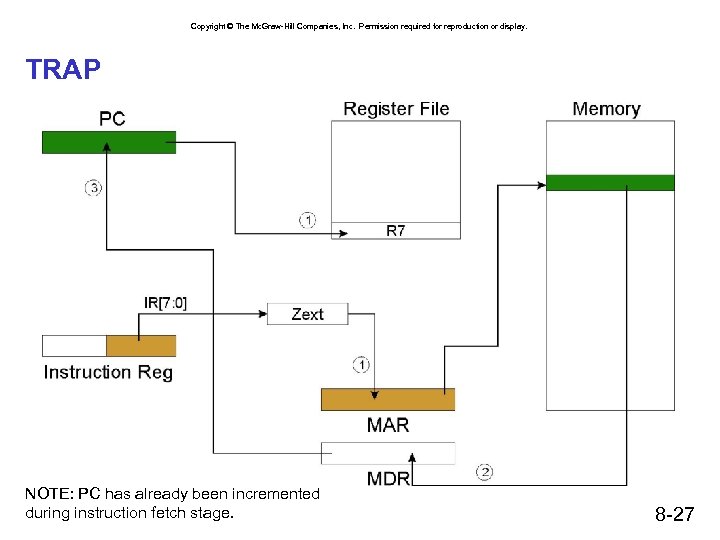 Copyright © The Mc. Graw-Hill Companies, Inc. Permission required for reproduction or display. TRAP NOTE: PC has already been incremented during instruction fetch stage. 8 -27
 Copyright © The Mc. Graw-Hill Companies, Inc. Permission required for reproduction or display. RET (JMP R 7) How do we transfer control back to instruction following the TRAP? We saved old PC in R 7. • JMP R 7 gets us back to the user program at the right spot. • LC-3 assembly language lets us use RET (return) in place of “JMP R 7”. Must make sure that service routine does not change R 7, or we won’t know where to return. 8 -28
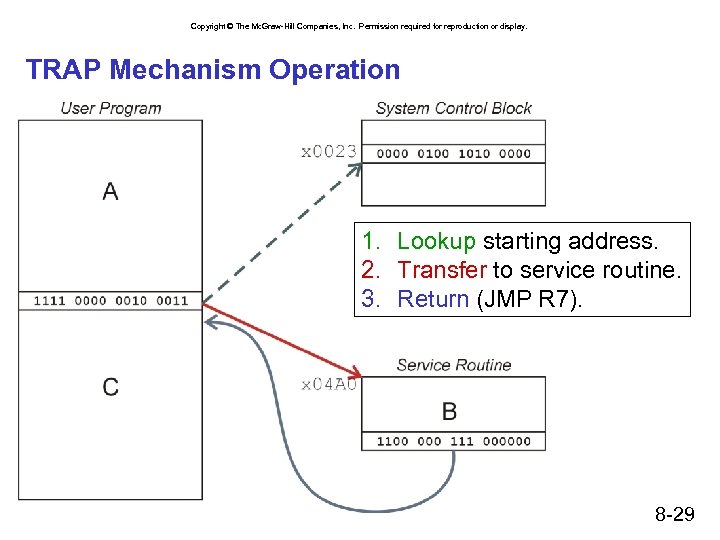 Copyright © The Mc. Graw-Hill Companies, Inc. Permission required for reproduction or display. TRAP Mechanism Operation 1. Lookup starting address. 2. Transfer to service routine. 3. Return (JMP R 7). 8 -29
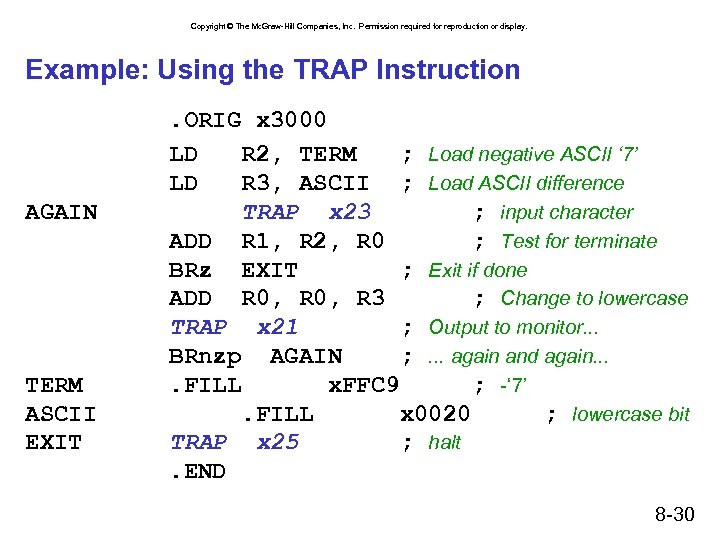 Copyright © The Mc. Graw-Hill Companies, Inc. Permission required for reproduction or display. Example: Using the TRAP Instruction AGAIN TERM ASCII EXIT . ORIG x 3000 LD R 2, TERM ; Load negative ASCII ‘ 7’ LD R 3, ASCII ; Load ASCII difference TRAP x 23 ; input character ADD R 1, R 2, R 0 ; Test for terminate BRz EXIT ; Exit if done ADD R 0, R 3 ; Change to lowercase TRAP x 21 ; Output to monitor. . . BRnzp AGAIN ; . . . again and again. . FILL x. FFC 9 ; -‘ 7’. FILL x 0020 ; lowercase bit TRAP x 25 ; halt. END 8 -30
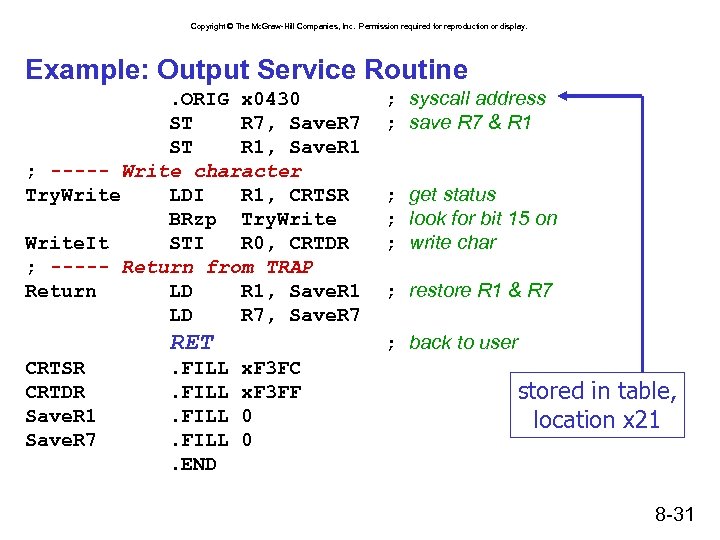 Copyright © The Mc. Graw-Hill Companies, Inc. Permission required for reproduction or display. Example: Output Service Routine. ORIG x 0430 ST R 7, Save. R 7 ST R 1, Save. R 1 ; ----- Write character Try. Write LDI R 1, CRTSR BRzp Try. Write. It STI R 0, CRTDR ; ----- Return from TRAP Return LD R 1, Save. R 1 LD R 7, Save. R 7 RET CRTSR CRTDR Save. R 1 Save. R 7 . FILL. END ; syscall address ; save R 7 & R 1 ; get status ; look for bit 15 on ; write char ; restore R 1 & R 7 ; back to user x. F 3 FC x. F 3 FF 0 0 stored in table, location x 21 8 -31
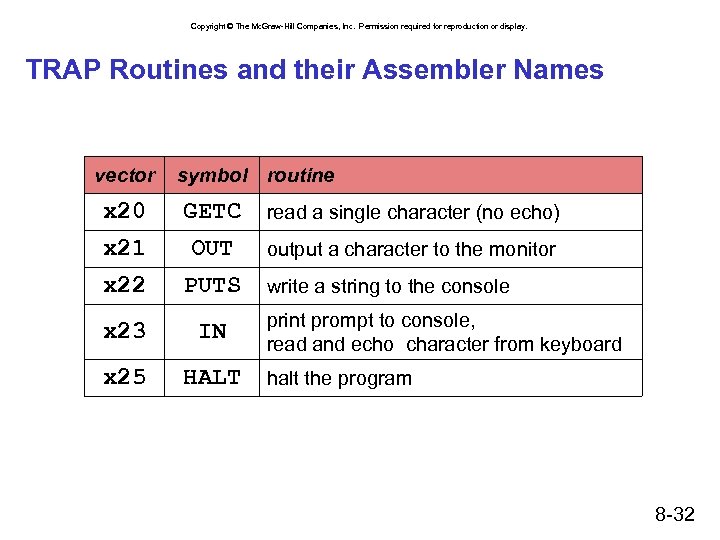 Copyright © The Mc. Graw-Hill Companies, Inc. Permission required for reproduction or display. TRAP Routines and their Assembler Names vector symbol routine x 20 GETC read a single character (no echo) x 21 OUT output a character to the monitor x 22 PUTS x 23 IN x 25 HALT write a string to the console print prompt to console, read and echo character from keyboard halt the program 8 -32
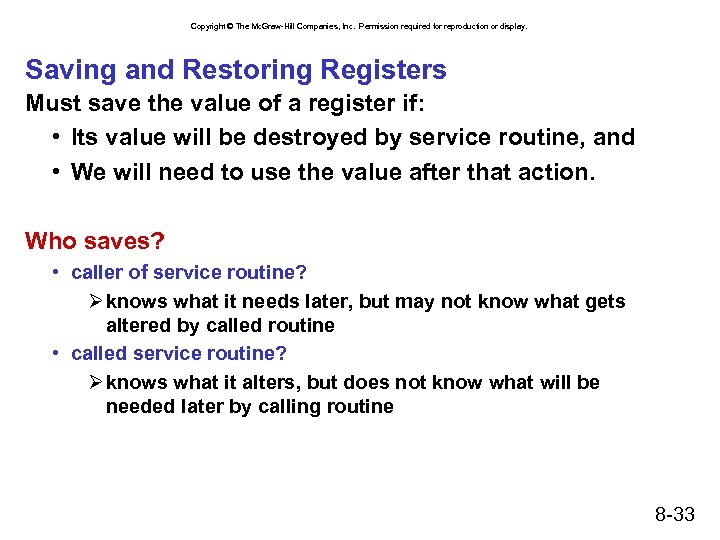 Copyright © The Mc. Graw-Hill Companies, Inc. Permission required for reproduction or display. Saving and Restoring Registers Must save the value of a register if: • Its value will be destroyed by service routine, and • We will need to use the value after that action. Who saves? • caller of service routine? Ø knows what it needs later, but may not know what gets altered by called routine • called service routine? Ø knows what it alters, but does not know what will be needed later by calling routine 8 -33
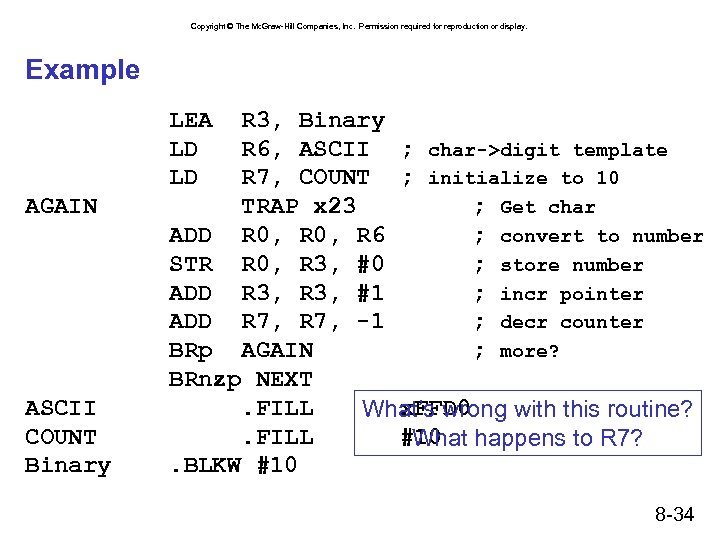 Copyright © The Mc. Graw-Hill Companies, Inc. Permission required for reproduction or display. Example LEA LD LD AGAIN ASCII COUNT Binary R 3, Binary R 6, ASCII ; char->digit template R 7, COUNT ; initialize to 10 TRAP x 23 ; Get char ADD R 0, R 6 ; convert to number STR R 0, R 3, #0 ; store number ADD R 3, #1 ; incr pointer ADD R 7, -1 ; decr counter BRp AGAIN ; more? BRnzp NEXT. FILL x. FFD 0 What’s wrong with this routine? . FILL #10 happens to R 7? What. BLKW #10 8 -34
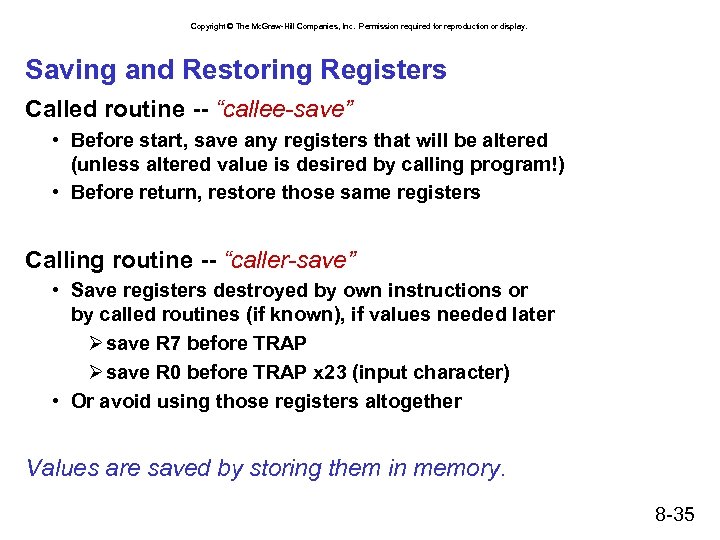 Copyright © The Mc. Graw-Hill Companies, Inc. Permission required for reproduction or display. Saving and Restoring Registers Called routine -- “callee-save” • Before start, save any registers that will be altered (unless altered value is desired by calling program!) • Before return, restore those same registers Calling routine -- “caller-save” • Save registers destroyed by own instructions or by called routines (if known), if values needed later Ø save R 7 before TRAP Ø save R 0 before TRAP x 23 (input character) • Or avoid using those registers altogether Values are saved by storing them in memory. 8 -35
 Copyright © The Mc. Graw-Hill Companies, Inc. Permission required for reproduction or display. Summary Chapter 8: Input/output • • • Behavior and data rate of I/O device Asynchronous vs. synchronous Polled vs. interrupt-driven Programmed vs. memory-mapped Control registers, data registers Chapter 9: Traps and System Calls • Hide details of I/O device interaction • TRAP/RET instructions • Caller- vs callee-saved registers 8 -36